Vue normale

Il y a de nouveaux articles disponibles, cliquez pour rafraîchir la page.
Hier — 17 avril 2026Flux principal

ASUS Zenbook DUO (2026) Review: One Laptop, Two Screens, All Business

Par : JC Torres
17 avril 2026 à 15:20

PROS:


  • Beautiful, nearly identical 14-inch 144Hz 3K OLED screens

  • Narrower hinge creates a more immersive visual experience

  • Ceraluminum design adds visual and tactile character

  • Powerful Intel Panther Lake performance and impressive battery life

CONS:


  • Quite pricey

  • No built-in card reader

  • RAM is soldered

RATINGS:

AESTHETICS
ERGONOMICS
PERFORMANCE
SUSTAINABILITY / REPAIRABILITY
VALUE FOR MONEY

EDITOR'S QUOTE:

The ASUS Zenbook DUO (UX8407) earns its premium with two stunning co-equal OLED screens, a sleeker hinge, and Intel Panther Lake performance built for serious work on the go.
award-icon

For a time, it seemed that foldable and rollable screens would be the future of laptops, just as they are positioned to be where smartphones are going. That was until people realized that what may be good for handheld devices might not work for 14-inch slabs with keyboards. Foldable laptops might still have their day, but they are too impractical and costly for now.

ASUS has chosen to instead design and deliver a solution for today’s needs and problems. Rather than a screen that folds just to save space, the Zenbook DUO has opted to expand the user’s workspace instead, bringing the productivity advantages of dual-monitor setups from desktops to laptops. This year’s ASUS Zenbook DUO (UX8407) does more than just upgrade the spec sheet. It is also adding a touch of style and elegance that makes a power user tool feel more considered.

Designer: ASUS

Aesthetics

The 2026 ASUS Zenbook DUO (UX8407) is quite stunning in almost any form, whether it’s closed shut, opened like a laptop, or especially when it’s wide open. The lid cover exudes not only minimalism but also character, with a reflective “ASUS ZENBOOK” logo engraved against the Elephant Gray “Ceraluminum” surface, creating a simple yet eye-catching visual and material contrast.

That Ceraluminum is, of course, ASUS’s latest material innovation that uses a special oxidation process to give aluminum some ceramic-like properties, particularly durability and higher resistance to scratches. The end result is a material that isn’t just nice to look at but also pleasing to touch, giving the lid a texture that almost feels like stone or, well, ceramic. There is also a certain visual “roughness” to the Ceraluminum surface, setting it apart from the brushed metal or anodized appearances of its peers.

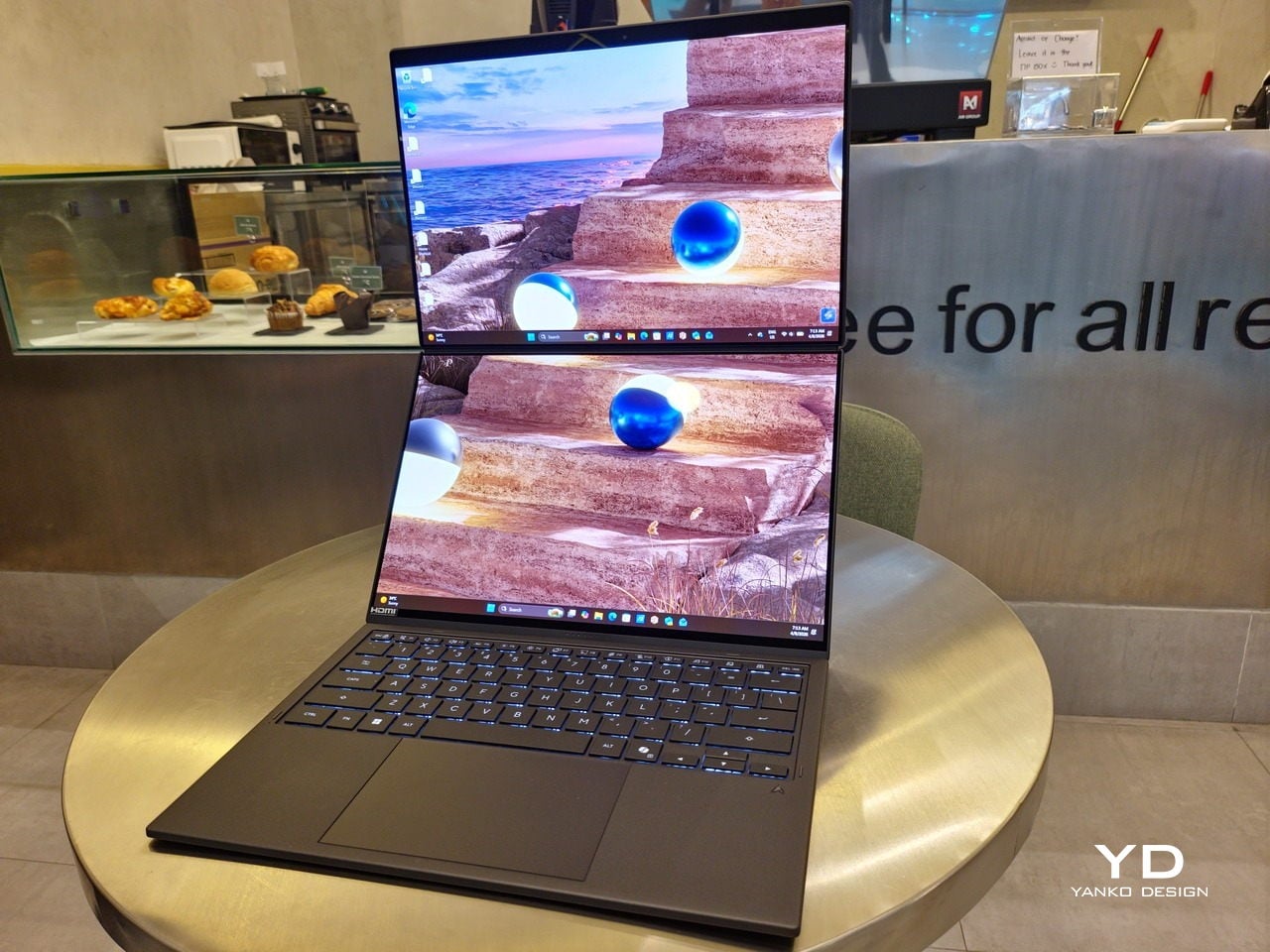
Of course, the real show happens when you open the laptop and lift the keyboard away, revealing two gorgeous 14-inch screens connected together by a hinge, no messy or awkward cables. For this iteration, ASUS poured its efforts into making that connection look even more seamless, not only by shrinking the bezels between the displays but also by developing a new “hideaway” hinge that narrows the gap from 25.31mm down to 7.6mm. Make no mistake, there’s still a very obvious separation between the two, but it is now less jarring, making it feel like you’re working with a screen that just happened to be split into two, rather than two screens stitched together.

With the detachable Bluetooth keyboard resting on the second screen or when it’s closed, the Zenbook DUO (2026) looks almost like a normal laptop. You have a few (literally) ports on either side along with some air vents, and a wide-long grille at the bottom above the built-in kickstand. Your only clue that this isn’t a normal laptop is when you accidentally close the laptop lid without the keyboard attached, creating a very noticeable gap that, unfortunately, would also be an open invitation for small items to come in and scratch the screens.

Ergonomics

At 1.65kg (3.64lbs) with the Bluetooth keyboard attached, the ASUS Zenbook DUO (UX8407) isn’t exactly lightweight compared to other 14-inch laptops in the market, at least the non-gaming kind. That said, it’s not exactly on the heavier side either, especially when you consider that you’re carrying two 14-inch screens, not to mention a 99Wh battery, in a single bundle. In that context, it’s actually amazing how much ASUS was able to reduce the heft without cutting corners.

That said, having two connected displays brings its own ergonomics puzzle, something that ASUS seems to have finally solved almost to perfection. You have no less than 5 ways to use the laptop, from a normal laptop to two screens vertically stacked to the side-by-side “desktop mode”. While the hinge does most of the hard work, the built-in kickstand literally carries the burden, supporting that full weight (minus the keyboard) on its own.

The new kickstand is stronger, sturdier, and stiffer, providing confidence it won’t just suddenly close down. It can open to a maximum of 90 degrees, which is the angle you’ll need for desktop mode. That said, it also means that you only have possible angle for the displays in that mode, unless you have a separate stand to prop it up, which kind of defeats the purpose of having a built-in kickstand.

One thing to note in desktop mode is that you will naturally be sacrificing one side of ports. Thankfully, you can turn the Zenbook DUO (2026) which ever side up, whether you need an extra HDMI and headphone jack, or an extra USB-A port. Thankfully, both Thunderbolt 4 ports are equal in capabilities, so you don’t have to make a sacrifice on that end.

If there’s one thing I found a bit cumbersome in the Zenbook DUO’s design is that the power button sits so flushed against the frame. On the one hand, that means it won’t snag with anything in your bag, nor will it get triggered accidentally. On the other hand, it also makes it harder to locate it without looking or fumbling with your finger sliding across the edge repeatedly.

Performance

The ASUS Zenbook DUO (UX8407) is one of the early laptops to embrace Intel’s new Panther Lake chips, specifically the Intel Core Ultra 3 series. The dual-screen laptops comes in two options, one with an Intel Core Ultra 7 355 and the Intel Core Ultra X9 388H. In terms of CPU alone, these already represent a huge leap not just in performance but also in power efficiency, but the latter configuration pulls an even bigger feat.

The review unit we received comes with an Intel Arc B390 GPU based the latest 3rd-gen Intel Xe graphics. Forget what memories you might have had of integrated Intel graphics, because we’re entering an era where you can actually play games with decent settings on it. Of course, your mileage may vary and benchmarks can only provide some general idea, but that all these specs mean is that the ASUS Zenbook DUO (2026) is built for serious productivity and creative work.

It is, after all, designed for heavy-duty computer users ranging from knowledge workers to creators who need to bring the productivity they enjoy on the desktop to wherever they go. Productivity suites, video editors, graphics programs, 3D modelers, and even games won’t make this flexible laptop break a sweat. And yes, that includes some AI shenanigans, thanks to an upgraded NPU as well.

Of course, this also means that it has enough muscle to support running two screens which, by default, is set to extended (versus mirroring each other). The beauty is that these two screens are nearly identical not just in size but also in capabilities, where other dual-screen laptops skimp on the second screen more often than not. We’re talking two 14-inch 3K (2880×1800) 144Hz Lumina Pro OLED displays. Both support touch and, more importantly, both support the ASUS Pen stylus.

In reality, there are very slight differences between the two screens in terms of full color gamut and maximum brightness, but you won’t notice it too much unless you are actively looking for it. In practice, most people will keep content they’re working on in one of two screens anyway, leaving the other as an auxiliary for references or controls.

The latter is actually an interesting aspect of this dual-screen laptop, making the Zenbook DUO feel almost futuristic. While it does have a detachable keyboard, there might be times when you want to have more direct access to the lower touch screen without having to switch back and forth with the Bluetooth keyboard at the side. With a six-finger gesture, you can summon a half-height virtual keyboard, a half-height virtual keyboard with a virtual trackpad to the right, or a full-screen keyboard with a large trackpad below it, pretty much like the virtual equivalent of the physical keyboard.

Additionally, you can have other virtual knobs and sliders above the keyboard or as floating windows, thanks to ASUS’s Dial & Control app. These controls, which also include a numpad and an area for writing with a pen, can change depending on what app is currently in focus. With a browser window, it can have a button for a new tab or a dial for zooming in and out. Or it could be a knob for volume and a slider for screen brightness.

As for the detachable keyboard, it magnetically snaps into place, with retracting pogo pins creating a more stable connection than Bluetooth, though that is the only way to use it when it’s detached. That said, there are no notches or protrusions along the edges of the keyboard, so prying it away from that strong magnetic hold can take a bit of work. The keyboard charges when it’s lying on the laptop, but it can also be charged separately via USB-C. Key travel is decent, but the keys themselves feel a bit squishy. The large trackpad is sensitive, but the hydrophobic coating gives it too much resistance when gliding your finger across it.

The combination of the more power-smart Intel Panther Lake processor and the 99Wh battery tucked inside gives the ASUS Zenbook DUO (UX8407) quite a long uptime, even with both screens enabled. Even a battery of benchmarks and hours of typing and browsing has left a good 12% of battery left, rounding up to a little over 15 hours of use, just a little below ASUS’s advertised 18 hours (with two screens). The included 100W USB-C charging brick helps mitigate the battery loss, and the fact that you can easily use power banks to top up on the go makes the battery narrative even more compelling.

Sustainability

ASUS didn’t use to speak much about the sustainability of its laptops, but that has changed in recent years. The invention of Ceraluminum adds another level to that story, though a bit indirectly. In a nutshell, the material is meant to increase the durability and longevity of the product by protecting it from small accidents. Whether the ZenBook DUO uses sustainable materials, or at least what percentage of it does, isn’t public information.

That longevity, however, is also affected by how much you can upgrade or even repair the laptop. Given how unconventional its design is, it’s really no surprise that there isn’t much here in the way of upgrade options. You do have easy access to the SSD underneath the kickstand. The Zenbook DUO (2026) can support up to 2TB with a full-sized M.2 SSD. The 32GB RAM, however, is soldered down.

Value

The ASUS Zenbook DUO (UX8407) is a laptop on a mission. It is, in a nutshell, designed for people who thrive and need multi-tasking capabilities that they could only enjoy while chained to their desk (or awkwardly carrying a portable monitor). That actually covers a wide range of professions and industries, including creators, designers, office workers, executives, and, yes, gamers. In that sense, there can probably be no better tool for them than this.

In both performance and flexibility, the 2026 Zenbook DUO offers users the power they need, as they need it. Cramped for space on a plane? Just use it as a single-screen laptop, and no one will be the wiser. Need to collaborate with a team? Lay it out flat on the desk to give everyone the same perspective. Need to reference documents as you write? The book-like desktop mode has you covered.

That said, it’s definitely far from perfect. For a laptop aimed at creatives and professionals, the absence of a built-in SD card reader seems pretty odd. And then there’s the $2,699.99 price for the configuration that has the impressive Intel Arc graphics. That puts it way above most 14-inch ultra-thin laptops and in the range of gaming laptops. But then again, none of those have two 14-inch screens, either.

Verdict

Laptops with foldable screens admittedly look fancy and impressive. The big OEMs, including ASUS, are still playing around to find the formula that will finally make it feel more than just a fancy and expensive experiment. In the meantime, however, people need to get work done, and when it comes to that, nothing really beats using more than two screens.

You could always carry a portable screen along with your laptop, which is awkward, cumbersome, and inefficient, or you could grab the ASUS Zenbook DUO (UX8407). With an improved hinge, beautiful co-equal 14-inch displays, and an Intel Panther Lake processor that can handle almost anything you throw at it, the dual-screen laptop lets you choose the way you want or need to work. And it looks stylish to boot in any form, making sure you’ll be the envy of everyone in the coffee shop.

The post ASUS Zenbook DUO (2026) Review: One Laptop, Two Screens, All Business first appeared on Yanko Design.

VitaLink Just Put a 13-Inch Screen and Keyboard Into One Foldable Slab

Par : JC Torres
17 avril 2026 à 01:45

Working on the go rarely looks as tidy as productivity-tool adverts suggest. Most people who travel with serious work needs end up carrying at least two or three things that don’t quite fit together: a tablet or laptop, a compact keyboard if the touchscreen isn’t enough, maybe a portable monitor, and a cable situation that somehow multiplies every time you pack.

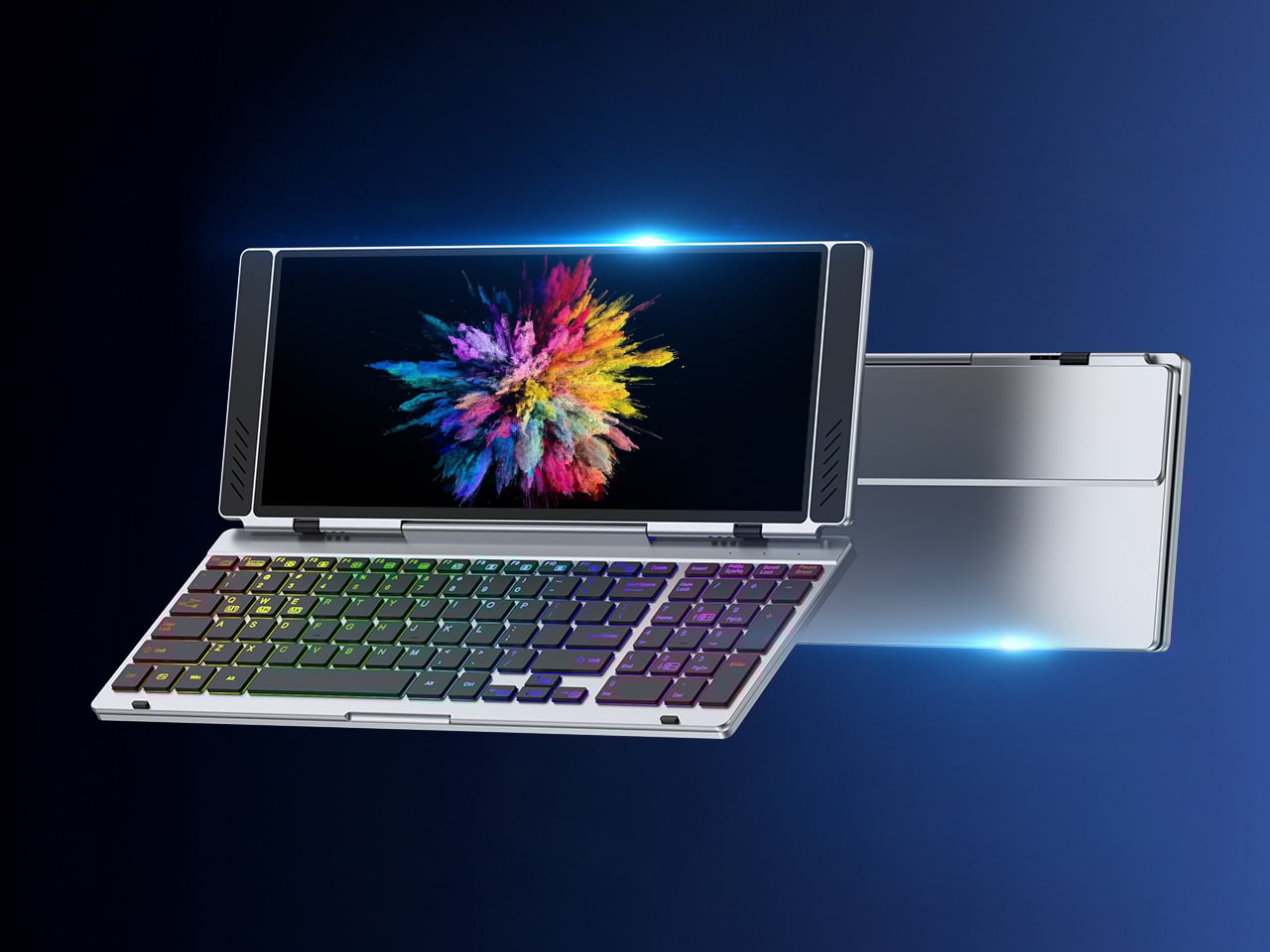
VitaLink is trying to simplify that. The concept combines a full-size keyboard and a large touch display into one foldable object in a CNC aluminum shell. Connect it to any USB-C device and your workspace expands immediately, without a separate stand, a monitor arm, or a bag pocket devoted to adapters. It folds down to 20mm and opens into something that feels genuinely designed.

Designer: VitaLink

Click Here to Buy Now: $279 $658 (58% off). Hurry, only 491/600 left! Raised over $37,000.

The integrated 13-inch display sits directly above the keyboard in what amounts to a compact laptop form factor. The screen runs at a 3840×1600 pixel resolution, a 2.4:1 ultra-wide format rather than a standard 16:9 panel, giving it an unusual amount of horizontal room. There’s enough space to keep two apps open side by side without either feeling squeezed into a corner.

The 180-degree hinge is what makes the compact form actually practical. When you’re done, everything closes into a flat 20mm slab that slips into a laptop sleeve without awkward bulk. The open footprint sits at around 34 × 15 cm, compact enough for a plane tray table, a crowded café counter, or a hotel desk that never seems to fit anything comfortably.

The panel supports 10-point touch, runs at 60 Hz, and delivers 298 PPI pixel density with 100% sRGB color coverage. Touching a screen this size changes how you interact with content. You can swipe, drag, and tap directly on the display while still using the keyboard below, which means managing layers in an editor, scrubbing a timeline, or pulling up references doesn’t require switching between input modes.

The keyboard uses scissor-switch mechanisms with 0.8mm of key travel and wider-than-typical spacing. That added spacing sounds like a minor detail until you’ve spent an hour trying to type accurately on a portable board that prioritizes size above everything else. Three RGB backlight modes let you set the visual tone, and the keys are designed to stay quiet enough for cafés and shared offices.

Two USB-C ports handle video, data, and power delivery through a single cable, and the plug-and-play setup works across Windows, macOS, Linux, iOS, and Android without requiring additional drivers. That compatibility extends to mini PCs, tablets, and handheld gaming consoles, so VitaLink isn’t tied to one kind of device. You’re not locked into a single workflow or a single ecosystem, which is most of the appeal.

Think about what that actually means. You’re in a hotel room with just your iPad and need a proper keyboard and enough screen space to write, edit, and reference something at once. Or you’re at a café with a mini PC and want a setup that doesn’t take over the whole table. Those are the moments where having the keyboard and the display in one object makes a real difference.

The aluminum body does more than keep things thin. CNC-machined aluminum with a frosted anodized finish gives it a rigidity that plastic travel accessories rarely have, protecting the display in transit and keeping the keyboard deck from flexing during typing sessions. It carries more like a slim hardcover notebook than a peripheral, which is a meaningful difference for anyone who’s dealt with a flimsy portable monitor in a crowded bag.

There’s something worth noting in the fact that portable work setups have gotten faster without necessarily getting more cohesive. The bag is still a loose collection of things that don’t quite belong together. VitaLink is at least making a case that the keyboard and the display belong in a single intentional object, built from the start for people whose work doesn’t stay in one place.

Click Here to Buy Now: $279 $658 (58% off). Hurry, only 491/600 left! Raised over $37,000.

The post VitaLink Just Put a 13-Inch Screen and Keyboard Into One Foldable Slab first appeared on Yanko Design.

À partir d’avant-hierFlux principal

LG’s World-First 1Hz Panel Gives the Dell XPS 48% More Battery

Par : JC Torres
25 mars 2026 à 10:07

Battery life has been one of the laptop industry’s most persistent design headaches, especially among Windows notebooks. Despite significant gains in chip efficiency, the display consistently ranks among the biggest power consumers in any portable computer. Most laptop screens refresh at a fixed rate regardless of what’s actually on them, which means the panel keeps drawing full power even when you’re sitting completely still, reading a document with nothing on screen changing at all.

LG Display’s new Oxide 1Hz panel is the first mass-produced LCD laptop screen that doesn’t work that way. Rather than holding a fixed rate, it reads what’s on screen and drops to 1 Hz when the content is static, then scales back up to 120 Hz for video or gaming. LG began mass production on March 22, 2026, claiming the first-ever achievement of this at scale.

Designer: LG, Dell

The technology relies on custom circuit algorithms and a new oxide material applied to the panel’s thin-film transistor. That oxide holds an electric charge longer than conventional LCD materials, letting the screen maintain a still image without continuously refreshing it. LG claims the result is up to 48% more use on a single charge versus existing solutions, which is a significant number if it holds up in everyday use.

In practice, this matters most during the parts of a workday you spend the bulk of your time in. Checking emails, reading through documents, and sitting on a static slide during a meeting are all moments where a 60 Hz or 120 Hz screen burns power for no real benefit. The Oxide 1Hz panel handles those scenarios at a fraction of the usual draw without any visible difference.

When you do pull up a video or launch something that demands smooth motion, the panel doesn’t hesitate. It detects the change and jumps back up to 120 Hz automatically. There’s no mode to switch into, no setting to toggle, and no trade-off to manage. It just adjusts based on what’s happening on screen, which is how this kind of feature should work in the first place.

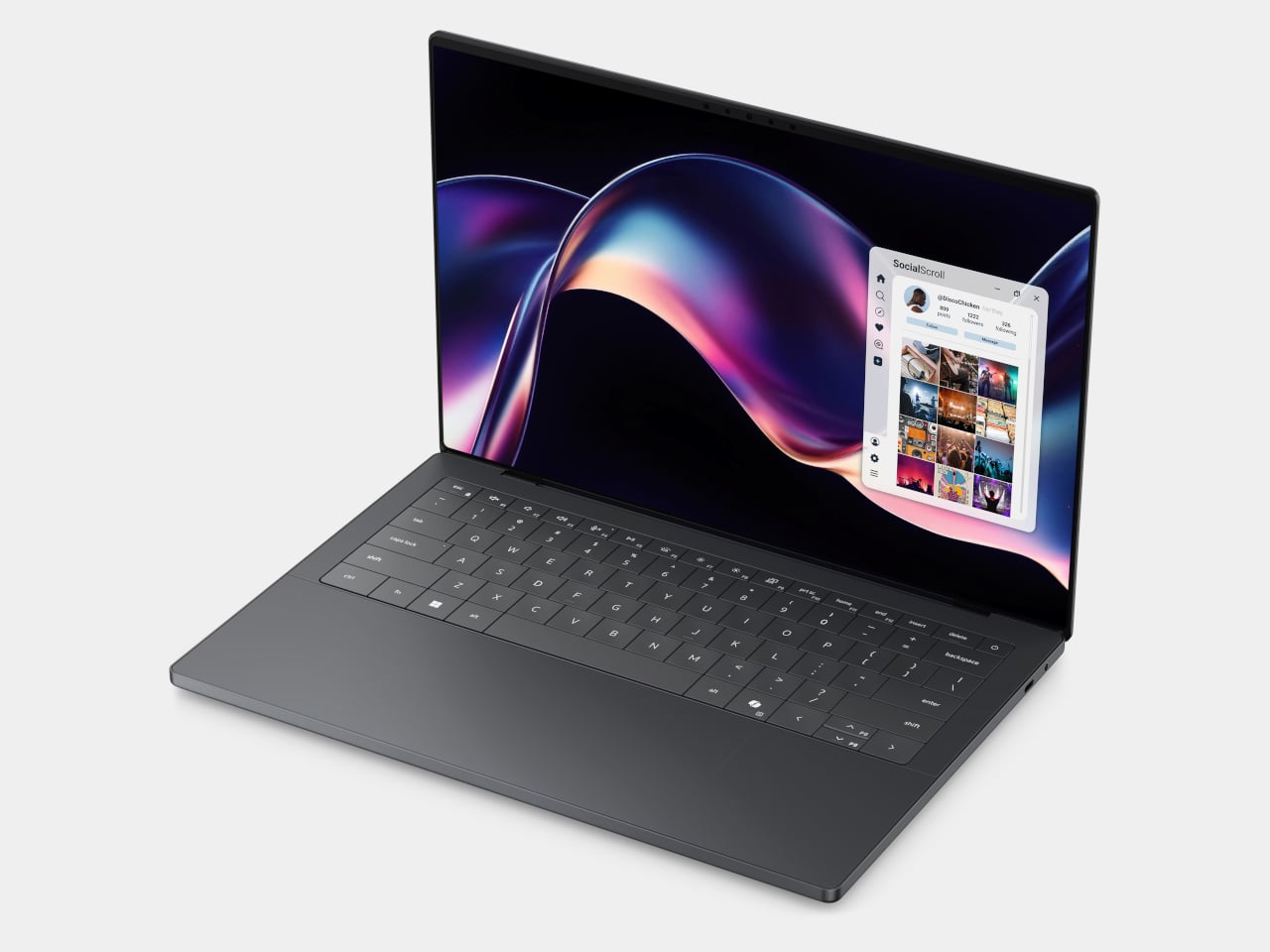
The first laptops to ship with this panel are the Dell XPS 14 and Dell XPS 16 for 2026, both unveiled at CES 2026 in January. The LCD option on both models runs at 1920 x 1200 pixels and 500 nits of brightness. Dell’s OLED option only drops as low as 20 Hz, which means the more affordable LCD configuration actually wins on low-power behavior.

Here’s where it gets interesting from a design standpoint. The display is one of the biggest power consumers in any laptop, so a screen drawing significantly less power during typical use creates real headroom for designers. They can use that headroom to maintain battery size and gain extra runtime, or to trim the battery slightly for a lighter, thinner chassis without giving up the battery life buyers already expect.

Of course, LG is already planning a 1 Hz OLED version of this technology for 2027, which is when things could get more interesting. OLED handles contrast and color in ways LCD can’t match, and pairing that quality with proper low-refresh-rate behavior could push portable laptop design further than it’s been able to go. For now, the Oxide 1Hz LCD is in something you can actually go out and buy.

The post LG’s World-First 1Hz Panel Gives the Dell XPS 48% More Battery first appeared on Yanko Design.

XbooK’s $1,999 Triple-Screen Laptop Is One Bag Instead of Three Monitors

Par : JC Torres
21 mars 2026 à 15:20

Anyone who has worked remotely long enough knows the moment a single laptop screen stops being enough. It’s usually the day you’re cross-referencing three documents at once, or the morning you realize your financial model needs a live chart in one window while you edit formulas in another. The standard fix is an external monitor or a portable screen extender, which works fine until you’re hauling a bag that feels like it’s punishing you for being productive.

The XbooK takes a different approach by folding three full 14-inch touchscreens into a single aluminum laptop body that closes to just 1.5 inches thick. At 7.5 lbs, it’s heavier than a typical ultrabook. The tradeoff, though, is straightforward: you’re not carrying a laptop plus accessories. You’re carrying the whole setup in one piece.

Designer: XbooK

All three screens run at 1920×1080 with 400 nits of brightness each. The machine is powered by an Intel Core Ultra 7 with 32GB of DDR5 RAM and a 1TB SSD, with Wi-Fi 7 and Bluetooth 5.0 onboard. That’s capable hardware, though nothing unusual for a mid-to-high-range laptop in 2025. What makes those specs interesting here is what they’re pushing: 42 inches of combined touchscreen that unfolds in seconds without a single cable involved.

In full Workstation Mode, all three screens run simultaneously alongside an embedded mechanical keyboard and a 10-point touchpad. Connectivity covers Thunderbolt 4, two USB-C ports, and an AUX jack, with a 1,600×1,200 front camera that’s sharper than most built-in laptop cameras. The 70Wh battery has to power all of that, and battery life under a three-screen load is something any serious buyer should push the company on before committing.

For days when the full spread is overkill, the XbooK also works in a two-screen mode or as a conventional single-screen laptop. The latter folds everything up and makes the device look surprisingly ordinary from the outside, except for the two thick slabs sitting underneath the keyboard. That adaptability is one of the more genuinely practical aspects of the design: you’re not locked into the workstation configuration every time you open the lid.

At $1,999 (down from a listed $2,999), it’s priced for professionals who already spend that much on monitors and docking stations. XbooK ships from the US with orders promised to be processed within 3 to 5 business days. The refund-before-shipping policy and fulfillment language have the texture of a startup still scaling up. Spending that much on a device from a company with no established hardware track record is a different kind of commitment than buying from a brand with a decade of products behind it.

Screen real estate is one of the last things portable computing has consistently failed to solve, and most multi-screen laptop concepts have been either too fragile or too awkward for daily travel. The XbooK has a cleaner physical premise than anything built around magnets or external rails. How the hinges and chassis hold up after a year on the road, though, is still an open question that no amount of spec-sheet confidence can close.

The post XbooK’s $1,999 Triple-Screen Laptop Is One Bag Instead of Three Monitors first appeared on Yanko Design.

AnsiSaver - L'art ANSI des BBS en screensaver macOS

Par : Korben
9 mars 2026 à 10:02

Si vous êtes pété de thunes, vous avez forcément un Mac. Mais surtout, vous avez un écran de veille par défaut qui vous file le cafard... Mais c'était sans compter sur AnsiSaver qui est un écran de veille capable de piocher dans les archives de 16colo.rs , la plus grosse collection d'art ANSI au monde, et qui fait défiler tout ça sur votre écran à 60 fps ! Like a boss !

Pour ceux qui débarquent, l'art ANSI c'est ces dessins réalisés caractère par caractère qu'on affiche dans les BBS (les serveurs communautaires d'avant Internet, en gros). Des artistes passaient des heures à composer des fresques en utilisant les 256 caractères du jeu CP437 ... et le résultat est souvent bluffant. Des logos, des paysages, de la typographie, le tout en mode texte UNIQUEMENT. Y'a même eu des groupes mythiques comme ACiD, iCE ou Blocktronics qui ont marqué le truc à l'époque !

En fait, AnsiSaver récupère ces packs directement depuis 16colo.rs, les met en cache dans ~/Library/Caches/AnsiSaver/ et les affiche via libansilove, une lib C spécialisée dans le rendu CP437. Le tout animé par Core Animation, ce qui est vraiment pas mal du tout pour un screensaver !

Côté options, même si j'ai pas réussi à y accéder (??), vous avez le choix entre 3 modes d'affichage. Le défilement vers le haut, le défilement vers le bas (qui empilent les œuvres et scrollent à l'infini) et le mode fondu enchaîné entre chaque pièce. La vitesse de défilement se règle de 10 à 200 pixels par seconde, et ça supporte les écrans Retina.

Le truc sympa c'est que vous pouvez aussi balancer vos propres fichiers puisque AnsiSaver supporte les .ANS, .ICE, .ASC, .BIN, .XB, .PCB et .ADF... du coup si vous avez une collection perso qui traîne sur un vieux disque dur (ça arrive), ou que vous aimez digger Archive.org, vous faites pointer vers le dossier et c'est réglé.

Pour l'install, c'est hyper simple. Vous téléchargez le .saver depuis les releases GitHub , vous double-cliquez et macOS l'ajoute aux Réglages Système.

Attention, le binaire n'est pas signé, du coup il faudra faire un tour dans Réglages > Confidentialité et sécurité pour l'autoriser au premier lancement. Si ça ne marche pas du premier coup, relancez les Réglages Système. Ça fonctionne sur macOS Sequoia minimum (15.0+) et ça tourne aussi bien sur Apple Silicon que sur Intel.

Si vous cherchez d'autres façons de pimper votre terminal avec des screensavers en mode rétro, y'a de quoi faire. Et si vous êtes plutôt nostalgie CRT et phosphore vert ... pareil.

En multi écran chez moi, ça passe pas partout mais sur MacBook Air, ça a CARRÉMENT de la gueule !

This Case Fixes iPhone’s Weak Selfie Camera with a Second Screen

Par : JC Torres
22 décembre 2025 à 11:07

The iPhone’s rear cameras keep getting better, but selfies still rely on a smaller, lower-resolution front sensor, and storage upgrades cost considerably more than a microSD card. People who shoot a lot of photos and video feel squeezed on both fronts, choosing between spending hundreds on internal storage or dealing with blurry front-camera selfies. Selfix is a case for the iPhone 17 Pro that tackles both problems at once.

Selfix is a case for the iPhone 17 Pro and Pro Max that adds a circular 1.6-inch AMOLED screen to the back and hides a microSD slot inside. The rear screen acts as a tiny viewfinder so you can use the 48 MP rear cameras for selfies, while the card slot lets you add up to 2 TB of storage without touching Apple’s upgrade menu or monthly cloud fees.

Designer: Selfix

The rear display mirrors the camera view so you can frame yourself, adjust in real time, and pick any of the rear lenses, from ultra-wide group shots to telephoto portraits. You get the main sensor’s larger 1/1.28-inch glass, Night Mode, and up to 8× optical zoom for selfies, instead of guessing with a cropped front camera and hoping everyone fits into the narrower field of view.

Selfix connects through the phone’s USB-C port and does not need a separate app. You snap the case on, open the camera, and the rear screen wakes up. A dedicated button on the case lets you turn the display off when you are not using it to save battery. The idea is to feel like a built-in second screen, not another gadget that needs pairing, permissions, and a drawer full of instructions.

The case includes a microSD slot that supports cards up to 2 TB, using the same USB-C connection to integrate with the phone. A 512 GB card costs around $50, while Apple’s $200 jump for the same capacity makes swappable storage a compelling alternative. Heavy shooters can archive trips or projects without paying monthly cloud fees or deleting older work to make room for new sessions.

Selfix is made from high-quality TPU and comes in Oat White, Blush Pink, and Midnight Black, sized to match the 17 Pro and Pro Max. It adds some thickness, bringing the total to 17mm, but in return, you get a grippy shell, a second screen, and a hidden storage bay. The design aims to look like a natural extension of the phone rather than a bolt-on camera rig or accessory that screams afterthought.

Selfix is aimed at people who care enough about image quality to use the rear cameras for everything, and who are tired of juggling storage or paying the upgrade tax. A case that quietly turns the iPhone into a dual-screen shooter with expandable memory makes you wonder why the phone did not ship this way, especially when the rear cameras already outclass the front by a significant margin, and storage remains artificially expensive.

The post This Case Fixes iPhone’s Weak Selfie Camera with a Second Screen first appeared on Yanko Design.

iPhone ‘Lock Screen Mirror’ feature lets you quickly check your hair/teeth without opening the camera

Par : Sarang Sheth
18 novembre 2025 à 21:30

Never have I seen something so audaciously brilliant I actually summon a CEO to help make it a reality but Tim Cook… if you’re reading this, this lock-screen mirror definitely needs to ship on the next iOS build. Put together by Jakub Zegzulka, an ex-Apple, Meta, and OpenAI fellow, this tiny little feature is perhaps more important than FaceID itself!

How many times have you stepped out for a meeting with friends or for an interview, having no idea what you look like… or whether you’ve got food stuck in your teeth? You unlock your phone, open the camera app, and flip to the front-facing camera to do a quick vibe-check. It’s a 3-step process that absolutely doesn’t need to be a 3-step process. Instead, Zegzulka’s solution involves just long-pressing on the camera icon on the bottom right of your lock screen. That brings up a tiny window emerging off the dynamic island, giving you a quick preview of yourself. You can check your hair, fix your make-up, adjust your specs, run your tongue across your teeth, or just quickly check out that annoying zit that appeared at the wrong place and wrong time.

Designer: Jakub Zegzulka

Zegzulka didn’t outline much, except a quick video demo of this feature on Threads. Although that was enough to gather nearly 2K likes in just over a day. The Lock Screen Mirror isn’t an app. It’s just a quick interaction that lets you open the camera’s viewfinder right on your lock screen for checking your appearance. The tiny circular window is almost exactly the size of a make-up mirror, and the feature is legitimately handy, even for me as a guy who has fairly curly hair that needs to just be ruffled before I step out.

Heck, imagine going an entire hour on a date with spinach stuck in your teeth and them being polite enough to not point out. Instead, you just do a quick check, get that pesky piece of green stuck on your pearly whites, and you’re good to go. It’s such a tiny-yet-life-enhancing feature that Apple could totally ship with their next build. You’re NOT opening your camera app with this lock screen mirror function, just a preview. You could drag your finger up and have the app open like it traditionally does, but a feature like this would probably eliminate the need to, if all you need to do is see if you look good right before you meet your friends, your future boss, or the potential love of your life.

The post iPhone ‘Lock Screen Mirror’ feature lets you quickly check your hair/teeth without opening the camera first appeared on Yanko Design.

Screen Now - Le service de screencast qui met la honte à toute l'industrie

Par : Korben
4 novembre 2025 à 10:36

Un développeur qui s’ennuyait s’est dit qu’il allait se faire un petit side-projet histoire de s’occuper un peu. Rien de foufou, juste reproduire Screen Studio (30 balles par mois) dans un navigateur et en full gratos pour que tout le monde puisse en profiter !

Et je pense que le gars a créé quelque chose qui va forcement faire grincer pas mal de dents dans l’industrie du screen recording !

Screen Studio, pour ceux qui ne connaissent pas, c’est un peu la Rolls des outils d’enregistrement d’écran sous macOS. Des animations fluides, du zoom automatique, des effets 3D sympas, bref tout ce qu’il faut pour faire des vidéos de démo qui claquent la fesse molle de vos mamans et de vos papas. Le seul problème, c’est que ça coûte un cuy (c’est un rongeur ) et que c’est réservé aux utilisateurs Mac. Et ça, ça laisse quand même pas mal de monde sur le carreau.

Le créateur de Screen Now a donc eu l’idée de faire la même chose, mais gratuit, et utilisable directement dans le navigateur. Comme ça, pas d’installation, pas de compte à créer… Vous ouvrez Chrome (marche pas sous Firefox), vous allez sur le site, et vous lancez l’enregistrement de votre screencast.

La liste des fonctionnalités fait un peu peur parce qu’il y a beaucoup de choses mais vous allez voir c’est très cool. Y’a par exemple la possibilité de mettre votre vidéo d’écran en vue 3D avec perspective, rotation et contrôle d’angle, exactement comme avec les outils pros.

Y’a moyen aussi de mettre des animations d’entrée et de sortie personnalisables avec fade, slide et pop. Y’a aussi de l’upload de backgrounds personnalisés en PNG, JPG ou WebP (et une bonne liste de background proposés par l’outil). Du zoom amélioré avec timeline interactive, du Picture-in-Picture pour votre tête et des effets de flou sur l’arrière-plan de la caméra. La timeline pour le montage propose aussi de la duplication d’éléments.

Vous pouvez même capturer l’audio de votre système en même temps que votre micro, avec mixage automatique pour un son équilibré. Le cropping vidéo gère l’ajustement du ratio et les overlays texte sont entièrement personnalisables.

Le plus dingue, c’est que le projet a bénéficié d’optimisations techniques assez impressionnantes. Le rendering vidéo est maintenant 10 fois plus rapide qu’au début, le sync audio-vidéo a été corrigé pour éliminer 99% des problèmes de freezing à l’export et bien sûr, Screen Now est une PWA (Progressive Web Apps), ce qui signifie que vous pouvez l’installer comme une vraie application sur votre ordinateur tout en gardant les avantages du web.

L’auto-save fonctionne via le stockage du navigateur (local storage) et vous pouvez gérer plusieurs projets et exporter tout ça en MP4 ou GIF avec des réglages de qualité et résolution.

La forme de caméra peut être circulaire en plus des classiques rectangulaire et carrée et il y a des raccourcis clavier pour accélérer le workflow. Bref, tout ce qu’on attend d’un outil semi-pro.

Bref, si vous voulez vous lancer dans le screencast ou tout simplement enregistrer une démo rapide ou une explication dans le cadre d’un dépannage, l’outil est accessible sur screen.now .

Merci à Cg2i pour le partage de cette découverte.

The Porsche Cayenne Electric Wants You to Forget Physical Buttons Exist

2 octobre 2025 à 17:29

Porsche revealed the interior of its upcoming electric Cayenne on September 30, 2025, and I’m experiencing the kind of cognitive dissonance that only comes from loving something I fundamentally disagree with. The cabin features what the company calls the largest continuous digital surface in any Porsche to date. Translation: screens everywhere. As someone who prefers minimal dashboard clutter, I should hate this. But Porsche’s execution here is genuinely impressive, even if it represents everything wrong with modern automotive design philosophy.

Designer: Porsche

Let me be clear about my bias upfront. After reviewing vehicles for over a decade, I’ve developed a strong preference for physical controls. Give me a rotary dial for volume, actual buttons for climate control, and a small display for Apple CarPlay. That’s all I need. Everything else just creates more opportunities for distraction and frustration. The industry’s obsession with touchscreens has turned dashboards into iPad showrooms, and I’m tired of it. But then Porsche goes and creates something like this.

Three Layers of Interaction

Porsche’s approach to the Cayenne Electric interior centers on what I’d describe as three distinct interaction layers. First, there’s the glance layer: a 14.25-inch curved OLED instrument cluster that bends horizontally to favor the driver’s sightline, paired with an optional augmented-reality head-up display. This is information you consume without touching anything.

Second is the touch layer, anchored by what Porsche calls the Flow Display. This is where the interface design gets genuinely interesting, and where my skepticism starts to crack.

Third is the tactile layer: physical buttons for key functions that you use most frequently while driving. Temperature, fan speed, volume. The stuff that should never require diving through touchscreen menus when you’re moving at highway speeds.

This three-layer framework represents Porsche trying to reconcile driver focus with customer demand for integrated entertainment. Rather than creating a single wall of glass like some competitors, the brand is using curvature, AR guidance, and selective hard controls to maintain some connection to traditional cockpit ergonomics.

The Flow Display

Porsche’s Flow Display is the center of the Cayenne Electric’s interior story. It’s a curved OLED that drops from the dashboard toward the console, so your wrist meets the glass at a natural angle rather than an upright plane. The curve is functional for reach and for stabilizing taps on the lower interface zones. Directly ahead, the 14.25-inch curved OLED cluster bends along a different axis to favor the driver’s sightline, which keeps EV power, navigation, and assistance info legible at a glance.

Together they make the largest continuous digital surface Porsche has put in a production cabin, but the company still leaves physical buttons for key functions to reduce menu diving in motion. Five predefined color schemes can be applied across the cluster, Flow Display, and passenger screen through a Themes App, turning the software layer into part of the cabin’s material palette.

I’ve seen plenty of curved displays in vehicles over the years, from the Mercedes-Benz S-Class to the Cadillac Escalade. Most feel gimmicky, like the design team added curves just because they could. The Flow Display’s vertical curve actually serves a purpose. After years of stretching to tap screens in various test vehicles, I appreciate the thought behind meeting my fingers at a more comfortable angle. It’s a subtle detail, but one that suggests actual human factors testing rather than pure aesthetics.

The Themes App detail is worth noting because it shows Porsche treating digital surfaces as coordinated design elements rather than isolated screens. You’re not just picking a wallpaper. You’re establishing a visual language across the entire dashboard that integrates with your interior trim choices. For a brand that obsesses over material quality and color matching, this makes more sense than I’d like to admit.

When Two Screens Aren’t Enough

An optional 14.9-inch passenger display lets the right seat control media, apps, and navigation features, with video playback allowed while driving. Porsche says the setup avoids distracting the driver, and several reports add that a polarized layer limits visibility from the driver’s angle. Keep it for road trips and copilots who actually manage routes, otherwise it risks duplicating what phones already do better.

My personal preference would be to use my phone for entertainment content. It’s already configured with my accounts, my preferences, my content libraries. Why do I need a separate infotainment ecosystem that inevitably provides a worse user experience? But I recognize that many people want more integration, more seamless connectivity between their vehicle and their digital life. That’s the market speaking, and manufacturers are listening.

The augmented-reality head-up display projects guidance and speed into the driver’s forward view with an effective size of 8.7 inches. Use it if you like arrows on the road ahead. If you don’t, the curved cluster is already doing the glance work. I’ve used HUDs in countless vehicles, and my opinion on them remains unchanged. Some people swear by them. I find them distracting and unnecessary, one more piece of visual information competing for attention when you should be watching the road.

The Screen Debate

Stephan Durach, BMW’s Senior Vice President for UI/UX Development, recently told BMW Blog that passenger screens are in high demand, especially in larger vehicles. “People are asking for that,” he explained. “People say, ‘I want to have a dedicated screen for consuming content.’ There is room. So, you can think about that.”

I understand the appeal from a product planning perspective. American buyers love options and choices. If some customers want passenger entertainment systems, why not offer them? The counterargument is that just because people ask for something doesn’t mean it’s a good idea. We’re increasingly treating vehicles like mobile living rooms, with every occupant consuming their own content through their own screen. At some point, we’ve lost the plot on what cars are actually for.

What Porsche Isn’t Saying Yet

The interior recently revealed focused on the digital interface rather than full performance specifications. Porsche hasn’t disclosed final power output, acceleration figures, or detailed battery specifications in this announcement. Those details will presumably arrive with the world premiere at the end of 2025.

What we do know is that Porsche will offer an 11-kW wireless charging pad, launching first in Europe in 2026 before expanding to other markets. I’ve tested wireless charging systems in a few vehicles, and while the convenience factor is undeniable, the efficiency loss compared to wired charging makes me question the value proposition. You’re paying more for the privilege of slower, less efficient charging, though the 11-kW capability is reasonably competitive for inductive systems.

Standard air suspension comes on all models, with optional rear-wheel steering that reduces the turning circle. That’s genuinely useful in a vehicle this size, making parking lot maneuvering significantly easier. The Active Ride system from the Panamera and Taycan will also be available, providing impressive body control and ride comfort.

The Electric Cayenne in Context

Porsche’s commitment to keeping the combustion-powered Cayenne well into the next decade reveals something important about EV adoption. The market isn’t progressing as quickly as manufacturers hoped a few years ago. Rather than forcing a full electric transition, Porsche is hedging its bets by offering both powertrains simultaneously. The same strategy applies to the Macan, where the electric version will coexist with a new gasoline-powered model arriving in 2028.

This pragmatic approach makes sense given current market realities. Some buyers want electric. Many don’t, at least not yet. Offering both options maximizes potential sales while giving the charging infrastructure more time to mature. The Cayenne Electric represents Porsche’s best effort at making EVs appealing to luxury SUV buyers who might otherwise stick with traditional engines.

As for the interior’s screen situation, it’s simultaneously the most impressive and most excessive I’ve seen from Porsche. The execution is genuinely impressive, with thoughtful ergonomics and quality OLED displays. The three-layer interaction model shows more restraint than a pure touchscreen approach, and the Flow Display’s vertical curve actually solves reach and tap accuracy problems rather than just looking different.

But I can’t shake the feeling that we’ve collectively normalized maximum complexity when minimum would serve most people better. Porsche is doing this well because customers are demanding integrated entertainment and the brand is responding with curvature, selective physical controls, and coordinated design language. That doesn’t mean it’s the right direction, just that it’s the direction the market is pushing everyone.

The world premiere happens at the end of 2025, with deliveries expected to begin in 2026. Porsche hasn’t announced pricing yet, but expect a significant premium over the gasoline model. You’re paying for advanced electric powertrain technology, the largest continuous digital surface in any Porsche, and apparently, enough screens to satisfy the most demanding copilots.

The post The Porsche Cayenne Electric Wants You to Forget Physical Buttons Exist first appeared on Yanko Design.

KeyGo Ultra-Slim Folding Keyboard Puts a Touch Screen at Your Fingertips

Par : JC Torres
19 août 2025 à 23:30

Working on the go always feels like a compromise. You’re stuck with tiny laptop keyboards that cramp your hands, or you’re juggling a separate keyboard, mouse, and maybe a portable monitor that never quite fits together properly. The whole setup becomes this awkward dance of cables and stands.

The KeyGo Ultra-Slim Folding Keyboard throws out that rulebook entirely. This isn’t just another portable keyboard with a gimmicky feature tacked on but a genuine rethinking of what mobile productivity can look like when you stop accepting limitations as inevitable.

Designer: KeyGo

Click Here to Buy Now: $269 $538 (50% off). Hurry, less than 72 hours left! Raised over $152,000.

Premium Build That Actually Feels Premium

The first thing you notice about KeyGo is how substantial it feels. The CNC-anodized aluminum construction gives it that MacBook-level heft and finish that makes most plastic peripherals feel cheap by comparison. This isn’t trying to be the lightest option but the most satisfying one to use.

The 180-degree foldable design is where the engineering really shows. The hinge mechanism transitions smoothly from closed to fully open without any wobble or flex. At 800 grams and folding down to just 324mm wide, it slips into most laptop bags without dominating your carry weight.

Lighting That Actually Matters

Those RGB backlighting modes aren’t just for show (though they do look fantastic). The three lighting options serve real purposes: breathing mode for low-light work, solid color for distraction-free typing, and rainbow wave for when you want your workspace to feel more alive. The FN + Q/W/E shortcuts make switching between them effortless.

The lighting system goes beyond basic functionality to create an emotional connection with your workspace. There’s something satisfying about watching the rainbow wave ripple across the keys as you type, or having the breathing effect gently pulse during those late-night work sessions. It’s the kind of detail that transforms a tool into something you genuinely enjoy using.

Two Input Methods, Infinite Possibilities

Here’s where KeyGo gets interesting. That 12.8-inch touchscreen sitting above the keyboard isn’t just a novelty but a genuine second display with 1920×720 resolution and full ten-finger touch support. The fully laminated glass eliminates that annoying air gap you get with cheaper displays.

The screen works as a traditional second monitor for multitasking, but the touch capability transforms how you interact with your devices. Swipe between apps, drag files directly with your fingers, or use it as a massive touchpad when you need precision. The 72% NTSC color gamut makes it suitable for creative work too.

Universal Compatibility Done Right

KeyGo works with everything: Windows, macOS, Linux, Android, and even iOS devices. The dual USB-C ports (one for power only, the other for full functionality) plus a USB-A port mean you’re never hunting for the right adapter. Turn your tablet into a productivity powerhouse or add touch input to that old desktop that’s never had it.

The scissor-switch keys are quiet enough for coffee shop work but responsive enough for serious typing sessions. Whether you’re coding, writing, or managing spreadsheets, the keyboard feels like a natural extension of your workflow rather than a compromise you have to work around.

Scenarios That Actually Make Sense

Picture this: you’re working remotely and need to reference documents while writing. Instead of constantly alt-tabbing, your references live on the KeyGo screen while you type on the main display. Or you’re editing video and want timeline controls at your fingertips without cluttering your main workspace.

The modular design adapts to different environments, too. Desktop setup when you’re at home, mobile workstation when you’re traveling, or even mounted in a car for those times when your vehicle becomes your office. The easy-to-clean surface makes it practical for medical or shared environments.

The Future of Portable Productivity

KeyGo represents something bigger than just another keyboard upgrade. It’s proof that portable productivity doesn’t have to mean settling for less. By combining tactile typing with versatile touch input, it creates new possibilities for how we work, create, and interact with our devices.

Sometimes the best innovations come from refusing to accept that things have to work a certain way. KeyGo makes mobile productivity feel less like a compromise and more like a genuine choice. It’s the kind of product that makes you wonder why everyone else is still doing things the hard way.

Click Here to Buy Now: $269 $538 (50% off). Hurry, less than 72 left! Raised over $152,000.

The post KeyGo Ultra-Slim Folding Keyboard Puts a Touch Screen at Your Fingertips first appeared on Yanko Design.

❌
❌