Vue normale

  • ✇Yanko Design
  • Never Lose Your Keys Again With a Tracker That Glows in the Dark
    For forgetful people like me, trackers have basically become a must-have. Whether you’re clipping one onto your wallet, your car keys, your backpack, or whatever it is you absolutely cannot afford to lose, these little devices help you do exactly what they promise: keep track. The only catch is that a lot of trackers tend to look alike, and if you’re relying on appearance alone instead of the connected app, it’s easy to accidentally grab the wrong one. If you’re after a tracker that actually st
     

Never Lose Your Keys Again With a Tracker That Glows in the Dark

9 septembre 2026 à 18:30

For forgetful people like me, trackers have basically become a must-have. Whether you’re clipping one onto your wallet, your car keys, your backpack, or whatever it is you absolutely cannot afford to lose, these little devices help you do exactly what they promise: keep track. The only catch is that a lot of trackers tend to look alike, and if you’re relying on appearance alone instead of the connected app, it’s easy to accidentally grab the wrong one.

If you’re after a tracker that actually stands out, and one that can even glow in the dark, Pebblebee’s latest Evercolor drop might be exactly what you need. Evercolor is the brand’s limited-edition color program built exclusively for its Clip 5 tracker, and the newest release, called Neon Pulse, comes in two eye-catching shades: Techno Lime and Hotline Pink. Pebblebee describes the collection as perfect for “bold self-expression and a fresh-season reset,” and honestly, it’s hard to disagree.

Designer: Pebblebee

Evercolor has rolled out plenty of standout colors before, but Neon Pulse marks the first time the program has added glow-in-the-dark accents. That means your tracker stays visible even after its LED switches off, so you’re not just relying on the app to tell you where your item is. You can actually spot it in the dark, as long as it’s somewhere within eyesight.

Keep in mind that this is a limited-edition release, so if hot pink and neon green happen to be your colors, you’ll want to grab them soon. Pebblebee rolls out new Evercolor shades every twelve weeks, and once a drop sells out, it’s gone for good, no restocks. Previous collections like Freeze Frame and Heatwave Hijinks have already sold out, so if Neon Pulse catches your eye, don’t wait too long to add it to your cart.

Underneath all that color, though, it’s still the same reliable Clip 5 that Pebblebee originally released. It works with both Apple and Android devices, so you don’t have to worry about switching phones down the line. The rechargeable battery lasts up to a year on a single USB-C charge, which means no more digging through drawers for spare coin batteries. It also boasts a direct Bluetooth range of about 500 feet, roughly double what a lot of competitors offer, plus access to a global crowd-network for finding your stuff even farther away. On top of that, you get a 130dB siren, a bright LED strobe, and IP66 water resistance, so it can handle a little rain or an accidental splash without missing a beat.

It’s also worth noting that Neon Pulse still costs the same $34.99 as the standard Clip 5, so you’re not paying extra just for the fresh colorway. There’s also a free built-in safety feature called Alert, which can notify you if an unfamiliar tracker seems to be following you, a nice bit of peace of mind on top of everything else. Design-wise, the compact clip-on shape makes it look less like a tech gadget and more like an accessory for your bag, wallet, or keychain. Add in the bright, playful colorway, and it becomes even more fashionable, dare we say, kind of cool. So if your main complaint about trackers has always been that they all look the same, Neon Pulse is built to solve exactly that problem.

At the end of the day, a tracker is only useful if you can actually tell it apart from the pile of identical black and white gadgets everyone else seems to own, and if you enjoy using it enough to keep it clipped on in the first place. Pebblebee’s Neon Pulse drop checks both boxes, combining genuine utility with a design that feels personal rather than generic. Whether you’re the type who loses your keys weekly or you just want your tech to match your personality, this drop is worth a look before it disappears for good. And if pink and green aren’t quite your vibe, it might be worth keeping an eye on Pebblebee’s page anyway. With a new Evercolor drop landing every twelve weeks, there’s a good chance your perfect color combo is just around the corner.

The post Never Lose Your Keys Again With a Tracker That Glows in the Dark first appeared on Yanko Design.

  • ✇Yanko Design
  • Clear-Shell Game Boys Never Made the Screen Transparent, Arduview Did
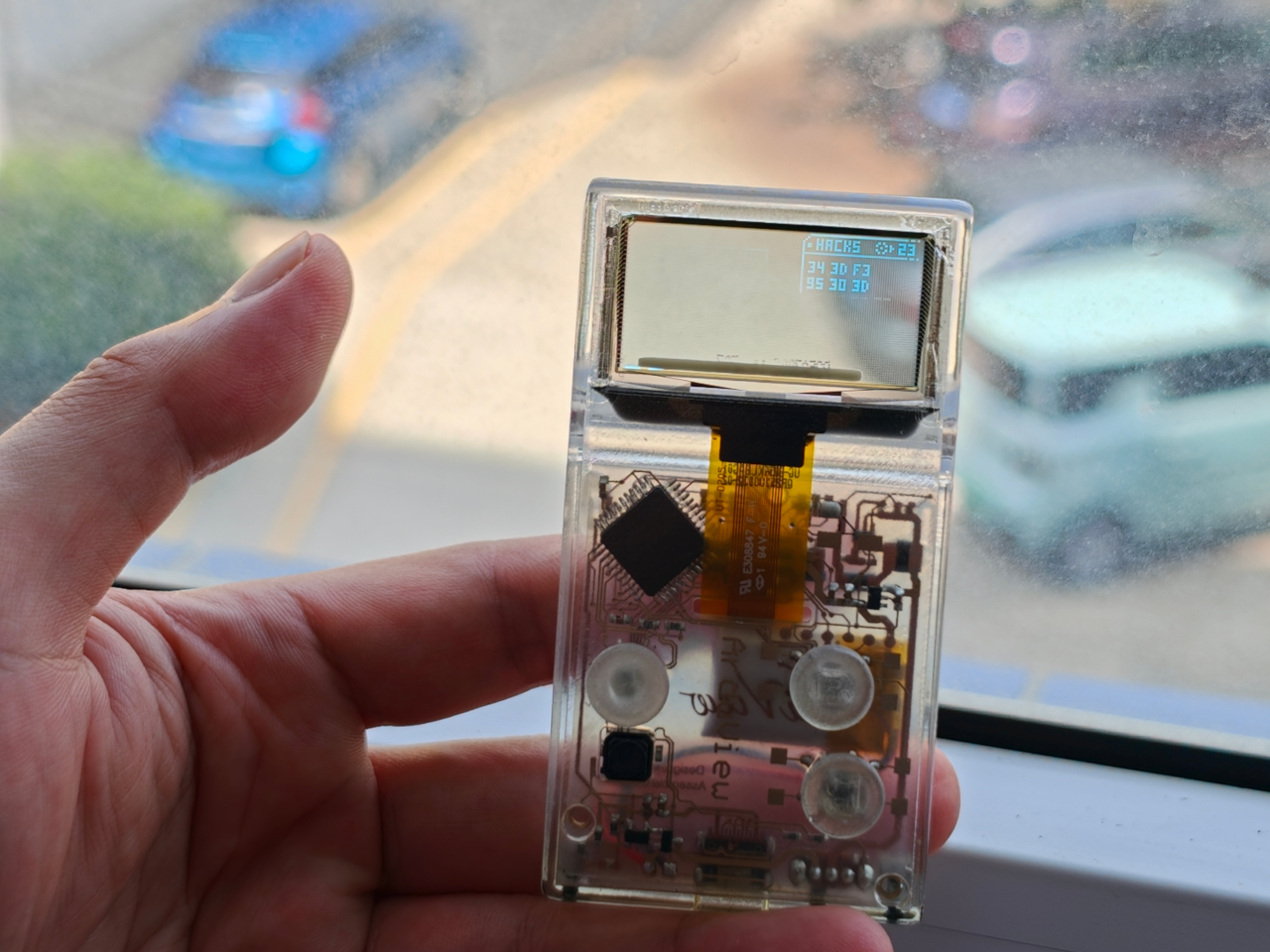
    Every gadget on a desk is built to hide what makes it work. Phones, consoles, controllers, they’re all sealed slabs designed to keep the copper and silicon out of sight. Arduview refuses that logic entirely. Its shell is clear, its circuit board is clear, and its OLED display lets you watch pixels light up while seeing straight through to the components producing them. Retro handhelds have flirted with transparency before. Clear-shell Game Boys and modded Miyoo units let you glimpse a shadow of
     

Clear-Shell Game Boys Never Made the Screen Transparent, Arduview Did

Par : JC Torres
9 septembre 2026 à 05:15

Every gadget on a desk is built to hide what makes it work. Phones, consoles, controllers, they’re all sealed slabs designed to keep the copper and silicon out of sight. Arduview refuses that logic entirely. Its shell is clear, its circuit board is clear, and its OLED display lets you watch pixels light up while seeing straight through to the components producing them.

Retro handhelds have flirted with transparency before. Clear-shell Game Boys and modded Miyoo units let you glimpse a shadow of the board through tinted plastic, but the display itself stayed opaque, a black rectangle sitting in an otherwise see-through frame. Arduview closes that gap by making the screen itself transparent, so nothing on the device breaks the illusion of looking clean through it.

Designer: Louis Huang

Peer through the front and the internals aren’t just visible; they’re the entire visual identity. The board, the chip, an orange copper flex cable, the button domes, and the USB-C port all sit in plain view, arranged the way a watchmaker might arrange gears behind sapphire crystal. Nothing here was designed to be hidden later. It was designed to be looked at from day one.

That philosophy extends to how the thing works, not just how it looks. Built on Arduboy, an open-source handheld platform, Arduview skips the layers that usually complicate small electronics. There’s no app store hunting, no Wi-Fi pairing, no account setup standing between you and 400 preloaded games. Power it on and it plays, the same instant gratification that made simple handhelds addictive in the first place.

At 50 grams and roughly the footprint of a credit card, the size does real work here. A device this small and this light stops being a dedicated gaming session and starts being something you carry the way you’d carry a keychain or a pocketknife, small enough to disappear until the moment you want it. Pull it out on a train platform or set it on a desk between meetings, and it reads less like a toy and more like a curiosity someone can’t resist picking up.

That reaction seems to be the entire point. A transparent gadget invites touching in a way an opaque one never does, because there’s an implicit dare in showing your internals: come look closer. Arduview leans into that dare completely, treating the space usually reserved for a case as prime real estate for the very thing most companies spend their design budgets concealing.

Retro gaming has always had a strong current of nostalgia running through it: chunky buttons, pixel art, low-resolution charm. Arduview borrows all of that while adding something genuinely new to the mix: a device that looks like it belongs in a display case at a design museum as much as it belongs in a pocket.

The post Clear-Shell Game Boys Never Made the Screen Transparent, Arduview Did first appeared on Yanko Design.

  • ✇Yanko Design
  • Your Second Screen Can Finally Work With No Cables and No Outlet
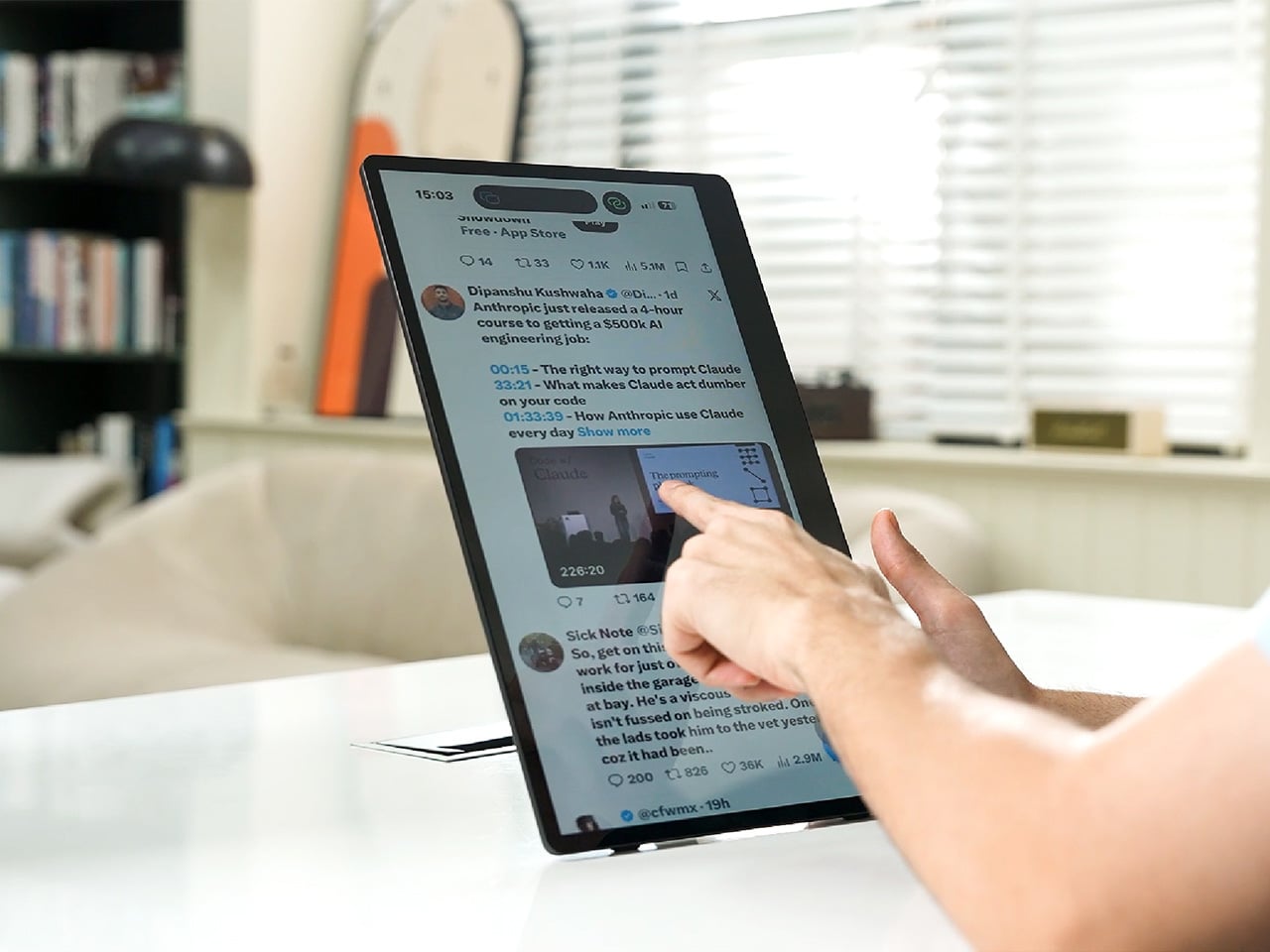
    Desks are overrated. So are the cables that come with them. The 4URPC is a 15.6-inch wireless touchscreen monitor built for people who’d rather not be chained to an outlet just to get a bigger screen. It’s slim, self-powered, and ready to mirror whatever’s on your phone, tablet, or laptop the moment you need more room to work, watch, or play. Cutting the cord doesn’t mean cutting functionality. The monitor mirrors an iPhone or Android device through a peer-to-peer wireless connection, no home W
     

Your Second Screen Can Finally Work With No Cables and No Outlet

Par : JC Torres
8 septembre 2026 à 21:45

Desks are overrated. So are the cables that come with them. The 4URPC is a 15.6-inch wireless touchscreen monitor built for people who’d rather not be chained to an outlet just to get a bigger screen. It’s slim, self-powered, and ready to mirror whatever’s on your phone, tablet, or laptop the moment you need more room to work, watch, or play.

Cutting the cord doesn’t mean cutting functionality. The monitor mirrors an iPhone or Android device through a peer-to-peer wireless connection, no home Wi-Fi or app required. For streaming platforms like YouTube, Netflix, or Hulu, connecting to Wi-Fi and tapping the built-in TV Cast icon sends video to the screen. Either way, there’s no dongle to lose or cable to untangle before the movie starts.

Designer: 4URPC

Click Here to Buy Now: $219 $399 (45% off). Hurry, only 451/600 left! Raised over $181,000.

The more interesting trick happens after mirroring starts. The 10-point touchscreen can send input back to the connected phone, turning the monitor into a larger, shared control surface. Flip through photos with a friend, walk a colleague through a presentation, or hand someone the reins without handing over your phone. It’s a shift that makes shared screen time less awkward.

None of this would matter much if the monitor were bulky. At half an inch thick and just over 2 pounds, it’s built to disappear into a backpack rather than dominate it. The matte, textured shell keeps fingerprints and glare to a minimum, and a fold-out kickstand on the back means setup takes seconds on a desk, a kitchen counter, or the arm of a couch.

A built-in 4,000 mAh battery backs up that portability by taking the wall outlet out of the equation. Setting up on a train, in a hotel room, or on a patio doesn’t mean scouting for the nearest plug first. That same battery can lend a charge to a connected phone, turning the monitor into a backup power bank when the moment calls for it.

Plug it into a laptop with a USB-C cable, and the 4URPC switches roles, becoming an extended display rather than a wireless mirror. Dragging a browser tab, a chat window, or a reference document onto the second screen takes a second, and the touchscreen works over the wired connection. The laptop stays focused on the main task while the extra display handles everything else.

The screen also rotates between landscape and portrait without any fuss, which sounds minor until it changes how you use it day to day. Landscape suits video calls, games, and spreadsheets, while portrait mode fits scrolling through documents, reading long articles, or checking social feeds. Switching between the two takes a twist of the stand, not a trip through a settings menu.

Compatibility runs wide enough that most people won’t need to think twice before connecting. Wireless mirroring covers iPhones, Android phones running version 10 or later, MacBooks, and most Windows laptops, while the wired USB-C or HDMI input works with game consoles, streaming boxes, and the Nintendo Switch. There’s no software to install and nothing to configure; connecting the device and turning it on is the entire setup process.

Under the glass sits a 1920×1080 matte IPS panel running at 60 Hz, built more for comfortable, glare-free sessions than eye-popping color numbers. Dual USB-C ports split power delivery and video duties, small stereo speakers cover casual audio, and a VESA mount plus a standard camera screw thread add mounting options beyond the built-in stand. It’s a practical set of choices rather than a flashy one.

There’s something telling about a monitor that assumes you won’t always be sitting at the same desk tomorrow. Work has scattered across kitchen tables, coffee shops, and airport gates for a while now, and screens are only starting to catch up. The 4URPC doesn’t try to be the sharpest or brightest display around; it just tries to be wherever you happen to land next.

Click Here to Buy Now: $219 $399 (45% off). Hurry, only 451/600 left! Raised over $181,000.

The post Your Second Screen Can Finally Work With No Cables and No Outlet first appeared on Yanko Design.

reMarkable Paper Pure Trades Tablet Features for Focus

8 septembre 2026 à 12:47

The $399 reMarkable Paper Pure trades apps, notifications, and color for focused writing. Review its features, limitations, battery life, and value.

The post reMarkable Paper Pure Trades Tablet Features for Focus appeared first on TechRepublic.

  • ✇Yanko Design
  • The $100 Keypad That Puts Each AI Coding Tool Behind Its Own Button
    Every developer juggling AI agents right now knows the feeling of context switching until the whole workflow blurs together. Copilot suggests something in one window, Claude Code runs a task in another, and a dozen prompts live scattered across notes and muscle memory. The Logitech MX Keypad exists to collapse all of that into nine small screens sitting next to the keyboard, each one a physical shortcut into a specific piece of that chaos. Every key on the keypad carries its own full-color LCD
     

The $100 Keypad That Puts Each AI Coding Tool Behind Its Own Button

Par : JC Torres
8 septembre 2026 à 10:20

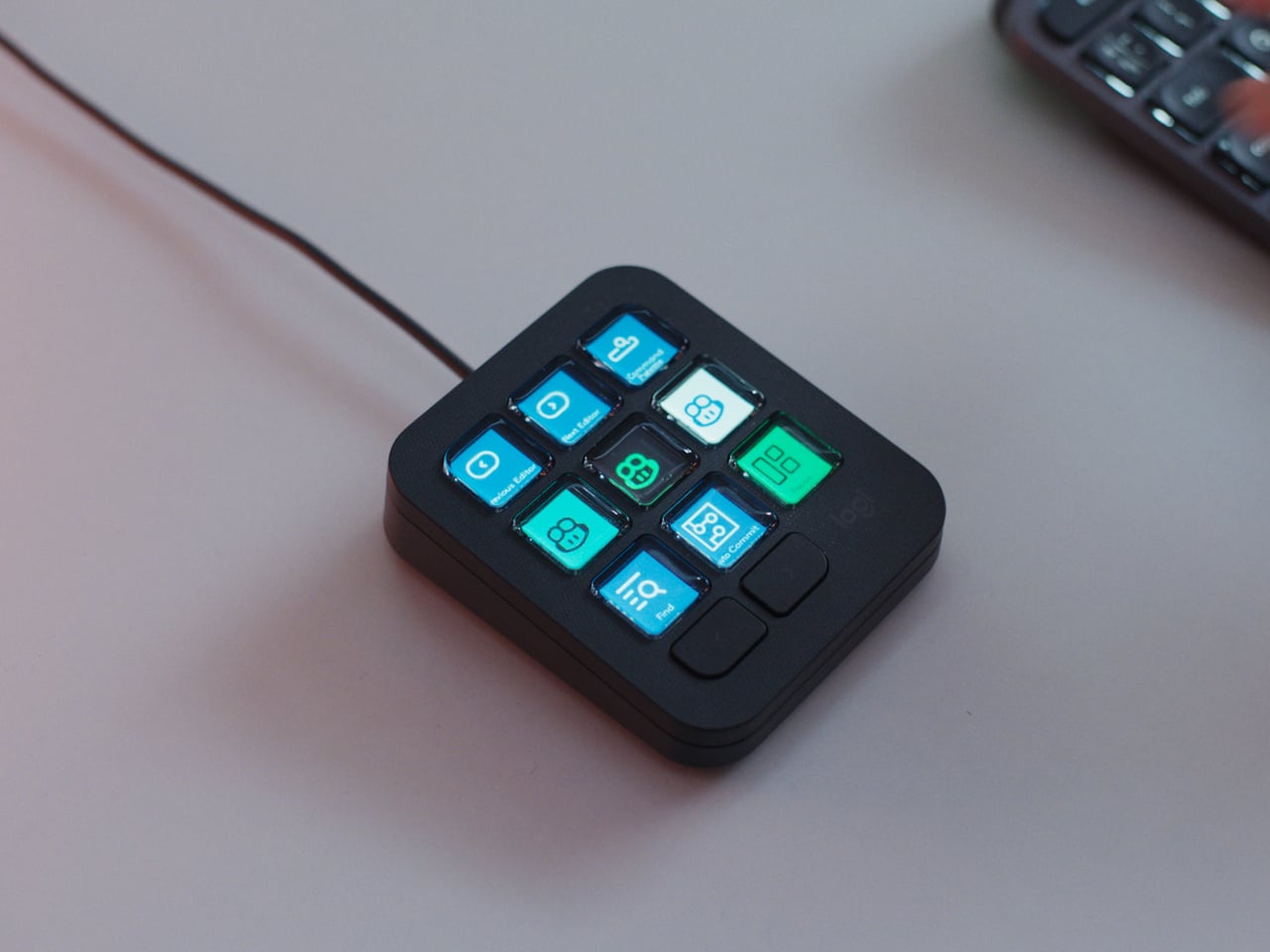
Every developer juggling AI agents right now knows the feeling of context switching until the whole workflow blurs together. Copilot suggests something in one window, Claude Code runs a task in another, and a dozen prompts live scattered across notes and muscle memory. The Logitech MX Keypad exists to collapse all of that into nine small screens sitting next to the keyboard, each one a physical shortcut into a specific piece of that chaos.

Every key on the keypad carries its own full-color LCD display, so instead of memorizing which function key does what, you glance down and see an icon that actually represents the command underneath it. Press one, and it can refactor a function, trigger a prompt macro, or hand off a task to an AI agent entirely. That small visual feedback loop turns an abstract keyboard shortcut into something closer to a labeled button on a control panel.

Designer: Logitech

What makes the hardware worth paying attention to is where Logitech chose to draw the compatibility line. Instead of building this around one coding environment, the MX Keypad works across GitHub Copilot, Claude Code, VS Code, and IntelliJ IDEA at once. A developer bouncing between an IDE and a terminal-based AI agent doesn’t need separate tools for each, just a different page of keys pulled up on the same nine buttons.

That pattern of paging matters more than it sounds. The keypad can hold multiple profiles, so switching from a Python project running through Copilot to a JavaScript refactor handled by Claude Code becomes a single tap rather than a mental reset. Anyone who has lost a train of thought hunting through browser tabs for the right prompt will recognize the value in never breaking eye contact with the code itself.

Underneath the surface, the MX Keypad ships with prebuilt plugins that Logitech had developers test directly against real coding platforms, rather than shipping generic templates and hoping they fit. An SDK opens the door further, letting teams build their own tools around internal workflows, while a community marketplace means the plugin library keeps growing without waiting on Logitech’s own release schedule.

None of that ambition comes wrapped in bulky, wasteful materials either. The body is made with recycled plastics, keeping the hardware in line with the sustainability commitments Logitech has built into its broader MX ecosystem. It is a small detail, but for a device meant to live permanently on a desk, it matters that the object itself doesn’t feel disposable.

At $99.99, the MX Keypad occupies a strange but clarifying position in a developer’s setup. It doesn’t replace a keyboard, and it doesn’t try to be an AI tool in its own right. Instead, it works like a translator between fast-moving human intent and the growing swarm of coding agents developers now manage daily, one labeled key at a time.

The post The $100 Keypad That Puts Each AI Coding Tool Behind Its Own Button first appeared on Yanko Design.

Lenovo Yoga Tab Gen 2 vs Yoga Tab Plus Gen 2: Which Should You Buy?

4 septembre 2026 à 11:39

Lenovo's new Yoga tablets share 4K displays and seven major Android upgrades, but performance, size, battery, memory, weight, and price separate them.

The post Lenovo Yoga Tab Gen 2 vs Yoga Tab Plus Gen 2: Which Should You Buy? appeared first on TechRepublic.

Xiaomi Smart Band 11 vs Smart Band 10: What Actually Changed?

4 septembre 2026 à 09:26

Xiaomi Smart Band 11 keeps the Band 10’s display size and 21-day battery claim but adds more brightness, a thinner design, and new health features.

The post Xiaomi Smart Band 11 vs Smart Band 10: What Actually Changed? appeared first on TechRepublic.

  • ✇Yanko Design
  • UGREEN’s Power Bank Uses Liquid Cooling, and You Can Actually Watch It
    UGREEN’s MagFlow Pro treats overheating as a design problem worth solving with actual engineering, not just a bigger heat sink. This 10,000mAh magnetic power bank borrows liquid cooling from gaming PCs and squeezes it into a pocket-sized charger, aiming to keep wireless charging fast without turning your phone into a hand warmer along the way. Qi2 charging has always had a dirty secret hiding under its magnetic convenience. Wireless systems lose up to 30% of their power as heat during transfer,
     

UGREEN’s Power Bank Uses Liquid Cooling, and You Can Actually Watch It

Par : JC Torres
4 septembre 2026 à 05:15

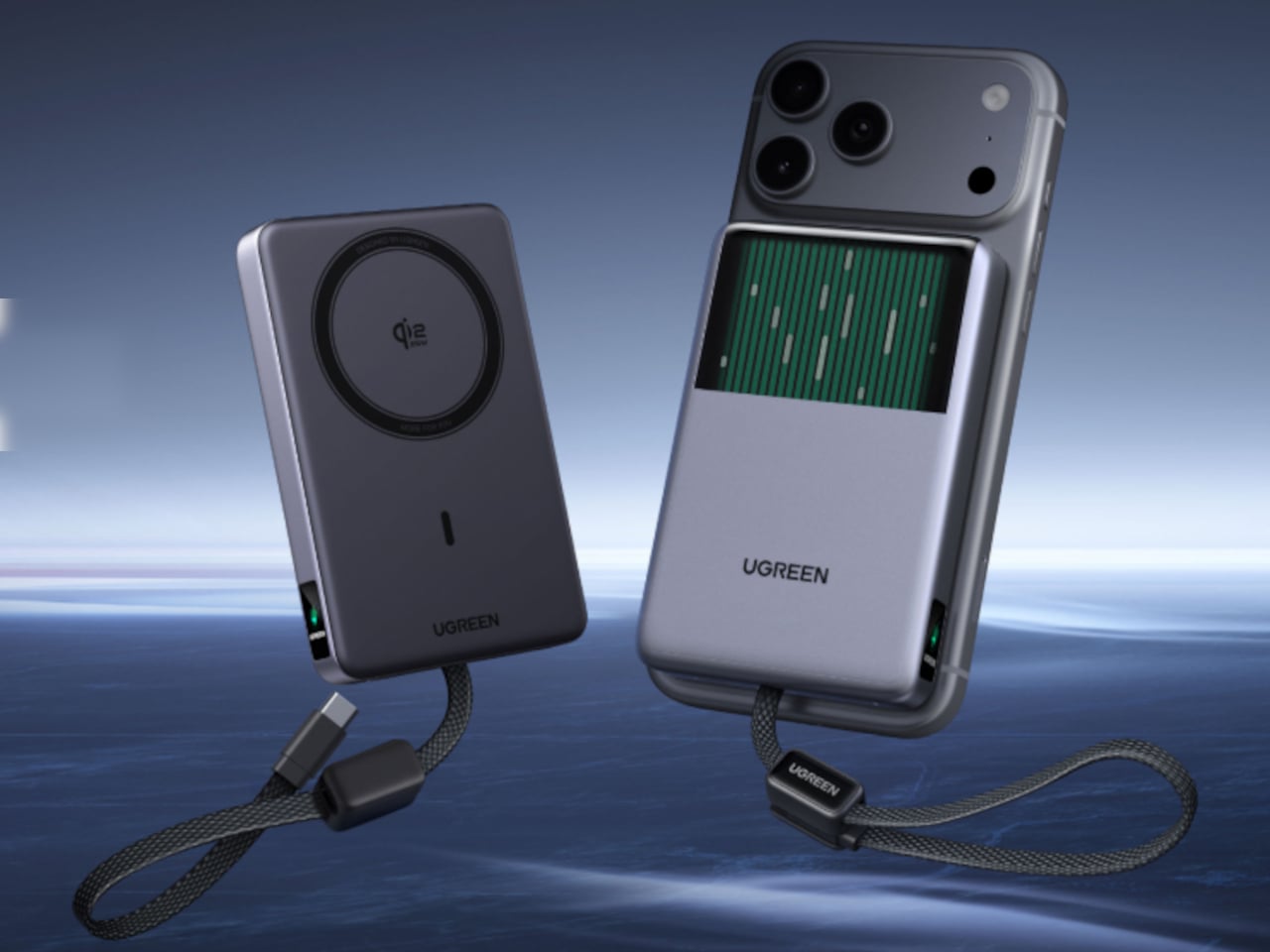
UGREEN’s MagFlow Pro treats overheating as a design problem worth solving with actual engineering, not just a bigger heat sink. This 10,000mAh magnetic power bank borrows liquid cooling from gaming PCs and squeezes it into a pocket-sized charger, aiming to keep wireless charging fast without turning your phone into a hand warmer along the way.

Qi2 charging has always had a dirty secret hiding under its magnetic convenience. Wireless systems lose up to 30% of their power as heat during transfer, which means a phone sitting at 25W often throttles down within minutes to avoid overheating. UGREEN built the MagFlow Pro around fixing that exact bottleneck rather than just chasing a bigger battery number.

Designer: UGREEN

Inside sits CryoPulse, a cooling system built around a micro-pump that circulates liquid coolant past the charging coil and other heat-generating components. Copper foil spreads that heat further, while a layout that physically separates key parts keeps warmth from concentrating in one spot. It is a scaled-down version of what keeps a gaming rig from throttling under load, just built to survive inside a phone charger.

A transparent panel on the front turns that entire process into something you can actually watch, showing coolant moving through the internal channels while your phone charges. It is an odd, almost theatrical touch for a power bank, but it doubles as reassurance that the system is doing its job. UGREEN calls it the Cyber Window, and it is hard to look away from once it is running.

That cooling translates into real numbers, too. UGREEN claims the system keeps peak surface temperatures on a phone up to 18°F below its own reference benchmark, letting a device hold onto higher wattage for longer instead of stepping down early. In practice, that means someone topping up before a flight or during a commute gets closer to advertised charging speeds instead of a slow crawl once things heat up.

A small display embedded in the shell keeps track of charging wattage, remaining battery percentage, cycle count, and cooling status, turning what used to be a guessing game into actual visible data. Paired with a built-in USB-C cable capable of 30W and a combined output of up to 45W, the MagFlow Pro can charge a phone, tablet, and another accessory simultaneously without demanding a bag full of extra cables.

If the battery degraded quickly, all of those fancy features would be pointless, so UGREEN built the cell around Dymondcell 2.0 protection, retaining more than 80% of its capacity after 800 charge cycles. It also survived seven hours of continuous overcharge testing without failure, a detail aimed squarely at anyone who leaves their charger plugged in overnight out of habit rather than necessity.

At $149.99, the MagFlow Pro costs considerably more than other 10,000mAh power banks on the market, and that price tag puts real weight behind its cooling claims. It is a bet that people charging phones daily care as much about consistent performance and battery longevity as they do about raw capacity, and that a bit of visible engineering can justify paying extra for it.

The post UGREEN’s Power Bank Uses Liquid Cooling, and You Can Actually Watch It first appeared on Yanko Design.

  • ✇Yanko Design
  • Cloud AI Means Someone Else Has Your Data, MINISFORUM Fixes That
    Running a serious AI model at home usually means renting someone else’s cloud server and hoping your data stays private along the way. MINISFORUM built its newest pairing to remove that trade-off entirely. The AI Agent NAS N5 MAX-P495 and AI Mini Workstation MS-S1 MAX-P495 combine for up to 131 TOPS of AI compute performance, 192GB of memory at 8533 MT/s, and up to 160GB of graphics memory, enough headroom to keep the heavy lifting on a desk instead of in a data center. The N5 MAX-P495 takes th
     

Cloud AI Means Someone Else Has Your Data, MINISFORUM Fixes That

Par : JC Torres
4 septembre 2026 à 00:00

Running a serious AI model at home usually means renting someone else’s cloud server and hoping your data stays private along the way. MINISFORUM built its newest pairing to remove that trade-off entirely. The AI Agent NAS N5 MAX-P495 and AI Mini Workstation MS-S1 MAX-P495 combine for up to 131 TOPS of AI compute performance, 192GB of memory at 8533 MT/s, and up to 160GB of graphics memory, enough headroom to keep the heavy lifting on a desk instead of in a data center.

The N5 MAX-P495 takes the shape of a compact black cube, but what it holds inside matters more than how it looks sitting on a shelf. It combines powerful AI computing with up to 200TB of local storage, enabling users to store, manage, and process large volumes of data within a single AI platform. That capacity turns a spare corner of an office into a private archive large enough to hold years of project files, footage, or research without ever touching a third-party server.

Designer: MINISFORUM

Storage alone doesn’t make an AI system useful, so MINISFORUM built the N5 to run the AI itself. From RAG knowledge bases and AI models to embeddings, databases, and AI agents such as OpenClaw and Hermes, N5 MAX-P495 keeps data and AI workloads local, enabling continuous and private AI operations. A small business could lean on that setup to run its own customer-support agent without routing conversations through an outside company’s servers.

That local-first approach extends to how the N5 fits into a larger setup. Designed to work alongside AI computing devices, N5 MAX-P495 serves as a centralized backend for data, models, knowledge, and long-running AI workloads, bringing storage and computing together at the edge. It’s less a standalone gadget and more a quiet engine room, built to keep working in the background while something faster handles the parts people actually interact with.

That faster half of the pairing is the MS-S1 MAX-P495, a compact tower wrapped in a ventilated, diamond-textured front panel that looks more like a piece of desk sculpture than a workstation. It delivers powerful local AI computing for demanding model inference, AI development, and computationally intensive workloads, built for intensive local AI tasks, engineering, and workflows in an ultra-compact footprint. Developers get workstation-class muscle without giving up desk space to a full tower case.

Speed matters just as much as raw power for certain jobs, and MINISFORUM designed the MS-S1 with that in mind. Designed for low-latency AI workloads, MS-S1 MAX-P495 enables responsive local inference for AI agents, computer vision, generative AI, and other real-time applications. A security camera system or a live creative tool built on generative AI benefits directly from that kind of immediate response instead of waiting on a round trip to the cloud.

Connectivity rounds out the workstation’s role in a larger setup. With extensive connectivity and expansion capabilities, MS-S1 MAX-P495 serves as a powerful AI compute frontend, supporting models, applications, and connected devices across flexible edge AI environments. That flexibility means the same box can sit at the center of a home lab or plug into a small studio’s existing hardware without forcing a rebuild.

Paired together, the two devices split the work the way a good team would. The MS-S1 MAX-P495 and N5 MAX-P495 form a complete edge AI computing system, delivering high-performance AI compute at the frontend while integrating compute, massive storage, data, and AI knowledge at the backend, providing a powerful foundation for real-time inference, persistent AI workloads, and scalable local AI applications. It’s a compact answer to a question more households and small teams are starting to ask: whether AI still needs to live somewhere else at all.

The post Cloud AI Means Someone Else Has Your Data, MINISFORUM Fixes That first appeared on Yanko Design.

  • ✇Yanko Design
  • The 8 Best Gadgets of September 2026
    September always arrives with a different energy. The summer concept season wraps up, the shipping boxes start showing up, and the gadgets worth keeping finally separate from the ones that were only ever interesting in a render. This month’s lineup is unusually strong: a $2,000 iPhone that finally killed the foldable crease, a Dyson toothbrush with a camera inside the brush head, and a telescope that fits in a bag you could carry onto a plane. What connects all eight is not a price bracket or a
     

The 8 Best Gadgets of September 2026

3 septembre 2026 à 21:45

September always arrives with a different energy. The summer concept season wraps up, the shipping boxes start showing up, and the gadgets worth keeping finally separate from the ones that were only ever interesting in a render. This month’s lineup is unusually strong: a $2,000 iPhone that finally killed the foldable crease, a Dyson toothbrush with a camera inside the brush head, and a telescope that fits in a bag you could carry onto a plane.

What connects all eight is not a price bracket or a category. It is the feeling that the designers started with a known compromise and refused to accept it. Foldable phones have always had a crease. Astrophotography has always needed a trunk full of gear. CD players have always been opaque boxes. Each gadget below found that exact problem and built past it. September’s best gear does not update existing things. It quietly makes them look dated.

1. iPhone Ultra

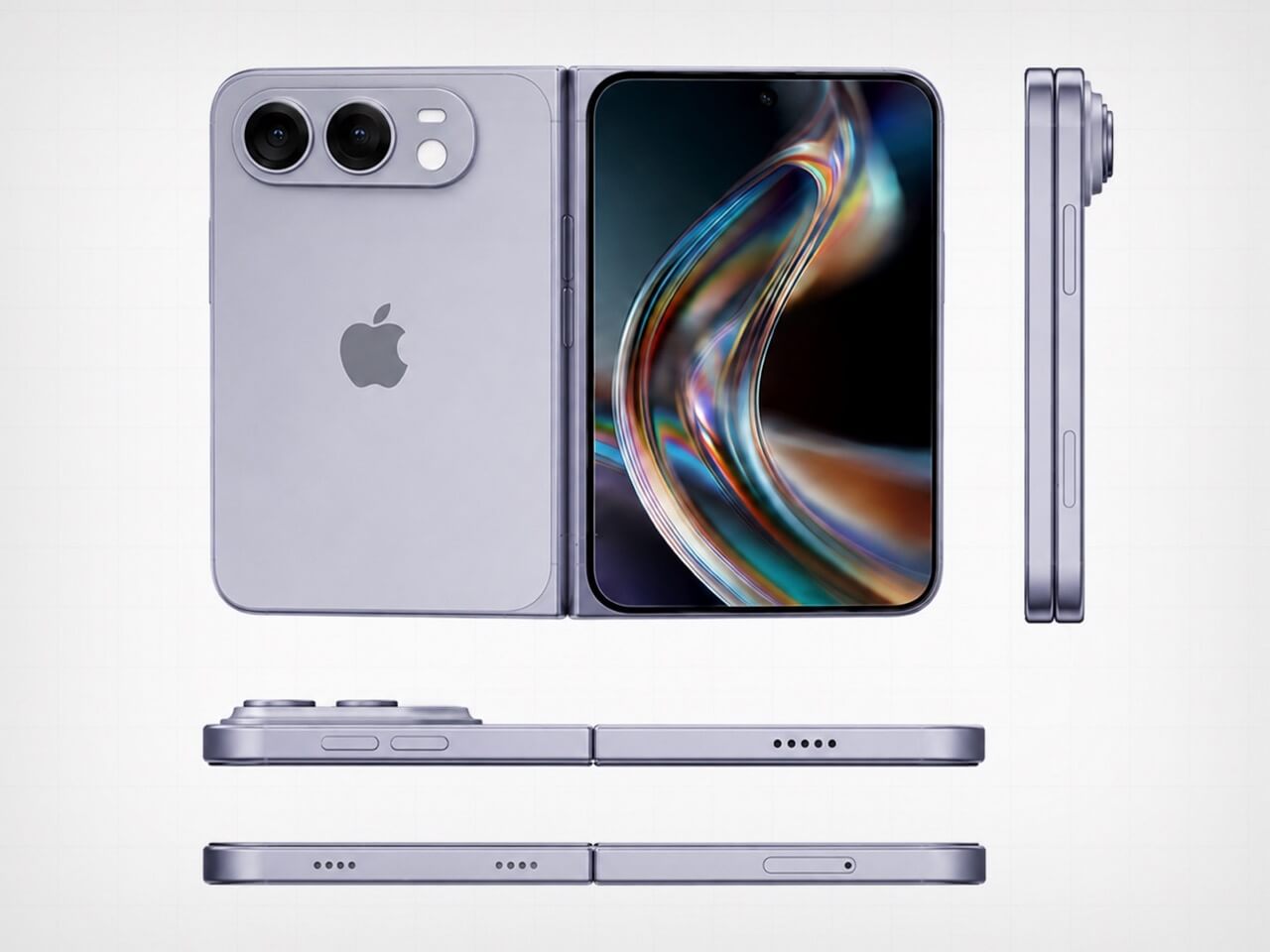
Apple saved its most aggressive design argument for last. The iPhone Ultra lands September 18 at $2,000, and the headline detail is the one that sounds impossible until you hold it — the visible crease is gone. Foldable phones have carried that horizontal line across the display since the format began, and every manufacturer called it a reasonable engineering compromise. Apple did not agree. The crease is gone, which means either the engineering problem is finally solved or a new one was quietly created in its place.

At $2,000, it is the most expensive iPhone Apple has shipped, and the price will be the loudest objection for most people. That is fair. It is also a phone that, when unfolded, gives you a display large enough to genuinely replace a small tablet, without the crease that made every foldable feel like a prototype. Whether the price is justified depends on how much that line across the screen has bothered you. For a certain buyer, the number will feel completely reasonable.

What We Like

  • The visible crease is gone, a problem every other foldable has simply accepted as permanent
  • September 18 availability means no waiting on a vague launch window

What We Dislike

  • $2,000 is a significant ask even for the most committed Apple buyer
  • At that price, the upgrade calculus is genuinely difficult for anyone coming from a recent iPhone

2. Dyson CameraJet Toothbrush

Dyson hid a 1mm camera directly under the brush head, and it reads 28 images a second while you brush. Within 100 milliseconds of detecting a gap in your coverage, the feedback loop kicks in. This is not an app that grades you on timing or buzzes when two minutes are up. It sees exactly where the bristles are not reaching and responds in real time, which is a fundamentally different answer to a problem the toothbrush industry has spent decades pretending does not exist.

The $499 price reads as absurd until you consider what it replaces. Most people spend years brushing the same spots and missing the same gaps, and no timer-based electric toothbrush has fixed that because timers do not know where your brush is. The camera does. Dyson also redesigned the toothpaste to work alongside the system, which suggests they understood that this product was not adding a feature to an existing object but rebuilding the assumptions around one entirely.

What We Like

  • A 1mm camera reading 28 frames per second gives real-time coverage feedback no other toothbrush can match
  • Dyson redesigned the toothpaste alongside the brush, showing the depth of thinking behind the product

What We Dislike

  • $499 is a difficult number for a toothbrush regardless of what it does
  • Proprietary toothpaste dependency is a meaningful lock-in that will frustrate buyers over time

3. ZWO Seestar S50 Pro

Astrophotography has always had a reputation problem. Getting a decent image of a nebula or galaxy traditionally meant a telescope, a tracking mount, a camera body, a set of filters, a laptop running capture software, and a location dark enough to make the whole trip worth it. The ZWO Seestar S50 Pro compresses that entire setup into something you could carry in a camera bag. That compression is not a minor convenience. It is the difference between astrophotography being a hobby you have and one you actually practice.

The S50 Pro is not a crowdfunded concept or a prototype. It is a shipping device sold through B&H, Amazon, and ZWO directly, part of a line that has been refining the smart telescope format for several years. For people who have wanted to try astrophotography without committing to a several-thousand-dollar hardware stack, it is the most credible entry point available right now, and the images it produces at this size are the kind that still feel surprising every time you see them.

What We Like

  • Compresses a full astrophotography rig into one bag without requiring a tracking mount or separate laptop
  • Sold through established US retailers with confirmed availability, not a waitlist product

What We Dislike

  • Smart telescopes in this class still need a reasonably dark sky to produce compelling results
  • The app-dependent workflow means the imaging experience is only as good as the software behind it

4. Camera With Digital Film


Every digital photo you have ever taken lives in a folder. Most of them stay there. The Camera with Digital Film changes the end of that process by ejecting a physical e-paper cartridge when you fire the shutter. Because e-paper holds its image without power, that small rectangle stays a picture permanently. You can lean it against a monitor, pin it to a wall, or hand it directly to the person you just photographed, and none of that requires a printer, an app, or a subscription to anything.

This is a personal maker build, not a retail product, which means you cannot order one. But the project is documented and open, which is its own kind of contribution. Instant cameras eject paper prints that fade over years. This ejects a display that does not. The object you walk away with is not a printout of a photo. It is the photo, held in a piece of hardware that draws no power to stay that way. The difference is not subtle once you hold one.

What We Like

  • E-paper holds the image without power indefinitely, making every shot a permanent physical object
  • The format lets you hand a photo to someone in the moment without a printer anywhere nearby

What We Dislike

  • This is a maker build with no purchase option — you build it, or you do not have it
  • E-paper’s limited color range means images read closer to a graphic print than a full-color photograph

5. ClearFrame Speaker + CD Player

The ClearFrame puts a CD player and a speaker into a frame you can see straight through, and the transparent design earns its place by making the mechanical parts of the player the visual feature rather than something hidden behind matte plastic. Watching a disc spin inside a clear housing is a different experience from staring at a closed box, and the ClearFrame is built around the idea that the hardware itself is worth looking at. The mechanism is the aesthetic. Nothing about that is accidental.

For anyone building a desk around objects that hold their own visually, the ClearFrame gives the CD player a reason to be out in the open rather than tucked away. The disc, the mechanism, the speaker housing: all of it visible, all of it intentional. It is not a nostalgia product. It is a design argument about what audio hardware looks like when it stops hiding its own workings.

Click Here to Buy Now: $240.00

What We Like

  • The transparent frame turns the mechanical components into the centerpiece rather than concealing them
  • Combines a CD player and speaker into one object with a coherent visual identity

What We Dislike

  • Listed under upcoming drops only, so exact pricing and shipping timeline are not yet confirmed
  • A clear housing will need regular cleaning to maintain the effect it is entirely built around

6. Cyberpunk 2077 x Commodore 64

The Commodore 64 launched in 1982. Cyberpunk 2077, the game, is set in 2077. The gap between those two years is roughly the entire history of consumer computing, and this collab leans into that distance rather than papering over it. The result sits at the intersection of two very specific aesthetics: the beige plastic of early home computing and the neon-drenched maximalism of Night City. Somehow they feel like they were always related. The Retro Games Ltd license makes it a real retail product, not a limited drop built on hype.

For people who grew up with a C64 or remember it as the machine that first felt like a home computer, this collab has a logic that is hard to argue with. Cyberpunk’s world is built on the idea that technology accumulates rather than replaces, and a computer from 1982 sitting alongside a game set in 2077 makes that point visually without needing to explain itself. It is the kind of object that earns its shelf space because it means something beyond what it does.

What We Like

  • The 95-year gap between the C64’s launch and the game’s setting is the entire premise, and the design commits to it
  • A real licensed retail product through Retro Games Ltd, not a concept or an event-exclusive run

What We Dislike

  • The appeal is almost entirely to people with an attachment to either the C64 or Cyberpunk 2077 specifically
  • As a niche collab object, it will be difficult to track down outside dedicated retro gaming retailers

7. OrigamiSwift Folding Mouse

Standard mice do not pack flat. They sit awkwardly in bags, take up more space than their function warrants, and feel like a compromise every time you travel with a laptop. The OrigamiSwift uses an origami-influenced folding structure that collapses the mouse into something genuinely flat: the kind of object you forget is in your bag until you need it.

Travel mice as a category have existed for a long time, but most of them solve portability by making the mouse physically smaller rather than foldable. Smaller mice are less comfortable to use for any extended session. The OrigamiSwift’s approach is different: it folds to pack and unfolds to a full grip, which means you are not choosing between portability and comfort every time you pull it out. For anyone who works from multiple locations, that trade-off has been the quiet frustration with every travel mouse that came before this one.

Click Here to Buy Now: $85.00

What We Like

  • Folds flat for packing without reducing grip size for use, a problem most travel mice simply ignore

What We Dislike

  • Folding mechanisms introduce hinge wear over time that rigid designs never have to account for
  • Travel-first positioning may mean trade-offs in sensor performance compared to a dedicated desk mouse

8. ROG Ally X Dual-Screen Mod

Dual-screen handhelds usually mean buying an entirely new device built around that feature from the ground up. This ROG Ally X mod skips that purchase. It snaps a 120Hz secondary display onto an existing Ally X using a mount system that removes just as easily, which means you get the dual-screen setup when you want it and a standard handheld when you do not. The engineering problem this solves is not new, but the solution here is additive rather than architectural, which makes it the more interesting answer.

It is a maker project, which means you build it rather than buy it, and the plans are documented and freely available. That limits its audience to people comfortable with a hobbyist build. Within that group, it is one of the more compelling uses of a gaming handheld’s form factor to surface this year. The 120Hz refresh rate on the secondary screen is not a placeholder spec either — it keeps up with the primary display rather than undercutting it, which has been the consistent weakness of every dual-screen attempt before this one.

What We Like

  • Snaps on and off without permanently modifying the Ally X itself
  • 120Hz on the secondary screen matches the primary display rather than being a visible step down

What We Dislike

  • No kit to order — you source and assemble the components yourself, or you do not have it
  • A second active display will draw additional power from the Ally X battery, which is already a known constraint on the device

September is not a month that usually swings this hard. Three products you can buy today, two from the YD shop, a maker build you can start this weekend, and an iPhone that lands in 16 days at a price that will generate more conversation than almost anything Apple has shipped in years. The range across eight picks is wider than usual, and that width is the point.

The through line is stubbornness. Every one of these objects exists because someone decided the accepted version of the thing was not good enough and built a different answer. A crease-free fold. A toothbrush that watches you brush in real time. A CD player you can see straight through. A photo that ejects itself from a camera. That kind of thinking does not happen every month. September had a good one.

The post The 8 Best Gadgets of September 2026 first appeared on Yanko Design.

  • ✇Yanko Design
  • Acer’s Packard Bell Crashed IFA 2026 Like a Box of Crayons
    Packard Bell spent a century teaching people that new technology doesn’t have to feel intimidating, and its 100th birthday present to itself leans hard into that idea. Under Acer’s ownership, the brand relaunched at IFA 2026 with a philosophy it calls “Tech it easy,” built around a lineup that trades beige plastic and quiet corporate design for colors loud enough to notice from across a room. Four products anchor that comeback, and each one argues that everyday tech gains something when it stop
     

Acer’s Packard Bell Crashed IFA 2026 Like a Box of Crayons

Par : JC Torres
3 septembre 2026 à 06:07

Packard Bell spent a century teaching people that new technology doesn’t have to feel intimidating, and its 100th birthday present to itself leans hard into that idea. Under Acer’s ownership, the brand relaunched at IFA 2026 with a philosophy it calls “Tech it easy,” built around a lineup that trades beige plastic and quiet corporate design for colors loud enough to notice from across a room. Four products anchor that comeback, and each one argues that everyday tech gains something when it stops taking itself so seriously.

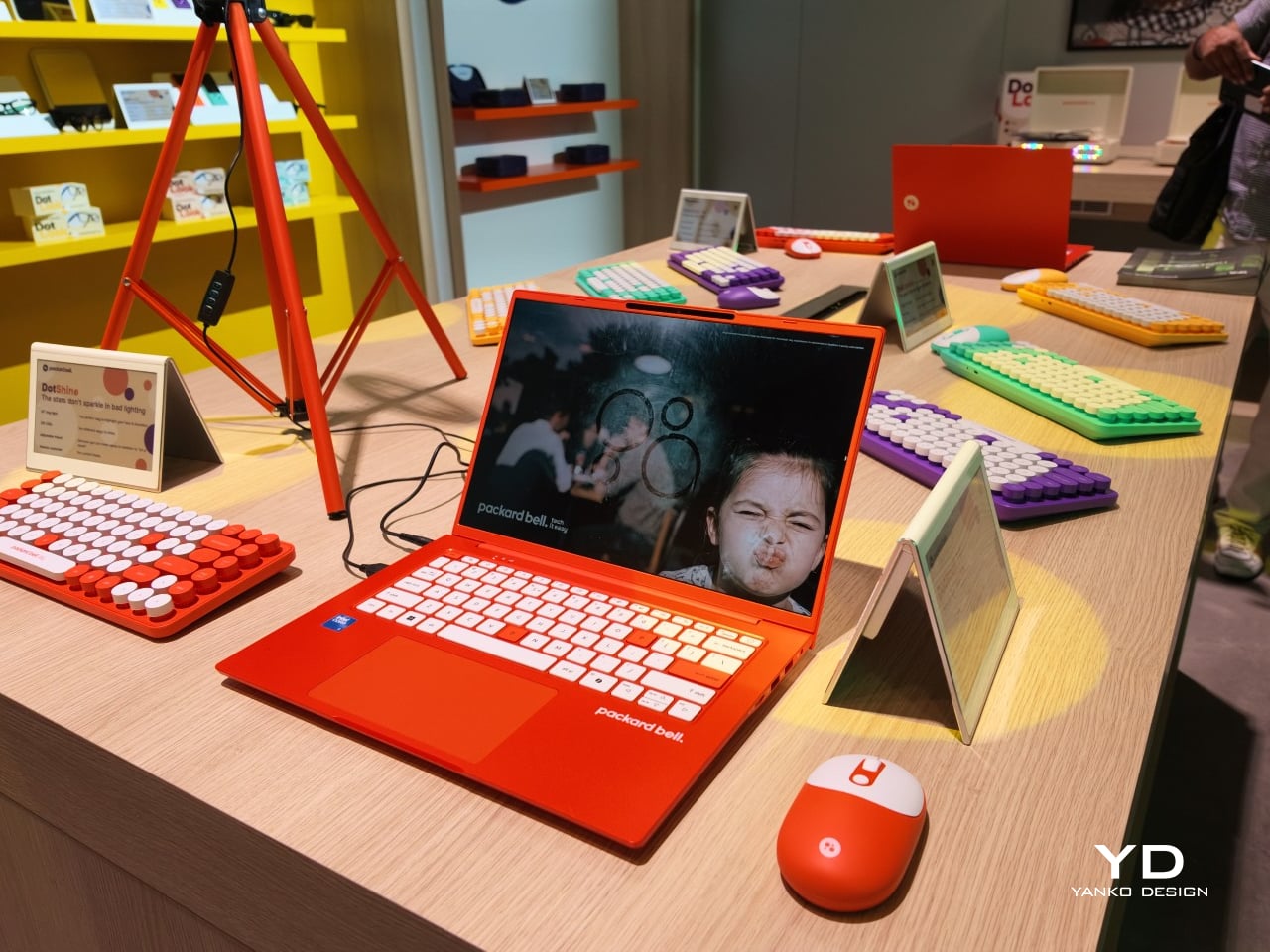
The DotBook carries the heaviest expectations as the collection’s flagship, a 14.5-inch laptop finished in a red-orange shell bright enough to spot on a crowded coffee shop table. Weighing under 1.3 kg and measuring just 17.9mm thin, it’s built for browsing, streaming, and everyday work rather than chasing benchmark scores, backed by up to 512GB of storage and 16GB of memory running quietly under Windows 11. It’s a laptop designed to disappear into a bag, not a spec sheet debate.

Designer: Acer

Where the DotBook plays it relatively straight, the DotLoop commits fully to spectacle. Housed inside an actual briefcase shell with a 1970s silhouette, the turntable pops open to reveal a working tonearm flanked by RGB-lit speaker grilles that glow while a record spins. Two built-in 3W speakers handle sound on their own, though Bluetooth and RCA outputs let the DotLoop hand audio off to a proper stereo system whenever the moment calls for something louder.

That willingness to have fun with format extends into the DotLine, a feature phone built for anyone tired of feeding a smartphone’s constant appetite for attention. A 2.8-inch display and physical keypad keep the experience deliberately simple, while an 1800mAh battery stretches across roughly two weeks between charges, a number that sounds almost mythical next to a modern flagship’s overnight anxiety. Four color options keep it from feeling like a consolation prize.

Rounding out the focus lineup, the DotCombo bundles a keyboard and mouse into a single color-matched purchase, eliminating the usual mismatched beige-on-black desk setup that so many peripherals default to. Both pieces run on rechargeable batteries good for hundreds of charge cycles, connecting over Bluetooth or a 2.4GHz receiver without a single AA battery required. Round keycaps borrowed from typewriter design give the whole thing a tactile, almost toy-like presence on a desk.

Beyond these four, Packard Bell rounds out its centennial collection with a portable speaker (DotTune), audio glasses (DotLook), a ring light for creators (DotShine), matching headphones (DotBass), and even a countertop food steamer (Steasy), all sharing the same saturated color palette and straightforward pricing. None of them ask for much attention individually, but together they paint a lineup unwilling to blend into a beige office shelf.

Pricing stays approachable across the board, with the DotBook starting around €499 (around $578), the DotLoop at €149 (around $173), the DotLine at €69 (around $80), and the DotCombo at just €39 (around $45). Packard Bell’s return proves that a century-old brand can still find something new to say, mostly by refusing to whisper it.

The post Acer’s Packard Bell Crashed IFA 2026 Like a Box of Crayons first appeared on Yanko Design.

  • ✇Yanko Design
  • Finally, a Smart Home You Can Control Without Your Phone
    For some years now, the idea of a smart home has been more than just science fiction. We’ve watched lights, thermostats, speakers, security systems, and countless other devices become “smarter.” One issue with these connected homes, though, is that most of their controls are app-based, meaning you always need your phone handy just to turn something on or off. That’s why a dedicated smart home hub is such a welcome idea: a control center that doesn’t live inside your phone. The Homey Portal, cre
     

Finally, a Smart Home You Can Control Without Your Phone

3 septembre 2026 à 05:15

For some years now, the idea of a smart home has been more than just science fiction. We’ve watched lights, thermostats, speakers, security systems, and countless other devices become “smarter.” One issue with these connected homes, though, is that most of their controls are app-based, meaning you always need your phone handy just to turn something on or off. That’s why a dedicated smart home hub is such a welcome idea: a control center that doesn’t live inside your phone.

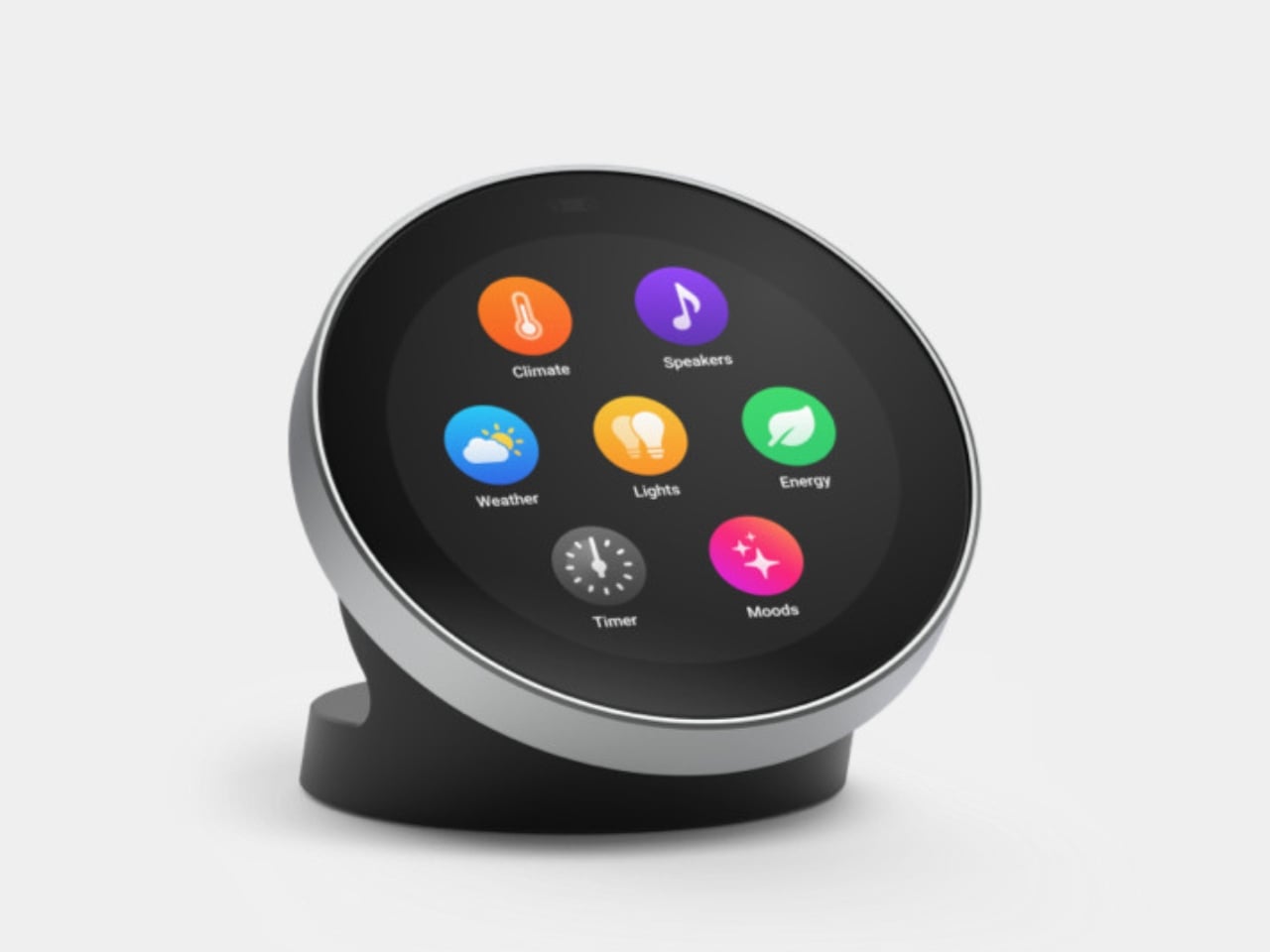
The Homey Portal, created by Dutch company Athom, is a physical smart home controller with a tactile surface that helps you manage all your connected devices. It lets anyone in your household do things like turn the lights on or off, see who’s at the door, check how much energy you’re using, find out what’s playing on your speaker, and trigger various other smart functions you’ve set up.

Designer: Athom

Having a physical smart home controller can be more convenient than relying on a phone-based one, and Homey proves it with this newly launched device. It features a 2.8-inch round touchscreen wrapped in a stainless-steel rotary ring. You can tap the screen to select and toggle your smart devices on or off, then twist the rotary dial to adjust things like brightness, volume, and temperature.

There’s a lot you can do with this little hub. If you have smart lights, you can turn them on and off and then twist the dial to dim or brighten them. It can also show the real-time temperature and humidity of your room, and you can twist the dial to adjust the temperature accordingly. If you’re playing something on your smart speaker, the screen displays the artist, track, and even the album art. From there, you can twist the dial to adjust the volume or swipe on the touchscreen to skip to the next song or go back to the previous one.

You can also set up Flow-based alerts, like a reminder to water your plants or a snapshot from your doorbell camera showing who just rang the bell. If you pair the Portal with a Homey Energy Dongle or another supported energy tracker, you can even check real-time household wattage, solar yield, and the cheapest hours to run your appliances.

The device itself is small enough to mount on a wall or simply place on your desk, side table, or countertop, whichever works best for you and the people you live with. It’s designed to work with the more than 70,000 devices from 2,000-plus brands that Homey already supports, as well as the broader Homey ecosystem, including Homey Pro, Homey Pro Mini, and Homey Cloud. The Homey Portal is available for pre-order now at an introductory price of $249, with the regular price set to rise to $299 once the first batch sells out. Orders are expected to start shipping before the end of the year, and every unit comes with both a desk stand and a wall mount included in the box, so you won’t need to buy any extra accessories to set it up wherever you like.

At its core, the Homey Portal is trying to solve a problem most of us didn’t even realize we’d accepted: that “smart” homes had quietly made simple tasks more complicated. Turning on a light shouldn’t require unlocking a phone, opening an app, and tapping through menus, and the Portal brings back the simplicity of just walking up to a dial and giving it a twist.

It also solves a more personal problem, since not everyone in a household wants to install an app or learn a new system just to turn off a lamp. Because each Portal can be placed in a specific room and used by anyone who walks by, it turns the smart home into something the whole family can actually share, not just the one person who set it all up. Whether it ends up on a kitchen wall, a bedroom nightstand, or a home office desk, it’s a small device aiming to make an increasingly complicated corner of our homes feel simple again.

The post Finally, a Smart Home You Can Control Without Your Phone first appeared on Yanko Design.

  • ✇Yanko Design
  • This $119 Ultrasonic Cutter Sense Materials And Auto-Adjusts To Cut EVA Foam, Resin, PLA 3D Prints
    There are power tools, and then there are smart tools. A power tool gives you brute force; a smart tool gives you controlled, consistent results. Think of a simple drill that just spins versus one that manages its own torque to avoid stripping a screw. For delicate work like trimming EVA foam for a cosplay project or cleaning up support structures on a 3D print, you definitely want the smart one. The problem is, most handheld cutters are pretty basic, giving you one speed and just hoping for th
     

This $119 Ultrasonic Cutter Sense Materials And Auto-Adjusts To Cut EVA Foam, Resin, PLA 3D Prints

2 septembre 2026 à 21:45

There are power tools, and then there are smart tools. A power tool gives you brute force; a smart tool gives you controlled, consistent results. Think of a simple drill that just spins versus one that manages its own torque to avoid stripping a screw. For delicate work like trimming EVA foam for a cosplay project or cleaning up support structures on a 3D print, you definitely want the smart one. The problem is, most handheld cutters are pretty basic, giving you one speed and just hoping for the best.

The SonicMax Slice 10 is aiming for that higher IQ. It’s a cordless ultrasonic cutter that senses the material you’re cutting and adjusts its own power output in real time. Slice through dense plastic and it pushes harder; trim the thin walls of a resin print and it eases back. This adaptive system, combined with cooling that prevents heat-related power drops, makes it feel like proper workshop equipment in the palm of your hand. It runs at 40kHz, delivers up to 50 watts of dynamic peak power, and does all of this without a single cable getting in your way.

Designer: SonicMax

Click Here to Buy Now: $119 $215 (45% off). Hurry, only 13/500 left! Raised over $124,000.

Most ultrasonic cutters on the market use transducers with a mechanical quality factor, or Qm, somewhere between 150 and 250. A higher Qm means the transducer converts electrical energy into vibration more efficiently, which directly translates to less heat generated during use. SonicMax claims a Qm of over 500 for the Slice 10, and lab data backs that up with a verified measurement of 541.1. That’s roughly two to three times higher than a typical competing tool, and it’s the foundational reason the Slice 10 can sustain longer sessions without thermal drama. That single transducer decision cascades into everything else, from runtime and cut quality to how comfortable the tool actually stays in your hand.

As the blade meets resistance, the Slice 10’s Smart Material Auto-Detection reads that feedback and adjusts power output and vibration frequency without you touching anything. Cutting through a stiff chunk of EVA foam feels different from trimming the thin walls of a resin print, and the tool responds to each material accordingly. You’re not locked into a fixed setting that works okay for most things but perfectly for nothing. The system also preserves cut quality across a long session, where material resistance can shift as the blade warms. The result is consistent cuts from the first pass to the last, regardless of what you’re running the blade through.

Heat is the reason most cordless ultrasonic cutters force you to stop every five to ten minutes, and the Slice 10 attacks that problem from two directions. Corded bench tools sidestep this issue by drawing steady power and dissipating heat more easily, but you give all of that up the moment you cut the cord. The high-efficiency transducer generates less heat from the start, and the built-in active cooling fan manages whatever thermal load does build up during a session. Overheat protection kicks in automatically at 80 degrees Celsius at the motherboard level, so the tool protects itself without you having to babysit it. You only appreciate how good this is after you’ve spent a session on a cutter that kept shutting itself off on you mid-cut.

A 5000mAh 21700 lithium-ion battery powers the Slice 10, and SonicMax made it user-replaceable, which you’ll end up appreciating far more than any spec sheet number. The 21700 is a high-performance cell format found in premium flashlights and power tools, so sourcing replacements from SonicMax or compatible third-party brands should never be a problem. SonicMax’s own branded replacement cell is rated for 500 charge cycles at 80% capacity retention, a reasonable lifespan for a tool you’re actually putting to work regularly. An 18W USB-C pass-through charging system brings it from zero to full in about 70 minutes, and the tool keeps running while plugged in. Claimed runtime sits at up to four hours, and when you run low mid-project, swapping in a spare takes seconds.

Blade choice gives the Slice 10 a lot of its bench-tool personality. SonicMax offers five blade styles that let the same handheld body take on very different jobs: a Standard Utility Blade for everyday trimming, a Precision Long Blade for tighter access and more delicate reach, a Fine Chisel Blade for careful cleanup work, a Heavy Duty Chisel Blade for more aggressive material removal, and a Wide Flat Scraper Blade for broader surface work. That range matters because it turns the Slice 10 into something closer to a compact cutting system than a one-trick knife. If you’re the kind of maker who bounces between foam, plastic, supports, edges, and surface cleanup in the same afternoon, this is where the tool starts looking properly versatile.

Lift-to-Activate sensing turns the tool on when you pick it up and off when you set it down, keeping your fingers away from controls mid-session and preventing accidental activation on the bench. A small OLED display shows real-time power output and battery level, so you’re never left guessing how much runtime remains. Built-in LED lighting illuminates the cut line, which sounds like a minor detail until you’re trying to trace a clean edge on a dark-colored print at your desk at some ungodly hour. Auto-shutdown kicks in after five minutes of idle, and low-battery protection activates before the cell drops to a damaging voltage. Together, these details make the Slice 10 feel like a tool that respects your workflow rather than constantly asking you to manage it.

The Slice 10 measures 260.5mm long and 28mm across, weighing 236 grams, keeping it firmly in single-hand, pen-grip territory across long sessions. Just the Slice 10 is available for a discounted $119, and ships with 10 replaceable Standard Utility blades. Upgrade to the Maker’s Bundle for $169 and you get the Slice 10 along with 50 blades spread across the five blade profiles (standard, precision long, fine chisel, heavy duty chisel, and flat scraper) as well as a 5000mAh replacement battery. If you’re looking for versatility and pushing your prints to the max, the $50 price bump does bring a fair share of value. You can also buy extra blades and batteries as add-ons. Shipping is expected to begin mid-October 2026 with worldwide delivery available, and SonicMax has not publicly confirmed warranty terms at the time of writing.

Click Here to Buy Now: $119 $215 (45% off). Hurry, only 13/500 left! Raised over $124,000.

The post This $119 Ultrasonic Cutter Sense Materials And Auto-Adjusts To Cut EVA Foam, Resin, PLA 3D Prints first appeared on Yanko Design.

  • ✇Yanko Design
  • Finally, a Compass That Works Without Opening Google Maps
    Anyone who has wandered around an unfamiliar neighborhood searching for a boutique that Google Maps insists is “on your left” when it is actually tucked behind a parking garage knows the specific frustration I am talking about. Small, independent stores rarely have the budget for a flashy storefront, and a pin on a map that is close enough to be tantalizing and far enough to be maddening is usually all you get. A Pow Studio designed something to fix exactly that: a small NFC-embedded fixture ca
     

Finally, a Compass That Works Without Opening Google Maps

2 septembre 2026 à 17:30

Anyone who has wandered around an unfamiliar neighborhood searching for a boutique that Google Maps insists is “on your left” when it is actually tucked behind a parking garage knows the specific frustration I am talking about. Small, independent stores rarely have the budget for a flashy storefront, and a pin on a map that is close enough to be tantalizing and far enough to be maddening is usually all you get. A Pow Studio designed something to fix exactly that: a small NFC-embedded fixture called the Navigation Tool that turns a single phone tap into a live compass, guiding you down the block to a physical destination without asking you to download anything.

That solves the first problem. The second one is subtler but just as real. Even after you find the store and walk through the door, most brands have no clean way to hand you off to their digital world. You try something on, feel vaguely inspired, and leave with no easy path to the website, the product specs, or the broader catalog. The Navigation Tool closes that gap too. The same NFC chip, this time embedded into the store’s hanging display system, redirects your phone tap to an online page loaded with product details and brand information. Two taps, two problems solved, zero apps required.

Designer: A Pow Studio

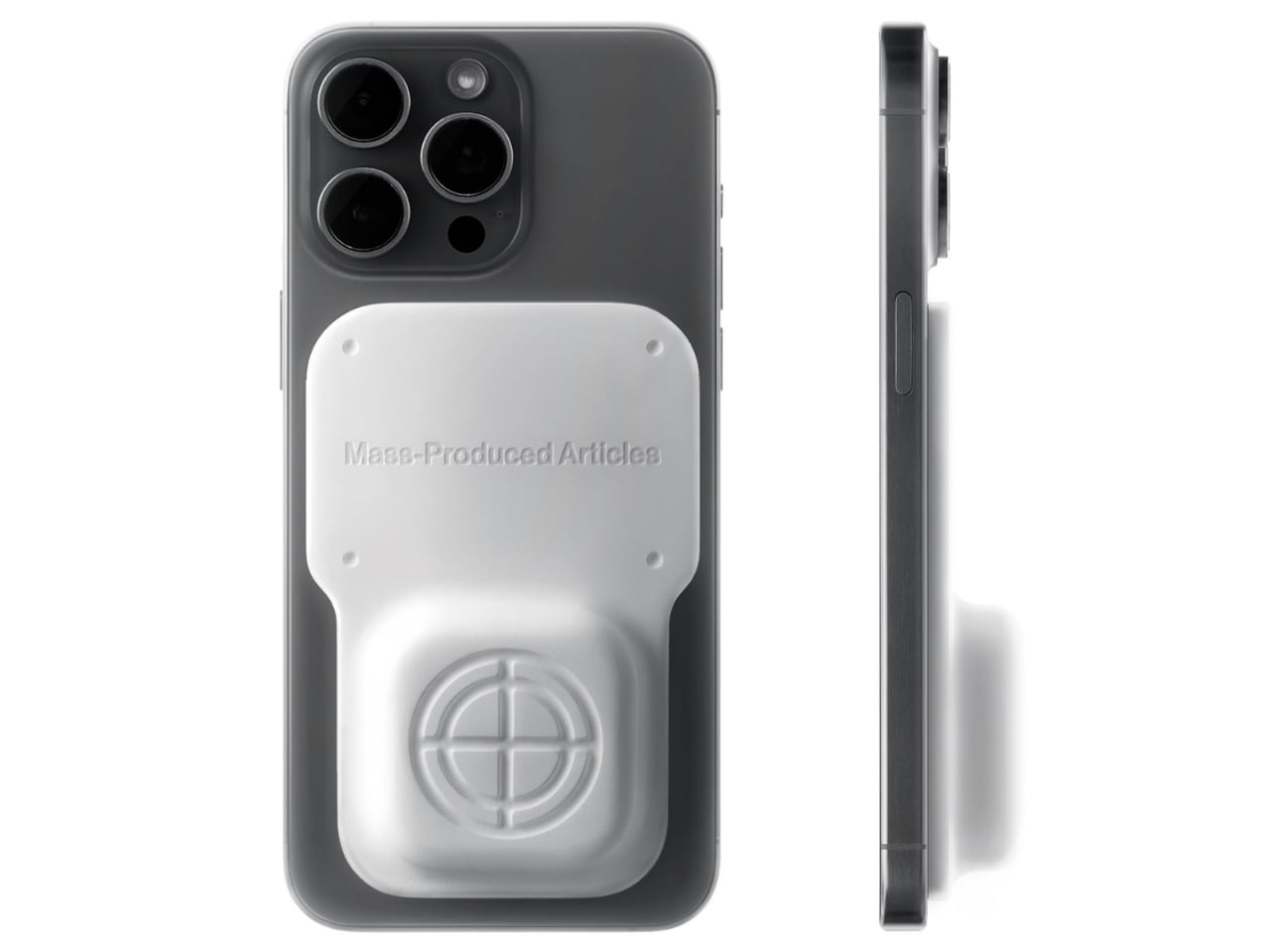
The mechanics are genuinely elegant. Outside, you tap your phone on the tool and a search bar appears asking for the coordinates of your destination. The system pulls from Location-Based Services and your phone’s built-in gyroscope to calculate real-time distance and direction, then renders everything as a clean, minimal compass interface on your screen. MagSafe compatibility is built in so the phone can physically attach to the tool while you navigate, which is a small detail but the kind that signals someone actually thought about what your hands are doing when you are half-lost and moving.

No app to download, no QR code cluttering a window decal, no clunky onboarding screen asking you to create an account you will use exactly once. You tap, and it works, the same quiet mechanism already living in Apple Pay or a subway fare card, just pointed at a completely different problem. American shoppers are already fluent in tap-to-pay and tap-to-unlock behavior, so repurposing that same gesture for navigation feels less like a gimmick and more like an overdue extension of something we already trust.

It also lands at an interesting moment for retail. Brick-and-mortar shopping has been quietly reasserting itself as something people actually want, not just tolerate, but brands still need their physical spaces to feed the digital ecosystem that keeps the business running. A tool like this treats the store not as a dead end or a photo backdrop but as one stop in a longer, connected journey. That feels like a more honest way to think about retail design than another Instagram wall ever could.

The visual language matches the intention. The compass interface on screen is stripped back to the point of being almost architectural: a circle, a crosshair, a tilt reading, a direction bearing. Nothing decorative, nothing unnecessary. It looks like something a navigator or a cinematographer would recognize before a tech blogger would, which feels right. Precise without being cold, minimal without being precious.

I do wonder about scale. A single boutique installing this is a lovely, considered gesture. A mall trying to retrofit hundreds of storefronts with individual NFC compass units is a different logistical conversation entirely, and I am not convinced every brand needs this level of ceremony just to get someone through the door. But as a proof of concept, it is a genuinely smart answer to a problem most retailers pretend does not exist. Sometimes the best design solution is not a flashier app. It is a small, physical object that refuses to overcomplicate the walk from curiosity to the front door.

The post Finally, a Compass That Works Without Opening Google Maps first appeared on Yanko Design.

Garmin Fenix 9 vs Fenix 9 Pro: Is the $100 Upgrade Worth It?

2 septembre 2026 à 13:51

The $100 jump to Garmin’s fēnix 9 Pro buys a titanium case and access to solar and inReach configurations, not a completely different watch platform.

The post Garmin Fenix 9 vs Fenix 9 Pro: Is the $100 Upgrade Worth It? appeared first on TechRepublic.

Xbox Series X25 vs Xbox Series X: Is the $100 Premium Worth It?

2 septembre 2026 à 12:33

Xbox Series X25 costs $100 more than the standard Series X without adding performance. Here’s what the anniversary premium actually buys.

The post Xbox Series X25 vs Xbox Series X: Is the $100 Premium Worth It? appeared first on TechRepublic.

Sennheiser Momentum True Wireless 5: Key Features and Price

2 septembre 2026 à 10:26

Sennheiser’s $299.95 Momentum True Wireless 5 adds user-replaceable batteries to both the earbuds and charging case, plus longer battery life and Bluetooth 6.0.

The post Sennheiser Momentum True Wireless 5: Key Features and Price appeared first on TechRepublic.

HONOR Watch 6: Everything You Need to Know

2 septembre 2026 à 09:43

HONOR Watch 6 combines long battery life, dual-band GPS, health tracking, and NFC, but some features depend on your phone, bank, and region.

The post HONOR Watch 6: Everything You Need to Know appeared first on TechRepublic.

  • ✇Yanko Design
  • This Foldable A2 Scanner Fits in a Bag and Doubles as a Live Presenter
    Scanners haven’t changed much in how they occupy a workspace. A flatbed sits in the middle and claims that real estate whether it’s in use or not. Overhead models are more flexible, but they still tend to take up a fixed spot in any setup. For anyone working from a compact home office or shared studio, that trade-off rarely gets a proper answer. Joyusing’s ScanMax 320 approaches the problem from a different angle, quite literally. Rather than occupying the center of a workspace, it’s built to s
     

This Foldable A2 Scanner Fits in a Bag and Doubles as a Live Presenter

Par : JC Torres
22 août 2026 à 21:45

Scanners haven’t changed much in how they occupy a workspace. A flatbed sits in the middle and claims that real estate whether it’s in use or not. Overhead models are more flexible, but they still tend to take up a fixed spot in any setup. For anyone working from a compact home office or shared studio, that trade-off rarely gets a proper answer.

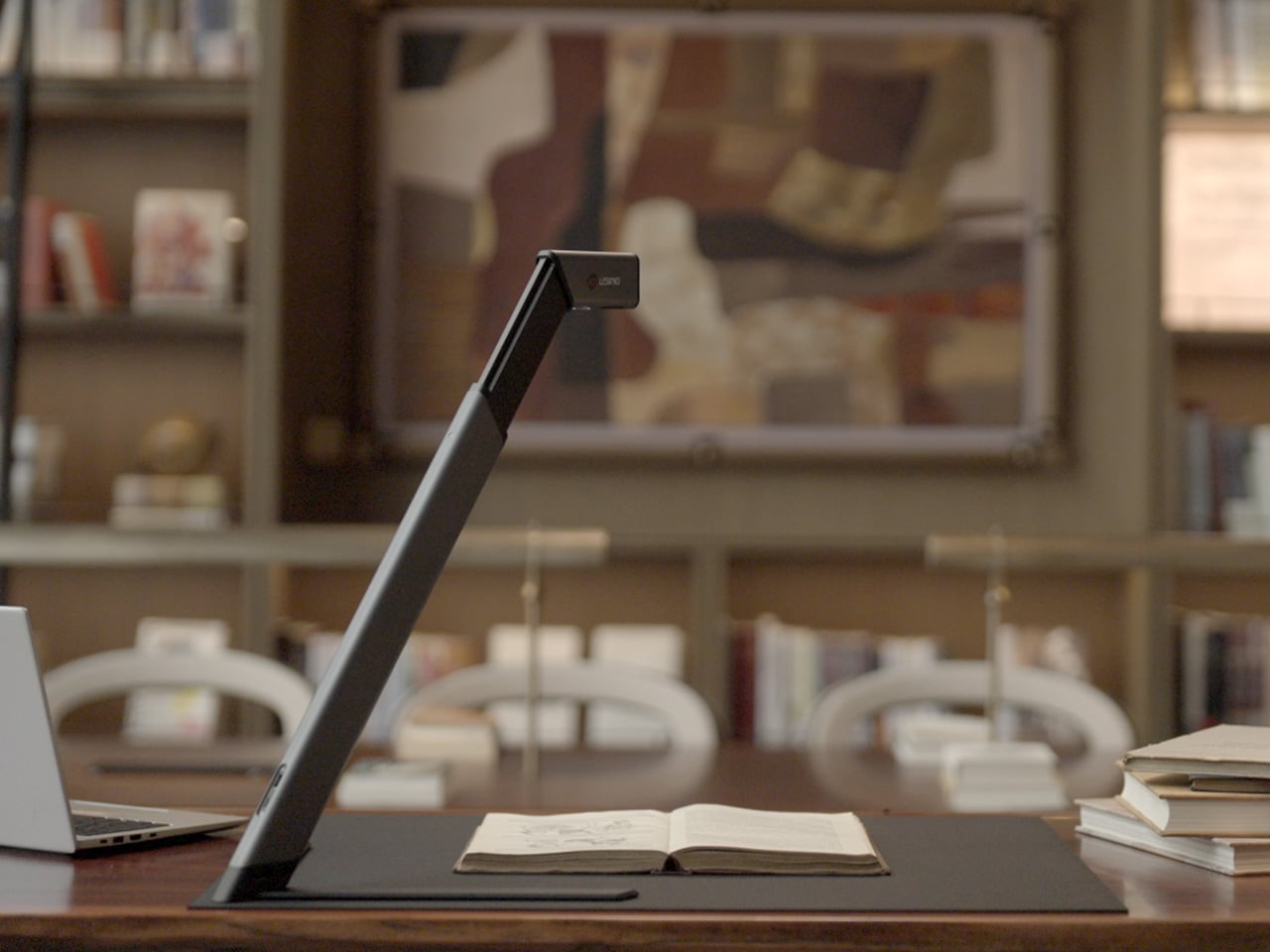
Joyusing’s ScanMax 320 approaches the problem from a different angle, quite literally. Rather than occupying the center of a workspace, it’s built to sit at the edge of a desk, positioned in the corner while its arm reaches overhead. It handles documents, books, artwork, and large-format materials up to A2 size, without taking over the surface it’s meant to serve.

Designer: JOYUSING

Click Here to Buy Now: $379 $649 (42% off). Hurry, only 32/220 left! Raised over $88,000.

Folded down, the ScanMax 320 measures 355mm x 68mm x 51mm, slim enough to slip into the included carrying bag and move between rooms without any effort. It runs entirely on USB-C power, so getting started means plugging in a single cable. There’s no proprietary adapter to hunt down, no driver installation ritual, and nothing complicated to deal with before the first scan. You can directly use the ScanMax 320 as a live presenter camera, and scanning as well as other advanced features simply require the free Joyusing Scanner intelligence software.

The shooting area extends to a full A2, or 594mm x 420mm, with a 32-megapixel sensor capturing at up to 380 DPI. That covers blueprints, double-page book spreads, large technical drawings, and oversized artwork in a single pass. An intelligent auto-switching system detects whether the material is A2 or A3 and adjusts accordingly, so there’s no manual input needed between sessions.

Overhead scanners tend to have a lighting problem, particularly near edges or when capturing materials that aren’t perfectly flat. The ScanMax 320 uses a rectangular illumination system shaped to match the scanning area, distributing light evenly and keeping shadows from washing out fine detail near the sides. Three brightness levels, at 30%, 70%, and 100%, are accessible with a single touch for quick adjustments in different environments.

Book scanning is where overhead devices tend to earn their keep, and also where they tend to frustrate. Pages curve at the spine, fingers get in the way, and binding shadows creep in from the edges. The ScanMax 320’s software handles most of this automatically, applying auto-flattening, finger removal, de-skewing, and shadow removal without manual adjustment. Book mode, paired with the included finger cots, keeps pages steady for continuous capture.

Once everything is captured, the software’s OCR engine converts printed text into editable, searchable files, with support for 180 languages and export options including Word, PDF, and TXT. A page of Japanese text, a technical report, or a multilingual research paper can go from physical to fully searchable in seconds, turning raw captures into documents you can actually search, copy, and share.

What’s less obvious about the ScanMax 320, and arguably more interesting, is that it also functions as a live visual presenter. Point it at a printed page, a hand-drawn sketch, or a physical object, and the feed goes live to whatever screen or projector it’s connected to. For a teacher going through annotated notes or a designer reviewing a layout with a client, that extra mode earns its place quickly.

Software compatibility covers Windows, macOS, and several Linux distributions including CentOS, Ubuntu, and Debian, though macOS users will find some features limited compared to the Windows version. Everything connects over USB-C, keeping the setup free of dongles and extra cables. Built-in annotation tools allow for direct markup of scanned content, which makes it easier to prepare materials before presenting or sharing them.

There’s something refreshingly considered about a scanner built to work with your desk rather than on top of it. The ScanMax 320 doesn’t ask you to clear space or rearrange anything. It folds, parks at the edge, and gets on with the job. Whether you’re archiving a collection, digitizing a sketchbook, or presenting something in a meeting, the fact that it stays in its corner is, in itself, the point.

Click Here to Buy Now: $379 $649 (42% off). Hurry, only 32/220 left! Raised over $88,000.

The post This Foldable A2 Scanner Fits in a Bag and Doubles as a Live Presenter first appeared on Yanko Design.

Samsung Galaxy H1 Leak Points to New Over-Ear Headphones: What We Know

17 août 2026 à 07:10

Samsung may be preparing a return to full-size wireless headphones with a device reportedly known as Galaxy H1. App code offers the first clues, but key details remain unconfirmed.

The post Samsung Galaxy H1 Leak Points to New Over-Ear Headphones: What We Know appeared first on TechRepublic.

❌