
❌

Vue normale

  • ✇Yanko Design
  • Hero Keyboard Packs a Windows 11 PC and Borrows Your Tablet’s Screen
    Carrying a tablet and a laptop means packing two screens when what you really need is another operating system. Hero Devices’ upcoming Hero Keyboard puts a Windows 11 PC inside a keyboard with its own trackpad and battery, leaving the display to a compatible tablet or monitor. The idea is to carry your computer without committing to the screen attached to it. That makes Hero look rather like a laptop that’s misplaced its lid. Its Midnight Merlot enclosure has rounded corners, black keys, and a
     

Hero Keyboard Packs a Windows 11 PC and Borrows Your Tablet’s Screen

Par : JC Torres
2 novembre 2026 à 12:20

Carrying a tablet and a laptop means packing two screens when what you really need is another operating system. Hero Devices’ upcoming Hero Keyboard puts a Windows 11 PC inside a keyboard with its own trackpad and battery, leaving the display to a compatible tablet or monitor. The idea is to carry your computer without committing to the screen attached to it.

That makes Hero look rather like a laptop that’s misplaced its lid. Its Midnight Merlot enclosure has rounded corners, black keys, and a broad trackpad, with none of the hinge hardware anchoring a display behind it. The aluminum body measures about 10.04 by 7.48 inches and just 0.46 inches thick, although that compact footprint doesn’t leave room for a separate number pad.

Designer: Hero Devices

Inside, Hero specifies an Intel Core Ultra 5 125H processor, 16 GB of memory, and a 512 GB SSD. Windows runs on that hardware, not on the tablet, which simply supplies the display and supported touch inputs. That’s critical when you need a Windows application your tablet can’t run natively, without replacing the mobile software you already enjoy using on it.

Using a tablet as the display takes some software, though. Hero Port uses a standard USB-C data cable for wired video, while touch and stylus inputs travel separately over Bluetooth Low Energy. Hero’s companion app targets iPadOS 17 and later and Android 7 and later, but its product page still marks it as forthcoming. iPhone users are directed to third-party alternatives, such as Duet.

At a desk, a compatible USB-C monitor can provide both a display connection and power through one cable. Move elsewhere, and the same files and applications travel inside the keyboard, rather than needing another PC to pick up the work. The optional $50 Sidekick case gives those separate parts a home, carrying Hero and an 11-inch iPad while doubling as a tablet stand.

Hero has a role when you don’t need Windows. Switch off its PC, and the keyboard and trackpad can still serve a tablet over Bluetooth. You could answer messages in your tablet’s native apps, then switch back to Windows for work that needs it. There’s no need to pack a second keyboard just because you’ve changed operating systems rather than changing screens.

Of course, leaving out the screen doesn’t make the rest weightless. Hero alone weighs about 1.59 pounds, before adding a tablet, stand, or charger. The company promises up to nine hours of battery life and includes a 100-watt USB-C charger, but those figures don’t establish how long your workload will last. The tablet supplying your display also has its own battery to manage.

The Founders Edition is listed at $999 for preorder in the US and Canada, with initial shipments planned for the fourth quarter of 2026. That’s a substantial price for something that still needs a separate display. Its appeal depends on already owning the right screen and wanting Windows enough to accept a cable, an app, and a less self-contained setup than a laptop.

The post Hero Keyboard Packs a Windows 11 PC and Borrows Your Tablet’s Screen first appeared on Yanko Design.
  • ✇Yanko Design
  • This chrome skeleton is the most extra mechanical keyboard ever made
    In 2006, Dutch designer Joris Laarman fed a bone growth algorithm into a computer and got a chair that looked grown rather than built. His Bone Chair became a landmark of generative furniture, and every hollowed out, nature mimicking object since has lived in its shadow. Zaha Hadid’s flowing buildings, Ross Lovegrove’s organic forms, and Neri Oxman’s computational experiments all share that family tree. Chairs, buildings, and lamps have all been invited to the reunion. Keyboards, strangely, nev
     

This chrome skeleton is the most extra mechanical keyboard ever made

13 octobre 2026 à 20:30

In 2006, Dutch designer Joris Laarman fed a bone growth algorithm into a computer and got a chair that looked grown rather than built. His Bone Chair became a landmark of generative furniture, and every hollowed out, nature mimicking object since has lived in its shadow. Zaha Hadid’s flowing buildings, Ross Lovegrove’s organic forms, and Neri Oxman’s computational experiments all share that family tree. Chairs, buildings, and lamps have all been invited to the reunion. Keyboards, strangely, never got the invite.

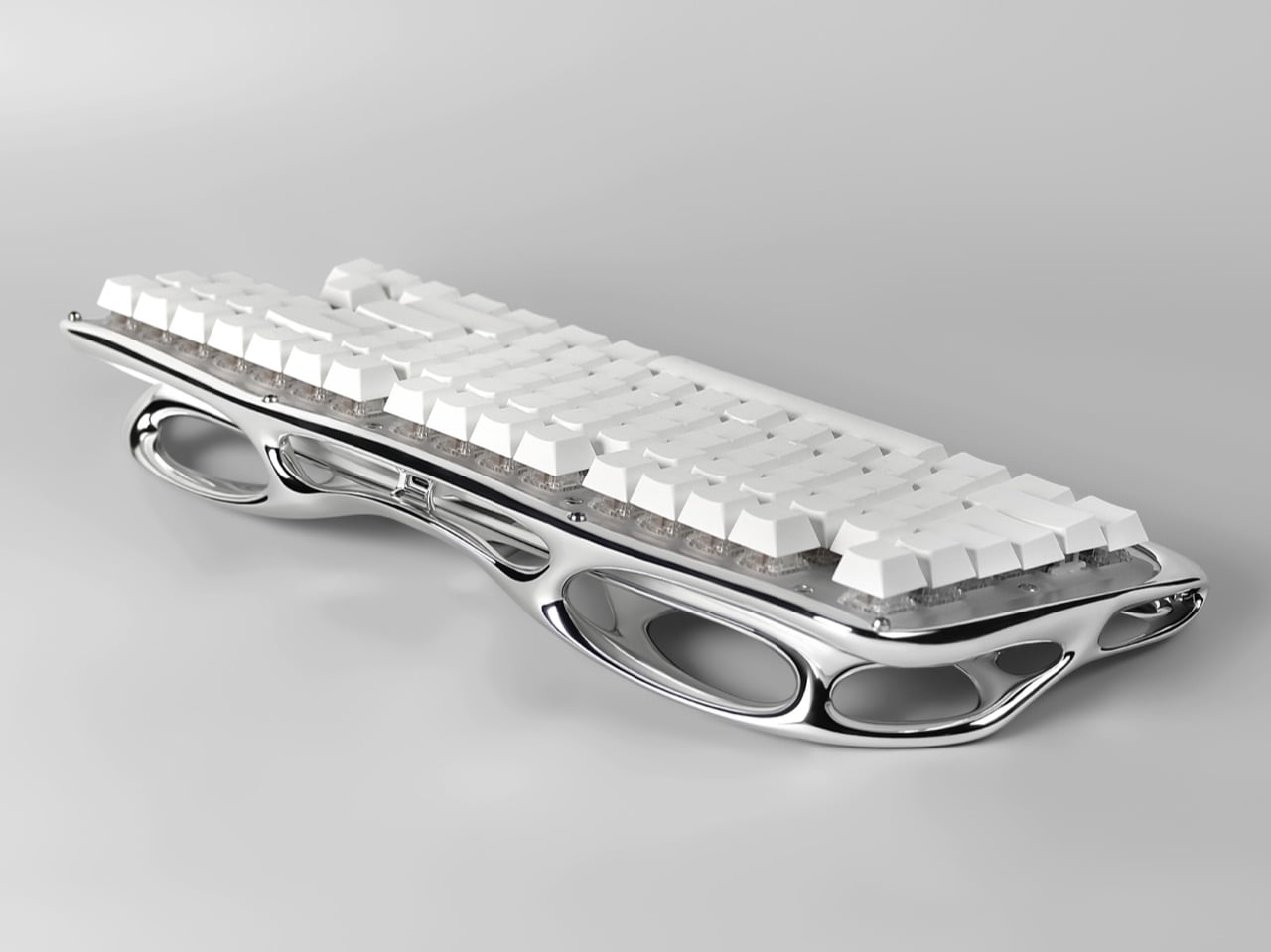
Pulse One, designed by Haoyuan Lu of New York based Pulsekey, is the late RSVP. Its 3D metal printed shell was shaped through generative design and digital sculpting, fusing the palm rest, frame, and bezel into one mirror finish lattice that looks like a skeleton went to a spa. White keycaps float above clear switches, and the board runs wireless. It earned Silver in Consumer Electronics / Computer Accessories at the International Design Awards. This is the most extra keyboard ever made, and I say that with admiration.

Designers: Haoyuan Lu, Hongbin Zhang & Wendi Yu

The closest pop culture cousin is the T-1000, the liquid metal assassin from Terminator 2: Judgment Day in 1991. That movie made flowing chrome terrifying, and designers have been borrowing the look ever since, minus the murder. Pulse One has the same mercury sheen, and every curve catches the light and stretches it into long silver ribbons. Park it on a desk and your monitor suddenly has a reflection to argue with. I would not outrun it, but I would happily let it sit next to my coffee.

Generative design, in general, works by handing a computer a set of goals and letting it propose the shape. The software piles material where a structure needs it and strips it away where it does not, which is why the results look so organic. You can see that logic in Pulse One’s shell, where big elliptical voids sit beside slim, tapering bridges of metal. Lu’s team then refined the form through digital sculpting, which is how a machine’s cold logic ends up looking this graceful. It reads as grown, much like Laarman’s chair did.

Folding the palm rest, frame, and bezel into one piece also cleans up a messy corner of keyboard design. Most boards stack a case, a plate, and a wrist rest, each with its own seams, screws, and opinions about alignment. Pulse One’s shell sweeps all of that into a single form that cradles the switches and tilts them toward your hands. A few small screws are still visible in the photos, so it is not magic, only very tidy engineering. Your wrists get a sculpted perch where a foam strip usually lives.

Under all that sculpture sits a keyboard people can actually live with. The campaign pitches it as wireless, hot-swappable, and good for weeks on a charge. Hot-swap sockets let you pull a switch and drop in another without a soldering iron, and one product photo shows exactly that, a lone switch pulled out beside a stray arrow keycap. The entry also describes the construction as modular, built for maintenance, customization, and renewal. Basically, it looks like a museum piece and behaves like a tinkerer’s board.

The post This chrome skeleton is the most extra mechanical keyboard ever made first appeared on Yanko Design.

  • ✇Yanko Design
  • Razer’s New Gaming Keypad Puts 31 Customizable Controls Right Under Your Hand
    A keyboard can give you plenty of keys, but when you’re gaming, you rarely use all of them. What matters is having the right controls exactly where your hand needs them. That is the idea behind Razer’s new Tartarus V2 Pro, a one-handed gaming keypad that packs 31 programmable controls into a much smaller footprint while adding a proper analog thumbstick, something most keypads don’t have. The thumbstick is one of the more interesting bits of the accessory. It uses TMR technology with anti-drift
     

Razer’s New Gaming Keypad Puts 31 Customizable Controls Right Under Your Hand

18 septembre 2026 à 20:30

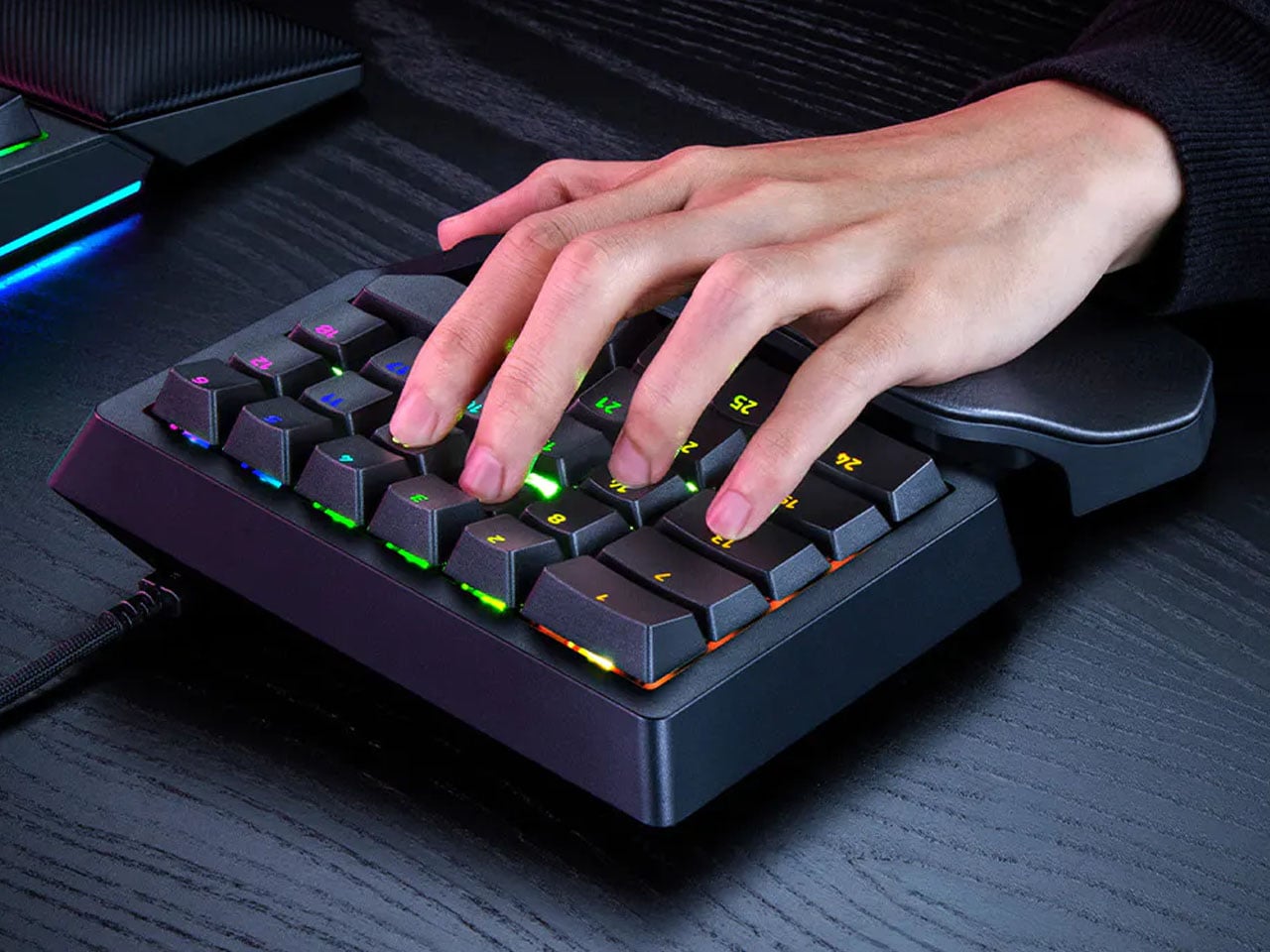
A keyboard can give you plenty of keys, but when you’re gaming, you rarely use all of them. What matters is having the right controls exactly where your hand needs them. That is the idea behind Razer’s new Tartarus V2 Pro, a one-handed gaming keypad that packs 31 programmable controls into a much smaller footprint while adding a proper analog thumbstick, something most keypads don’t have.

The thumbstick is one of the more interesting bits of the accessory. It uses TMR technology with anti-drift positioning and sits alongside three dedicated thumb buttons, giving the left hand a combination of keyboard and controller-style controls. The stick can handle movement, but it can also be assigned to other commands, making it useful for games that rely heavily on shortcuts, radial menus, or multiple simultaneous inputs.

Designer: Razer

Razer has also moved beyond the usual mechanical-switch approach, as Tartarus V2 Pro uses second-generation Analog Optical Switches that can recognize how far a key is pressed. Their actuation point can be adjusted anywhere between 0.1 and 4.0 mm, allowing the keys to be tuned for either quick, light presses or a more deliberate response. Rapid Trigger goes further by detecting upward movement as small as 0.1 mm, which can make repeated inputs feel considerably more immediate. Razer rates the switches for up to 100 million keystrokes.

There is plenty of control over how those inputs behave as well. Razer’s Advanced Input Control features include Snap Tap, Snap Flex, Dual-Keypress Priority, and Dynamic Keystroke. These allow players to change the way directional inputs work, prioritize simultaneous key presses, or assign different actions depending on how far a key is pressed. The wrist rest can slide outward and rotate from side to side, so the position of the hand can be adjusted instead of forcing it into one fixed angle. The keypad uses textured doubleshot PBT keycaps and a 5052 aluminum alloy top plate, with Chroma RGB lighting adding the familiar Razer touch.

True 8000 Hz HyperPolling is built in, while Razer Synapse handles deeper customization. Players can create up to 24 keymaps across three onboard profiles, with actuation and Rapid Trigger settings adjustable to suit different games. An onboard LED array also provides visual feedback without needing the software open.

At 211 × 159 × 49 mm and 486 grams, Tartarus V2 Pro takes up far less desk space than a conventional keyboard. Priced at $199.99, the gaming accessory changes how the player’s hand interacts with a game. Instead of reaching across a keyboard for commands, movement, and shortcuts, the controls are gathered into one compact surface designed specifically around that hand.

The post Razer’s New Gaming Keypad Puts 31 Customizable Controls Right Under Your Hand first appeared on Yanko Design.

❌