❌

Vue normale

Razer Reclusa Mini 65% review: My favorite Razer keyboard of 2026 isn't a Huntsman

Razer has released so many keyboards during 2026 that even I sometimes need a minute to remember which Huntsman does what.

I've reviewed the $499.99 Huntsman Signature Edition, the excellent Huntsman V3 Pro Low-Profile TKL, and more recently Razer's $139.99 Huntsman V3 HE Magnetic. The latter brought adjustable Hall Effect switches and Razer's increasingly sophisticated competitive gaming features to its flagship keyboard family.

And yet the Razer keyboard I keep coming back to isn't a Huntsman.

It's the Reclusa.

Razer first introduced this new enthusiast-focused family with the Reclusa X Mini 65%, a remarkably good little $49.99 keyboard with hot-swappable mechanical switches, dual-layer dampening, south-facing LEDs, and that distinctive black, white, and mint-green tri-tone design. I loved typing on it, and its price-to-quality ratio made it ridiculously easy to recommend.

Now we have its considerably more ambitious sibling.

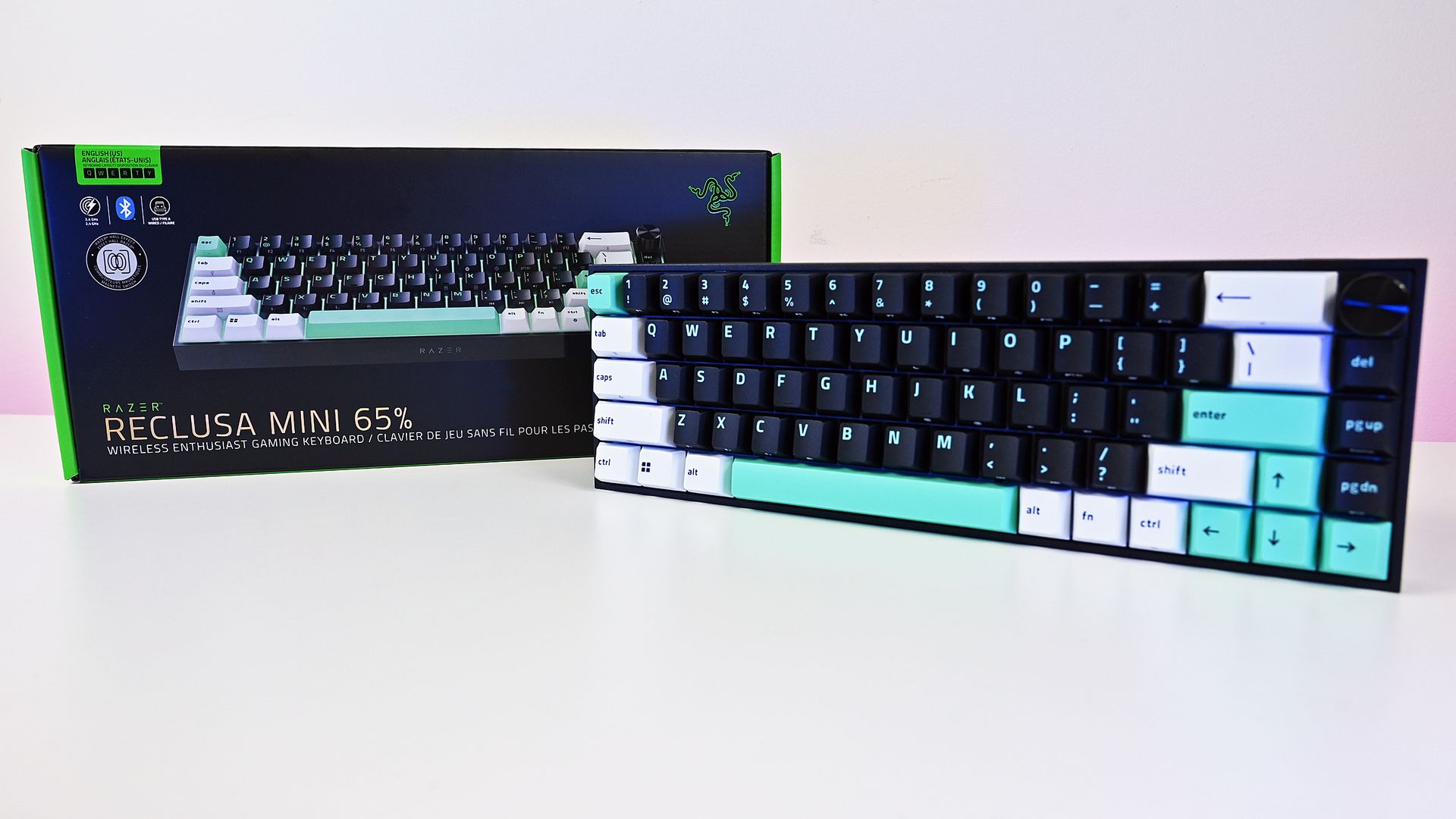
At $129.99 (Best Buy or Razer.com), the Razer Reclusa Mini 65% costs $80 more, but Razer has stuffed most of its premium gaming technology inside while preserving what attracted me to the cheaper keyboard in the first place.

I've used it as my primary keyboard for two weeks. And despite having plenty of alternatives sitting nearby, I don't particularly want to switch back.

Razer had no input, nor did it see the contents of this review, prior to publication.

Same Reclusa formula, considerably more hardware

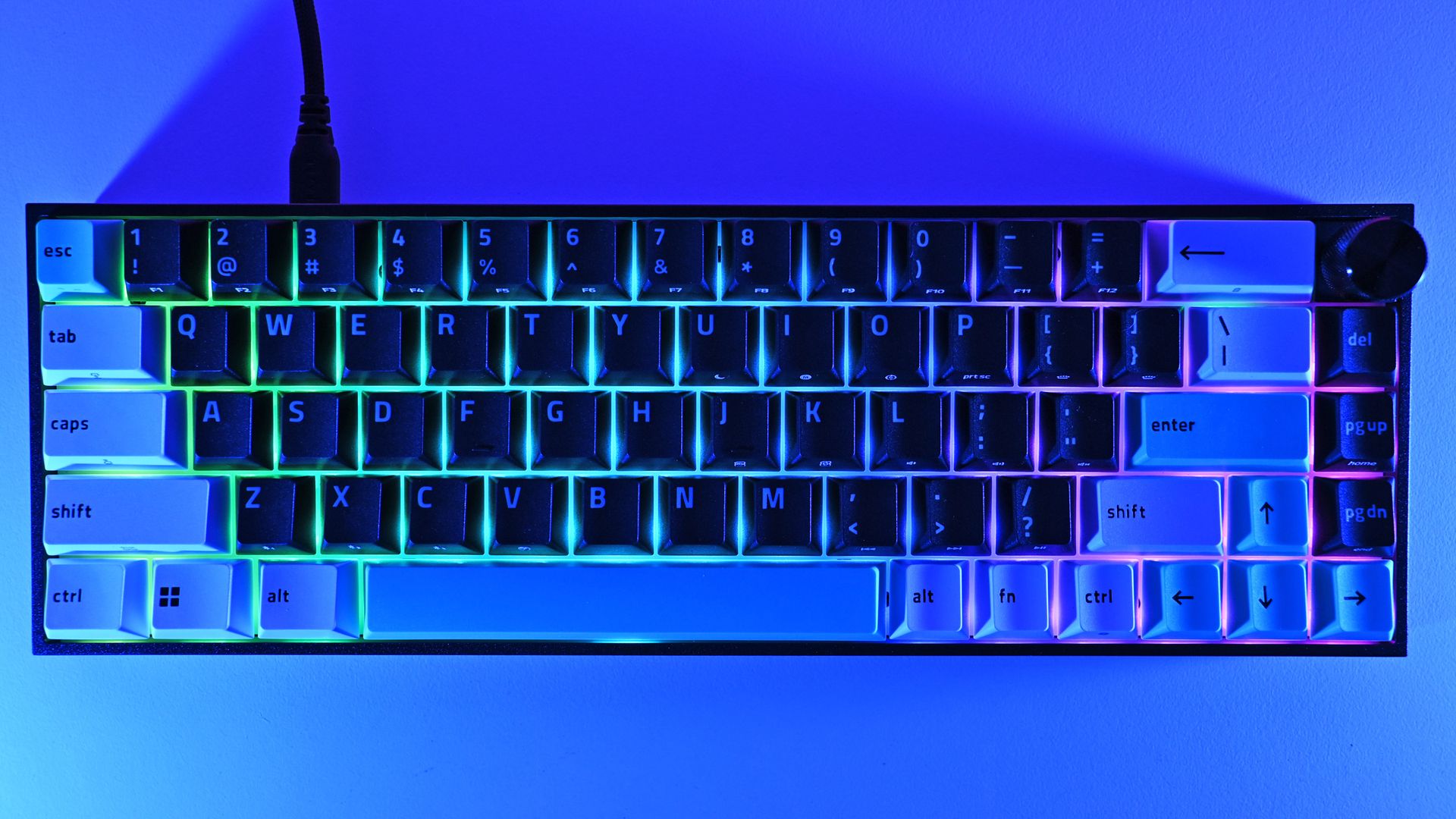
Top-down view of the Razer Reclusa Mini 65% keyboard connected via USB cable, displaying per-key RGB backlighting and a multi-function dial in the top-right corner.

The compact 65% layout preserves dedicated arrow keys while eliminating the function row and numpad, leaving considerably more room on your desk. (Image credit: Daniel Rubino)

The overall aesthetic of the Raze Resclusa Mini 65% remains fantastic.

You still get the compact 65% layout, tri-tone keycaps, and bright mint accents that prevent this from becoming another anonymous black gaming rectangle. The lighting comes from south-facing per-key RGB LEDs rather than shine-through legends.

After two weeks as my primary keyboard, I don't want to take the Reclusa Mini 65% off my desk.

I do miss having the legends themselves illuminated, especially in a dark room, but I understand the decision. The Reclusa is supposed to feel like Razer's enthusiast keyboard family, rather than another variation of Huntsman.

Where the premium model immediately wins me over is the multifunction dial in the upper-right corner. After missing dedicated media controls on the Reclusa X, having a conveniently positioned dial back for volume and other controls makes a surprisingly big difference to my everyday use.

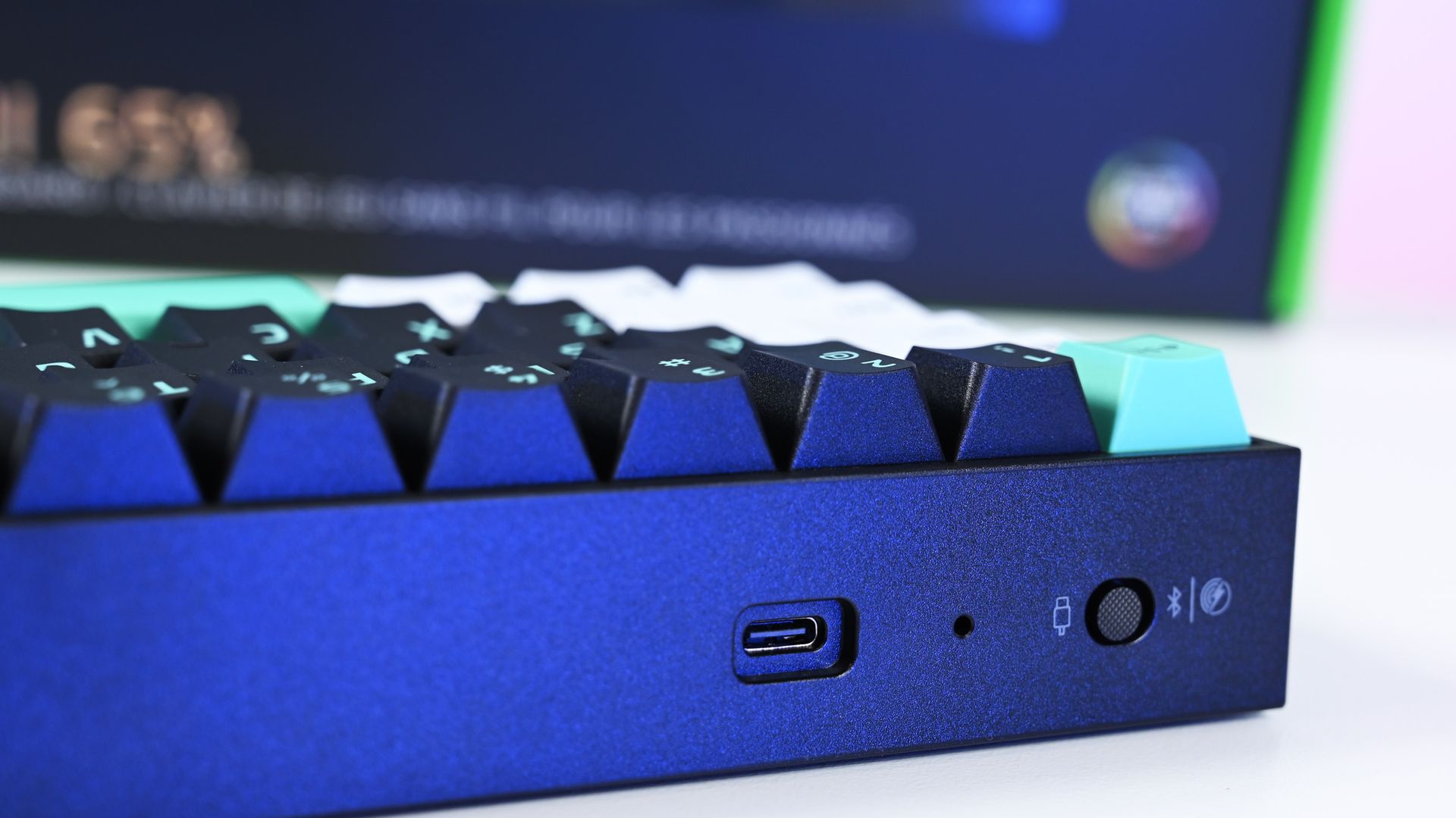
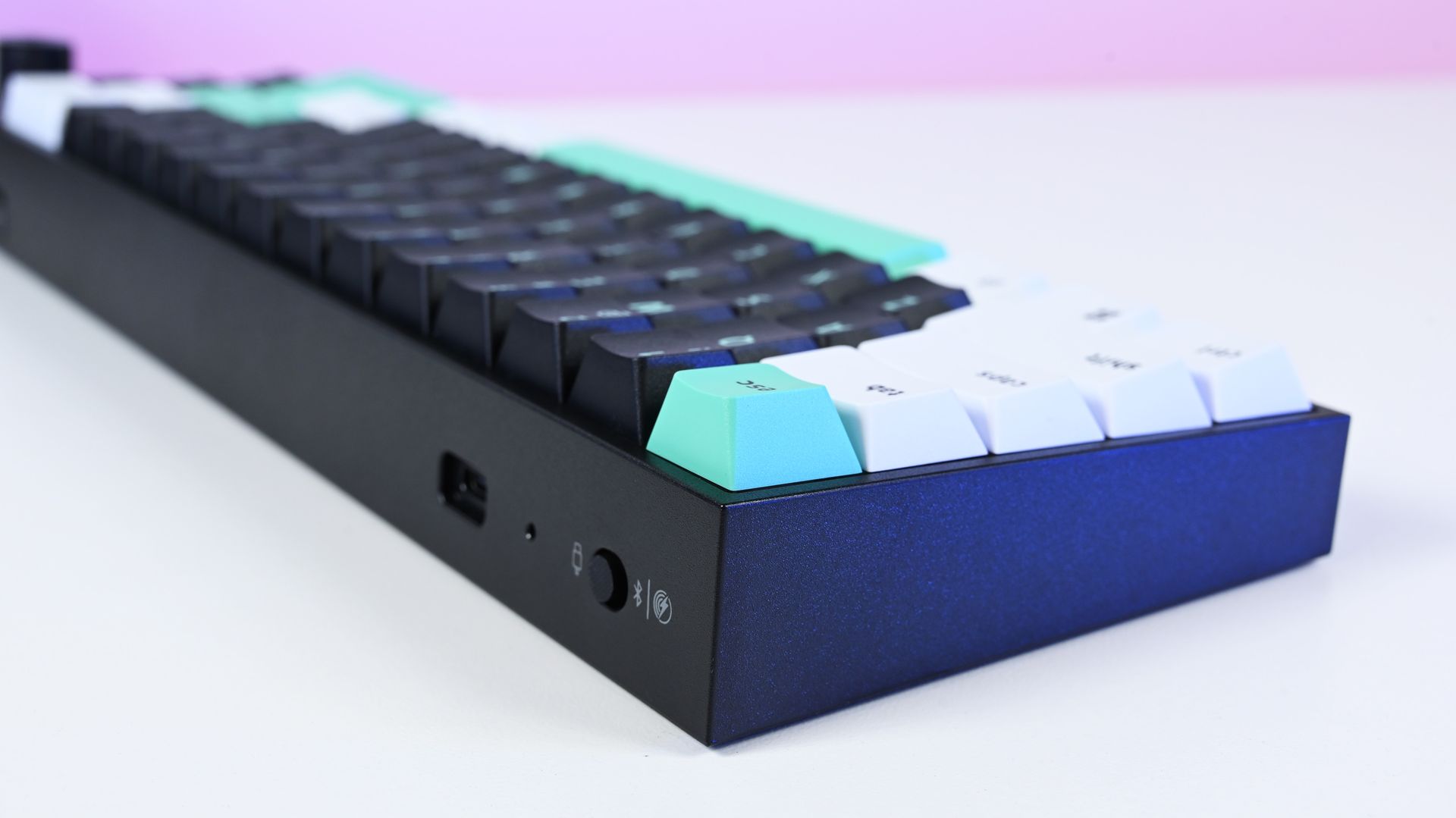
Close-up of the rear connection controls on the Razer Reclusa Mini 65%, featuring a USB-C port, status LED, and a 3-way toggle switch for USB, Bluetooth, and 2.4 GHz.

The Reclusa Mini 65% supports wired USB-C, Bluetooth, and 2.4GHz Razer HyperSpeed Wireless, with up to 8,000Hz polling available when wired. (Image credit: Daniel Rubino)

There's also more going on underneath those keycaps.

Razer uses a PPS plate, lubricated stabilizers, IXPE switch foam, and dual-layer silicone dampening. According to my product briefing, the IXPE layer was specifically added over the Reclusa X's acoustic system to further reduce unwanted resonance.

I can totally hear (and feel) it.

The Reclusa Mini sounds more controlled and dampened than the X. It's audible without producing the higher-pitched clacking that can become irritating in an office. The best way I can describe it is a satisfying"plunk."

Few gaming keyboards I've used strike this balance between excellent everyday typing, enthusiast customization, and genuinely advanced competitive features.

More importantly, this is probably the best typing experience I've had on any Razer keyboard.

That's quite a claim, considering how many Razer keyboards I've tested this year. I mean, they've all been great, but my hands feel happy with this one.

Reclusa goes magnetic

Angled close-up of the Razer Reclusa Mini 65% keycaps, showcasing black alphanumeric keys, white bottom row modifiers, and an accent teal spacebar on a dark chassis.

The Reclusa Mini 65% keeps the excellent tri-tone aesthetic of the cheaper Reclusa X, mixing black, white, and mint-green doubleshot ABS keycaps. (Image credit: Daniel Rubino)

The biggest change is replacing the X's conventional mechanical switches with Razer's linear Hall Effect Magnetic switches (read our primer on HE switches for controllers to get an idea of why they're great).

Actuation can be adjusted anywhere from 0.1mm to 4.0mm, compared with the fixed 2mm actuation of the Reclusa X, and the magnetic switches are hot-swappable for compatible third-party alternatives.

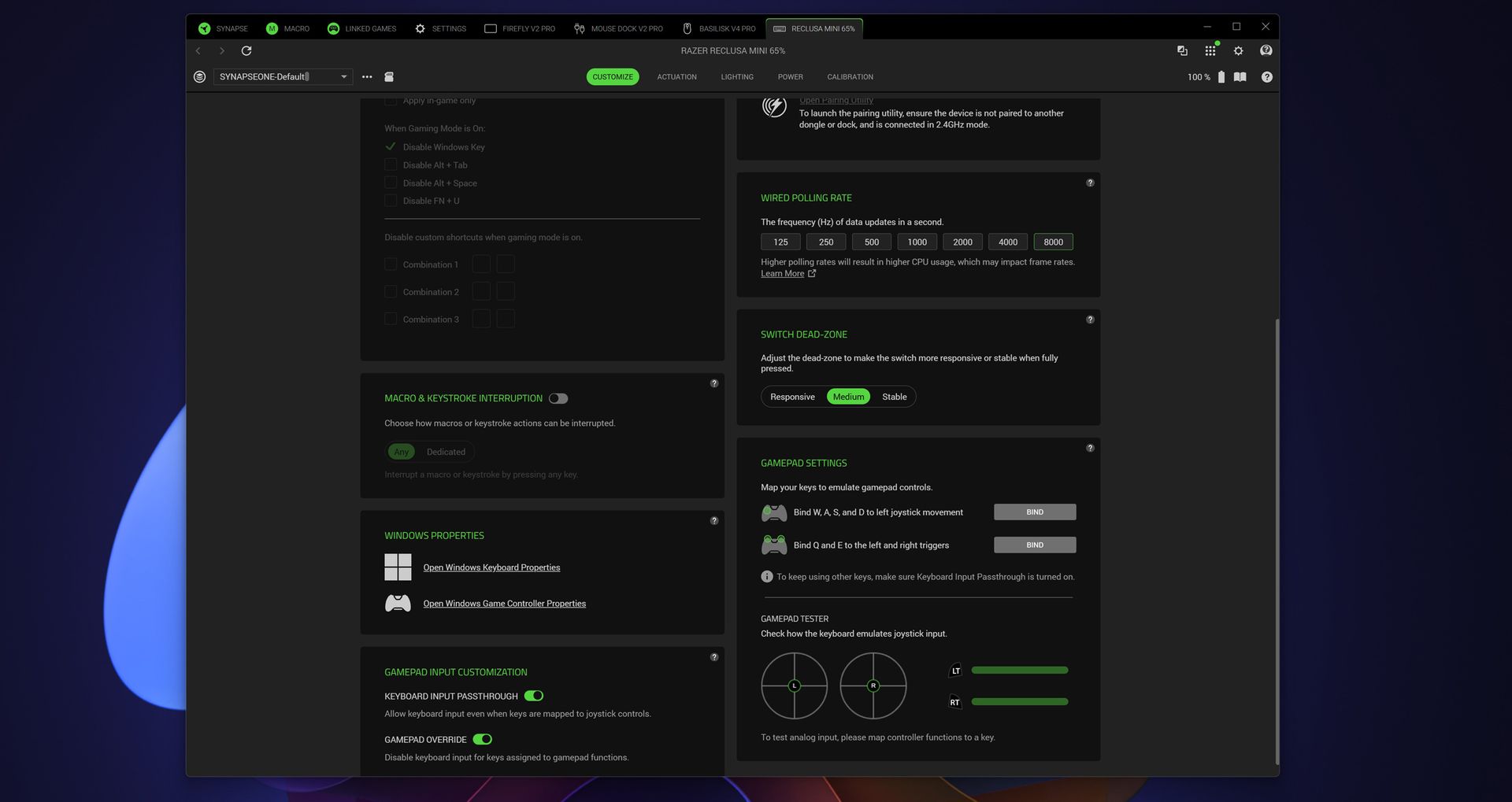
Razer Synapse customization screen for the Reclusa Mini 65%, showing wired polling rates up to 8,000Hz, switch dead-zone controls, and gamepad settings.

Razer Synapse exposes even more enthusiast-level controls, including up to 8,000Hz wired polling, switch dead-zone adjustment, and gamepad input customization. (Image credit: Daniel Rubino)

That opens the door to Razer's current collection of advanced input features, including Rapid Trigger, Snap Tap, Snap Flex, Dynamic Keystroke, and Dual-Keypress Priority (I explain those a bit more in my recent Huntsman review). Razer Synapse, its love/hated software, also provides individual switch calibration, something particularly useful if you begin swapping magnetic switches.

There's an enormous amount to play with, or you can just use some of the presets and not worry about it.

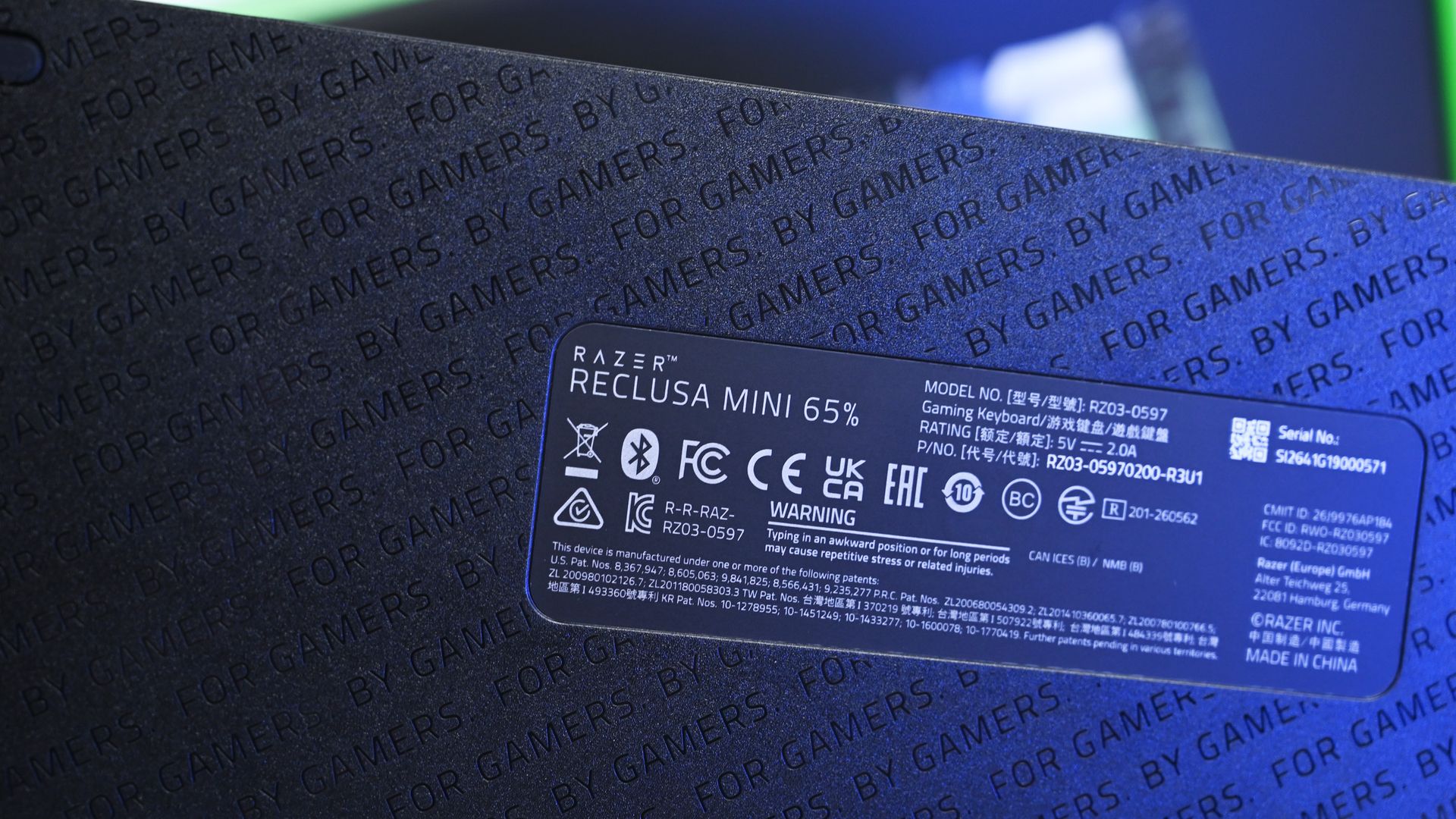
Close-up of the Razer Reclusa Mini 65% underside, showing the product information label and regulatory markings over a textured base etched with 'FOR GAMERS. BY GAMERS.'

Even the underside receives some attention with Razer's repeating "FOR GAMERS. BY GAMERS." pattern, although there are no adjustable rear feet. (Image credit: Daniel Rubino)

I won't pretend every person buying this board needs to spend hours configuring individual actuation points, either. I'm perfectly happy using the Reclusa as a fantastic typing keyboard most of the day and taking advantage of its speed while gaming.

But if you're the kind of player who does obsess over these settings, Razer gives you the tools.

Polling jumps from 1,000Hz on the Reclusa X to 8,000Hz when wired, while wireless operates at up to 1,000Hz. The Reclusa Mini also supports 2.4GHz HyperSpeed, Bluetooth, wired USB-C, multi-device HyperSpeed pairing, and switching between three Bluetooth devices.

That's the real argument for paying $129.99.

An awkward $80 question

Close-up of the top-right corner of the Razer Reclusa Mini 65%, showing the knurled black multi-function volume dial alongside Delete, Page Up, and Page Down keys.

This little multifunction dial is a surprisingly important upgrade for me, restoring convenient volume control that I sorely missed on the cheaper Reclusa X. (Image credit: Daniel Rubino)

Ironically, the Reclusa Mini 65%'s biggest competitor might be Razer's own $49.99 Reclusa X Mini 65%.

I gave that keyboard 4.5 stars in my review because it nailed the fundamentals for an almost comically low price.

The premium Reclusa is better. It feels more substantial, sounds better, adds wireless connectivity, returns my beloved dial, dramatically expands switch configuration and brings Razer's current Hall Effect gaming technology along for the ride.

At $129.99, it's also competitively positioned within the enthusiast Hall Effect market. For context, Razer's own Huntsman V3 HE Magnetic TKL launched at $139.99, while the Mini 65% was $119.99. Wooting's plastic 60HE v2 launched at $179.99, with its aluminum version reaching $239.99.

Side angle of the Razer Reclusa Mini 65% chassis, highlighting the rear edge featuring a USB-C port, an LED indicator, and a tri-mode wireless/wired toggle switch.

A physical selector quickly switches between wired USB-C, Bluetooth, and Razer HyperSpeed Wireless connectivity, one of the biggest upgrades over the $49.99 Reclusa X. (Image credit: Daniel Rubino)

Still, the cheaper Reclusa X exists.

If you're plugging a keyboard into one PC, don't care about Rapid Trigger or adjustable actuation, and just want something excellent to type and game on, save the $80. The X remains absurdly good.

The Razer Reclusa Mini 65% delivers the best typing experience I've had on any Razer keyboard.

It's also worth mentioning the lack of adjustable rear feet. Curiously, this didn't bother me despite normally raising the back of my keyboards. The default angle works well enough that I stopped thinking about it.

And naturally, 65% remains 65%. I love the extra mouse space and compact footprint. If you depend on a function row or numpad, nothing about this keyboard will change your mind.

Should you buy the Razer Reclusa Mini 65%?

Angled top-down view of the Razer Reclusa Mini 65% keyboard illuminated in a dark setting, showing vibrant multi-color Chroma RGB backlighting beneath the keys.

South-facing per-key Razer Chroma RGB creates an underglow around the keycaps, although I do miss having illuminated legends when using the keyboard at night. (Image credit: Daniel Rubino)

You should buy this if...

✅You loved the idea of the Reclusa X but wanted Razer's premium gaming technology.

✅You want adjustable Hall Effect switches, Rapid Trigger, 8KHz wired polling, and serious customization.

✅You need both excellent wireless connectivity and wired performance.

✅Typing feel and keyboard acoustics matter as much to you as gaming performance.

✅You want a compact keyboard without sacrificing a multifunction dial.

You shouldn't buy this if...

❌You don't need wireless or Hall Effect gaming features. Buy the $49.99 Reclusa X and pocket the $80.

❌You need a full-size or TKL layout.

❌Adjustable rear feet are important to your typing position.

Bottom line

I'm almost annoyed by how much I like this keyboard.

I've got Huntsmans. Lots of Huntsmans. Some of them have more premium materials, some have different switches, and one I've reviewed costs nearly four times as much.

But for the last two weeks, the Reclusa Mini 65% has been the keyboard sitting in front of me, and I'm in no rush to replace it.

Razer's $49.99 Reclusa X remains the rational recommendation for most people. It nails the core fundamentals and punches ludicrously far above its price. The $129.99 Reclusa Mini takes that unusually good foundation and adds the stuff enthusiasts and competitive gamers are more likely to appreciate: magnetic switches, adjustable actuation, 8KHz polling, sophisticated input controls, wireless connectivity, better acoustics, and that incredibly handy dial.

Do I need any of it?

Probably not.

But I'm keeping it on my desk anyway.

Razer - Reclusa Mini 65% Wireless Enthusiast Gaming Keyboard With Hot-Swappable Hall Effect Magnetic Switches - BlackWindows Central

Razer
Razer Reclusa Mini 65% Wireless Gaming Keyboard

The Razer Reclusa Mini 65% takes the excellent foundation of the $49.99 Reclusa X and piles on nearly every enthusiast feature I could ask for: adjustable Hall Effect switches, Rapid Trigger, 8,000Hz wired polling, Bluetooth and HyperSpeed wireless, hot-swappable magnetic switches, better dampening, and my beloved media dial.

Click to join us on r/WindowsCentral

Join us on Reddit at r/WindowsCentral to share your insights and discuss our latest news, reviews, and more.


  • ✇Yanko Design
  • 8 Best Desk Accessories of October 2026 to Upgrade Your Workspace
    Your desk does not need another gadget simply because there is room for one. The worthwhile additions are the ones that change how the space works or feels: a light that leaves the surface clear, a mouse that packs flat, or a notebook alternative that lets your ideas move around. Sometimes, the right accessory does something less practical but equally personal, giving an otherwise ordinary setup a little more character. These eight designs approach the workspace from different directions, balan
     

8 Best Desk Accessories of October 2026 to Upgrade Your Workspace

9 novembre 2026 à 07:40

Your desk does not need another gadget simply because there is room for one. The worthwhile additions are the ones that change how the space works or feels: a light that leaves the surface clear, a mouse that packs flat, or a notebook alternative that lets your ideas move around. Sometimes, the right accessory does something less practical but equally personal, giving an otherwise ordinary setup a little more character.

These eight designs approach the workspace from different directions, balancing useful everyday tools with objects that make sitting down feel more inviting. Sony’s miniature 3D display leads the selection, joined by adaptable storage, sculptural stationery, thoughtful lighting, and portable technology. The connecting thread is considered design rather than a matching aesthetic, with each accessory offering a distinct reason to claim some space beside your computer, sketchbook, or morning coffee cup.

1. Sony ELF-MN1 Spatial Reality Display

Sony’s ELF-MN1 takes the familiar desk collectible and replaces the physical figure with a digital character on a six-inch display. Its glasses-free 3D presentation makes compatible content appear to have depth without asking you to wear a headset. The transparent stand keeps the enclosure visually light, which suits an object intended to sit beside a monitor rather than compete with it. This is the personality piece of the group, not another screen pretending to be essential office equipment.

The interesting design decision is making digital collecting feel more like displaying an object than opening another window on your computer. Eye tracking adjusts the stereoscopic image for the viewer, although the effect is intended for one person rather than everyone around the desk. You will need a compatible smartphone or PC and supported content, so this is not a universal digital picture frame.

What we like

  • The combination of a compact enclosure and glasses-free depth gives digital collectibles a distinctive desktop presence.
  • It adds personality without requiring a headset.

What we dislike

  • The stereoscopic effect is intended for a single viewer.
  • Compatible hardware and content are required, and the product is not shipping yet.

2. MagBoard Clipboard

A notebook gives your thoughts a home, but it also decides where every page belongs. The MagBoard Clipboard takes a more flexible approach, using a magnet and lever mechanism to secure loose sheets inside a simple cover. Pages can be removed, replaced, or rearranged as a project develops. For a desk covered with sketches, meeting notes, and half-finished ideas, that makes it an appealing middle ground between a conventional bound notebook and an increasingly unruly stack of loose paper.

Designed by Hirock Design Office and made in Japan, the clipboard has a rigid cover that also provides a writing surface away from your desk. The shop specifies a capacity of up to 30 sheets, enough for a focused working collection rather than an entire archive. A5 and A4 sizes let you choose between compact notes and larger drawings. Available configurations start at $45, making this the simplest selection for readers who would rather reorganize their paper than digitize everything.

Click Here to Buy Now: $45.00

What we like

  • Loose pages can follow the changing order of a project.
  • The rigid cover provides support when a tabletop is unavailable.

What we dislike

  • The stated 30-sheet capacity limits how much material it can hold.
  • It costs more than a basic clipboard and still requires managing individual sheets.

3. Divoom Astrotoo

The Divoom Astrotoo looks like a tiny computer from a future imagined several decades ago. Its rounded housing, raised keys, and joystick give it a tangible character that a plain speaker grille rarely achieves. Behind that playful appearance sits a 20W speaker and a 3.95-inch display for photographs, clock faces, pixel art, and music visualizations. It offers a way to bring music and personal imagery into the same small object, rather than adding separate accessories to your desk.

Physical controls handle everyday interactions, while the Divoom app manages visual customization. That division gives the buttons a purpose beyond completing the retro look, although the phone remains part of the experience. Divoom lists Bluetooth, WiFi, microSD playback, and battery operation, with up to six hours claimed between charges. At $199.99 and listed in stock, Astrotoo is a substantial purchase for its size. Its appearance is easy to appreciate; sound quality needs listening rather than assumptions based on its specifications.

What we like

  • The physical keys and joystick make the retro styling functional.
  • Music playback and a customizable display share one compact enclosure.

What we dislike

  • Visual customization still involves a phone app.
  • The claimed six-hour battery life does not cover a full eight-hour workday.

4. BenQ iScreenBar

A desk lamp can improve a workspace while also becoming another object you have to work around. BenQ’s iScreenBar removes the base from that equation by attaching to a compatible iMac through a magnetic mounting system. The aluminum body follows the computer’s restrained material language, while cable management helps keep the addition visually contained. It is a particularly relevant accessory for an already crowded desk, where the best place to put another useful object may be above the work surface.

The mounting arrangement is designed to leave the camera, microphones, and speakers unobstructed, while asymmetric optics direct illumination toward the desk. BenQ also provides automatic brightness adjustment and software controls, giving the light more flexibility than its minimal appearance suggests. The important qualification is compatibility: the magnetic clip supports iMac models from 2021 onward, not earlier iMacs or Apple’s standalone displays. Listed at $189, it makes sense as a tailored lighting solution, not as a universal recommendation for every computer.

What we like

  • The mounted design leaves the desktop free of a lamp base.
  • Its attachment and cable routing are designed specifically around the iMac.

What we dislike

  • Compatibility excludes earlier iMacs and Apple’s standalone displays.
  • The specialized mounting makes it less transferable if you change computer setups.

5. Levitating Pen 3.0

Most pens disappear into a drawer until they are needed. The Levitating Pen 3.0 makes putting one down part of its appeal. Supported magnetically, it balances on a pinpoint at a 60-degree angle, creating a poised silhouette above its pedestal. The effect gives an ordinary writing instrument the presence of a small kinetic sculpture. Beside Sony’s digital display, it offers a different kind of desktop spectacle, using a physical balance mechanism rather than another illuminated screen to attract attention.

The pen remains a writing tool, which matters when the novelty wears off. The available 2-in-1 configuration can switch between fountain and rollerball formats by changing the grip, offering a practical reason to look beyond the stand. That version was listed at $149 when checked, while standalone fountain and rollerball variants were marked sold out. Its strongest appeal is the relationship between object and holder, so consider whether you want to dedicate permanent desk space to the pedestal.

Click Here to Buy Now: $149.00

What we like

  • The magnetic balance turns storage into a distinctive part of the design.
  • The available 2-in-1 version offers fountain and rollerball configurations.

What we dislike

  • The pedestal occupies more space than simply storing a pen in a tray.
  • At $149 for the available configuration, its sculptural appeal carries a premium.

6. DailyObjects Node Charging Ecosystem

Charging accessories often arrive one device at a time, eventually leaving a desk with several unrelated stands and cables. Designed by LAYER for DailyObjects, Node treats them as components of a shared system instead. A dock supports interchangeable modules, allowing the arrangement to change with the devices and routines around it. The collection includes a wireless phone stand, charging disk, Apple Watch stand, and portable lamp. Its rounded forms make the charging setup feel like a deliberate group of objects.

The flexibility extends beyond rearranging pieces on a base. LAYER describes modules that can work independently, with a battery-equipped phone stand and portable lamp allowing selected functions to move elsewhere. That could suit someone who works at a desk during the day and wants the same accessories nearby later. The distinction between configurations matters, since a pictured collection should not be mistaken for one included package. Current pricing and regional purchase availability could not be independently confirmed during checking.

What we like

  • Interchangeable modules allow the setup to respond to different needs.
  • The phone stand and portable lamp bring mobility into a usually stationary category.

What we dislike

  • Buyers need to check exactly which modules a configuration includes.
  • Current pricing and regional availability remain unconfirmed.

7. Orbitkey Grid Desk Organizer

A fixed compartment organizer works beautifully until the things you need to store change. Orbitkey’s Grid Desk Organizer makes that limitation its starting point, using movable dividers that snap into a perforated tray floor. Instead of finding objects that fit the compartments, you arrange the compartments around your objects.

That is a useful distinction for a desk that alternates between stationery, charging cables, earbuds, and small tools, where yesterday’s tidy arrangement can quickly become today’s awkward collection of empty spaces. Stackable trays add another layer of adaptability, while the lid can serve as a phone stand. The design is promising, but its production status needs to stay visible beside the attractive imagery.

What we like

  • Movable dividers let the storage layout follow the objects.
  • Stackable layers offer a way to organize vertically.

What we dislike

  • Accessing lower trays involves moving or sliding the layers above them.
  • Fulfillment remains pending, so it is not an immediate desk upgrade.

8. OrigamiSwift Mouse

The OrigamiSwift Mouse addresses a familiar frustration with portable work tools: the shape that suits your hand rarely suits your bag. Its folding body opens into a raised mouse form, then flattens for storage when the workday moves elsewhere. The triangular geometry gives that transformation a visual logic rather than disguising the folds. Designed by Horace Lam, it belongs on this list because the mechanism changes how the object travels, not simply because its appearance differs from a conventional mouse.

Bluetooth connectivity and USB-C charging keep the practical specifications familiar, while the listed 40-gram weight reinforces the portability story. The shop claims up to three months of use per charge, a figure that should be treated as a product claim rather than a tested result. Black and Gray versions are listed at $85, with Titanium Silver at $95. The folding design is appealing for shared tables and mobile setups, although comfort over long sessions still needs individual assessment.

Click Here to Buy Now: $85.00

What we like

  • The folding mechanism reduces thickness for packing and storage.
  • Its lightweight construction suits a workspace that moves between locations.

What we dislike

  • Folding flatter does not necessarily mean occupying less tabletop area.
  • The unusual shape warrants a personal comfort check before replacing an everyday mouse.

A Better Desk Does Not Need Everything

The most convincing desk upgrade is usually the one that answers a specific frustration. MagBoard gives loose notes a more flexible home, BenQ moves lighting off the work surface, and OrigamiSwift changes what a mouse needs to occupy inside your bag. None requires the rest of the collection to make sense. Choosing one useful improvement is a better starting point than assembling an entire setup around a photograph you admire.

There is also room for objects that make the desk feel more personal, whether that means a magnetically balanced pen or a digital character beside your monitor. The distinction is knowing what you are buying and why. Check compatibility, available configurations, and delivery status before committing, particularly with forthcoming designs. A considered workspace should reflect the way you actually spend time there, with enough room left for the work itself.

The post 8 Best Desk Accessories of October 2026 to Upgrade Your Workspace first appeared on Yanko Design.

  • ✇Yanko Design
  • A $25 Water Bottle That Packs Snacks Without an Extra Bag
    A water bottle in one hand and a bag of trail mix in the other works perfectly well until you need your phone. Then the snack bag gets stuffed into a pocket or buried somewhere inconvenient. The FLPSDE XR Dual Chamber Water Bottle tackles that small but familiar packing problem by giving your drink and your snacks separate spaces inside one bottle. I like the premise: fewer loose things to keep track of, without abandoning the snacks. Designed by Ben Bazis, whose name appears on FLPSDE’s contai
     

A $25 Water Bottle That Packs Snacks Without an Extra Bag

9 novembre 2026 à 05:15

A water bottle in one hand and a bag of trail mix in the other works perfectly well until you need your phone. Then the snack bag gets stuffed into a pocket or buried somewhere inconvenient. The FLPSDE XR Dual Chamber Water Bottle tackles that small but familiar packing problem by giving your drink and your snacks separate spaces inside one bottle. I like the premise: fewer loose things to keep track of, without abandoning the snacks.

Designed by Ben Bazis, whose name appears on FLPSDE’s container patent, the XR is a retail product rather than a concept waiting for production. It’s the plastic version of the brand’s dual-chamber bottle, with drinking access at the top and storage accessed by flipping it over. That arrangement makes sense for an afternoon out when bringing a whole lunch bag feels excessive, but pretending you won’t get hungry feels optimistic.

Designer: Ben Bazis

The capacity needs a little unpacking. FLPSDE lists 32 ounces overall, but that’s divided between a 25-ounce drinking chamber and a 7-ounce storage compartment. You’re not getting a full 32-ounce water supply plus a bonus snack container. Some of the bottle’s interior is committed to storage, which seems like a reasonable exchange for short outings. For a longer walk with limited refill opportunities, I’d give water capacity priority over the convenience of consolidated packing.

Visually, the XR makes its unusual construction easy to understand. The product image shows a snack chamber nested inside the lower portion of a translucent blue body, with water occupying the space above and around it. You can see the contents rather than treating the base like a mystery compartment. I prefer that openness here. Seeing the remaining cashews is a useful reminder that you packed them, and an equally useful warning that you’re almost out.

The lid gets attention, too. FLPSDE includes a straw, a carry handle, and a wide opening for adding ice, along with the option to drink without the straw. Those are sensible accommodations for different habits, although the storage is still the reason this bottle deserves a look. I’m more interested in that practical combination than in another bottle asking me to appreciate its color alone. The XR does offer colors you can mix and match, if that’s your thing.

The lower compartment isn’t restricted to food. FLPSDE suggests keys or lip balm, and says it can also hold a separate cold drink, including electrolytes or cold coffee. The company describes the chambers as independently sealed. I’d use it for dry snacks first, simply because that’s the clearest benefit for my own packing preferences. A small second beverage has its appeal, but keeping a handful of nuts from disappearing into the bottom of a backpack feels more broadly useful.

Cleaning is where a clever container can become a chore. FLPSDE says the XR disassembles completely and that all parts are top-rack dishwasher safe. That matters more to me than the prospect of carrying two drinks. A bottle that holds food needs to be approachable after the outing, too. Disassembly is a sensible design choice, though it also means more pieces to wash and reassemble. Combining containers doesn’t make their maintenance disappear; it brings the jobs together.

At a listed $24.98, the XR is priced modestly enough to make its extra function worth considering. FLPSDE gives dimensions of 10.25 inches tall and 3.25 inches wide, and says it fits most cup holders. That last detail is worth checking against your own car or bag rather than assuming every holder agrees. The useful question is whether its shape fits the places where you already carry a bottle.

I wouldn’t replace a perfectly good bottle solely to acquire a snack compartment. But for someone already shopping, the XR offers a specific reason to choose it: the food travels with the water. Its appeal depends on how you pack, not how enthusiastically you collect drinkware. If a bottle is already coming along, giving it responsibility for the trail mix seems like a fair assignment.

The post A $25 Water Bottle That Packs Snacks Without an Extra Bag first appeared on Yanko Design.

  • ✇Yanko Design
  • Twelve South’s Cablesnap 65W Charger Packs Its Cable So You Don’t Have To
    Chargers have become smaller and more capable, but their cables still have a habit of becoming a tangled mess in our bags. Even remembering to pack one doesn’t guarantee you’ve brought the other. Twelve South’s Cablesnap 65W charger tackles that familiar problem with a retractable USB-C cable, keeping the wire tucked inside its body until you actually need to plug something in. The idea is pretty straightforward, although it addresses a chore that’s easy to overlook. Pull out the USB-C connecto
     

Twelve South’s Cablesnap 65W Charger Packs Its Cable So You Don’t Have To

Par : JC Torres
9 novembre 2026 à 04:15

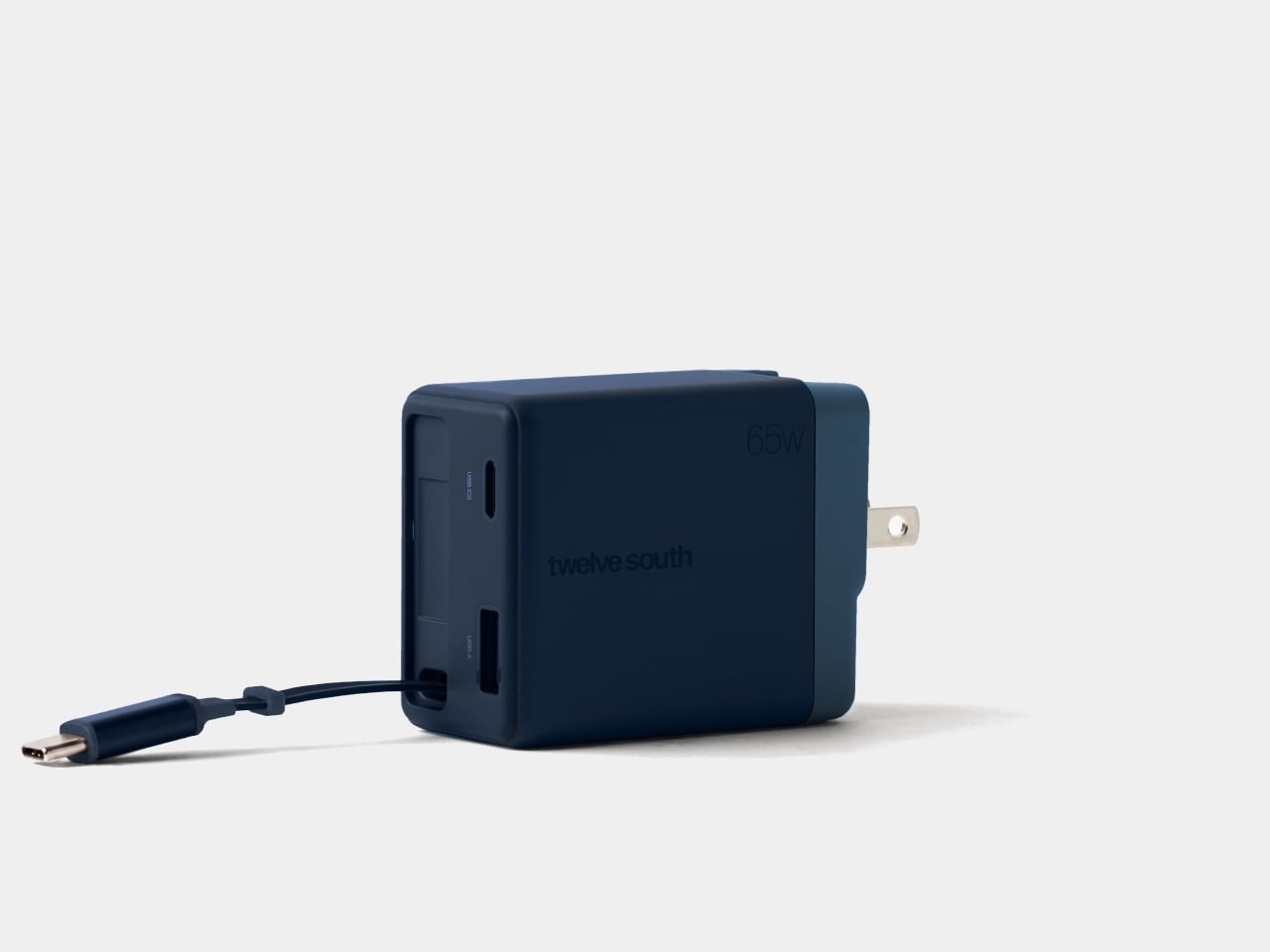
Chargers have become smaller and more capable, but their cables still have a habit of becoming a tangled mess in our bags. Even remembering to pack one doesn’t guarantee you’ve brought the other. Twelve South’s Cablesnap 65W charger tackles that familiar problem with a retractable USB-C cable, keeping the wire tucked inside its body until you actually need to plug something in.

The idea is pretty straightforward, although it addresses a chore that’s easy to overlook. Pull out the USB-C connector and the flat cable extends up to 29 inches, giving you some freedom to position your device. When you’re done, a small tug sends it back into the housing. There’s no need to wrap the cord around the charger and hope it stays put.

Designer: Twelve South

The connector has its own recessed resting place beside the extra ports, so there isn’t a loose tip dangling outside after the cable disappears. That leaves a rounded rectangular body with relatively little visual clutter and a contrasting end section. Coastal blue, Dune, and Slate finishes give it some personality, especially if you’ve grown tired of the usual anonymous black or white chargers.

That disappearing trick does come with a catch, of course. A 29-inch cable works best when the outlet is already reasonably close to where you want your device. A desk socket is one thing; an outlet hidden behind a hotel bed is another matter. You can avoid having extra wire spread across the table, but you can’t pull out length that isn’t there.

Fortunately, the built-in cable isn’t your only connection. An additional USB-C port and a USB-A port let you charge up to three devices together, which could cover a laptop, phone, and wireless earbuds at the end of the day. You’ll still need separate cables for those extra ports, though, so this particular arrangement hasn’t made your entire cable collection obsolete just yet.

The advertised 65W, however, needs a little explanation. That’s the charger’s total available output, rather than what each device receives when everything is plugged in. The USB-A port tops out at 18W, while the overall power budget is shared. Charging a compatible laptop alongside your other gadgets is convenient, but you shouldn’t expect it to receive the full 65W in that particular arrangement.

The US plug folds into the body as well, keeping its prongs from sticking out while the charger is packed away. Included Type G and Type C adapters accommodate compatible UK and European outlets, saving you from sourcing those pieces separately. Between the folding plug and retractable cable, there’s less to arrange before slipping the charger back into your crowded travel bag.

At $49.99, the Cablesnap 65W puts a price on not having to coil a cable every time you move between desks or pack for a trip. The integrated design does raise a question about replacing that cable, something Twelve South doesn’t explain. You still have the spare USB-C port if needed, but using it brings a loose cord back into your bag.

The post Twelve South’s Cablesnap 65W Charger Packs Its Cable So You Don’t Have To first appeared on Yanko Design.

  • ✇Yanko Design
  • A Pop-Up Book Vase Offers Six Looks Without Extra Vases
    I am not much of a flower person and, consequently, not much of a flower vase person. As much as I know that they can add to the aesthetic beauty of any space, I don’t have much space to display them or add to my messycore clutter. Also, most flower vase designs don’t appeal to me enough that I’d actually make space for them. But as a certified book lover, anything that’s close to the look of a book is something I might actually consider. The Pop-up Book Vase is one such flower display that has
     

A Pop-Up Book Vase Offers Six Looks Without Extra Vases

7 novembre 2026 à 19:30

I am not much of a flower person and, consequently, not much of a flower vase person. As much as I know that they can add to the aesthetic beauty of any space, I don’t have much space to display them or add to my messycore clutter. Also, most flower vase designs don’t appeal to me enough that I’d actually make space for them. But as a certified book lover, anything that’s close to the look of a book is something I might actually consider.

The Pop-up Book Vase is one such flower display that has a certain look I might go for if I decide to buy a few flowers and display them. It uses a book aesthetic where you can turn the page and get a new look with its three-dimensional paper vase silhouette. This way, you get a different look by switching among the three designs if you’re the kind of person who wants something new to look at every once in a while.

Click Here to Buy Now: $45.00

The way this vase is designed goes beyond printing a book pattern on a regular vase. The flowers go into a glass test tube, which fits into the book’s spine. Each book has three vase shapes that you can change as you turn the page. Turning the book upside down changes which end of the silhouette is wider, so you get something new again. You basically get six possible configurations of a vase in just one object, rather than six separate containers.

That division between the materials is what makes the idea work. The paper creates the decorative shape, while the glass holds the water. MECLI calls the design Flowery Tale and specifies water-resistant paper, but that doesn’t mean you should treat the whole thing like a waterproof vessel. The brand advises wiping up water promptly and letting the paper dry thoroughly before storing it. I’d still keep the messy part of refilling away from my actual books.

The storage aspect is probably what appeals to me most. MECLI says you can return it to a bookshelf when it’s not in use. The closed book measures approximately 3.9 inches wide, 1.2 inches deep, and 7.2 inches tall. For someone who doesn’t regularly buy flowers, that’s more useful than having an empty vase taking up display space between bouquets. It still needs room when open, of course, so I wouldn’t expect it to magically solve my clutter problem. But I like that it has somewhere to go when the flowers are gone.

It’s also a nice option for someone who wants a small floral gesture rather than a full centerpiece. The test-tube format suggests starting with a single bloom instead of trying to squeeze in a large bouquet. For me, that makes the idea of displaying flowers feel a little less like another decorating project. The page-turning is part of the appeal, too: I’d be choosing a shape to go with the flower rather than buying another vase.

At $45, though, the Pop-up Book Vase is a decorative purchase rather than the cheapest way to display a flower. IKEA’s VILJESTARK, a 6¾-inch glass vase listed at $1.99 in the US, handles the basic job for much less. Its shape stays the same, whereas the Pop-up Book Vase offers changing silhouettes and book-shaped storage. If all you need is a small container for a stem, IKEA makes more financial sense. Here, the extra money is buying the paper construction and the pleasure of changing the display.

I don’t think this would suddenly turn me into someone who always has fresh flowers at home. But it gives me a reason to consider making room for one. A vase that can spend its downtime on a bookshelf feels more suited to my habits than one that needs a permanent spot on the table.

The post A Pop-Up Book Vase Offers Six Looks Without Extra Vases first appeared on Yanko Design.

  • ✇Yanko Design
  • Razer’s New Hammerhead Earbuds Bring Back the Cable, Not the Headphone Jack
    Wireless earbuds can make a short gaming break depend on whether you remembered to charge their case the night before. Razer’s Hammerhead V3 Chroma takes that worry off the list with a cable that carries audio and power through USB-C. There’s no headphone jack involved in this return to wired listening, and the angled plug has been shaped around the hands holding your phone. The connector has a 90-degree bend, letting the cable run alongside a compatible device rather than sticking straight int
     

Razer’s New Hammerhead Earbuds Bring Back the Cable, Not the Headphone Jack

Par : JC Torres
6 novembre 2026 à 06:07

Wireless earbuds can make a short gaming break depend on whether you remembered to charge their case the night before. Razer’s Hammerhead V3 Chroma takes that worry off the list with a cable that carries audio and power through USB-C. There’s no headphone jack involved in this return to wired listening, and the angled plug has been shaped around the hands holding your phone.

The connector has a 90-degree bend, letting the cable run alongside a compatible device rather than sticking straight into your palm. That matters when you rotate a phone for a game and wrap both hands around its ends. It’s a small adjustment to an unglamorous component, but one that addresses one immediate objection to putting a wire back into a handheld setup.

Designer: Razer

The wire also gives Razer somewhere to put controls that don’t have to share space with an ear tip. An in-line remote handles volume, playback, and active noise cancellation (ANC), with raised controls you can locate by touch rather than tapping an earbud. Its omnidirectional microphone supports calls and team chat, keeping the interactions on the cable instead of behind another phone menu.

Of course, subtlety isn’t really the point of a bright green cable hanging from black earbuds. Circular outer caps carry illuminated Razer logos, with Chroma RGB offering 16.8 million color options. The glossy housings and short stems aren’t particularly dramatic by themselves, but the color makes the whole arrangement unmistakably gaming hardware, even when you’re simply listening to music on the bus.

Inside each earbud, a dynamic driver works alongside a dedicated tweeter, dividing the work between lower and higher frequencies. Razer includes feed-forward ANC, intended to reduce surrounding noise during a commute or a match in a shared room. Noise cancellation brings a familiar wireless-earbud convenience to a wired pair, although neither the driver arrangement nor the connection guarantees great sound on its own.

Four presets cover Gaming, Music, Movies, and Call, alongside a custom equalizer profile for anyone who prefers adjusting the balance themselves. Moving to a PC adds THX Surround Sound 7.1 through Razer Synapse 4. That’s a software-dependent extra, not something the earbuds automatically deliver on every phone, so the same connection doesn’t mean an identical feature set everywhere you plug them in.

The IPX4 rating allows for splashes and sweat, which makes sense for earbuds that might move from a desk to a drizzly commute. It doesn’t turn them into waterproof gear. The cable needs managing: it can catch on clothing or pull against the phone when you reach too far. A bent connector changes its direction, not the distance you’re able to move.

Launched on November 5, 2026, the Hammerhead V3 Chroma costs $79.99 in the US. The trade is straightforward: fewer batteries to remember, but a cable and an occupied USB-C port in return. If that’s your phone’s only charging connection, you’ll need another way to top it up while listening. The earbuds need no charging, but your phone doesn’t get the same night off.

The post Razer’s New Hammerhead Earbuds Bring Back the Cable, Not the Headphone Jack first appeared on Yanko Design.

  • ✇Yanko Design
  • Peak Design’s Charging Station Folds Flat to Charge Two Phones
    Charging a phone and a pair of earbuds is easy enough, but sharing that same stand with another phone is a different matter. Peak Design’s new Charging Station addresses that problem with two equally capable magnetic pads and a hinged arm. Stand it up beside your laptop, or lay it flat so two phones can recharge without competing for the better spot. The shape is straightforward, with a narrow metal arm linking two rounded-square charging surfaces. Die-cast aluminum and zinc form the chassis, w
     

Peak Design’s Charging Station Folds Flat to Charge Two Phones

Par : JC Torres
4 novembre 2026 à 10:20

Charging a phone and a pair of earbuds is easy enough, but sharing that same stand with another phone is a different matter. Peak Design’s new Charging Station addresses that problem with two equally capable magnetic pads and a hinged arm. Stand it up beside your laptop, or lay it flat so two phones can recharge without competing for the better spot.

The shape is straightforward, with a narrow metal arm linking two rounded-square charging surfaces. Die-cast aluminum and zinc form the chassis, while the machined aluminum stem provides the moving structure. Laminated Clarino covers the pads, and a non-slip TPU foot sits underneath. Black and Moon finishes keep the color choices restrained, rather than turning your nightstand into a brightly branded electronics display.

Designer: Peak Design

Two hinges let you adjust the arm and upper pad separately, positioning a phone for a video call or a glance at your calendar. Magnetic attachment supports portrait and landscape orientations, so changing what you’re doing doesn’t require another stand. An earbud case can sit on the lower pad while the phone stays raised, keeping both devices within the same small desktop footprint.

The lower pad gets more interesting when you fold the station flat. Peak Design rates both Qi2.2 pads for up to 25W simultaneously, allowing two compatible phones to recharge at once without assigning one a slower accessory spot. That doesn’t mean every magnetically attached phone will receive 25W, though. The device’s own charging support still determines how much power it can accept.

That folding movement also changes how the charger travels. Packed flat, it measures 6.3 by 2.7 by 0.6 inches, with the arm tucked alongside the body instead of projecting into your bag. At 9.7 ounces, it still adds weight to a travel kit, but you aren’t packing a rigid desktop stand just to keep a phone propped up in a hotel room.

A separate USB-C output makes room for a third device, although this connection is wired. Its 7.5W output is suited to smaller accessories rather than replacing a laptop charger. A watch still needs its own charging cable or puck, so this isn’t a dedicated three-device wireless dock. It simply gives that extra cable somewhere to connect without occupying another outlet on the wall.

The $99.95 price also leaves out the wall adapter. Peak Design includes a fabric-wrapped USB-C cable rated for 100W, but specifies at least a 45W power supply to operate the station and 75W or more for maximum dual charging speed. That makes the adapter part of the buying decision, particularly if your existing charger is already committed to powering something else at home.

The post Peak Design’s Charging Station Folds Flat to Charge Two Phones first appeared on Yanko Design.

Xbox’s smallest controller is pocket-sized, rechargeable, and only $50

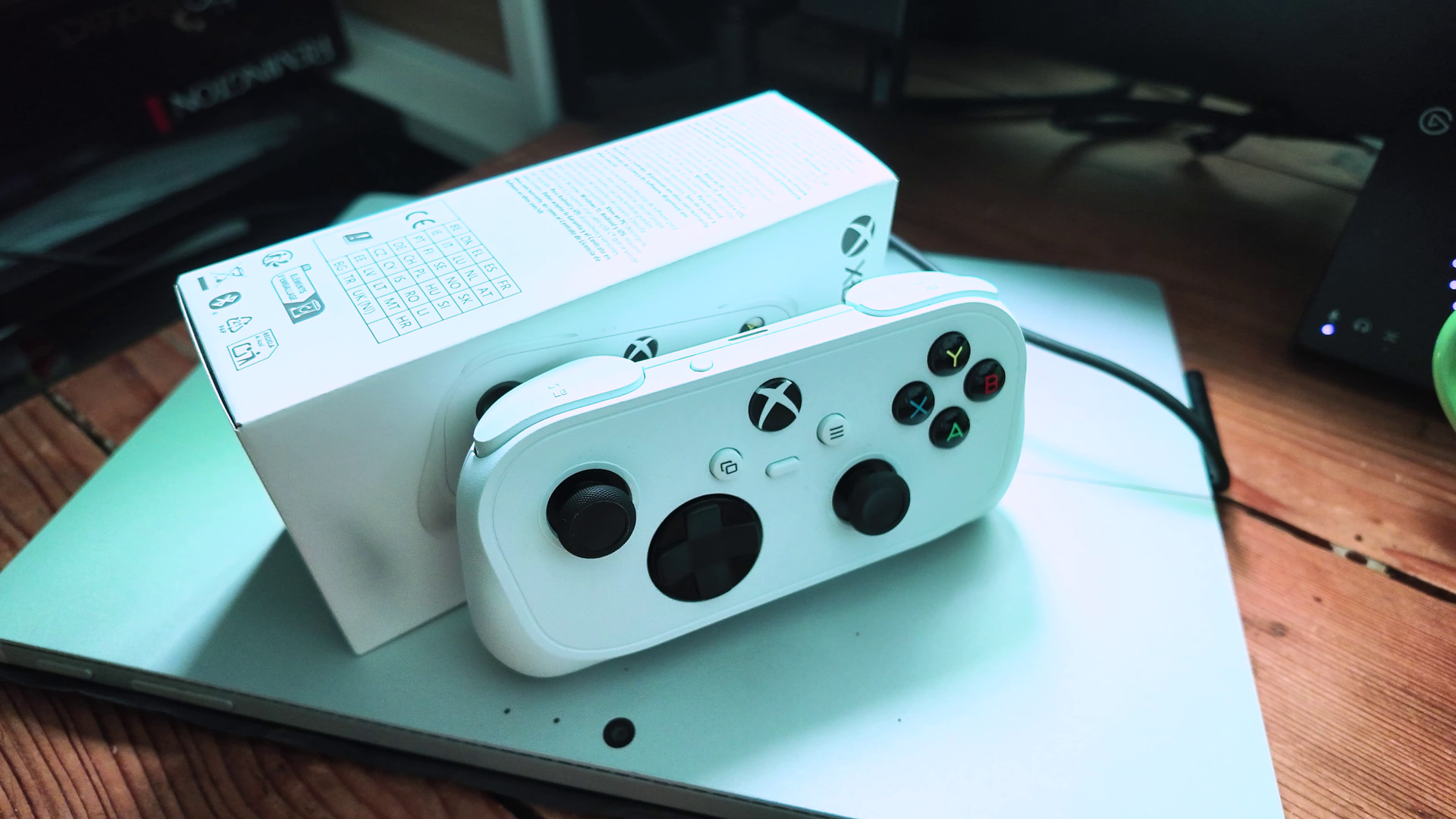
I managed to get my average-sized hands on a below-average sized controller this past week, as the Xbox Nano Controller prepares for lift off.

Microsoft revealed the Xbox Nano Controller a short while ago, but it had leaked a fair bit even before then via patents and regulatory filings. The pint-sized pad is a unique offering from team green, and it actually gives us a glimpse into how their thinking is evolving for their gaming operation in general.

The Xbox Nano Controller goes on sale on November 4, 2026 for the United States, United Kingdom, and other select markets, arriving right in time for Christmas. The Xbox Nano Controller is priced at $49.99 (via Amazon US here), comes with all the standard Xbox inputs, albeit without vibration motors or removable batteries.

We're still putting it through its paces before a full formal review, but initial impressions are positive. There's one feature here that isn't even activated yet ... though. Let's get into it.

Super cute, with super caveats

Xbox Nano Controller pictures

It's a small boi. (Image credit: Windows Central | Jez Corden)

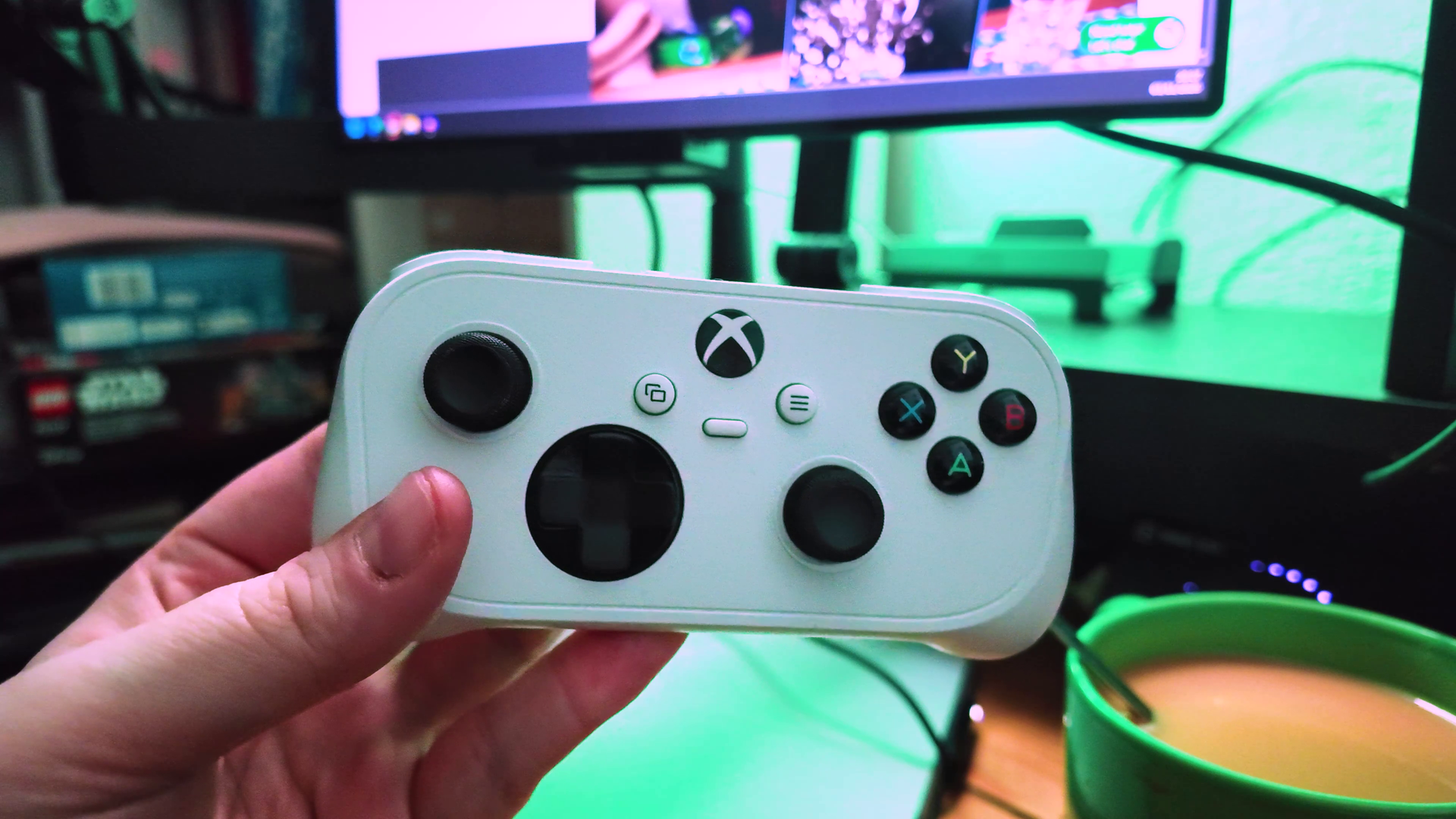
Yes, this controller is indeed Nano by name, and Nano by nature. It's roughly the same width as a standard Xbox controller, but it has a much shorter profile, with ergonomic palm grips that feel good in the hand even as an adult.

The thumbsticks, buttons, triggers, and bumpers are all slimmed down, but are positioned nicely making it easy to differentiate by feel alone. Actuating the triggers is easy because of the way they're lipped, and the bumpers are slightly raised rather than flush, which makes rolling your finger between them intuitive in motion.

As mentioned, there are no vibration motors this time around, however, as they naturally couldn't fit inside. The battery cell doesn't have a listed lifespan on the page, so we're still testing it out, but I've been abusing it a fair bit over the past week and still have 20% left which is impressive. I'm still working on a more in-depth analysis there.

Speaking of "a work in progress," for some reason, Microsoft has strangely tried to hide the fact this controller supports Wi-Fi direct capabilities for Xbox Cloud Gaming.

Xbox Nano Controller pictures

It's pretty damn fun, but don't dip it in your tea. (Image credit: Windows Central | Jez Corden)

Indeed, as shared by The Verge and clarified by our own sourcing, Microsoft will soon reveal its Google Stadia-like capabilities for gamepad connections direct to your Wi-Fi, eliminating the latency of Bluetooth. By connecting directly to the servers over the internet, you eliminate some additional jumps your controller would otherwise have to do to reach the game. I'm told all future Xbox controllers will come with this tech as standard, including the Xbox Elite Controller Series 3, which is likely also imminent for reveal.

The Wi-Fi direct capabilities will only be available in the United States initially, and only in testing, before going global in the coming weeks and months ahead.

In any case, this is a really nice addition to the Xbox controller lineup. It's going to be ideal for travel due to its weight and size, and is easily pocketable. It might also be a better option for younger gamers with smaller hands. Microsoft has been marketing it against Minecraft Dungeons 2, which offers a glimpse at how they're thinking about positioning it.

I'll put together a full review in the coming days, but early impressions are very solid!

The Xbox Nano Controller is up now for preorder at major retailers, offering a portable way to access your games without the hassle of a bigger, beefier home controller.

See at: AmazonView Deal

Click to join us on r/WindowsCentral

Join us on Reddit at r/WindowsCentral to share your insights and discuss our latest news, reviews, and more.
  • ✇Yanko Design
  • Hal Jordan has to recharge his ring, but the NoxTi titanium EDC lantern glows for decades
    Every Green Lantern has the same annoying chore. Once a day, the ring needs a top-up, so our cosmic cop has to press his fist against a glowing green lantern and recite a whole poem before it’ll charge. Imagine your iPhone demanding spoken word every night before you plug it in. Xedge’s NoxTi TRI skips the ritual. It’s a pocket-sized lantern in Grade 5 titanium that hangs off your keys or around your neck, with three glow tubes tucked inside. Fit it with tritium tubes and it glows without charg
     

Hal Jordan has to recharge his ring, but the NoxTi titanium EDC lantern glows for decades

2 novembre 2026 à 21:45

Every Green Lantern has the same annoying chore. Once a day, the ring needs a top-up, so our cosmic cop has to press his fist against a glowing green lantern and recite a whole poem before it’ll charge. Imagine your iPhone demanding spoken word every night before you plug it in.

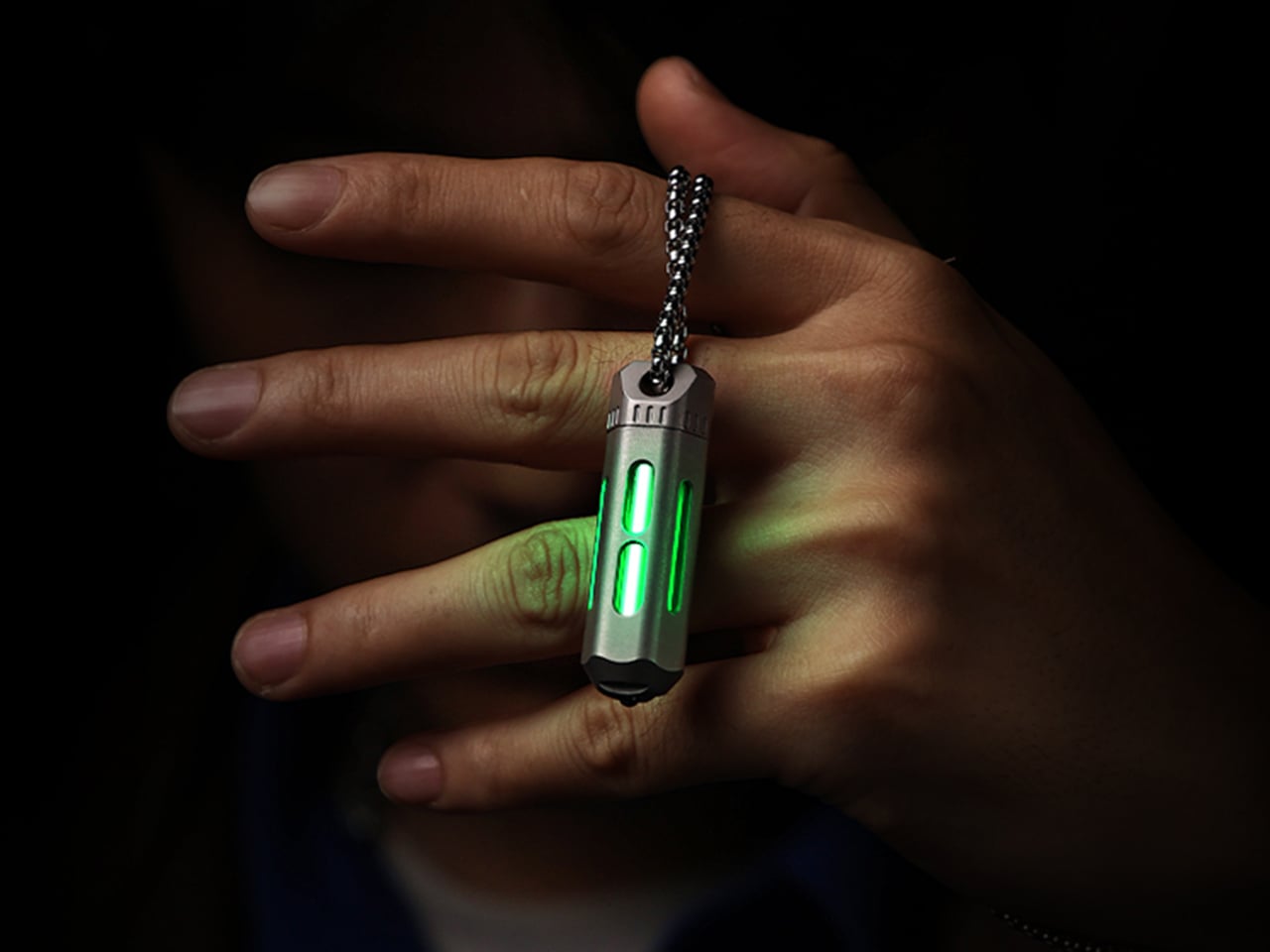
Xedge’s NoxTi TRI skips the ritual. It’s a pocket-sized lantern in Grade 5 titanium that hangs off your keys or around your neck, with three glow tubes tucked inside. Fit it with tritium tubes and it glows without charging, a switch, or poetry, slowly dimming over a couple of decades. Prefer something non-radioactive? Photoluminescent tubes absorb light and glow after dark. Hal would be jealous.

Designer: Xedge

Click Here to Buy $35 $55 (36% off). Hurry, only a few left! Raised over $81,000.

Three Tubes, One Glowing Core

NoxTi TRI holds three 3 x 22.5mm glow tubes spaced 120 degrees apart to keep the glow visible from more angles, whether the capsule is dangling from a keyring or lying in a cupholder. The tubes sit in a custom carrier made of optical-grade PMMA acrylic, for which Xedge claims around 97 percent light transmission. The carrier is designed to use total internal reflection to distribute the light, making the three tubes appear as one luminous core behind the titanium windows.

Six colors are on the menu: Apple Green, Ice Blue, Ocean Blue, Red, Violet, and Sunset Orange. Run one across all three slots for a uniform glow, or mix them. Yes, that means three Lantern Corps on one keyring. Tritium is the set-and-forget option. Its half-life is about 12 years, so the glow gradually dims rather than switching off, with Xedge describing a usable lifespan of about two decades. That’s still a better deal than any battery I own. The tritium is sealed inside glass vials, and Xedge reports a radiation-meter reading of 0.07 µSv/h. Photoluminescent tubes are the cheaper, non-radioactive option, recharging through exposure to light.

Titanium Outside, Shock Absorbers Inside

The shell is CNC-machined from Grade 5 titanium, an alloy also used in aircraft parts and bone implants. Its corrosion resistance should suit the sweat and daily handling of life on a crowded keyring. It measures 47mm long and 14.3mm across, and weighs 15.8 grams, roughly the weight of three US nickels. Inside, a quartz sleeve surrounds the glowing core to help keep dust out and the view clear, while O-rings seal the threaded body. Xedge says it tested the design at temperatures from minus 20°C to 100°C. It comes in sandblasted raw titanium or a stealthier Black DLC finish. I’d pick the black, purely because the glow stands out more against it.

The more interesting detail is how the design cushions those glass tubes. Each one rests on a 3mm silicone ball, and a stainless steel spring under the core is intended to absorb jolts from dropped keys or a swinging pendant. That spring sits on a magnetic base to help keep it in place when you unscrew the body to swap tubes, reducing the chance of tiny parts bouncing across the kitchen floor. A machined Tri-Index Cap keeps all three tubes aligned with their windows. Xedge says every component is accessible and replaceable, giving the titanium shell a chance to outlive several sets of tubes.

Wear It, Clip It, Break Glass With It

The attachment hole at the top takes a split ring, a quick-release clip, or a chain, so the TRI can live on your keys, hang off a bag zipper, dangle from a phone strap, or ride around your neck as a pendant. The kit supports both single-tube and triple-tube setups, so you can switch between them. On the opposite end sits a ceramic glass-breaker bead, intended for breaking car windows in an emergency, which I sincerely hope nobody ever needs. Keep expectations calibrated, though: this is a locator glow for finding your keys or bag in the dark. It won’t light up a trail.

The NoxTi TRI Kickstarter campaign lists a retail price of about $55 (HK$429) per unit. Pledge pricing starts at $35 for the launch special, followed by $39 for Super Early Bird and $45 for Early Bird, with two-packs from $65 and a four-pack at $119. Glow tubes are separate add-ons: tritium costs $20 per tube or $60 for three, while photoluminescent tubes are $7 each or $15 for three. Extras include the Black DLC upgrade ($15), a stainless steel necklace ($12), a titanium quick-release clip ($15), and titanium split rings ($12 for three). Shipping is listed as free worldwide, with deliveries planned for February 2027. Xedge hasn’t published warranty terms yet.

Click Here to Buy $35 $55 (36% off). Hurry, only a few left! Raised over $81,000.

The post Hal Jordan has to recharge his ring, but the NoxTi titanium EDC lantern glows for decades first appeared on Yanko Design.

McDonald's created the perfect mouse and forgot to sell it where I live

When I was a child my dad's office shelf was filled with plastic toys from McDonald's that I played with. Some of those sat there for years as a reminder of short stops on vacations for lunch. Since those days over three decades ago, McDonald's toys have evolved.

Rather than a heavy plastic Grimace or another colorful mascot, McDonald's food now comes with computer accessories. That is, if you're in China.

McDonald's China teamed up with Lenovo to create a wireless mouse that looks like a carton of McDonald's fries. Apart from looking like a fast food item, the mouse is rather unassuming. It features two buttons and a scroll wheel. It charges through USB-C, which is standard for mice these days.

McDonald's mice are made from around 60% recycled materials. Specifically, old Happy Meal toys were used.

The mouse comes with a carrying case that turns into a mousepad when you open it up, which is a clever design.

Unfortunately for myself and anyone else hoping to get their hands on one of the mice, McDonald's held a very limited run for the accessory. Only 4,000 units were made, and they were sold over a single weekend for roughly $14. There's also the geographic limitation of the fry mice only being made available in China.

Close-up of a green McDonald's 9 Moa McNuggets box with Halo and Xbox 25th anniversary logos next to fries.

McDonald's Moa McNuggets were dry and broke game lore, but I'd forgive those shortcomings to get a McDonald's mouse. (Image credit: Future)

My love of McDonald's is well documented. My Microsoft profile photo is me holding a Happy Meal. Call it a guilty pleasure or an occasional treat, I love a box of McNuggets or a taste of a limited-time item at McDonald's.

I often find excuses to review McDonald's food that is connected to Microsoft in some way, such as the Moa McNuggets inspired by Halo and the Minecraft Nether Flame Sauce.

If they ever launch a similar device in America, some of the mice may be made out of my old toys.

Click to join us on r/WindowsCentral

Join us on Reddit at r/WindowsCentral to share your insights and discuss our latest news, reviews, and more.

  • ✇Yanko Design
  • Strapsicle’s iPad Cases Trade Gripping the Edges for a Silicone Hand Strap
    Apple spends plenty of effort making the iPad thin and light, but that doesn’t mean holding one for an entire chapter feels effortless. A protective case can give it more bulk without giving your fingers much help. Strapsicle’s iPad cases take a different approach, adding a silicone strap that lets your hand support the tablet from behind instead of constantly squeezing its edges. The most conspicuous part of the design is also its most useful idea. Strapsicle calls it the XO strap, a circular
     

Strapsicle’s iPad Cases Trade Gripping the Edges for a Silicone Hand Strap

Par : JC Torres
28 octobre 2026 à 11:20

Apple spends plenty of effort making the iPad thin and light, but that doesn’t mean holding one for an entire chapter feels effortless. A protective case can give it more bulk without giving your fingers much help. Strapsicle’s iPad cases take a different approach, adding a silicone strap that lets your hand support the tablet from behind instead of constantly squeezing its edges.

The most conspicuous part of the design is also its most useful idea. Strapsicle calls it the XO strap, a circular center with four diagonal arms attached to the case. Slide your fingers underneath, and the flexible silicone sits across the back of your hand. That gives the iPad another point of support without turning it into something with a bulky carrying handle.

Designer: Strapsicle

That arrangement also leaves room to change how you hold the tablet. Your fingers can slip under different parts of the strap for portrait reading or landscape browsing, with either hand taking a turn. Of course, the case doesn’t make an iPad weightless. It’s intended to reduce reliance on pinching the edges, not remove the need to support the device at all.

Eventually, though, even the most interesting book has to make way for something else. The front cover folds along its geometric creases to become a stand, offering portrait support for reading and a steeper 75° landscape position for watching videos. There’s also an 8° setup for typing and drawing, bringing the screen closer to the tabletop rather than holding it almost upright.

The cover doesn’t have to follow you through every activity, thankfully. It detaches completely, leaving the rear strap accessible without a folded flap competing for space behind your hand. Small pins connect it to the shell rather than magnets, so removing it is a deliberate step. Put it back on when you’re finished, and the screen has a cover for the trip home.

There’s a smaller silicone loop along the edge for an Apple Pencil, keeping the stylus with the tablet instead of loose in a bag. The main straps are interchangeable, too, so changing colors doesn’t require replacing the whole case. Pink, dark teal, and black give that unusual rear shape a little personality, while the transparent back leaves the iPad’s own finish visible.

Strapsicle lists two sizes, fitting the sixth- and seventh-generation iPad mini or the 10th-generation iPad and iPad (A16). Its announced US launch prices are $69.99 for the mini case and $79.99 for the larger version. The company says they’re shipping now, with the October 26, 2026, announcement marking their B&H retail debut. DataVision sales are scheduled to follow in November.

There is a tradeoff to all that extra support, however. Strapsicle lists the complete mini case at about six ounces and the larger version at 9.8 ounces, including their covers and straps. You’re adding weight to something you’ll still have to hold. Taking the cover off for a chapter on the couch makes sense, then, provided you remember to put it back before heading out.

The post Strapsicle’s iPad Cases Trade Gripping the Edges for a Silicone Hand Strap first appeared on Yanko Design.

  • ✇Yanko Design
  • Arrowspace’s $119 screwdriver identifies screws and lights up the matching bit
    For five years, Arrowmax has been teaching screwdrivers to read people. The SES Pro in 2021 watched your wrist, so a twist left or right told the motor which way to spin. The SES Max added app control, and the M1 Pro stretched output to 10 kgf·cm with a manual fallback for stubborn screws. Its little screen could report torque and battery level all day. Your screwdriver got smarter and you got lazier, in the best possible way. The obvious next question was why the tool still had no idea what sc
     

Arrowspace’s $119 screwdriver identifies screws and lights up the matching bit

27 octobre 2026 à 21:47

For five years, Arrowmax has been teaching screwdrivers to read people. The SES Pro in 2021 watched your wrist, so a twist left or right told the motor which way to spin. The SES Max added app control, and the M1 Pro stretched output to 10 kgf·cm with a manual fallback for stubborn screws. Its little screen could report torque and battery level all day. Your screwdriver got smarter and you got lazier, in the best possible way. The obvious next question was why the tool still had no idea what screw it was holding.

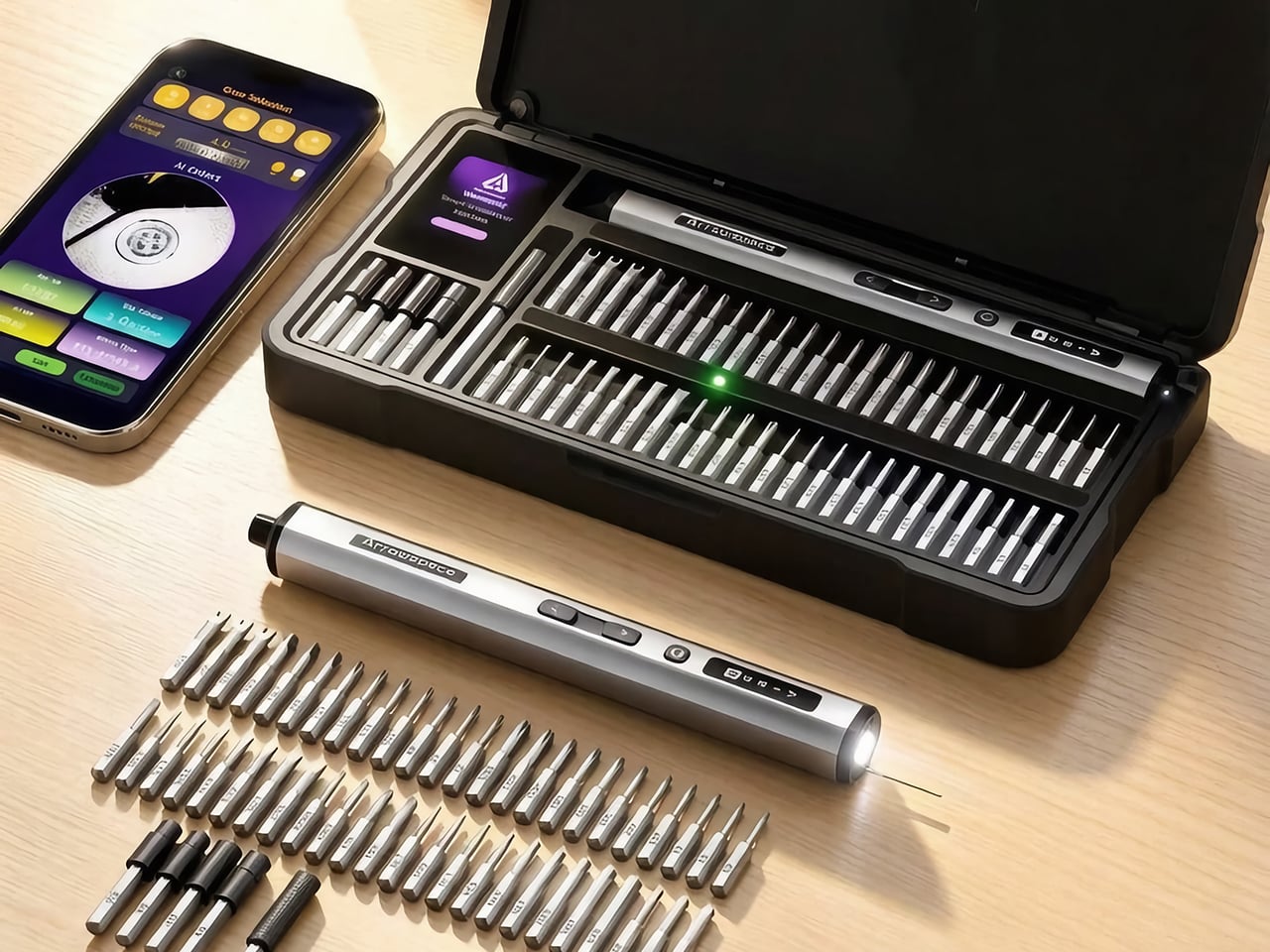
The Arrowspace S1, built by the same team under a new brand name, answers that with a camera on the tail end of the screwdriver. Image recognition names the screw’s drive type and exact size, while a small probe holds the lens at a fixed distance so tiny heads stay sharp. The smart case then lights the slot of the matching bit, and Auto mode picks a safe torque for that fastener. It keeps the 10 kgf·cm ceiling of the M1 Pro, which is plenty for everything from earbuds to e-bike parts. Early pricing starts at $119, and the kit includes the case, 52 S2 steel bits, and a power tip extension.

Designers: LAU YIN / XU YU

Click Here to Buy Now: $129 $215 (40% off). Hurry, only 40/400 left! Raised over $119,000.

The Screwdriver That Squints So You Don’t Have To

The camera sits at the rear of the S1, right behind a small contact probe, and the two work as a team. You rest the probe on the screw head, which locks the lens at one fixed distance, so every shot lands sharp. A screw this small turns to mush if the camera drifts even 1mm. Arrowmax fixed that blur problem with a metal pin instead of more code, which is a very hardware-person way to win an argument. I love it, because it means recognition survives a messy bench and shaky hands instead of working only in a demo video.

Once the shot is sharp, the driver sends it to the companion app on your phone, which works out the drive type and exact size. Everything runs locally with no internet involved, so your screw photos stay on your phone. Arrowmax trained the model, a YOLO object detector, on its own collection of tens of thousands of real screw photos, currently covering 12 common head profiles. The app shows the actual camera image next to the verdict, so you can see what the S1 sees and judge the call yourself. Only the reading step needs the phone, since motor control, torque, and the displays all work on their own.

A Case That Points at the Right Bit

The smart case turns the app’s verdict into something you can see across the bench. A 2-inch TFT screen with Arrowspace’s purple interface shows the recognized screw type and size, while an LED glows under the slot holding the matching bit. Reach, grab, done. Compare that with the usual ritual of squinting at tiny codes on dozens of near-identical shafts, and the old way starts to look like a part-time job. It is the same idea as a warehouse pick-to-light shelf, shrunk down to a tray of S2 steel bits.

The 52 bits are S2 steel hardened to HRC60, which keeps the tips from rounding off after repeated use, and extended bits reach screws buried in deep holes. A magnetic holder keeps bits seated while you work. The case itself is a CNC-machined frame in aerospace-grade aluminum with EVA protection inside, a build the M1 Pro’s CNC aluminum box would recognize. That solid metal feel suits a bench that sees daily use. One box ends up holding the driver, the bits, and the answer to which bit you need.

Gentle With Earbuds, Firm With E-Bikes

Electric torque runs from 1 to 10 kgf·cm, roughly 0.1 to 1 N·m, and Arrowspace’s own chart maps that range to real jobs. The low end suits earbuds, smart bands, and glasses. Around 3 you are into laptops and camera bodies, 6 covers RC cars, drones, and game consoles, and the full 10 handles e-bike parts and large appliances. Auto mode matches a conservative preset to the screw it just identified and remembers your last setting between jobs. Prefer to drive? The app lets you tune the torque for each mode yourself.

When electric mode runs out of muscle, the S1 switches to manual on its own, a trick it inherits from the M1 Pro. The mechanism is rated for 30 kgf·cm of hand-twisted force, which handles the factory screw that laughs at motors. A 600mAh LiPo battery covers 900+ screws or about 90 minutes of continuous use, and USB-C refills it in roughly 70 minutes. An OLED on the body shows torque level, spin direction, and battery, and it even animates while charging. A full session of fiddly repairs fits comfortably inside one charge.

The Price of Never Guessing Again

The S1 suits anyone who repairs often enough to own a drawer of bits but not often enough to have a veteran’s eye, meaning RC builders, scale modelers, drone owners, and the friend who gets every laptop question. Arrowspace says the AI handles identification while your hand keeps the control, and that split feels right to me. My one wish is friendlier recognition for oddballs like JIS cross-head screws, the Phillips look-alikes in plenty of Japanese electronics. Arrowmax says updates will keep widening the 12 profiles covered today, so the wish has a path. A screwdriver that learns new screws over time is a fun idea for a tool that used to be a metal stick.

Pricing for a single S1 kit starts at $119, listed at 45% off, with $129 and $149 tiers also available. Every tier includes the driver, the illuminated smart case, 52 S2 steel bits, and a power tip extension. Shipping is an estimated $16 by air freight to anywhere in the world, so US buyers are covered, with delivery expected in April 2027. Two kits run $238 and three run $339, with shipping at $30 and $45. The optional Angle Screw attachment is sold separately, so check the product page for its price. A stripped screw can cost you a whole device, which makes $119 look like cheap insurance.

Click Here to Buy Now: $129 $215 (40% off). Hurry, only 40/400 left! Raised over $119,000.

The post Arrowspace’s $119 screwdriver identifies screws and lights up the matching bit first appeared on Yanko Design.

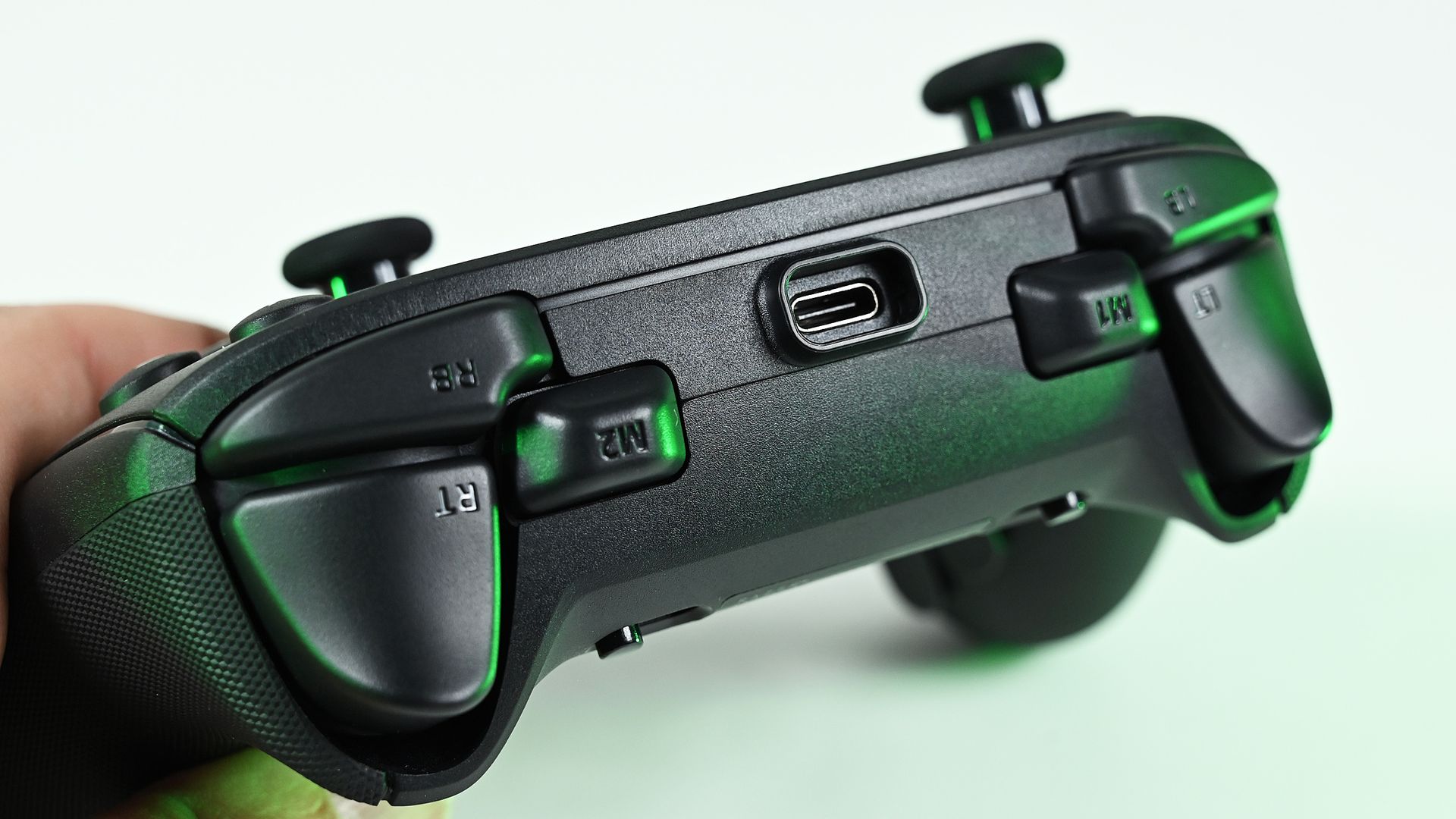
Razer Wolverine V4 Pro (Xbox, PC) controller review — The new standard.

The Razer Wolverine has been the torchbearer for premium alternative Xbox controllers for some time. And now we're on iteration V4, which was released just a few weeks ago.

It comes at an interesting time for the best Xbox controllers. Microsoft relinquished exclusivity over its Xbox Wireless signal. In previous years, all third-party Xbox controllers were wired, which was irritating to say the least, especially since Xbox refused to use new tech like haptics or anti-drift capacitivate thumbsticks.

That might be changing with the Xbox Elite Series 3, rumored to be imminent for release, but it's not here yet. Between then and now, we still have the Razer Wolverine V4 Pro, which might just be the best Xbox controller I've ever used — even if it is missing some crucial features on the convenience side.

But for how long will it remain the king? And is it really worth the cash?

Razer Wolverine V4 Pro — Specs and price

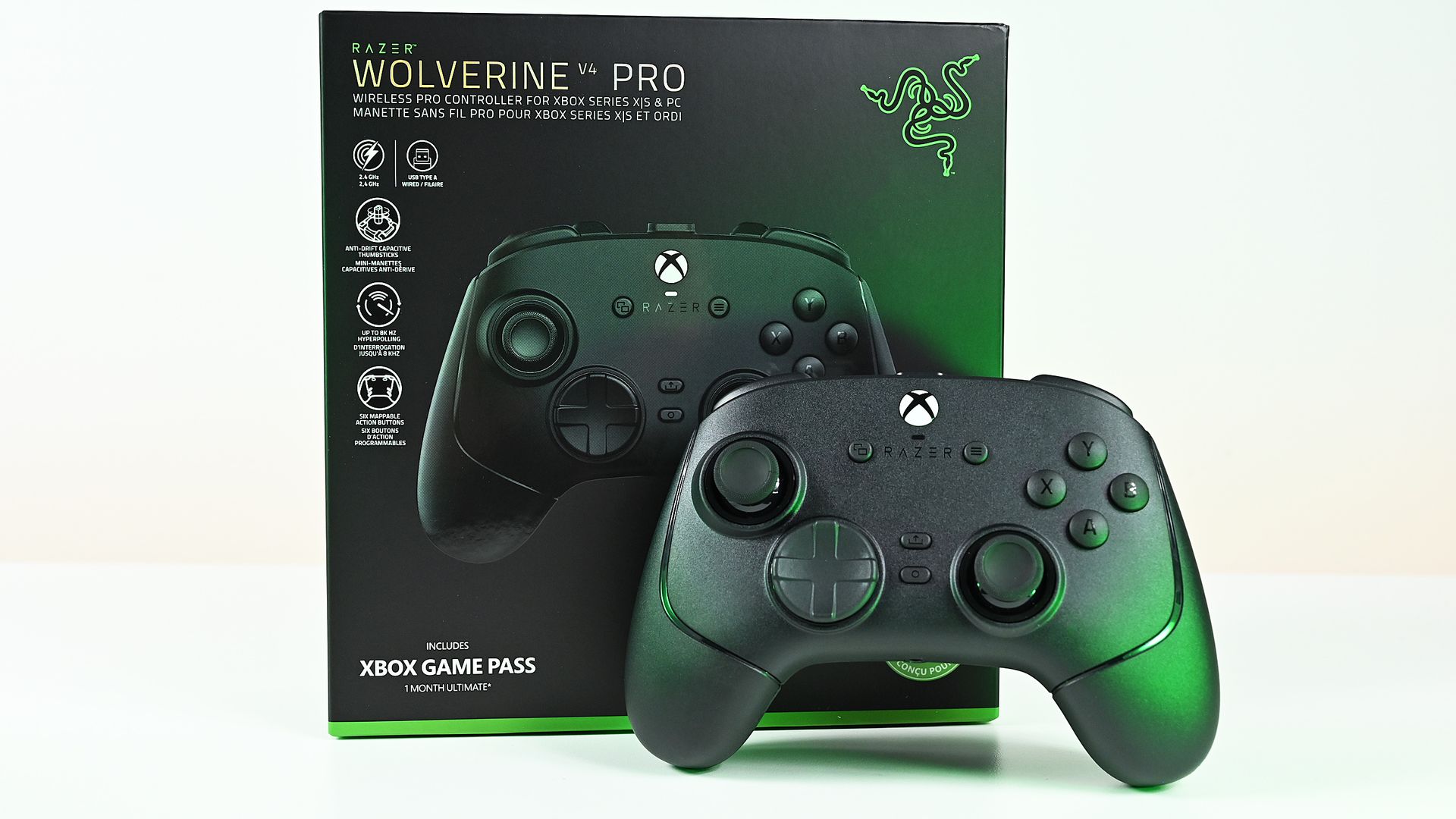
Front view of the black wireless Razer Wolverine controller standing upright in front of its green and black retail packaging box.

No major frills in the box, but the essentials are thoroughly nailed. (Image credit: Daniel Rubino)

The Razer Wolverine V4 Pro is a powerhouse when it comes to raw specs, offering a truly absurd 8,000 Hz maximum polling rate on PC. It's limited to 250 Hz on Xbox (owing to Microsoft's Xbox Wireless signal), but for those who truly want some e-sports-grade connectivity on Windows PC, you need look no further.

Specification

Razer Wolverine V4 Pro

Compatibility

Xbox Series X|S, Xbox One, Windows PC

Connectivity

Razer HyperSpeed Wireless (2.4 GHz), USB-C wired

Polling Rate

Up to 8,000 Hz on PC, up to 250 Hz on Xbox

Thumbsticks

High-resolution capacitive anti-drift thumbsticks with interchangeable stick caps

Additional Inputs

4 removable rear buttons and 2 claw-grip bumpers (6 extra inputs total)

Triggers

With locks for adjustable short-throw and full-range modes

Customization

Remappable controls, interchangeable thumbstick caps, removable faceplate, 4 onboard profiles

Battery Life

Up to 27 hours

Price

$199.99 MSRP

The Xbox version is only compatible with Xbox consoles and Windows PCs, sadly lacking Bluetooth for anyone who wants something compatible with mobile devices on the side. It comes with a USB dongle in the box with Razer's high-spec polling rate capabilities and dynamic switching between Xbox and PC. No need to flip a switch on the dongle itself anymore.

The thumbsticks are capacitive and thus anti-drift (a major issue with all current Xbox controllers), and measures far more steps than typical TMR sticks. They come with programmable "claw" shoulder buttons as well as four removable back buttons, Elite-style.

It sports up to 27 hours of continuous play, is chargeable via USB-C cable, and has a removable faceplate for good measure.

It all comes in at $199.99, however, putting it on par with the Xbox Elite Series 2 controller with its full bundle of accessories. While you do miss out on a charge dock and Bluetooth, you are gaining some serious firepower and a design chassis built to last, rather than fall apart.

Razer Wolverine V4 Pro — Features, software, and ergonomics

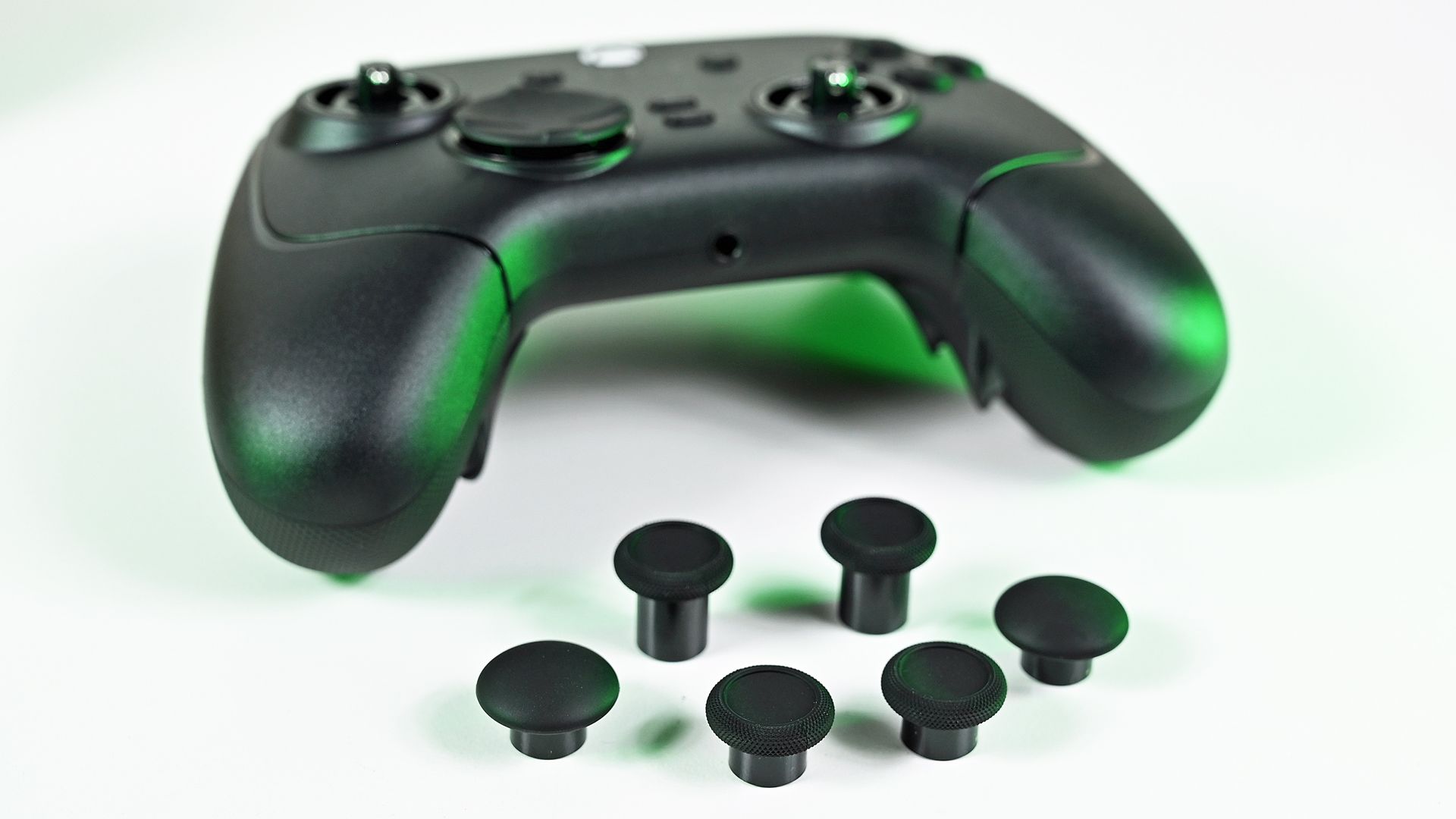
Front view of the controller with bare analog stick shafts, displayed alongside six interchangeable replacement thumbstick caps.

A large suite of customization awaits. (Image credit: Daniel Rubino)

The Razer Wolverine V4 Pro is becoming something of a leader in this space. I've been using the Razer Wolverine V3 Pro as my go-to PC gaming controller for some time now, and to say I'm used to it would be an understatement. I would say I've come to prefer it overall, particularly over time, as my Xbox Elite Controller Series 2 has succumbed to stick drift in a big, annoying way. But more on that in a sec.

The Wolverine V4 Pro doesn't reinvent the wheel over its predecessors, but does address some nitpicks and annoyances I've seen some people have.

It comes with the same two extra shoulder claw bumpers, which can be programmed to do a variety of additional things. The back paddles can be removed now, for those who prefer to only rock two instead of all four, for example. The buttons and D-pad still have a "clicky" actuation, which I know sometimes gets a mixed reaction. I don't mind it myself, but if you didn't like it, know that it's back here with the V4.

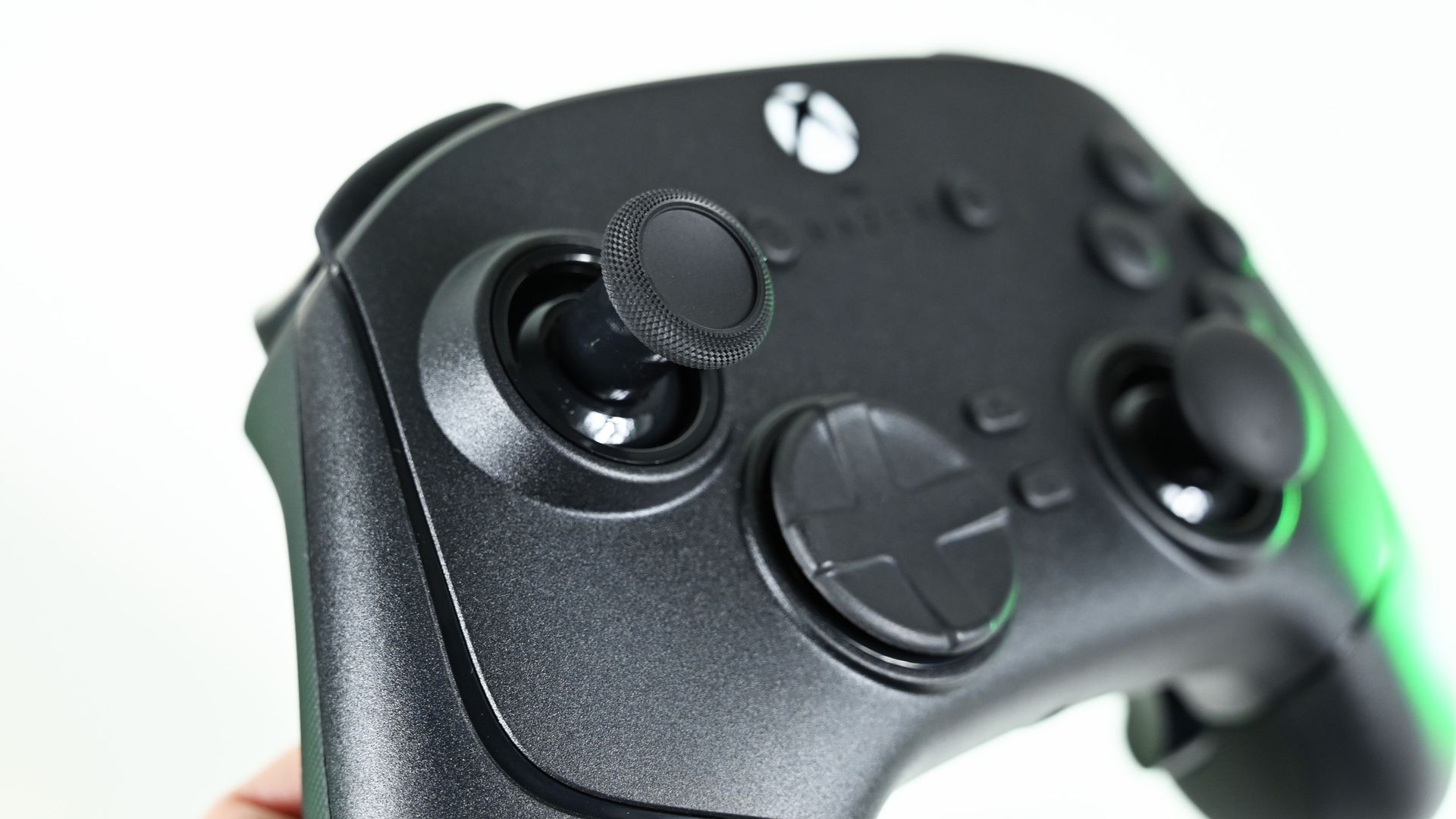
Close-up of the controller's textured left analog thumbstick, hybrid directional pad, and glowing Xbox guide button.

Superior sticks really elevates the package above what Microsoft offers today. (Image credit: Daniel Rubino)

The sticks are capacitive anti-drift, and contactless, and should be utterly resistant against wear and tear. Quality-wise, they feel almost 1:1 with what Xbox offers — minus the inevitable drift, which is a huge plus. Razer includes some swappable options in the box too, and they're easy to swap out. Unlike the magnetic ones on the Elite, though, Razer's won't fall off as easily, as they're held in place with a small clasp. I can't tell you how many times I've dropped my Elite controller only for the thumbsticks to fall off and go hiding somewhere.

Design-wise, the Razer Wolverine V4 Pro is not exactly a huge looker, but it does have a magnetic faceplate that can be swapped out for custom designs. I've not seen any available online yet, but I'm sure they're coming down the pipeline.

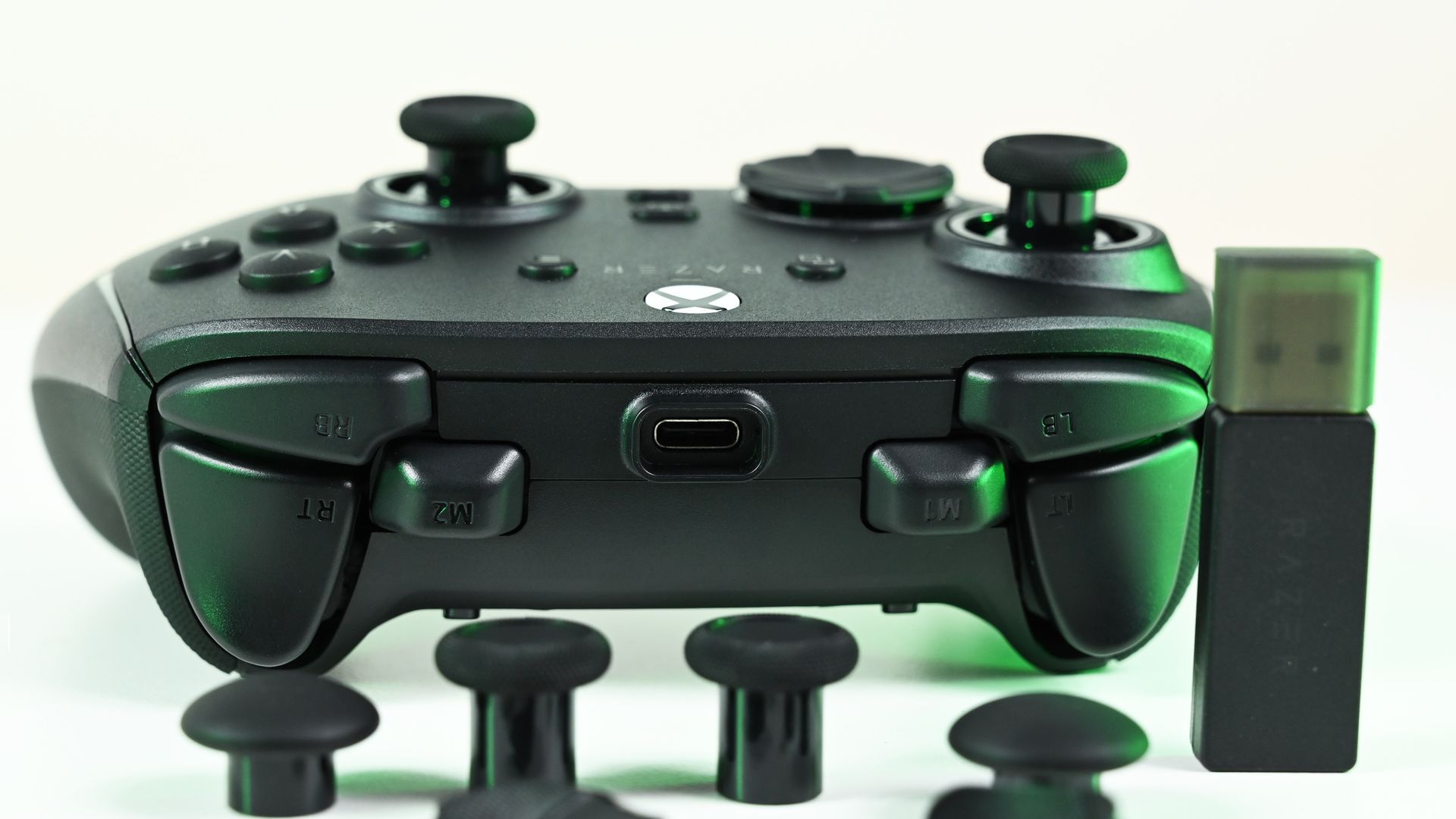
I'm not a huge fan of the large USB-C port on the top of the controller, which juts out haphazardly. It's not a big deal, and I guess it helps hold the cable in place for charging, but it isn't a pretty solution.

Speaking of charging, the Razer Wolverine V4 Pro gets around 27 hours on a single charge according to the firm, although I'd say it clocks in a bit less than that in practice, maybe around 20-24 hours when used via Xbox. Coupled with the fact that it has no charge dock unlike other controllers in this price range, I was hoping Razer would look to move beyond cables with the V4 Pro. Alas, we might need to wait for the V5. Again, not a big deal, but it is something worth considering.

Top view of the controller's triggers, bumpers, and USB-C port, displayed with a USB wireless dongle and spare thumbstick caps.

More inputs than most people would need. (Image credit: Daniel Rubino)

Razer's software is still among the best third-party solutions for gaming accessories on PC, in my view, with everything bundled in a single place. It's easy to manage the features on the Wolverine V4, assigning buttons and the like, although be wary of using Razer's macros in some competitive games — automation detection can get you banned in some PvP titles like shooters. Offline though, it can be a handy feature, especially in some management and simulation games.

Speaking of shooters, Razer's triggers are also well put together here. The trigger locks make activation more rapid, which can be a boost for pistols and rifle fire. You can disable them with a switch for full motion activation for acceleration in racing games and things like that.

The V4 boasts flawless reception without disconnects or degradation, even in a radio-hostile environment.

Crucially, Razer also seems to have eliminated signal interference issues that came in the box with the V3. Firmware updates fixed those over time, but the V4 boasts flawless reception without disconnects or degradation, even in a radio-hostile environment (i.e., my office with a thousand other radio signals interfering with each other).

All in all, I think this is more of a refinement and iteration over the V3 Pro, improving and polishing the strong fundamentals to a mirror finish.

Razer Wolverine V4 Pro — Competition

Close-up of the controller's top edge, highlighting the recessed USB-C connection port, bumper buttons, and remappable M1 and M2 buttons.

I think for many, the Xbox Elite comparison will be top dog. But there's a third Elite around the corner ... (Image credit: Daniel Rubino)

There are many great Xbox controllers from third-party firms these days. As much as I truly adore the convenience of the Xbox Elite charge dock and monstrous, infinite-feeling battery, the sticks and general build quality degrade rapidly over time. It's hard to recommend the Xbox Elite controller these days to most people as a result, even if the dock is the best out there by a mile.

The Razer Wolverine V4 Pro is not cheap at $199, and perhaps is best considered over things like 8BitDo Ultimate 3E if you are looking for something on the higher end for rapid response in multiplayer PvP PC games, like Call of Duty and such. The 8BitDo Ultimate 3E Xbox / PC wireless controller has a charge dock, has Bluetooth, as well as anti-drift sticks and programmable additional buttons. It is also $70 cheaper than the Razer Wolverine V4 Pro, at the cost of a "premium feel" potentially. Razer also rocks that absurd 8000 Hz maximum polling, although the 8BitDo does also go up to 1000 Hz on PC for good measure, albeit with a smaller battery.

I wish Razer would jump on the battery dock train to reduce reliance on cables and charging. I shouldn't need to be scrambling for a cable mid-match in 2026, particularly when so many others are offering them now.

There are also even more premium options out there now too, like the SteelSeries Aeon Pro, which is $50 more expensive, but also offers a charge dock and the ability to connect and switch between two platforms at once. The Razer Wolverine V4 Pro asks you to physically move the dongle between platforms if you're moving between devices, which isn't always ideal either.

Razer Wolverine V4 Pro — Should you buy it?

Top-down view of the black Razer Wolverine controller nestled securely inside the black foam insert of its open packaging box.

A great pure controller, but for the price Razer could stand to offer a bit more. (Image credit: Daniel Rubino)

I think the 8000 Hz polling radio does a lot of the heavy lifting on the price here, potentially making this a niche option for esports-grade level play — something other controllers simply don't offer right now. However, for the vast majority of consumers, I would've liked to have seen a bit more on the convenience end. This is branded as a "Pro" controller, though to be fair, i.e. for "Pro" gamers. In that, it does exactly the job it set out to do.

There are other options that might be better value for a regular gamer like those outlined above. There's also the Xbox Elite Controller Series 3 which is probably just weeks away from a reveal, making the decision to grab this even murkier maybe in the near term (as of writing, that is). But one thing is for sure: you won't be disappointed if you do end up picking this controller up.

The Razer Wolverine V4 Pro absolutely nails the fundamentals like few other controllers do, delivering massive performance in a tidy, intuitive package.

Razer Wolverine V4 Pro controllerWindows Central

Razer
Wolverine V4 Pro

The Razer Wolverine V4 Pro is a stellar controller that every other controller should draw from with regards to the fundamentals. Superb ergonomics, great customizability, and high-quality materials provide a reassuring sense of value for money. As a consumer, I'd probably swap out the 8K polling for something else, but this is for "Pro" gamers, and in that, it surely delivers.

See at: Amazon

Click to join us on r/WindowsCentral

Join us on Reddit at r/WindowsCentral to share your insights and discuss our latest news, reviews, and more.

Samsung Galaxy Tab S12 Ultra Cheat Sheet: What to Know Before You Buy

26 octobre 2026 à 04:47

Explore Galaxy Tab S12 Ultra features and pricing, from DeX and Galaxy AI to accessories, with buying advice to help you choose the right configuration.

The post Samsung Galaxy Tab S12 Ultra Cheat Sheet: What to Know Before You Buy appeared first on TechRepublic.

Dell’s new monitor price cuts offer sweet spots between productivity and gaming

Monitors are a quintessential part of our lives as Windows users (and gamers), whether it's for achieving the best graphics and frame rates for our favorite titles or simply giving us better details and performance when going about our daily productivity tasks.

Dell's monitors fulfill this need with gusto, and several of them are now on sale if you need one to tackle the winter influx of games or workloads. That includes the productivity-focused Dell 32 Plus 4K S3225QS) for $329.99 at Dell (was $369.99), the gaming-focused Alienware 27 240Hz QD-OLED (AW2726DM) for $319.99 at Dell (was $349.99), and the budget-friendly Alienware 32 (AW3225DM) for $249.99 (was $299.99).

32 Plus 4K (S3225QS): was $369.99 now $329.99

"For around £300, the Dell 32 Plus S3225QS delivers a 4K VA panel with a 120Hz refresh rate and a typically smart, stylish design. If you're looking for a big, affordable screen to maximize your productivity, then this looks to be a very capable – and rather handsome-looking – option that won't break the bank." ~ Sasha Muller, freelancer journalist

ITPro review: ⭐⭐⭐⭐⭐View Deal

27 QD-OLED (AW2726DM): was $349.99 now $319.99

"The Alienware AW2726DM doesn’t have USB ports or internal speakers, but it does have premium-level gaming performance and an image that goes toe-to-toe with any premium OLED, for a significantly lower admission price." ~ Christian Eberle, Contributing Editor

Tom's Hardware review: ⭐⭐⭐⭐½View Deal


With its 32-inch Curved QD-OLED screen capable of rendering images and videos at 2560x1440 resolution and 180Hz refresh rates, the Alienware 32 (AW3225DM) is a great budget pick for gamers and content creators alike.View Deal

Which of these monitors is good for gaming?

Alienware's 27 240Hz QD-OLED (AW2726DM) and Alienware 32 (AW3225DM) are the best options for gaming in this round-up.

The Alienware 27 is a mid-range monitor great for gaming with its sharp and colorful images, low input lag for improved controller responsiveness, and a solid build for longer durability. Meanwhile, the Alienware 32 delivers decent frame rates and resolution at a much lower price and with a wider curved screen for greater cinematic immersion.

Additionally, these two monitors feature Variable Refresh Rates, which help games maintain stable frame rates. Plus, Call of Duty: Modern Warfare 4 requires Xbox consoles to use monitors with variable refresh rates; otherwise, it can't deliver optimal performance.

Which of these monitors is good for productivity?

The Dell 32 Plus 4K (S3225QS) is the best choice for productivity among this monitor round-up.

It features a massive 32-inch display that render 4K resolutions, an sRGB mode to provide images, documents, and other digital assets with vibrant colors, built-in 10W speakers with decent sound quality, and a sideways HDMI port for quick and easy connections to laptops or PCs when swapping desktops.

Should I wait until Black Friday for better deals?

It depends on your situation. If you're willing to wait for Black Friday on November 27, 2026 for potentially greater discounts, then I'd recommend holding off until then.

However, if you're in desperate need of a new monitor or afraid these monitors will rise in price to the point that Black Friday deals won't be useful thanks to the RAM crisis, then I'd recommend taking advantage of Dell's discounts now.

Click to join us on r/WindowsCentral

Join us on Reddit at r/WindowsCentral to share your insights and discuss our latest news, reviews, and more.
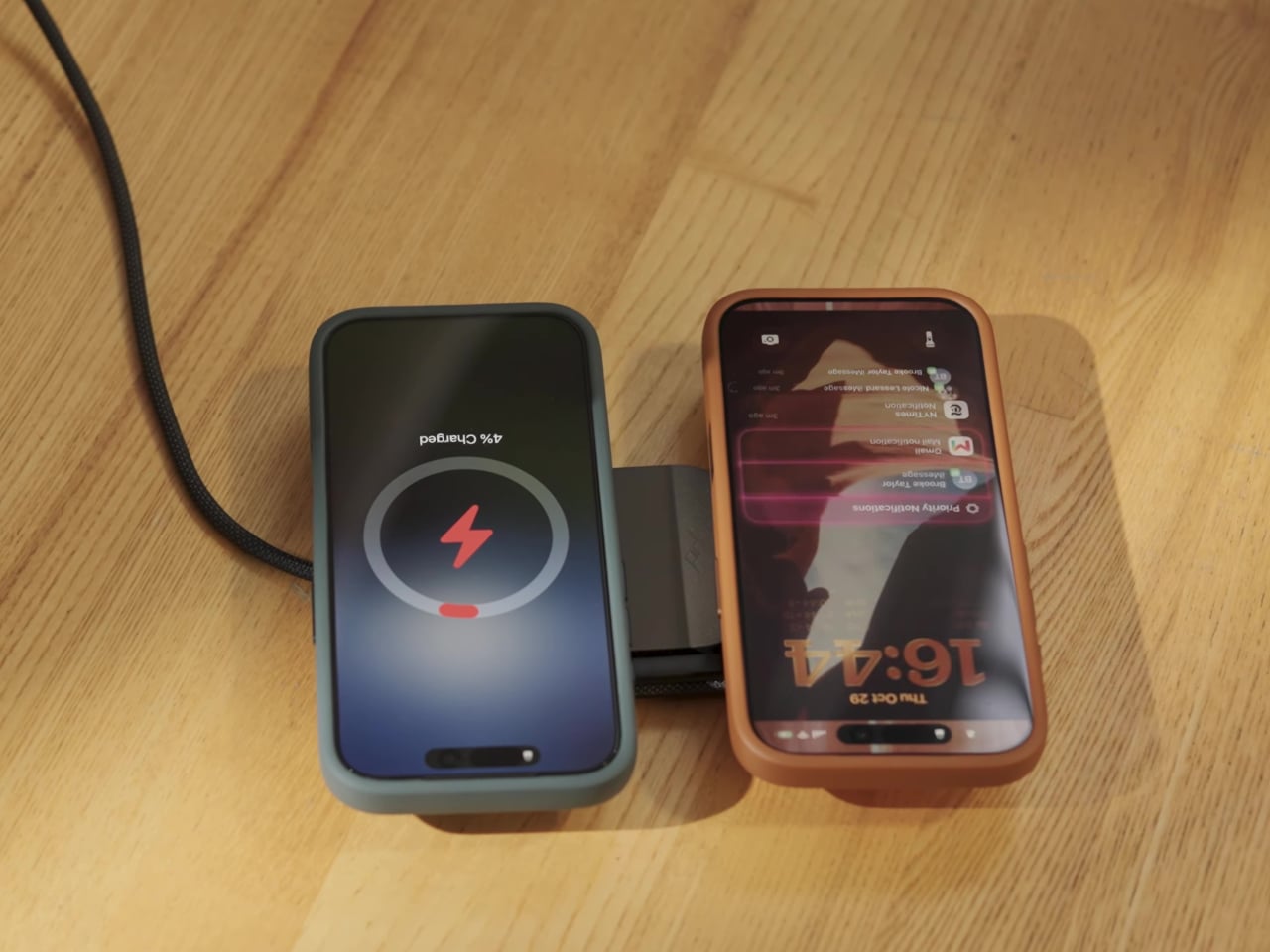
  • ✇Yanko Design
  • Statik PowerStand turns a USB-C cable into a folding phone stand
    A phone charging flat on a desk isn’t particularly useful when you want to follow a recipe or join a video call. Statik’s PowerStand gives that familiar cable an extra job, building a folding stand directly into its USB-C connector. The $19.99 retail accessory lets your phone stay propped up while plugged in, without adding a separate cradle to the table. Most of the work happens in a broad connector housing that sits across the phone’s bottom edge. Two legs pivot out from its ends, turning the
     

Statik PowerStand turns a USB-C cable into a folding phone stand

Par : JC Torres
26 octobre 2026 à 06:07

A phone charging flat on a desk isn’t particularly useful when you want to follow a recipe or join a video call. Statik’s PowerStand gives that familiar cable an extra job, building a folding stand directly into its USB-C connector. The $19.99 retail accessory lets your phone stay propped up while plugged in, without adding a separate cradle to the table.

Most of the work happens in a broad connector housing that sits across the phone’s bottom edge. Two legs pivot out from its ends, turning the plug into a little support structure for portrait or landscape viewing. Fold those legs back against the housing when you’re finished, and the stand travels with the cable rather than becoming another loose accessory to forget.

Designer: Statik

That arrangement makes particular sense beside a laptop, where a phone can sit upright for calls while the computer handles everything else. Turn it sideways, and the same support becomes useful for watching a video over lunch. There’s no magnetic ring or special case to attach first, although you do have to plug the stand end into the phone to use it.

The connector’s shape matters even when you aren’t using the stand. Its right-angle layout sends the cord along the phone’s edge instead of straight out into your hand, a useful distinction when holding it horizontally for a game. Statik also extends the plug’s shaft to reach through most cases, though that isn’t a promise that every bulky protective cover will fit.

Putting a wide piece of hardware underneath a phone creates another problem, since that space often contains speakers and microphones. PowerStand’s housing includes molded channels that Statik says direct sound toward the listener while keeping those openings clear. It’s a thoughtful response to the connector’s added width, although the available evidence doesn’t establish a measurable improvement in volume or call quality.

Statik rates the cable for up to 240W using USB Power Delivery 3.1, allowing it to serve compatible laptops when paired with an appropriate charger. That figure describes the cable’s capacity, not what every connected device will receive. Data transfers are limited to USB 2.0’s 480Mbps, making this a charging-first accessory rather than a particularly speedy file-transfer cable for large video projects and backups.

At 6.6 feet, the cord gives you some room between the outlet and whatever patch of desk or kitchen counter you’re using. It has a braided nylon jacket and reinforced strain relief, while the connector combines TPE plastic and aluminum. The rest of the lead remains a conventional cable, with a standard USB-C plug at the opposite end rather than another folding mechanism.

Of course, putting a stand inside a connector means accepting a much wider plug, even on days when you only want to charge. There’s no getting around that tradeoff by folding the feet away. But for someone who regularly props a phone beside a keyboard or hotel bed, though, that extra width buys a more useful resting place than the nearest coffee mug on the nightstand.

The post Statik PowerStand turns a USB-C cable into a folding phone stand first appeared on Yanko Design.

  • ✇Yanko Design
  • Wuben’s tiny flashlight packs 500 lumens and a blade into 40 grams
    My phone flashlight handles most of my after-dark chores, which is a funny confession from someone who writes about EDC gear for a living. It is always in my pocket, it is bright enough, and it asks for nothing extra. Then a job needs both hands, and suddenly the phone is clamped in my teeth, aiming at the ceiling while I squint at a breaker box. The phone flashlight is a great idea with one design flaw, which is that it comes attached to a phone. Hands-free light has always been the gap, and h
     

Wuben’s tiny flashlight packs 500 lumens and a blade into 40 grams

24 octobre 2026 à 21:45

My phone flashlight handles most of my after-dark chores, which is a funny confession from someone who writes about EDC gear for a living. It is always in my pocket, it is bright enough, and it asks for nothing extra. Then a job needs both hands, and suddenly the phone is clamped in my teeth, aiming at the ceiling while I squint at a breaker box. The phone flashlight is a great idea with one design flaw, which is that it comes attached to a phone. Hands-free light has always been the gap, and headlamps are too much hardware for a trip to the garage.

Wuben’s G6 SPARK is a keychain-sized answer to the teeth problem. Its clip rotates 90 degrees with distinct clicks, so you can clip it to a pocket, cap brim, or backpack strap and aim the beam where your hands are busy. The 500-lumen main light handles distance, a 100-lumen side light with red modes handles up close, and a hidden blunt-tip blade covers the odd chore. The body is 7075 aluminum, 0.34 inches (8.6 mm) thick, and 1.4 ounces (40 g or about as much as an AirPods case).

Designer: Wuben

Click Here to Buy Now: $33.99 $44.99 (24% off). Hurry, only 411/1000 left! Raised over $111,000.

Eleven credit cards thick and cut from aerospace aluminum

The G6 SPARK measures 2.56 by 1.35 inches and 0.34 inches thick (65 by 34.2 by 8.6 mm), and it weighs 1.4 ounces (40 g). That makes it roughly eleven credit cards thick, so it vanishes into a jeans pocket. The body is 7075 aluminum, which Wuben calls aerospace-grade, and a slab this thin needs a metal with a spine. Wuben rates it IP66 against dust and powerful water jets, with 1 meter (3.3 feet) of impact resistance, so a keychain’s daily abuse should not scare it. The USB charging port hides inside the body, which keeps the face clean and symmetrical.

7075 is the zinc-rich member of the aluminum family, and it has a reputation for being far tougher than the 6061 found in most flashlight bodies. Aircraft engineers fell for it because it is light and stiff at the same time. Stiffness is exactly what a flat flashlight needs, since a thin body that flexes is a bad day for the lens and the electronics. On a keychain, that rigidity should also help it survive a crowded pocket full of other metal. A push-release attachment lets you pop it off the ring when you want it in your hand instead of dangling off your keys.

Three lights, one button, and a click code you can learn in an evening

The main light tops out at 500 lumens with a 66 meter (217 ft) throw and a peak beam intensity of 1,089 candela. Those numbers describe a beam for the space around you, like a driveway or a campsite, rather than a hillside across the valley. Light color is 5000K, a daylight white, and the CRI of 70 means colors look decent rather than lab-accurate, which is fine for finding a dropped screw. Brightness steps are Eco, Low, Medium, and High, and you cycle them by holding the button. A double click jumps to Turbo, a triple click gives you Strobe, and mode memory remembers your last setting.

The independent side light is the one I expect to use most, since it gives a close-range pool of light at arm’s length. White comes in Low, Medium, and High, topping out at 100 lumens, which is plenty for reading a label or tracing a wire. Red adds a steady mode and a signal mode at 10 lumens, handy for saving night vision or flagging yourself on a dark road. Hold the button while the main light is off to wake the side light, and hold again to cycle the five modes. That is a lot of options on one button, though the click patterns are easy enough to learn in an evening.

A clip that aims, a blade that hides, and a cap brim that becomes a headlamp

The clip is the headline trick, rotating through 90 degrees with distinct mechanical clicks so you can feel each position. Clipped to a cap brim, it works like a minimalist headlamp, and I would happily wear it to read in a tent. Tucked into the side is a blunt-tip utility blade that handles opening boxes, slicing tape, and sharpening a pencil, and probably a marshmallow stick if you ask nicely. Fold it away and the G6 goes back to being a slab that keeps your keys company. My one wish is a tiny tactile mark near the button, so a cold thumb can find it in the dark.

Click Here to Buy Now: $33.99 $44.99 (24% off). Hurry, only 411/1000 left! Raised over $111,000.

The post Wuben’s tiny flashlight packs 500 lumens and a blade into 40 grams first appeared on Yanko Design.

  • ✇Yanko Design
  • Ninja Labs MagSafe Flex Pouch turns your phone into a stretchy everyday carry pocket
    Smartphones have become the focal point of everyday carry, but their slim profiles leave little room for the small essentials people take everywhere. Ninja Labs, a Los Angeles-based company, offers a simple alternative with the MagSafe Flex Pouch. The accessory is a detachable silicone pocket that turns the back of a MagSafe-compatible smartphone into expandable storage for everyday items. Unlike conventional magnetic wallets designed primarily for cards, the Flex Pouch uses a flexible, stretch
     

Ninja Labs MagSafe Flex Pouch turns your phone into a stretchy everyday carry pocket

21 octobre 2026 à 09:20

Smartphones have become the focal point of everyday carry, but their slim profiles leave little room for the small essentials people take everywhere. Ninja Labs, a Los Angeles-based company, offers a simple alternative with the MagSafe Flex Pouch. The accessory is a detachable silicone pocket that turns the back of a MagSafe-compatible smartphone into expandable storage for everyday items.

Unlike conventional magnetic wallets designed primarily for cards, the Flex Pouch uses a flexible, stretchy compartment to accommodate objects of different shapes and sizes. It can hold credit cards, IDs, cash, coins, wireless earbuds, and even a car key fob. According to Ninja Labs, the pocket can accommodate anything from a single card to a stack of 20, making it a versatile option for people who want to carry fewer accessories.

Designer: Ninja Labs

The design is centered on a proprietary memory silicone blend that expands to roughly twice its original size before contracting again. Rather than relying on zippers, buttons, or rigid compartments, the material stretches around its contents. Its naturally grippy surface helps keep items in place, while the open-top construction allows quick access. When emptied, the pouch returns to its original compact form.

Ninja Labs says the material retained more than 90 percent of its original stretch after 10,000 stretching cycles, offering an indication of its intended durability. However, the company advises against carrying regular house keys or other sharp-edged objects that could puncture the silicone.

The MagSafe version introduces a refreshing change to the original Flex Pouch concept. Earlier versions integrated the pocket directly into an iPhone case, making it a permanent part of the phone’s exterior. The new accessory is a standalone unit that attaches magnetically to a MagSafe-compatible iPhone or case and can be removed whenever it is no longer needed. Android users can also use it with a suitable magnetic case, although the pouch does not provide phone protection of its own.

This detachable format makes the accessory adaptable to different situations. It can carry cards and cash for a quick errand, earbuds and a car fob while travelling, or small personal-care items during a night out. The flexible construction also allows it to accommodate bulkier objects than a traditional flat wallet, although adding more contents inevitably creates a pronounced bulge at the back of the phone.

The MagSafe Flex Pouch is priced at $59 and is available in pink, baby blue, lavender, and black, with transparent silicone and a sparkling pink finish among the options. Ninja Labs offers worldwide shipping, with international delivery listed at $10, so you can try it out right away. You can also go for their case cover version if MagSafe is not your thing.

The post Ninja Labs MagSafe Flex Pouch turns your phone into a stretchy everyday carry pocket first appeared on Yanko Design.

  • ✇Yanko Design
  • A Coffee Bar Without a Remodel: UNITO’s Rolling Station
    A coffee grinder, a kettle, and a few favorite mugs can turn into a surprisingly territorial collection. Add filters, beans, and the tools that make a morning ritual feel worthwhile, and suddenly the kitchen counter has a second job. UNITO’s Coffee Station offers a dedicated home for that equipment, with wheels underneath so the coffee corner doesn’t have to become a permanent fixture. Designed by Unito, the station brings preparation space and storage together in a movable counter. Its appeal
     

A Coffee Bar Without a Remodel: UNITO’s Rolling Station

21 octobre 2026 à 04:15

A coffee grinder, a kettle, and a few favorite mugs can turn into a surprisingly territorial collection. Add filters, beans, and the tools that make a morning ritual feel worthwhile, and suddenly the kitchen counter has a second job. UNITO’s Coffee Station offers a dedicated home for that equipment, with wheels underneath so the coffee corner doesn’t have to become a permanent fixture.

Designed by Unito, the station brings preparation space and storage together in a movable counter. Its appeal extends beyond reclaiming kitchen space. For a studio hosting clients or someone setting up a coffee pop-up, it could provide a more organized starting point than a table surrounded by supply boxes. Unito’s founder has described the Coffee Station as part of the brand’s move toward furniture and tools for small businesses.

Designer: Unito

The material combination gives that practical idea some personality. According to the supplied product description, silver anodized aluminum profiles form the frame, while light birch plywood supplies the panels. I like that the design lets both materials retain their identities. The metal outlines the structure with a workshop-like precision; the wood gives the broad surfaces enough warmth to keep the station from reading as purely institutional equipment.

That balance matters for something that might face customers. In the published photographs, the silver framework remains visible around the wooden drawer fronts, and side surfaces extend beyond the central cabinet on supporting brackets. Those extra surfaces look useful for separating preparation from pickup. A cup waiting to be served shouldn’t have to compete with the grinder for the same patch of counter.

Storage deserves as much attention as the equipment displayed above it. The described configuration includes two soft-close drawers, with an open compartment underneath. The photographs show wide finger-pull cutouts rather than projecting handles. I appreciate that restraint, but the more useful decision is giving small supplies somewhere to disappear. Filters, spoons, and towels could stay close without becoming part of the countertop display.

Then come the wheels, arguably the least glamorous and most consequential detail. The specifications list four locking stainless steel casters, and brake levers are visible in the photographs. That arrangement is intended to let the station move into position and then stay put. I’d still distinguish a rolling workstation from portable luggage. Moving across a suitable floor is a different proposition from negotiating stairs or loading it into a car.

The top also introduces an interesting possibility: it is specified to accept IGT panels or stoves. IGT refers to the Iron Grill Table system, whose modular approach combines frames with cooking and work-surface inserts. For UNITO, the appeal is a surface that could accommodate different tasks rather than permanently committing to one arrangement. Exact insert compatibility still needs confirmation before anyone starts ordering accessories.

The dedicated patio umbrella slot is another thoughtful detail. Published images show an umbrella rising above a fully arranged coffee setup, making the station read like a small service point rather than a kitchen cart parked outside. That could be useful for a temporary outdoor gathering. It doesn’t, however, establish that the plywood is weatherproof or that the station can anchor an umbrella safely in wind.

My favorite potential use is actually the less theatrical one: a shared studio where the coffee setup needs its own territory but the room changes throughout the week. A dedicated station could keep supplies together while allowing the host to rearrange the space. That feels like a convincing reason to put furniture on wheels, especially when building another fixed counter would make the room less flexible.

I wouldn’t call it a complete café or an outdoor kitchen. Those descriptions skip over water, power, cleanup, and the practical demands of serving people. Its more believable contribution is giving coffee equipment a coherent place to live and work. For someone who wants a serious setup without designing the room around it, that’s an appealing amount of commitment.

The post A Coffee Bar Without a Remodel: UNITO’s Rolling Station first appeared on Yanko Design.

  • ✇Yanko Design
  • Espresso Without an Outlet or a Separate Cup
    An espresso habit gets complicated the minute you leave the kitchen. You can bring the beans, but the equipment tends to stay beside an outlet, occupying a respectable chunk of counter. Pura Coffee’s PURA NEO Pro, listed for sale at $349, is designed to put heating, extraction, and drinking into one battery-powered object. The problem it tackles is straightforward: making espresso away from your usual setup without packing a miniature coffee station. Visually, the NEO Pro looks closer to a trav
     

Espresso Without an Outlet or a Separate Cup

20 octobre 2026 à 17:30

An espresso habit gets complicated the minute you leave the kitchen. You can bring the beans, but the equipment tends to stay beside an outlet, occupying a respectable chunk of counter. Pura Coffee’s PURA NEO Pro, listed for sale at $349, is designed to put heating, extraction, and drinking into one battery-powered object. The problem it tackles is straightforward: making espresso away from your usual setup without packing a miniature coffee station.

Visually, the NEO Pro looks closer to a travel tumbler than a shrunken kitchen appliance. The company’s imagery shows a cylindrical body, a cup at the top, and a textured brown band around the middle. A circular power button keeps the front relatively uncluttered. I like the restraint here. It looks like an object you could leave beside a laptop without your desk suddenly resembling the equipment shelf behind a coffee bar.

Designer: Pura Coffee

That stacked layout explains the design’s most interesting decision. Pura pumps water upward through the grounds into the drinking cup above, so you don’t need to balance the brewer over a separate vessel. The cup becomes part of the architecture rather than another accessory to remember. The company says upward flow helps wet the coffee bed evenly and reduce channeling. That extraction advantage needs testing, but the integrated cup has an immediately understandable purpose.

The basic controls are refreshingly physical. After a short press followed by a two-second hold to power on, one press starts heated brewing at the default 92°C, roughly 198°F. A double press skips heating and brews using the water’s existing temperature. Pura also uses a colored light ring to communicate status. It’s a sensible division of labor: a button for getting coffee started, with a small visual signal instead of another screen demanding your attention.

Inside, the ambition gets more technical. Pura specifies extraction pressure of 6 to 9 bar at the coffee puck and a five-stage process that moves from pre-infusion through brewing to pressure release. Its roughly three-minute cold-start brewing time is explicitly labeled a design target, not a verified result here. I’d treat that timing as provisional, particularly if the appeal is making a quick cup between meetings rather than enjoying the preparation itself.

Then comes Brew OS, the companion software that lets owners adjust brewing parameters and save combinations as shareable Brew Cards. Pura says the app can also suggest a starting extraction curve from a photograph of a coffee bag or the beans themselves. That’s a potentially useful entry point for someone who wants more guidance than a temperature slider. Importantly, the company describes these suggestions as starting points, while deeper learning from personal taste ratings remains on its roadmap.

I’m more persuaded by saving a recipe than by the prospect of photographing beans. A saved combination gives the tinkering a destination: find settings you like, then stop rebuilding them every morning. For me, that’s a better reason to connect a coffee maker to a phone than simply adding remote controls. Brew OS allows that recipe to be saved and shared, although repeating settings shouldn’t be mistaken for guaranteeing identical flavor.

The practical boundaries matter, too. The water tank holds a maximum of 70 milliliters, about 2.4 fluid ounces, so think espresso-sized servings, not a full commuter mug. Ground coffee is the primary approach, with an optional Nespresso-compatible capsule adapter. Cleanup still involves discarding the grounds and rinsing removable parts; the body cannot be immersed or put in the dishwasher. Portability gets the equipment into your bag, but it doesn’t make the used grounds disappear afterward.

At $349, I’d want the NEO Pro to earn its place through regular use, not just the occasional campsite photo. Its strongest design argument is the cup itself: brewing and drinking share one vertical assembly, with fewer separate objects to arrange. If carrying your espresso routine matters enough to justify the preparation and cleanup, that’s a thoughtful place to start. The app can offer more settings later. First, the coffee needs somewhere to land.

The post Espresso Without an Outlet or a Separate Cup first appeared on Yanko Design.

❌