❌

Vue normale

  • ✇Yanko Design
  • The $179 Magic Screen gives any MacBook a touchscreen with stylus support
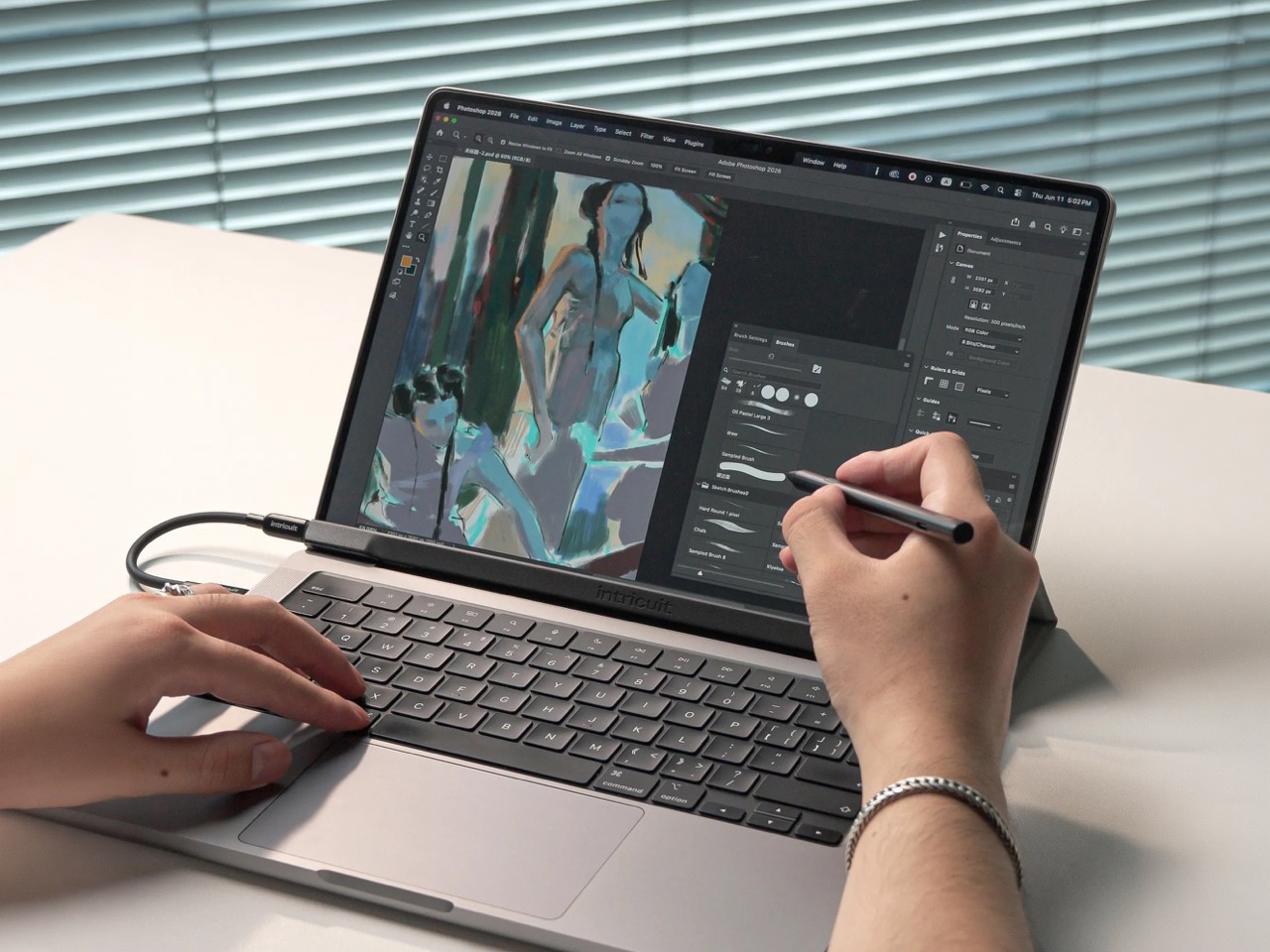
    Hidden around a modern MacBook display are magnets used to tell the laptop you shut the lid. Intricuit, a small hardware startup, looked at those magnets and saw a free mounting system. Its Magic Screen uses them to snap a touch-sensitive glass panel over your display, adding tap, swipe, and pinch controls to the MacBook you already own. It costs $179 on Kickstarter. Apple’s approach is the new MacBook Pro with PROLED XDR Display, which starts at $2,899, or roughly sixteen Magic Screens with ch
     

The $179 Magic Screen gives any MacBook a touchscreen with stylus support

9 novembre 2026 à 15:20

Hidden around a modern MacBook display are magnets used to tell the laptop you shut the lid. Intricuit, a small hardware startup, looked at those magnets and saw a free mounting system. Its Magic Screen uses them to snap a touch-sensitive glass panel over your display, adding tap, swipe, and pinch controls to the MacBook you already own. It costs $179 on Kickstarter. Apple’s approach is the new MacBook Pro with PROLED XDR Display, which starts at $2,899, or roughly sixteen Magic Screens with change left over for snacks. That’s a whole laptop rather than an accessory, but it’s a steep entry price if touch is all you’re after.

Apple integrates the touch sensor into a tandem OLED panel and uses a stiffer hinge designed to limit screen bounce when you tap it. It also supports zero styluses, Apple Pencil included, which is a little funny coming from the company that sells the Apple Pencil. The Magic Screen ships with a pen that reads 4,096 pressure levels, previews its tip position as it hovers, and supports palm rejection while you draw. Intricuit lists compatibility with M1 and newer MacBook Pros, M2 and newer Airs, and even the $599 MacBook Neo, bringing that last combination to $778.

Designer: Intricuit

Snap, Plug, Tap: How the Glass Registers Your Fingers

The panel is tempered glass with a capacitive digitizer built in, the same kind of touch technology your phone uses, tracking up to ten fingers at once. Intricuit lists transparency at 99% or better and a response time of 8ms. A single USB-C cable carries the touch data and draws a claimed 0.6 watts from your MacBook, so there’s no extra battery to babysit. The 14-inch MacBook Pro version weighs 4.3 ounces (122.8 grams), and the 16-inch version comes in at 6.1 ounces (172.6 grams). Basic touch works without the app; Intricuit’s software for macOS Sonoma or later adds further controls.

Tom’s Guide spent three weeks with a Magic Screen and came away convinced macOS is far more touch-ready than Apple ever let on. Taps open apps, a press-and-hold summons the right-click menu, and familiar trackpad gestures carry over to the glass. Intricuit demos it triggering clips in Resolume Arena, orbiting models in SketchUp, and shoving sticky notes around Miro boards, all situations where reaching for something directly has an obvious appeal. It also works with iPhone Mirroring, letting you tap through your phone’s apps on the larger display. Fingerprints land on the overlay rather than directly on your MacBook’s screen.

The Stylus Apple Skipped Comes in the Box

The included pen uses USI 2.0, the Universal Stylus Initiative standard supported by compatible Chromebooks, and reads 4,096 levels of pressure. That gives you control over line weight, from a light hairline to a fat brushstroke, while palm rejection is designed to let you rest your hand on the glass as you draw. Hover detection starts about 0.4 inches (10mm) away, previewing the tip’s position before it touches down. Intricuit rates the battery at 100 hours, with a 40-minute USB-C recharge and no Bluetooth pairing required. Your Apple Pencil isn’t compatible, though it won’t work on Apple’s new MacBook Pro either.

Pop the Magic Screen off and it becomes a flat pen tablet, a familiar setup for anyone who has used a Wacom. Drawing on an upright laptop screen means working against gravity and a hinge, while laying the panel on a desk lets you rest your arm. The folio case folds into a stand for this mode. When the panel goes back on your display, the case braces against the lid to reduce wobble under your fingers. Apple’s Sidecar offers another route to drawing on a Mac, but requires an iPad and an Apple Pencil alongside the laptop. Intricuit puts the touch panel and pen in one $179 box, provided you already own a compatible MacBook.

What $2,899 Gets You at the Apple Store

Apple’s price buys a complete laptop with a tandem OLED panel rated to peak at 2,000 nits and an integrated touch sensor. The hinge is stiffer, the 14-inch body weighs 3 pounds, and the glowing Apple logo is back on the lid for the nostalgics. That package costs $400 more than the equivalent standard MacBook Pro. The Magic Screen comes with its own compromises: a cable occupying a port and a panel you need to remove before closing the lid. Intricuit built a stopper into the bottom edge to keep the lid from closing onto it, a bit of idiot-proofing that could save an expensive mistake.

The Magic Screen is available for $179 after a successful crowdfunding run, a $60 discount off its planned $239 retail price. Pick your size carefully, since each of the five versions is fitted to a specific MacBook display, and the M1 MacBook Air sits this one out. Each box includes the panel, stylus, folio case, USB-C cable, and a polishing cloth for the inevitable fingerprints.

The post The $179 Magic Screen gives any MacBook a touchscreen with stylus support first appeared on Yanko Design.

  • ✇WinCentral
  • Apple’s Four-Week Launch Extravaganza: What to Expect from the Upcoming Product Wave
    Apple’s Four-Week Product Launch Extravaganza: What’s Coming Next It looks like the tech world is in for a chaotic, action-packed month. Rumors and official schedules indicate that Apple is preparing a multi-week rollout strategy. Rather than dropping every single device in one giant multi-hour keynote, Apple is spreading its autumn launch lineup across four consecutive […]
     

Apple’s Four-Week Launch Extravaganza: What to Expect from the Upcoming Product Wave

Par : Nayan
19 octobre 2026 à 01:16
Apple’s Four-Week Product Launch Extravaganza: What’s Coming Next It looks like the tech world is in for a chaotic, action-packed month. Rumors and official schedules indicate that Apple is preparing a multi-week rollout strategy. Rather than dropping every single device in one giant multi-hour keynote, Apple is spreading its autumn launch lineup across four consecutive […]

  • ✇Korben
  • Game Porting Toolkit 4 - Les jeux Windows enfin fluides sur Mac
    Il y a deux ans, Apple lâchait le Game Porting Toolkit en jurant ses grands dieux qu'on pourrait faire tourner des jeux Windows sur un Mac Apple Silicon. À l'époque je vous disais que le gaming Windows sur Mac, c'était donc plié. Hé bien la version 4.0 vient de sortir en bêta, et cette fois les chiffres donnent raison à cette promesse ! La nouvelle version du traducteur maison de GPTK (baptisé D3DMetal 4) transforme dorénavant le DirectX 12 des jeux en Metal 4, le moteur graphique d'Apple. L
     

Game Porting Toolkit 4 - Les jeux Windows enfin fluides sur Mac

26 juin 2026 à 08:22

Il y a deux ans, Apple lâchait le Game Porting Toolkit en jurant ses grands dieux qu'on pourrait faire tourner des jeux Windows sur un Mac Apple Silicon. À l'époque je vous disais que le gaming Windows sur Mac, c'était donc plié. Hé bien la version 4.0 vient de sortir en bêta, et cette fois les chiffres donnent raison à cette promesse !

La nouvelle version du traducteur maison de GPTK (baptisé D3DMetal 4) transforme dorénavant le DirectX 12 des jeux en Metal 4, le moteur graphique d'Apple.

Le youtubeur Andrew Tsai, dont j'ai mis le test dans cet article, a donc benchmarké 20 gros titres Windows pour mesurer le gain, et certains résultats piquent fort.

Black Myth Wukong passe par exemple de 60 à 80 fps sur un MacBook Pro M3 Max, juste en changeant de système et de version de traduction ! Red Dead Redemption 2 gagne 25% de perfs sur le MacBook Neo, la petite machine d'Apple à 600 balles avec sa puce A18 Pro et ses tout petits 8 Go de RAM (le chip de l'iPhone 16 Pro, quoi).

Black Myth Wukong : à gauche GPTK 3.0 sur macOS 26 (~60 fps), à droite GPTK 4.0 sur macOS 27 bêta (~80 fps).

Et le phénomène c'est 007 First Light, un AAA tout récent que personne ne pensait voir démarrer sur Mac, qui tranquillou nous crache du 70 fps en 1080p sur le M3 Max. Mais bien sûr, y'a un petit piège caché quand même pour celui-là. En fait, à chaque lancement, comptez 20 bonnes minutes de compilation de shaders avant de pouvoir jouer. Mais une fois dans le jeu c'est nickel. CodeWeavers finira sûrement par corriger ça, cela dit...

D'ailleurs, petit ajout, Alexandre, un lecteur, m'a signalé qu'un utilisateur de Reddit a pondu un outil open source pour contourner ça, 007 Shader Commander . Le principe, sauvegarder le cache de shaders D3DMetal une fois qu'il est constitué, puis le restaurer avant chaque lancement histoire de ne pas tout recompiler. Résultat chez lui, on passe de 20 minutes à 3 secondes au démarrage. Le projet est tout jeune (v0.0.1) et pensé pour CrossOver, mais si vous galérez sur 007, ça vaut le coup d'œil. Merci à lui !

007 First Light en 1080p sur un MacBook Pro M3 Max, environ 73 fps via GPTK 4.0 et le chemin DirectX 12 vers Metal 4.

Mais alors pourquoi ça va plus vite, ma chère Micheline ?

Hé bien ("ma chère Maïté", allez, on joue le jeu !!) parce que GPTK 4 est taillé pour Apple Silicon et ne traîne plus ce boulet qu'est la compatibilité Intel. Ça débloque donc des trucs comme l'interpolation d'images de MetalFX. Notez qu'en dessous, c'est toujours CrossOver et ce bon vieux Wine qui font le sale boulot de traduction, comme depuis le début.

Autre bonne surprise, les fameuses fuites mémoire des jeux Naughty Dog. Avant, Uncharted 4 ou The Last of Us 2 qui vous bouffaient 34 Go de RAM en quelques minutes, ben maintenant il vous faudra des heures pour atteindre le même niveau de conso RAM. C'est donc pas encore parfait, mais c'est largement jouable.

De son côté, comme on peut le voir dans la vidéo, Spider-Man 2 nous colle un magnifique bug de T-pose si vous n'avez pas une puce M5, parce que le jeu réclame des fonctions GPU absentes des puces précédentes. Et de leur côté, Monster Hunter Wilds bégaie, Street Fighter 6 plante une fois sur deux.

Spiderman en T-Pose

Bref, on est sur de la bêta, faut le savoir.

Mais quand ça marche, ça marche fort ! Rien que Tekken 8 qui tourne à 60 fps en ligne, c'est le plus fluide que ce jeu ait jamais eu sur un Mac. Star Wars Battlefront 2 dépasse aussi les 120 fps et Hellblade 2, Expedition 33 ou Resident Evil 9 tournent sans broncher.

Pour jouer correctement, prévoyez quand même un Mac avec de la RAM et de quoi installer la bêta de macOS 27.

En tout cas, voir un James Bond next-gen tourner sur un MacBook, moi ça me plait !

Source (les 20 benchmarks d'Andrew Tsai) et AppleInsider .

❌