❌

Vue normale

  • ✇Yanko Design
  • 8BitDo’s $40 Xbox controller has a cable, a headphone jack, and drift-resistant sticks
    Wired earbuds staged a comeback a couple of years ago, helped by Gen Z deciding a dangling white cable looks cooler than an AirPods case. Wired gaming controllers could use some of that goodwill. 8BitDo’s new Ultimate 3C+ Wired Controller for Xbox skips the battery entirely and plugs straight into your console over USB-C. It costs $39.99, carries an official Xbox license, and brings tunable TMR sticks to the lowest-priced model in the Ultimate 3 family. You trade a little freedom of movement fo
     

8BitDo’s $40 Xbox controller has a cable, a headphone jack, and drift-resistant sticks

9 novembre 2026 à 18:30

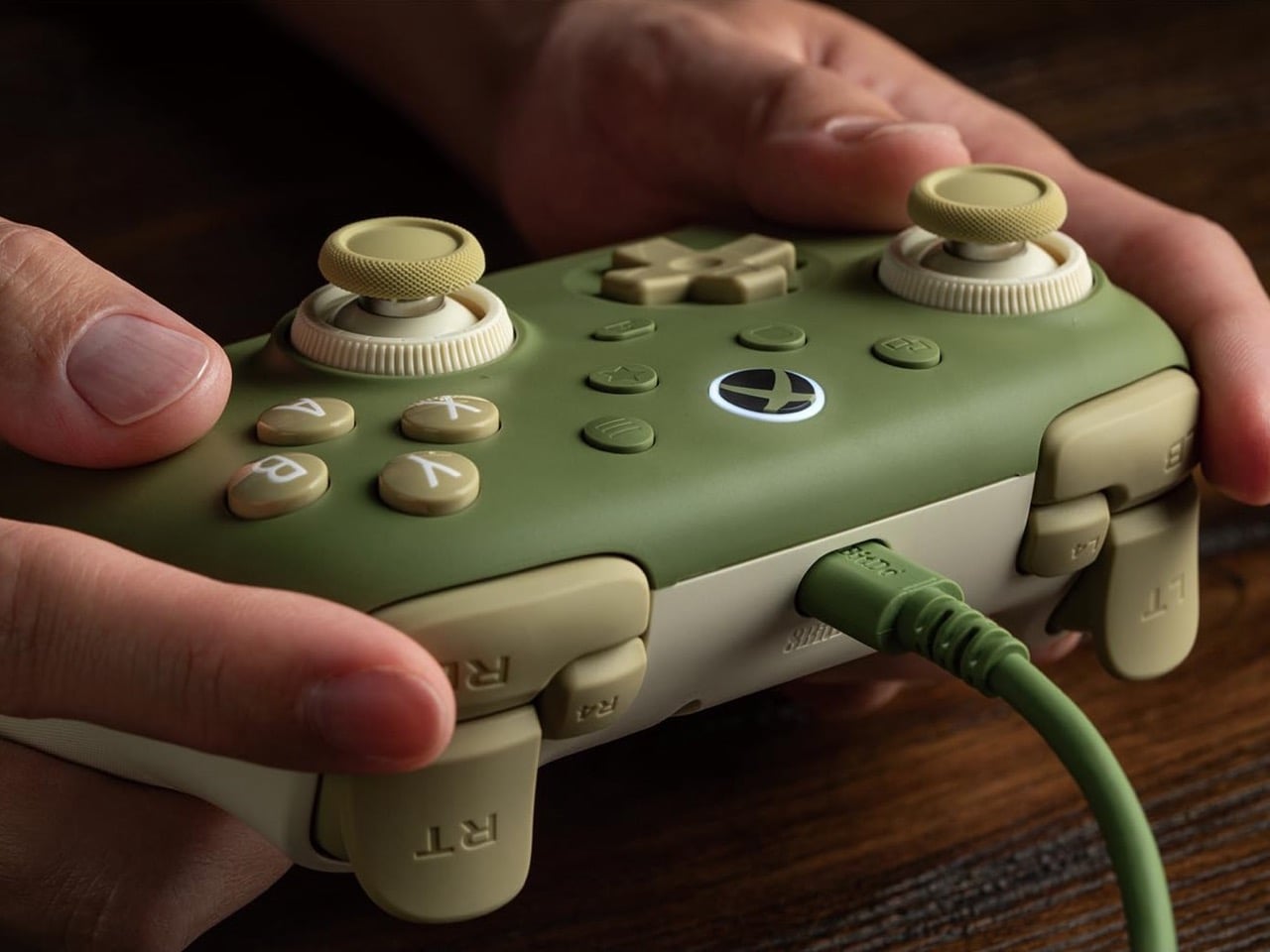
Wired earbuds staged a comeback a couple of years ago, helped by Gen Z deciding a dangling white cable looks cooler than an AirPods case. Wired gaming controllers could use some of that goodwill. 8BitDo’s new Ultimate 3C+ Wired Controller for Xbox skips the battery entirely and plugs straight into your console over USB-C. It costs $39.99, carries an official Xbox license, and brings tunable TMR sticks to the lowest-priced model in the Ultimate 3 family. You trade a little freedom of movement for a controller that never needs charging, pairing, or a panicked hunt for a dongle.

There’s no battery to degrade over years of late-night Call of Duty sessions, and a 3.5mm jack sends game audio straight to your headset. The controller works with Xbox Series X|S, Xbox One, and Windows 10 or later. It arrives a few weeks after the wireless Ultimate 3C+, which launched in October for PC and Android at the same price. The Xbox version is built for console players who would rather never think about charge levels again. The included cable stretches 8.2 feet (2.5m), so measure your couch distance accordingly.

Designer: 8BitDo

TMR sticks you can tune for shooters or racing

8BitDo’s Dual Force Ring sticks combine adjustable tension with a soft-stop silicone ring under each stick to cushion the moment it hits the edge of its travel. Increase the tension if you prefer firmer resistance when aiming in shooters, or loosen it for the long, sweeping inputs of racing games. A 12-bit ADC sampling chip and a 216MHz processor read the stick position, which 8BitDo says improves precision and response. The sensors are TMR, short for tunneling magnetoresistance, and track stick position magnetically, without sliding electrical contacts. Potentiometer sticks rely on contacts that physically wear, which can cause stick drift.

Earlier this year, 8BitDo’s fanciest stick tech lived in controllers costing $99 and up. The Ultimate 3 series kicked off at CES 2026 with the $149.99 Ultimate 3E, and the $99 Ultimate 3 for Xbox brought force rings along in May. Now that adjustable tension sits inside a $39.99 controller with a cable hanging off it. Compare that with Microsoft’s Xbox Nano Controller, a $49.99 pocket pad that still ships with conventional potentiometer sticks. If your last Xbox controller died of drift, that difference in sensor tech may be the most persuasive line on this spec sheet.

Switchable triggers, extra bumpers, and lockable back buttons

A switch flips the triggers between linear Hall Effect mode and short micro-switch mode. Linear gives you the full analog pull for feathering a throttle, while micro-switch turns each trigger into something closer to a mouse click. Impulse Trigger rumble lives inside the triggers, with more vibration tucked into the grips. 8BitDo says a dedicated rapid-stop chip cuts vibration off quickly, so a gunshot’s rumble doesn’t linger. The idea is that when an explosion fades on screen, your palms stop buzzing too.

Two extra bumpers, labeled R4 and L4, join the standard shoulder buttons and can be remapped without software. Two back buttons sit under the grips, and a lock disables them when you would rather not trigger a reload by accident. 8BitDo describes the D-pad as clicky but smooth, says it has refined the ABXY buttons, and lists wear-resistant stick rings. It also widened the grip angle compared with the older Ultimate C Wired, stretching the body to 5.96 inches (151.5mm) long. It weighs 7.9 ounces (224g), just 8 grams more than its predecessor, with the revised grip intended to offer a more relaxed hold.

Ten dollars less than the Xbox Nano

Compared with the wireless 3C+, the Xbox model drops the turbo function and its sibling’s polling rate of up to 1,000Hz. It also skips the cardboard DIY stand that ships in the wireless box, a minor tragedy for anyone who enjoys a little arts and crafts with their unboxing. In return, you get the headphone jack, full Xbox console support, and an official license. Competitive players chasing every millisecond may miss the higher polling rate. For couch play, cable reach is likely to be the more immediate concern.

At $39.99, the 3C+ Wired undercuts the $49.99 Xbox Nano by ten dollars and Microsoft’s standard $64.99 controller by twenty-five. It also costs just $5 more than the older Ultimate C Wired for Xbox, which paired Hall Effect sticks with an RGB light ring. 8BitDo swapped that light show for tunable TMR sticks, which seems a useful trade for anyone more interested in stick feel than desk glow. Pre-orders are live on the 8BitDo eShop and Amazon in the US, with Matcha Green and Charcoal Gray units shipping November 16.

The post 8BitDo’s $40 Xbox controller has a cable, a headphone jack, and drift-resistant sticks first appeared on Yanko Design.
  • ✇Yanko Design
  • The $179 Magic Screen gives any MacBook a touchscreen with stylus support
    Hidden around a modern MacBook display are magnets used to tell the laptop you shut the lid. Intricuit, a small hardware startup, looked at those magnets and saw a free mounting system. Its Magic Screen uses them to snap a touch-sensitive glass panel over your display, adding tap, swipe, and pinch controls to the MacBook you already own. It costs $179 on Kickstarter. Apple’s approach is the new MacBook Pro with PROLED XDR Display, which starts at $2,899, or roughly sixteen Magic Screens with ch
     

The $179 Magic Screen gives any MacBook a touchscreen with stylus support

9 novembre 2026 à 15:20

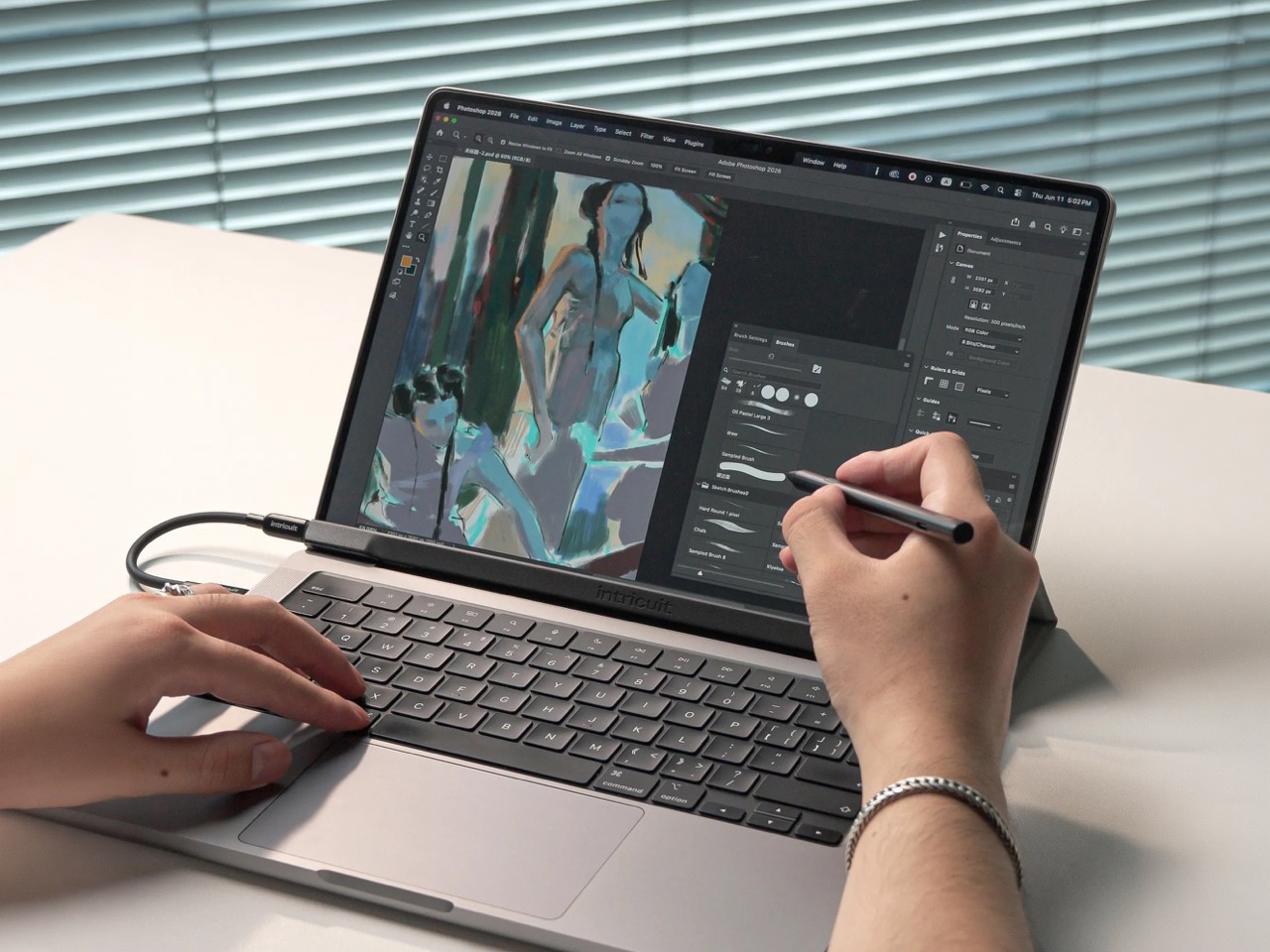
Hidden around a modern MacBook display are magnets used to tell the laptop you shut the lid. Intricuit, a small hardware startup, looked at those magnets and saw a free mounting system. Its Magic Screen uses them to snap a touch-sensitive glass panel over your display, adding tap, swipe, and pinch controls to the MacBook you already own. It costs $179 on Kickstarter. Apple’s approach is the new MacBook Pro with PROLED XDR Display, which starts at $2,899, or roughly sixteen Magic Screens with change left over for snacks. That’s a whole laptop rather than an accessory, but it’s a steep entry price if touch is all you’re after.

Apple integrates the touch sensor into a tandem OLED panel and uses a stiffer hinge designed to limit screen bounce when you tap it. It also supports zero styluses, Apple Pencil included, which is a little funny coming from the company that sells the Apple Pencil. The Magic Screen ships with a pen that reads 4,096 pressure levels, previews its tip position as it hovers, and supports palm rejection while you draw. Intricuit lists compatibility with M1 and newer MacBook Pros, M2 and newer Airs, and even the $599 MacBook Neo, bringing that last combination to $778.

Designer: Intricuit

Snap, Plug, Tap: How the Glass Registers Your Fingers

The panel is tempered glass with a capacitive digitizer built in, the same kind of touch technology your phone uses, tracking up to ten fingers at once. Intricuit lists transparency at 99% or better and a response time of 8ms. A single USB-C cable carries the touch data and draws a claimed 0.6 watts from your MacBook, so there’s no extra battery to babysit. The 14-inch MacBook Pro version weighs 4.3 ounces (122.8 grams), and the 16-inch version comes in at 6.1 ounces (172.6 grams). Basic touch works without the app; Intricuit’s software for macOS Sonoma or later adds further controls.

Tom’s Guide spent three weeks with a Magic Screen and came away convinced macOS is far more touch-ready than Apple ever let on. Taps open apps, a press-and-hold summons the right-click menu, and familiar trackpad gestures carry over to the glass. Intricuit demos it triggering clips in Resolume Arena, orbiting models in SketchUp, and shoving sticky notes around Miro boards, all situations where reaching for something directly has an obvious appeal. It also works with iPhone Mirroring, letting you tap through your phone’s apps on the larger display. Fingerprints land on the overlay rather than directly on your MacBook’s screen.

The Stylus Apple Skipped Comes in the Box

The included pen uses USI 2.0, the Universal Stylus Initiative standard supported by compatible Chromebooks, and reads 4,096 levels of pressure. That gives you control over line weight, from a light hairline to a fat brushstroke, while palm rejection is designed to let you rest your hand on the glass as you draw. Hover detection starts about 0.4 inches (10mm) away, previewing the tip’s position before it touches down. Intricuit rates the battery at 100 hours, with a 40-minute USB-C recharge and no Bluetooth pairing required. Your Apple Pencil isn’t compatible, though it won’t work on Apple’s new MacBook Pro either.

Pop the Magic Screen off and it becomes a flat pen tablet, a familiar setup for anyone who has used a Wacom. Drawing on an upright laptop screen means working against gravity and a hinge, while laying the panel on a desk lets you rest your arm. The folio case folds into a stand for this mode. When the panel goes back on your display, the case braces against the lid to reduce wobble under your fingers. Apple’s Sidecar offers another route to drawing on a Mac, but requires an iPad and an Apple Pencil alongside the laptop. Intricuit puts the touch panel and pen in one $179 box, provided you already own a compatible MacBook.

What $2,899 Gets You at the Apple Store

Apple’s price buys a complete laptop with a tandem OLED panel rated to peak at 2,000 nits and an integrated touch sensor. The hinge is stiffer, the 14-inch body weighs 3 pounds, and the glowing Apple logo is back on the lid for the nostalgics. That package costs $400 more than the equivalent standard MacBook Pro. The Magic Screen comes with its own compromises: a cable occupying a port and a panel you need to remove before closing the lid. Intricuit built a stopper into the bottom edge to keep the lid from closing onto it, a bit of idiot-proofing that could save an expensive mistake.

The Magic Screen is available for $179 after a successful crowdfunding run, a $60 discount off its planned $239 retail price. Pick your size carefully, since each of the five versions is fitted to a specific MacBook display, and the M1 MacBook Air sits this one out. Each box includes the panel, stylus, folio case, USB-C cable, and a polishing cloth for the inevitable fingerprints.

The post The $179 Magic Screen gives any MacBook a touchscreen with stylus support first appeared on Yanko Design.

  • ✇Yanko Design
  • Hollow Clock V Trades a Solid Dial for a Ring of Hidden Gears
    Most clocks give their hands somewhere obvious to stand, usually a solid face hiding the mechanism behind it. Hollow Clock V leaves that space empty, making its hands appear to hover inside a slender ring. This working DIY project uses 3D-printed parts, hidden gears, and magnets to pull off a trick that doesn’t require a transparent panel to work. The minute hand provides the first clue, since its outer end connects to a rotating ring concealed within the frame. Its center supports the hour han
     

Hollow Clock V Trades a Solid Dial for a Ring of Hidden Gears

Par : JC Torres
9 novembre 2026 à 13:20

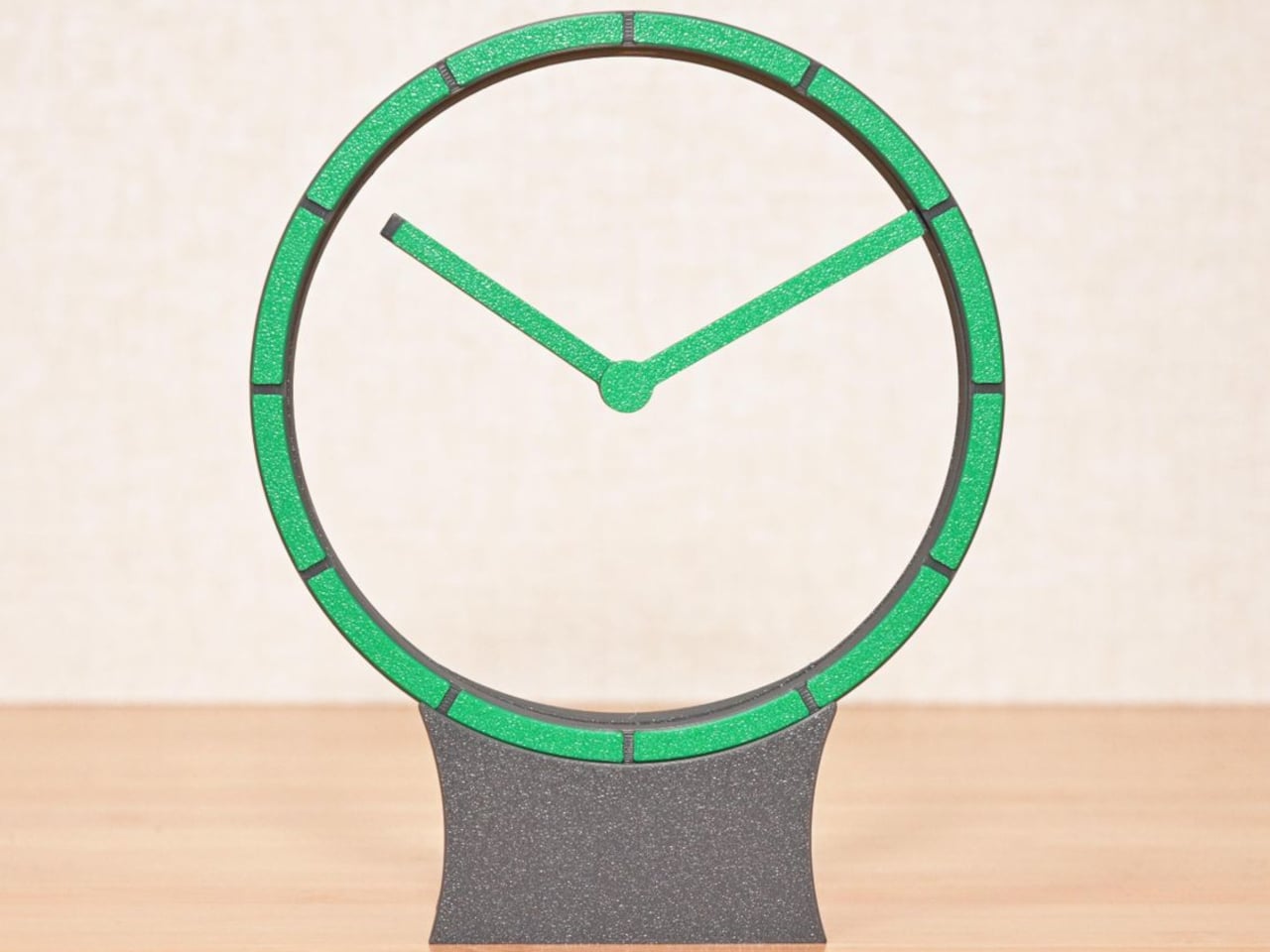
Most clocks give their hands somewhere obvious to stand, usually a solid face hiding the mechanism behind it. Hollow Clock V leaves that space empty, making its hands appear to hover inside a slender ring. This working DIY project uses 3D-printed parts, hidden gears, and magnets to pull off a trick that doesn’t require a transparent panel to work.

The minute hand provides the first clue, since its outer end connects to a rotating ring concealed within the frame. Its center supports the hour hand on a small pivot, so the pair isn’t actually levitating. The hour hand’s position is controlled magnetically by another rotating ring, allowing it to keep pointing at the right hour while the longer hand travels around.

Designer: Shinsaku Hiura

That second ring carries two neodymium magnets, which interact with a third tucked into the hour hand. Their T-shaped arrangement helps keep the hand aligned without adding a connection across the opening. Down in the base, a stepper motor and a combination of worm and bevel gears drive the minute ring 12 times faster than the hour ring, without a bulky central hub.

All that machinery makes the spare appearance deceptive. The ring has a border only about 0.28 inches wide, with hour markers replacing a conventional numbered dial. Screws are kept out of sight when the clock is assembled, apart from the central hand fastener. A rear USB-C connection sends the cable away from the front, leaving the open center to do the distracting.

The finish is also shaped by the way the parts are printed, rather than treated as an afterthought. Front surfaces sit against the printer’s build plate, picking up its texture instead of exposing filament paths across the face. Changing filament during printing gives the markers a contrasting color. It’s a small manufacturing decision that makes the homemade object look a little more deliberate.

Setting the time stays physical, too. You lift the display ring out of the base, freeing it from the drive gears, move the hands to the desired time, and slot it back in. There’s no tiny adjustment knob to hunt for behind the housing. For a clock that hides so much of its mechanism, this particular interaction is refreshingly easy to understand.

Getting to that point takes more effort than the finished clock lets on. The project involves printing, soldering, loading firmware, and assembling the moving parts, although the supplied print orientations don’t require supports. Smooth gear surfaces matter, and the guide includes lubrication and tuning advice. The uncluttered desk ornament is also a small mechanical project, with patience required before it starts keeping time.

The ratchet is designed to compensate for missed motor steps, though it also introduces a reason to think twice about bedside placement. The guide describes removing its hook for quiet operation only when the mechanism runs smoothly enough. On a desk or shelf, that choice comes down to how much of the clock’s engineering you’re prepared to hear as well as admire.

The post Hollow Clock V Trades a Solid Dial for a Ring of Hidden Gears first appeared on Yanko Design.

Garmin Fenix 9 vs Forerunner 970: Which Premium Sports Watch Should You Buy?

9 novembre 2026 à 13:03

The Garmin Forerunner 970 costs $250 less than the Fenix 9, but the pricier watch offers rugged hardware, longer battery options, and specialized outdoor features.

The post Garmin Fenix 9 vs Forerunner 970: Which Premium Sports Watch Should You Buy? appeared first on TechRepublic.

Sony WH-1000XM6 vs WH-1000XM5: Is the Upgrade Worth It?

9 novembre 2026 à 11:41

The Sony WH-1000XM6 improves ANC, sound, battery life, and portability, but deep discounts make the WH-1000XM5 a tempting alternative. Here's which to buy.

The post Sony WH-1000XM6 vs WH-1000XM5: Is the Upgrade Worth It? appeared first on TechRepublic.

❌