❌

Vue normale

  • ✇Yanko Design
  • This Light-Charging E Ink Frame Gives Your Photos a Home Beyond Your Phone
    Taking photographs has become almost effortless, but getting them off our phones is another matter. There’s always a favorite vacation snapshot that deserves better than being buried between screenshots and receipts. Inkanva is developing a color E Ink canvas that gives those pictures a more permanent place at home, with a paper-like display and indoor-light charging on its two smaller models. The difference starts with what the display doesn’t do. There’s no backlight turning a family portrai
     

This Light-Charging E Ink Frame Gives Your Photos a Home Beyond Your Phone

Par : JC Torres
7 novembre 2026 à 21:45

Taking photographs has become almost effortless, but getting them off our phones is another matter. There’s always a favorite vacation snapshot that deserves better than being buried between screenshots and receipts. Inkanva is developing a color E Ink canvas that gives those pictures a more permanent place at home, with a paper-like display and indoor-light charging on its two smaller models.

The difference starts with what the display doesn’t do. There’s no backlight turning a family portrait into another glowing rectangle in the living room. Instead, E Ink Spectra 6 reflects ambient light and uses six physical pigments to create color. Like a printed photograph, it needs light to be seen, which makes its relationship with the room quite different from a backlit tablet’s.

Designer: Inkanva

Click Here to Buy Now: $159 $239 (34% off). Hurry, only a few left! Raised over $358,000

1

Light also has another job here. The 7.09-inch and 13.3-inch editions include a perovskite photovoltaic component that harvests indoor light to replenish the battery. That’s a rather technical way of addressing a familiar decorating problem: finding somewhere for an electronic object without planning around a nearby power outlet. The component attaches magnetically and can be removed without opening the display housing.

Of course, the room still has a say in how that works. Charging depends on available light and how often you change the picture, so a dim corner isn’t the same as a well-lit shelf. E Ink helps by retaining a static image without continuous display power. The aim is fewer charging interruptions, rather than a promise of unlimited activity.

1

1

Changing the picture follows a routine that should feel familiar to anyone who’s edited a photo on a phone. Choose an image in the Inkanva app, adjust the crop, and send it over Wi-Fi. A trip to the coast could replace last year’s family portrait without another print order, leaving the physical frame where it is while the memory inside changes.

There’s room for less conventional contributions, too. The app offers AI tools that turn spoken ideas or doodles into artwork, giving a quick sketch another direction to explore. A child’s drawing could become the starting point for something new, although there’s no obligation to involve AI at all. Your own photograph can take the same place without being reinterpreted by software.

1

Those who’d rather manage their pictures closer to home have a separate local mode with a browser interface and its own image library. It’s an alternative to app-based management, rather than another remote control running alongside it. Home Assistant support also leaves room for custom routines, such as putting a different artwork on display for the start of the week.

The surrounding frame matters almost as much as the image, especially when it shares a room with furniture you’ve chosen carefully. On the 13.3-inch edition, a separate decorative wood surround can be swapped without replacing the display. Moving it from a study to a living room doesn’t have to mean keeping the same finish, even if the photograph stays exactly as it was.

1

Scale changes that relationship as well. The 7.09-inch canvas suggests a personal photograph beside a desk, while the 13.3-inch version gives an image more presence on a shelf or wall. There’s also a 28.5-inch edition for a larger wall composition, although it doesn’t include the light-harvesting panel.

A photograph doesn’t need to change every morning to deserve a place on the wall. It might stay there for months, gathering the sort of familiarity that makes a room feel like yours. Inkanva leaves that decision with the person living beside it. When another picture finally earns the spot, you can change what’s inside without taking down the frame.

Click Here to Buy Now: $159 $239 (34% off). Hurry, only a few left! Raised over $358,000

The post This Light-Charging E Ink Frame Gives Your Photos a Home Beyond Your Phone first appeared on Yanko Design.
  • ✇Yanko Design
  • Micro Journal Rev.2.1.MINI Writing Laptop Pairs a Wide Screen With Just 48 Keys
    Opening a laptop to write a paragraph can quickly turn into checking messages, rearranging windows, and forgetting the sentence you had in mind. The Micro Journal Rev.2.1.MINI, nicknamed Baby Shark, puts writing at the center of a small, folding computer instead. Its wide screen and compact mechanical keyboard give your words their own space, while Linux supplies the editing tools beneath that colorful clamshell. The chunky enclosure doesn’t try to resemble a slim aluminum laptop. A bright red
     

Micro Journal Rev.2.1.MINI Writing Laptop Pairs a Wide Screen With Just 48 Keys

Par : JC Torres
7 novembre 2026 à 18:30

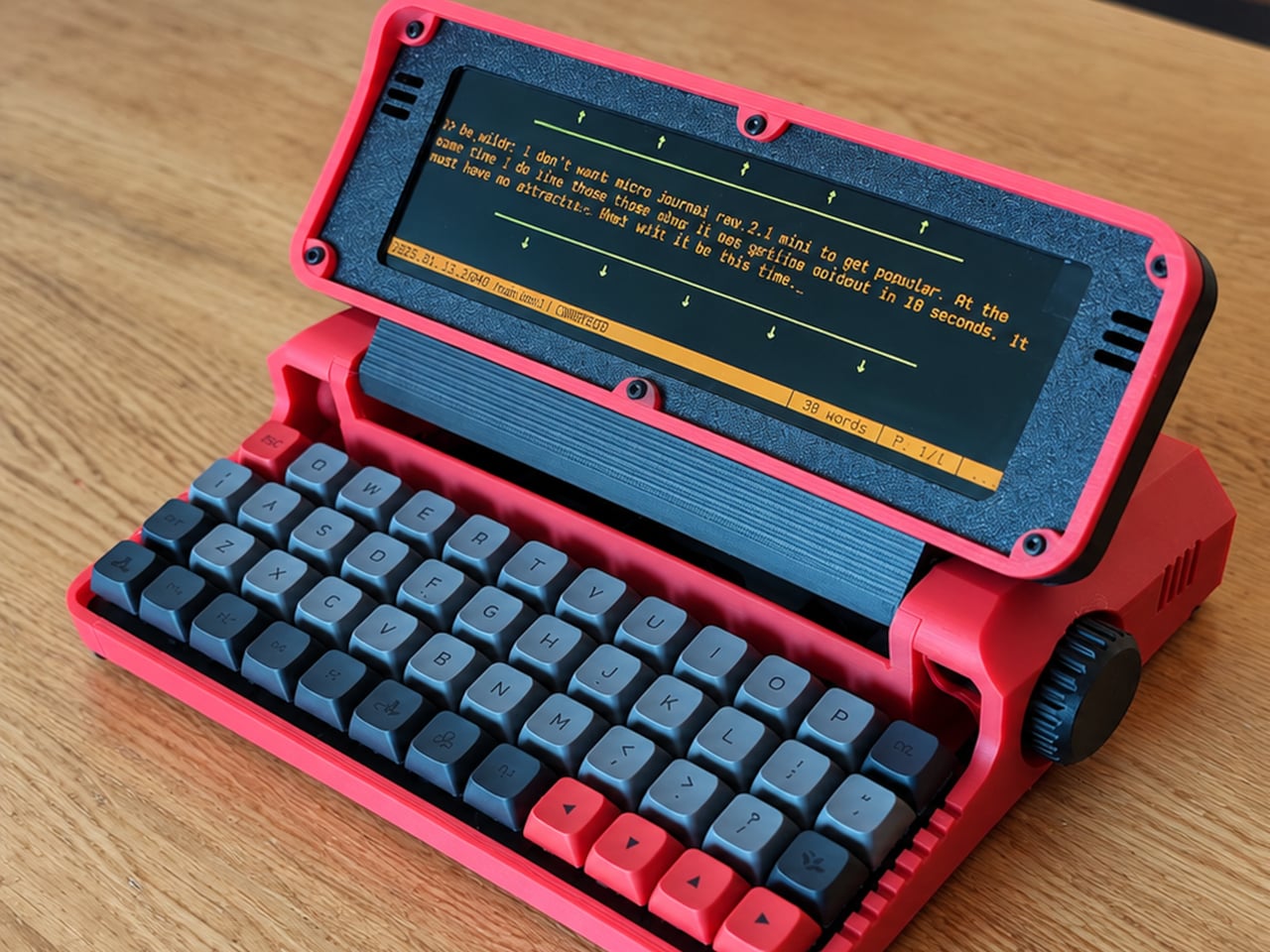
Opening a laptop to write a paragraph can quickly turn into checking messages, rearranging windows, and forgetting the sentence you had in mind. The Micro Journal Rev.2.1.MINI, nicknamed Baby Shark, puts writing at the center of a small, folding computer instead. Its wide screen and compact mechanical keyboard give your words their own space, while Linux supplies the editing tools beneath that colorful clamshell.

The chunky enclosure doesn’t try to resemble a slim aluminum laptop. A bright red shell, dark panels, exposed screws, and ridged side knobs give it the character of a little workshop instrument. Its hinged display folds down over the keyboard when you’re finished. The 3D-printed construction makes color part of the customization, rather than limiting everyone to another black rectangle in their bag.

Designer: Un Kyu Lee

The 8-inch LCD is unusually wide and shallow, with a 1280×400 resolution that stretches a document across the device. It leaves space for your passage without offering the vertical expanse of a conventional laptop screen. That’s a useful distinction for drafting: there’s room to work through a sentence, but reviewing several pages still means scrolling rather than shrinking everything into an overview.

The keyboard makes a similar trade. Its 48 keys form a four-row, 12-column grid, rather than the staggered rows most typists know. Numbers and additional symbols live on layers accessed by holding another key, which keeps the footprint small while asking your fingers to learn new combinations. Vial software lets you remap assignments, and hot-swappable switches let you change the feel without soldering.

A Raspberry Pi Zero 2 W runs Linux inside, with WordGrinder and nano available for drafting and editing. That gives you somewhere to revise yesterday’s work as well as start today’s entry. Files can leave through a USB flash drive or a browser-based interface on your local network, so a writing session doesn’t have to end with retyping everything on your main computer.

Portability also depends on what you put inside. Baby Shark takes up to four replaceable 18650 cells, sold separately, or runs directly from USB power. The connector is USB-C, but the documented setup requires a USB-A charger and a USB-A-to-USB-C cable, not USB Power Delivery. That means the charger already serving your laptop may not be the one this little writing machine needs.

Linux brings a pause before the writing starts: the seller estimates about 30 seconds to boot. This isn’t an instant-on notebook, and closing the screen isn’t a substitute for shutting the system down properly. On the other hand, published enclosure files, circuit-board designs, and firmware give owners ways to repair or modify it, instead of treating the device as a sealed appliance.

Baby Shark is sold as a DIY project even when ordered assembled, with no seller warranty. Later batches are planned without the Raspberry Pi, leaving buyers to supply it themselves. There’s considerable room to make both the hardware and software your own, provided that adjusting the keyboard doesn’t become another way to postpone the paragraph you originally sat down to write. There’s also a Purple Black Mint Green, nicknamed Witch, version inspired by the EVA-01 from the famed anime, Evangelion.

The post Micro Journal Rev.2.1.MINI Writing Laptop Pairs a Wide Screen With Just 48 Keys first appeared on Yanko Design.

  • ✇Yanko Design
  • Aina’s AI Ring Puts an OLED Screen and Joystick on Your Finger
    Reaching for your phone to pause a song can easily turn into reading messages you weren’t planning to open. Aina Ring proposes keeping those small decisions on your hand instead, with a display and thumb-operated control built into a substantial titanium band. The upcoming wearable is designed to handle quick commands and AI suggestions while your iPhone stays tucked away in your pocket. The design doesn’t pretend to be an ordinary piece of jewelry. A rectangular OLED display sits above the ind
     

Aina’s AI Ring Puts an OLED Screen and Joystick on Your Finger

Par : JC Torres
7 novembre 2026 à 16:45

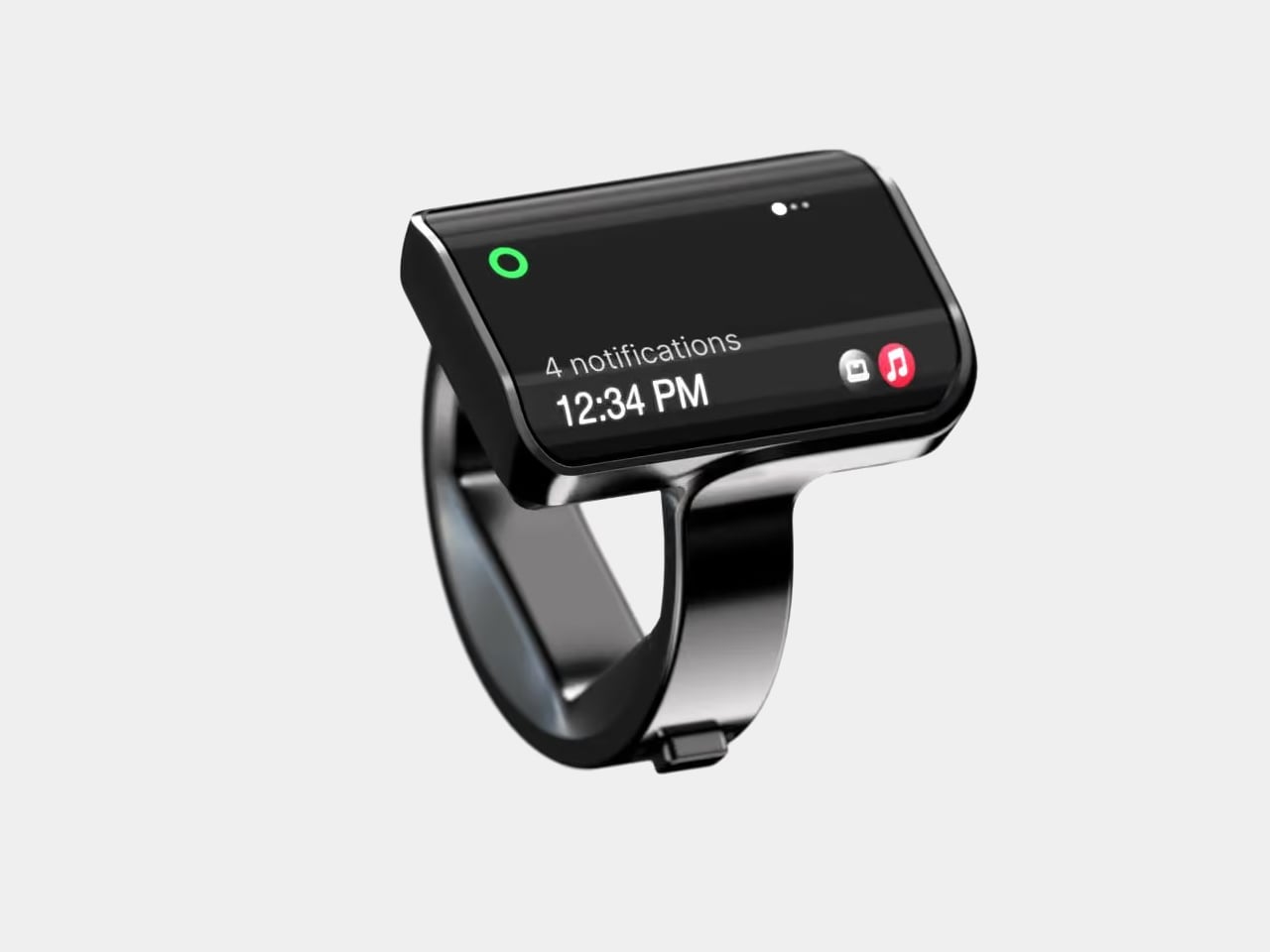
Reaching for your phone to pause a song can easily turn into reading messages you weren’t planning to open. Aina Ring proposes keeping those small decisions on your hand instead, with a display and thumb-operated control built into a substantial titanium band. The upcoming wearable is designed to handle quick commands and AI suggestions while your iPhone stays tucked away in your pocket.

The design doesn’t pretend to be an ordinary piece of jewelry. A rectangular OLED display sits above the index finger, with glass covering its face and rounded edges easing the transition to the band. Four titanium body parts enclose 140 components. Eclipse Black, Amber Gold, Mercury Silver, and Slate Titanium offer different finishes, although none makes that raised screen disappear into a conventional ring.

Designer: Aina

The more interesting detail sits beside your thumb. A joystick-like button on the band accepts seven gesture types, including directional flicks, presses, and holds. Depending on the current task, flicking upward can approve a suggestion, answer a call, or pause music. Displayed hints explain the next action, giving that tiny screen a role beyond repeating notifications from a device you already carry.

Aina calls its suggestions Cues and says its software learns from your routines and calendar. A regular departure time might bring up a ride suggestion; an approaching meeting could offer a shortcut to join. The important design choice is that approval remains yours. Ignore the suggestion and nothing happens, rather than letting a guessed preference quietly become a booking you didn’t request.

Voice provides another route when a flick isn’t enough. Hold the button to dictate a note or set a reminder through the built-in microphone, while a speaker enables calls from the ring. On a Mac, that same control can dictate into applications. It’s a way to catch a thought during a walk, without stopping to compose it on a phone keyboard.

The ring remains an accessory to Apple’s ecosystem, not an independent phone. It requires an iPhone running iOS 18 or later, with macOS 15 or later for Mac features; Android and Windows aren’t supported. Meeting controls depend on the nearby Mac and Aina’s app, so muting from your finger doesn’t mean you can leave the computer behind and keep every function.

Aina claims up to 18 hours per charge, with a cube-shaped dock included for overnight charging. Sizes run from 7 through 13, but only the band changes; the display stays the same. A smaller finger therefore doesn’t get a less conspicuous screen. The IP65 rating allows everyday splashes, although the company says to remove the ring before swimming or showering.

Starting at $399 for early-access preorders, against a $499 list price, Aina is scheduled to ship in early 2027. That leaves the usefulness of its predictions and the comfort of its substantial shape to be established beyond launch demonstrations. A thumb-sized shortcut might save a trip into an app, but wearing it all day needs a better reason than simply having somewhere else to check incoming notifications.

The post Aina’s AI Ring Puts an OLED Screen and Joystick on Your Finger first appeared on Yanko Design.

  • ✇Yanko Design
  • Diden Spider Robot Climbs Steel Walls and Actually Welds Them
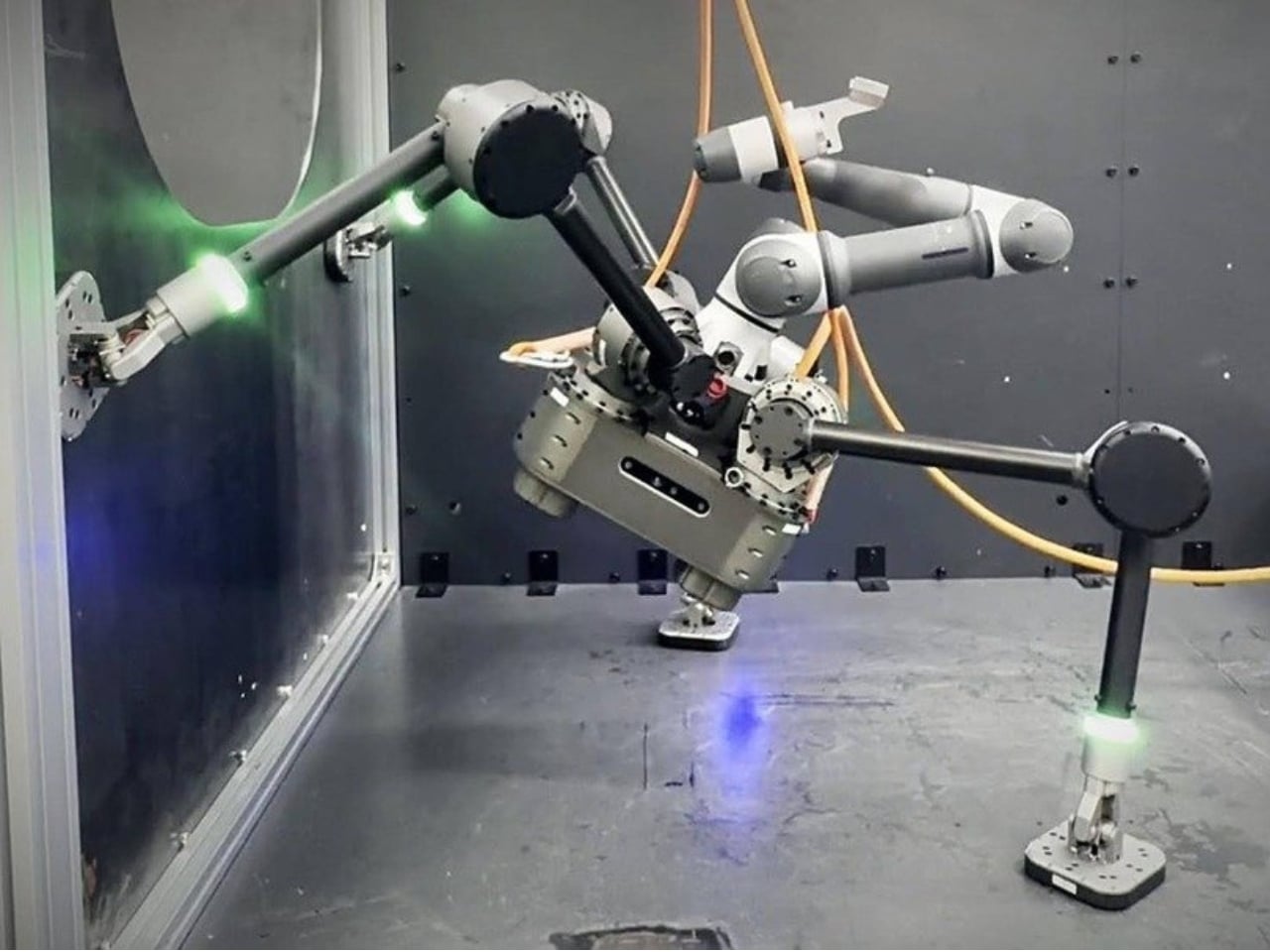
    A welding tool is only useful if you can get it to the seam. Inside a ship’s steel structure, that can mean bringing a worker, equipment, and a platform into position before the actual welding begins. It’s the less glamorous side of industrial work, and arguably one of the more compelling reasons to build a climbing robot. South Korea’s Diden Robotics approaches that problem with four widely spread legs and magnetic feet. Its Diden Spider is designed to carry welding equipment onto steel walls
     

Diden Spider Robot Climbs Steel Walls and Actually Welds Them

7 novembre 2026 à 15:15

A welding tool is only useful if you can get it to the seam. Inside a ship’s steel structure, that can mean bringing a worker, equipment, and a platform into position before the actual welding begins. It’s the less glamorous side of industrial work, and arguably one of the more compelling reasons to build a climbing robot.

South Korea’s Diden Robotics approaches that problem with four widely spread legs and magnetic feet. Its Diden Spider is designed to carry welding equipment onto steel walls and ceilings, taking the tool to places that are awkward for people to reach. I like how directly its strange-looking body answers the task. The low stance and broad footprint aren’t there to give it personality. They help it stay attached while carrying equipment that has a job to do.

Designer: Diden Robotics

That spider shape also came from a practical failure. In a company interview, co-founder and COO Youngha Shin explains that early, dog-shaped configurations struggled when turning sideways on walls. The arrangement left fewer joint actuators supporting the body, and feet that failed to sit flat could cause the robot to flip. Spreading the legs outward kept the body closer to the wall and improved how the feet met the surface. The silhouette follows the problem.

The feet use electropermanent magnets, which deserve a little attention because they make the whole idea possible. An electrical pulse switches their magnetic state on or off. Once attached, they don’t need a continuous supply of electricity to maintain that magnetic hold, according to Diden. That doesn’t make the entire robot power-free. Its joints, sensors, and computing still have work to do. It means staying attached doesn’t require constantly feeding electricity into the magnets.

Diden rates the Spider 30 configuration for a payload of 30 kilograms, roughly 66 pounds. That capacity is important because climbing alone doesn’t accomplish much welding. The platform needs to carry useful equipment once it gets there. Diden describes interchangeable task modules, including robotic manipulators and inspection equipment. I find the traveling-tool-platform idea more compelling than treating the machine as a single-purpose mechanical welder. Its mobility could serve different jobs along the same steel structure.

One of my favorite details is much smaller than the legs. Shin says feedback from people using the robot led Diden to add LEDs to its feet, allowing them to see whether each foot had attached. That’s a sensible concession to human nerves. A control system may know its magnetic foot is holding, but someone watching expensive equipment hang from steel deserves a readable signal, too.

Finding the work is another challenge. Diden describes a navigation system that compares live, three-dimensional sensor data with a ship’s CAD model to estimate position and orientation. Its mapping system also reconstructs nearby obstacles from depth-camera data. In practical terms, the robot needs to understand where it is and what blocks its next step. A magnetic grip provides attachment; navigating a cluttered structure requires a separate layer of perception and control.

This is a physical machine with reported industrial use, rather than a speculative rendering. Diden says Spider 30 has completed field deployment at major Korean shipyards and that its welding results have been applied to vessels in production. Separately, Maeil Business Newspaper reported in May 2026 that Diden had completed sales to some major Korean shipbuilders. Those are meaningful signs of progress, although neither establishes dependable performance over every production shift.

I’d judge it by the less photogenic parts of the job: repeatable weld quality, maintenance demands, setup time, and how often somebody needs to intervene. Still, the design makes a persuasive starting argument. It gives an awkwardly placed tool a way to reach its work. If that removes even some occasions when a person has to climb into position with welding gear, the unusual body has earned its place.

The post Diden Spider Robot Climbs Steel Walls and Actually Welds Them first appeared on Yanko Design.

  • ✇Yanko Design
  • Baseus Sleep SK1 Brings Bedtime Audio Without Earbuds
    Since I live alone, listening to music or podcasts before I sleep is not really an issue, as there’s no one to complain about the sound. But when I share a hotel room or someone sleeps over, this may become a problem. Sure, there are earbuds, but I have this irrational fear that they may get buried deep in my ears when I fall asleep and move around. One possible solution would be speakers that can sit under the pillow and play close to my ears, with the aim of keeping the sound from bothering o
     

Baseus Sleep SK1 Brings Bedtime Audio Without Earbuds

7 novembre 2026 à 09:20

Since I live alone, listening to music or podcasts before I sleep is not really an issue, as there’s no one to complain about the sound. But when I share a hotel room or someone sleeps over, this may become a problem. Sure, there are earbuds, but I have this irrational fear that they may get buried deep in my ears when I fall asleep and move around. One possible solution would be speakers that can sit under the pillow and play close to my ears, with the aim of keeping the sound from bothering other people in the room.

The Baseus Sleep SK1 is one such speaker. It uses what Baseus calls micro-vibration conduction to carry audio through the pillow to your ears. Basically, your pillow becomes part of the audio system, while two sound-producing units are intended to direct the music, audiobook, or podcast toward the sleeper’s head. The idea is to keep the listening area small rather than fill the bedroom with sound.

Designer: Baseus

The Sleep SK1 looks like a Bluetooth speaker, with two circular pods joined by a narrow, curved bridge. It looks more like connected pucks than a bedside speaker. Its reported dimensions are about 6.5 by 1.8 by 0.55 inches, and it weighs roughly 1.55 ounces. The low profile is designed to minimize intrusion, although that doesn’t mean you won’t feel it through a compressed pillow. Comfort would still need to be tested.

The device has three physical buttons around the edge of one pod for operating the speaker. There’s also a digital display integrated into one circular face, showing the time, operating mode, and remaining battery level. That gives you another way to check the time when you wake up in the middle of the night instead of automatically reaching for your phone. Of course, you’d still have to uncover the display if it’s underneath your pillow.

For people who prefer background sounds to music or conversation, Baseus says its companion app offers more than 100 sound options, including rain, ocean waves, campfire sounds, and ASMR. You can also set up to 10 alarms for different schedules. The alarms use the same pillow-directed approach, which could be useful if you need to get up before the person sleeping beside you.

Baseus claims more than 10 hours of playback from the built-in 300 mAh battery, which would cover an overnight listening session if it holds up in practice. Charging is via USB-C, with a full charge reportedly taking about two hours. For something intended to stay beneath a pillow, the useful part is having enough battery life to use it without leaving a charging cable attached.

Your pillow is an important part of the setup, though. The Gadgeteer reports that Baseus recommends pillows up to about 3.1 inches thick and suggests increasing the volume for thicker pillows or when sleeping on your back. That makes pillow thickness and sleeping position things to consider before buying. Turning the volume up may help you hear, but whether it stays quiet enough for someone nearby is another question.

The SK1 is listed on JD.com in China, with a reported price of 184 yuan. That shouldn’t be mistaken for a confirmed US retail price, and an official US release hasn’t been established in the available sources. It’s worth checking regional availability and app support rather than assuming an imported unit will offer the same experience everywhere.

For me, the appeal is being able to listen without putting anything in my ears. But I’d want to know how clearly a podcast comes through my own pillow and how much of it someone else can hear. Those would be the deciding factors for me. If the SK1 can keep a familiar voice close to my pillow without sharing the whole conversation with the room, that would be a good enough reason to consider it.

The post Baseus Sleep SK1 Brings Bedtime Audio Without Earbuds first appeared on Yanko Design.

Aina’s $399 AI Ring Turns Your Thumb Into an AI Approval Button

6 novembre 2026 à 13:03

Aina’s $399 AI ring lets users approve tasks with a thumb flick. Check iPhone and Mac compatibility, shipping plans, and key considerations for IT teams.

The post Aina’s $399 AI Ring Turns Your Thumb Into an AI Approval Button appeared first on TechRepublic.

Claude Personal Finance: Features, Privacy and ChatGPT Comparison

6 novembre 2026 à 12:53

Anthropic launches Claude Personal Finance for bank account analysis. Explore its features, privacy considerations, availability and comparison with ChatGPT.

The post Claude Personal Finance: Features, Privacy and ChatGPT Comparison appeared first on TechRepublic.

Nothing’s First AI Device Is Coming in December: What We Know

6 novembre 2026 à 10:53

Nothing CEO Carl Pei has confirmed a December launch for the company's first AI-native device. Here's what we know about its design, features, and availability.

The post Nothing’s First AI Device Is Coming in December: What We Know appeared first on TechRepublic.

Motorola Signature 27 vs Samsung Galaxy S26 Ultra: Which Flagship Is Worth $1,600?

6 novembre 2026 à 04:04

Motorola Signature 27 vs Samsung Galaxy S26 Ultra: Compare price, cameras, battery, charging, software, and features to see which flagship offers better value.

The post Motorola Signature 27 vs Samsung Galaxy S26 Ultra: Which Flagship Is Worth $1,600? appeared first on TechRepublic.

  • ✇Yanko Design
  • Raven Prism Smart Glasses Put a Linux Computer in the Corner of Your Eye
    Checking a recipe with flour on your fingers is a good reminder that a touchscreen isn’t always the most convenient interface. Raven Resonance’s Prism glasses propose keeping those instructions in the corner of your vision instead, with eye controls leaving your hands free. The reservation-stage wearable puts a Linux computer inside familiar-looking frames, rather than simply supplying another screen tethered to your phone. The frames make some concessions to everything packed inside. Thick tem
     

Raven Prism Smart Glasses Put a Linux Computer in the Corner of Your Eye

Par : JC Torres
6 novembre 2026 à 13:20

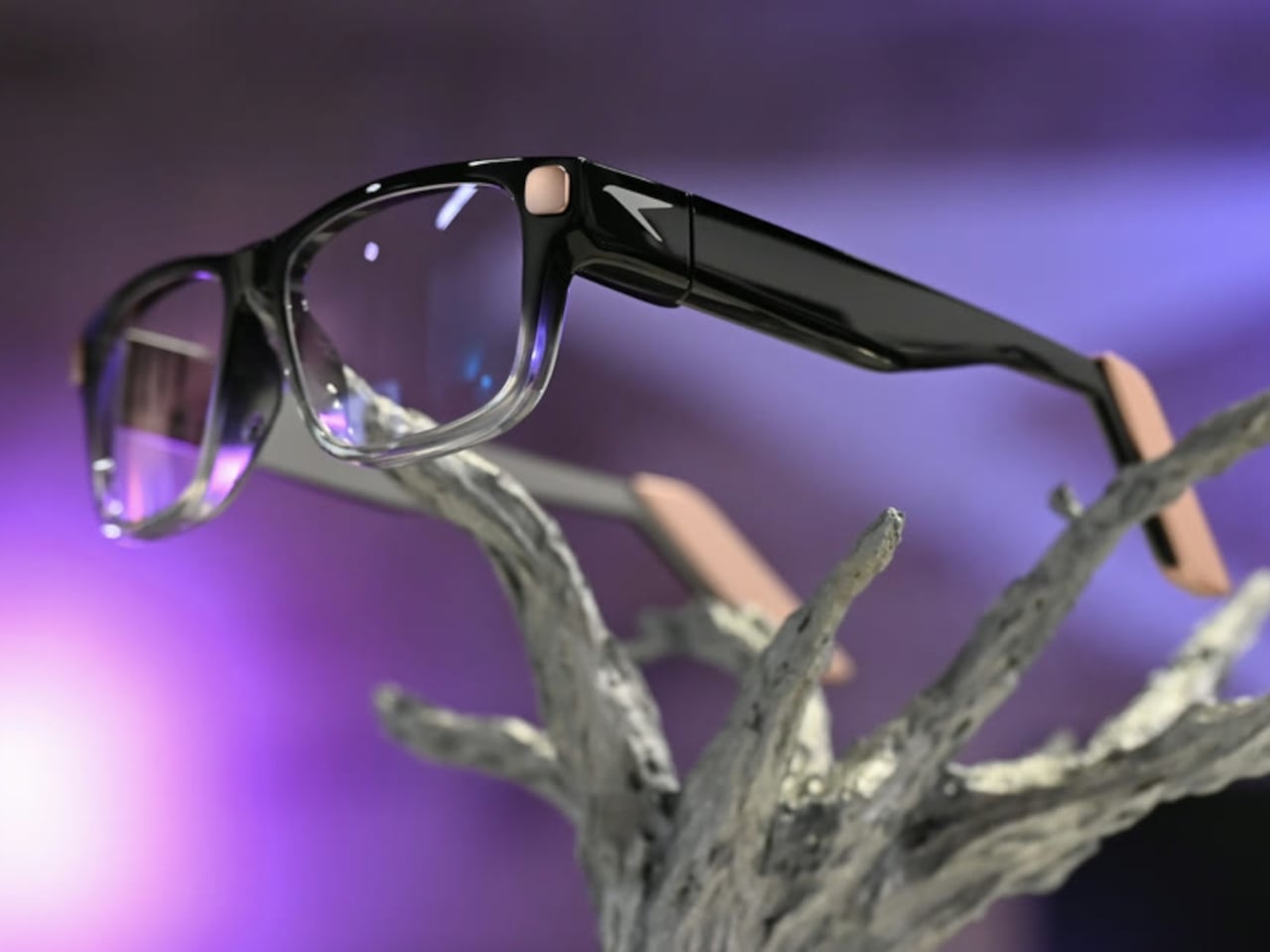
Checking a recipe with flour on your fingers is a good reminder that a touchscreen isn’t always the most convenient interface. Raven Resonance’s Prism glasses propose keeping those instructions in the corner of your vision instead, with eye controls leaving your hands free. The reservation-stage wearable puts a Linux computer inside familiar-looking frames, rather than simply supplying another screen tethered to your phone.

The frames make some concessions to everything packed inside. Thick temples run back from a dark brow, while clearer lower rims soften the outline around the lenses. Pale end pieces add a contrasting finish without covering the front in conspicuous branding. There’s still more hardware beside your head than ordinary glasses would carry, so familiar styling shouldn’t be confused with proven comfort.

Designer: Raven Resonance

The display occupies the right eye’s periphery, using a full-color waveguide with a 30-degree diagonal field of view. Its position is meant to make a recipe or reference image available when you glance over, rather than filling your central view. That arrangement suits checking the next instruction while cooking, although looking away from your hands still requires choosing a sensible moment to pause.

Eye control gives that arrangement its practical purpose. Raven’s software framework includes buttons you activate by holding your gaze on them, along with gaze-based navigation. You wouldn’t need to tap a temple every time your hands were occupied. The challenge is distinguishing a deliberate selection from an ordinary glance, something the developer guidance acknowledges by recommending large targets and avoiding crowded layouts.

Privacy gets a physical control rather than just a settings menu. A cover must be moved manually before the 13-megapixel camera can operate, and lights in the rims signal when it’s active. Raven also says speech recognition runs locally and cloud sharing requires consent. Those choices make the intended boundaries clearer, but they don’t amount to an independent security audit of the system.

Keeping prescription glasses usable while their electronics recharge takes another physical solution. Raven Wings are removable battery modules, designed to swap without shutting down your apps. Two pairs and a charging case are included, letting one set recharge while you wear the other. That makes the all-day ambition about exchanging batteries, not a published promise of uninterrupted runtime from a single pair.

Underneath that eyewear is Raven OS, running on a quad-core ARM processor with up to 4GB of memory. Developers can connect remotely and build compatible applications, but Linux underneath doesn’t mean every desktop program fits a tiny wearable display. Navigation directions and other phone-supplied information also remain part of the pitch, so standalone computing shouldn’t be mistaken for making your phone redundant.

Prism is priced at $1,499, including supported prescription lenses, with initial US shipments planned for January 2027. New reservations currently fall into a summer 2027 batch, not that first delivery window. Its usefulness will depend on whether these small interactions feel easier than reaching for a phone, and whether you’re comfortable keeping the screen, batteries, and computer on your face all day.

The post Raven Prism Smart Glasses Put a Linux Computer in the Corner of Your Eye first appeared on Yanko Design.
  • ✇Yanko Design
  • Sony MDR-3R over-ear headphones revive nostalgia of the Walkman era
    Remember the Walkman headphones from more than four decades ago? Well, the nostalgia is revived as Sony has brought back over-ear headphones for a generation obsessed with wired audio gear. The new pair of earphones draws inspiration from the originals that debuted in 1981, with the original design drawings referenced in crafting this pair. The inspiration doesn’t stop at the looks alone, as the earphones come with the same 23mm dynamic driver, so that the same sound signature can be replicated
     

Sony MDR-3R over-ear headphones revive nostalgia of the Walkman era

6 novembre 2026 à 11:20

Remember the Walkman headphones from more than four decades ago? Well, the nostalgia is revived as Sony has brought back over-ear headphones for a generation obsessed with wired audio gear. The new pair of earphones draws inspiration from the originals that debuted in 1981, with the original design drawings referenced in crafting this pair.

The inspiration doesn’t stop at the looks alone, as the earphones come with the same 23mm dynamic driver, so that the same sound signature can be replicated in these. All the modern conveniences are included, though, like a microphone for taking calls and the in-line remote control to toggle calls, music, and podcast streaming. This falls straight in line with the trend that brands like Final with AirWire and StillFrame are following.

Designer: Sony

For audiophiles who are constantly juggling their expensive gear, chasing that perfect sound, this is a subtle reminder of how it all started back then. The nostalgia of a balanced, warm sound signature that emphasized natural vocals and emotional richness. The earphones come with the iconic blue and orange earpads to customize the look. Hitting the rewind button, the OG earphones shipped with the Walkman TPS-L2 in 1979 and played cassettes.

You can barely distinguish the MDR-3R from the original one, and millennials will instantly feel the nostalgia. The small design details, like the metal headband and the holes on the outer casing of the drivers. Sony doesn’t stop there, as the packaging and the instruction manual also take you back to the golden era. Practicality of use is also taken care of, as the earphones weigh just 38 grams, bettering the original ones by 2 grams.

Since modern phones are rarely seen with a 3.5mm headphone jack, the pair comes with a USB-C connector to plug in easily with modern devices. I would have liked the headphones to come with a swappable option to plug in a 3.5mm or 4.4mm jack for high-quality playback with services like Tidal or Apple Music. That said, you’ll have to buy a USB-C to 3.5mm or 4.4mm jack so that you can plug it into DAPs like the HiBy W4 HiFi Amplifier.

Along with the OG classic version, the earphones also come in a Stranger Things Edition that has a black headband and the themed red and black foam pads to match the ones worn by Max. The standard MDR-3R over-ear earphones are priced at $59.99, while the Stranger Things Edition comes for $79.99.

The post Sony MDR-3R over-ear headphones revive nostalgia of the Walkman era first appeared on Yanko Design.
  • ✇Yanko Design
  • Keychron’s $35 Keypad Turns AI Shortcuts Into Four Physical Buttons
    Working with an AI coding assistant can mean repeating the same handful of commands while your fingers hunt across a keyboard full of other possibilities. Keychron’s F4 HE 8K Vibe Coding Keypad gives those repeated decisions their own little patch of desk. Four programmable keys put prompting, dictation, approval, and rejection within reach, without asking you to replace the keyboard you already use. The square body measures just 1.77 inches on each side, although its tall keycaps bring the hei
     

Keychron’s $35 Keypad Turns AI Shortcuts Into Four Physical Buttons

Par : JC Torres
6 novembre 2026 à 09:20

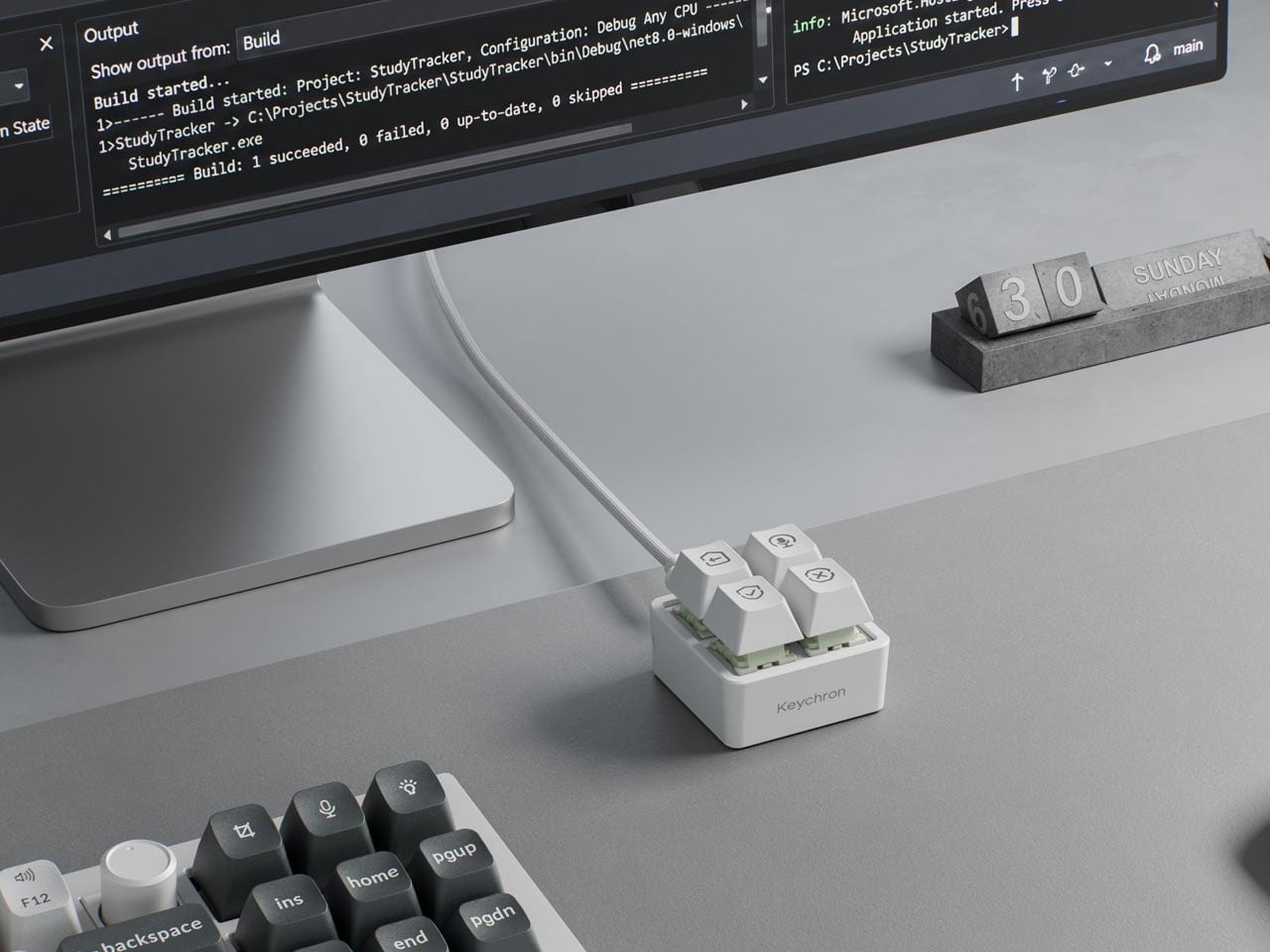
Working with an AI coding assistant can mean repeating the same handful of commands while your fingers hunt across a keyboard full of other possibilities. Keychron’s F4 HE 8K Vibe Coding Keypad gives those repeated decisions their own little patch of desk. Four programmable keys put prompting, dictation, approval, and rejection within reach, without asking you to replace the keyboard you already use.

The square body measures just 1.77 inches on each side, although its tall keycaps bring the height to 1.35 inches. Available in black or white, it looks like someone neatly cut a corner from a mechanical keyboard. An ABS plastic enclosure surrounds an aluminum plate, leaving the switch housings visible beneath the caps instead of hiding them behind a broad decorative surround.

Designer: Keychron

Those caps do more than supply a place to press. Keychron provides 15 icon options in dye-sublimated PBT, so a microphone, check mark, or cross can identify what you’ve assigned underneath. Per-key RGB adds another cue, letting you color an approval key green and a rejection key red. These are physical labels and configured colors, not screens that update when you switch applications.

The intended routine is familiar if you’ve spent time reviewing generated code. Start a conversation, dictate a change, then accept or reject what comes back, using mappings suited to your software. Keychron supplies Codex and Claude presets through its browser-based Launcher. The microphone icon needs particular attention, though: there’s no microphone inside this little box, so voice input still needs one elsewhere.

Launcher also handles ordinary shortcuts and recorded macros, giving the keypad something to do when you’re finished negotiating with an AI. A meeting mute button or a window-snapping shortcut might earn its place just as easily. Settings save to the device, but the relevant shortcuts still need to work on the next computer. Onboard memory carries your assignments, not the applications they control.

The magnetic switches add a less obvious kind of customization. You can choose how far a key travels before registering, making a shallow press sufficient or requiring a more deliberate movement. Dynamic Keystrokes can assign up to four actions across pressing and releasing one key. That’s extra flexibility, although remembering several hidden actions might undermine the simplicity of having four clearly labeled buttons.

Keychron advertises 8,000 reports per second over USB-C with a suitable cable, a gaming-oriented specification rather than evidence that AI will answer faster. More immediately relevant is another wire trailing from such a small accessory. The listed box contents include the keypad, 11 extra caps, and a manual, but no cable, so you’ll need to provide that part of the setup yourself.

The F4 costs $34.99, but the featured Launcher version remains in beta ahead of its planned November 9, 2026 release. That caveat aside, the question is how often you’re repeating the same commands. Four dedicated buttons are appealing when they remove a daily nuisance, less so when they’re another thing to remember beside your perfectly functional keyboard.

The post Keychron’s $35 Keypad Turns AI Shortcuts Into Four Physical Buttons first appeared on Yanko Design.
  • ✇Yanko Design
  • Razer’s New Hammerhead Earbuds Bring Back the Cable, Not the Headphone Jack
    Wireless earbuds can make a short gaming break depend on whether you remembered to charge their case the night before. Razer’s Hammerhead V3 Chroma takes that worry off the list with a cable that carries audio and power through USB-C. There’s no headphone jack involved in this return to wired listening, and the angled plug has been shaped around the hands holding your phone. The connector has a 90-degree bend, letting the cable run alongside a compatible device rather than sticking straight int
     

Razer’s New Hammerhead Earbuds Bring Back the Cable, Not the Headphone Jack

Par : JC Torres
6 novembre 2026 à 06:07

Wireless earbuds can make a short gaming break depend on whether you remembered to charge their case the night before. Razer’s Hammerhead V3 Chroma takes that worry off the list with a cable that carries audio and power through USB-C. There’s no headphone jack involved in this return to wired listening, and the angled plug has been shaped around the hands holding your phone.

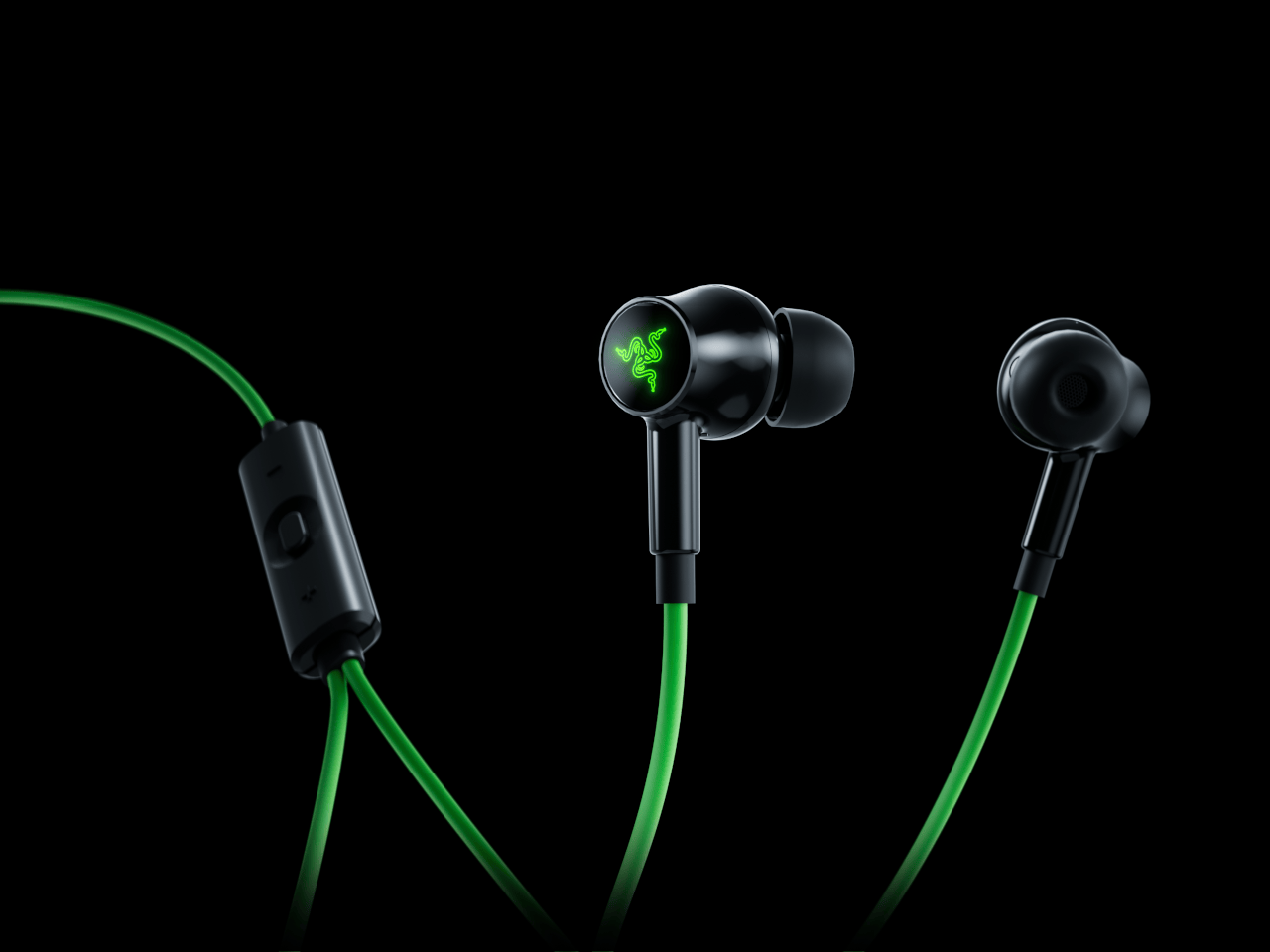
The connector has a 90-degree bend, letting the cable run alongside a compatible device rather than sticking straight into your palm. That matters when you rotate a phone for a game and wrap both hands around its ends. It’s a small adjustment to an unglamorous component, but one that addresses one immediate objection to putting a wire back into a handheld setup.

Designer: Razer

The wire also gives Razer somewhere to put controls that don’t have to share space with an ear tip. An in-line remote handles volume, playback, and active noise cancellation (ANC), with raised controls you can locate by touch rather than tapping an earbud. Its omnidirectional microphone supports calls and team chat, keeping the interactions on the cable instead of behind another phone menu.

Of course, subtlety isn’t really the point of a bright green cable hanging from black earbuds. Circular outer caps carry illuminated Razer logos, with Chroma RGB offering 16.8 million color options. The glossy housings and short stems aren’t particularly dramatic by themselves, but the color makes the whole arrangement unmistakably gaming hardware, even when you’re simply listening to music on the bus.

Inside each earbud, a dynamic driver works alongside a dedicated tweeter, dividing the work between lower and higher frequencies. Razer includes feed-forward ANC, intended to reduce surrounding noise during a commute or a match in a shared room. Noise cancellation brings a familiar wireless-earbud convenience to a wired pair, although neither the driver arrangement nor the connection guarantees great sound on its own.

Four presets cover Gaming, Music, Movies, and Call, alongside a custom equalizer profile for anyone who prefers adjusting the balance themselves. Moving to a PC adds THX Surround Sound 7.1 through Razer Synapse 4. That’s a software-dependent extra, not something the earbuds automatically deliver on every phone, so the same connection doesn’t mean an identical feature set everywhere you plug them in.

The IPX4 rating allows for splashes and sweat, which makes sense for earbuds that might move from a desk to a drizzly commute. It doesn’t turn them into waterproof gear. The cable needs managing: it can catch on clothing or pull against the phone when you reach too far. A bent connector changes its direction, not the distance you’re able to move.

Launched on November 5, 2026, the Hammerhead V3 Chroma costs $79.99 in the US. The trade is straightforward: fewer batteries to remember, but a cable and an occupied USB-C port in return. If that’s your phone’s only charging connection, you’ll need another way to top it up while listening. The earbuds need no charging, but your phone doesn’t get the same night off.

The post Razer’s New Hammerhead Earbuds Bring Back the Cable, Not the Headphone Jack first appeared on Yanko Design.
  • ✇Yanko Design
  • The PP-2 Turntable Plays Vinyl Upside Down, Without the Fuss
    Choosing an album should be the enjoyable part of playing a record. Hovering a delicate needle over its edge can feel like an unnecessary little test, especially if you want music rather than a new equipment hobby. Waiting for Ideas addresses that friction with the PP-2, an aluminum turntable that takes tonearm adjustment out of the listener’s hands. Place the record upside down, press Play, and playback happens underneath. The Paris studio, founded by Jean-Baptiste Anotin, explored this approa
     

The PP-2 Turntable Plays Vinyl Upside Down, Without the Fuss

6 novembre 2026 à 05:15

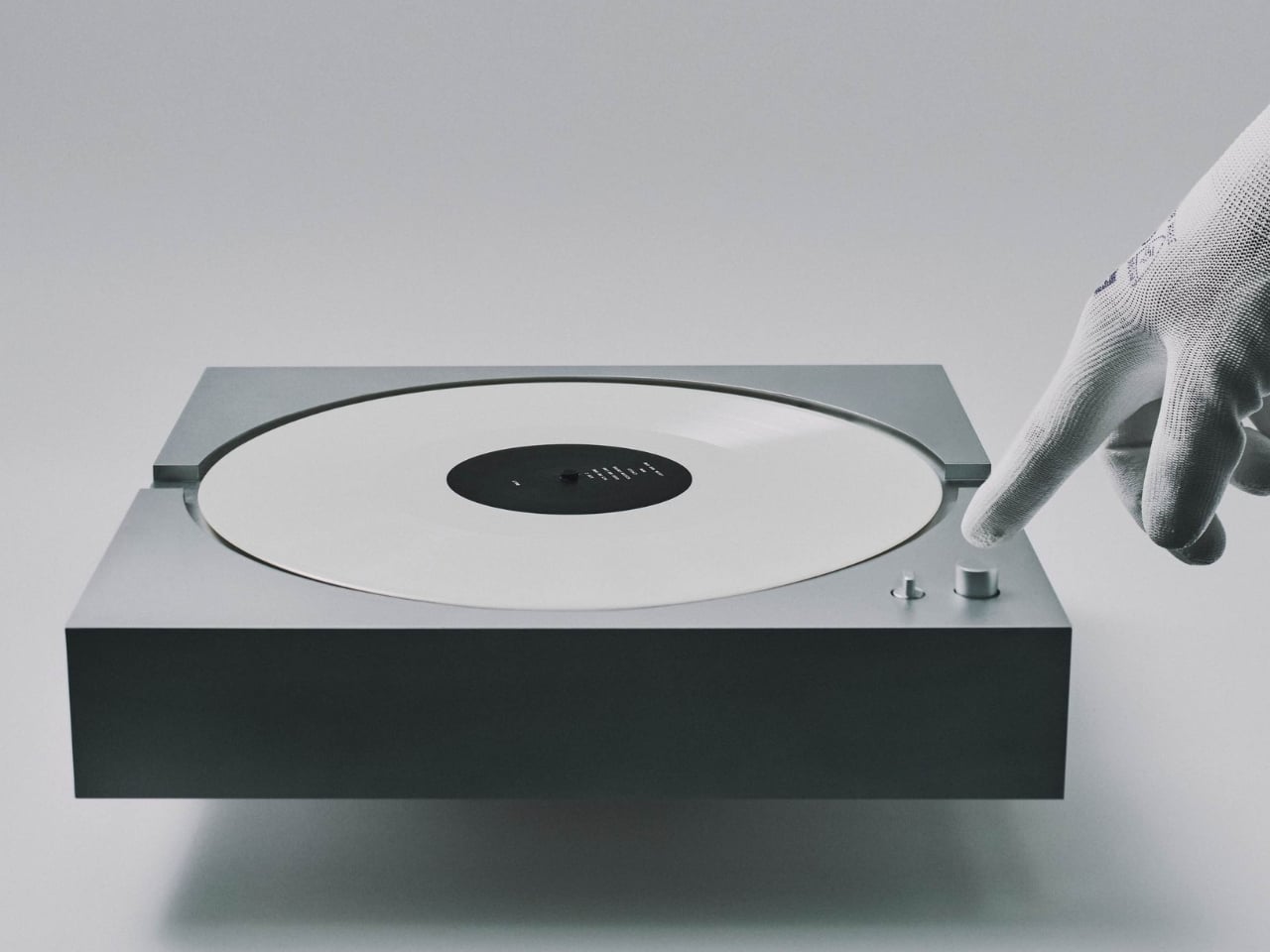
Choosing an album should be the enjoyable part of playing a record. Hovering a delicate needle over its edge can feel like an unnecessary little test, especially if you want music rather than a new equipment hobby. Waiting for Ideas addresses that friction with the PP-2, an aluminum turntable that takes tonearm adjustment out of the listener’s hands. Place the record upside down, press Play, and playback happens underneath.

The Paris studio, founded by Jean-Baptiste Anotin, explored this approach with the PP-1, which we covered in March 2025. That earlier model hid its needle below the record and made an unusually convincing case for simplifying vinyl playback. The PP-2 continues that idea with an optical pickup system. It’s currently listed for preorder, so this is a product to plan around rather than expect immediately.

Designer: Waiting for Ideas

I like the premise because the ritual of vinyl doesn’t have to include every mechanical responsibility associated with it. Choosing a sleeve, pulling out a record, and committing to an album side already give the experience its character. For my money, operating the equipment shouldn’t become a separate qualification. The PP-2’s appeal starts with that distinction, well before any discussion of audio fidelity.

Its body is CNC-machined from a solid block of aluminum and anodized, with a footprint roughly 13.8 inches square and a height just under 3 inches. Those proportions give it a compact, architectural presence on paper, closer to a deliberately placed object than a sprawling component. The square format also feels appropriate: a record is already visually busy enough without the surrounding hardware competing for attention.

The optical system deserves a careful explanation, because “reading vinyl with light” can suggest the wrong thing. A physical stylus still follows the groove. Light measures that stylus’s movement instead of the magnets and coils used in conventional magnetic cartridges. Waiting for Ideas credits Miniot technology, whose optical pickup approach preserves an analog signal path. This isn’t a contactless laser player, despite how futuristic the description might sound.

Waiting for Ideas says removing magnets from the moving stylus assembly reduces its mass, allowing more faithful tracking and finer detail. Those are appealing promises, but I’d want independent measurements and listening tests before treating them as reasons to upgrade. The clearer design achievement is easier to understand: the system keeps the delicate business of following a groove largely outside the user’s daily routine.

The motor gets a corresponding update. PP-2 uses an axial-flux direct-drive motor with optical speed control, which the studio says adjusts rotation 1,000 times per second. It supports 33 and 45 rpm records. The useful goal here is consistency, not a correction count worth showing off to guests. I’m more interested in what that engineering lets the owner stop worrying about than how impressive it sounds in a specification list.

A built-in preamplifier, RCA connections, a 3.5mm output, and USB-C power complete the practical picture. Including the preamp keeps another specialized component out of the shopping equation, while the wired outputs give the design familiar connections to work with. I appreciate that restraint. A visually simplified turntable loses some of its argument if assembling the rest of the system requires decoding a second equipment catalog.

The difficult number is the price. The store lists the PP-2 at €8,900 and asks buyers to allow up to eight weeks for assembly and shipping. Applicable import duties and taxes outside the European Union are additional. That makes this a luxury interpretation of convenience, not an accessible entry point for someone buying their first few records. The purchase argument needs to include a serious attachment to the object itself.

At that price, I’d also want clear answers about servicing and long-term support before ordering. Still, I can appreciate the decision to make elaborate engineering recede from everyday use. The PP-2 leaves the listener with a record to choose and a Play button to press. For someone who loves albums more than adjusting equipment, that’s a thoughtful place to focus the design.

The post The PP-2 Turntable Plays Vinyl Upside Down, Without the Fuss first appeared on Yanko Design.

Xiaomi 18 Pro Max vs Samsung Galaxy S26 Ultra: Which Flagship Is Worth Buying?

4 novembre 2026 à 13:45

Compare Xiaomi 18 Pro Max and Galaxy S26 Ultra cameras, performance, battery, pricing, and software support to see which flagship is worth buying.

The post Xiaomi 18 Pro Max vs Samsung Galaxy S26 Ultra: Which Flagship Is Worth Buying? appeared first on TechRepublic.

OPPO Find X10 Pro Max Cheat Sheet: Price, Specs, Camera and Features

4 novembre 2026 à 12:40

Explore the OPPO Find X10 Pro Max's price, triple 200MP cameras, specifications, battery, ColorOS 17 features, and availability.

The post OPPO Find X10 Pro Max Cheat Sheet: Price, Specs, Camera and Features appeared first on TechRepublic.

  • ✇Yanko Design
  • Peak Design’s Charging Station Folds Flat to Charge Two Phones
    Charging a phone and a pair of earbuds is easy enough, but sharing that same stand with another phone is a different matter. Peak Design’s new Charging Station addresses that problem with two equally capable magnetic pads and a hinged arm. Stand it up beside your laptop, or lay it flat so two phones can recharge without competing for the better spot. The shape is straightforward, with a narrow metal arm linking two rounded-square charging surfaces. Die-cast aluminum and zinc form the chassis, w
     

Peak Design’s Charging Station Folds Flat to Charge Two Phones

Par : JC Torres
4 novembre 2026 à 10:20

Charging a phone and a pair of earbuds is easy enough, but sharing that same stand with another phone is a different matter. Peak Design’s new Charging Station addresses that problem with two equally capable magnetic pads and a hinged arm. Stand it up beside your laptop, or lay it flat so two phones can recharge without competing for the better spot.

The shape is straightforward, with a narrow metal arm linking two rounded-square charging surfaces. Die-cast aluminum and zinc form the chassis, while the machined aluminum stem provides the moving structure. Laminated Clarino covers the pads, and a non-slip TPU foot sits underneath. Black and Moon finishes keep the color choices restrained, rather than turning your nightstand into a brightly branded electronics display.

Designer: Peak Design

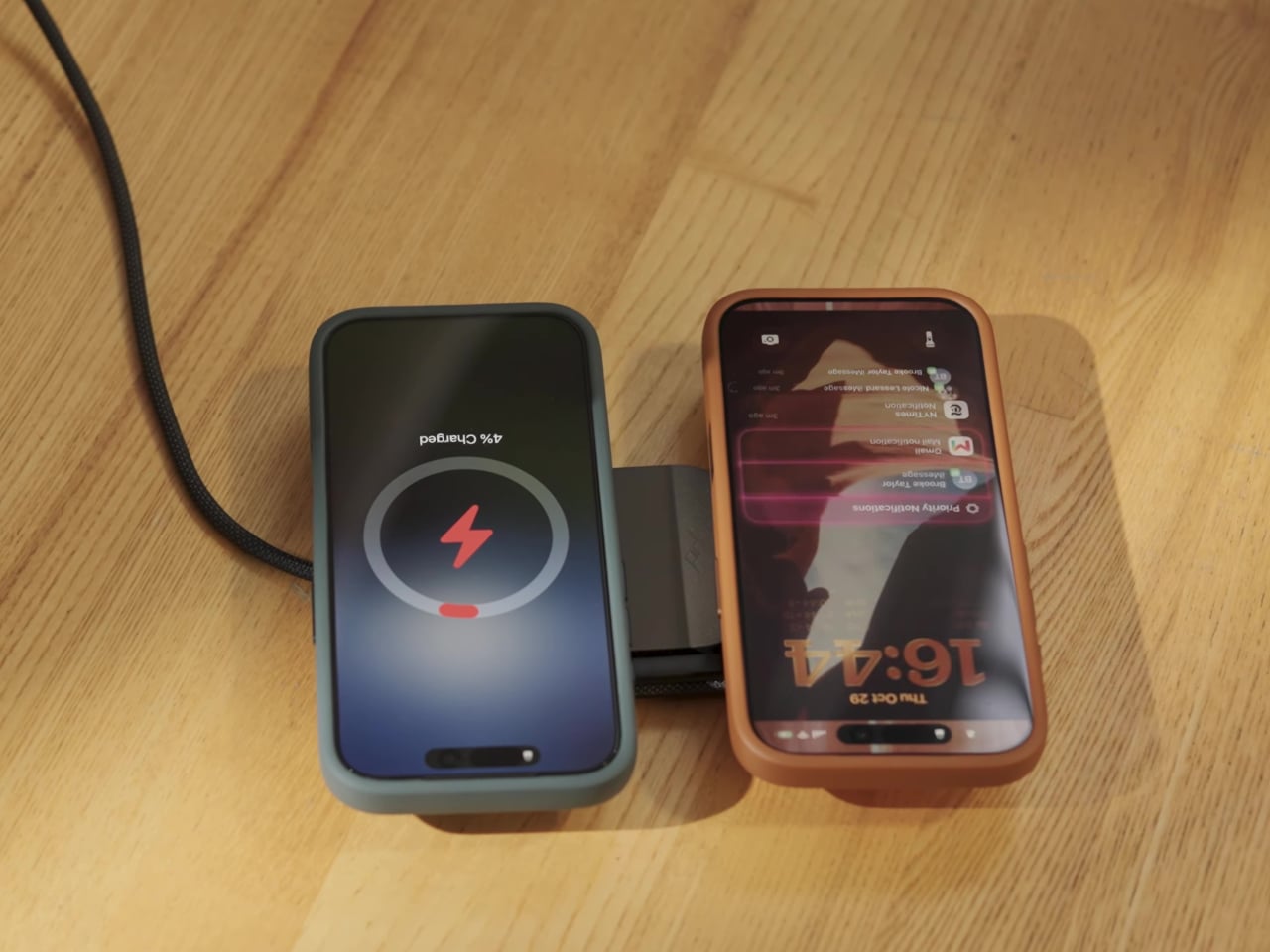
Two hinges let you adjust the arm and upper pad separately, positioning a phone for a video call or a glance at your calendar. Magnetic attachment supports portrait and landscape orientations, so changing what you’re doing doesn’t require another stand. An earbud case can sit on the lower pad while the phone stays raised, keeping both devices within the same small desktop footprint.

The lower pad gets more interesting when you fold the station flat. Peak Design rates both Qi2.2 pads for up to 25W simultaneously, allowing two compatible phones to recharge at once without assigning one a slower accessory spot. That doesn’t mean every magnetically attached phone will receive 25W, though. The device’s own charging support still determines how much power it can accept.

That folding movement also changes how the charger travels. Packed flat, it measures 6.3 by 2.7 by 0.6 inches, with the arm tucked alongside the body instead of projecting into your bag. At 9.7 ounces, it still adds weight to a travel kit, but you aren’t packing a rigid desktop stand just to keep a phone propped up in a hotel room.

A separate USB-C output makes room for a third device, although this connection is wired. Its 7.5W output is suited to smaller accessories rather than replacing a laptop charger. A watch still needs its own charging cable or puck, so this isn’t a dedicated three-device wireless dock. It simply gives that extra cable somewhere to connect without occupying another outlet on the wall.

The $99.95 price also leaves out the wall adapter. Peak Design includes a fabric-wrapped USB-C cable rated for 100W, but specifies at least a 45W power supply to operate the station and 75W or more for maximum dual charging speed. That makes the adapter part of the buying decision, particularly if your existing charger is already committed to powering something else at home.

The post Peak Design’s Charging Station Folds Flat to Charge Two Phones first appeared on Yanko Design.
  • ✇Yanko Design
  • Xbox Put a Working Series X Inside a Giant Fake Alligator
    Finding a place for a game console usually means clearing a shelf, not making room for a reptile. Microsoft’s Xbox Series X-BITE puts a working Series X inside an artificial alligator measuring more than five feet long. The one-off creation trades a discreet electronics box for something closer to a wildlife exhibit, complete with a controller between its teeth. The alligator rests on slim posts above a rectangular, wood-grain base, with its legs hanging below and its tail curling toward the fl
     

Xbox Put a Working Series X Inside a Giant Fake Alligator

Par : JC Torres
4 novembre 2026 à 09:20

Finding a place for a game console usually means clearing a shelf, not making room for a reptile. Microsoft’s Xbox Series X-BITE puts a working Series X inside an artificial alligator measuring more than five feet long. The one-off creation trades a discreet electronics box for something closer to a wildlife exhibit, complete with a controller between its teeth.

The alligator rests on slim posts above a rectangular, wood-grain base, with its legs hanging below and its tail curling toward the floor. Dark, ridged scales and a lighter belly give it the appearance of a mounted specimen. That familiar display format does much of the work, making the oversized enclosure feel deliberately theatrical rather than like an ordinary console wearing a novelty cover.

Designer: Microsoft (Xbox)

A raised section on its back interrupts those scales, with an illuminated Xbox Nexus symbol worked into the surface. It’s the clearest clue that the animal has supposedly swallowed something it shouldn’t. The branding stays small against the length of the body, allowing the fabrication to carry the joke before the glowing logo explains why there’s an alligator underneath your television in the first place.

The head gets a less subtle treatment. Xbox-green irises surround pupils shaped around the Nexus symbol, turning the creature’s stare into another brand reference. Between the open jaws sits a custom Xbox Wireless Controller with artificial bite marks. It gives the sculpture a little unfinished business, as though the console wasn’t quite enough of a meal and the accessories were next on the menu.

The commission went to creature-effects specialists, who used 3D modeling, sculpting, and fabrication to build the animal around the hardware. That process gives a promotional console the attention normally associated with a film prop. Florida supplied the inspiration, according to Xbox, although the animal itself is entirely artificial. No actual alligators were used or harmed in creating this unusually elaborate console enclosure.

For the person who eventually owns it, the obvious challenge is finding a suitable place to put it. More than five feet of reptile won’t disappear into the usual gap beside a television. Its long base asks for a substantial display surface, and the raised mounting makes the whole assembly something to plan a room around rather than tuck away.

There’s also a qualification behind the playable-console claim. Xbox says the Series X inside works, but its fine print recommends the finished creation for display. The announcement doesn’t explain ventilation, access to ports, or servicing inside the sculpted body. That leaves a distinction between functioning hardware and a practical replacement for the console you switch on every evening after work.

Only one Series X-BITE exists, and it’s being offered through a sweepstakes rather than a retail release. There isn’t a shelf price to weigh against a standard console or a choice of less toothy finishes. The appeal is owning the fabrication itself, with a working Xbox as its unlikely inhabitant. The controller has a home, provided you don’t mind the teeth.

The post Xbox Put a Working Series X Inside a Giant Fake Alligator first appeared on Yanko Design.

  • ✇Yanko Design
  • Buy the printer, make the presents: Snapmaker’s U1 drops to $699 for Black Friday
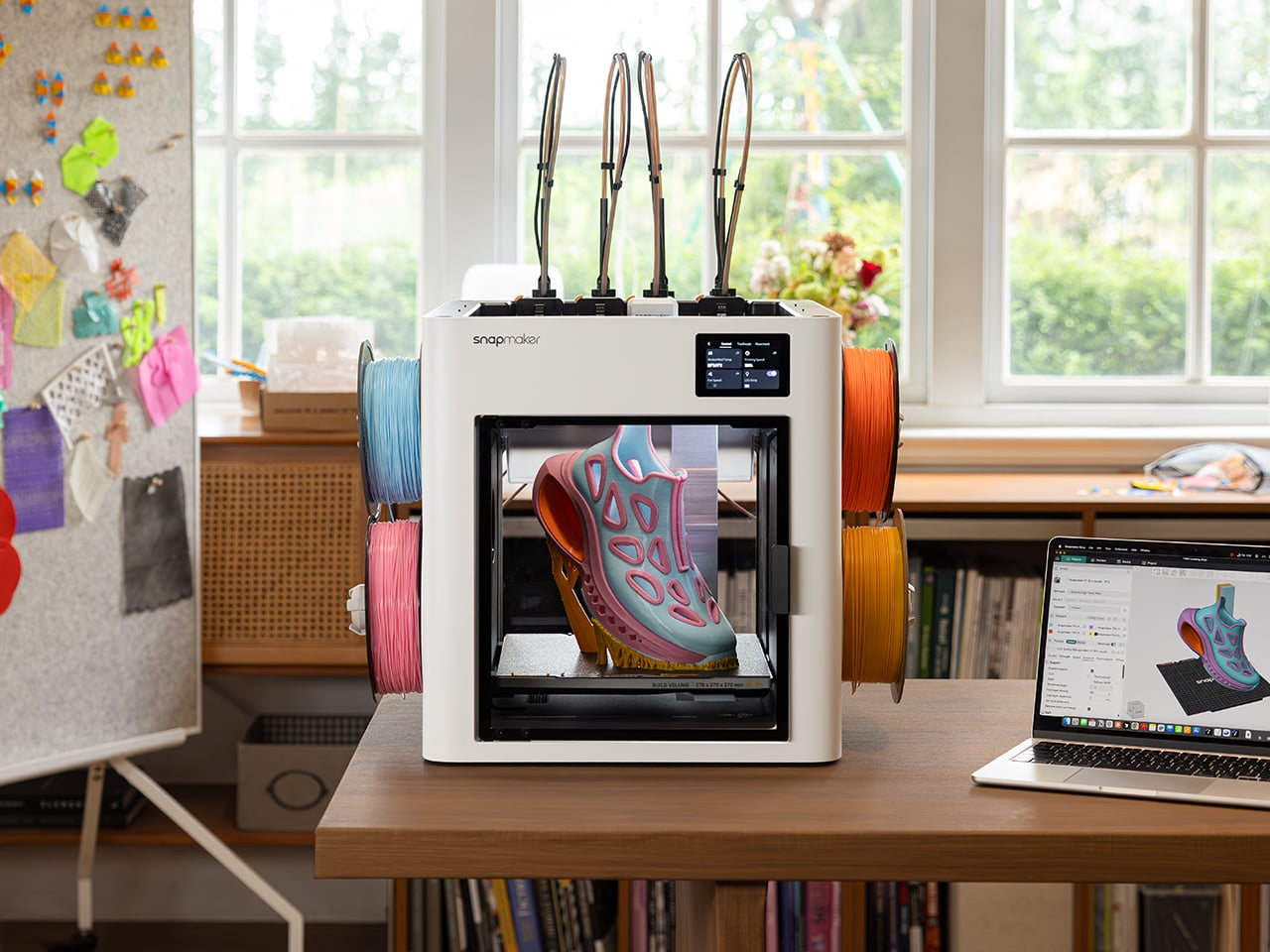
    The Snapmaker U1 drops to $699 this Black Friday, down 30% from its $999 list price, and it might be the smartest buy on your holiday list, mostly because it can make plenty of the gifts on it. The U1 is a four-toolhead 3D printer that prints in up to four colors or materials in a single go. That covers personalized ornaments, figurines, and fidget toys, all printed in multicolor on your desk. It ships with four spools of PLA and 30 ready-to-print models, so after unboxing and automatic calibra
     

Buy the printer, make the presents: Snapmaker’s U1 drops to $699 for Black Friday

3 novembre 2026 à 21:45

The Snapmaker U1 drops to $699 this Black Friday, down 30% from its $999 list price, and it might be the smartest buy on your holiday list, mostly because it can make plenty of the gifts on it. The U1 is a four-toolhead 3D printer that prints in up to four colors or materials in a single go. That covers personalized ornaments, figurines, and fidget toys, all printed in multicolor on your desk. It ships with four spools of PLA and 30 ready-to-print models, so after unboxing and automatic calibration, you can print your first model on day one. A good chunk of your Christmas list, sorted.

Four-head printers are rare at this price. Tool changers like the Prusa XL have historically cost well north of $2,000. Snapmaker’s SnapSwap system keeps four print heads loaded and swaps between them in about five seconds, while single-nozzle setups like Bambu’s AMS flush filament at every color change. Fewer purges mean faster prints and, by Snapmaker’s count, up to 85% less wasted plastic. More than 20,000 Kickstarter backers already bought in, making the U1 the most-funded 3D printer campaign in the platform’s history, with now more than 150,000 users worldwide.

Designer: Snapmaker

Click Here to Buy Now: Black Friday Sale. Hurry, deal ends soon!

Five-Second Swaps and a Lot Less Printer Poop

Each of the U1’s four print heads sits docked and preheated with its own filament. When a print calls for a new color, the printer parks the active head and grabs the next one. A steel-ball coupling and a mechanical lock seat each head in the exact same spot every time, and Snapmaker says the mechanism survived over a million continuous swaps with zero mechanical failures. The printer then auto-calibrates all four heads to within 0.04mm (about 0.0016 inches) of each other. That keeps the white trim on a Santa hat right where it belongs.

Single-nozzle printers handle color changes by shoving the old filament out until the new one runs clean. Snapmaker pegs that process at roughly two minutes per swap, and on a busy multicolor model the purged plastic can outweigh the model itself. The U1 only purges small amounts at the start of a job and during calibration. Print a tray of four-color ornaments and those savings stack up fast, in both hours and filament. Your filament budget ends up on the tree instead of in the trash.

A Personalized Ornament, From Download to Gift Box

Four heads can hold four different materials as easily as four colors, so flexible TPU or dissolvable supports can share a print with rigid plastic. For most holiday gifts, though, four colors of PLA do the heavy lifting. Snapmaker’s Full Spectrum feature stretches that palette by stacking thin alternating layers of your four filaments, which your eye reads as new in-between shades. Results depend on the filament, the model’s shape, and your settings, so a quick test print helps. Load red, green, white, and gold, and you’ve basically got Christmas in a box.

Personalizing a gift takes about as much skill as sending a text. Open an ornament model in Snapmaker Orca, add a name with the slicer’s text tool, and assign one of your four colors to each part. A palm-sized ornament uses only a few grams of filament, so each one costs pocket change in plastic. Hit print, and the U1 handles every color swap on its own while you get on with your evening. Repeat for each name on your list, and nobody else at the party will show up with those.

Smart Enough for First-Timers, Cheap Enough for Black Friday

Snapmaker Space, the company’s model library (currently in open beta), offers ready-to-print multicolor models, so beginners can skip 3D modeling entirely. Auto bed leveling helps your first layer stick, and input shaping reduces vibration for smoother walls, with speeds topping out at 500mm/s (about 20 inches per second). Filament loads itself, RFID tags on Snapmaker spools fill in settings for you, and Backup Mode switches to a matching spool when one runs dry. A built-in camera with AI monitoring can flag spaghetti failures and ping your phone. Tinkerers get Klipper firmware and OrcaSlicer support.

Click Here to Buy Now: Black Friday Sale. Hurry, deal ends soon!

The post Buy the printer, make the presents: Snapmaker’s U1 drops to $699 for Black Friday first appeared on Yanko Design.

Google Changes AI Access Rules for Schools Ahead of 2027

4 novembre 2026 à 11:54

Google's new school AI controls could affect student Search access. Here's what administrators need to know about Gemini, Guided Learning, and the 2027 rollout.

The post Google Changes AI Access Rules for Schools Ahead of 2027 appeared first on TechRepublic.

❌