HomePod mini 2 can serve as a Mac speaker for movies, gaming, and video calls. Here's what Apple confirms about compatible Macs, stereo pairing, setup, and microphone limitations.
The post Use HomePod mini 2 as a Mac Speaker: What Apple Says appeared first on TechRepublic.
HomePod mini 2 can serve as a Mac speaker for movies, gaming, and video calls. Here's what Apple confirms about compatible Macs, stereo pairing, setup, and microphone limitations.
Bitdeer is expanding its AI infrastructure footprint in Malaysia with a new 67 MW facility designed for NVIDIA Blackwell systems. Here's what's confirmed about its rollout and customer commitments.
The post Bitdeer Secures 67 MW for Nvidia AI in Malaysia, but No Customer Deal Announced appeared first on TechRepublic.
Bitdeer is expanding its AI infrastructure footprint in Malaysia with a new 67 MW facility designed for NVIDIA Blackwell systems. Here's what's confirmed about its rollout and customer commitments.
Honor's WIN 2 phones bring dual cooling fans, with a fan-equipped gaming tablet set for an October 21 launch in China. See the features and buyer trade-offs.
The post Honor Unveils Dual-Fan Gaming Phones: What Buyers Should Know appeared first on TechRepublic.
Honor's WIN 2 phones bring dual cooling fans, with a fan-equipped gaming tablet set for an October 21 launch in China. See the features and buyer trade-offs.
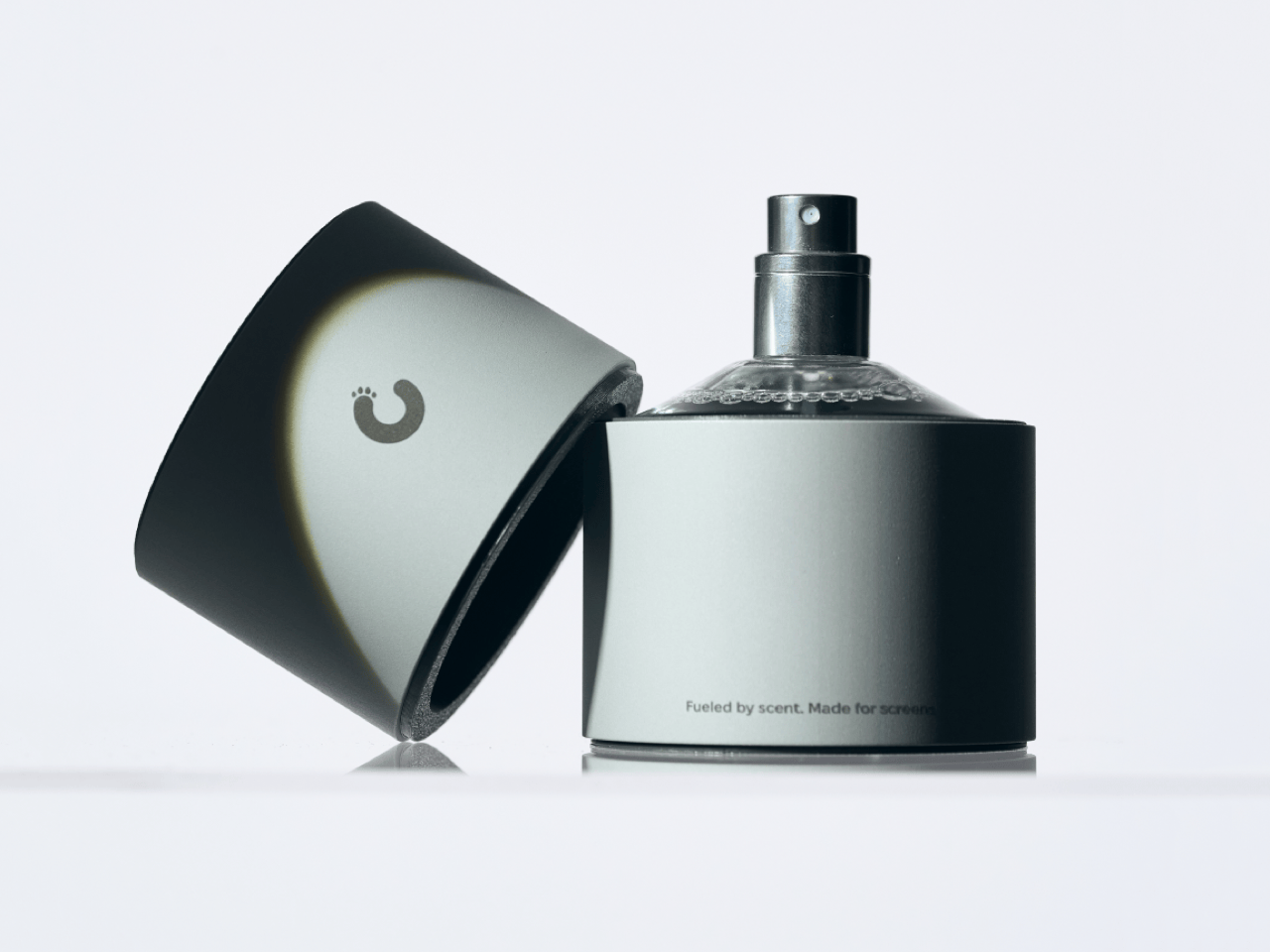
Apple’s official answer to a smudgy MacBook screen is a $9 Polishing Cloth, which, to be fair, is ten bucks cheaper than the version everyone roasted in 2021. MacPaw has a more extravagant answer. The Ukrainian company behind CleanMyMac just revealed CleanMyMac Mist, its first physical product, a screen and keyboard cleaner dressed up as a bottle of designer fragrance. One spritz on a microfiber cloth is meant to lift the fingerprints and leave your laptop smelling like a frosty pine forest. Yo
Apple’s official answer to a smudgy MacBook screen is a $9 Polishing Cloth, which, to be fair, is ten bucks cheaper than the version everyone roasted in 2021. MacPaw has a more extravagant answer. The Ukrainian company behind CleanMyMac just revealed CleanMyMac Mist, its first physical product, a screen and keyboard cleaner dressed up as a bottle of designer fragrance. One spritz on a microfiber cloth is meant to lift the fingerprints and leave your laptop smelling like a frosty pine forest. Your candles, your hand soap and your car already have signature scents, so honestly, the MacBook was overdue.
MacPaw calls the scent Frosted Juniper, picked because juniper grows both in Ukraine, where the company was founded, and in California, where the Mac was born. That’s a little sentimental, and I’m completely here for it. The notes run from camphor, ozone and citrus up top to fir needle, cedar leaf and green apple at the base, and the brief was to smell clean without smelling like a cleaning product. Pole, a design and small-batch production studio in Ivano-Frankivsk, made the glass atomizer, its metal case, and a pink box loud enough to see from across the office. Only 100 bottles exist, and they’re up for grabs via a CleanMyMac Instagram and TikTok giveaway until October 23, so don’t go hunting for a price tag.
Designers: MacPaw & Pole
Every design choice here borrows from the perfume counter instead of the cleaning aisle. A slim glass atomizer sits inside a cylindrical metal case, and its silver-and-gray finish would sit happily next to any MacBook. The box flips the mood entirely, with a hot pink tray holding the Mist, a microfiber cloth, a small brush and a scent card, which is basically a perfume blotter for your laptop. The whole package is designed to live on your desk in plain view, far away from the Windex under the kitchen sink. Le Labo pulled a similar trick with its hand-cast concrete diffuser, treating a fragrance gadget as decor first.
Apple’s own cleaning guide warns against aerosol sprays, so the Mist uses a pump atomizer, and you spritz the cloth instead of the screen. That small habit change tackles a real problem, since one in three US Mac owners in MacPaw’s survey admitted to damaging their machine while cleaning it. The product site names the usual culprits: glass cleaners that strip anti-reflective coatings, paper towels that leave micro-scratches, and the hoodie sleeve that only feels like it’s doing something. Apple Stores reportedly keep their display units spotless with WHOOSH!, so dedicated screen formulas are nothing new. MacPaw’s twist is making the formula something you’d happily smell on your fingertips afterward, though nano-texture displays should still stick to Apple’s dry cloth.
As a longtime CleanMyMac user, I find the whole thing delightfully on the nose. The app launched in 2008, has racked up 29 million downloads sweeping caches, logs and leftover app files out of Macs, and MacPaw says it cleans a million machines a day. For 18 years, “clean” was a metaphor for digital housekeeping, and now the metaphor has a nozzle and a note pyramid. MacPaw handed the physical side to Pole, a design and production center in Ivano-Frankivsk with metal, wood, ceramics and biolab workshops under one roof. Pole specializes in runs of 1 to 500 units and built elements for Ukraine’s pavilion at Expo 2025 in Osaka, so a 100-bottle drop sits right in its comfort zone.
The Mist isn’t for sale, and the only way to get a bottle is a giveaway on CleanMyMac’s Instagram and TikTok that closes at 11:59 PM EST on October 23. MacPaw will pick 10 winners on Instagram and 5 on TikTok, so the odds are slim, but every entrant still gets a 20% CleanMyMac coupon. The full scent breakdown and entry details live at cleanmymacmist.com. Millions of Mac owners already trust MacPaw with the inside of their machines, and I suspect plenty of them would buy a refill to keep the outside smelling like a snowy forest. Frosted Juniper makes a great first edition, though I’m already lobbying for a cozy sandalwood one by December.
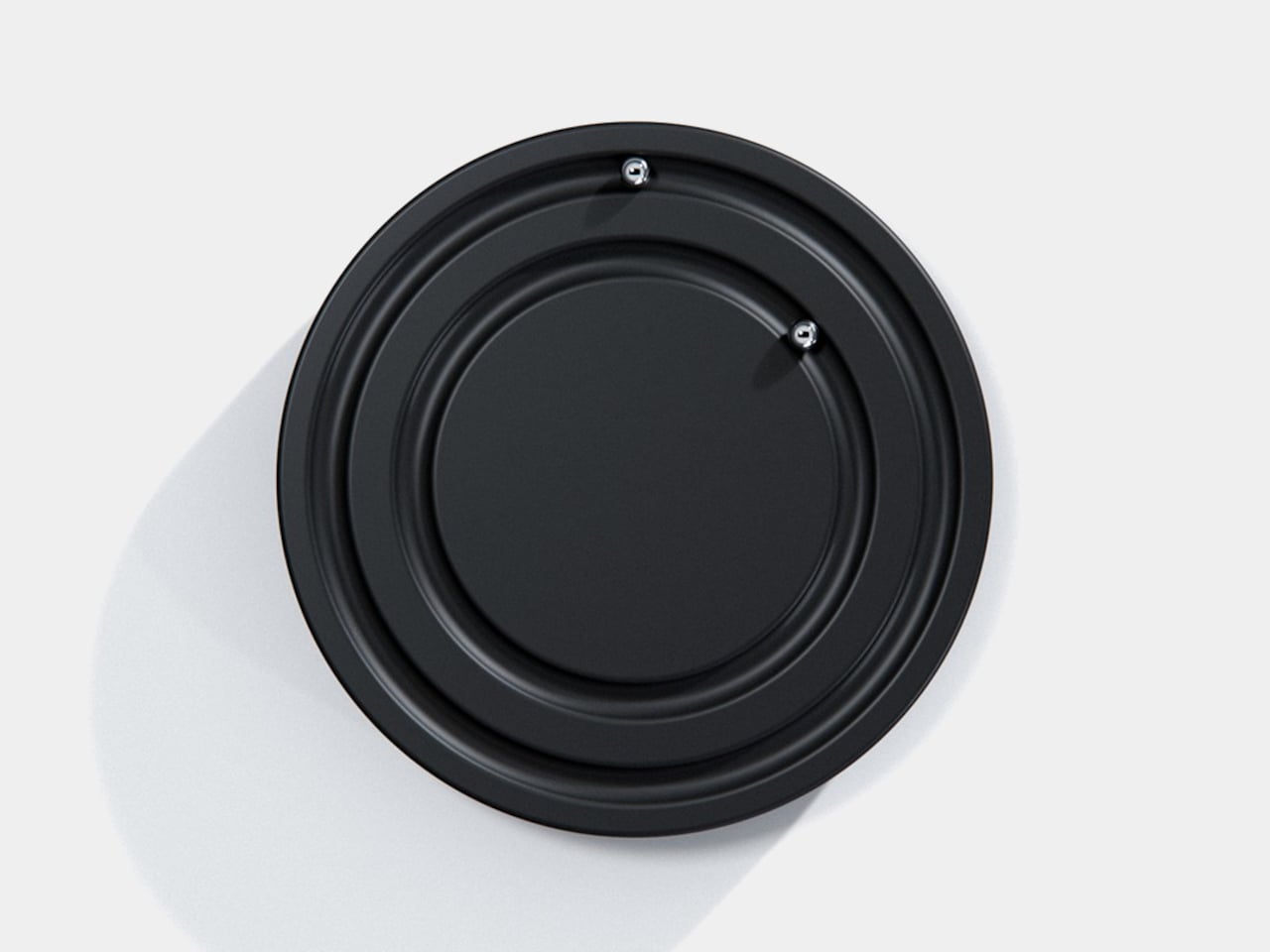
Clocks have become so familiar that we barely think about what their hands are doing. They point to positions around a circle, a habit that Orbit keeps while removing the hands themselves. This ultra-minimalist clock concept replaces them with two magnetically held metal spheres, giving time a physical presence you can reach and remove, instead of leaving it behind protective glass.
The face is a dark circular disk with two concentric recessed tracks, each carrying a polished sphere. There’s no
Clocks have become so familiar that we barely think about what their hands are doing. They point to positions around a circle, a habit that Orbit keeps while removing the hands themselves. This ultra-minimalist clock concept replaces them with two magnetically held metal spheres, giving time a physical presence you can reach and remove, instead of leaving it behind protective glass.
The face is a dark circular disk with two concentric recessed tracks, each carrying a polished sphere. There’s no cluster of numerals or central pin to interrupt the surface. Instead, the grooves give the small bearings separate paths, while their reflective finish contrasts with the darker background. The clock’s relief supplies the detail that printed markings would normally provide on a conventional dial.
One sphere represents the hours and the other the minutes, preserving the basic logic of an analog clock. You still look for positions around the face, only without a pair of hands connecting those positions to the center. That makes the idea less unfamiliar than it initially sounds. Reading it doesn’t call for learning an entirely new code, although some adjustment seems inevitable.
Of course, removing all those markings comes with a compromise. Estimating the hour should be simpler than judging an exact minute on an unmarked circle. Orbit could suit a living room where a glance is enough to keep track of the afternoon. Checking how many minutes remain before catching a train might make you rather grateful for the numbers on your phone.
The more unusual part is that the spheres aren’t permanently trapped in their tracks. Magnetic attachment is intended to let you lift each one away and put it back, adding a tactile interaction to an object usually left alone. That’s a surprisingly playful detail for such a restrained design, especially when removing both markers would leave the clock with nothing to tell you.
There’s a sculptural quality to the body itself, with a rounded outer edge and circular channels that give the black surface depth. A rear keyhole slot provides for wall mounting, keeping that face upright without a separate stand. The name Orbit feels appropriate here, with two small spheres occupying rings around an empty center, rather than hands meeting at a shared pivot point.
Orbit remains a concept, so there’s no established price or availability to weigh against those compromises. Its detachable markers do suggest a rather different relationship with a wall clock, though. Reach for the face and you’re handling the things that tell the time. Just make sure those little spheres don’t end up somewhere less useful, such as behind the living room sofa.
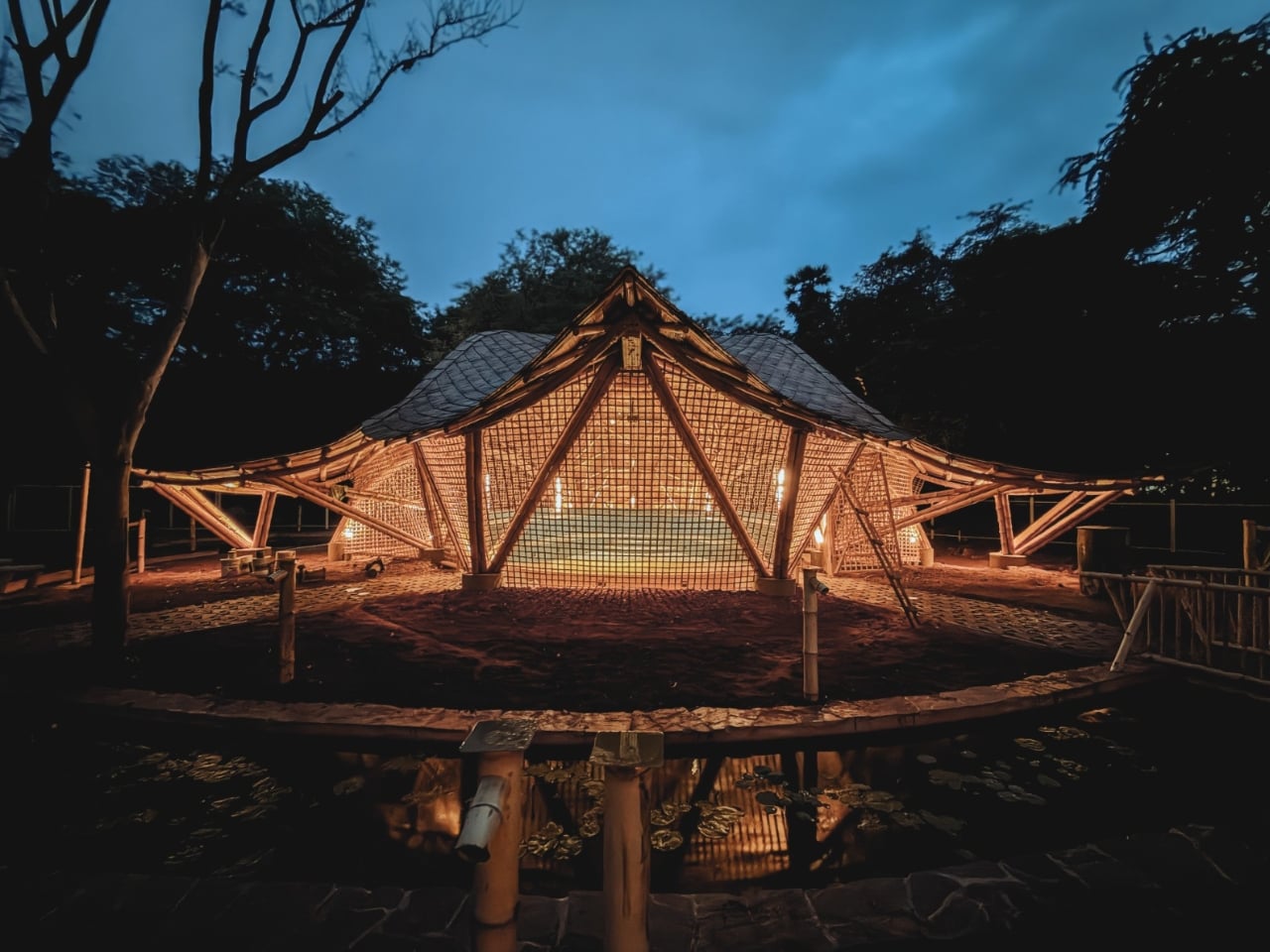
A column in the middle of a music hall means someone has to look around it. That’s a practical problem to solve before worrying about how dramatic the ceiling looks. At the Maestro Ilaiyaraaja Centre for Music Learning and Research in Chennai, India, Ekarth Studio uses bamboo vaults to create spans of up to 49 feet without interior columns. The structure makes room for people to gather, while giving them a roof worth looking up at.
The completed, 10,000-square-foot center at IIT Madras addresse
A column in the middle of a music hall means someone has to look around it. That’s a practical problem to solve before worrying about how dramatic the ceiling looks. At the Maestro Ilaiyaraaja Centre for Music Learning and Research in Chennai, India, Ekarth Studio uses bamboo vaults to create spans of up to 49 feet without interior columns. The structure makes room for people to gather, while giving them a roof worth looking up at.
The completed, 10,000-square-foot center at IIT Madras addresses another challenge: bringing music education, research, rehearsal, and recording into one setting. Named for composer Ilaiyaraaja, it belongs to the university’s “Music for All” initiative, whose research interests include acoustics, artificial intelligence, sound synthesis, and instrument design. That’s an unusually broad assignment for a music building. It needs places for focused work, but also room for different disciplines to meet without every encounter becoming a scheduled appointment.
The roofs give those activities a recognizable home. Ekarth Studio drew their geometry from Bel Patra, the three-part leaf associated with Lord Shiva. Interconnected vaults translate that reference into canopies that rise, dip, and extend over the spaces below. I like that the inspiration has a specific cultural origin. A music center with a curving roof could easily attract a vague explanation about sound waves, but this one has a more deliberate starting point.
Those curves also involve some serious assembly. The studio describes a structural system combining round bamboo culms, bundled splits, and bundled sticks. Flat bamboo splits are gathered together to form the primary spine beams, rather than relying on a single solid member. Arches reach nearly 30 feet high. The useful distinction is that bamboo carries the roof and establishes its shape. Calling it a decorative finish would miss the most interesting decision in the project.
Leaving that construction exposed gives the interiors their character. Ekarth’s material palette includes treated bamboo, lime-based finishes, earthen surfaces, natural-fiber roofing, and handcrafted bamboo weaving. The studio also leaves the bamboo’s connections visible. I’m drawn to buildings that let you follow how they were assembled. Here, the repetition of individual pieces gives the large roof forms a finer scale, so the architecture offers more to examine than its outline from a distance.
The exterior photographs show roof edges sweeping outward above bamboo lattice screens, with trees close to the pavilions. The small, regular openings in those screens contrast with the broad curves overhead. They make the enclosure look less abrupt than a blank wall would. Ekarth’s plan connects classrooms and other spaces with courtyards and shaded outdoor areas, giving the center an architectural relationship with its surroundings that goes beyond putting landscaping around a finished building.
The people who assembled it deserve attention, too. According to the studio’s account, artisans split, bent, bundled, and joined the bamboo primarily with basic carpentry tools, while structural engineering adapted those processes for an institutional building. Ekarth reports an 11-month construction period with limited use of heavy machinery. That timeline is noteworthy, but I’d give equal billing to the craft. Its contribution remains legible in the finished architecture rather than disappearing behind another surface.
A beautiful bamboo structure doesn’t, by itself, establish how well a recording room isolates sound or how comfortable the building stays throughout the year. Those are separate performance questions, and the published project descriptions don’t provide measurements that settle them. The same restraint applies to sustainability. Natural materials and a less machinery-intensive construction process are choices worth discussing, but they aren’t enough to calculate the building’s environmental footprint or long-term maintenance demands.
Even with those questions open, the design gives me a clear reason to pay attention. The central amphitheater-like gathering space puts rehearsal, performance, and collective learning beneath the same expressive structure. That feels like an appropriate investment for a music center: a memorable room whose defining gesture also keeps its floor open. The ceiling earns its visual complexity by leaving more usable space underneath, where the people and the music belong.
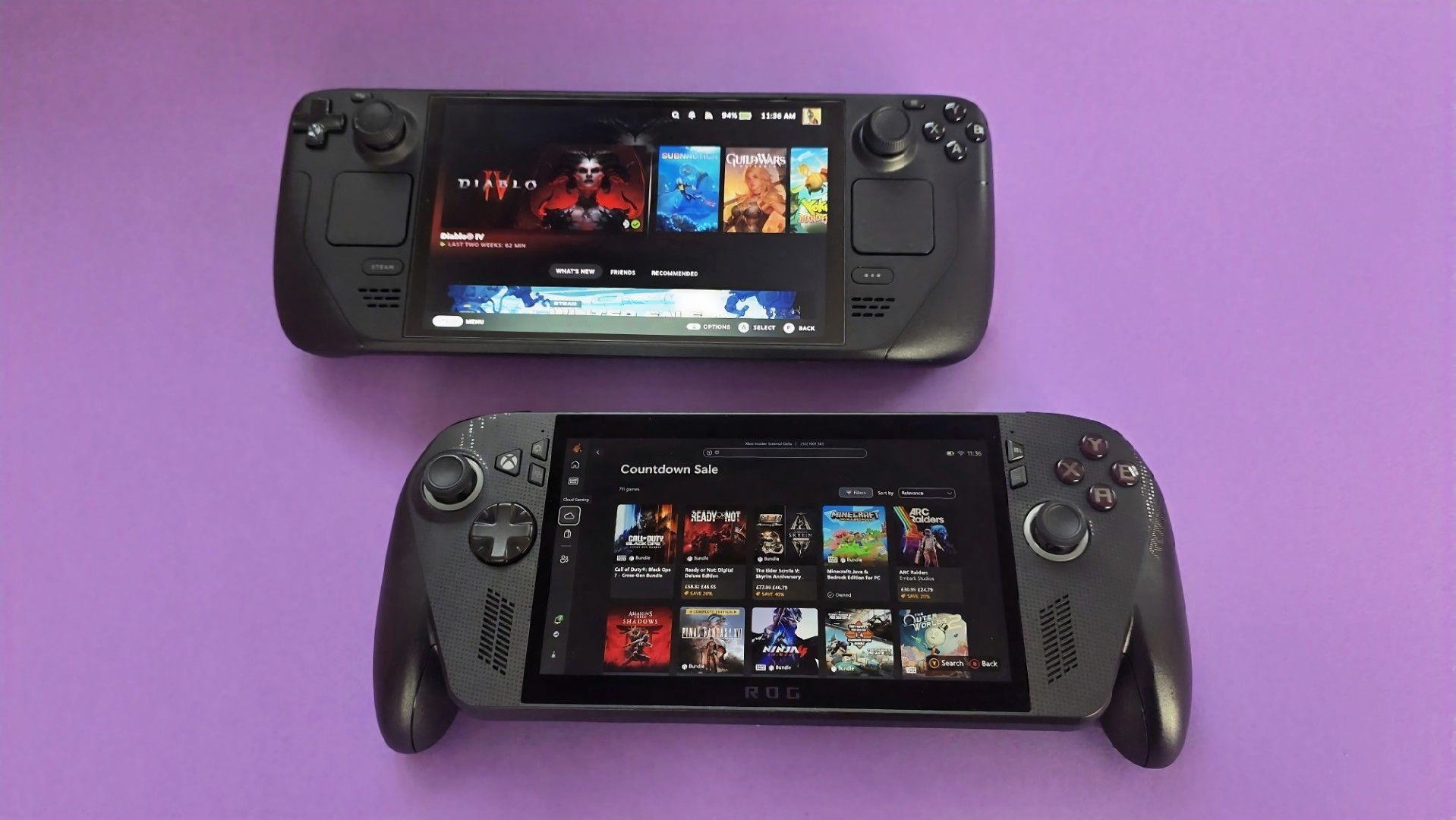
Recently, it was revealed that fans can expect FSR4 on the likes of the Xbox Ally X, something my colleague Jez Corden covered. But now, thanks to god-knows-what-kind-of wizardry, a new mod developed by lonewolf0622 has managed to get Nvidia’s own DLSS 3.7 working on AMD’s hardware, including the ROG Ally X and Steam Deck.For those unfamiliar with what DLSS and FSR do, they basically let hardware render games at lower resolutions to improve performance, then upsc
For those unfamiliar with what DLSS and FSR do, they basically let hardware render games at lower resolutions to improve performance, then upscale that image without tanking visual quality. Think of it as a game rendering at 720p and upscaling to 1080p for a much sharper image.
The mod, called HelixSR, is quite clever in how it achieves this. Rather than requiring NVIDIA hardware, it effectively tricks the hardware in believing it's AMD's FSR 3.1, allowing games to use DLSS's image reconstruction instead.
In testing from various creators, we actually know whether the mod is good or not. And early testing says, yes, it is. Over on ResetEra, users have been comparing HelixSR against FSR 4. One test showed that upscaling at 1080p took around 7 milliseconds with HelixSR, compared to 11 milliseconds using FSR 4.
It's not an insignificant difference, particularly for handhelds where performance is already rather limited. Of course, there's more to upscaling than raw performance, and whether the resulting image looks better is up for debate.
YouTuber BlackHeart909 has also been experimenting with the mod, reportedly achieving between 35 and 40 FPS in CONTROL Resonant on the ROG Ally X at 1080p. Dropping the output to 720p apparently allowed the game to maintain a locked 60 FPS, which is rather impressive.
There are some catches, though. HelixSR currently only works with DirectX 12 games, and those without FSR 3.1 support need an additional tool called OptiScaler.
Still, I find this whole thing fascinating. NVIDIA has spent years making DLSS a major selling point for its graphics cards, and now we're seeing people bring the technology to AMD-powered handhelds, which is just something I never thought we'd see.
Slot
est une interface incroyable pour la console portable
Anbernic RG SP
(lien affilié) qui ne lit que la Game Boy, la Game Boy Color et la Game Boy Advance. Mais il retrouve les gestes d'une GBA SP sur laquelle vos jeux deviennent des cartouches sur une étagère, et qui font le même bruit que celle qu'on enfonce IRL dans sa GBA d'enfance.
Voici ce que ça donne :
L'interface de slot : les cartouches GBA défilent sur l'
Slot
est une interface incroyable pour la console portable
Anbernic RG SP
(lien affilié) qui ne lit que la Game Boy, la Game Boy Color et la Game Boy Advance. Mais il retrouve les gestes d'une GBA SP sur laquelle vos jeux deviennent des cartouches sur une étagère, et qui font le même bruit que celle qu'on enfonce IRL dans sa GBA d'enfance.
Voici ce que ça donne :
L'interface de slot : les cartouches GBA défilent sur l'étagère, puis une cartouche Pokémon s'enfonce dans la fente et le jeu démarre
Si vous appuyez sur la touche Start, la cartouche se retournera pour afficher son circuit imprimé. Et à partir de là, vous pourrez choisir l'émulateur que vous voulez entre mGBA et gpSP.
Un appui sur la touche A relancera la dernière sauvegarde et si vous faites un appui long, vous repartirez de zéro. Maintenant, si vous voulez éjecter la cartouche, il faudra laisser le bouton Menu enfoncé. Et ça permettra de créer une nouvelle sauvegarde instantanément pour ne pas perdre votre progression en changeant de jeu.
Le clapet suit le même principe... le refermer écrit une sauvegarde et éteint l'écran, et au bout de trois minutes slot éteint la console, qui reprendra au même endroit au démarrage suivant. Même le câble link passe par le Wi-Fi entre deux RG SP, de quoi échanger des Pokémon sur Émeraude, Rouge Feu et Vert Feuille.
Après, ce soft slot est bridé exprès puisqu'il dit "non" aux autres systèmes d'émulation. En fait, l'auteur voulait vraiment et uniquement une expérience similaire à ce qu'il avait avec sa GBA SP d'enfance. Donc il n'a pas non plus intégré les RetroAchievements ni les Cheats et encore moins tout ce qui était Bluetooth (c'est la prise jack ou rien).
Donc si vous voulez d'autres consoles,
SpruceOS
, dont je vous ai parlé en septembre, en gèrera bien plus.
Côté machines, slot tourne sur la RG SP, les RG34XX, RG34XXSP (sans le stick pour l'instant), RG35XXSP et 35XX Plus, et depuis la 1.6.0 sur la RG28XX. Le code est bien sûr sous licence GPL-3.0, et l'auteur précise que le frontend a été écrit par Claude Opus, puis relu par lui. C'est maintenant un gage de qualité car, eh, qui veut encore développer des outils à l'ancienne ? (lol, oui j'essaye de vous trigger !!)
Pour l'installer, il faut flasher
BaseOS
, l'image système de Prashant Vaibhav, sur une carte SD, puis démarrer la console une fois pour qu'elle étende le stockage. Ensuite, vous copiez le contenu de l'archive de slot à la racine de la carte et vous rangez vos ROMs dans leur dossier des plateformes sous Games/. Elles doivent être décompressées puisque slot ne lit ni les .zip ni les .7z.
Et pour faire une mise à jour, suffit de remplacer le dossier System/, sans toucher aux jeux ni aux sauvegardes. Le reste, y compris la variante à deux cartes SD où slot et vos jeux sont sur la seconde, est indiqué dans
le guide du projet
.
A brand-new desktop interface prototype codenamed “Garrison” represents Xbox’s fresh approach to native PC gaming software. Engineered to solve longstanding performance bottlenecks, Garrison delivers a lightning-fast ecosystem capable of handling massive game libraries without sluggish menu delays or memory bloat. Beyond under-the-hood engine overhauls, Garrison bridges input gaps with a rebuilt dual UI optimized for […]
A brand-new desktop interface prototype codenamed “Garrison” represents Xbox’s fresh approach to native PC gaming software. Engineered to solve longstanding performance bottlenecks, Garrison delivers a lightning-fast ecosystem capable of handling massive game libraries without sluggish menu delays or memory bloat. Beyond under-the-hood engine overhauls, Garrison bridges input gaps with a rebuilt dual UI optimized for […]
- Contient des liens affiliés Amazon -
Chez moi, c'est un Mac mini qui gère à peu près tout depuis des mois. Il héberge mes projets de vibe coding, (pour ceux qui débarquent, on parle du développement où une IA écrit le gros du code pendant que je bois des chocolats chauds devant Rick et Morty), il fait tourner mes sessions de Claude, l'IA d'Anthropic, il pilote ma domotique, il surveille même mes NAS et mon Plex. Tout ça marche bien, je n'y touche presque jamais.
Chez moi, c'est un Mac mini qui gère à peu près tout depuis des mois. Il héberge mes projets de vibe coding, (pour ceux qui débarquent, on parle du développement où une IA écrit le gros du code pendant que je bois des chocolats chauds devant Rick et Morty), il fait tourner mes sessions de Claude, l'IA d'Anthropic, il pilote ma domotique, il surveille même mes NAS et mon Plex. Tout ça marche bien, je n'y touche presque jamais.
Sauf que voilà, il m'a fallu une seconde session de travail avec une autre instance de Claude/Codex, pour un projet qui n'avait rien à voir. J'ai d'abord pensé racheter un Mac mini. Et puis entre les prix qui ont gonflé et macOS qu'il aurait fallu piloter à distance en permanence, j'ai un peu baissé les bras.
GEEKOM m'a alors proposé de tester son A5
, un petit PC de la taille d'un Mac mini, 11,7 centimètres de côté pour 650 grammes, qu'on trouve autour de 500 euros avec trois ans de garantie. J'ai dit oui, forcément, même si je n'ai plus acheté de PC depuis 15 ans.
Dedans, il y a un Ryzen 7 7730U d'AMD avec huit cœurs, seize threads et une fréquence qui monte à 4,5 GHz, le tout dans 15 watts, donc ça chauffe vraiment très peu. Les 16 Go de mémoire DDR4 ne sont pas soudés, on peut aller jusqu'à 64 Go en ouvrant le boîtier, et ça, Apple ne vous laissera jamais le faire sur un Mac Mini.
Le SSD de 500 Go est déjà plus généreux que les 256 Go du Mac mini de base, et si ça ne suffit pas, il y a un deuxième emplacement M.2 et une baie pour un disque 2,5 pouces. En cumulant, on peut monter à 7 To.
Pour la connectique, j'ai de quoi voir venir, avec six ports USB dont deux USB-C, deux sorties HDMI qui gèrent jusqu'à quatre écrans 4K, du WiFi 6, du Bluetooth 5.4 et surtout un port Ethernet 2,5 gigabits, le seul que j'utilise vraiment vu que la machine discute toute la journée avec mes NAS, tout le monde à cette vitesse, ce qui est quand même bien sympathique.
La machine est livrée sous Windows 11, mais je lui ai installé un Ubuntu en version serveur. J'ai branché un écran une heure à tout casser, le temps de l'installation, de configurer le Bios pour qu'il redémarre tout seul en cas de panne de courant, et depuis je n'y touche plus qu'en SSH, la prise de contrôle à distance en ligne de commande. Et encore quand je dis "Je", ce sont mes IA et mes automatisations qui administrent la machine, et ça fonctionne, sans drame (j'ai BEAUCOUP de sauvegardes derrière, je vous conseille d'en avoir aussi si vous laissez l'IA administrer vos machines).
Le plus fou, et qui m'a vraiment surpris, c'est le silence. GEEKOM annonce autour de 28 décibels au repos et à peine plus en charge, et dans les faits je ne l'entends simplement jamais, alors qu'il est posé dans mon salon et qu'il tourne 24h/24. La consommation est ridicule aussi, environ un demi kilowattheure par jour.
Ce genre de machine peut servir à plein de choses, un petit serveur maison, Home Assistant pour la domotique, une médiathèque, des agents IA qui bossent la nuit, ou tout simplement un PC de bureau classique si vous le laissez sous Windows.
Et pour tout vous dire, sur cet usage serveur, il est même meilleur que mon Mac mini. Plus de bizarreries macOS, plus de mise à jour qui réclame une session ouverte, plus de réglage système qui se met en travers du chemin. Ubuntu fait ce qu'on lui demande et c'est vraiment très reposant.
Le circuit graphique Vega 8 intégré ne vous permettra pas de lancer GTA6 en 4K (en même temps il n'est toujours pas annoncé sur PC...), et il ne faut pas compter dessus pour faire tourner un gros modèle d'IA en local, mais pour du développement, du serveur et de la vidéo, c'est vraiment la machine idéale.
Si vous avez le même genre de besoin que moi, ou que vous avez envie d'expérimenter, vous pouvez y aller. L'A5 est en vente autour de 550 euros sur Amazon,
dispo en cliquant ici
.
Avec en plus un petit code promo : Prix habituel : 549 € Prix après réduction : 494 € (10 % de réduction) Code promo : KORBA527 (valable jusqu'au 30 octobre)
Vous ne le savez surement pas mais Sebseba, un membre du forum TeamAAZ, partage depuis juin 2025 un
LivePE 100% en français
. C'est une ISO qui se met sur une clé USB et qui permet de démarrer un LivePE (un Windows Live quoi...), en EFI comme en MBR, avec de quoi sauvegarder, partitionner, récupérer des fichiers ou réparer le boot. Bref, c'est super pratique si vous faites un peu d'admin ou de support technique.
Vous ne le savez surement pas mais Sebseba, un membre du forum TeamAAZ, partage depuis juin 2025 un
LivePE 100% en français
. C'est une ISO qui se met sur une clé USB et qui permet de démarrer un LivePE (un Windows Live quoi...), en EFI comme en MBR, avec de quoi sauvegarder, partitionner, récupérer des fichiers ou réparer le boot. Bref, c'est super pratique si vous faites un peu d'admin ou de support technique.
Le bureau du LivePE démarré dans une machine virtuelle, avec ses icônes en français
Il l'a fabriqué avec une base de
Win10XPE
,
SFX Constructor
et
Dism++
, et ça embarque une sacrée liste de programmes.
Par exemple, pour les sauvegardes, vous avez le droit à Acronis True Image 2026, Macrium Reflect X Server, AOMEI Backupper et les outils Hasleo. Pour tout ce qui est partitionnement, c'est MiniTool, EaseUS et AOMEI Partition Assistant. Aussi, pour récupérer des fichiers, GetDataBack Pro et Hasleo Data Recovery et il y a bien sûr AIDA64 Extreme et le Kaspersky Virus Removal Tool.
Maintenant, pour le mettre sur une clé ou un SSD externe, le tuto de Sebseba impose
UltraISO
et rien d'autre, sinon le multiboot EFI + MBR ne marchera pas. Il faut initialiser le support en MBR, puis vous le formatez en FAT32, vous ouvrez TECH.iso dans UltraISO et vous l'écrivez en mode USB-HDD+.
Et ensuite, vous pouvez réduire cette partition et en créer une seconde en NTFS pour y ranger vos ISO Windows. Par contre, attention, WinToHDD ne créera pas la partition MSR quand il installera Windows en GPT/EFI, ce qui posera des problèmes de migration plus tard... Donc préparez bien l'ESP et la MSR avant, avec DiskGenius ou DiskPart GUI Micro.
Le gestionnaire de démarrage de l'ISO, lui, s'affiche en anglais
Cette ISO de LivePE bien frenchy est une adaptation du WinPE de Sergei Strelec, dont l'
historique officiel
liste lui aussi Acronis, Macrium Reflect, AIDA64 et GetDataBack, mais uniquement dans la langue de David Bowie (ouais Shakespeare c'est has-been). Et si vous préférez une clé multiboot montée avec Ventoy,
Medicat
dont je vous ai déjà parlé à de multiples reprises, fait ça très bien depuis longtemps.
Anthropic may not be finished with its Claude 5.5 rollout yet. After launching Claude Opus 5.5 and Sonnet 5.5, speculation is growing that the AI company could have another major model or capability waiting in the wings as it prepares for a closely watched public-market debut. According to the latest rumors circulating in AI circles, […]
Anthropic may not be finished with its Claude 5.5 rollout yet. After launching Claude Opus 5.5 and Sonnet 5.5, speculation is growing that the AI company could have another major model or capability waiting in the wings as it prepares for a closely watched public-market debut. According to the latest rumors circulating in AI circles, […]
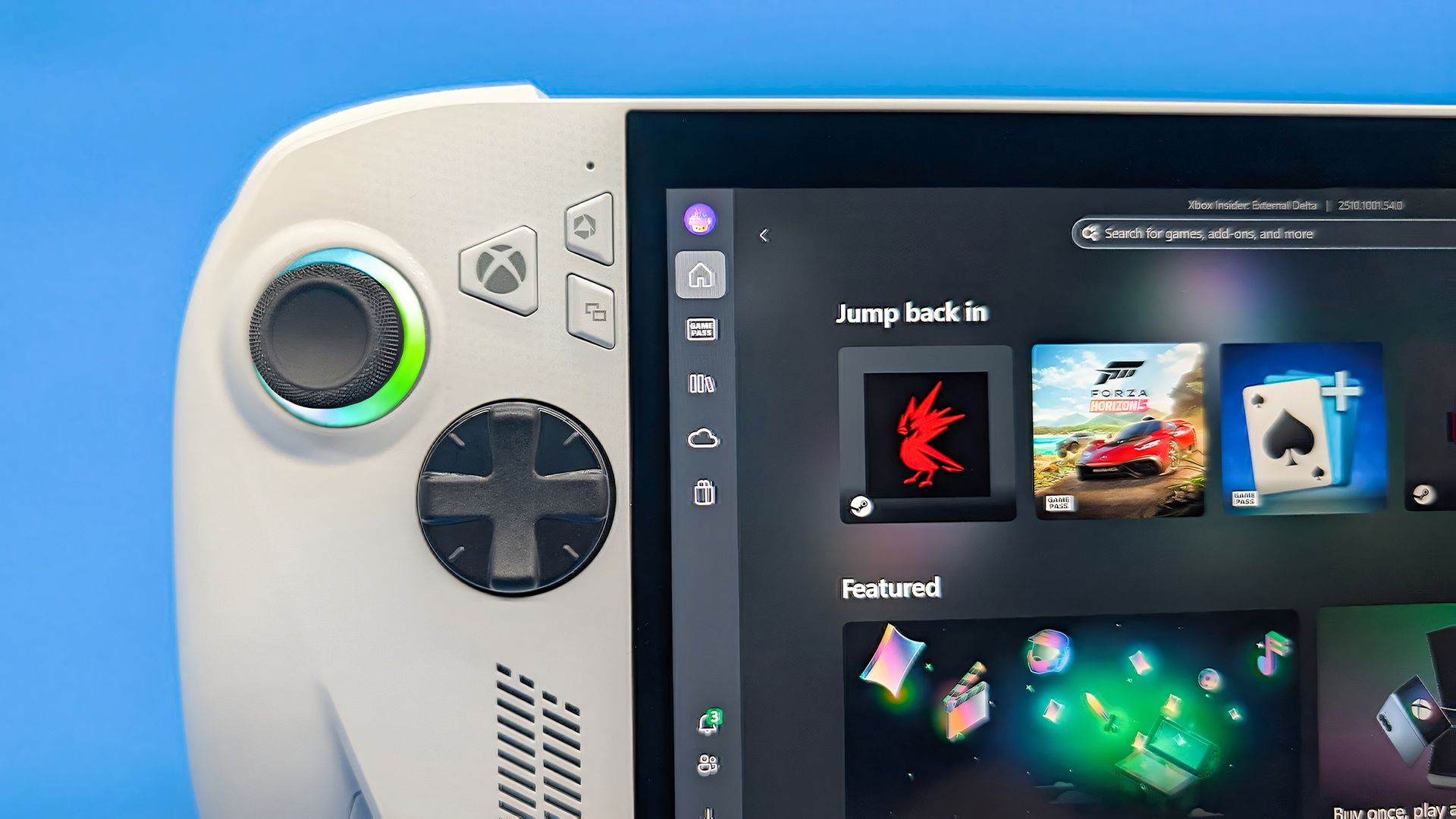
Winhanced is a launcher that essentially replaces Xbox Mode on your Windows handheld. Instead of simply fullscreening the Xbox app, Winhanced gives you a fully featured user interface that connects to your Xbox, Steam, GOG, and Epic libraries, alongside support for emulators, other apps, and much more.I've talked quite extensively about Winhanced here on Windows Central, using the launcher for quite some time on my own handhelds, and seen it in both its current,
Winhanced is a launcher that essentially replaces Xbox Mode on your Windows handheld. Instead of simply fullscreening the Xbox app, Winhanced gives you a fully featured user interface that connects to your Xbox, Steam, GOG, and Epic libraries, alongside support for emulators, other apps, and much more.
I've talked quite extensively about Winhanced here on Windows Central, using the launcher for quite some time on my own handhelds, and seen it in both its current, near-complete state and its not-so-complete state a few months back.
The launcher is nearing version 1.0, which I’m sure I’ll cover when it releases, as the sneak peek I’ve seen — and will discuss closer to release — is extremely exciting. However, version 0.9.9.9 is available today and boasts new features and improvements. These are just a few that caught my attention:
Friend cards, letting you message your friends, see what they’re doing, view their profiles, and more. (Public)
Better integration with Discord, Steam, Xbox, and PlayStation. (Public)
PC streaming through the new Winhanced Streaming Companion. (Public)
Install Windows updates without leaving Winhanced. (Public)
Improved driver detection for updating your handheld’s drivers through Winhanced. (Public)
Game theme music, including the option to choose your own tracks. (Public)
Improved Epic and GOG downloads, including resumable downloads. (Public)
Create your own collections for easier access to different groups of games. (Early Access)
A Discord server browser that can be navigated with a controller. (Early Access)
Those are just a handful of the additions, and 0.9.9.9 also includes substantial behind-the-scenes work to improve how Winhanced works in general, making it a pretty seamless experience. If you're interested, I urge you to join the Winhanced Discord and check out the full release notes because there’s simply far too much for me to reasonably cram into one overextended post without getting into the weeds.
I’ve moaned since the day I got my Xbox Ally X about just how unpolished and, frankly, disappointing the user experience was. Winhanced has genuinely changed that for me, though, and made me much more willing to pick up my Xbox Ally X and actually play games on it, which isn’t something I can say for the other launchers I’ve tried.
If you’ve tried Winhanced before and found it too buggy, I’d suggest giving it another shot now. A big part of 0.9.9.9 focused on squashing hardware-related bugs and improving consistency across supported handhelds, with the developer describing this release's device consistency as finally at a "1.0 level."
If Winhanced isn’t your thing, though, that’s okay too. Xbox Mode is improving, but I'll still use this instead. Let me know your thoughts in the comments, or just drop a vote on the poll!
Join us on Reddit at r/WindowsCentral to share your insights and discuss our latest news, reviews, and more.
J'sais pas si vous êtes de la team
Dumbphone
, mais quand Emir Karşıyakalı tape une recherche Google sur son vieux Nokia 6300 de 2007, il se fait gentiment envoyer chier vers une mise à jour de son browser. Alors, parce qu'il en avait marre de vivre 2026 comme s'il était resté bloqué en 2007, il a codé
Claude S40
, un client Claude non officiel pour les Nokia Series 40 qui font tourner du Java.
Et le plus fou c'est que non seulement, c'est vibe codé mais qu'en plus,
J'sais pas si vous êtes de la team
Dumbphone
, mais quand Emir Karşıyakalı tape une recherche Google sur son vieux Nokia 6300 de 2007, il se fait gentiment envoyer chier vers une mise à jour de son browser. Alors, parce qu'il en avait marre de vivre 2026 comme s'il était resté bloqué en 2007, il a codé
Claude S40
, un client Claude non officiel pour les Nokia Series 40 qui font tourner du Java.
Et le plus fou c'est que non seulement, c'est vibe codé mais qu'en plus, ça marche du feu de dieu :
Vous tapez votre question au clavier et la réponse s'affiche sur ce tout petit écran. Pour la météo ou l'actu, Claude fait sa recherche web côté serveur sans passer par le navigateur du Nokia. Il est même capable d'inscrire un rendez-vous pour vous dans l'agenda du téléphone.
Évidemment, le téléphone ne cause pas directement à l'API d'Anthropic. En fait, tout passe par un petit serveur écrit en Go, qui est proposé sous la forme d'une image Docker que vous devez héberger vous-même. Et c'est ce serveur qui conserve la clé API d'Anthropic, qui va donc découper les réponses que lui renvoie Claude pour les envoyer au téléphone qui ne lit pas plus de 8 Ko à la fois. Et ce serveur conserve les conversations durant 30 jours max.
Et c'est là que ce vieux Nokia rend la tâche difficile car il ne discute qu'en TLS 1.0 (Les boomers appellent ça "le petit cadenas"), n'envoie pas de SNI (le nom du site demandé) et ses certificats racines datent des années 90 et 2000 donc, autant dire que niveau dates de péremptions, c'est comme visiter la cave à conserves d'un survivaliste...
Le serveur est donc capable de discuter en HTTPS avec le web et de faire suivre la data chiffrée en HTTPS entre lui-même et le Nokia, grâce à un certificat auto-signé, dont la racine a été installée sur le téléphone.
Le code de Claude S40 est bien sûr libre, sous licence MIT, et côté hébergement, il suffit de mettre ça sur un petit VPS à quelques euros par mois et vous êtes tranquille. Ensuite, le reste se facture aux messages puisque chaque question, comme chaque recherche web, passe par votre clé API Claude... Donc, n'oubliez pas de mettre une petite limite de dépense dans votre console Anthropic, histoire de ne pas cramer votre compte en banque.
Par contre, l'appli n'a pour le moment été testée que sur le Nokia 6300 (RM-217) et il lui faut une carte SIM avec les données mobiles activées évidemment. Or le 6300 ne fait QUE du
GSM, GPRS et EDGE
, et
Orange coupe progressivement sa 2G
. En effet, depuis mars, 44 départements vont la perdre à partir du 6 octobre, et toute la métropole, hors zones blanches, sera sans 2G dès le 20 octobre 2026. Donc si vous êtes chez Orange, faut pas traîner pour tester car après, ça ne fonctionnera plus !! Sniiiif.
Mais rassurez-vous, Emir ne compte pas s'arrêter là puisqu'il est en train de reverser le firmware du téléphone pour contourner la couche Java et ensuite pouvoir lui faire faire ce qu'il veut. Voilà, si vous avez encore un 6300 dans un tiroir, c'est donc le bon moment de le ressortir, avant de passer à
un dumbphone compatible 4G
.
- Contient des liens affiliés Amazon -
Un emplacement M.2 finalement, ce n'est rien d'autre qu'un bonne vieille connexion PCIe d'une à quatre lignes selon la machine (sauf quand il est câblé en SATA, mais ça, j'en reparle à la fin). Et en général, comme le montre la photo ci-dessous, ce qu'on y met, c'est un SSD pour avoir du stockage rapide et efficace
Emplaceme
Un emplacement M.2 finalement, ce n'est rien d'autre qu'un bonne vieille connexion PCIe d'une à quatre lignes selon la machine (sauf quand il est câblé en SATA, mais ça, j'en reparle à la fin). Et en général, comme le montre la photo ci-dessous, ce qu'on y met, c'est un SSD pour avoir du stockage rapide et efficace
Emplacement d'un M.2 sur la carte mère d'un laptop (
source
)
Mais aujourd'hui, on va s'ouvrir un petit peu l'esprit sur cet emplacement M.2, parce que OUI, rien ne vous oblige à y mettre un SSD !
Mais avant de commander quoi que ce soit, sortez le manuel de votre carte mère ou la doc de votre mini-PC et regardez le type (PCIe ou SATA) de votre connecteur M.2, le format accepté et surtout le nombre de lignes de cet emplacement.
Le nombre de lignes, c'est le nombre de voies de circulation entre la carte M.2 et le processeur. Plus il y en a, plus ça va vite, donc en général, pour une carte réseau, une ligne (x1) ou deux (x2) suffisent. Mais si vous partez sur une carte graphique, il faudra 4 lignes minimum (x4).
Par exemple, le Beelink ME Mini
, lui, dispose de 5 emplacements PCIe 3.0 x1 et un seul en x2. Et sur
une ASRock B850 Pro-A
, le 4e emplacement M2 tourne en x4... mais retombe en x2 dès qu'un disque occupe l'un des autres ports M.2 en SATA3.
Regardez aussi ce que l'emplacement partage, car sur cette même carte mère ASRock, occuper par exemple le 3ème emplacement désactive purement et simplement le slot PCIE2. Vérifiez aussi que la puce du contrôleur M.2 dispose bien d'un pilote pour votre système, et demandez-vous par où passera le câble car mis à part l'accélérateur IA que je vous présente un peu plus bas, toutes les cartes qui suivent traînent un truc derrière elles. Donc, il faudra peut-être découper votre boîtier ou laisser dépasser des trucs...
Allez, c'est parti !
Une carte réseau 5 ou 10 GbE
Pour un NAS ou un routeur maison,
la carte 5 GbE de KALEA
à 29,90 € embarque une Realtek RTL8126 qui se branche sur un emplacement à clé M ou B+M et déporte son port RJ45 sur une équerre classique de PC. Et bonne nouvelle, comme la RTL8126 est une puce PCIe 3.0 x1, une seule ligne suffit ! Elle est reconnue par
le pilote r8169 de Linux
depuis le noyau 6.9, et sous FreeBSD (donc OPNsense ou pfSense) par
le pilote officiel de Realtek
, realtek-re-kmod, qui s'installe à part.
La carte 5 GbE de KALEA, avec son port RJ45 déporté sur une équerre
Maintenant, si vous voulez du 10 GbE,
la carte de REKONG
à 98,32 € passe par une Marvell AQC113. Et si j'en crois la fiche du vendeur, elle accepte du Gen4 x1 ou du Gen3 en x4, x2 et x1. Sauf qu'une ligne Gen3, c'est 8 Gbit/s, ce qui veut dire que sur un emplacement Gen3 x1, elle plafonnera sous ses 10 Gbit/s. Donc à ce prix-là, autant prendre la 5 GbE. Par contre, en Gen3 x2 (16 Gbit/s) ou en Gen4 x1 (32 Gbit/s), elle pourra tenir les 10 Gbit/s sans problème,
Côté logiciel, Linux la gère avec son pilote atlantic, mais sous OPNsense, c'est une autre histoire. Le pilote FreeBSD d'Aquantia, lui, ne prend pas en charge l'AQC113 et il faudra
passer par un pilote communautaire
.
Un accélérateur IA pour Frigate
Si vous faites tourner
Frigate pour vos caméras
, oubliez le Google Coral, qui
n'est plus recommandé par Frigate
. Mais attention, avant d'acheter un autre accélérateur IA à la place, regardez d'abord si votre processeur ne sait pas déjà faire le boulot, car le détecteur OpenVINO de Frigate tourne sur le GPU intégré des processeurs Intel de 6e génération ou plus récents. Un N100, par exemple, analyse une image en 15 ms environ avec MobileNetV2, sans rien acheter de plus, donc vous n'en aurez peut-être même pas besoin.
Par contre, si ça ne suffit plus,
le module Hailo-8 de LUCKFOX
à 201,59 € vous amènera 26 TOPS sur une interface PCIe Gen3 à quatre lignes. Frigate le prend en charge, avec environ 7 ms par image, mais mesurées avec YOLOv6n, donc c'est loin d'être comparable aux 15 ms du N100.
Maintenant, le truc cool, c'est que vous n'avez pas besoin d'un emplacement x4. La preuve,
l'AI HAT+ 26 TOPS
de Raspberry Pi, construit autour du même Hailo-8, tourne sur le port PCIe du Pi 5, qui n'a qu'une seule ligne. Un emplacement M.2 en x1 fera donc l'affaire, même si Frigate note que les PC x86 à deux lignes font mieux que le Pi.
Le module M.2 Hailo-8, avec sa puce sous un capot métallique
Une carte graphique externe en OCuLink
Ici, c'est la seule carte de la liste qui exige un emplacement x4.
L'adaptateur OCuLink de RIITOP
à 36,95 € transformera instantanément votre port M.2 en prise OCuLink PCIe 4.0 x4 (jusqu'à 64 Gbit/s). On doit ensuite le relier au
dock Minisforum DEG1
(prix 109,00 €), sur laquelle se plug la carte graphique (à acheter séparément avec son alim) et se branche sur une alimentation ATX ou SFX. Le câble OCuLink, lui,
est livré avec le dock
.
L'adaptateur M.2 de RIITOP et sa prise OCuLink
Notez que le DEG1 de Minisforum n'est compatible qu'avec les machines qui gèrent le PCIe 4.0 x4, donc visez un emplacement Gen4 x4. Et l'OCuLink ne se branche pas à chaud, faudra éteindre le PC avant.
Le dock DEG1 de Minisforum, avec le slot qui reçoit la carte graphique
Et si vous préférez rester à l'intérieur du boîtier,
la nappe ADT-Link
à 35,45 € ressortira l'emplacement M.2 en slot PCIe x16 prévu pour une carte graphique. Alors je dis x16, mais c'est seulement au niveau du format PCIe 3.0 parce que la carte, en réalité, ne recevra que les lignes réellement disponibles de l'emplacement M.2.
La nappe R43SR d'ADT-Link, du connecteur M.2 au slot PCIe x16
Le port USB-C de façade qui ne sert à rien
Et si le port USB-C en façade de votre boîtier reste inerte faute de connecteur sur la carte mère,
l'adaptateur Type-E de CY
à 32,99 € transformera l'emplacement M.2 en connecteur interne Type-E à 20 Gbit/s. Il repose sur une ASMedia ASM3242, conçue pour quatre lignes PCIe Gen3 (sur deux, on tombe à 16 Gbit/s), et ne fait ni vidéo, ni audio, ni recharge PD.
L'adaptateur M.2 de CY, son connecteur Type-E et son dissipateur
Maintenant, si un connecteur USB 3.0 à 19 broches est encore libre,
un simple adaptateur EZDIY-FAB
à 14,99 € réveillera ce port en USB 3.2 Gen 1, sans avoir à toucher à votre emplacement M.2.
L'adaptateur en L d'EZDIY-FAB, vu sous deux angles
Six ports SATA de plus
Côté stockage,
le contrôleur SATA de Namvo
à 29,99 € vous ajoutera 6 ports SATA 6 Gbit/s grâce à
une ASMedia ASM1166
, reliée en PCIe Gen3 x2. Ça fait 16 Gbit/s à partager entre les 6 disques, et moitié moins sur un emplacement x1.
Le contrôleur SATA de Namvo
Du Wi-Fi 6E
Enfin, pour ajouter du Wi-Fi 6E à une tour qui n'en a pas, il vous faudra
un module Intel AX210
à 28,37 € et
un adaptateur Jectse
à 9,62 € qui le fera tenir dans un emplacement à clé M. Comme Intel documente son AX210 comme étant du Wi-Fi (PCIe) et BT (USB), l'adaptateur fait passer le Wi-Fi par une ligne PCIe et le Bluetooth par un petit câble USB 2.0 fourni, à relier à un connecteur interne de la carte mère. Et les antennes ne figurent ni sur la fiche du module ni dans le colisage de l'adaptateur, donc faudra les acheter à part.
Méfiez-vous par contre de la liste de compatibilité de la fiche Jectse, qui dit supporter aussi l'AX201.
Intel classe ce module
en "M.2: CNVio2", et pas en PCIe et USB. Bref, attention à bien prendre un AX210 et pas un 201
Voilà et si votre emplacement libre s'avère être câblé en SATA, bah oubliez toutes ces cartes... Toutes ces cartes parlent uniquement le PCIe. Il ne vous restera alors plus qu'à y mettre un SSD SATA... Snif.
Depuis sa version 2.1.277, Claude Code sait parfaitement lire les fichiers AGENTS.md. Ainsi, quand un projet n'a pas de CLAUDE.md, il prend l'AGENTS.md à la place, ce qui est super confortable pour tous ceux qui jonglent entre plusieurs agents. Enfin... sauf si vous avez coupé sa télémétrie, parce que dans ce cas-là, bizarrement, votre fichier AGENTS.md est totalement ignoré !
AGENTS.md, pour ceux qui débarquent, c'est un fichier Markdown que les agents de code lisent pour comprendre un projet.
Depuis sa version 2.1.277, Claude Code sait parfaitement lire les fichiers AGENTS.md. Ainsi, quand un projet n'a pas de CLAUDE.md, il prend l'AGENTS.md à la place, ce qui est super confortable pour tous ceux qui jonglent entre plusieurs agents. Enfin... sauf si vous avez coupé sa télémétrie, parce que dans ce cas-là, bizarrement, votre fichier AGENTS.md est totalement ignoré !
AGENTS.md, pour ceux qui débarquent, c'est un fichier Markdown que les agents de code lisent pour comprendre un projet. Codex, Amp ou Cursor s'y mettaient déjà en août 2025 (souvenez-vous de
ce fichier qui dit non aux IA
). Alors que chez Anthropic, la demande a traîné durant 1 an sur GitHub, jusqu'à ce que Boris Cherny, qui bosse sur Claude Code, ferme le ticket en août en conseillant une astuce, un CLAUDE.md qui contient juste @AGENTS.md, pour que Claude Code importe le fichier.
Puis la 2.1.277 est arrivée avec une vraie lecture native d'AGENTS.md, sans CLAUDE.md du tout, et c'est elle qui pose problème...
Parce que cette lecture native passe en réalité par un plugin intégré, qui est off par défaut et qui ne s'allume que si un feature flag récupéré chez Anthropic, tengu_agents_md_mod, lui dit oui. Et si ce flag ne répond pas, bah c'est "niet", et le fichier n'est jamais lu. Hé oui c'est bizarre qu'un accès à un fichier local nécessite un tel appel réseau...
Et ce "non", on l'obtient sans même le savoir, puisqu'il suffit d'activer DISABLE_TELEMETRY, CLAUDE_CODE_DISABLE_NONESSENTIAL_TRAFFIC ou même DO_NOT_TRACK, ou encore de passer par Bedrock et les autres fournisseurs tiers.
Attention, même à 0 (donc activé), DISABLE_TELEMETRY coupera la télémétrie. En fait, n'importe quelle valeur non vide compte.
Le pire, c'est que rien ne vous avertit. C'est vrai que quand AGENTS.md est chargé, Claude Code l'annonce avec une petite ligne dans la session, mais quand il est ignoré, hé bien y'a rien du tout. Et c'est assez impactant car ensuite le modèle répond sans vos consignes, et vous vous tapez à reformuler vos prompts en boucle en croyant que l'IA vous ignore, alors que le fichier ne lui est tout simplement jamais parvenu.
Et le comble, c'est que c'est documenté, et
la page des variables d'environnement
liste même tout ce qu'on perd quand les flags ne sont pas récupérés, lecture d'AGENTS.md comprise. Pourtant, y'a aucun rapport logique... Couper la télémétrie, de mon point de vue, ça reste un choix légitime et ça ne devrait couper que l'envoi de statistiques à Anthropic et pas la lecture d'un stupide fichier texte. Bref, ça me dépasse, ce genre de bug ou de "fonctionnalité".
En attendant, la parade est celle que conseillait Boris Cherny... À côté de chaque AGENTS.md, posez un bon vieux CLAUDE.md qui contient une seule ligne, @AGENTS.md. Par défaut, dès qu'un CLAUDE.md existe, la lecture native ne s'en mêle même plus, et c'est l'import qui fait le boulot. Et comme les imports de CLAUDE.md ne dépendent d'aucun flag, hé bien ça passe tranquillou, télémétrie coupée ou pas.
Comme ça vous préservez votre vie privée ET vos consignes.
I've been a PC gamer for as long as I can remember, pushing my earliest family desktop computers to their limits by installing a single copy of Command and Conquer to their tiny hard drives, before eventually building my own rigs with a meager part-time job wage and a bright-eyed idea of what good value components looked like.These days, I do most of my gaming on my still-loved Steam Deck, the Linux-based handheld from the same company behind the massive PC game
I've been a PC gamer for as long as I can remember, pushing my earliest family desktop computers to their limits by installing a single copy of Command and Conquer to their tiny hard drives, before eventually building my own rigs with a meager part-time job wage and a bright-eyed idea of what good value components looked like.
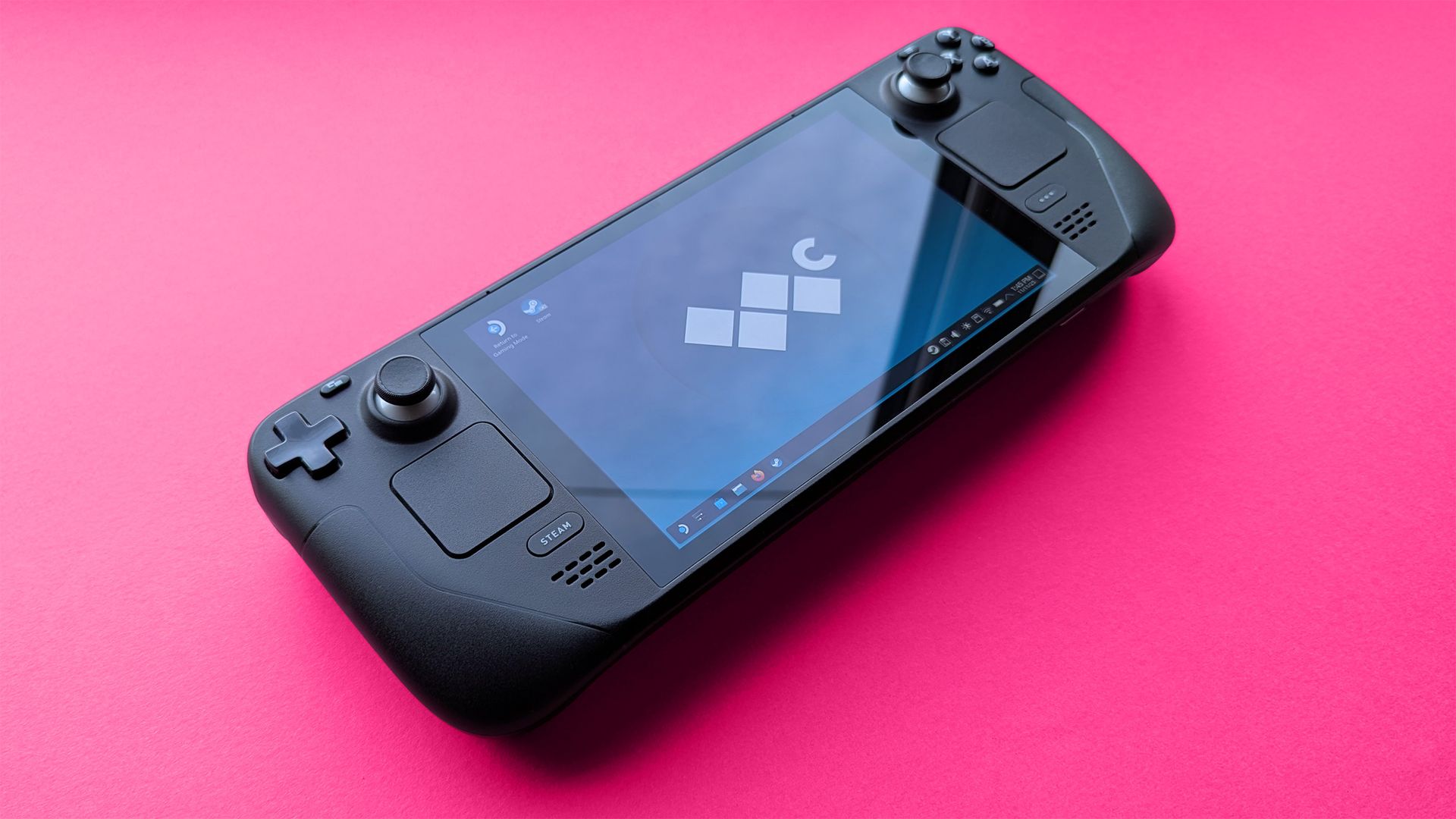
These days, I do most of my gaming on my still-loved Steam Deck, the Linux-based handheld from the same company behind the massive PC game storefront, Steam. It runs practically every game originally designed for Windows, and for the ones that it struggles with, I fall back on cloud gaming on services like GeForce NOW and Xbox Cloud.
Until now, I've pushed as many curious gamers as possible toward handheld gaming PCs, easing them in with budget-friendly options before watching them grow an appetite for high-end examples of excess that squeeze the capabilities of traditional gaming laptops into a compact form factor. However, one seems to have stuck closer to its MSRP, while many others become pipe dreams.
"Power of XBOX. Freedom of Windows. Craftmanship of ROG."View Deal
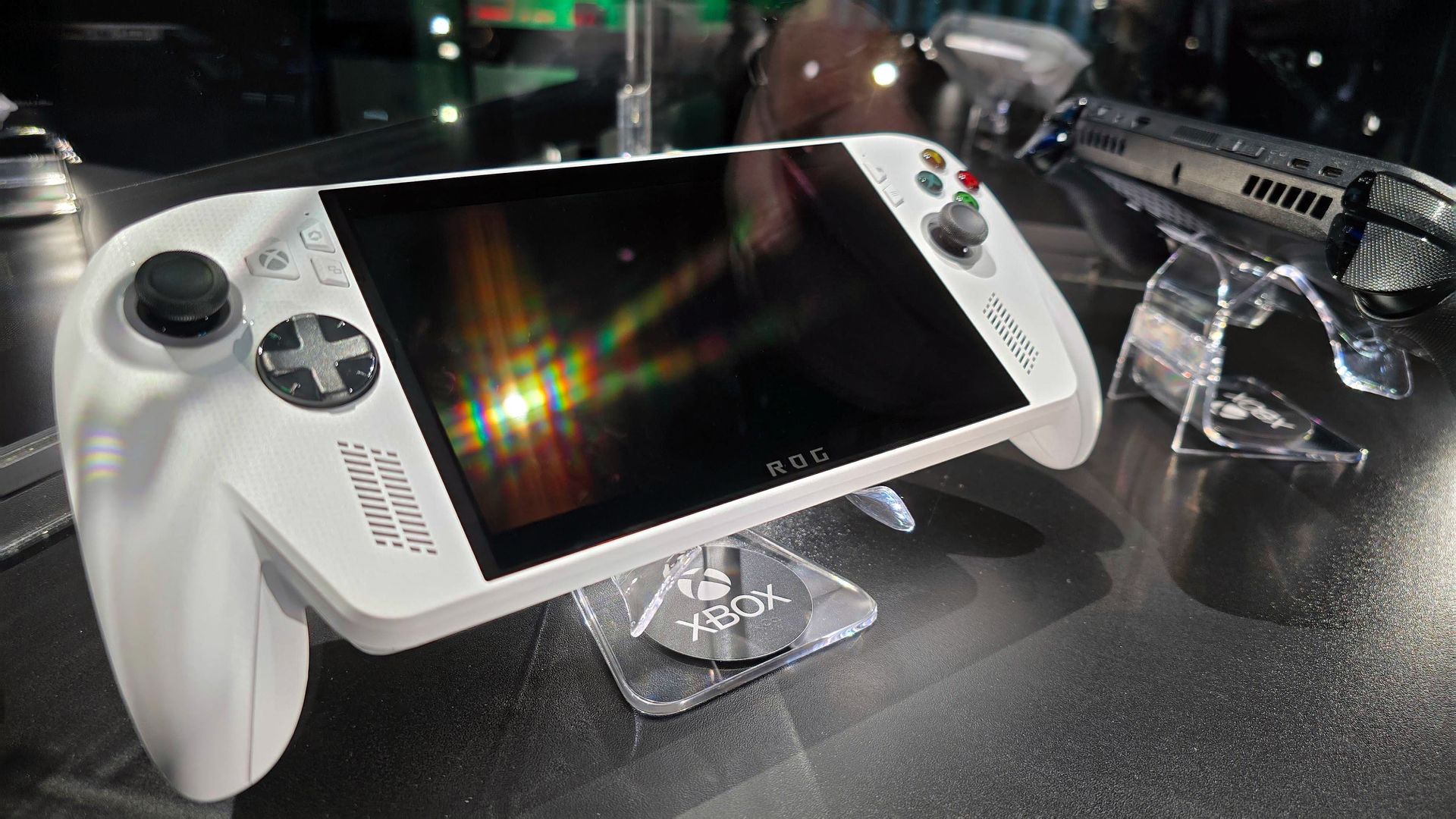
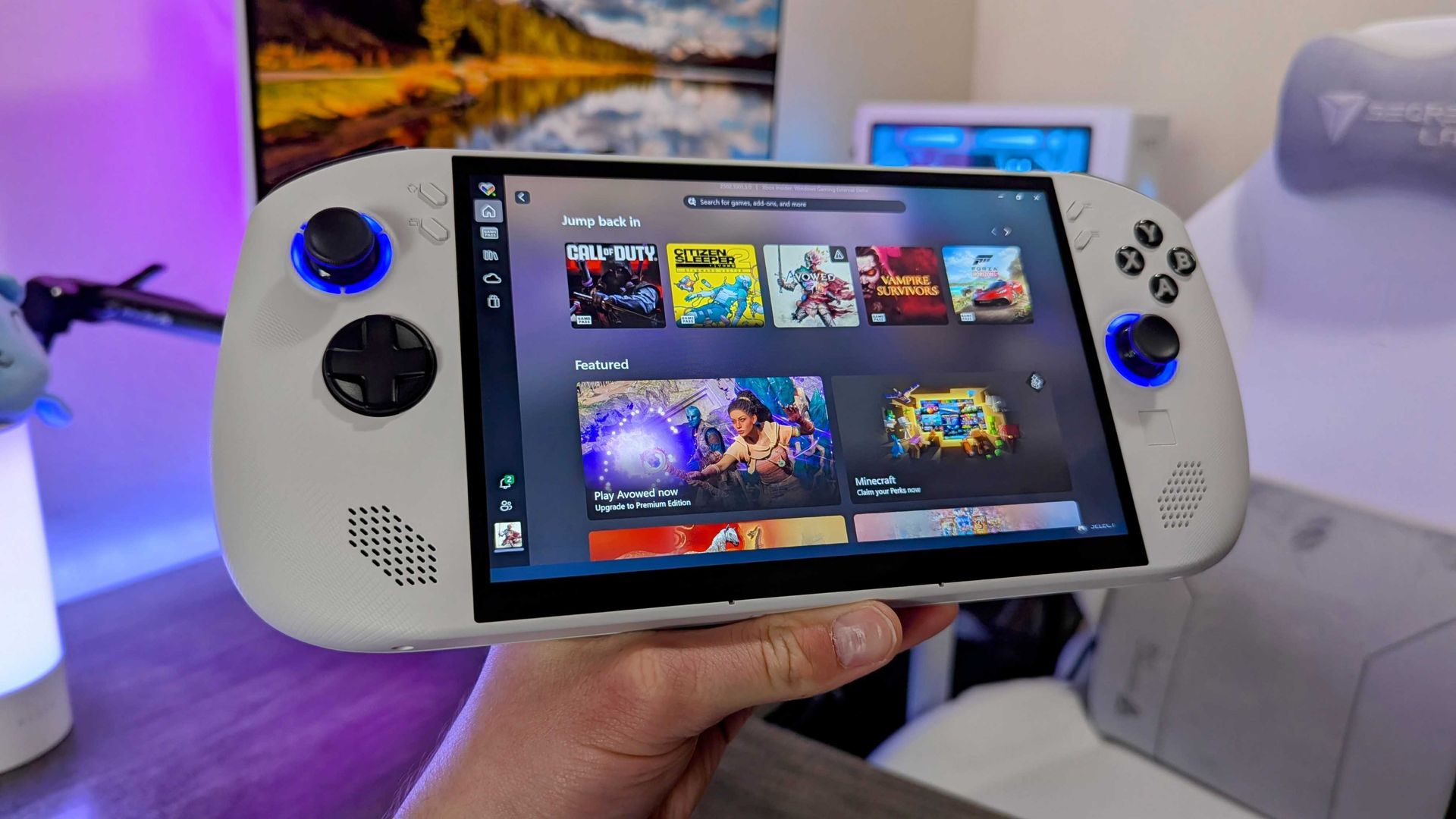
Somehow, the XBOX Ally is holding strong
It's a modest machine inside, but the ergonomics make the ROG Xbox Ally worth your attention. (Image credit: Jez Corden | Windows Central)
As it stands, the ROG XBOX Ally sells for $599.99 at Best Buy, which is the same price it launched at when we tested it for our XBOX Ally review. Right now, it holds an average 4.4/5 rating among at least 930 customer reviews from that listing alone, and they seem quite happy with its price-per-performance ratio.
Then again, the ROG XBOX Ally can reach a higher 120Hz refresh rate than the Steam Deck OLED's 90Hz, though you'll have to find a lightweight PC game that runs well enough to show those theoretical benefits of smoother visuals, with support for the Ally's variable refresh rate (VRR) that helps to reduce screen tearing and frame pacing inconsistencies.
"But, it runs Windows!"
Lenovo's Legion Go S arrived without too much fanfare. (Image credit: Windows Central | Zachary Boddy)
Usually snared by the inevitable cost of a Windows license for each corresponding handheld, the appeal of Valve's in-house 'SteamOS' operating system became obvious in the category's formative years. However, alternatives initially designed around that prospect, such as Lenovo's Ryzen Z2 Go-based Legion Go S, now cost around $989.99.
Of course, the repeated blame for these price hikes lands squarely on the memory crisis driven by massive-scale AI hardware infrastructure, which shows no signs of slowing down in the near future. Gamers are essentially stuck between a rock and a hard place as most components become unaffordable, which somewhat softens the OS argument on the PC side.
Because ultimately, there's nothing stopping anyone from installing SteamOS on a ROG XBOX Ally (or any other Windows-based handheld, for that matter). The experience will vary between devices, but to date, none of the major players have arbitrarily locked their products to Windows 11. If, despite all the awful odds, the Ally can maintain its price, it could become the mainstream choice.
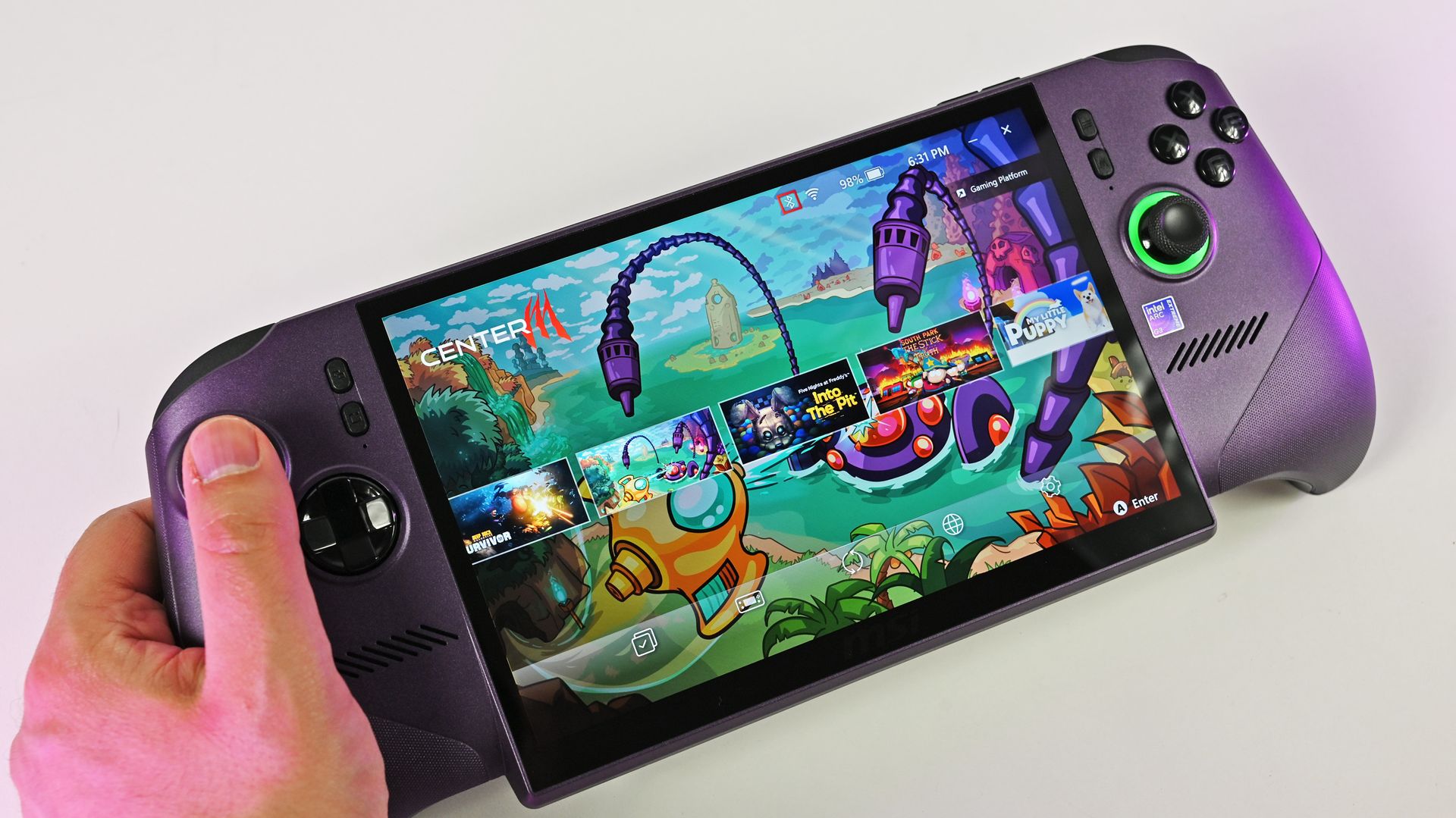
Availability also seems fine for the white XBOX Ally, unlike ultra-high-end variants like the "mind-blowing" MSI Claw 8 EX AI+ and its $1,799 price tag, which apparently convinced flush gamers to spend, but its stock couldn't keep up. For handhelds targeting far below $1,000 — the realm of sensible spending — XBOX is surprisingly beating Valve. Will it last? I'd love to believe it.
Join us on Reddit at r/WindowsCentral to share your insights and discuss our latest news, reviews, and more.
Most of us have two or more gadgets that need constant charging, plus several chargers and cables to keep them all juiced up. That’s probably fine if you have an entire outlet strip at home or in the office, but when you’re working with a small space, or you’re traveling and on the go, it can be a real challenge to charge multiple devices at once. You end up with a tangle of cords and charging heads, or sometimes you even have to take turns charging your gadgets.
If you mostly own Apple devices
Most of us have two or more gadgets that need constant charging, plus several chargers and cables to keep them all juiced up. That’s probably fine if you have an entire outlet strip at home or in the office, but when you’re working with a small space, or you’re traveling and on the go, it can be a real challenge to charge multiple devices at once. You end up with a tangle of cords and charging heads, or sometimes you even have to take turns charging your gadgets.
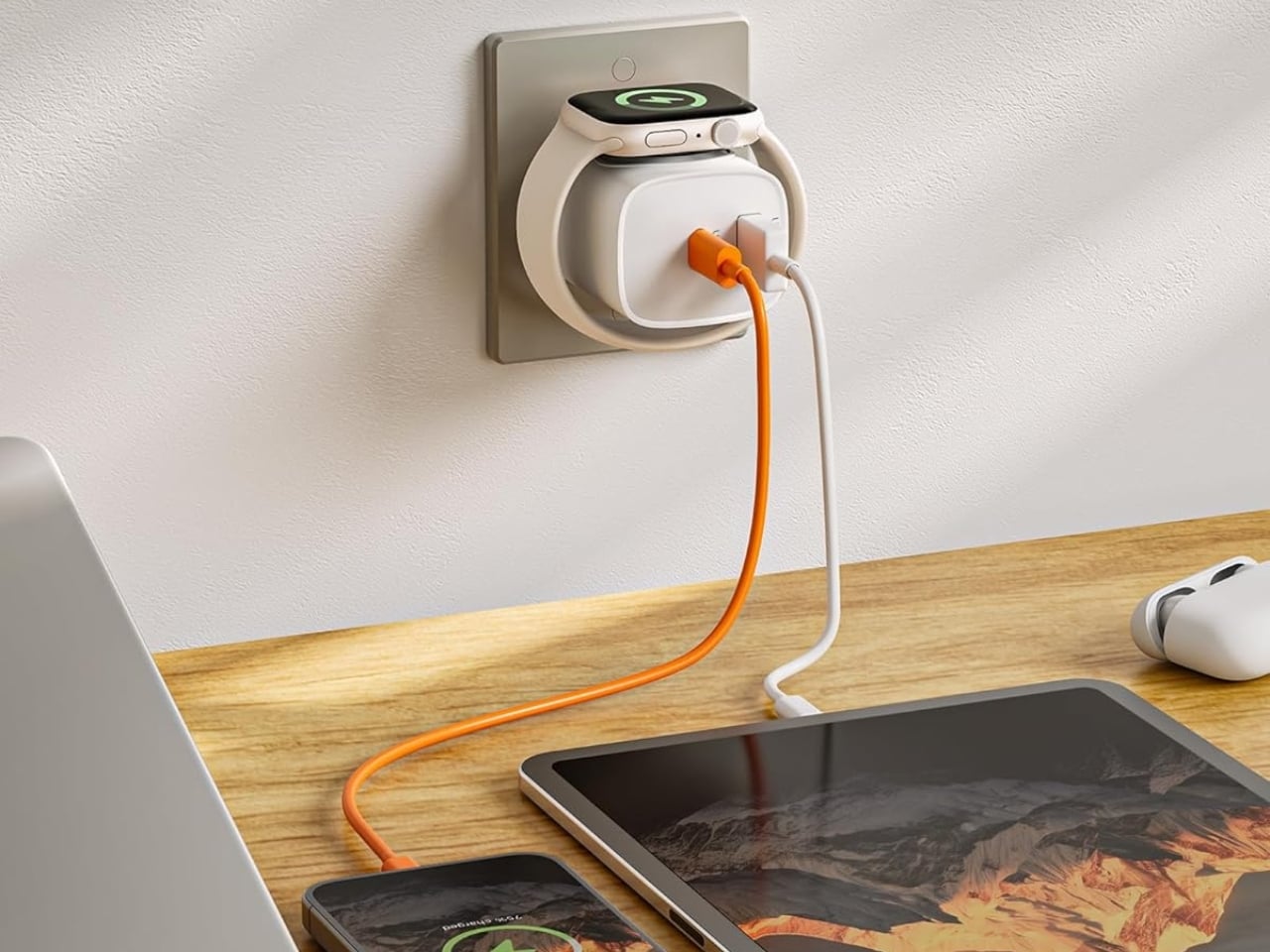
If you mostly own Apple devices or other USB-C-powered gear, the TESSAN 3-in-1 USB-C Charger may actually solve that problem for you. It’s a compact wall charger with a USB-C port, a USB-A port, and a built-in magnetic Apple Watch dock, so you only need one outlet to power up three devices at the same time.
This 3-in-1 charger is especially handy when you only have one outlet available but need to power up three different devices. A few years ago, this wouldn’t have been much of an issue, since most of us only had one phone to worry about. But now that owning multiple devices is the norm, charging has become an everyday hassle. What do you do when you’ve got a phone, a pair of AirPods, and a smartwatch that all need power at the same time?
TESSAN’s charger features fast charging through its 20W USB-C port, so you can get a device like the iPhone 15 up to 55 percent battery in just 30 minutes. At the same time, its 18W USB-A port can juice up an accessory simultaneously while your main device charges. It also offers broad compatibility, working with everything from the latest iPhone models to AirPods and other USB-powered devices. The real star of the show, though, is the built-in magnetic charger for your Apple Watch. There’s no separate puck or cable needed here. Instead, you get a self-aligning dock, so you won’t have to fuss with positioning your watch every time you need to charge it.
The charger comes in four finishes (white, black, pink, and blue) and is clearly designed to double as a small desk-aesthetic item, though it will likely still read as “just a charger” to most people, especially in the white colorway. Where it really shines is portability: it’s a travel-friendly device you can toss in a bag without a second thought, instead of hauling around three separate chargers that eat up space and weight in your carry-on.
How does it stack up against the competition? The most obvious comparison is Belkin, whose 3-in-1 MagSafe charging stands are the gold standard in this category. Belkin’s BoostCharge Pro and UltraCharge Pro docks charge an iPhone, Apple Watch, and AirPods wirelessly and look considerably more premium sitting on a nightstand, but they also run anywhere from $95 to $150 and require more desk real estate. TESSAN’s charger, at $20.99, skips the wireless charging bells and whistles in favor of a compact, plug-in design that’s built more for function and travel than for a styled bedside setup. If you want a showpiece charging stand for your living room, Belkin is still hard to beat. But if you want something inexpensive, pocketable, and fast enough to get you out the door in the morning, TESSAN makes a compelling case for itself as the budget-friendly, travel-first alternative.
At the end of the day, this isn’t a charger trying to be a lifestyle centerpiece. It’s a charger trying to solve a genuinely annoying, everyday problem: too many devices, not enough outlets, and not enough patience to wait in line for your turn at the power strip. For $20.99, the TESSAN 3-in-1 USB-C Charger delivers fast charging, broad compatibility, and a clever built-in Apple Watch dock in a package small enough to disappear into a laptop bag or a nightstand drawer. It won’t turn heads the way a sleek charging stand might, but it will quietly keep your phone, watch, and earbuds powered up without the usual cord chaos. For anyone juggling multiple Apple devices on a daily basis, or packing for a trip and dreading the tangle of cables, this little charger earns its spot on the “actually useful” list.
Apple has the opportunity to do something really cool here! An emulator going by the name of Classipod has been doing the rounds on the Google Play Store, letting you run an iPod Classic style interface on any Android phone of your choosing. The only problem is that Apple never really made a 9:20 iPod Classic. Every iPod Classic had a short, stout design and as it stands, there are only two Android phones that currently fit this bill, and both fold.
A video on Instagram showed the Classipod int
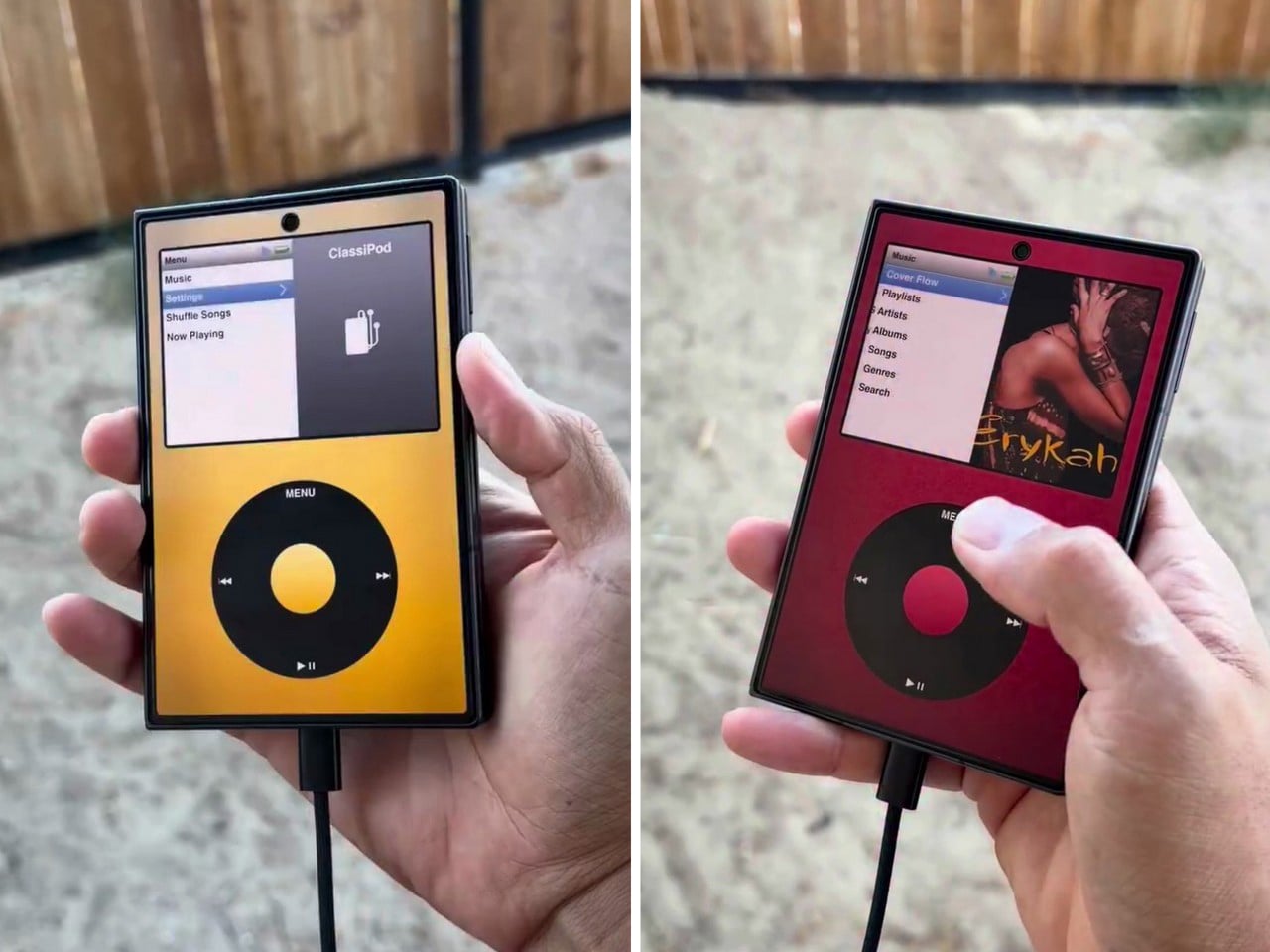
Apple has the opportunity to do something really cool here! An emulator going by the name of Classipod has been doing the rounds on the Google Play Store, letting you run an iPod Classic style interface on any Android phone of your choosing. The only problem is that Apple never really made a 9:20 iPod Classic. Every iPod Classic had a short, stout design and as it stands, there are only two Android phones that currently fit this bill, and both fold.
A video on Instagram showed the Classipod interface on a Galaxy Z Fold8 and I can’t help but feel like this almost exactly looks like the classic iPod. The proportions are damn near perfect, the interface still makes me nostalgic, and those color options absolutely slap! The only real problem is that, like all good things, Classipod came to Android before it did to the iPhone Duo… but if someone from Apple’s software team is reading this (hey Craig!), just go ahead and give us an Apple Music skin that brings back the iPod Classic! Pretty please??
Designer: Adeeteya
Here’s what I find so funny about running Classipod on a Z Fold8 – sure, it almost matches the iPod Classic’s form factor, but even when folded shut, it’s still thinner than the iPod! I’m talking hinge, two sets of screens, two batteries, an entire processor, cameras galore, all that packed into something that measures 9.7mm thick while the iPod Classic, which is just a tiny screen, battery, SoC, and a massive flash drive, measures 10.5mm in thickness. Then again, the iPod Classic packs an aux input too, which you’ll never see on a foldable phone.
But hold the Z Fold8 in your hand and the Classipod definitely scratches the itch of owning vintage Apple gear. The weight and heft, the analog interface, and that gorgeous jogwheel that is sure to get your muscle memory kicking in instantly. You sideload music so it plays locally (no streaming), and you can do everything, from searching for artists to making playlists. And yes, if you’re asking, the jogwheel has haptic feedback so it actually does feel like the iPod of yesteryears.
There are a few iPod emulators on the App Store, but none as good as the Classipod. I guess someone could vibecode one overnight and run it on an iPhone Duo soon, but until then, turns out the most faithful recreation of an iPod Classic exists… just on an Android device!
Valve's popular Steam Deck handheld pushed handheld gaming PCs into the mainstream with its affordable, Linux-based console, and its potential successor seemingly aims to make the same impact. Speaking to IGN's Jacqueline Thomas, Valve software developer Pierre-Loup Griffais touched on the fabled 'Steam Deck 2' and whether the ongoing RAM crisis could affect its development.We want to make sure there's a very delineated performance improvement for something like
Valve's popular Steam Deck handheld pushed handheld gaming PCs into the mainstream with its affordable, Linux-based console, and its potential successor seemingly aims to make the same impact. Speaking to IGN's Jacqueline Thomas, Valve software developer Pierre-Loup Griffais touched on the fabled 'Steam Deck 2' and whether the ongoing RAM crisis could affect its development.
We want to make sure there's a very delineated performance improvement for something like a future Steam Deck.
Pierre-Loup Griffais, Valve
When asked whether ongoing hardware shortages — which have already affected pricing for its Steam Machine PC and Steam Frame VR headset — have changed how Valve thinks about a Steam Deck successor, Griffais answered, "Not really." For now, it sounds like any potential 'Steam Deck 2' will target the same balance of performance and affordability as before, but is that realistic?
Steam Deck performance was crushed years ago
MSI Claw 8 EX AI+ stands as one of the best Windows-based handhelds today. (Image credit: Daniel Rubino)
For clarity, I use my Steam Deck almost every day, and it still powers through my library of built-for-Windows PC games with relative success. However, there's no denying its age, and the custom-made Zen 2/RDNA 2 APU doesn't stand a chance in many of the AAA games released in the past few years. For those demanding titles, plenty of Windows-based handhelds are far better suited.
Unfortunately, much like the Claw [8 EX AI+], the Steam Machine is a premium engineering marvel suffering from historically terrible macroeconomic timing.
Daniel Rubino, Windows Central
In that, I'm trying to stay grounded when I hear that Valve's plans haven't changed for the Steam Deck 2 (or whatever it might be called), because that never necessarily meant it would target the same price point as its first handheld. After all, the company just launched its new Steam Frame VR headset for $1,059, which is higher than it originally planned (via PC Gamer).
So, Valve is stuck between a rock and a hard place: sourcing a follow-up (presumably also custom-made) processor and the corresponding components for a mass-produced handheld without pricing it so high that it loses mainstream appeal. It won't be easy, and I wouldn't be surprised if we don't hear anything concrete about the Steam Deck 2 for a few years.
Join us on Reddit at r/WindowsCentral to share your insights and discuss our latest news, reviews, and more.

 Connexion