Vue normale

Il y a de nouveaux articles disponibles, cliquez pour rafraîchir la page.
Hier — 17 avril 2026Flux principal

Dórica Just Proved Good Design Belongs on Your Kitchen Counter

Par : Ida Torres
17 avril 2026 à 21:30

Most of us have at least one object in our home we’ve never actually looked at. The napkin holder. The fruit basket. The candle holder that’s been sitting on the same shelf for three years. We use these things daily, sometimes multiple times, and yet they exist in this strange invisible space between functional and forgotten. That’s exactly the space that Sebastián Ángeles decided to design for.

Ángeles is the founder and creative director of Dórica, a Mexico City-based contemporary furniture brand that has spent years building a quiet but increasingly well-regarded reputation for pieces that prioritize longevity over trend. Their chairs, benches, and credenzas have found their way into residential, commercial, and hospitality spaces, and the brand has been recognized as one of the most relevant contemporary furniture names coming out of Mexico. But with Prea, released in February 2026 and recently featured by Wallpaper, Ángeles shifted his focus somewhere more intimate: the objects you reach for without thinking.

Designer: Sebastián Ángeles for Dórica

Prea is labeled “Chapter II” in Dórica’s story, and the brand describes it as their first collection of everyday objects. It’s a small but considered group of pieces, including an egg basket, a fruit basket, a candelabra, and a napkin holder, each designed and produced in Mexico with a clear emphasis on wood and ceramic, clean lines, and what the brand calls “material honesty.” The pieces are not elaborate. They don’t announce themselves when you walk into a room. And that restraint is, I think, the entire point.

Wallpaper described Prea as “a study in restraint,” and that feels right. But I’d push it further. Prea is actually a philosophical statement wrapped in a very practical object. The brand’s own language around the collection is striking: “Design here does not decorate. It holds. It supports. It allows the ordinary to be seen.” That’s not the kind of copy you expect from a brand selling a napkin holder. It’s the kind of thought that makes you pause.

We talk constantly in design circles about the gap between high design and everyday life, between the gallery object and the kitchen counter. Dórica seems genuinely uninterested in that gap existing at all. The premise of Prea is that the objects living alongside our daily rituals, the things we touch without registering that we’re touching them, deserve the same level of intentionality that goes into a statement chair or a sculptural lamp. Not to make them more important than they are, but to acknowledge that they already are important. We just stopped noticing.

There’s a Mexican design perspective embedded in this that feels worth acknowledging. The brand has always positioned itself around craftsmanship and longevity rather than novelty, and Prea continues that ethos into a new category. It’s a move that says something about how Ángeles sees the role of design in everyday life: not as a luxury layer applied to living, but as something woven into the texture of it.

I’ll be honest, when I first looked at the collection, my instinct was that it seemed minimal to the point of simplicity. A fruit basket is a fruit basket. But the more I sat with the images and the thinking behind the work, the more that restraint started to feel like confidence. These pieces don’t need to perform. They just need to be present, well-made, and honest. In a market saturated with objects begging for your attention, that’s a harder thing to pull off than it looks.

Prea is also a smart move for Dórica as a brand. Entering the everyday objects category at this level of intention signals a maturity that not every furniture brand is willing to commit to. It’s easier to scale up into bigger, more visible pieces. Scaling down into the egg basket, and making it mean something, takes a different kind of confidence. If you’re the kind of person who has ever picked up a beautifully made object and held it for just a second longer than you needed to, this collection is worth seeking out.

The post Dórica Just Proved Good Design Belongs on Your Kitchen Counter first appeared on Yanko Design.

This iPhone Air 2 Concept Adds Two Cameras and Suddenly the Phone Makes More Sense

Par : Sarang Sheth
17 avril 2026 à 20:30

Every first-generation Apple product is essentially a beta test with a premium price tag, and the iPhone Air was no exception. The engineering was genuinely remarkable: 5.6mm thin, a large ProMotion display, A19 Pro performance, and battery life that surprised nearly everyone who reviewed it. What wasn’t remarkable were the two omissions that showed up in every single hands-on: one camera and one speaker, on a phone that cost $999. Those two complaints alone handed buyers a perfectly logical reason to spend the same money on a Pro instead. The Air needed a second generation the moment the first one shipped.

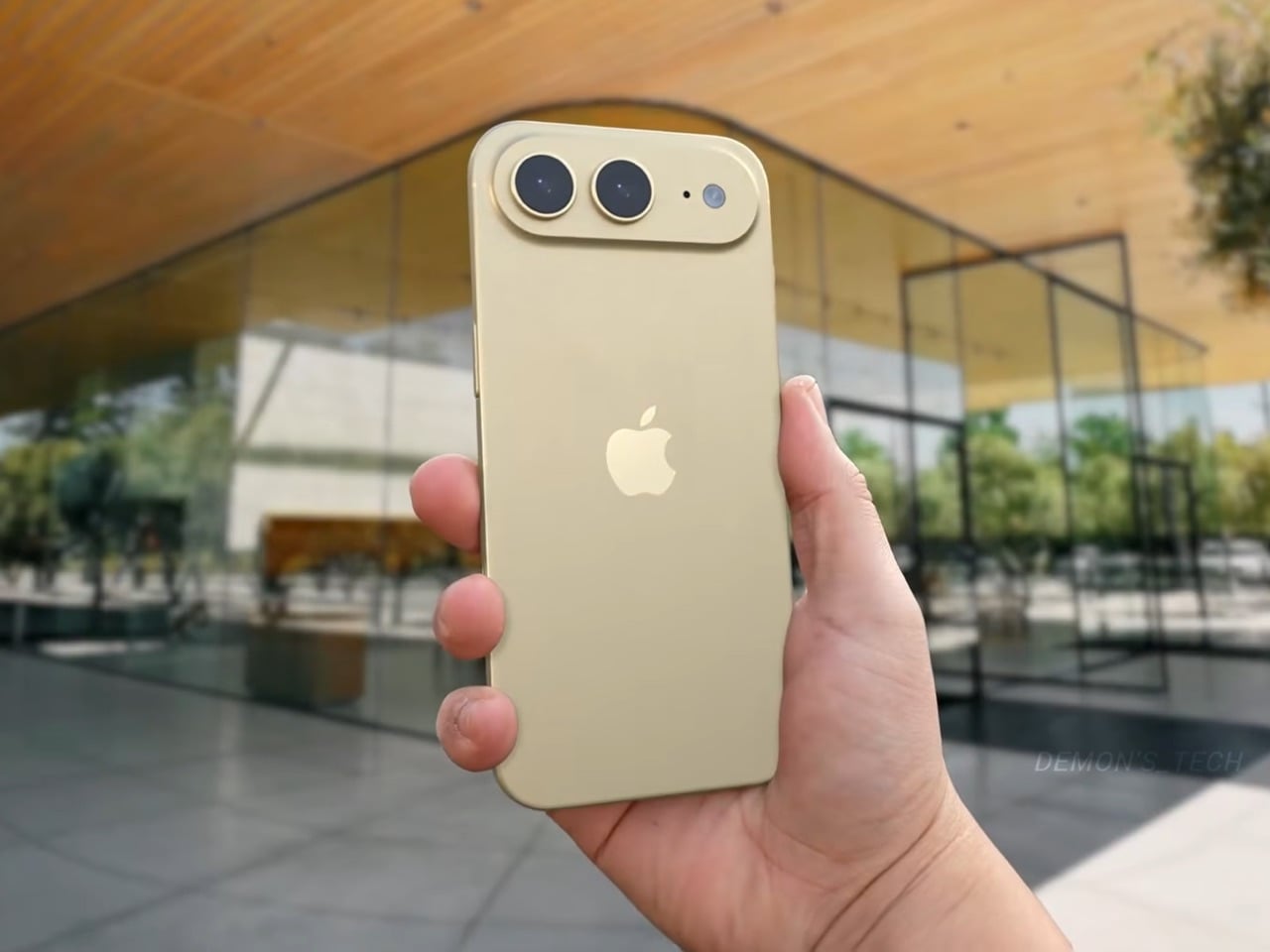
Demon’s Tech has imagined exactly what that second generation could look like, and the concept renders suggest Apple already has a clear path to making the Air the phone it should have been from the start. The dual-camera bar is wide and confident across the top of the phone, housing two lenses with room to spare. The rest of the body is pure restraint, a flat back, centered Apple logo, and a color range vivid enough to give the phone a personality that its specs can now actually back up. If the rumored stereo speaker and efficiency-focused N2 chip join that camera upgrade, the Air 2 goes from interesting to genuinely compelling.

Designer: Demon’s Tech

Two 48-megapixel sensors reportedly sit inside the pill-shaped housing, one primary and one ultrawide, which aligns with leaks from Chinese tipster Digital Chat Station suggesting Apple is going for a main-plus-ultrawide configuration rather than a telephoto. That choice makes sense for the Air’s positioning. Telephoto glass demands physical depth that a sub-6mm chassis simply cannot accommodate, and ultrawide coverage is what most non-Pro users actually miss day-to-day. The original Air’s single-lens bar always looked slightly incomplete, like a sentence that trailed off mid-thought, and Demon’s Tech addresses that by stretching the new pill-shaped housing almost the full width of the phone’s upper third, sitting flush and purposeful rather than apologetic. It is a small change on paper that transforms the entire visual logic of the back panel.

Apple shipped the original Air in four relatively restrained options: cloud white, sky blue, light gold, and matte space black. Demon’s Tech blows that palette wide open, running through violet, cobalt, mint green, and vivid red alongside the sandy gold seen in the hero shots, which is closer to what the iPhone 5C attempted in 2013, a phone that led with color as a statement rather than a courtesy. The Air’s lifestyle positioning actually supports this approach in a way the 5C’s budget framing never quite did. A phone you buy partly because it is extraordinarily thin is a phone you buy to be noticed, and being noticed in muted gold is considerably less fun than being noticed in electric blue. The renders make a quiet argument that Apple’s colorway restraint on the original Air was a missed opportunity, not a deliberate choice.

Twelve gigabytes of RAM paired with the A20 Pro keeps the performance story simple: this is a phone that matches the Pro lineup on silicon even if it concedes on optics. The sleeper upgrade is Apple’s rumored N2 efficiency chip, because getting better battery life out of a body that physically has less room for cells requires exactly this kind of architectural work, the same discipline that let the original Air post competitive endurance numbers despite its dimensions. Add stereo sound from a bottom speaker alongside the existing top one, and the two most common complaints about the first Air evaporate inside a single product cycle. That is a more focused corrective than Apple managed with either the Mini or the Plus, both of which spent multiple generations struggling to justify their existence. If Apple lands all of this at the same $999 price point, the value math finally starts working in the Air’s favor.

Apple has confirmed the Air line continues, with the second generation reportedly targeting a spring 2027 release window, landing after the iPhone 18 Pro, Pro Max, and foldable models ship in fall 2026. That later window gives Apple’s engineering teams more time to solve the thermal and battery challenges that come with building capable hardware into an impossibly thin frame, and it gives the Air its own launch moment rather than forcing it to compete for attention against a foldable iPhone. Demon’s Tech’s concept is the best visual argument yet for what that launch moment could look like: a phone that carries its thinness as a given rather than an excuse, and finally has the camera system and audio to back up everything the form factor promises.

The post This iPhone Air 2 Concept Adds Two Cameras and Suddenly the Phone Makes More Sense first appeared on Yanko Design.

ASUS Zenbook DUO (2026) Review: One Laptop, Two Screens, All Business

Par : JC Torres
17 avril 2026 à 15:20

PROS:


  • Beautiful, nearly identical 14-inch 144Hz 3K OLED screens

  • Narrower hinge creates a more immersive visual experience

  • Ceraluminum design adds visual and tactile character

  • Powerful Intel Panther Lake performance and impressive battery life

CONS:


  • Quite pricey

  • No built-in card reader

  • RAM is soldered

RATINGS:

AESTHETICS
ERGONOMICS
PERFORMANCE
SUSTAINABILITY / REPAIRABILITY
VALUE FOR MONEY

EDITOR'S QUOTE:

The ASUS Zenbook DUO (UX8407) earns its premium with two stunning co-equal OLED screens, a sleeker hinge, and Intel Panther Lake performance built for serious work on the go.
award-icon

For a time, it seemed that foldable and rollable screens would be the future of laptops, just as they are positioned to be where smartphones are going. That was until people realized that what may be good for handheld devices might not work for 14-inch slabs with keyboards. Foldable laptops might still have their day, but they are too impractical and costly for now.

ASUS has chosen to instead design and deliver a solution for today’s needs and problems. Rather than a screen that folds just to save space, the Zenbook DUO has opted to expand the user’s workspace instead, bringing the productivity advantages of dual-monitor setups from desktops to laptops. This year’s ASUS Zenbook DUO (UX8407) does more than just upgrade the spec sheet. It is also adding a touch of style and elegance that makes a power user tool feel more considered.

Designer: ASUS

Aesthetics

The 2026 ASUS Zenbook DUO (UX8407) is quite stunning in almost any form, whether it’s closed shut, opened like a laptop, or especially when it’s wide open. The lid cover exudes not only minimalism but also character, with a reflective “ASUS ZENBOOK” logo engraved against the Elephant Gray “Ceraluminum” surface, creating a simple yet eye-catching visual and material contrast.

That Ceraluminum is, of course, ASUS’s latest material innovation that uses a special oxidation process to give aluminum some ceramic-like properties, particularly durability and higher resistance to scratches. The end result is a material that isn’t just nice to look at but also pleasing to touch, giving the lid a texture that almost feels like stone or, well, ceramic. There is also a certain visual “roughness” to the Ceraluminum surface, setting it apart from the brushed metal or anodized appearances of its peers.

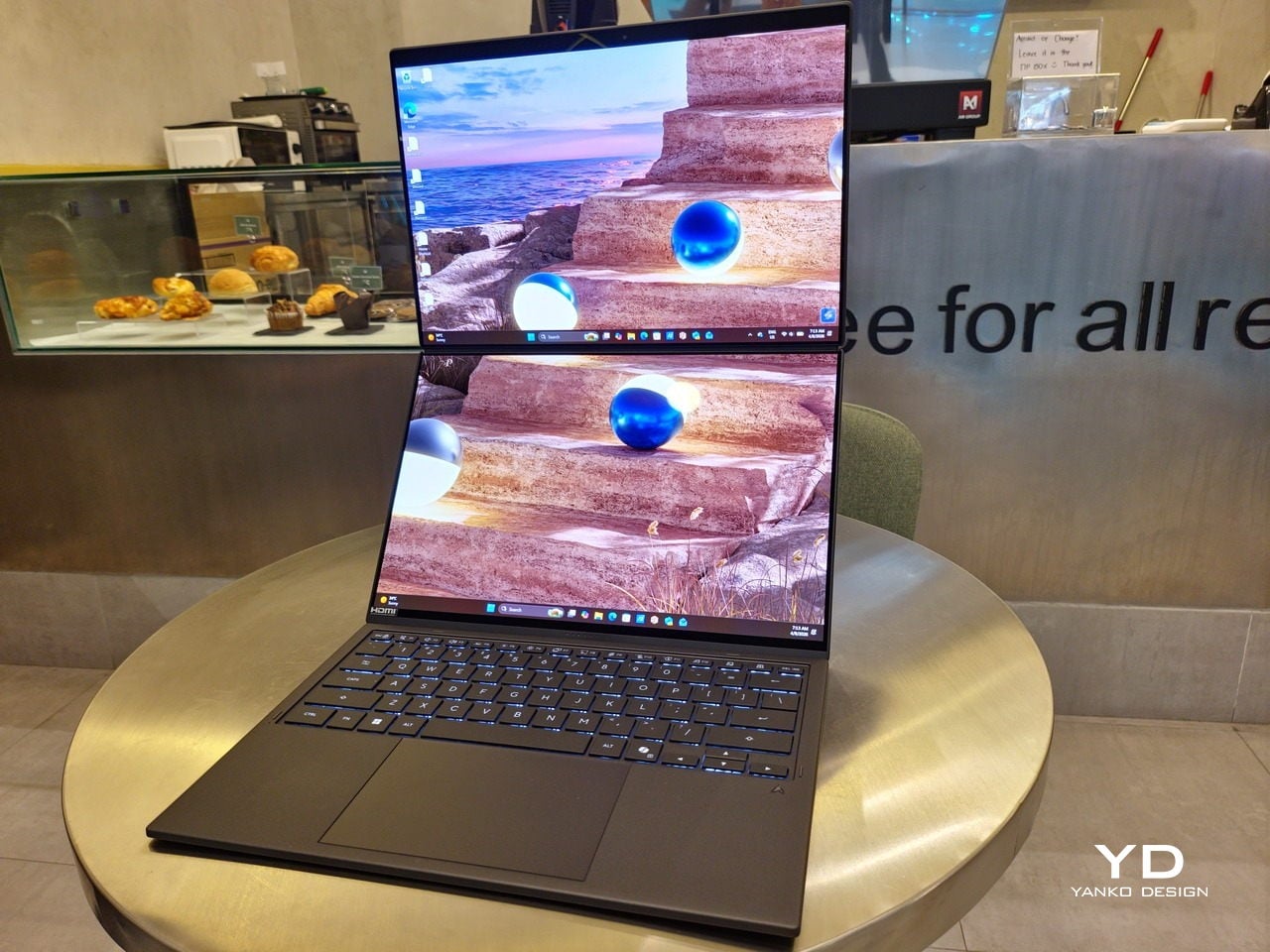
Of course, the real show happens when you open the laptop and lift the keyboard away, revealing two gorgeous 14-inch screens connected together by a hinge, no messy or awkward cables. For this iteration, ASUS poured its efforts into making that connection look even more seamless, not only by shrinking the bezels between the displays but also by developing a new “hideaway” hinge that narrows the gap from 25.31mm down to 7.6mm. Make no mistake, there’s still a very obvious separation between the two, but it is now less jarring, making it feel like you’re working with a screen that just happened to be split into two, rather than two screens stitched together.

With the detachable Bluetooth keyboard resting on the second screen or when it’s closed, the Zenbook DUO (2026) looks almost like a normal laptop. You have a few (literally) ports on either side along with some air vents, and a wide-long grille at the bottom above the built-in kickstand. Your only clue that this isn’t a normal laptop is when you accidentally close the laptop lid without the keyboard attached, creating a very noticeable gap that, unfortunately, would also be an open invitation for small items to come in and scratch the screens.

Ergonomics

At 1.65kg (3.64lbs) with the Bluetooth keyboard attached, the ASUS Zenbook DUO (UX8407) isn’t exactly lightweight compared to other 14-inch laptops in the market, at least the non-gaming kind. That said, it’s not exactly on the heavier side either, especially when you consider that you’re carrying two 14-inch screens, not to mention a 99Wh battery, in a single bundle. In that context, it’s actually amazing how much ASUS was able to reduce the heft without cutting corners.

That said, having two connected displays brings its own ergonomics puzzle, something that ASUS seems to have finally solved almost to perfection. You have no less than 5 ways to use the laptop, from a normal laptop to two screens vertically stacked to the side-by-side “desktop mode”. While the hinge does most of the hard work, the built-in kickstand literally carries the burden, supporting that full weight (minus the keyboard) on its own.

The new kickstand is stronger, sturdier, and stiffer, providing confidence it won’t just suddenly close down. It can open to a maximum of 90 degrees, which is the angle you’ll need for desktop mode. That said, it also means that you only have possible angle for the displays in that mode, unless you have a separate stand to prop it up, which kind of defeats the purpose of having a built-in kickstand.

One thing to note in desktop mode is that you will naturally be sacrificing one side of ports. Thankfully, you can turn the Zenbook DUO (2026) which ever side up, whether you need an extra HDMI and headphone jack, or an extra USB-A port. Thankfully, both Thunderbolt 4 ports are equal in capabilities, so you don’t have to make a sacrifice on that end.

If there’s one thing I found a bit cumbersome in the Zenbook DUO’s design is that the power button sits so flushed against the frame. On the one hand, that means it won’t snag with anything in your bag, nor will it get triggered accidentally. On the other hand, it also makes it harder to locate it without looking or fumbling with your finger sliding across the edge repeatedly.

Performance

The ASUS Zenbook DUO (UX8407) is one of the early laptops to embrace Intel’s new Panther Lake chips, specifically the Intel Core Ultra 3 series. The dual-screen laptops comes in two options, one with an Intel Core Ultra 7 355 and the Intel Core Ultra X9 388H. In terms of CPU alone, these already represent a huge leap not just in performance but also in power efficiency, but the latter configuration pulls an even bigger feat.

The review unit we received comes with an Intel Arc B390 GPU based the latest 3rd-gen Intel Xe graphics. Forget what memories you might have had of integrated Intel graphics, because we’re entering an era where you can actually play games with decent settings on it. Of course, your mileage may vary and benchmarks can only provide some general idea, but that all these specs mean is that the ASUS Zenbook DUO (2026) is built for serious productivity and creative work.

It is, after all, designed for heavy-duty computer users ranging from knowledge workers to creators who need to bring the productivity they enjoy on the desktop to wherever they go. Productivity suites, video editors, graphics programs, 3D modelers, and even games won’t make this flexible laptop break a sweat. And yes, that includes some AI shenanigans, thanks to an upgraded NPU as well.

Of course, this also means that it has enough muscle to support running two screens which, by default, is set to extended (versus mirroring each other). The beauty is that these two screens are nearly identical not just in size but also in capabilities, where other dual-screen laptops skimp on the second screen more often than not. We’re talking two 14-inch 3K (2880×1800) 144Hz Lumina Pro OLED displays. Both support touch and, more importantly, both support the ASUS Pen stylus.

In reality, there are very slight differences between the two screens in terms of full color gamut and maximum brightness, but you won’t notice it too much unless you are actively looking for it. In practice, most people will keep content they’re working on in one of two screens anyway, leaving the other as an auxiliary for references or controls.

The latter is actually an interesting aspect of this dual-screen laptop, making the Zenbook DUO feel almost futuristic. While it does have a detachable keyboard, there might be times when you want to have more direct access to the lower touch screen without having to switch back and forth with the Bluetooth keyboard at the side. With a six-finger gesture, you can summon a half-height virtual keyboard, a half-height virtual keyboard with a virtual trackpad to the right, or a full-screen keyboard with a large trackpad below it, pretty much like the virtual equivalent of the physical keyboard.

Additionally, you can have other virtual knobs and sliders above the keyboard or as floating windows, thanks to ASUS’s Dial & Control app. These controls, which also include a numpad and an area for writing with a pen, can change depending on what app is currently in focus. With a browser window, it can have a button for a new tab or a dial for zooming in and out. Or it could be a knob for volume and a slider for screen brightness.

As for the detachable keyboard, it magnetically snaps into place, with retracting pogo pins creating a more stable connection than Bluetooth, though that is the only way to use it when it’s detached. That said, there are no notches or protrusions along the edges of the keyboard, so prying it away from that strong magnetic hold can take a bit of work. The keyboard charges when it’s lying on the laptop, but it can also be charged separately via USB-C. Key travel is decent, but the keys themselves feel a bit squishy. The large trackpad is sensitive, but the hydrophobic coating gives it too much resistance when gliding your finger across it.

The combination of the more power-smart Intel Panther Lake processor and the 99Wh battery tucked inside gives the ASUS Zenbook DUO (UX8407) quite a long uptime, even with both screens enabled. Even a battery of benchmarks and hours of typing and browsing has left a good 12% of battery left, rounding up to a little over 15 hours of use, just a little below ASUS’s advertised 18 hours (with two screens). The included 100W USB-C charging brick helps mitigate the battery loss, and the fact that you can easily use power banks to top up on the go makes the battery narrative even more compelling.

Sustainability

ASUS didn’t use to speak much about the sustainability of its laptops, but that has changed in recent years. The invention of Ceraluminum adds another level to that story, though a bit indirectly. In a nutshell, the material is meant to increase the durability and longevity of the product by protecting it from small accidents. Whether the ZenBook DUO uses sustainable materials, or at least what percentage of it does, isn’t public information.

That longevity, however, is also affected by how much you can upgrade or even repair the laptop. Given how unconventional its design is, it’s really no surprise that there isn’t much here in the way of upgrade options. You do have easy access to the SSD underneath the kickstand. The Zenbook DUO (2026) can support up to 2TB with a full-sized M.2 SSD. The 32GB RAM, however, is soldered down.

Value

The ASUS Zenbook DUO (UX8407) is a laptop on a mission. It is, in a nutshell, designed for people who thrive and need multi-tasking capabilities that they could only enjoy while chained to their desk (or awkwardly carrying a portable monitor). That actually covers a wide range of professions and industries, including creators, designers, office workers, executives, and, yes, gamers. In that sense, there can probably be no better tool for them than this.

In both performance and flexibility, the 2026 Zenbook DUO offers users the power they need, as they need it. Cramped for space on a plane? Just use it as a single-screen laptop, and no one will be the wiser. Need to collaborate with a team? Lay it out flat on the desk to give everyone the same perspective. Need to reference documents as you write? The book-like desktop mode has you covered.

That said, it’s definitely far from perfect. For a laptop aimed at creatives and professionals, the absence of a built-in SD card reader seems pretty odd. And then there’s the $2,699.99 price for the configuration that has the impressive Intel Arc graphics. That puts it way above most 14-inch ultra-thin laptops and in the range of gaming laptops. But then again, none of those have two 14-inch screens, either.

Verdict

Laptops with foldable screens admittedly look fancy and impressive. The big OEMs, including ASUS, are still playing around to find the formula that will finally make it feel more than just a fancy and expensive experiment. In the meantime, however, people need to get work done, and when it comes to that, nothing really beats using more than two screens.

You could always carry a portable screen along with your laptop, which is awkward, cumbersome, and inefficient, or you could grab the ASUS Zenbook DUO (UX8407). With an improved hinge, beautiful co-equal 14-inch displays, and an Intel Panther Lake processor that can handle almost anything you throw at it, the dual-screen laptop lets you choose the way you want or need to work. And it looks stylish to boot in any form, making sure you’ll be the envy of everyone in the coffee shop.

The post ASUS Zenbook DUO (2026) Review: One Laptop, Two Screens, All Business first appeared on Yanko Design.

The ZERO Chair Has No Welds, No Joints, No Apologies

Par : Ida Torres
17 avril 2026 à 14:20

Most chairs are built on compromise. You stack the legs, screw the seat, bolt the back, and somewhere in that assembly, a little bit of the original idea gets lost to the necessity of structure. Davide Bozzo’s ZERO Chair refuses to play that game entirely.

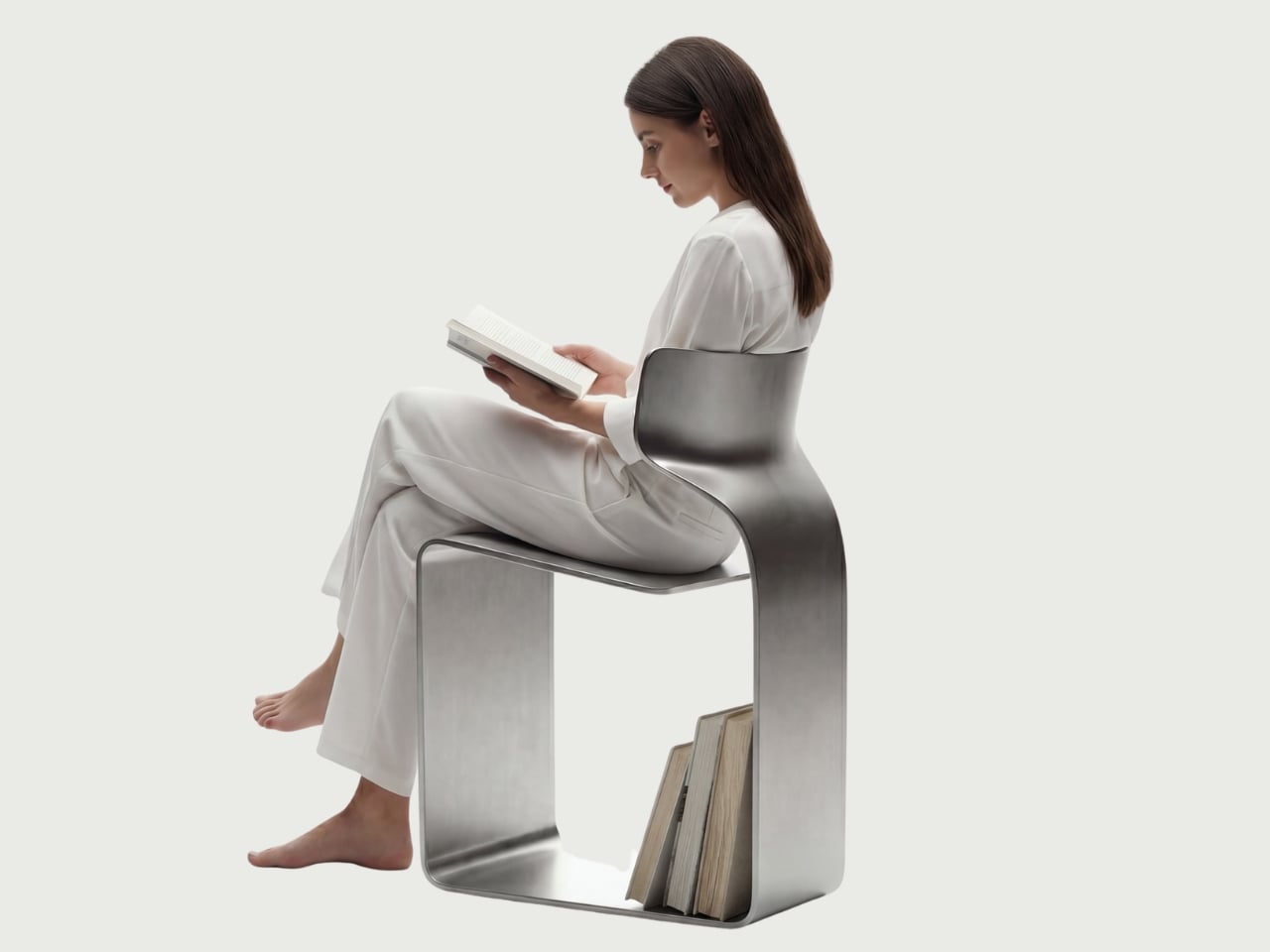
The concept is almost confrontationally simple: one single ribbon of metal, bent and curved into a complete chair. No welds holding two pieces together. No joints disguised under upholstery. No hardware quietly doing the heavy lifting behind the scenes. Just one continuous piece of material pushed into a form that includes the base, the cantilevered seat, and the backrest all at once. The name isn’t branding. It’s a philosophy.

Designer: Davide Bozzo

Looking at the photographs, the first thing I kept circling back to was the sheer audacity of the backrest. It doesn’t connect to the base through hidden brackets or clever joinery. It simply rises from the same ribbon, curving upward and backward in a motion that looks more like a wave caught mid-break than anything you’d typically call furniture. It’s graceful in a way that makes you slightly suspicious of it. How is this thing holding anyone’s weight?

The answer lies in what Bozzo describes as structural tension. Form doesn’t just follow function here. It is the function. The material itself carries the engineering logic. Every curve has a reason, and every bend is calculated to distribute load through the continuity of the form rather than through added components. It’s the same principle behind suspension bridge cables or the way a curved shell is structurally stronger than a flat panel. Applied to a chair, it feels almost radical.

I’ll be honest. My first instinct was skepticism. A single-piece metal chair sounds like one of those design school exercises that makes for great renderings but falls apart under real scrutiny. But looking at the close-up photographs, especially the one capturing the S-curve where the seat meets the backrest, you start to believe it. The brushed metal finish shows actual material depth and actual intentionality in how the surface was treated. This isn’t a concept render floating in a void. It has weight and presence.

That said, I do have questions. Comfort is conspicuously absent from the conversation. Metal, even beautifully formed metal, is hard. The cantilevered seat gives some flexibility, which should help, but a chair without cushioning asks something significant of the person sitting in it. Bozzo’s design makes a statement about material honesty and structural purity, which I respect deeply, but at some point a chair has to be sat in. That’s the tension that makes it interesting rather than just pretty.

The piece also reads as a quiet counterargument to the current era of maximalist furniture. We’ve spent years surrounded by bouclé armchairs, curved velvet sofas, and furniture dressed up in layers of texture and warmth. Bozzo’s chair strips all of that away and asks whether furniture can earn your attention through restraint and engineering alone. My honest opinion? It can. Whether it earns a place in your living room is a different question entirely.

The chair also does something that doesn’t get discussed enough in design coverage: it makes the negative space part of the design. The open rectangle formed by the base creates a void that’s almost as deliberate as the metal itself. In the lifestyle image set against a Japanese garden backdrop, that void frames the gravel and ground beyond it. The chair becomes a viewfinder. That’s not accidental. That’s a designer who understands that what you leave out is just as powerful as what you put in.

Bozzo has been building a reputation for material-forward work. His stainless steel pet bowl Dune explored similar ideas around fluid curves in a single medium, but the ZERO Chair feels like a significant step up in ambition. It’s the kind of piece that stops you mid-scroll, makes you set your phone down, and actually think. That, more than any material specification, is probably the point.

The post The ZERO Chair Has No Welds, No Joints, No Apologies first appeared on Yanko Design.

Foshan’s Forgotten Warehouses Got a Rooftop Park Under Floating Domes

Par : Ida Torres
17 avril 2026 à 13:20

Somewhere along the Huadi River in Foshan, China, a cluster of old grain storage warehouses has been turned into one of the most quietly poetic pieces of architecture I’ve seen all year. The Yongping Warehouse Renovation, completed in 2025 by Guangzhou-based Atelier cnS, is exactly the kind of project that makes you stop scrolling and actually look.

The site sits in Dali Town, Nanhai District, a former industrial pocket of the Pearl River Delta that’s been gradually shedding its factory-town skin in favor of something more livable and publicly accessible. These particular warehouses, lined up along the riverfront, were derelict grain storage buildings with no obvious future. Not exactly glamorous source material. But Atelier cnS didn’t flinch, and the result is a project that earns its attention without asking for it loudly.

Designer: Atelier cnS

Because the site has a narrow footprint, the architects pushed the public space upward, placing a landscaped rooftop park above the commercial interiors below. Vertical programming isn’t a new idea, but what makes Yongping feel different is how thoughtfully the transition between levels was handled. The gaps between warehouse blocks weren’t sealed or filled in. Instead, they were preserved and widened into passageways, so as you move through the building, you catch glimpses of the river framed by walls before the whole view opens up at the top. It’s a slow reveal, and it’s deliberate.

And then there are the canopies. A series of translucent, domed structures built from hexagonal frames cluster across the roofline like a quiet gathering of clouds. Atelier cnS actually named the project “A Wisp of Cloud” over Huadi River, and the photos earn that name completely. The domes are light-diffusing, casting shade without blocking river views. They create zones for sitting, moving, and play without ever feeling like they’re closing the space in. They look like they arrived gently, rather than being imposed on the building below them.

The rooftop itself is shaped into slopes, steps, and play surfaces that echo the original pitched forms of the warehouse roofs. It’s one of those details that most visitors probably won’t consciously register, but it’s exactly the kind of architectural memory that makes a renovation feel grounded rather than gratuitous. The old buildings aren’t being pretended out of existence. The new design is in active conversation with what was there before.

I’m genuinely drawn to this project because it gets the balance right in a way that many adaptive reuse projects don’t quite manage. Too often, the renovations that attract the most attention are the ones where the new design overwhelms the original structure, turning the old building into nothing more than a convenient shell. Yongping avoids that trap. The warehouses are still very much present. Their bones dictate the rhythm, the circulation, and some of the visual language of the final result. You can feel the history of the place without having to read about it first.

Atelier cnS has been developing this kind of thinking for years. The studio’s earlier work on elevated public circulation, including a “roof-hopping” design approach explored in their White House Guesthouse project, signals a long-running interest in finding new life in existing structures. Yongping feels like a maturation of that sensibility. More refined, more integrated, and more tuned in to the texture of a neighborhood mid-transition.

The project spans 4,311 square meters, and it’s worth noting what it does beyond the architecture itself. Turning a commercial renovation into a publicly accessible rooftop park, in a district shifting away from its industrial past, is a real act of generosity. A park on a roof could easily read as a private amenity. Here, it reads like a gift to the neighborhood, a place to walk, rest, and look out at the river without needing a reason to be there.

Architecture doesn’t always need to announce itself to be worth paying attention to. The Yongping Warehouse Renovation is understated, purposeful, and lit from above by a cluster of translucent domes that look, from a distance, exactly like a wisp of cloud over the river.

The post Foshan’s Forgotten Warehouses Got a Rooftop Park Under Floating Domes first appeared on Yanko Design.

The All-Black Kitchen Is 2026’s Hottest Design Trend — Here Are 8 Products That Nail It

17 avril 2026 à 11:40

Black has always carried weight in design. Authority, restraint, a quiet elegance that needs no announcement. In 2026, the all-black kitchen has shifted from a bold statement to a genuine design movement. What once felt too dramatic for the most-used room in the home now feels precisely considered. Designers and homeowners alike are gravitating toward the palette for its ability to make a space feel curated, intentional, and deeply sophisticated when executed well.

The shift runs deeper than cabinetry and countertops. It lives in the tools, the cookware, the lighting, every touchpoint that shapes how a kitchen performs and how it looks doing it. Finding pieces that commit to the aesthetic without sacrificing function is the real challenge. These eight products do exactly that, from carbon graphite cookware rooted in Japanese craft to a precision pour-over kettle engineered for serious brewing.

1. ANAORI Kakugama

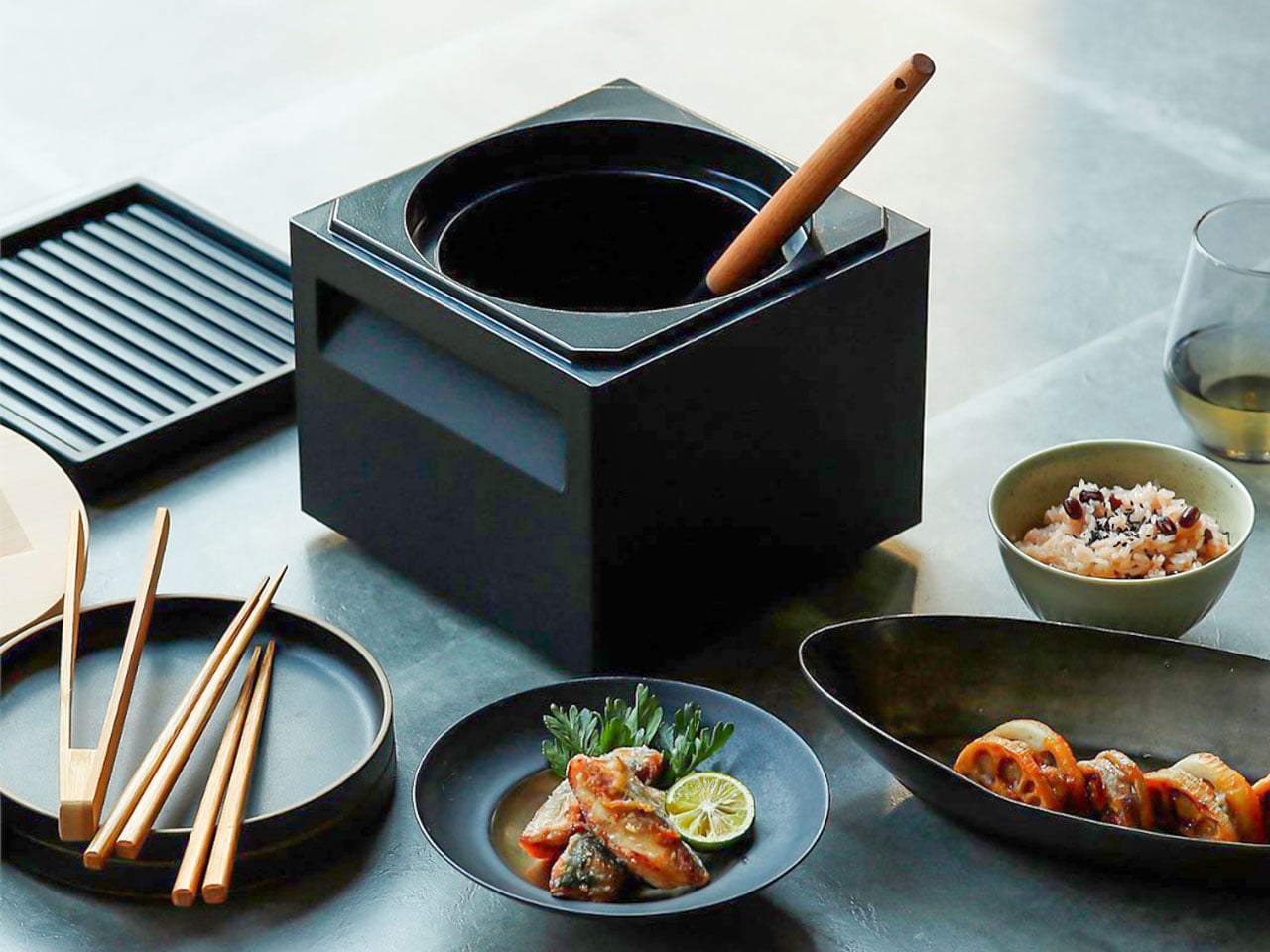
Carbon graphite isn’t a material you encounter in the kitchen, which is precisely what makes the ANAORI Kakugama so compelling. Crafted from solid carbon graphite, this Japanese cooking vessel carries a physical and conceptual weight that coated pans simply can’t match. Its matte black surface distributes heat with uncommon efficiency, significantly reducing the risk of scorching while preserving the natural flavors and nutrients of whatever is being prepared. This is cookware that approaches food with genuine respect.

The kakugama’s range is quietly impressive. Designed to steam, poach, simmer, grill, and fry, it handles each technique without compromise, making it the kind of piece that earns a permanent position in the kitchen. The fragrant Japanese cypress lid adds something unexpected: as it heats, it releases a subtle, earthy aroma that transforms an ordinary cooking session into something closer to ritual. For the design-conscious cook who values craft as much as performance, this vessel is essentially irreplaceable.

What We Like

  • Carbon graphite construction delivers exceptional, even heat retention across every cooking method
  • The Japanese cypress lid adds a rare aromatic quality to cooking that no synthetic material can replicate

What We Dislike

  • The premium material and craftsmanship place this vessel at a significant price point above conventional cookware
  • Carbon graphite requires more attentive handling and care than standard kitchen materials

2. Obsidian Black Precision Chopstick Tongs

There’s a particular satisfaction in a kitchen tool that commits fully to its concept. Part of the Obsidian Black Kitchen Collection, the Precision Chopstick Tongs take their form directly from traditional Japanese chopsticks and engineer it for the demands of a modern kitchen. Made from SUS821L1 stainless steel, they’re light enough to handle delicate pieces of sushi yet durable enough for daily stovetop use. The result is a utensil that genuinely bridges the line between cooking instrument and tableware.

What sets these tongs apart from anything else in the drawer is the finish. A special metal processing technique ensures the obsidian’s black color resists scratching and peeling, maintaining its appearance through repeated use and washing. They work just as confidently plating sashimi at the table as they do flipping proteins in a pan. That dual-purpose quality is rare, and it’s exactly what earns a piece a permanent place in a kitchen where aesthetics and performance are equally weighted.

Click Here to Buy Now: $25.00

What We Like

  • The obsidian black finish is scratch and peel-resistant, holding its appearance through sustained daily use
  • Designed to function as both a cooking utensil and tableware, bridging the kitchen and dining with a single tool

What We Dislike

  • The chopstick form may require a brief adjustment period for those accustomed to conventional tong grips
  • The precision-focused design is less suited to tasks requiring wide or bulky gripping

3. Samsung Bake Ultra Concept

Concept appliances rarely look this resolved. Designed by Octavio Leon Villareal, the Samsung Bake Ultra approaches the compact electric oven with a formal discipline that separates considered design from merely clever design. Its two-tone composition, a soft gray body anchored by a black glass front, achieves a visual balance that reads as both contemporary and enduring. This isn’t minimalism for its own sake. It’s a deliberate formal decision that allows the Bake Ultra to feel entirely at home in kitchens ranging from industrial-chic to warm and considered.

The rounded edges are doing significant work. By softening what could easily have read as an overly boxy silhouette, Villareal gives the Bake Ultra an approachability that most compact ovens lack entirely. It doesn’t demand attention, but it consistently earns it. In an all-black kitchen where every object contributes to the room’s visual tone, an appliance this compositionally assured is genuinely valuable. The Bake Ultra wasn’t designed just to function. It was designed to belong.

What We Like

  • The two-tone design with black glass front integrates cleanly into an all-black kitchen without disrupting the visual flow
  • Rounded edges give the compact form an approachability that’s rarely achieved in kitchen appliance design

What We Dislike

  • As a concept design, the Bake Ultra is not yet available for consumer purchase
  • The soft gray body, while elegant, slightly departs from a fully committed all-black aesthetic

4. Iron Frying Plate

The Iron Frying Plate operates on a beautifully simple premise: eliminate the plate. Made from 1.6mm-thick mill scale steel, this uncoated, rust-resistant piece of cookware is designed to go from stove to table without interruption. There’s no ceramic coating to chip, no synthetic surface to question, just raw, well-engineered steel that builds character and natural seasoning with every use. The matte black mill scale finish slots into an all-black kitchen without any deliberate effort at all.

Its detachable wooden handle is one of those small design decisions that reveal serious thought about every moment of use. Attach it for cooking, remove it for serving, one-handed, no tools required. That seamless transition from cooking vessel to serving piece is exactly the kind of dual-function thinking that earns a product permanent space in a curated kitchen. JIU doesn’t try to be more than it is. It’s a frying plate, and it’s an excellent one.

Click Here to Buy Now: $69.00

What We Like

  • The uncoated mill scale steel surface develops natural seasoning over time, building flavor with every use
  • The one-handed detachable wooden handle enables a smooth transition from stovetop cooking directly to table service

What We Dislike

  • An uncoated steel surface requires regular seasoning and more attentive care than nonstick alternatives
  • The minimal form is best suited to simple preparations rather than sauce-heavy or complex dishes

5. HA1 Expert Hard Anodized Nonstick 10-Piece Set

If the all-black kitchen needs a workhorse, the All-Clad HA1 Expert set fills that role without compromise. Ten pieces of hard anodized, scratch-resistant nonstick cookware finished in a deep, uniform black that holds up to both heavy daily use and visual scrutiny. The anodized aluminum construction is reinforced with a stainless-steel base, delivering warp resistance and the kind of even, consistent heat distribution that makes routine cooking genuinely more reliable. This is a set built for people who cook seriously and care deeply about how their kitchen looks.

The range covers everything a fully functioning kitchen demands: two fry pans, two saucepans, a sauté pan, and a stockpot, each paired with a matching lid. Oven-safe to 500°F and induction-compatible, very little is left unaddressed. Double-riveted stainless steel handles hold securely through extended use, while tempered glass lids allow for monitoring without lifting. As a complete, coherent system in black, this set reads less like a collection of pots and more like an intentional design decision.

What We Like

  • Hard-anodized, scratch-resistant construction paired with long-lasting PTFE nonstick delivers durable, professional-grade performance
  • Fully induction compatible and oven safe to 500°F, covering virtually every cooking scenario without exception

What We Dislike

  • Glass lids are only oven safe to 350°F, considerably lower than the pans themselves
  • PTFE nonstick requires careful utensil choice and hand washing to preserve its surface longevity

6. Precision Chef Kitchen Scissors

Kitchen scissors rarely receive the design attention they deserve. The Precision Chef Kitchen Scissors are a deliberate exception. The oxidation-colored black finish isn’t cosmetic; it’s a durable surface treatment that resists deterioration, holding its appearance through years of regular use. The curved serrated blade is engineered specifically for cutting meat, reducing effort while improving both control and safety. In a kitchen where every object is chosen with intention, a pair of scissors is considered a meaningful detail that most kitchens quietly overlook.

The ergonomic structure goes beyond grip comfort. When laid flat, the blade is designed to avoid contact with the counter surface, a small but precise detail that speaks to the level of thought invested in this tool. Cutting through steaks, portioning pizza, or trimming vegetables, these scissors approach each task with the same quiet authority that an all-black kitchen demands. They are scissors genuinely designed to be seen as well as used, and they meet that standard on both counts.

Click Here to Buy Now: $95.00

What We Like

  • Oxidation coloring creates a durable black finish that resists fading and surface deterioration through sustained use
  • The curved serrated blade is purpose-engineered for meat cutting, improving control and reducing the effort required

What We Dislike

  • The specialized curved blade may feel less versatile for tasks that go beyond protein and general food prep
  • Ergonomic scissors with complex geometry can be more difficult to sharpen at home than straight-bladed alternatives

7. Melrose Pendant Light

Lighting in an all-black kitchen isn’t merely functional; it’s structural. The Steel Lighting Co. Melrose pendant operates as both. The 18-inch industrial dome in matte black is proportioned specifically for kitchen island use, casting a wide, even wash of light across the work surface below. American-made and UL-approved for both indoor and outdoor installation, this is a pendant built to perform as well as it looks. At 300 watts, it carries the capacity to anchor a kitchen island with genuine visual authority.

What makes the Melrose particularly thoughtful is its configurable interior. Available in white, matte black, or brass, the interior color shapes both the quality of reflected light and the overall tone of the fixture without altering its profile. In a black kitchen, a brass interior introduces a warm, considered counterpoint that prevents the space from reading as flat or one-dimensional. The matte black exterior remains constant throughout: commanding, clean, and entirely at home in a kitchen built around the same commitment to the color.

What We Like

  • Configurable interior color options in white, matte black, or brass allow for subtle tonal customization within a consistent exterior
  • American-made with indoor and outdoor UL approval, signaling a meaningful commitment to build quality and longevity

What We Dislike

  • At 12 pounds, installation may require additional structural consideration, depending on the ceiling construction
  • The industrial farmhouse silhouette may not suit kitchens with a strictly contemporary or ultra-minimal design direction

8. Fellow Stagg EKG Pro Electric Pour-Over Kettle

The Fellow Stagg EKG Pro is the kind of object that reframes where coffee fits in the morning. Its signature gooseneck spout delivers precise control over flow rate and stream consistency, the kind of control that produces a measurable difference in pour-over extraction. To the degree, temperature control heats and holds water exactly as programmed, while a high-resolution color display allows complete customization of brewing schedules, altitude adjustments, and temperature units. This is a kettle engineered with the seriousness typically reserved for professional brewing equipment.

The EKG Pro’s WiFi connectivity and scheduling capabilities are where it shifts from impressive to genuinely integrated into daily life. Program brewing schedules that adapt to your routine so the kettle is ready precisely when you are, no preheating, no guesswork. The sleek industrial design holds its own on a countertop alongside thoughtfully chosen cookware and tools. The hold function maintains brewing temperature for extended periods without wasting energy. In an all-black kitchen, this kettle earns its visible place every single morning.

What We Like

  • To-the-degree temperature control, combined with a gooseneck spout, delivers precision that measurably improves pour-over coffee quality
  • WiFi connectivity and programmable scheduling mean the kettle is ready exactly when needed, without any manual preheating

What We Dislike

  • Advanced features like WiFi and the color display come at a price point that significantly exceeds basic kettle alternatives
  • The gooseneck form is optimized for pour-over brewing and is less suited to general-purpose boiling tasks

The Kitchen Finally Got the Design Treatment It Deserved

The all-black kitchen doesn’t ask for compromise. Every product here demonstrates that designing in black means choosing objects with a strong point of view, ones crafted carefully, finished deliberately, and considered at every stage. The color is what makes the curation visible. It’s a shared language between objects that have little else in common except that they were each made to last, made to perform, and made to matter in the space they occupy.

What’s striking about 2026’s black kitchen movement is how completely it spans every category. Cookware, utensils, lighting, kettles: the commitment runs through the entire room. When each element carries the same visual weight, a kitchen stops being a collection of appliances and tools and becomes a genuinely designed space. That’s the standard these eight products are held to, and without exception, it’s the standard each one meets.

The post The All-Black Kitchen Is 2026’s Hottest Design Trend — Here Are 8 Products That Nail It first appeared on Yanko Design.

Bigme HiBreak Dual Has E Ink Up Front and a Round LCD in Back

Par : JC Torres
17 avril 2026 à 08:45

Staring at a phone screen for hours isn’t kind to your eyes, and more people are finally taking that seriously. The backlit displays on most modern smartphones are tuned for vivid color and fast scrolling, but sustained use can lead to real fatigue. That growing awareness has pushed E Ink displays into smartphone territory, where their paper-like readability makes a lot of practical sense.

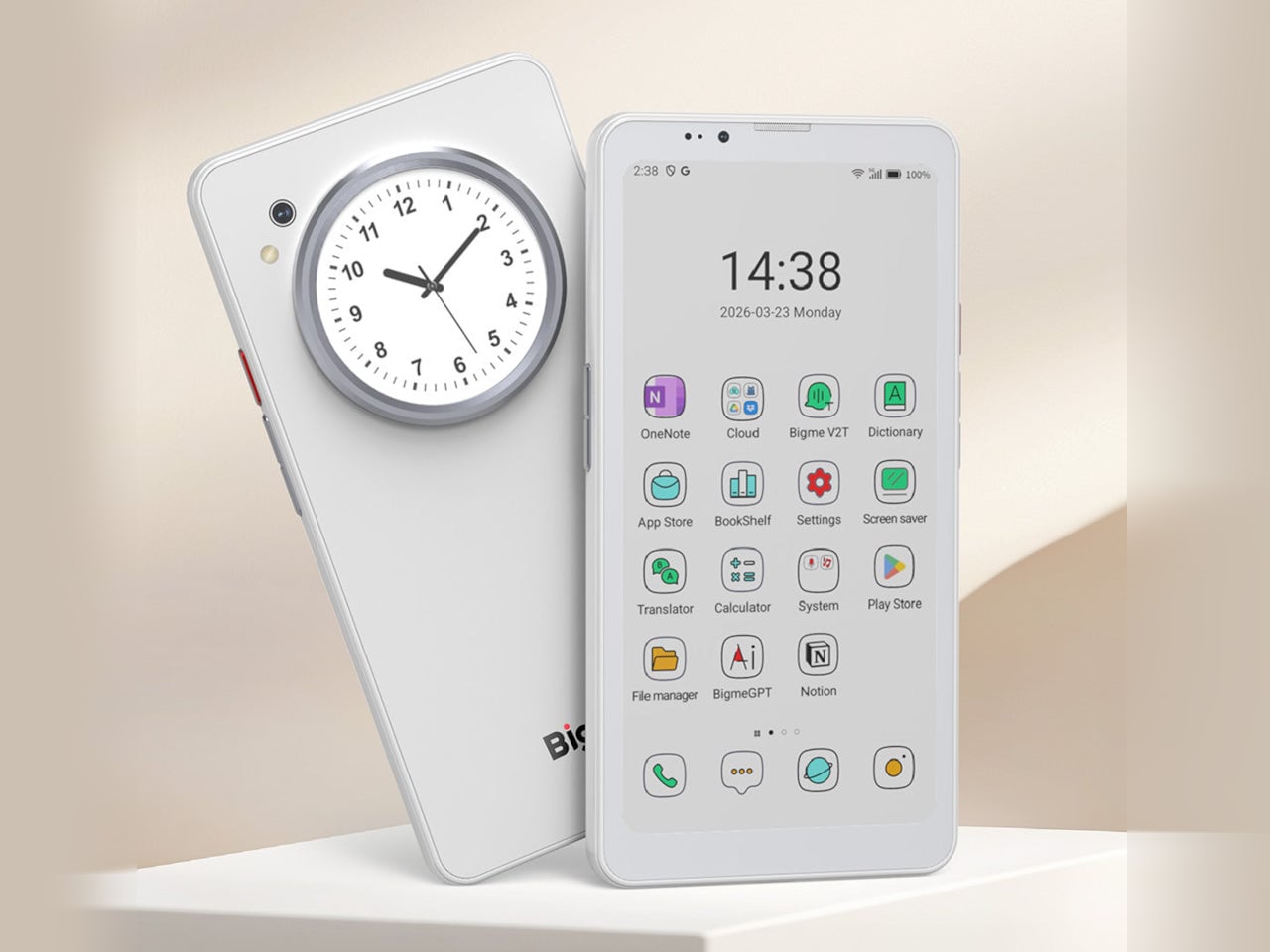
Bigme has been building its HiBreak series into a line of Android smartphones centered on E Ink displays, and the HiBreak Dual is its newest entry. Rather than simply updating the screen, Bigme gave this model two displays: a full-sized E Ink panel on the front and a compact circular LCD on the back, letting the phone handle information at two different levels of urgency.

Designer: Bigme

The main display is a 6.13-inch E Ink screen at 824 by 1,648 pixels, delivering 300 pixels per inch in greyscale mode. The color model supports up to 4,096 colors, and a frontlight with 36 brightness levels covers both dim interiors and bright outdoor settings. Because E Ink reflects ambient light rather than emitting it, reading outdoors is comfortable in a way that backlit displays simply aren’t.

What sets the HiBreak Dual apart from the rest of the lineup is its stylus support, a first for the HiBreak series. A 4,096-level pressure-sensitive pen lets you write, sketch, and annotate directly on the E Ink surface, turning the phone into something closer to a digital notebook. The paper-like texture of the display makes the experience feel more tactile and far less clinical than a standard touchscreen.

The circular LCD on the back measures 1.85 inches and pulls off a surprisingly wide range of tasks. It shows the time, notifications, music controls, and weather at a glance, and also doubles as a viewfinder for the 20MP main camera. Bigme even added an AI pet feature that generates an animated version of your actual pet from a photo, keeping it alive on that small round screen.

Despite the unconventional display setup, the HiBreak Dual doesn’t skimp on the fundamentals. Although dated, Android 14 with full GMS certification keeps the entire Google Play library accessible, and NFC support means Google Wallet and contactless payments work just as they would on any standard Android device. The 5MP front camera handles video calls and everyday selfies without issue, while a fingerprint sensor takes care of security.

Under the hood, the phone runs on a MediaTek Dimensity 1080 processor paired with either 8GB or 12GB of RAM and up to 256GB of internal storage, further expandable by an additional 2TB via microSD. A 4,500mAh battery gets through a full day without much drama, while 5G on dual SIM cards, Bluetooth 5.2, and dual-band WiFi take care of the rest.

Pricing starts at $519 for the 8GB/128GB model, with early bird options in the $359 to $409 range and a 12GB/256GB version also available. It’s a phone designed for people who spend a significant part of their day reading, writing, and staying on top of things through a mobile device, and who’d genuinely rather do it on a screen that asks a little less of their eyes.

The post Bigme HiBreak Dual Has E Ink Up Front and a Round LCD in Back first appeared on Yanko Design.

VitaLink Just Put a 13-Inch Screen and Keyboard Into One Foldable Slab

Par : JC Torres
17 avril 2026 à 01:45

Working on the go rarely looks as tidy as productivity-tool adverts suggest. Most people who travel with serious work needs end up carrying at least two or three things that don’t quite fit together: a tablet or laptop, a compact keyboard if the touchscreen isn’t enough, maybe a portable monitor, and a cable situation that somehow multiplies every time you pack.

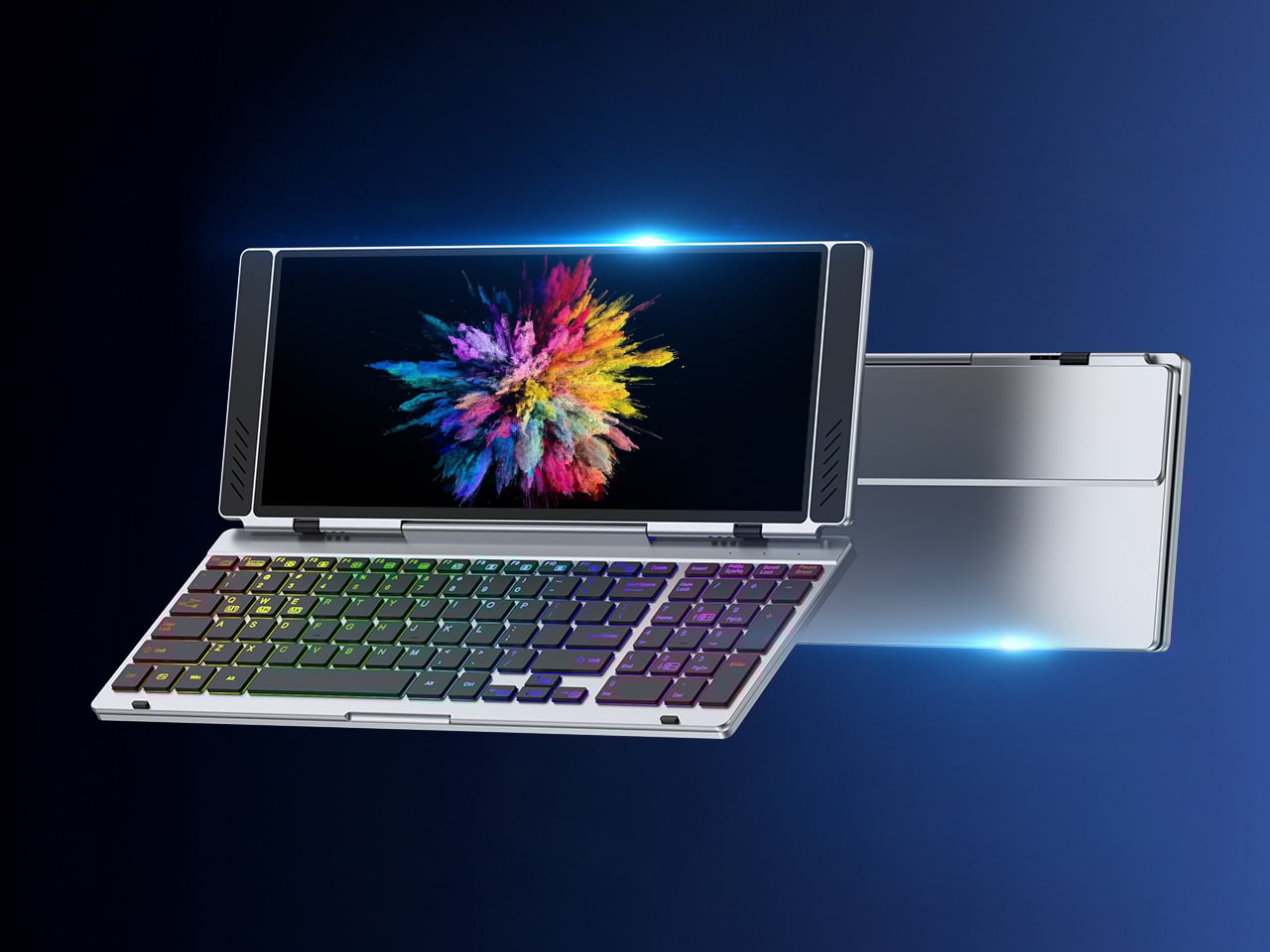
VitaLink is trying to simplify that. The concept combines a full-size keyboard and a large touch display into one foldable object in a CNC aluminum shell. Connect it to any USB-C device and your workspace expands immediately, without a separate stand, a monitor arm, or a bag pocket devoted to adapters. It folds down to 20mm and opens into something that feels genuinely designed.

Designer: VitaLink

Click Here to Buy Now: $279 $658 (58% off). Hurry, only 491/600 left! Raised over $37,000.

The integrated 13-inch display sits directly above the keyboard in what amounts to a compact laptop form factor. The screen runs at a 3840×1600 pixel resolution, a 2.4:1 ultra-wide format rather than a standard 16:9 panel, giving it an unusual amount of horizontal room. There’s enough space to keep two apps open side by side without either feeling squeezed into a corner.

The 180-degree hinge is what makes the compact form actually practical. When you’re done, everything closes into a flat 20mm slab that slips into a laptop sleeve without awkward bulk. The open footprint sits at around 34 × 15 cm, compact enough for a plane tray table, a crowded café counter, or a hotel desk that never seems to fit anything comfortably.

The panel supports 10-point touch, runs at 60 Hz, and delivers 298 PPI pixel density with 100% sRGB color coverage. Touching a screen this size changes how you interact with content. You can swipe, drag, and tap directly on the display while still using the keyboard below, which means managing layers in an editor, scrubbing a timeline, or pulling up references doesn’t require switching between input modes.

The keyboard uses scissor-switch mechanisms with 0.8mm of key travel and wider-than-typical spacing. That added spacing sounds like a minor detail until you’ve spent an hour trying to type accurately on a portable board that prioritizes size above everything else. Three RGB backlight modes let you set the visual tone, and the keys are designed to stay quiet enough for cafés and shared offices.

Two USB-C ports handle video, data, and power delivery through a single cable, and the plug-and-play setup works across Windows, macOS, Linux, iOS, and Android without requiring additional drivers. That compatibility extends to mini PCs, tablets, and handheld gaming consoles, so VitaLink isn’t tied to one kind of device. You’re not locked into a single workflow or a single ecosystem, which is most of the appeal.

Think about what that actually means. You’re in a hotel room with just your iPad and need a proper keyboard and enough screen space to write, edit, and reference something at once. Or you’re at a café with a mini PC and want a setup that doesn’t take over the whole table. Those are the moments where having the keyboard and the display in one object makes a real difference.

The aluminum body does more than keep things thin. CNC-machined aluminum with a frosted anodized finish gives it a rigidity that plastic travel accessories rarely have, protecting the display in transit and keeping the keyboard deck from flexing during typing sessions. It carries more like a slim hardcover notebook than a peripheral, which is a meaningful difference for anyone who’s dealt with a flimsy portable monitor in a crowded bag.

There’s something worth noting in the fact that portable work setups have gotten faster without necessarily getting more cohesive. The bag is still a loose collection of things that don’t quite belong together. VitaLink is at least making a case that the keyboard and the display belong in a single intentional object, built from the start for people whose work doesn’t stay in one place.

Click Here to Buy Now: $279 $658 (58% off). Hurry, only 491/600 left! Raised over $37,000.

The post VitaLink Just Put a 13-Inch Screen and Keyboard Into One Foldable Slab first appeared on Yanko Design.

Marcheur de glace Crimson Desert : comment vaincre ce boss facilement ?

17 avril 2026 à 20:06
En vaquant à vos occupations dans Crimson Desert, vous êtes sans aucun doute tombé sur un adversaire redoutable, à savoir le Marcheur de glace. Cet adversaire imposant de glace ne constitue pas une réelle menace quand on sait comment l’affronter. Et c’est là que nous intervenons puisque nous avons composé...

Tyranocif Pokémon Champions : Pourquoi est-il fort et comment le jouer ?

17 avril 2026 à 19:08
À peine lancée, la méta de Pokémon Champions bat son plein. Plusieurs Pokémon sortent du lot, à l'image de Tyranocif. Il dispose de statistiques extrêmement solide, surtout en forme Méga-Tyranocif, tout en se complétant bien avec d'autres Pokémon en jeu. Notre guide.

Street Fighter (2026) : Jason Momoa en Blanka, 50 Cent, Roman Reigns... Le nouveau trailer est un délire total !

Par : luneera
17 avril 2026 à 18:42
À six mois de sa sortie au cinéma, le nouveau film en live action Street Fighter en dévoile un peu plus sur son histoire et ses personnages, et donne une idée des scènes déjantées qui attendent les spectateurs, avec un premier aperçu du fameux Hadouken de Ryu...

Tanche dorée Crimson Desert : où trouver cet animal légendaire ?

17 avril 2026 à 18:12
Crimson Desert propose de relever de nombreux défis. Parmi eux, le défi du Récit d’au-delà des brumes qui vous demande de trouver une vingtaine d’animaux légendaires. Dans ce guide, on vous propose de découvrir la position de la tanche dorée, l’un des animaux légendaires qui viendra compléter votre liste....

Pragmata : voici les 8 meilleurs conseils que je peux vous donner avant de commencer le jeu !

Après des années d'attente et un développement chaotique qui a frôlé la catastrophe (le jeu ayant repoussé sa date de sortie indéfiniment à une période), Pragmata est enfin disponible ce 17 avril 2026, avec une semaine d'avance sur la sortie initiale. Si jamais vous voulez vous lancer dans cette aventure...

Recrutement Pokémon Champions : tout savoir sur cette mécanique pour récupérer plus de Pokémon

17 avril 2026 à 07:07
Dans le titre Pokémon Champions, l'interface du Ranch de Recrutement permet de rassembler des des Pokémon. Les joueurs délaissent alors l'utilisation des Poké Balls pour acquérir des monstres par l'intermédiaire de contrats de recrutements de 7 jours ou de recrutement définitif. Pokémon rencontrés, coût,...

Le Seigneur des Anneaux : vous ne le savez peut-être pas, mais le chef d'œuvre de J.R.R. Tolkien est né dans la mort et la boue

Par : LilDaun4
17 avril 2026 à 03:59
Le Seigneur des Anneaux est une œuvre fantastique devenue culte, mais ses racines sont bien réelles. Pour comprendre au mieux les écrits de J.R.R Tolkien, il faut s'intéresser à l'un des plus grands traumatismes du siècle dernier.

❌
❌