❌

Vue normale

  • ✇Yanko Design
  • LiberNovo’s motorized office chair reclines to 160 degrees, has seat cooling, and is up to 42% discount
    In 1976, two designers gave the office a chair that moved when you did. The Met calls Emilio Ambasz and Giancarlo Piretti’s Vertebra the first automatically adjustable office chair. Fifty years later, plenty of us still tug knobs and crank levers like we’re docking a spaceship. LiberNovo’s Maxis picks up that old idea and sizes it for bigger frames. Its Black Friday sale opens November 19, with up to 42% off in the US. The Maxis is LiberNovo’s first line built from the ground up for big and tal
     

LiberNovo’s motorized office chair reclines to 160 degrees, has seat cooling, and is up to 42% discount

9 novembre 2026 à 21:45

In 1976, two designers gave the office a chair that moved when you did. The Met calls Emilio Ambasz and Giancarlo Piretti’s Vertebra the first automatically adjustable office chair. Fifty years later, plenty of us still tug knobs and crank levers like we’re docking a spaceship. LiberNovo’s Maxis picks up that old idea and sizes it for bigger frames. Its Black Friday sale opens November 19, with up to 42% off in the US.

The Maxis is LiberNovo’s first line built from the ground up for big and tall users, rated to 399 lbs (181 kg) and certified to BIFMA X5.11, and fitted for people between 5’10” and 6’7″ (178 to 200 cm). Instead of scaling up a standard chair, LiberNovo resized the parts that tend to fail on larger bodies, from the seat depth to the headrest travel. It comes in three versions: Manual, Electric, and Airflow. List prices run $1,299, $1,799, and $1,859, which makes for one big leap and one tiny hop. Let’s walk the staircase one step at a time.

Designer: LiberNovo

Click Here to Buy Now: Black Friday Deals End Soon!

What all three Maxis versions share

Maxis Manual

All three versions of the Maxis share the same big-body frame. The seat is 20.5 inches (52 cm) deep, with a multi-density cushion that runs firmer at the rear and softer at the front edge, where the backs of your thighs rest. The backrest spans 16.9 inches at the shoulders and flares to 20.5 inches at the waist. The U-shaped headrest travels 5.5 inches up and down and 4.7 inches in and out. Arc-shaped armrests open from 15.7 to 23.6 inches wide, so they don’t crowd your waist.

Lean back in a Maxis and the neck support, backrest, armrests, and seat all move together, a many-jointed cousin of the Vertebra’s idea. The eight-panel backrest flexes on 14 dual-link points and 16 ball joints. Six springs engage progressively by angle and weight, which LiberNovo says keeps the recline smooth under a heavier load. Five stops run from 105 degrees (Deep Focus) to 160 degrees (Spine Flow), and LiberNovo suggests 115 to 125 degrees for most of the day. Do the four-step setup once, and LiberNovo says you’ll rarely touch the controls again.

What the $500 step from Manual to Electric adds

Maxis Electric

The Manual keeps lumbar support on a dial, with no motor and no battery, which suits anyone who wants a chair that never needs charging. The Electric swaps that dial for the ErgoPulse motor and carries a 2,200 mAh battery. The motor moves the lumbar zone in or out until it meets your lower back, forming an S-curve, so there’s no reaching behind you to twist a knob. Lumbar is step one of the Maxis setup, so you’ll feel this feature on day one. That’s the first half of what the extra $500 buys.

OmniStretch is the other half, a five-minute motorized stretch sequence that runs while you’re in deep recline. Both the Electric and the Airflow include it, and the Manual skips it. LiberNovo describes it as an in-chair stretch and reset, which makes it a handy pause between long work sessions and the walk to the kitchen. Whether it’s worth a share of $500 depends on how often you’d actually use it. If the honest answer is every afternoon, the math gets friendly fast.

The $60 Airflow upgrade, and how the sale works

Maxis Airflow

The Airflow adds a seat fan to everything the Electric does. A 4,000 RPM centrifugal fan pulls air through a five-layer seat on two levels, and an occupancy sensor pauses it when you stand up, so it never spins for an empty chair. The battery grows from 2,200 to 3,000 mAh, and LiberNovo lists fan noise under 45 dB. The upholstery is Danish Gabriel Atlantic fabric, rated by its maker at more than 100,000 abrasion rubs. At list price, all of that sits $60 above the Electric, which is the easiest call on the page.

LiberNovo’s holiday sale opens November 19 and builds toward Black Friday and Cyber Monday, with up to 42% off in the US. Eligible purchases carry 30-day price protection, so buying early comes with a safety net for qualifying price changes. Every LiberNovo chair is backed by a 6-year frame warranty and a 2-year warranty on electronics. Orders unlock gift tiers by spending, topping out at a travel kit with an inflatable neck pillow, eye mask, and earplugs. US buyers can split the bill into four 0% Klarna payments. Fifty years after the Vertebra, the best pitch for a chair that moves with you is still the simplest: you stop thinking about it.

Click Here to Buy Now: Black Friday Deals End Soon!

The post LiberNovo’s motorized office chair reclines to 160 degrees, has seat cooling, and is up to 42% discount first appeared on Yanko Design.
  • ✇Yanko Design
  • 8BitDo’s $40 Xbox controller has a cable, a headphone jack, and drift-resistant sticks
    Wired earbuds staged a comeback a couple of years ago, helped by Gen Z deciding a dangling white cable looks cooler than an AirPods case. Wired gaming controllers could use some of that goodwill. 8BitDo’s new Ultimate 3C+ Wired Controller for Xbox skips the battery entirely and plugs straight into your console over USB-C. It costs $39.99, carries an official Xbox license, and brings tunable TMR sticks to the lowest-priced model in the Ultimate 3 family. You trade a little freedom of movement fo
     

8BitDo’s $40 Xbox controller has a cable, a headphone jack, and drift-resistant sticks

9 novembre 2026 à 18:30

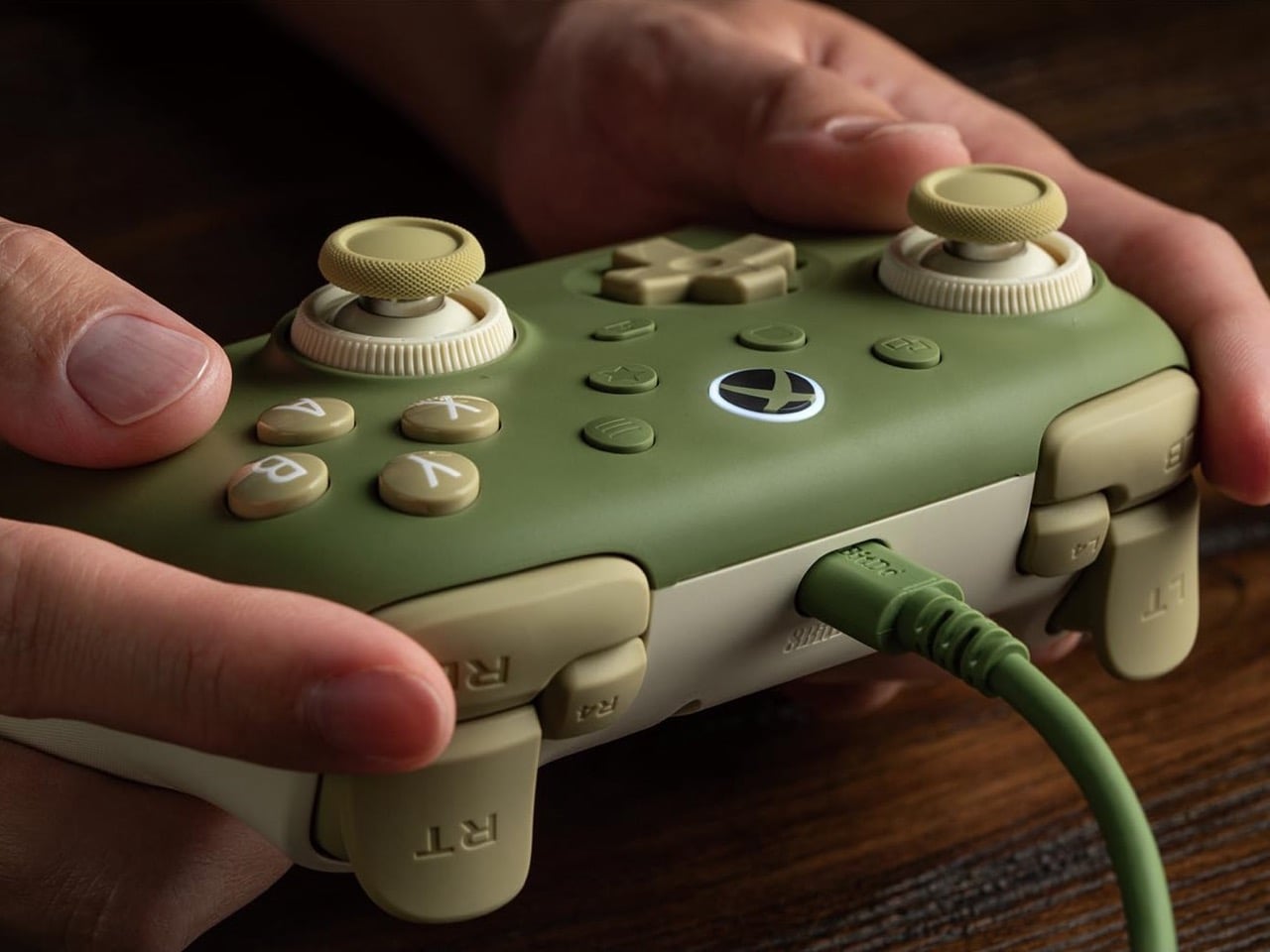
Wired earbuds staged a comeback a couple of years ago, helped by Gen Z deciding a dangling white cable looks cooler than an AirPods case. Wired gaming controllers could use some of that goodwill. 8BitDo’s new Ultimate 3C+ Wired Controller for Xbox skips the battery entirely and plugs straight into your console over USB-C. It costs $39.99, carries an official Xbox license, and brings tunable TMR sticks to the lowest-priced model in the Ultimate 3 family. You trade a little freedom of movement for a controller that never needs charging, pairing, or a panicked hunt for a dongle.

There’s no battery to degrade over years of late-night Call of Duty sessions, and a 3.5mm jack sends game audio straight to your headset. The controller works with Xbox Series X|S, Xbox One, and Windows 10 or later. It arrives a few weeks after the wireless Ultimate 3C+, which launched in October for PC and Android at the same price. The Xbox version is built for console players who would rather never think about charge levels again. The included cable stretches 8.2 feet (2.5m), so measure your couch distance accordingly.

Designer: 8BitDo

TMR sticks you can tune for shooters or racing

8BitDo’s Dual Force Ring sticks combine adjustable tension with a soft-stop silicone ring under each stick to cushion the moment it hits the edge of its travel. Increase the tension if you prefer firmer resistance when aiming in shooters, or loosen it for the long, sweeping inputs of racing games. A 12-bit ADC sampling chip and a 216MHz processor read the stick position, which 8BitDo says improves precision and response. The sensors are TMR, short for tunneling magnetoresistance, and track stick position magnetically, without sliding electrical contacts. Potentiometer sticks rely on contacts that physically wear, which can cause stick drift.

Earlier this year, 8BitDo’s fanciest stick tech lived in controllers costing $99 and up. The Ultimate 3 series kicked off at CES 2026 with the $149.99 Ultimate 3E, and the $99 Ultimate 3 for Xbox brought force rings along in May. Now that adjustable tension sits inside a $39.99 controller with a cable hanging off it. Compare that with Microsoft’s Xbox Nano Controller, a $49.99 pocket pad that still ships with conventional potentiometer sticks. If your last Xbox controller died of drift, that difference in sensor tech may be the most persuasive line on this spec sheet.

Switchable triggers, extra bumpers, and lockable back buttons

A switch flips the triggers between linear Hall Effect mode and short micro-switch mode. Linear gives you the full analog pull for feathering a throttle, while micro-switch turns each trigger into something closer to a mouse click. Impulse Trigger rumble lives inside the triggers, with more vibration tucked into the grips. 8BitDo says a dedicated rapid-stop chip cuts vibration off quickly, so a gunshot’s rumble doesn’t linger. The idea is that when an explosion fades on screen, your palms stop buzzing too.

Two extra bumpers, labeled R4 and L4, join the standard shoulder buttons and can be remapped without software. Two back buttons sit under the grips, and a lock disables them when you would rather not trigger a reload by accident. 8BitDo describes the D-pad as clicky but smooth, says it has refined the ABXY buttons, and lists wear-resistant stick rings. It also widened the grip angle compared with the older Ultimate C Wired, stretching the body to 5.96 inches (151.5mm) long. It weighs 7.9 ounces (224g), just 8 grams more than its predecessor, with the revised grip intended to offer a more relaxed hold.

Ten dollars less than the Xbox Nano

Compared with the wireless 3C+, the Xbox model drops the turbo function and its sibling’s polling rate of up to 1,000Hz. It also skips the cardboard DIY stand that ships in the wireless box, a minor tragedy for anyone who enjoys a little arts and crafts with their unboxing. In return, you get the headphone jack, full Xbox console support, and an official license. Competitive players chasing every millisecond may miss the higher polling rate. For couch play, cable reach is likely to be the more immediate concern.

At $39.99, the 3C+ Wired undercuts the $49.99 Xbox Nano by ten dollars and Microsoft’s standard $64.99 controller by twenty-five. It also costs just $5 more than the older Ultimate C Wired for Xbox, which paired Hall Effect sticks with an RGB light ring. 8BitDo swapped that light show for tunable TMR sticks, which seems a useful trade for anyone more interested in stick feel than desk glow. Pre-orders are live on the 8BitDo eShop and Amazon in the US, with Matcha Green and Charcoal Gray units shipping November 16.

The post 8BitDo’s $40 Xbox controller has a cable, a headphone jack, and drift-resistant sticks first appeared on Yanko Design.

  • ✇Yanko Design
  • The $179 Magic Screen gives any MacBook a touchscreen with stylus support
    Hidden around a modern MacBook display are magnets used to tell the laptop you shut the lid. Intricuit, a small hardware startup, looked at those magnets and saw a free mounting system. Its Magic Screen uses them to snap a touch-sensitive glass panel over your display, adding tap, swipe, and pinch controls to the MacBook you already own. It costs $179 on Kickstarter. Apple’s approach is the new MacBook Pro with PROLED XDR Display, which starts at $2,899, or roughly sixteen Magic Screens with ch
     

The $179 Magic Screen gives any MacBook a touchscreen with stylus support

9 novembre 2026 à 15:20

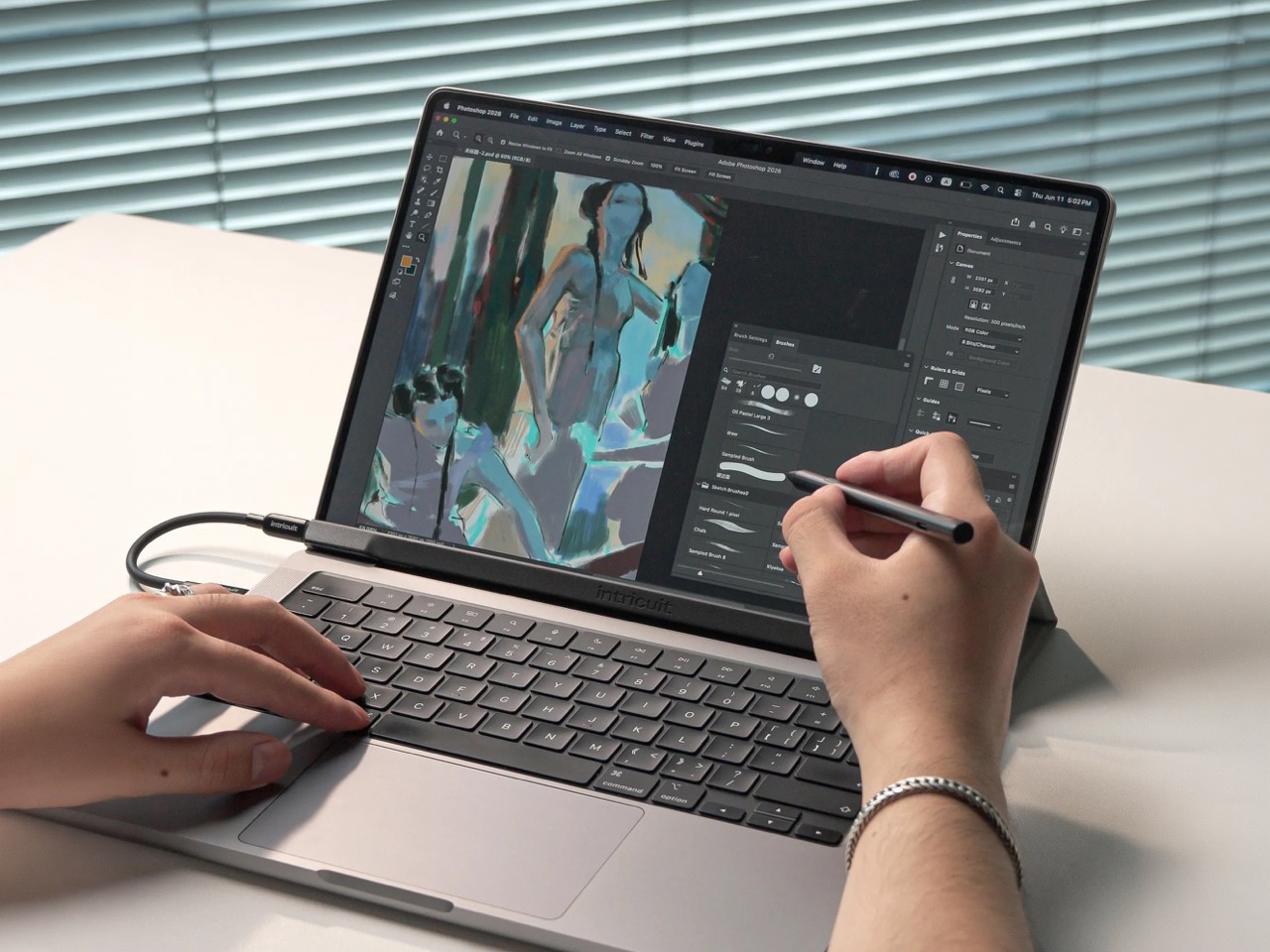
Hidden around a modern MacBook display are magnets used to tell the laptop you shut the lid. Intricuit, a small hardware startup, looked at those magnets and saw a free mounting system. Its Magic Screen uses them to snap a touch-sensitive glass panel over your display, adding tap, swipe, and pinch controls to the MacBook you already own. It costs $179 on Kickstarter. Apple’s approach is the new MacBook Pro with PROLED XDR Display, which starts at $2,899, or roughly sixteen Magic Screens with change left over for snacks. That’s a whole laptop rather than an accessory, but it’s a steep entry price if touch is all you’re after.

Apple integrates the touch sensor into a tandem OLED panel and uses a stiffer hinge designed to limit screen bounce when you tap it. It also supports zero styluses, Apple Pencil included, which is a little funny coming from the company that sells the Apple Pencil. The Magic Screen ships with a pen that reads 4,096 pressure levels, previews its tip position as it hovers, and supports palm rejection while you draw. Intricuit lists compatibility with M1 and newer MacBook Pros, M2 and newer Airs, and even the $599 MacBook Neo, bringing that last combination to $778.

Designer: Intricuit

Snap, Plug, Tap: How the Glass Registers Your Fingers

The panel is tempered glass with a capacitive digitizer built in, the same kind of touch technology your phone uses, tracking up to ten fingers at once. Intricuit lists transparency at 99% or better and a response time of 8ms. A single USB-C cable carries the touch data and draws a claimed 0.6 watts from your MacBook, so there’s no extra battery to babysit. The 14-inch MacBook Pro version weighs 4.3 ounces (122.8 grams), and the 16-inch version comes in at 6.1 ounces (172.6 grams). Basic touch works without the app; Intricuit’s software for macOS Sonoma or later adds further controls.

Tom’s Guide spent three weeks with a Magic Screen and came away convinced macOS is far more touch-ready than Apple ever let on. Taps open apps, a press-and-hold summons the right-click menu, and familiar trackpad gestures carry over to the glass. Intricuit demos it triggering clips in Resolume Arena, orbiting models in SketchUp, and shoving sticky notes around Miro boards, all situations where reaching for something directly has an obvious appeal. It also works with iPhone Mirroring, letting you tap through your phone’s apps on the larger display. Fingerprints land on the overlay rather than directly on your MacBook’s screen.

The Stylus Apple Skipped Comes in the Box

The included pen uses USI 2.0, the Universal Stylus Initiative standard supported by compatible Chromebooks, and reads 4,096 levels of pressure. That gives you control over line weight, from a light hairline to a fat brushstroke, while palm rejection is designed to let you rest your hand on the glass as you draw. Hover detection starts about 0.4 inches (10mm) away, previewing the tip’s position before it touches down. Intricuit rates the battery at 100 hours, with a 40-minute USB-C recharge and no Bluetooth pairing required. Your Apple Pencil isn’t compatible, though it won’t work on Apple’s new MacBook Pro either.

Pop the Magic Screen off and it becomes a flat pen tablet, a familiar setup for anyone who has used a Wacom. Drawing on an upright laptop screen means working against gravity and a hinge, while laying the panel on a desk lets you rest your arm. The folio case folds into a stand for this mode. When the panel goes back on your display, the case braces against the lid to reduce wobble under your fingers. Apple’s Sidecar offers another route to drawing on a Mac, but requires an iPad and an Apple Pencil alongside the laptop. Intricuit puts the touch panel and pen in one $179 box, provided you already own a compatible MacBook.

What $2,899 Gets You at the Apple Store

Apple’s price buys a complete laptop with a tandem OLED panel rated to peak at 2,000 nits and an integrated touch sensor. The hinge is stiffer, the 14-inch body weighs 3 pounds, and the glowing Apple logo is back on the lid for the nostalgics. That package costs $400 more than the equivalent standard MacBook Pro. The Magic Screen comes with its own compromises: a cable occupying a port and a panel you need to remove before closing the lid. Intricuit built a stopper into the bottom edge to keep the lid from closing onto it, a bit of idiot-proofing that could save an expensive mistake.

The Magic Screen is available for $179 after a successful crowdfunding run, a $60 discount off its planned $239 retail price. Pick your size carefully, since each of the five versions is fitted to a specific MacBook display, and the M1 MacBook Air sits this one out. Each box includes the panel, stylus, folio case, USB-C cable, and a polishing cloth for the inevitable fingerprints.

The post The $179 Magic Screen gives any MacBook a touchscreen with stylus support first appeared on Yanko Design.

  • ✇Yanko Design
  • This Logitech Surgical Kit Concept Turns XR Controllers Into Medical Instruments
    Before a pilot flies you to Cancún, they’ve logged hours in a simulator crashing planes that don’t exist. Surgical training has had a harder time getting there, and residents often get thin hands-on practice before working on living patients. Niklas Andreasen, a graduate of Sweden’s Umeå Institute of Design, set out to fix that with MX Surgical, a mixed reality training kit he developed with Logitech. It pairs replica surgical instruments with a headset, so trainees can rehearse procedures anyw
     

This Logitech Surgical Kit Concept Turns XR Controllers Into Medical Instruments

9 novembre 2026 à 14:20

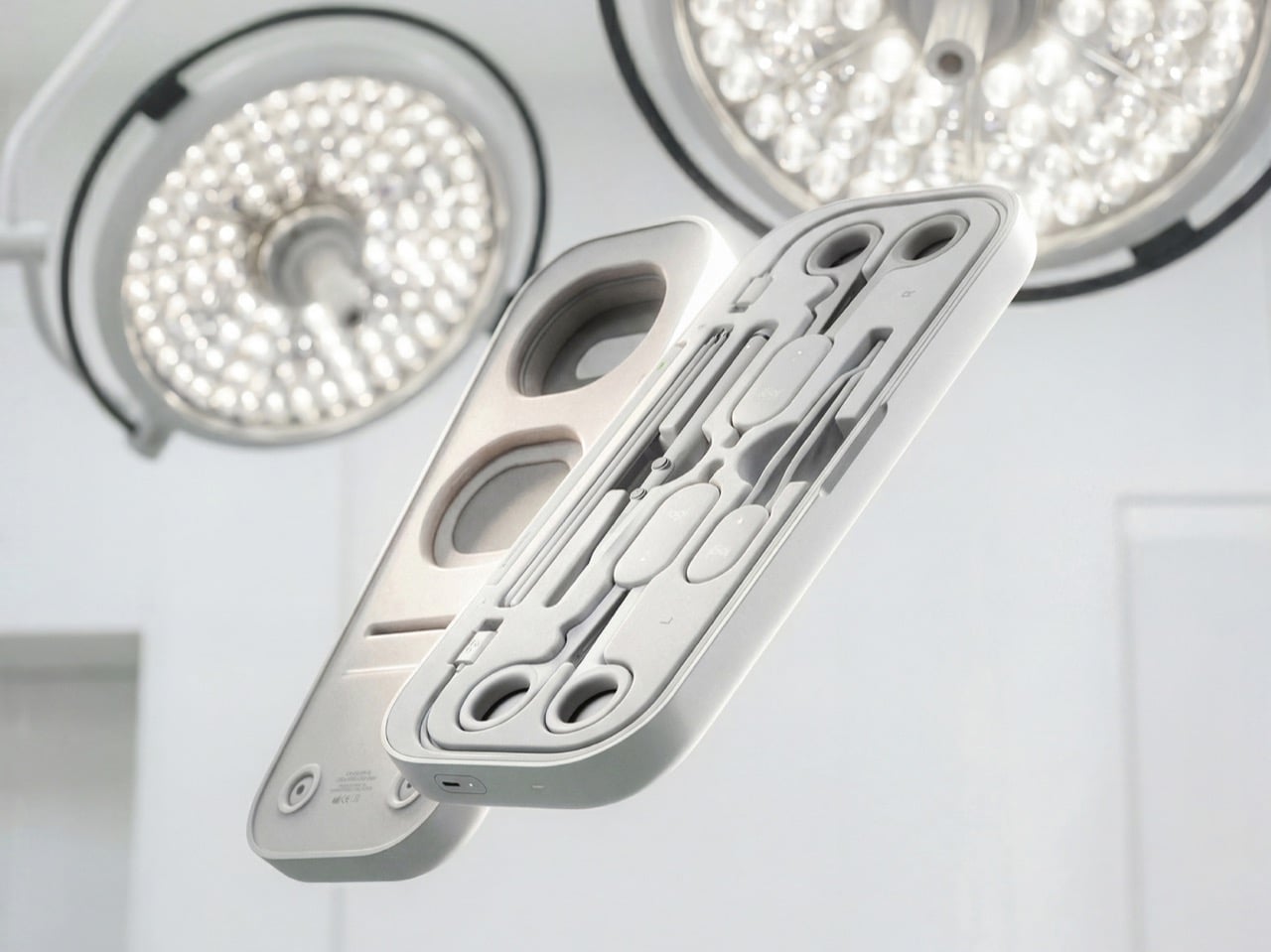
Before a pilot flies you to Cancún, they’ve logged hours in a simulator crashing planes that don’t exist. Surgical training has had a harder time getting there, and residents often get thin hands-on practice before working on living patients. Niklas Andreasen, a graduate of Sweden’s Umeå Institute of Design, set out to fix that with MX Surgical, a mixed reality training kit he developed with Logitech. It pairs replica surgical instruments with a headset, so trainees can rehearse procedures anywhere they can open a case. Call it a flight sim for scalpels, and a lot more portable than the six-figure simulator rigs some hospitals bolt to the floor.

Andreasen grouped surgical tools into three mechanical families (ring-handled scissors and clamps, forceps, and pen-grip instruments), then designed one reconfigurable controller for each. Sensors and adjustable resistance mechanics inside recreate how each tool pushes back in your hand, and layered pads give you something to actually cut into. The headset handles the anatomy, while a companion platform scores you on precision, force, and timing like a very strict video game. It’s a concept for now, with no pricing or launch plans. Even so, it has already picked up Emerging Product Designer of the Year at the 2026 European Product Design Awards, three Core77 student wins, and a nomination for Red Dot’s Peter Zec Prize.

Designer: Niklas Andreasen (Umeå Institute of Design, in collaboration with Logitech)

Three Controllers, One Entire Instrument Tray

A real surgical tray can hold dozens of instruments, and building a replica of each one would turn the kit into a hardware store. Andreasen sidestepped that by mapping what instruments have in common mechanically. Scissors, needle holders, and clamps all pivot on a ring-handled scissor action. Forceps pinch, and scalpels and probes ride in a pen grip. Each MX Surgical controller covers one of those families, tuning its spring tension and range of motion in real time so the same body can feel like a fine dissecting scissor one minute and a stiff clamp the next.

Logitech has spent over four decades shaping mice, keyboards, and controllers around human hands, and the collaboration shows. The kit wears the MX family’s soft radii and matte warm grays, so anyone who owns Logitech’s MX Ink stylus for Meta Quest will feel right at home. Three mentors from Logitech, Nick Jinkinson, Andreas Connellan, and Aidan Kehoe, guided the project. The cutaway renders show a rotary mechanism tucked right at the pivot, where the resistance needs to happen, inside ring handles your fingers already know from the real tool. Compare that with FundamentalXR, a leading haptic surgical platform that has traditionally relied on desk-mounted haptic arms.

Layered Pads Handle the Feel, the Headset Handles the Gore

Haptics can only fake so much, so MX Surgical gives your hands something physical to work on. Layered training pads stand in for tissue at different depths, and they slot into a die-cut tray inside the case. As you work through a procedure, the mixed reality overlay progressively reveals deeper layers of anatomy and shifts to match what you’re doing. Hospitals and universities can stock a material library of swappable pads and components, tailoring the kit to a specialty or a specific case. Residents without a headset aren’t stuck either, because a simpler screen-based version handles the visual side.

This hybrid approach borrows from both ends of current surgical training. On one end are cheap suturing pads that residents practice stitches on at home, which feel real but teach nothing about context. On the other end are VR simulations that show you an entire operating room but feel like waving a remote around. MX Surgical splits the job, letting the pad handle touch and the headset handle everything you need to see. The whole thing packs into a slim carry case, which makes it something you can take home, practice with at 11pm, and toss in a bag for your next rotation.

A Scorecard for Skills Surgeons Used to Pick Up by Osmosis

Every practice session gets logged by the companion platform, which tracks motor patterns, motion efficiency, accuracy, force control, and response timing. Those numbers describe the stuff a senior surgeon notices from across the room, like a hand that hesitates or grips too hard. The platform adjusts difficulty as you improve, keeps a digital anatomy atlas on hand, and lets mentors review your sessions remotely. Residents can train alone or in teams, then sit down with an attending to go through the results together. Andreasen’s own framing is that this data captures knowledge residency has always passed down person to person without ever writing it down.

That puts MX Surgical in direct conversation with William Halsted, who founded the surgical residency program at Johns Hopkins in 1890 around a simple motto: see one, do one, teach one. A century later, a design student added a fourth step, practice one, and made it look like something that belongs next to your keyboard. Andreasen built it through interviews and observation sessions with surgeons and educators in Sweden and Germany, with mentors from Logitech, Intuitive Surgical, and IDEO. In a Red Dot interview, he said he looks for ideas that “earn and defend their place.” A kit that lets a resident make their first mistake on a pad instead of a person sounds like one of those ideas.

The post This Logitech Surgical Kit Concept Turns XR Controllers Into Medical Instruments first appeared on Yanko Design.

  • ✇Yanko Design
  • Someone built a PlayStation arcade cabinet on ebay, and now I want to play Tekken
    The PlayStation 5 is having a wild autumn. Modders have cracked it wide open, and people are now hauling Steam games onto the console and PS5 games onto their PCs, like two neighbors who swapped houses just to see what happens. Meanwhile, an eBay seller called arcadeplug has gone in the opposite direction, building a PlayStation-themed bartop arcade cabinet that plays the original PS1 library old-school style, standing up with a joystick in hand. It runs on a Raspberry Pi 4 with RetroPie, uses
     

Someone built a PlayStation arcade cabinet on ebay, and now I want to play Tekken

8 novembre 2026 à 21:45

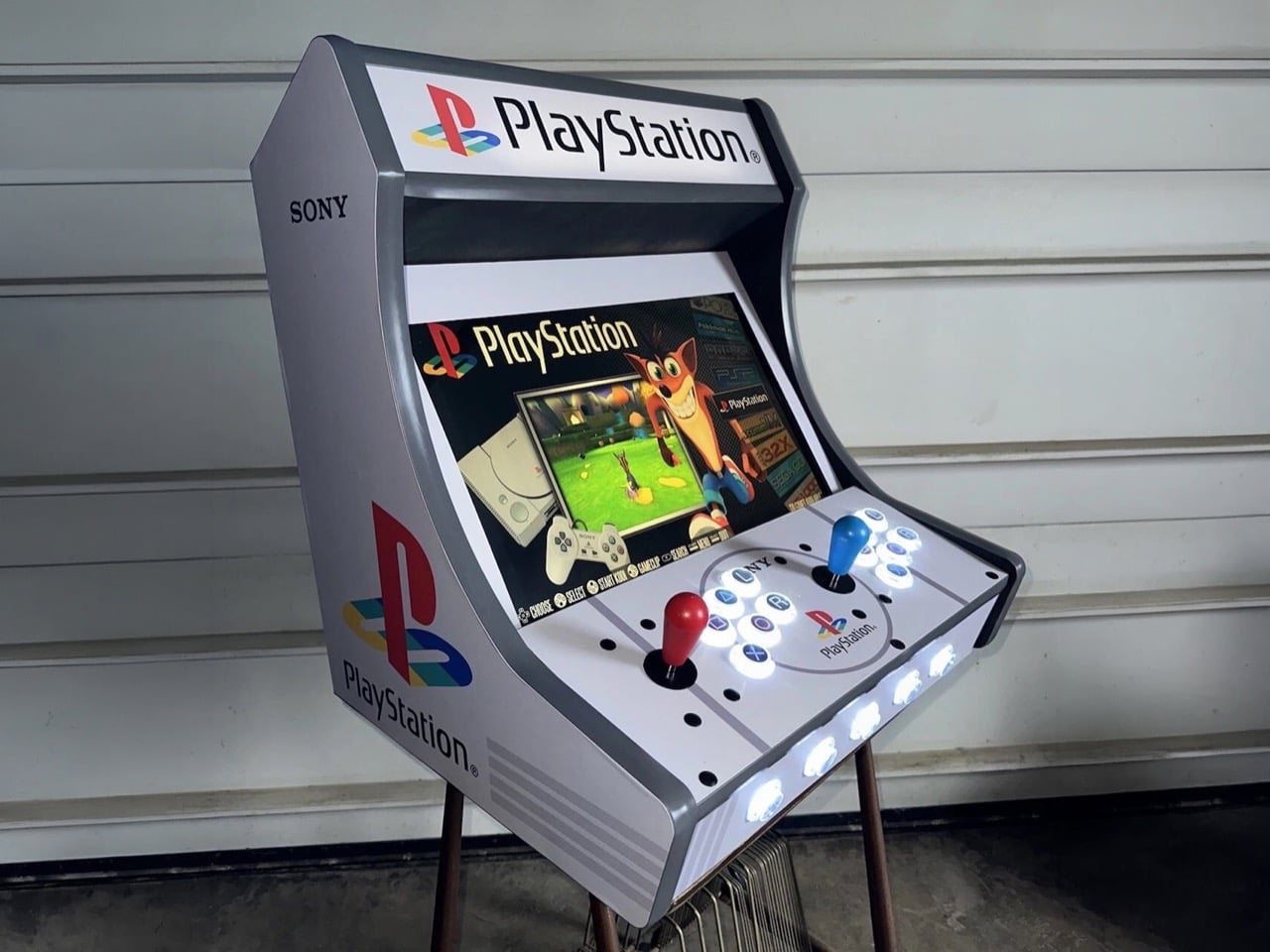
The PlayStation 5 is having a wild autumn. Modders have cracked it wide open, and people are now hauling Steam games onto the console and PS5 games onto their PCs, like two neighbors who swapped houses just to see what happens. Meanwhile, an eBay seller called arcadeplug has gone in the opposite direction, building a PlayStation-themed bartop arcade cabinet that plays the original PS1 library old-school style, standing up with a joystick in hand. It runs on a Raspberry Pi 4 with RetroPie, uses a 19-inch screen, and costs $1,029.99. Sony never made this machine. Somebody with a lot of vinyl and a free weekend decided the universe needed it anyway.

I’ll admit the first photo got me. The gray body, the four-color PS logo on the side, and the glowing triangle, circle, cross, and square buttons hit the same part of my brain that still remembers the PS1 boot-up sound. It’s a fan build in official-looking clothes, and the clothes are excellent. The funny part is the history, because PlayStation hardware actually powered ’90s arcade cabinets, running Tekken on Namco’s System 11 board months before the console launched. Those machines wore other companies’ art. This one wears Sony’s art with zero Sony hardware inside, which is a deliciously backwards way to close the loop.

Designer: arcadeplug

Sony Snuck the PlayStation Into Arcades Before It Hit Living Rooms

Tekken’s road to the arcade ran through a 1993 meeting where Sony’s Ken Kutaragi walked Namco’s Shegeichi Nakamura through the early PlayStation specs. Namco had been building Tekken for its pricey System 22 board, a machine meant to slug it out with Sega’s Virtua Fighter 2. After that meeting, the project moved to System 11, a cheaper board built on PlayStation architecture. The plan was simple economics, leaving Sega the big arcades while Tekken chased the smaller ones that couldn’t afford premium hardware. Bringing the game home was easy, since the arcade board and the console were basically siblings. An upgraded System 12 followed, debuting with Tekken 3 in March 1997.

Sony also built its own arcade boards, the ZN-1 and ZN-2, and handed them to studios like Capcom, Taito, and Tecmo. Street Fighter EX, Battle Arena Toshinden 2, and Tetris: The Grand Master all ran on PlayStation-derived silicon, though nothing on the cabinets told you so. Sony kept the boards unbranded, letting each publisher put its own name and art on the outside. My favorite slip comes from Acclaim, whose NBA Jam Extreme manual casually calls it the “Sony Play Station Arcade Board.” Sony’s arcade boards were PlayStations in disguise. This cabinet is the disguise with no PlayStation inside.

Why the PS1’s Graphic Design Looks This Good Blown Up

Teiyu Goto, the designer behind the original PlayStation and its controller, picked shapes for the face buttons because every rival was using letters. Each shape carried a meaning, with the circle and cross standing for yes and no, the triangle for a viewpoint, and the square for a sheet of paper or a menu. He gave them colors too, and had to convince management that the red circle and blue cross were intentional. Three decades later, those four shapes work as a logo in their own right. On this cabinet, they sit on translucent arcade buttons lit from within, and you can read them from across the room.

Manabu Sakamoto’s 1994 PS logo takes over the side panels, printed big enough to study how it works. Sakamoto wanted the mark to suggest 3D without simply adding thickness, so he stood the P upright and laid the S flat behind it, using four primary colors. At cabinet scale, that illusion of depth looks better than it ever did on a console lid. The body borrows the PS1’s light gray, and a ring around the center of the control panel frames another PS logo, which reads to me like a nod to the original console’s round disc lid. All of it is laminated vinyl, and it sells the fantasy completely.

A Raspberry Pi, Six Buttons, and a $1,029.99 Price Tag

Inside sits a Raspberry Pi 4 with a 128GB build running RetroPie, the open-source software that bundles emulators for the Pi. Games play out on a 19-inch LCD, backed by a pair of 4-inch speakers, Sanwa-clone joysticks and buttons, and LED lighting throughout. Each player gets one stick and six buttons, the four PlayStation symbols plus an L and an R. That layout drops the original controller’s second pair of shoulder buttons, which suits Tekken and Street Fighter Alpha far better than a 40-hour Final Fantasy run. You’ll also be standing the whole time, which feels right for a fighter and slightly brutal for a JRPG.

On eBay, the Custom PlayStation Multicade cabinet goes for $1,029.99 or best offer, shipping from Ohio with a one-year warranty covering the speakers, buttons, and Pi. For scale, Arcade1Up’s licensed Street Fighter II cabinets run roughly $350 to $650, and a SuperStation One FPGA console costs about $210 to $250 if you just want PS1 games on a TV. Neither comes dressed like this, though. The timing makes me smile, because Sony is ending physical game disc production in 2028, and here’s a shrine to the console that made CDs the default for a generation. Modders are prying the PS5 open to see what it can become. Somebody in Ohio gave the PS1 the arcade cabinet it never had.

The post Someone built a PlayStation arcade cabinet on ebay, and now I want to play Tekken first appeared on Yanko Design.

❌