❌

Vue normale

  • ✇Yanko Design
  • This DIY PlayStation 2 Handheld Gives a Foldable Phone Screen a New Job
    The PlayStation 2 was never something you could casually slip into a bag, unless you planned to bring a screen and controller along for the ride. The PlayStation 2 DUO brings those pieces together in an unofficial DIY handheld with an unusual trick. Its screen actually bends in the middle, letting you fold the console when it’s time to put the game away. There’s plenty of familiar territory around that unfamiliar fold. A purple shell surrounds the display, with a D-pad and the four recognizable
     

This DIY PlayStation 2 Handheld Gives a Foldable Phone Screen a New Job

Par : JC Torres
28 octobre 2026 à 12:20

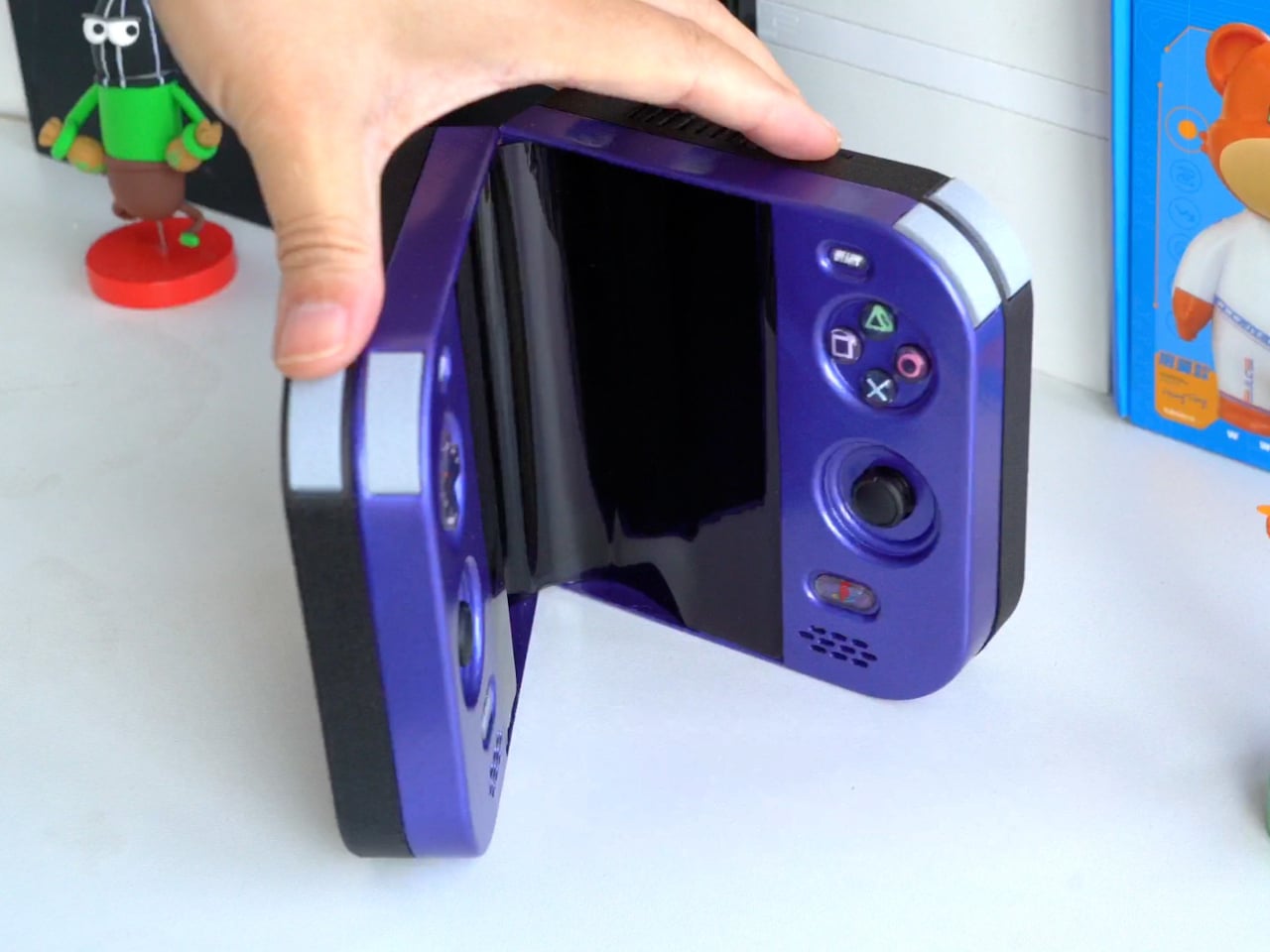
The PlayStation 2 was never something you could casually slip into a bag, unless you planned to bring a screen and controller along for the ride. The PlayStation 2 DUO brings those pieces together in an unofficial DIY handheld with an unusual trick. Its screen actually bends in the middle, letting you fold the console when it’s time to put the game away.

There’s plenty of familiar territory around that unfamiliar fold. A purple shell surrounds the display, with a D-pad and the four recognizable PlayStation symbols sitting above two analog sticks. Start and Select occupy the upper corners, while speaker grilles sit below the controls. The arrangement looks reassuringly conventional, which is probably helpful when the screen between your hands is doing something rather unconventional.

Designer: LCLDIY

That screen is a single flexible panel, rather than two separate displays interrupted by a hinge. The project’s earlier development notes describe a 7.8-inch screen salvaged from a foldable phone. It gives the DUO a generous central canvas when opened, without committing the handheld to that same width inside a bag. Of course, making a screen bend doesn’t make its limitations magically disappear.

The panel needs room to curve, and forcing it into a sharp fold would damage it. That requirement shaped the casing and its hinge, leaving a broad bend instead of squeezing the halves completely flat together. It’s a less tidy package than a closed clamshell might suggest, but the extra space has a practical purpose: keeping that delicate display in one piece.

There’s genuine PlayStation 2 hardware inside as well, rather than a newer computer pretending to be Sony’s console. Getting it to fit required cutting down the original motherboard and rearranging its supporting electronics. A 3D-printed enclosure brings everything together, turning equipment once tethered to a television into something you can hold between both hands. The nostalgia extends beyond the buttons, in other words.

The folding body makes the electronics more complicated, of course. Separate control boards occupy the two sides, with a ribbon cable linking them across the center. The trimmed motherboard also carries a small cooling fan and heatsink. There’s quite a bit happening underneath that playful exterior, particularly for a device whose moving parts include the surface you’re supposed to be staring at.

Folding it up reduces the footprint, but doesn’t automatically make this a pocket console. The published project information doesn’t establish its weight, closed dimensions, or battery runtime, so there’s little reason to start planning an entire flight around it. More importantly, this is a completed hobby build, not an upcoming Sony handheld with a price tag and a place on store shelves.

Enclosure printing files and a PCB archive are available on the project page, although they don’t amount to a complete assembly guide. Recreating the DUO still involves board modification and careful work around a flexible display. That might temper the urge to make one immediately, especially if your experience with PlayStation hardware mostly involves inserting discs rather than cutting up circuit boards.

The post This DIY PlayStation 2 Handheld Gives a Foldable Phone Screen a New Job first appeared on Yanko Design.
  • ✇Yanko Design
  • Strapsicle’s iPad Cases Trade Gripping the Edges for a Silicone Hand Strap
    Apple spends plenty of effort making the iPad thin and light, but that doesn’t mean holding one for an entire chapter feels effortless. A protective case can give it more bulk without giving your fingers much help. Strapsicle’s iPad cases take a different approach, adding a silicone strap that lets your hand support the tablet from behind instead of constantly squeezing its edges. The most conspicuous part of the design is also its most useful idea. Strapsicle calls it the XO strap, a circular
     

Strapsicle’s iPad Cases Trade Gripping the Edges for a Silicone Hand Strap

Par : JC Torres
28 octobre 2026 à 11:20

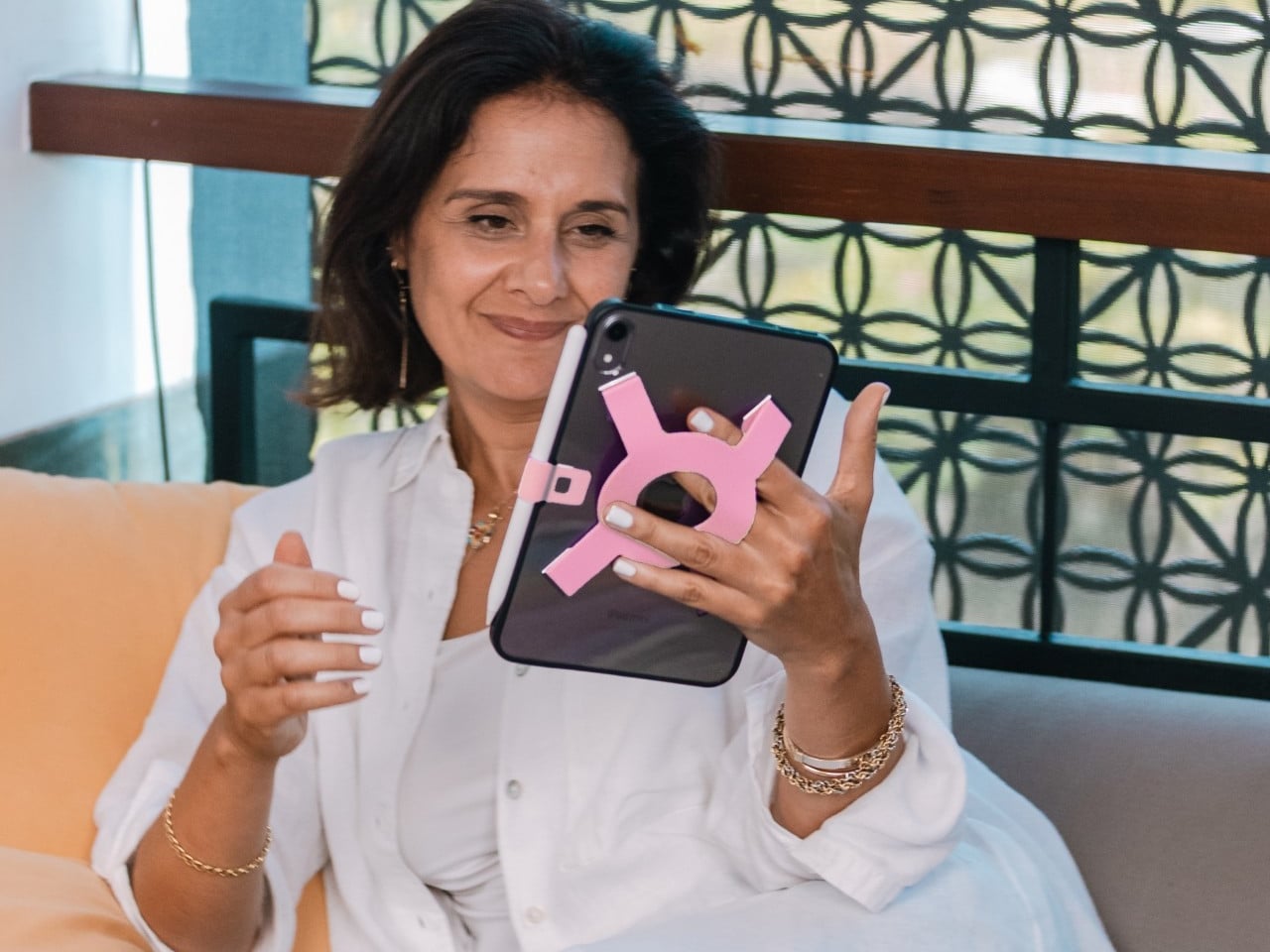
Apple spends plenty of effort making the iPad thin and light, but that doesn’t mean holding one for an entire chapter feels effortless. A protective case can give it more bulk without giving your fingers much help. Strapsicle’s iPad cases take a different approach, adding a silicone strap that lets your hand support the tablet from behind instead of constantly squeezing its edges.

The most conspicuous part of the design is also its most useful idea. Strapsicle calls it the XO strap, a circular center with four diagonal arms attached to the case. Slide your fingers underneath, and the flexible silicone sits across the back of your hand. That gives the iPad another point of support without turning it into something with a bulky carrying handle.

Designer: Strapsicle

That arrangement also leaves room to change how you hold the tablet. Your fingers can slip under different parts of the strap for portrait reading or landscape browsing, with either hand taking a turn. Of course, the case doesn’t make an iPad weightless. It’s intended to reduce reliance on pinching the edges, not remove the need to support the device at all.

Eventually, though, even the most interesting book has to make way for something else. The front cover folds along its geometric creases to become a stand, offering portrait support for reading and a steeper 75° landscape position for watching videos. There’s also an 8° setup for typing and drawing, bringing the screen closer to the tabletop rather than holding it almost upright.

The cover doesn’t have to follow you through every activity, thankfully. It detaches completely, leaving the rear strap accessible without a folded flap competing for space behind your hand. Small pins connect it to the shell rather than magnets, so removing it is a deliberate step. Put it back on when you’re finished, and the screen has a cover for the trip home.

There’s a smaller silicone loop along the edge for an Apple Pencil, keeping the stylus with the tablet instead of loose in a bag. The main straps are interchangeable, too, so changing colors doesn’t require replacing the whole case. Pink, dark teal, and black give that unusual rear shape a little personality, while the transparent back leaves the iPad’s own finish visible.

Strapsicle lists two sizes, fitting the sixth- and seventh-generation iPad mini or the 10th-generation iPad and iPad (A16). Its announced US launch prices are $69.99 for the mini case and $79.99 for the larger version. The company says they’re shipping now, with the October 26, 2026, announcement marking their B&H retail debut. DataVision sales are scheduled to follow in November.

There is a tradeoff to all that extra support, however. Strapsicle lists the complete mini case at about six ounces and the larger version at 9.8 ounces, including their covers and straps. You’re adding weight to something you’ll still have to hold. Taking the cover off for a chapter on the couch makes sense, then, provided you remember to put it back before heading out.

The post Strapsicle’s iPad Cases Trade Gripping the Edges for a Silicone Hand Strap first appeared on Yanko Design.

New Glucose Monitor Enters Human Testing: No Skin-Worn Device Needed

28 octobre 2026 à 11:03

Senseonics has begun testing Freedom, an implanted glucose monitor that could track blood sugar for a year without wearable hardware. Here's how it would work.

The post New Glucose Monitor Enters Human Testing: No Skin-Worn Device Needed appeared first on TechRepublic.

  • ✇Yanko Design
  • Instax Mini Evo 2 Brings Retro Fun Without Giving Up Digital
    One of the things that I’d like to explore more in 2027 is taking more photos of the things around me and the things I’ll be experiencing in the new year. I’m still not good enough to warrant getting a DSLR camera, but I would be willing to try out digital cameras where I can experiment and play around with filters and textures while also being able to make the photos live outside of my camera roll. Fujifilm’s Instax Mini Evo 2 is one such camera, with tactile controls, a large touchscreen, 10
     

Instax Mini Evo 2 Brings Retro Fun Without Giving Up Digital

28 octobre 2026 à 10:20

One of the things that I’d like to explore more in 2027 is taking more photos of the things around me and the things I’ll be experiencing in the new year. I’m still not good enough to warrant getting a DSLR camera, but I would be willing to try out digital cameras where I can experiment and play around with filters and textures while also being able to make the photos live outside of my camera roll.

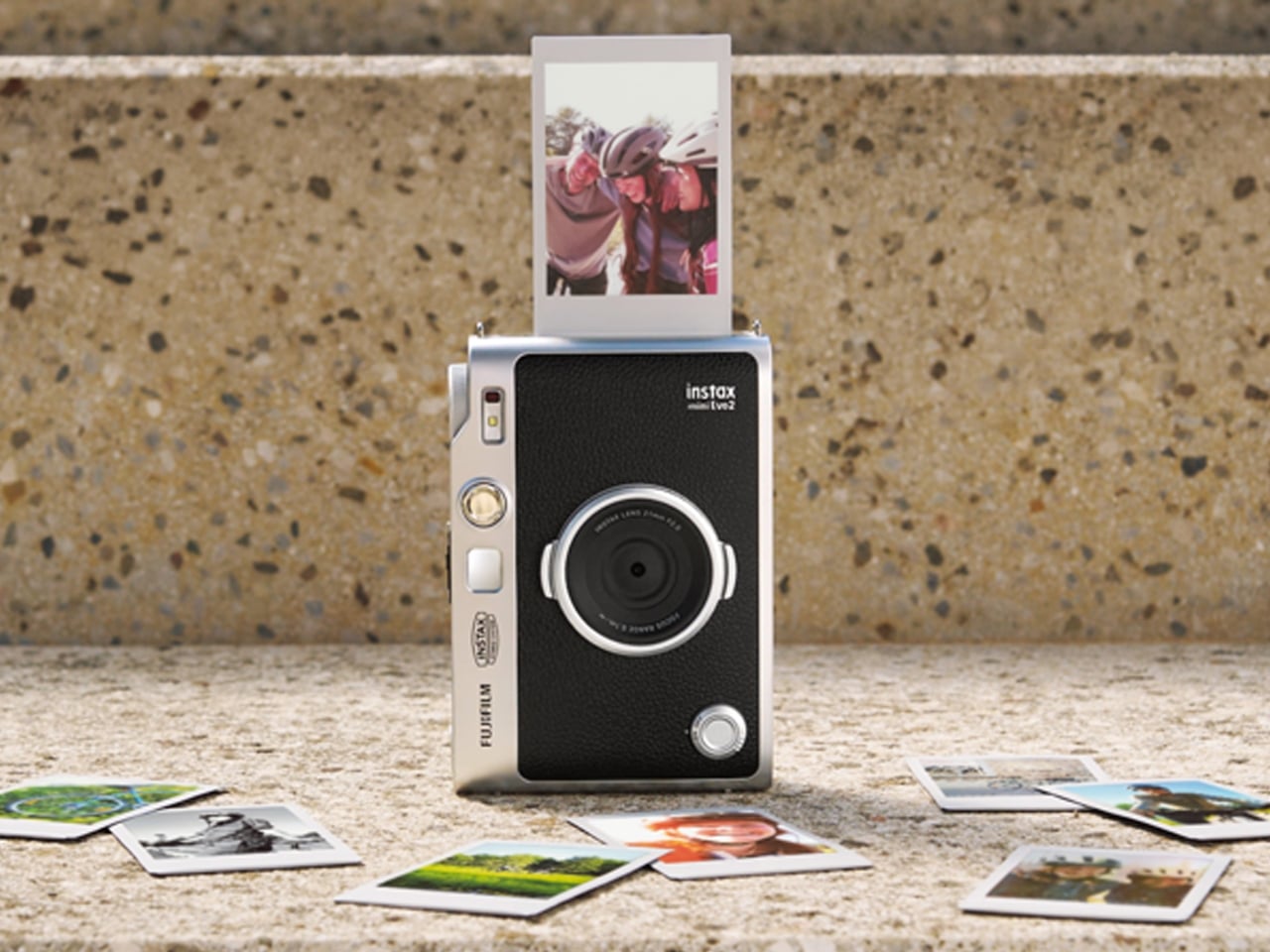
Fujifilm’s Instax Mini Evo 2 is one such camera, with tactile controls, a large touchscreen, 10 lens effects and 10 film effects to create 100 combinations, and, of course, the ability to print photos. This second generation of the hybrid instant camera and photo printer keeps its predecessor’s retro feel and range of creative combinations while adding some modern conveniences.

Designer: Fujifilm

The camera’s tactile controls add a tangible interface to this digital camera, giving it an analog-inspired way of operating. You have a lens dial to change from one lens effect to another, while the film-effect dial lets you go through the 10 different film effects. There’s also a lever that you pull to print out the photo, making printing a separate, deliberate action.

The 4.5-inch touchscreen is larger than the original Mini Evo’s display. Its Expanded View mode displays the area outside your intended print frame. You get a framing guide to show you what the photo will actually include, giving you an added layer of compositional awareness. This could be useful when you’re waiting for a moving subject to enter the frame. The touchscreen complements the dials by handling settings, image browsing, and editing, including cropping and adjustments to brightness, contrast, and saturation. You can make those changes on the camera before deciding which pictures deserve a print.

The Mini Evo 2 also now has an Immersive Movie feature that captures the four seconds leading up to your photo, producing a five-second silent clip that includes the shutter moment. It requires a separately sold microSD card. Rather than reducing the still photo to a smaller size, Fujifilm lists separate recording resolutions: 2144 × 2860 pixels for normal still images and 560 × 992 pixels for video. The short clip gives you a little more of what happened around the photograph, although it isn’t a replacement for recording longer videos.

For still photos, the camera can also record at approximately 13 megapixels when a microSD card is inserted and Expanded View is turned off. That gives you a higher-resolution option, but it isn’t the default for every shot. It’s worth knowing the conditions rather than assuming that every image you take will have the same resolution.

What appeals to me most is having a dedicated digital camera that encourages a little more playing around. I’d like to spend more time choosing how a photo looks before taking it, rather than scrolling through editing options afterward. The combination of physical dials and a touchscreen feels like an interesting way to approach that, with familiar digital controls alongside something you can actually turn.

The built-in printer adds to the appeal of having two devices in one. It works with photos taken on the camera and pictures from your smartphone through the Instax Mini Evo app. The app also supports remote shooting, so you can join a group photo instead of always being the person behind the camera. Your phone still has a role, but it doesn’t have to handle every part of taking the picture. Combining a digital camera and printer isn’t new for Fujifilm, so the novelty here is more about how the pieces work together. The larger touchscreen and new shooting modes give me more reasons to be interested in the camera itself, beyond the photographs it can print.

For my 2027 photography plans, I’d like a camera that makes me curious enough to keep picking it up. Trying a different effect or paying closer attention to what enters the frame seems like a manageable place to start. I don’t need every picture to become a keepsake; I’d be happy to develop a habit of noticing more. Fujifilm announced the Mini Evo 2 on October 27, 2026, with availability scheduled to begin November 27, 2026.

The post Instax Mini Evo 2 Brings Retro Fun Without Giving Up Digital first appeared on Yanko Design.

  • ✇Yanko Design
  • $229 Galaxy Buds On arrive with hands-free AI operation and smooth gestures
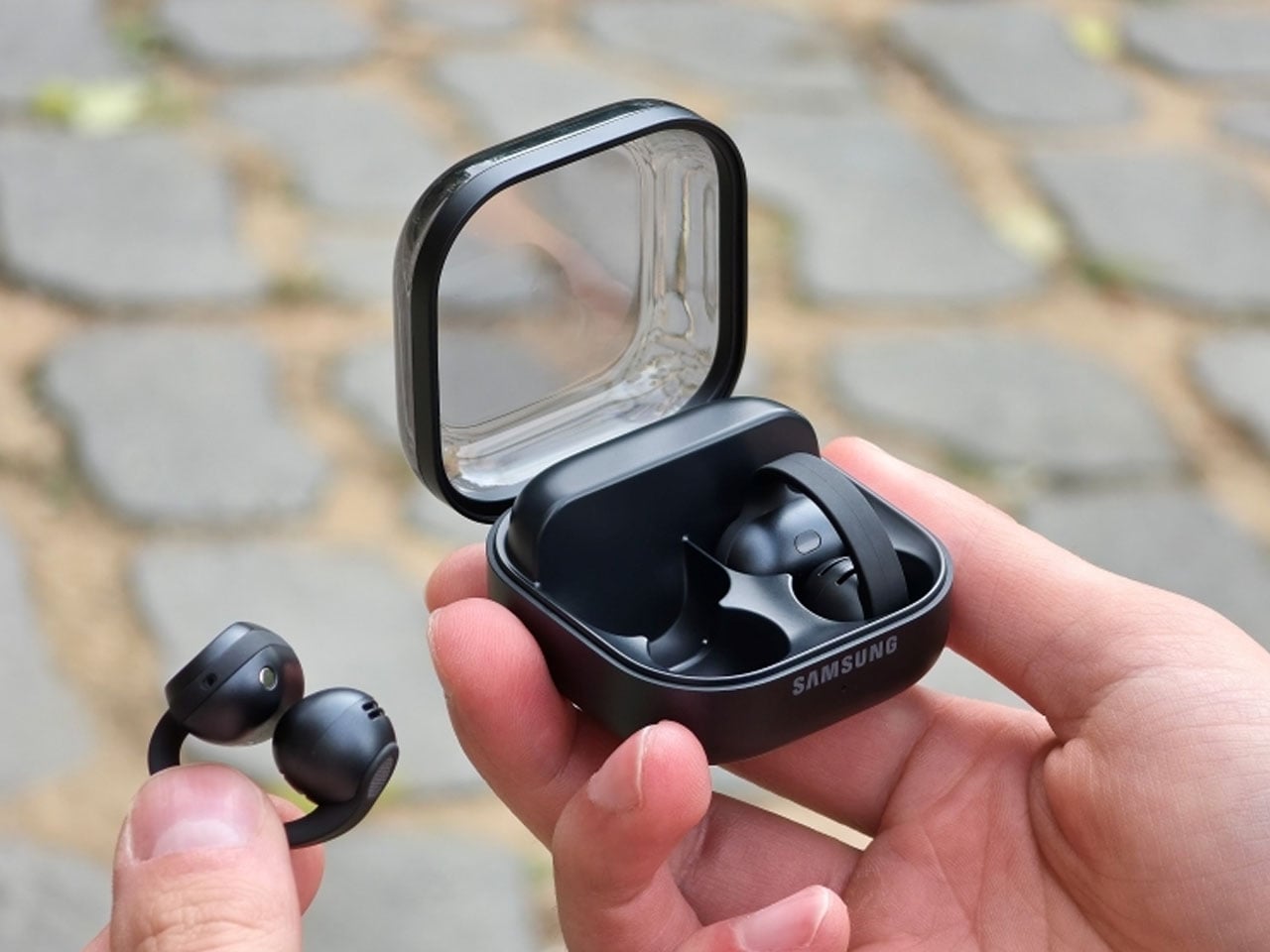
    The clip-on buds form factor is here to stay and not merely a fad. Samsung has joined the bandwagon with its first-ever clip-ons that compete in the flagship segment. The South Korean giant’s Buds4 Pro earbuds have already impressed us with their excellent call quality, ANC, and comfort. So we expect the same from the new Galaxy Buds On. With Bose Ultra Open, Sony LinkBuds, Huawei FreeBuds 6, Nothing Ear (open), and CMF Clip Pro giving outdoor audio lovers plenty of options, the Samsung clip-on
     

$229 Galaxy Buds On arrive with hands-free AI operation and smooth gestures

28 octobre 2026 à 09:20

The clip-on buds form factor is here to stay and not merely a fad. Samsung has joined the bandwagon with its first-ever clip-ons that compete in the flagship segment. The South Korean giant’s Buds4 Pro earbuds have already impressed us with their excellent call quality, ANC, and comfort. So we expect the same from the new Galaxy Buds On.

With Bose Ultra Open, Sony LinkBuds, Huawei FreeBuds 6, Nothing Ear (open), and CMF Clip Pro giving outdoor audio lovers plenty of options, the Samsung clip-ons have a strong case with the features on offer. Their first-ever clip-on wireless buds sit inside the ear, while the ergonomic shape comfortably hugs the ear for a snug fit even while working out. According to Samsung, the buds were developed after analyzing different ear shapes to optimize speaker placement and the built-in battery.

Designer: Samsung

Galaxy Buds On are focused on spatial awareness without losing out on the music quality, thanks to the TwinBoost speakers that deliver low-frequency performance. The automatic volume control toggles the audio level depending on the outside ambient noise, so that you don’t miss out on any of the important audio streams or call conversations. The introductory video clearly highlights the fact that the buds seamlessly integrate into daily life and personal listening space. Unlike some buds that have left and right distinction, these don’t have one, which is both a downside and an advantage when it comes to freedom of use.

The IP54 buds are powered by the Snapdragon S7 Gen 1 Sound platform paired with the high-efficiency Class-D amplifier, which optimizes things at the hardware level for final performance. This ensures a nonstop 9.5 hours of continuous music playback after a single charge. The buds come with a bone conduction vibration sensor that helps detect if the wearer is speaking to someone, so that the transparency mode can be enhanced and background noise reduced. As seen in the launch video, the buds can be triggered hands-free with the “Hey Google, let’s talk live” command for natural AI conversations.

Head gestures are also a part of the mix and more reliable given the bone conduction tech is at the helm. You can take or reject calls, read message notifications, dismiss alarms, or even adjust volume or equalizer on Galaxy devices. Samsung has also addressed the audio leakage issue, which is common to most clip-ons, with the Audio Leakage Reduction tech. The accompanying case brings the total battery life to an impressive 38 hours. With each of the buds weighing 6.65g and the case at 41g, the Buds On have a strong case for people in the Galaxy ecosystem. For a price of $229, they are flush in the flagship dominance race, and it will ultimately boil down to the real-world performance of the buds.


The post $229 Galaxy Buds On arrive with hands-free AI operation and smooth gestures first appeared on Yanko Design.

  • ✇Yanko Design
  • km5’s Sp1 Speaker and Mp1 Mixer Give CD Listening a DJ-Style Twist
    There’s something satisfying about choosing a CD, even if most of us have become accustomed to tapping a screen instead. The trouble is finding audio equipment you’d actually want to leave on display. km5’s newly announced Sp1 speaker and Mp1 mixer give its Cp1 CD player some equally minimalist company, letting you listen to favorite albums or try your hand at mixing them. Both borrow the Cp1’s flat, frame-like format, with black or white finishes that let the pieces sit together without lookin
     

km5’s Sp1 Speaker and Mp1 Mixer Give CD Listening a DJ-Style Twist

Par : JC Torres
28 octobre 2026 à 06:07

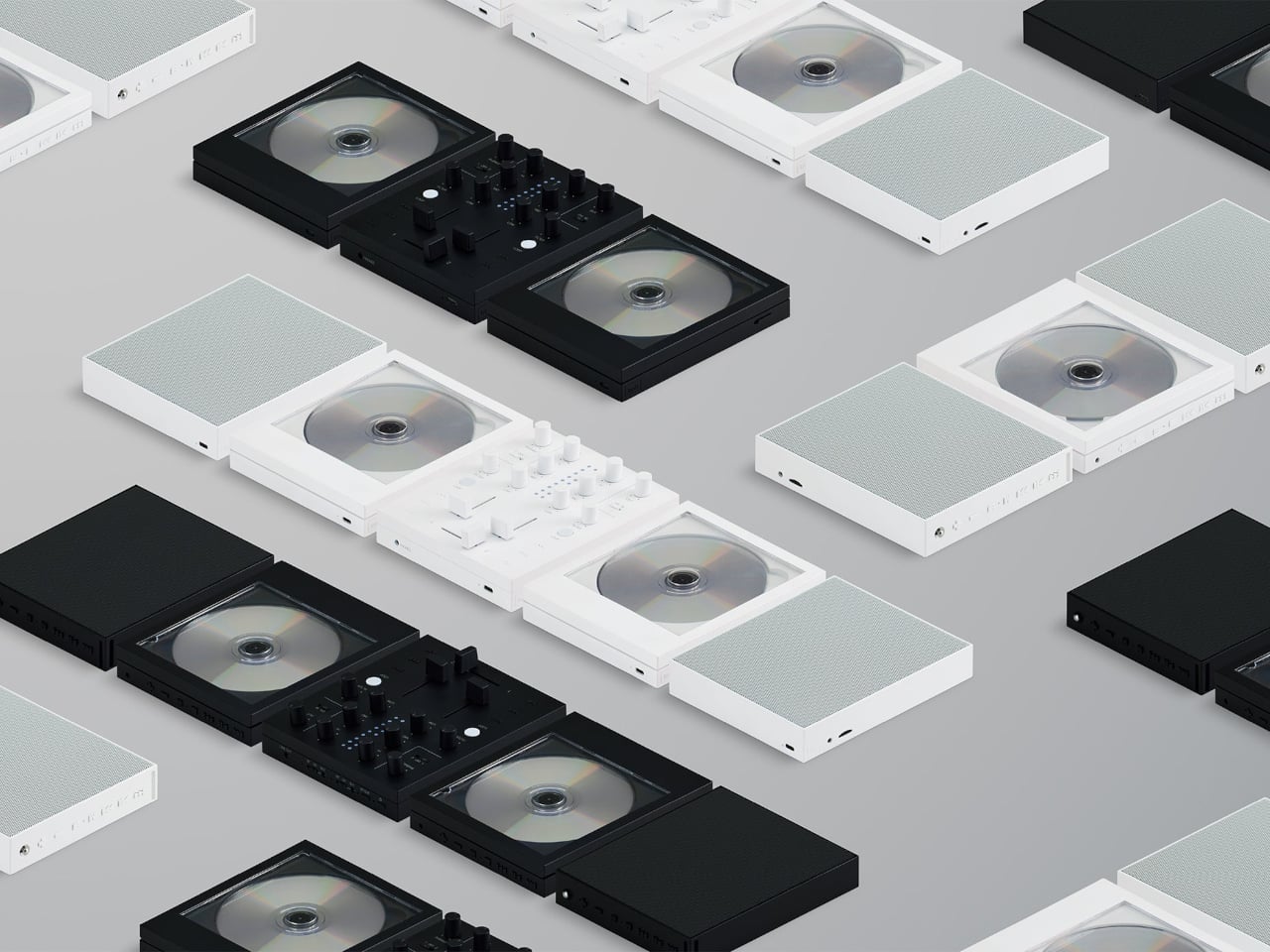
There’s something satisfying about choosing a CD, even if most of us have become accustomed to tapping a screen instead. The trouble is finding audio equipment you’d actually want to leave on display. km5’s newly announced Sp1 speaker and Mp1 mixer give its Cp1 CD player some equally minimalist company, letting you listen to favorite albums or try your hand at mixing them.

Both borrow the Cp1’s flat, frame-like format, with black or white finishes that let the pieces sit together without looking like an assortment of unrelated electronics. The Sp1 puts a perforated grille where the player displays its disc, while the Mp1 fills that space with knobs and sliders. They share the same size, but each makes its purpose clear through its front surface.

Designer: km5

The speaker has a few surprises behind that otherwise quiet appearance. A dot-matrix display sits beneath the grille, showing the time and playback information without carving out a separate screen on the front. Physical buttons occupy the top edge alongside a retractable metal antenna. That last detail gives away the Sp1’s other role as an FM radio that doesn’t need to borrow your phone.

Inside are two 1.77-inch full-range drivers and two passive radiators, though their presence alone doesn’t tell us how convincing the bass will be. Bluetooth and microSD playback offer other ways to listen, and you can record radio programs, too. Pairing two Sp1 units provides stereo playback, letting a single speaker become part of a larger arrangement rather than something you’ve outgrown.

The Mp1, meanwhile, invites you to do something with the music beyond pressing play. Its two channels have separate level sliders, with a crossfader below for blending between sources. Three-band EQ controls adjust the bass, midrange, and treble, while filters change the sound further. Loop buttons repeat sections of a track, giving a favorite passage permission to stick around a little longer.

Two Bluetooth inputs let the mixer receive music from sources such as a Cp1 and a smartphone, then send the combined sound wirelessly to a compatible speaker. You aren’t required to own an entire matching set, thankfully. Line inputs and outputs also accommodate wired connections, though the published information doesn’t establish how much delay the completely wireless arrangement introduces when you’re trying to mix.

Built-in batteries make it easier to move the arrangement away from a desk, with km5 quoting approximately 12 hours for the speaker and six for the mixer. Optional wall-mount accessories offer another way to free up a surface. The mixer can even be operated on the wall, an unusual invitation to get up from the sofa and fiddle with the music yourself.

Preorders are scheduled to open on November 16, 2026, with km5 expecting shipments in February 2027 or later, though pricing remains unconfirmed. There’s also a practical limit to that portable party setup. The speaker’s quoted battery life is twice the mixer’s, so it might be ready for another album when your DJ booth is looking for a charger.

The post km5’s Sp1 Speaker and Mp1 Mixer Give CD Listening a DJ-Style Twist first appeared on Yanko Design.

  • ✇Yanko Design
  • Logitech’s MX Master 4 Developer Edition Is a Mouse Full of Coding Easter Eggs
    Productivity mice aren’t usually the most expressive things on a desk. Their unusual curves and extra buttons often say more about work than the person doing it. Logitech’s MX Master 4 Developer Edition takes a slightly different approach, covering its familiar shape in programming references. The limited-edition mouse keeps the standard model’s features, but gives developers something a little more personal to reach for. Rather than stick to a single muted color, the mouse pairs light gray but
     

Logitech’s MX Master 4 Developer Edition Is a Mouse Full of Coding Easter Eggs

Par : JC Torres
28 octobre 2026 à 04:15

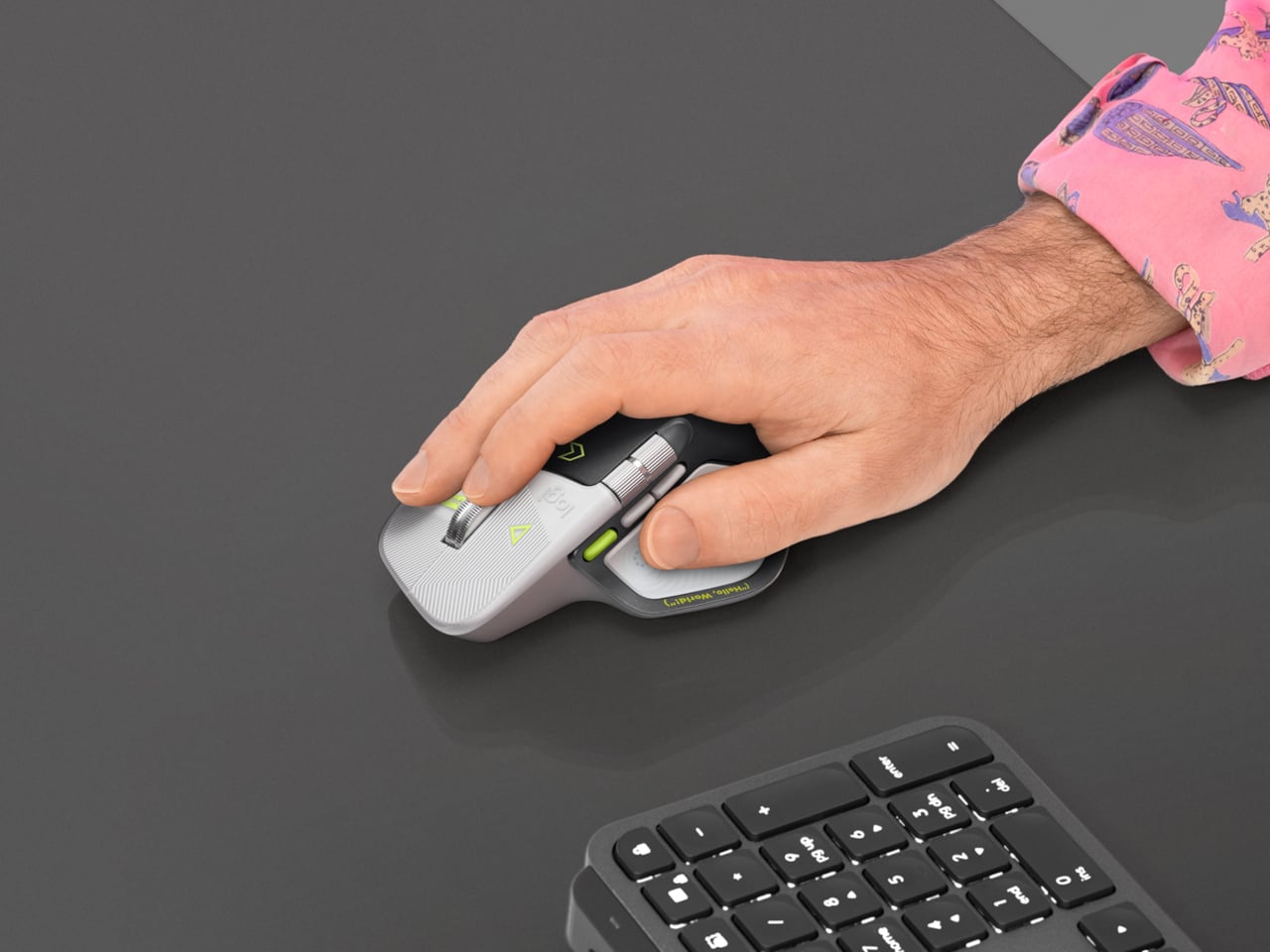
Productivity mice aren’t usually the most expressive things on a desk. Their unusual curves and extra buttons often say more about work than the person doing it. Logitech’s MX Master 4 Developer Edition takes a slightly different approach, covering its familiar shape in programming references. The limited-edition mouse keeps the standard model’s features, but gives developers something a little more personal to reach for.

Rather than stick to a single muted color, the mouse pairs light gray buttons with a dark palm rest and bright yellow-green accents. Fine circuit-like lines spread across the front, while coding symbols sit beside the controls. It’s a busier treatment than the regular version, of course, but the graphics follow the mouse’s existing divisions instead of covering everything in one continuous pattern.

Designer: Logitech

Some references are easier to recognize than others. A Hello, World greeting runs along the thumb rest, while smaller markings include 0xFF + 1 and 09.17. Logitech links those last two to Programmers’ Day and the Linux kernel’s release date. You don’t have to understand them to use the mouse, thankfully, although knowing the references does make its decoration feel rather less random.

Underneath that artwork, the familiar sculpted body remains, including a raised back and a broad platform for your right thumb. That thumb gets quite a few responsibilities, with a horizontal scroll wheel, side buttons, and the Haptic Sense Panel within reach. The asymmetric shape hasn’t become ambidextrous for this edition, so left-handed programmers are still left admiring the graphics from the wrong side.

The MagSpeed wheel handles the more familiar business of moving through long documents and code. It switches between stepped scrolling and free-spinning movement, letting you work line by line or move farther through a page. The thumb wheel provides horizontal navigation, which is useful when the thing you’re working on refuses to fit neatly inside a window, as spreadsheets have a habit of doing.

The ripples on the thumb panel hint at another kind of feedback. Rather than relying entirely on what happens onscreen, the mouse can deliver vibrations for supported actions and notifications. Logitech lets users adjust their intensity and customize app-specific feedback through Logi Options+. That doesn’t mean every application suddenly gains a sense of touch, but compatible interactions can have a physical cue.

Pressing the panel also opens Actions Ring, an onscreen collection of shortcuts arranged around the cursor. You can assign tools and macros through Options+, putting frequently used commands near where you’re already working. There is a small irony here, however. Despite the Linux reference on the shell, Logitech doesn’t provide a Linux version of Options+ for configuring that particular shortcut system.

The Developer Edition is listed for US preorder at $119.99, with shipping scheduled to start October 31, 2026. Since its functions match the standard MX Master 4, the choice comes down to how much personality you’d like under your hand. Existing owners won’t find new capabilities here, though the temptation to coordinate a keyboard, desk mat, and everything else remains.

The post Logitech’s MX Master 4 Developer Edition Is a Mouse Full of Coding Easter Eggs first appeared on Yanko Design.

❌