❌

Vue normale

  • ✇Korben
  • Que faire avec un port M.2 libre ? 6 gadgets à y brancher à la place d'un SSD
    - Contient des liens affiliés Amazon - Un emplacement M.2 finalement, ce n'est rien d'autre qu'un bonne vieille connexion PCIe d'une à quatre lignes selon la machine (sauf quand il est câblé en SATA, mais ça, j'en reparle à la fin). Et en général, comme le montre la photo ci-dessous, ce qu'on y met, c'est un SSD pour avoir du stockage rapide et efficace Emplaceme
     

Que faire avec un port M.2 libre ? 6 gadgets à y brancher à la place d'un SSD

24 septembre 2026 à 09:26
- Contient des liens affiliés Amazon -

Un emplacement M.2 finalement, ce n'est rien d'autre qu'un bonne vieille connexion PCIe d'une à quatre lignes selon la machine (sauf quand il est câblé en SATA, mais ça, j'en reparle à la fin). Et en général, comme le montre la photo ci-dessous, ce qu'on y met, c'est un SSD pour avoir du stockage rapide et efficace

Emplacement d'un M.2 sur la carte mère d'un laptop ( source )

Mais aujourd'hui, on va s'ouvrir un petit peu l'esprit sur cet emplacement M.2, parce que OUI, rien ne vous oblige à y mettre un SSD !

Mais avant de commander quoi que ce soit, sortez le manuel de votre carte mère ou la doc de votre mini-PC et regardez le type (PCIe ou SATA) de votre connecteur M.2, le format accepté et surtout le nombre de lignes de cet emplacement.

Source

Le nombre de lignes, c'est le nombre de voies de circulation entre la carte M.2 et le processeur. Plus il y en a, plus ça va vite, donc en général, pour une carte réseau, une ligne (x1) ou deux (x2) suffisent. Mais si vous partez sur une carte graphique, il faudra 4 lignes minimum (x4).

Par exemple, le Beelink ME Mini , lui, dispose de 5 emplacements PCIe 3.0 x1 et un seul en x2. Et sur une ASRock B850 Pro-A , le 4e emplacement M2 tourne en x4... mais retombe en x2 dès qu'un disque occupe l'un des autres ports M.2 en SATA3.

Regardez aussi ce que l'emplacement partage, car sur cette même carte mère ASRock, occuper par exemple le 3ème emplacement désactive purement et simplement le slot PCIE2. Vérifiez aussi que la puce du contrôleur M.2 dispose bien d'un pilote pour votre système, et demandez-vous par où passera le câble car mis à part l'accélérateur IA que je vous présente un peu plus bas, toutes les cartes qui suivent traînent un truc derrière elles. Donc, il faudra peut-être découper votre boîtier ou laisser dépasser des trucs...

Allez, c'est parti !

Une carte réseau 5 ou 10 GbE

Pour un NAS ou un routeur maison, la carte 5 GbE de KALEA à 29,90 € embarque une Realtek RTL8126 qui se branche sur un emplacement à clé M ou B+M et déporte son port RJ45 sur une équerre classique de PC. Et bonne nouvelle, comme la RTL8126 est une puce PCIe 3.0 x1, une seule ligne suffit ! Elle est reconnue par le pilote r8169 de Linux depuis le noyau 6.9, et sous FreeBSD (donc OPNsense ou pfSense) par le pilote officiel de Realtek , realtek-re-kmod, qui s'installe à part.

La carte 5 GbE de KALEA, avec son port RJ45 déporté sur une équerre

Maintenant, si vous voulez du 10 GbE, la carte de REKONG à 98,32 € passe par une Marvell AQC113. Et si j'en crois la fiche du vendeur, elle accepte du Gen4 x1 ou du Gen3 en x4, x2 et x1. Sauf qu'une ligne Gen3, c'est 8 Gbit/s, ce qui veut dire que sur un emplacement Gen3 x1, elle plafonnera sous ses 10 Gbit/s. Donc à ce prix-là, autant prendre la 5 GbE. Par contre, en Gen3 x2 (16 Gbit/s) ou en Gen4 x1 (32 Gbit/s), elle pourra tenir les 10 Gbit/s sans problème,

Côté logiciel, Linux la gère avec son pilote atlantic, mais sous OPNsense, c'est une autre histoire. Le pilote FreeBSD d'Aquantia, lui, ne prend pas en charge l'AQC113 et il faudra passer par un pilote communautaire .

Un accélérateur IA pour Frigate

Si vous faites tourner Frigate pour vos caméras , oubliez le Google Coral, qui n'est plus recommandé par Frigate . Mais attention, avant d'acheter un autre accélérateur IA à la place, regardez d'abord si votre processeur ne sait pas déjà faire le boulot, car le détecteur OpenVINO de Frigate tourne sur le GPU intégré des processeurs Intel de 6e génération ou plus récents. Un N100, par exemple, analyse une image en 15 ms environ avec MobileNetV2, sans rien acheter de plus, donc vous n'en aurez peut-être même pas besoin.

Par contre, si ça ne suffit plus, le module Hailo-8 de LUCKFOX à 201,59 € vous amènera 26 TOPS sur une interface PCIe Gen3 à quatre lignes. Frigate le prend en charge, avec environ 7 ms par image, mais mesurées avec YOLOv6n, donc c'est loin d'être comparable aux 15 ms du N100.

Maintenant, le truc cool, c'est que vous n'avez pas besoin d'un emplacement x4. La preuve, l'AI HAT+ 26 TOPS de Raspberry Pi, construit autour du même Hailo-8, tourne sur le port PCIe du Pi 5, qui n'a qu'une seule ligne. Un emplacement M.2 en x1 fera donc l'affaire, même si Frigate note que les PC x86 à deux lignes font mieux que le Pi.

Le module M.2 Hailo-8, avec sa puce sous un capot métallique

Une carte graphique externe en OCuLink

Ici, c'est la seule carte de la liste qui exige un emplacement x4. L'adaptateur OCuLink de RIITOP à 36,95 € transformera instantanément votre port M.2 en prise OCuLink PCIe 4.0 x4 (jusqu'à 64 Gbit/s). On doit ensuite le relier au dock Minisforum DEG1 (prix 109,00 €), sur laquelle se plug la carte graphique (à acheter séparément avec son alim) et se branche sur une alimentation ATX ou SFX. Le câble OCuLink, lui, est livré avec le dock .

L'adaptateur M.2 de RIITOP et sa prise OCuLink

Notez que le DEG1 de Minisforum n'est compatible qu'avec les machines qui gèrent le PCIe 4.0 x4, donc visez un emplacement Gen4 x4. Et l'OCuLink ne se branche pas à chaud, faudra éteindre le PC avant.

Le dock DEG1 de Minisforum, avec le slot qui reçoit la carte graphique

Et si vous préférez rester à l'intérieur du boîtier, la nappe ADT-Link à 35,45 € ressortira l'emplacement M.2 en slot PCIe x16 prévu pour une carte graphique. Alors je dis x16, mais c'est seulement au niveau du format PCIe 3.0 parce que la carte, en réalité, ne recevra que les lignes réellement disponibles de l'emplacement M.2.

La nappe R43SR d'ADT-Link, du connecteur M.2 au slot PCIe x16

Le port USB-C de façade qui ne sert à rien

Et si le port USB-C en façade de votre boîtier reste inerte faute de connecteur sur la carte mère, l'adaptateur Type-E de CY à 32,99 € transformera l'emplacement M.2 en connecteur interne Type-E à 20 Gbit/s. Il repose sur une ASMedia ASM3242, conçue pour quatre lignes PCIe Gen3 (sur deux, on tombe à 16 Gbit/s), et ne fait ni vidéo, ni audio, ni recharge PD.

L'adaptateur M.2 de CY, son connecteur Type-E et son dissipateur

Maintenant, si un connecteur USB 3.0 à 19 broches est encore libre, un simple adaptateur EZDIY-FAB à 14,99 € réveillera ce port en USB 3.2 Gen 1, sans avoir à toucher à votre emplacement M.2.

L'adaptateur en L d'EZDIY-FAB, vu sous deux angles

Six ports SATA de plus

Côté stockage, le contrôleur SATA de Namvo à 29,99 € vous ajoutera 6 ports SATA 6 Gbit/s grâce à une ASMedia ASM1166 , reliée en PCIe Gen3 x2. Ça fait 16 Gbit/s à partager entre les 6 disques, et moitié moins sur un emplacement x1.

Le contrôleur SATA de Namvo

Du Wi-Fi 6E

Enfin, pour ajouter du Wi-Fi 6E à une tour qui n'en a pas, il vous faudra un module Intel AX210 à 28,37 € et un adaptateur Jectse à 9,62 € qui le fera tenir dans un emplacement à clé M. Comme Intel documente son AX210 comme étant du Wi-Fi (PCIe) et BT (USB), l'adaptateur fait passer le Wi-Fi par une ligne PCIe et le Bluetooth par un petit câble USB 2.0 fourni, à relier à un connecteur interne de la carte mère. Et les antennes ne figurent ni sur la fiche du module ni dans le colisage de l'adaptateur, donc faudra les acheter à part.

Méfiez-vous par contre de la liste de compatibilité de la fiche Jectse, qui dit supporter aussi l'AX201. Intel classe ce module en "M.2: CNVio2", et pas en PCIe et USB. Bref, attention à bien prendre un AX210 et pas un 201

Voilà et si votre emplacement libre s'avère être câblé en SATA, bah oubliez toutes ces cartes... Toutes ces cartes parlent uniquement le PCIe. Il ne vous restera alors plus qu'à y mettre un SSD SATA... Snif.

Source : XDA Developers

  • ✇Korben
  • Claude Code vous fait choisir entre vie privée et AGENTS.md
    Depuis sa version 2.1.277, Claude Code sait parfaitement lire les fichiers AGENTS.md. Ainsi, quand un projet n'a pas de CLAUDE.md, il prend l'AGENTS.md à la place, ce qui est super confortable pour tous ceux qui jonglent entre plusieurs agents. Enfin... sauf si vous avez coupé sa télémétrie, parce que dans ce cas-là, bizarrement, votre fichier AGENTS.md est totalement ignoré ! AGENTS.md, pour ceux qui débarquent, c'est un fichier Markdown que les agents de code lisent pour comprendre un projet.
     

Claude Code vous fait choisir entre vie privée et AGENTS.md

24 septembre 2026 à 01:49

Depuis sa version 2.1.277, Claude Code sait parfaitement lire les fichiers AGENTS.md. Ainsi, quand un projet n'a pas de CLAUDE.md, il prend l'AGENTS.md à la place, ce qui est super confortable pour tous ceux qui jonglent entre plusieurs agents. Enfin... sauf si vous avez coupé sa télémétrie, parce que dans ce cas-là, bizarrement, votre fichier AGENTS.md est totalement ignoré !

AGENTS.md, pour ceux qui débarquent, c'est un fichier Markdown que les agents de code lisent pour comprendre un projet. Codex, Amp ou Cursor s'y mettaient déjà en août 2025 (souvenez-vous de ce fichier qui dit non aux IA ). Alors que chez Anthropic, la demande a traîné durant 1 an sur GitHub, jusqu'à ce que Boris Cherny, qui bosse sur Claude Code, ferme le ticket en août en conseillant une astuce, un CLAUDE.md qui contient juste @AGENTS.md, pour que Claude Code importe le fichier.

Puis la 2.1.277 est arrivée avec une vraie lecture native d'AGENTS.md, sans CLAUDE.md du tout, et c'est elle qui pose problème...

Parce que cette lecture native passe en réalité par un plugin intégré, qui est off par défaut et qui ne s'allume que si un feature flag récupéré chez Anthropic, tengu_agents_md_mod, lui dit oui. Et si ce flag ne répond pas, bah c'est "niet", et le fichier n'est jamais lu. Hé oui c'est bizarre qu'un accès à un fichier local nécessite un tel appel réseau...

Et ce "non", on l'obtient sans même le savoir, puisqu'il suffit d'activer DISABLE_TELEMETRY, CLAUDE_CODE_DISABLE_NONESSENTIAL_TRAFFIC ou même DO_NOT_TRACK, ou encore de passer par Bedrock et les autres fournisseurs tiers.

Attention, même à 0 (donc activé), DISABLE_TELEMETRY coupera la télémétrie. En fait, n'importe quelle valeur non vide compte.

Le pire, c'est que rien ne vous avertit. C'est vrai que quand AGENTS.md est chargé, Claude Code l'annonce avec une petite ligne dans la session, mais quand il est ignoré, hé bien y'a rien du tout. Et c'est assez impactant car ensuite le modèle répond sans vos consignes, et vous vous tapez à reformuler vos prompts en boucle en croyant que l'IA vous ignore, alors que le fichier ne lui est tout simplement jamais parvenu.

Et le comble, c'est que c'est documenté, et la page des variables d'environnement liste même tout ce qu'on perd quand les flags ne sont pas récupérés, lecture d'AGENTS.md comprise. Pourtant, y'a aucun rapport logique... Couper la télémétrie, de mon point de vue, ça reste un choix légitime et ça ne devrait couper que l'envoi de statistiques à Anthropic et pas la lecture d'un stupide fichier texte. Bref, ça me dépasse, ce genre de bug ou de "fonctionnalité".

En attendant, la parade est celle que conseillait Boris Cherny... À côté de chaque AGENTS.md, posez un bon vieux CLAUDE.md qui contient une seule ligne, @AGENTS.md. Par défaut, dès qu'un CLAUDE.md existe, la lecture native ne s'en mêle même plus, et c'est l'import qui fait le boulot. Et comme les imports de CLAUDE.md ne dépendent d'aucun flag, hé bien ça passe tranquillou, télémétrie coupée ou pas.

Comme ça vous préservez votre vie privée ET vos consignes.

Source : szypowi.cz

As the Steam Deck loses its affordable appeal, the XBOX Ally could be an unexpected handheld gaming champion

I've been a PC gamer for as long as I can remember, pushing my earliest family desktop computers to their limits by installing a single copy of Command and Conquer to their tiny hard drives, before eventually building my own rigs with a meager part-time job wage and a bright-eyed idea of what good value components looked like.

These days, I do most of my gaming on my still-loved Steam Deck, the Linux-based handheld from the same company behind the massive PC game storefront, Steam. It runs practically every game originally designed for Windows, and for the ones that it struggles with, I fall back on cloud gaming on services like GeForce NOW and Xbox Cloud.

Until now, I've pushed as many curious gamers as possible toward handheld gaming PCs, easing them in with budget-friendly options before watching them grow an appetite for high-end examples of excess that squeeze the capabilities of traditional gaming laptops into a compact form factor. However, one seems to have stuck closer to its MSRP, while many others become pipe dreams.

XBOX Ally: $599.99

"Power of XBOX. Freedom of Windows. Craftmanship of ROG."View Deal

Somehow, the XBOX Ally is holding strong

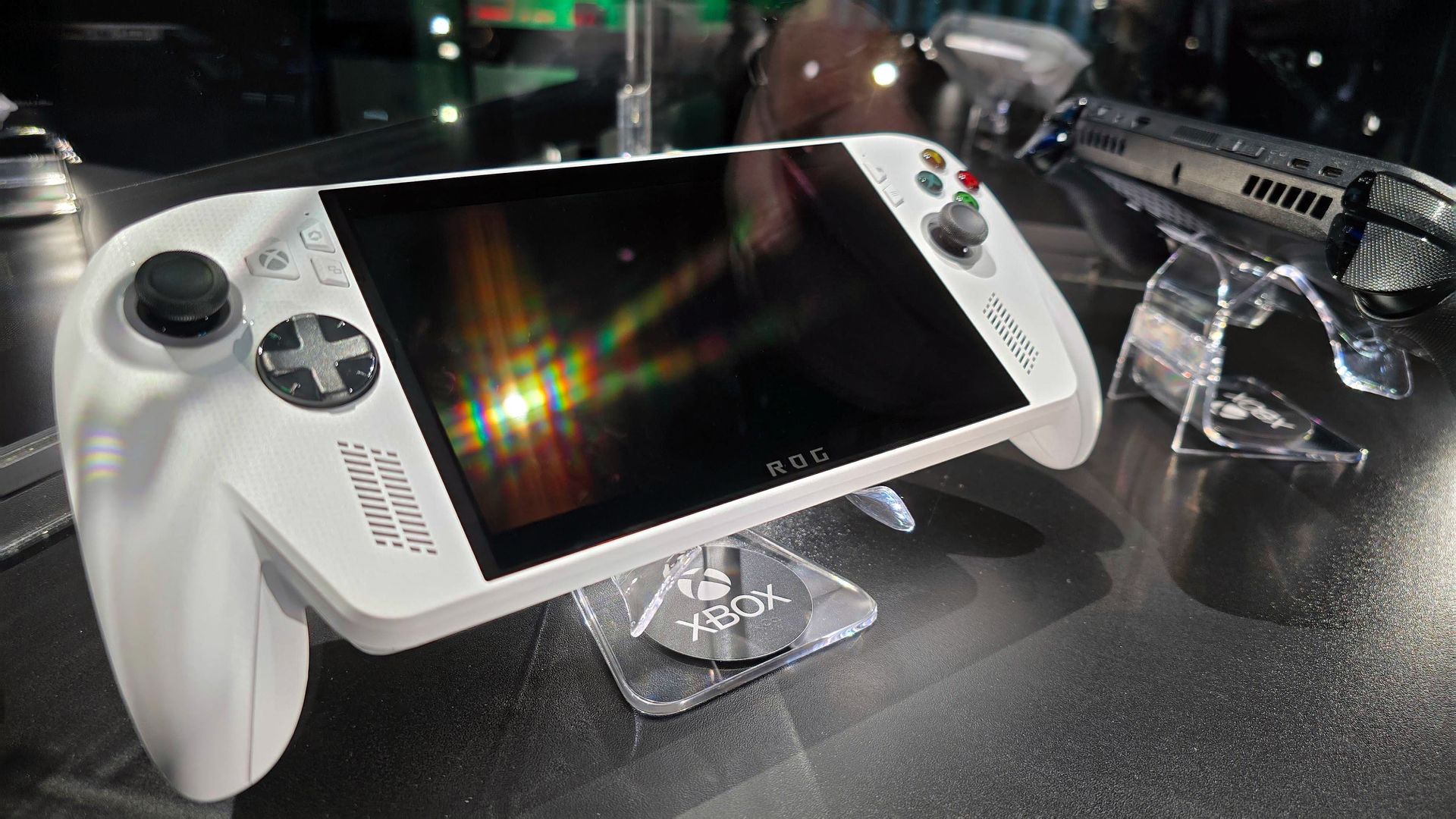
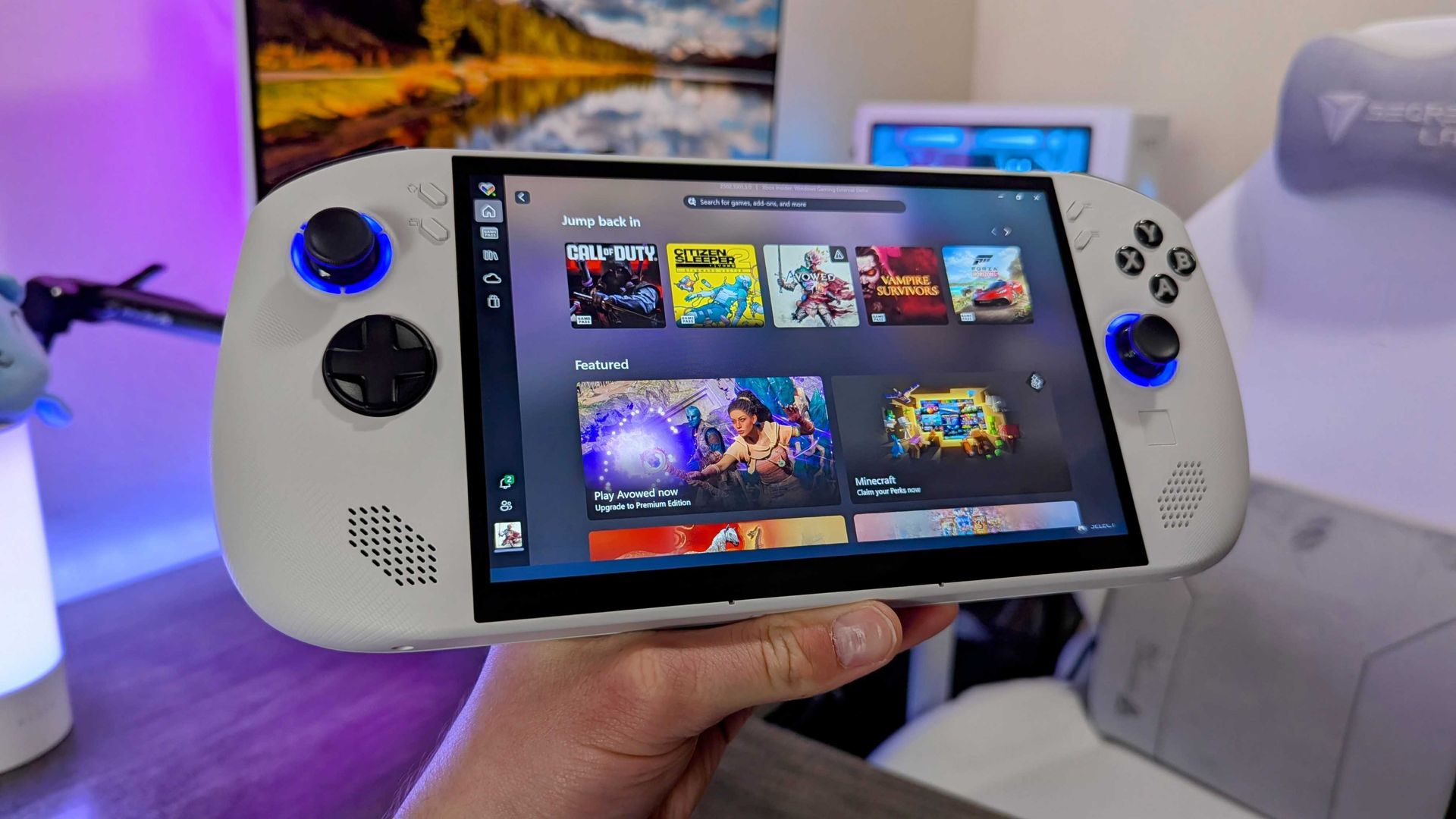
ASUS ROG Xbox Ally (white) and ROG Xbox Ally X (black) in a glass display case at Gamescom in August, 2025.

It's a modest machine inside, but the ergonomics make the ROG Xbox Ally worth your attention. (Image credit: Jez Corden | Windows Central)

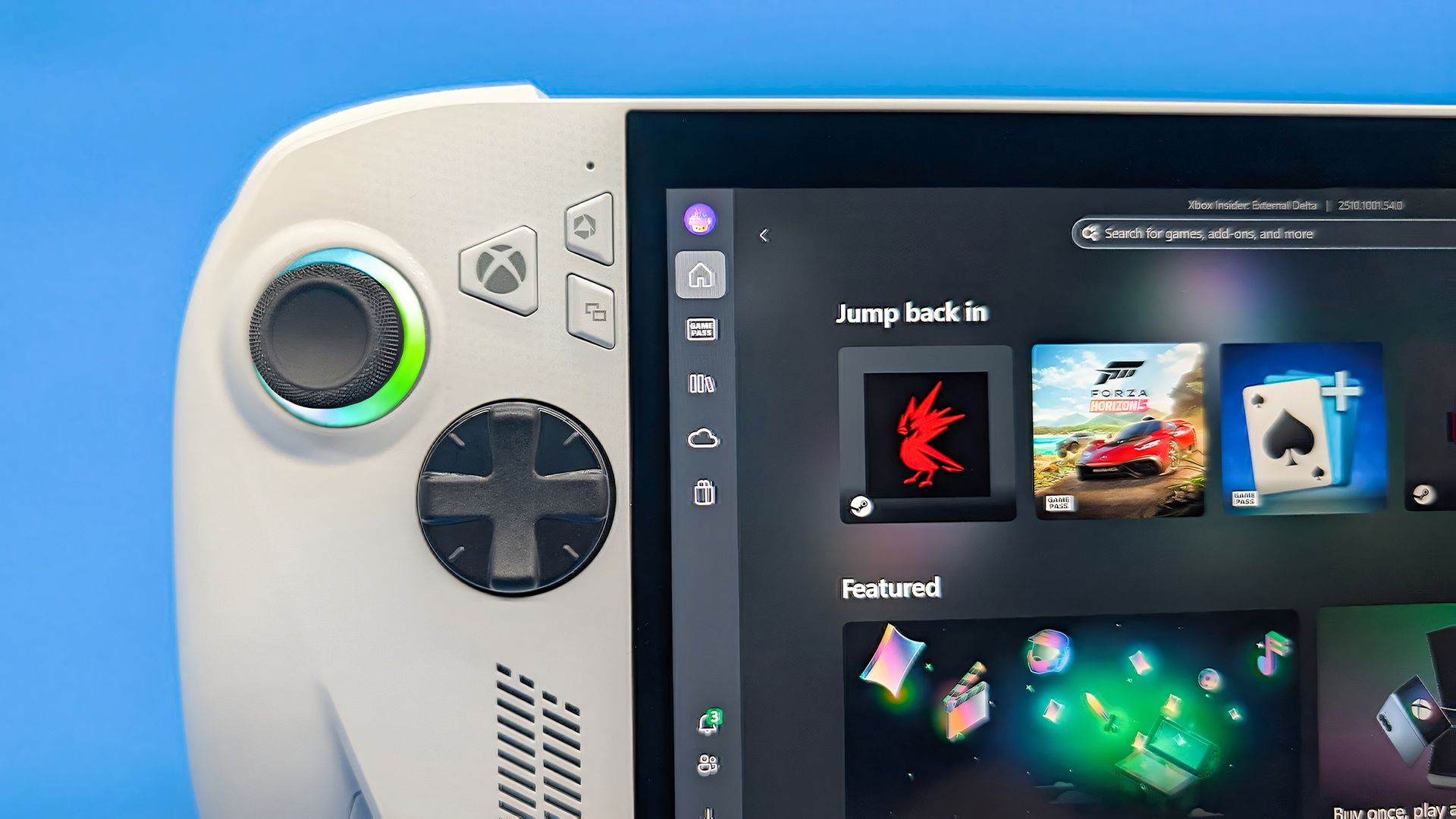
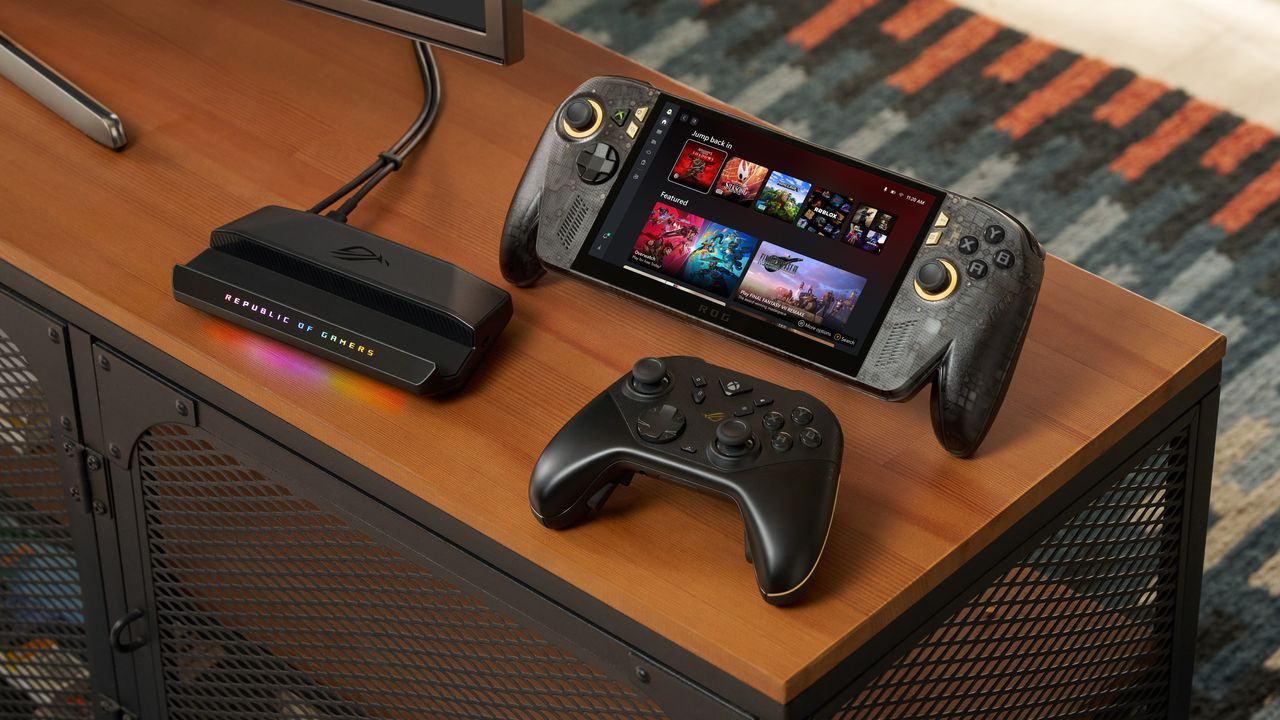
As it stands, the ROG XBOX Ally sells for $599.99 at Best Buy, which is the same price it launched at when we tested it for our XBOX Ally review. Right now, it holds an average 4.4/5 rating among at least 930 customer reviews from that listing alone, and they seem quite happy with its price-per-performance ratio.

The white ROG XBOX Ally relies on AMD's Ryzen Z2 A processor, a relatively older Zen 2 chip with performance more comparable to Valve's long-standing Steam Deck than its high-end black ROG XBOX Ally X sibling or its predecessors like the (discontinued) original ASUS ROG Ally, built as a modern entry-level pick.

So, in what feels like an unexpected turn of events, Microsoft and ASUS offer the best price in handheld PC gaming with the ROG XBOX Ally, since the cheapest Steam Deck starts at $789 for a 512GB model, though Valve has an edge with an OLED screen that offers stronger contrast. If nothing else, it's certainly a different vibe than the price hikes on the Xbox Series X|S consoles.

Then again, the ROG XBOX Ally can reach a higher 120Hz refresh rate than the Steam Deck OLED's 90Hz, though you'll have to find a lightweight PC game that runs well enough to show those theoretical benefits of smoother visuals, with support for the Ally's variable refresh rate (VRR) that helps to reduce screen tearing and frame pacing inconsistencies.

"But, it runs Windows!"

The Lenovo Legion Go S held in a hand with the Xbox app opened.

Lenovo's Legion Go S arrived without too much fanfare. (Image credit: Windows Central | Zachary Boddy)

Usually snared by the inevitable cost of a Windows license for each corresponding handheld, the appeal of Valve's in-house 'SteamOS' operating system became obvious in the category's formative years. However, alternatives initially designed around that prospect, such as Lenovo's Ryzen Z2 Go-based Legion Go S, now cost around $989.99.

That's a disappointing increase from the $599.99 MSRP we saw during our Lenovo Legion Go S review, with another rise to $1,579.99 for the Ryzen Z1 Extreme Legion Go S model that we tested (dropping to $999.99 in occasional sales). Suddenly, a Windows-based handheld that comes, in part, from XBOX itself doesn't sound so bad.

Of course, the repeated blame for these price hikes lands squarely on the memory crisis driven by massive-scale AI hardware infrastructure, which shows no signs of slowing down in the near future. Gamers are essentially stuck between a rock and a hard place as most components become unaffordable, which somewhat softens the OS argument on the PC side.

Because ultimately, there's nothing stopping anyone from installing SteamOS on a ROG XBOX Ally (or any other Windows-based handheld, for that matter). The experience will vary between devices, but to date, none of the major players have arbitrarily locked their products to Windows 11. If, despite all the awful odds, the Ally can maintain its price, it could become the mainstream choice.

Availability also seems fine for the white XBOX Ally, unlike ultra-high-end variants like the "mind-blowing" MSI Claw 8 EX AI+ and its $1,799 price tag, which apparently convinced flush gamers to spend, but its stock couldn't keep up. For handhelds targeting far below $1,000 — the realm of sensible spending — XBOX is surprisingly beating Valve. Will it last? I'd love to believe it.

Click to join us on r/WindowsCentral

Join us on Reddit at r/WindowsCentral to share your insights and discuss our latest news, reviews, and more.

  • ✇Yanko Design
  • This $21 Charger Powers Your iPhone, Apple Watch, and AirPods at Once
    Most of us have two or more gadgets that need constant charging, plus several chargers and cables to keep them all juiced up. That’s probably fine if you have an entire outlet strip at home or in the office, but when you’re working with a small space, or you’re traveling and on the go, it can be a real challenge to charge multiple devices at once. You end up with a tangle of cords and charging heads, or sometimes you even have to take turns charging your gadgets. If you mostly own Apple devices
     

This $21 Charger Powers Your iPhone, Apple Watch, and AirPods at Once

19 septembre 2026 à 16:45

Most of us have two or more gadgets that need constant charging, plus several chargers and cables to keep them all juiced up. That’s probably fine if you have an entire outlet strip at home or in the office, but when you’re working with a small space, or you’re traveling and on the go, it can be a real challenge to charge multiple devices at once. You end up with a tangle of cords and charging heads, or sometimes you even have to take turns charging your gadgets.

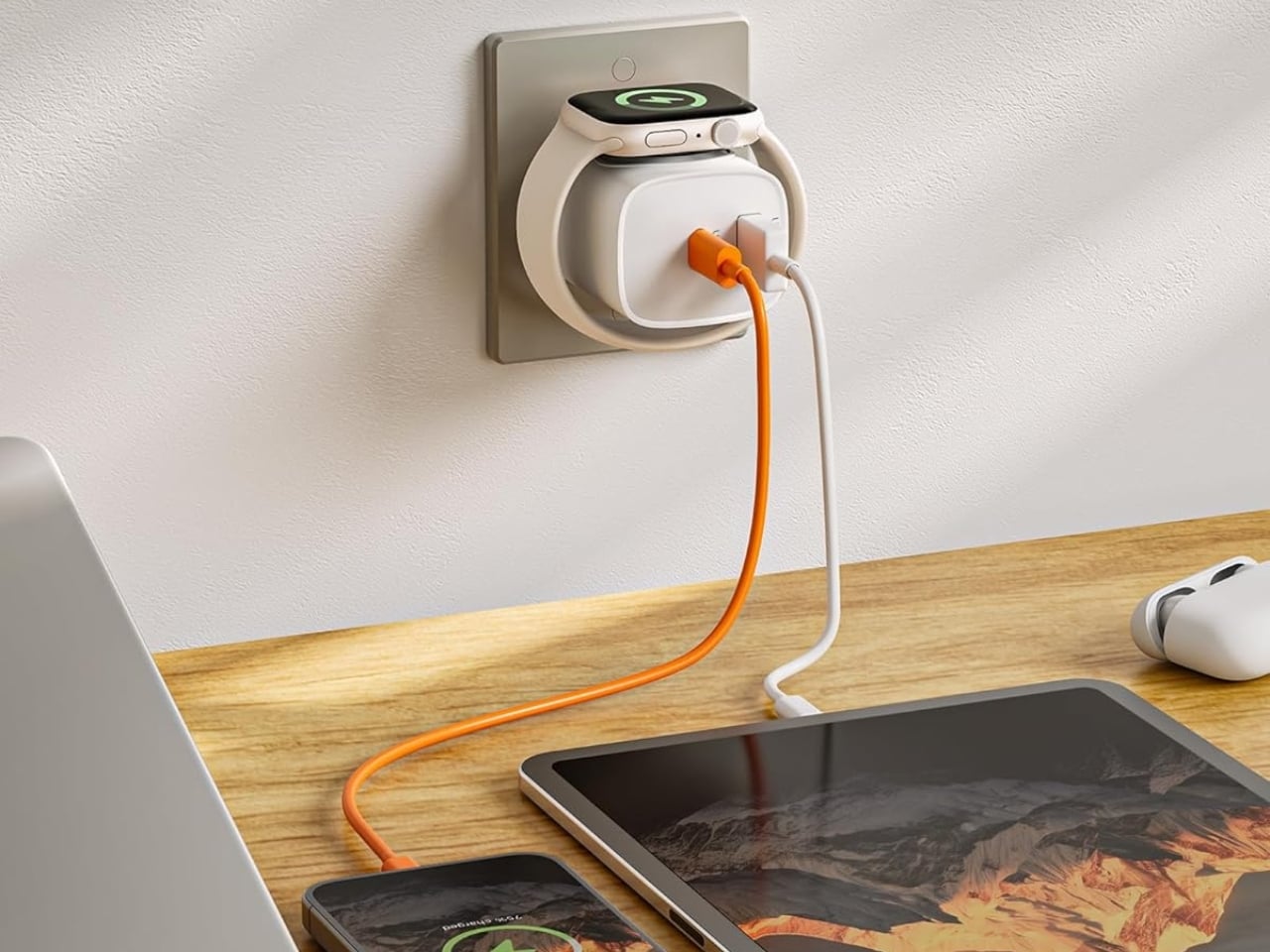
If you mostly own Apple devices or other USB-C-powered gear, the TESSAN 3-in-1 USB-C Charger may actually solve that problem for you. It’s a compact wall charger with a USB-C port, a USB-A port, and a built-in magnetic Apple Watch dock, so you only need one outlet to power up three devices at the same time.

Designer: TESSAN

This 3-in-1 charger is especially handy when you only have one outlet available but need to power up three different devices. A few years ago, this wouldn’t have been much of an issue, since most of us only had one phone to worry about. But now that owning multiple devices is the norm, charging has become an everyday hassle. What do you do when you’ve got a phone, a pair of AirPods, and a smartwatch that all need power at the same time?

TESSAN’s charger features fast charging through its 20W USB-C port, so you can get a device like the iPhone 15 up to 55 percent battery in just 30 minutes. At the same time, its 18W USB-A port can juice up an accessory simultaneously while your main device charges. It also offers broad compatibility, working with everything from the latest iPhone models to AirPods and other USB-powered devices. The real star of the show, though, is the built-in magnetic charger for your Apple Watch. There’s no separate puck or cable needed here. Instead, you get a self-aligning dock, so you won’t have to fuss with positioning your watch every time you need to charge it.

The charger comes in four finishes (white, black, pink, and blue) and is clearly designed to double as a small desk-aesthetic item, though it will likely still read as “just a charger” to most people, especially in the white colorway. Where it really shines is portability: it’s a travel-friendly device you can toss in a bag without a second thought, instead of hauling around three separate chargers that eat up space and weight in your carry-on.

How does it stack up against the competition? The most obvious comparison is Belkin, whose 3-in-1 MagSafe charging stands are the gold standard in this category. Belkin’s BoostCharge Pro and UltraCharge Pro docks charge an iPhone, Apple Watch, and AirPods wirelessly and look considerably more premium sitting on a nightstand, but they also run anywhere from $95 to $150 and require more desk real estate. TESSAN’s charger, at $20.99, skips the wireless charging bells and whistles in favor of a compact, plug-in design that’s built more for function and travel than for a styled bedside setup. If you want a showpiece charging stand for your living room, Belkin is still hard to beat. But if you want something inexpensive, pocketable, and fast enough to get you out the door in the morning, TESSAN makes a compelling case for itself as the budget-friendly, travel-first alternative.

At the end of the day, this isn’t a charger trying to be a lifestyle centerpiece. It’s a charger trying to solve a genuinely annoying, everyday problem: too many devices, not enough outlets, and not enough patience to wait in line for your turn at the power strip. For $20.99, the TESSAN 3-in-1 USB-C Charger delivers fast charging, broad compatibility, and a clever built-in Apple Watch dock in a package small enough to disappear into a laptop bag or a nightstand drawer. It won’t turn heads the way a sleek charging stand might, but it will quietly keep your phone, watch, and earbuds powered up without the usual cord chaos. For anyone juggling multiple Apple devices on a daily basis, or packing for a trip and dreading the tangle of cables, this little charger earns its spot on the “actually useful” list.

The post This $21 Charger Powers Your iPhone, Apple Watch, and AirPods at Once first appeared on Yanko Design.

  • ✇Yanko Design
  • iPod Classic emulator for the Samsung Galaxy Z Fold8 finally gets the size and aspect ratio right
    Apple has the opportunity to do something really cool here! An emulator going by the name of Classipod has been doing the rounds on the Google Play Store, letting you run an iPod Classic style interface on any Android phone of your choosing. The only problem is that Apple never really made a 9:20 iPod Classic. Every iPod Classic had a short, stout design and as it stands, there are only two Android phones that currently fit this bill, and both fold. A video on Instagram showed the Classipod int
     

iPod Classic emulator for the Samsung Galaxy Z Fold8 finally gets the size and aspect ratio right

18 septembre 2026 à 15:21

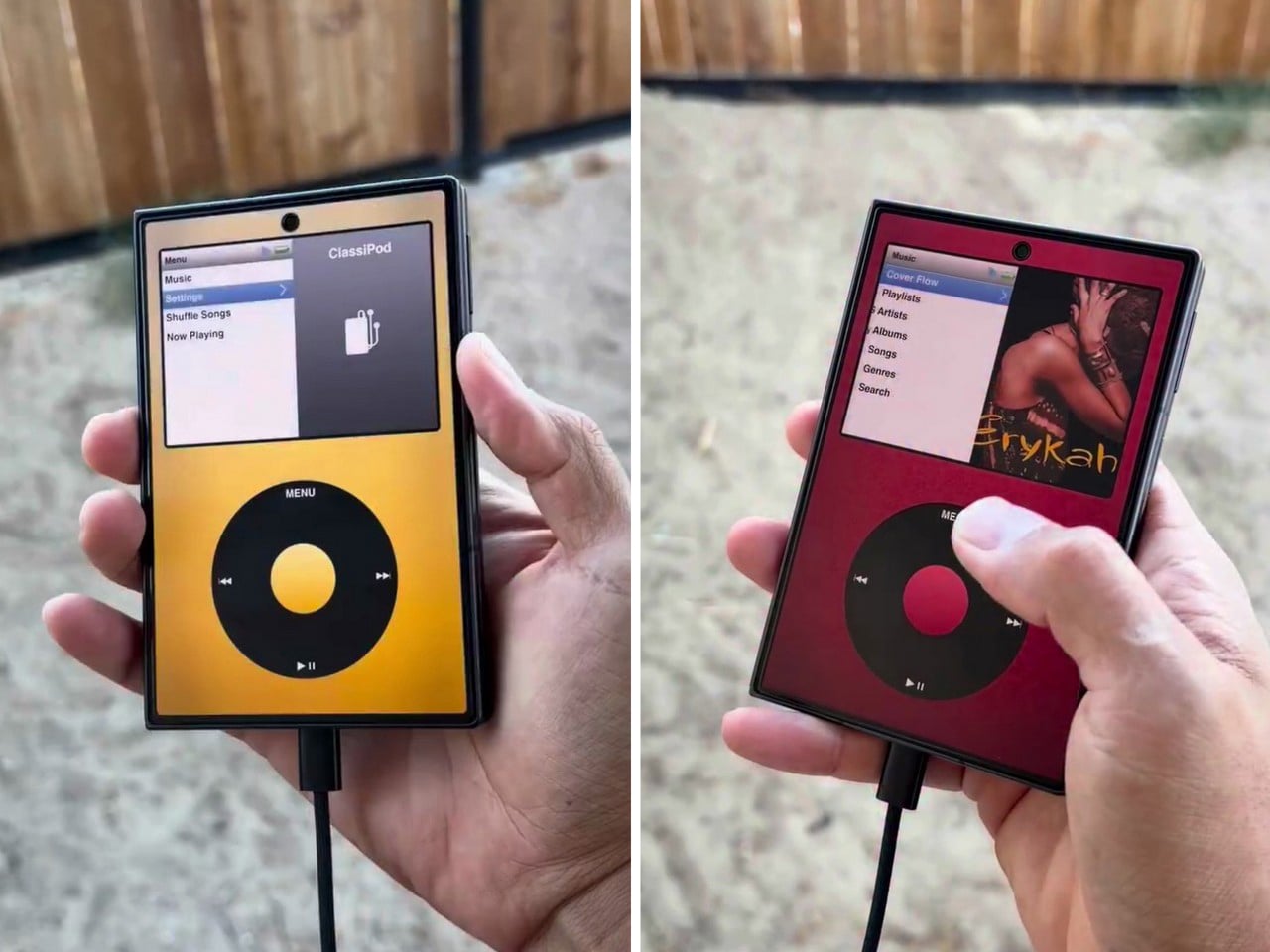
Apple has the opportunity to do something really cool here! An emulator going by the name of Classipod has been doing the rounds on the Google Play Store, letting you run an iPod Classic style interface on any Android phone of your choosing. The only problem is that Apple never really made a 9:20 iPod Classic. Every iPod Classic had a short, stout design and as it stands, there are only two Android phones that currently fit this bill, and both fold.

A video on Instagram showed the Classipod interface on a Galaxy Z Fold8 and I can’t help but feel like this almost exactly looks like the classic iPod. The proportions are damn near perfect, the interface still makes me nostalgic, and those color options absolutely slap! The only real problem is that, like all good things, Classipod came to Android before it did to the iPhone Duo… but if someone from Apple’s software team is reading this (hey Craig!), just go ahead and give us an Apple Music skin that brings back the iPod Classic! Pretty please??

Designer: Adeeteya

Here’s what I find so funny about running Classipod on a Z Fold8 – sure, it almost matches the iPod Classic’s form factor, but even when folded shut, it’s still thinner than the iPod! I’m talking hinge, two sets of screens, two batteries, an entire processor, cameras galore, all that packed into something that measures 9.7mm thick while the iPod Classic, which is just a tiny screen, battery, SoC, and a massive flash drive, measures 10.5mm in thickness. Then again, the iPod Classic packs an aux input too, which you’ll never see on a foldable phone.

But hold the Z Fold8 in your hand and the Classipod definitely scratches the itch of owning vintage Apple gear. The weight and heft, the analog interface, and that gorgeous jogwheel that is sure to get your muscle memory kicking in instantly. You sideload music so it plays locally (no streaming), and you can do everything, from searching for artists to making playlists. And yes, if you’re asking, the jogwheel has haptic feedback so it actually does feel like the iPod of yesteryears.

There are a few iPod emulators on the App Store, but none as good as the Classipod. I guess someone could vibecode one overnight and run it on an iPhone Duo soon, but until then, turns out the most faithful recreation of an iPod Classic exists… just on an Android device!

The post iPod Classic emulator for the Samsung Galaxy Z Fold8 finally gets the size and aspect ratio right first appeared on Yanko Design.

Steam Deck 2 handheld plans haven't been affected by the RAM crisis, even if Valve's Steam Machine PC and Steam Frame VR were more expensive than planned.

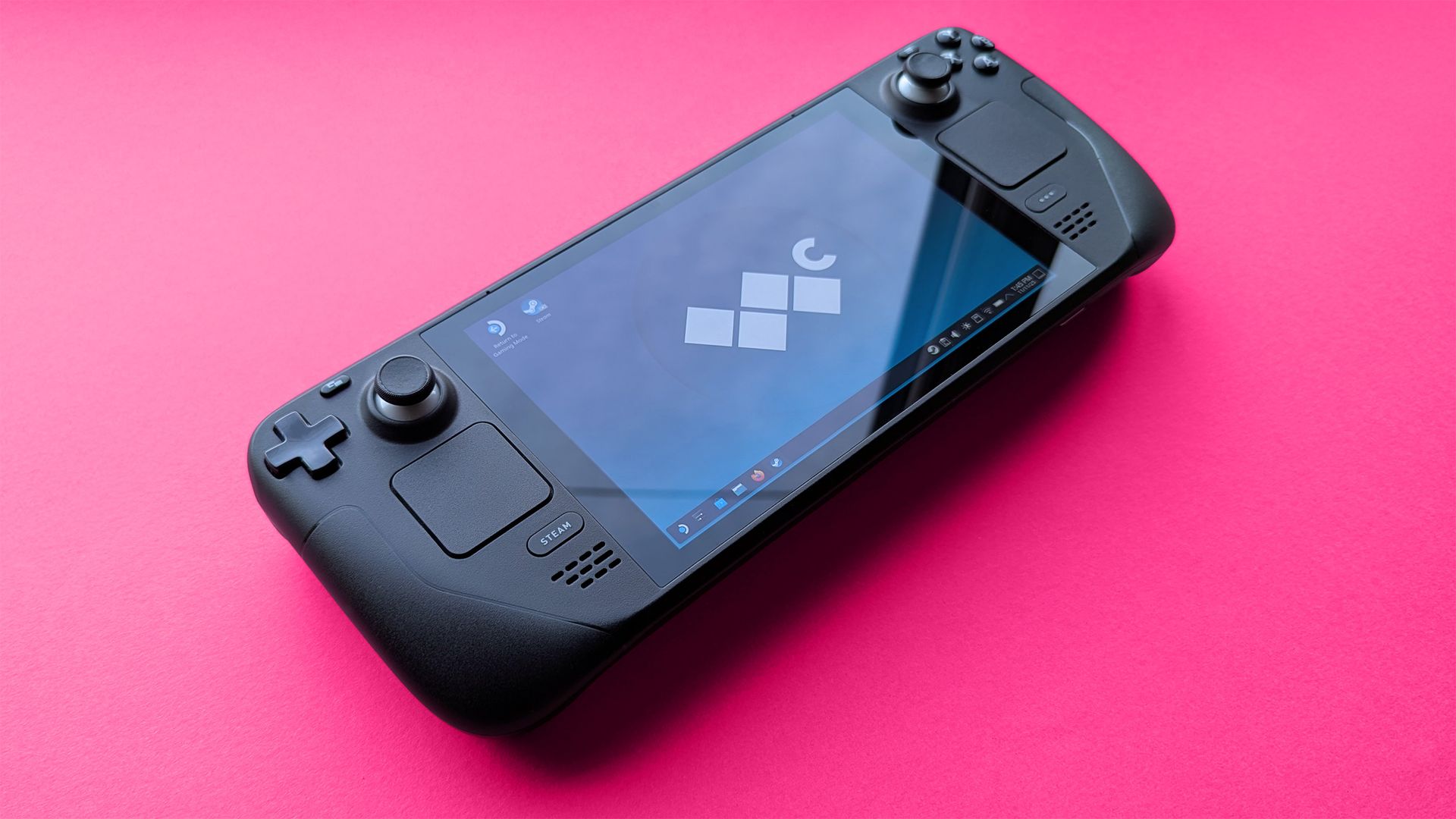
Valve's popular Steam Deck handheld pushed handheld gaming PCs into the mainstream with its affordable, Linux-based console, and its potential successor seemingly aims to make the same impact. Speaking to IGN's Jacqueline Thomas, Valve software developer Pierre-Loup Griffais touched on the fabled 'Steam Deck 2' and whether the ongoing RAM crisis could affect its development.

We want to make sure there's a very delineated performance improvement for something like a future Steam Deck.

Pierre-Loup Griffais, Valve

When asked whether ongoing hardware shortages — which have already affected pricing for its Steam Machine PC and Steam Frame VR headset — have changed how Valve thinks about a Steam Deck successor, Griffais answered, "Not really." For now, it sounds like any potential 'Steam Deck 2' will target the same balance of performance and affordability as before, but is that realistic?

Steam Deck performance was crushed years ago

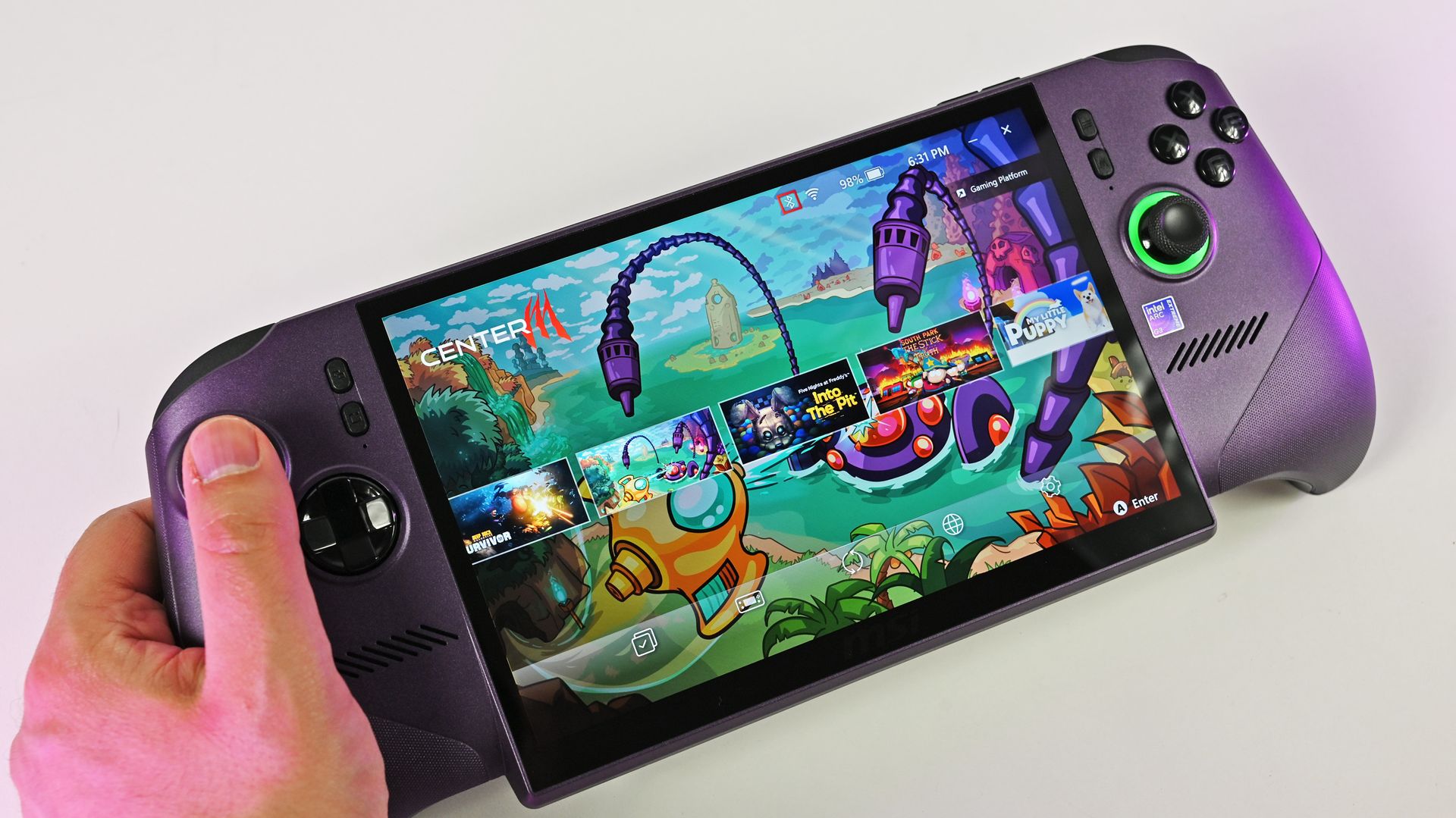
A person holds the metallic purple MSI Claw 8 EX AI+ handheld gaming PC, showcasing its large screen running the MSI Center M game launcher.

MSI Claw 8 EX AI+ stands as one of the best Windows-based handhelds today. (Image credit: Daniel Rubino)

For clarity, I use my Steam Deck almost every day, and it still powers through my library of built-for-Windows PC games with relative success. However, there's no denying its age, and the custom-made Zen 2/RDNA 2 APU doesn't stand a chance in many of the AAA games released in the past few years. For those demanding titles, plenty of Windows-based handhelds are far better suited.

Of course, higher-end options like ASUS ROG's "next-gen" Xbox Ally X and the all-out powerhouse MSI Claw 8 EX AI+ don't offer higher performance without asking for more cash. On the contrary, the Ally X starts at $999.99, while the Claw 8 EX AI+ moves closer to $1,800, which is a far cry from the $399 to $649 window that the Steam Deck originally targeted.

Unfortunately, much like the Claw [8 EX AI+], the Steam Machine is a premium engineering marvel suffering from historically terrible macroeconomic timing.

Daniel Rubino, Windows Central

In that, I'm trying to stay grounded when I hear that Valve's plans haven't changed for the Steam Deck 2 (or whatever it might be called), because that never necessarily meant it would target the same price point as its first handheld. After all, the company just launched its new Steam Frame VR headset for $1,059, which is higher than it originally planned (via PC Gamer).

So, Valve is stuck between a rock and a hard place: sourcing a follow-up (presumably also custom-made) processor and the corresponding components for a mass-produced handheld without pricing it so high that it loses mainstream appeal. It won't be easy, and I wouldn't be surprised if we don't hear anything concrete about the Steam Deck 2 for a few years.

Click to join us on r/WindowsCentral

Join us on Reddit at r/WindowsCentral to share your insights and discuss our latest news, reviews, and more.

  • ✇Korben
  • SpruceOS - Le guide pour rhabiller votre console rétro
    Si vous avez une petite console rétro portable qui traîne, du genre une Miyoo Mini, une TrimUI Brick, une Anbernic RG35XX , vous avez sans doute remarqué que l'interface livrée avec fait le job mais sans plus. Ça tombe bien, spruceOS est là pour ça ! Et malgré son nom, ce n'est pas vraiment un système d'exploitation. En réalité, il s'agit d'un frontend codé en Python qui vient se poser sur une base système déjà existante. Le code est public, sous une licence Creative Commons donc
     

SpruceOS - Le guide pour rhabiller votre console rétro

15 septembre 2026 à 02:53

Si vous avez une petite console rétro portable qui traîne, du genre une Miyoo Mini, une TrimUI Brick, une Anbernic RG35XX , vous avez sans doute remarqué que l'interface livrée avec fait le job mais sans plus. Ça tombe bien, spruceOS est là pour ça ! Et malgré son nom, ce n'est pas vraiment un système d'exploitation. En réalité, il s'agit d'un frontend codé en Python qui vient se poser sur une base système déjà existante. Le code est public, sous une licence Creative Commons donc pour les plus capitalistes d'entre vous, ça veut dire pas d'usage commercial sans permission écrite de l'équipe.

Sur les Miyoo et les TrimUI, la base en question est le système d'origine de la console, celui du fabricant. Sur les Anbernic à puce H700 et sur la Powkiddy RGB30, il faut d'abord installer une base tierce sur la première carte mémoire, genre BaseOS pour les Anbernic, dArkMoss pour la Powkiddy. La carte spruce, elle, ira dans le second emplacement, le TF2, et elle restera librement échangeable d'un appareil supporté à l'autre. Rien de dramatique donc, mais ça fait une étape de plus et une carte en plus.

Ce que vous y gagnez si vous installez spruceOS, c'est surtout du confort au quotidien. Vous maintenez le bouton HOME pendant trois secondes et le Game Switcher vous laisse sauter d'un état de sauvegarde à l'autre sans quitter votre partie. Quand vous éteignez la console en plein jeu, elle sauvegarde même toute seule son état et vous remet exactement là où vous en êtiez au rallumage. Et si votre console a le Wi-Fi, vous ne repassez plus par le PC pour l'habiller puisque l'outil Theme Garden pioche dans plus de quatre-vingts thèmes communautaires dispo en ligne, le Game Nursery télécharge des portages gratuits / homebrew, et un scraper récupère même les jaquettes des jeux depuis la base libretro.

Le menu principal de spruceOS, avec les quatre icônes du thème SPRUCE par défaut

Ce qu'il vous faut avant de commencer

Il vous faut une carte microSD neuve, d'une vraie marque, achetée chez un revendeur sérieux ainsi qu'un bon lecteur de cartes. Et bien sûr un ordinateur sous Windows, macOS ou Linux avec une connexion Internet.

Et surtout, n'utilisez pas la carte livrée avec la console. C'est pas moi qui le dit mais le wiki du projet qui est catégorique là-dessus, en majuscules dans le texte : "DO NOT USE THAT STOCK SD CARD!", parce qu'elle est mauvaise, que les jeux dessus sont mauvais et que les BIOS le sont aussi. Donc gardez-la dans un tiroir, elle vous servira pour revenir en arrière en cas de foirage.

L'installation en un clic

L'équipe a sorti un installeur tout-en-un, qu'elle présente comme entièrement open source, disponible pour Windows, Linux et macOS. Il formate la carte, télécharge la version que vous choisissez et l'installe, en une seule opération. Une seule précaution, et le projet la signale lui-même : vérifiez bien que le lecteur que vous désignez est votre carte, parce que l'installeur écrit sur celui que vous lui montrez. C'est le chemin recommandé, et c'est aussi lui qui règle le cas des Anbernic et de la Powkiddy : BaseOS et dArkMoss ont chacun leur onglet dans l'application et se téléchargent puis s'installent automatiquement, sans que vous ayez à aller chercher une image ailleurs.

Un détail qui coince sur Mac, et qui n'est écrit nulle part ailleurs que dans le dépôt : macOS interdit aux applications d'écrire sur un disque amovible sans permission explicite, et l'installeur passe par le Terminal. Il faut donc aller dans Réglages Système, Confidentialité et sécurité, Accès complet au disque, ajouter Terminal, puis quitter et rouvrir le Terminal. Ce dernier point compte, la permission ne s'applique pas à une session déjà ouverte.

Sur Mac, Terminal doit figurer dans Accès complet au disque pour que l'installeur puisse écrire sur la carte ( Source )

L'installation à la main

Si vous préférez faire ça vous-même, il vous faut un utilitaire de formatage et 7zip. Vous formatez la carte en FAT32, avec Rufus sous Windows ou l'Utilitaire de disque sous macOS en choisissant MS-DOS (FAT32). Vous récupérez l'archive spruce.vX.X.X.7z sur la page des versions du dépôt, vous l'extrayez sur votre ordinateur, puis vous copiez le contenu extrait sur la carte. Vous éjectez proprement, vous insérez la carte dans la console et vous allumez.

Et là, attention au piège, puisque le paquet contient un dossier caché nommé .tmp_update, et sans lui spruce ne fonctionnera tout simplement pas. Donc affichez les fichiers cachés avant de les copier : sur Mac c'est Commande + Majuscule + point, et sur Ubuntu le dossier est masqué par défaut lui aussi. Sur Mac, pensez aussi à nettoyer les fichiers .dot parasites avant d'éjecter la carte. Un utilitaire comme CleanEject fait ça très bien.

Vos jeux et vos BIOS

Les ROMs se rangent ensuite dans un dossier Roms, avec un sous-dossier par machine. La plupart des noms sont évidents, mais certains noms piègent tout le monde comme SFC ou FC. Hé oui, les jeux Super Nintendo vont dans SFC, pour Super Famicom, et pas SNES ; les jeux NES vont dans FC, pour Famicom, et pas NES. Les vidéos et la musique, elles, vont toujours dans MEDIA.

Les BIOS se posent dans un dossier BIOS à la racine de la carte, mais il faut les placer dans le sous-dossier qui va bien par machine et pas tout balancer en vrac. Le BIOS de la Dreamcast veut son sous-dossier, certains sont obligatoires pour que la machine tourne, d'autres pas. Donc je vous invite à vous renseigner en fonction de la machine que vous voulez émuler. Et comme d'hab, le BIOS de la NeoGeo ne va pas dans BIOS mais avec les jeux.

BIOS/dc/dc_boot.bin Dreamcast, obligatoire
BIOS/gba_bios.bin Game Boy Advance, facultatif
Roms/NEOGEO/neogeo.zip NeoGeo, obligatoire, et pas dans BIOS

Et évidemment, le projet ne fournit ni ROMs commerciales ni BIOS et ne vous dira pas où les trouver, donc c'est à vous de voir avec vos propres cartouches et vos propres disques.

Si l'écran reste noir

Maintenant, si c'est tout noir au lancement, vérifiez que le dossier .tmp_update est bien présent sur la carte. Remettez-la dans l'ordinateur, réaffichez les fichiers cachés, et regardez : si vous avez copié sans avoir activé l'affichage, il n'y est pas. L'autre suspect, c'est la carte elle-même. C'est peut-être parce que vous avez acheté une no-name de merde.

Le moment où vous ne pourrez plus revenir en arrière

Tant que vous ne touchez qu'à la carte, vous ne risquez rien de définitif. Sur la famille Anbernic RG35XX, les guides de référence le disent tous : ces firmwares vivent entièrement sur la microSD, et donc on peut passer de l'un à l'autre sans modification permanente de l'appareil. Ailleurs le principe est le même, et pour retrouver votre console en version d'usine il suffit donc de remettre la carte d'origine.

Sauf qu'il y a UNE exception !! spruce embarque un Firmware Updater qui apparaît tout seul dans vos applications si votre console tourne sur un firmware ancien. Celui-là n'écrit pas sur la carte mais dans la mémoire interne de la machine, et le wiki prévient sans détour : "Failure to follow the firmware updating instructions can lead to a bricked device.". En gros si vous le lancez pour faire la mise à jour du firmware, ça peut bricker votre console, donc pensez bien à la brancher sur le courant avant la mise à jour. Le projet documente d'ailleurs deux procédures de débriquage, dont une qui demande carrément d'ouvrir la Miyoo Flip et de débrancher sa batterie, ce qui vous dit assez bien à quel point on a quitté le terrain du réversible...

Et si spruceOS ne vous convient pas, vous ne serez pas coincé pour autant car sur ce même matériel, le guide de référence de Retro Game Corps recommande aussi Knulli pour son interface EmulationStation, ou encore muOS pour la performance d'émulation la plus avancée, à condition que le bricolage de configs customs ne vous rebute pas. Après voilà, chaque "OS" a sa carte et vous changez d'avis quand vous voulez.

Source : spruceOS sur GitHub , le wiki du projet et le site officiel

  • ✇Yanko Design
  • RHYTHM Is the Walkman the Smartphone Era Forgot to Build
    Smartphones turned music into just another notification competing for attention, a song interrupted by a text, an album broken up by a calendar alert. RHYTHM exists to undo that arrangement entirely, building a dedicated listening device from real audio components instead of borrowing a phone’s guts and bolting on a headphone jack. It’s a from-scratch digital audio player designed around one job: playing music properly, without a screen demanding anything else from you. That commitment starts w
     

RHYTHM Is the Walkman the Smartphone Era Forgot to Build

Par : JC Torres
12 septembre 2026 à 06:30

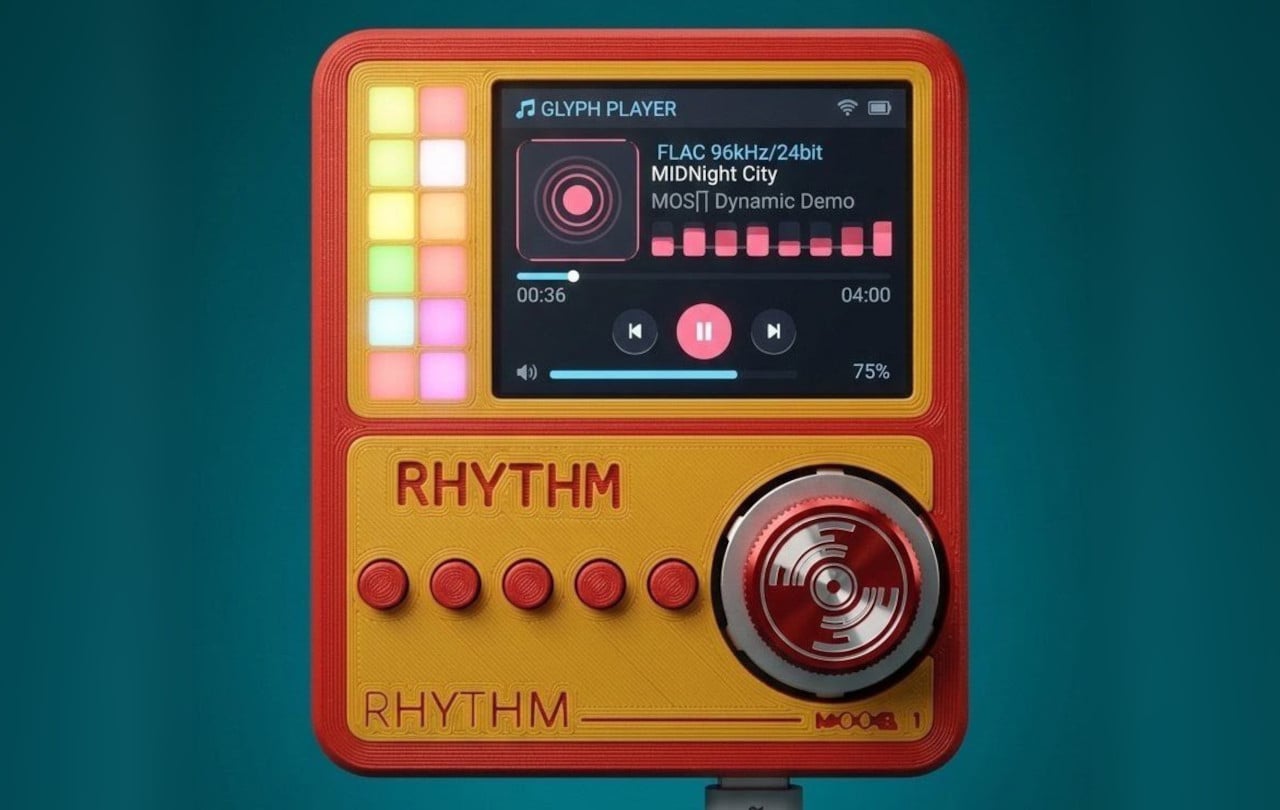
Smartphones turned music into just another notification competing for attention, a song interrupted by a text, an album broken up by a calendar alert. RHYTHM exists to undo that arrangement entirely, building a dedicated listening device from real audio components instead of borrowing a phone’s guts and bolting on a headphone jack. It’s a from-scratch digital audio player designed around one job: playing music properly, without a screen demanding anything else from you.

That commitment starts with what’s actually driving the sound. Rather than leaning on an all-in-one audio codec chip the way most budget players do, RHYTHM routes music through a genuine ESS SABRE DAC, the same category of chip found in dedicated hi-fi gear, paired with a discrete amplifier stage rather than a shortcut solution. An ESP32-S3 handles the file parsing and processing, but the actual sound reproduction runs through hardware built specifically for that job alone.

Designer: Mithilesh Gupta Konda

The headphone output makes the clearest case for why any of this matters. Instead of splitting one internal signal across a single jack, RHYTHM runs two completely independent, actively buffered 3.5mm outputs, each driven by its own dedicated amplifier chip. Two people can plug in two entirely different pairs of headphones, and each gets a full, uncompromised signal, no shared circuit quietly degrading whichever connection came second.

Keeping that signal clean required rethinking the power supply as much as the audio path. RHYTHM physically separates its digital logic and high-frequency switching lines from the analog circuitry that actually shapes the sound, regulating each side through its own dedicated, ultra-low-noise power regulator. It’s an unglamorous decision that never shows up in a spec sheet screenshot, but it’s exactly the kind of choice that determines whether quiet passages in a recording stay quiet.

Physical control gets the same attention. A precision mechanical rotary encoder handles navigation alongside a set of tactile buttons, giving the whole interface a hands-on quality that a touchscreen simply can’t replicate. Paired with a compact 2-inch color display, the device reads less like a shrunken phone and more like a purpose-built instrument, something meant to be operated by feel in a pocket or a bag without needing to look at it.

A microSD slot rounds out the practical side, storing lossless files locally rather than depending on a streaming connection or app ecosystem. That local-first approach extends the project’s entire philosophy: RHYTHM isn’t trying to replace a phone’s convenience. Instead, it’s opting out of that convenience on purpose, trading constant connectivity for a listening experience built around a single, uninterrupted task.

The post RHYTHM Is the Walkman the Smartphone Era Forgot to Build first appeared on Yanko Design.

  • ✇Korben
  • Super Mario 64 tourne sur un processeur ARM (avec ReactOS)
    Une vidéo postée sur X montre Super Mario 64 qui tourne sur une machine ARM, sous un système qui n'est ni Windows ni Linux. Oui, c'est bien ReactOS, le clone libre de Windows, et le jeu est un exécutable x64 tout ce qu'il y a de plus banal ! Et n'allez pas croire que c'est un émulateur qu'on aurait posé sur un OS libre. Que nenni ! Pour exécuter du x64 sur de l'ARM, il faut deux trucs qui n'ont rien à voir l'un avec l'autre : un moteur qui traduit les instructions du processeur, et un système ca
     

Super Mario 64 tourne sur un processeur ARM (avec ReactOS)

11 septembre 2026 à 00:59

Une vidéo postée sur X montre Super Mario 64 qui tourne sur une machine ARM, sous un système qui n'est ni Windows ni Linux. Oui, c'est bien ReactOS, le clone libre de Windows, et le jeu est un exécutable x64 tout ce qu'il y a de plus banal !

Et n'allez pas croire que c'est un émulateur qu'on aurait posé sur un OS libre. Que nenni ! Pour exécuter du x64 sur de l'ARM, il faut deux trucs qui n'ont rien à voir l'un avec l'autre : un moteur qui traduit les instructions du processeur, et un système capable de faire cohabiter du code natif et du code traduit dans un même programme.

La première moitié, c'est FEX, l'émulateur financé par Valve dont je vous parlais en décembre. Sauf que côté Windows, FEX se limite au processeur : sa propre documentation précise que la traduction des appels système revient soit à Wine, soit à l'ABI du système. Tout le reste est alors à la charge de l'hôte.

Cette seconde moitié porte un nom, ARM64EC, et c'est une invention de Microsoft pour Windows 11 sur ARM (oui, la boîte que ReactOS passe justement son temps à recopier). Le principe consiste à compiler les bibliothèques du système en ARM64 avec une interface appelable depuis du code x64 recompilé. Du coup, un même programme mélange des morceaux natifs et des morceaux émulés, et seul ce qui doit vraiment l'être passe par l'émulateur. L'intérêt de faire comme ça, c'est surtout la vitesse !

Jusqu'ici, deux entités avaient bâti cet "étage" : Microsoft dans Windows, et Wine depuis sa version 10 . ReactOS est donc la troisième. Son développeur Ahmed Arif a ainsi écrit son propre runtime hybride dans le ntdll du système, avec le chargeur d'images, les ponts qui rendent les fonctions natives appelables en x64, et le déroulement de pile.

Ensuite, pour vérifier que tout se tient, il fait tourner le même binaire des deux côtés, sur son ReactOS et sur un vrai Windows 11 ARM64, puis il compare.

Screenshot

Alors, est-ce que vous pouvez l'installer ?

Et bien malheureusement, non !

Tout ce boulot n'existe que dans une branche d'un fork personnel, et le dépôt officiel de ReactOS n'en contient pas la moindre ligne. Et c'est mieux pour l'instant car, comme Ahmed le dit lui-même, son fork est encore plus expérimental que ReactOS lui-même ! C'est donc à réserver aux machines virtuelles, aux cartes de développement ou aux bécanes sans données sensibles. Bref, venant d'un projet qui se présente déjà lui-même comme un système de qualité alpha, ça vous situe l'ambiance...

Bref, rien à télécharger mais pour un projet qui se battait encore il y a trois mois pour lancer Half-Life , voir un jeu x64 démarrer sur de l'ARM, ça envoie quand même du pâté.

Source : Phoronix

  • ✇Yanko Design
  • 5 Designs That Prove Vinyl’s Comeback Was Never Just About the Music
    Vinyl has returned to the cultural spotlight, but its comeback is about much more than nostalgia. A new generation is discovering records as objects of design, ritual, and personal expression. For Gen Z, vinyl offers something increasingly rare in a digital-first world: a physical relationship with music. Choosing an album, holding the sleeve, placing the record on a turntable, and listening from beginning to end creates a slower, more intentional experience. The renewed interest in vinyl is al
     

5 Designs That Prove Vinyl’s Comeback Was Never Just About the Music

10 septembre 2026 à 12:20

Vinyl has returned to the cultural spotlight, but its comeback is about much more than nostalgia. A new generation is discovering records as objects of design, ritual, and personal expression. For Gen Z, vinyl offers something increasingly rare in a digital-first world: a physical relationship with music. Choosing an album, holding the sleeve, placing the record on a turntable, and listening from beginning to end creates a slower, more intentional experience.

The renewed interest in vinyl is also influencing interiors and product design. Record players are becoming sculptural objects, album covers are being displayed like artwork, and dedicated listening corners are finding their place inside contemporary homes. Here is how Gen Z is giving an old format a new visual language, transforming the record experience into a lifestyle statement.

1. Vinyl Becomes A Lifestyle

Vinyl has moved beyond the traditional collector’s shelf to become part of a broader lifestyle centered around music, design, and self-expression. Gen Z is attracted to records because they provide something that streaming cannot: a tangible connection to an artist and an album. The large-format sleeve, physical record, and carefully designed packaging create an experience that feels more substantial than tapping a song on a phone.

This shift has also made vinyl increasingly relevant to interiors. Records can sit on open shelving, lean against walls, or become part of carefully arranged listening corners. Collections communicate personality through color, artwork, typography, and genre. Instead of simply storing music, younger listeners are using their collections to shape the atmosphere and identity of their spaces.

The Ripple Turntable transforms sound into a visual language, drawing inspiration from the way audio waves radiate outward from a single source. Its pristine white surface features sculpted ripples that appear to emanate from the center of the platter and the base of the tonearm, intersecting across the surface to create a striking sense of movement. The effect turns an otherwise functional audio device into an expressive sculptural object, giving the act of playing music a distinctly visual dimension.

A sleek gold tonearm introduces a subtle accent against the all-white body, while the black vinyl record provides a strong visual contrast. Its minimalist yet playful character makes it particularly suited to Scandinavian and Japanese-inspired interiors, where sculptural simplicity and thoughtful detailing take center stage.

2. The Ritual Of Listening

Streaming has made listening almost effortless, allowing users to access millions of songs instantly. Vinyl introduces a different rhythm. The listener has to select an album, remove the record from its sleeve, place it carefully on the turntable, and lower the needle. These small actions create a physical ritual that encourages greater attention.

That ritual is particularly relevant to a generation accustomed to constant notifications and rapidly changing digital content. Listening to a record can create a moment of pause, where the album becomes the focus rather than background noise. Turning the record over halfway through also introduces a natural break, making music feel like an activity rather than an endless stream of content.

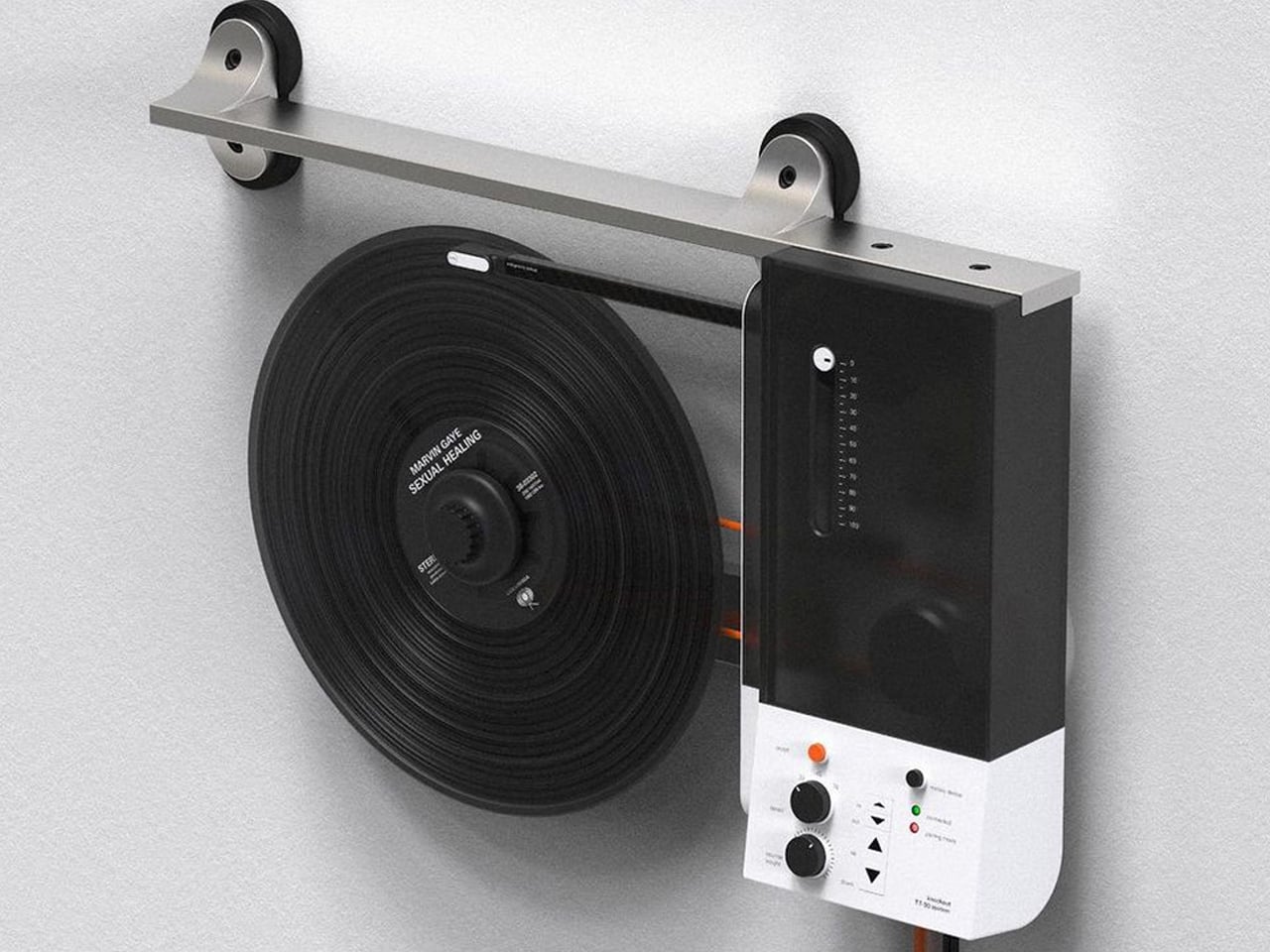
Oscar Olsson’s TT-90 System reimagines the traditional turntable by combining analog listening with contemporary digital functionality. Flipping the record player 90 degrees, the concept mounts the vinyl vertically on the wall, creating the illusion of a record floating in space as it spins beneath the needle. The unconventional format also addresses a common limitation of traditional turntables: their bulky footprint. Instead of occupying valuable furniture space, the TT-90 becomes part of the wall, transforming an everyday audio device into a striking piece of interior design. Available in black, orange, and white, its streamlined silhouette gives the familiar record player a distinctly futuristic character.

Beyond its space-saving approach, the TT-90 System introduces smartphone connectivity, allowing listeners to control playback digitally alongside onboard controls. Rubber components help reduce vibration against the wall, while a threaded knob secures the record during vertical playback. The result is a playful fusion of physical music culture, modern technology, and sculptural design.

3. Record Players Become Design

The turntable is experiencing its own design revival. Contemporary models are increasingly being designed to look at home alongside modern furniture rather than being treated purely as technical equipment. Minimal controls, warm materials, compact forms, transparent components, and sculptural bases are giving turntables a more furniture-like presence.

For Gen Z, this visual quality matters because technology is increasingly expected to contribute to a home’s aesthetic. A record player can become the centerpiece of a listening corner, positioned alongside books, plants, speakers, and carefully selected objects. The result is a more integrated approach to audio design, where performance and appearance work together instead of technology disappearing into a cabinet.

The Symphony headphones by Przemysław Wolnicki explore an intriguing meeting point between vinyl culture and contemporary personal audio. Instead of simply recreating the look of a record player, the concept translates its tactile interaction into a headphone interface. Each earcup features a miniature vinyl-inspired control surface that functions like a tiny turntable. Rotating the record allows listeners to seek forward or rewind, while the stylus controls track selection and playback. The interaction gives digital listening a physical dimension, creating a playful connection between nostalgic analog rituals and modern wireless audio.

Visually, the Symphony headphones take a distinctly premium approach. Brushed stainless steel gives the concept an audiophile-inspired character, while elongated structural elements add a futuristic, almost automotive quality to the earcups. Transparent sections introduce another layer of visual intrigue, allowing parts of the mechanism to remain visible.

4. Album Art Enters Interiors

Vinyl’s physical scale gives album artwork a presence that digital platforms cannot easily reproduce. A record sleeve can be picked up, examined, framed, displayed, or arranged as part of a larger collection. Its typography, photography, illustration, and color palette can influence the character of an entire room.

Gen Z’s interest in personalized interiors has made this particularly relevant. Rather than following perfectly coordinated design schemes, younger homeowners and renters often use meaningful objects to create spaces that feel individual. A stack of favorite records or a carefully arranged shelf can reveal musical taste while adding visual interest. Music therefore becomes part of interior storytelling, with album artwork functioning almost like a rotating gallery.

Building a vinyl collection comes with an important challenge: keeping records in excellent condition. Unlike digital music, physical records require careful storage and handling, with warping being one of the most common problems. Exposure to heat, pressure, or improper storage can distort a record’s shape, potentially causing skips, pops, and uneven playback. Pro-Ject’s Flatten it offers a dedicated solution for collectors who want to preserve their records or restore warped discs. Designed specifically for vinyl maintenance, the machine gently flattens damaged records while aiming to protect the delicate grooves responsible for their sound.

The Flatten it resembles a sophisticated record player, but instead of playing music, it uses heated aluminum plates to distribute warmth evenly across the record. Temperature controls allow users to adjust the process, while low temperature hysteresis helps maintain consistent conditions. Its solid aluminum construction gives the machine a premium, durable feel, while its straightforward operation makes it approachable even for first-time vinyl collectors.

5. A New Generation Collects

Gen Z is approaching collecting differently from previous generations. Owning vinyl does not necessarily mean building an exhaustive collection of an artist’s entire discography. Instead, younger collectors may choose albums because of their emotional significance, artwork, rarity, cultural relevance, or connection to a particular period of their lives.

Social media has further strengthened vinyl’s visual appeal. Record hauls, listening setups, shelves, packaging details, and limited-edition pressings naturally become content for visually driven platforms. Yet the appeal goes deeper than aesthetics. In an economy built around subscriptions and temporary digital access, owning a physical album offers a sense of permanence. Vinyl gives listeners something they can hold, display, revisit, and pass on.

Album artwork has long played an important role in shaping how music is experienced, turning records into visual as well as auditory objects. As streaming has reduced album covers to small digital thumbnails, vinyl has restored the opportunity to create tangible, immersive packaging. OK Go embraces that potential with its album And the Adjacent Possible, featuring an inventive vinyl jacket designed by Yuri Suzuki and Claudio Ripol. The gatefold cover transforms the familiar act of opening a record into an interactive visual experience, extending the album’s creative identity beyond the music itself.

Opening the jacket reveals a three-dimensional pop-up structure featuring geometric red and green domes that rise from the surface. A reflective element beneath them creates an optical illusion, making the partial forms appear like complete spheres. The playful construction recalls the wonder of a pop-up book while maintaining a sophisticated aesthetic. Its precise folds, geometric forms, and restrained palette turn the record sleeve into a sculptural object that connects music, packaging, and interactive design.

Vinyl’s revival reflects a growing desire for tactile, intentional experiences in a digital world. Gen Z is not simply bringing records back; it is redesigning the entire experience around listening, collecting, interiors, and personal expression.

The post 5 Designs That Prove Vinyl’s Comeback Was Never Just About the Music first appeared on Yanko Design.

  • ✇Yanko Design
  • Your Second Screen Can Finally Work With No Cables and No Outlet
    Desks are overrated. So are the cables that come with them. The 4URPC is a 15.6-inch wireless touchscreen monitor built for people who’d rather not be chained to an outlet just to get a bigger screen. It’s slim, self-powered, and ready to mirror whatever’s on your phone, tablet, or laptop the moment you need more room to work, watch, or play. Cutting the cord doesn’t mean cutting functionality. The monitor mirrors an iPhone or Android device through a peer-to-peer wireless connection, no home W
     

Your Second Screen Can Finally Work With No Cables and No Outlet

Par : JC Torres
8 septembre 2026 à 21:45

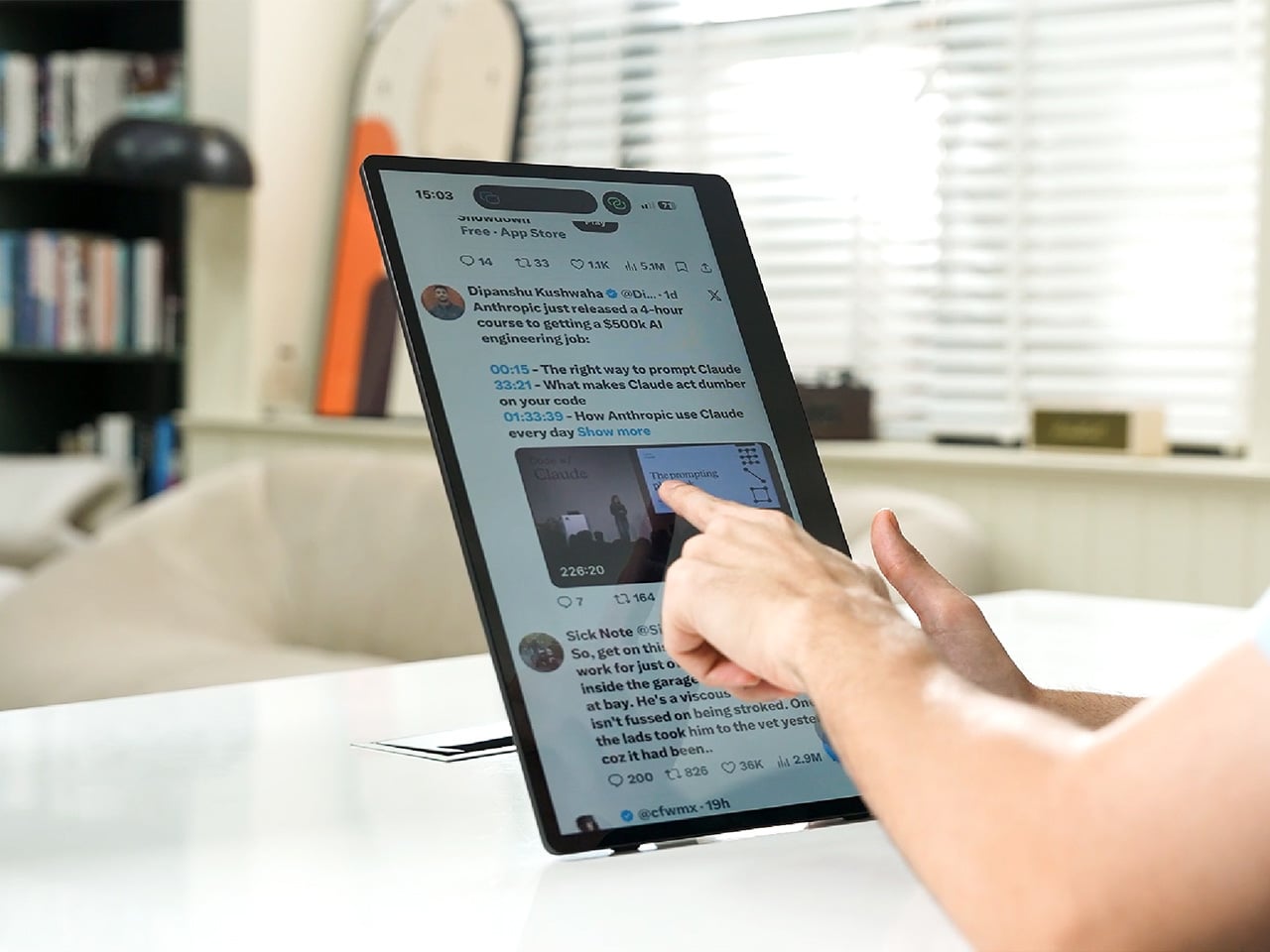
Desks are overrated. So are the cables that come with them. The 4URPC is a 15.6-inch wireless touchscreen monitor built for people who’d rather not be chained to an outlet just to get a bigger screen. It’s slim, self-powered, and ready to mirror whatever’s on your phone, tablet, or laptop the moment you need more room to work, watch, or play.

Cutting the cord doesn’t mean cutting functionality. The monitor mirrors an iPhone or Android device through a peer-to-peer wireless connection, no home Wi-Fi or app required. For streaming platforms like YouTube, Netflix, or Hulu, connecting to Wi-Fi and tapping the built-in TV Cast icon sends video to the screen. Either way, there’s no dongle to lose or cable to untangle before the movie starts.

Designer: 4URPC

Click Here to Buy Now: $219 $399 (45% off). Hurry, only 451/600 left! Raised over $181,000.

The more interesting trick happens after mirroring starts. The 10-point touchscreen can send input back to the connected phone, turning the monitor into a larger, shared control surface. Flip through photos with a friend, walk a colleague through a presentation, or hand someone the reins without handing over your phone. It’s a shift that makes shared screen time less awkward.

None of this would matter much if the monitor were bulky. At half an inch thick and just over 2 pounds, it’s built to disappear into a backpack rather than dominate it. The matte, textured shell keeps fingerprints and glare to a minimum, and a fold-out kickstand on the back means setup takes seconds on a desk, a kitchen counter, or the arm of a couch.

A built-in 4,000 mAh battery backs up that portability by taking the wall outlet out of the equation. Setting up on a train, in a hotel room, or on a patio doesn’t mean scouting for the nearest plug first. That same battery can lend a charge to a connected phone, turning the monitor into a backup power bank when the moment calls for it.

Plug it into a laptop with a USB-C cable, and the 4URPC switches roles, becoming an extended display rather than a wireless mirror. Dragging a browser tab, a chat window, or a reference document onto the second screen takes a second, and the touchscreen works over the wired connection. The laptop stays focused on the main task while the extra display handles everything else.

The screen also rotates between landscape and portrait without any fuss, which sounds minor until it changes how you use it day to day. Landscape suits video calls, games, and spreadsheets, while portrait mode fits scrolling through documents, reading long articles, or checking social feeds. Switching between the two takes a twist of the stand, not a trip through a settings menu.

Compatibility runs wide enough that most people won’t need to think twice before connecting. Wireless mirroring covers iPhones, Android phones running version 10 or later, MacBooks, and most Windows laptops, while the wired USB-C or HDMI input works with game consoles, streaming boxes, and the Nintendo Switch. There’s no software to install and nothing to configure; connecting the device and turning it on is the entire setup process.

Under the glass sits a 1920×1080 matte IPS panel running at 60 Hz, built more for comfortable, glare-free sessions than eye-popping color numbers. Dual USB-C ports split power delivery and video duties, small stereo speakers cover casual audio, and a VESA mount plus a standard camera screw thread add mounting options beyond the built-in stand. It’s a practical set of choices rather than a flashy one.

There’s something telling about a monitor that assumes you won’t always be sitting at the same desk tomorrow. Work has scattered across kitchen tables, coffee shops, and airport gates for a while now, and screens are only starting to catch up. The 4URPC doesn’t try to be the sharpest or brightest display around; it just tries to be wherever you happen to land next.

Click Here to Buy Now: $219 $399 (45% off). Hurry, only 451/600 left! Raised over $181,000.

The post Your Second Screen Can Finally Work With No Cables and No Outlet first appeared on Yanko Design.

  • ✇Yanko Design
  • Cloud AI Means Someone Else Has Your Data, MINISFORUM Fixes That
    Running a serious AI model at home usually means renting someone else’s cloud server and hoping your data stays private along the way. MINISFORUM built its newest pairing to remove that trade-off entirely. The AI Agent NAS N5 MAX-P495 and AI Mini Workstation MS-S1 MAX-P495 combine for up to 131 TOPS of AI compute performance, 192GB of memory at 8533 MT/s, and up to 160GB of graphics memory, enough headroom to keep the heavy lifting on a desk instead of in a data center. The N5 MAX-P495 takes th
     

Cloud AI Means Someone Else Has Your Data, MINISFORUM Fixes That

Par : JC Torres
4 septembre 2026 à 00:00

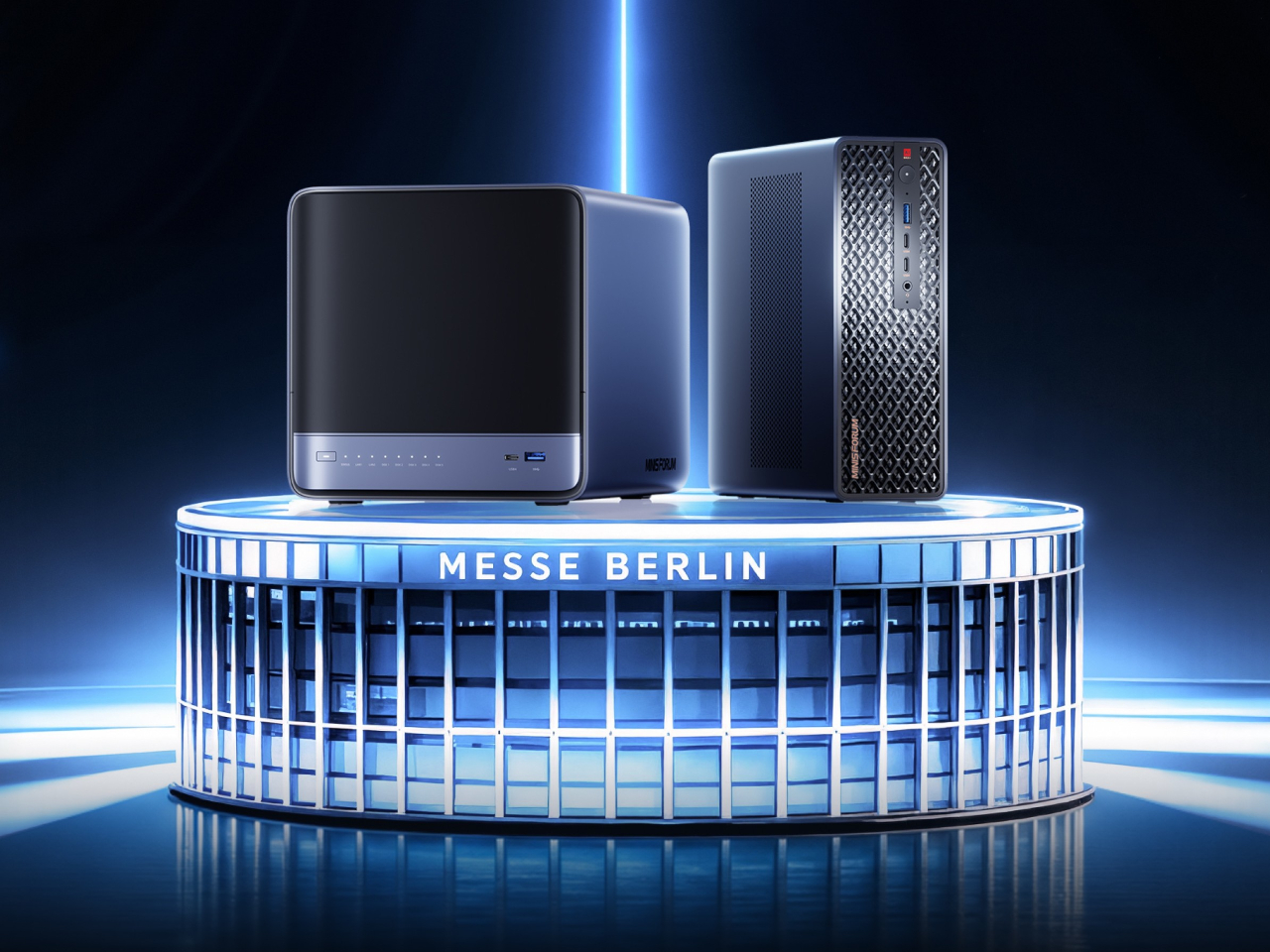
Running a serious AI model at home usually means renting someone else’s cloud server and hoping your data stays private along the way. MINISFORUM built its newest pairing to remove that trade-off entirely. The AI Agent NAS N5 MAX-P495 and AI Mini Workstation MS-S1 MAX-P495 combine for up to 131 TOPS of AI compute performance, 192GB of memory at 8533 MT/s, and up to 160GB of graphics memory, enough headroom to keep the heavy lifting on a desk instead of in a data center.

The N5 MAX-P495 takes the shape of a compact black cube, but what it holds inside matters more than how it looks sitting on a shelf. It combines powerful AI computing with up to 200TB of local storage, enabling users to store, manage, and process large volumes of data within a single AI platform. That capacity turns a spare corner of an office into a private archive large enough to hold years of project files, footage, or research without ever touching a third-party server.

Designer: MINISFORUM

Storage alone doesn’t make an AI system useful, so MINISFORUM built the N5 to run the AI itself. From RAG knowledge bases and AI models to embeddings, databases, and AI agents such as OpenClaw and Hermes, N5 MAX-P495 keeps data and AI workloads local, enabling continuous and private AI operations. A small business could lean on that setup to run its own customer-support agent without routing conversations through an outside company’s servers.

That local-first approach extends to how the N5 fits into a larger setup. Designed to work alongside AI computing devices, N5 MAX-P495 serves as a centralized backend for data, models, knowledge, and long-running AI workloads, bringing storage and computing together at the edge. It’s less a standalone gadget and more a quiet engine room, built to keep working in the background while something faster handles the parts people actually interact with.

That faster half of the pairing is the MS-S1 MAX-P495, a compact tower wrapped in a ventilated, diamond-textured front panel that looks more like a piece of desk sculpture than a workstation. It delivers powerful local AI computing for demanding model inference, AI development, and computationally intensive workloads, built for intensive local AI tasks, engineering, and workflows in an ultra-compact footprint. Developers get workstation-class muscle without giving up desk space to a full tower case.

Speed matters just as much as raw power for certain jobs, and MINISFORUM designed the MS-S1 with that in mind. Designed for low-latency AI workloads, MS-S1 MAX-P495 enables responsive local inference for AI agents, computer vision, generative AI, and other real-time applications. A security camera system or a live creative tool built on generative AI benefits directly from that kind of immediate response instead of waiting on a round trip to the cloud.

Connectivity rounds out the workstation’s role in a larger setup. With extensive connectivity and expansion capabilities, MS-S1 MAX-P495 serves as a powerful AI compute frontend, supporting models, applications, and connected devices across flexible edge AI environments. That flexibility means the same box can sit at the center of a home lab or plug into a small studio’s existing hardware without forcing a rebuild.

Paired together, the two devices split the work the way a good team would. The MS-S1 MAX-P495 and N5 MAX-P495 form a complete edge AI computing system, delivering high-performance AI compute at the frontend while integrating compute, massive storage, data, and AI knowledge at the backend, providing a powerful foundation for real-time inference, persistent AI workloads, and scalable local AI applications. It’s a compact answer to a question more households and small teams are starting to ask: whether AI still needs to live somewhere else at all.

The post Cloud AI Means Someone Else Has Your Data, MINISFORUM Fixes That first appeared on Yanko Design.

  • ✇Yanko Design
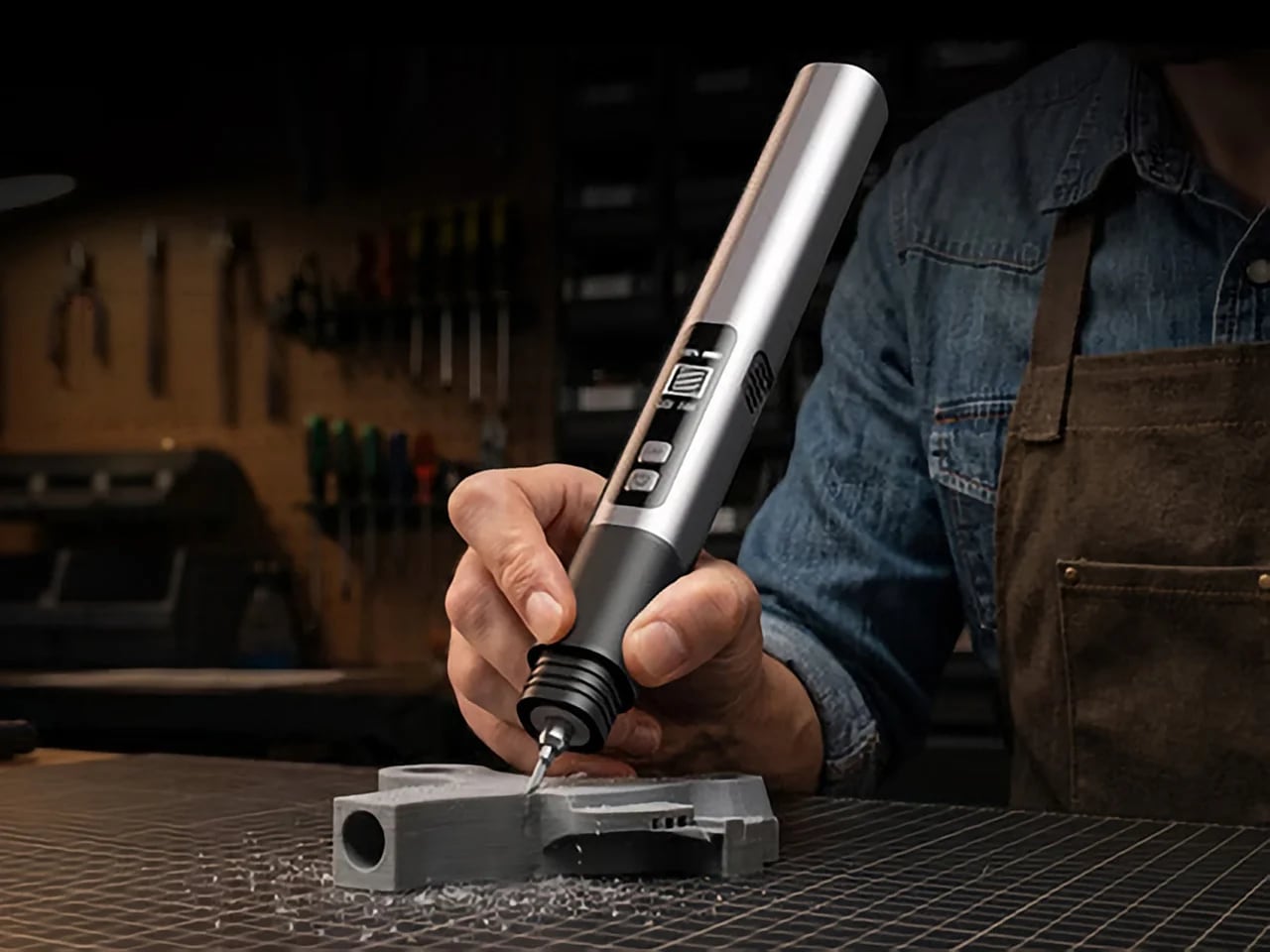
  • This $119 Ultrasonic Cutter Sense Materials And Auto-Adjusts To Cut EVA Foam, Resin, PLA 3D Prints
    There are power tools, and then there are smart tools. A power tool gives you brute force; a smart tool gives you controlled, consistent results. Think of a simple drill that just spins versus one that manages its own torque to avoid stripping a screw. For delicate work like trimming EVA foam for a cosplay project or cleaning up support structures on a 3D print, you definitely want the smart one. The problem is, most handheld cutters are pretty basic, giving you one speed and just hoping for th
     

This $119 Ultrasonic Cutter Sense Materials And Auto-Adjusts To Cut EVA Foam, Resin, PLA 3D Prints

2 septembre 2026 à 21:45

There are power tools, and then there are smart tools. A power tool gives you brute force; a smart tool gives you controlled, consistent results. Think of a simple drill that just spins versus one that manages its own torque to avoid stripping a screw. For delicate work like trimming EVA foam for a cosplay project or cleaning up support structures on a 3D print, you definitely want the smart one. The problem is, most handheld cutters are pretty basic, giving you one speed and just hoping for the best.

The SonicMax Slice 10 is aiming for that higher IQ. It’s a cordless ultrasonic cutter that senses the material you’re cutting and adjusts its own power output in real time. Slice through dense plastic and it pushes harder; trim the thin walls of a resin print and it eases back. This adaptive system, combined with cooling that prevents heat-related power drops, makes it feel like proper workshop equipment in the palm of your hand. It runs at 40kHz, delivers up to 50 watts of dynamic peak power, and does all of this without a single cable getting in your way.

Designer: SonicMax

Click Here to Buy Now: $119 $215 (45% off). Hurry, only 13/500 left! Raised over $124,000.

Most ultrasonic cutters on the market use transducers with a mechanical quality factor, or Qm, somewhere between 150 and 250. A higher Qm means the transducer converts electrical energy into vibration more efficiently, which directly translates to less heat generated during use. SonicMax claims a Qm of over 500 for the Slice 10, and lab data backs that up with a verified measurement of 541.1. That’s roughly two to three times higher than a typical competing tool, and it’s the foundational reason the Slice 10 can sustain longer sessions without thermal drama. That single transducer decision cascades into everything else, from runtime and cut quality to how comfortable the tool actually stays in your hand.

As the blade meets resistance, the Slice 10’s Smart Material Auto-Detection reads that feedback and adjusts power output and vibration frequency without you touching anything. Cutting through a stiff chunk of EVA foam feels different from trimming the thin walls of a resin print, and the tool responds to each material accordingly. You’re not locked into a fixed setting that works okay for most things but perfectly for nothing. The system also preserves cut quality across a long session, where material resistance can shift as the blade warms. The result is consistent cuts from the first pass to the last, regardless of what you’re running the blade through.

Heat is the reason most cordless ultrasonic cutters force you to stop every five to ten minutes, and the Slice 10 attacks that problem from two directions. Corded bench tools sidestep this issue by drawing steady power and dissipating heat more easily, but you give all of that up the moment you cut the cord. The high-efficiency transducer generates less heat from the start, and the built-in active cooling fan manages whatever thermal load does build up during a session. Overheat protection kicks in automatically at 80 degrees Celsius at the motherboard level, so the tool protects itself without you having to babysit it. You only appreciate how good this is after you’ve spent a session on a cutter that kept shutting itself off on you mid-cut.

A 5000mAh 21700 lithium-ion battery powers the Slice 10, and SonicMax made it user-replaceable, which you’ll end up appreciating far more than any spec sheet number. The 21700 is a high-performance cell format found in premium flashlights and power tools, so sourcing replacements from SonicMax or compatible third-party brands should never be a problem. SonicMax’s own branded replacement cell is rated for 500 charge cycles at 80% capacity retention, a reasonable lifespan for a tool you’re actually putting to work regularly. An 18W USB-C pass-through charging system brings it from zero to full in about 70 minutes, and the tool keeps running while plugged in. Claimed runtime sits at up to four hours, and when you run low mid-project, swapping in a spare takes seconds.

Blade choice gives the Slice 10 a lot of its bench-tool personality. SonicMax offers five blade styles that let the same handheld body take on very different jobs: a Standard Utility Blade for everyday trimming, a Precision Long Blade for tighter access and more delicate reach, a Fine Chisel Blade for careful cleanup work, a Heavy Duty Chisel Blade for more aggressive material removal, and a Wide Flat Scraper Blade for broader surface work. That range matters because it turns the Slice 10 into something closer to a compact cutting system than a one-trick knife. If you’re the kind of maker who bounces between foam, plastic, supports, edges, and surface cleanup in the same afternoon, this is where the tool starts looking properly versatile.

Lift-to-Activate sensing turns the tool on when you pick it up and off when you set it down, keeping your fingers away from controls mid-session and preventing accidental activation on the bench. A small OLED display shows real-time power output and battery level, so you’re never left guessing how much runtime remains. Built-in LED lighting illuminates the cut line, which sounds like a minor detail until you’re trying to trace a clean edge on a dark-colored print at your desk at some ungodly hour. Auto-shutdown kicks in after five minutes of idle, and low-battery protection activates before the cell drops to a damaging voltage. Together, these details make the Slice 10 feel like a tool that respects your workflow rather than constantly asking you to manage it.

The Slice 10 measures 260.5mm long and 28mm across, weighing 236 grams, keeping it firmly in single-hand, pen-grip territory across long sessions. Just the Slice 10 is available for a discounted $119, and ships with 10 replaceable Standard Utility blades. Upgrade to the Maker’s Bundle for $169 and you get the Slice 10 along with 50 blades spread across the five blade profiles (standard, precision long, fine chisel, heavy duty chisel, and flat scraper) as well as a 5000mAh replacement battery. If you’re looking for versatility and pushing your prints to the max, the $50 price bump does bring a fair share of value. You can also buy extra blades and batteries as add-ons. Shipping is expected to begin mid-October 2026 with worldwide delivery available, and SonicMax has not publicly confirmed warranty terms at the time of writing.

Click Here to Buy Now: $119 $215 (45% off). Hurry, only 13/500 left! Raised over $124,000.

The post This $119 Ultrasonic Cutter Sense Materials And Auto-Adjusts To Cut EVA Foam, Resin, PLA 3D Prints first appeared on Yanko Design.

  • ✇Yanko Design
  • Finally, a Compass That Works Without Opening Google Maps
    Anyone who has wandered around an unfamiliar neighborhood searching for a boutique that Google Maps insists is “on your left” when it is actually tucked behind a parking garage knows the specific frustration I am talking about. Small, independent stores rarely have the budget for a flashy storefront, and a pin on a map that is close enough to be tantalizing and far enough to be maddening is usually all you get. A Pow Studio designed something to fix exactly that: a small NFC-embedded fixture ca
     

Finally, a Compass That Works Without Opening Google Maps

2 septembre 2026 à 17:30

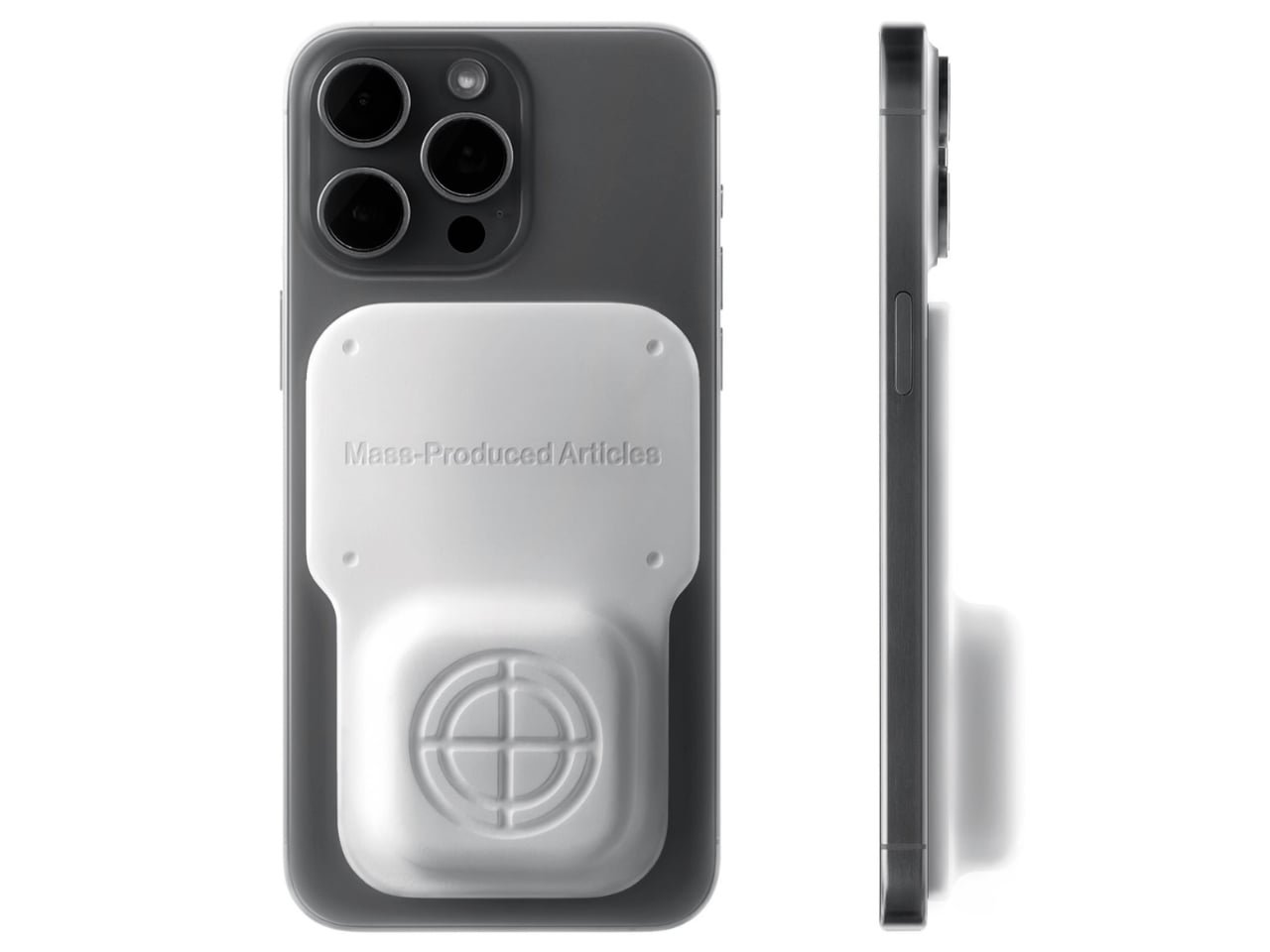
Anyone who has wandered around an unfamiliar neighborhood searching for a boutique that Google Maps insists is “on your left” when it is actually tucked behind a parking garage knows the specific frustration I am talking about. Small, independent stores rarely have the budget for a flashy storefront, and a pin on a map that is close enough to be tantalizing and far enough to be maddening is usually all you get. A Pow Studio designed something to fix exactly that: a small NFC-embedded fixture called the Navigation Tool that turns a single phone tap into a live compass, guiding you down the block to a physical destination without asking you to download anything.

That solves the first problem. The second one is subtler but just as real. Even after you find the store and walk through the door, most brands have no clean way to hand you off to their digital world. You try something on, feel vaguely inspired, and leave with no easy path to the website, the product specs, or the broader catalog. The Navigation Tool closes that gap too. The same NFC chip, this time embedded into the store’s hanging display system, redirects your phone tap to an online page loaded with product details and brand information. Two taps, two problems solved, zero apps required.

Designer: A Pow Studio

The mechanics are genuinely elegant. Outside, you tap your phone on the tool and a search bar appears asking for the coordinates of your destination. The system pulls from Location-Based Services and your phone’s built-in gyroscope to calculate real-time distance and direction, then renders everything as a clean, minimal compass interface on your screen. MagSafe compatibility is built in so the phone can physically attach to the tool while you navigate, which is a small detail but the kind that signals someone actually thought about what your hands are doing when you are half-lost and moving.

No app to download, no QR code cluttering a window decal, no clunky onboarding screen asking you to create an account you will use exactly once. You tap, and it works, the same quiet mechanism already living in Apple Pay or a subway fare card, just pointed at a completely different problem. American shoppers are already fluent in tap-to-pay and tap-to-unlock behavior, so repurposing that same gesture for navigation feels less like a gimmick and more like an overdue extension of something we already trust.

It also lands at an interesting moment for retail. Brick-and-mortar shopping has been quietly reasserting itself as something people actually want, not just tolerate, but brands still need their physical spaces to feed the digital ecosystem that keeps the business running. A tool like this treats the store not as a dead end or a photo backdrop but as one stop in a longer, connected journey. That feels like a more honest way to think about retail design than another Instagram wall ever could.

The visual language matches the intention. The compass interface on screen is stripped back to the point of being almost architectural: a circle, a crosshair, a tilt reading, a direction bearing. Nothing decorative, nothing unnecessary. It looks like something a navigator or a cinematographer would recognize before a tech blogger would, which feels right. Precise without being cold, minimal without being precious.

I do wonder about scale. A single boutique installing this is a lovely, considered gesture. A mall trying to retrofit hundreds of storefronts with individual NFC compass units is a different logistical conversation entirely, and I am not convinced every brand needs this level of ceremony just to get someone through the door. But as a proof of concept, it is a genuinely smart answer to a problem most retailers pretend does not exist. Sometimes the best design solution is not a flashier app. It is a small, physical object that refuses to overcomplicate the walk from curiosity to the front door.

The post Finally, a Compass That Works Without Opening Google Maps first appeared on Yanko Design.

  • ✇Korben
  • WhatCable - Trouvez le câble qui bride la charge sur votre Mac
    Je ne sais pas vous, mais chez moi, mes câbles USB-C se ressemblent tous. Et dans le tas, j'en ai qui chargent mon MacBook deux fois plus vite que d'autres. Et franchement, en les regardant, je ne peux pas vous dire lesquels sont les plus efficaces. Alors que mon Mac, lui, apparemment, il le sait déjà. En tout cas, c'est ce que j'ai compris en allant lire le site de WhatCable. Ce qu'ils expliquent, c'est qu'à chaque branchement, le contrôleur de port d'un Mac Apple Silicon envoie un message à la
     

WhatCable - Trouvez le câble qui bride la charge sur votre Mac

1 septembre 2026 à 05:24

Je ne sais pas vous, mais chez moi, mes câbles USB-C se ressemblent tous. Et dans le tas, j'en ai qui chargent mon MacBook deux fois plus vite que d'autres. Et franchement, en les regardant, je ne peux pas vous dire lesquels sont les plus efficaces. Alors que mon Mac, lui, apparemment, il le sait déjà.

En tout cas, c'est ce que j'ai compris en allant lire le site de WhatCable. Ce qu'ils expliquent, c'est qu'à chaque branchement, le contrôleur de port d'un Mac Apple Silicon envoie un message à la puce que certains câbles embarquent et récupère sa fiche d'identité : débit annoncé, ampérage, fabricant. De ce que j'ai compris, macOS range la réponse dans le registre IOKit sous forme d'objets bruts, et ne l'affiche nulle part en clair. Snif...

Et c'est cette réponse que WhatCable va chercher, puis traduit. L'app vit dans la barre de menus, vous branchez un câble, et elle vous dit alors instantanément lequel des trois maillons plafonne la charge : Soit le chargeur, soit le câble, soit le Mac lui-même quand sa batterie est presque pleine.

Et vous obtenez le même verdict côté débit.

L'app confronte aussi la fiche du câble à sa spécification USB-PD et lève un carton jaune quand quelque chose cloche. Ça peut être l'identifiant fabricant à zéro, les bits réservés utilisés de travers...etc. Moi, je parle bien ici de contrefaçon de câbles, mais l'app reste très prudente dans sa formulation. Elle signale juste des trucs bizarres, et elle ne dit jamais qu'un câble est une contrefaçon.

Après, la plupart des câbles sous 60 W n'ont aucune puce à interroger, donc il n'y a rien à lire, et certains ne répondent correctement qu'avec un appareil branché à l'autre bout. Sur les ports USB-C en façade d'un Mac mini ou d'un Studio, aucune donnée de câble ne remonte non plus. C'est à cause de l'architecture d'Apple.

Côté matériel, il vous faut donc un Mac Apple Silicon sous macOS 14 minimum, les Mac Intel ne publiant pas ces données du tout. L'app est gratuite et son code est sous licence MIT, sauf le dossier des fonctions Pro où là, faudra débourser environ 10 €.

Si vous avez Homebrew, vous pouvez installer l'app rapidement comme ceci :

brew install --cask darrylmorley/whatcable/whatcable

L'app est même en français si vous avez séché les cours d'anglais. Bref, de quoi trier votre caisse de câbles sans vous planter...

Anthropic launches Claude Fable 5.1 and Mythos 5.1, pushing AI deeper into coding and scientific research

Par : Nisha
2 septembre 2026 à 00:15
Anthropic has introduced Claude Fable 5.1 and Claude Mythos 5.1, two new versions of its fifth-generation Claude models that push the company further into long-running coding, research, cybersecurity and scientific workloads. The announcement is particularly interesting because Fable 5.1 and Mythos 5.1 are essentially the same underlying model. The major difference is how Anthropic applies […]

  • ✇WinCentral
  • Anthropic May Be Preparing Two New Claude Models, and a Double Release Could Be Coming
    Anthropic may be preparing not one, but two new Claude models for release. Two mysterious identifiers have surfaced in developer circles: claude-melon-eap and claude-marshmallow-eap. They are reportedly early-access test versions of upcoming Claude models, although Anthropic has not officially confirmed either identifier or what products they will eventually become. The speculation is getting particularly interesting […]
     

Anthropic May Be Preparing Two New Claude Models, and a Double Release Could Be Coming

Par : Nayan
31 août 2026 à 04:56
Anthropic may be preparing not one, but two new Claude models for release. Two mysterious identifiers have surfaced in developer circles: claude-melon-eap and claude-marshmallow-eap. They are reportedly early-access test versions of upcoming Claude models, although Anthropic has not officially confirmed either identifier or what products they will eventually become. The speculation is getting particularly interesting […]

Pre‑orders are live for the new ROG Xbox Ally X20, featuring a larger OLED display, a refreshed design, and clear advantages over the current Ally X

ASUS has officially opened pre-orders for the ROG Xbox Ally X20, confirming that the company's 20th anniversary handheld gaming PC will be available both as a premium standalone device and as part of a bundled package when it launches on October 15.

In the United States, customers can now pre-order the ROG Xbox Ally X20 standalone model for $1,299.99 MSRP, while the fully loaded ROG Xbox Ally X20 Bundle is priced at $2,499.99 MSRP.

Both versions will be available through Best Buy (today) and the ASUS Store (Sept 24th).

While ASUS originally introduced the X20 as a special anniversary edition, the more time we've spent learning about the device, the clearer it becomes that this isn't simply a commemorative refresh. The ROG Xbox Ally X20 is effectively a significant mid-generation upgrade to the existing ROG Xbox Ally X, bringing meaningful hardware, display, thermal, and control improvements that go well beyond a new paint job or limited-edition branding.

Direct front view of the translucent black ROG Xbox Ally X20 handheld gaming device displaying

Pre-order
ASUS
ROG Xbox Ally X20

A refined celebration of ASUS’s gaming legacy, the Ally X20 Anniversary Edition pairs its upgraded Ryzen AI Z2 Extreme chip with a vibrant 7.4‑inch OLED HDR display and a boosted 80 Wh battery. It’s a sleeker, more efficient Windows gaming handheld built to mark the milestone with sharper visuals, quieter thermals, and longer play sessions.

A true upgrade, not just an anniversary model?

At first glance, the X20's translucent-inspired design and special 20th anniversary touches may suggest that this is primarily a collector's edition. Under the chassis, however, ASUS has made extensive engineering changes compared to the existing ROG Xbox Ally X that directly impact the gaming experience.

The most obvious upgrade is the display.

The ROG Xbox Ally X20 moves from the current model's 7-inch screen to a larger 7.4-inch OLED panel, while also delivering substantial improvements in brightness and HDR performance. The display now supports 600 nits SDR brightness, up to 1,400 nits peak HDR brightness, and includes Dolby Vision support alongside ASUS' ROG Nebula HDR technologies.

ROG Xbox Ally X20

Processor

AMD Ryzen AI Z2 Extreme 

Display

7.4" OLED HDR (600 nits, 1400 peak)
16:9 FHD (1080p)
120 Hz  FreeSync

Memory

24 GB 8000 MHz LPDDR5X

Storage

1 TB M.2 2280 SSD (Upgradable)

Connectivity

Wi‑Fi 6E (2×2) + Bluetooth 5.4

I/O

1× USB‑C 4.0 (Thunderbolt 4  compatible
1× USB‑C 3.2 Gen 2
1× microSD Express 
1× 3.5 mm Combo Audio Jack

Battery

80 Wh

Dimensions

11.81" (W) × 4.77" (D) × 2.02" (H) in (300 × 121.1 × 51.3 mm)

Weight

1.66lbs (756 g)

For handheld gaming, display quality is often one of the most noticeable aspects of the user experience, and the move to OLED alone represents one of the largest upgrades ASUS has made to the platform since launch.

Major internal redesign improves cooling and airflow

Direct front view of the translucent black ROG Xbox Ally X20 handheld gaming device displaying

Direct front view of the translucent black ROG Xbox Ally X20 handheld gaming device displaying "20 ROG Anniversary" and "Dare to Innovate" on its screen. (Image credit: ASUS)

The display isn't the only part of the handheld receiving attention.

According to ASUS, the X20 features a completely redesigned PCB, allowing engineers to rethink the internal layout of the system. Surface-mounted USB4 ports enabled the motherboard to be repositioned, creating additional airflow opportunities within the chassis.

ASUS has also upgraded the cooling solution with revised fan and heatsink fin designs, while shifting motherboard placement by several millimeters to further improve thermal efficiency.

That may sound like a small change on paper, but thermals have become one of the defining factors of modern handheld gaming PCs. Better airflow and improved cooling can translate into lower temperatures, quieter operation, and more consistent performance during extended gaming sessions.

A better handheld for competitive gaming

A person reclining on a couch wearing ROG XREAL R1 AR glasses while holding the Ally X20 handheld, viewing a large virtual screen projection of a racing game.

A person reclining on a couch wearing ROG XREAL R1 AR glasses while holding the Ally X20 handheld, viewing a large virtual screen projection of a racing game. (Image credit: ASUS)

ASUS is also targeting enthusiasts who play fighting games, shooters, and other genres where input precision matters.

The ROG Xbox Ally X20 introduces hybrid metal dome switches for a more tactile D-pad feel, along with what ASUS calls a Transforming D-pad. The mechanism allows players to rotate the D-pad configuration to better align diagonals, providing an experience specifically designed with fighting games in mind.

The thumbsticks have also been upgraded to TMR magnetic induction sticks, offering Hall-effect-style benefits while reducing power consumption. ASUS says the sticks deliver roughly a 3% dead zone and improved precision compared with traditional alternatives.

From a visual standpoint, ASUS has doubled the RGB lighting count around the sticks, increasing from two LEDs to four LEDs per joystick.

Taken together, these changes may end up being just as important as the display improvements, especially for players who spend hundreds of hours with a handheld in their hands.

What's unchanged?

Back view of the translucent black ROG Xbox Ally X20 featuring textured hand grips, ventilation grilles, a gold diagonal stripe, and a 20th anniversary badge.

Back view of the translucent black ROG Xbox Ally X20 featuring textured hand grips, ventilation grilles, a gold diagonal stripe, and a 20th anniversary badge. (Image credit: ASUS)

Interestingly, ASUS has resisted changing several of the core specifications that already made the ROG Xbox Ally X one of the strongest Windows gaming handhelds available.

The ROG Xbox Ally X20 retains:

  • AMD Ryzen AI Z2 Extreme processor
  • 24GB LPDDR5X-8000 memory
  • 1TB PCIe Gen4 SSD storage
  • 80Wh battery
  • USB4 connectivity with Thunderbolt compatibility
  • Wi-Fi 6E support

That's probably the right decision. The current Ally X platform already delivers excellent battery life and class-leading handheld performance, so ASUS appears to have focused on enhancing areas that users interact with directly rather than chasing specs for the sake of a marketing bullet point.

And to be fair, there is no newer AMD handheld chip on the market, so there's that!

Goodbye microSD, hello microSD Express

One notable hardware change involves expandable storage.

The traditional microSD slot has been removed and replaced with a microSD Express card reader, supporting dramatically faster storage speeds. ASUS cites support for microSD Express cards capable of approaching 1 GB/s transfer rates, bringing removable storage much closer to SSD-class performance

As game install sizes continue growing, that could become a more meaningful upgrade than many users initially realize.

Two ways to buy

ROG Xbox Ally X20 bundle set showcasing the handheld console, AR glasses, power adapter, interchangeable grips, and a heavy-duty black carrying case.

Everything included in the $2,499 ROG Xbox Ally X20 bundle set. (Image credit: ASUS)

For buyers who only want the handheld itself, the new standalone version offers a straightforward path into the X20 experience.

ROG Xbox Ally X20

Meanwhile, ASUS is also offering a premium bundle aimed at enthusiasts and collectors, because of course.

Perspective view of black ROG XREAL R1 AR glasses featuring dark tinted lenses, custom frames, and gold 20th anniversary branding on the side arm.

The ROG XREAL R1 AR glasses, which are its top-tier offering, is one of the reasons for the big price jump for the anniversay bundle package. (Image credit: ASUS)

ROG Xbox Ally X20 Bundle

And what's in that bundle? I'm glad you asked:

  • ROG Xbox Ally X20 handheld
  • ROG XREAL R1 Edition 20 AR glasses
  • dbrand Killswitch case and custom skin
  • dbrand joystick covers
  • Custom Pelican Protector Case with 20th anniversary badge
  • 68W charger

That's a lot of stuff in that bundle, and it's cool to see dbrand officially teaming up with ASUS here for its famed Killswitch case (see our previous review). As far as that steep price, much of that comes down to the inclusion of the ROG XREAL R1 Edition glasses, which are currently sold separately, while these are, of course, matching in the 20th anniversary gold and black motif.

I've written about the current ROG XREAL R1's before, noting their crazy 240Hz micro‑OLED panels, letting you experience a portable (virtual) 171-inch screen. Along with their included dock, they cost $849.99.

ASUS now has one of the strongest handheld lineups on the market

Angled front view of the translucent black ROG Xbox Ally X20 handheld console with gold joystick rings and screen displaying a 20th anniversary graphic.

Angled front view of the translucent black ROG Xbox Ally X20 handheld console with gold joystick rings and screen displaying a 20th anniversary graphic. (Image credit: ASUS)

What's perhaps most impressive about the X20 launch is what it does to ASUS' overall handheld portfolio.

The company's lineup now spans three clear price tiers (assuming we don't see price increases):

That's a remarkably clean progression that gives buyers meaningful upgrade options at every budget level.

The X20 occupies a premium position without completely abandoning value-conscious enthusiasts. Even at $1,299.99, it remains roughly $500 below the eye-watering prices we've seen attached to some ultra-premium handhelds, including MSI's difficult-to-find Intel-powered Claw 8 EX AI+ configurations.

More importantly, the X20 differentiates itself with tangible quality-of-life improvements rather than simply adding more RAM or storage. The OLED display, revamped controls, enhanced cooling design, microSD Express support, and internal engineering changes all combine to create a device that feels genuinely evolved from the existing Ally X.

For a product marketed as an anniversary edition, that's arguably the biggest surprise of all.

The ROG Xbox Ally X20 may celebrate two decades of Republic of Gamers history, but its real significance is that it represents the most refined version of ASUS' handheld gaming platform yet—and now, for the first time, buyers can purchase it without needing to opt for the collector-focused bundle.

Direct front view of the translucent black ROG Xbox Ally X20 handheld gaming device displaying

Pre-order
ASUS
ROG Xbox Ally X20

A refined celebration of ASUS’s gaming legacy, the Ally X20 Anniversary Edition pairs its upgraded Ryzen AI Z2 Extreme chip with a vibrant 7.4‑inch OLED HDR display and a boosted 80 Wh battery. It’s a sleeker, more efficient Windows gaming handheld built to mark the milestone with sharper visuals, quieter thermals, and longer play sessions.

Stock image of the ASUS ROG Xbox Ally X20 Annivesary edition and kit.

Pre-order
ASUS
ROG Xbox Ally X20 Bundle

Twenty years of ROG innovation, marked by the limited ROG Edition 20 lineup in an exclusive colorway. The ROG XBOX Ally X20 Bundle carries that celebration forward, pairing the handheld with the ROG XREAL R1 Edition 20 Gaming AR glasses to create a complete gaming setup that travels with you.

Click to join us on r/WindowsCentral

Join us on Reddit at r/WindowsCentral to share your insights and discuss our latest news, reviews, and more.

ROG Xbox Ally X20 handheld sitting upright on a desk setup alongside a black wireless controller and an RGB-lit Republic of Gamers dock station.

ROG Xbox Ally X20 handheld sitting upright on a desk setup alongside a black wireless controller and an RGB-lit Republic of Gamers dock station.

  • ✇Korben
  • Geekom retire enfin un pilote que Windows Defender signalait comme vérolé depuis 2024
    Le constructeur Geekom a retiré de ses anciennes pages de support un installeur de pilote réseau que plusieurs moteurs d'analyse classent comme malveillant. Le fichier s'appelle Install_PCIE_Win11_11.10.0720.2022_11222022.exe et il dormait dans l'archive LAN partagée par six mini-PC de la marque : A7, A8, AE7, AE8, AX7 Pro et AX8 Pro. Le signalement part d'un utilisateur de r/MiniPCs sur Reddit, et du site VideoCardz qui a vérifié lui-même en téléchargeant l'archive directement c
     

Geekom retire enfin un pilote que Windows Defender signalait comme vérolé depuis 2024

20 août 2026 à 03:02

Le constructeur Geekom a retiré de ses anciennes pages de support un installeur de pilote réseau que plusieurs moteurs d'analyse classent comme malveillant. Le fichier s'appelle Install_PCIE_Win11_11.10.0720.2022_11222022.exe et il dormait dans l'archive LAN partagée par six mini-PC de la marque : A7, A8, AE7, AE8, AX7 Pro et AX8 Pro.

Le signalement part d'un utilisateur de r/MiniPCs sur Reddit, et du site VideoCardz qui a vérifié lui-même en téléchargeant l'archive directement chez Geekom le 15 août dernier. VirusTotal, FileScan.IO, MetaDefender et YARAify réagissent tous les quatre, ce dernier en remontant même des signatures ClamAV qui nomment la famille Asruex.

Alors c'est déjà un peu chaud d'apprendre ça, surtout si vous avez un PC Geekom mais la problème c'est que ce n'est pas absolument pas une nouveauté !

En effet, le 29 décembre 2024, le propriétaire d'un AE8 explique sur le forum ComputerBase qu'il vient de réinstaller Windows, qu'il a pris ses pilotes sur le site du fabricant, et que Defender lui a sorti Trojan:Win32/Asruex.A au décompactage. Il dit ensuite avoir écrit à Geekom pour les prévenir.

20 mois plus tard, Tom's Hardware décrit sur les machines Geekom, des permissions administrateur, des frappes clavier interceptées et une connexion à un serveur de commande, et PCWorld raconte que des attaquants sont venus glisser une backdoor dans le paquet.

Ce fichier est donc bien un paquet Realtek générique, que DriversCloud héberge et redistribue depuis le 25 novembre 2022 et qui s'est fait vérolé ensuite en 2024. Sur l'origine de l'exemplaire qui traînait chez elle, Geekom dit dans son communiqué du 18 août qu'il s'agit d'une ressource obsolète oubliée sur de vieilles pages, mais jamais d'une intrusion.

Donc si vous avez téléchargé et lancé cet installeur LAN depuis une page support d'un de ces six modèles, vous êtes concerné !! Le Windows livré avec la machine n'est pas en cause, du moins d'après Geekom. Supprimez donc l'installeur, lancez un scan complet avec Windows Defender ou votre antivirus préféré, et récupèrez un pilote réseau faible chez Realtek ou directement via Windows Update.

De son côté, Geekom a invoqué la déesse de l'effet Streisand en demandant à VideoCardz de retirer son article mais VideoCardz a dit non évidemment...

Source : PCWorld

  • ✇Korben
  • Quand personne ne vérifie la date d'expiration de votre CB
    Trois chercheurs de l'université du Massachusetts à Amherst ont réussi à régler pour 3,19 dollars d'achats dans un supermarché avec une carte bancaire périmée ! Leur secret ? Glisser une app maison entre la carte et le terminal qui trafique la date d'expiration de la carte. En fait, leur montage relaie les échanges NFC et modifie au passage un champ que personne ne protège : la date d'expiration lue par le terminal. Leur papier s'appelle Zombie Cards Back Online , et a été présent
     

Quand personne ne vérifie la date d'expiration de votre CB

19 août 2026 à 03:02

Trois chercheurs de l'université du Massachusetts à Amherst ont réussi à régler pour 3,19 dollars d'achats dans un supermarché avec une carte bancaire périmée !

Leur secret ?

Glisser une app maison entre la carte et le terminal qui trafique la date d'expiration de la carte.

En fait, leur montage relaie les échanges NFC et modifie au passage un champ que personne ne protège : la date d'expiration lue par le terminal. Leur papier s'appelle Zombie Cards Back Online , et a été présenté à USENIX Security 2026.

La mécanique tient en réalité à une bizarrerie du réseau Visa. Une carte annonce sa date d'expiration à deux endroits différents, et sur le kernel Visa, la date que le terminal consulte pour ses contrôles locaux n'est reliée à aucune signature. La banque, elle, regarde l'autre. Les deux devraient être liées cryptographiquement mais elles ne le sont pas.

Pire, ce kernel transmet à la banque un TVR entièrement à zéro. Le TVR, c'est le champ qui raconte ce que le terminal a vérifié et ce qui a coincé. Rempli de zéros, il ne raconte plus rien, du coup, la banque autorise une transaction sans savoir que les contrôles d'en face ont été contournés.

Reste que la portée est plus étroite que le tour de force le laisse croire. Sur cinq banques américaines testées, une seule a validé l'opération de bout en bout dans des conditions de laboratoire, permettant de payer jusqu'à 500 dollars. Une autre a laissé passer le terminal puis refusé côté banque. De leur côté, les kernels Mastercard, American Express et Discover, eux, ont rejeté les modifications.

Il faut aussi avoir la carte expirée à portée de NFC, et que la banque ait réémis la nouvelle avec le même numéro de compte, ce que les auteurs décrivent comme une pratique d'émetteurs américains.

Bref, c'est pas si simple et tous les essais ont eu lieu aux États-Unis donc rien ne dit non plus ce que ça donnerait sur un terminal français, où le sans contact plafonne de toute façon à 50 euros par paiement, 150 euros cumulés et 5 opérations avant que ça ne réclame le code. Puis de toute façon, le numéro de CB change intégralement à chaque renouvellement de carte, donc bon...

Six ans plus tôt, l'équipe de David Basin publiait The EMV Standard: Break, Fix, Verify , une application Android en relais sur du Visa sans contact, ce qui permettait de payer sans saisir de code. C'est vrai que les failles du paiement sans contact ne datent pas d'hier mais ce qui est neuf ici, c'est cette histoire de faiblesse au niveau de la date d'expiration.

Voilà, comme d'hab, Visa a été prévenu en mai 2025, relancé en décembre mais ni Visa ni les banques n'ont annoncé le moindre correctif pour le moment...

Source

❌