Vue normale

  • ✇Yanko Design
  • This Japanese Bottle Opener Catches the Cap So You Never Chase It Again
    When you come home after a long, hectic day, sometimes all you want to do is sink into the couch, scroll through your phone, and crack open a cold drink. But when that “cold one” happens to be a bottle of beer or soda, things do not always go according to plan. The opener slips, the cap bends and gets mangled, or it pops off and goes skittering across the counter or under the couch. It is a minor inconvenience, sure, but it has a funny way of taking a little of the relaxation out of what should
     

This Japanese Bottle Opener Catches the Cap So You Never Chase It Again

7 septembre 2026 à 13:20

When you come home after a long, hectic day, sometimes all you want to do is sink into the couch, scroll through your phone, and crack open a cold drink. But when that “cold one” happens to be a bottle of beer or soda, things do not always go according to plan. The opener slips, the cap bends and gets mangled, or it pops off and goes skittering across the counter or under the couch. It is a minor inconvenience, sure, but it has a funny way of taking a little of the relaxation out of what should be a simple, satisfying moment.

The First Pour Bottle Opener was built to fix exactly that. Made by Suwada, a legendary Japanese blacksmith house, it is an elegantly crafted tool designed to let you enjoy your drink in peace. Its flowing, sculptural silhouette also makes it a genuine piece of design rather than a purely functional gadget you shove in a drawer and forget about.

Click Here to Buy Now: $65.00

The bottle opener is forged from solid, corrosion-resistant stainless steel and finished with a hand-applied satin coat that gives it a soft, understated shine. Its shape isn’t flashy or complicated, and that’s exactly the point: the stripped-down, minimalist form is what makes it look right at home sitting out on your kitchen counter, bar cart, or shelf, instead of buried in a drawer with your corkscrews and other odds and ends. It’s also a quiet nod to Suwada’s roots. The company has been forging blades and metal tools in Tsubame-Sanjo, a Japanese region famous for generations of metalworking mastery, so the craftsmanship behind this little opener runs a lot deeper than its price tag might suggest.

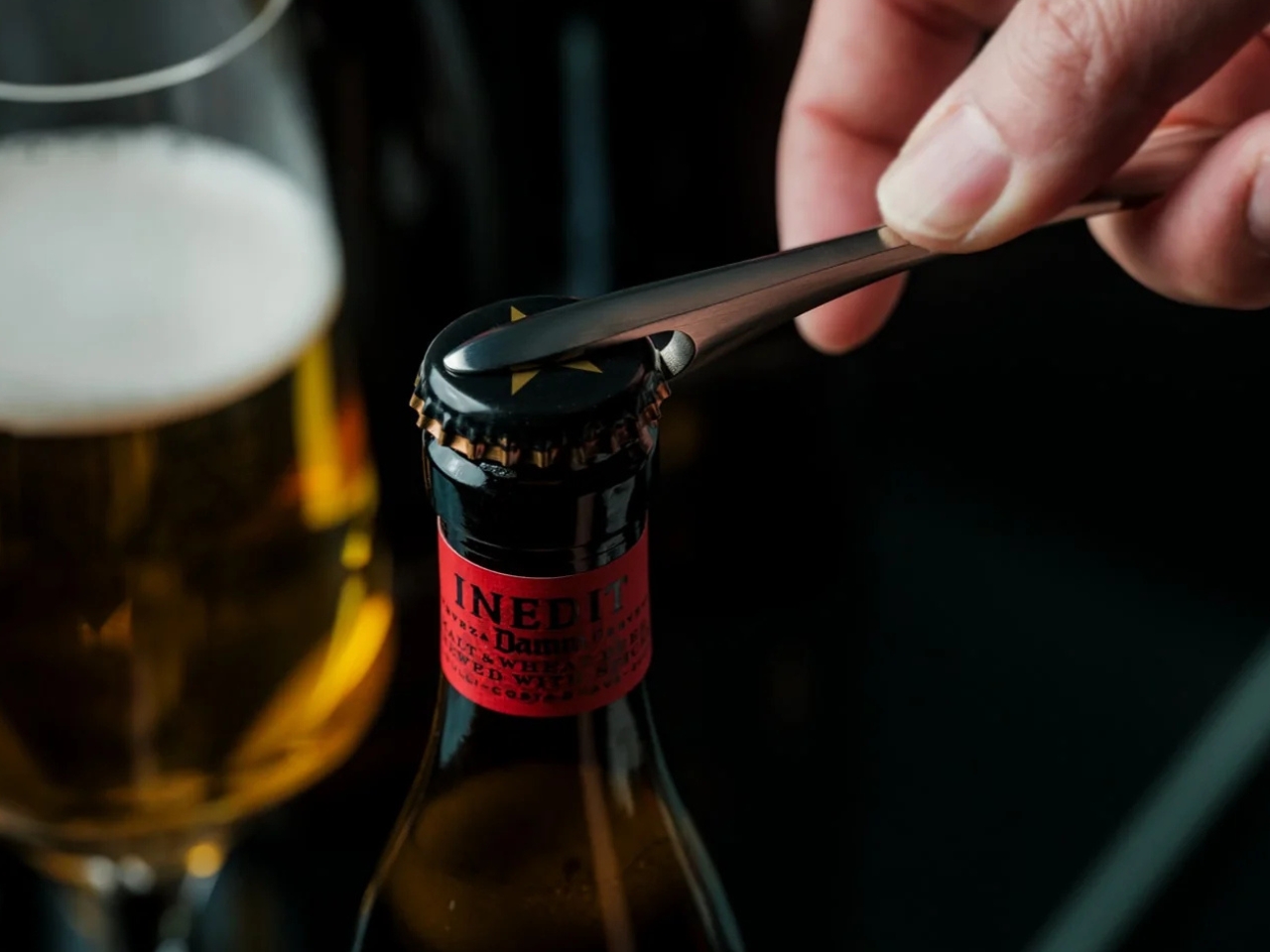
Where the First Pour really earns its keep is in the details. It opens bottle caps cleanly without bending or denting them, so you’re not left with a crushed, jagged souvenir every time you crack open a drink. It also has a built-in magnet that catches the cap the instant it pops free, rather than letting it clatter onto the counter, roll under the fridge, or scuff up your countertop. It’s a small addition, but it’s the kind of thoughtful touch a lot of openers skip entirely, and one that makes a genuine difference every single time you use it.

For comparison, a mainstream option like the OXO Good Grips Bottle Opener retails for around $10 and gets the job done just fine, thanks to a soft, non-slip handle built for everyday comfort. It’s a reliable, no-frills tool, and there’s nothing wrong with that. But it is purely utilitarian: there’s no magnet to catch the cap, no display-worthy design, and no real story behind how it’s made. At $65, the First Pour Bottle Opener costs several times more, but you’re paying for hand-applied craftsmanship, a heritage that spans centuries, corrosion-resistant stainless steel, and a magnetic cap-catch that solves a problem most openers on the market, including OXO’s, simply don’t address. It’s less an “opener versus opener” comparison and more a question of whether you want a tool that just works, or one that works beautifully and looks the part while doing it.

I don’t usually think much about something like a bottle opener when I’m shopping for my kitchen. It’s one of those tools you buy once and only think about again when it fails you. But something like the First Pour Bottle Opener makes you reconsider how small changes, whether to design or function, can matter more than you’d expect. Using it turns a mundane, thoughtless task into a small, satisfying ritual, one you can look forward to with that end-of-day (or, let’s be honest, middle-of-the-day) cold drink. Sometimes it really is the small things that make a good moment feel a little better, and this humble little tool is proof that even the objects we take for granted deserve a second look.

The post This Japanese Bottle Opener Catches the Cap So You Never Chase It Again first appeared on Yanko Design.
Microsoft Project Zenith: Windows Developer PCs Will Come Ready to Code

4 septembre 2026 à 17:29

Microsoft’s Project Zenith brings a ready-to-code Windows experience to developer PCs, with local AI support and preconfigured tools.

The post Microsoft Project Zenith: Windows Developer PCs Will Come Ready to Code appeared first on TechRepublic.

Circular Ring 3 Adds Glucose Insights: Which Model Fits Your Needs

4 septembre 2026 à 14:42

Circular Ring 3 Slim and Pro add non-invasive glucose insights, contactless payments, haptic alerts, and up to 12 days of claimed battery life per charge.

The post Circular Ring 3 Adds Glucose Insights: Which Model Fits Your Needs appeared first on TechRepublic.

Apple Reportedly Plans 13.8-Inch Notch-Free OLED MacBook

4 septembre 2026 à 14:30

Apple may launch a 13.8-inch OLED MacBook with touch support and an under-display camera between the MacBook Air and Pro in late 2028 or early 2029.

The post Apple Reportedly Plans 13.8-Inch Notch-Free OLED MacBook appeared first on TechRepublic.

AI Can Now Clear Some Mammograms Without a Radiologist’s Review

4 septembre 2026 à 14:25

Vara has received CE certification allowing its AI to clear some mammograms as normal without radiologist review, marking a step toward autonomous medical AI.

The post AI Can Now Clear Some Mammograms Without a Radiologist’s Review appeared first on TechRepublic.

  • ✇Yanko Design
  • TCL’s P80 Pro and Ultra Are the Phones That Replaced Your Kindle Too
    TCL’s P80 Ultra and P80 Pro prove a phone screen doesn’t have to pick one personality and stick with it. Unveiled at IFA 2026 in Berlin, both handsets fold a vivid AMOLED panel and TCL’s paper-like NXTPAPER technology into the same sheet of glass, letting the display shift moods with a flick of a switch instead of forcing a trade-off between color and comfort. Run a finger along the frame, and you’ll find a thin slider, a small physical detail that carries plenty of weight in daily use. Slide i
     

TCL’s P80 Pro and Ultra Are the Phones That Replaced Your Kindle Too

Par : JC Torres
4 septembre 2026 à 04:15

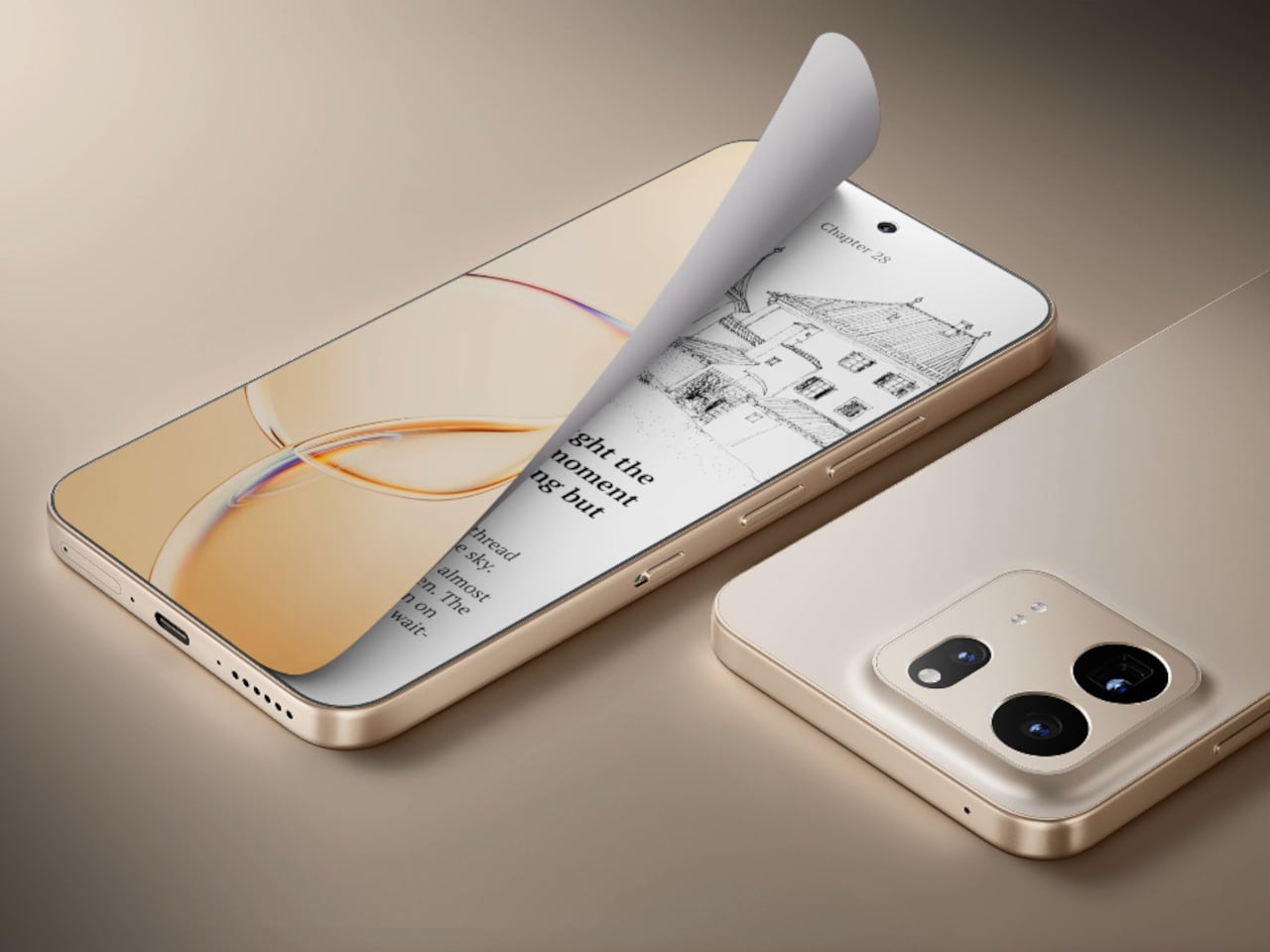
TCL’s P80 Ultra and P80 Pro prove a phone screen doesn’t have to pick one personality and stick with it. Unveiled at IFA 2026 in Berlin, both handsets fold a vivid AMOLED panel and TCL’s paper-like NXTPAPER technology into the same sheet of glass, letting the display shift moods with a flick of a switch instead of forcing a trade-off between color and comfort.

Run a finger along the frame, and you’ll find a thin slider, a small physical detail that carries plenty of weight in daily use. Slide it, and the 6.83-inch panel drops its saturation, taking on a warmer, textured look that mimics a printed page. A commuter buried in a novel or someone proofreading a document late at night gets a screen that behaves like paper, without losing the sharpness underneath.

Designer: TCL

Push that same slider one notch further, and the screen drops color entirely for Max Ink Mode, a stripped layout that silences notifications except for calls and texts. It reads like a design decision as much as a software one, TCL betting people want to quiet their phone rather than mute it completely. The payoff is a battery that can stretch across roughly a week of steady reading.

That reading-first mindset carries into the software too. Both phones can convert e-books into audiobooks or podcast-style narration using on-device AI, giving Max Ink Mode a voice to lean on when eyes need a break instead of ears. It is a small addition, but it treats the slower, paper-like mode as a genuine feature rather than a bolted-on gimmick for a keynote slide.

None of that would matter if the screen looked washed out the rest of the time, so TCL leaned on a 1.5K AMOLED panel that hits 3,200 nits and covers the full DCI-P3 color range. A Nano Crystal Shield coating cuts glare enough to keep the display readable under direct sun, marking TCL’s first pairing of NXTPAPER with OLED rather than the LCD panels it used before.

The frame wrapping that screen is aluminum rather than the plastic often found at this price, giving both phones a sturdier grip without piling on bulk. TCL backs that up with an IP68 rating against dust and water, plus MIL-STD-810H certification for the inevitable drop. Buyers get to pick between Sunlit Gold, Burgundy, and Midnight Blue, three finishes that lean more toward jewelry-box color choices than typical slab-of-glass smartphone palettes.

Where the two models part ways is around the back. The P80 Ultra carries a 50-megapixel main camera next to a 50-megapixel periscope lens for 3x optical zoom, tucked into a housing shaped to avoid throwing off the phone’s balance. The P80 Pro drops the periscope for a simpler dual-camera arrangement, trading reach for a slimmer build that still shares the same main sensor and 8-megapixel ultrawide.

TCL is rolling both phones out across Europe first, with the P80 Ultra priced from €549 (around $635) and the P80 Pro starting at €429 (around $500), before a Latin American launch follows in October. A wider release is expected to reach additional regions afterward. In a category full of identical glass rectangles, these two phones actually behave differently depending on what someone needs from them that day.

The post TCL’s P80 Pro and Ultra Are the Phones That Replaced Your Kindle Too first appeared on Yanko Design.

Microsoft Planner vs Asana: Which PM Tool Wins in 2026?

4 septembre 2026 à 01:00

Deciding between Asana and Planner? This comparison guide will help you evaluate their features, pricing, and more.

The post Microsoft Planner vs Asana: Which PM Tool Wins in 2026? appeared first on TechRepublic.

Honor Robot Phone Cheat Sheet: Specs, Price and Who Should Buy It

3 septembre 2026 à 18:11

Explore the Honor Robot Phone’s 200MP gimbal camera, flagship specs, China pricing, key trade-offs, and whether this experimental phone is worth buying.

The post Honor Robot Phone Cheat Sheet: Specs, Price and Who Should Buy It appeared first on TechRepublic.

Enough Phone Brings Back the Removable Battery in a Tiny Android Body

3 septembre 2026 à 16:44

The 5.3-inch Enough Phone promises Android 17, a removable battery and microSD storage, but the compact smartphone still faces a difficult path to launch.

The post Enough Phone Brings Back the Removable Battery in a Tiny Android Body appeared first on TechRepublic.

Acer DualPlay Mini: Can a Gaming Handheld Replace Your Laptop?

3 septembre 2026 à 16:20

Acer’s DualPlay Mini combines gaming controls with a physical keyboard, but can the 8-inch handheld replace a travel laptop for everyday work?

The post Acer DualPlay Mini: Can a Gaming Handheld Replace Your Laptop? appeared first on TechRepublic.

Libre Duo 10 Day: The First Wearable to Track Glucose and Ketones

3 septembre 2026 à 10:36

Abbott’s Libre Duo 10 Day continuously tracks glucose and ketones from one sensor, with a US launch planned for later in 2026.

The post Libre Duo 10 Day: The First Wearable to Track Glucose and Ketones appeared first on TechRepublic.

  • ✇Yanko Design
  • Acer’s Packard Bell Crashed IFA 2026 Like a Box of Crayons
    Packard Bell spent a century teaching people that new technology doesn’t have to feel intimidating, and its 100th birthday present to itself leans hard into that idea. Under Acer’s ownership, the brand relaunched at IFA 2026 with a philosophy it calls “Tech it easy,” built around a lineup that trades beige plastic and quiet corporate design for colors loud enough to notice from across a room. Four products anchor that comeback, and each one argues that everyday tech gains something when it stop
     

Acer’s Packard Bell Crashed IFA 2026 Like a Box of Crayons

Par : JC Torres
3 septembre 2026 à 06:07

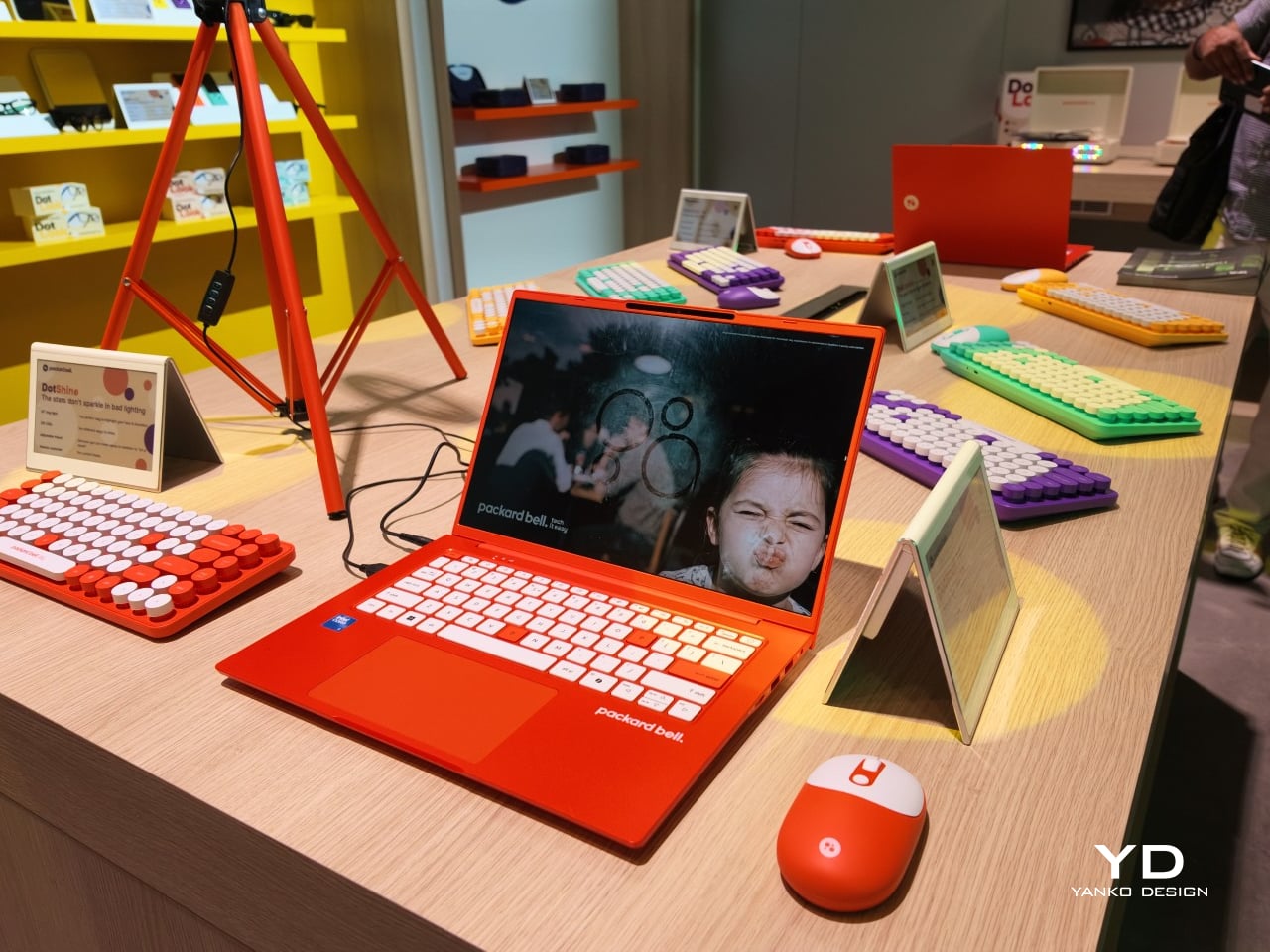
Packard Bell spent a century teaching people that new technology doesn’t have to feel intimidating, and its 100th birthday present to itself leans hard into that idea. Under Acer’s ownership, the brand relaunched at IFA 2026 with a philosophy it calls “Tech it easy,” built around a lineup that trades beige plastic and quiet corporate design for colors loud enough to notice from across a room. Four products anchor that comeback, and each one argues that everyday tech gains something when it stops taking itself so seriously.

The DotBook carries the heaviest expectations as the collection’s flagship, a 14.5-inch laptop finished in a red-orange shell bright enough to spot on a crowded coffee shop table. Weighing under 1.3 kg and measuring just 17.9mm thin, it’s built for browsing, streaming, and everyday work rather than chasing benchmark scores, backed by up to 512GB of storage and 16GB of memory running quietly under Windows 11. It’s a laptop designed to disappear into a bag, not a spec sheet debate.

Designer: Acer

Where the DotBook plays it relatively straight, the DotLoop commits fully to spectacle. Housed inside an actual briefcase shell with a 1970s silhouette, the turntable pops open to reveal a working tonearm flanked by RGB-lit speaker grilles that glow while a record spins. Two built-in 3W speakers handle sound on their own, though Bluetooth and RCA outputs let the DotLoop hand audio off to a proper stereo system whenever the moment calls for something louder.

That willingness to have fun with format extends into the DotLine, a feature phone built for anyone tired of feeding a smartphone’s constant appetite for attention. A 2.8-inch display and physical keypad keep the experience deliberately simple, while an 1800mAh battery stretches across roughly two weeks between charges, a number that sounds almost mythical next to a modern flagship’s overnight anxiety. Four color options keep it from feeling like a consolation prize.

Rounding out the focus lineup, the DotCombo bundles a keyboard and mouse into a single color-matched purchase, eliminating the usual mismatched beige-on-black desk setup that so many peripherals default to. Both pieces run on rechargeable batteries good for hundreds of charge cycles, connecting over Bluetooth or a 2.4GHz receiver without a single AA battery required. Round keycaps borrowed from typewriter design give the whole thing a tactile, almost toy-like presence on a desk.

Beyond these four, Packard Bell rounds out its centennial collection with a portable speaker (DotTune), audio glasses (DotLook), a ring light for creators (DotShine), matching headphones (DotBass), and even a countertop food steamer (Steasy), all sharing the same saturated color palette and straightforward pricing. None of them ask for much attention individually, but together they paint a lineup unwilling to blend into a beige office shelf.

Pricing stays approachable across the board, with the DotBook starting around €499 (around $578), the DotLoop at €149 (around $173), the DotLine at €69 (around $80), and the DotCombo at just €39 (around $45). Packard Bell’s return proves that a century-old brand can still find something new to say, mostly by refusing to whisper it.

The post Acer’s Packard Bell Crashed IFA 2026 Like a Box of Crayons first appeared on Yanko Design.

  • ✇Yanko Design
  • This $119 Ultrasonic Cutter Sense Materials And Auto-Adjusts To Cut EVA Foam, Resin, PLA 3D Prints
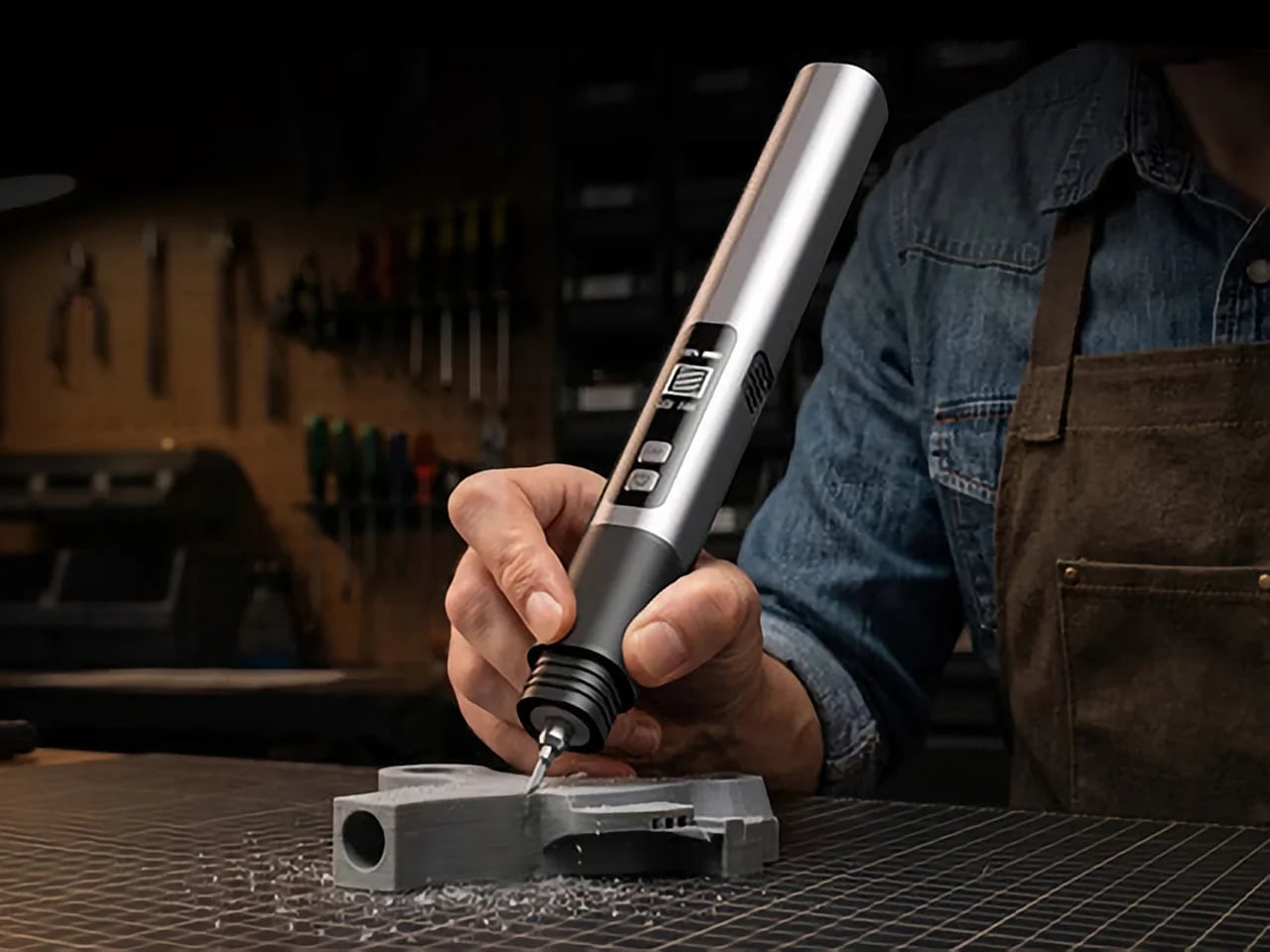
    There are power tools, and then there are smart tools. A power tool gives you brute force; a smart tool gives you controlled, consistent results. Think of a simple drill that just spins versus one that manages its own torque to avoid stripping a screw. For delicate work like trimming EVA foam for a cosplay project or cleaning up support structures on a 3D print, you definitely want the smart one. The problem is, most handheld cutters are pretty basic, giving you one speed and just hoping for th
     

This $119 Ultrasonic Cutter Sense Materials And Auto-Adjusts To Cut EVA Foam, Resin, PLA 3D Prints

2 septembre 2026 à 21:45

There are power tools, and then there are smart tools. A power tool gives you brute force; a smart tool gives you controlled, consistent results. Think of a simple drill that just spins versus one that manages its own torque to avoid stripping a screw. For delicate work like trimming EVA foam for a cosplay project or cleaning up support structures on a 3D print, you definitely want the smart one. The problem is, most handheld cutters are pretty basic, giving you one speed and just hoping for the best.

The SonicMax Slice 10 is aiming for that higher IQ. It’s a cordless ultrasonic cutter that senses the material you’re cutting and adjusts its own power output in real time. Slice through dense plastic and it pushes harder; trim the thin walls of a resin print and it eases back. This adaptive system, combined with cooling that prevents heat-related power drops, makes it feel like proper workshop equipment in the palm of your hand. It runs at 40kHz, delivers up to 50 watts of dynamic peak power, and does all of this without a single cable getting in your way.

Designer: SonicMax

Click Here to Buy Now: $119 $215 (45% off). Hurry, only 13/500 left! Raised over $124,000.

Most ultrasonic cutters on the market use transducers with a mechanical quality factor, or Qm, somewhere between 150 and 250. A higher Qm means the transducer converts electrical energy into vibration more efficiently, which directly translates to less heat generated during use. SonicMax claims a Qm of over 500 for the Slice 10, and lab data backs that up with a verified measurement of 541.1. That’s roughly two to three times higher than a typical competing tool, and it’s the foundational reason the Slice 10 can sustain longer sessions without thermal drama. That single transducer decision cascades into everything else, from runtime and cut quality to how comfortable the tool actually stays in your hand.

As the blade meets resistance, the Slice 10’s Smart Material Auto-Detection reads that feedback and adjusts power output and vibration frequency without you touching anything. Cutting through a stiff chunk of EVA foam feels different from trimming the thin walls of a resin print, and the tool responds to each material accordingly. You’re not locked into a fixed setting that works okay for most things but perfectly for nothing. The system also preserves cut quality across a long session, where material resistance can shift as the blade warms. The result is consistent cuts from the first pass to the last, regardless of what you’re running the blade through.

Heat is the reason most cordless ultrasonic cutters force you to stop every five to ten minutes, and the Slice 10 attacks that problem from two directions. Corded bench tools sidestep this issue by drawing steady power and dissipating heat more easily, but you give all of that up the moment you cut the cord. The high-efficiency transducer generates less heat from the start, and the built-in active cooling fan manages whatever thermal load does build up during a session. Overheat protection kicks in automatically at 80 degrees Celsius at the motherboard level, so the tool protects itself without you having to babysit it. You only appreciate how good this is after you’ve spent a session on a cutter that kept shutting itself off on you mid-cut.

A 5000mAh 21700 lithium-ion battery powers the Slice 10, and SonicMax made it user-replaceable, which you’ll end up appreciating far more than any spec sheet number. The 21700 is a high-performance cell format found in premium flashlights and power tools, so sourcing replacements from SonicMax or compatible third-party brands should never be a problem. SonicMax’s own branded replacement cell is rated for 500 charge cycles at 80% capacity retention, a reasonable lifespan for a tool you’re actually putting to work regularly. An 18W USB-C pass-through charging system brings it from zero to full in about 70 minutes, and the tool keeps running while plugged in. Claimed runtime sits at up to four hours, and when you run low mid-project, swapping in a spare takes seconds.

Blade choice gives the Slice 10 a lot of its bench-tool personality. SonicMax offers five blade styles that let the same handheld body take on very different jobs: a Standard Utility Blade for everyday trimming, a Precision Long Blade for tighter access and more delicate reach, a Fine Chisel Blade for careful cleanup work, a Heavy Duty Chisel Blade for more aggressive material removal, and a Wide Flat Scraper Blade for broader surface work. That range matters because it turns the Slice 10 into something closer to a compact cutting system than a one-trick knife. If you’re the kind of maker who bounces between foam, plastic, supports, edges, and surface cleanup in the same afternoon, this is where the tool starts looking properly versatile.

Lift-to-Activate sensing turns the tool on when you pick it up and off when you set it down, keeping your fingers away from controls mid-session and preventing accidental activation on the bench. A small OLED display shows real-time power output and battery level, so you’re never left guessing how much runtime remains. Built-in LED lighting illuminates the cut line, which sounds like a minor detail until you’re trying to trace a clean edge on a dark-colored print at your desk at some ungodly hour. Auto-shutdown kicks in after five minutes of idle, and low-battery protection activates before the cell drops to a damaging voltage. Together, these details make the Slice 10 feel like a tool that respects your workflow rather than constantly asking you to manage it.

The Slice 10 measures 260.5mm long and 28mm across, weighing 236 grams, keeping it firmly in single-hand, pen-grip territory across long sessions. Just the Slice 10 is available for a discounted $119, and ships with 10 replaceable Standard Utility blades. Upgrade to the Maker’s Bundle for $169 and you get the Slice 10 along with 50 blades spread across the five blade profiles (standard, precision long, fine chisel, heavy duty chisel, and flat scraper) as well as a 5000mAh replacement battery. If you’re looking for versatility and pushing your prints to the max, the $50 price bump does bring a fair share of value. You can also buy extra blades and batteries as add-ons. Shipping is expected to begin mid-October 2026 with worldwide delivery available, and SonicMax has not publicly confirmed warranty terms at the time of writing.

Click Here to Buy Now: $119 $215 (45% off). Hurry, only 13/500 left! Raised over $124,000.

The post This $119 Ultrasonic Cutter Sense Materials And Auto-Adjusts To Cut EVA Foam, Resin, PLA 3D Prints first appeared on Yanko Design.

  • ✇Yanko Design
  • This CD Player Doesn’t Hide Its Mechanism, It Puts It on Display
    If you think compact discs are a thing of the past, you probably haven’t been around a K-pop fan or a hoarder who still has their CDs from decades ago. Then there are people like me who have a stack of CDs collected over the years but no actual CD player to enjoy them on, since options that are strong on both quality and design are hard to come by. The ClearFrame Speaker CD Player is a solid choice for anyone looking for a visually stunning player that won’t let a CD’s album art go to waste. It
     

This CD Player Doesn’t Hide Its Mechanism, It Puts It on Display

2 septembre 2026 à 19:30

If you think compact discs are a thing of the past, you probably haven’t been around a K-pop fan or a hoarder who still has their CDs from decades ago. Then there are people like me who have a stack of CDs collected over the years but no actual CD player to enjoy them on, since options that are strong on both quality and design are hard to come by.

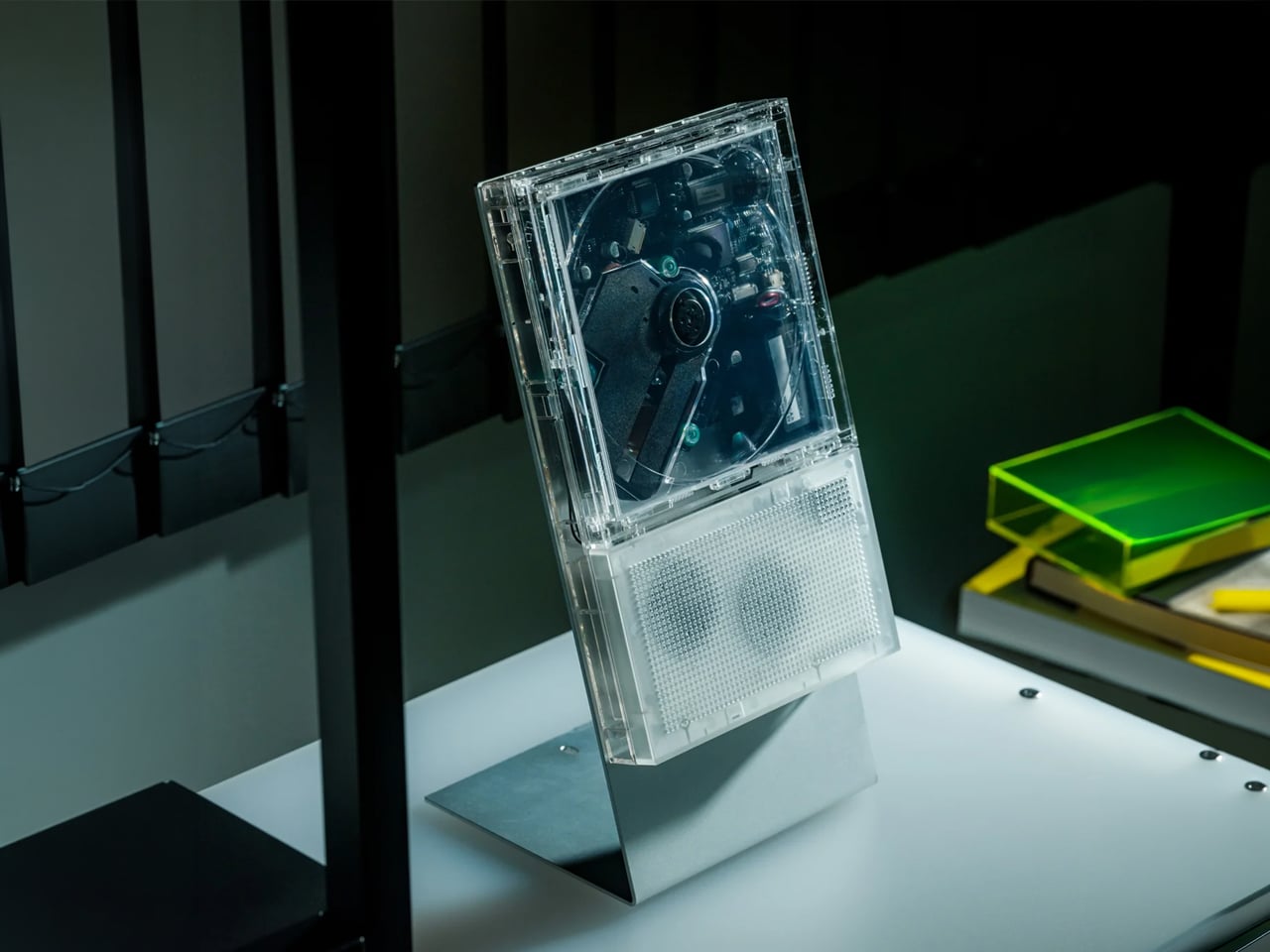
The ClearFrame Speaker CD Player is a solid choice for anyone looking for a visually stunning player that won’t let a CD’s album art go to waste. It lets you slot the jacket art onto the front of the player so it becomes a rotating piece of wall or shelf art. Or, if you’d rather show off the mechanics, you can leave the artwork out and display the transparent body itself, watching your CD spin with all its moving (and non-moving) parts in full view.

Click Here to Buy Now: $240.00

Whenever I come across beautiful album art, I can’t help but think it’s wasted if it only ever gets seen as a tiny digital thumbnail on a streaming app. A player like the ClearFrame Speaker CD Player lets you put that kind of artwork on full display while you’re enjoying the music in your room. Seeing something that the artist, and the album art designer, worked hard on come to life while it spins gives it the justice it deserves. And if you’d rather see the clear, polycarbonate-style body become a piece of art in its own right, just take out the album cover and let it shine in all its transparent glory.

This is also an upgraded version of the original, and already popular, ClearFrame CD Player, since it now comes with a built-in speaker. That means you no longer need to hook it up to an external Bluetooth speaker or wired setup, which makes it even more flexible to display anywhere in your home. You actually have three ways to listen to your favorite CDs: through the built-in 40mm speaker, with wired headphones through the 3.5mm jack, or over Bluetooth 5.3 to external speakers or headphones if you already have a better setup you’d like to use.

Beyond the listening options, the ClearFrame Speaker CD Player was clearly designed with portability in mind. At just 454 grams (about a pound) and roughly the size of a hardcover book, it’s light enough to carry from your bedroom to your living room without a second thought. Its 1,800mAh battery gives you around six to seven hours of playback through the built-in speaker, or seven to eight hours if you’re streaming over Bluetooth, so you can enjoy a few albums back-to-back before needing to recharge via USB-C. There’s even a retro-style LED Nixie tube display that adds a warm, nostalgic touch to the whole experience, plus a 2MB SDRAM anti-shock buffer so accidental bumps won’t make your music skip.

For collectors, this player also solves a real problem: what to do with all the CDs sitting untouched in a drawer somewhere. Instead of treating them like outdated clutter, the ClearFrame gives them a reason to come back out, whether that’s a K-pop photocard-era album, a mix your best friend burned for you in high school, or a boxed set you’ve been meaning to revisit. It turns “old technology” into a genuine decor piece you’d be proud to leave out on a shelf.

If you’re looking to gift this to someone (or, let’s be honest, treat yourself), the ClearFrame Speaker CD Player comes in a few configurations depending on how you plan to display it. You can pick it up on its own, or add a wall mount, book case, or display stand, so it fits neatly into whatever corner of your home you have in mind. It isn’t the cheapest CD player on the market, but if you have a stack of CDs with nowhere to go and album art too good to keep hidden, this one earns its price tag by turning something you already own into something worth looking at every single day.

The post This CD Player Doesn’t Hide Its Mechanism, It Puts It on Display first appeared on Yanko Design.

  • ✇Yanko Design
  • Miele’s G8 Dishwasher Photographs Your Dirty Dishes Before Auto-Selecting The Cycle: Hands-on at IFA 2026
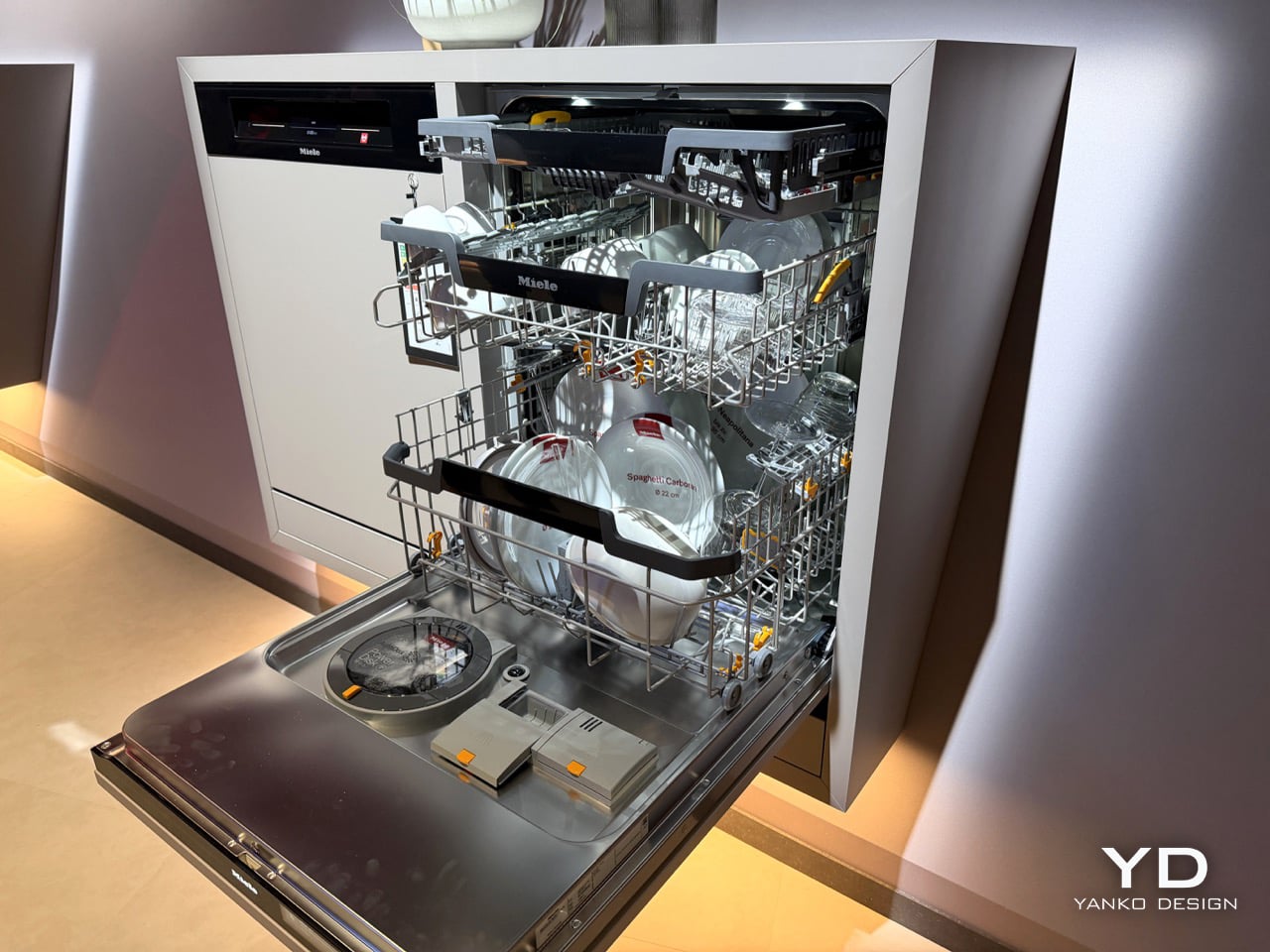
    Miele’s new G8 Diamond snaps a photo of your dirty dishes before it washes them. The moment the door swings toward shut, a light inside blinks on, a camera grabs one frame, the light dies, and the AutoVision system studies what it caught. If it sees a bottle, it calls up BottleClean and drives the spray harder. If it sees a pot, the cleaning intensity climbs. If it sees plastics, it runs the new hot air drying harder, because plastic containers are famously terrible at drying themselves. Miele
     

Miele’s G8 Dishwasher Photographs Your Dirty Dishes Before Auto-Selecting The Cycle: Hands-on at IFA 2026

2 septembre 2026 à 18:30

Miele’s new G8 Diamond snaps a photo of your dirty dishes before it washes them. The moment the door swings toward shut, a light inside blinks on, a camera grabs one frame, the light dies, and the AutoVision system studies what it caught. If it sees a bottle, it calls up BottleClean and drives the spray harder. If it sees a pot, the cleaning intensity climbs. If it sees plastics, it runs the new hot air drying harder, because plastic containers are famously terrible at drying themselves. Miele showed it for the first time at IFA 2026 in Berlin, and it lands in Germany, Austria and Switzerland in April 2027.

A camera in a dishwasher makes the headline, but the memory is what makes the design. The G8 holds onto that bottle it clocked at breakfast, so stacking dinner plates on top of it by eight in the evening changes nothing. Layer in AutoDos and its PowerDisk granulate, measuring out its own detergent since 2018, then set an app rule that says wait until 80 percent full and never before 10pm, and the machine stops consulting you altogether. Miele has spent decades selling dishwashers on the promise that they scrub so you do not have to. This one wants to think so you do not have to.

Designer: Miele

Here’s the part that actually impressed me. AutoVision doesn’t run a video feed you can scrub through in the app. It fires once, right as the door clicks shut, and the machine works from that single image for the entire cycle. Load a wine bottle at breakfast, stack it under a mountain of lunch plates by evening, and the G8 still treats it as a bottle, because it saw it once and that was enough. The only real caveat came from Miele’s own team at IFA: keep bottles roughly central and pots in the lower basket, since the spray arm still struggles to reach the far corners. Vision only helps if the water can follow it there.

What makes this genuinely new isn’t the word AI, which every appliance brand at IFA 2026 was throwing around like confetti. Most of those claims are turbidity sensors, the kind that read how murky the wash water has become and adjust accordingly. LG’s SenseClean works that way, and Samsung has filed similarly around soil detection. A turbidity sensor knows the water is dirty. It has no idea why. Miele’s camera identifies the actual object sitting in the rack, a considerably harder computer vision problem, and one that both LG and Bosch have patented around for years without shipping a consumer dishwasher built on it. Miele is putting an object-recognition camera inside a box you can buy next spring, not just inside a patent filing.

Around that camera sits a decade of quieter automation finally clicking into place. AutoDos, with its PowerDisk granulate, has been dosing detergent on its own since 2018, and Miele still claims nobody else in the category offers true automatic dispensing. ExcellentDry adds a hot air system with three fixed levels, chosen once and then applied forever, aimed squarely at the plastic containers that usually come out of a cycle still damp at the base. The cutlery drawer becomes a genuine third tier, one side droppable for coffee cups, and a new touch display replaces the old dial logic. Set the app to run only past 10pm and only above 80 percent full, or tie it to your solar output, and the dishwasher stops asking permission for anything.

None of this works if you don’t trust the camera’s judgment, and Miele knows it. “Intelligence can be programmed. Trust has to be earned,” said Dr. Axel Kniehl, the company’s Executive Director of Marketing and Sales, at the IFA press conference, and it’s the one line from the whole reveal that actually admits the stakes. AutoVision only functions if enabled by the user, according to Miele’s own release, which suggests it ships switched off by default. Fair enough. Handing a machine the authority to decide how hard to scrub your grandmother’s pans is a bigger ask than letting it dose its own detergent, and Miele seems to know it needs to earn that permission slowly rather than assume it.

The G8 Diamond won’t reach a single kitchen before April 2027, and even then only in Germany, Austria and Switzerland, so everything here is still a promise rather than a lived-in product. But the promise is the interesting part. For a century, appliance makers competed on how much physical labor they could remove. Miele is the first one at this scale betting the next fight is over who you trust to make the fifty tiny decisions labor never touched in the first place.

The post Miele’s G8 Dishwasher Photographs Your Dirty Dishes Before Auto-Selecting The Cycle: Hands-on at IFA 2026 first appeared on Yanko Design.

  • ✇Korben
  • Line Rider - À fond sur la piste de luge !
    Ce jeu, ou plutôt cette expérience, je vous le dis tout de suite, ça ne va pas changer votre vie. Au contraire, ça risque même d'aggraver vos PTSD en rapport avec les sports d'hiver. Moi, ça va, je ne suis jamais allé à la montagne en vacances l'hiver, parce que je n'étais pas assez richou étant + jeune, donc, c'est au moins un trauma que je n'ai pas ! Dans Line Rider , vous tracez une ligne à la souris, vous appuyez sur play, et un petit bonhomme en luge dévale la pente que vous
     

Line Rider - À fond sur la piste de luge !

3 septembre 2026 à 06:54

Ce jeu, ou plutôt cette expérience, je vous le dis tout de suite, ça ne va pas changer votre vie. Au contraire, ça risque même d'aggraver vos PTSD en rapport avec les sports d'hiver. Moi, ça va, je ne suis jamais allé à la montagne en vacances l'hiver, parce que je n'étais pas assez richou étant + jeune, donc, c'est au moins un trauma que je n'ai pas !

Dans Line Rider , vous tracez une ligne à la souris, vous appuyez sur play, et un petit bonhomme en luge dévale la pente que vous venez de dessiner à pleine balle. Voilà c'est tout !

Alors, je pense que si vous êtes un ancien, vous connaissez forcément, parce que ce truc n'est pas de première fraîcheur. C'est sorti en 2006 sur DeviantArt . Ça a été créé par Boštjan Čadež, un étudiant de l'Académie des Beaux-Arts de Ljubljana, pour un devoir de son cours d'illustration. À l'époque, il y a eu quand même 10 000 personnes qui l'ont vu dans les 24 heures de la sortie du jeu. Et un mois plus tard, on en était à 4 millions de vues et 325 000 téléchargements du jeu.

Notez quand même que la toute première version n'avait même pas de gomme et c'était volontaire de la part de Boštjan. Sauf qu'aujourd'hui ce n'est plus le Flash de 2006 que vous lancez mais une réécriture complète pour le web moderne, signée David Lu avec Matthew Henry et Tobias Bessler.

Et la réécriture a pris du muscle puisque vous avez maintenant trois types de ligne (la bleue qui porte, la rouge qui accélère, la verte qui ne sert qu'au décor), des calques, une pelure d'oignon pour suivre la trajectoire, jusqu'à six lugeurs en même temps, et un moteur de scripts pour piloter la caméra ou la gravité.

Attention quand même : Ne lancez que des scripts dont vous connaissez la provenance ^^. Par contre, n'oubliez pas que les lignes ont un sens. Si vous les tracez de la gauche vers la droite, elles feront office de sol. Par contre, si vous les tracez dans l'autre sens, votre petit gugusse va s'y cogner par en dessous ou la traversera sans la voir s'il y arrive par le dessus.

Vous pouvez aussi glisser un fichier audio dans l'éditeur pour caler l'animation sur la musique. C'est comme ça que la communauté sort ses morceaux de bravoure, genre les 39 millions de vues de la piste que DoodleChaos a synchronisée sur "In the Hall of the Mountain King".

Ce clic autorise une connexion à Google : adresse IP transmise et traceurs possibles. En savoir plus Voir cette vidéo sur YouTube

Ensuite, concernant l'export vidéo, le bouton sort bien un MP4, mais celui-ci sera muet. La musique que vous avez chargée sert uniquement à caler l'animation pendant que vous dessinez, et la synchro, vous devrez la faire ailleurs, dans OBS ou un vrai logiciel de montage.

Côté mobile par contre, c'est plus tristoune. L' application Android est à 2,99 € et n'a plus bougé depuis juillet 2023, et la fiche App Store vers laquelle le site pointe toujours renvoie un beau 404. Bof donc...

Le web reste donc le seul endroit où Line Rider est vraiment vivant.

Le code, lui, est fermé. David Lu n'a sorti que le moteur physique, dans un dépôt sans aucune licence et qui n'a plus évolué depuis 2017. Alors si vous voulez du libre pour de vrai, allez voir plutôt LROverhaul , un descendant de Line Rider Advanced sous GPL-3.0 qui tourne sur le bureau.

Merci à j0j0b4rj0 pour le lien !

Source : linerider.com

  • ✇Korben
  • HortusFox - Le carnet de bord partagé de vos plantes
    Je n'ai plus mes 5 hectares de jardin et de forêt, snif snif.... Maintenant c'est un immense jardin de 15 mètres carrés dans lequel je n'ai encore rien planté. Il y a des framboisiers, une pelouse en souffrance++ et deux ou trois trucs qui servent surtout de litière aux chats du quartier. Dans la maison, j'ai également deux spathiphyllums, ces fleurs de lune que tout le monde a chez soi, et une Monstera achetée chez Ikea. Et je ne sais absolument pas m'en occuper. ^^ Alors quand je suis tombé su
     

HortusFox - Le carnet de bord partagé de vos plantes

3 septembre 2026 à 05:59

Je n'ai plus mes 5 hectares de jardin et de forêt, snif snif.... Maintenant c'est un immense jardin de 15 mètres carrés dans lequel je n'ai encore rien planté. Il y a des framboisiers, une pelouse en souffrance++ et deux ou trois trucs qui servent surtout de litière aux chats du quartier. Dans la maison, j'ai également deux spathiphyllums, ces fleurs de lune que tout le monde a chez soi, et une Monstera achetée chez Ikea.

Et je ne sais absolument pas m'en occuper. ^^

Alors quand je suis tombé sur HortusFox , j'ai regardé ça d'un autre œil que d'habitude. Il s'agit d'une application web que vous installez chez vous, qui est développée sous licence MIT depuis 2023 par un type tout seul, Daniel Brendel, qui va vous permettre de gérer toutes vos plantations et autres plantes vertes en intérieur.

Reste à comprendre ce que ça fait vraiment, parce que ce n'est pas ce à quoi on s'attend... Ça n'est pas vraiment un conseiller, ça ne va pas vous dire par exemple quand arroser votre Monstera, ni diagnostiquer une feuille jaune.

C'est simplement un carnet de bord, point. Vous déclarez vos lieux (le salon, la cuisine, la serre), vous y rattachez vos plantes avec leurs photos, vos notes et un journal, et vous créez des tâches dont c'est vous qui fixez l'intervalle. Le système vous rappelle alors ce que vous avez à faire selon l'échéance que vous avez décidée, et il garde la trace de ce que vous avez fait.

Dit comme ça, ça paraît maigre, sauf que quand vous êtes cinq à passer devant les mêmes pots de fleurs, c'est super pratique ! Est-ce que quelqu'un a arrosé pendant les vacances ? Est-ce que le petit s'est occupé de ses plantes carnivores ou pas ? Là, la réponse est dans le journal de la plante et pas dans la tête de X ou Y qui a mis son téléphone en mode avion.

C'est d'ailleurs ce qui fait sa différence. Plusieurs comptes partagent le même espace, avec les tâches en commun, un inventaire du matériel et même un chat de groupe pour se laisser des mots.

Plant-it , l'autre projet libre du genre, repose exactement sur la même philosophie. À la base, c'était également une application web, mais comme il y avait trop de bugs , l'auteur a préféré supprimer la version qu'il hébergeait. Et Plant-it est ainsi devenu une simple application Android. Adieu les versions web et la version iOS.

HortusFox, lui, a fait le chemin inverse et garde son serveur, mais du coup il n'a aucune application native en face : le dépôt Android du projet est archivé depuis 2024, ce qui fait que pour savoir ce qui se passe, vous devrez ouvrir la page web pour voir l'état de vos plantes. Je vous laisse deviner si mon fils va penser à ouvrir un onglet tout seul pour ses plantes carnivores... lol.

Ce n'est pas grave, je me suis acheté ces petites Oyas pour les plantes vertes (lien affilié), et ça fait super bien le taf pour garder la terre un petit peu humide en permanence.

Ça s'installe en Docker Compose avec une base MariaDB. Pas de SQLite, pas de PostgreSQL et n'attendez pas que ça change parce que ça demanderait trop de boulot à l'auteur... L'interface est également disponible en onze langues dont le français. Au niveau de la vie privée, il n'y a pas vraiment de télémétrie, il faut juste savoir que l'identification des photos passe par l'API de Pl@ntNet , qui est gratuite jusqu'à 500 identifications par jour, et la météo par OpenWeatherMap. Ces deux-là réclament donc vos propres clés, et vous n'êtes pas obligé de les activer. Les données botaniques, elles, viennent du GBIF sans rien demander.

Et si vous voulez juste identifier vos plantes sans monter un serveur, j'avais déjà parlé des applis qui font ça .

Un point quand même avant que vous ne lanciez le docker compose : Une XSS stockée a été remontée le 11 août 2026 dans la version 5.9, qui est la dernière en date. Cela veut dire que n'importe quel membre de votre espace HortusFox peut glisser du JavaScript persistant dans les notes d'une plante, qui s'exécutera ensuite chez tous ceux qui la consultent, admin compris ( CVE-2026-72559 ). Donc mettez bien cette application ailleurs que sur Internet et assurez-vous que votre grand-mère ou vos enfants ne sont pas des petits hackers en herbe.

Amusez-vous bien avec vos plantes vertes !

  • ✇Korben
  • Nitter et XCancel sont morts, et l'explication est dans leur code
    Le 24 août dernier, X Corp. a envoyé une lettre de mise en demeure au développeur de Nitter et une autre à celui de XCancel (une instance célèbre de Nitter). Le délai accordé était très court (environ 24h), et depuis, les deux services sont hors ligne. Alors que s'est-il passé ? Nitter, c'était sept ans de travail bénévole pour lire les posts publics de Twitter puis de X sans avoir besoin de compte, sans pub, sans JavaScript et surtout sans laisser son adresse IP à Elon Musk et ses sbires. On re
     

Nitter et XCancel sont morts, et l'explication est dans leur code

2 septembre 2026 à 04:51

Le 24 août dernier, X Corp. a envoyé une lettre de mise en demeure au développeur de Nitter et une autre à celui de XCancel (une instance célèbre de Nitter). Le délai accordé était très court (environ 24h), et depuis, les deux services sont hors ligne.

Alors que s'est-il passé ?

Nitter, c'était sept ans de travail bénévole pour lire les posts publics de Twitter puis de X sans avoir besoin de compte, sans pub, sans JavaScript et surtout sans laisser son adresse IP à Elon Musk et ses sbires. On remplaçait x.com par nitter.net dans l'URL, et on lisait ce qui nous intéressait. Y'avait même des extensions de redirection automatique qui le faisaient pas à notre place. Et XCancel qui venait de fêter ses 2 ans, c'était tout pareil !

Aujourd'hui la page d'accueil de XCancel affiche ces 4 lignes qui disent en gros que le service est arrêté jusqu'à nouvel ordre. Celle de Nitter n'est pas plus bavarde et son mainteneur, zedeus, cherche un avocat et refuse de commenter.

Notez qu'aucun tribunal n'a été saisi et qu'une simple lettre a suffi.

Ce que X reproche à ces 2 services, c'est un "usage illicite et un contournement de son API", plus une violation du Texas Harmful Access by Computer Act et du Lanham Act. TechCrunch, qui a pu lire le courrier , rapporte une accusation plus précise qui est que Nitter aurait accédé à des comptes X et à des jetons de session pour récupérer le contenu en douce.

Aux États-Unis, en tout cas, "aspirer" des pages web publiques n'a rien de criminel. Mais le problème, c'est que Nitter ne fonctionne plus comme ça depuis des années. Si on analyse son code, on se rend compte que depuis que Twitter a supprimé les comptes invités début 2024, Zedeus, le développeur de Nitter, a mis en place un tout autre système.

Pour contourner les limites imposées par X.com, il a développé un script tools/get_session.py qui prend en arguments un identifiant X, un mot de passe, un secret à double facteur et un chemin de fichier.

Et là-dedans, il embarque en dur une paire de clés API, se déclare auprès des serveurs de X comme LE client Twitter officiel pour Android en version 10.21 tournant sur un OnePlus A3010, fait passer le flux de connexion par cloudscraper, génère le code à double facteur à la volée, et récupère un jeton OAuth qu'il écrit ensuite dans un fichier.

Au niveau des identifiants, c'est l'hébergeur de l'instance qui les fournit puisque depuis la coupure de 2024, faire tourner Nitter imposait de le relier à un vrai compte X. On est donc très loin du robot anonyme qui lit une page publique. C'est un client officiel simulé, avec des identifiants valides, et c'est exactement ça que la lettre de mise en demeure décrit.

Donc voilà, le problème est bien plus compliqué que du scraping simple. Ce sera donc à un juge de trancher sur le fond.

Depuis, le dépôt GitHub est passé en lecture seule, archivé et selon Zedeus, d'autres instances ont reçu des courriers du même genre. De son côté, X ne s'est pas encore exprimé publiquement sur cette affaire.

Reste la question qui nous intéresse : On fait comment pour lire la merde fasciste de X sans compte maintenant ? Bah honnêtement, y'a pas grand-chose... Moi, je vous recommande d'arrêter d'aller là-dessus pour votre propre bien-être. Mais si vraiment vous êtes accro, le pont ActivityPub bird.makeup répond toujours présent et permet de suivre un compte X public depuis Mastodon. Toutefois, il ne vous affichera pas un fil de discussion direct dans le navigateur comme le faisait XCancel ou Nitter.

Après pour un post précis, il reste éventuellement la Wayback Machine, à condition que quelqu'un ait archivé le tweet avant. Sinon, bah faudra vous reconnecter sur X à l'ancienne avec votre compte...

Source : Techdirt

  • ✇Korben
  • Maintenant - Le monitoring qui trouve vos conteneurs tout seul
    "Maintenant", ce n'est pas qu'un adverbe à la con pour apprécier l'instant présent ou faire péter ses ordres comme votre Belle Mère ! C'est également un conteneur à lancer, qui se connecte en lecture seule à un socket Docker pour réaliser en un battement de cil, tout l'inventaire de votre home lab ! Il relève ainsi l'état de chaque conteneur, ses healthchecks, ses boucles de redémarrage, ses logs, et vos projets Compose regroupés comme vous les avez écrits. Ensuite, tout ce qui v
     

Maintenant - Le monitoring qui trouve vos conteneurs tout seul

1 septembre 2026 à 06:24

"Maintenant", ce n'est pas qu'un adverbe à la con pour apprécier l'instant présent ou faire péter ses ordres comme votre Belle Mère ! C'est également un conteneur à lancer, qui se connecte en lecture seule à un socket Docker pour réaliser en un battement de cil, tout l'inventaire de votre home lab !

Il relève ainsi l'état de chaque conteneur, ses healthchecks, ses boucles de redémarrage, ses logs, et vos projets Compose regroupés comme vous les avez écrits.

Ensuite, tout ce qui vous alerte pour de bon se déclare à la main. Les checks HTTP et TCP se configurent sous la forme de labels sur les conteneurs à surveiller. Par exemple, un maintenant.endpoint.http avec son intervalle et son seuil d'échec, un maintenant.endpoint.tcp pour la base...etc. Pas besoin donc d'aller mettre votre gros nez dans un fichier de config spécifique.

Vos tâches planifiées reçoivent chacune une URL à appeler quand elles finissent comme ça si la sauvegarde de trois heures du matin ne se manifeste pas, vous êtes prévenu. Vos certificats HTTPS sont surveillés et signalés cinq fois avant leur expiration, un mois avant puis de plus en plus près. Il compare aussi l'empreinte de vos images à celle publiée sur le registre, ce qui vous permet ensuite de savoir lesquelles ont pris du retard sans lancer des docker pull à l'aveugle. Ah et il sert une page de statut publique pour vos utilisateurs.

Le tout tient dans un binaire Go qui occupe environ 17 Mo de RAM et qui se repose sur une simple base SQLite.

Par contre, l'édition gratuite (Community) gère une seule machine. Si vous voulez du multi-hôte, il faudra passer par la case payante. Toujours en gratuit, il y a aussi des plafonds... Vous avez le droit uniquement à 10 endpoints, 5 heartbeats, 5 certificats, 3 composants de page de statut et uniquement 7 jours d'historique.

Attention quand même, y'a 2 choses à savoir avant de vous enflammer et de poser ça sur une machine exposée sur le net. Il n'y a aucune authentification intégrée, et de ce que j'ai compris, c'est assumé ! A vous donc de mettre en place un reverse proxy et un Authelia ou un Authentik devant.

Pour situer "Maintenant" par rapport à d'autres solutions que je vous ai déjà présentées, Beszel fait les métriques par conteneur sans aucun plafond gratos, mais pas les checks HTTP. Uptime Kuma lui, fait les checks, mais ses monitors doivent être créés un par un dans l'interface, sauf à lui greffer AutoKuma pour lire les labels. Donc, il n'y a pas vraiment de solution tout-en-un gratuite...

A découvrir ici !

❌