Vue normale

Samsung proves Microsoft was wrong to give up on Surface Duo so quickly: The new Galaxy Z Fold 8 is the Surface Duo 3 of my dreams

Ever since Microsoft threw in the towel with Surface Duo, I've been what I call "smartphone homeless." Well, technically that era of my life began with the death of Windows Phone in 2017, flip flopping between different iPhone's and Android's until I found my new forever home with the Surface Duo in 2020.

That new forever home was very short lived. Between 2020 and 2023, I daily drove both the Surface Duo and Surface Duo 2 for the lifetime of those devices. I was happy, content, and excited for where this form factor could lead should Microsoft continue developing it.

Of course, Microsoft didn't feel the same way, and the Surface Duo was put to rest not long after the Surface Duo 2 shipped. I loved the Surface Duo for a myriad of reasons, but the main one was its shape and size. I loved how squat and wide the device was, when being used in single-screen and dual-screen mode.

It was unique and different that it turned heads in public. To this day, I have never had more strangers come up to me in public to ask what phone model I was using. The Surface Duo was a conversation starter, but it wasn't just the novelty that I loved. It was genuinely useful, being easier to type on in single-screen mode compared to slab phone, and better for multitasking when in dual-screen.

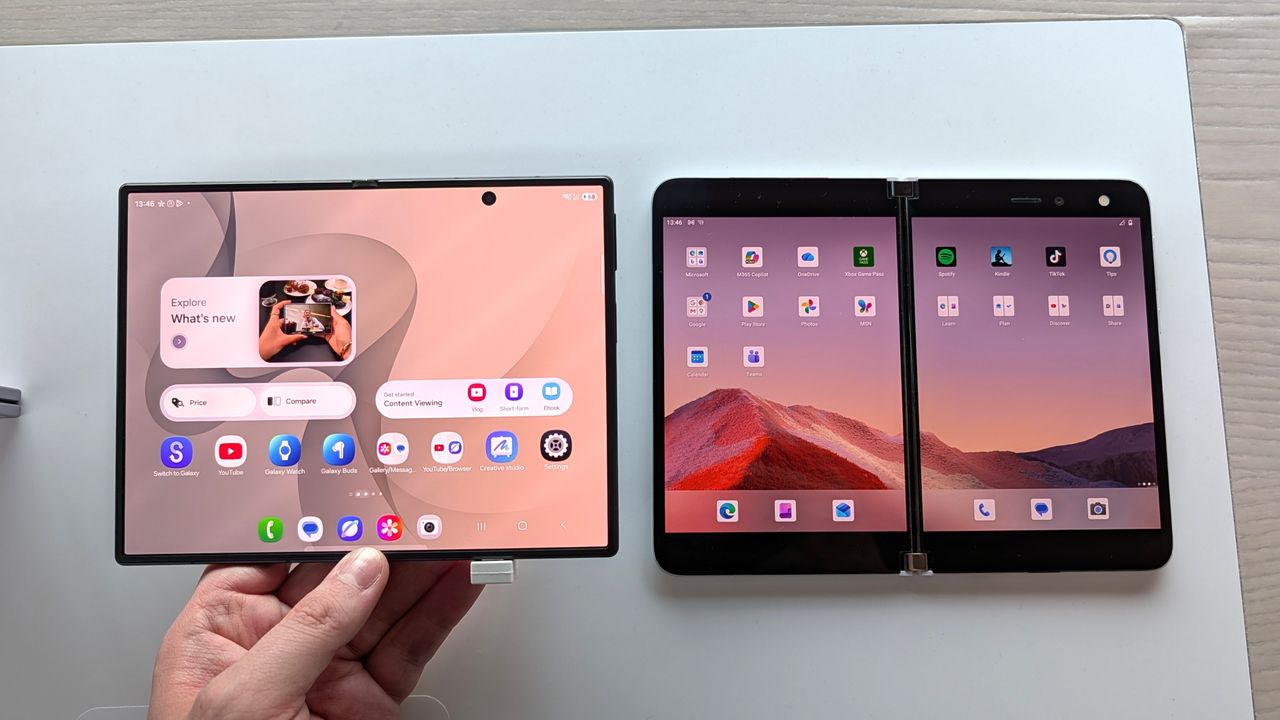
Surface Duo and Galaxy Z Fold 8 side by side

Both screens are similar, but the Galaxy Z Fold 8's is a tiny bit narrower and taller. (Image credit: Zac Bowden / Windows Central)

So, when Samsung unveiled the Galaxy Z Fold 8 last week, I was instantly intrigued based on its shape and size alone. It's the first westerly available short but wide smartphone since the Surface Duo, and although it's not dual-screen device with a 360-degree hinge, this is the closest thing to a Surface Duo 3 we're ever going to get.

Taking a look at their specs, it's immediately evident that both share similarities in their sizing. While the Galaxy Z Fold 8 is technically smaller, it's only smaller because the Surface Duo's bezels are so large. If you just compare screen sizes, they are very similar. The Surface Duo's display is 5.6-inches, and the Galaxy Z Fold 8 is 5.5 inches.

Both are similar in width when in folded position, which means typing on both feels identical when in use as a smartphone. It also means apps have more room to spread out, with text and images displaying more content across a single line. When opened up, the Surface Duo's dual-displays are overall bigger, but the Galaxy Z Fold 8's aspect ratio is preferred.

Spec

Microsoft Surface Duo

Samsung Galaxy Z Fold 8

Form Factor

Dual dual-screen displays joined by a 360° physical hinge

Flexible single inner screen with an external cover screen

Unfolded Dimensions

145.2 × 186.9 × 4.8 mm

123.9 × 161.4 × 4.5 mm

Folded Dimensions

145.2 × 93.3 × 9.9 mm

123.9 × 81.9 × 9.7 mm

Weight

250 g

201 g

Main / Inner Display

8.1" dual display (3:2 total ratio, 2700 × 1800) split by a physical hinge seam

7.6" seamless flexible display (4:3 aspect ratio, 1848 × 2448)

Individual / Cover Display

Two 5.6" screens (4:3 aspect ratio each); no dedicated external cover screen

5.5" outer cover screen (10:16 aspect ratio, 1248 × 1972)

Although I could see the similarities on paper, I had to get my hands on a Galaxy Z Fold 8 just to make sure. Luckily for me, I have a Samsung store nearby, so I popped in and checked it out. To say I didn't immediately fall in love would be lying. It felt like home. The short but wide aspect ratio, the almost creaseless folding screen on the inside, and thin bezels all around, it just all comes together so perfectly.

Side by side, it makes the Surface Duo look like a prototype with its thick bezels and gap between the screens. I've always said the Surface Duo is beautiful in its own special way, but I think the Galaxy Z Fold 8 finally dethrones it from a pure aesthetics perspective.

But I could immediately tell that the aspect ratio and size of the Galaxy Z Fold 8 was right. It feels just like a Surface Duo in both folded and unfolded postures, and typing on both doesn't give my thumbs the cramps after a few minutes. Apps feel like they have more room to breath across both, and the entire OS experience is just nicer when the screens are this wide.

Surface Duo and Galaxy Z Fold 8 side by side

The typing experience feels very roomy across both. (Image credit: Zac Bowden / Windows Central)

The one area that the Galaxy Z Fold 8 still fails to beat the Surface Duo on however is multitasking. Yes, the Galaxy Z Fold 8 can multitask and when set up by the user, it's very powerful. However, the Surface Duo was special because it made multitasking automatic.

You never think about multitasking on Surface Duo. It just happens. The device dynamically adjusts and places apps and popups on either screen where it makes the most sense. I never multitask on normal foldables, but I was running two apps side by side all the time on Surface Duo, because it was automatic.

The Galaxy Z Fold 8 still requires you to manually initiate multitasking, which means I rarely if ever do it. On the Surface Duo, if you tap a link in a group chat in one app, it'll open your browser on the other half so that you can still see the group chat in the app you were just using. Galaxy Z Fold 8 doesn't do that.

Surface Duo and Galaxy Z Fold 8 side by side

The Duo is only bigger because of its bezels. (Image credit: Zac Bowden / Windows Central)

It would be awesome if Samsung could add an option in OneUI that forces the OS to act more like Surface Duo, where multitasking is automated by the device. Unfortunately, that's not a thing at current, and so multitasking is still something I'm probably not going to do much of on the Galaxy Z Fold 8.

Outside of that minor disappointment, I think the Galaxy Z Fold 8 is a near perfect replacement for my Surface Duo needs. It has better cameras, and it's SO much lighter than the Duo. And although it doesn't support pen, I wasn't much a pen user on the Surface Duo either and so that's not a problem for me.

I will miss the novelty of a 360-degree hinge, and being able to close the Duo so that neither screen is visible was a really nice unique capability that the Galaxy Z Fold 8 obviously doesn't have. But we know at this point that Surface Duo 3 was going to pivot to a single-screen folding design like the one on the Galaxy Z Fold 8 anyway, which is why I think Microsoft was wrong to give up so soon.

With that said, I'm still very excited for the Fold 8, and I hope its the start of a long running trend of short but wide phones. Thank you Microsoft for showing the world that the short but wide aspect ratio works for smartphones. It may have taken a little longer for everyone else to catch on, but the good news is people are finally waking up.

Samsung Galaxy Z Fold 8

Samsung
Galaxy Z Fold 8

The Samsung Galaxy Z Fold 8 is a spiritual successor to the Surface Duo, featuring a short but wide aspect ratio cover and foldable screen that makes typing and multitasking so much easier than your traditional smartphone slabs.

Click to join us on r/WindowsCentral

Join us on Reddit at r/WindowsCentral to share your insights and discuss our latest news, reviews, and more.

Surface Duo and Galaxy Z Fold 8 side by side

Surface Duo and Galaxy Z Fold 8 side by side

OnePlus 16 May Skip the US and Europe: What Buyers Need to Know

31 juillet 2026 à 15:48

Thinking about importing the OnePlus 16? Learn what OnePlus' US and Europe exit means for availability, warranty, software support, and compatibility.

The post OnePlus 16 May Skip the US and Europe: What Buyers Need to Know appeared first on TechRepublic.

Qualcomm Confirms Snapdragon Price Hike, Android Phones May Cost More

31 juillet 2026 à 10:53

Qualcomm will raise processor prices for products shipped after September 1, adding new cost pressure for Android phone makers and future devices.

The post Qualcomm Confirms Snapdragon Price Hike, Android Phones May Cost More appeared first on TechRepublic.

Samsung Earnings Put New Foldables at the Center of Its Asia Strategy

31 juillet 2026 à 08:05

Samsung’s record second-quarter earnings masked losses in its consumer-device businesses, making the Fold8 lineup more important to its Asia mobile strategy.

The post Samsung Earnings Put New Foldables at the Center of Its Asia Strategy appeared first on TechRepublic.

Apple’s New iPhone Leasing Program: What It Means Before You Upgrade

30 juillet 2026 à 14:42

Apple's new Apple Upgrade program lets US customers lease iPhones, Macs, iPads, and Apple Watches. Here's how it works and whether it's better than buying.

The post Apple’s New iPhone Leasing Program: What It Means Before You Upgrade appeared first on TechRepublic.

Google Pixel 11 Explained: What Google Has Confirmed and What the Rumors Say

30 juillet 2026 à 10:22

Google will unveil the Pixel 11 on Aug. 12. Here's what Google has confirmed, what reputable reports suggest, and what remains unknown ahead of launch.

The post Google Pixel 11 Explained: What Google Has Confirmed and What the Rumors Say appeared first on TechRepublic.

ColorOS Replacing OxygenOS on OnePlus Phones: What Users Lose

29 juillet 2026 à 14:17

OnePlus has confirmed an optional move from OxygenOS to ColorOS 17. Here's what changes, what stays the same, and what existing owners should expect.

The post ColorOS Replacing OxygenOS on OnePlus Phones: What Users Lose appeared first on TechRepublic.

REVIEW: Turtle Beach Stealth Pro II for Xbox and PC — An absolutely spectacular multi-platform headset, with Turtle Beach's BEST audio EVER

Windows Central Best Award

I've been reviewing Turtle Beach headsets for a long time. The firm has a huge array of products for Xbox and PC gamers, hitting every price point and use case. Many of Turtle Beach's products have easily landed on our best Xbox and PC gaming headsets lists. Where I've personally found Turtle Beach to be most exciting is on the higher-end, where the firm has a tendency to really push the envelope with regards to functionality and value.

The Stealth Pro II absolutely encompasses that. Yes, it isn't cheap, but it comes in at a comparable price to lifestyle Bluetooth headsets that offer far less functionality and features, often with subpar durability and audio.

With the Stealth Pro II, I'm sitting here well and truly asking myself if this headset isn't just a competitor in the gaming space, but also the general everyday lifestyle space. With a subtle and stylish design, obscene amounts of functionality, and absolutely crystalline audio — the Stealth Pro II could be (should be) your next Xbox / PC gaming headset pick.

Turtle Beach Stealth Pro II — Specs and Price

Turtle Beach Stealth Pro II, headset photographs

Even the packaging is slick. (Image credit: Windows Central | Jez Corden)

The Turtle Beach Stealth Pro II headset is a monster on paper, boasting an impressive array of features, functions, and premium-end specs.

Here's an overview of what you can expect to get out of the box.

Category

Specification

Drivers

60mm Eclipse™ Dual Drivers (separate woofers + tweeters)

Frequency Response

10Hz – 40kHz

Wireless Audio Quality

Hi‑Res 24‑bit / 96kHz over 2.4GHz; LC3plus & LDAC

Wireless Connectivity

2.4GHz USB wireless + Bluetooth 5.3 (dual‑audio)

Active Noise Cancellation

Advanced ANC with four internal mics

Microphone (Boom)

9mm floating shock‑mount, unidirectional, flip‑to‑mute, AI noise reduction

Internal Mics

Integrated beamforming microphones

Microphone Frequency Response

100Hz – 16kHz

Battery System

Dual swappable Li‑Polymer packs, 40 hours each (80h rotation)

Charging

Transmitter dock + USB‑C cable

Design & Build

Anodized aluminum frame, chrome accents, soft‑touch surfaces, diamond‑cut controls, dual‑layer memory‑foam cushions with athletic fabric, mesh suspension headband

Form Factor

Over‑ear

App Support

Swarm II app with 10‑band EQ, mic tuning, noise gate, presets

Audio Presets

Bass Boost, Signature Sound, Treble Boost, Vocal Boost

Compatibility (Xbox / PC Version)

Xbox Series X|S, Xbox One, PC, Bluetooth mobile devices. Additional USB transmitters for PlayStation / Nintendo sold separately.

Included Accessories

Hard‑shell case, transmitter dock, USB wireless transmitter, USB‑C cable, two batteries

Price

£299.99 / $349.99 / €349.99

At $349.99, it's not exactly what I'd call cheap, but that seems to have become the standard for headsets that are really pushing the bar when it comes to premium audio and "do everything" specs.

You can swap between two 40-hour batteries, with one permanently charged and ready to go in the transmitter dock. It comes with an additional USB transmitter for PC, with the main charge dock functioning as the radio for Xbox. It also sports Bluetooth 5.3 audio with LDAC, with simultaneous mixing with a USB sound source. It grabs the Hi-Res certification that has become all the rage lately, and boasts a massive speaker upgrade over the previous gen, with dual 60mm drivers and a huge frequency spectrum from 10Hz to 40kHz.

What's it like to actually use, though?

Turtle Beach Stealth Pro II — Design and Comfort

Turtle Beach Stealth Pro II, headset photographs

An absolute stunner, showing real restraint for a company previously known for neon green plastic and toy-like designs. This could be your every day headset. (Image credit: Windows Central | Jez Corden)

I think this is quite easily Turtle Beach's most attractive headset design. The Stealth Pro of yesteryear was fantastic, but it was still quite bulky in that typical "gamer" way, designed for isolation rather than fashion. Somehow, the 'Beach has managed to thread both needles with a single line here. Absolutely stunning engineering and design here.

The brushed metal speaker plates look great on the outside, and there remains a very subtle Turtle Beach imprint that stays out of the way and won't cramp anyone's style. The speakers are accented with the same metallic trims, and the headband connects with these bending connectors that look very futuristic.

The microphone is simultaneously flip-to-mute and detachable, allowing you to go fully wireless. It has internal microphones as well for taking calls on the go without using the full mic boom.

Turtle Beach Stealth Pro II, headset photographs

The attention to detail extends to the controls. Each sports a different "feel" on the fingers to help you differentiate between the controls. It's smart, ergonomic design. (Image credit: Windows Central | Jez Corden)

The tapered cans reduce the visible footprint of the headset, which I feel reduces its visible "bulk" over some of Turtle Beach's previous attempts at a headset like this. And this is without compromising on speaker size or features. The 60mm drivers are a noticeable upgrade over the previous model, with separated tweeters and woofers.

On comfort, this is the only part where I think more attention could've been paid. The headband is made of this odd nylon mesh which, while looking pretty, is actually quite tight and uncomfortable over longer sessions. I imagine it's something one could get used to, but it seems like an odd oversight given how painstaking the rest of the design work is. The mesh is also great at trapping dust and is a bit difficult to clean effectively. Additionally, it doesn't seem to be replaceable ... so if you rip it somehow, you're kind of screwed.

I'm also not a huge fan of the fabric material used on the cushions. While it is comfortable, Turtle Beach's previous materials felt a little smoother on the skin. I am someone who vastly prefers leatherette over fabric, though, so take that as you will.

Turtle Beach Stealth Pro II — Features and Audio

Turtle Beach Stealth Pro II, headset photographs

It's far better looking than me. (Image credit: Windows Central | Jez Corden)

Where this headset absolutely dominates is audio. This is by a country mile the best-sounding headset Turtle Beach has ever produced. As I write this, I'm listening to Tool at maximum volume and enjoying my very own personal concert in an absolutely vast virtual soundscape with impressive separation, thundering, warm bass, and enjoying distortion-free treble, mids, and highs.

The intros on songs I've been intimately acquainted with for decades come through with details I've not experienced prior. Regardless of what I threw at it, from thundering double bass-peddle metal tracks to haunting electronica, it has been a really really fun time testing this headset out. For music and cinematic delivery, this headset is goosebumps-inducingly good, truly ethereal, regardless of genre. For lifestyle and daily mobile use, it also rocks up with active noise canceling, which is very good too. I put it through its paces with noisy fans and my air filter on maximum settings, and felt myself fully isolated with my Spotify playlist.

But what about gaming?

Turtle Beach Stealth Pro II, headset photographs

The nifty transmitter dock ensures you always have a 40-hour battery fully charged and ready to go. It also future-proofs you against flats. (Image credit: Windows Central | Jez Corden)

You can indeed expect a similarly amazing experience in games, too. Rocking up with Overwatch and the review build of Halo Campaign Evolved was as immersive as you might expect. Halo's intro music somehow never fails to enchant, and it's only elevated with a good sound system like these.

Where things get even more impressive, particularly in competitive play, is with Turtle Beach's famed SuperHuman Hearing.

Using the bundled Swarm II app, you can set it to focus either on footsteps or gunshots; there's also a legacy setting for those who prefer the old-school profile. SuperHuman Hearing does negatively impact the "cinematic" feel of games, creating an unnatural soundscape — but that's entirely the point. It's supposed to look for and emphasize sound cues that will give you a tactical advantage. And it does work. Games that are already designed with tactical sound design have always worked well with Turtle Beach's SuperHuman Hearing system, but with this headset it hits another level. If Battlefield 6 or Overwatch were Olympic sports, this headset would probably get you banned for cheating.

Another part of this headset that's utterly impressive is the microphone. It's detachable and sports flip-to-mute capabilities as mentioned, but it also has a miniature shock protector, which I've simply never seen before in a gaming headset.

Above is an audio sample with the headset's AI-powered noise cancellation feature turned on. In the first half, you can hear my voice come through clearly despite having a fan blowing directly on the mic, which is impressive. It sounds a lot better without the fan on, of course, but the clarity is rock solid for gaming comms.

I think I'd even be comfortable dropping my XLR mic and using this headset for actual game streaming, which is not something I find myself saying often these days. Turtle Beach really nailed it across the board when it comes to audio here.

Turtle Beach Stealth Pro II — Should you buy it?

Turtle Beach Stealth Pro II, headset photographs

A pricy headset that absolutely will not disappoint you. (Image credit: Windows Central | Jez Corden)

I absolutely adore this headset. The sound is a true pleasure, and it's always a joy when a headset like this delivers so much. It makes the review process fun, as I have an excuse to listen to several albums and play several games as part of my "extensive" testing process ...

I was a bit disappointed with the headband and materials on the earcups. I'm also a bit disappointed that Turtle Beach still can't seem to nail dual-USB sound source mixing, although I admit the requirement for that is pretty niche, and not something 99% of people will actually use. Being able to mix Bluetooth in simultaneously with your Xbox or PC is a nice consolation, though.

✅ You should buy this if:

  • You want best-in-class audio on a multi-platform gaming headset.
  • You're willing to pay a premium for things like ANC and high-end specs.
  • You're a fan of Turtle Beach's SuperHuman Hearing feature.

❌ You should skip this if:

Where this headset just shines above all is the sound delivery. The soundscape is incredibly immersive for its category, and the microphone is also a cut above what I'd typically expect from a gaming headset.

At this price point, there aren't really a ton of competitors out there worth considering in this range. I absolutely don't think you'll be disappointed with this if you're a dedicated Xbox and PC gamer who wants a bit of Bluetooth and music capabilities on the side. This is an immaculate "do everything" headset that definitely feels worth the price of admission for me.

Turtle Beach Stealth Pro II

Amazing
Turtle Beach
Stealth Pro II

The Turtle Beach Stealth Pro II is an absolutely stunning headset that sports arguably some of the best audio reproduction I've experienced in such a fully-featured gaming headset.

See at: Amazon

Click to join us on r/WindowsCentral

Join us on Reddit at r/WindowsCentral to share your insights and discuss our latest news, reviews, and more.

Turtle Beach Stealth Pro II, headset photographs

Turtle Beach has another banger on its hands.

Motorola Edge 70 Max: The Android Phone Built to Last All Day

17 juillet 2026 à 17:54

Motorola's Edge 70 Max pairs a 7,100mAh silicon-carbon battery with built-in Qi2 magnetic charging, flagship hardware, and a slim design in its India debut.

The post Motorola Edge 70 Max: The Android Phone Built to Last All Day appeared first on TechRepublic.

New FCC Proposal Pits Phone Privacy Against Fraud Prevention

17 juillet 2026 à 10:39

The FCC has proposed requiring identity verification for phone activation, a move supporters say will fight fraud while critics warn it threatens privacy.

The post New FCC Proposal Pits Phone Privacy Against Fraud Prevention appeared first on TechRepublic.

Apple Wallet Car Key Support Could Expand to Lucid, Xiaomi Vehicles

10 juillet 2026 à 14:25

iOS 27 beta code hints that Lucid and Xiaomi vehicles could gain Apple Car Key support, though compatible models and launch timing remain unconfirmed.

The post Apple Wallet Car Key Support Could Expand to Lucid, Xiaomi Vehicles appeared first on TechRepublic.

Google’s July Pixel Update Targets Android 17 Boot Problems

10 juillet 2026 à 13:20

Google’s July 2026 Pixel update fixes Android 17 boot loops, app crashes, display issues, and navigation problems across supported devices.

The post Google’s July Pixel Update Targets Android 17 Boot Problems appeared first on TechRepublic.

Apple’s iPhone Air 2 Could Get a Major Battery Upgrade

10 juillet 2026 à 12:00

The iPhone Air 2 could gain a larger battery, an A20 chip, and a second camera as Apple reportedly works to improve endurance without adding bulk.

The post Apple’s iPhone Air 2 Could Get a Major Battery Upgrade appeared first on TechRepublic.

Samsung Galaxy Z Fold 8 Wide: Everything We Know So Far

10 juillet 2026 à 11:05

Samsung Galaxy Z Fold 8 Wide rumors cover its design, specs, cameras, price, and possible release date ahead of Galaxy Unpacked on July 22 in London, UK.

The post Samsung Galaxy Z Fold 8 Wide: Everything We Know So Far appeared first on TechRepublic.

iPhone 18 Pro Max: New Battery May Make It Apple’s Heaviest in Years

10 juillet 2026 à 10:26

The iPhone 18 Pro Max could become thicker and heavier as Apple reportedly plans a larger battery and upgraded cooling system.

The post iPhone 18 Pro Max: New Battery May Make It Apple’s Heaviest in Years appeared first on TechRepublic.

Google Pixel 11: Pricing Leak Reveals Bigger Storage, Higher Costs

9 juillet 2026 à 16:43

A Pixel 11 pricing leak suggests Google may drop 128GB storage and start all models at 256GB, potentially raising entry prices.

The post Google Pixel 11: Pricing Leak Reveals Bigger Storage, Higher Costs appeared first on TechRepublic.

Samsung Reportedly Starts OLED Panel Production for Apple’s First Foldable iPhone

25 juin 2026 à 13:13

Apple reportedly cleared Samsung Display to make OLED panels for its first foldable iPhone, with hinge issues still shaping launch timing.

The post Samsung Reportedly Starts OLED Panel Production for Apple’s First Foldable iPhone appeared first on TechRepublic.

The Seiren V3 Pro proves Razer can build a true studio‑grade mic, and it might be the company’s most mature product yet

The Razer Seiren V3 Pro arrives as a pro‑level streaming microphone that finally feels like the centerpiece of Razer’s recent run of impressive peripherals. It pairs studio‑grade hardware — a large 30 mm dynamic capsule, USB‑C and XLR outputs, and tactile controls — with deep Synapse software and Chroma RGB flair, aiming to satisfy both serious creators and RGB enthusiasts.

This review cuts through the marketing: I’ll show what the mic actually sounds like, how its software and features stack up against rivals, and whether it’s worth swapping in for your current setup.

Razer had no input, nor did it see the contents of this review, prior to publication.

What it is

The Razer Seiren V3 Pro ($249.99 / €289.99) is a hybrid dynamic microphone tailored specifically for streamers, podcasters, and music producers.

At its heart sits a custom 30 mm dynamic capsule purpose-built to capture broadcast-style depth and natural warmth.

Structurally, it features a robust, resonance-resistant zinc unibody frame paired with an integrated, vibration-dampened adjustable arm mount.

To round out its premium aesthetic, it includes a gorgeous Razer Chroma RGB lighting ring that doubles as a real-time status and live mute indicator, which can be enabled by the mic button.

Quick set up

Angled shot of the Razer Seiren V3 Pro microphone on a white desk next to its packaging, highlighting the green side panel of the box.

(Image credit: Daniel Rubino)

Unboxing the Razer Seiren V3 Pro is refreshingly simple. Unlike many high-end microphones that leave you scrambling to buy external accessories, this mic is entirely ready to rock right out of the box.

It features an included desktop stand, a built-in shock absorber, and a removable pop filter. Just plug it in via the included USB Type-C cable, complete a quick configuration, and you are up and running.

If you want to jump into the pro tier immediately, you can just as easily route an XLR cable (not included) straight from the base into an audio interface or mixer.

It’s a frictionless setup that gives you studio-grade enhancements with zero technical expertise required.

How it's different

Bottom view of the Razer Seiren V3 Pro microphone showing the circular base with a headphone jack, XLR port, USB-C cable plug, and gain wheel.

USB, XLR, microphone port, and gain control are on the bottom of the Seiren V3 Pro. (Image credit: Daniel Rubino)

The Seiren V3 Pro separates itself from the pack by flawlessly bridging mainstream USB convenience and professional XLR performance.

Its primary direct competitor in this hybrid category is the HyperX Flipcast, which we've also reviewed. However, the Seiren V3 Pro secures a massive hardware victory right away: it includes a high-quality desktop stand and integrated shock mount in the box, whereas the Flipcast notoriously ships without a stand or boom arm, forcing an immediate extra purchase.

Furthermore, the software support here is on an entirely different level. While HyperX’s NGENUITY app offers rudimentary controls, Razer Synapse unlocks deep, granular audio customization:

  • 32-Bit Float Support: Available via Synapse, this format captures a dramatically wider dynamic range to effectively eliminate digital clipping and distortion.
  • Advanced Audio DSP: Houses an advanced parametric EQ, noise gate, compressor, limiter, and AI noise remover directly powered by an onboard hardware engine.
  • Synapse Advanced Mixing: Allows for multi-channel stream routing right within the application interface.

What it's great at

Close-up of the Razer Seiren V3 Pro microphone housing, showing the glowing green tap-to-mute button icon and a purple LED ring.

A big mute button on the side is enabled/disabled with a light tap, so you don't disturb the mic while on a mount. (Image credit: Daniel Rubino)

The biggest hardware triumph here is the dual-connectivity workflow. Having both USB-C and XLR connections on one microphone offers massive advantages, though it comes with standard hybrid trade-offs:

  • The Pros: It provides immense versatility. Newcomers can start with a simple, plug-and-play desktop configuration and seamlessly transition into an advanced analog signal chain down the road without buying a new microphone. Interestingly, you can keep both the USB and XLR cables plugged in simultaneously and dynamically switch between them on your Windows PC.
  • The Cons: You are paying a premium for dual internal electronics, and advanced Synapse software functions (like 32-bit float, the parametric EQ, and advanced mixing) are strictly limited to the digital USB connection.

During testing, there wasn't a noticeable difference in tonal warmth when swapping between the two connections, but the USB interface emerged as the clear favorite for me purely because it unlocks Synapse's superior sound features and DSP suite.

My experience otherwise with the mic has been great. You can hear it in action in the short review video accompanying this article, as well as on our recent Windows Central Podcast, Episode #396.

For now, I plan to keep using this mic over my HyperX ProCast. While the ProCast is an excellent, gold-sputtered large-diaphragm XLR condenser, it is strictly analog, requires 48V phantom power, and entirely lacks the modern digital conveniences, RGB integration, and software agility that make the Seiren V3 Pro so effortless to use daily.

Plus, while the ProCast had an original MSRP of $199.99 and dropped as low as $99.99 on sale, it now appears to be discontinued and increasingly hard to find, completely out of stock at both Best Buy and HyperX.

Screenshot of the Razer Synapse application showing the custom Parametric Equalizer settings and visual frequency curve for the microphone.
Daniel Rubino
Screenshot of the Razer Synapse software displaying a pop-up window for an automated 10-second Environment Noise Test to isolate ambient sound.
Daniel Rubino
Screenshot of the Razer Synapse software on Windows, showing the Stream Mixer tab configuration for the Seiren V3 Pro microphone.
Daniel Rubino

The Razer Synapse software features offer brilliant audio tuning, particularly the automatic environment noise test and AI noise remover. They do a spectacular job of silencing background hums and room reflections.

The Razer Synapse setup here was awesome: Hit a button and record yourself talking for 10 seconds. Hit another button and say nothing for 10 seconds. Then answer a few questions, e.g., what is your goal here (streamer, podcast, general, etc.) and what do you have fans running, environmental noise, etc. From that data, the system suggests your tuning, which you can then accept, and you're done. You can re-run the process anytime in Synapse should anything change.

The only minor catch is that the aggressive noise cancellation can occasionally cut your voice out a bit during quieter moments. Because of this, some manual tweaking of the noise gate threshold may still be needed to get it dialed in perfectly.

Finally, if you are already invested in Razer’s ecosystem—sporting a Razer keyboard, mouse, or monitor—adding this mic beautifully completes the package. The Chroma RGB ring integrates flawlessly into your existing lighting profiles, satisfying RGB enthusiasts while giving clear visual feedback on your live mute status via the tap-to-mute sensor.

Who's it for

Close-up of the Razer Seiren V3 Pro with its foam pop filter removed, revealing the metal mesh grille, internal dynamic capsule, and red LED ring.

The mic is "naked" without its pop-filter, which slides off. (Image credit: Daniel Rubino)

This microphone is built for the forward-thinking content creator. It is perfect for game streamers, podcasters, and hybrid musicians who want beautiful aesthetic flair and USB simplicity today, but demand the studio-grade security of an XLR output as their production setup grows.

Should you buy the Razer Seiren V3 Pro?

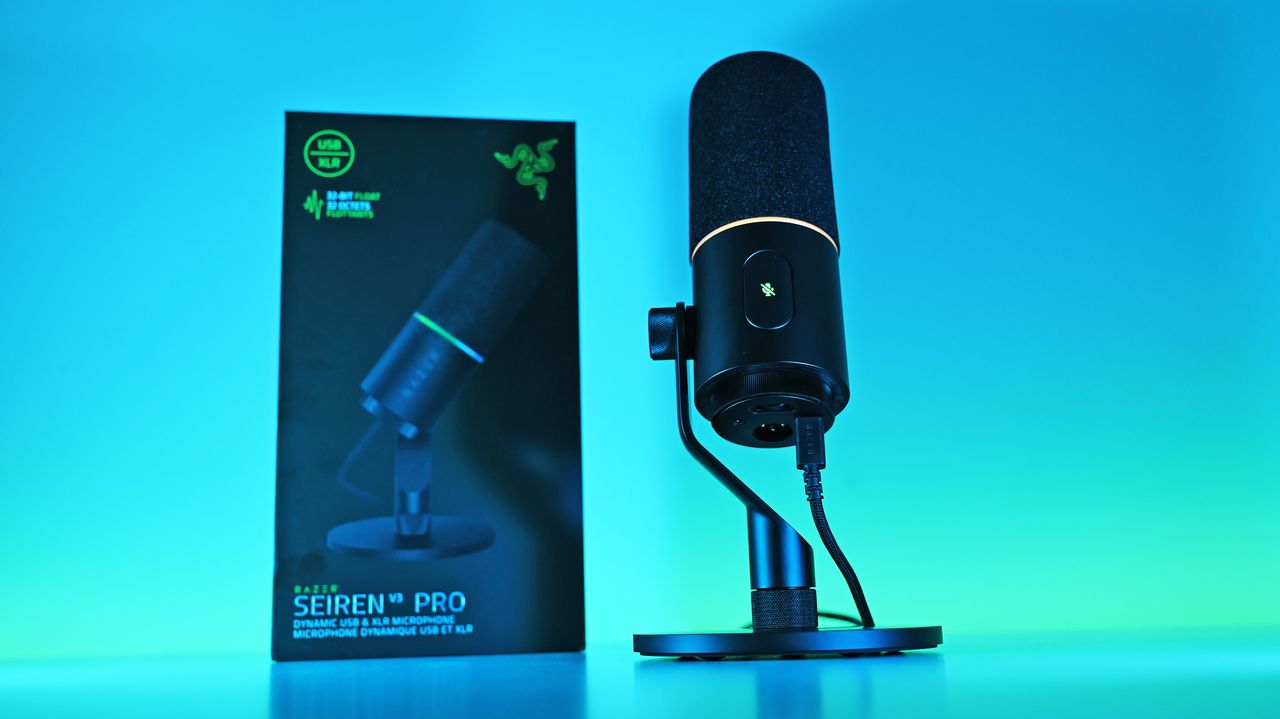
Low-angle shot of the Razer Seiren V3 Pro mic plugged into a USB-C cable next to its box, illuminated by a vivid blue and cyan background.

I ended up liking the Seiren V3 Pro more than I expected, largely due to the software and DSP controls. (Image credit: Daniel Rubino)

You should buy it if ...

✅ You want USB‑C now, XLR later.

✅ You use Razer Synapse/Chroma and want full integration.

✅ You need onboard DSP (32‑bit float, AI noise removal) to cut post‑work.

You should not buy this if ...

You prefer a pure XLR, software‑free workflow.

You’re on a tight budget and don’t need RGB or Synapse.

You need full feature parity on macOS without Windows Synapse.

Ignore

Admittedly, my "you should not buy ifs" here are nitpicky. You can just use this as an XLR mic with a software-free workflow if you want and not worry about USB or software. But there are also more affordable XLR-only mics, hence the con.

At $249.99, Razer positions the Seiren V3 Pro firmly in the higher-end premium tier compared to the HyperX Flipcast (which currently sits at $179.99 against a $229.99 MSRP) and the now-evaporated ProCast.

However, for me, the incredible Razer Synapse DSP more than makes up for that higher cost. The sheer quality of the out-of-the-box hardware processing saves massive time in post-production. I didn't expect that to be the big selling point, but it's clever software and the kind of "don't think about it" setups I prefer.

While you could look at other heavy hitters at this price point like the Shure MV7+ or SteelSeries Alias Pro, Razer brings an unmatched physical build quality, out-of-the-box completeness, and ecosystem synergy to your desk. It delivers studio sound, simply and effortlessly.

Razer Seiren V3 Pro Microphone — Dynamic Usb Type C & Xlr Streaming Mic, 32-Bit Float Support, Built-In Audio Dsp, Ai Noise Removal, Shock Absorber & Pop Filter, Chroma Rgb Lighting Ring — Black

Razer
Razer Seiren V3 Pro Microphone

Razer's new studio‑grade mic with 32‑bit float clarity, USB/XLR flexibility, built‑in DSP and pop filter, RGB status ring, and durable zinc design for clean, professional sound in streaming or recording setups.

Low-angle shot of the Razer Seiren V3 Pro mic plugged into a USB-C cable next to its box, illuminated by a vivid blue and cyan background.

Low-angle shot of the Razer Seiren V3 Pro mic plugged into a USB-C cable next to its box, illuminated by a vivid blue and cyan background.

Apple Reportedly Preparing Second-Generation iPhone Air for Spring 2027

19 juin 2026 à 09:53

Apple’s next iPhone Air could arrive in spring 2027 with camera and battery upgrades as the company shifts toward staggered iPhone launches.

The post Apple Reportedly Preparing Second-Generation iPhone Air for Spring 2027 appeared first on TechRepublic.

Android 17 Is Live on Pixel, but Samsung and Other Android Users Still Have to Wait

19 juin 2026 à 08:09

Android 17 is rolling out to supported Pixel devices first, while non-Pixel users and IT teams face separate OEM timelines, beta programs, and app-testing considerations.

The post Android 17 Is Live on Pixel, but Samsung and Other Android Users Still Have to Wait appeared first on TechRepublic.

❌