Vue normale

  • ✇Yanko Design
  • 8 Best Desk Gadgets Every Digital Nomad Quietly Keeps in Their Bag & Finally Deserves a Permanent Home
    Most desk setups are inherited. The nomad’s is earned. Everything that makes it into the bag has already passed a strict and largely unconscious test — weight, versatility, the ability to make a stranger’s table feel like a place worth working from. Over months and years of moving between cities, time zones, and co-working spaces, the digital nomad ends up with a carefully curated set of tools that are small by necessity but thoughtful by design. The interesting thing about these objects is wha
     

8 Best Desk Gadgets Every Digital Nomad Quietly Keeps in Their Bag & Finally Deserves a Permanent Home

1 avril 2026 à 07:40

Most desk setups are inherited. The nomad’s is earned. Everything that makes it into the bag has already passed a strict and largely unconscious test — weight, versatility, the ability to make a stranger’s table feel like a place worth working from. Over months and years of moving between cities, time zones, and co-working spaces, the digital nomad ends up with a carefully curated set of tools that are small by necessity but thoughtful by design.

The interesting thing about these objects is what happens when the travel slows down. When a lease gets signed, a proper desk arrives, and the bag starts being unpacked with more intention. The tools that survived the road do not lose their relevance on a permanent surface. Many of them were built with the kind of considered design that rewards exactly this kind of scrutiny. They look better than most things bought specifically for a home office, hold up longer, and carry the kind of personal history that makes a workspace feel genuinely inhabited. This is for that moment. Eight objects that lived in the bag for a reason, and deserve a permanent home for the same one.

1. OrigamiSwift Folding Mouse

The OrigamiSwift is what happens when industrial design takes portability seriously. Weighing just 40 grams and folding flat to a profile thin enough to slip between notebook pages, it removes the usual tension between compact and comfortable. On a desk, it unfolds in under half a second, snapping into a full-sized ergonomic shape that sits naturally in the hand. For anyone who has suffered through the cramped mechanics of a standard travel mouse, this feels like a genuine upgrade.

The Bluetooth connectivity is quick, and the origami-inspired fold keeps the mechanism tactile enough that using it becomes a small ritual rather than a chore. At the desk, it earns a permanent spot not because it compensates for a lack of options, but because the transformation itself is satisfying. It is the kind of tool that makes you reconsider how you work, and then makes the work feel slightly more considered. Portable by design, permanent by choice.

Click Here to Buy Now: $85.00

What we like

  • Folds to near-invisible thinness at just 4.5mm, making it one of the most carry-friendly mice ever built without compromising on ergonomic full-size comfort
  • Activates in under half a second with a single flip, making the transition from travel bag to working mouse feel immediate and effortless

What we dislike

  • At 40 grams, the lightweight build may feel insubstantial for users accustomed to the heft and resistance of a traditional full-sized mouse
  • Bluetooth-only connectivity means no wired fallback for tasks where even minor wireless latency becomes a frustration

2. Fidget Cube

The Fidget Cube arrived at a time when open-plan offices made visible restlessness a liability and invisible anxiety a norm. Antsy Labs built something straightforward in response: a small cube with six distinct tactile surfaces, each mapped to a different kind of fidget. Click. Glide. Flip. Breathe. Roll. Spin. The vocabulary is simple, the execution is precise, and the result is a desk object that earns its keep without demanding attention from anyone but you.

For digital nomads who have spent years suppressing the impulse to tap or spin something through a long layover or tense client call, the Fidget Cube offers quiet permission. On a permanent desk, it sits within reach without asking for attention. The black and graphite colorways blend cleanly into most setups, looking less like a toy and more like a considered detail. It is not a gimmick. It is self-awareness shaped into an object.

What we like

  • Six distinct tactile surfaces cover a wide range of fidgeting behaviors in a single pocket-sized cube, making it genuinely versatile across different stress responses and focus modes
  • Discreet colorways like Midnight Black and Graphite blend seamlessly into professional setups without drawing unwanted attention in shared or client-facing workspaces

What we dislike

  • The clicking surfaces can produce audible sounds that may distract colleagues in quiet, open-plan, or library-style work environments
  • The cube format offers no digital or productivity-tracking integration for users who want data on their focus habits or stress patterns

3. Nothing Power (1) Battery Bank

Nothing built its reputation on the Glyph interface, a grid of LED lights that turned the back of a phone into a notification display and a design statement. The Power (1) carries that language into a battery bank, using transparent layers, bold light paths, and illuminated interactions to make a utilitarian object feel worth looking at. The design philosophy is direct: good design is not just about appearance, it is about how an object makes you feel when you reach for it.

For a nomad who has charged devices from airport benches and café stools, a power bank is rarely a display piece. The Nothing Power (1) challenges that. Sitting on a desk, the Glyph illumination gives charging status a visual presence that feels more like an ambient display than a simple indicator light. It treats the desk as a stage and every object on it as a conscious choice. Few battery banks have ever earned that kind of consideration.

What we like

  • The Glyph interface turns a charging indicator into a visual experience, making it arguably the only power bank designed to look genuinely intentional, sitting on a desk permanently
  • Transparent design layers reflect Nothing’s ethos of honest, open construction, giving the object a premium quality that stands apart from every other battery bank on the market

What we dislike

  • The Nothing Power (1) is currently a concept design and is not yet available as a finished commercial product
  • Exact battery capacity, output wattage, and pricing remain unconfirmed, making direct comparison with available alternatives difficult at this stage

4. HubKey Gen2

Desk clutter tends to accumulate in layers: a dock for the monitor, an adapter for the second screen, a hub for storage. Somewhere between them sits a tangle of cables that each solves a single problem in isolation. The HubKey Gen2 treats that as a design problem worth solving from the inside out. It is an 11-in-1 USB-C hub with a hardware control surface on top, offering programmable shortcut keys, a central dial, 100W power delivery, and 2.5Gbps Ethernet in a compact cube footprint.

The display support is what separates it from a standard hub. Two HDMI ports, each running a 4K display at 60Hz, mean a laptop becomes a proper dual-monitor workstation without extra adapters. For a nomad settling in, that shift from single-screen café work to a dual-screen editing setup is significant. The shortcut keys and central dial bring a physical control layer to software-heavy workflows, keeping hands on the desk rather than hunting through menus on a trackpad.

What we like

  • Dual 4K HDMI outputs at 60Hz eliminate the need for a separate display dock when transitioning from a travel setup to a full home workstation
  • The programmable shortcut keys and central knob return a satisfying physical dimension to digital workflows, reducing time spent navigating software menus

What we dislike

  • The compact cube form factor may feel crowded once all 11 ports are simultaneously in active use, which limits clean cable management around the unit
  • Fully customizing the shortcut keys requires additional software configuration, adding a setup investment before the productivity benefit becomes fully apparent

5. Rolling World Clock

Keeping track of time zones is one of the quieter friction points of nomadic life. The Rolling World Clock solves it most physically: you roll it. A 12-sided form with each face representing a major timezone city, a single hand reads the local time wherever it lands. London. Tokyo. New York. The gesture is intuitive, and the result is a genuinely useful desk object without trying to be more.

Available in black and white, this is the kind of object that earns its place through curiosity rather than scale. Guests pick it up. Colleagues ask about it. It turns a functional necessity into a small conversation. For the nomad who has lived across time zones and built relationships across continents, there is something quietly satisfying about having those cities represented not on a screen, but held in your hand.

Click Here to Buy Now: $49.00

What we like

  • The tactile rolling interaction makes checking international time a deliberate, physical gesture rather than a reflexive phone unlock
  • Covers 12 major timezone cities in a clean, minimalist form that works equally well as a functional desk piece or a shelf object

What we dislike

  • Limited to 12 preset cities, which may not include every timezone relevant to users with contacts in less commonly represented regions
  • The single analog hand offers general time orientation rather than precise minute-level accuracy, which may not suit users with tight cross-timezone scheduling needs

6. Orbitkey Desk Mat Slim

A desk mat either disappears into the background or it becomes the visual anchor of the entire setup. The Orbitkey Desk Mat Slim is built for the second outcome, designed with the restraint of the first. Made from premium vegan leather on top and 100% recycled PET felt underneath, it layers material integrity with practical function. The anti-slip backing holds the mat planted, while the magnetic cable holder keeps wires from drifting toward the edges, where they become a distraction.

Notes, receipts, and napkin sketches are the inevitable artifacts of nomadic work, and they tend to pile up without a clear home. The document hideaway is the detail that tips this mat from surface to organizer. The slim front pocket keeps loose papers horizontal, accessible, and out of sight. For someone accustomed to a shared café counter or a hotel tray table, this level of surface order feels less like a feature and more like a quiet exhale.

What we like

  • The document hideaway pocket reduces visible desk clutter without adding bulk, making it one of the more intelligent storage details found on any desk mat
  • Vegan leather and recycled PET felt construction deliver both a refined visual quality and a material responsibility that most desk accessories still lack

What we dislike

  • The slim format may feel too narrow for users with wide multi-monitor setups who need significant horizontal coverage across their full desk surface
  • The magnetic cable holder works best with a small number of cables and may become less effective in more heavily wired configurations

7. Flow Timer

The Pomodoro method has been around since the late 1980s, and most people who use it rely on a phone timer or a browser tab. Neither is ideal. The Flow Timer replaces that with something solid. Cast in metal, with dual customizable presets for focus and break intervals, it lives on the desk as a functional timer and an object of intention. The visual arc tells you where you are in the session without a notification or a screen unlock.

For nomads who have long been their own productivity managers, a physical timer brings a different quality of commitment than a screen-based one. The act of setting it is deliberate. The focus-to-break transition is automatic. Sitting in a permanent spot, it becomes a small anchor for the rhythm of the day. Available in three colorways, the Flow Timer is one of those rare accessories that improves both how you work and how the desk looks while you do it.

What we like

  • Automatic switching between focus and break intervals removes the friction of resetting a timer mid-session, keeping the workflow continuous and uninterrupted
  • Solid metal construction and three considered colorways make it an aesthetic desk object as much as a productivity tool

What we dislike

  • The absence of a digital display means reading the visual arc requires a brief adjustment period before the feedback becomes truly instinctive
  • As a dedicated single-function device, it competes for surface space against multi-purpose tools in more minimal or compact desk setups

8. Memento Business Card Log

There is a specific quality to the business cards that collect at the bottom of a travel bag. Each one marks a moment, a conversation, a person worth remembering. The Memento Business Card Log was made for exactly this. Designed by Re+g, a Japanese brand with roots in thoughtful stationery craft, it holds up to 120 cards with a dedicated handwriting space beside each one for a characteristic, a date, or a detail that brings the memory back clearly.

The two-point slit system keeps cards secure without sleeves or adhesive, and the special binding allows pages to be easily reordered as professional relationships evolve. For a nomad building a network across cities and industries, this is the kind of object that earns its desk placement not through technology but through intention. It is a record of everywhere you have been and everyone who mattered enough to keep. That is rare, and the design knows it.

Click Here to Buy Now: $35.00

What we like

  • The two-point slit system and reorderable binding make the organization genuinely flexible, allowing the log to grow and shift alongside a professional network over time
  • Handwritten note spaces beside each card transform a simple storage product into a meaningful personal archive of the conversations that shaped a career on the road

What we dislike

  • A maximum of 120 cards may feel limiting for high-volume networkers who accumulate contacts rapidly across multiple cities, conferences, and industries
  • The analog format, while entirely intentional, offers no digital sync or search capability for users who need to cross-reference contacts across devices

These Gadgets Were Never Just for the Bag

There is a moment in every nomad’s life when the bag starts feeling less like freedom and more like a deadline. When the tools that carried you through airports and co-working spaces deserve something more settled. These eight objects were always portable by design, but built with the kind of intention that reads just as well on a permanent desk. Good design does not ask where it is. It just works.

The idea here is not to stop moving. It is to stop treating permanence as a downgrade. A folding mouse, a tactile timer, a rolling clock, a mat that holds your cables and your notes — taken together, they form a desk that feels chosen rather than assembled. The nomad who gives these a home is not giving anything up. They are just finally working somewhere worthy of the tools they already carry.

The post 8 Best Desk Gadgets Every Digital Nomad Quietly Keeps in Their Bag & Finally Deserves a Permanent Home first appeared on Yanko Design.
  • ✇Yanko Design
  • 5 Best Waterdrop Filter Systems for Spring 2026, From Renters to Full Family Kitchens
    The water coming out of your tap has traveled through infrastructure that, in many American cities, predates the internet by several decades. Municipal treatment plants catch most of what they’re supposed to catch, but aging pipes, PFAS compounds from industrial and agricultural runoff, and lead from corroding plumbing each leave their own signature in what eventually fills your glass. Two people living thirty miles apart can have genuinely different water problems, and the solution that works
     

5 Best Waterdrop Filter Systems for Spring 2026, From Renters to Full Family Kitchens

25 mars 2026 à 21:45

The water coming out of your tap has traveled through infrastructure that, in many American cities, predates the internet by several decades. Municipal treatment plants catch most of what they’re supposed to catch, but aging pipes, PFAS compounds from industrial and agricultural runoff, and lead from corroding plumbing each leave their own signature in what eventually fills your glass. Two people living thirty miles apart can have genuinely different water problems, and the solution that works perfectly in one kitchen may be entirely wrong for the other. Spring tends to be when many families actually act on this, a natural reset point where the habits and home conditions worth changing finally get real attention.

Waterdrop Filter has spent the better part of the last decade building a filtration lineup that treats water quality as a variable, not a constant. Five of their systems are currently on sale on Amazon through March 31st, spanning the full range of how people actually live: renters who can’t drill into cabinets, families running a high-demand kitchen with PFAS and lead on their radar, people who want their minerals preserved, and anyone who wants instant hot filtered water without the plumbing commitment. Each one is built around a different problem, and this guide helps narrow down which one is built around yours.

Waterdrop Filter G3P800 Tankless RO System: The Under-Sink Performer That Stays Out of Sight

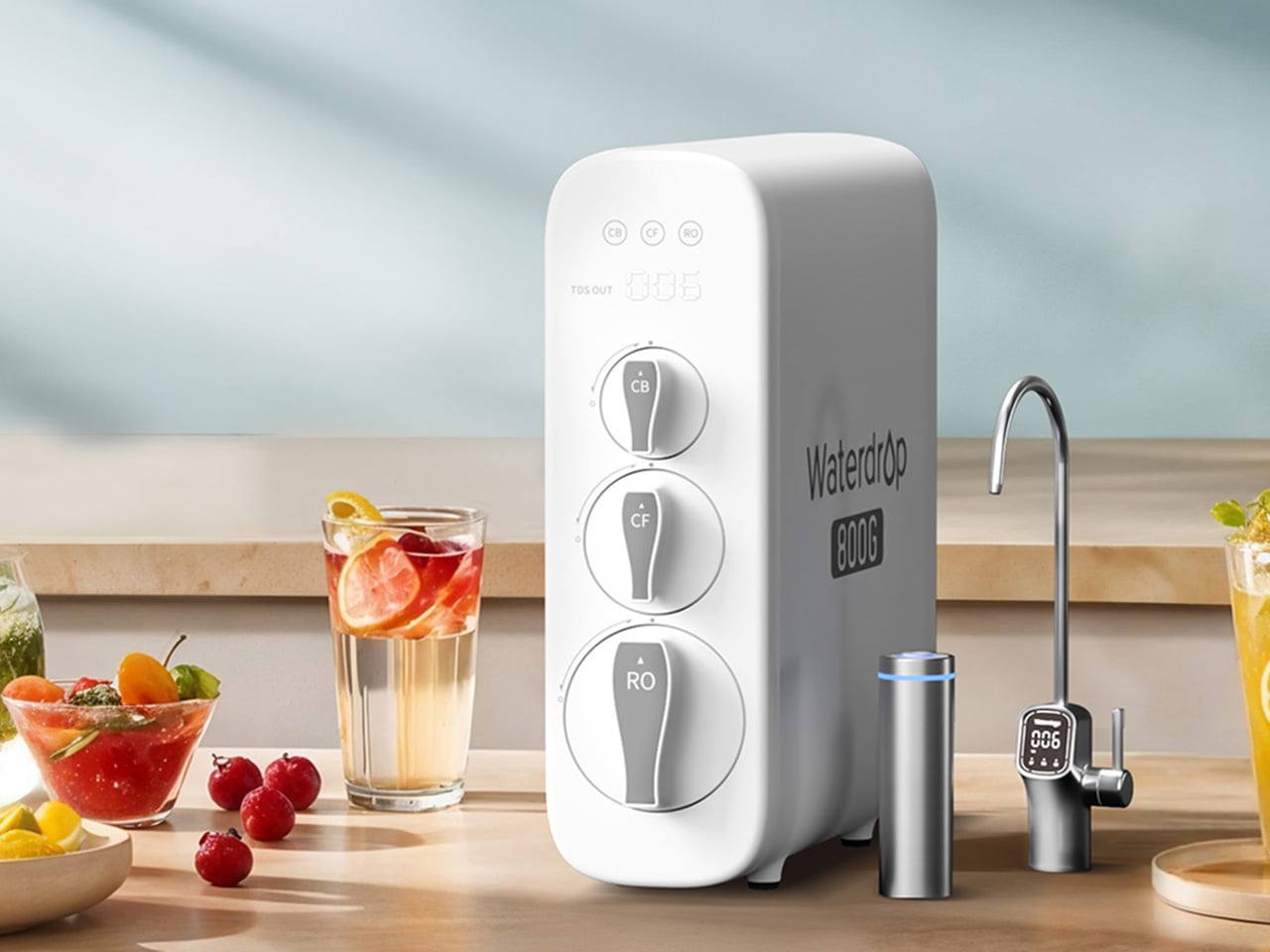
For families thinking seriously about what’s actually in their water this spring, the G3P800 is where Waterdrop Filter’s under-sink lineup earns its bestseller status. The concerns driving most of those conversations, PFAS compounds, lead from aging pipes, chlorine byproducts, are precisely what this system addresses. Its 10-stage RO filtration achieves 98% PFOA reduction, 99% PFOS, and over 99% lead, numbers that carry particular weight for households with infants, pregnant women, or elderly members. NSF/ANSI certifications across standards 42, 53, 58, and 372 back those claims with third-party verification. The tankless design reclaims 50 to 70 percent of under-sink cabinet space, and the UV sterilization stage catches bacteria and viruses that even a high-precision RO membrane cannot address alone.

At 800 gallons per day, the G3P800 handles the full rhythm of a busy family kitchen, from drinking water and cooking to coffee and baby formula preparation. A brushed nickel smart faucet displays real-time TDS readings and filter status at a glance, keeping the system legible without demanding attention. The 3:1 pure-to-drain ratio reflects a genuine shift in responsible RO design, producing meaningfully less drain water than older systems. Spring tends to be the moment families finally act on water quality concerns sitting in the back of their minds, and the G3P800 meets that decision with something durable, rigorously certified, and quietly capable of handling daily household demand for years.

Click Here to Buy Now: $699 $999 (30% off). Hurry, deal ends in 48-hours! Website Here.

Waterdrop Filter X12 RO System: The Flagship That Puts Minerals Back Where They Belong

Where the G3P800 is built for families who want serious filtration at serious capacity, the X12 is for those willing to push further. At 1,200 gallons per day across 11 stages of precision RO filtration, it represents Waterdrop Filter’s most complete answer to the growing list of contaminants giving health-conscious households pause this spring. The PFAS reduction figures here are among the strongest in the lineup, achieving 98.88% PFOA and 98.97% PFOS reduction, alongside a greater than 99.87% lead reduction rate. Certified against NSF/ANSI standards 58 and 372, the X12 carries the kind of third-party verification that families with infants or elderly members look for before trusting a system with daily drinking water and formula preparation.

What genuinely separates the X12 from most flagship RO systems is what it does after filtration. Reverse osmosis at this level of thoroughness strips water down comprehensively, which is where the built-in alkaline mineralization stage earns its place. Calcium and magnesium are reintroduced post-filtration, supporting bone health over time and restoring the balanced, naturally mineral-rich character that makes water taste the way good water should. For families prioritizing both purity and nutritional quality, particularly those with growing children, that combination is difficult to replicate elsewhere. The smart digital faucet handles real-time TDS monitoring and filter life tracking with the same quiet intelligence found across the range. Spring health resets tend to go deeper for some households, and the X12 is designed for exactly that level of commitment.

Click Here to Buy Now: $854.05 $1299 (34.2% off). Use code YKSPRING26 during checkout. Hurry, deal ends in 48-hours! Website Here.

Waterdrop Filter DLG-P: Serious PFAS Protection Without the Installation Headache

The conversation around PFAS and lead tends to center on high-capacity RO systems, and for good reason. But the reality of how many people actually live, in rentals, in first homes, in apartments where permanent under-sink modifications are off the table, means that access to serious water filtration has historically required commitment that many households simply couldn’t meet. The DLG-P is Waterdrop Filter’s answer to that gap. It installs in around three minutes without specialist tools, routes filtered water through an innovative dual-outlet design serving both a dedicated drinking faucet and the main kitchen tap, and achieves 99.7% PFOA and 99.6% PFOS reduction that rivals systems at considerably higher price points. For renters prioritizing PFAS protection this spring, those numbers reframe what budget-friendly filtration can actually deliver.

The system reduces chlorine, fluoride, sediment, and odors across its filtration stages, covering contaminants that affect daily drinking water quality in the most direct ways. A smart filter life indicator removes guesswork from maintenance, flagging replacement needs before performance drops. Filter cartridge replacement takes around three seconds, keeping upkeep genuinely frictionless for fast-paced households where the water filter is expected to work reliably in the background. The black finish gives it a contemporary presence that holds up in modern kitchen environments, and the compact footprint respects the limited under-sink space that comes with rental kitchens. For those who have looked at the G3P800 or X12 with interest but need a solution that fits a different budget and living situation, the DLG-P covers more ground than its entry price suggests.

Click Here to Buy Now: $91.19 $119.99 (24% off). Use code YKSPRING26 during checkout. Hurry, deal ends in 48-hours! Website Here.

Waterdrop Filter TSU: The Case for Filtration That Knows When to Stop

Not every household is starting from the same water quality baseline. In homes where municipal supply is reasonably clean but carrying chlorine taste, sediment, bacteria, and trace heavy metals like lead, deploying a full reverse osmosis system is a longer route than necessary. The TSU operates on that logic. Its 0.01-micron ultrafiltration membrane reduces 99.9% of bacteria, intercepts rust, sediment, fluoride, and heavy metals including lead, while leaving the water’s natural mineral content completely intact. Where the X12 reintroduces calcium and magnesium through a dedicated remineralization stage, the TSU simply never removes them, which for households with acceptable source water is both more efficient and more elegant.

What makes the TSU particularly compelling as a spring upgrade is what it doesn’t require. No electricity, no pump, zero wastewater, running entirely on standard water line pressure with nothing added to the utility bill. The 3-stage tankless system saves 50 to 70 percent of under-sink cabinet space. A brushed nickel dedicated faucet comes included, and the filter lifespan runs up to 24 months, meaning maintenance stays minimal across nearly two years. For busy families where easy installation and low ongoing upkeep matter as much as performance, the zero-waste design also reduces environmental impact and running costs over time. For households that want clean water supporting healthier spring routines without rebuilding their entire under-sink setup, the TSU makes a case that’s difficult to argue with.

Click Here to Buy Now: $123.99 $189.99 (34.7% off). Use code YANSPRING26 during checkout. Hurry, deal ends in 48-hours! Website Here.

Waterdrop Filter C1H: Countertop RO With a Trick Up Its Sleeve

Every system covered in this guide has required going under a sink. The C1H abandons that requirement entirely. It sits on the counter, plugs into a standard outlet, connects to a water source without drilling or permanent modification, and starts delivering six-stage reverse osmosis filtered water with no installation window and no landlord conversation. The 0.0001-micron RO membrane targets the same field of contaminants that motivates most spring filtration upgrades, including PFAS, chlorine, heavy metals, and TDS. The detachable tank design means it moves between a kitchen, an office, or a bedroom without friction, which matters for parents with young children or elderly family members who want safe, filtered water accessible across different rooms rather than anchored to a single tap.

The feature that sharpens the C1H’s appeal for spring routines is instant hot water delivered in three seconds across five adjustable temperature settings. Morning tea, pour-over coffee, baby formula, and quick meal preparation all lose the waiting step that a separate kettle introduces. A Favorite Mode remembers preferred temperature and volume combinations so the same result comes out consistently. Smart touch controls manage everything from volume selection to real-time TDS monitoring and filter life tracking. The 3:1 pure-to-drain ratio and a twelve-month filter lifespan keep both environmental impact and ongoing upkeep to a minimum. For households that have followed this guide and still need a solution on entirely different terms, the C1H closes that gap with confidence.

Click Here to Buy Now: $219 $279 (22% off). Hurry, deal ends in 48-hours! Website Here.

The post 5 Best Waterdrop Filter Systems for Spring 2026, From Renters to Full Family Kitchens first appeared on Yanko Design.

  • ✇Yanko Design
  • The Shargeek 300 is a Cyberpunk-style Power Bank that can charge two MacBook Pros
     Power banks have spent years being boring on purpose. Black rectangles, white rectangles, the occasional textured finish. The category settled into a kind of utilitarian invisibility, as if the industry collectively decided that anything carrying electrons should look like a bar of soap. SHARGE never got that memo. The Shargeek 300 looks like a prop from a near-future thriller, with transparent panels revealing glowing circuitry beneath, RGB light bars running along its flanks, and a CNC alum
     

The Shargeek 300 is a Cyberpunk-style Power Bank that can charge two MacBook Pros

20 mars 2026 à 21:45

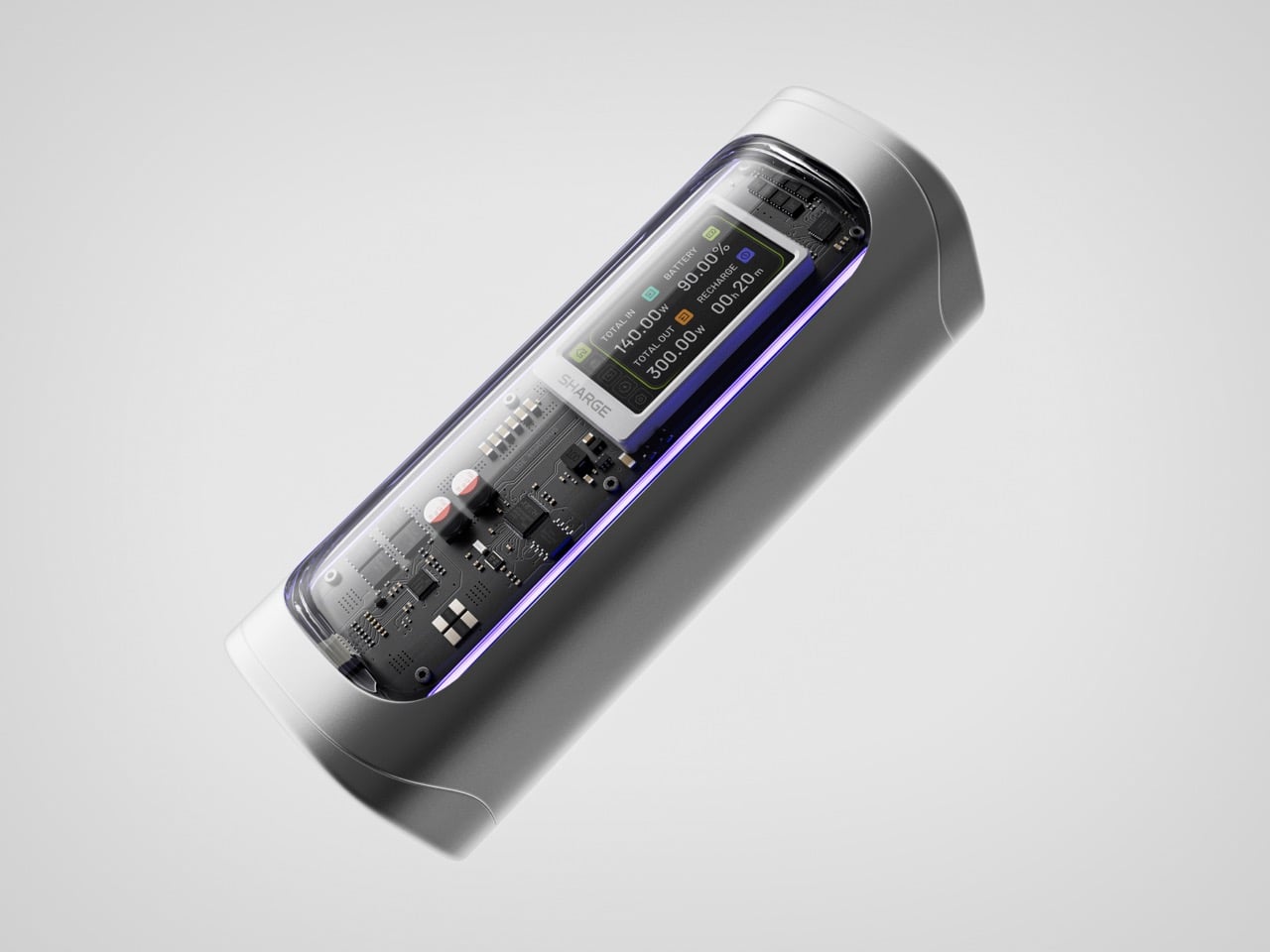
Power banks have spent years being boring on purpose. Black rectangles, white rectangles, the occasional textured finish. The category settled into a kind of utilitarian invisibility, as if the industry collectively decided that anything carrying electrons should look like a bar of soap. SHARGE never got that memo. The Shargeek 300 looks like a prop from a near-future thriller, with transparent panels revealing glowing circuitry beneath, RGB light bars running along its flanks, and a CNC aluminum body that catches light the way expensive things tend to. It belongs on a desk you’d actually want to show people.

Founded in 2020, SHARGE built its identity around the conviction that charging hardware deserves the same design attention as the devices it powers. The original Shargeek 100, launched in 2021, was the proof of concept: a transparent, display-equipped power bank with DC charging that found a devoted audience almost immediately. The Shargeek 300 is what four years of that bet looks like fully cashed in. It pushes 300 watts of total output, enough to charge two 16-inch MacBook Pros simultaneously while still fast-charging a smartphone on a third port. The 24,000mAh battery lands at 86.4Wh, sitting just under the 100Wh threshold airlines enforce for carry-on batteries. Recharge time from flat to full is 75 minutes with a 140W input. The whole unit is roughly the size of a 330ml can of cola. SHARGE spent 40 months getting here, and the result makes most rivals in the category look underprepared.

Designer: Sharge

Click Here to Buy Now: $159 $199 ($40 off) Hurry! Only 6 days left.

That meticulous attention to detail is most obvious in the physical construction. The main body is a matte silver CNC aluminum frame, which is then given a 180-grit sandblasted, anodized finish for a smooth, premium feel. The company’s head of production is even quoted as personally comparing the feel of every unit to an iPhone to ensure they are equally premium. The signature transparent casing is not just a window, but a piece of safety equipment, made from V0 flame-retardant, UL94-certified polycarbonate that resists both scratches and heat. The dual RGB light bars are fully customizable, allowing users to adjust brightness, change colors, and cycle through effects via the onboard display, turning a functional object into a piece of personalized desk art.

Inside that striking shell is technology that sets a new benchmark for portable power. The Shargeek 300 is the first power bank to use the same Full-Tab Battery Cell technology pioneered by Tesla. This design significantly lowers internal resistance compared to conventional cells, a change that unlocks faster charging speeds, higher sustained output, and superior heat dissipation. This internal efficiency is the key to how a device this compact can safely manage a 300W total output without overheating or degrading quickly. The advanced battery structure results in a longer-lasting, more stable power source that can handle the demanding, continuous power draws required by high-performance laptops and other professional equipment, putting truly next-generation power in your hands.

This power is routed through a versatile array of four output ports designed to handle nearly any device. The stars of the show are the two USB-C ports, both of which support the Power Delivery 3.1 standard to deliver a massive 140W of power each. This is what allows the Shargeek 300 to simultaneously fast-charge two 16-inch MacBook Pros at their maximum charging speed. A third USB-A port provides up to 20W for legacy devices and smartphones. The fourth and most unique port is the adjustable DC barrel port, a feature carried over from the Shargeek 100. It now supports up to 140W and its voltage can be manually set between 5V and 28V, unlocking compatibility with a world of gear that USB-C cannot serve, from professional camera equipment to high-performance drones. The 24,000mAh capacity provides enough energy for approximately one full charge of a modern MacBook Pro, six charges for an iPhone 16 Pro, or two charges for an iPad Pro.

The user experience is managed through a 1.9-inch IPS display, which is 60% larger than the screen on the previous model. It provides a level of control that is unheard of in this category. Beyond showing real-time input and output wattage, the display allows you to monitor battery health, track charging cycles, and check internal temperatures. You can use it to precisely adjust the DC output voltage, set a custom welcome message, and configure the RGB lighting. This smart display transforms the power bank from a simple battery into an intelligent power hub. This intelligence extends to its handling of delicate electronics. A dedicated Low-current Mode ensures that devices like earbuds, smartwatches, and fitness trackers receive a safe, optimized charge, preventing the overcharging that can damage the small batteries in those devices.

This combination of raw power and intelligent control is backed by a comprehensive suite of safety features, including overvoltage, undervoltage, short-circuit, and real-time temperature protection. This commitment to safety extends to its travel-readiness. Crucially, the power bank’s 24,000mAh capacity is engineered to a rating of 86.4Wh, keeping it comfortably under the 100Wh limit imposed by airlines for carry-on luggage. This makes it one of the most powerful charging solutions that can be legally carried onto a plane, a critical detail for mobile professionals. The low standby power consumption is another practical benefit, allowing the Shargeek 300 to retain over 90% of its charge after 15 days of inactivity. For anyone who has pulled a power bank from a bag after weeks only to find it unexpectedly dead, this is a genuinely valuable feature.

The Shargeek 300 starts at $199 but is available at a discounted $159 price for earlybird backers. Cobble together $209 and you can get the power bank along with its companion Pixel 140W PD 3.1 wall charger from Sharge with its adorable pixel-matrix display. The Shargeek 300 comes with a 12-month warranty, and ships globally as early as May 2026.

Click Here to Buy Now: $159 $199 ($40 off) Hurry! Only 6 days left.

The post The Shargeek 300 is a Cyberpunk-style Power Bank that can charge two MacBook Pros first appeared on Yanko Design.

❌