Last night I surprised myself by working an extra hour at my desk. I occasionally work late, but what surprised me is that it happened by accident. I believe the blame falls on GUNNAR and a pair of glasses the company sent me to try out.Like many people, I sit at a desk for the majority of my workday and stare at a screen for hours on end. I often get headaches or eye strain after working for too long without a break. I've spent years building up an ergonomic wor
Last night I surprised myself by working an extra hour at my desk. I occasionally work late, but what surprised me is that it happened by accident. I believe the blame falls on GUNNAR and a pair of glasses the company sent me to try out.
Like many people, I sit at a desk for the majority of my workday and stare at a screen for hours on end. I often get headaches or eye strain after working for too long without a break. I've spent years building up an ergonomic workstation to help my back, knees, and wrists, but I've neglected my eyes.
GUNNAR glasses are designed to block blue light. I've been aware of the company for years, in part due to their various gaming partnerships, but I had never used a pair myself. Gunnar and I got in touch to let me try a pair.
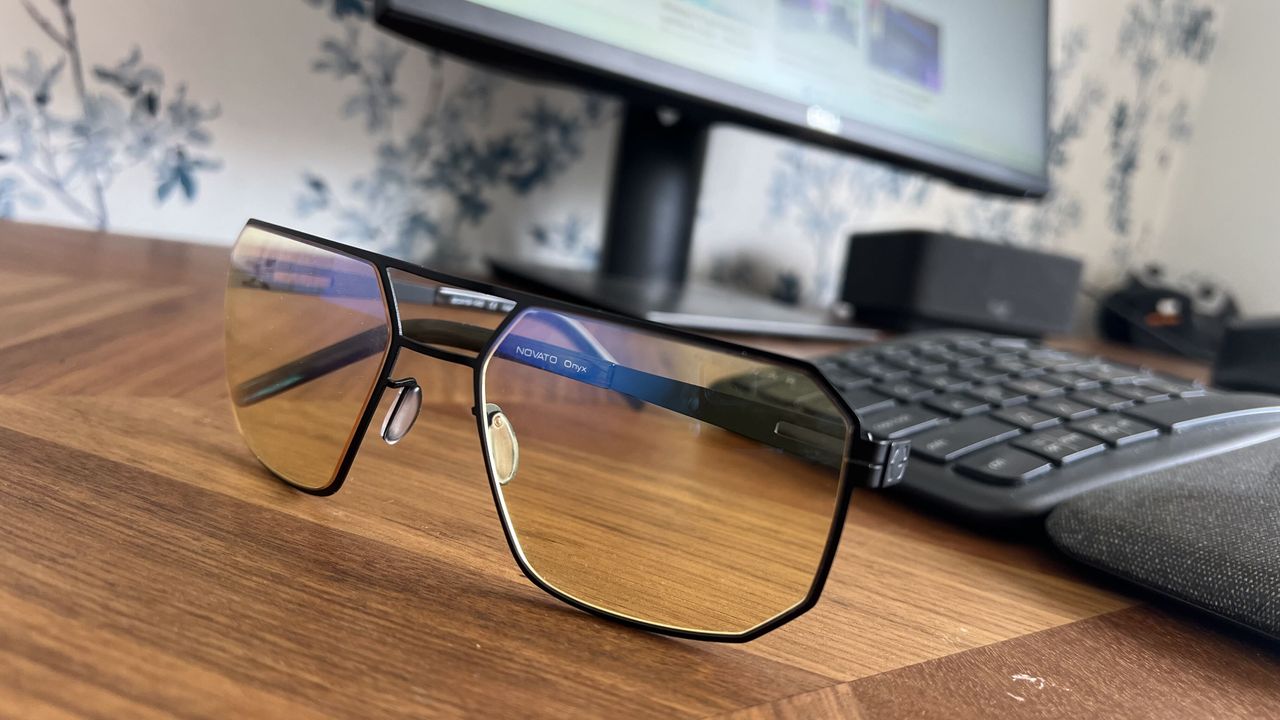
The Novato pair of glasses I was sent has the amber tint that's available in many frames from GUNNAR. This particular pair has a slight magnification as well, though it's available with a neutral focus.
When I slipped on the glasses, I felt my face relax almost instantly. I then continued to work throughout the afternoon.
Later in the evening, I noticed that I had worked an hour later than usual.
I got to the end of my normal day and just kept working because I didn't realize how late it was. I usually need breaks every once in a while to rest my eyes, but since my eyes didn't hurt I lost track of time.
These glasses filter out blue light to reduce eye strain caused by staring at a screen. They're made with a lightweight titanium frame and have anti-reflective coating.View Deal
GUNNAR glasses vs. f.lux and Windows 11's Night Light
I've used apps like f.lux and Windows 11 features such as Night Light to filter out blue light from my PC screen. I still recommend those apps to anyone who wants to reduce eye strain or who works late at night.
I was, however, surprised how much the GUNNAR glasses felt different than using software to reduce blue light.
I'm not an eye doctor or any type of medical professional, so please take my experience as simply a hands-on with the GUNNAR glasses. When I put them on, it felt like the entirety of my eyes could relax rather than just having a specific screen filtered.
While apps like f.lux are great, they don't do anything to filter out blue light from overhead lighting or any other light sources in your room. Slipping on a pair of GUNNAR glasses came much closer to filtering blue light out of the entire room.
This particular model of GUNNAR glasses rests quite close to my face, though they have models that wrap around even more.
I'm sure that part of the improved experience is mental. My mind feels like it can relax my eyes, so my face follows. With the glasses on, I caught myself squinting or flexing my face less.
I'm not sure if accidentally working an extra hour is a good thing or a bad thing, but if I can harness the experience for my normal working hours, I'll be very excited. I plan to use these GUNNAR glasses and some other frames over the coming weeks and will follow up with how things go.
Join us on Reddit at r/WindowsCentral to share your insights and discuss our latest news, reviews, and more.
Close-up of Gunnar Novato Onyx computer glasses featuring amber lenses and a matte black geometric metal frame resting on a wooden desk in front of a monitor and keyboard.
Slipping on the GUNNAR Novato Onyx glasses instantly reduced my eye strain.
One thing we haven't had so much of with the Xbox Series X|S compared to previous generations is limited edition consoles. There have been some, like the Halo Xbox Series X and some competition specials, but compared to the Xbox 360 and Xbox One especially, it's been a pretty dry time. Some of the older limited editions command a pretty penny on the used market these days, and obviously there's a finite supply of them. But there are some real gems, like the Gears
One thing we haven't had so much of with the Xbox Series X|S compared to previous generations is limited edition consoles. There have been some, like the Halo Xbox Series X and some competition specials, but compared to the Xbox 360 and Xbox One especially, it's been a pretty dry time.
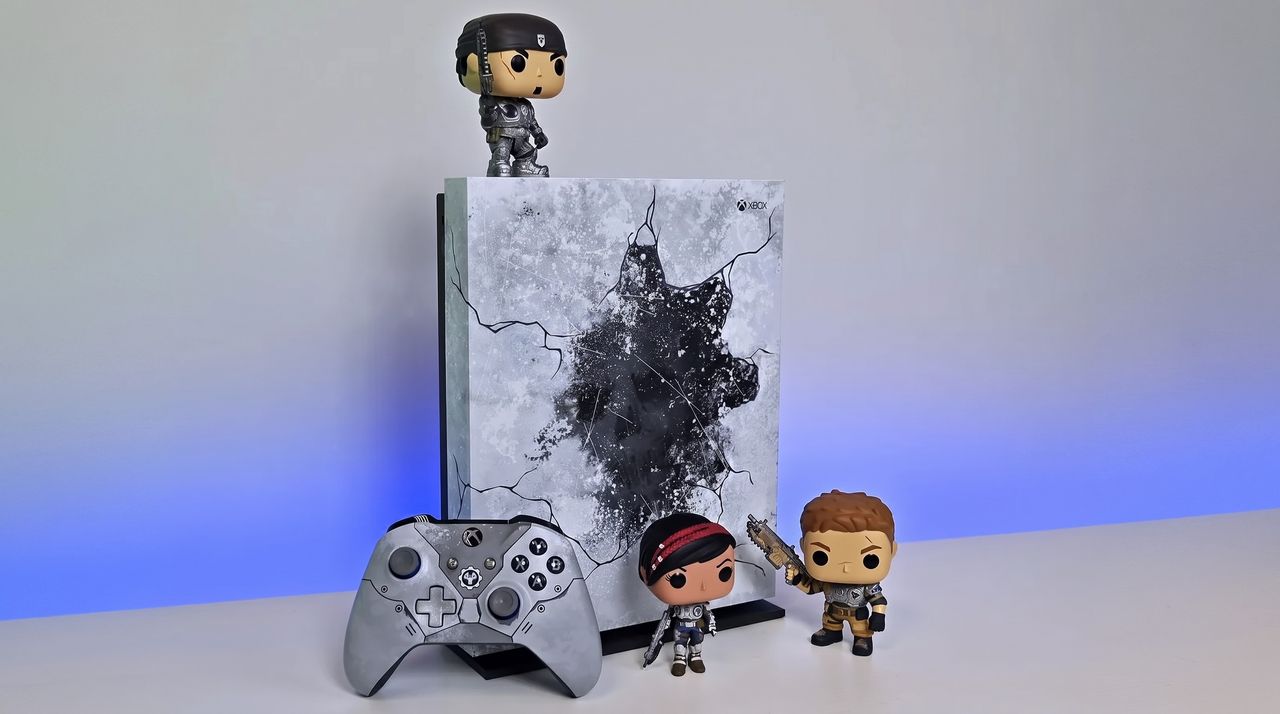
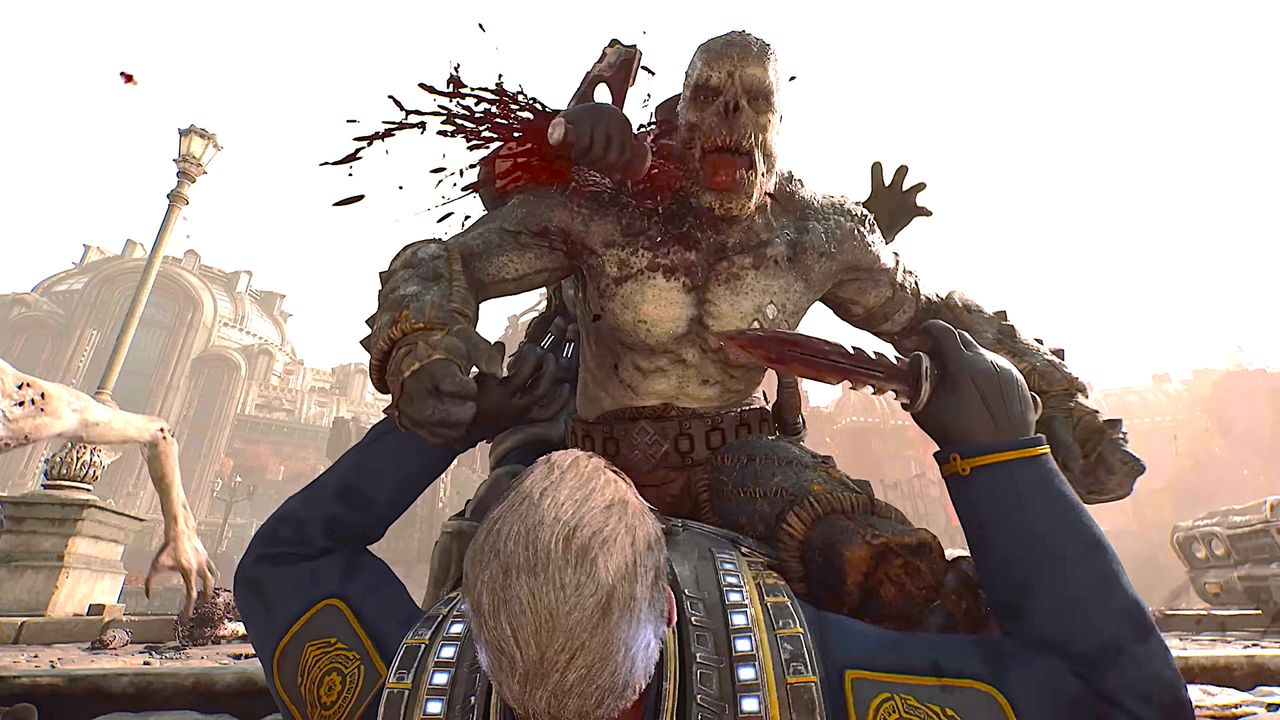
Some of the older limited editions command a pretty penny on the used market these days, and obviously there's a finite supply of them. But there are some real gems, like the Gears 5 Xbox One X (pictured above) or even the blood red Gears of War 4 Xbox One S. Later this year we'll also see the Xbox Series X25, with its classic translucent green shell. Though unfortunately, a vastly increased price, now.
But over on the Xbox subreddit there's a thread rolling right now where folks are talking about these consoles, so I thought I'd bring it on over here, too. So what's your favorite limited edition Xbox console of all time?
There are some incredible choices on the Reddit thread, from the classic Crystal Green OG Xbox through the Halo 4 Xbox 360, the Titanfall Xbox One, and some others that folks like myself based in the UK might not even have known existed.
I didn't know there was a Taco Bell Xbox One X, for example, nor a green Mountain Dew OG Xbox. Granted, neither of these were actually sold, but they still exist, and I'd definitely go for a Mountain Dew Xbox if I could get my hands on one without selling a kidney.
I've never actually owned a limited edition console myself. The closest I've come so far is the Project Scorpio launch edition Xbox One X, which I still have in my office looking pretty.
Does this one take the crown as your favorite limited edition? (Image credit: Microsoft)
If I had to pick, it'd be between two. The Xbox console I always coveted the most was the Crystal Green first-generation. I wish I'd chopped in my standard black console to get one, but given I'd already spent a whole paycheck from a part-time job on one at the age of 17, I decided against it lest I risk the wrath of the parents.
The other might be one most wouldn't pick given some of the wild designs, but as a massive fan of the franchise, I always wanted the blue Forza Edition Xbox One. It didn't help that a friend of mine actually had one, taunting me every time I went over.
So, those are my picks, but I'm more interested in yours. There's no shortage to choose from, so hit the comments below and share your own favorite limited edition Xbox console design from the last 25 years!
Join us on Reddit at r/WindowsCentral to share your insights and discuss our latest news, reviews, and more.
A photo of a special edition Gears of War Xbox One X and matching controller with three Gears of War Funko Pop figures.
We used to get special edition consoles all the time, like this Gears of War Xbox One X.
Digital Sun (the indie developer behind the cult-favorite Moonlighter series) and 11 Bit Studios (the publisher of several hit indie titles like The Thaumaturge, Indika, Frostpunk 2, and Creatures of Ava) have announced that Moonlighter 2: The Endless Vault is finally leaving early access.Version 1.0 of Moonlighter 2: The Endless Vault will be launching on September 2, 2026, for Xbox Series X|S, Xbox Game Pass, PC Game Pass, PlayStation 5, Nintendo Switch 2, and
To celebrate the occasion, Digital Sun and 11 Bit Studios are giving away the first Moonlighter game for free to keep forever via Steam between August 5, 2026, and August 9, 2026.
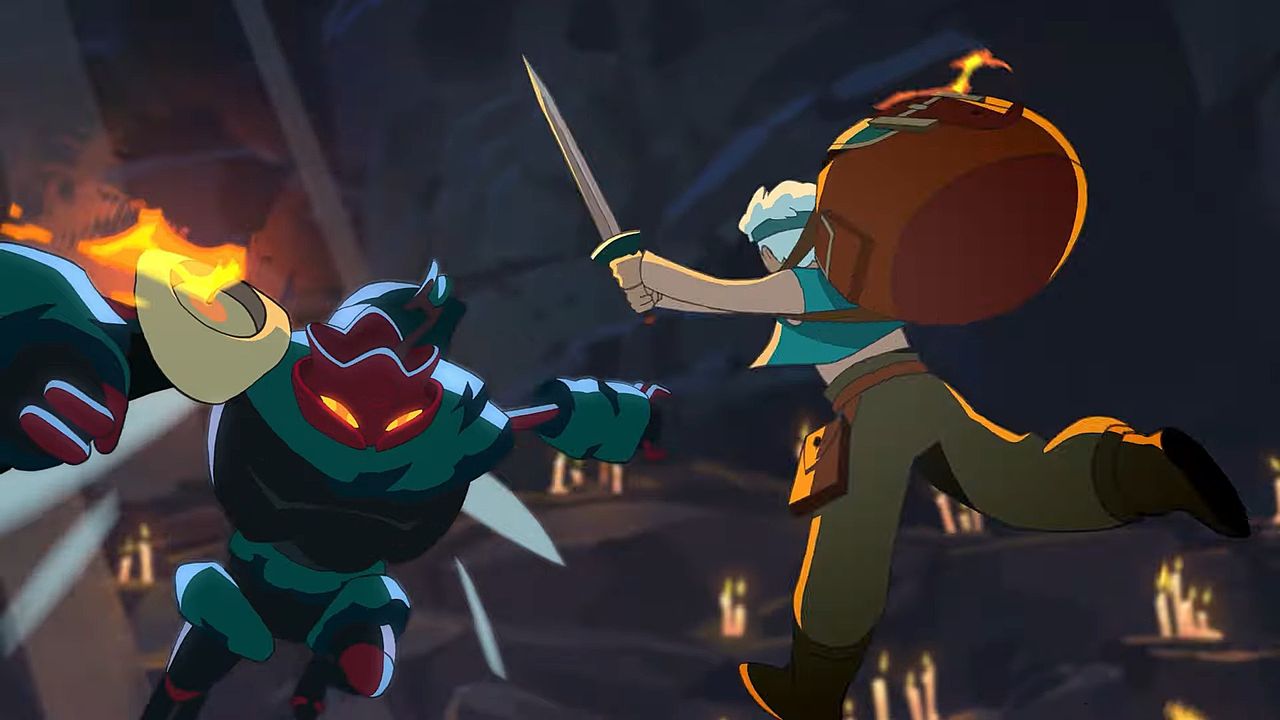
For those unaware, the Moonlighter series is a top-down, action-RPG with roguelite elements where you live the life of an adventurer-shopkeeper named Will.
The gameplay loop of this series revolves around exploring dangerous dungeons filled to the brim with ancient treasure guarded by deadly monsters.
You then sell whatever loot you find to help maintain your shop's profits while investing in other businesses to help the struggling town of Tresna thrive again and give you access to better equipment to help you survive more challenging dungeons.
Windows Central's take
We actually covered the Moonlighter series a couple of times at Windows Central. One of my colleagues, Brendan Lowry, reviewed the first Moonlighter, and while he praised it for having a unique premise, excellent presentation, and decent action-RPG gameplay, he felt there was much room for improvement in the story and combat department.
Dungeon crawling was more rewarding, combat was more varied and intense, and its merchant simulation gameplay has somehow made inventory management, which is usually a tedious task in most games, a fun activity in its own right.
I never played the Moonlighter series before, but with the first game now being free on Steam for a short time, I may give it a shot because the art style looks cute, and the gameplay looks fun while giving me nostalgic memories of classic top-down action-RPGs like The Legend of Zelda: Link's Awakening.
It would certainly be a good time to kill before the sequel leaves early access, while giving me much better appreciation for all the improvements it's made from the first game.
Dive deep into dark dungeons for ancient treasure, and risk your life to restore wealth to the ailing town of Tresna in Moonlighter: The Endless Vault.
Microsoft Outlook has a handful of changes in the works that will make it easier to stay on top of emails and events. Some of the upgrades, such as drag and drop support for rescheduling events, will change how you interact with Outlook, while others are smaller upgrades.All of the improvements are detailed on the Microsoft 365 Roadmap. I've taken five of the most exciting entries from that roadmap and gathered them in the chart below.FeatureDescriptionRollout St
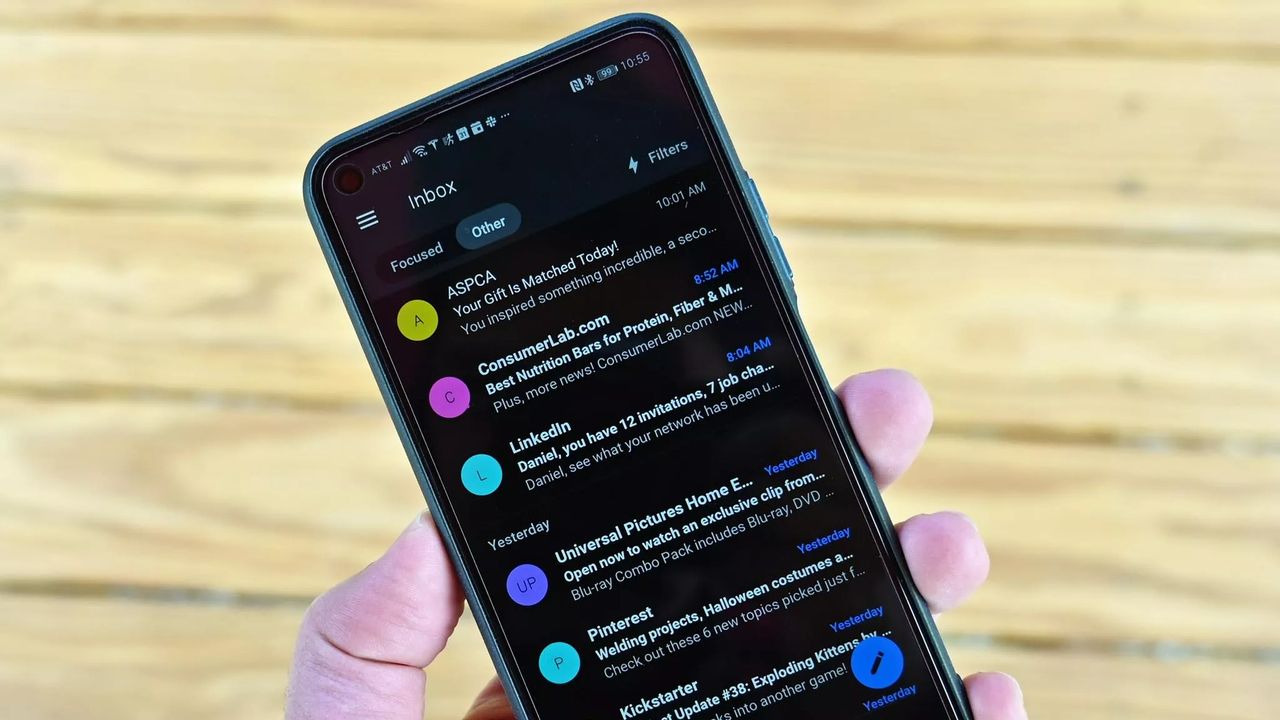
Microsoft Outlook has a handful of changes in the works that will make it easier to stay on top of emails and events. Some of the upgrades, such as drag and drop support for rescheduling events, will change how you interact with Outlook, while others are smaller upgrades.
All of the improvements are detailed on the Microsoft 365 Roadmap. I've taken five of the most exciting entries from that roadmap and gathered them in the chart below.
Feature
Description
Rollout Start
Platform
Filter messages by events
You can now filter your messages for calendar invitations. Simply go to the filter and select Events from the drop down.
August 2026
Android and iOS
Copilot Chat pop-out for Outlook for Mac and iPad
Copilot Chat remains accessible within an Outlook app window but now can also be popped out to float over the main Outlook app window. Popping out Copilot Chat allows people to switch contexts or have more space for what they are working on in Outlook and control the space and form that Copilot Chat takes on screen. When you open Copilot chat and click the pop-out button, Copilot will open separately over the main Outlook window.
August 2026
iPad and Mac
Drag and drop
You can now reschedule events by dragging them to a new time slot in your calendar. This feature is available in day and multi day views.
August 2026
Android and iOS
Insert signature image from OneDrive
Users can now insert images into their email signature directly from OneDrive, in addition to the device photo library.
August 2026
Android and iOS
All day events to show up more clearly in the Mail module calendar preview
We're making it easier to tell when receiving meeting invites that conflict with scheduled Out of Office time or Busy All Day events, on Outlook Web and Outlook for Windows.
August 2026
Desktop and web
Being able to filter messages to only show those with calendar invitations will save me a lot of time. I get a lot of calendar invites from my wife to coordinate our schedules, but I also get a lot of emails from my wife about other things.
After finding those events, I'll be able to move them around in Outlook by dragging and dropping them. Since we have a young child, we often need to move things to different times of the day to align with naptime. I wish drag and drop support was on the way to the web version of Outlook as well, but the roadmap entry only mentions iOS and Android.
Which features would you like to see added to Outlook? Are there any improvements on the way that you're especially excited about? Let us know in the comments!
Join us on Reddit at r/WindowsCentral to share your insights and discuss our latest news, reviews, and more.
Earlier this year, Microsoft announced that it was moving to address Windows 11's biggest issues and criticisms from users in an effort to win back trust from customers and reposition Windows once more as a viable alternative to macOS and Linux, something people actually want to use over the competition. It was nice to see Microsoft outline its roadmap and plan for Windows 11, but I wasn't prepared for just how fast the company would start delivering on the promi
Earlier this year, Microsoft announced that it was moving to address Windows 11's biggest issues and criticisms from users in an effort to win back trust from customers and reposition Windows once more as a viable alternative to macOS and Linux, something people actually want to use over the competition.
It was nice to see Microsoft outline its roadmap and plan for Windows 11, but I wasn't prepared for just how fast the company would start delivering on the promises it was making. Since March, Microsoft has previewed and even shipped many improvements to Windows 11 that are the direct result of its Windows K2 initiative, all designed to fix Windows 11.
I've been testing these new Windows 11 builds over the last few months, and there are 5 big changes and improvements that stand out as super exciting. Some of these improvements are already shipping, whereas others are still in preview.
A new and improved Windows Update
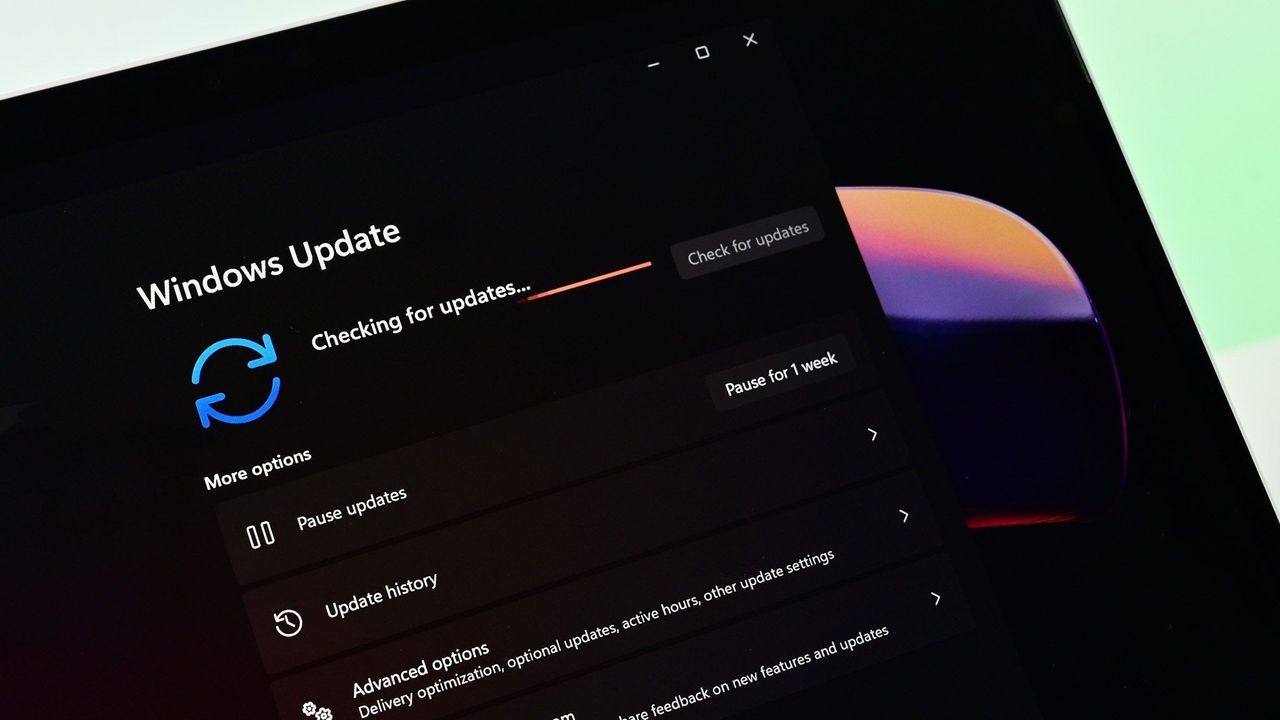
Windows Update is now much smarter and doesn't get in the way anymore (Image credit: Zac Bowden / Windows Central)
Updates on Windows have always been frustrating, so much so Microsoft made it a point of focus for its Windows K2 effort. In the last few months, Microsoft has shipped multiple changes and improvements to Windows Update which are designed to make it more reliable, and more importantly, less annoying.
The first big change is ensuring driver, framework, and security updates are now all timed to install at the same time. Previously, any update could require the user to restart at any time. Now, Windows Update will only ask you to restart once a month, as the update system now installs those driver and framework updates alongside security patches.
That's in addition to being able to pause updates indefinitely now, so even when the one time a month that Windows asks you to restart finally rolls around, users have the option to say no and postpone the restart for as long as they need. Even when an update is pending restart, the option to shut down or restart without installing said update is now present.
Microsoft has even made it so users can skip installing updates when setting up a PC for the first time, meaning it now takes just a few minutes to get right into using your new PC instead of the 20+ minutes it used to take when installing the latest update was a requirement before reaching the desktop.
All of these Windows Update improvements are already shipping to all Windows 11 users, which is a crazy quick turn around.
Less ads and AI across the OS
Widgets no longer includes MSN ads and sponsored content. (Image credit: Zac Bowden / Windows Central)
Microsoft is also removing Bing and MSN ads from Windows Search, in preview now. The search pane itself is now a long list or recent search queries and items, with nonsense like the Bing wallpaper of the day and other sponsored content no longer appearing at all. Even search results that reach out to the web no longer include sponsored content.
The Start menu now also has more granular controls over the kind of content that appears in there. The "Recommended" feed has been renamed to the "Recents" feed and no longer shows recommended apps and websites that came across as more advertising. Users even have the option to remove the Recents feed entirely now, which is great.
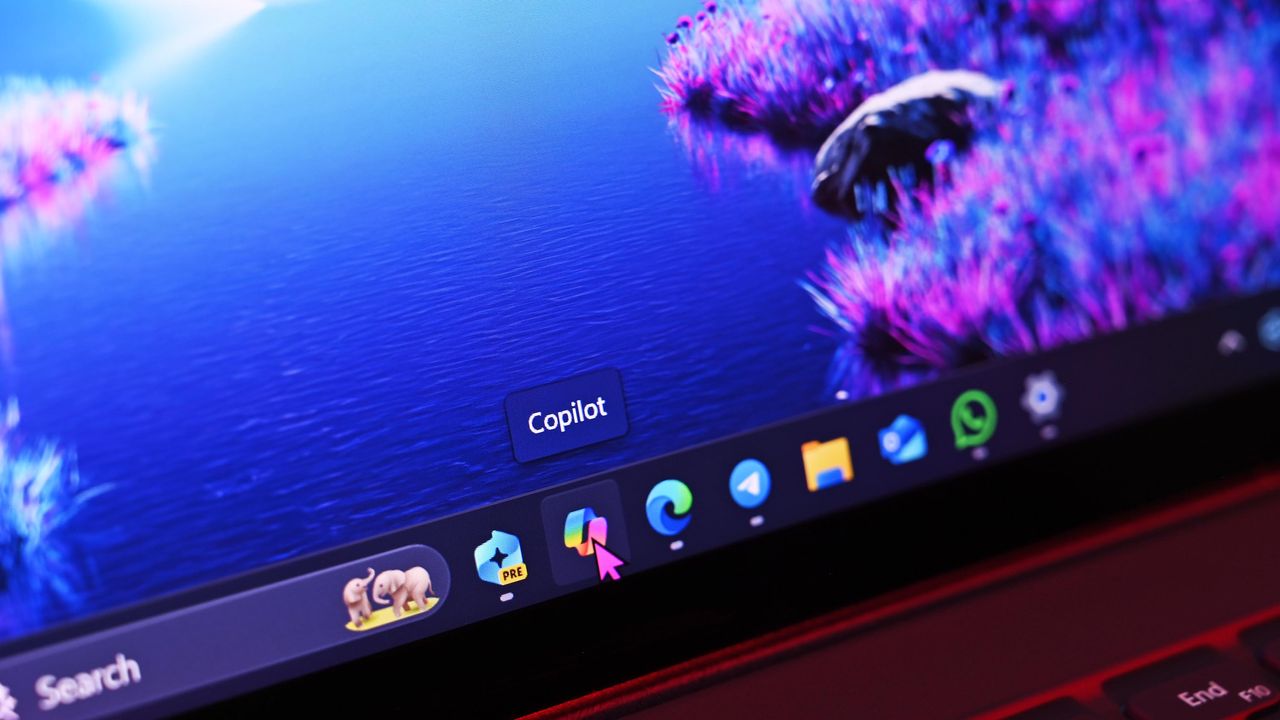
Copilot used to plague every inbox app and UI surface you could think of on Windows 11, but today it only appears in a few very specific areas. It still exists as a standalone app on Windows 11, but the Copilot button no longer exists in apps like Photos and Notepad. Microsoft has even removed the "Ask Copilot" option in File Explorer.
Better performance and reliability
Windows 11 is now faster and more reliable, with a focus on reducing memory usage. (Image credit: Zac Bowden / Windows Central)
One big area of focus for Microsoft is the overall performance and reliability of Windows 11, which many agree has slipped over the last few years. The good news is Microsoft has already delivered several improvements on this front, with more to come in the following weeks.
The first big change is the new "Low Latency Profile" feature that shipped just a few weeks ago. It's an invisible change that makes opening apps, context menus, and flyouts from the Taskbar much more responsive by silently increasing CPU frequency when these common actions take place.
This is something other OS platforms do which allows them to remain feeling snappy, even under heavy load, and now Windows 11 has the same behavior. This has outright fixed the issue users sometimes have where things like the Start menu don't always appear immediately when clicked. That's a thing of the past now.
Microsoft is also improving the performance of WinUI interfaces across the system via a new System Compositor which reduces latency and memory overhead across the OS so that these modern interfaces are consistently responsive. There's even a new Run dialog built with WinUI that is faster than the old Win32 version.
Opening and navigating through file trees in File Explorer is faster too, and searching for files and apps on Windows 11 is now more consistent. Two character search is already shipping, which makes finding content a little bit easier.
Customizable Taskbar and Start menu
There are many new customization options coming to Start (Image credit: Zac Bowden / Windows Central)
One of the biggest issues people have with Windows 11 is how it took away customizable options for areas of the system like the Start menu or Taskbar. Microsoft has heard that feedback, and is already publicly testing a new Taskbar and Start menu that can be user customized.
The Taskbar can now be repositioned just like on Windows 10, allowing the user to move it to the left, right and top of the display if that's where they want it. There's also a new resize option letting users make it smaller like the Windows 10 one could.
The Start menu is also getting more customization options. Users can hide entire segments of Start, such as the Recents feed, Pinned apps, or All Apps area. They can toggle on or off the Phone Link companion, and disable Start entirely if they don't ever use it.
And there's more to come
Context menus are getting a redesign and better customizability. (Image credit: Zac Bowden / Windows Central)
Above are all the new improvements that I've tested and are either shipping or in public testing via the Windows Insider Program. These are the real changes and features that can be tried and tested as we speak, not just empty promises or ideas. It's all available to download and try out right now.
There's still more to come too, stuff that isn't yet in public preview testing. Microsoft has confirmed it's working to move more parts of the OS to WinUI for faster performance, such as the Start menu and areas of File Explorer. There's an effort to reduce the footprint of the OS in the works too, which should make the OS less resource intensive at idle.
For the features that are yet to ship outside of preview, I understand that Microsoft is aiming to get the bulk of these improvements out of the door before the end of 2026, with some expected in 2027.
SI'm so very impressed with how quickly Microsoft has turned Windows 11 around so far. I haven't felt this positive about the features and changes being actively made to Windows in a really long time, to the point where it feels weird to not have anything to really complain about. All of my biggest issues with Windows 11 have either already been addressed, or are in the process of being addressed.
It's a great time to be a Windows user again.
Join us on Reddit at r/WindowsCentral to share your insights and discuss our latest news, reviews, and more.
My favorite Xbox feature is having a bit of a moment in the sun. The Xbox ecosystem is a lot better than people give it credit for in my view. Xbox Game Pass is still a fantastic deal for those who want to graze a large library of content. Xbox Cloud Gaming is more viable than ever for single-player games, and things like cloud saves remain free, while paid on other platforms. DEAL: Get Surfshark VPN 86% OFF with Windows Central 🦈My favorite feature however is Xb
My favorite Xbox feature is having a bit of a moment in the sun.
The Xbox ecosystem is a lot better than people give it credit for in my view. Xbox Game Pass is still a fantastic deal for those who want to graze a large library of content. Xbox Cloud Gaming is more viable than ever for single-player games, and things like cloud saves remain free, while paid on other platforms.
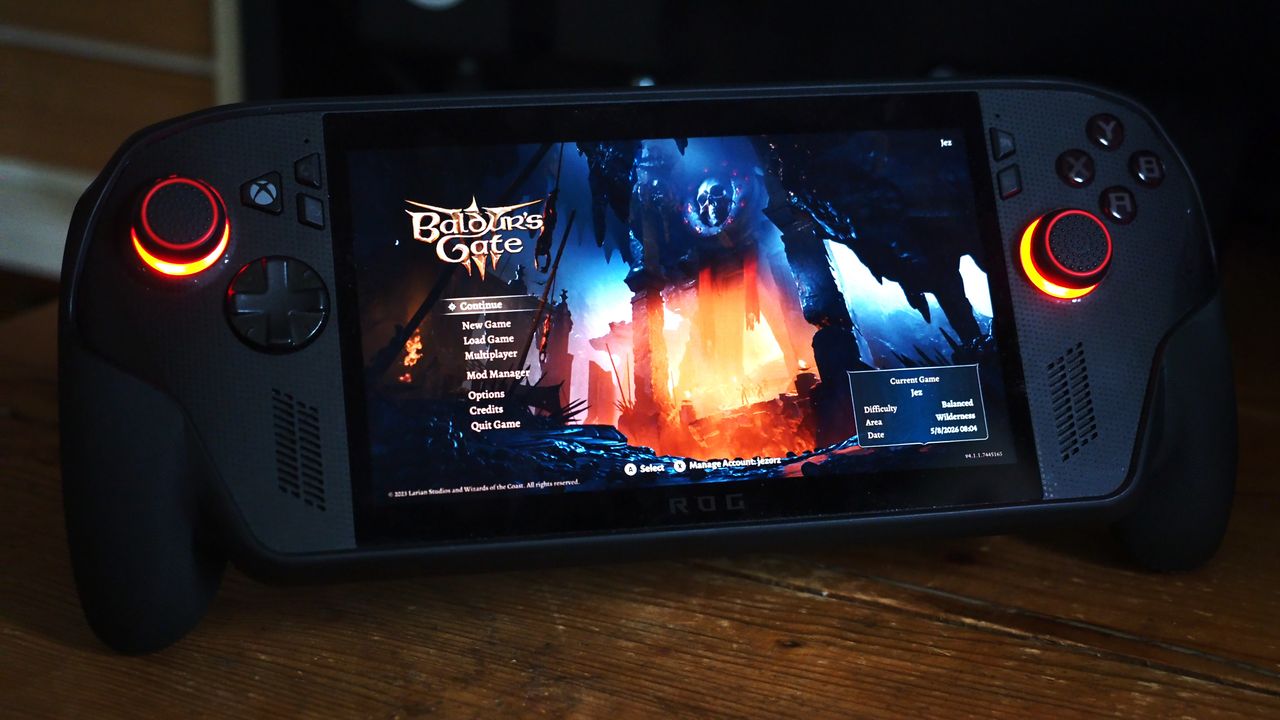
My favorite feature however is Xbox Play Anywhere. The ability to buy once, and take my games across Windows PCs, cloud, my laptop, Xbox Series X|S and Xbox Ally X handheld is a cornerstone of how I want to access games now. It's a vastly underrated feature, and something I think Microsoft could do a lot more to promote.
Baldur's Gate 3 is one of the best RPGs of modern times. (Image credit: Larian Studios)
I sent Larian publishing lead Michael Douse a message and asked for comment on why Baldur's Gate 3 ended up hitting Xbox Play Anywhere, almost three years after its initial launch.
"We just did it because it's a pretty cool part of the Xbox ecosystem and it would mean a lot to the players who enjoy that ecosystem," Douse explained. "We had the resources & time and figured it would make a few folks happy."
Indeed, there's been a huge sprint of fantastic AAA games hitting Xbox Play Anywhere recently, including 007: First Light, Beast of Reincarnation, Hell is Us, Palworld 1.0, Dispatch, Subnautica 2, and many more. Upcoming we also have things like Blood of the Dawnwalker and Onimusha: Way of the Sword. Historically, games only hit Xbox Play Anywhere via Xbox Game Pass, but increasingly, developers are dropping Xbox Play Anywhere on a discretionary basis.
I also asked Sascha Reuter from Fullset about Project Neon, a classic SHMUP that originally launched on the Neo Geo. Project Neon has now been ported to Xbox Series X|S and other platforms, and is launching straight into Xbox Play Anywhere.
"We always love to give players as much bang for for their buck as we can," Reuter explained. "So adding all the versions was pretty much a no-brainer, so was to allow players to switch between their systems however they like."
Reuter told me that developing for Xbox Play Anywhere is as simple as "using a Dropbox folder," as developers can deliver app packages that target multiple platforms via Microsoft's developer back end. Reuter said that Xbox's API for designating a save folder is simple to set up for cross-platform saves, and prevents overwriting and handles syncing via Azure.
Increasingly, it feels like developers are actively opting into Xbox Play Anywhere by default, but challenges remain.
The future of Xbox is PC
Xbox Helix is set to bridge the gap between Xbox and Windows. (Image credit: Windows Central)
Microsoft is doing a lot of work to bridge the gap between its Xbox and Windows ecosystems. Xbox Play Anywhere helps developers target Xbox customers regardless of platform, and Microsoft has long suggested games with Xbox Play Anywhere see higher sales and boosted retention.
Still, it's difficult to retroactively set up Xbox Play Anywhere. If codebases diverge too much across separate versions, applying Xbox Play Anywhere can create errors when synchronizing progress. Games like Fallout 76 have never received Xbox Play Anywhere support for that reason — although it's not unheard of. Resident Evil 8 gained Xbox Play Anywhere support several years after launch too, just like Baldur's Gate 3.
Some publishers perhaps simply don't seem to see the value in it. Ubisoft has begun offering free versions of some of its PC games to owners who already own the Xbox version, but Xbox achievements aren't supported on PC. EA doesn't offer any form of synchronicity at all between its Xbox and PC versions either.
Windows Insiders need to update their PCs to be on a recent build of Windows within the next week. The latest Windows Insider builds contain a renewed flight certificate, which is important because the current flight certificate is set to expire on August 11, 2026.Flight certificates are used to encourage people to keep devices up to date and on supported versions of Windows. Microsoft ships renewed certificates on a routine basis.Microsoft emphasized the importa
Windows Insiders need to update their PCs to be on a recent build of Windows within the next week. The latest Windows Insider builds contain a renewed flight certificate, which is important because the current flight certificate is set to expire on August 11, 2026.
Flight certificates are used to encourage people to keep devices up to date and on supported versions of Windows. Microsoft ships renewed certificates on a routine basis.
Microsoft emphasized the importance of a renewed flight certificate because in the past renewal mainly affected those in the Canary Channel. Now, those certificates apply across all Insider channels, including Experimental and Beta.
"Today’s Experimental (Future Platforms) build contains a renewed Windows Insider flight certificate. Windows Insider Preview builds use flight certificates that are renewed periodically to help ensure Insider devices remain on supported builds and continue receiving future Insider Preview updates. The current flight certificate expires on August 11, 2026, so please update your device to a build containing the renewed flight certificate before that date."
A separate document dives into more detail, though the main takeaway is that Insiders should simply update their PCs to a recent build. Microsoft shared the chart below to help Insiders stay up to date.
Channel
Core
Minimum Build
Experimental
Future Platforms
29634.1000 (available July 27, 2026)
Experimental
26H2
26300.9032 (available July 31, 2026)
Experimental
26H1
28120.2630 (available July 31, 2026)
Beta
25H2
26220.9022 (available July 31, 2026)
Beta
26H1
28020.2623 (available July 31, 2026)
Once you've performed this one-time larger update, your PC will go back to receiving regular updates.
If you don't update your PC to a build with a fresh flight certificate, you'll start seeing a warning that says, "This build will expire soon" on your desktop. You will also stop receiving automatic background updates once the flight certificate expires.
You should update your PC to a build with a fresh flight certificate, but if you don't, you can fix the issue by going to Settings > Windows Update and letting your PC install the latest build.
Test builds of Windows 11 are designed to expire relatively quickly, so you should update your PC regularly if you're a Windows Insider. Doing so will ensure your system is running a supported version of Windows.
Join us on Reddit at r/WindowsCentral to share your insights and discuss our latest news, reviews, and more.
In this episode of the Windows Central Podcast, Daniel Rubino and Zac Bowden sit down with Marcus Ash, Corporate Vice President of Design and Research for Windows at Microsoft. The discussion centers on the user experience vision for Windows 11, balancing modernization with legacy app compatibility, and optimizing system efficiency across diverse hardware configurations.This episode of the Windows Central Podcast is sponsored by Surfshark VPN. Unlimited devices,
In this episode of the Windows Central Podcast, Daniel Rubino and Zac Bowden sit down with Marcus Ash, Corporate Vice President of Design and Research for Windows at Microsoft. The discussion centers on the user experience vision for Windows 11, balancing modernization with legacy app compatibility, and optimizing system efficiency across diverse hardware configurations.
This episode of the Windows Central Podcast is sponsored by Surfshark VPN. Unlimited devices, access your content from anywhere, and auto-block malware on Windows, Edge, and other platforms from $2.50/mo, with 4 months extra FREE. Sign up today!
Design Philosophy in Windows 11: Marcus Ash discusses how design decisions are shaped by user feedback, telemetry, and modern workflow requirements.
Optimizing Performance for Low-RAM Devices (8GB): A deep dive into full-stack optimizations—ranging from kernel memory scheduling to UI process management—to ensure smooth performance on 8GB RAM hardware.
Modernizing Legacy Tools vs. Backward Compatibility: Discussion on how Microsoft approaches updating older OS utilities (e.g., Control Panel, Registry Editor) while protecting enterprise compatibility and muscle memory.
Web Tech, WebView2, and Modern UI: Exploring the role of web-based interface components in Windows 11, including trade-offs between agility, feature delivery, and resource utilization.
Have a question you want us to answer on the podcast? Send it to us at [email protected]
Players of Dovetail Games' popular train simulator, Train Sim World 6, on Xbox One and PS4 have unfortunate bad news to endure. Currently the game and all DLC content have been made available on last-gen hardware, but that is now coming to an end. The announcement was made on the developer's blog, alongside information on exactly what it means for players on Xbox One and PS4. "Train Sim World titles and new TSW Add-on releases developed from this date onwards wil
Players of Dovetail Games' popular train simulator, Train Sim World 6, on Xbox One and PS4 have unfortunate bad news to endure.
Currently the game and all DLC content have been made available on last-gen hardware, but that is now coming to an end.
The announcement was made on the developer's blog, alongside information on exactly what it means for players on Xbox One and PS4.
"Train Sim World titles and new TSW Add-on releases developed from this date onwards will only be available on PlayStation 5, Xbox Series X|S, and PC platforms (Steam, Xbox for PC and Epic Games).
This change is essential for allowing the teams that create TSW content freedom to take advantage of current-gen hardware, prioritising the best performance possible, and improving the visual quality as much as they can."
The good news is that this change doesn't affect content you've already bought up to now. It's still there, it's still playable, and it's still supported. The cancellation only applies to any further DLC content for Train Sim World 6 and for future games in the franchise. To play any of that, you'll need to be on PC, Xbox Series X|S, or PS5.
It's sad news for players still on the last-gen consoles, for sure, but credit to Dovetail Games for holding out as long as it has.
Xbox One players do at least have more options to carry on with Train Sim World 6. (Image credit: Dovetail Games)
Even Xbox has finally had to take the plunge with Call of Duty, with Modern Warfare 4 not releasing on Xbox One or PS4, either. It's particularly bad timing for those still holding onto their older consoles given that both Xbox and Sony have recently increased prices on the new consoles, too.
If you are on Xbox One with Train Sim World 6, you do at least have options. It supports Xbox Play Anywhere, for one, so if you can move to PC, you can take all of your existing content with you so long as you use the Xbox App. You can't transfer your content to Steam or Epic Games. Content does transfer between Xbox One and Xbox Series X|S as you would expect, and PS4 players can also carry over to PS5.
Train Sim World 6 is also supported by Xbox Cloud Gaming, so even though your console may not be up to scratch going forward, you can still keep playing through the cloud if you're unable to move natively to supported hardware. PS4 owners don't have that luxury, as cloud streaming on PlayStation is limited to owners of the PS5 version.
While the timing might not be great, it's understandable. Games are more demanding than ever, and ultimately no experience at all is better than paying for something and having a bad experience.
Join us on Reddit at r/WindowsCentral to share your insights and discuss our latest news, reviews, and more.
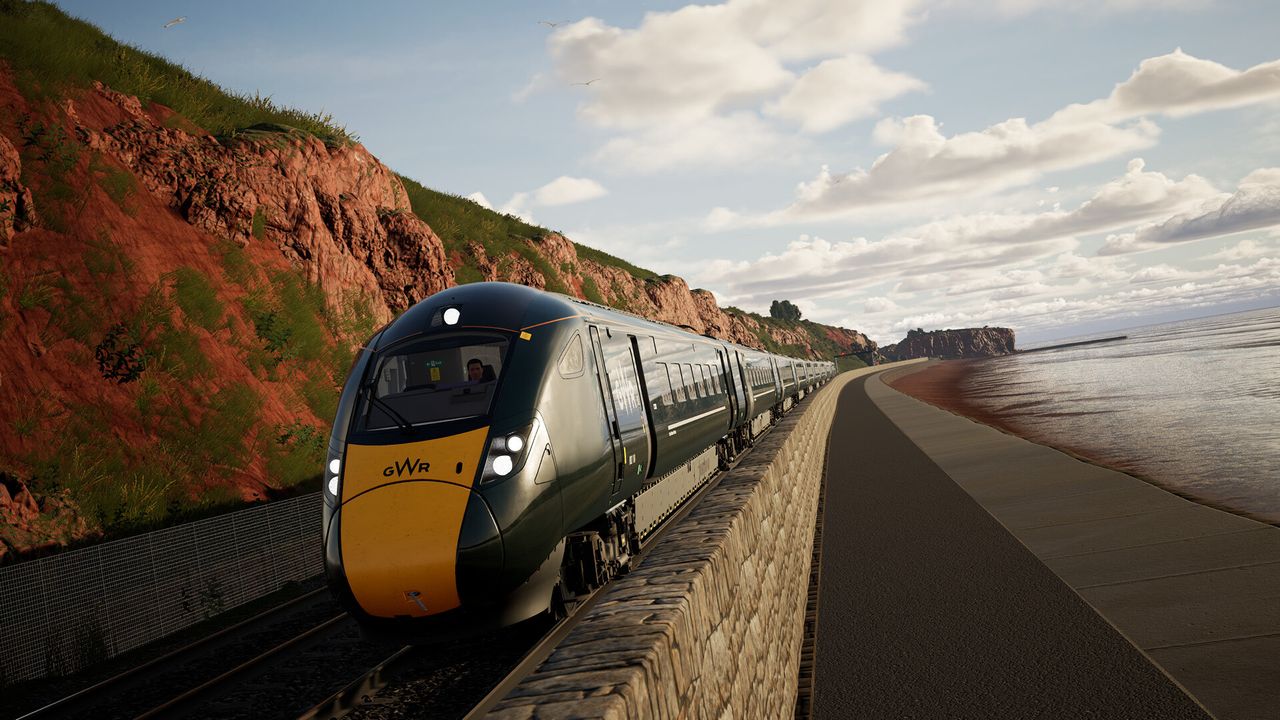
A promotional screenshot from Train Sim World 6 showing a GWR train driving along the Devon coast.
From now on you'll need current-gen hardware to play future Train Sim World content.
Another month into the scorching summer season, and things have just heated up for Xbox Game Pass as we have a couple of major highlights coming in its latest batch of new games dropping in the first half of August 2026.Some standout highlights include the cozy Power Wash Simulator 2, the hit open-world survival game Grounded 2, and the chaotic roguelike action game Ball x Pit.However, the star of the show is the first Gears of War: E-Day multiplayer beta test, w
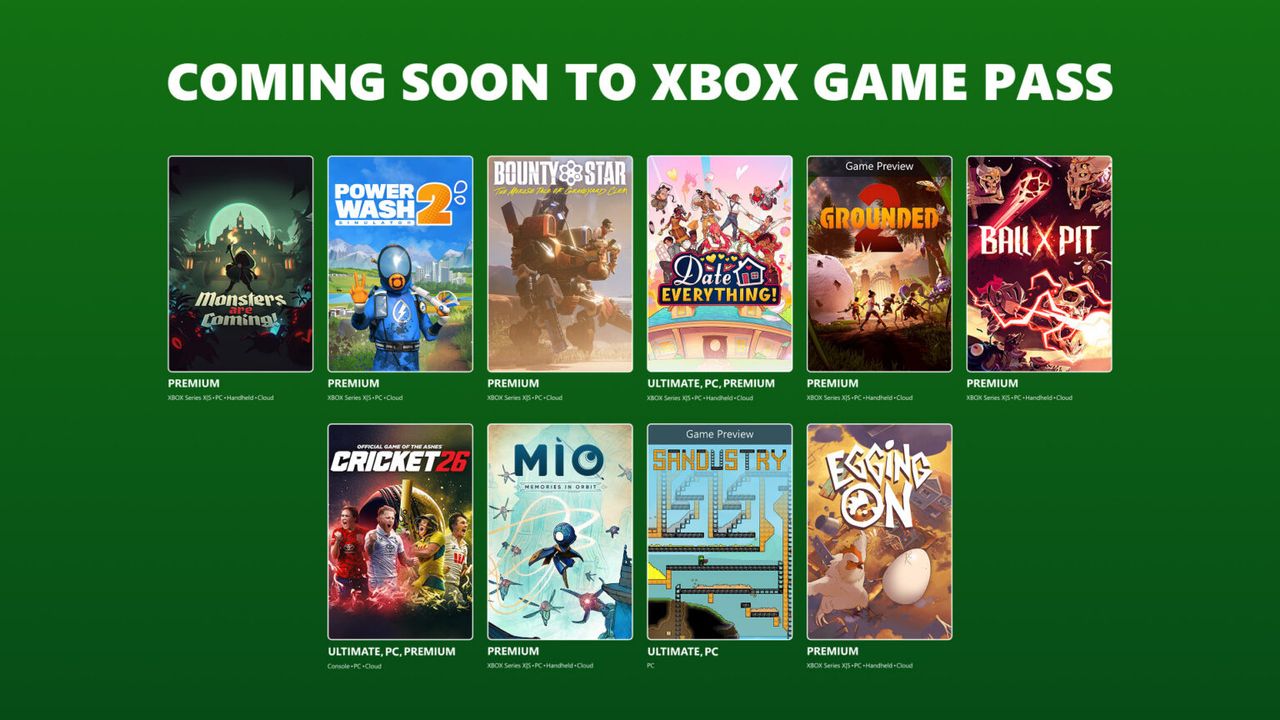
Another month into the scorching summer season, and things have just heated up for Xbox Game Pass as we have a couple of major highlights coming in its latest batch of new games dropping in the first half of August 2026.
Some standout highlights include the cozy Power Wash Simulator 2, the hit open-world survival game Grounded 2, and the chaotic roguelike action game Ball x Pit.
However, the star of the show is the first Gears of War: E-Day multiplayer beta test, which is scheduled to run from August 6, 2026, at 12:00 pm PT to August 10, 2026, at 10:00 am PT for people who pre-ordered the game on Xbox Series X|S or Steam or people who are subscribed to Xbox Game Pass Ultimate and PC Game Pass.
Here's August's first wave of Xbox games coming to and leaving Xbox Game Pass.
Game
Date Available
Available on (Game Pass versions)
Monsters are Coming!
August 6, 2026
Cloud, Xbox Series X|S, Handheld and PC (Ultimate, Premium, PC Game Pass)
PowerWash Simulator 2
August 6, 2026
Cloud, Xbox Series X|S, and PC (Ultimate, PC Game Pass)
Bounty Star
August 11, 2026
Cloud, Xbox Series X|S, and PC (Premium, Ultimate and PC Game Pass)
Date Everything!
August 11, 2026
Cloud, Xbox Series X|S, Handheld, and PC(Premium, Ultimate and PC Game Pass)
Grounded 2 (Game Preview)
August 11, 2026
Cloud, Xbox Series X|S, Handheld, and PC(Premium, Ultimate and PC Game Pass)
Ball x Pit
August 12, 2026
Cloud, Xbox Series X|S, Handheld, and PC(Premium, Ultimate and PC Game Pass)
Cricket 26
August 13, 2026
Cloud, Console, and PC (Premium, Ultimate and PC Game Pass)
Mio: Memories in Orbit
August 13, 2026
Cloud, Xbox Series X|S, Handheld and PC (Premium, Ultimate and PC Game Pass)
Sandustry (Game Preview)
August 13, 2026
PC (Premium, Ultimate and PC Game Pass)
Egging On
August 18, 2026
Cloud, Xbox Series X|S, Handheld and PC (Premium, Ultimate and PC Game Pass)
Games leaving Xbox Game Pass (August 15)
Menace (Game Preview) (PC)
Atlas Fallen (Cloud, Console, and PC)
Aliens: Firesteam Elite (Cloud, Console, and PC)
Firewatch (Cloud, Console, and PC)
Windows Central's take
To be frank, this isn't the greatest batch of new Xbox Game Pass titles in the world (unless you're really into Grounded 2 or PowerWash Simulator). It's quite clear that, right now, Xbox is dedicating all its marketing power to hyping Gears of War: E-Day by including its upcoming early-access multiplayer beta test in this line-up.
Which, to be fair, is totally fine with me because Gears of War: E-Day's multiplayer looks insane. It features an epic 12-player PvE mode called "Siege Horde" where you must fight off never-ending waves of Locust grunts while completing objectives, and occasionally content MMORPG-style raid bosses that require every player to take down.
The classic PvP 4v4 Versus mode also makes a comeback, but with new match types, maps, and new weapons to help you rip and tear your enemies apart.
Additionally, you can also check out my colleague, Jez Corden's preview of Gears of War: E-Day's Siege Horde mode to see if its large-scale carnage and 12-player co-op insanity is up your alley and enticing enough to make you pick up the full game when it launches on October 6, 2026 for Xbox Series X|S, Xbox Game Pass (Day One), and PC via Windows and Steam.
Relive the tragic day that started the long, grueling war between the COGs and the Locust horde in the highly anticipated prequel of the Gears of War franchise, Gears of War: E-Day.
562 researchers across 64 countries were on the receiving end of $20 million of rewards from the Microsoft Bounty Program. That program has researchers work with Microsoft to identify and report vulnerabilities across Microsoft's products and services.The program has been around for years, but the $20 million in awards is a new record. For context, the Microsoft Bounty Program awarded $17 million to 344 researchers last year.How much researchers receive depends o
562 researchers across 64 countries were on the receiving end of $20 million of rewards from the Microsoft Bounty Program. That program has researchers work with Microsoft to identify and report vulnerabilities across Microsoft's products and services.
The program has been around for years, but the $20 million in awards is a new record. For context, the Microsoft Bounty Program awarded $17 million to 344 researchers last year.
How much researchers receive depends on the type of vulnerability they report. Cloud programs and Zero Day Quest vulnerabilities are capped at $100,000 per vulnerability. Reporting an Endpoint and On-Premises program vulnerability can be worth up to $250,000.
Of course, those are the maximum payouts per report. Many reported vulnerabilities result in smaller awards.
Microsoft expanded the scope of its researcher awards last year. Now, in addition to flagging traditional bounties, researchers can be rewarded for reporting vulnerabilities in open-source software, third-party components, and Microsoft cloud services.
Microsoft detailed the rewards in a recent blog post.
"Security is a team sport. Every vulnerability reported through our bounty programs represents an opportunity to address risk before it can be exploited against customers," said Microsoft. "The work of the research community plays a critical role in helping Microsoft stay ahead of emerging threats while strengthening the security of cloud services, AI systems, enterprise platforms, and consumer technologies."
Microsoft credited the increase in submissions in part to AI. Increasingly, AI is being used to help security researchers.
Microsoft also uses AI to find and fix vulnerabilities as well. Unfortunately, AI can also be used by hackers to quickly leverage discovered vulnerabilities. As a result, there is an AI arms race happening between malicious actors and security researchers.
Microsoft also recalled the success of the Microsoft Zero Day Quest, which had researchers from 20 countries travel to Microsoft's campus in Redmond, Washington. Over 700 vulnerability reports were filed and over $2.3 million was awarded at that event.
Join us on Reddit at r/WindowsCentral to share your insights and discuss our latest news, reviews, and more.
Microsoft's Surface Pro 12-inch 1st Edition (2025) powered by Qualcomm Snapdragon X Plus processor.
A vulnerability report on the Copilot experience can result in an award of up to $30,000.
July has come to an end, and as we start a new month, it's a good time to look at the new features and changes that Microsoft has been working on in the second half of the month for Windows 11.In the last two weeks of July, the company has delivered several new features, but many of those improvements were features that we have already seen in other builds as Microsoft continues to align each channel more closely together.As part of the improvements, we have seen
July has come to an end, and as we start a new month, it's a good time to look at the new features and changes that Microsoft has been working on in the second half of the month for Windows 11.
In the last two weeks of July, the company has delivered several new features, but many of those improvements were features that we have already seen in other builds as Microsoft continues to align each channel more closely together.
As part of the improvements, we have seen new customization options for the Start menu, new gestures for the touchpad, an updated interface for the Account Control menu, and improvements for File Explorer.
In addition, we have seen the company pushing changes to Widgets, Windows Search, and more.
In the Experimental channel, Microsoft released builds 26300.9032, 26300.8935, 28120.2630, and 28120.2546, while the Beta channel introduced builds 26220.9022, 26220.8925, 28020.2623, and 28020.2539 for versions 26H2, 26H1, and 25H2.
In this recap, I'll highlight the latest and most noteworthy changes available through the Windows Insider Program.
Biggest improvements from the Windows Insider Program in July 2026
These are the most significant changes Microsoft has unveiled since my last roundup.
Windows Search automatic locations
Starting with the release of build 26300.9032, the operating system ships with an updated version of Windows Search that can now automatically find and search other folder locations based on your activity.
The new feature uses signals, such as files and frequently accessed locations. According to the company, this helps to make relevant files easy to find without requiring manual indexing.
The feature is known as "Automatically find additional relevant locations," and it's located on Settings > Privacy & security > Search.
(Image credit: Microsoft)
In addition, Microsoft didn't mention this, but I've noticed a new "Search the contents of online files" on the same page, which allows you to decide whether Windows Search can search online content.
Phone Link changes
The Phone Link companion flyout that appears in the Start menu is getting an update on build 26300.9032 that allows you to hover over a recent message or notification in the "Recent" section to preview the content without extra steps.
(Image credit: Microsoft)
This improvement requires the Phone Link app version 1.26021.3.0 or higher.
Adaptive hibernate policy update
In the Experimental channel, build 26300.9032 (version 25H2) also introduces changes for the adaptive hibernate policy to prevent hibernation when the battery is above 80 percent and to hibernate when the battery falls below 10 percent.
Microsoft accomplishes this by increasing instances of instant-on resumes from Modern Standby and increasing battery preservation at the low end of the battery.
This change is also available on builds 28120.2630 and 28020.2623 for version 26H1.
File Explorer performance boost
On build 26300.8935, File Explorer received three specific improvements. First, the company made file deletion faster when deleting large and fragmented files.
This update also makes the Home page faster, and finally, the "Recommended" section on the Home page now supports touch scrolling to make it easier to browse files from the carousel.
In addition, starting with build 26220.8925 for version 25H2, the "Details" view now shows file sizes with appropriate units, such as KB, MB, and GB, instead of only showing KB.
(Image credit: Mauro Huculak)
Furthermore, on the "Home" page, you can now use a middle mouse click to open folder locations in new tabs.
Widgets improvements
The preview build 26300.8935 also updates the animated icons for the Widgets entry point in the Taskbar.
First, the icon now matches the system accent color instead of the red color. Also, the animated icons can now show more dynamic content if notifications are enabled in the Widgets dashboard.
Windows Update changes
On build 28120.2630 (Experimental channel for version 26H1), Microsoft is making system updates less disruptive by reducing the number of restarts users face each month.
This is possible thanks to a new unified update experience that coordinates driver, .NET, and firmware updates with the monthly quality update, consolidating updates into a single monthly reboot instead of multiple interruptions.
The company is also expanding update pause controls, allowing users to extend update pauses as many times as needed.
(Image credit: Mauro Huculak)
These improvements are also available for build 28020.2623 in the Beta channel for version 26H1.
Touchpad gestures
Builds 28120.2630 and 28020.2623 for version 26H1 add new gesture controls for Precision Touchpads through the Settings app.
The new options will work across most apps, although apps built with WinUI 3 will require updated WinAppSDK 1.8 or 2.0 support before they can take full advantage of the changes.
(Image credit: Microsoft)
The new controls include scroll and zoom speed, which lets you adjust the default speed for scrolling and pinch-to-zoom gestures. Also, accelerated scrolling will allow you to increase scrolling speed the longer you continue scrolling, making it easier to move quickly through long documents and webpages.
These improvements are also available for build 26220.8925 in the Beta channel for version 25H2.
Smart card policy
Starting with build 28120.2546, Microsoft is adding support to remove smart card policies in Azure Virtual Desktop (AVD) and Windows 365 sessions that use Microsoft Entra ID authentication.
As a result of this change, administrators can configure remote sessions to automatically disconnect when a redirected smart card is removed, helping improve security and meet compliance requirements.
This improvement is also available for build 29639 in the Experimental channel for version Future Platforms.
Narrator changes
Microsoft is making refreshable Braille displays easier to use with Narrator in build 28120.2546.
Windows 11 now supports HID-compatible Braille displays, allowing users to connect supported devices instantly over USB with no additional setup, or wirelessly through Bluetooth. The feature also works during the initial Out-of-Box Experience (OOBE), enabling you to configure a new computer independently.
These improvements are also available for build 28020.2539 in the Beta channel for version 26H1, for build 26220.8925 for version 25H2, and for build 29634 for version Future Platforms.
Taskbar positioning
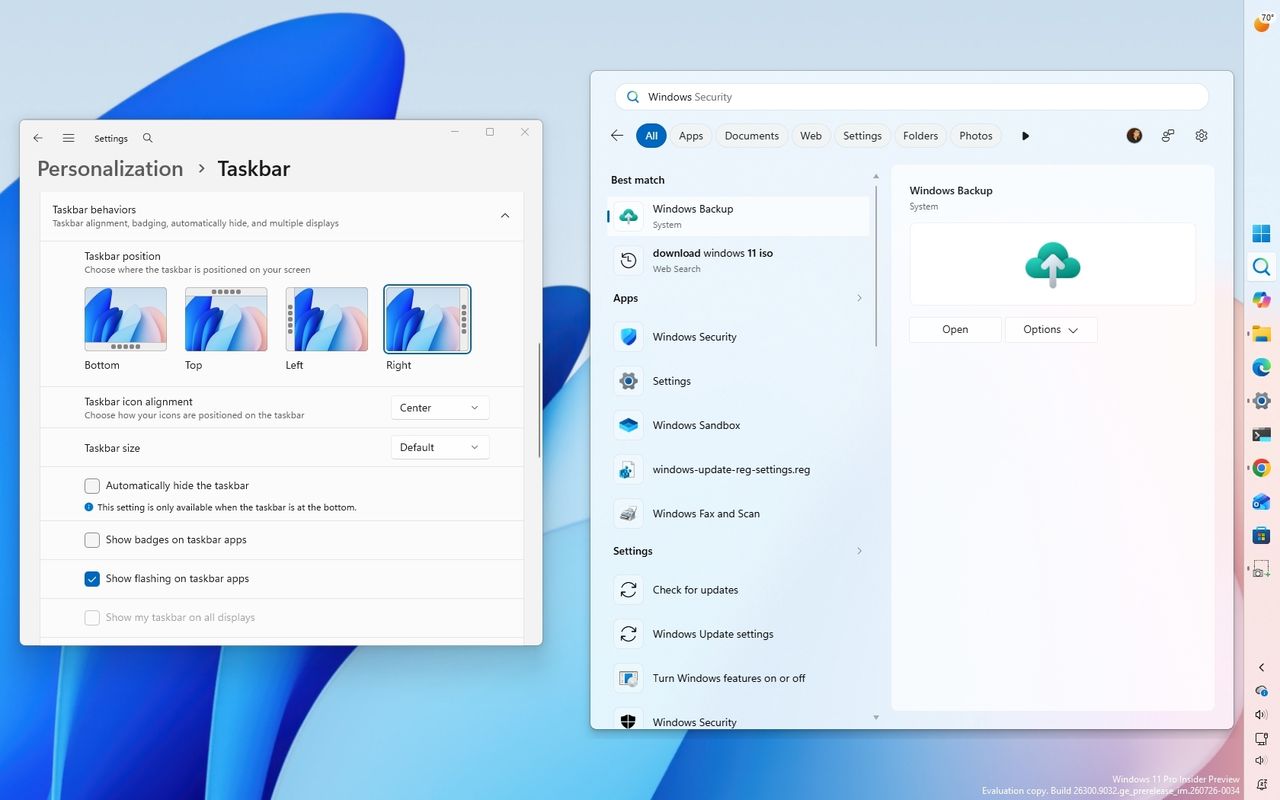
Starting with build 26220.9022 for version 25H2 in the Beta channel, the operating system introduces the ability to change the position of the Taskbar to the top, left, right, and bottom of the screen.
The new setting is known as "Taskbar positions," and it's available from Settings > Personalization > Taskbar > Taskbar behaviors.
(Image credit: Mauro Huculak)
When using this new functionality, Taskbar tooltips, flyouts, and animations continue to work in any of the positions, while most customization options, including never combining Taskbar icons, remain available.
(Image credit: Mauro Huculak)
This flight also introduces the ability to make the Taskbar smaller. The option is available from this page. However, in the Beta channel, the option works when configuring the "Show smaller app icons" option. In future releases, the company will add a dedicated button under the "Taskbar behaviors" setting, as it's currently available in the Experimental channel.
It's worth pointing out that these changes are still under development, and they may not work as intended.
Start menu new customization
On Windows 11 build 26220.8925, Microsoft is rolling out new Start menu customization options, including the ability to choose which sections appear in the menu and adjust its size.
The new customization settings are available on Settings > Personalization > Start. On this page, you can show or hide any of the sections, and you'll also notice that the "Recommended" section has been renamed to "Recent."
(Image credit: Mauro Huculak)
In addition, there's a new option to change the Start menu size, which means you can make the menu larger or smaller, or use the automatic option to let the system choose the size based on the configuration.
(Image credit: Mauro Huculak)
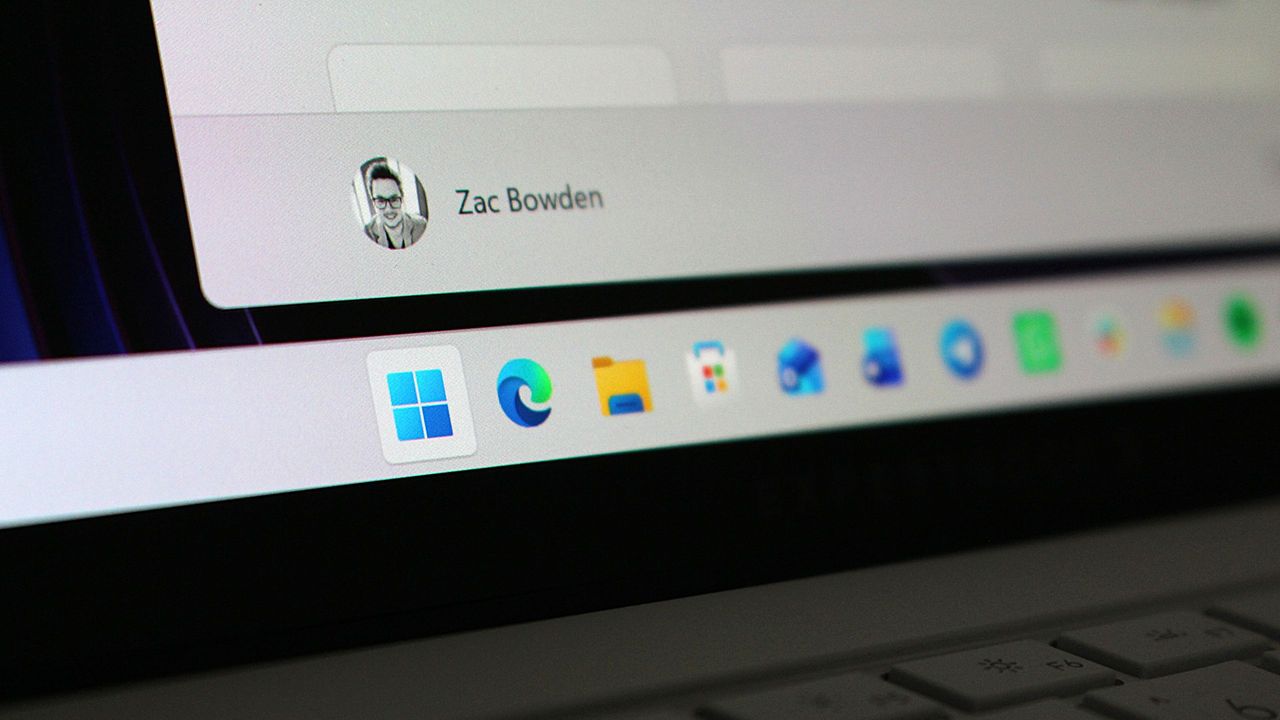
Finally, at the bottom of the page, under the "Other" section, you can enable the "Hide your name and profile picture on Start" setting to improve your privacy when projecting your screen to other people.
Account Control menu redesign
Microsoft is also refreshing the Account Control flyout in the Start menu with a more modern design and clearer Microsoft account information.
(Image credit: Mauro Huculak)
The updated interface adds a subscription badge, making it easier to check your account state, view available benefits, and explore upgrade options.
It also surfaces account benefits and storage details, giving users a centralized place to manage their Microsoft account without opening the Settings app.
This improvement is also available for build 29634 in the Experimental channel for version Future Platforms.
Voice Isolation for Voice Access
On build 29634 in the Experimental channel for version Future Platforms, Windows 11 also introduced Voice Isolation for Voice Access to improve speech recognition in noisy environments and shared spaces.
According to the company, the feature uses on-device processing for filtering background noise and nearby conversations.
In addition, Voice Access now includes three speech recognition models, including "Voice Isolation," "Remove background noise only," and "No filtering."
Windows Central's Take
Looking back at the second half of July, I don't think this was Microsoft's most exciting set of Insider releases. A lot of what landed in the Beta and Experimental channels wasn't entirely new. Instead, it felt like the company was catching those channels up with features that had already appeared in other Insider channels as it continues to align the program.
I don't think that's a bad thing. It suggests Microsoft is getting closer to offering a more consistent experience across the Insider channels while focusing on improvements that people will actually notice.
I'm still waiting to see how quickly these features make it into the stable release. Microsoft has been moving faster recently, but Insider builds are still a preview of what's planned, not a guarantee of what will eventually ship.
What are your thoughts about these latest Windows 11 Insider changes? Let me know in the comments.
More resources
Explore more in-depth how-to guides, troubleshooting advice, and essential tips to get the most out of Windows 11 and 10. Start browsing here:
If you use a Steam Deck, then the first thing I would always recommend is to install Decky Loader. From there, one of the first plugins I'd recommend is SteamGridDB, because let's face it, the box art isn't always the best artwork you can have in your games library. Now, though, SteamGridDB is also on Windows 11. We first covered SteamGridDB for Windows 11 a while ago, but until recently I hadn't really given it much notice. I've started using the Xbox App on Win
If you use a Steam Deck, then the first thing I would always recommend is to install Decky Loader. From there, one of the first plugins I'd recommend is SteamGridDB, because let's face it, the box art isn't always the best artwork you can have in your games library.
Now, though, SteamGridDB is also on Windows 11. We first covered SteamGridDB for Windows 11 a while ago, but until recently I hadn't really given it much notice.
I've started using the Xbox App on Windows 11 as my go-to launcher since I'm in there a lot for Game Pass games, anyway.
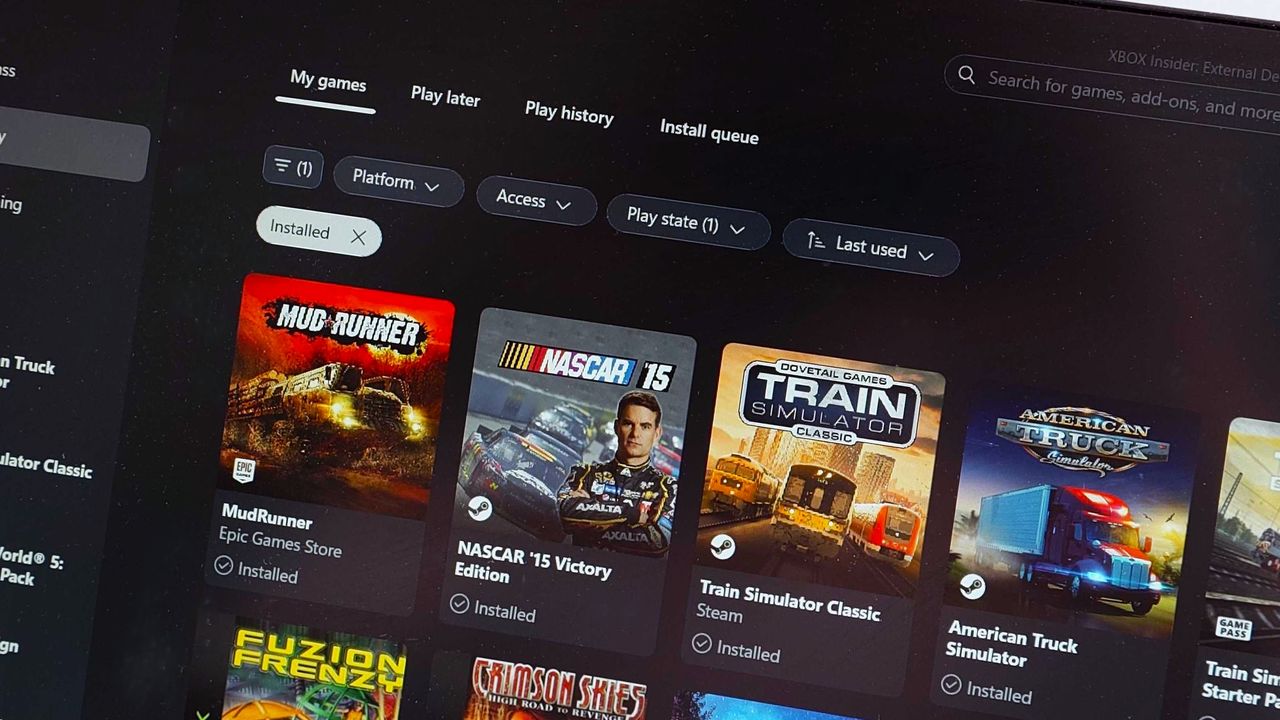
But while it's convenient having the Xbox App launch games also from Steam, Epic Games, Ubisoft, etc., one thing made me twitch; the artwork pulled in was awful. Low-res icons mostly rather than full artwork.
This is where SteamGridDB comes in. Just as on the Steam Deck, you can use it to select custom art for your games, and in this case, bring your non-Xbox titles up to the standard of those you're getting directly through the app.
Even older games will have at least something better than the stock icon. (Image credit: Windows Central)
SteamGridDB is not an app, as such, but instead a Game Bar widget. So to make your changes you have to go through Game Bar, but I actually think I prefer it this way. It can't hook into the Xbox App like it can hook into SteamOS, so it's probably the next best thing this way.
These days you can get it directly from the Microsoft Store, and once it's installed, you may just need to launch it from the Widgets Menu on the Game Bar.
But it's as simple as selecting a game, hitting the search icon, and compatible artwork will show up. The selections in my experience aren't quite as plentiful as they are on SteamOS, but there's not been a game I've come across where there isn't something that's a whole heck of a lot better than a crummy low-res icon.
Before: Terrible looking icons. Windows CentralAfter: Glorious artwork!Windows Central
Once you choose your artwork, the next time you go to your library in the Xbox App, it'll have been applied, and it won't make your eyes bleed any longer.
I'm using it on my desktop PC, but it's particularly useful if you're on a handheld gaming PC such as the Xbox Ally or Lenovo Legion Go series. Clean library, clean mind!
Game Bar is one of those features I use a lot without really exploring what it can do, and SteamGridDB is now a permanently pinned widget. It only takes seconds to make a change, and it's so worth it.
It's a must-have if, like me, you're using the Xbox App to launch games from elsewhere.
Join us on Reddit at r/WindowsCentral to share your insights and discuss our latest news, reviews, and more.
A photo of the library in the Xbox App on Windows 11 using SteamGridDB artwork for games from Steam.
SteamGridDB will make sure your non-Xbox games have eyecatching artwork, too.
The ASUS Zenbook A16 is not a gaming laptop, but what if it were a gaming desktop? One YouTuber sought to find out what happens when you connect an eGPU to the Zenbook A16. The results are surprising and show a promising potential future for gaming on Arm processors.Connecting the Zenbook A16 is not something for the faint of heart. Until recently, it was not possible to connect any GPU to a Snapdragon X-powered laptop, even if you were willing to use unofficial
The ASUS Zenbook A16 is not a gaming laptop, but what if it were a gaming desktop? One YouTuber sought to find out what happens when you connect an eGPU to the Zenbook A16. The results are surprising and show a promising potential future for gaming on Arm processors.
Connecting the Zenbook A16 is not something for the faint of heart. Until recently, it was not possible to connect any GPU to a Snapdragon X-powered laptop, even if you were willing to use unofficial methods.
ETA Prime connected an RTX 4060 to a Zenbook A16 using the developer driver for RTX Spark. That GPU is also from NVIDIA, and its driver can be installed on a PC like the Zenbook A16 to connect an RTX 4060.
Obviously the setup is not official or optimized, but it does work to an extent. Some other NVIDIA GPUs were also successfully connected, but ETA Prime saw the best performance with the RTX 4060.
The Zenbook A16 was able to hit impressive framerates and settings when connected to the RTX 4060.
In ETA Prime's video, you'll see Forza Horizon 6, Cyberpunk 2077, Project Cars 2, and DOOM: The Dark Ages at very respectable framerates and settings.
Hitting those framerates often required frame generation, but gameplay looks smooth. In Cyberpunk 2077, ETA Prime was able to hit the low 40s at high settings without frame generation and the low 70s with frame generation.
Experimentation by ETA Prime and Ghobso Gaming (who tested Halo: Campaign Evolved) shows that Snapdragon X2 chips are capable of playing games. But those processors lack support and optimization.
If drivers ship and game developers embrace Snapdragon X-powered PCs, we could see a significant jump in gaming on Windows 11 on Arm.
Join us on Reddit at r/WindowsCentral to share your insights and discuss our latest news, reviews, and more.
Studio photos of the 2026 ASUS Zenbook A16 laptop featuring the new Qualcomm Snapdragon X2 Elite Extreme processor.
Studio photos of the 2026 ASUS Zenbook A16 laptop featuring the new Qualcomm Snapdragon X2 Elite Extreme processor.
In most modern homes, people rarely depend on a single shared computer anymore. Instead, most families use a combination of Windows 11 laptops, macOS devices, Android phones, iPhones, tablets, smart TVs, and cloud services, all connected through the same home network. The problem is that one weak device can compromise the entire network.As digital life spreads across more devices and services, security gaps become easier to overlook. Attackers increasingly target
In most modern homes, people rarely depend on a single shared computer anymore. Instead, most families use a combination of Windows 11 laptops, macOS devices, Android phones, iPhones, tablets, smart TVs, and cloud services, all connected through the same home network. The problem is that one weak device can compromise the entire network.
As digital life spreads across more devices and services, security gaps become easier to overlook. Attackers increasingly target the weakest link, often a device without proper protection, outdated software, or a misconfigured app.
TL;DR
The risk: Users today rely on multiple devices, accounts, and platforms.
The solution: All-in-one protection makes digital safety easy by eliminating coverage gaps between different operating systems.
Bitdefender Total Security: Provides a seamless multi-device coverage starting point for Windows 11, macOS, iOS, and Android.
Bitdefender Premium Security: Includes integrated privacy tools, such as an unlimited VPN, to remove data caps and protect public connections.
Bitdefender Ultimate Security: Offers identity-first digital protection with identity theft insurance and real-time monitoring.
Fragmented security increases household risk because attackers exploit the weakest device
Using different security solutions across devices creates an unbalanced level of protection. A Windows 11 laptop might have an antivirus installed, while a child's Android tablet might not, and this inconsistency can create openings that malicious individuals can exploit.
Can one vulnerable device really compromise the whole home?
Yes. Modern cyberattacks often use lateral movement, meaning malware on one device can scan the network for others. If one device (laptop, tablet, or phone) is compromised, it can expose other devices in the network.
According to the 2025 Verizon Data Breach Investigations Report, around 60 percent of breaches involve the human element, including non‑malicious actions such as mistakes, misconfigurations, or falling for phishing scams.
When each device in the home uses a different security solution, the chances of mistakes increase.
Why all‑in‑one protection solves this problem
A single security solution reduces that configuration friction. Instead of juggling different apps, settings, and alerts, every device follows the same protection solution. This reduces the number of decisions families must make, and fewer decisions mean fewer gaps.
(Image credit: Bitdefender )
Why is an all-in-one suite better than several specialized apps?
Because it removes configuration friction, using a unified protection means all your devices use the same security system, so you don't have to worry about differences between Android and Windows 11. Everything is built on a single platform, helping eliminate potential weak points that attackers could exploit.
Bitdefender Total Security provides seamless multi‑device coverage
A single defense system is the appropriate solution for busy homes because it stops the manual labor required to stay safe. Bitdefender Total Security is designed as a single protection layer for mixed devices in the home. It brings Windows 11, macOS, iOS, and Android under one unified dashboard.
(Image credit: Future)
Key features of the Total Security tier:
Central dashboard: It monitors the security status of every family device from a single location.
Real‑time protection: Uses advanced threat detection to block malware, ransomware, and zero‑day threats.
Integrated privacy tools: It includes webcam and microphone protection to alert you when apps attempt unauthorized access.
Bitdefender consistently ranks at the top of independent laboratory tests. In the latest AV‑Comparatives Real‑World Protection Test, Bitdefender achieved a 99.5 percent protection rate with one of the lowest false‑positive scores.
Users can start with Antivirus Plus for essential protection on a single device before moving to full-suite plans.
Bitdefender Premium Security removes common limitations like VPN data caps
While the standard "Total Security" suite is robust, the jump to Premium Security is where all-in-one protection is the more practical choice because it removes common limitations, such as VPN data caps, that often lead users to avoid certain security features altogether.
(Image credit: Future)
Is upgrading to Bitdefender Premium Security worth it?
Yes, for most homes, upgrading to Bitdefender Premium Security is worth it, especially if you regularly use public Wi-Fi, travel often, or work remotely. An unlimited VPN adds a layer of protection by encrypting your internet traffic without the hassle of data limits.
Why is an integrated password manager helpful?
Integration creates an easier-to-manage experience. Bitdefender's Password Manager is great for shared households because it helps family members generate strong, unique passwords, as well as sync them across devices and reduce password reuse, a major cause of account compromise.
Bitdefender Ultimate Security adds identity‑first protection for modern home
Device protection still matters, but these days your personal data is just as exposed. Families share devices, accounts, and the same wireless network, which creates more chances for information to slip through the cracks. Bitdefender Ultimate Security focuses on that risk, adding tools aimed at protecting financial and personal data, not just the devices themselves.
It offers up to $2 million in identity theft insurance.
Access to restoration specialists.
What happens if your identity is stolen?
Bitdefender's specialists help guide you through restoring your identity, credit, and accounts, a process that can otherwise take a long time.
Bitdefender plan comparison
Feature
Total Security
Premium Security
Ultimate Security
Device Protection
Up to 5 devices
Up to 5 devices
Up to 5 devices
Unlimited VPN
No (200MB/day)
Yes
Yes
Password Manager
Yes
Yes
Yes
Identity Monitoring
No
No
Yes
ID Theft Insurance
No
No
Up to $2M
FAQs about common household security questions
Do I need an antivirus solution on every device?
Yes. Even devices that don't traditionally get viruses can be used as entry points for attackers.
Can an infected device compromise other devices on my network?
Yes. Some malware is capable of scanning your home network and attempting to access other devices.
Is an all‑in‑one suite better than using separate apps?
Yes, for most homes, the unified protection reduces the chances of misconfigurations and improves management.
Is the VPN upgrade worth it?
If you usually connect to public Wi‑Fi or travel, an unlimited Bitdefender Premium VPN is a worthy upgrade.
Bottom line
A security setup is only as good as how well it’s maintained across your devices. When protection is split between different apps and services, it's easy for something to get missed. An all-in-one approach reduces that complexity by bringing device security, account protection, and privacy tools into one place.
Bitdefender brings device protection, privacy tools, and identity monitoring under one system, reducing the complexity that usually causes security gaps at home.
For larger households managing multiple users and devices, Family Plans provide centralized protection and easier subscription management across the entire home network.
Mark Russinovich is the CTO of Microsoft Azure, and as it seems, a big fan of id Software's classic 1993 FPS, DOOM. I've seen the game running on practically every imaginable piece of hardware with a screen and any semblance of buttons, but I hadn't expected it to be playable inside Paint — until I installed it on my own PC earlier this morning."Playable" is being generous, because as Russinovich explains in his documentation for DoomPaint on GitHub: "Every frame
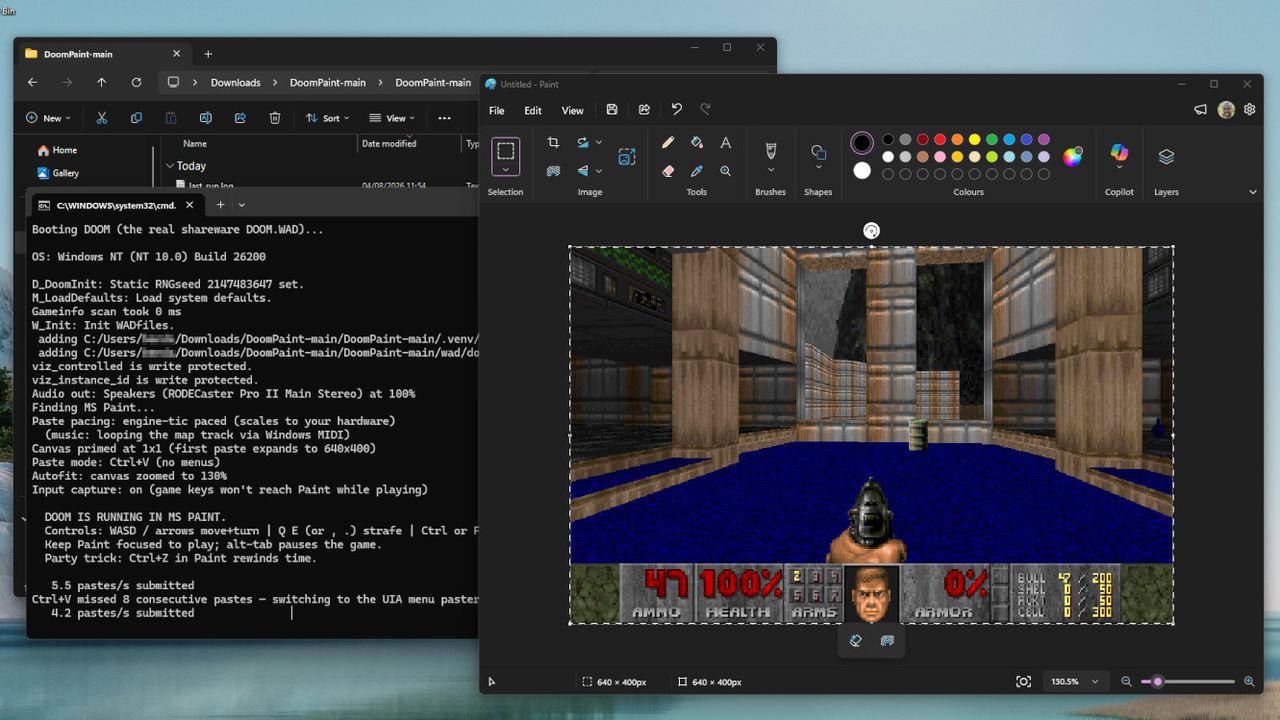
Mark Russinovich is the CTO of Microsoft Azure, and as it seems, a big fan of id Software's classic 1993 FPS, DOOM. I've seen the game running on practically every imaginable piece of hardware with a screen and any semblance of buttons, but I hadn't expected it to be playable inside Paint — until I installed it on my own PC earlier this morning.
"Playable" is being generous, because as Russinovich explains in his documentation for DoomPaint on GitHub: "Every frame is placed on the Windows clipboard and pasted into Paint's canvas as a genuine document edit", so Microsoft Paint is acting like more of a monitor than anything else, but it's still a sight to behold.
Performance ranges from quite smooth to snail's pace, but "the spreadsheet-tier framerate is part of the charm", and this is hardly the kind of medium I'd expect anyone to beat the entire game in. Nevertheless, it's real, and stands as the latest example of DOOM running in weird places. You'll need to install Python to run it, but that's all — alternatively, you could just watch my video.
It's a particularly bizarre crossover featuring two of my special interests, retro boomer shooters and classic Windows apps, with the icing on the cake being its creator. Sure, looking at the contributors section of DoomPaint shows generous commits from Anthropic's Claude and Microsoft's GitHub Copilot, so we're definitely dealing with a vibe-coded project here, but this is still a fascinating look into the downtime of a Microsoft executive.
Paint renders the game but does not compute it. Paint computes nothing. Paint has never computed anything. That's the joke.
Mark Russinovich, CTO and Technical Fellow for Microsoft Azure
Plus, there's working sound and music in this oddity, which is a step beyond what I expected from using Paint as a DOOM renderer. Again, though, this is more of a visual trick than an engine conversion, as Russinovich reiterates, "Paint renders the game but does not compute it. Paint computes nothing. Paint has never computed anything. That's the joke."
I've spent plenty of hours replaying the classics with source ports like UZDoom, and pulling a legitimate copy of its internal ".WAD" file will make variants like this playable with the complete selection of levels and weapons. If, somehow, you still haven't played DOOM in 2026, this could be one of the strangest ways to get started — but it's probably better to appreciate it from a distance.
I’m usually not one who likes to compare a new game to others, or someone who combines two games and calls it a “child” of the aforementioned counterparts. But I feel like I would be dishonest with the fans of specific games if I didn’t compare in this case.Beast of Reincarnation is part NieR: Automata, a touch of Sekiro, with a semblance of Enslaved: Odyssey to the West, all combined into a beautiful creation that makes me wonder what Game Freak could really do
I’m usually not one who likes to compare a new game to others, or someone who combines two games and calls it a “child” of the aforementioned counterparts. But I feel like I would be dishonest with the fans of specific games if I didn’t compare in this case.
Beast of Reincarnation is part NieR: Automata, a touch of Sekiro, with a semblance of Enslaved: Odyssey to the West, all combined into a beautiful creation that makes me wonder what Game Freak could really do if they weren’t enthralled by the money they make with Nintendo off their Pokémon games.
The first time I saw the developer of Beast of Reincarnation listed, I was floored by what Game Freak could actually do. For years, they’d been on the receiving end of joke after joke for their lackluster open worlds in Pokémon on Nintendo Switch 1 and 2.
Let’s just say this: Game Freak is actually capable of some astonishing stuff. Beast of Reincarnation is proof that developers can sometimes become victims of their own success, bound to endless cycles of repeat games until they’re able to break free and direct something of their own.
This review was conducted using a pre-release code of Beast of Reincarnation provided to Windows Central by Game Freak. The company had no input or prior knowledge of its content.
Beast of Reincarnation: Story
If nothing else, Beast of Reincarnation is absolutely stunning. (Image credit: Windows Central)
The year is 4026, and the world as humanity once knew it is gone. Taken by what they call the Blight, the Earth has been largely replaced by some sort of forest-like organism that dominates the landscape and poisons the populace. Humanity still exists, whether as themselves or the husks of iron golems; the world's future hangs in the balance of one they call “Blighted.”
That person is Emma, an 18-year-old both gifted and cursed by the Blight. Known to the rest of humanity as a “Sealer,” Emma has the ability to use the Blight to her advantage. She grows and manipulates it at will to wreak havoc on those around her.
Koo is the goodest boy. (Image credit: Windows Central)
Alongside Emma is Koo, a dog who also suffers from the Blight. Together, Emma and Koo set out alongside a ragtag set of characters to free the land of the Blight by taking on the big bad, the Beast of Reincarnation. A creature that resurrects itself once every 100 years and must be defeated in order for humanity to survive.
To do so, Emma must go about collecting the powers held within the Nushi, boss-like creatures of massive zones Emma will journey to. Each Nushi collected will grant Emma a new power and further improve her strength and capability to defeat the Beast of Reincarnation.
The overall arc is well done and far beyond anything I've seen Game Freak make to date. While it's not on the same level as NieR: Automata or Pragmata in terms of Eastern-developed stories, it's nice to see them create something more than the ever-loving rival-driven Pokémon games.
Beast of Reincarnation: Gameplay and Combat
Hope you like swords. (Image credit: Windows Central)
Beast of Reincarnation comes labeled as an action RPG, but that term doesn’t really cover what kind of action the game entails. From Assassin’s Creed Shadows and Diablo 4 to Kingdom Hearts and The Witcher 3, the ARPG genre is very undefined in terms of what you can expect.
Which is yet another reason why comparing other games is such a compelling approach in this situation. As the combat reflects that of games like Sekiro and NieR: Automata, but it's nothing like something from Diablo!
Either way, what matters most is the answer to the age-old question, “Is it fun?” Yes! I had a blast playing Beast of Reincarnation.
The combat is a bewildering dance of enemy management. Engage foes when ready, keeping them at a distance, or sneaking up on a group to eliminate one before engaging the whole cohort. Balancing that alongside handling your companion, it might sound overwhelming, but it's not.
Finishing blows are a visual treat. (Image credit: Windows Central)
What I love most about Beast of Reincarnation is how intuitive the controls feel (at least on a controller). Your main weapon attacks, combos, and pet abilities are all within reasonable button combinations that create a sense of power.
I am always the shield or magic guy in Soulslike/ARPG games, so I was pretty terrible with the parries to start. I even gave up playing Sekiro at one point because it wasn’t clicking, and I’m a guy who’s beaten and replayed every other Dark Souls game.
Beast of Reincarnation felt different, or at least, things just finally clicked. After an hour, I felt like I knew what I was doing. A feeling a lot of players have when tackling some of these harder games.
And make no mistake, again, I love these games, but I’m trying to emphasize both the challenge of them as well as the ease of learning. One of the biggest gripes players have with harder games these days is the lack of accessibility or difficulty options, or how hard the games are.
Slice and dice attacks (Image credit: Windows Central)
I’ve never been one to believe that games like Sekiro or Dark Souls should have difficulty options, as that would alter the very core principles those games were built on. Beast of Reincarnation isn’t that, but it's also not a game that will hold your hand through every little niche or problem you come across.
Beast is a perfect reincarnation of the ARPG genre in the sense that it delivers a rewarding, challenging experience yet doesn’t punish the player with lost experience, loot, or something else upon death.
The rewards come in waves with a sense of accomplishment as well as wonder on screen as parries land and enemies fall. New weapons, gear, and other items that grant currency for upgrading both your gear and your home base.
Your main weapon is a samurai sword. Upgradable and interchangeable with other similar swords of varying effects you'll find across the landscape.
This animation is somewhat overused, to say the least. (Image credit: Windows Central)
What I found disappointing in terms of both weapons and combat is that over time it can feel very repetitive. Unlocking combos is a slow process, and weapons aren't all that varied either.
From boss to boss, they look gorgeous, but the combat itself is the general dodge and parry, followed by a finishing move. I find it more frustrating that it seems so much potential was left on the development floor. Even general enemy finishers are mirrored far too often, with every Golem seemingly getting the same backslash attack.
With great horizontal and vertical traversal mechanics, I felt "whelmed" by the combative options to make good use of them. The abilities eventually begin to flesh this out, but they take so long to unlock that by the time you do, you start to wonder if you even have enough time to have fun.
That's not to say it's horrid, not by any means. The combat is serviceable and genuinely fun at times, but the fact that much of the actual development for this game was given to external studios is shown as the entire puzzle doesn't feel as cohesive as it could have.
Walker
Not Texas Ranger (Image credit: Windows Central)
Speaking of which, the main base for player operations is known as the Cleanse Walker. This, straight out of Star Wars, metallic vehicle is a host for you and your party, as well as equipment benches, chicken farms, and even a shower for you and your dog, Koo.
Players can find items out in the world that will grant upgrades to these different little Walker areas, like different seeds to plant so your in-Walker cook can help create new dishes that will bolster your stats as well as keep Emma fed. Hitting a point of starvation will cause Emma to lose out on some of her strength, making a general return to your Walker something that will become habit-forming.
You can also increase bonds with other characters and Koo, which grant extra slots for abilities, or other things like new recipes, upgrade paths, etc.
Those abilities for Koo will be essential, as he adds a plethora of abilities that grant multi-target damage, blinding, and other effects. He can also carry healing items and other small-use gadgets that will help Emma in a pinch. Upgrading his bond with Emma will allow for more slots to become available to use. If he dies (not Emma), the slots reset, so be careful!
I actually quite liked these additions granted by the Walker, but as I said with combat, I just wish they'd have more impact on the overall game itself. Once again, it feels like the mechanic is there but never quite reaches its full potential.
Open world-ish
Areas are similar, but varied enough to feel fresh. (Image credit: Windows Central)
All of this comes neatly packed in a semi-open world. On your pilgrimage, Emma will come across multiple zones of varying size, all of which are open to the player to explore. Checking corners, while not necessary, will lead to treasure chests and Walker upgrade items.
Each new zone comes with a general collection of both corrupted and normal Golems to either fight or buy items from, as well as new enemies packed into different areas that will keep players on their toes, much like the second zone, which literally had me blowing up from self-destructing Golems.
A general Blight-infested look will dawn on each zone, but every one felt very different from the last. The first acting as a training ground of sorts, while leading into narrower, but more vertical areas like an entire city structure with its own underground tunnel system.
What you don’t find on your first go won’t be gone forever, as each zone can be revisited with a simple fast travel back. Meaning anything you might have missed is still up for collection.
The loot isn't game-changing outside of general Walker upgrade materials. What bothered me most was the lack of cool outfits to find! Armor isn't showcased either, as each new outfit
Beast of Reincarnation: Performance and graphics
Performance is a mixed bag. (Image credit: Windows Central)
Here’s where things get a little more complicated. Our main review rig was my Windows PC via Steam, where I run an RTX 5080, 9800X3D, and 64GB of DDR5 RAM. Needless to say, my rig can hang.
On Beast of Reincarnation, I had zero issues running it via my system at 4K with DLSS set to Quality. I was hitting frame rates well above 90, with all the settings maxed out, ray tracing included. When we hop over to Xbox, it’s a different story.
Our own Jez Corden was testing it on his Xbox Series X and reported to me that it was almost unplayable at times. I asked him what kind of frame rate issues he was running into, and in his own words he said, “from 60 FPS down to like 5 FPS,” when running around the open-world zones.
Curiously, I booted up my 4060m laptop, and over there, it ran surprisingly well. At 1080p, I was hitting over 100 FPS with most settings maxed and DLSS 3.5 set to Quality. So, for once, it doesn’t seem to be a bad PC port, but rather a potentially bog-water console port.
Post-launch patches should iron out the issues. (Image credit: Windows Central)
We’ve been told that issues will be ironed out come launch, but as of July 28, 2026, when we last tested the Xbox Series X version, it wasn’t doing so well. I can’t imagine the Series S version is much better!
So buyer beware; maybe check out a couple of day-one patches if you’re unsure about the experience you could potentially have playing on console. Sounds like it could be another Crimson Desert situation. Great PC performance, with a couple of patches needed before the game really shines on console.
You'd think as a result, the world would be jaw-droppingly gorgeous, but it's just okay, I guess? Don't get me wrong, the art direction is wonderful, and I do think the game is rather pretty to look at, but for the performance trade-offs we're currently seeing on console, it doesn't make a lot of sense.
Should you buy Beast of Reincarnation?
Explosion! (Image credit: Windows Central)
If you’re a sucker for the following titles, you should absolutely buy this game: NieR: Automata, Sekiro, Enslaved: Odyssey to the West, Pragmata, Horizon Zero Dawn, Shadow of the Colossus. You get the point.
I think once all the bugs are ironed out, Beast of Reincarnation will become quite a hit with a smaller audience. I don’t believe it’ll reach the heights of something like NieR: Automata, but it's something that I truly feel has the weight to capture said audience with its magic and majesty.
It's also a day-one release on Xbox Game Pass Ultimate and PC Game Pass, so if you're a subscriber to either, definitely add it to your list.
Beast of Reincarnation
If you’re looking for tight combat, well-done exploration, and another beautifully confusing story discovering the definition of humanity, do yourself a favor and pick up Beast of Reincarnation.
Join us on Reddit at r/WindowsCentral to share your insights and discuss our latest news, reviews, and more.
A screenshot from Beast of Reincarnation by Game Freak
Beast of Reincarnation's creators are best known for Pokémon, but this is something completely different, and beautiful.
Your iPhone and your PC are about to get a bit closer. Apple is working on allowing your iPhone's clipboard to connect to your Windows 11 clipboard. The feature was requested by Microsoft and after review, Apple has agreed to move forward with it. MacRumors first spotted the change and 9to5Mac expanded on that coverage.Rather than just a friendly note, Microsoft reached out to Apple in the form of an EU Digital Markets Act (DMA) interoperability request.At the mo
Your iPhone and your PC are about to get a bit closer. Apple is working on allowing your iPhone's clipboard to connect to your Windows 11 clipboard.
The feature was requested by Microsoft and after review, Apple has agreed to move forward with it. MacRumors first spotted the change and 9to5Mac expanded on that coverage.
Rather than just a friendly note, Microsoft reached out to Apple in the form of an EU Digital Markets Act (DMA) interoperability request.
At the moment, apps can only access an iPhone's clipboard if the app is actively running in the foreground. Apple will need to grant access to Microsoft to make clipboard syncing possible.
Apple already has a Universal Clipboard feature that works across iOS and macOS. That feature is one of many benefits of users being in Apple's ecosystem.
Microsoft argued that “cross-device copy and paste is a foundational productivity interaction that users expect to ‘just work’ across their primary devices."
Microsoft also described the use cases for the interoperability:
Copy text or other supported content on their iPhone and paste it directly on their Windows PC, and vice versa.
Perform common productivity workflows without needing to foreground an app or take explicit repeated actions to initiate a transfer.
Experience clipboard synchronization as a lightweight, continuous capability rather than a manual, app-driven operation.
On June 26, Apple confirmed that it will make the feature available:
"We will introduce a new solution that will follow similar patterns to the Accessory Notifications and Accessory Live Activities frameworks that were introduced on iOS26.5. It will enable you to create an extension to share and import pasteboard items with paired accessories. The system will notify your extension when items are copied into the clipboard; then your extension can use the Accessory Transport Extension framework to share the contents with your accessory as necessary using available transports."
If the feature does ship, it will rely on Apple’s AccessorySetupKit, which is an API framework that requires authorization from both the connected Windows PC and iOS device.
Unfortunately, there are several caveats to the interoperability. First, it will likely not be ready until at least late 2027. Apple referred to creating the feature as a "significant engineering effort," and noted development will be complete by fall 2027. After that, the feature will enter beta and eventually ship to the public.
Even when the clipboard connection becomes available, it may be limited to users in the European Union (EU). When forced to create features or expand them across platforms, Apple sometimes only rolls out the changes within the EU. In other instances, Apple has released the improvements to everyone, regardless of location.
Microsoft has taken a similar approach when dealing with the EU. I would argue the best version of Windows 11 is limited to EU users because they have greater control over which apps are installed on their PC.
Join us on Reddit at r/WindowsCentral to share your insights and discuss our latest news, reviews, and more.
iPhone X resting on a Windows PC showing the Microsoft logo
iPhone X resting on a Windows PC showing the Microsoft logo
If, like me, you were wildly impressed by Gears of War: E-Day's insane multiplayer gameplay showcase and want to play it as soon as possible, then you're in luck. E-Day is holding two beta test weekends for players to try out its multiplayer modes and help the devs polish it ahead of its October 6, 2026 launch. The first beta test will run from August 6, 2026, at 12:00 pm PT to August 10, 2026, at 10:00 am PT for players who pre-ordered the game on Xbox Series X|
If, like me, you were wildly impressed by Gears of War: E-Day's insane multiplayer gameplay showcase and want to play it as soon as possible, then you're in luck. E-Day is holding two beta test weekends for players to try out its multiplayer modes and help the devs polish it ahead of its October 6, 2026 launch.
The first beta test will run from August 6, 2026, at 12:00 pm PT to August 10, 2026, at 10:00 am PT for players who pre-ordered the game on Xbox Series X|S or Steam, and/or subscribed to Xbox Game Pass Ultimate and PC Game Pass.
The second beta test will be open for all players on all eligible platforms and will run from August 13, 2026, at 12:00 pm PT to August 17, 2026, at 10:00 am PT, regardless of whether a player has pre-ordered the game or not.
To download the beta for the early access weekend, search for it on your respective platform's digital storefront or library for "Gears Beta" if you pre-ordered the game digitally, or redeem an email code sent to your account if you pre-ordered the physical edition.
Accessing the open beta test is easier, as you simply need to search for "Gears Beta" on the Xbox digital storefront, Xbox PC app, or Steam's storefront and download accordingly.
Xbox users will need at least an Xbox Game Essentials subscription to access the Gears of War E-Day multiplayer beta tests.
Steam users won't need an Xbox/Microsoft account to play the Gears of War E-Day multiplayer beta tests, but they'll need to link their Steam account to an Xbox account (which is done via the multiplayer beta test's main menu) if they hope to play with Xbox players via cross-play.
Multiplayer beta content
BOOM (Image credit: Microsoft)
Here's a list of what content you can expect from Gears of War: E-Day's multiplayer beta test versus what content will be available in the full version, sourced from the official Gears of War: E-Day page.
Gears of War: E-Day Multiplayer content
Content
Beta
Launch
Horde Siege Maps
1 Map
3 Maps
Horde Siege Classes
4 Classes
4 Classes
Horde Siege Class Levels
Capped at Level 10
30
Invasion Events
2 Invasion Bosses
4 Invasion Bosses
Versus Modes
2 Modes
4 Modes
Versus Maps
2 Maps
6 Maps
Weapons
All
All
Medals
5
Over 80
Player Level
Capped at Level 50
Level 100 with Four Re-Ups
Customization
Limited Characters & Beta Rewards
Season One Content
Multiplayer beta exclusive rewards
Exclusive rewards for playing the Gears of War: E-Day multiplayer beta tests (Image credit: Xbox Game Studios)
Additionally, completing certain challenges within the beta tests will net you some exclusive in-game rewards you can use in the beta and in the full game, which include:
Epic Blast Damage Mags Character Skin – Hit Player Level 20
Rare Crush the Bug Weapon Skin Set – Extract from Horde Siege 8 Times on Infantry difficulty or higher.
Open Beta Medal & First in the Fight Title – Launch the Multiplayer Beta
PC spec requirements
PC Specs for Gears of War: E-Day multiplayer beta (Image credit: Xbox Game Studios)
If you're planning on playing Gears of War: E-Day on PC, here is a list of recommended specs by The Coalition for you to determine if your rig can run it.
Do note that these specifications aren't reflective of the full game, and The Coalition will update this list with the final PC spec requirements ahead of the game's launch.
Also, make sure you update your NVIDIA Driver to GeForce Game Ready Driver 610.74 before launching the game; otherwise, it won't run.
Not to mention its story campaign, as shown in the Gears of War: E-Day Direct in June, which is also building up to a nostalgic thrill ride for players who grew up playing the original trilogy while also bringing in new newcomers with new mechanics and weapons to make it more fast-paced and brutal than previous titles.
Relive the tragic day that started the long, grueling war between the COGs and the Locust horde in the highly anticipated prequel of the Gears of War franchise, Gears of War: E-Day.
But what about you? Are you looking forward to playing the Gears of War: E-Day multiplayer beta tests, or are you waiting until the full game comes out to play the campaign solo or with co-op?
If you have any thoughts on the matter, please let us know through the poll, the comments section, or our Reddit page.
Join us on Reddit at r/WindowsCentral to share your insights and discuss our latest news, reviews, and more.
A soldier in blue armor stabs a monstrous, grey-skinned creature in the chest with a combat knife, causing a violent spray of blood in a city ruin.
Microsoft Edge has a lot of built-in features that go unnoticed. Read Aloud has been part of Edge for a long time, and I use it all the time to review articles and listen to content. But after weeks of testing, I understand how Edge's Read Aloud feature stacks up against a dedicated tool for text-to-speech.Speechify launched a Windows app earlier this year that adds real-time text-to-speech and voice typing to PCs. There was already a Speechify web extension, whi
Microsoft Edge has a lot of built-in features that go unnoticed. Read Aloud has been part of Edge for a long time, and I use it all the time to review articles and listen to content. But after weeks of testing, I understand how Edge's Read Aloud feature stacks up against a dedicated tool for text-to-speech.
Speechify launched a Windows app earlier this year that adds real-time text-to-speech and voice typing to PCs. There was already a Speechify web extension, which is what I used for testing here. Speechify shared Premium access with me to help me assess their app and extension, so I've had several months to get used to them and compare them to alternatives.
Interestingly, Speechify and Read Aloud in Edge excelled in different areas.
Accuracy and cadence
Speechify (left) offers smoother natural voices and page navigation, but Edge's built-in Read Aloud toolbar (right) handles basic text-to-speech for free. (Image credit: Future)
Read Aloud supports a large library of voices. These are fun to play around with since there are quite a few English options sporting different accents.
All of the voices marked as "Natural" in Read Aloud sound fluid and are easy to understand. Occasionally, the feature will pause for a moment as it decides where to jump to next on a page (more on that below).
Read Aloud finds text well and presents pages using voice, allowing you to multitask or absorb content through both reading and listening.
While Edge's voices sound fluid, Speechify's voices sound more natural. They sound as if a voice actor is in a booth reading to you. There's a bit more bass in each voice and more depth than what's in Edge.
Speechify has several celebrity voices, which to be honest I'm not too fussed about. I don't need robot Gwyneth Paltrow to read me the latest Xbox news, but it's an option if you'd like her to.
Voices in Speechify are labeled based on their key characteristic, such as "Velvety" or "Easygoing." The "Resonant" Dominic voice would be a great choice to read the next Sarah J. Maas novel, but I don't think he's the best option for tech news.
Because Speechify's voices are clear and natural-sounding, you can play them at faster speeds before they sound ridiculous. I'm able to play Speechify voices at over 2.2x speed and still understand them. Edge's Read Aloud voices max out at around 2x speed before they're difficult to understand.
Dealing with the modern web
The modern web is full of inserts, page breaks, ads, and other components. When you read an article online, you rarely see a large block of uninterrupted text. In fact, my editor would tell me off if I published a piece of just text.
In order for articles to be visually engaging, publishers place block quotes, embedded posts, videos, and other items. When you read an article, you scan over certain content without thinking. If you spend a lot of time on the web, you've learned what should be read as part of an article, such as a block quote, and what is separate, like a list of related pieces.
Microsoft Edge's Read Aloud feature has not learned the same lessons. It will jarringly jump between the main text of a piece and a "You May Like" section.
In contrast, Speechify sticks with the main text of an article and hops over inserts that are off-topic. In my testing, Speechify correctly identifies the content I'd like read, such as block quotes, but bypasses things I'd want to circle back to later and click.
Both Read Aloud in Edge and Speechify hopped past ads in my experience, which is nice.
This app adds voice typing and text-to-speech to Windows. It can read PDFs, web pages, or documents and can be used to convert spoken words to text with correct punctuation.
A subscription also gets you more features within the web extension.
Note that the free version of the Speechify app is limited to slower listening speeds, fewer voices, and text-to-speech (voice typing requires Premium). Voice typing is free within the extension.View Deal
Is Edge Read Aloud better than Speechify?
Speechify works well and sounds natural, but it's difficult to justify its cost when Edge can do much of the same for free. (Image credit: Speechify | Edited with Gemini)
Edge's Read Aloud feature is surprisingly solid for a free tool that's built into Microsoft's browser. If you only care about listening to the web, it's the better choice for most people.
Speechify is not worth its subscription cost if you only plan to use it to listen to articles out loud. A large portion of Speechify's value comes from its dictation features.
Don't get me wrong, Speechify is very good at reading websites and documents out loud. I prefer how it handles ads, text blocks inserted into pieces, and other website components. I also prefer the voices in Speechify.
But Edge's built-in Read Aloud feature works well and is free. Paying $29 per month is a large investment to listen to articles.
If you need to dictate text and listen to articles, I'd suggest trying Speechify.
Join us on Reddit at r/WindowsCentral to share your insights and discuss our latest news, reviews, and more.
Microsoft Edge Vertical Tabs
Microsoft Edge has a built in Read Aloud feature that can read articles.

 Connexion