Vue normale

Il y a de nouveaux articles disponibles, cliquez pour rafraîchir la page.
À partir d’avant-hierYanko Design

This USB-C Dongle Just Let You Control an iPhone From Windows

Par : JC Torres
28 juin 2026 à 01:45

Remote work has fundamentally changed how often people need access to devices they aren’t sitting in front of. The tools built for this, however, haven’t kept up. Software-based remote access drops the moment a device sleeps or the screen locks, traditional KVMs demand a tangle of HDMI, USB, power, and Ethernet cables, and phones and tablets have been left out of the picture entirely.

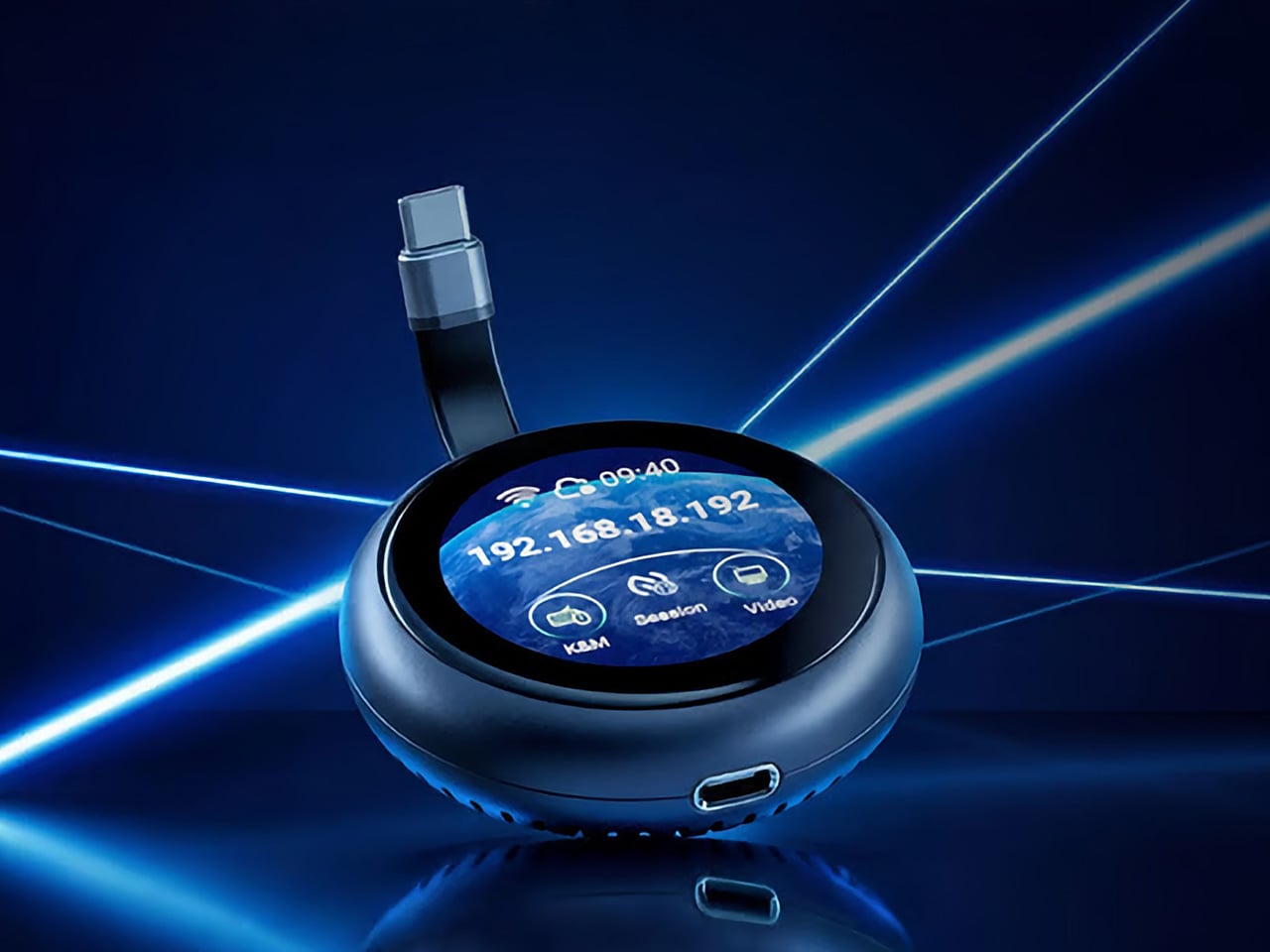
GL.iNet, the Hong Kong-based networking company behind a range of popular OpenWrt routers, has built the Comet Q to tackle all three of those problems at once. Officially designated the GL-RMQ1, it’s described as the world’s first browser-based, pocket-sized remote-control device built specifically for USB-C devices, covering laptops, phones, tablets, and Mac minis. You plug it in, open a browser, and you’re in.

Designer: GL.iNet

Click Here to Buy Now: $89 $129.9 (31% off). Hurry, only 866/2500 left! Raised over $1 million.

What sets the Comet Q apart is that it operates at the hardware level, not through software installed on the target device. That distinction matters more than it sounds. Traditional remote desktop software relies on the operating system and an active network connection, failing the moment a device sleeps, locks, or loses Wi-Fi. The Comet Q keeps working through all of that, as long as the device stays powered on and hasn’t entered a hibernation state that cuts off its HDMI/USB output.

That control comes through a single USB-C cable that simultaneously carries video, data, and power, doing away with the HDMI dongle and USB hub that traditional KVMs require. Video output reaches up to 2K at 60 fps with two-way audio, and a built-in USB-C passthrough port means the device being controlled stays charged throughout the session. It’s a genuinely pocket-sized setup that actually earns that description.

Where the Comet Q breaks new ground is with mobile devices. No KVM was ever built for them, and if something went wrong remotely, there was no clean solution short of being physically present. It connects directly through the USB-C port, working with iPhones from the iPhone 15 onward (excluding the iPhone 16e and later budget models), iPads, and a wide range of Android phones and tablets, provided the port supports DisplayPort Alt Mode.

All of that also means the OS combination no longer matters. Users can control an iPhone from a Windows PC, a MacBook from an Android tablet, or an iPad from a Linux machine. Developers can manage test devices without being at their desks, IT teams can monitor a fleet of phones from one interface, and content creators can run a dedicated recording device from anywhere in the same room.

There’s a surprisingly personal side to this. If you’ve ever tried walking a parent through a tech problem over the phone, knowing you could take over their screen remotely would have saved everyone a lot of stress. The Comet Q makes that possible, and since Wi-Fi credentials can be preset before shipping the device, the person receiving it doesn’t need to set it up.

Accessing the Comet Q doesn’t require any downloads. From a laptop or desktop, any browser pointed to glkvm.com is enough to take full control, with no account creation needed. When controlling from a phone or tablet, the GLKVM app, available on Windows, macOS, App Store, and Google Play, handles touch gestures more precisely. A 1.8-inch circular touchscreen on the device also makes initial setup possible without opening a laptop.

Security runs through every layer of the design. Each session ends the moment the Comet Q is physically disconnected, leaving no residual access or background processes behind. Built-in support for Tailscale, ZeroTier, and WireGuard VPN keeps remote connections encrypted and firewall-friendly, while two-factor authentication adds yet another layer on top. Remote access that works through hardware rather than software has been a long time coming for phones and tablets.

Click Here to Buy Now: $89 $129.9 (31% off). Hurry, only 866/2500 left! Raised over $1 million.

The post This USB-C Dongle Just Let You Control an iPhone From Windows first appeared on Yanko Design.

The Jerry Can That’s Actually a 300W Party Speaker With a Guitar Input

Par : JC Torres
27 juin 2026 à 19:30

Portable party speakers have settled into a comfortable but predictable aesthetic: boxy, rugged, cylindrical, occasionally translucent. They compete mostly on specs, with loudness and battery life doing most of the heavy lifting in marketing copy. The design rarely causes a double-take. Most of them look like pieces of gear that belong in a hiking backpack, not a conversation starter you’d voluntarily carry to a campsite because someone just had to see it.

The Ultimea Go throws all of that out by doing something nobody asked for but nobody can really argue with: it looks exactly like a jerry can. The resemblance isn’t a stretch or a loose visual metaphor. It’s a deliberate full-scale commitment to the fuel container form, right down to the handle and the boxy proportions. The gimmick and the product are the same thing here, and it lands.

Designer: Ultimea

Under the shell, the speaker pulls its weight acoustically. The driver setup includes dual 5-inch woofers, dual 3-inch full-range drivers, and a 1-inch tweeter, all contributing to a 300 W peak output that Ultimea says is loud enough for groups of 10 to 20 people. The 360° omnidirectional design means the sound radiates in all directions rather than projecting from one face, which matters when a crowd is gathered around rather than sitting in front of it.

What tips it further toward the unexpected is the inclusion of two microphone inputs and a guitar input alongside the standard Bluetooth 5.4 connection. That turns it from a passive playback device into something a busker could plug into on a street corner or a backyard musician could use for a spontaneous after-dinner set. The inputs don’t feel like afterthoughts; they actively expand what the speaker is for.

For anyone who wants to scale up, Auracast support allows playback to sync across up to 100 devices simultaneously. Practically, that means linking multiple speakers across a large space without the usual signal degradation or timing offsets that come with daisy-chaining Bluetooth units together. Two Ultimea Go speakers can also be paired in TWS mode for true stereo output, making the jerry can a unit that can grow with the occasion.

The battery runs for up to 16 hours on a single charge, which holds through a full outdoor day without needing a top-up. IPX4 water resistance adds a reasonable layer of protection against splashes and light rain, so setting it near a pool or leaving it outside during a light drizzle isn’t cause for panic. RGB lights add the requisite visual flair without being the only thing the design has going for it.

An app handles the finer controls, and a bass boost function gives the low end an extra push when the situation calls for it. The speaker ships in black, with the jerry can silhouette doing most of the visual work in any setting. It’s the kind of thing that gets spotted across a campsite and prompts a walk over to find out what it actually is.

The post The Jerry Can That’s Actually a 300W Party Speaker With a Guitar Input first appeared on Yanko Design.

Wacom MovinkPad Pro 14 Review: The $900 Sketchbook Designers Needed

Par : JC Torres
27 juin 2026 à 15:22

PROS:


  • Minimalist design streamlined for focused work on the go

  • Paper-like experience when drawing or writing

  • Comes with Wacom Pro Pen 3 in the box

  • Large, bright, color-accurate OLED screen with anti-reflective surface


CONS:


  • Quite a significant investment

  • Uncertain software update roadmap

  • Instant Pen Display Mode is currently offered as a beta feature

RATINGS:

AESTHETICS
ERGONOMICS
PERFORMANCE
SUSTAINABILITY / REPAIRABILITY
VALUE FOR MONEY

EDITOR'S QUOTE:

The Wacom MovinkPad Pro 14 isn't another Android tablet. It's a sketchbook that happens to run one.
award-icon

For decades, Wacom has held an almost unchallenged grip on the drawing tablet and pen display market. Its products are so trusted that studios and design firms often keep them running for years, sometimes long after they’ve been discontinued. Lately, though, its rivals have been gaining a lot of attention, pushing increasingly attractive prices and expanding into new product categories.

That doesn’t mean Wacom has been idling. The company is finally wading into standalone Android tablet territory with the MovinkPad 11 and the more premium MovinkPad Pro 14, a proper portable drawing machine aimed squarely at working creatives. We’ve been spending time with the larger of the two, along with the new Wacom Art Pen 2, and the question is whether it’s worth every dollar of its price tag.

Designer: Wacom

Aesthetics

Right out of the box, the MovinkPad Pro 14 doesn’t dazzle the way other tablets in its price range tend to. There are no flashy colors, no ultra-thin borders, no polished surfaces. The bezels are noticeably wide, the default wallpaper is a solid, flat light gray, and the whole thing carries a stubbornly plain look that feels almost out of step with the competition.

It’s all very much by design. Wacom’s intent is to mimic the look and feel of a physical sketchbook, the kind artists, designers, and architects carry everywhere. The device comes in one color, light gray, which echoes the tone of most sketchbook paper. Its rectangular form, wide borders included, also closely mirrors the footprint of an A4 pad, binding and all.

The sides of the device carry that same restraint. One long edge holds the power button, volume rocker, and microSD slot, while the opposite edge features connectors for the optional cover accessory. The short edges house the speakers, and the bottom is reserved for branding, regulatory inscriptions, and four rubber feet. There’s nothing extraneous, nothing decorative, and nothing that distracts from the task you’re there to do.

The included Pro Pen 3 follows the same philosophy. It’s all black, slim, and cylindrical, with a body so uniform it almost looks like a high-end mechanical pencil. The three side buttons are barely raised, sitting nearly flush against the barrel for a cleaner look. Unscrewing the rear half reveals three replacement nibs tucked inside: a Carbon Shaft nib, a Felt nib, and a POM nib.

Wacom’s vision for the MovinkPad Pro 14 is to replicate the feeling of picking up a sketchbook, flipping to a fresh page, and getting straight to work. That intent comes through clearly because the tablet removes just about every visual, physical, and digital distraction it can. It doesn’t try to be the slickest-looking device in the room. It tries to be the one you reach for first.

Ergonomics

At 14 inches, the MovinkPad Pro 14 isn’t something you’d hold up one-handed for long, but at just 699 grams and 5.9mm thin, it slips easily into any bag. Resting it on your arm or lap doesn’t feel like a chore either. For creatives who move between locations throughout the day, that combination of size and lightness goes a long way toward making it a genuinely portable tool.

The four rubber feet on the underside keep the tablet from sliding around on a desk and slightly raise the back off the surface, which helps with airflow. There’s no built-in kickstand or angled stand, so if you prefer working at a tilt, you’ll need to source one separately, either from Wacom’s own accessory line or from a third-party option. It’s a small gap in an otherwise thoughtful package.

Those wide bezels, which might seem like a design quirk at first, actually earn their place here. They give you a comfortable inactive area to rest your palm or fingers when gripping the tablet from the sides, so your touch input doesn’t accidentally interfere with whatever you’re drawing. It’s the kind of practical thinking that tends to reveal itself only once you’re deep into a long session.

That said, the MovinkPad Pro 14’s footprint means it isn’t something you’d pull from a bag and start sketching on at a moment’s notice. For that kind of spontaneous work, the smaller MovinkPad 11 is probably the better fit. The Pro 14 is better suited to longer, more involved sessions away from the desk, as long as you’ve found a comfortable spot to settle in.

The Pro Pen 3 is well-balanced and comfortable enough in the hand, though your experience will vary depending on what you’re used to. Its slim, pencil-like build can lead to some cramping over long sessions for those accustomed to thicker tools. Official grips are available but aren’t cheap. The nearly-flushed buttons are also too easy to press accidentally. The Art Pen 2, which we’re also reviewing, offers a wider barrel as an alternative but is sold separately.

Performance

Under the hood, the MovinkPad Pro 14 runs on a Qualcomm Snapdragon 8s Gen 3 with 12GB of RAM and 256GB of storage, expandable via microSD up to 2TB. The processor isn’t the newest available, but it handles everything thrown at it with ease. Multitasking is smooth, app switching is fluid, and there’s no sense that the hardware is struggling to keep pace with anything.

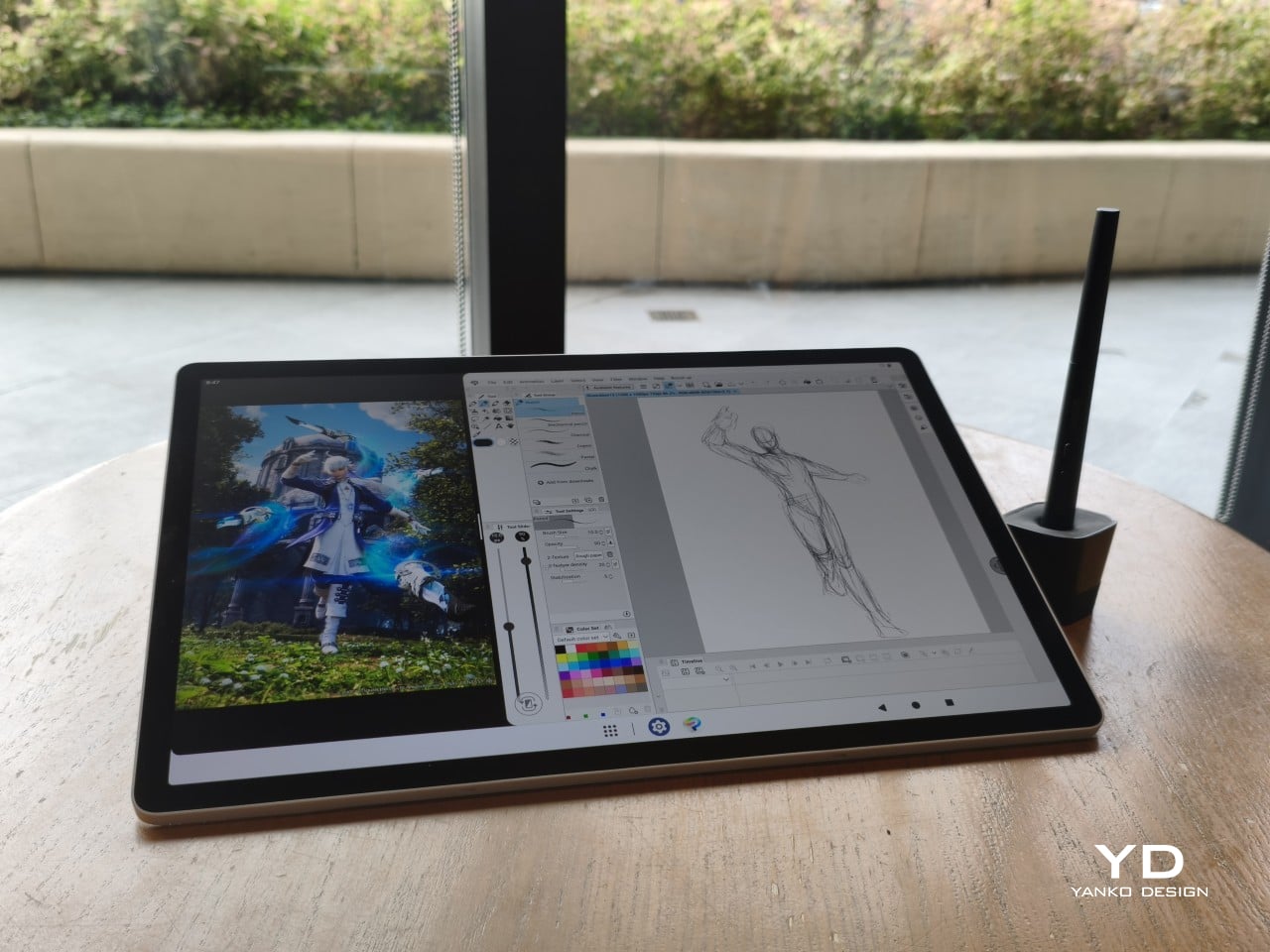
The 14-inch OLED display runs at a 2880×1800 resolution with a 120Hz refresh rate, treated with anti-fingerprint, anti-reflective, and anti-glare textured glass. The wide rectangular aspect ratio works in favor of drawing apps that line their UI panels along the sides, something squarish iPad screens can’t accommodate as cleanly. The textured coating adds a satisfying scratchiness to each stroke, and pen accuracy is, naturally, exactly what you’d expect from Wacom.

There are no cameras on the MovinkPad Pro 14, front or back. That’s a deliberate choice. There’s no temptation to flip over to social media, no accidental video calls, nothing that pulls focus away from what you’re there to do. Passively watching a tutorial in a corner of the screen is about as off-task as it gets, which, honestly, isn’t a bad thing for anyone prone to distraction. Split-screen functionality makes it easy to have a reference off to the side while you work.

The software side is equally stripped down. Android 15 comes installed with zero bloatware and just three Wacom-made apps: Shelf for your gallery, Tips for settings, and Canvas, a quick sketching surface that wakes directly from sleep with a tap of the pen. It’s intentionally bare-bones for capturing fleeting ideas, though a few more brush options would genuinely be welcome. From Canvas, you can instantly send your sketch to an Android app, though it seems to be limited to Clip Studio Paint, iBisPaint, and Autodesk Sketchbook. Hoping it will offer some flexibility in the future.

Speaking of apps, desktop-grade drawing applications like Clip Studio Paint and Krita run without issue. The broader Android ecosystem opens up a decent range of options, though it’s worth remembering that anything exclusive to Windows or Mac won’t be available here. Customizing the pen buttons is also off the table, a limitation of the Android platform rather than any fault of the hardware itself.

The Instant Pen Display Mode is arguably the most intriguing feature here. It converts the tablet into a secondary display for a Windows or Mac computer, via USB or Wi-Fi, turning it into a portable, makeshift Cintiq. It’s part of Wacom Lab, an experimental creator community that lets users explore and provide feedback on new creative possibilities through beta features. As of this writing, the setup process involves quite a number of steps, and pen button support is currently limited to toggling a small side panel for common modifier keys. It definitely shows promise, so hopefully development will be quick.

Battery life is genuinely impressive. The 10,000mAh cell can sustain nearly five days on standby and supports 65W fast charging, though you’ll need to bring your own charger since none is included in the box. The USB-C port is only 2.0, so it doesn’t charge as quickly as the spec might suggest, but an hour or more of active drawing barely makes a dent in the battery.

Sustainability

Wacom doesn’t use recycled or notably sustainable materials in the MovinkPad Pro 14 itself, but the company does meet several other environmental benchmarks worth noting. Its packaging is compact, minimal, entirely plastic-free, and fully recyclable, while the device is built with the kind of durability Wacom products are known for, the sort that keeps them in active use long after most gadgets would have been binned.

That longevity argument holds well for Wacom’s drawing tablets and pen displays, which tend to outlast their useful lives many times over. A standalone Android tablet is a different matter, though. Apps like Clip Studio Paint have already dropped Android 12 support, making regular OS updates critical. Wacom has committed to keeping the MovinkPad Pro 14 current, but no clear update schedule or roadmap has been shared publicly yet.

Value

At $899.95, the MovinkPad Pro 14 isn’t an impulse buy, but it’s a reasonably grounded one. An equivalent iPad would require buying the Apple Pencil separately, while a comparable Samsung Galaxy Tab tends to run noticeably higher. For a tablet built specifically around the drawing experience, with Wacom’s pen technology at its core, the price lands in a range that’s genuinely difficult to argue against.

The large screen and capable hardware make it a compelling option for creatives who frequently work away from their desks. It doesn’t sacrifice quality for the sake of portability. With the right app installed, it functions as a capable mobile workstation wherever you happen to be. And when a PC or Mac app becomes unavoidable, Instant Pen Display Mode is there to bridge the gap.

There are caveats, of course. The beta status of Instant Pen Display Mode means it’s not quite ready to be a daily driver feature. You’ll also need to feel at home with Android’s drawing ecosystem for this workflow to really make sense. And the uncertainty around long-term Android updates is a concern that Wacom will need to address more concretely before most buyers can put it fully to rest.

Verdict

The MovinkPad Pro 14 isn’t Wacom’s first stab at a standalone portable device. Veterans will remember the Windows-based Cintiq Companions and the MobileStudio Pros. But this is by far the most portable and clearly focused version of that idea. It doesn’t try to cram Windows into a pen display. It’s a purpose-built mobile experience that happens to carry a Cintiq-like trick discreetly tucked away.

At the same time, it doesn’t operate like an Android tablet with a Wacom digitizer tacked on, which is essentially what Samsung’s Wacom-enabled slates are. Wacom has built something around a specific, coherent idea: a true digital sketchbook. Some software edges still need ironing out, but for artists and designers craving genuine creative freedom outside the studio, the MovinkPad Pro 14 offers something few tablets in its class can match.

The post Wacom MovinkPad Pro 14 Review: The $900 Sketchbook Designers Needed first appeared on Yanko Design.

5 Portable Bluetooth Speakers for Summer 2026 That Sound as Good Outside as They Look

27 juin 2026 à 11:40

Most portable speakers resolve the outdoor brief in one of two ways. They build something tough enough to survive whatever summer throws at it, then let design take care of itself. Or they craft something that looks considered and hope it never meets moisture. These five refuse that tradeoff. Each earns its place outdoors on visual merit alone, a bar that very few speakers in this category have the confidence to clear.

The selection spans passive acoustic amplification to hard-anodized Danish aluminum, retro broadcast aesthetics to science fiction metalwork, and an outdoor warrior that floats face-up in a swimming pool. What ties them together is a conviction that a portable speaker should be worth looking at when the music stops. Whether you pack one for the long weekend or set one up on the rooftop, these speakers make the setup look considered before anyone hits play.

1. Retrowave Radio

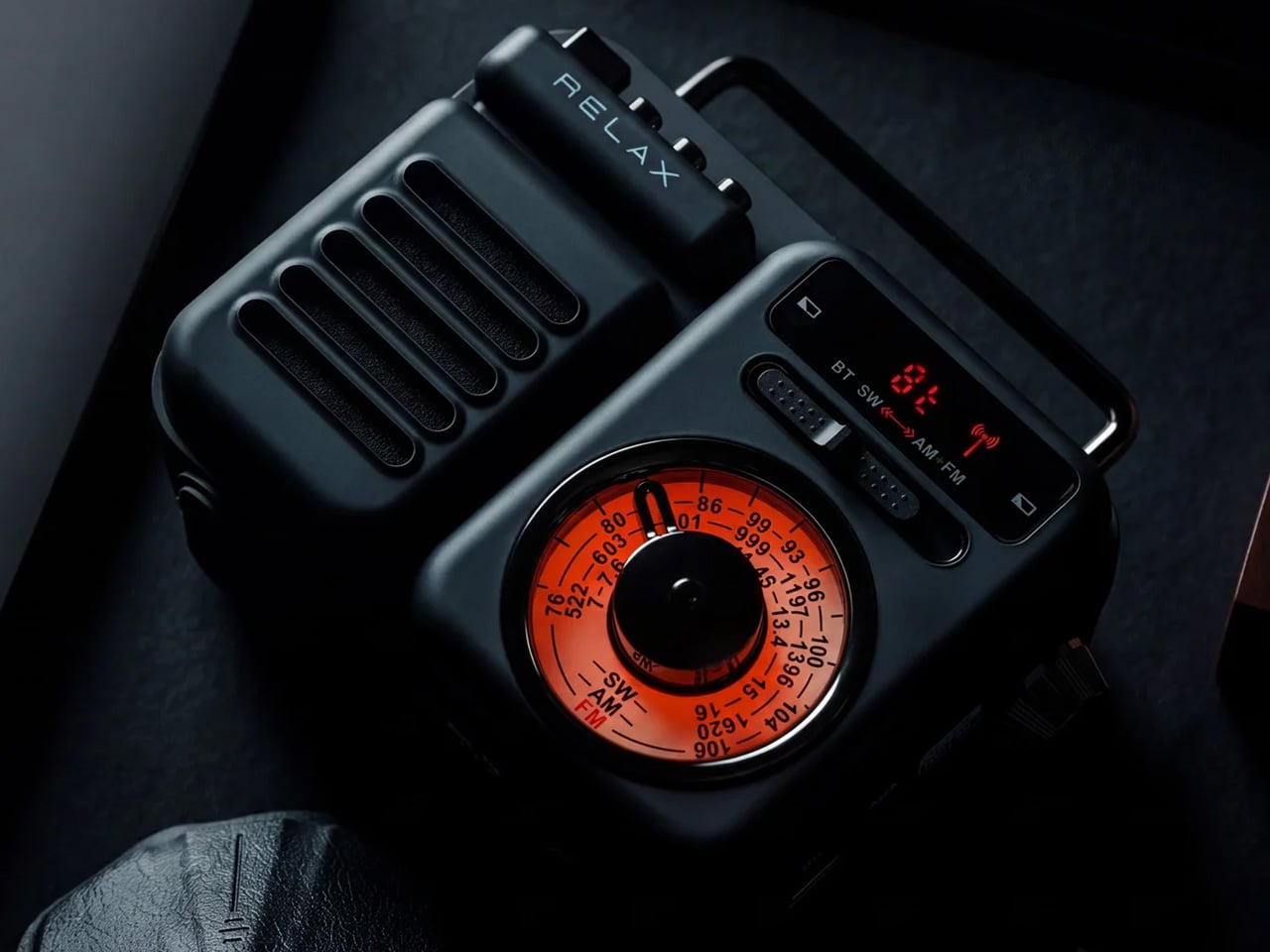
There is a specific pleasure in a speaker that looks like it predates Bluetooth by thirty years. The Retrowave Radio brings that cabinet sensibility into a summer that runs on playlists and wireless connectivity, giving you the best of both. Its proportions and analog-styled face sit more comfortably on a picnic blanket or campsite ledge than most modern speakers manage, which tend to read as tech accessories rather than objects genuinely worth looking at.

The FM tuner adds a layer the streaming era forgot. Scanning local frequencies somewhere without a strong data signal is its own kind of discovery, the kind no algorithm delivers. Bluetooth connectivity keeps it relevant to every device you already own, so the retro shell is not a compromise so much as a philosophy about what listening outdoors should feel like. It is the speaker most likely to draw a question from whoever walks past, which is the highest compliment any piece of audio design can receive.

Click Here to Buy Now: $89.00

What We Like

  • The retro cabinet reads as a considered aesthetic statement rather than a novelty gimmick, and holds its own in any outdoor setting
  • Dual functionality as a Bluetooth speaker and FM radio opens it up to genuine off-grid situations where streaming is not an option

What We Dislike

  • The analog-inspired styling may not suit those who prefer a contemporary minimal look in their audio gear
  • FM reception quality depends entirely on local signal strength, which varies considerably depending on where summer takes you

2. Anker Soundcore Boom 3i

The Soundcore Boom 3i solves a problem most outdoor speakers refuse to acknowledge. Pools, lakes, and beaches are exactly where you want music most and also the worst possible environments for most electronics. Anker’s answer is a speaker that floats and self-orients so the audio always faces upward, keeping sound clear whether it was placed there deliberately or went in during a particularly competitive game of volleyball. That kind of design honesty about actual use is rare.

Beyond the floating, it includes Buzz Clean, a feature where the speaker vibrates on command to shake sand and debris out of the grille. It is a small addition that solves a genuine frustration without tools or disassembly. Sixteen hours of battery life and LED lighting that pulses with your music make it a speaker clearly built by a team that has spent time at actual beaches, not imagined them from an office.

What We Like

  • The self-orienting float design solves a real outdoor audio problem rather than just marketing waterproofing that most owners never actually test
  • Buzz Clean is genuinely useful in sandy environments and requires no tools, disassembly, or anything beyond pressing a button

What We Dislike

  • The LED lighting, while effective at night, adds visual busyness that may not appeal to those who prefer their gear to sit quietly in the background
  • Its larger footprint makes it less suited to compact bags or minimalist packing situations where every cubic inch matters

3. Bang & Olufsen Beosound Explore

Bang & Olufsen built the Beosound Explore from hard-anodized aluminum, and that material choice explains everything else about it. Reaching for aluminum where every competitor defaults to polycarbonate communicates a specific set of values about longevity, texture, and what outdoor gear can look like when it is not trying to appear durable but simply is. At 631 grams with a rubberized base and carabiner strap, it travels without ceremony and arrives looking like it belongs wherever you set it down.

The True360 sound from dual full-range drivers means there is no bad angle at a campsite or on a rooftop, and 27 hours of battery life removes the anxiety that shadows every other portable speaker on a long weekend. IP67 water resistance covers submersion up to one meter for thirty minutes, which handles every realistic outdoor scenario. Designed in Denmark and built to outlast seasons rather than one summer, the Beosound Explore is the speaker you eventually stop having to replace.

What We Like

  • Hard-anodized aluminum construction gives it a material quality and cool-to-the-touch feel that no polycarbonate competitor comes close to matching
  • 27-hour battery life is genuinely class-leading at this form factor, removing charging from the weekend equation entirely

What We Dislike

  • The price sits at the premium end of the portable speaker category, which may not align with every budget on this list
  • The compact driver configuration prioritizes audio fidelity over sheer volume ceiling, so those expecting a party speaker may find it more refined than powerful

4. Battery-Free Amplifying iSpeakers

The Battery-Free Amplifying Speaker starts from the most honest premise in portable audio: what if the speaker needed nothing from you except the sound you already had? Using passive acoustic amplification, it channels audio from your device through a shaped resonance chamber without a Bluetooth receiver, a charging cable, or a battery to manage. The result is a speaker that is always ready because there is genuinely nothing about it that can run out.

Its design logic sits closer to a musical instrument than a consumer gadget. Every curve and internal chamber proportion is there to do acoustic work, which means every formal decision has a functional one sitting behind it. For a long morning on the balcony or an afternoon at the beach where you forgot to charge everything, it removes the one variable that always causes friction. You set it down, rest your phone inside, and the sound arrives without a single button pressed.

Click Here to Buy Now: $179.00

What We Like

  • Zero dependency on charging makes it genuinely grab-and-go in a way no battery-powered speaker on this list can claim
  • Passive acoustic construction makes it one of the most durable options here by virtue of having no electronics to fail

What We Dislike

  • Volume ceiling is naturally limited compared to powered speakers, making it less suited to larger outdoor gatherings where you are competing with ambient noise
  • Performance is tied directly to the speaker quality of the host device, which varies considerably from one phone to the next

5. GravaStar Mars Pro

The GravaStar Mars Pro does not attempt to blend in, and it is entirely correct not to try. Its zinc alloy body, war-damaged finish options, tripod legs, and exposed mechanical detailing sit somewhere between industrial design and a film prop, which is precisely what makes it worth owning. Most portable speakers are designed to disappear into their surroundings. The Mars Pro is designed to become the focal point of wherever it is placed, and its 20W dual speaker system backs that visual confidence with real audio substance.

A full-range driver paired with a passive bass radiator gives the Mars Pro low-end presence that its dimensions should not produce. The RGB lighting system runs through six dynamic modes, pulsing with your music and making it a natural fit for evening rooftops and outdoor gatherings. At 5.5 pounds, it is the heaviest option here, which places it at the center of a setup rather than inside a bag. That is exactly where it wants to be.

What We Like

  • The zinc alloy construction and sculpted mech aesthetic make it one of the most visually distinctive portable speakers available at any price point
  • 20W dual speaker output delivers bass presence well beyond what the physical size suggests is acoustically possible

What We Dislike

  • At 5.5 pounds, it is not a speaker you carry around a site; it is the one you set up and gather around, which limits where it fits on a summer itinerary
  • The dramatic visual language is polarizing and will not appeal to anyone who wants their audio gear to sit quietly in the background

The Best Summer Speaker Is the One Worth Looking At When the Music Stops

A portable speaker is one of the few objects that has to perform twice over. It has to sound right and look right in the same moment and the same light. The five here clear that bar without any of them feeling like a compromise in either direction. Summer is short enough that whatever you bring outdoors should be worth the trip, and each of these makes that case without any difficulty.

Whether you reach for the passive simplicity of the battery-free amplifier, the engineered restraint of the Beosound Explore, or the unapologetic presence of the Mars Pro, the underlying conviction is the same. Good design does not ask you to choose between form and function. These speakers already made that decision, and it shows from the moment you set them down somewhere they have no business looking this good.

The post 5 Portable Bluetooth Speakers for Summer 2026 That Sound as Good Outside as They Look first appeared on Yanko Design.

10 Best Tech Gadgets for the Guy Who Thinks He Has Everything — He’s Missing All of These

20 juin 2026 à 11:40

The problem with buying tech for someone who follows tech is that he’s usually already seen it. His desk is deliberate. His bag is considered. His tech doesn’t accumulate — it earns a place and stays there. Shopping for him isn’t hard because he’s difficult. It’s hard because he’s usually right, and anything that doesn’t clear his bar comes back with a polite explanation.

The ten things on this list are the ones he hasn’t gotten to yet. Some of them are brand new. A few are still taking shape as concepts or patent filings worth tracking closely. None of them are the safe, obvious choice you grab when you’re not sure. Safe choices are what you give someone you don’t actually know that well, and the guy who has everything will see right through them.

1. Google Home Speaker

Google’s first new standalone smart speaker in nearly six years arrived in June 2026, and the gap is written into everything about it. The Nest Audio it replaces launched when people were buying anything that made a room feel less empty. The Google Home Speaker is a more considered object: small and rounded, available in colors the hardware team has always gotten right — the kind that make a shelf look slightly more curated without announcing a brand — with 360-degree audio and a light ring that tells you when Gemini is listening, thinking, or ready to respond.

The Gemini integration is the actual reason this speaker exists. Every Google product with enough surface area has been rewired into the AI model since 2025, and the kitchen turned out to be the most underserved room in the portfolio. What that means in practice is a speaker that answers hands-free cooking questions, manages a calendar, controls the broader smart home, and holds a conversation more fluently than any Nest device before it. Whether Google maintains attention on the category this time around is the only question worth watching.

What We Like

  • Gemini integration makes ambient AI genuinely useful in a room that needed it most
  • Soft, rounded form and considered color options read as a design object rather than tech hardware

What We Dislike

  • A six-year product gap makes long-term hardware commitment harder to trust
  • Full Gemini functionality requires staying inside the Google ecosystem to get the most out of it

2. OrigamiSwift Folding Mouse

Most travel mice solve the portability problem by building a smaller, worse mouse. The OrigamiSwift, designed by Horace Lam, takes a different approach entirely. It folds completely flat to 0.18 inches thick, slips into a pocket, and unfolds into a full-sized ergonomic form in under half a second. The triangular structure that makes the fold work comes directly from origami geometry, which gives the collapsed state enough rigidity to survive a bag without a case, and the open position enough stability for accurate, comfortable tracking on almost any surface you set it on.

At 40 grams, you stop noticing it in your bag within the first day of carrying it, which is exactly the point. A 4,000 CPI infrared sensor handles tracking, Bluetooth 5.2 keeps the connection fast and reliable, and a single USB-C charge on the built-in lithium polymer battery lasts up to three months. The soft-click buttons are quiet enough for a shared workspace without drawing any attention. For anyone who has carried a full-sized mouse in their bag out of sheer stubbornness about ergonomics, the OrigamiSwift is the design that finally makes the case for stopping.

Click Here to Buy Now: $85.00

What We Like

  • Opens from flat to full-sized ergonomic form in under 0.5 seconds with no mechanical fuss
  • Three months of battery life per USB-C charge removes recharging from the equation entirely

What We Dislike

  • The slim profile and 40-gram weight take adjustment for anyone used to heavier, more substantial mice
  • Stock is very limited — only a handful of units remain in the shop

3. Volla Plinius

The Volla Plinius is named after Pliny the Elder, which is the kind of product name that tells you something about the people who built it. It’s a Google-free Android phone with an IP68 dust and water rating, a 6.67-inch FHD+ OLED display running at up to 120Hz, a 64MP main camera with phase-detection autofocus, an 8MP ultra-wide, and a 2MP macro, with 5G and a MediaTek Dimensity 7300 processor underneath. Out of the box, it runs Volla OS, a Google-free Android build with a clean, text-based interface and a Security Mode that governs which apps communicate with the outside world.

The detail that separates the Plinius from every other privacy phone is a user-replaceable battery you can swap with a standard screwdriver, even with the IP68 waterproofing intact. The 5,300mAh cell handles a full day comfortably, with 30W fast charging and 15W wireless charging both covered. Ubuntu Touch is available as a fully Linux-based OS from the UBports Foundation that doubles as a desktop environment when connected to a monitor. The standard Plinius starts at €598, with the Plus model adding 12GB of RAM, 256GB of storage, and a Pogo PIN connector for magnetic accessories at €698.

What We Like

  • User-replaceable battery with a standard screwdriver is a genuinely rare feature at any price, let alone with IP68 in place
  • Dual OS support means you can run Volla OS or full Ubuntu Touch on the same hardware

What We Dislike

  • The Pogo PIN modular accessory system is still early in its development

4. piBrick Pocket-CM5

The piBrick Pocket-CM5 is an open-source handheld computer built around the Raspberry Pi Compute Module 5, a custom PCB designed for manufacturing at JLCPCB, and a 3D-printed shell. The whole parts list totals around $172, and what that buys is a device at smartphone proportions — 80mm × 145mm × 19.6mm — with a 3.92-inch AMOLED display at 1080 × 1240 pixels and 90Hz, a 5,000mAh battery, a compact QWERTY keyboard derived from the BlackBerry layout with an integrated trackpad, side rotary encoders, and five user-programmable buttons that give it a tactile depth no touchscreen-only device can replicate.

The feature that elevates the piBrick from impressive project to genuinely useful tool is USB-HID mode. Plug it into any external computer or server, and the keyboard and trackpad operate as a fully functional USB input device, independent of the Raspberry Pi running inside it. A sysadmin arriving at a server rack without a spare keyboard doesn’t need to find one. Full-size and micro-HDMI outputs allow the same device to drive an external display. NVMe SSD support in 2230 or 2242 formats adds storage beyond the SD card. The schematics, PCB files, and build instructions are open-source, making $172 the floor rather than the price.

What We Like

  • USB-HID mode turns it into a functioning keyboard and trackpad for any external computer or server
  • Full open-source hardware means the design belongs to anyone who wants to build on or modify it

What We Dislike

  • Requires hands-on assembly from a parts list rather than arriving as a finished, ready-to-use consumer device
  • The 3D-printed shell is functional but lacks the material quality of commercial hardware at this price level

5. StillFrame Headphones

The StillFrame headphones are designed by Tatsufumi Funayama and weigh 103 grams, which is light enough that you genuinely stop noticing them across a full workday. The 40mm drivers produce a wide, open soundstage tuned for music that rewards real listening rather than functioning as background wallpaper. A stainless steel headband holds the structure with the right balance of strength and flex, and the fabric ear cushions attach magnetically, making swaps between the included colorways quick and satisfying in the way that small, well-engineered interactions tend to be. The form takes its reference from the quiet geometry of CD players from the 1980s and 1990s, and the connection is immediate once you see it.

At $245, the StillFrame competes on philosophy as much as on specification. Active noise cancellation and Transparency Mode are both on board, Bluetooth 5.4 handles wireless streaming, and a USB-C cable supports high-resolution wired playback for when the signal matters more than the convenience. Battery life runs to 24 hours. The internal circuit board is deliberately exposed within the housing, treated as part of the visual experience rather than something to hide behind plastic. The White model ships with Light Gray and Turquoise cushions included — two moods for the same object, quietly expressive without trying to be.

Click Here to Buy Now: $245.00

What We Like

  • 103g and an open soundstage make these the kind of headphones you wear for hours without wanting to take them off
  • The exposed circuit board and magnetic cushion system give the object a physical personality that most headphones flatten out entirely

What We Dislike

  • Only 4 units remain in the shop, which makes these effectively a limited run at this point
  • The on-ear design sits between over-ear and in-ear, and the level of passive isolation won’t suit everyone

6. Oppo Bubble

The rear camera has been the better camera for over a decade. Every benchmark, every low-light comparison, every zoom test confirms it, and yet selfie culture built itself entirely around the front-facing lens because there was no practical way to see what the good camera was capturing while it was pointed away from you. The Oppo Bubble is a small circular AMOLED touchscreen that attaches magnetically to the back of a phone and mirrors the rear camera’s live feed wirelessly, up to 10 meters away. It launched in China on May 25, 2026, alongside select Oppo Reno 16 devices, and includes a built-in remote shutter trigger. Apple has had the magnetic infrastructure for something like this since 2020. Oppo just claimed the screen real estate it left empty.

The circular AMOLED display is what makes the Bubble credible rather than merely clever. A low-resolution preview would sink the concept at its most basic job, so Oppo putting a proper screen in here is the detail that earns the price. A 550mAh battery keeps it running independently, and when the camera is off, the Bubble displays custom wallpapers, live photos, videos, and animated themes. Ten meters of wireless range repositions it from selfie mirror to legitimate remote shooting monitor — the kind of tool that used to require a separate Bluetooth trigger and a lot of hoping for the best.

What We Like

  • Ten meters of wireless range turns it from a selfie mirror into a proper remote monitor for tripod-mounted shooting
  • The circular AMOLED form gives it enough design personality to work as an accessory rather than just a functional attachment

What We Dislike

  • Live camera preview only works with select Reno 16 series Oppo devices at launch, which is a real limitation right now
  • No confirmed international release outside China as of June 2026

7. Lenovo ThinkTab X11

Rugged tablets have almost always meant choosing between enterprise-grade hardware at enterprise-grade prices, or pressing a consumer device into field conditions it was never designed to handle. The Lenovo ThinkTab X11 is an attempt to close that gap at $499, bringing it into reach for the people who actually use tablets in logistics, construction, transportation, manufacturing, and energy. The 10.95-inch display runs at 90Hz, reaches 800 nits under high brightness mode, and handles gloved hands and wet fingers without issue — the Snapdragon 7s Gen 3 runs the processing, with up to 12GB of RAM and 512GB of UFS 3.1 storage configurable depending on the deployment.

The battery design is what makes this genuinely interesting. The 10,200mAh cell removes on a screwless mechanism, so a worker can swap a depleted pack for a fresh one mid-shift without stopping to find a power outlet. In vehicle or fixed workstation deployments, the ThinkTab can run directly from DC power with no battery installed at all, eliminating heat buildup from continuous charging and removing long-term degradation from the equation entirely. The included case carries MIL-STD-810H certification, the device itself carries IP68, and the whole package ships with Android 16 alongside four years of security patches and two guaranteed major OS upgrades.

What We Like

  • Screwless hot-swap battery means mid-shift power changes are a practical workflow option, not a maintenance event
  • Battery-less DC operating mode for fixed deployments removes heat and degradation entirely from continuous-use scenarios

What We Dislike

  • At $499, it sits above consumer tablets doing lighter work, though well below comparable enterprise-only hardware
  • The Snapdragon 7s Gen 3 is a capable rather than cutting-edge processor for the price bracket

8. Nothing Book

This is a concept, and it’s worth saying that plainly before anything else. The Nothing Book is a design exploration by Nikita Bukoros that takes the brand’s philosophy to its logical conclusion: a performance laptop that treats its internal architecture as the visual statement rather than hiding it. The see-through body layers the cooling system, circuit boards, and internal components into a composition that Bukoros describes as industrial art as much as consumer electronics. The see-through aesthetic Nothing built its identity around, originally inspired by the translucent polycarbonate designs of the late 1990s, reaches its most ambitious expression here.

The secondary screen mounted on the lid is the detail that makes the concept worth following. It is a slim external display that breaks the closed-laptop monotony entirely — you can push messages, symbols, emojis, or anything else in the classic Nothing font to whoever is looking at the back of your machine in a meeting or a cafe. Nikita moves beyond Nothing’s usual monochrome palette and offers the concept in hot red, cool green, subtle pink, and magnetic teal. A purpose-built charging dock triggers a cooling animation on the secondary display when the laptop is docked, which is the kind of considered detail that separates a design worth remembering from one worth scrolling past.

What We Like

  • The secondary lid screen is a genuinely original idea that gives the closed laptop a visual identity and purpose
  • See-through architecture makes the internal engineering part of the aesthetic rather than something to conceal behind a plain surface

What We Dislike

  • This is a concept, not a product — Nothing has confirmed a laptop is in development
  • The exposed internals aesthetic would face real structural and thermal engineering challenges in a shipping device

9. Canon Pocket Gimbal Camera

Canon filed a patent in April 2026 for a compact handheld camera with a fully integrated three-axis gimbal, a fixed lens, a grip with a screen, and a folding mechanism that protects the stabilizer head during storage. It is the most refined and product-ready of three gimbal-related patents Canon has filed since 2021, and the one that reads most like a brief handed to an engineering team rather than a thought experiment. The key detail is a smart shutdown sequence that uses magnetic sensors and image analysis to guide the gimbal safely into a folded position before cutting motor power, addressing a mechanical wear issue that has quietly frustrated gimbal camera owners for years.

The competitive timing is pointed. DJI’s drone business has faced regulatory scrutiny in the United States, and Canon has been tracking the pocket gimbal category across three progressive patent filings over five years — moving from cinema-level ambition in 2021, to an auto-flipping mechanism in 2025, to this fixed-lens, behavior-smart design in 2026. Canon’s color rendering, the warm, accurate output that photographers have built careers around, is a form of credibility no spec sheet can manufacture quickly. Whether this patent becomes a product remains unconfirmed, but the arc from moonshot to practical brief is the clearest signal yet that Canon intends to ship something.

What We Like

  • Smart shutdown using magnetic sensors and image analysis is a specific, practical engineering improvement, not a theoretical feature
  • Three filings over five years show a product being genuinely refined rather than filed and forgotten

What We Dislike

  • This is a patent, not an announcement — Canon’s 2021 interchangeable-lens gimbal concept never shipped
  • Fixed lens removes the ambition of the earlier patents, which some creators will register as a step back

10. Battery-Free Amplifying iSpeakers

The premise behind the Battery-Free Amplifying iSpeakers is simple enough to say in one sentence: they amplify your iPhone’s audio through acoustic design alone, with no power source, no Bluetooth pairing, and no charging cycle to manage. At $179, they sit on a counter as a sculptural object even when the phone is nowhere near them, which is the standard any speaker worth keeping should meet before it earns a permanent place in the room. The best design objects don’t ask anything of you when they’re not being used. They just sit there, doing the room a favor.

For the guy who has accumulated Bluetooth speakers, wireless earbuds, a smart speaker with a subscription, and a desk speaker that needs a firmware update, a passive amplifier is the unexpected move. There is nothing to configure, nothing to pair, nothing to update, and nothing that goes wrong. You set the phone in, the sound fills the room, and that is the complete interaction.

Click Here to Buy Now: $179.00

What We Like

  • Requires no power, no pairing, and no maintenance — the interaction is entirely physical
  • Functions as a display object on the counter whether a phone is in it or not

What We Dislike

  • Passive amplification has natural limits on output volume compared to any powered speaker
  • Works best in quiet rooms rather than competing with ambient noise

The Things He Didn’t Know He Was Missing

The man who already has everything doesn’t need more things. He needs the specific thing he hasn’t encountered yet — the speaker that finally has a brain worth talking to, the mouse that folds flat without a compromise on feel, the phone that keeps its data to itself, the handheld computer that doubles as a keyboard for any machine it’s plugged into. These aren’t impulse picks. Each one is here because it does something the obvious alternatives don’t, and because the guy you’re shopping for will notice the difference within the first ten minutes.

A few of these are still taking shape — a concept waiting on a decision, a patent waiting on a factory floor. That’s worth saying plainly, but it’s not a reason to dismiss them. The guy who has everything is usually the first to know what’s coming, and the first to make up his mind about it. A list that only includes what you can buy today isn’t a list for him. It’s a list for someone else entirely.

The post 10 Best Tech Gadgets for the Guy Who Thinks He Has Everything — He’s Missing All of These first appeared on Yanko Design.

OBSBOT AI Cameras Are on Sale for Prime Day 2026, and the Tiny 2 Webcam Just Hit Its Lowest Price Ever

Par : Sarang Sheth
20 juin 2026 à 01:45

There is a camera brand that has shown up at International Broadcasting Conference, partnered with the Esports World Cup as an official camera provider, earned Editor’s Choice awards from music and DJ publications, and landed in the desk setups of remote workers, streamers, worship AV teams, and solo creators, all while keeping a relatively low profile compared to the legacy names in the category. OBSBOT, founded in 2016, has built its reputation the way durable hardware brands tend to: by making things that keep working, and keep getting better. Reviewers have consistently noted that firmware updates meaningfully improve OBSBOT cameras after purchase, which is a rarer quality in hardware than it should be.

Prime Day 2026 will put seven OBSBOT cameras on sale simultaneously, running through June 29 across Amazon and the OBSBOT official store. The lineup covers three distinct use cases: the Meet series for plug-and-play video calls and casual streaming, the Tiny series for creators and hybrid workers who want PTZ tracking at their desk, and the Tail 2 for anyone running a live production setup that used to require a full crew. The discounts range from around 15% on the newer Tiny 3 series to over 30% on the Tiny 2, which arrives at a price point that has not been seen before. Discounts hit on June 23rd – here is the full breakdown.

Click Here to Buy.

OBSBOT Tail 2 ($1088) – The AI Camera That Puts a Production Crew on Your Tripod

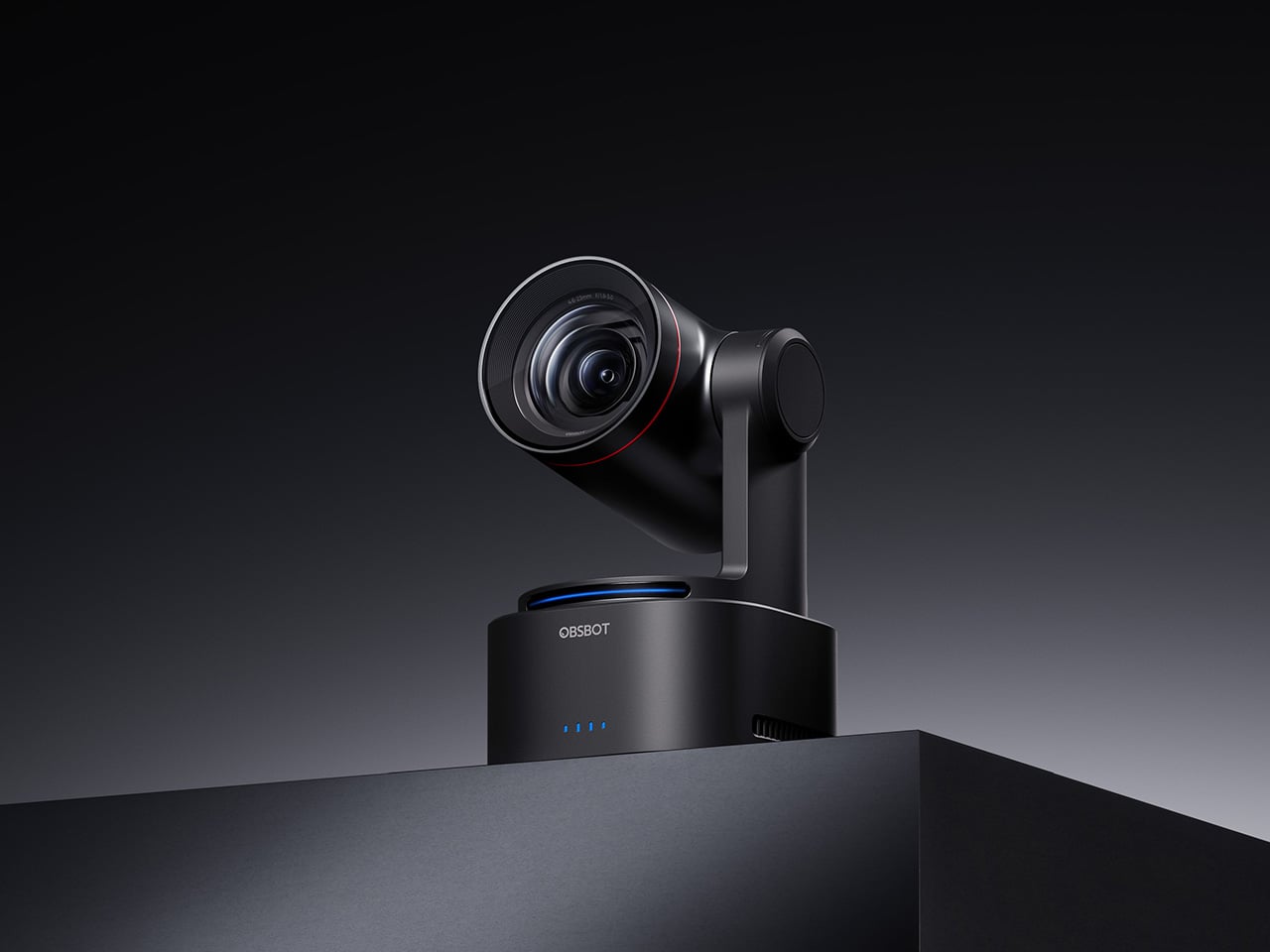
The OBSBOT Tail 2 is what happens when a camera is designed to solve the most persistent problem in solo and small-team video production: the need for a human operator. This is the company’s flagship live production camera, built around an advanced AI tracking system and a three-axis gimbal that does more than just pan and tilt. It is the world’s first PTZR (Pan-Tilt-Zoom-Roll) camera, with the Roll being a new game-changing feature that allows the entire lens and sensor assembly to rotate 90 degrees. This delivers true, uncropped vertical video, a clever piece of engineering that makes it immediately relevant for anyone creating content for mobile-first platforms. It pairs that mechanical intelligence with serious imaging hardware, including a large 1/1.5-inch CMOS sensor, a 5x optical zoom, and the ability to capture sharp 4K footage at a fluid 60 frames per second.

What separates the Tail 2 from a high-end webcam is how it fits into a professional workflow. It comes equipped with a full suite of broadcast-standard ports, including NDI, SDI, HDMI, and Ethernet, allowing it to integrate directly with live switching hardware and streaming software with minimal latency. For solo operators, the system works with gesture controls for hands-free adjustments, and a dedicated app provides granular remote control over framing and movement. This combination of broadcast-grade connectivity and intelligent automation is what makes the Tail 2 so versatile. It is equally at home as the primary camera for a DJ’s live stream, a dynamic tracking camera for a church service, or part of a multi-camera setup for a corporate event.

Why We Recommend

At its core, the Tail 2 is an investment in workflow efficiency. Tech reviewers have consistently framed it as a tool that can pay for itself, replacing the cost and complexity of hiring a camera operator for recurring shoots. The Prime Day discount reinforces that value proposition, knocking $200 off the price and bringing the non-NDI version down to $999. Breaking the thousand-dollar barrier is significant, shifting the Tail 2 from a niche professional tool to a much more accessible option for serious creators, small businesses, and organizations looking to upgrade their production quality. For anyone who needs cinematic, automated camera movement without a dedicated crew, this is the camera to get.

Click Here to Buy: $1088 $1298 ($210 off). Prime Day Deal starts on 23rd June 2026!

OBSBOT Tiny 3 ($296) – A Palm-Sized PTZ Camera with Full-Sized Ambition

The OBSBOT Tiny 3 is the company’s answer to a simple question: how much professional-grade technology can you fit into a webcam that is smaller than a cup of coffee? The answer, it turns out, is quite a lot. This is the flagship of the Tiny series, designed for creators and hybrid workers who want the absolute best imaging and tracking performance in a desk-friendly format. It starts with a massive 1/1.28-inch CMOS sensor, which is exceptionally large for a webcam and allows it to capture more light for a cleaner, more detailed 4K image. That sensor is paired with a pan-tilt-zoom system that moves with near-silent precision, keeping the subject perfectly framed.

Where the Tiny 3 really shows its intelligence is in the software and processing that drive its hardware. It inherits the refined AI Tracking 2.0 from the larger Tail 2, making its auto-framing and subject tracking remarkably smooth and reliable. It also features Gesture Control 2.0, allowing users to manage zoom and tracking with simple hand signals, a feature that feels genuinely useful in practice. For streamers and power users, the native integration with Elgato’s Stream Deck is a critical addition, bringing PTZ controls directly into their existing workflow. OBSBOT even added creative tools like virtual avatars and improved the audio with a five-mode stereo microphone system, rounding out a feature set that feels both powerful and polished.

Why We Recommend

The Tiny 3 is the pick for anyone who prioritizes having the latest and most refined technology on their desk. While other models in the lineup offer steeper discounts, the Prime Day price drop brings this premium, current-generation flagship under the $300 mark. This is the camera for the user who wants the best sensor, the most advanced AI tracking, and the tightest software integration OBSBOT offers in a webcam. It represents the peak of the Tiny series, and this is the most affordable it has been since its launch.

Click Here to Buy: $296 $349 ($53 off). Prime Day Deal starts on 23rd June 2026!

OBSBOT Tiny 3 Lite ($169) – The Same Intelligence with a Focus on Value

For many users, the appeal of the flagship Tiny 3 lies in its advanced AI brain, not necessarily its top-of-the-line sensor. OBSBOT created the Tiny 3 Lite for exactly that audience. This camera is built on the same intelligent foundation as its more expensive sibling, delivering the same seamless AI Tracking 2.0, responsive Gesture Control 2.0, and sharp 4K resolution. It is, for all practical purposes, the same smart user experience. The key difference, and the reason for its more accessible price, is the move to a slightly smaller 1/2-inch CMOS sensor. This strategic trade-off makes the Tiny 3 Lite an incredibly compelling option for anyone who works in a space with reasonably good lighting.

In practice, the Tiny 3 Lite feels nearly identical to the flagship during everyday use. It keeps you perfectly in frame during video calls, responds to hand gestures to zoom in on a whiteboard, and integrates with the same powerful OBSBOT software suite, including Stream Deck support. It also features a slightly different physical design with an integrated stand, making it incredibly simple to set up on any monitor or desk. By preserving the core software and AI features that define the Tiny 3 experience, OBSBOT has distilled the product down to its most important essentials, creating a camera that performs well above its price point.

Why We Recommend

The Tiny 3 Lite is the pragmatic choice in the Tiny 3 series. It offers access to OBSBOT’s latest-generation AI tracking and software ecosystem for a fraction of the flagship’s cost. The Prime Day deal, which brings the price down to $169, makes it one of the best values in the entire lineup for a current-generation product. If you want the smartest PTZ webcam on the market but do not need the absolute best low-light performance that the Tiny 3’s larger sensor provides, the Lite version is the smarter purchase. It delivers the features that matter most without the premium price tag.

Click Here to Buy: $169 $199 ($30 off). Prime Day Deal starts on 23rd June 2026!

OBSBOT Tiny 2 ($229) – The Champion Webcam Now Available at Under $250

Before the Tiny 3 arrived, the Tiny 2 was OBSBOT’s undisputed flagship desk camera, and it remains a formidable piece of hardware. This is the camera that set the standard for what a premium AI webcam could be, pairing a huge 1/1.5-inch CMOS sensor with exceptionally fast autofocus and reliable AI tracking. That large sensor is a critical detail, as it gives the Tiny 2 excellent low-light capabilities and a natural depth of field that rivals even some of the newer models in the lineup. It established the features that now define the Tiny series, including effective auto-zoom, dynamic gesture controls, and even voice commands for a completely hands-free experience.

The Tiny 2 is a proven workhorse. It has benefited from years of firmware updates that have refined its performance, making it a stable and dependable choice for streamers, content creators, and professionals who need consistently great video. While it may not have every single new software feature from the Tiny 3 series, its core performance remains top-tier. The image quality from its large sensor and premium lens system is still a benchmark for the category, delivering a crisp, professional look that cheaper webcams simply cannot match. For many users, this level of raw performance is far more important than the latest software gimmicks.

Why We Recommend

This is arguably the single best deal of the entire Prime Day event. The Tiny 2 is seeing a massive price drop of $100, bringing it down to just $229, a discount of over 30% and its lowest price ever. This is a rare opportunity to get a former flagship product with a best-in-class sensor for the price of a mid-range webcam. For anyone prioritizing pure image quality over having the absolute newest model, the Tiny 2 offers a value proposition that is impossible to ignore. It is the smartest purchase for the performance-focused buyer.

Click Here to Buy: $229 $329 ($100 off). Prime Day Deal starts on 23rd June 2026!

OBSBOT Tiny 2 Lite ($129) – The Smartest Way to Get into AI-Powered PTZ

The OBSBOT Tiny 2 Lite takes the intelligent core of the celebrated Tiny 2 and packages it into an even more accessible and affordable design. This camera is built for the user who wants to step up from a static webcam to the world of AI-powered pan, tilt, and zoom without paying a premium. It delivers the essential features that made its bigger brother a success, including reliable AI tracking with auto-zoom, crisp 4K resolution, and multipurpose tracking modes that can follow a subject’s whole body or focus just on their head and shoulders. It is a streamlined experience focused entirely on delivering smart, automated framing.

While it does not have the same massive sensor as the standard Tiny 2, the Tiny 2 Lite still produces a clean, professional image that is a significant upgrade over nearly any built-in laptop camera or budget webcam. The real magic, however, is in the motion. For presenters, educators, or streamers who move around, the camera’s ability to smoothly follow them is a game-changer. It also includes useful features like preset PTZ positions, allowing users to instantly switch between a tight shot and a wide view with the press of a button, a function typically found on much more expensive hardware.

Why We Recommend

This is the ultimate entry point into intelligent webcams. With the Prime Day discount bringing its price down to just $129, the Tiny 2 Lite is in a class of its own. At that price, it competes with high-end static webcams while offering a full suite of AI and PTZ features that its rivals lack. For anyone who has been frustrated by fixed-frame cameras but felt priced out of the AI tracking market, this deal removes that barrier. It offers the most important features of the Tiny 2 generation at a cost that makes it an easy and obvious upgrade.

Click Here to Buy: $129 $179 ($50 off). Prime Day Deal starts on 23rd June 2026!

OBSBOT Meet 2 ($99) – The 4K Webcam That Makes Every Meeting Smarter

The OBSBOT Meet 2 is designed to solve a very specific, modern problem: making you look and sound as professional as possible on a video call with the least amount of effort. This is not a complex PTZ camera for creators; it is a sleek, intelligent webcam for the hybrid worker, the remote professional, and anyone who spends their day in virtual meetings. It delivers a sharp, vibrant 4K image at 30 frames per second, providing a significant leap in clarity over standard-issue laptop cameras. Its compact and lightweight design allows it to sit discreetly atop any monitor or laptop, instantly elevating the look of a desk setup.

The real intelligence of the Meet 2 lies in its automation. It features fast, reliable AI-powered auto-framing that keeps you perfectly centered in the shot, even if you shift or lean. It can also widen its frame to include a second person, making it ideal for small group meetings in a huddle room. This is paired with a fast autofocus system that keeps the image sharp and professional. The setup is pure plug-and-play; you connect it via USB, and it works seamlessly with Zoom, Microsoft Teams, Google Meet, and other major platforms without requiring any complicated software or drivers. It is designed to be an invisible upgrade that simply makes you look better.

Why We Recommend

The Meet 2 hits the sweet spot between performance and simplicity. It offers two of the most important features from high-end cameras, 4K resolution and AI auto-framing, in an accessible, user-friendly package. The Prime Day deal makes its value proposition even stronger, dropping the price to just $99. For under a hundred dollars, it provides a massive upgrade in video quality and intelligence for any professional. This is the ideal camera for anyone who wants to improve their virtual presence without adding the complexity of a PTZ system.

Click Here to Buy: $99 $129 ($30 off). Prime Day Deal starts on 23rd June 2026!

OBSBOT Meet SE ($58) – The Easiest and Most Affordable Upgrade for Any Setup

Sometimes, the best upgrade is the one you do not have to think about. The OBSBOT Meet SE is built on that principle. It takes the single most useful intelligent feature from its more expensive siblings, AI-powered auto-framing, and delivers it in a simple, incredibly affordable package. This camera is designed for anyone and everyone who is still using a basic, fixed-frame webcam and wants a better experience without any complexity. It captures clean, clear 1080p video and uses its AI brain to make sure you are always centered in the frame, looking professional and engaged.

The Meet SE is a masterclass in thoughtful, essentialist design. It is a true plug-and-play device that works the moment you connect it, with no drivers to install or complicated settings to configure. It even includes a physical privacy cover, a simple but crucial feature that provides peace of mind for remote workers and students. While its primary focus is on effortless video calls, OBSBOT also included a surprisingly capable 1/2.8-inch stacked CMOS sensor, which gives it better-than-expected image quality and even allows for high frame rate capture for smooth slow-motion effects, a rare bonus in a webcam at this price.

Why We Recommend

This is the definitive “no-brainer” upgrade. With its Prime Day price of just $58, the OBSBOT Meet SE is likely cheaper than the keyboard on your desk, yet it delivers a feature that was, until recently, reserved for premium cameras. It completely eliminates the problem of awkward, off-center framing on video calls for less than the cost of a nice dinner out. For students, remote workers, or anyone who simply wants to look better in their daily meetings without spending a lot of money or time, there is no better value to be found in this entire sale.

Click Here to Buy: $58 $69 ($11 off). Prime Day Deal starts on 23rd June 2026!

The post OBSBOT AI Cameras Are on Sale for Prime Day 2026, and the Tiny 2 Webcam Just Hit Its Lowest Price Ever first appeared on Yanko Design.

The Memdock G3 Is the 13-Port Dock You Don’t Have to Hide Anymore

Par : JC Torres
16 mai 2026 à 01:45

Modern desks have never looked better. Sit-stand tables, cable management trays, and ultra-thin laptops have turned the average workspace into something worth showing off. But for all the effort that goes into making a desk look clean and intentional, the accessories that actually power it are often still a mess, and docking stations, in particular, tend to be boxy, generic things that most people try to hide.

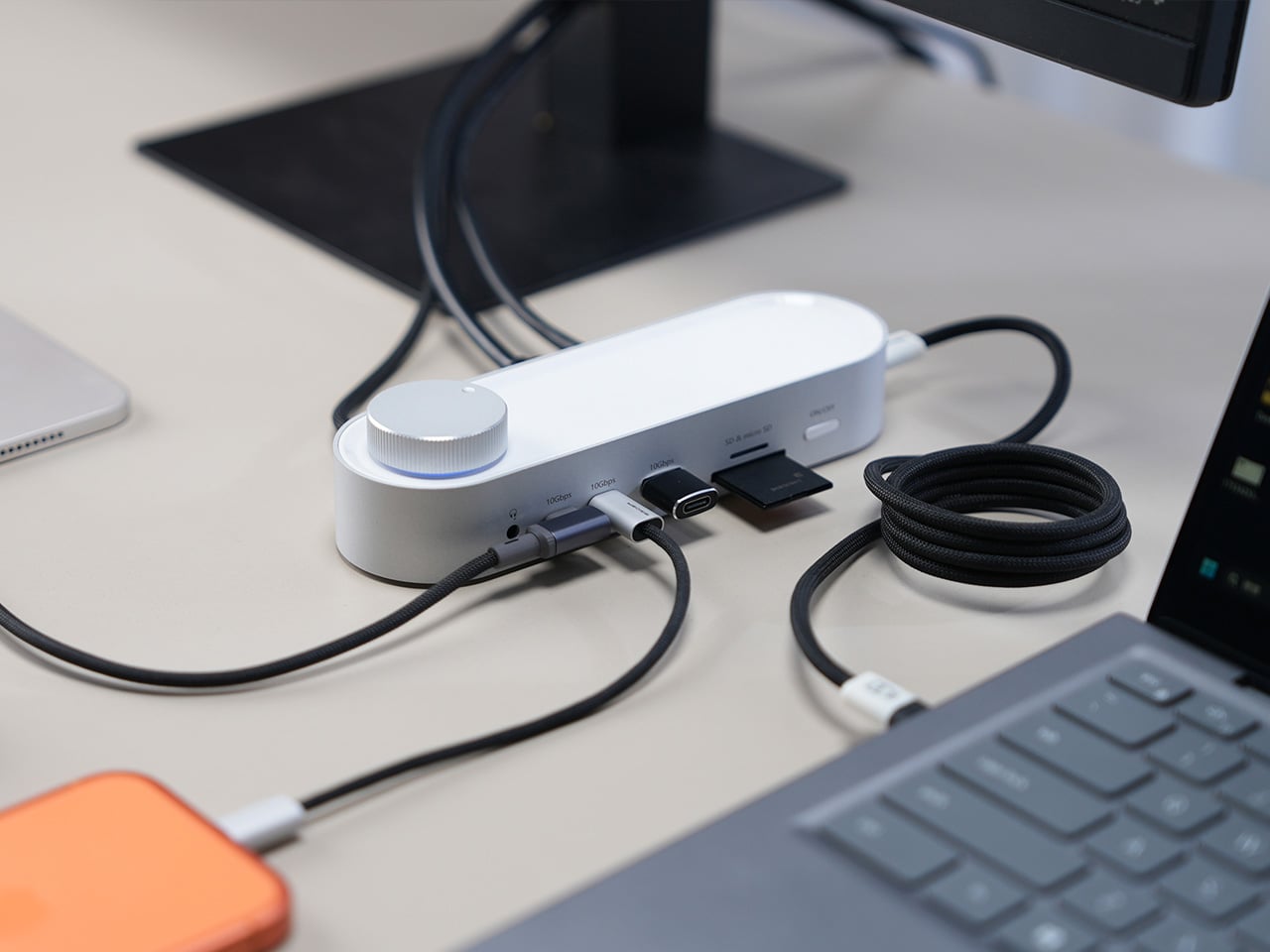
That habit of hiding docks makes sense, since most of them aren’t exactly something you’d want on display. The Memdock G3 takes a different approach. It’s a 13-in-1 docking station that doesn’t look the part in the way most docks do, and that’s a compliment. With a rounded aluminum body and a physical volume knob at one end, it’s designed to sit on the desk, not behind it.

Designer: Memdock

Click Here to Buy Now: $89 $189 ($100 off). Hurry, only 135/200 left! Raised over $50,000.

The aluminum shell is both light and sturdy. Weighing just 175g and measuring 17cm in length, it won’t crowd any desk. The silver-white finish sits comfortably alongside a MacBook or a Surface without looking out of place. A one-touch power switch keeps things simple, while the knurled volume knob doubles as a status indicator with a blue ring glowing softly at its base.

Where the G3 separates itself from generic hubs is with its dual HDMI outputs, both capable of 4K at 60Hz. Whether you’re juggling two monitors or spreading your workspace across screens, the setup doesn’t need extra adapters or complicated display routing. It works across Windows and macOS without additional drivers, so plugging in is genuinely all you need to get a full dual-screen arrangement running.

Charging is another area where the G3 keeps things clean. The 100W PD port can keep a laptop topped up while everything else stays connected, which means you don’t need a separate charger taking up another outlet. Pass-through charging also stays active even when the dock is switched off, so your devices keep charging overnight without you having to think about it.

On the data side, the G3 carries multiple 10Gbps connections, including USB-C, which is meaningfully faster than the 5Gbps typical of most docks in its category. Moving a batch of raw photos or offloading footage from an external drive feels noticeably quicker, cutting the time you’d otherwise spend watching a progress bar crawl. Two USB-A ports handle the everyday stuff, from keyboards and mice to thumb drives.

Photographers and video shooters will appreciate having both an SD and a TF slot built in, which removes the hassle of hunting for a separate card reader every time they need to pull files off a camera. Pair that with a Gigabit Ethernet port for a steadier wired connection, and the G3 handles a range of workflows that most hubs can’t without reaching for yet another dongle.

The volume knob deserves a separate mention, not just as a feature, but as a design choice that says something about the G3’s priorities. Instead of digging through a settings panel every time you want to nudge the audio on a call, you just reach over and turn it. It’s a small thing, but it’s the kind of immediate, tactile control that feels obvious once you have it.

Docking stations rarely get treated like products worth designing with real care. They sit at the junction of display, power, data, and audio, making them genuinely central to how a desk functions, yet they’re almost always designed as if nobody will ever look at them. The Memdock G3 is a reminder that the things holding a workspace together can be just as thoughtfully considered as anything else on the desk.

Click Here to Buy Now: $89 $189 ($100 off). Hurry, only 135/200 left! Raised over $50,000.

The post The Memdock G3 Is the 13-Port Dock You Don’t Have to Hide Anymore first appeared on Yanko Design.

This Ceramic Vase Is Actually a Phone Speaker That Needs No Power

Par : JC Torres
12 mai 2026 à 16:20

The home has become increasingly cluttered with gadgets that need charging, pairing, and their own dedicated spaces. Even something as simple as playing music from a smartphone often involves a Bluetooth speaker sitting on a shelf, waiting for its battery to drain. There’s been a quiet counter-movement in product design, where objects do their jobs without power and sit in a room the way a vase or a mug would.

Kenji Abe’s ECHO is exactly that kind of object. It’s an analog speaker that amplifies smartphone audio simply by being set on top of the phone, requiring no power, no pairing, and no setup beyond placing it down. The concept takes its cues from wind instruments and seashells, two forms that have been shaping and projecting sound for centuries without the help of electricity.

Designer: Kenji Abe

The inside of ECHO works like a chamber, built to catch the phone’s audio and carry it outward in soft, diffused waves rather than projecting it directly. The geometry draws from the same logic as a cupped hand, but with more control over how sound travels. The result isn’t a dramatic volume boost so much as a room-filling quality that feels warmer than a powered speaker on a desk.

The choice of material makes as much of a statement as the form. Abe uses glazed ceramic, the same material found in vases, mugs, and tableware, giving ECHO a texture and presence that belongs in a home rather than on a tech shelf. It doesn’t look like an accessory. It looks like something that was always there, something that simply happened to be placed near a phone.

That quality matters when the phone is on the kitchen counter and you want music while cooking, or on a desk where you’d rather not have a speaker taking up permanent residence. ECHO doesn’t need to live next to a charging cable or be put away between uses. It sits on the table and becomes part of the room, as unobtrusive as any other ceramic piece nearby.

A guest walking in wouldn’t necessarily clock it as a tech product. That’s partly the point. The glazed surface catches light the way pottery does, and the form is quiet enough to sit beside books or plants without demanding attention. When a phone is slid underneath it, it starts doing its job. When the phone is gone, it just stays there, still looking like it belongs. The same underlying principle runs through the Battery-free Amplifying iSpeakers, where a Duralumin metal enclosure amplifies a smartphone’s audio without any power.

Abe designed ECHO to exist comfortably in a room even when it isn’t doing anything, a goal most speakers never consider. Most audio accessories announce themselves. This one quietly waits, and when a phone is close enough to fill the cavity with sound, the room gets a little warmer and a little fuller without anyone having to reach for a power button.

The post This Ceramic Vase Is Actually a Phone Speaker That Needs No Power first appeared on Yanko Design.

The 5 Best Tech Gadgets of May 2026

12 mai 2026 à 11:40

May 2026 is a good time to be paying attention. Gadgets aren’t just getting faster or thinner; the best ones this month are getting more intentional. There’s a shared thread running through every standout: each was built around a real constraint, a real behavior, or a real cultural moment, rather than a spec sheet searching for an audience. Five products rose above the rest, and each earns its spot for a distinctly different reason.

From a foldable phone that demolishes the category’s $800 price floor to a Nintendo Switch add-on that turns a gaming console into a live production rig, the range here is unusually wide. What connects them is the quality of thinking underneath. These aren’t renders looking for investment. They’re real objects designed to change how you work, listen, create, and move through a day. That’s the only brief that actually matters.

1. NASA Artemis Watch 2.0

NASA’s Artemis II lifted off from Kennedy Space Center on April 1, 2026, carrying four astronauts on humanity’s first crewed lunar journey in over 50 years. CircuitMess timed the NASA Artemis Watch 2.0 directly into that cultural gravity. At $129, it’s a fully assembled, ready-to-use programmable smartwatch built around a dual-core ESP32 microcontroller, with a full-color LCD screen, accelerometer, gyroscope, compass, and temperature sensor packed into a wristband designed for anyone aged nine and up who wants more than a fitness tracker strapped to their wrist.

What makes it worth your attention is the depth it offers without demanding anything upfront. Out of the box, it pairs with iOS and Android over Bluetooth for activity tracking and notifications. When curiosity takes over, the firmware is fully open-source and reprogrammable in Python, CircuitBlocks, or the Arduino IDE. Build custom watch faces, write your own apps, and modify sensor behavior as far down as you want to go. The Artemis Watch 2.0 is one of the rarer gadgets at this price: it genuinely grows with the person wearing it.

What we like

  • Fully open-source firmware supports Python, CircuitBlocks, and Arduino, giving both beginners and experienced coders meaningful room to explore and build
  • Ships fully assembled and ready to use straight out of the box, lowering the barrier to entry without removing any of the technical depth underneath

What we dislike

  • At $129, it asks for more commitment than most impulse purchases in the kids’ tech category allow for
  • Screen performance in direct sunlight hasn’t been addressed in any available documentation

2. OrigamiSwift Mouse

Every frequent traveler has made the same quiet compromise: leave the proper mouse at home or carry something too small to work with comfortably for more than an hour. OrigamiSwift was built precisely around that problem. It’s a Bluetooth mouse that folds flat when not in use, weighs just 40 grams, and opens into full working position in under half a second. The origami-inspired form isn’t a styling exercise. It’s a structural answer to the oldest tension in portable peripherals: comfort has always cost you size.

The ergonomic shaping holds up across extended work sessions, which matters more than most product pages acknowledge. Whether you’re finalizing a presentation at an airport gate or editing documents in a co-working space, OrigamiSwift stays comfortable in your hand and disappears into a bag when you’re done. The ultra-thin profile and minimal build weight mean it never adds anything meaningful to your load. For anyone who genuinely works from wherever they happen to be, this is the mouse that finally makes sense to own.

Click Here to Buy Now: $85.00

What we like

  • 40-gram weight and flat-fold profile make it practically invisible in any bag, disappearing entirely until you actually need it
  • Sub-0.5-second activation means there’s no friction at all between being packed and being productive

What we dislike

  • Available listings don’t confirm DPI range or scroll wheel responsiveness for anyone doing precision work
  • Bluetooth-only connectivity may create compatibility friction with older desktop setups that lack wireless support

3. Ai+ Nova Flip

The foldable phone category has spent five years convincing itself that the flip experience carries a natural premium of $800 or more. Ai+ is testing that assumption head-on with the Nova Flip, launched in India at Rs 29,999, roughly $320, making it the most accessible foldable phone on the market. The inner display is a 6.9-inch AMOLED panel resolving at 2790 x 1188 pixels, complemented by a 3.1-inch AMOLED cover screen. MediaTek’s Dimensity 7300 handles processing, paired with 8GB of LPDDR4X RAM and 256GB of internal storage.

The spec list doesn’t read like a budget compromise. A 50-megapixel primary camera, a 32-megapixel front shooter, and a 4325mAh battery with 33W wired charging all hold credibly against devices at double the price. 5G, NFC, and an IP64 dust and splash rating close out a package that would feel serious in any category. The Nova Flip doesn’t just undercut the competition on price. It quietly forces a harder conversation about what the flip form factor has genuinely been worth at $1,000 all along.

What we like

  • $320 pricing opens the foldable phone experience to an entirely new audience that the category has ignored since its beginning
  • The 4325mAh battery is a genuinely surprising capacity for the flip form factor at any price point, let alone this one

What we dislike

  • The 2-megapixel depth lens reads as the weakest component in an otherwise strong and well-considered camera array
  • Long-term hinge durability at this price tier is unproven and worth tracking carefully over time

4. Akai MPC Switch

Alquemy’s Akai MPC Switch concept asks a question that feels obvious the moment someone finally puts it to you: if laptop-grade software can run on portable hardware, why can’t a capable gaming console handle serious music production? The MPC Switch is a pair of controller units designed to snap directly onto the sides of a Nintendo Switch, replacing the Joy-Cons with MIDI inputs, outputs, and a full DAW running on the console’s own screen. The control layout reflects real production workflows rather than a stylized render built for social media.

The appeal runs deeper than the novelty of the form. The concept treats the Switch as a legitimate interface surface: something you game on when you need to and produce or perform on when the moment calls for it. Swap the Joy-Cons for the MIDI setup, and you’re there. Whether Nintendo or Akai ever moves this into production is a separate question entirely, but Alquemy has made a persuasive case that the idea deserves a real answer. The best concepts don’t just look good. They make you wonder why nobody shipped it first.

What we like

  • MIDI integration and a credible DAW interface position the Switch as a serious production platform rather than a novelty peripheral
  • The Joy-Con snap mechanism makes the transition between gaming and music production genuinely seamless in concept

What we dislike

  • No confirmed production timeline means this remains aspirational, with no clear path in your hands
  • The Switch’s processing ceiling may be a real constraint for complex, multi-layer production sessions

5. StillFrame Headphones

Most headphone designs land at one of two poles: the over-ear build that announces itself before you even put it on, and the in-ear solution that disappears but gives nothing back in soundstage. StillFrame lands somewhere more considered than either. At 103 grams, it sits closer to weightless than wearable. The 40mm drivers are tuned for a wide, open soundstage that pulls spatial detail and melodic texture out of tracks that most headphones flatten into undifferentiated background noise.

Active noise cancellation closes you off when focus demands it. Transparency mode reconnects you to the room when the world around you matters more. Battery holds at 24 hours, covering a full workday, an overnight flight, and the morning after with no cable required. Switching between modes takes a single tap. StillFrame was designed around the premise that how you listen should adapt to where you are, not the other way around. That’s a harder brief to execute cleanly than it sounds, and the weight alone suggests it’s been taken seriously.

Click Here to Buy Now: $245.00

What we like

  • 103 grams is a genuinely rare achievement for an over-ear headphone carrying both ANC and full-size 40mm drivers
  • 24-hour battery life covers the kind of all-day, real-world use that most headphones in this category only claim to handle

What we dislike

  • No published information on codec support, like LDAC or aptX, for listeners who prioritize wireless audio fidelity
  • Colorway and finish options appear limited in current listings, which may be a sticking point for buyers who care about visual identity

The Only Standard That Matters Is the One You Can Feel

May 2026’s strongest gadgets share something harder to write into a spec sheet than battery life or pixel count. Each was designed around a specific friction point and resolved it with a precision that feels purposeful rather than accidental. The Artemis Watch converts a cultural moment into a learning platform. The Nova Flip resets the floor of an entire category. The OrigamiSwift solves a portability problem that dozens of mice before it never genuinely addressed.

StillFrame and the Akai MPC Switch represent opposite ends of the development spectrum, one shipping and one conceptual, but both make the same underlying argument: that considered design changes the terms of what a product is allowed to be. Whether you’re optimizing a travel bag or rethinking a music studio from a gaming console, the standard these five set is worth taking seriously. The best gadgets this month aren’t the loudest ones in the room. They’re the most resolved.

The post The 5 Best Tech Gadgets of May 2026 first appeared on Yanko Design.

d64 Just Packed an Entire Dice Collection Into a Tiny 1980s Computer

Par : JC Torres
12 mai 2026 à 09:16

Tabletop roleplaying games have an accessory problem. The dice alone can take over a corner of any gaming table, each one representing a different die type that the rules will inevitably call for at the least convenient moment. Tracking down the right d10 mid-session, or explaining to a new player why there are two different ten-sided dice in the bag, is just one of those small but reliable annoyances that experienced players have long since stopped questioning.

The Console’88 from d64Computing is a compact digital dice roller that handles the entire set from d4 through d100 in a single device, the size of a pocket calculator. What makes it genuinely interesting, though, isn’t just the function; it’s that the designer chose to dress it up as a miniature 1980s computer, complete with a CGA color display, vector graphics, boot-screen text, and the kind of visual language that looks like it was pulled straight out of a 1984 computer catalog.

Designer: d64Computing

Selecting a die type is done through a rotary dial and a button underneath the faux keyboard, which fits the era aesthetically and keeps the interaction simple. Spin it to the die you want, and get your result. The randomness runs at microsecond precision, so the results are genuinely unpredictable rather than cycling through a predictable sequence. For anyone who’s ever side-eyed an app-based roller and wondered about its actual randomness, that’s a meaningful detail.

The sounds are what push it over from clever gadget into something with real personality. The Console’88 plays 1980s video game audio when you roll, and it apparently has dedicated sound effects for critical successes and critical failures, which is the kind of contextually appropriate design decision that’s easy to appreciate at an actual gaming table. A crit that’s announced by a triumphant eight-bit jingle lands differently than a number quietly appearing on a phone screen.

There’s an argument to be made for physical dice that has nothing to do with practicality. Rolling actual dice is tactile, dramatic, and central to the experience for a lot of players. But for anyone who travels frequently to gaming sessions, runs games for beginners without their own dice, or simply wants something that takes up less space on an already crowded table, a single device covering every die type is a reasonable swap to make.

The design commitment here is what separates the Console’88 from a generic electronic dice app. This thing looks like it belongs on a desk next to a Commodore 64, and reviews consistently call out the visual quality of the vector graphics and the charm of the retro computer case. It’s a product that clearly started from an aesthetic vision rather than pure function, and the function turned out to be genuinely good on top of it.

The post d64 Just Packed an Entire Dice Collection Into a Tiny 1980s Computer first appeared on Yanko Design.

Sony’s PS6 Could Triple the PS5’s Power. It Could Also Cost $800 and Land in 2029

Par : Sarang Sheth
12 mai 2026 à 00:30

Seven years is a strange unit of time. Long enough to finish a PhD, short enough to remember an event vividly, and apparently, exactly long enough for Sony to build, test, manufacture, and ship a new generation of PlayStation hardware. PS3 to PS4, PS4 to PS5: seven years, twice, with the precision of a Swiss movement. The console industry built its entire release calendar ecosystem around that cadence. Publishers scheduled their biggest titles around it. Retailers planned inventory cycles for it. Analysts forecast revenue curves based on it. So the news that Sony has not yet decided when the PS6 will launch, with Bloomberg and MST International both pointing toward 2028 at the earliest (if not 2029), carries weight well beyond a single product launch.

The culprit is DDR7 memory, or more precisely, the catastrophic shortage of it, as AI data centers absorb the global supply of high-bandwidth RAM faster than Samsung, SK Hynix, and Micron can produce it. One year of delay sounds manageable until you zoom out. GTA6, announced in December 2023 for a 2025 launch, has been publicly delayed three separate times and is currently targeting November 2026, with bettors still skeptical. Beyond the Spider-Verse slipped from March 2024 to June 2027, a three-year crater in the release calendar of one of the most acclaimed animated franchises in history. Apple is formally retiring the single annual iPhone event in favor of a split premium-then-standard cadence. The PS6 delay is a symptom of something structural, and the structure is bending.

Image Credits: Latif Ghouali

The memory crisis at the root of Sony’s problem is unlike previous supply chain disruptions in one important way: it is being driven by a competitor class that simply outclasses consumer electronics on every financial dimension. Samsung, SK Hynix, and Micron have made a calculated pivot toward high-bandwidth memory for AI accelerators, with demand expected to grow 70 percent year-over-year in 2026 alone. Meanwhile, Alphabet and Amazon have announced capital expenditure plans of roughly $185 billion and $200 billion respectively this year, among the largest in corporate history, further intensifying competition for advanced memory. Sony is not losing a bidding war. It is sitting in a market that has structurally reorganized around different priorities, and the PS6 is waiting at the back of a very long, very expensive queue.

Sony President and CEO Hiroki Totoki addressed the uncertainty directly at the FY2025 earnings briefing, saying through a translator: “We have not yet decided on at what timing we will launch the new console, or at what prices. So we would like to really observe and follow the situation.” That is an extraordinary statement from the head of one of the most strategically disciplined hardware companies on the planet. Sony does not typically observe and follow. It plans, announces, and executes. The fact that Totoki’s language sounds more like a macroeconomist reading a volatile market than a product chief managing a launch calendar tells you everything about how abnormal this moment is.

The hardware itself, when it arrives, looks genuinely transformative. Leakers and supply chain sources indicate Sony awarded the PS6 chip contract to AMD back in 2022, with the console expected to feature a custom Zen 6 CPU and RDNA 5 GPU architecture, targeting roughly triple the PS5’s rasterization performance with 4K gaming at 120 frames per second and advanced ray tracing. A companion handheld codenamed Project Canis is reportedly riding alongside the main console as part of a unified two-device platform strategy, which would represent the most significant structural shift in PlayStation’s hardware philosophy since the PS3’s disastrous Cell processor gamble. The specs, in other words, are not the problem. The atoms are.

The delay also arrives at a peculiar competitive moment. If supply chains stabilize by 2027, Sony could target a late 2028 launch with multiple SKUs and the handheld companion. If shortages persist, the PS6 could slip to 2029 or beyond, risking market momentum loss to rivals. Microsoft has been conspicuously quiet about its own next-generation plans, and a scenario where Xbox gets to market first, even with a smaller install base, would hand the competition a narrative advantage that Sony has not faced since the PS3 era. As of early April 2026, prediction markets showed only about 25 percent probability that Sony would announce the PS6 before 2027. The crowd is not optimistic.

What the PS6 situation actually exposes is the fragility of product cycles that have been treated as laws of nature rather than engineered outcomes. GTA6 has been delayed not once or twice but three times since its December 2023 reveal, bouncing from a 2025 window to May 2026, then to its current November 19, 2026 target, with Take-Two CEO Strauss Zelnick deploying identical “we feel really good about it” language each time a new date was announced. Beyond the Spider-Verse, a sequel to a film that grossed $690 million and earned a near-universal critical consensus as a generational achievement in animation, has been pushed from March 2024 to June 2027, a three-year gap that would have been unthinkable for a franchise at that level of commercial and artistic momentum. And Apple, the company that arguably invented the modern product launch as cultural event, is now formally splitting its iPhone releases across a fall premium window and a spring standard window, with Mark Gurman reporting the expectation that this pattern continues for years to come. Clockwork, everywhere, is slipping.

Sony will ship the PS6. The hardware is real, the AMD partnership is locked, and the performance targets are serious enough to make the wait feel justified when the box finally lands on a shelf. But the seven-year cycle, that beautiful, reliable, industry-organizing drumbeat, is not coming back on its original terms. The PS6 will arrive when the memory market allows it, which is to say when AI infrastructure spending pauses long enough for consumer electronics to get a turn. That is a sentence that would have read like science fiction in 2020, when the PS5 launched on schedule into a pandemic and sold out globally within minutes. The world has reorganized itself around different priorities. The PlayStation, for the first time in a long time, has to wait in line like everyone else.

The post Sony’s PS6 Could Triple the PS5’s Power. It Could Also Cost $800 and Land in 2029 first appeared on Yanko Design.

BEYOND Expo 2026: Asia’s Biggest Tech Event Just Told the World That AI Software Was Only the Warm-Up

Par : Sarang Sheth
10 mai 2026 à 23:30

Every major tech conference eventually finds its thesis statement. CES landed on “everything is connected.” SXSW staked out culture-meets-technology. BEYOND Expo‘s thesis for 2026 is more specific, and honestly more timely: AI has spent years proving itself in software, and the interesting question now is what happens when it leaves the screen. The official theme, “AI: Digital to Physical,” takes over from last year’s theme of Transforming Uncertainty into a Trigger for Innovation. Timed perfectly around the global speculation that AI’s a bubble, it’s a genuine reflection of where the most consequential AI work is actually happening right now, in robotics labs, automotive platforms, wearables, and manufacturing floors across the Greater Bay Area.

BEYOND has been building toward this moment since Dr. Lu Gang launched it during a global lockdown in 2021, a decision he’s called delusional in hindsight during an interview with Yanko Design, but with the kind of grin that says he’d do it again. The original problem he was solving was simpler than people realize: Asia’s most interesting founders kept showing up at CES and Web Summit as attendees rather than headliners. A hardware startup out of Shenzhen with genuinely world-class AI chops would get a 3×3 booth on a back wall while the stage went to the usual suspects. BEYOND was built to fix that imbalance, and five years in, it’s working.

Click Here to know more about the BEYOND Expo 2026

The 2026 edition is aiming for 30,000 attendees, a significant jump from 2024’s 20,000, and the programming reflects a maturing event that knows its own strengths. The summit lineup spans Humanoid Robotics and Embodied AI, Enterprise Agentic Workflows, Autonomous Driving, AI-Integrated Wearables, and a PayFi and Decentralized AI track that will either feel prescient or premature depending on your priors. What ties all of it together is the through-line of AI becoming something you interact with physically, not just through a chat interface. That’s a meaningful editorial choice, and one that puts BEYOND in a different conversation than conferences still treating large language models as the whole story.

The most interesting addition this year is the GBA Innovation Tour, which gives international attendees direct access to Greater Bay Area manufacturing infrastructure. This matters more than it might sound. Lu Gang has argued for years that what makes Asia’s tech ecosystem genuinely different isn’t just the innovation pipeline, it’s the compression of the distance between idea and physical product. Watching an AI concept move from prototype to production in a Shenzhen facility in weeks rather than months is something you can describe in a keynote, but apparently you need to see it to really understand the scale and speed involved. The tour is BEYOND’s way of making that argument visceral rather than theoretical.

Last year’s theme, “Unveiling Possibilities,” was about reframing uncertainty as creative fuel, which was the right message for a chaotic moment. “AI: Digital to Physical” is more declarative, more confident. It names a specific transition that the industry is mid-stride through, and plants BEYOND squarely in the middle of it. Registration and exhibition details are live at beyondexpo.com.

Click Here to know more about the BEYOND Expo 2026

The post BEYOND Expo 2026: Asia’s Biggest Tech Event Just Told the World That AI Software Was Only the Warm-Up first appeared on Yanko Design.

Phone Cases Are Boring, This One Puts a Living Terrarium Inside

Par : JC Torres
10 mai 2026 à 17:20

Phone cases have largely settled into two camps: the ones that protect your phone without anyone noticing they exist, and the ones that make a statement with printed graphics, colors, or textures. Neither approach has found a way to make the back of a phone genuinely interesting rather than just decorated. Designer Daniel Idle found a third option that neither camp seems to have considered.

The Terrarium Phone Case is a clear resin case for the iPhone 16 Pro Max with an actual planted environment sealed inside the back cavity. Moss, small-leafed plants, and a stabilized soil substrate are embedded within the transparent shell, creating a thin cross-section of living terrain that you carry around with you wherever the phone goes. It’s a working phone case, a functional terrarium, and an oddly calming thing to have in your pocket all at once.

Designer: Daniel Idle

The construction involved 3D modeling and fabrication in clear resin, producing a case with enough depth in the back wall to house soil, roots, and plant matter. The plants are packed using a stabilized substrate that keeps the arrangement intact when the phone is picked up, rotated, tilted, or slipped into a bag. The camera cutout is fully preserved; the charging port at the bottom remains accessible; the phone continues to work exactly as it always did.

What keeps everything alive inside the sealed cavity is a closed-loop moisture system. The plants and soil generate humidity, which evaporates toward the inner surface of the resin, condenses back into droplets, and cycles down again. Light passing through the clear shell feeds the plants from outside, while the substrate provides gradual nutrient release. The whole thing is, in a fairly literal sense, a miniature ecosystem that sustains itself without any intervention from the person carrying it.

The condensation that forms on the inside of the shell during high-humidity moments is part of the visual appeal rather than a flaw to be engineered away. Seeing that vapor cycle through the case is a reminder that something in there is alive, actively breathing and responding to its environment, in the same pocket or bag as a device specifically engineered to minimize all biological interference.

There’s a running thread through design culture about bringing nature back into objects and spaces that have drifted too far from it. Biophilic design has become a recognizable term for everything from moss walls in offices to plant-filled shelving in apartments. Most of those applications treat plants as decoration layered on top of an existing design. Idle’s approach is different because the plant system isn’t decoration; it’s structural, sealed directly into the object’s body as a core component rather than an afterthought.

Of course, there will be some reservations about putting moisture and soil so close to your phone, which might be resistant to water and dust, but only from brief encounters. Good thing, then, that it’s still a concept project right now. But as a thought experiment about what a phone case could reasonably contain, it lands somewhere between genuinely novel and gently absurd, which is probably the most honest place for a good idea to start.

The post Phone Cases Are Boring, This One Puts a Living Terrarium Inside first appeared on Yanko Design.

The Roomba Guy Just Built a Robot Pet You Might Actually Love

Par : Ida Torres
9 mai 2026 à 22:30

If you’ve ever watched your Roomba bump helplessly into a chair leg for the third time and thought, “I deserve better from my robots,” you’re not alone. And apparently, neither did Colin Angle. The co-founder of iRobot, the man who essentially put a hockey puck-shaped vacuum in millions of homes, left the company in 2024 with a new question rattling around in his head: what if a robot could actually feel like it cares about you? The answer is the Familiar, the first prototype from his new startup, Familiar Machines & Magic. And it is not your average robot.

Picture a creature somewhere between a soft-eared dog and a round, slightly abstract bear. It has four legs, huge paws, and doe eyes that make it immediately charming in a way that no Roomba ever attempted to be. It’s furry, expressive, and was designed with the help of former Disney Imagineers, which explains why it looks like it belongs in an animated feature rather than a tech showcase. The Familiar has 23 degrees of freedom, meaning it can wiggle its ears, tilt its head, and wag a small nub of a tail with the kind of fluidity that feels less mechanical and more… alive. Its coat is touch-sensitive, built specifically to encourage physical interaction between you and it.

Designer: Familiar Machines & Magic

It also doesn’t talk. That detail feels deliberate and, to me, very smart. Voice assistants have trained us to think of robots as tools we command. The Familiar is going for something completely different. It’s designed to read your tone of voice, your body language, your overall energy, and respond accordingly. Angle calls it “Consumer Physical AI,” and while the label sounds like something off a product white paper, the idea behind it is genuinely compelling.

The name itself is worth noting. A “familiar” in folklore refers to the supernatural animal companion of a witch or magical figure, a creature bonded to a person not through ownership but through genuine connection. Angle’s team chose that name deliberately, and I think it sets the tone for what they’re trying to build. The goal isn’t to sell you a novelty gadget. It’s to create a new kind of relationship between humans and machines, one built on trust, attentiveness, and something approaching care.

Now, I’ll be upfront: I have feelings about this. Part of me finds it genuinely beautiful as a design concept. The Familiar was clearly approached the way good industrial design should be, with deep thought about how an object makes you feel, not just what it does. The choice to make it animal-like rather than humanoid is interesting, too. There’s far less of the uncanny valley unease that tends to follow humanoid robots around, and more of the universal warmth that most people already extend toward animals.

But another part of me wonders about the emotional stakes here. We’re already watching people form attachments to AI chatbots. A touch-sensitive, furry, expressive robot that mirrors your emotional state is a much more potent version of that. Angle has said he wants it to feel like the machine actually cares about him. That’s a lovely vision. It’s also a design brief that puts enormous responsibility on the creators to get it right, because the flip side of emotional bonding is emotional dependence.

Still, I’d be lying if I said the Familiar didn’t make me curious in the best possible way. The prototype images are almost disarmingly sweet. It looks like something you’d want sitting on the couch next to you while you read, or settled quietly in the corner while you work. If any robot was ever designed to move through your life rather than just function within it, this might be it.

The Familiar is still in the prototype stage, with no confirmed price or release date. But as debut concepts go, it’s a strong one. Whether or not it ever makes it into our homes, it raises questions about what we actually want from the machines we live with. And those questions feel well overdue.

The post The Roomba Guy Just Built a Robot Pet You Might Actually Love first appeared on Yanko Design.

This AC Does 5 Jobs at Once and Looks Like Furniture on Your Wall

Par : JC Torres
9 mai 2026 à 19:15

The split air conditioner is one of the least loved objects in any home, which is a strange thing to say about something most people couldn’t live without. It works, technically, but it tends to make its presence known in all the wrong ways. The air is too direct, the noise is a constant background irritant, and the plastic box on the wall rarely belongs in any thoughtfully designed interior.

From that frustration comes WellFlow, a concept that reframes what air conditioning is supposed to do for the people living around it. Rather than engineering a better cooling box, the designers built something closer to a wellness device. It’s a concept that received validation through the iF Design Award in 2026 and was first revealed at IFA Berlin 2025.

Designer: Merve Nur Sökmen, Zehra Sarıarslan

The most immediate shift is in how air actually moves. Conventional units push output in one direction, landing directly on whoever is in the room. WellFlow uses four-way diffusion to spread conditioned air from all sides without targeting anyone in particular. Sensors also monitor occupancy and steer airflow accordingly, so the unit quietly adapts to the room rather than expecting the room to tolerate it.

Beyond airflow, the system also handles humidity, air purity, ambient lighting, and sound. A built-in humidifier balances moisture levels rather than leaving the air artificially dry, which is one of the most common complaints about running a conventional unit through the night. Circadian lighting and integrated speakers complete the picture, creating conditions that support sleeping, concentrating, or quietly winding down, depending on what the moment calls for.

All of this adjusts automatically. The system continuously monitors temperature, humidity, and air quality, then fine-tunes its output without any manual input. A baby’s room needs different conditions than a home office or a gym corner, and WellFlow is designed to recognize those differences. Its behavior was shaped through user research spanning new parents, older adults, and people with respiratory sensitivities, groups that conventional air conditioners routinely fail to address.

The physical form is just as deliberate as the behavior. Most air conditioners are conspicuously technical, with plastic housings that fight against any interior aesthetic. WellFlow uses a woven textile front panel with rounded corners and a matte finish, giving it a material quality far more associated with furniture than appliances. An ambient light halo behind the unit softly signals its presence on the wall without demanding any attention.

A pull-out front filter makes maintenance visible and intuitive, addressing something the design team identified as a recurring trust issue with conventional units. People often aren’t sure when or how to clean their filters, and that uncertainty quietly chips away at confidence in the device. WellFlow removes that ambiguity. For a machine designed around human comfort, even that seemingly small detail ends up mattering quite a lot.

The post This AC Does 5 Jobs at Once and Looks Like Furniture on Your Wall first appeared on Yanko Design.

Samsung Just Turned a Theme Park Queue Into a 3D Safari, No Glasses

Par : JC Torres
8 mai 2026 à 17:20

Waiting in line at a theme park is one of those unavoidable experiences that nobody designs for enthusiastically. The physical infrastructure exists, the rope lines are laid out, and in the best-case scenario, there’s some signage or ambient music to occupy the time. But the queue is fundamentally dead space, a stretch of minutes that happens before the experience begins rather than as part of it. That’s a design problem, and most parks accept it as one that can’t really be solved.

Samsung’s Spatial Signage installation at Everland in South Korea offers a different answer. At the newly renovated Safari World: The Wild attraction in Yongin, the company installed its glasses-free 3D display directly in the queue area, where life-scale tigers and lions appear to surge toward visitors without so much as a pair of 3D glasses required. The wait effectively becomes the opening act.

Designer: Samsung

The technology making that possible is Samsung’s patented 3D Plate system, which uses binocular parallax to deliver separate images to each eye, tricking the brain into perceiving depth the same way it does when looking at real objects at real distances. Unlike the boxy, space-hungry installations that most 3D signage has historically required, the Spatial Signage display slots into the queue corridor in an 85-inch, portrait-oriented panel with a 52 mm profile. There’s nothing protruding into the space, and no hardware for visitors to interact with.

The content for the Everland installation was developed by Klleon, whose team prioritized capturing the natural movement rhythms of the animals rather than exaggerated cinematic effects. The result is a quality of realism that works specifically because of the environment: a queue is typically a narrow, enclosed space where visitors are already looking forward and standing relatively still, which happens to be exactly the viewing geometry where the 3D depth effect lands best.

What that means practically is that the queue line stops being something guests endure and starts being something they talk about. Anticipation for an attraction is one of the least exploited moments in the theme park visit. Visitors heading toward Safari World already have the right frame of mind for a wildlife encounter, and the display capitalizes on that readiness by delivering a preview of that encounter before anyone boards a vehicle or rounds a corner.

The broader implication is about how display technology fits into destination entertainment design. For years, attractions have used projection mapping, animatronics, and theatrical sets to build immersion during rides and shows, but the queue almost always remains a visual afterthought. A display that can occupy a narrow corridor at wall depth, require no headgear, and show content at true-to-life scale without any spatial awkwardness changes what’s possible in that format.

Everland isn’t a retail shelf or a shopping center atrium. The animals aren’t selling anything. They’re there because a flat screen in that corridor would register as background noise, and a three-dimensional tiger at eye level does not. That distinction, between content that is present and content that actually commands attention, is the problem Spatial Signage was built to solve, and the queue turned out to be a rather fitting test.

The post Samsung Just Turned a Theme Park Queue Into a 3D Safari, No Glasses first appeared on Yanko Design.

AI-powered earbuds with built-in camera expand your capabilities in the real world

Par : Gaurav Sood
8 mai 2026 à 15:20

Headphones and earbuds have, over the last couple of years, become staples of this fast-paced world for good reason. The little audio gear essentials can do a multitude of tasks with just the push of a tactile button or pinch gesture. They can trigger smart assistant support for a smarter you, and if this concept were to be imagined, they can give you a pair of smart eyes, too.

The idea of a pair of earbuds with integrated cameras is not new, as Emil Lukas imagined, and now another concept reinforces the merit in having a pair of lenses on earbuds. Dubbed Lightwear, the earbuds look something straight out of a sci-fi flick, but underneath, they are a pair of smart assistant earphones that enhance your environmental perception in real time.

Designer: Suosi Design

Touted as the world’s first AI-powered earphones, Lightwear comes with a set of HD camera lenses to expand the sense perception as a vision module to interpret the surroundings and deliver the desired result. One can detail them via voice command about any information required in real time, and the buds respond with a detailed set of instructions or navigation guidance. Having gesture control support, the buds can control the connected home devices remotely using just gesture commands. All the data fed into the smart data system is end-to-end encrypted and stored locally. For enhanced privacy and protection, the sensitive data is automatically cleared on a scheduled cycle.

Compared to Emil’s version, these earbuds have a very downplayed camera presence, which I prefer. They look and feel just like any normal earbud, but have a function that makes them stand out from most pairs of earbuds that have the predictable features. Unlike other AI-powered earbuds, these stand true to their name as they come with the added visual apparatus to put forth better results. The use of AI functions is not limited to the earbuds, since the charging case does the same. This removes the use-case scenario to just when the earbuds are being worn. Loaded with highly sensitive microphones, the AI features can be triggered anytime the user wants. Privacy is also taken care of, as the user can opt to activate the fingerprint unlock module to prevent any unauthorized use.

These have an over-the-ear design, reminiscent of the way IEMs sit flush on the ears. The battery resides in those lobes, and although the designers don’t specifically talk about the usage time, these should last longer than TWS earbuds. Nor is there a specific word about the sound quality, ANC levels, or the app features. But then it’s just a concept centred on the form factor and usability.

The post AI-powered earbuds with built-in camera expand your capabilities in the real world first appeared on Yanko Design.

The TrackPoint Was Always Laptop-Only, This $52 Bean Changes That

Par : JC Torres
8 mai 2026 à 14:20

The pointing stick is one of the more divisive input devices in computing history. Lenovo’s TrackPoint has a devoted following, built around people who never want to lift their hands off the keyboard home row just to move a cursor. Everyone else finds the red nub somewhere between baffling and genuinely annoying. Either way, it has stayed locked to laptop keyboards for decades, with essentially no standalone options available.

Ploopy, the Canadian open-source hardware company known for its lineup of trackballs and trackpads, has changed that with the Bean. It’s a standalone external pointing stick that connects over USB-C and sits flat on a desk. Think of it as a TrackPoint you don’t have to buy a ThinkPad to access, with a few deliberate improvements added to address the weaknesses that nub has always had.

Designer: Ploopy

The Bean measures 84mm x 64mm x 16mm and houses a red pointing nub near the center of its flat, 3D printed case. Unlike the fixed nubs built into laptop keyboards, this one has additional travel in its movement, which Ploopy says helps reduce fatigue from pushing a stiffer stick over long sessions. Four buttons flank the nub, covering the standard left, right, middle click, and scroll by default.

None of those defaults is locked in. The Bean runs QMK open-source firmware on a Raspberry Pi RP2040 microcontroller, and remapping any of the four Omron D2LS-21 buttons takes just a few minutes using the free VIA web app. There are no drivers to install and no proprietary software to deal with, just a browser-based tool that reads the device and lets you assign functions however you like.

For anyone who finds the conventional mouse hard on their wrist, or simply prefers keeping their hands positioned in front of them rather than reaching out to one side constantly, a pointing stick can make a noticeable difference over long sessions. You nudge the nub, and the cursor moves without your palm going anywhere. It’s a small thing until it isn’t, especially for people managing repetitive strain concerns.

Like everything else Ploopy makes, the Bean is completely open source. Hardware design files and firmware are both on GitHub, so anyone who wants to print their own case, modify the button layout, or write custom firmware from scratch has everything they need to do it. That kind of transparency is unusual for any consumer input device and puts Ploopy in a different category from virtually every competitor.

The Bean is available now for $70 CAD (around $52 USD), which is reasonable for a device with this much flexibility built in. It isn’t going to pull in anyone who has never thought about pointing sticks before, but for the enthusiast crowd that has been waiting for a standalone option this customizable and this open, it’s about as close to a purpose-built answer as anyone has delivered.

The post The TrackPoint Was Always Laptop-Only, This $52 Bean Changes That first appeared on Yanko Design.

A Mouse You Can Squeeze Like a Stress Ball While You Work

Par : JC Torres
2 mai 2026 à 22:30

The computer mouse hasn’t changed much in decades. Still mostly hard plastic, still shaped like a bar of soap, still asking your hand to grip something that gives absolutely nothing back. The rest of the desk setup has evolved, ergonomic chairs, standing desks, wrist rests, but the one device your hand touches for eight hours straight has remained stubbornly rigid and deeply uninteresting.

The PILLIGA mouse concept makes a fairly obvious argument for why that should change. Instead of hard plastic, the entire upper chassis is a squishy, flexible membrane packed with a viscous, translucent gel. It’s the same basic impulse that makes people reach for a stress ball mid-meeting, except it’s also the thing you need to get any work done.

Designer: Guillermo Gonzalez

The thinking behind it is straightforward enough. Deadline pressure builds, calls run long, and the urge to fidget becomes almost impossible to ignore. Rather than keeping a stress ball in the desk drawer as a separate ritual, the mouse folds that habit directly into the tool that’s already in your hand. You can squeeze, press, or knead the gel without ever lifting your hand off your workflow.

The dome shape isn’t just for show, either. It follows the natural arch of your palm rather than forcing your hand flat against a hard surface, and the gel underneath absorbs the kind of low-level muscular strain that builds up quietly over hours of clicking and scrolling. It’s the sort of ergonomic consideration that usually requires its own dedicated accessory, not just a different material.

The controls themselves are sensibly laid out. A flat circular interface sits embedded in the front of the mouse, cleanly split for left and right clicks, with a textured, rubberized scroll wheel running between them. A USB-C port at the front handles charging, keeping the wireless design intact without the inconvenience of a separate charging dock. The bottom carries the optical sensor and power switch.

What makes the PILLIGA mouse concept genuinely interesting is how far it extends color as a design element. The gel comes in several variants, from vivid green with gold flecks and a blue version scattered with purple glitter, to darker, more subdued options that look considerably more at home on a professional desk. Each colorway pairs with a matching base and click interface, making the whole thing feel deliberate.

That range matters. The more reserved colorways hint that this isn’t a novelty item for a niche corner of the internet; it works just as comfortably on a professional desk as it does on a creative’s workstation. The gel doesn’t make it look cheap. It makes it look like something designed by someone who gave serious thought to what a mouse should feel like.

Concepts like the PILLIGA are more useful as provocations than promises. Computer mouse design has been coasting on the same assumptions for decades, and the idea that your primary input device could also be physically satisfying to hold hasn’t come up often enough. The gel-filled body raises the question, and that’s honestly more than most peripheral design manages to do.

The post A Mouse You Can Squeeze Like a Stress Ball While You Work first appeared on Yanko Design.

❌
❌