❌

Vue normale

  • ✇Yanko Design
  • Mori the Mushroom Robot Offers Company Without Saying a Word
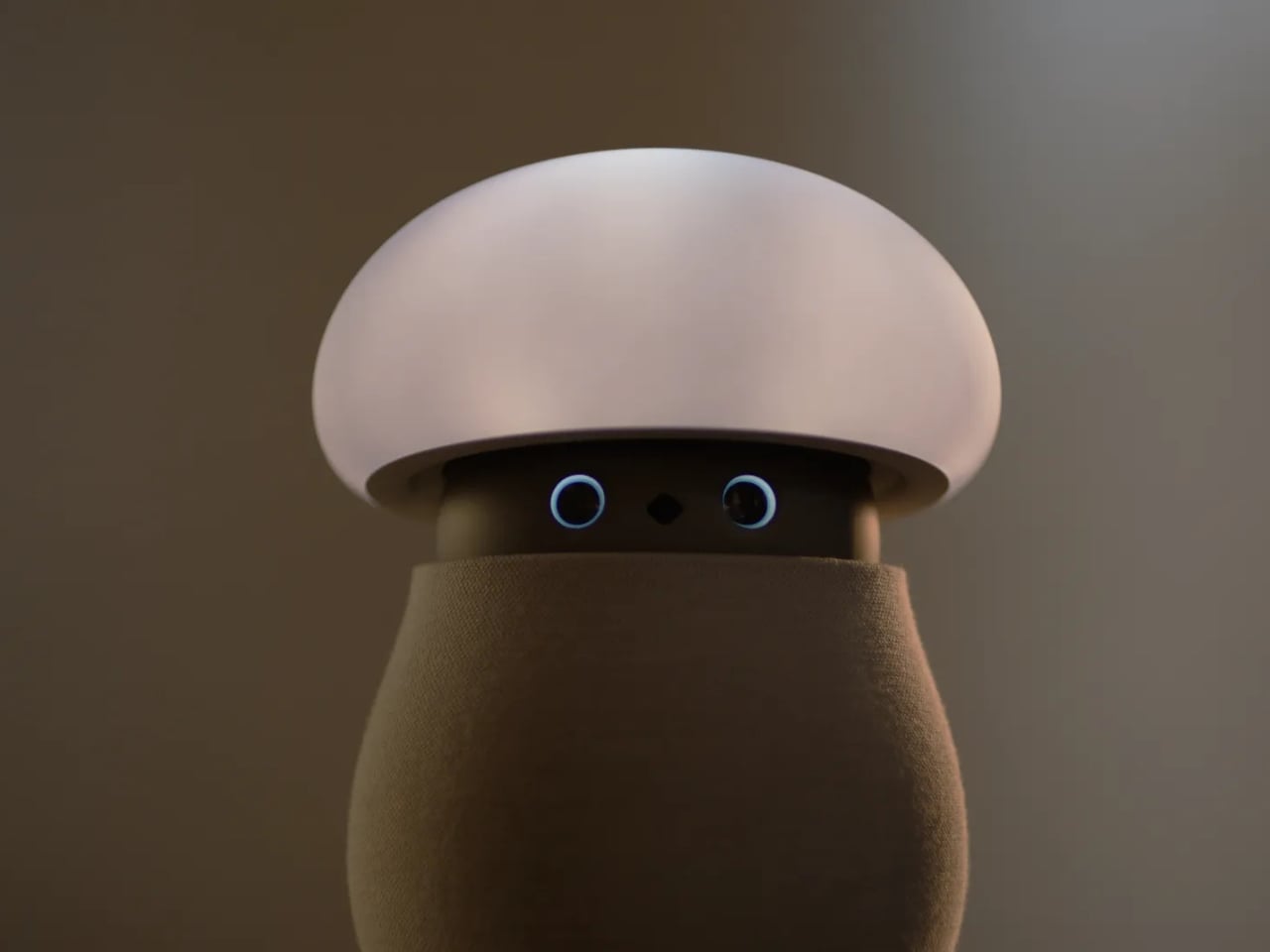
    A mushroom with glowing eyes is an easier sell for my nightstand than a miniature humanoid. OKA’s Mori takes that approachable shape and gives it a specific job: offering a little company and a reason to pause, without making another screen the center of attention. Currently offered through an early-purchase program, the companion robot uses light, sound, and movement to bring some presence to a quiet room. The ambition is modest enough to feel appealing. For anyone who wants to unwind without
     

Mori the Mushroom Robot Offers Company Without Saying a Word

23 octobre 2026 à 14:20

A mushroom with glowing eyes is an easier sell for my nightstand than a miniature humanoid. OKA’s Mori takes that approachable shape and gives it a specific job: offering a little company and a reason to pause, without making another screen the center of attention. Currently offered through an early-purchase program, the companion robot uses light, sound, and movement to bring some presence to a quiet room. The ambition is modest enough to feel appealing.

For anyone who wants to unwind without reaching for their phone, the physical design makes a good opening argument. Mori stands just under 12 inches tall at its maximum height, with a broad illuminated cap above a rounded, fabric-covered body. Two eyes peek out from underneath and the fabric contains 25 percent real wool. In the supplied photographs, the proportions suggest a small table lamp that wandered into an animated movie, then decided to stay. I’d happily make room for that silhouette.

Designer: OKA

The backstory gives that friendliness some purpose. OKA cofounder Hua Wang said he spent a decade designing mechanisms that brought people back to their phones. With Mori, he wanted a robot that belonged in a home rather than a large, intrusive machine. That’s a useful starting point. A domestic robot has to earn its place among your furniture before its intelligence becomes particularly interesting.

Mori’s controls lean into that furniture-friendly character. According to OKA, placing both hands on its base starts a guided breathing session, while patting its head makes the cap retract and turns it into a lamp. Light and natural soundscapes provide the setting for those breaks. I like the directness of those gestures. Touching an object to change its behavior feels appropriate here, especially when the proposed activity is stepping away from the usual sequence of opening an app, choosing a menu, and adjusting settings.

Importantly, Mori doesn’t speak in words. Its vocabulary consists of sounds, expressions, light, and movement. That limitation might be its most attractive feature. I don’t particularly want a bedside object to become another conversational obligation. A glance or a small movement leaves more room for interpretation, much like an animated character whose personality comes through before it says anything. The lamp setting also gives its owner a way to dial that personality down, with most companion reactions reduced. Cute still needs an off-ramp.

Of course, those expressive eyes come with a less whimsical consideration: sensing people inside their homes. OKA’s privacy policy says Mori’s core AI runs locally, with camera and microphone inputs processed on the device. Raw audio and image frames are discarded after processing, while recognition information can remain locally to distinguish users. The policy separately allows collection of account, device, and diagnostic information. That distinction matters. Local processing is a welcome design decision, but I’d still read the permissions before inviting a camera-equipped companion onto the dresser.

OKA also says Mori learns and becomes more individual through repeated interaction. That’s the promise I’d reserve judgment on until longer-term use establishes what actually changes. A familiar gesture could become endearing, or simply predictable. The interesting design challenge is giving Mori enough variation to sustain affection without making it demand attention. Its quiet role sets a higher bar than the adorable appearance initially suggests: it needs to remain pleasant when the novelty has worn off.

At $649 before taxes and shipping for First Access orders, Mori is an expensive experiment in companionship. That purchase includes two years of its Nature Time subscription; OKA says basic functions won’t require a paid plan, and the included subscription won’t automatically become a paid one. I’m drawn to the object, but the price makes its everyday behavior more important than its introductory charm. The real payoff would be a robot you enjoy having nearby even when you aren’t actively playing with it. A mushroom-shaped lamp already has a place in a home. Mori has to make the eyes worth paying for.

The post Mori the Mushroom Robot Offers Company Without Saying a Word first appeared on Yanko Design.

  • ✇Yanko Design
  • AYN Odin 3 Portal Handheld Pairs a Flat Glass Front With Sculpted Grips
    Putting a large screen on a gaming handheld is easy compared with making the whole thing comfortable to hold. AYN’s Odin 3 Portal approaches that problem with a 7-inch OLED up front and sculpted grips behind it. Now available for preorder, the Android handheld combines a broad, glass-covered face with physical controls that give your fingers somewhere other than the screen to go. That front surface stretches across the display and surrounding control areas, giving the device a flatter, more uni
     

AYN Odin 3 Portal Handheld Pairs a Flat Glass Front With Sculpted Grips

Par : JC Torres
23 octobre 2026 à 10:20

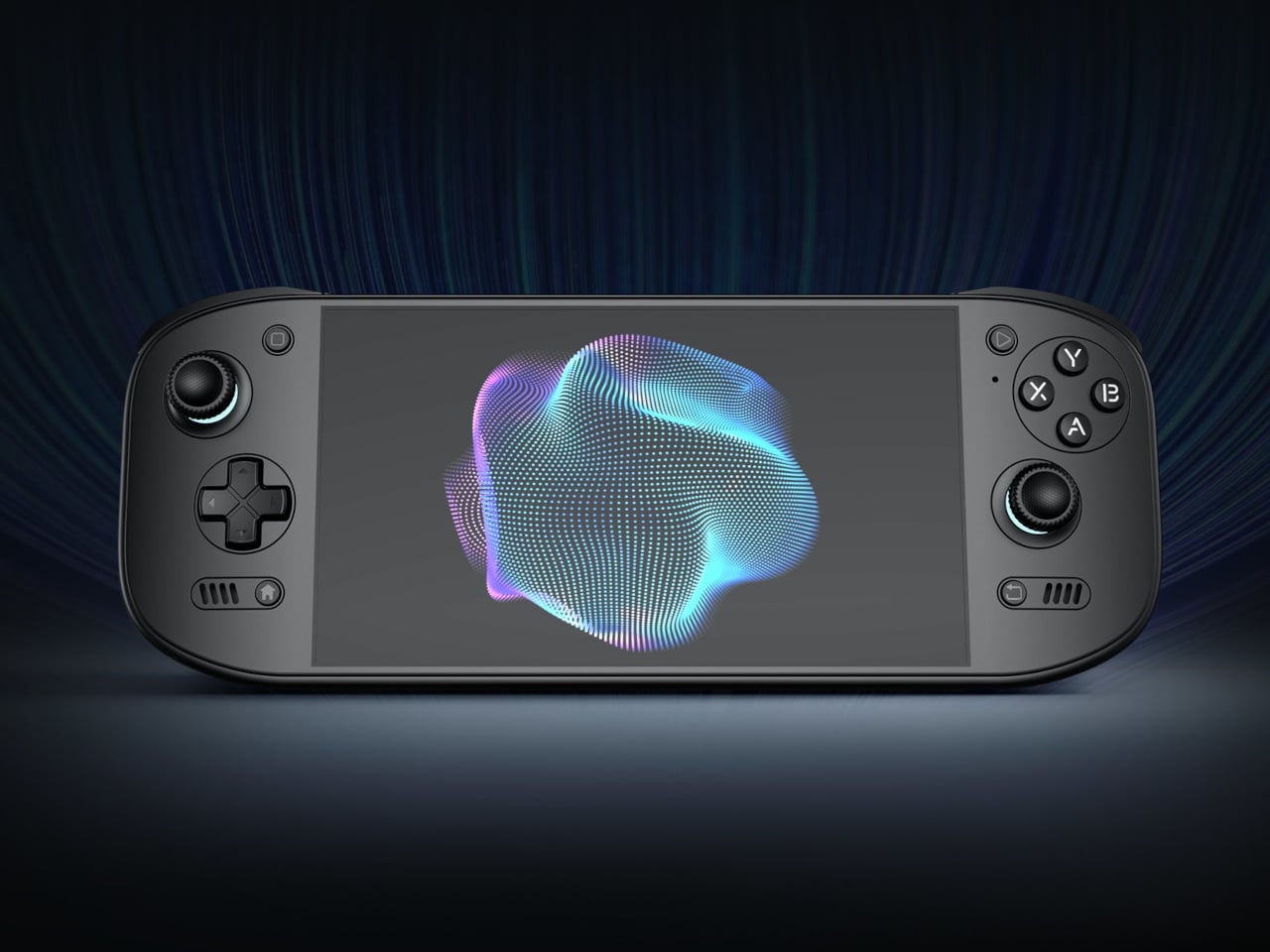
Putting a large screen on a gaming handheld is easy compared with making the whole thing comfortable to hold. AYN’s Odin 3 Portal approaches that problem with a 7-inch OLED up front and sculpted grips behind it. Now available for preorder, the Android handheld combines a broad, glass-covered face with physical controls that give your fingers somewhere other than the screen to go.

That front surface stretches across the display and surrounding control areas, giving the device a flatter, more unified appearance than a screen dropped into a chunky frame. Black keeps the boundary between panel and housing less conspicuous, while White and Cold Grey emphasize it. The latter’s purple buttons add retro flavor without turning the machine into a tribute to another console.

Designer: AYN

Turn it over, and the shape becomes less concerned with looking flat. Rounded bulges give your palms somewhere to settle, while textured shoulder buttons meet your index fingers above. The full-size Hall-effect sticks have ridged edges, and a dome D-pad sits below the left stick. These details aim to improve control, though actual comfort will depend on your hands and how you play.

The screen is a 1920×1080 OLED with a 120Hz refresh rate, giving supported games room to show smoother motion without asking you to peer at a tiny display. That doesn’t mean every game will run at 120 frames per second, of course, nor should you always crank it up. It depends on the game, settings, and your remaining battery.

Behind that screen is Qualcomm’s Dragonwing Q8 processor, paired with Android 15 and active cooling. A broad rear grille gives the internal fan room to draw air, making ventilation part of the exterior rather than hiding it completely. That’s worth remembering when you settle in with the handheld against a cushion, since the cooling system still needs an unobstructed path to breathe.

Power comes from a 9,000mAh battery, with support for 60W charging when you need to plug back in. Actual playtime will depend on the game and screen settings, so that capacity doesn’t translate into a guaranteed afternoon away from an outlet. At about 15.9 ounces, the handheld puts weight behind that screen, especially when a quick session somehow becomes an entire evening.

Storage starts at 128GB with 12GB of RAM, while the top model offers 1TB and 16GB of RAM. There’s also a microSD slot, so choosing less built-in storage doesn’t close off future expansion. AYN specifies that no games come preinstalled, however. You’re buying the hardware for your own library and setup, not a ready-made collection of nostalgic favorites waiting behind the power button.

Launch pricing starts at $399, with the 1TB version reaching $669 and shipping expected to begin in early November 2026. The pricier configuration doesn’t buy a different screen or processor, just more memory and storage than the base model. That leaves a practical choice between keeping a larger library installed and keeping the price down, particularly when a memory card remains an option.

The post AYN Odin 3 Portal Handheld Pairs a Flat Glass Front With Sculpted Grips first appeared on Yanko Design.

  • ✇Yanko Design
  • Teenage Engineering’s EP-35 Amp Has a Hidden Cable Compartment
    The back of Teenage Engineering’s EP-35 opens to reveal a compartment for cables and accessories. It’s a wonderfully unglamorous feature to put on a music gadget. An amp can look perfectly composed in a product photo, but taking it anywhere means figuring out where the supporting cast goes. Giving those loose pieces a home inside the speaker feels like an acknowledgment of how people actually use their equipment. That practical streak extends beyond storage. Listed for sale at $399, the EP-35 c
     

Teenage Engineering’s EP-35 Amp Has a Hidden Cable Compartment

23 octobre 2026 à 09:20

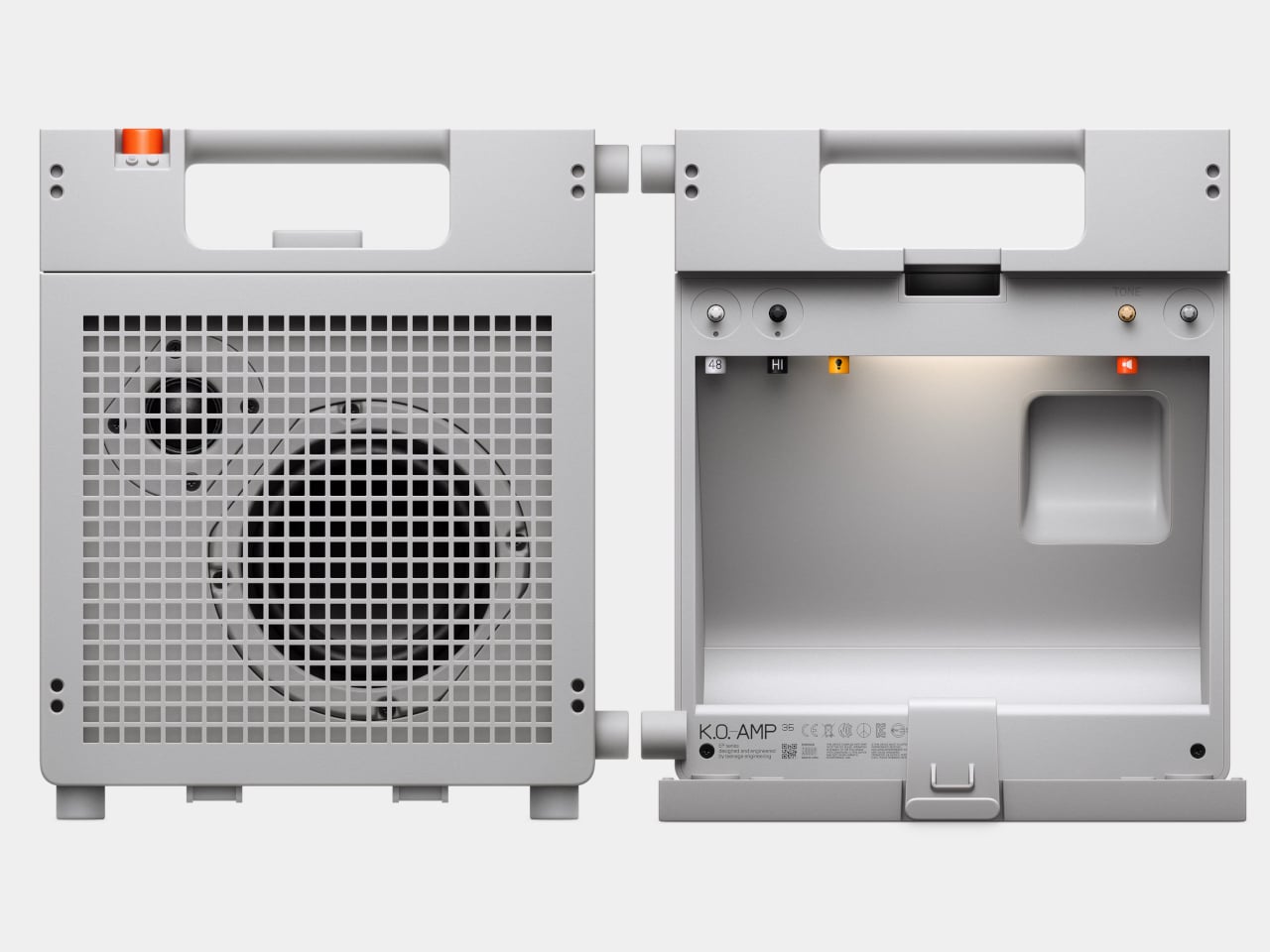
The back of Teenage Engineering’s EP-35 opens to reveal a compartment for cables and accessories. It’s a wonderfully unglamorous feature to put on a music gadget. An amp can look perfectly composed in a product photo, but taking it anywhere means figuring out where the supporting cast goes. Giving those loose pieces a home inside the speaker feels like an acknowledgment of how people actually use their equipment.

That practical streak extends beyond storage. Listed for sale at $399, the EP-35 combines a portable speaker, an instrument amplifier, and a USB audio interface. It accepts guitar, microphone, line-level, Bluetooth, and USB audio, with multiple sources able to play together. The problem it addresses is straightforward: playing guitar over a backing track, or adding vocals, shouldn’t require assembling a small equipment department. Here, those connections meet in one box.

Designer: Teenage Engineering

Visually, the EP-35 has the charm of equipment that might belong in a very stylish school science lab. Its gray body, square grille, integrated handle, and orange accents are deliberately matter-of-fact. I like that the speaker drivers remain visible behind the grid. They give the front a slightly awkward, almost characterful expression. Nothing about the proportions suggests an object desperate to disappear into your decor, which is part of its appeal.

The controls make a similar impression. There are physical dials for choosing effects and adjusting their intensity, with eight presets each for guitar and microphone. That’s an approachable arrangement: select a sound, turn a control, hear what changes. I’d rather see that direct relationship on something intended for casual playing than a screen full of options. The microphone effects even include presets called “robo choir” and “frog,” which gives you a fair idea of the intended mood.

The USB audio interface is less visually entertaining but potentially more useful. Connect the EP-35 to a computer and it can serve as a recording interface, giving the same object a role at a desk after it comes home. That continuity makes sense to me. A portable device earns its shelf space more easily when it doesn’t become redundant the moment you’re near a power outlet and a laptop.

Inside the storage compartment, Teenage Engineering has also included a small camp light. It can illuminate the compartment automatically when opened, stay on, or react to incoming audio in disco mode. Tilting the speaker backward makes those LEDs display the battery level. Some of this is useful, some is cheerfully unnecessary. I’m happy with that balance. Checking a battery through a small physical gesture is a more memorable interaction than another tiny percentage readout.

Portability does need a little perspective, though. At about seven pounds, the EP-35 is something you carry by its handle, not casually toss into a small shoulder bag. Teenage Engineering rates battery life at 12 hours with the volume set to five, so that figure shouldn’t be treated as an all-day guarantee at any loudness. It’s also splash-resistant rather than waterproof. Those distinctions matter if the appealing camp light has you mentally packing it for a weekend outdoors.

There’s room to expand the setup, too. Two EP-35s can play Bluetooth audio in stereo through broadcast mode. Teenage Engineering’s instructions let you assign left and right channels by tilting each speaker before starting that mode. Connected instruments take a different route: linking their sound between speakers requires a line-out-to-line-in cable. That’s worth understanding before imagining a completely wireless mini stage. The wireless convenience applies specifically to Bluetooth playback.

For me, the $399 price makes the most sense if those musical connections will get regular use. Someone who only wants background listening would be paying for considerable capability they might never touch. Sound quality still needs a listening test; clever packaging can’t settle that question. But I appreciate the attention paid to what happens between sessions. The music stops, the cables come out, and the EP-35 gives you somewhere to put them. That’s a modest design decision with a very recognizable payoff.

The post Teenage Engineering’s EP-35 Amp Has a Hidden Cable Compartment first appeared on Yanko Design.

  • ✇Yanko Design
  • INMO GO3 AI Glasses Review: Putting Information in Your Line of Sight
    PROS: Interchangeable batteries offer near-uninterrupted use Familiar frame styling keeps the design approachable Adjustable temples and nose pads help personalize the fit In-view translation into 98 languages reduces the need to check a phone CONS: Swapping batteries require a 5-second reboot Optional prescription lenses don't support hyperopia (farsightedness) RATINGS: AESTHETICSERGONOMICSPERFORMANCESUSTAINABILITY / REPAIRABILITYVALUE FOR MONEYEDITOR'S QUOTE:T
     

INMO GO3 AI Glasses Review: Putting Information in Your Line of Sight

Par : JC Torres
22 octobre 2026 à 21:45

PROS:


  • Interchangeable batteries offer near-uninterrupted use

  • Familiar frame styling keeps the design approachable

  • Adjustable temples and nose pads help personalize the fit

  • In-view translation into 98 languages reduces the need to check a phone

CONS:


  • Swapping batteries require a 5-second reboot

  • Optional prescription lenses don't support hyperopia (farsightedness)

RATINGS:

AESTHETICS
ERGONOMICS
PERFORMANCE
SUSTAINABILITY / REPAIRABILITY
VALUE FOR MONEY

EDITOR'S QUOTE:

The INMO GO3 AI Glasses pair familiar eyewear styling with practical translation tools and the convenience of swappable batteries.

Looking down at a phone to translate a conversation can interrupt the exchange it’s supposed to help. Reading presentation notes creates a similar problem, pulling attention away from the people in front of you. The INMO GO3 AI Glasses bring those words into view instead, putting translation and presentation tools inside a familiar rectangular frame that doesn’t require a dramatic change in personal style.

That familiar shape is only part of the appeal, though. Adjustable contact points, discreet controls, and, most importantly, a replaceable battery give the GO3 a practical foundation beyond its display. Together, they suggest an approach to smart glasses that puts everyday wear on equal footing with software features. How convincingly the GO3 brings those priorities together comes down to a few details, starting with the frame itself.

Designer: INMO

Click Here to Buy Now: $509 $699 ($190 off). Hurry, deal ends in 48-hours!

Aesthetics

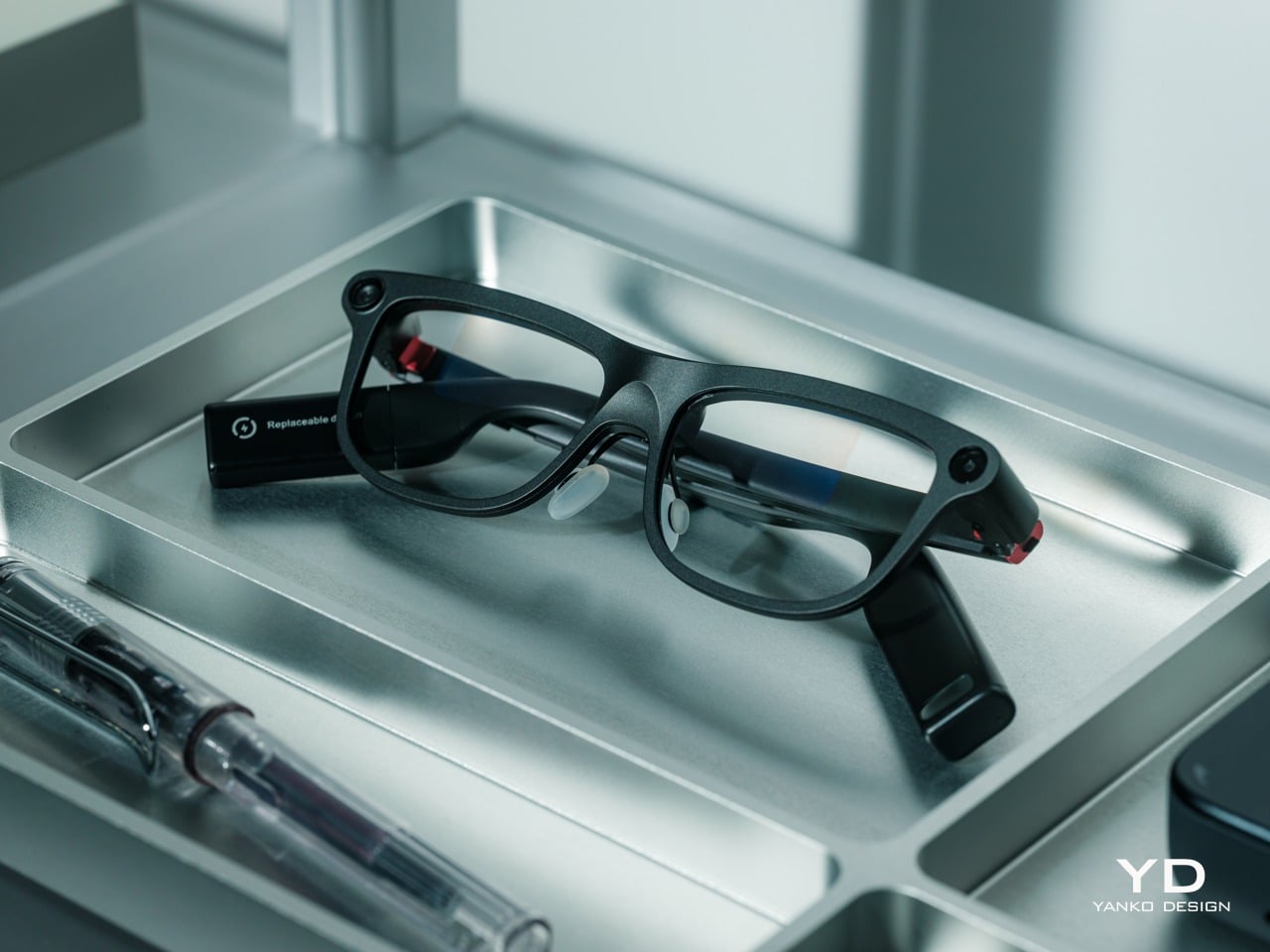
The INMO GO3’s rectangular lenses and softened corners give it the outline of conventional eyewear, although the frame has more substance than a pair of reading glasses. That’s a reasonable visual compromise, of course, given what it packs inside. The thicker brow provides room for the display hardware while giving the front a confident shape, rather than leaving its components looking like something awkwardly attached afterward.

The dark matte finish does much of the visual work. It gives the broad surfaces a quieter presence than glossy plastic would, while the small red accents around the hinges add a bit of personality. Thankfully, the color doesn’t spread across the frame. There’s enough contrast to make the details interesting without making the glasses look like equipment borrowed from a gaming setup.

The GO3 utilizes aluminum alloy and polyamide for the construction with a CNC-finished, fingerprint-resistant surface. It’s not an entirely metal object, which makes sense when you consider that the electronics also add their own weight to the equation. The frame and temples share a restrained finish instead of competing for attention through contrasting textures.

The slim temples measure around 8mm, keeping the side profile from becoming an oversized box. The curved ends retain the familiar outline of glasses, even with additional hardware inside. It isn’t dainty eyewear, admittedly, but the shape avoids the visor treatment that would make a business lunch feel like a technology demonstration.

The camera is integrated into the front rather than perched above it, and the controls follow the temples. These details help the INMO GO3 read as a somewhat fashionable object instead of gadgets sharing a frame. A supplied camera cover also provides a way to obscure the lens when recording isn’t appropriate, especially given the current conversations around smart glasses.

Ergonomics

At approximately 58 grams, the INMO GO3 has the weight of electronics to accommodate as well as the frame itself. Comfort depends on more than the number on the specification sheet. The relationship between the nose pads, temples, and ears matters as much. There’s a focus on those contact points, rather than relying on a lightweight label to explain away the fitting process.

Air-cushion nose pads support the front, while the temples offer 15 degrees of adaptive movement, at least on paper. That flexibility gives the frame room to accommodate differences in head shape. Naturally, there will be cases when the head shape just won’t fit, but INMO has tried to accommodate as many head sizes as possible.

Given we’re talking about glasses, prescription support is another important piece of that everyday equation. The GO3 uses an insert system, with INMO’s current lenses supporting nearsightedness and astigmatism, though not farsightedness. That won’t cover every prescription, but it gives supported wearers a way to combine vision correction and the display.

Operating the glasses doesn’t have to depend on talking to them. Temple touch controls and physical power and GO buttons provide alternatives, while the companion app handles setup and settings. When you’re around people or somewhere that requires a degree of silence, a discreet gesture is often preferable to a spoken command, and familiar controls help make the wearable format a little less foreign.

Performance

Two-Way Dialogue Translation – Read translations directly through the glasses, while the other person sees or hears your translated response on the phone.

The INMO GO3’s binocular green Micro-LED display uses optical waveguides, with a 640×480 resolution and a 30-degree field of view. Adjustable brightness is listed up to 1,500 nits, which is plenty even for the bright outdoors. That said, those specs clearly mark it as something more for text and guidance rather than a miniature cinema. Green lettering has a slightly retro character, but a translation or the next line of a speech doesn’t need a full-color backdrop to be useful.

Translation, of course, is the primary use case for these glasses, and the numbers are admittedly impressive. INMO lists 78 source languages and 98 target languages online, with subtitles appearing in view rather than on a phone held between speakers. Offline support covers nine languages on Android and 13 on iOS, and future updates promise even more. The phone still needs to stay paired to a phone, of course, but a missing internet connection needn’t end every supported conversation.

Built-In Teleprompter – Follow your script directly through the glasses.

For presentations, the teleprompter moves the script from a desk into the speaker’s field of view, allowing for a more natural-looking stage presence. There’s automatic voice-following advancement in 17 languages (including English, Mandarin, Cantonese, Japanese, Korean, German, French, Thai, Russian, Spanish, Portuguese, Polish, Arabic, Indonesian, Vietnamese, Dutch, and Italian), alongside manual scrolling from the temple. Other languages will be displayed, depending on the document uploaded by the user, but the pages for unsupported languages can’t be automatically turned by voice. Very few will be sitting close enough to realize you’re not exactly looking at them, but at least you won’t be spending half of the presentation staring down at your notes.

Photo Translation – Point the camera at written text and read its translation directly through the glasses.

The GO3 also offers features better used in meetings, such as recording, transcription, and AI summaries for later review. Walking and cycling directions, an AI assistant powered by ChatGPT and Gemini, and photo translation extend the same idea beyond work scenarios: put a useful answer nearby without making a phone screen the center of every activity.

Admittedly, many AI smart glasses offer similar features, but the INMO GO3’s killer feature is its interchangeable battery system. One 270mAh battery is installed in the glasses, with one spare included. Continuous use yields around 3 hours on a full charge, which is probably more than enough for most use cases. The 1,300mAh battery charging case offers three to four more charges, so you practically get a full day’s worth in total.

Where it gets interesting is how you can swap out the dead battery on the tip of the GO3 with the spare in the charging case. It’s quick and convenient, but not entirely seamless. The glasses will shut down when you pull out the battery, but plugging a fresh one in boots it up in just a few seconds. It does mean you have to briefly stop what you’re doing or make sure you’re not in the middle of something critical, but it’s better than waiting for minutes for the glasses to charge up.

Sustainability

The replaceable battery has a longer-term benefit beyond getting through a busy afternoon. An aging power cell doesn’t automatically have to take the entire pair of glasses out of service. INMO lists a replacement battery at $49, making that component a separate ownership expense. That’s a useful piece of product design: the part expected to wear with repeated charging doesn’t have to remain permanently sealed inside.

That doesn’t establish a complete sustainability story, and there’s no need to pretend otherwise. The reviewed specifications don’t establish recycled material content, comprehensive component repairability, or an end-of-life program. The more defensible advantage is the ability to keep the same frame in service when its battery needs replacing. Thoughtful care still matters, particularly for the lenses and hinges, but accessible power replacement is a concrete place to start.

Value

At $699, currently discounted to $509, the INMO GO3 asks for a commitment beyond casual curiosity. The standard package includes the glasses, installed battery, single spare, and battery charging case. That’s a coherent starting point, with the power system already accounted for. The value comes from using the display repeatedly, rather than paying for a collection of functions that remain untouched save for a few presentations or travels abroad.

The useful comparison is between priorities, rather than a contest over the longest feature list. Camera-and-audio glasses answer a different need from eyewear that puts text in view, while entertainment-focused displays serve another purpose again. For someone moving between multilingual conversations and presentations, the GO3’s combination is easier to justify. That it can also be your travel companion and AI assistant brings added value to the table, especially when you don’t look like a walking technology advertisement.

Verdict

The INMO GO3’s most appealing quality is how its design keeps returning to recognizable habits. Wear glasses, follow a conversation, glance at a script, and change a battery when necessary. The technology adds steps of its own, of course, but the physical form doesn’t ask for an entirely new routine. Its familiar outline and adaptable contact points give the translation and presentation tools a sensible place to live.

Travelers, presenters, and people working across languages have the clearest reasons to appreciate that combination. A paired phone remains part of most workflows, and battery changes belong between tasks, but neither qualification takes away the appeal of information placed closer to the conversation. There’s something refreshingly practical about glasses that leave room for ordinary interactions, even when a little green text is helping them along.

Click Here to Buy Now: $509 $699 ($190 off). Hurry, deal ends in 48-hours!

The post INMO GO3 AI Glasses Review: Putting Information in Your Line of Sight first appeared on Yanko Design.

Hugging Face’s New AI Model Lets Scientists Analyze DNA at a Fraction of the Cost

23 octobre 2026 à 09:48

Hugging Face's Carbon-X AI model lets researchers analyze DNA using natural language, with lower reported costs and local deployment options for labs.

The post Hugging Face’s New AI Model Lets Scientists Analyze DNA at a Fraction of the Cost appeared first on TechRepublic.

Nvidia Teaches a $399 Duck Robot to Walk Using AI

23 octobre 2026 à 05:08

Nvidia and Hugging Face show how a $399 duck-shaped robot learns to walk using AI simulation. Here's how Microduck works, what it costs, and when buyers may get one.

The post Nvidia Teaches a $399 Duck Robot to Walk Using AI appeared first on TechRepublic.

Zoomtopia 2026: Zoom Introduces AI Agents, New Security Controls

22 octobre 2026 à 16:50

Zoom unveils AI agents and its Unified Context Layer at Zoomtopia 2026. Learn how its new automation and security tools could affect IT teams.

The post Zoomtopia 2026: Zoom Introduces AI Agents, New Security Controls appeared first on TechRepublic.

China’s Unitree Shows Off H2-X Robot With Kung Fu Moves and Rescue Skills

22 octobre 2026 à 10:23

China's Unitree unveils the H2-X humanoid robot with kung fu moves and rescue demonstrations, but questions remain about its autonomy, safety and endurance.

The post China’s Unitree Shows Off H2-X Robot With Kung Fu Moves and Rescue Skills appeared first on TechRepublic.

❌