Vue normale

Singapore Switches On Biological Computing Rack With Living Human Neurons

24 août 2026 à 08:11

NUS, DayOne, and Cortical Labs have deployed a 20-unit biological computing rack in Singapore using living human neurons alongside silicon hardware.

The post Singapore Switches On Biological Computing Rack With Living Human Neurons appeared first on TechRepublic.

OnePlus 16 Details Leak: 9,000mAh Battery Could Be Its Biggest Upgrade

17 août 2026 à 12:29

OnePlus 16 leaks point to a 9,000mAh battery, 200MP camera, 185Hz display, and new Snapdragon chip, though most specs remain unconfirmed.

The post OnePlus 16 Details Leak: 9,000mAh Battery Could Be Its Biggest Upgrade appeared first on TechRepublic.

"Market response has far exceeded our expectations" — ASUS can't make enough laptops with RTX Spark ahead of their expected Q4 launch

I was at Computex this year when NVIDIA's RTX Spark System-on-Chip (SoC) was revealed to the world, and from the start, I had a hunch that it would be a big deal.

A powerful chip for Windows on ARM that can run every Windows app ever made? That was one of NVIDIA CEO Jensen Huang's first promises.

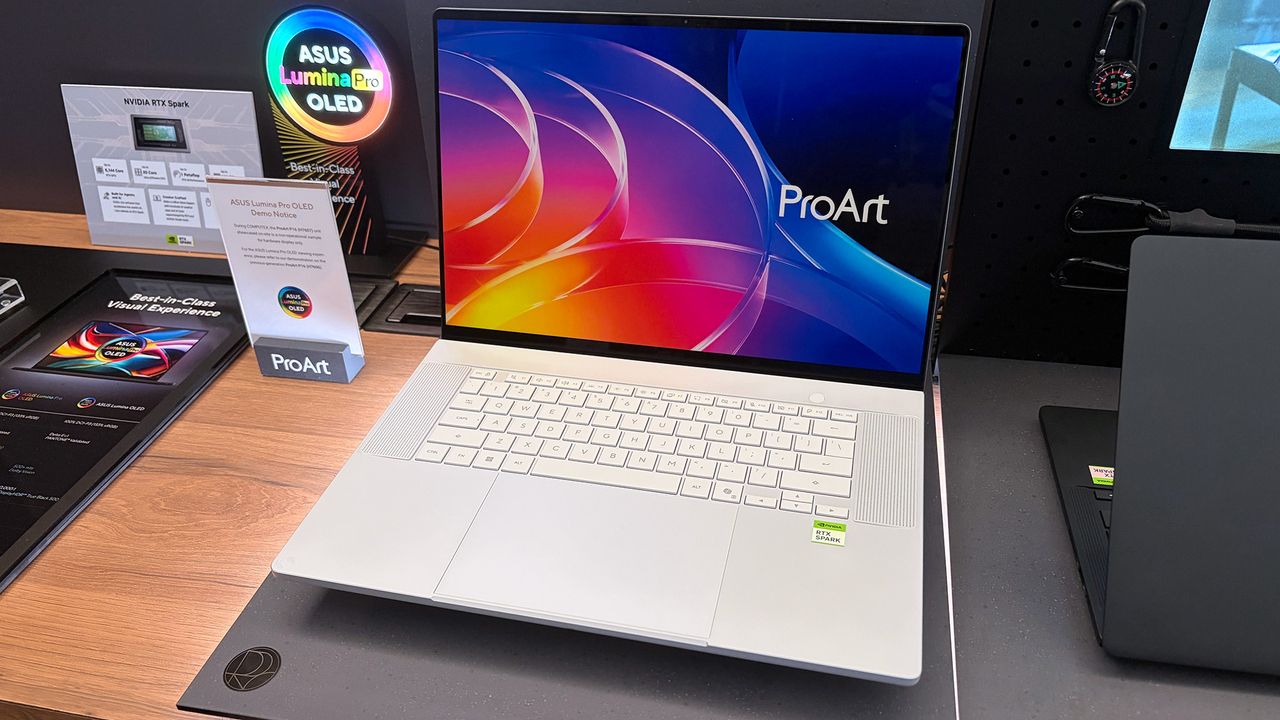
With Microsoft as its launch partner, the Surface Laptop Ultra was one of the first RTX Spark laptops announced, but ASUS was right up there with its ProArt P16 and ProArt P14, two laptops I got to see firsthand in Taipei.

Incredibly sleek and streamlined, these laptops were a smash hit on the show floor. Apparently, they're also far more popular than ASUS was expecting.

In a recent ASUS Q2 earnings call, it was revealed that the company is completely out of ProArt P14 and P16 units to ship to its partners (aka third-party retailers and distributors) as part of pre-order efforts.

As one of the first manufacturers to launch RTX Spark-based systems, the market response to pre-orders for our ProArt notebook P16 and P14 has been intense. They are currently completely sold out. [...] Regarding current demand, the market response has far exceeded our expectations. Essentially, the initial quantities we planned have already been fully pre-ordered by our channel partners. We’re continuing to place additional orders with our partners.

S.Y. Hsu, Co-CEO ASUS (ASUS Q2 earnings call)

More RTX Spark laptops are on the way, of course, and ASUS has some time to shore up supplies before the planned Q4 2026 release of the new Spark-powered ProArt PCs.

It's too bad that the earnings call doesn't mention anything about exact volumes, because it's hard to say exactly how popular these laptops really are. However, ASUS says that it's "very optimistic about next year's sales" thanks to the "high AI computing power relative to its compact size" in the RTX Spark laptops.

What is NVIDIA's RTX Spark?

ASUS ProArt P16 laptop samples on display shelving highlighting chassis and features at Computex 2026

A look at the NVIDIA RTX Spark chip that's (normally) inside the ProArt P16. (Image credit: Cale Hunt | Windows Central)

NVIDIA's RTX Spark is an ARM-powered SoC that's expected to compete directly with the likes of Intel, AMD, and Qualcomm for space in Windows 11 PCs.

I covered rumors of the "N1X" chip for months in the lead-up to Computex 2026, and indeed it seems just as powerful and efficient as pre-announcement estimates.

Spark takes efficient ARM-based CPU cores similar to those found in Qualcomm Snapdragon chips and pairs them with an NVIDIA Blackwell RTX GPU, all while drawing from a unified memory setup that can hit 128GB.

ASUS ProArt P16 laptop samples on display shelving highlighting chassis and features at Computex 2026

A broken-down example of the ASUS ProArt P16 with RTX Spark. (Image credit: Cale Hunt | Windows Central)

This combination allows for massive performance that can shred standard and AI-related tasks without requiring a bulky discrete GPU.

Throw these chips into ASUS ProArt laptops with "all-day-long" battery life, wide port variety, super slim bodies, and 4K OLED displays, and it's easy to see why there's so much interest from retail partners.

(via VideoCardz)

Click to join us on r/WindowsCentral

Join us on Reddit at r/WindowsCentral to share your insights and discuss our latest news, reviews, and more.

ASUS ProArt P16 laptop samples on display shelving highlighting chassis and features at Computex 2026

ASUS ProArt P16 laptop samples on display shelving highlighting chassis and features at Computex 2026

  • ✇Korben
  • Un script pour virer les produits sponsorisés d'Amazon
    Allez, on va faire un jeu. Cherchez un disque dur externe sur Amazon et regardez où pointe le premier lien de la page. Bingo, ça part sur une adresse en /sspa/click, autrement dit un emplacement publicitaire. Et c'est pas le mieux noté, c'est pas le moins cher, non, c'est juste celui qui a payé le plus pour être là. Et moi, ce qui me saoule vraiment, c'est qu
     

Un script pour virer les produits sponsorisés d'Amazon

17 août 2026 à 11:40

Allez, on va faire un jeu. Cherchez un disque dur externe sur Amazon et regardez où pointe le premier lien de la page. Bingo, ça part sur une adresse en /sspa/click, autrement dit un emplacement publicitaire. Et c'est pas le mieux noté, c'est pas le moins cher, non, c'est juste celui qui a payé le plus pour être là.

Et moi, ce qui me saoule vraiment, c'est que les filtres n'y peuvent rien.

Pour remédier à cela il faut sortir l'artillerie. J'ai d'abord pensé à faire un filtre uBlock Origin, puis à me coder une extension Firefox, avant de me rappeler que Tampermonkey tournait déjà dans mon navigateur.

Direction le repo Greasy Fork, donc, où traîne un script qui fait exactement ça . Une cinquantaine de règles CSS, qui dégagent du DOM les résultats sponsorisés de la recherche, les carrousels promo, les encarts publicitaires de la fiche produit, l'upsell Prime et les bannières de marque.

On passe ainsi de ça :

À ça :

Et ça fonctionne super sur toutes les versions d'Amazon, y compris Amazon.fr.

Trois réglages attendent dans le menu du gestionnaire de scripts. Un compteur qui affiche en bas de page ce qui a été retiré et pourquoi, une journalisation console pour les curieux, et une option qui redirige les pages de navigation vers la vraie liste de résultats.

Attention quand même à ce qui saute en plus des pubs. Le bloc "Les gens qui ont acheté ça, ont aussi acheté ça". Le script s'attaque aussi à Rufus, l'assistant d'achat maison et côté installation, il vous faut Tampermonkey, Violentmonkey ou Greasemonkey. Sur Firefox, ça s'arrête là. Par contre sur Chrome, depuis la version 138, il faut en plus activer un switch "Allow User Scripts" sur la fiche de l'extension, coupé par défaut sur toute extension fraîchement installée.

Voilà, j'espère que ça vous aidera à avoir un Amazon un peu plus propre. Maintenant, n'oubliez pas, Amazon, c'est le mal, donc si vous avez les moyens de payer 2x plus cher la même chose et que vous aimez passer votre vie dans les transports ou en bagnole à faire une espèce de chasse au trésor à travers toute la ville, pour trouver le produit qu'il vous faut, le mieux reste encore et toujours d'acheter dans des magasins physiques. Lol.

  • ✇Korben
  • 33 secondes pour lancer un MP3 ? C'est pas VLC, c'est Windows Defender
    Hé oui, ENCORE LUI !! Jonathan Blow, le développeur de Braid et de The Witness, a annoncé hier (le 12 août) sur X qu'il laissait tomber VLC... La raison c'est 33 putain de secondes d'attente entre un clic sur un fichier MP3 et le début de la lecture, sous Windows (évidement). C'est vrai qu'une demi-minute pour lancer un son sur une machine récente, c'est abusé ! Du coup, il est repassé au bon vieux lecteur multimédia de Microsoft. Son point de vue c'est que "tout un secteur du logiciel open sour
     

33 secondes pour lancer un MP3 ? C'est pas VLC, c'est Windows Defender

13 août 2026 à 03:58

Hé oui, ENCORE LUI !!

Jonathan Blow, le développeur de Braid et de The Witness, a annoncé hier (le 12 août) sur X qu'il laissait tomber VLC... La raison c'est 33 putain de secondes d'attente entre un clic sur un fichier MP3 et le début de la lecture, sous Windows (évidement). C'est vrai qu'une demi-minute pour lancer un son sur une machine récente, c'est abusé ! Du coup, il est repassé au bon vieux lecteur multimédia de Microsoft.

Son point de vue c'est que "tout un secteur du logiciel open source est dans un état franchement embarrassant" dès qu'il s'agit de tourner Windows. Je peux pas lui donner tord, c'est vrai que le ralentissement est réel sous Windows 11, sans qu'on sache vraiment pourquoi...

Mais heureusement, la réponse de VideoLAN ne s'est pas faite attendre et a replacer correctement le débat. Pour l'équipe de VLC, la lenteur vient d'un bug de Microsoft Defender arrivé avec une mise à jour de Windows 11, qui a mis le cache de plugins de VLC en quarantaine. L'antivirus maison de Windows a donc classé comme suspect, puis mis de côté, un fichier que VLC génère lui-même. VideoLAN écrit qu'il s'est retrouvé là "comme par magie".

Pour remettre VLC d'aplomb, VideoLAN propose donc de réinstaller le logiciel ou de régénérer ce cache. Mais pas besoin d'aller jusqu'à la réinstallation, puisque l'installeur Windows officiel dispose déjà d'un raccourci qu'il faut dans le dossier VideoLAN du menu Démarrer, "VLC media player - reset preferences and cache files".

Ce raccourci lance vlc.exe avec les deux options de remise à zéro, la configuration et le cache de plugins, puis referme aussitôt le lecteur. Ça devrait faire le taf même si attention, vos préférences partent aux chiottes avec le reste, donc si vous avez bricolé vos réglages de sortie audio, vos raccourcis clavier ou vos sous-titres, vous les perdrez. Mais ensuite, le cache, lui, se reconstruira au lancement suivant.

Après régénérer le cache n'empêche pas Defender de le rechoper par la suite. L'autre option, c'est donc d'exclure une bonne fois pour toutes vlc.exe de la liste d'analyse de l'antivirus.

Bref, ce genre de faux positif n'est pas nouveau chez Windows Defender, qui y'a pas longtemps a même pris des certificats DigiCert pour un cheval de Troie, sans parler des ISO Linux qui se font flagger régulièrement .

Voilà, hormis la comm de VLC pour le moment, personne n'a encore publié de détails techniques, et Microsoft n'a rien dit.

Source

A severe ASUS Armoury Crate vulnerability affects laptops, handhelds, and desktop PCs — Here's how to check if you're in the clear

ASUS Armoury Crate is but one piece of specialized management software that many of us have installed on our PC, perhaps without even knowing it. It comes preinstalled on ASUS gaming handhelds, including the Xbox Ally X, as well as ASUS gaming laptops.

If that sounds like hardware you use, it's time to check up on Armoury Crate. According to an August 10 update on the official ASUS advisory board, "a component used by Armoury Crate" is vulnerable and could be leaving you open to attacks.

Alongside that unmentioned component of Armoury Crate, ASUS has also released security updates for its GPU Tweak III, GPU Tweak II, and AI Suite 3 software.

This vulnerability, listed as CVE-2026-8917, comes with an 8.4 rating. That's out of a maximum of 10, meaning this isn't an issue you should ignore for long.

What does this ASUS vulnerability entail?

According to the CVE record, an "IOCTL vulnerability allows a local attacker to write a specific value to an arbitrary memory address, potentially leading to privilege escalation."

Although the CVE record doesn't mention Armoury Crate by name, it's clear that ASUS is concerned with that "certain component" alongside its other standalone software.

How do I update the vulnerable ASUS software?

Screenshot of GPU-Tweak-III software update details, including version, size, release date, SHA-256 hash, and patch notes with a

A look at the GPU Tweak III download page at the ASUS support website. (Image credit: ASUS)

Updated versions of GPU Tweak III, GPU Tweak II, and AI Suite 3 software can be directly downloaded from the ASUS support website.

You want to be sure that you're grabbing the most recent version. For GPU Tweak III, I'm seeing version 2.1.7.2. This appears to be a newer version than what's listed as affected on the CVE website.

Download interface for GPU Tweak II version 2.4.0.0, showing file details and a prominent download button.

The GPU Tweak II version on the ASUS support page appears to still be the one affected. (Image credit: ASUS)

For GPU Tweak II, I'm seeing version 2.4.0.0 on the ASUS support page; unfortunately, this version is listed on the CVE page as vulnerable, so I can only guess that ASUS hasn't yet made the necessary updates to its download packages.

It's unclear why ASUS hasn't yet made the secure version of GPU Tweak II available for download. If you're concerned, my best advice is to simply remove the software entirely until it's updated.

For AI Suite 3, I'm seeing version 3.01.10, which is thankfully newer than the affected version 2.1.2.0 listed on the CVE page.

And for the actual Armoury Crate software, you can choose to update from within the app itself.

Is there any alternative to ASUS Armoury Crate?

Computer interface showing CPU and GPU fan settings and performance modes for a ROG Zephyrus G14 laptop, featuring graphs and sliders for fan control and power limits.

A look at the G-Helper app interface for ASUS laptops and gaming handhelds. (Image credit: Seerge (g-helper.com))

I often use Armoury Crate on my desktop gaming PC to control certain ROG and TUF components, but most of the time it sits idly in the background. It's not the best software, vulnerabilities aside, but it seems to get the job done.

I've read tales of some specific ASUS desktop hardware absolutely requiring Armoury Crate to function properly, but for other ASUS gaming devices, it can be replaced entirely.

Let me introduce you to G-Helper. It's designed to work with ASUS laptops and gaming handhelds, doing what Armoury Crate does in a streamlined, unbloated app that only eats up about 5MB of space.

You can download G-Helper for free from its official website.

via PC Gamer

Click to join us on r/WindowsCentral

Join us on Reddit at r/WindowsCentral to share your insights and discuss our latest news, reviews, and more.

Armoury Crate menu on ROG Ally.

The ROG Ally handheld with Armoury Crate shown on the display.

Cancel Microsoft 365 and Get Microsoft Office for Life for $50

7 septembre 2026 à 09:00

Microsoft 365 costs $99.99/year, but Microsoft Office Pro gives you the same apps for life for only $49.97.

The post Cancel Microsoft 365 and Get Microsoft Office for Life for $50 appeared first on TechRepublic.

OnePlus Community Is Ending: What Users Should Save First

4 août 2026 à 14:04

OnePlus is closing its North American Community on August 16. Learn how to save your posts, photos, guides, and files before they become inaccessible.

The post OnePlus Community Is Ending: What Users Should Save First appeared first on TechRepublic.

OnePlus 16 May Skip the US and Europe: What Buyers Need to Know

31 juillet 2026 à 15:48

Thinking about importing the OnePlus 16? Learn what OnePlus' US and Europe exit means for availability, warranty, software support, and compatibility.

The post OnePlus 16 May Skip the US and Europe: What Buyers Need to Know appeared first on TechRepublic.

ColorOS Replacing OxygenOS on OnePlus Phones: What Users Lose

29 juillet 2026 à 14:17

OnePlus has confirmed an optional move from OxygenOS to ColorOS 17. Here's what changes, what stays the same, and what existing owners should expect.

The post ColorOS Replacing OxygenOS on OnePlus Phones: What Users Lose appeared first on TechRepublic.

Newegg offers some of our favorite gaming CPUs bundled with motherboards and precious RAM in a limited summer sale

AI continues to wreak havoc on the tech industry, driving up the prices of processors, RAM, motherboards, and more PC hardware so companies can keep up with its hunger for more power (and RAM).

Fortunately, Newegg is offering a limited sale on several discounted bundles containing AMD processors we've tested and rated highly for their solid performance, alongside compatible motherboards and 16GB RAM modules to help these CPUs reach their full potential.

So, if you're looking to upgrade your PC with some of the best CPUs for gaming or productivity content creation, along with the best motherboards and precious RAM to maintain their stability, this round-up could be your next best solution.


"True to its word, AMD has specifically targeted gamers with this affordable powerhouse, and I expect my upcoming tests only to cement its place in your next rig." — Ben Wilson, Senior Editor

Windows Central review: ⭐⭐⭐⭐½View Deal


"For gamers with a passion for livestreaming, it offers almost max specs for a reasonable price and power draw." — Ben Wilson, Senior Editor

Windows Central review: ⭐⭐⭐⭐½View Deal


"In a masterclass of performance-per-watt efficiency, AMD offers incredible single-core performance scores that beat its intended 14600K rival and even challenge the 14700K." — Ben Wilson, Senior Editor

Windows Central review: ⭐⭐⭐⭐½View Deal


This bundle contains an AMD Ryzen 5 9600X processor along with a compatible MSI B850 GAMING PLUS WIFI6E motherboard with fast WiFi 7 wireless connectivity and two 8GB RAM sticks.View Deal


This gaming-focused bundle contains an AMD Ryzen 7 7800X3D processor, a GIGABYTE B650E EAGLE WF6E motherboard that offers PCIe 5.0 and Wi-Fi 6E, and two 8GB RAM sticksView Deal


This bundle contains an AMD Ryzen 9 9900X processor with an ASUS TUF GAMING X870E-PLUS WIFI7 motherboard that features two onboard PCIe 5.0 M.2 slots with fast Wi-Fi 7 and two 8GB DDR5 RAM sticks.View Deal

FAQ

How long will these discounts last?

These discount deals will last from July 14, 2026 to July 31, 2026.

Are these AMD processors good for gaming?

Indeed, they are. AMD's Ryzen 9 9900X, Ryzen 7 7800X3D, and Ryzen 5 9600X processors all offer good to exceptional performance for boosting frame rates and smoothness, particularly the -X3D chips.

Which of these processors is good for productivity?

The Ryzen 7 7800X3D productivity performance is somewhat underwhelming, while the Ryzen 9600X fares much better with creative apps and solid single-core performance.

Click to join us on r/WindowsCentral

Join us on Reddit at r/WindowsCentral to share your insights and discuss our latest news, reviews, and more.

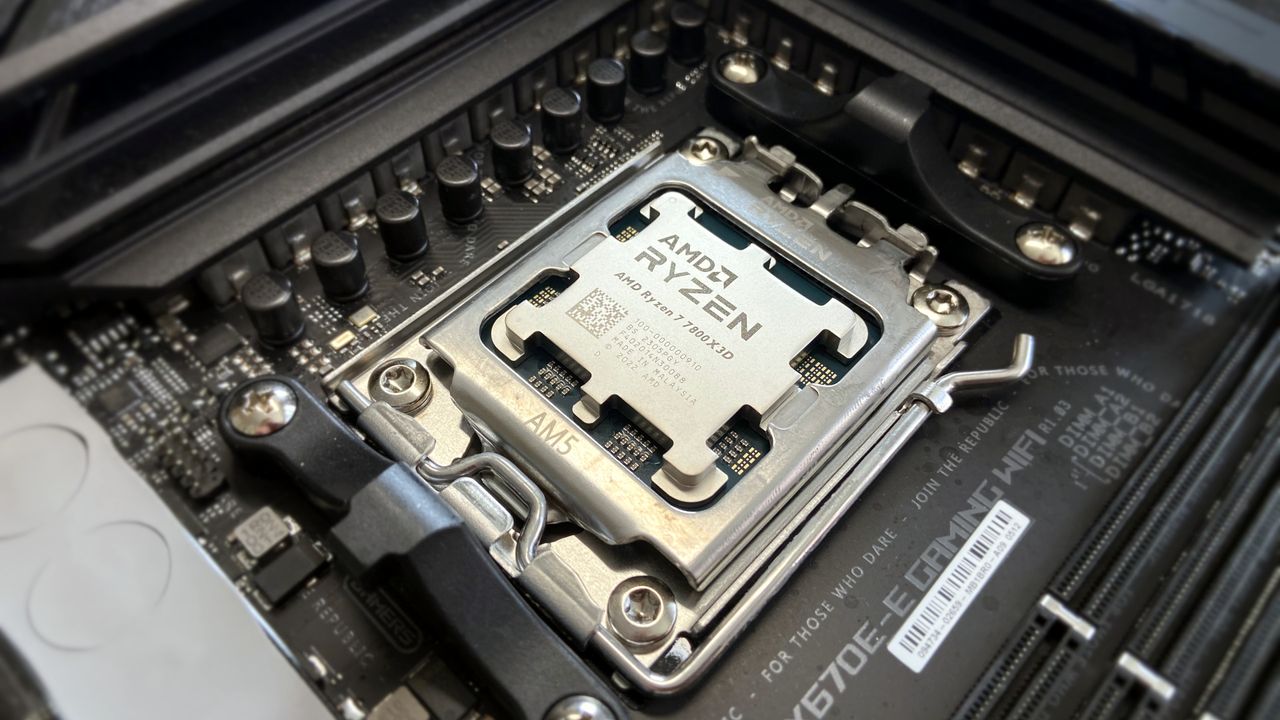
AMD Ryzen 7 7800X3D in socket

AI-generated image of an AMD processor with an MSI motherboard and Team Group RAM.

Apple Sued Over Hide My Email Privacy Claims

17 juillet 2026 à 10:19

Apple faces a proposed class action alleging a Hide My Email flaw could expose users’ real addresses despite the company’s privacy claims.

The post Apple Sued Over Hide My Email Privacy Claims appeared first on TechRepublic.

  • ✇Korben
  • Une IA a lu un rouleau carbonisé par le Vésuve il y a près de 2 000 ans
    Pour la première fois, on connaît le titre exact d'un livre antique sans avoir ouvert le livre. Les chercheurs de la Vesuvius Challenge ont lu, écrit en plein milieu d'un papyrus carbonisé, la mention "Sur les vices, livre 1", un traité de philosophie grecque signé Philodème, un penseur épicurien actif au Ier siècle avant notre ère, dont le rouleau était resté soudé sur lui-même depuis l'éruption du Vésuve en l'an 79. Ce rouleau, baptisé PHerc. 1667, vient d'être déchiffré d'un bout à l'autre. C
     

Une IA a lu un rouleau carbonisé par le Vésuve il y a près de 2 000 ans

26 juin 2026 à 04:38

Pour la première fois, on connaît le titre exact d'un livre antique sans avoir ouvert le livre. Les chercheurs de la Vesuvius Challenge ont lu, écrit en plein milieu d'un papyrus carbonisé, la mention "Sur les vices, livre 1", un traité de philosophie grecque signé Philodème, un penseur épicurien actif au Ier siècle avant notre ère, dont le rouleau était resté soudé sur lui-même depuis l'éruption du Vésuve en l'an 79.

Ce rouleau, baptisé PHerc. 1667, vient d'être déchiffré d'un bout à l'autre. C'est le premier lu en entier.

Pour comprendre l'exploit, il faut imaginer l'état de ces documents : retrouvés en 1752 dans une luxueuse villa d'Herculanum, probablement celle du beau-père de Jules César, les quelque 1 800 rouleaux ont été changés en bâtons de charbon par la chaleur de l'éruption, au point que les dérouler à la main revient encore aujourd'hui à les réduire en miettes.

D'où l'idée, mise au point en vingt ans par Brent Seales, informaticien à l'université du Kentucky, de ne jamais y toucher. On glisse le rouleau dans un accélérateur de particules qui en réalise un scanner à rayons X d'une finesse extrême, on reconstitue en 3D chacune des couches enroulées à l'intérieur, puis on les déplie virtuellement à l'écran comme on aplatirait une viennoiserie feuilletée sans la déchirer.

Restait le pire. L'encre de l'époque est faite de carbone, exactement comme le papyrus brûlé qui la porte, donc elle est quasiment invisible sur les scans, et c'est là qu'intervient une IA entraînée à repérer les infimes différences de texture laissées par les lettres pour redessiner peu à peu un texte que l'œil humain ne voit pas.

Le résultat est franchement fort, avec 70 nouvelles colonnes de texte exhumées et, sur un autre rouleau, la mention "Philodème, Sur les dieux, livre 8" qui révèle aux historiens que cet ouvrage comptait plusieurs tomes, ce que personne ne soupçonnait jusqu'ici.

Et pour les spécialistes de l'Antiquité, ça compte vraiment, parce que la bibliothèque carbonisée d'Herculanum est la seule de tout le monde gréco-romain à nous être parvenue à peu près complète, et non en fragments recopiés au Moyen Âge par des moines.

Honnêtement, lire 2 000 caractères tracés par un Romain juste avant que tout brûle, ça vaut largement tous les chatbots qui écrivent des e-mails à votre place.

Source : The Register , Scrollprize

  • ✇Yanko Design
  • The Soviet Union Built UFO-Shaped Circuses. Now You Can Fold One.
    The Soviet Union had a complicated relationship with spectacle. Everything about Soviet ideology pointed toward collective purpose, practical function, and the rejection of excess. And then they went and built circus arenas shaped like flying saucers, out of raw concrete, in capital cities across Central Asia and Eastern Europe. If that is not a contradiction worth paying attention to, I do not know what is. Cirk, a new book from David Navarro and Martyna Sobecka of Zupagrafika, makes that cont
     

The Soviet Union Built UFO-Shaped Circuses. Now You Can Fold One.

27 juin 2026 à 18:30

The Soviet Union had a complicated relationship with spectacle. Everything about Soviet ideology pointed toward collective purpose, practical function, and the rejection of excess. And then they went and built circus arenas shaped like flying saucers, out of raw concrete, in capital cities across Central Asia and Eastern Europe. If that is not a contradiction worth paying attention to, I do not know what is.

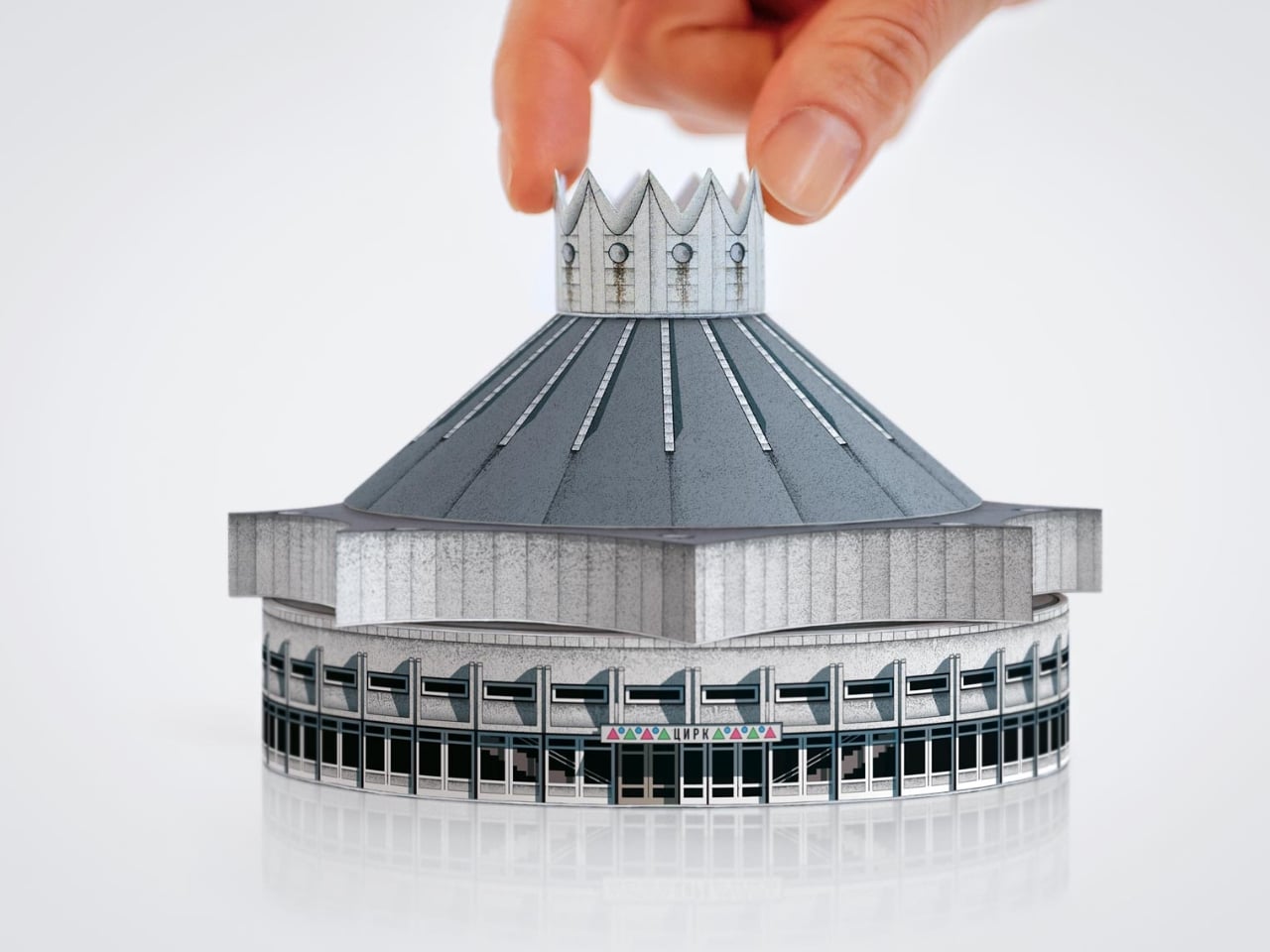
Cirk, a new book from David Navarro and Martyna Sobecka of Zupagrafika, makes that contradiction its entire subject. The Poznań-based design duo have spent over a decade documenting the brutalist and modernist architecture of the former Eastern Bloc, and Cirk is their latest, most playful entry in that ongoing project. The book surveys the permanent circus arenas built across the former USSR from the 1960s through the 1980s, buildings that, as Zupagrafika puts it, combined “socialist modernism, experimental engineering, and choreographed spectacle.” It is an architectural typology most people have never thought about, and yet once you see these buildings, you cannot stop looking.

Designers: David Navarro and Martyna Sobecka

But the part of Cirk that has people talking is not the photography, gorgeous as it is. It is the second half of the book: five press-out paper models of actual circus buildings, designed for readers to punch out and assemble with nothing but glue. The five models represent the Kyrgyz State Circus in Bishkek, the Chișinău State Circus in Moldova, the Dnipro State Circus in Ukraine, the Great Moscow State Circus, and the Tashkent State Circus in Uzbekistan. Five buildings. Five cities. Five strikingly different pieces of architecture, each one reduced to a miniature you can hold in your hands.

I have a genuine soft spot for paper models, and I think their reputation as a “children’s activity” has always undersold what they actually are. A well-designed paper model is an act of translation. Someone has to study a real building, understand its geometry from every angle, figure out how to collapse it into a flat sheet, and do it in a way that holds together when you fold it back up. That is not trivial when the buildings in question are full of curves, cantilevers, and circular geometry. The circus arenas in Cirk are not simple boxes. Many have sweeping domed roofs and wide cylindrical bases, and the kind of sculptural confidence that makes them look like props from a science fiction film. Getting that geometry to behave on paper requires real design skill, and Zupagrafika clearly has it.

The studio has been producing paper model kits alongside their books for years, so this is familiar territory. But tucking five models into the back of a hardcover book feels like a deliberate choice, not an afterthought. The models are not a gimmick. They are an argument. You can look at photographs of the Great Moscow State Circus for a long time, and it will remain something abstract and distant. When you press out those perforated shapes and fold them into a miniature version of that building, something shifts. The scale changes. The building becomes tactile and personal. You start to understand its proportions in a way that a photograph simply cannot deliver.

There is also something quietly political about the whole exercise. These arenas were built as monuments to Soviet power, intended to be overwhelming and permanent. Reducing one to a paper model is almost cheeky. It takes these grand gestures of ideological architecture and makes them domestic, approachable, collectible. The Soviet state is long gone. Someone is now folding the Great Moscow State Circus on their kitchen table. History has a strange sense of humor.

Cirk is a hardcover running 88 pages, sized generously at 30 by 24 centimeters, giving the models room to breathe on the page. The first half carries photography and historical essays, with a foreword from writer Jelena Prokopljević. It is a complete package: context, visual archive, and the hands-on satisfaction of making something. For anyone drawn to architecture, Cold War history, or just the very specific pleasure of a perforated page coming apart cleanly, Cirk is a book that earns its shelf space. The flying-saucer buildings are absolutely worth it.

The post The Soviet Union Built UFO-Shaped Circuses. Now You Can Fold One. first appeared on Yanko Design.

  • ✇Yanko Design
  • Wacom MovinkPad Pro 14 Review: The $900 Sketchbook Designers Needed
    PROS: Minimalist design streamlined for focused work on the go Paper-like experience when drawing or writing Comes with Wacom Pro Pen 3 in the box Large, bright, color-accurate OLED screen with anti-reflective surface CONS: Quite a significant investment Uncertain software update roadmap Instant Pen Display Mode is currently offered as a beta feature RATINGS: AESTHETICSERGONOMICSPERFORMANCESUSTAINABILITY / REPAIRABILITYVALUE FOR MONEYEDITOR'S QUOTE:
     

Wacom MovinkPad Pro 14 Review: The $900 Sketchbook Designers Needed

Par : JC Torres
27 juin 2026 à 11:22

PROS:


  • Minimalist design streamlined for focused work on the go

  • Paper-like experience when drawing or writing

  • Comes with Wacom Pro Pen 3 in the box

  • Large, bright, color-accurate OLED screen with anti-reflective surface


CONS:


  • Quite a significant investment

  • Uncertain software update roadmap

  • Instant Pen Display Mode is currently offered as a beta feature

RATINGS:

AESTHETICS
ERGONOMICS
PERFORMANCE
SUSTAINABILITY / REPAIRABILITY
VALUE FOR MONEY

EDITOR'S QUOTE:

The Wacom MovinkPad Pro 14 isn't another Android tablet. It's a sketchbook that happens to run one.
award-icon

For decades, Wacom has held an almost unchallenged grip on the drawing tablet and pen display market. Its products are so trusted that studios and design firms often keep them running for years, sometimes long after they’ve been discontinued. Lately, though, its rivals have been gaining a lot of attention, pushing increasingly attractive prices and expanding into new product categories.

That doesn’t mean Wacom has been idling. The company is finally wading into standalone Android tablet territory with the MovinkPad 11 and the more premium MovinkPad Pro 14, a proper portable drawing machine aimed squarely at working creatives. We’ve been spending time with the larger of the two, along with the new Wacom Art Pen 2, and the question is whether it’s worth every dollar of its price tag.

Designer: Wacom

Aesthetics

Right out of the box, the MovinkPad Pro 14 doesn’t dazzle the way other tablets in its price range tend to. There are no flashy colors, no ultra-thin borders, no polished surfaces. The bezels are noticeably wide, the default wallpaper is a solid, flat light gray, and the whole thing carries a stubbornly plain look that feels almost out of step with the competition.

It’s all very much by design. Wacom’s intent is to mimic the look and feel of a physical sketchbook, the kind artists, designers, and architects carry everywhere. The device comes in one color, light gray, which echoes the tone of most sketchbook paper. Its rectangular form, wide borders included, also closely mirrors the footprint of an A4 pad, binding and all.

The sides of the device carry that same restraint. One long edge holds the power button, volume rocker, and microSD slot, while the opposite edge features connectors for the optional cover accessory. The short edges house the speakers, and the bottom is reserved for branding, regulatory inscriptions, and four rubber feet. There’s nothing extraneous, nothing decorative, and nothing that distracts from the task you’re there to do.

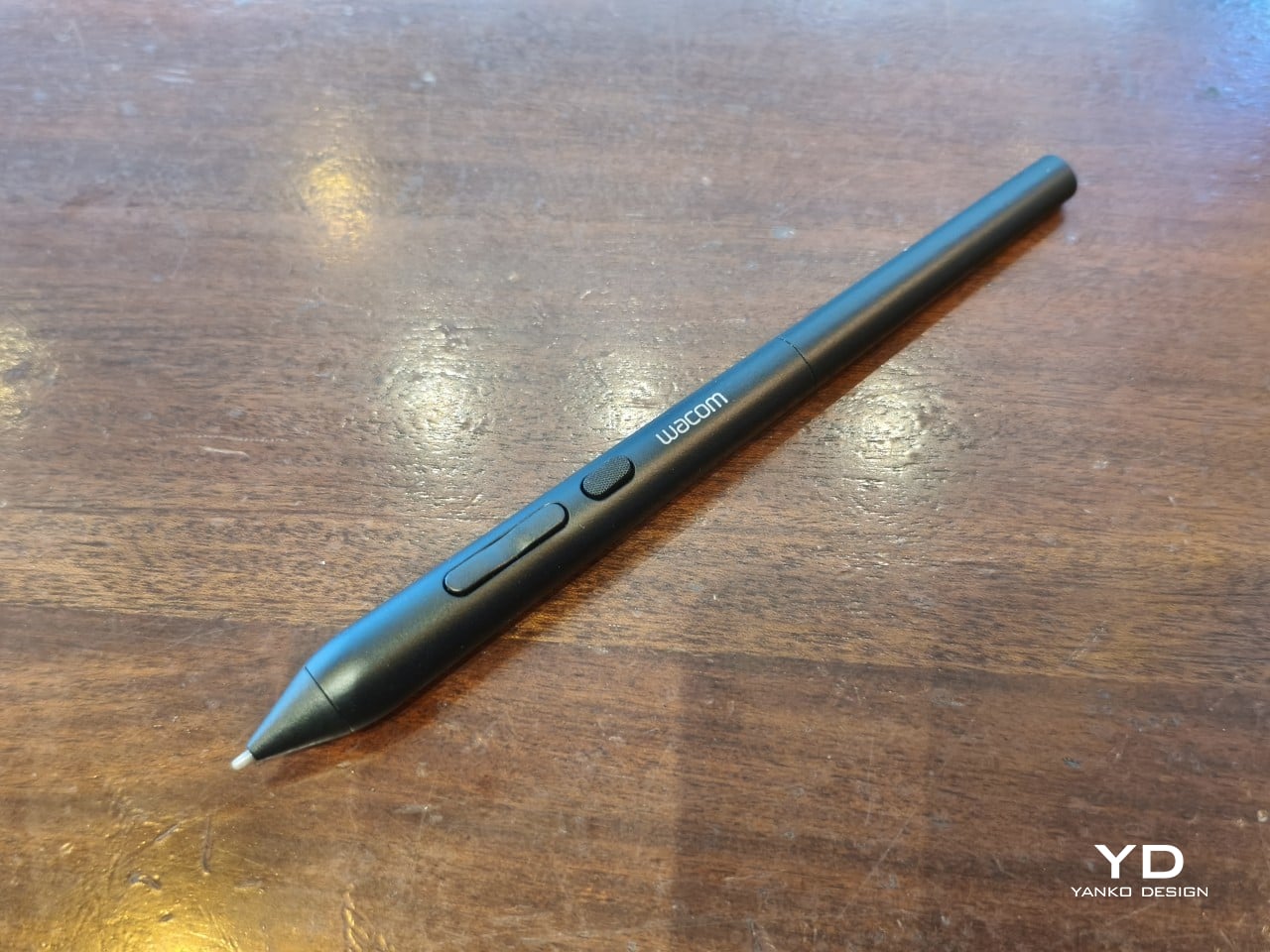
The included Pro Pen 3 follows the same philosophy. It’s all black, slim, and cylindrical, with a body so uniform it almost looks like a high-end mechanical pencil. The three side buttons are barely raised, sitting nearly flush against the barrel for a cleaner look. Unscrewing the rear half reveals three replacement nibs tucked inside: a Carbon Shaft nib, a Felt nib, and a POM nib.

Wacom’s vision for the MovinkPad Pro 14 is to replicate the feeling of picking up a sketchbook, flipping to a fresh page, and getting straight to work. That intent comes through clearly because the tablet removes just about every visual, physical, and digital distraction it can. It doesn’t try to be the slickest-looking device in the room. It tries to be the one you reach for first.

Ergonomics

At 14 inches, the MovinkPad Pro 14 isn’t something you’d hold up one-handed for long, but at just 699 grams and 5.9mm thin, it slips easily into any bag. Resting it on your arm or lap doesn’t feel like a chore either. For creatives who move between locations throughout the day, that combination of size and lightness goes a long way toward making it a genuinely portable tool.

The four rubber feet on the underside keep the tablet from sliding around on a desk and slightly raise the back off the surface, which helps with airflow. There’s no built-in kickstand or angled stand, so if you prefer working at a tilt, you’ll need to source one separately, either from Wacom’s own accessory line or from a third-party option. It’s a small gap in an otherwise thoughtful package.

Those wide bezels, which might seem like a design quirk at first, actually earn their place here. They give you a comfortable inactive area to rest your palm or fingers when gripping the tablet from the sides, so your touch input doesn’t accidentally interfere with whatever you’re drawing. It’s the kind of practical thinking that tends to reveal itself only once you’re deep into a long session.

That said, the MovinkPad Pro 14’s footprint means it isn’t something you’d pull from a bag and start sketching on at a moment’s notice. For that kind of spontaneous work, the smaller MovinkPad 11 is probably the better fit. The Pro 14 is better suited to longer, more involved sessions away from the desk, as long as you’ve found a comfortable spot to settle in.

The Pro Pen 3 is well-balanced and comfortable enough in the hand, though your experience will vary depending on what you’re used to. Its slim, pencil-like build can lead to some cramping over long sessions for those accustomed to thicker tools. Official grips are available but aren’t cheap. The nearly-flushed buttons are also too easy to press accidentally. The Art Pen 2, which we’re also reviewing, offers a wider barrel as an alternative but is sold separately.

Performance

Under the hood, the MovinkPad Pro 14 runs on a Qualcomm Snapdragon 8s Gen 3 with 12GB of RAM and 256GB of storage, expandable via microSD up to 2TB. The processor isn’t the newest available, but it handles everything thrown at it with ease. Multitasking is smooth, app switching is fluid, and there’s no sense that the hardware is struggling to keep pace with anything.

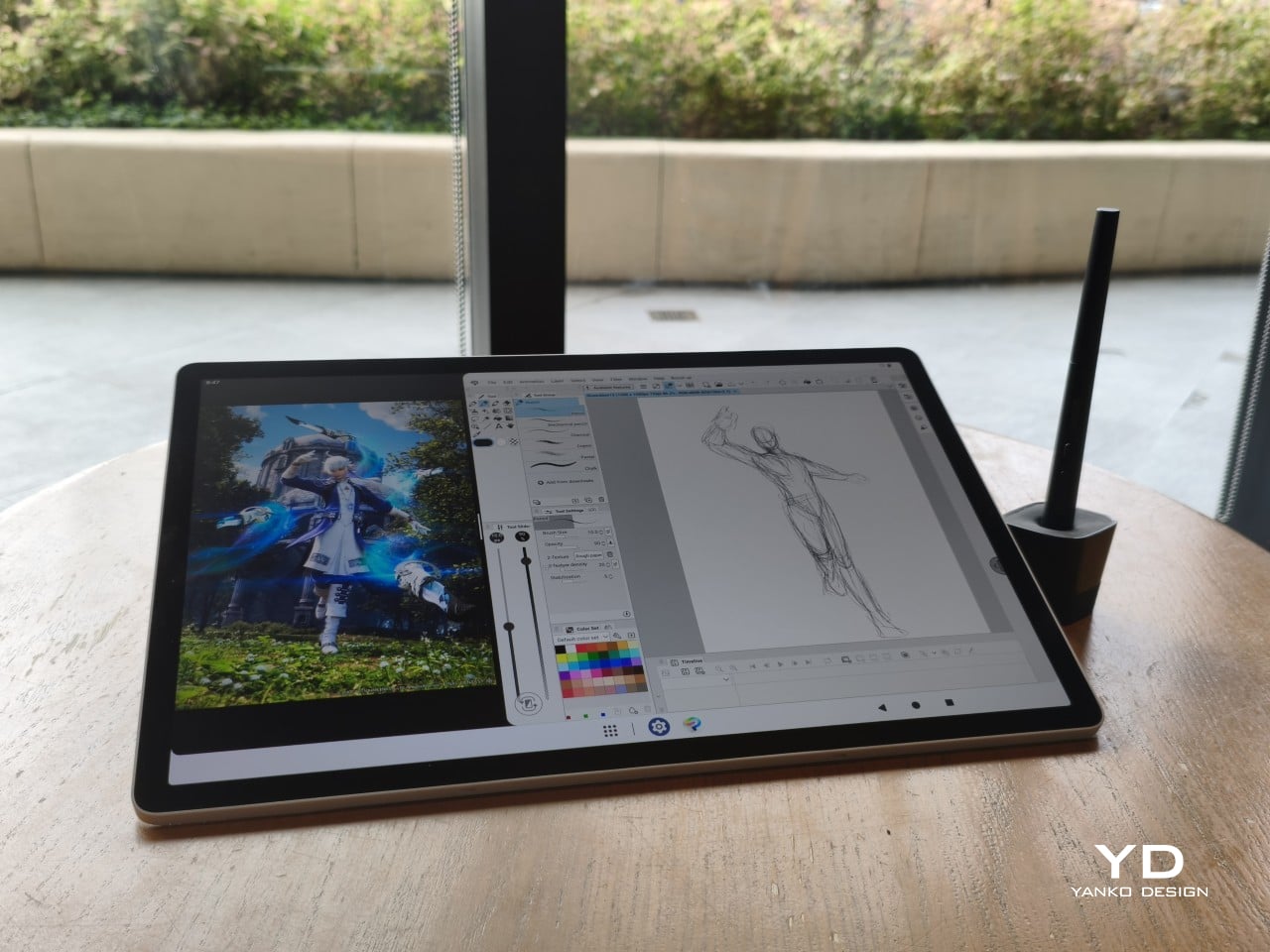
The 14-inch OLED display runs at a 2880×1800 resolution with a 120Hz refresh rate, treated with anti-fingerprint, anti-reflective, and anti-glare textured glass. The wide rectangular aspect ratio works in favor of drawing apps that line their UI panels along the sides, something squarish iPad screens can’t accommodate as cleanly. The textured coating adds a satisfying scratchiness to each stroke, and pen accuracy is, naturally, exactly what you’d expect from Wacom.

There are no cameras on the MovinkPad Pro 14, front or back. That’s a deliberate choice. There’s no temptation to flip over to social media, no accidental video calls, nothing that pulls focus away from what you’re there to do. Passively watching a tutorial in a corner of the screen is about as off-task as it gets, which, honestly, isn’t a bad thing for anyone prone to distraction. Split-screen functionality makes it easy to have a reference off to the side while you work.

The software side is equally stripped down. Android 15 comes installed with zero bloatware and just three Wacom-made apps: Shelf for your gallery, Tips for settings, and Canvas, a quick sketching surface that wakes directly from sleep with a tap of the pen. It’s intentionally bare-bones for capturing fleeting ideas, though a few more brush options would genuinely be welcome. From Canvas, you can instantly send your sketch to an Android app, though it seems to be limited to Clip Studio Paint, iBisPaint, and Autodesk Sketchbook. Hoping it will offer some flexibility in the future.

Speaking of apps, desktop-grade drawing applications like Clip Studio Paint and Krita run without issue. The broader Android ecosystem opens up a decent range of options, though it’s worth remembering that anything exclusive to Windows or Mac won’t be available here. Customizing the pen buttons is also off the table, a limitation of the Android platform rather than any fault of the hardware itself.

The Instant Pen Display Mode is arguably the most intriguing feature here. It converts the tablet into a secondary display for a Windows or Mac computer, via USB or Wi-Fi, turning it into a portable, makeshift Cintiq. It’s part of Wacom Lab, an experimental creator community that lets users explore and provide feedback on new creative possibilities through beta features. As of this writing, the setup process involves quite a number of steps, and pen button support is currently limited to toggling a small side panel for common modifier keys. It definitely shows promise, so hopefully development will be quick.

Battery life is genuinely impressive. The 10,000mAh cell can sustain nearly five days on standby and supports 65W fast charging, though you’ll need to bring your own charger since none is included in the box. The USB-C port is only 2.0, so it doesn’t charge as quickly as the spec might suggest, but an hour or more of active drawing barely makes a dent in the battery.

Sustainability

Wacom doesn’t use recycled or notably sustainable materials in the MovinkPad Pro 14 itself, but the company does meet several other environmental benchmarks worth noting. Its packaging is compact, minimal, entirely plastic-free, and fully recyclable, while the device is built with the kind of durability Wacom products are known for, the sort that keeps them in active use long after most gadgets would have been binned.

That longevity argument holds well for Wacom’s drawing tablets and pen displays, which tend to outlast their useful lives many times over. A standalone Android tablet is a different matter, though. Apps like Clip Studio Paint have already dropped Android 12 support, making regular OS updates critical. Wacom has committed to keeping the MovinkPad Pro 14 current, but no clear update schedule or roadmap has been shared publicly yet.

Value

At $899.95, the MovinkPad Pro 14 isn’t an impulse buy, but it’s a reasonably grounded one. An equivalent iPad would require buying the Apple Pencil separately, while a comparable Samsung Galaxy Tab tends to run noticeably higher. For a tablet built specifically around the drawing experience, with Wacom’s pen technology at its core, the price lands in a range that’s genuinely difficult to argue against.

The large screen and capable hardware make it a compelling option for creatives who frequently work away from their desks. It doesn’t sacrifice quality for the sake of portability. With the right app installed, it functions as a capable mobile workstation wherever you happen to be. And when a PC or Mac app becomes unavoidable, Instant Pen Display Mode is there to bridge the gap.

There are caveats, of course. The beta status of Instant Pen Display Mode means it’s not quite ready to be a daily driver feature. You’ll also need to feel at home with Android’s drawing ecosystem for this workflow to really make sense. And the uncertainty around long-term Android updates is a concern that Wacom will need to address more concretely before most buyers can put it fully to rest.

Verdict

The MovinkPad Pro 14 isn’t Wacom’s first stab at a standalone portable device. Veterans will remember the Windows-based Cintiq Companions and the MobileStudio Pros. But this is by far the most portable and clearly focused version of that idea. It doesn’t try to cram Windows into a pen display. It’s a purpose-built mobile experience that happens to carry a Cintiq-like trick discreetly tucked away.

At the same time, it doesn’t operate like an Android tablet with a Wacom digitizer tacked on, which is essentially what Samsung’s Wacom-enabled slates are. Wacom has built something around a specific, coherent idea: a true digital sketchbook. Some software edges still need ironing out, but for artists and designers craving genuine creative freedom outside the studio, the MovinkPad Pro 14 offers something few tablets in its class can match.

The post Wacom MovinkPad Pro 14 Review: The $900 Sketchbook Designers Needed first appeared on Yanko Design.

  • ✇Yanko Design
  • Wacom Art Pen 2 Review: A Stylus That Finally Moves Like a Real Brush
    PROS: Ergonomic design with raised and angled buttons 360-degree barrel rotation sensitivity Iconic Wacom flared grip design Accessible price point for a pro tool CONS: Limited compatibility with Wacom drawing tablets No option for custom weight swapping RATINGS: AESTHETICSERGONOMICSPERFORMANCESUSTAINABILITY / REPAIRABILITYVALUE FOR MONEYEDITOR'S QUOTE:The Wacom Art Pen 2 proves that sometimes one feature is all it takes to make a tool feel irreplaceable. D
     

Wacom Art Pen 2 Review: A Stylus That Finally Moves Like a Real Brush

Par : JC Torres
27 juin 2026 à 11:20

PROS:


  • Ergonomic design with raised and angled buttons

  • 360-degree barrel rotation sensitivity

  • Iconic Wacom flared grip design

  • Accessible price point for a pro tool

CONS:


  • Limited compatibility with Wacom drawing tablets

  • No option for custom weight swapping


RATINGS:

AESTHETICS
ERGONOMICS
PERFORMANCE
SUSTAINABILITY / REPAIRABILITY
VALUE FOR MONEY

EDITOR'S QUOTE:

The Wacom Art Pen 2 proves that sometimes one feature is all it takes to make a tool feel irreplaceable.

Digital drawing has matured to a point where the pen you use often defines the kind of work you’re capable of. Most tablets ship with a capable stylus included, and pressure sensitivity has become nearly standard. Where real differences emerge is in the finer details: tilt support, button placement, barrel thickness, and the nuanced control that separates a general sketching tool from something more professional.

Wacom knows this territory well, having refined its pen technology across decades of products. The Art Pen 2 is its latest attempt to push that nuance even further, reviving a feature from its predecessor that dedicated artists genuinely missed: 360-degree barrel rotation. It’s an accessory designed not for everyone, but for those who want their digital brushes to behave as closely as possible to the real thing.

Designer: Wacom

Aesthetics

The Art Pen 2 carries Wacom’s iconic flared grip design, widening toward the tip and tapering toward the back. It gives the pen more visual character than a plain cylinder, while the two raised side buttons, set at a slight angle, add a bit of intentional texture to an otherwise clean barrel. The shape looks distinctly professional without being flashy, which suits the kind of serious work it’s built for.

Unscrew the back half, and a small nib compartment is tucked inside, keeping replacement tips within arm’s reach during a session. It’s a detail borrowed from the Pro Pen 3 and one that makes swapping nibs far less disruptive mid-drawing. The pen comes in an all-black finish, which keeps things clean and consistent, and makes the angled buttons stand out just enough to locate them quickly by sight.

Ergonomics

The pen is well-balanced and feels substantial in the hand without being heavy. The wider barrel suits anyone who finds slimmer pens like the Pro Pen 3 a bit uncomfortable during long sessions, though that’s always a personal call. The three raised, angled buttons make accidental presses nearly impossible and are effortless to identify by feel, which matters when your eyes are glued to the canvas.

The flared shape does come with a trade-off. It won’t sit easily in most pen loop accessories or grip covers, and there’s no way to slim it down if the barrel feels too wide. That’s the opposite situation from the Pro Pen 3, where an aftermarket grip can always bulk things up. The Art Pen 2’s shape is fixed, and you work with it or find something else.

Performance

Pressure sensitivity sits at 8,192 levels with full tilt support, putting it on par with the best pens at any price. Accuracy and response are exactly what you’d expect from Wacom, meaning there’s nothing to second-guess. What sets the Art Pen 2 apart, though, is the 360-degree barrel rotation, which picks up precisely how much and in which direction the pen shaft is turned.

For tools like calligraphy brushes or natural-media simulations, barrel rotation is genuinely transformative. It’s worth noting, though, that it’s also a fairly niche feature and not many drawing apps currently support it. Casual users probably won’t miss it at all. Where it resonates most is as an upgrade path for those who owned and relied on the original Art Pen before it was discontinued.

Compatibility is currently limited to a specific set of devices: the Wacom MovinkPad Pro 14, select Cintiq models (DTK168, DTK246, DTH246), and three Intuos Pro variants (PTK470, PTK670, and PTK870). Wacom has said that support for additional Pro Pen 3-enabled devices will be added over time, but for now, buyers should double-check their tablet is on the list before committing.

Sustainability

Like most professional accessories, the Art Pen 2 is plastic and metal, with nothing notably sustainable about the materials themselves. There’s no recycled content or eco-conscious material choice to speak of. Packaging tells a different story, though. It’s minimal, plastic-free, and fully recyclable, which aligns with what Wacom has been doing across its more recent product releases. A small step, but a consistent one.

What does count in the pen’s favor is Wacom’s track record for longevity. The original Art Pen was in production and active support for close to 16 years, an almost unheard-of lifespan for a digital accessory. If the Art Pen 2 follows a similar path, the investment stretches well beyond what most accessories can promise, and that kind of durability is its own quiet form of sustainability.

Value

The barrel rotation feature does limit the Art Pen 2’s broader appeal. Plenty of artists won’t need it, and for those users, there’s still a reasonable case for sticking with the more standard Pro Pen 3. If rotation has never factored into your workflow, the Art Pen 2’s most distinctive selling point simply won’t move the needle for you, and that’s worth being honest about.

That said, there’s a hidden value worth considering. At $99.95, the Art Pen 2 is $30 cheaper than the Pro Pen 3, with nearly identical core performance and barrel rotation on top. For those who prefer a thicker grip, it also sidesteps the added cost of official grip accessories. As a package, it makes considerably more financial sense than it first appears.

Verdict

The Wacom Art Pen 2 is a well-considered accessory for a specific type of creative. It doesn’t try to replace the Pro Pen 3, and it’s clearly not aimed at casual sketchers. What it offers is a combination of pro-level pressure sensitivity, a comfortable and distinctive grip, and a rotation feature that no competing pen at this price comes close to matching.

The limited compatibility list is a real constraint, and Wacom should address it sooner rather than later. But for those drawing on a supported device, particularly the MovinkPad Pro 14, the Art Pen 2 is a genuinely valuable add-on that earns its asking price without much argument. Especially at $99.95, it delivers a kind of brush-like expressiveness through barrel rotation that no standard pen, regardless of price, can replicate.

The post Wacom Art Pen 2 Review: A Stylus That Finally Moves Like a Real Brush first appeared on Yanko Design.

Android 17 Is Live on Pixel, but Samsung and Other Android Users Still Have to Wait

19 juin 2026 à 08:09

Android 17 is rolling out to supported Pixel devices first, while non-Pixel users and IT teams face separate OEM timelines, beta programs, and app-testing considerations.

The post Android 17 Is Live on Pixel, but Samsung and Other Android Users Still Have to Wait appeared first on TechRepublic.

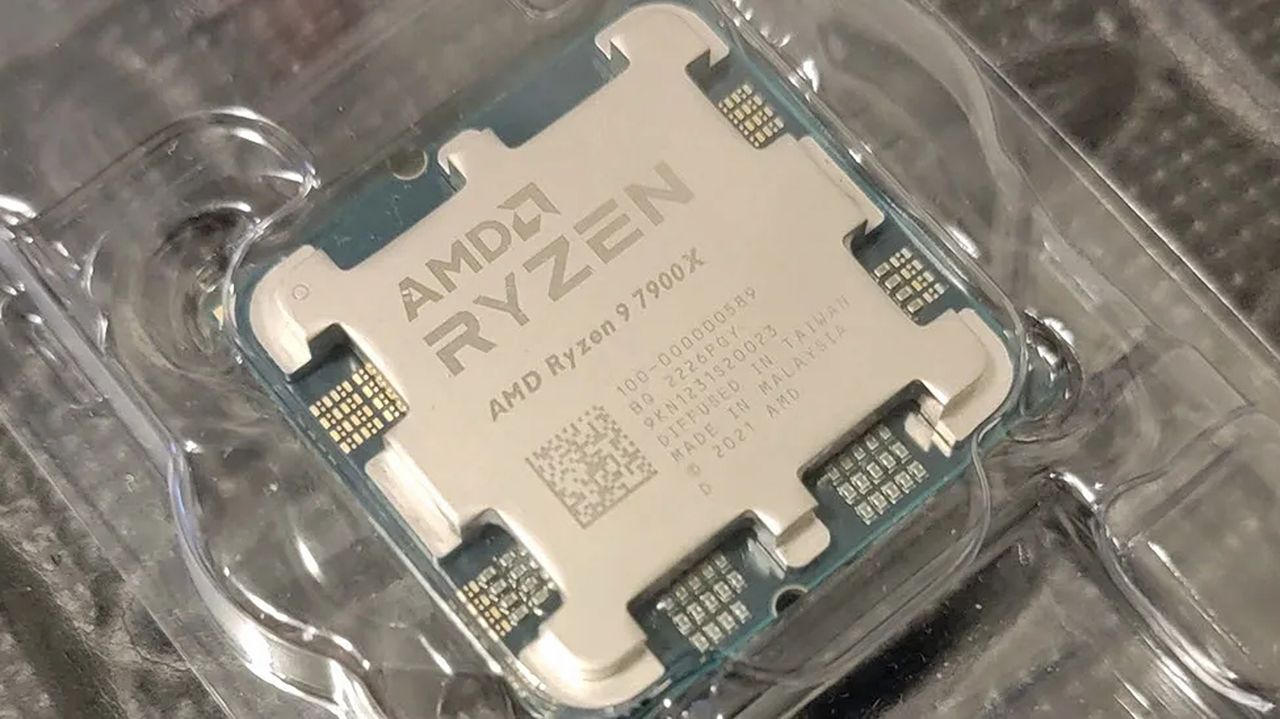
AMD's Zen 4 CPUs can still "chomp through even the most demanding workloads" — and the Ryzen 9 7900X remains a smart pick

We have found a limited-time sale on the AMD Ryzen 9 7900X CPU, giving keyboard warriors and gamers a chance to significantly improve their PCs' performance for much less.

Close-up of an AMD Ryzen 7900X processor in clear packaging, showcasing its metallic surface and circuitry details. The tone is high-tech and sleek.

Close-up of an AMD Ryzen 7900X processor in clear packaging, showcasing its metallic surface and circuitry details. The tone is high-tech and sleek.

China’s AI Talent Shortage Drives Big Pay Offers in Singapore

26 mai 2026 à 12:29

Chinese tech firms are recruiting Singapore-trained AI graduates with large pay packages as China faces a growing AI talent shortage by 2030.

The post China’s AI Talent Shortage Drives Big Pay Offers in Singapore appeared first on TechRepublic.

‘Tiny11’ Gives Windows 10 Users a Risky Upgrade Path

26 mai 2026 à 12:23

Tiny11 can help older Windows 10 PCs run a lighter Windows 11 build, but the unofficial project comes with security and support tradeoffs.

The post ‘Tiny11’ Gives Windows 10 Users a Risky Upgrade Path appeared first on TechRepublic.

❌