I haven't seen a sane GPU price in what feels like almost a year, and the landscape isn't getting any better for gamers.The NVIDIA RTX 5090, which arrived at a $1,999 MSRP in 2025, is now listed at Newegg starting at $4,799.99. The MSI Ventus 3X OC is indeed the lowest price I could find, and there are other options that push well beyond $5,000.Bad luck if you're shopping for a new RTX 5090 alone. The high-end of NVIDIA's consumer GPU stack has become inaccessibl
I haven't seen a sane GPU price in what feels like almost a year, and the landscape isn't getting any better for gamers.
The NVIDIA RTX 5090, which arrived at a $1,999 MSRP in 2025, is now listed at Newegg starting at $4,799.99. The MSI Ventus 3X OC is indeed the lowest price I could find, and there are other options that push well beyond $5,000.
Bad luck if you're shopping for a new RTX 5090 alone. The high-end of NVIDIA's consumer GPU stack has become inaccessible for the average gamer, and there's no real alternative in sight.
Well, that's sort of true. While perusing various storefronts this morning, it quickly became evident that I can buy an entire pre-built gaming PC with an RTX 5090 inside for less than the card alone.
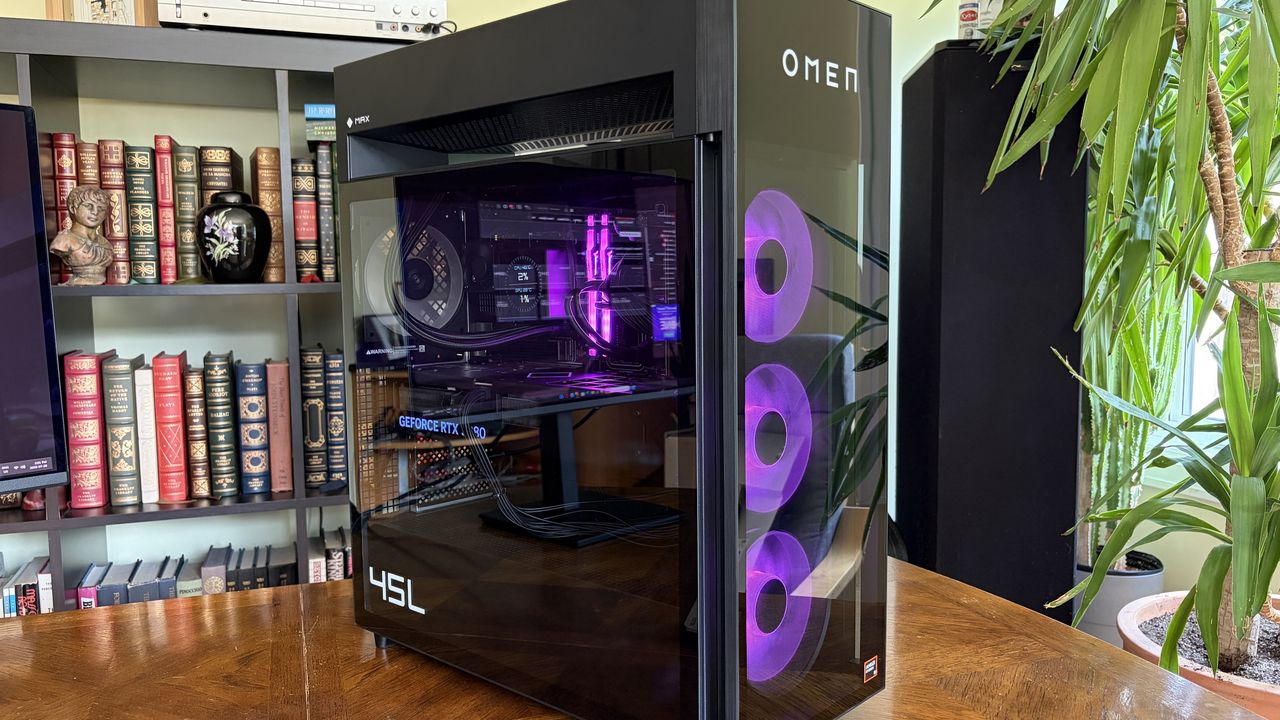
A look at the current promo pricing on a full gaming PC with RTX 5090. (Image credit: HP)
HP's Omen 45L desktop is my prime example. It has an NVIDIA RTX 5090 GPU, an Intel Core Ultra 7 265K CPU, 16GB of DDR5-6000 RAM, a 1TB M.2 PCIe 4.0 NVMe SSD, and everything else you need for a full build.
At the time of writing, this Omen 45L model costs $4,389.99. That's $410 less than the cheapest RTX 5090 listed on Newegg. Of course, the Omen 45L is on sale, with a regular price of $5,379.99. That's still less than the ASUS TUF Gaming RTX 5090 model, which sits at $5,429 on Newegg.
Buy a pre-built gaming PC for the card and sell the rest?
NVIDIA's RTX 5090 has hit costs I never imagined, but there are some alternative options. (Image credit: Windows Central | Ben Wilson)
The math gets more upside down when you factor in all the extra hardware you get with a pre-built PC.
The Omen 45L's CPU adds about $300, the 16GB of Kingston Fury DDR5-6000 RAM adds about $330, and the 1TB M.2 PCIe 4.0 NVMe SSD adds roughly $200. That's about $800 worth of extra components before even considering the 1200W PSU, motherboard, cooling, and case.
I can imagine a lot of readers will see this and wonder why they don't just buy a pre-built, remove the RTX 5090, and sell the rest of the components. I'm wondering the same thing.
HP isn't the only place that I'm seeing this pricing deficit in effect. Over at iBuyPower, I put together a system with an Intel Core i5-14400F CPU, 32GB of DDR5 RAM, a 1TB M.2 PCIe 4.0 NVMe SSD, a 1000W PSU, and an NVIDIA RTX 5090 that costs $5,596.
With the right initiative to sell the extra components, you could definitely end up paying less or the same for a standalone card and still end up with some extra hardware for future upgrades.
The HP Omen Max 45L I reviewed isn't perfect, but if it's cheaper than a lone GPU, it's hard to fault. (Image credit: Future)
The current state of GPU prices is due to the ongoing RAM and storage crisis that's sending NAND, DRAM, and other PC component prices into deep space.
As a result of the VRAM that goes into these cards hitting such high costs, NVIDIA jacked up the prices of GPU kits for its board partners (companies like ASUS, MSI, Gigabyte, and Zotac that build full GPUs using NVIDIA's kit) in July. Shortly after, it was reported that the hike could go as high as 30%.
We're now starting to feel those price hikes at retailers, as evidenced above. I suspect that HP's prices will also eventually be on the rise, but there are different market factors at play.
OEM builders can lock in large supplies of parts at a lower cost, so prices often don't catch up until after regular consumers begin to see them. I saw the same thing happen with Windows laptops this year. Components eventually run out, companies have to buy more, and those new costs are then passed down to consumers.
There's one caveat: when I reviewed the Omen Max 45L, I noticed that the RTX 5080 is a custom unit designed by HP. The same applies to the RTX 5090. Does that really matter? Not really. It's still NVIDIA's GPU inside, and my testing showed no difference compared to standalone cards.
Whatever happens to HP's pre-built PC pricing, there's no denying that the entire PC market is in chaos. You might not love the idea of a pre-built PC, but I definitely recommend seeing what's out there before you buy a standalone RTX GPU. You might just end up with a whole lot more than you expected for a lower price.
Join us on Reddit at r/WindowsCentral to share your insights and discuss our latest news, reviews, and more.
An Omen Max 45L with a transparent side panel displays its internal components, including a GeForce RTX 508 graphics card, against a backdrop of a bookshelf.
An Omen Max 45L with a transparent side panel displays its internal components, including a GeForce RTX 508 graphics card, against a backdrop of a bookshelf.
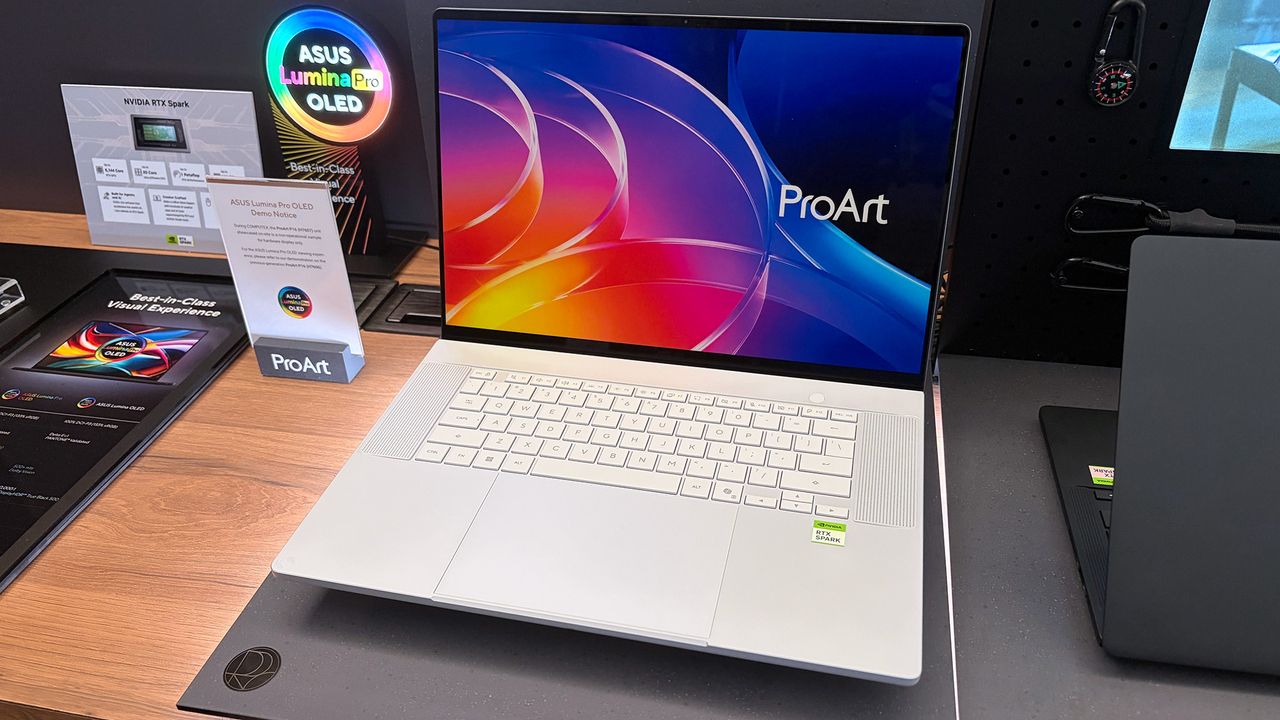
I was at Computex this year when NVIDIA's RTX Spark System-on-Chip (SoC) was revealed to the world, and from the start, I had a hunch that it would be a big deal.A powerful chip for Windows on ARM that can run every Windows app ever made? That was one of NVIDIA CEO Jensen Huang's first promises.With Microsoft as its launch partner, the Surface Laptop Ultra was one of the first RTX Spark laptops announced, but ASUS was right up there with its ProArt P16 and ProArt
I was at Computex this year when NVIDIA's RTX SparkSystem-on-Chip (SoC) was revealed to the world, and from the start, I had a hunch that it would be a big deal.
Incredibly sleek and streamlined, these laptops were a smash hit on the show floor. Apparently, they're also far more popular than ASUS was expecting.
In a recent ASUS Q2 earnings call, it was revealed that the company is completely out of ProArt P14 and P16 units to ship to its partners (aka third-party retailers and distributors) as part of pre-order efforts.
As one of the first manufacturers to launch RTX Spark-based systems, the market response to pre-orders for our ProArt notebook P16 and P14 has been intense. They are currently completely sold out. [...] Regarding current demand, the market response has far exceeded our expectations. Essentially, the initial quantities we planned have already been fully pre-ordered by our channel partners. We’re continuing to place additional orders with our partners.
S.Y. Hsu, Co-CEO ASUS (ASUS Q2 earnings call)
More RTX Spark laptops are on the way, of course, and ASUS has some time to shore up supplies before the planned Q4 2026 release of the new Spark-powered ProArt PCs.
It's too bad that the earnings call doesn't mention anything about exact volumes, because it's hard to say exactly how popular these laptops really are. However, ASUS says that it's "very optimistic about next year's sales" thanks to the "high AI computing power relative to its compact size" in the RTX Spark laptops.
What is NVIDIA's RTX Spark?
A look at the NVIDIA RTX Spark chip that's (normally) inside the ProArt P16. (Image credit: Cale Hunt | Windows Central)
NVIDIA's RTX Spark is an ARM-powered SoC that's expected to compete directly with the likes of Intel, AMD, and Qualcomm for space in Windows 11 PCs.
I covered rumors of the "N1X" chip for months in the lead-up to Computex 2026, and indeed it seems just as powerful and efficient as pre-announcement estimates.
Spark takes efficient ARM-based CPU cores similar to those found in Qualcomm Snapdragon chips and pairs them with an NVIDIA Blackwell RTX GPU, all while drawing from a unified memory setup that can hit 128GB.
A broken-down example of the ASUS ProArt P16 with RTX Spark. (Image credit: Cale Hunt | Windows Central)
This combination allows for massive performance that can shred standard and AI-related tasks without requiring a bulky discrete GPU.
Throw these chips into ASUS ProArt laptops with "all-day-long" battery life, wide port variety, super slim bodies, and 4K OLED displays, and it's easy to see why there's so much interest from retail partners.
Keyboard switches used to be a fairly niche topic. Enthusiasts knew what they wanted and sought it out, while more casual gamers and typists just went with what seemed best. I'm talking about the feel, the sound, and the speed — not to forget pricing, durability, hot-swap support, and layout, especially when getting into gaming keyboards.But the days of switches being an enthusiast's niche are over. Hall Effect and optical switches are enjoying a mainstream push,
Keyboard switches used to be a fairly niche topic. Enthusiasts knew what they wanted and sought it out, while more casual gamers and typists just went with what seemed best.
I'm talking about the feel, the sound, and the speed — not to forget pricing, durability, hot-swap support, and layout, especially when getting into gaming keyboards.
But the days of switches being an enthusiast's niche are over. Hall Effect and optical switches are enjoying a mainstream push, especially in gaming hardware, and the less flashy keyboards for office work are also seeing some major upgrades.
These advancements can make buying a new keyboard in 2026 a confusing endeavor. You step away for a few months, and it feels like there's a completely new set of literature to read up on.
I'm here to lay out the main types of different keyboard switches you may encounter, helping you get the perfect hardware for your needs.
What are mechanical keyboard switches?
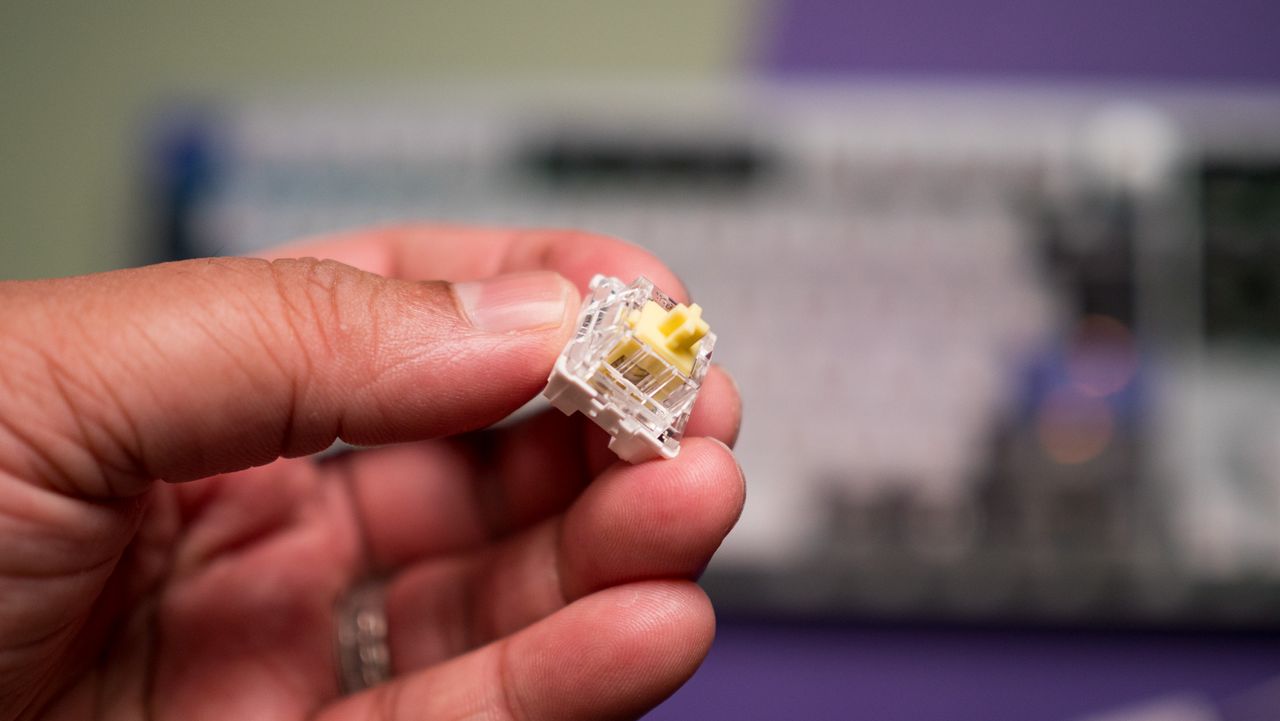
A Razer BlackWidow V4 with its keycaps removed to show off the mechanical switches. (Image credit: Ben Wilson | Windows Central)
Mechanical switches are the baseline for keyboards. When the keycap is pressed, a stem compresses a spring, and two separate metal contacts touch to complete a circuit and let your PC know you've performed a keystroke.
Mechanical boards are popular because they allow for quick swapping of keycaps (and in many cases, the switches themselves) without needing any special tools. If you're just starting on your path down the keyboard rabbit hole, a mechanical option is likely your best bet.
You might have heard of Cherry MX before, and that's because it's the company that essentially created the mechanical keyboard in the 1980s. It's still the default switch today, with many competitors attempting to outdo its creations.
There are three basic versions of mechanical switches that you'll most often encounter when shopping: Linear, Tactile, and Clicky.
Linear switches
Linear switches offer a smooth feel from the top through to the bottom. There's no noticeable bump when you hit the actuation point (in this case, the two metal contacts coming together), and there's minimal noise while typing.
Cherry MX Red and Cherry MX Black switches are probably best known, but there are also Speed Silver, Silent Red, and Low Profile Speed options.
Linear switches are great for PC gaming because they're generally faster and more consistent when the action gets going. The fact that they don't make noise is also a boon, especially if you're gaming in a shared space.
Tactile switches
The Keychron Q6 Pro's tactile switches are an excellent option for gaming or for work. (Image credit: Harish Jonnalagadda / Windows Central)
Tactile switches are a common ground between linear and clicky. They offer a small, noticeable bump at the actuation point without adding a loud click.
Cherry MX Brown is the classic example of a tactile switch. They're sought after by gamers and typists alike who prefer having that little bit of pressure to let them know that a keystroke has been made.
Clicky switches
Clicky switches are what I consider the "extreme" version. They offer the same noticeable bump as tactile switches when the actuation point is hit, but a loud click follows.
Some typists and gamers prefer the heavier feel and the loud click (especially if you're going for a retro vibe), but that audible feedback can definitely get annoying over time.
Cherry MX Blue switches are the default example here, but there are also Green and Ultra Low Profile clicky switches to watch out for.
Pro Wireless Gaming: It's a result of a collaboration between Alienware and over 100 esports athletes, and it's a genuine step up over the company's previous products. Build quality is exceptional, typing feels great, and gaming performance is flawless.View Deal
Cherry MX's competition in the mechanical market
The Glorious GMMK 3 Pro is available will classic MX or Hall Effect switches. (Image credit: Harish Jonnalagadda / Windows Central)
Cherry MX remains the brand that's best known, and it has been upgrading its switches to better compete with new competitors. For example, its MX2A lineup with a redesigned stem helps make its switches feel a lot smoother.
This innovation to compete is driven by companies like Gateron, Kailh, and Glorious that have jumped on expiring patents to create their own mechanical switches. They generally fall into the same three basic mechanical switch categories, so it's not too difficult to figure out what's best for you.
What are optical keyboard switches?
Optical switches on the IOGear HVER PRO X gaming keyboard. (Image credit: Windows Central)
Optical keyboard switches are a lot like their mechanical counterparts. They use the same stem-and-spring setup, but there are no metal contacts to form a circuit when pressed.
Instead, optical switches place a beam of infrared light below each key. When you press a keycap, that beam is interrupted, and your PC recognizes a keystroke.
The main benefits of an optical switch are durability and response. There are no metal contacts to wear out, and keypresses are usually registered just a bit faster.
The Razer Huntsman V3 Pro features optical keyboard switches. (Image credit: Michael Hoglund)
When I think of optical switches, I usually think of Razer. It's the brand spearheading this tech most of the time; its Analog Optical Gen-2 switches in the Razer Huntsman V3 Pro are a perfect example. There are, however, competing brands.
Optical switches offer things like adjustable actuation (making keys easier or harder to register keystrokes) and rapid trigger mode (allowing for faster repeated presses).
Most optical switches are hot-swappable like their mechanical counterparts. However, the main catch is that optical switches can't be added to mechanical keyboards, and vice versa, due to different circuit technology underlying each option.
Razer's Huntsman V3 Pro uses optical switches for improved durability and performance, making it a particularly excellent option for gamers who don't want to spend extra on Hall Effect hardware.View Deal
What are Hall Effect keyboard switches?
The Razer Huntsman V3 HE Magnetic Mini keyboard with Hall Effect switches. (Image credit: Daniel Rubino)
I first began hearing about "Hall Effect" to do with controller joysticks some years ago, but the tech actually originated with keyboards way back in the 1960s. Hall Effect seems to have now become the upgrade choice for many gamers in 2026.
Hall Effect works by placing a magnet in the switch's stem. A separate sensor measures how far the switch travels based on magnetic strength, meaning there's no actual physical or optical activation required.
This opens Hall Effect switches up to far more customization options than mechanical or optical hardware. Actuation distances can be fine-tuned, often as low as 0.1 mm, as in the Razer Huntsman V3 HE Magnetic we recently reviewed.
Because Hall Effect switches offer such tight customization and because there are fewer mechanical parts to wear out, they're becoming much more popular in PC gaming circles.
It was Wooting that really kicked this category off in the early 2020s, but since then, companies like SteelSeries, ASUS, Corsair, Keychron, Logitech, and the aforementioned Razer have jumped into the market.
Huntsman V3 HE Magnetic TKL 8KHz: With adjustable actuation from 0.1–4.0 mm, Rapid Trigger, Snap Tap, Snap Flex and Dynamic Keystroke, Razer’s HE Magnetic TKL give players granular control over inputs and movement — and back it with factory calibration, a 100‑million keystroke rating and on-demand recalibration via Synapse.View Deal
What are Topre switches?
The RealForce RGB is a Topre keyboard we reviewed in 2020.
The final switch category I'm covering separately is Topre. These are capacitive switches designed by a Japanese company of the same name, and they're proving to be popular amongst people who type all day every day.
They work by combining a rubber dome on top of a spring. A sensor detects when the dome compresses (aka when you press down on the keycap) and registers a keystroke. It's a lot like Hall Effect, where there's no circuit to complete, but they have a softer feel that doesn't bottom out as hard.
Keyboards using Topre switches, like those from RealForce, are generally more expensive, but for some people, that extra money might save them from serious typing fatigue.
Other types of switches worth mentioning
The switches I mentioned above are the major options you'll find when shopping for a new keyboard. But there are a few others worth mentioning.
Mechanical, optical, and Hall Effect switches sometimes come in a low-profile option, which just means that the keycaps are not nearly as high. You'll sometimes find these keyboards installed in high-end gaming laptops, but there are plenty of standalone options available as well.
For budget keyboards, you're almost always going to find membrane or scissor switches in play. They're generally quiet, cheap, and relatively comfortable. The big problem? They don't usually last nearly as long, and they don't feel nearly as nice to type on.
Which type of keyboard switch should you buy?
The ASUS ROG Azoth Extreme Edition 20 mechanical keyboard is one of the most expensive on the market today, but not because of its switches. (Image credit: Future)
So, with all the keyboard switch info in mind, which one should you buy? Our guides to the best keyboards and best gaming keyboards are great places to start, but let me break it down into the different categories of PC users who care most about their hardware.
Competitive PC gamers should seriously consider investing in a Hall Effect keyboard. They're more durable, they offer extreme precision, and they can be customized to your liking. Optical switches can also do a great job here if you'd rather skip the magnetic setup.
Casual PC gamers might want to splurge on Hall Effect or optical switches, and there's nothing wrong with that. But for the majority, classic mechanical switches, whether linear, clicky, or tactile, will do a great job of keeping up with repeated keypresses. You won't have to spend as much, and you can still have a lot of fun customizing your board.
For professional typists or programmers, I recommend a tactile mechanical switch. You still get a comfortable setup and extra durability, without all the extra noise that might annoy you or those around you over time. If you have the budget, this is where Topre switches can also be super appreciated.
And if you're on a budget, you can always check out a cheaper mechanical switch. There are plenty of options available at the low end of the market. And if you really don't care? Just get a cheapo membrane keyboard and forget everything you just read.
Join us on Reddit at r/WindowsCentral to share your insights and discuss our latest news, reviews, and more.
I have several PCs in my office that are capable of running Copilot+ tools in Windows 11, but there's one feature I've stayed away from: Windows Recall.Why? I don't particularly like the idea of AI snapshotting what I do on my PC and making it searchable, even if it promises to never let the data leave my local system. I'm sure it's handy for some users, but I've yet to come across a scenario where I wish I had it enabled.If you're of the opposite opinion and hap
I have several PCs in my office that are capable of running Copilot+ tools in Windows 11, but there's one feature I've stayed away from: Windows Recall.
Why? I don't particularly like the idea of AI snapshotting what I do on my PC and making it searchable, even if it promises to never let the data leave my local system. I'm sure it's handy for some users, but I've yet to come across a scenario where I wish I had it enabled.
If you're of the opposite opinion and happen to use macOS, I have good news. OpenAI today announced "ChatGPT Computer History" for its macOS app.
What is ChatGPT Computer History?
Today we're releasing Computer History in ChatGPT.It lets ChatGPT learn from everything you do on your computer, so it can better understand how you work, finish tasks that you're in the middle of, and suggest skills and automations based on how you use your computer. pic.twitter.com/xnTq7hWH8OAugust 13, 2026
Here's a blurb from the ChatGPT press release about how it works:
Computer History turns your activity across apps and websites into memories and a timeline that ChatGPT and Codex can reference. You can ask natural questions about recent work, pick up where you left off, understand patterns in how you work, and turn repeated workflows into skills or automations.
OpenAI
Yeah, that sounds like the same thing. But let me explain ChatGPT's version a bit more.
Computer History, according to ChatGPT's website, is completely optional and turned off by default for Pro, Business, and Enterprise subscribers.
Rather than collecting screenshots every so often to keep track of your doings, Computer History "records interaction events and does not capture your screen or audio." It's basically its own little keylogger, keeping tabs on clicks, typing, app switching, shortcuts, and more.
The data it records is searchable, and you can interact with Computer History the same way you interact with any AI, asking it regular language questions.
The data that Computer History gathers is saved locally on your Mac, but it does get sent to OpenAI's cloud servers in order to turn it into memories. These memories are then sent back to your Mac for local storage.
OpenAI says it does not keep this data on its servers unless required by law, and it does not use the data for training.
Is Computer History different enough from Recall to avoid similar backlash?
A look at the Recall feature's pause option in the Windows 11 taskbar. (Image credit: Windows Central)
The reaction to ChatGPT's Computer History announcement is surely mixed. It seems like there are just as many people worrying about massive privacy and surveillance issues as there are people wondering if they should go out and buy a Mac.
Windows Recall faced the same adversity when it was announced as a default feature, with no opt-in available. The pushback was so bad that Microsoft delayed its launch by almost a year in order to address security issues. It officially released in April 2025 as an opt-in feature, but I know that many Windows users are still wary of its abilities.
The fact that ChatGPT is making its Computer History opt-in from the start tells me it learned from Microsoft's mistakes. There's also the fact that it doesn't take screenshots, making it feel less like routine spying.
The memes coming out of the ChatGPT Computer History announcement are gold. (Image credit: @trashpandaemoji (X.com))
That doesn't mean there aren't inherent risks to using something like Recall on Windows or Computer History on macOS.
It's clearly noted in OpenAI's Computer History documentation that the feature does not encrypt your information, and that it can be accessible to other apps running on macOS.
Like Recall, there are also serious prompt injection risks. Because these AI-powered features can essentially see what you're doing, they can be tricked with text. You might visit a seemingly innocuous website, only to realize later that it contained hidden instructions aimed at AI that made it do something unsavory.
Windows Central's take
Some of us here at Windows Central use Windows Recall on our PCs, but I stay away from it. (Image credit: Zac Bowden / Windows Central)
Some of us here at Windows Central use Windows 11's Recall feature. Others don't. I'm in the latter camp, but one day that might change.
Why? It feels like there's a definite push going on with AI assistants that can remember everything you do, and it's not just ChatGPT and Microsoft. I've spent time with Lenovo's Qira cross-device ambient assistant, and I've written about HP IQ.
Although I shudder at the privacy implications of these tools gone wrong, they definitely seem like one strong fork in the future of computing. It will be interesting to see how this all plays out, and ultimately to see how macOS users react to something that made Windows users go ballistic.
What do you think about ChatGPT's Computer History? Is it Recall with a different name? Is ChatGPT approaching the tool properly with opt-in-only settings and no screenshotting? Is it something you'd use on Windows 11? Let me know in the comments section below!
Join us on Reddit at r/WindowsCentral to share your insights and discuss our latest news, reviews, and more.
Scooby Doo meme of Fred pulling the mask off of ChatGPT only to reveal Windows Recall beneath.
Scooby Doo meme of Fred pulling the mask off of ChatGPT only to reveal Windows Recall beneath.
Fellow Canadian Dave W. Plummer is a legendary programmer who created some of Microsoft's most recognizable (and lasting) software.Not only did he create ZIP file support for Windows and get Space Cadet Pinball running on Windows NT, but he also created Windows Task Manager. As the story goes, Plummer began working on Task Manager at home before bringing it into Microsoft. It began shipping on Windows PCs in 1996, and the rest is history.Well, sort of. Plummer ha
Fellow Canadian Dave W. Plummer is a legendary programmer who created some of Microsoft's most recognizable (and lasting) software.
Not only did he create ZIP file support for Windows and get Space Cadet Pinball running on Windows NT, but he also created Windows Task Manager. As the story goes, Plummer began working on Task Manager at home before bringing it into Microsoft. It began shipping on Windows PCs in 1996, and the rest is history.
Well, sort of.
Plummer has been a regular figure on social media and YouTube (check out Dave's Garage) for years, and I particularly enjoy his stories and insights regarding the early days of Microsoft and Windows.
The example was bathed in neon lighting for a definitive cyberpunk vibe, and of course it was accompanied by a hard-hitting synthwave soundtrack.
It's been about six months since Plummer showed off the concept, and he's now returned with a working version of what he calls "Task Manager OG," or TMOG for short.
It's not quite as cyberpunk as the original idea. The neon lighting is still there, but it's toned down, and the synthwave soundtrack seems to have been replaced with classic rock tunes.
Say HELLO to my little friend, Task Manager OG!I'm please to announce the immediate availability of the MacOS version of TMOG today; Windows support will follow shortly, so follow for the update!TMOG is a free application; I may do a Pro version at some point, but everything… pic.twitter.com/N35Bc239eiJuly 31, 2026
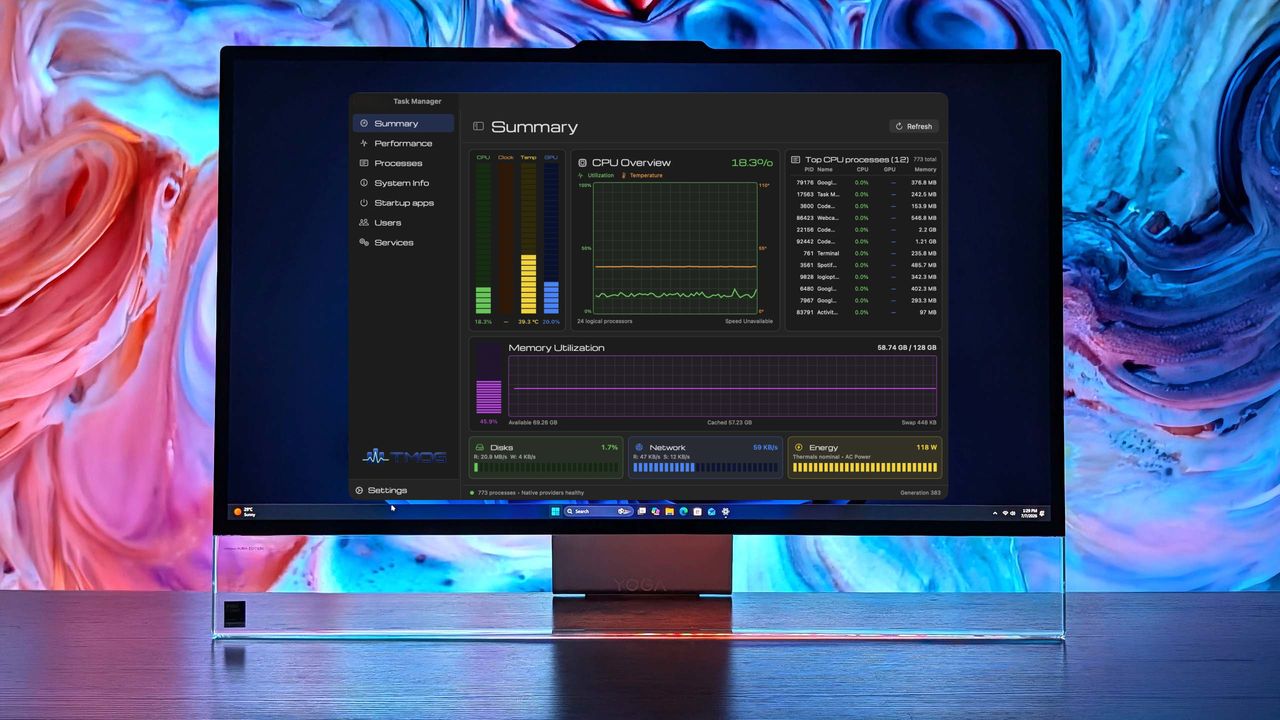
Plummer explains that he created TMOG to have "the clarity of Activity Monitor" from macOS with "the depth of Task Manager" from Windows. The software has all the main information about CPU, GPU, RAM, storage, temps, etc. up front, with much deeper diagnostics sitting just below.
Perhaps the best part is that Plummer says his OG version of Task Manager is "half the size of the Windows Task Manager."
A look at the overall summary tab in the Task Manager OG app.Dave W. Plummer (tmog.org)A look at the Performance tab in Task Manager OG.Dave W. Plummer (tmog.org)Another look at the performance tab, this time focusing on network performance, in Task Manager OG.Dave W. Plummer (tmog.org)
Here's the rub. Plummer's Task Manager OG is, for now, only available onmacOS. But as Plummer states, "Windows support will follow shortly." That's a bit of a bummer because I wanted to test it out myself; alas, I'm fresh out of Macs in my office.
Plummer has a full website set up for TMOG, where you can download the beta for free (currently for macOS only). The upcoming Windows version of TMOG is listed as native Win32, with no browser shell required.
There's another Task Manager alternative I've been enjoying
A look at the Processes monitoring page in the AppControl app.FutureThe memory usage spike when I opened a large article in our CMS is clearly shown in AppControl.Future
While I wait patiently to test out Plummer's Task Manager OG on Windows, I should remind readers that earlier this year I made the switch to AppControl.
It's a Windows 11 Task Manager alternative that I found quite capable, and I went so far as to say that AppControl is what the stock Windows 11 Task Manager should have been all along.
What do you think about the cyberpunk-esque look of Plummer's Task Manager OG? Is it something you'll try out on your Windows PC once it's available? Will you test it out on your Mac first? Let me know your thoughts in the comments section below!
Join us on Reddit at r/WindowsCentral to share your insights and discuss our latest news, reviews, and more.
Lenovo PC displaying Task Manager OG with CPU and memory statistics, set against a colorful abstract background.
Lenovo PC displaying Task Manager OG with CPU and memory statistics, set against a colorful abstract background.
I made the switch to a full-time OLED monitor a few months ago, and it's been a welcome upgrade on my desk for gaming and for work.Apparently, I'm far from the only one who decided to make this upgrade.The latest market research from TrendForce shows that the OLED monitor market picked up momentum as it moved through the second quarter of 2026.In fact, TrendForce saw global OLED monitor shipments rise by a healthy 26.1% in Q2 2026 compared to Q2 2025. Year over y
I made the switch to a full-time OLED monitor a few months ago, and it's been a welcome upgrade on my desk for gaming and for work.
Apparently, I'm far from the only one who decided to make this upgrade.
The latest market research fromTrendForce shows that the OLED monitor market picked up momentum as it moved through the second quarter of 2026.
In fact, TrendForce saw global OLED monitor shipments rise by a healthy 26.1% in Q2 2026 compared to Q2 2025. Year over year, shipments are up a whopping 98%. No, I don't think the OLED display market is in any jeopardy.
TrendForce posits that the OLED market's growth in Q2 2026 was largely driven by the launch of new models, especially those that measure 27 inches (the industry's most popular size).
Alienware's AW2726DM is an outstanding OLED gaming monitor for those who want to spend $350. (Image credit: Future)
Another market growth factor TrendForce includes is China's 618 shopping day. It's akin to the Black Friday/Cyber Monday events on this side of the Pacific, when countless people make tech upgrades.
ASUS remains at the top of the OLED industry with a healthy 23.1% market share. It notably launched the 34-inch ultrawide ROG Strix XG34WCDMSrecently, which is currently being tested here in my office.
Samsung remains in second place with 13.1% market share, with MSI and AOC coming in at number three and four with 12.8% and 8.6% market share, respectively.
LG remains in last place out of the big brands with 8.4% market share, and I wouldn't be surprised to see that number drop next quarter as the company deals with fallout from its monitors installing unwanted adware on Windows 11 PCs.
The hidden driver behind the rise in OLED monitor sales
The price of many PC components, including NVIDIA GPUs, is on the rise due to AI-influenced hardware shortages. (Image credit: CFOTO/Future Publishing via Getty Images)
The TrendForce report suggests that improved OLED panel supply chains have helped smaller brands compete with the big names I mentioned above, but I suspect there's another reason driving monitor sales that TrendForce doesn't mention.
The ongoing RAM and storage crisis doesn't seem to have any end in sight. The rosiest of estimates puts a market correction towards the end of 2027, but more realistic estimates are pushing into the 2030s, barring some sort of AI bubble collapse.
The shortage of DRAM and NAND chips is affecting other hardware prices as well, including GPUs. When your next PC upgrade is looking, at best, like a motherboard and CPU swap, many enthusiasts are looking elsewhere for a meaningful (and not overpriced) upgrade path.
Dropping $350 on a new OLED gaming monitor doesn't seem so bad when standard RAM kits cost hundreds more. (Image credit: Future)
The recent drop in OLED prices, highlighted by the $350 Alienware AW2726DM monitor I reviewed, is making it a perfect time to swap monitors. And when other PC upgrades are off the table, OLED really starts to make sense.
Do you agree that sky-high PC component prices are forcing people to look at other upgrade avenues? Do you think OLED sales will level out in the next quarter as the market becomes more saturated? Let me know in the comments section below!
Join us on Reddit at r/WindowsCentral to share your insights and discuss our latest news, reviews, and more.
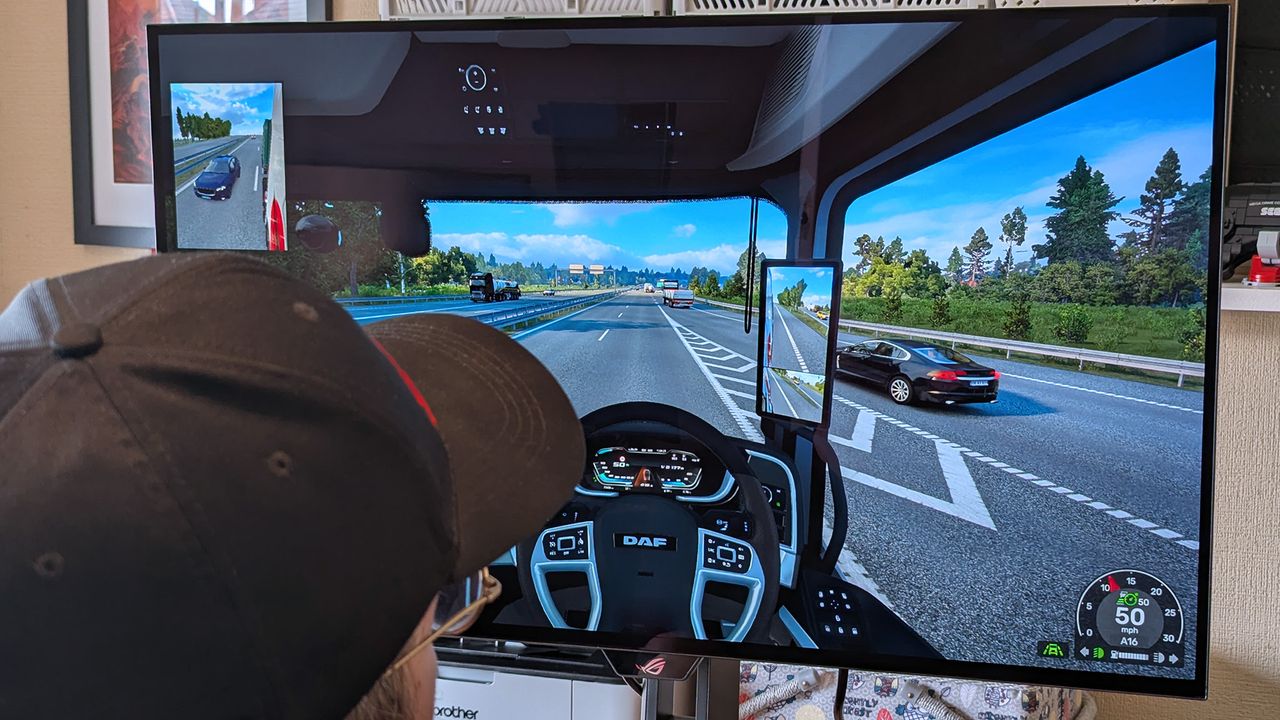
Windows Central's Ben Wilson wearing a black cap sits at a desk playing Euro Truck Simulator 2, with the ASUS ROG Strix OLED XG32UQWMS monitor showing a DAF truck interior.
Windows Central's Ben Wilson wearing a black cap sits at a desk playing Euro Truck Simulator 2, with the ASUS ROG Strix OLED XG32UQWMS monitor showing a DAF truck interior.

 Connexion