❌

Vue lecture

Acer's OLED Swift 16 AI laptop gets a huge discount before Black Friday

The Swift 16 AI is one of the latest Windows laptops featuring Intel's "Panther Lake" processors (Core Ultra Series 3) that balance productivity, power, and efficiency for all-day battery life, plus Acer's stunning OLED touchscreen.

It's already on sale for just $999.99 at Best Buy long before Black Friday, with a hefty $550 discount that knocks 35% off its listing price. With 16GB of RAM and 1TB of storage, it's a great option for anyone looking to upgrade their everyday laptop without spending the usual ~$1,200+ costs.

Swift 16 AI (Core Ultra X7 358H, 16GB RAM, 1TB SSD): was $1549.99 now $999.99

"Impresses with its vibrant 16-inch OLED panel, powerful Panther Lake-powered performance, ultraportable design, and long-lasting battery life." — Tony Polanco, Senior Computing Writer, Tom's Guide

Tom's Guide review: ⭐⭐⭐⭐View Deal

Why should you buy this laptop?

An open Acer laptop sits on a wooden desk, displaying Windows 11’s vivid blue, teal, and pink abstract wallpaper in a bright, minimal setting.

Side-view of the Acer Swift 16 AI laptop. (Image credit: Tom's Guide (Tony Polanco) | Acer)

Powered by Intel's Core Ultra Series 3 "Panther Lake" X7 358H processor and integrated Arc B390 graphics, the Swift 16 AI delivers plenty of performance for everyday productivity workloads, including multitasking across dozens of browser tabs, content creation, and even some gaming. That integrated B390 graphics chip is far more powerful than its lower-end variants; in fact, you'll find the same one in high-end gaming handhelds.

Beyond that, Acer boasts a full day of usable battery life in a laptop with a thin chassis and a sharp 3K (2880x1800) OLED touchscreen. That means vibrant colors, strong contrast, and even a super-smooth 120Hz refresh rate as a bump over the usual 60Hz standard you'd find in many others.

You'll get dual USB-C ports alongside two more traditional USB-A ports, HDMI-out for external monitors, and a 3.5mm audio jack for wired headphones, reducing the need for too many dongles when you're traveling. Plenty of peripherals are wireless these days, but it's always nice to have the option for wired alternatives.

Acer's bigger trackpad might not suit everyone, and the speakers were never made for movie-watching, but neither detracts from what is otherwise a well-rounded productivity laptop. Alternatively, an AMD-based Swift 16 AI with a WUXGA (1920x1200) touchscreen is also on sale for $799.99 at Walmart. However, it is sold by a reseller, not Walmart itself, so there's a chance it will disappear much faster.

Should I wait for Black Friday for a better deal?

Even if you're hesitant to buy before Black Friday, Best Buy's 'Price Match Guarantee' may allow eligible customers to request a refund of the difference if Best Buy lowers its own price during the applicable return window: "If our price goes lower during the holiday season, we’ll match it."

Is it good for gaming?

The Acer Swift 16 AI is surprisingly competent at running games for a non-gaming laptop. It can run graphically intensive games like Cyberpunk 2077 at 1080p on medium settings, and lower-end games like Fortnite at 1080p at 60 FPS or higher.

Can you adjust the trackpad?

You can shrink its detection range by a quarter or half its size within the included AcerSense software app to prevent accidental clicks.

Click to join us on r/WindowsCentral

Join us on Reddit at r/WindowsCentral to share your insights and discuss our latest news, reviews, and more.

  •  

The 5 Best Outdoor Gear of November 2026

A campsite gets complicated through small inconveniences: a flashlight that’s running low, cookware competing for space, nowhere inviting to sit once dinner is done. Those are useful starting points for an outdoor gear roundup. This November’s selection looks at designs that address the practical business of spending time outside, with room for a telescope that gives you a reason to stay out long after the dishes have been put away.

These are our editorial picks for November 2026, selected for their approach to carrying, setting up, and using outdoor equipment. They aren’t five releases from the same month, and this isn’t a ranking based on comparative field testing. Each offers a specific design detail worth considering, along with compromises that deserve attention before anything joins your packing list. Think of the collection as five different possibilities, not one mandatory kit.

1. Olight Baton 4 Premium Edition
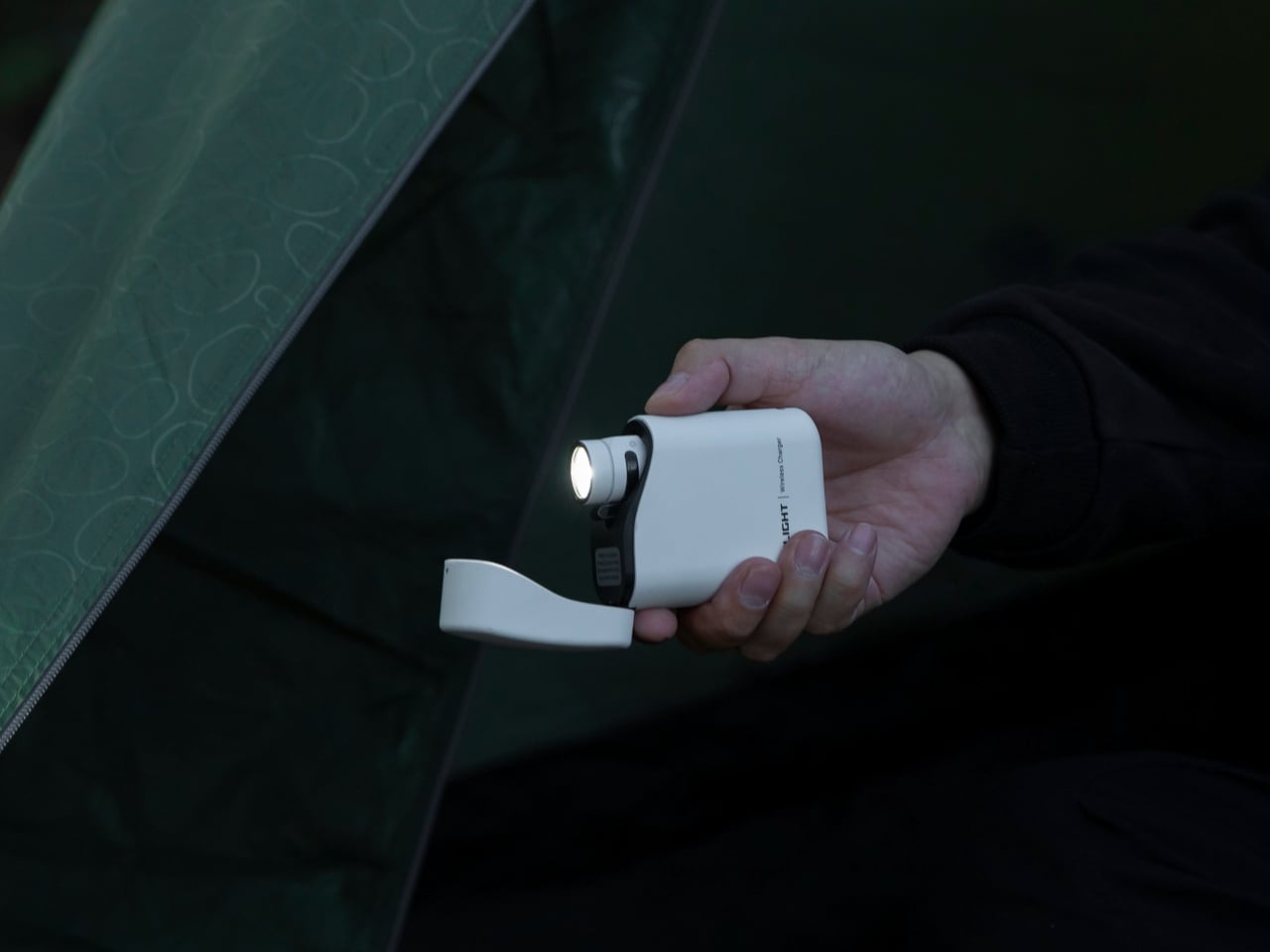
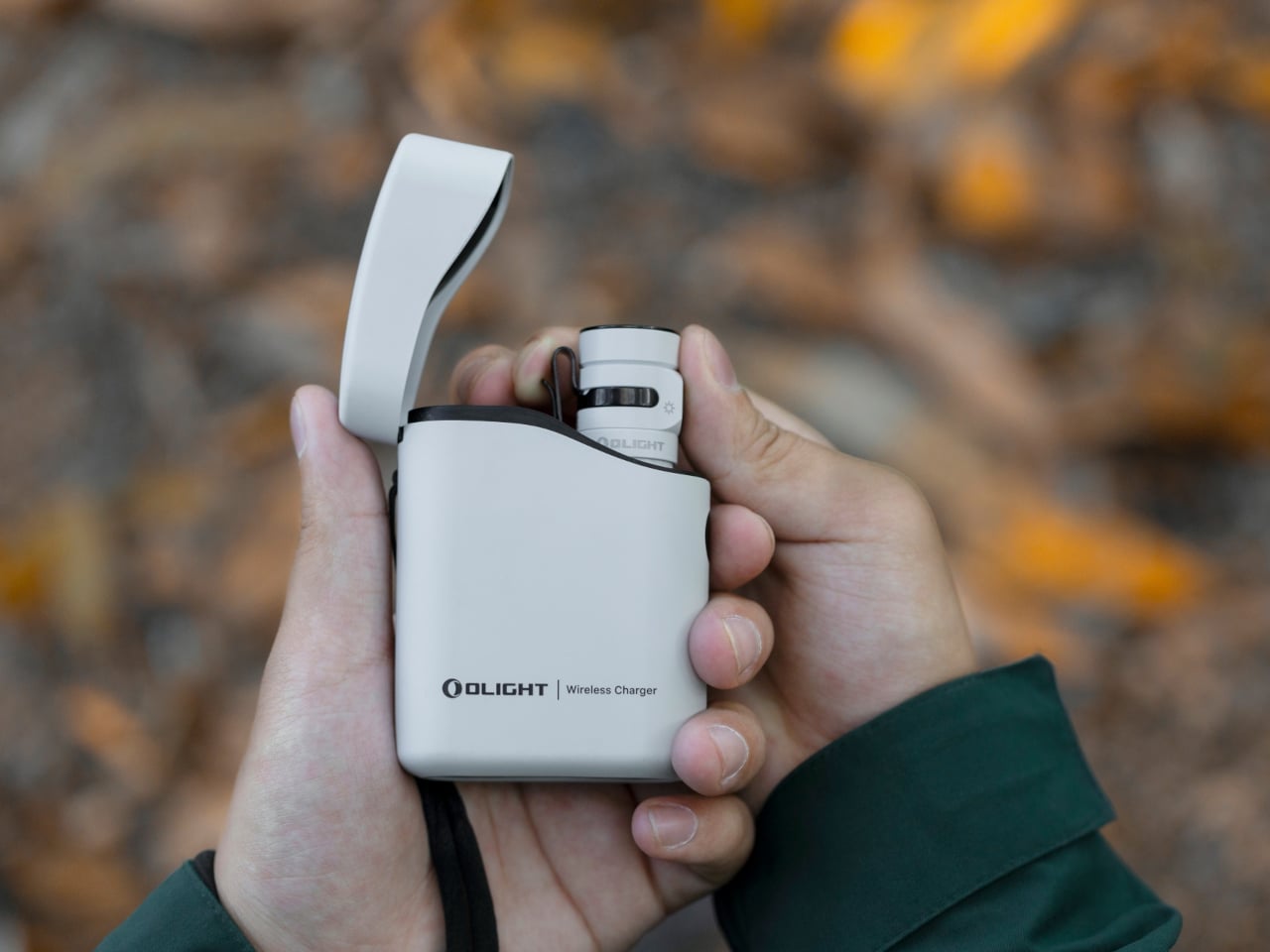
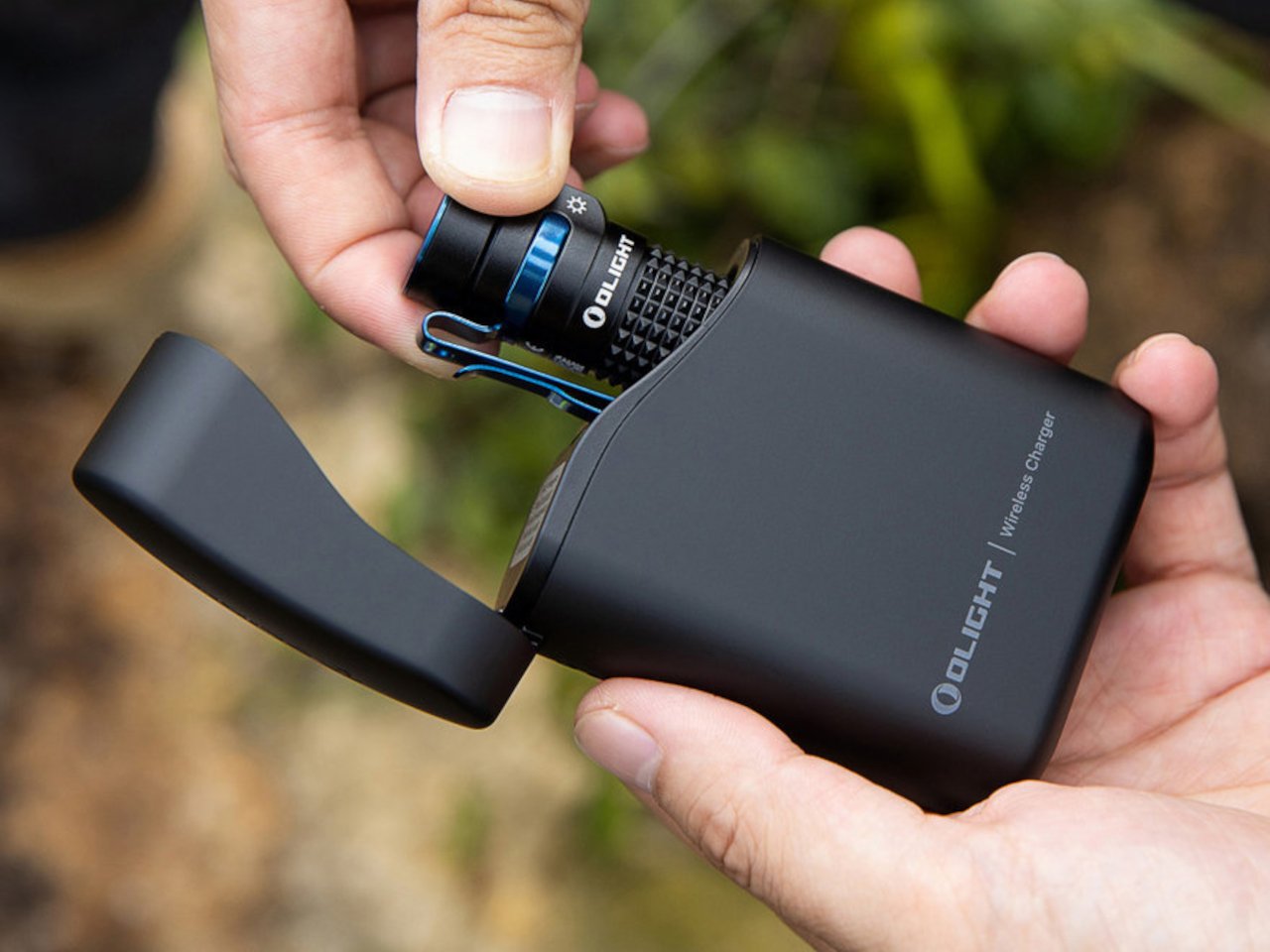
The smartest part of Olight’s Baton 4 Premium Edition is the case. Its flip-top enclosure carries a 5,000mAh battery, recharges the flashlight, and lets you operate the light without removing it. Open the lid, press the case’s button, and the flashlight can illuminate while remaining docked. Holding the button adjusts brightness. That gives the enclosure a useful role beyond storage, particularly when you only need a quick look inside a bag or around the campsite before putting everything away again.

The flashlight itself measures just 2.48 inches long and weighs 52.5 grams with its battery. Olight rates its maximum output at 1,300 lumens, though the manual shows that turbo brightness begins stepping down after 90 seconds. The case also supplies USB-C power to external devices, offering backup charging without another dedicated battery pack. There’s a packing tradeoff: the 142-gram case weighs considerably more than the light. Bring both when charging flexibility matters; carrying only the flashlight keeps things much lighter.

What we like

  • The flashlight remains usable while docked in its charging case.
  • USB-C output gives the case a second job: powering other devices.

What we dislike

  • The charging case adds considerably more weight than the flashlight alone.
  • The 1,300-lumen maximum is a brief turbo setting, not sustained output.

2. DWARFLAB Draco Smart Telescope
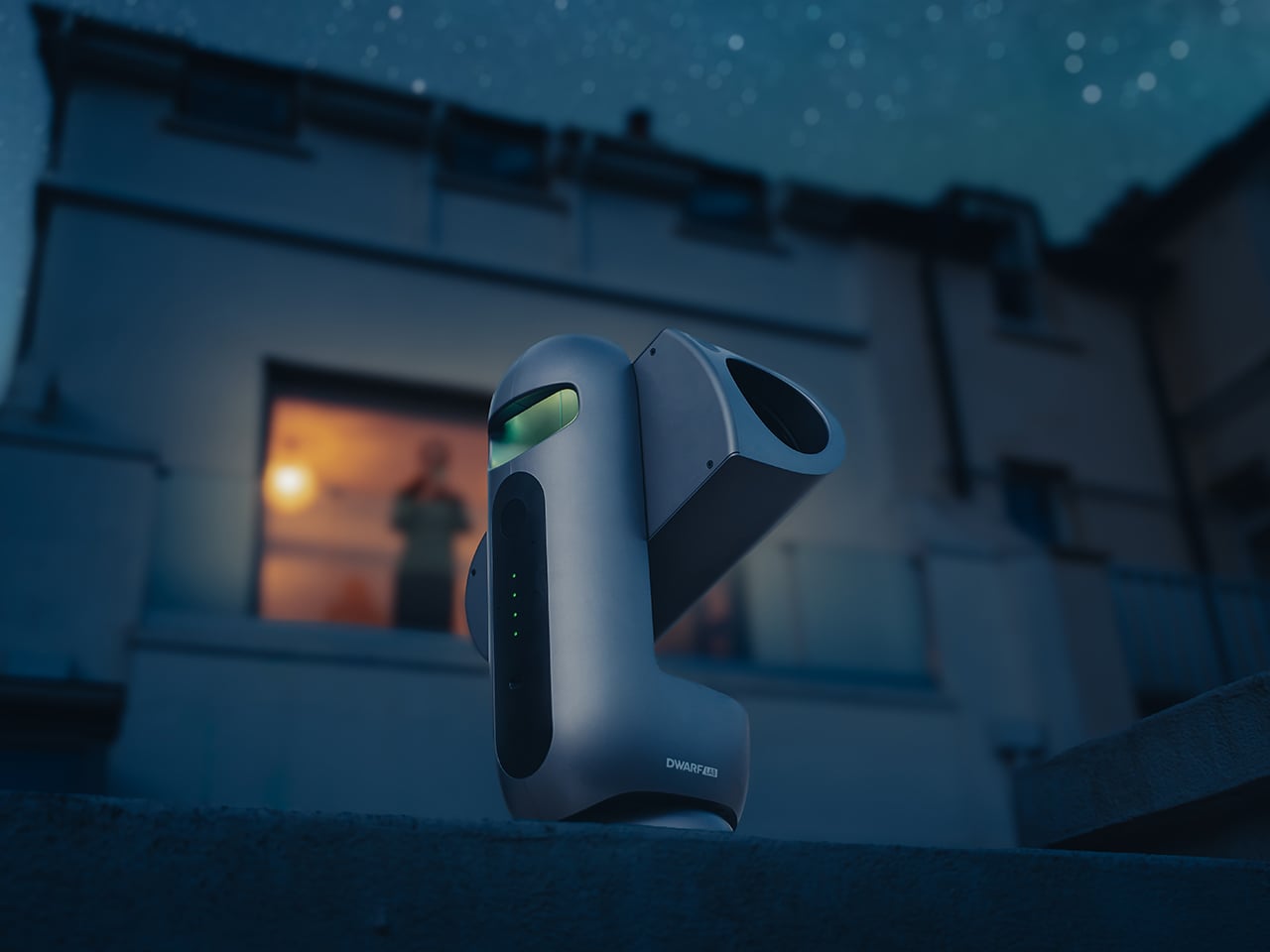
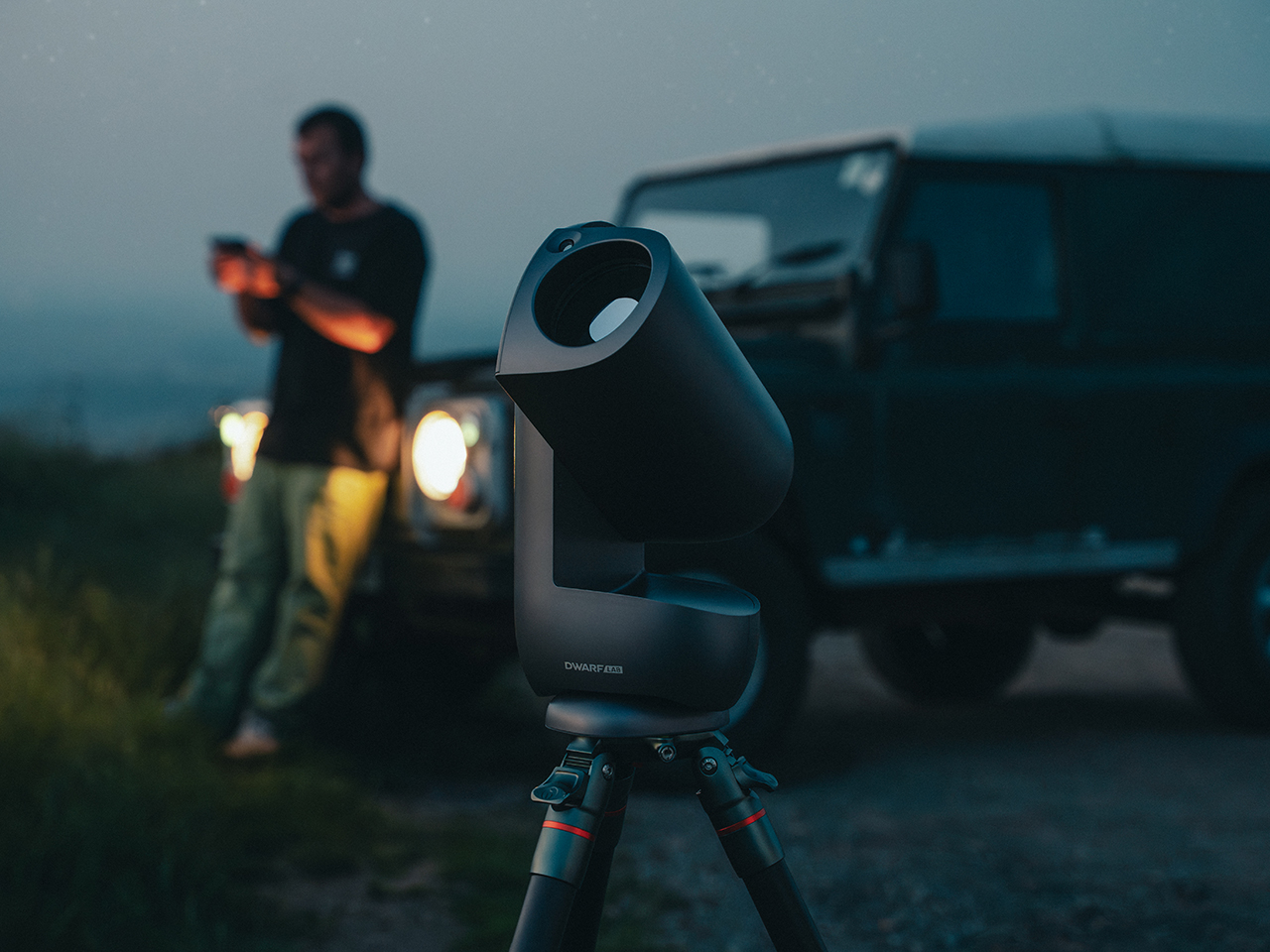
DWARFLAB’s Draco is the indulgence in this selection: a preorder smart telescope designed for photographing the night sky. Its 90mm aperture, folded optics, and integrated cameras bring several astronomy components into one portable instrument. The particularly interesting mechanism is a rotating imaging sensor that compensates for field rotation, the apparent twisting of stars across an image during an exposure. DWARFLAB advertises single exposures of up to 300 seconds, with guiding hardware built into the telescope instead of attached as another accessory.

The practical appeal is how much setup the system takes on. Through the DWARFLAB app, Draco automates focusing, targeting, tracking, and image stacking, while its wide-angle and telephoto cameras can capture simultaneously. Scheduled shooting also makes an overnight session possible without constant supervision. At 5.5 kilograms, though, this is equipment to transport rather than casually add to a hiking bag.

Click Here to Buy Now: $1599

What we like

  • Integrated guiding and automated capture reduce the number of separate components to manage.
  • Simultaneous wide-angle and telephoto imaging offers two views of the same night.

What we dislike

  • A 5.5-kilogram body makes this a substantial addition to your luggage.
  • Preorder status rules it out as a dependable purchase for an imminent trip.

3. Zempire Stealth-Jet Wide Camp Stove
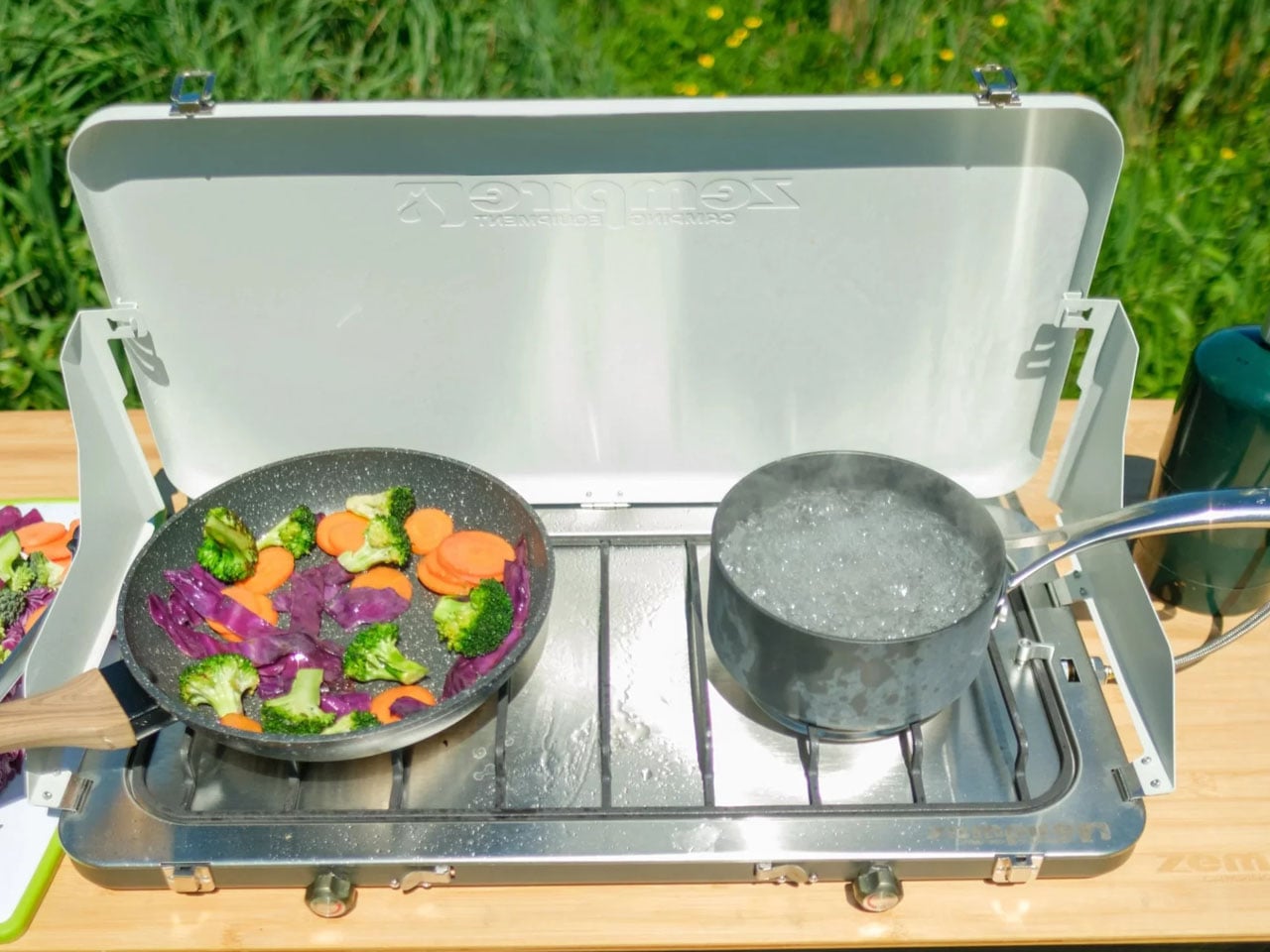
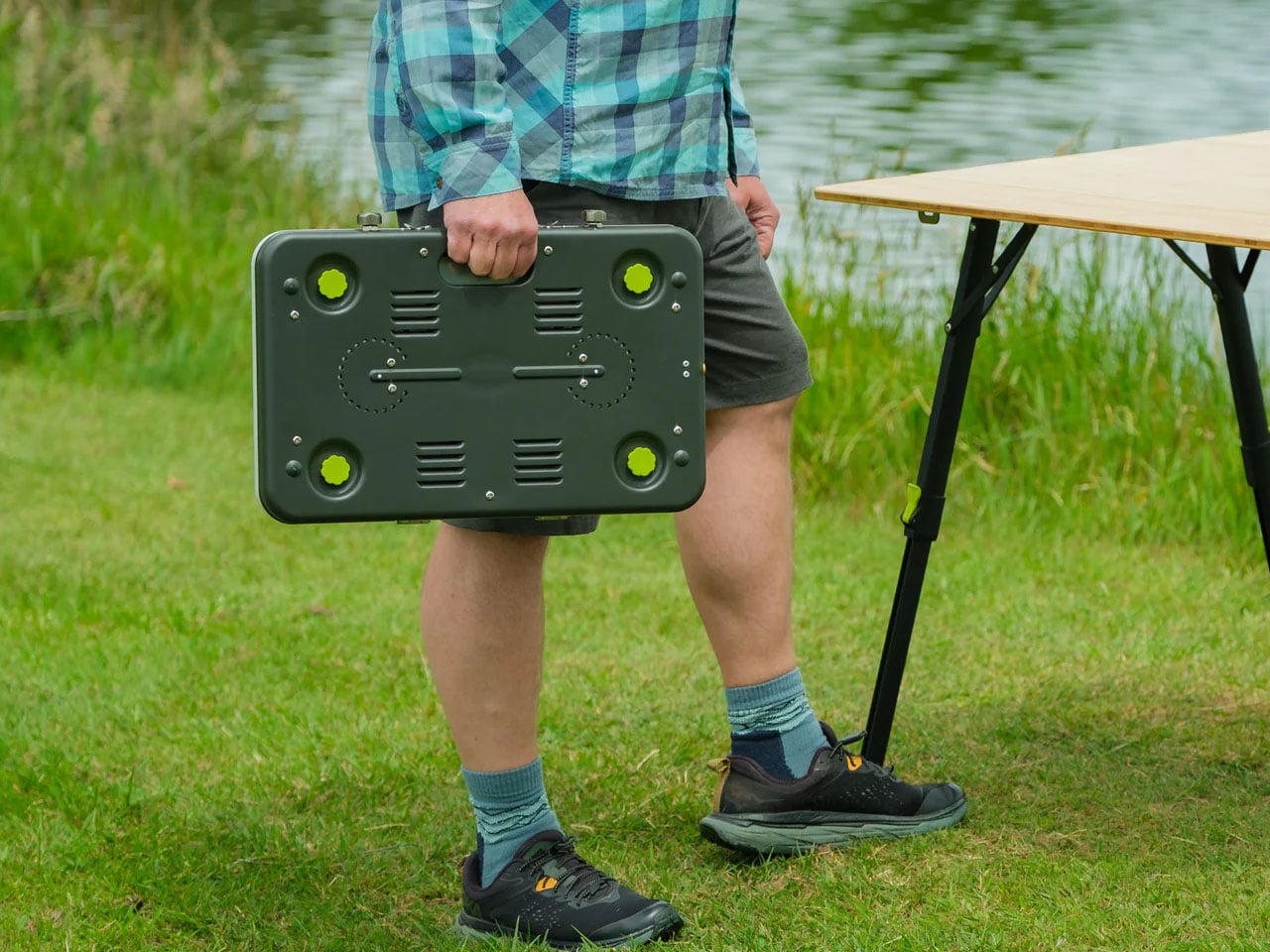
Zempire’s Stealth-Jet Wide addresses a familiar packing problem: a camp kitchen can occupy a surprising amount of the trunk. This two-burner stove closes into a powder-coated pressed-steel body just 2 inches thick. Its packed footprint remains a substantial 23.2 by 12 inches, but the shallow profile gives you a flatter object to arrange around other equipment. Open it, and the extra width provides space for larger pots and pans, with independently controlled burners rated at up to 10,000 BTUs each.

The supporting details are refreshingly practical. Rear and side wind shields surround the cooking area, pull-switch piezo ignition removes the need for matches during normal operation, and a removable pot stand provides access for cleaning. The $210 stove includes a propane canister hose connector, though fuel is separate. At 10 pounds, 13 ounces, its thinness solves storage bulk rather than backpack weight. That makes it a sensible design to consider for car camping, where fitting equipment matters more than carrying it.

What we like

  • The 2-inch packed profile reduces the stove’s storage bulk.
  • Two independently controlled burners provide flexibility for cooking a meal.

What we dislike

  • Its nearly 11-pound weight makes it poorly suited to backpacking.
  • A compatible propane canister and fuel must be purchased separately.

4. Nike ACG x Helinox Chair Zero LT

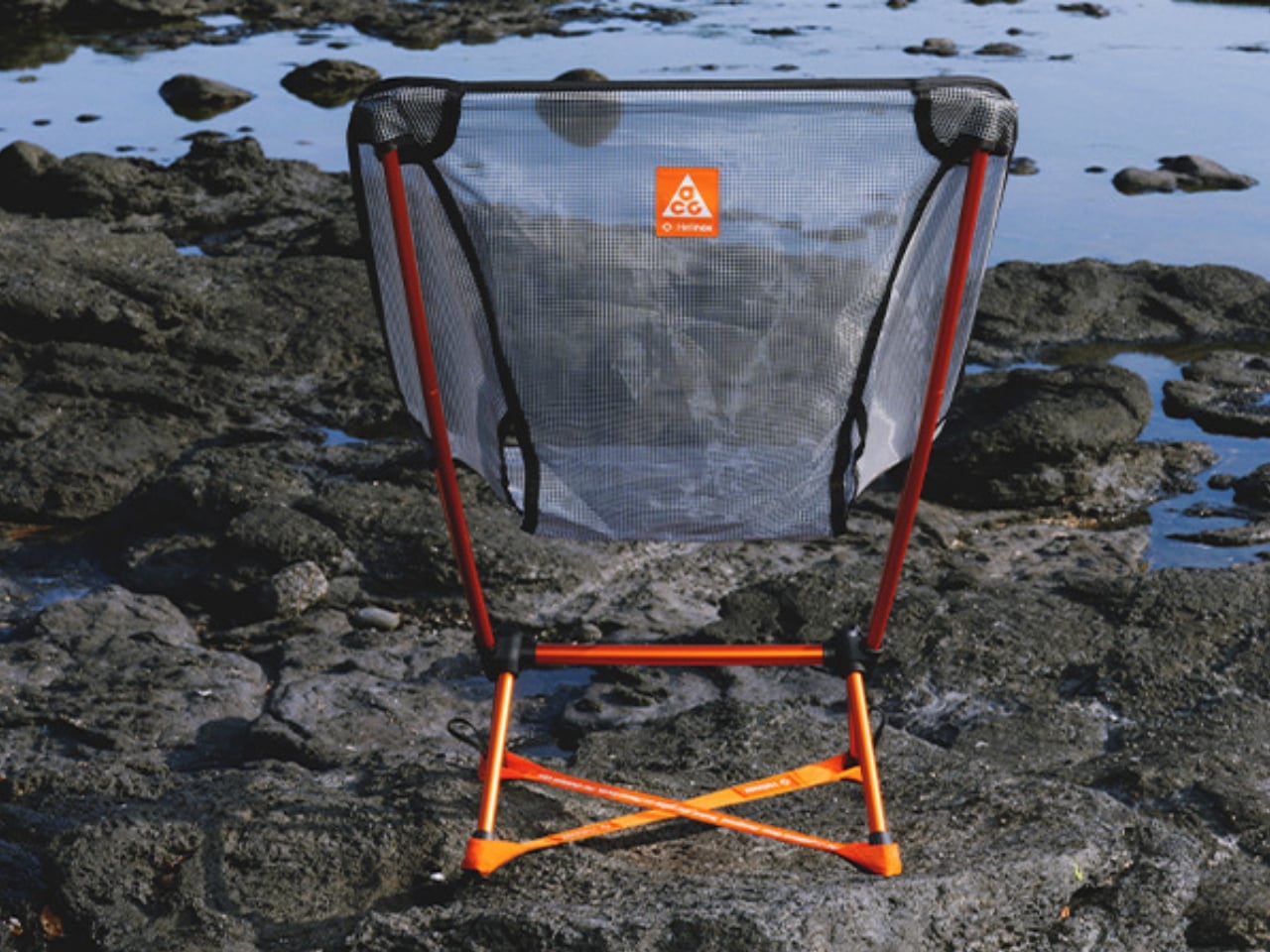
The Nike ACG x Helinox Chair Zero LT makes its construction the visual attraction. An orange frame sits beneath translucent Ghostgrid fabric, drawing attention to the supporting structure rather than hiding it under a substantial upholstered seat. Helinox describes Ghostgrid as a monofilament mesh with a reinforced ripstop grid, developed to balance low weight with resistance to abrasion and tearing. It’s an appropriate material story for a chair whose appeal depends on how little furniture you’re willing to carry outdoors.

The specifications make that argument concrete: 534 grams packed, a 265-pound stated capacity, and a carry case measuring 14 by 4.5 by 4.5 inches. Shock-corded aluminum poles form the frame, while an included X-Strap increases ground contact area to help reduce sinking on softer surfaces. Fit deserves attention before the branding: Helinox identifies adults under 5 feet, 9 inches among its ideal users.

What we like

  • A 534-gram packed weight makes the case for carrying a separate seat.
  • The included X-Strap addresses sinking on softer ground.

What we dislike

  • Helinox’s stated ideal-user guidance makes fit worth checking for taller buyers.
  • The collaboration is currently sold out on the US site.

5. Clip&Go Radio
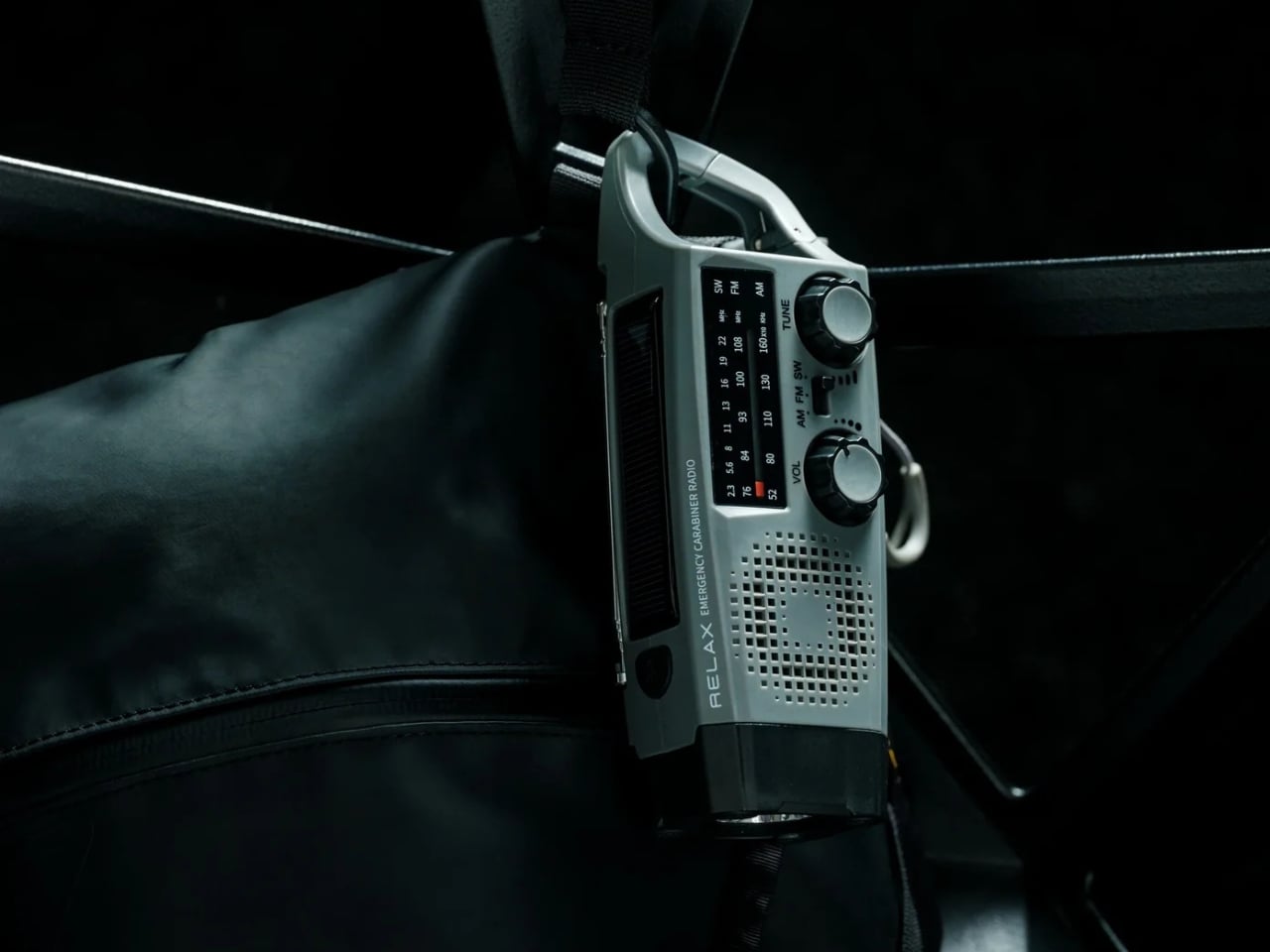
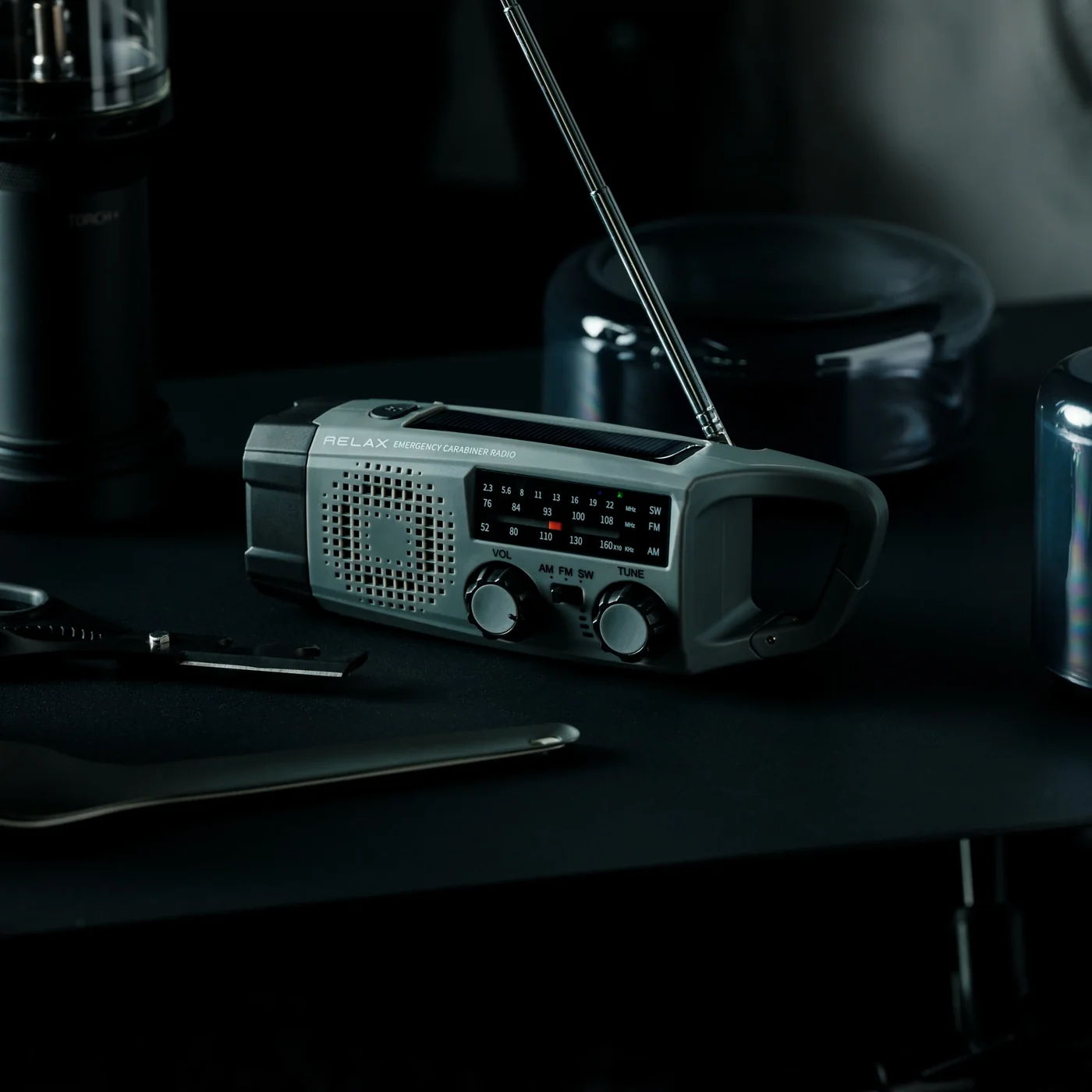
The Clip&Go Radio puts its carrying method directly into the body. A built-in carabiner attaches the 220-gram device to a backpack or other gear, keeping its AM, FM, and shortwave radio accessible without assigning it an interior pocket. The design makes particular sense for something combining everyday listening with backup functions. There’s a flashlight, an audible SOS alarm with a flashing light, and a replaceable 2,000mAh battery that can also supply power to compatible smartphones.

The charging hierarchy is worth understanding before heading out. USB-C is the recommended primary method, with the shop listing approximately two hours for a full charge. The hand crank and solar panel are emergency alternatives, with listed charging times of approximately six and 67 hours, respectively. Neither should be mistaken for a quick substitute for plugging in. The replaceable 18650 cell is the more appealing ownership detail: when the battery wears out, you can replace it rather than retire the radio.

Click Here to Buy Now: $60.00

What we like

  • The integrated carabiner keeps it accessible.
  • Its 18650 battery is replaceable.

What we dislike

  • Solar charging is extremely slow.
  • Hand-crank charging is a lengthy backup method.

Packing Around the Trip

Before adding any of these to your equipment, decide what kind of outing you’re packing for. A trunk, a bicycle pannier, and a backpack impose different limits. Put the complete setup on the scale, including cases, cables, fuel, and accessories, rather than judging an object by its headline measurement. A thin stove still needs room around it; a compact instrument can still represent a substantial share of what you’re carrying.

It’s also worth separating the job you need done from the extra functions that sound appealing on a product page. Choose lighting around how you’ll use it, seating around your body, and specialist equipment around an activity you genuinely enjoy. Multifunctional gear earns its place when those functions match your habits. The better purchase may be the object that replaces something awkward, rather than another addition to an already crowded bag.

The post The 5 Best Outdoor Gear of November 2026 first appeared on Yanko Design.

  •  

Midea’s award-winning blender concept can both heat and cool your mixture down

Picture a blender with a stovetop hidden in its base, so it can turn soybeans into hot soy milk or rice into congee without you touching a pot. Heated blenders like this are a breakfast staple across China, and most share one annoying flaw: the drink comes out scalding, leaving you to blow on it like it owes you money. Midea’s Fully Automatic Air Flow Blender targets that wait with an airflow system designed to help with both cooking and cooling. Midea claims it brings drinks down to 131°F (55°C) within five minutes of finishing. That’s roughly where breakfast stops being a dare and starts being breakfast.

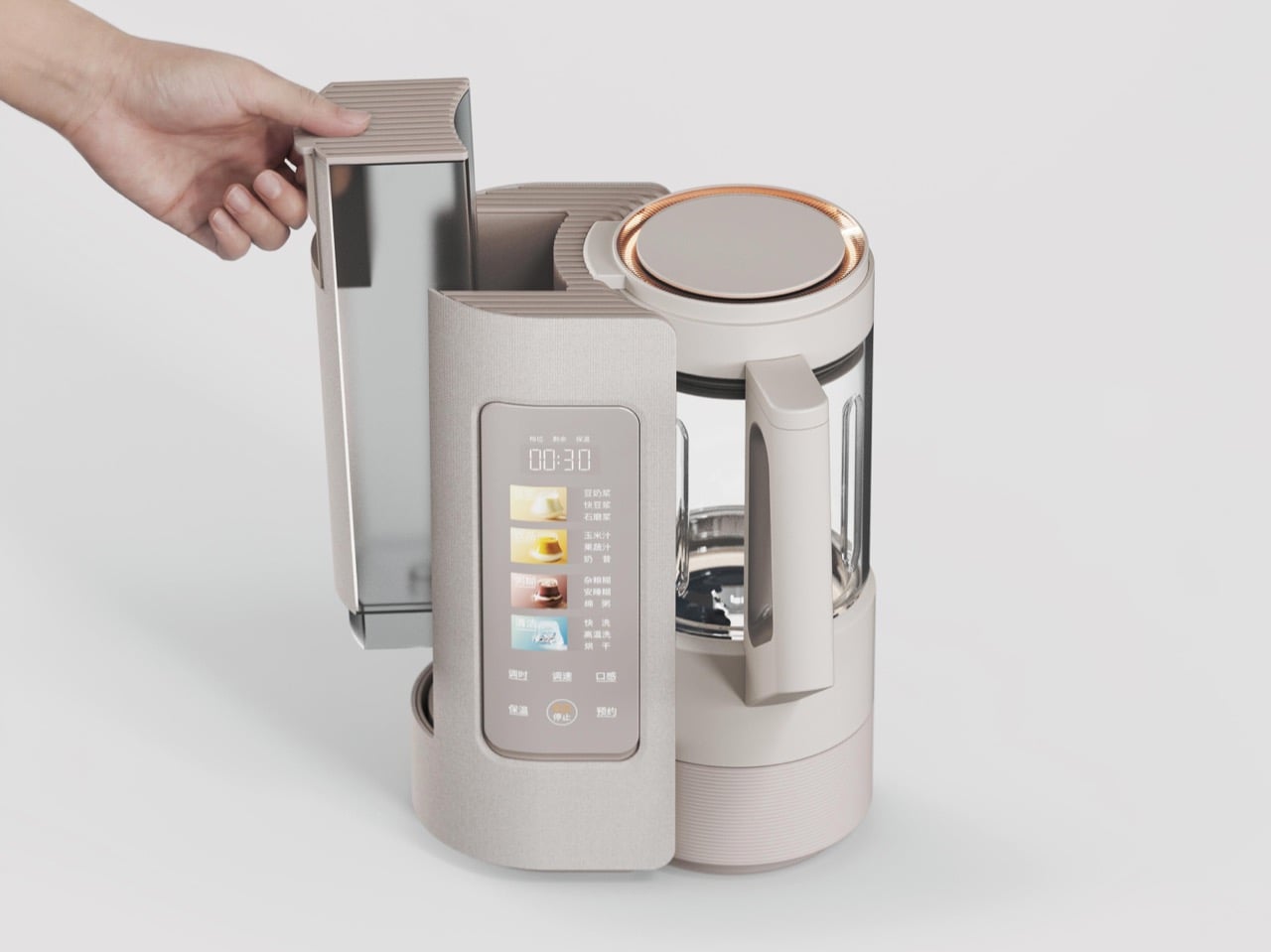
The machine comes from Guangdong Midea Consumer Electric, with a design team led by Peng Xi and Wang Jin, and it received a Red Dot Award: Design Concept 2026 in the Ready for Market track. That track recognizes near-finished products that haven’t reached shelves, judged partly on whether they can realistically ship within a year. Midea says the airflow lets the motor blend at full power without soy milk foaming over. A built-in water tank sits alongside the blending jar, and the linen-textured shell looks ready for a Scandinavian café. The Chinese-language interface suggests a launch in China first, though there’s no word yet on US availability.

Designers: Peng Xi, Wang Jin, Li Qianlun, Jo Jeongmin, Ru Guanhong & Wang Xingzhe

Soybeans contain saponins, compounds that contribute to soy milk’s bubble-bath foam when heated. Heated blenders typically manage this by blending in short bursts and pausing the heat to keep the foam from reaching the lid. That stop-start rhythm helps explain why a batch of soy milk on Midea’s existing machines takes around 30 minutes. The company credits its airflow system with cutting prep time in half, though it hasn’t detailed how the system controls foam.

A freshly cooked batch of soy milk or congee can come out near 212°F (100°C), then sit in the jar cooling a degree at a time while you wait. Midea’s existing heated blenders hold drinks at 131°F (55°C) on keep-warm for up to six hours, so the target is familiar territory for the brand. The new machine’s trick is getting there fast: Midea says cooling takes about five minutes. That’s roughly the time it takes to find your shoes and your keys. Paired with overnight scheduling, it could have freshly made soy milk ready to drink when you wake up.

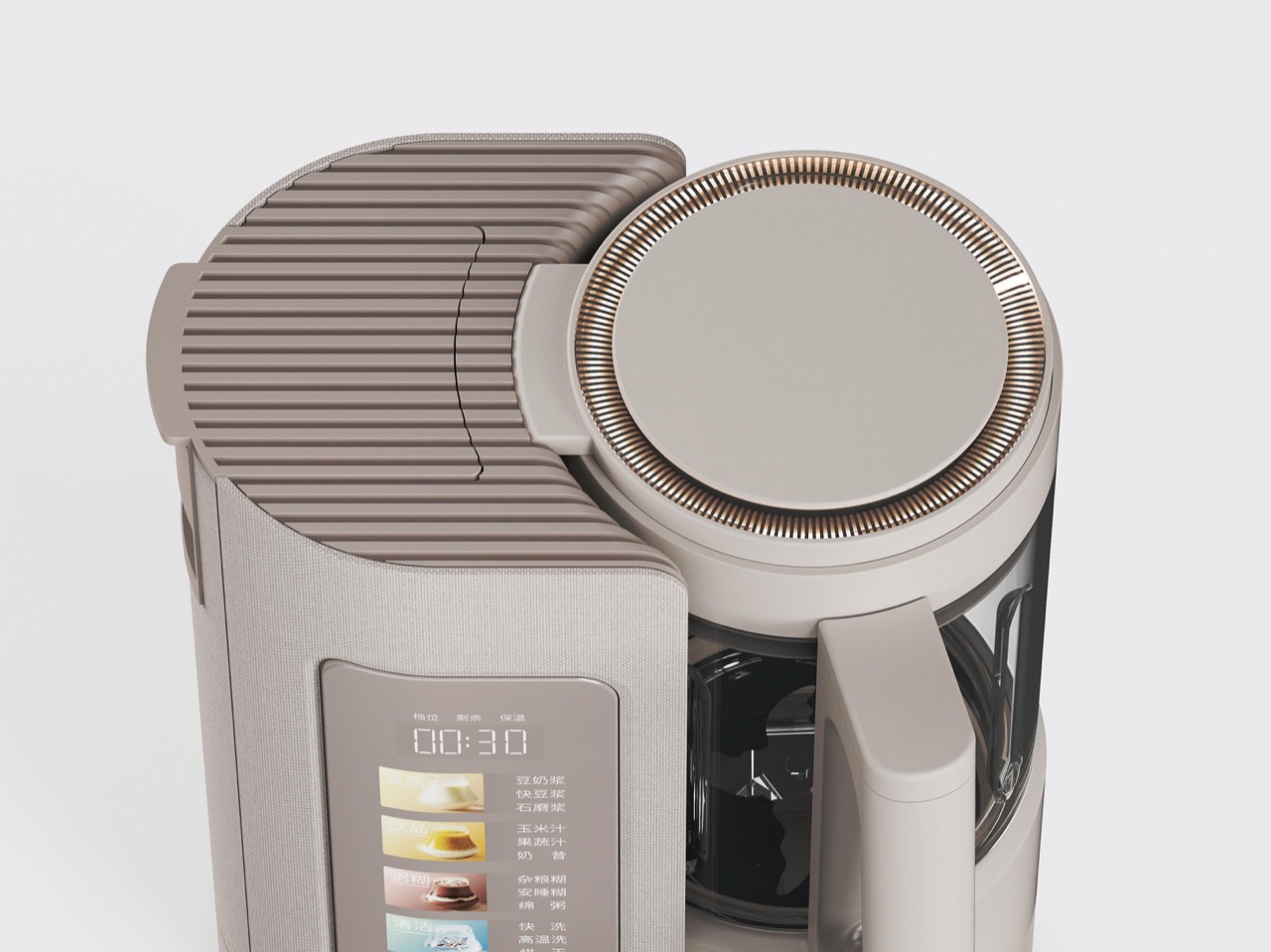
Visually, the appliance splits into two towers that share a figure-eight footprint. On the left, a linen-textured column holds a water tank that lifts straight out from the top, with a corrugated grip that echoes the ribbed base beneath the glass jar. On the right, the jar wears a copper-colored lid ring that appears to double as a status light. Midea’s description of the surface as a linen texture suggests a molded finish rather than real cloth, a sensible call next to a jar of hot congee. The touch panel flips up for easier reading and carries illustrated buttons for soy milk, juices and milkshakes, porridges, and cleaning, including one porridge program labeled for better sleep.

The closest thing US readers will recognize is the Ninja Foodi Cold & Hot Blender, which pairs an 800-watt heating element with a 64-ounce glass pitcher and sells for around $200 at Walmart. It can cook soup from raw ingredients, but you’re still the one pouring in water and waiting for everything to cool. Midea’s pitch is to automate more of that work, drawing water from the built-in tank and offering a high-temperature wash and drying cycle through the menu. The tank will still need refilling, of course. There’s no price or US release date yet, so this one stays on the wishlist.

The post Midea’s award-winning blender concept can both heat and cool your mixture down first appeared on Yanko Design.

  •  

Razer’s New Hammerhead Earbuds Bring Back the Cable, Not the Headphone Jack

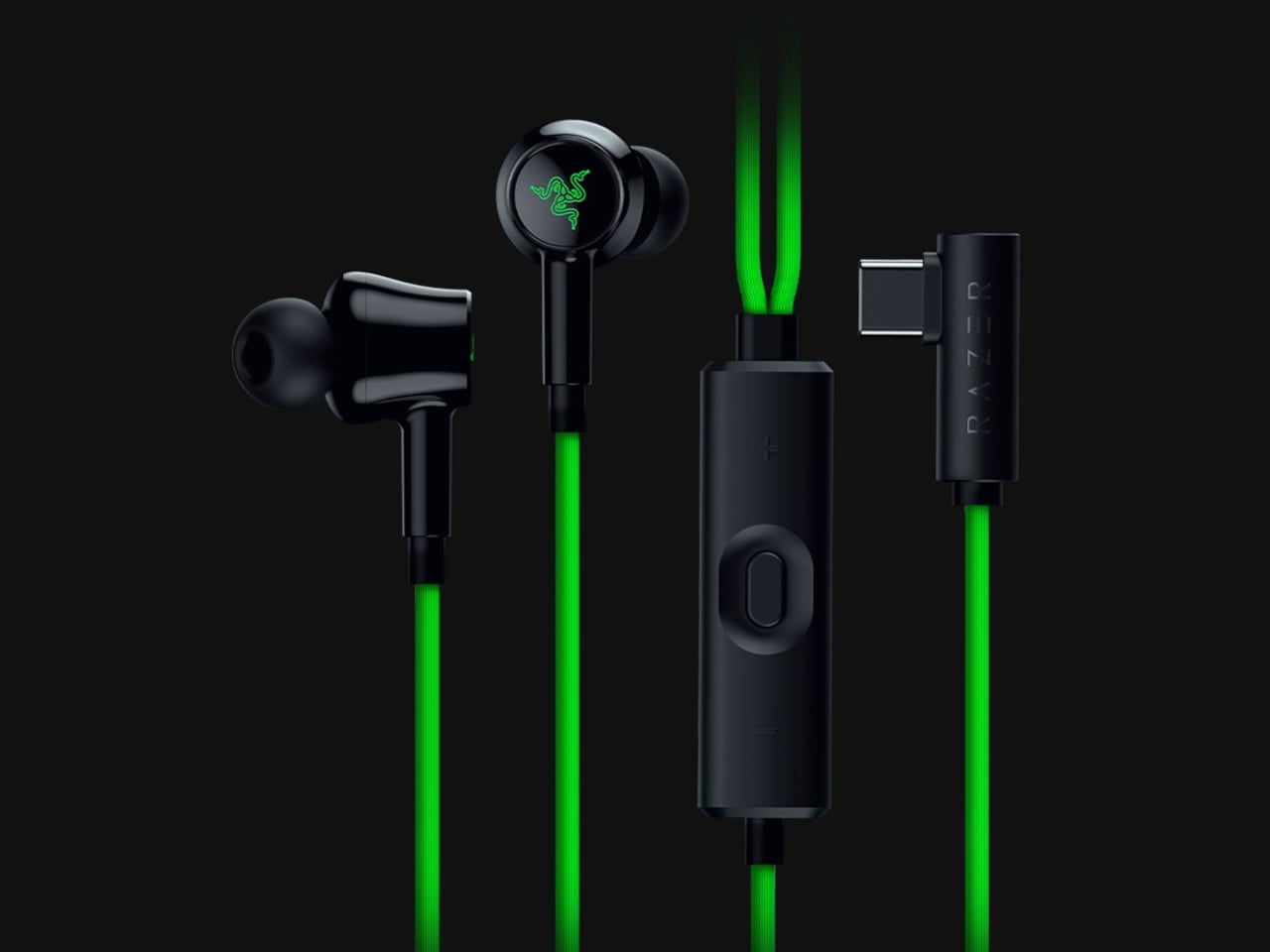
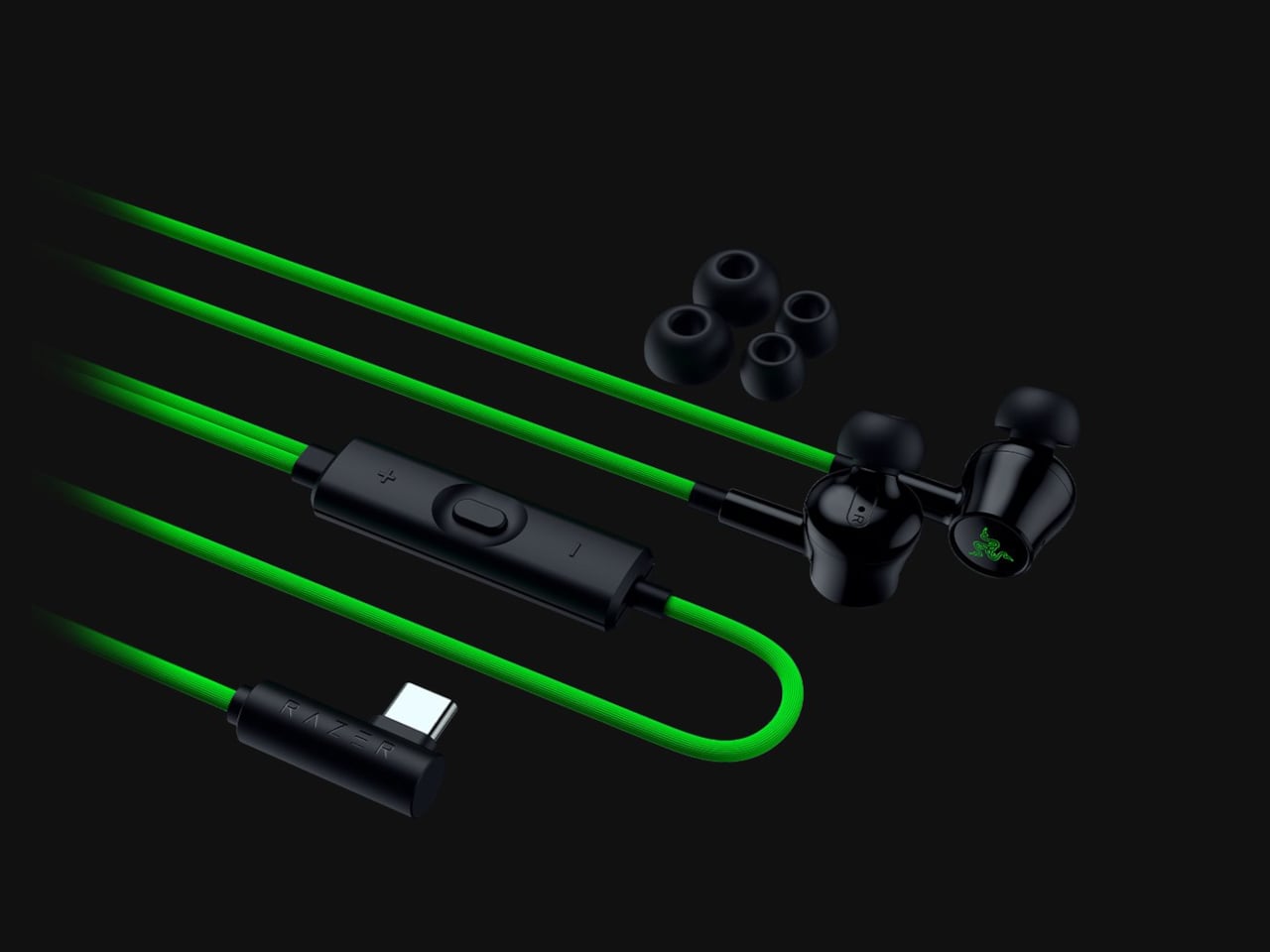
Wireless earbuds can make a short gaming break depend on whether you remembered to charge their case the night before. Razer’s Hammerhead V3 Chroma takes that worry off the list with a cable that carries audio and power through USB-C. There’s no headphone jack involved in this return to wired listening, and the angled plug has been shaped around the hands holding your phone.

The connector has a 90-degree bend, letting the cable run alongside a compatible device rather than sticking straight into your palm. That matters when you rotate a phone for a game and wrap both hands around its ends. It’s a small adjustment to an unglamorous component, but one that addresses one immediate objection to putting a wire back into a handheld setup.

Designer: Razer

The wire also gives Razer somewhere to put controls that don’t have to share space with an ear tip. An in-line remote handles volume, playback, and active noise cancellation (ANC), with raised controls you can locate by touch rather than tapping an earbud. Its omnidirectional microphone supports calls and team chat, keeping the interactions on the cable instead of behind another phone menu.

Of course, subtlety isn’t really the point of a bright green cable hanging from black earbuds. Circular outer caps carry illuminated Razer logos, with Chroma RGB offering 16.8 million color options. The glossy housings and short stems aren’t particularly dramatic by themselves, but the color makes the whole arrangement unmistakably gaming hardware, even when you’re simply listening to music on the bus.

Inside each earbud, a dynamic driver works alongside a dedicated tweeter, dividing the work between lower and higher frequencies. Razer includes feed-forward ANC, intended to reduce surrounding noise during a commute or a match in a shared room. Noise cancellation brings a familiar wireless-earbud convenience to a wired pair, although neither the driver arrangement nor the connection guarantees great sound on its own.

Four presets cover Gaming, Music, Movies, and Call, alongside a custom equalizer profile for anyone who prefers adjusting the balance themselves. Moving to a PC adds THX Surround Sound 7.1 through Razer Synapse 4. That’s a software-dependent extra, not something the earbuds automatically deliver on every phone, so the same connection doesn’t mean an identical feature set everywhere you plug them in.

The IPX4 rating allows for splashes and sweat, which makes sense for earbuds that might move from a desk to a drizzly commute. It doesn’t turn them into waterproof gear. The cable needs managing: it can catch on clothing or pull against the phone when you reach too far. A bent connector changes its direction, not the distance you’re able to move.

Launched on November 5, 2026, the Hammerhead V3 Chroma costs $79.99 in the US. The trade is straightforward: fewer batteries to remember, but a cable and an occupied USB-C port in return. If that’s your phone’s only charging connection, you’ll need another way to top it up while listening. The earbuds need no charging, but your phone doesn’t get the same night off.

The post Razer’s New Hammerhead Earbuds Bring Back the Cable, Not the Headphone Jack first appeared on Yanko Design.

  •  

The PP-2 Turntable Plays Vinyl Upside Down, Without the Fuss

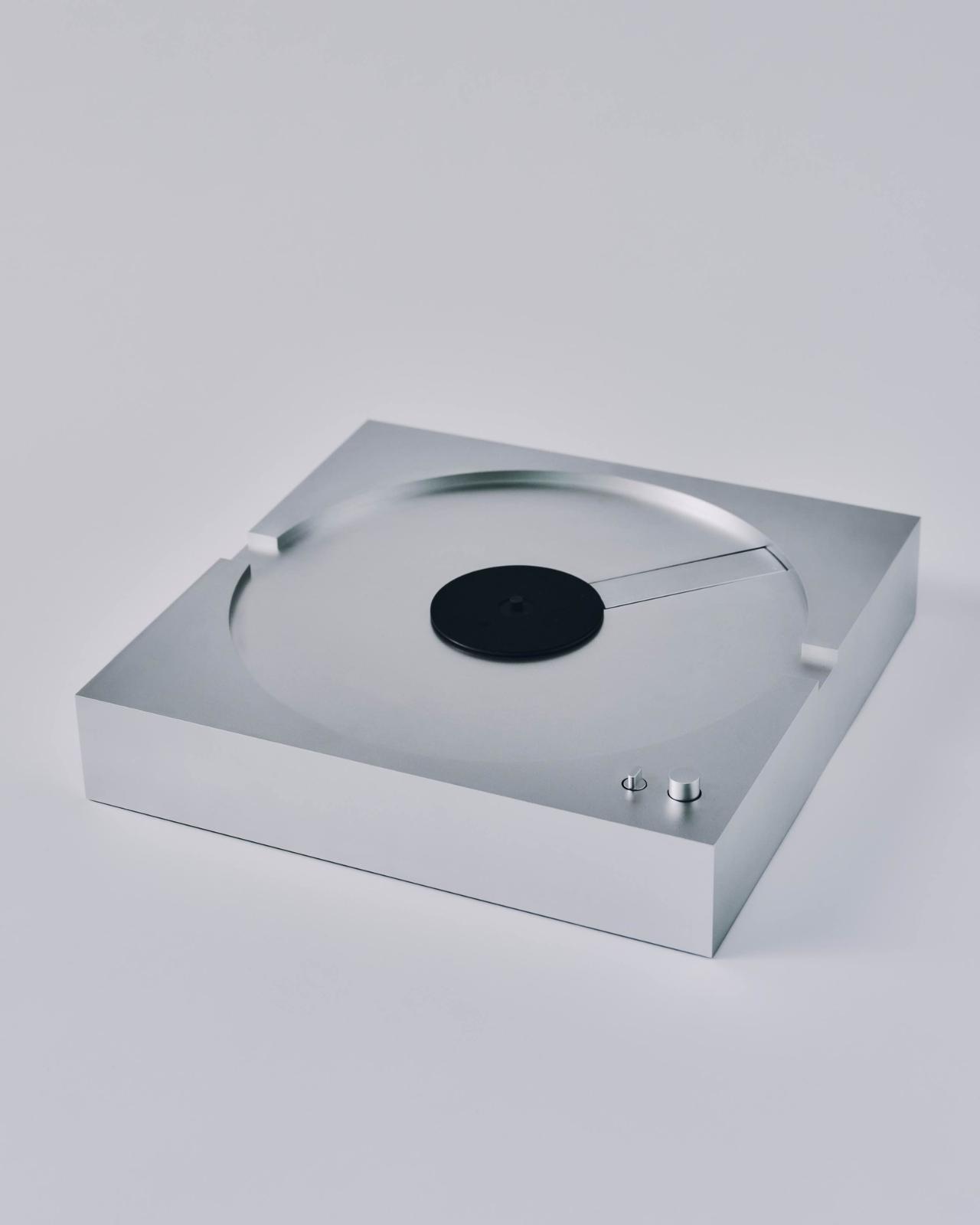
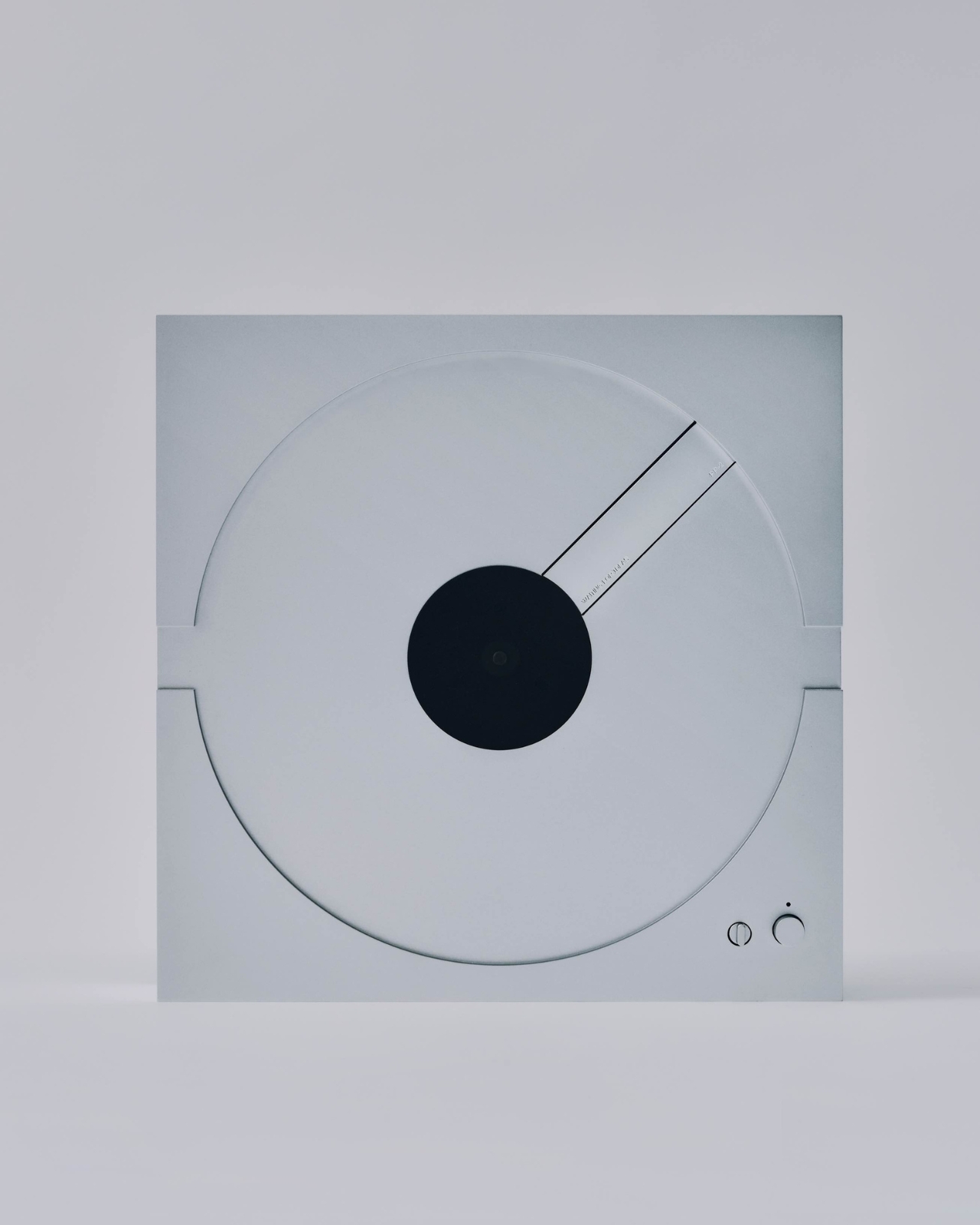
Choosing an album should be the enjoyable part of playing a record. Hovering a delicate needle over its edge can feel like an unnecessary little test, especially if you want music rather than a new equipment hobby. Waiting for Ideas addresses that friction with the PP-2, an aluminum turntable that takes tonearm adjustment out of the listener’s hands. Place the record upside down, press Play, and playback happens underneath.

The Paris studio, founded by Jean-Baptiste Anotin, explored this approach with the PP-1, which we covered in March 2025. That earlier model hid its needle below the record and made an unusually convincing case for simplifying vinyl playback. The PP-2 continues that idea with an optical pickup system. It’s currently listed for preorder, so this is a product to plan around rather than expect immediately.

Designer: Waiting for Ideas

I like the premise because the ritual of vinyl doesn’t have to include every mechanical responsibility associated with it. Choosing a sleeve, pulling out a record, and committing to an album side already give the experience its character. For my money, operating the equipment shouldn’t become a separate qualification. The PP-2’s appeal starts with that distinction, well before any discussion of audio fidelity.

Its body is CNC-machined from a solid block of aluminum and anodized, with a footprint roughly 13.8 inches square and a height just under 3 inches. Those proportions give it a compact, architectural presence on paper, closer to a deliberately placed object than a sprawling component. The square format also feels appropriate: a record is already visually busy enough without the surrounding hardware competing for attention.

The optical system deserves a careful explanation, because “reading vinyl with light” can suggest the wrong thing. A physical stylus still follows the groove. Light measures that stylus’s movement instead of the magnets and coils used in conventional magnetic cartridges. Waiting for Ideas credits Miniot technology, whose optical pickup approach preserves an analog signal path. This isn’t a contactless laser player, despite how futuristic the description might sound.

Waiting for Ideas says removing magnets from the moving stylus assembly reduces its mass, allowing more faithful tracking and finer detail. Those are appealing promises, but I’d want independent measurements and listening tests before treating them as reasons to upgrade. The clearer design achievement is easier to understand: the system keeps the delicate business of following a groove largely outside the user’s daily routine.

The motor gets a corresponding update. PP-2 uses an axial-flux direct-drive motor with optical speed control, which the studio says adjusts rotation 1,000 times per second. It supports 33 and 45 rpm records. The useful goal here is consistency, not a correction count worth showing off to guests. I’m more interested in what that engineering lets the owner stop worrying about than how impressive it sounds in a specification list.

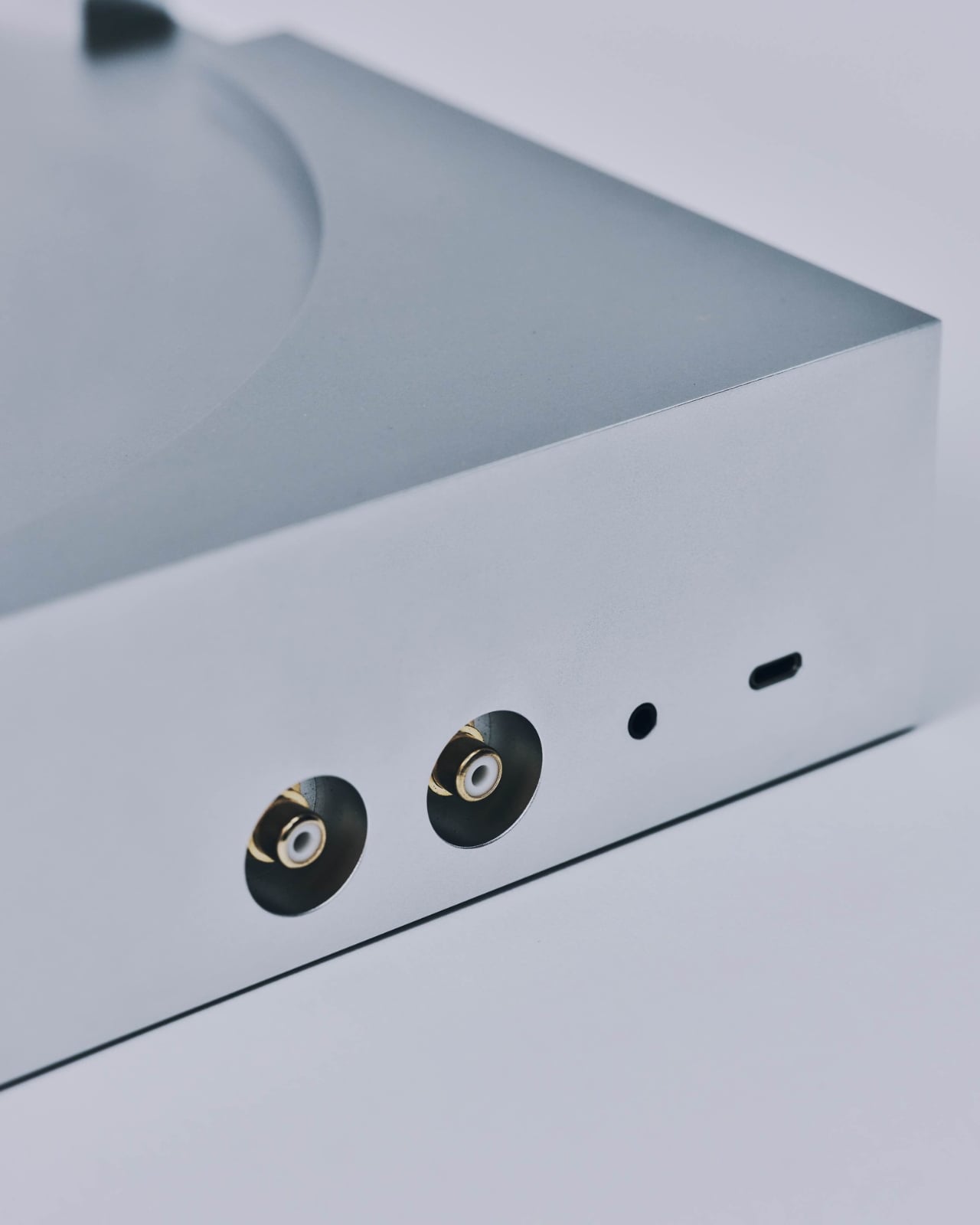
A built-in preamplifier, RCA connections, a 3.5mm output, and USB-C power complete the practical picture. Including the preamp keeps another specialized component out of the shopping equation, while the wired outputs give the design familiar connections to work with. I appreciate that restraint. A visually simplified turntable loses some of its argument if assembling the rest of the system requires decoding a second equipment catalog.

The difficult number is the price. The store lists the PP-2 at €8,900 and asks buyers to allow up to eight weeks for assembly and shipping. Applicable import duties and taxes outside the European Union are additional. That makes this a luxury interpretation of convenience, not an accessible entry point for someone buying their first few records. The purchase argument needs to include a serious attachment to the object itself.

At that price, I’d also want clear answers about servicing and long-term support before ordering. Still, I can appreciate the decision to make elaborate engineering recede from everyday use. The PP-2 leaves the listener with a record to choose and a Play button to press. For someone who loves albums more than adjusting equipment, that’s a thoughtful place to focus the design.

The post The PP-2 Turntable Plays Vinyl Upside Down, Without the Fuss first appeared on Yanko Design.

  •  

War.app - Le jeu de conquête où personne n'attend son tour

Bon, c'est vendredi aujourd'hui et vous êtes payé la misère alors on va trop forcer hein et se détendre un peu ! (et allez demander à votre boss une augmentation DE CE PAS !!)

Et pour cela, on va tous se mettre sur War.app , un jeu de conquête au tour par tour, gratuit, auquel on peut jouer directement depuis le navigateur (ou sur Android et iOS). Dans ce jeu, vous déployez des armées sur une carte du monde et vous grignotez petit à petit les territoires de vos adversaires, un peu comme dans le jeu Risk.

D'ailleurs, vous avez peut-être déjà croisé ce jeu avant sous le nom de Warzone...

Ce changement de nom fait suite en fait, à un accord avec Activision, l'éditeur de Call of Duty: Warzone , qui avait déposé ses marques WARZONE en 2020 alors que le jeu existait depuis novembre 2017 mais bon... David, Goliath, l'INPI... vous connaissez. Côté joueurs toutefois, rien d'autre ne change, assure Fizzer, le créateur, qui code son jeu tout seul comme un chef ! Le système de compte pour conserver votre progression et vos parties en cours n'a d'ailleurs pas bougé donc vous devrez tout retrouver.

Par contre, si vous aviez warzone.com dans vos favoris, pensez bien à le remplacer, même si l'adresse redirige encore vers war.app.

Maintenant, une partie, ça ressemble à ça : une carte du monde, un nombre d'armées sur chaque territoire, et tout le monde donne ses ordres en même temps. Du coup, personne ne poireaute pendant que les autres jouent, et comme les parties sont asynchrones, chacun joue son tour quand ça l'arrange.

Une partie solo contre l'ordinateur, au tour 2, avec 5 armées à déployer

Et surtout, il n'y a pas de dés. Hé oui, par défaut, chaque armée qui attaque en tue 0,6 en face, donc le résultat d'un combat se calcule à l'avance. Sur la capture, 5 armées parties d'Islande en tuent 3, de quoi balayer les 2 qui gardent le Groenland. Le créateur d'une partie peut quand même réactiver le hasard s'il y tient.

La fenêtre d'attaque : 5 armées d'Islande vers le Groenland, et "Kills 3" affiché sous le curseur

En solo, vous avez accès à des milliers de niveaux contre l'ordinateur, dont ceux créés par la communauté. Et en multijoueur, une même partie peut réunir jusqu'à 400 joueurs, sur des cartes qui dépassent large les 3 000 territoires.

Bref, ya de quoi vous occuper ce vendredi mais aussi ce week-end mais aussi pendant votre chômage puisque j'imagine que votre boss vient de vous virer pour avoir osé lui demander une augmentation. Désoléééé.

Après, gratuit, ça veut dire AVEC de la pub. Je sais que vous adorez ça !! loool L'abonnement qui la retire c'est 3,99 $ par mois ou 19,99 $ par an donc c'est pas très cher et ça débloque surtout l'usage illimité de l'appli native pour Windows, Mac et Linux. Mais Fizzer assure que ça ne rend pas plus fort dans le jeu, puisqu'il ne vend ni armées ni cartes. Seul vrai bémol pour moi c'est que l'App Store ne propose pour le moment le jeu qu'en anglais (et ici sur Korben.info je suis en multilingue maintenant, vous le saviez ??).

Bref, c'est à essayer directement sur war.app en commençant évidemment par une partie solo pour prendre le coup de main et après, peut-être qu'on ira tous en multi se foutre sur la gueule entre lecteurs de korben.info ! Allez savoir ?

Source : War.app

  •  

J'ai testé CottageCore, le jeu cosy d'une vieille connaissance

Je ne sais pas si vous connaissez David Catuhe, mais c'est le créateur de Babylon.js, un moteur de rendu 3D pour le Web qu'il pilote depuis chez Microsoft, et accessoirement une vieille connaissance. Ça faisait un bail qu'on ne s'était pas parlé alors quand il m'a écrit pour me présenter son jeu, avec en bonus une clé pour tester la version complète encore en bêta, j'ai sauté dessus. Donc voilà, vous êtes prévenus, c'est le test d'un copain... mais un test qui je l'espère sera honnête.

Ce jeu, c'est CottageCore , un jeu de construction cosy où vous construisez librement votre village dans une clairière avant de pouvoir ensuite le regarder prendre vie. Les villageoises s'installent, vous leur choisissez un métier parmi une quinzaine, les animaux y vivent leur meilleure vie et les saisons défilent jusqu'à l'hiver. Ça se joue en mode Créatif, sans aucune limite, ou en mode "Dieu de la clairière", où cette fois accueillir du monde coûte du mana.

Ce clic autorise une connexion à Google : adresse IP transmise et traceurs possibles. En savoir plus

Voir cette vidéo sur YouTube

Et franchement, c'est très chill. La musique est top (David précise que l'art et la musique sont faits par des humains, l'IA ne l'ayant aidé que pour le code) et les modèles 3D sont super jolis. On règle les proportions des maisons et des tours, leurs matériaux, leurs couleurs, la forme des toits, et on peut même les faire flotter sur des nuages.

La place du village, avec sa fontaine, ses villageoises et ses poules qui se baladent

Mais ce que j'ai préféré dans ce jeu, c'est que les bâtiments peuvent gagner une fonction. Par exemple, vous partez d'une simple maison, vous lui ajoutez des tours, et si vous remplissez les conditions de sa recette, elle deviendra alors un beau château ou une jolie église.

Mon château sur son rocher, et à droite la carte de recette avec ses conditions encore à faire

Par contre, ces conditions ne sont pas toujours claires, et construire n'est pas si simple. Pour le château par exemple, il faut surélever le terrain, et chez moi ça ne marchait pas bien, sans que je comprenne pourquoi. David a pourtant déjà retravaillé ces cartes fin octobre puisqu'un clic sur une condition non remplie la met en évidence et vous indique quoi faire. Donc si vous bloquez, cliquez sur la ligne qui coince.

Une alerte réclame plus de nourriture pour l'hiver pendant que je bataille avec le château (capture : Korben)

Après, c'est une bêta, donc faut être indulgent et je suis certain que David qui découvrira cet article en même temps que vous corrigera ces quelques derniers accrocs. Pendant le tuto, les alertes passaient aussi parfois devant les bulles d'explication. Le jeu m'a aussi un peu fait laguer, rien de grave, et m'a proposé de lui-même de quitter le mode haute qualité pour passer en mode performance.

En plein tuto, l'alerte de baisse d'images par seconde passe devant et propose la qualité Normal

Côté technique, le jeu est écrit en TypeScript, son rendu passe par Babylon Lite en WebGPU, et la version Steam emballe tout ça dans Electron. Et l'idée ne date pas d'hier puisque David m'a raconté que tout avait commencé en Silverlight 5, sous le nom de code de Worldmonger, auf qu'à l'époque, il ne savait pas encore dessiner, donc c'était, je cite, "moche comme un cul".

Mon petit village vu de haut, avec son rempart crénelé et le château au bord de la rivière (capture : Korben)

Voilà, si ça vous tente, la démo est gratuite sur Steam depuis le 3 novembre, dispo sous Windows, macOS et Linux, avec une petite clairière et cinq métiers seulement. Sur Mac, il vous faudra une puce M3 minimum sous macOS 14, et sur PC, Windows 10 avec une GTX 1660 ou une RX 5500 XT.

Et comme le jeu sortira en français le 14 avril 2027, d'ici là, il a laaarrrgeeemmment le temps de se bonifier et de voir ces petits défauts de jeunesse être corrigés !

Voilà, si vous avez envie de vous détendre une heure ou deux pour bichonner votre petit village, allez faire un tour dans la clairière de David !

  •  

Wing Commander - Volez en coop dans votre navigateur

Le premier Wing Commander, celui qui tournait sous DOS, peut maintenant êtré joué en coop dans votre navigateur, chacun le cul posé dans son chasseur. Suffit simplement d'entrer un petit code pour rejoindre un salon et retrouver votre ailiers intergalactique pour une partie endiablée.. Et ce n'est pas un remake puisque c'est le jeu d'origine qui tourne dans un DOSBox compilé spécialement pour le web, avec donc ce mode multijoueur greffé dessus à force de rétro-ingénierie.

Ce clic autorise une connexion à Google : adresse IP transmise et traceurs possibles. En savoir plus

Voir cette vidéo sur YouTube

Si vous voulez tester, vous devrez donc vous rendre sur la page du jeu et y glisser-déposer l'installeur GOG de Wing Commander ou un zip de son dossier. Tout est ensuite décompressé localement dans le navigateur sans que vos fichiers ne soient téléversés nulle part, et surtout ils y restent pour la prochaine fois. Ensuite vous entrez le code de salon et un indicatif, vous envoyez le lien à votre pote, et le premier pilote arrivé lance la partie pour tout le monde ! Ça se joue à deux, ou à trois si l'hôte ouvre un siège de plus, soit au clavier, soit à la souris ou à la manette.

Cet exploit a été réalisé par 2 frères, Daniel et Patrick, qui gamins jouaient déjà à deux sur le même vaisseau, l'un aux commandes, l'autre aux lasers et à la postcombustion, en rêvant de voler côte à côte. Puis en octobre 2015, Daniel qui était en train de jouer dans DOSBox se dit que ce serait carrément possible de retrouver les coordonnées de son vaisseau et celui d'un allier dans les fameux 640 Ko de mémoire. Et s'il retrouve ça, il pourra piloter l'allier via le réseau...

Alors il se met au boulot, copie la mémoire vaisseau à l'arrêt, donne un petit coup d'accélérateur, et compare avec le résultat... Et voilà comment des années plus tard, à force de jouer avec le debugger de DOSBox et de reverser la mémoire, ils arrivent en 2017 à mettre au point un protocole réseau avec le meneur qui envoie la position de chaque vaisseau à chaque image.

Seulement, pour y jouer, il fallait retrouver le jeu, récupérer une version bricolée de DOSBox, s'échanger ses adresses IP et ouvrir des ports sur les firewalls... Bien relou donc... Et le projet s'est donc endormi sur GitHub.

Mais l'IA est arrivée et a permis à Daniel et son frère de ressortir le jeu avec une communication WebRTC, jouable directement dans le navigateur ! Comme quoi, il ne suffit pas de grand chose pour dépoussiérer de grandes idées ! Les frangins se sont même un peu enflammés et on ajouté dans le jeu un chat vocal !

Bref, le mieux c'est encore de tester ça avec vos amis. En plus comme c'est la GRÊVE GÉNÉRALE !!, vous aurez un peu de temps pour lancer ça sur Chrome (oui Firefox et Safari, ça n'a pas été testé donc je ne sais pas ce que ça donne).

Ah et notez aussi que le dépôt du projet annonce aussi Wing Commander II en multi, et les sources sont sur GitHub pour ceux qui voudraient héberger leur propre salon.

Ne vous reste plus qu'à trouver votre ailier !

  •  

HatchZip - Décompresser une archive énorme sur un disque plein

Vous venez de télécharger un jeu de 180 Go compressé en ZIP ou en 7z (Merci FitGirl ! ^^), et une fois décompressé, il viendra squatter 200 Go. Logique... Sauf que comme vous le savez également, WinRAR, 7-Zip ou unzip ont besoin de conserver l'archive pour la décompresser jusqu'au bout. Du coup, au final, cette archive compressée + tous les fichiers extraits en même temps sur le disque, et bien vous vous retrouvez avec 380 Go au total.

Donc si comme moi vous êtes toujours à court de place parce que "les nouveaux modèles à tester sur Ollama, tu connais", voici peut-être LA solution du tur-fu !

C'est en tout cas la mission que s'est donné HatchZip , un extracteur gratuit et open source pour Windows, macOS et Linux, qui s'utilise en GUI (interface graphique) ou en ligne de commande. Lui en décompressant votre archive se contentera d'un peu plus de 200 Go et pas de 380 Go parce qu'avec lui, l'archive rétrécit au fur et à mesure que les fichiers en sortent. Et quand il a terminé, hé bien il ne reste plus que les fichiers extraits !

L'archive de 180 Go se vide par la fin pendant que le dossier du jeu se remplit

Comme un ZIP ou un 7z range son index tout à la fin du fichier, HatchZip commence par le mettre de côté dans un petit fichier, puis il extrait les morceaux en partant du dernier. Après chaque fournée, il ampute alors l'archive à l'endroit où commençait cette fournée, et la place libérée sert alors aux fichiers suivants.

Voici comment le lancer en ligne de commande (avec la phase de check pour voir si ça tiendra sur votre disque)

hatchzip check game.zip
hatchzip extract game.zip

Bien sûr, si vous faites Ctrl+C, HatchZip terminera de s'occuper des fichiers qu'il est en train d'écrire, enregistrera sa progression et s'arrêtera. Pareil après un plantage ou une coupure de courant. Mais il suffit alors de relancer la même commande pour qu'il reprenne là où il en était. Et si vous changez d'avis, hatchzip restore refera une archive "normale" avec ce qui n'a pas encore été extrait (ce sera donc ouvrable classiquement par 7-Zip, WinRAR ou unzip sauf pour un RAR ayant ses noms de fichiers chiffrés).

Côté formats, il lit le ZIP, le 7z, le RAR, le tar, le .tar.gz, le .tar.xz et les archives découpées en .001, .002, etc., dont il supprime chaque volume dès qu'il est vidé. Un .tar.gz ou un .tar.xz, lui, se décompresse depuis le début, et HatchZip n'en rend la place qu'en "poinçonnant" le fichier, ce qui n'est pas encore vérifié sous NTFS et APFS. Et un .tar.xz fait d'un seul bloc, lui, est carrément refusé dès le départ.

Par contre, un 7z lui aussi compressé en un seul gros bloc solide exigera de la place libre pour ce bloc entier, car il ne pourra être libéré qu'une fois complètement extrait. Et un RAR solide ne passe qu'avec --keep-archive, autrement dit en extraction classique qui conserve l'archive.

Après, n'oubliez pas que cet outil détruit ce qu'il lit, donc ayez toujours une copie récupérable de ce que vous décompressez. Et prenez la dernière version, uniquement sur hatchzip.dev ou sur GitHub (hatchzip.com n'a rien à voir avec le projet), et ajoutez-y --verify-first quand l'archive ne peut pas être retéléchargée car ça lui permet de contrôler alors la somme de chaque fichier avant d'effacer quoi que ce soit.

HatchZip est sous licence MIT / Apache 2.0, et c'est, je pense à garder sous le coude pour le jour où votre SSD criera famine (ce qui est le cas du mien tous les jours) !

Source : HatchZip sur GitHub

  •  
❌