Vue lecture

First it was Neo, and now it's iPhone Duo — Apple keeps robbing Microsoft of its Surface device names, and I'm mad about it

I loved my Surface Duo a lot. It was a unique folding phone with two screens instead of a single foldable display, supported pen input, and was the thinnest of its kind when it launched in 2020 (see our original review). It was a mesmerizing bit of kit, but it failed to gain any real mainstream attention.

And although it never shipped, its bigger brother, the Microsoft Surface Neo PC, was also something a lot of us Windows fans were looking forward to at the time. A dual-screen laptop, to complement my dual-screen phone? Sign me up! In 2020, it really did seem like Microsoft was building out its own unique device ecosystem to compete with Apple, Samsung, and Google.

The Neo and Duo were clever names for these devices. Both names had dual meanings to them, too. Neo, meaning "new," referred to the form factor, as well as being a reference to "The One" from The Matrix. And Duo, obviously signifying the device's unique "duo" screen setup, but it was also a reference to the fact that it was a surprise second device in a pair, alongside Neo.

When Duo was announced, it was a true one more thing moment during the event. There had been rumors that Microsoft was working on a folding phone for years prior, but recent reporting at the time had suggested the project was dead. So when Duo was announced alongside Neo, it was a rare true surprise to those in attendance and watching online.
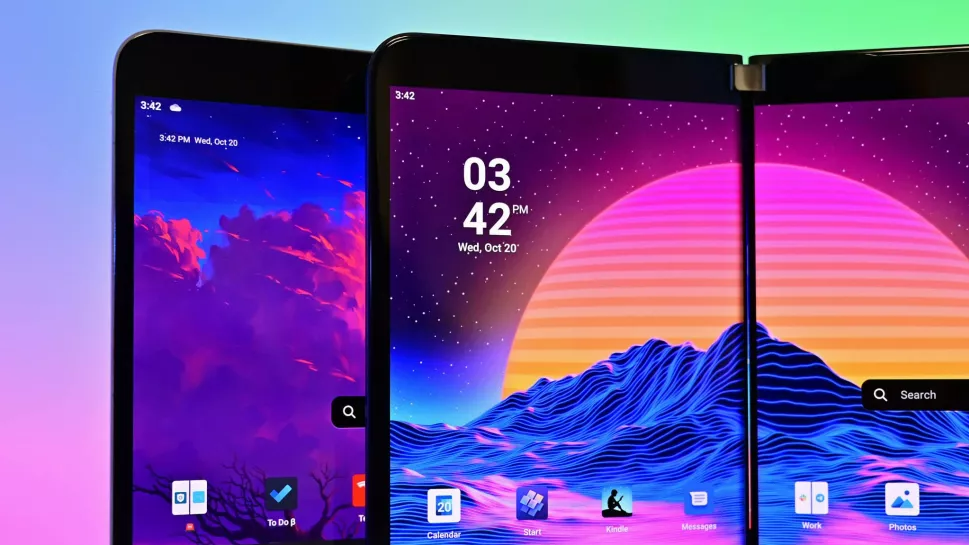
Surface Duo vs Surface Duo 2

(Image credit: Future)

Cut to 2026, and it's all dead. Microsoft gave up on Duo after just one iteration (Surface Duo 2 review), and it never even gave Neo a chance. The company's boneheaded shortsightedness led to the death of unique Surface hardware, and now today we're left with boring laptops and tablets from the Redmond giant.

It was inevitable that the Neo and Duo would forever be relegated to the history books, a hall of fame of unique devices that tried and failed to capture the market. Now, Apple has stormed in and stolen these names for their own products, which will only serve to further bury Microsoft's efforts.

I'm sure there are some Apple fans out there who think Apple never even thought about Microsoft when it named the MacBook Neo and iPhone Duo, but I think that's a lie. Apple is clearly aware that Neo and Duo were strongly tied to the Surface brand, but decided that didn't matter, which is the correct decision.

The MacBook Neo is an almost polar opposite of the Surface Neo. While Surface Neo was supposed to be a super expensive dual-screen flagship laptop, the MacBook Neo is Apple's cheapest laptop, undercutting much of the market. I don't know why, but that feels like an F.U. to Microsoft's vision for its Neo.

And now, there's iPhone Duo. This one hits much harder, as they're both playing in the same game. Surface Duo was a thin folding phone with pen support, and the iPhone Duo is pretty much exactly that. Of course, Apple's iPhone Duo refers to the fact that it's both an iPhone and an iPad, but seeing the Duo moniker on an Apple product just stings.
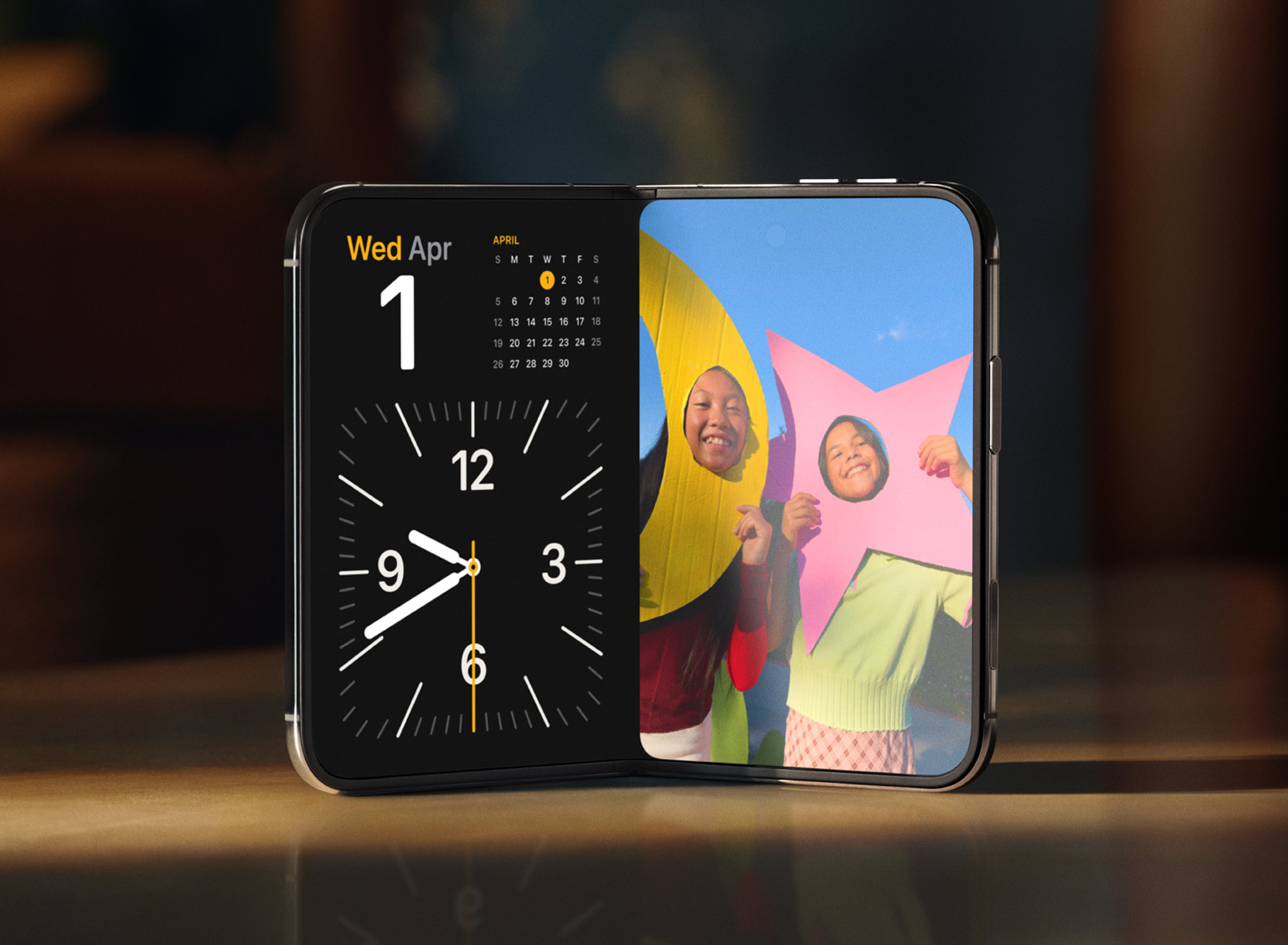
iPhone Duo

The iPhone Duo is a modern day Surface Duo. (Image credit: Apple)

If anything, it's just reminded me of what was possible had Microsoft pushed through and continued to innovate on the Surface Duo. The company had started working on a third-gen Surface Duo in 2022, which was going to pivot to a single-screen folding setup not dissimilar to the iPhone Duo.

But Microsoft just can't see a good thing through. Because Surface Duo 1 sold poorly, and Surface Duo 2 sold even less than that, the company decided that it was not worth continued investment in this category, which is just wrong. Folding phones were and still are the future, but Microsoft decided to pack it all in.

Now, Apple has just stolen the crown for the Duo moniker, with a product that seemingly does everything the Duo set out to achieve, but better in every way because Apple isn't going to give up after just one iteration. I get the impression that Duo is here to stay in Apple's lineup, unlike the Duo in Microsoft's lineup.

I'm mad that Apple has stolen the Neo and Duo moniker, but frankly, they deserve it. Microsoft clearly isn't doing anything with them, and they are cool product names for devices that stand out. MacBook Neo and iPhone Duo certainly do that, even if they're not in complete harmony like the Surface Neo and Surface Duo were supposed to be.

Congratulations on the launch of iPhone Duo, Apple.

Click to join us on r/WindowsCentral

Join us on Reddit at r/WindowsCentral to share your insights and discuss our latest news, reviews, and more.

  •  

Windows 11 set to gain upgraded sound settings, cross-device improvements, and new family safety features

Microsoft has just announced a set of new Windows 11 preview builds that are packing some notable improvements and changes that are now in testing with Insiders. This week's preview builds come packing an upgraded set of settings for sound and audio devices on Windows, enhanced cross device features that sync with your phone, and new family safety options.

First up, Microsoft has introduced a new design for the volume sliders that appear in the Sound Settings area of Windows Settings. The sliders now also show audio activity for when music or video is playing in the background while you configure your settings, making it easier to dial in exactly where you want your volume.

Microsoft is also porting over more Control Panel sound settings to Windows Settings, including the ability to set default devices, and the ability to allow hardware acceleration for devices that support it.

New sound settings

The new live audio activity indicator. (Image credit: Microsoft)

Here's a list of the new sound settings coming to Windows 11:

  • We've updated the design of the volume sliders in Sound Settings so that they display audio activity on the side when audio is playing.
  • If your audio device supports hardware acceleration, an option to allow hardware acceleration is now available in the Advanced section of the device's properties.
  • You can now configure exclusive mode for an audio device in the Advanced section of the device's properties, so you don't have to go to Control Panel.
  • You can now configure adaptive communication sound levels, which reduce the volume of other sounds when communications activity is detected, directly in Settings.
  • The option to set an audio device as the default sound device for communication now always appears in Properties. The option is unavailable if the device is already the default instead of being hidden.
  • We've updated the text for allowing audio devices to make it clearer.
  • We've added a new banner when mono audio is enabled to make it clear that some properties don't take effect while mono audio is active.
  • We've updated the All sound devices page:
    • You can now change default devices from this page.
    • We've adjusted the page design so that you can filter whether you're viewing input or output devices.
    • We've added toggles so that you can choose whether to hide or show disabled, disconnected, and unplugged devices.
  • We've also updated the input and output audio properties pages in Settings to include jack information for devices that need it.

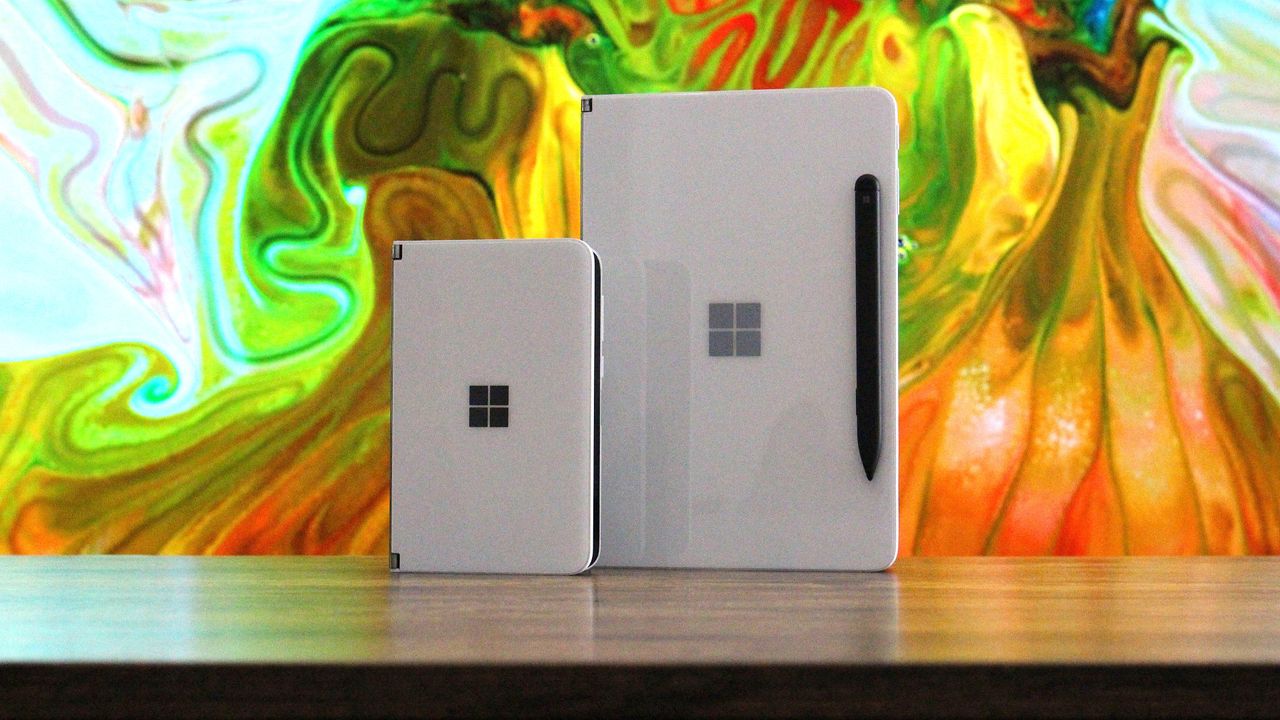
Another new feature in testing is the ability to quickly download the Windows app for a phone app that appears in the Taskbar via Phone Link. If you use the cross-device sync features that comes with Phone Link, hovering over an open app such as your phone's browser on the Taskbar will now let you quickly pick up where you left off without missing a beat.

New cross device features

Quickly resume web browsing activity from your phone from the Taskbar! (Image credit: Microsoft)

In addition to the new sound settings, Microsoft has announced major upgrades to the family safety features in Windows 11. The company says family safety is a top priority for the company, and is addressing key issues and concerns from parents.

Key areas of focus include:

  • Parental approvals for offerings like screen-time extensions, app access, and purchases now happen faster, so kids aren’t left waiting and parents stay in control.
  • We restored clear visibility into web and app activity so parents can trust what they see in their reports.
  • Made spending more transparent, with wallet balances.
  • We also gave adults in a family more control over their own experience, making it far easier to add, manage, or leave a family group 

"Each of these improvements came from a real family experience — from issues parents told us mattered most: speed, accuracy, control, transparency, and peace of mind." Microsoft Distinguished Engineer, Rob Mauceri said. "This is the compounding effect of a team that treats every piece of customer feedback as a commitment to do better."

These improvements are welcome to see, and a sign that Microsoft continues to modernize and improve Windows 11 for the masses. These improvements are part of Microsoft's ongoing Windows K2 effort, which is focused on fixing Windows 11's biggest flaws.

Click to join us on r/WindowsCentral

Join us on Reddit at r/WindowsCentral to share your insights and discuss our latest news, reviews, and more.
  •  

What is Project Zenith? Microsoft's special Windows 11 experience for developers and hardware isn't what you think it is

Last week at IFA 2026, Microsoft announced Project Zenith, the codename of a new class of devices aimed squarely at developers looking to build apps and local AI experiences on top of Windows 11. The announcement came out of the blue, which naturally caused a bit of confusion online.

So, what is it? Well, Zenith is an effort to formalize a baseline for "developer-ready" hardware: devices that meet a minimum bar for performance and are ready out of box to begin coding and compiling. This means the configuration of Windows 11 that ships on these devices is different from normal PCs, with different default settings and pre-installed apps.

To be clear: This isn't a new or different version of Windows 11. Zenith devices will almost definitely still ship with either Windows 11 Home or Pro, depending on the OEM. It's simply how Windows 11 is configured out of box that differentiates these developer-class devices from normal Windows 11 PCs.

There's seemingly also a hardware component at play, too. Microsoft says Zenith devices must ship with at least 64GB of unified memory and be capable of 250GB/s of memory bandwidth if they want to ship with this specially preconfigured version of Windows 11 for developers. All other hardware will ship with the normal configurations of Windows 11.

In recent years, there has been an uptick in developers making the switch from Windows to Mac for a variety of reasons, including OS quality issues or lack of capable hardware in the wake of Apple Silicon. Developers have also complained that it just takes too long to set up a Windows PC for development, sometimes taking hours or even days from the first power-up.

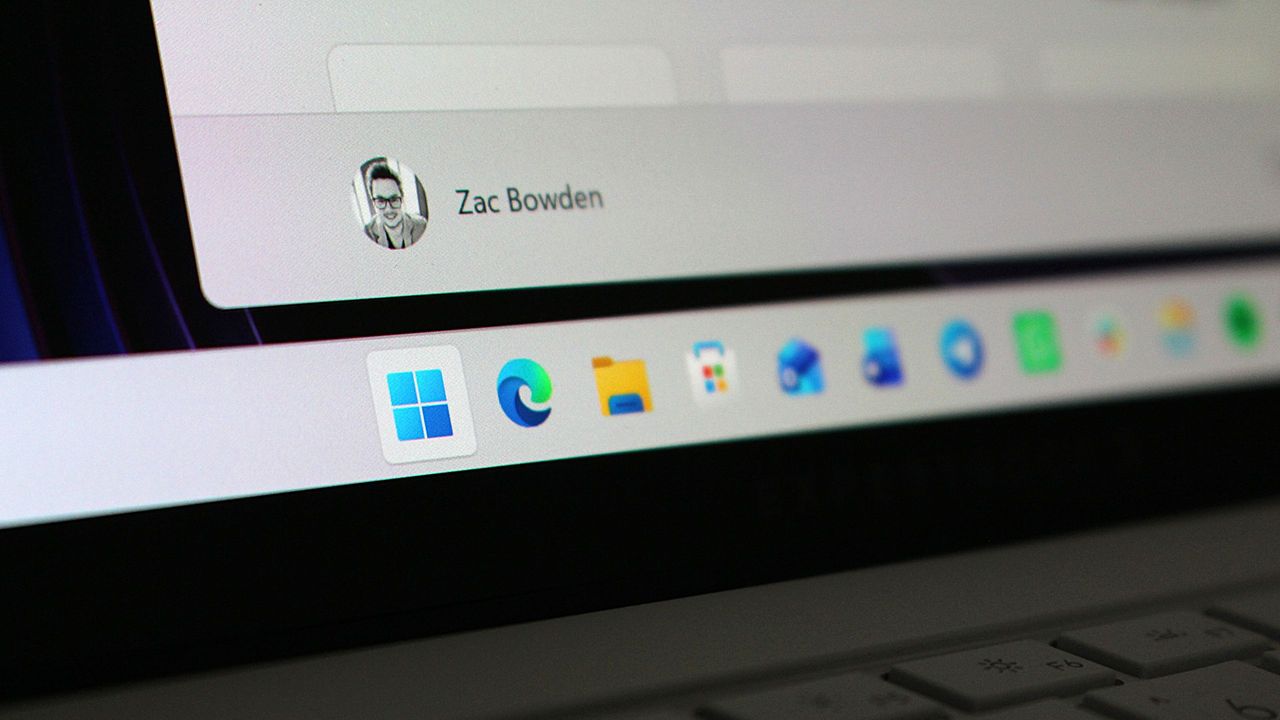
Preinstalled tools on Zenith PCs

The developer-focused apps and frameworks that come preloaded on Zenith PCs. (Image credit: Microsoft)

Zenith removes this friction. These devices are certified high-end and ship from the factory in a state that is ready to code, with apps like Visual Studio and GitHub Copilot already installed and ready to go as soon as you reach the desktop. They also ship with Windows 11 in a configuration that already dials back the annoyances that developers have complained about.

Out of box, "File Explorer shows file extensions, hidden files, the full path in the title bar, and the details pane, with long-path support enabled. Recently used files and folders and sync provider tips are turned off for a cleaner workspace. In Search and Start, Command Palette is enabled, while Start menu tips and account notifications are turned off to reduce distractions."

These are small but meaningful changes to the default Windows configuration, one that can save minutes of setup time. If you're managing a fleet of developer devices, this will save you hours of configuration time. The good news is these settings aren't unique to Zenith PCs.

If you don't fancy spending the money on a new Zenith device, you can manually configure your existing Windows 11 PC to match the configuration that comes preloaded on Zenith PCs. Of course, it'll take longer to do, but you'll save yourself the cost of a new PC in the process.

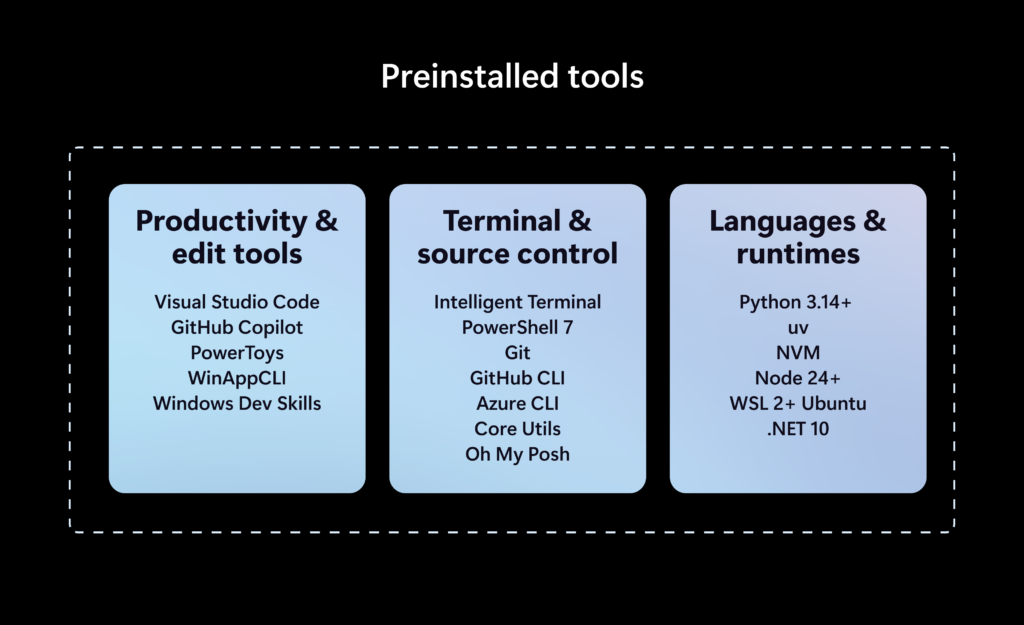
Ultimately, the goal of Zenith is to signal to developers that Microsoft is listening and wants to position Windows as the preferred platform for on-device AI and app development. The first Zenith devices to ship will be ones powered by AMD's Ryzen AI Halo chips, with other chipmakers such as the RTX Spark expected to follow.

No word on which OEMs will build Zenith hardware, or when the first Zenith devices will begin shipping just yet. We'll keep you posted when we know more!

Click to join us on r/WindowsCentral

Join us on Reddit at r/WindowsCentral to share your insights and discuss our latest news, reviews, and more.
  •  

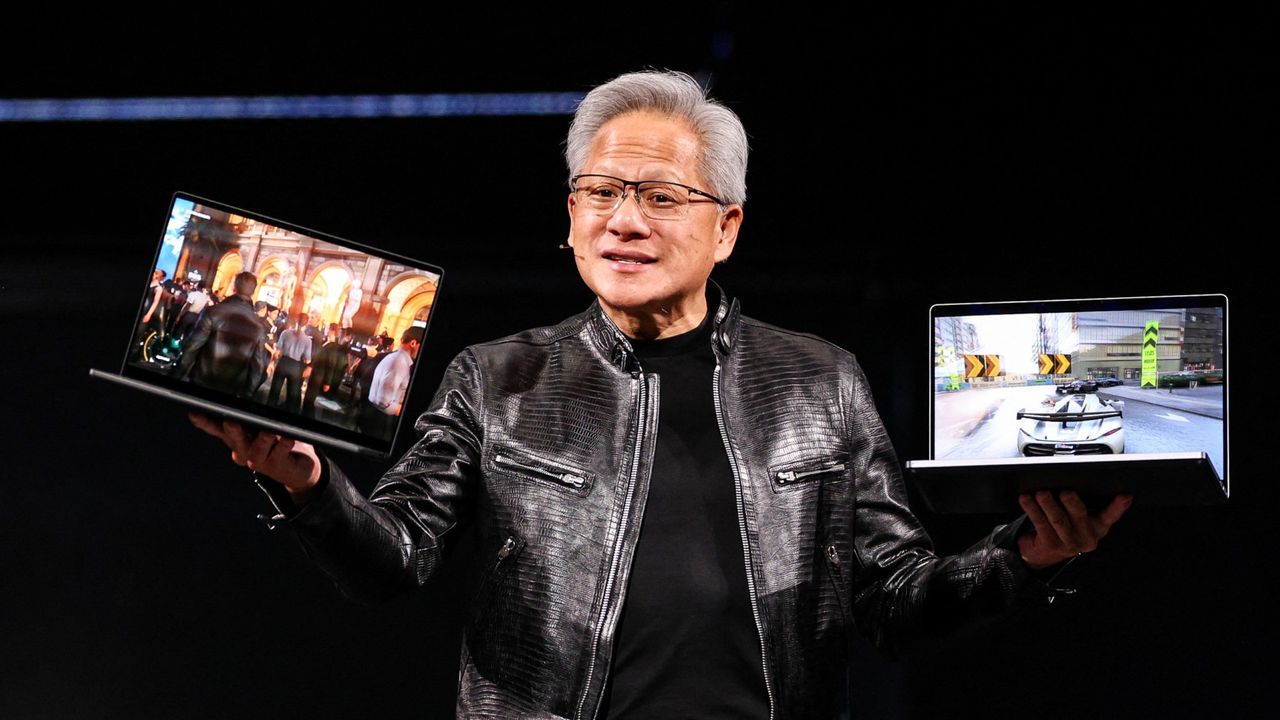
NVIDIA confirms RTX Spark configurations and availability: First devices expected to begin shipping as soon as next month, with two N1X configs on offer

NVIDIA has confirmed new details and availability info about its upcoming RTX Spark SoC for Windows 11 devices. At IFA 2026, the company announced that it expects the first RTX Spark laptops to begin shipping as soon as next month, sometime in October depending on the OEM. Additionally, two new devices are joining the launch lineup; the Lenovo Yoga 9n laptop and Acer SFF desktop PC.

Alongside availability news, NVIDIA has also confirmed configuration details for the upcoming RTX Spark chips. There will be two different configurations of the RTX Spark N1X, with configurable RAM and storage based on what OEMs wish to offer. The high-end RTX Spark will be targeted at desktops and laptops, with support for up to 128GB unified memory, 20 CPU cores, and 6144 Blackwell RTX cores.

There will also be a less powerful RTX Spark configuration exclusively for laptops, which can only be configured with 24GB or 32GB unified memory, a 5120-Core Blackwell RTX GPU, and an 18-core CPU. While still a high-end chip, this should allow RTX Spark to ship in laptops that cost closer to $2,000, significantly lower priced than the high-end SoC.

Category

Specification 1

Specification 2

GPU Cores

6144-core Blackwell RTX GPU

5120-core Blackwell RTX GPU

CPU Cores

20-core Grace CPU

18-core Grace CPU

Memory

24-128 GB Unified Memory

24-32 GB Unified Memory

Form Factors

Laptops and Compact Desktops

Laptops

NVIDIA is touting RTX Spark as the best SoC for AI development on Windows. It supports NVIDIAs full AI stack, as well as the Windows Agent Framework and 120B parameter agents. It also supports hardware accelerated 4:2:2 video for video editing professionals.

It's also good for gaming, with expected 100 frames per second in many games at 1440p with RT and DLSS. In fact, NVIDIA has announced that many popular and mainstream gaming developers have committed to supporting RTX Spark with native games and frameworks so that there are no compatibility issues with the RTX Spark's Arm architecture.

While the first RTX Spark devices are expected to begin shipping in October, it's not yet clear which OEMs will be first out the gate. All major Windows hardware makers, including Dell, Lenovo, HP, ASUS, and Microsoft have all announced RTX Spark devices that are expected to ship by the end of this year. Devices like the Surface Laptop Ultra have not yet been given a release date, though Microsoft typically does aim to ship new Surface PCs in October.

We'll be sure to keep you updated on all the RTX Spark device availability as more information is revealed by OEMs. In the meantime, are you considering an RTX Spark device as your next Windows PC? Let us know in the comments!

Click to join us on r/WindowsCentral

Join us on Reddit at r/WindowsCentral to share your insights and discuss our latest news, reviews, and more.
  •  

Microsoft promises to make more Windows 11 PCs secure by default next month: Announces automatic memory integrity protection enablement on more devices

In a new blog post, Microsoft has announced that starting in October 2026, "Memory Integrity Protection" will become enabled on more eligible devices. The feature, which is already enabled by default on most modern Windows PCs, is a kernel-level security feature designed to protect PCs from "sophisticated attacks with little or no additional configuration."

"Built on Virtualization-based Security (VBS), memory integrity helps protect critical parts of Windows from tampering," Microsoft says. "It forms a foundation for modern security innovations such as hotpatch updates that improve user experience and productivity, as well as protection."

The company says that memory integrity protection will begin being enabled by default on eligible PCs starting next month, enhancing security with no additional setup required. "Windows quality updates will begin enabling memory integrity protection on eligible devices. If not already enabled, these updates will also enable VBS, helping make additional security capabilities available"

Of course, users still have control over whether they want memory integrity protection enabled. Most Windows PCs today come with it enabled by default already, but the user is able to control whether it is turned on or off. If you've already manually disabled memory integrity protection, it won't be automatically enabled next month.

"To help ensure a reliable device experience, Windows automatically evaluates readiness before enabling memory integrity."

The automatic rollout will only really apply to older PCs that never had it enabled to begin with. For those users, this will be an invisible change that makes your PC more secure. "Memory integrity helps make this possible by allowing only trusted kernel-mode code and drivers to run."

Microsoft has been working to make Windows 11 more secure while also reducing the frequency and annoyances of Windows Update. In recent months, the company has announced a complete overhaul to the Windows Update system, reducing how often it prompts users to restart to just once a month.

With features like hotpatch on commercial editions of Windows, Microsoft is now also able to update the OS on the fly without restarting the OS. While hotpatching isn't yet available on Windows 11 Home or Pro, it's something that we would love to see on consumer editions of Windows in the future too.

Click to join us on r/WindowsCentral

Join us on Reddit at r/WindowsCentral to share your insights and discuss our latest news, reviews, and more.
  •  

Microsoft finalizes Windows 11 version 26H2 for general availability: Next version of Windows 11 enters final preview phase before rollout begins

Microsoft has began rolling out the next version of Windows 11 to testers in the Windows Insider Release Preview Channel, which is the very last phase of testing before general availability begins. With version 26H2 now in the Release PreviewChannel, the company is signalling that this new version is just about done, and testing of the final bits can begin.

Windows 11 version 26H2 is similar to version 25H2 in scope. It's based on the same platform release as both 25H2 and 24H2 before it, which means it's not a major OS upgrade and won't be making major changes to the OS core. Instead, 26H2 serves to reset the support clock for Windows 11 users, with 26H2 offering a refreshed 24 months of support for consumers, and 36 months for commercial customers.

That's good news for users who usually dismiss new versions of Windows 11 for being unstable or buggy. 26H2 shares the same core OS, feature stack, and security updates as 25H2, meaning there are no compatibility or software quality concerns to be worried about. If it works on 25H2, it'll work on 26H2 also.

"As Windows 11, version 26H2 shares the same servicing branch as Windows 11, version 25H2, the update is implemented through an enablement package (eKB). This means your device will be updated to the next version through a single restart – providing a familiar, fast, and reliable update experience."

There may be some instances where 26H2 gets new features first, but for as long as 25H2 (and 24H2) are supported, they should get the same features also. For now, version 26H2 is at feature parity with version 25H2, which is expected to receive the same Windows K2 improvements such as the more customizable Start menu and new Windows Search pane at the same time.

Now that Windows 11 version 26H2 is now in the Release Preview Channel, that typically means we're just a few weeks away from general availability beginning. Bits that are flighted to the Release Preview Channel are production ready, and so now it's just a matter of ensuring the final bits don't have any last minute bugs or issues.

Should everything go according to plan, I expect we'll begin hearing about version 26H2 general availability in the next few weeks. Microsoft usually aims to begin rolling out new versions of Windows 11 towards the end of September and into October, and I expect the same to happen this year.

Click to join us on r/WindowsCentral

Join us on Reddit at r/WindowsCentral to share your insights and discuss our latest news, reviews, and more.
Windows 11 Start button

Windows 11 Start button

  •  

Microsoft celebrates major progress with Windows 11 on Arm PCs, confirms Windows on Arm is now "a first-class platform for any workload" and that "customer demand is growing"

Microsoft has published a new blog post celebrating significant progress around the Windows on Arm platform over the last year. The company is excited to welcome NVIDIA to the Windows on Arm family with its RTX Spark SoC later this year, joining the Qualcomm Snapdragon X platform and solidifying the Windows on Arm platform as here to stay.

"The market is sending a clear signal: more silicon providers and more OEM partners are investing in Windows on Arm because customer demand is growing for these powerful and efficient Windows devices and experiences," says Klaus Diaconu, Partner Director at Microsoft. "In the fall of 2026, devices from Microsoft Surface, ASUS, Dell, HP, Lenovo, and MSI will be available [with RTX Spark.]"

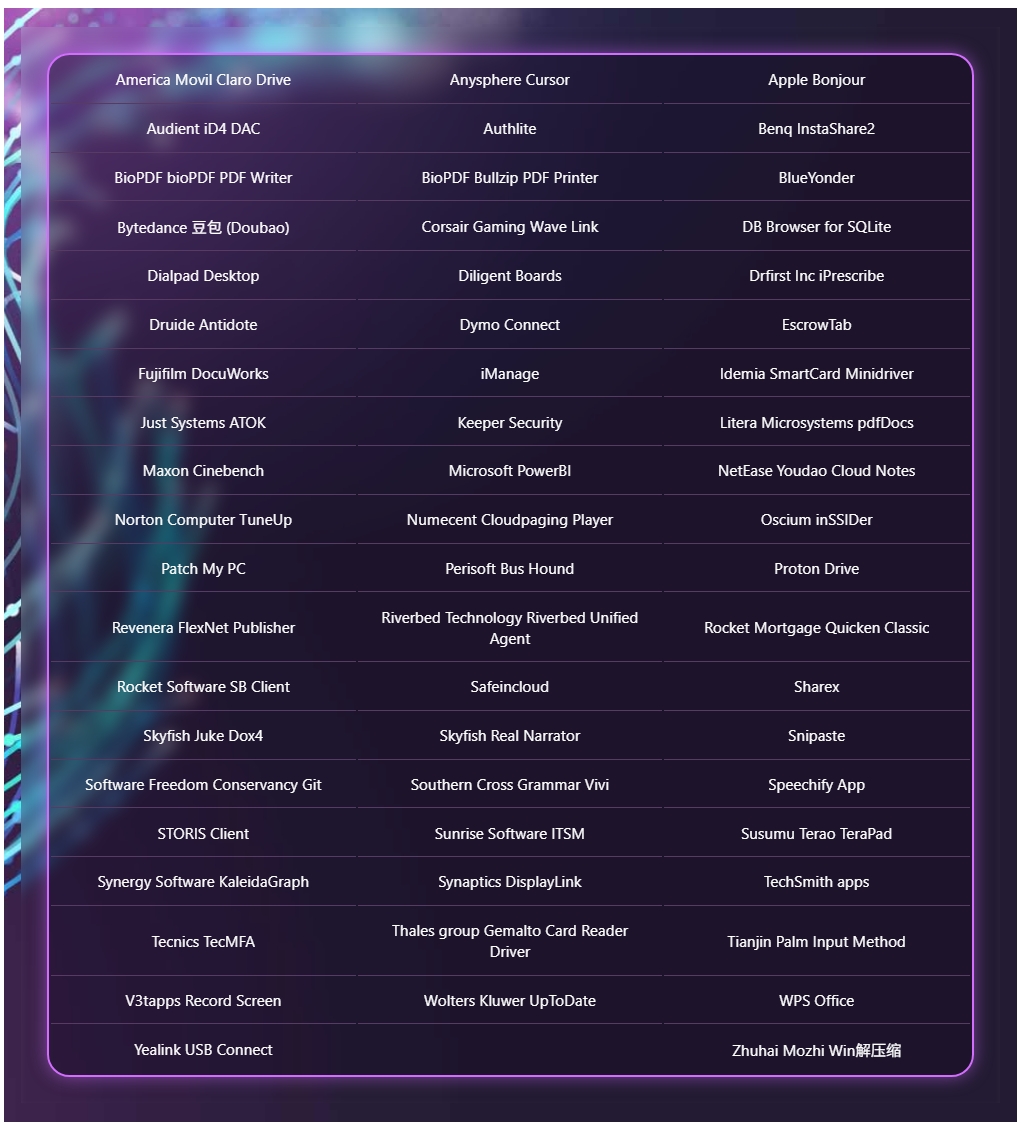
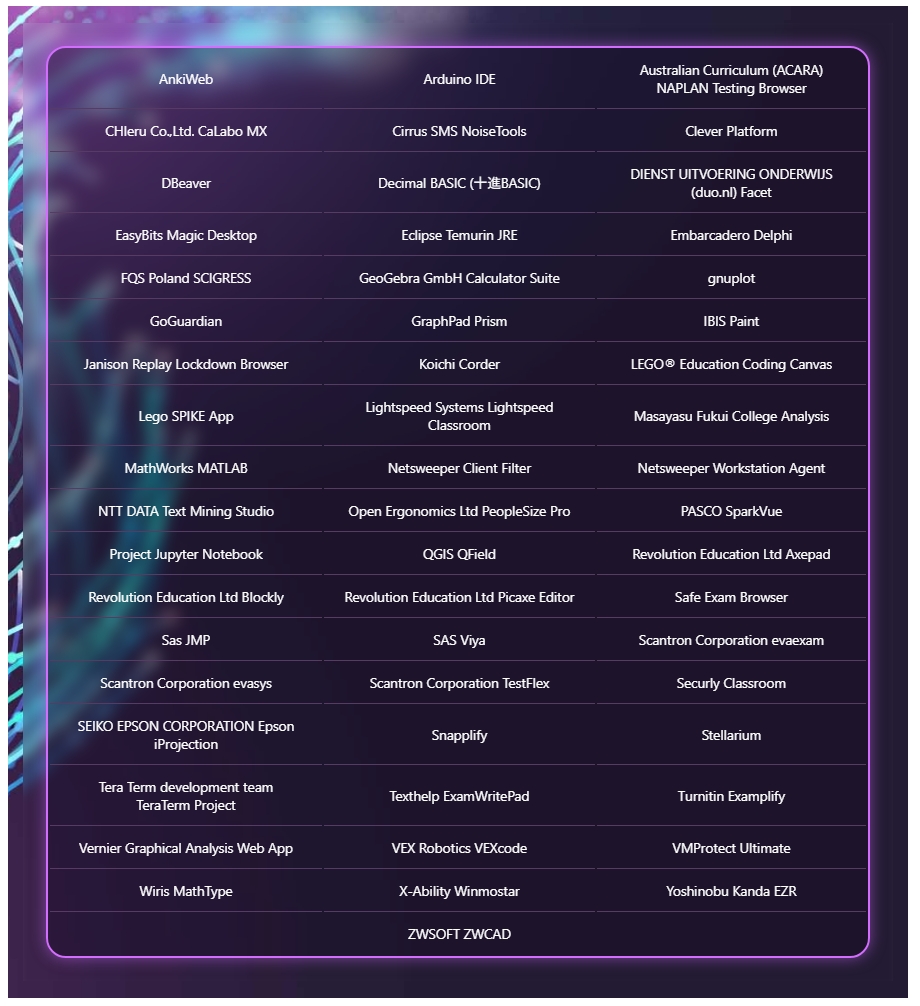
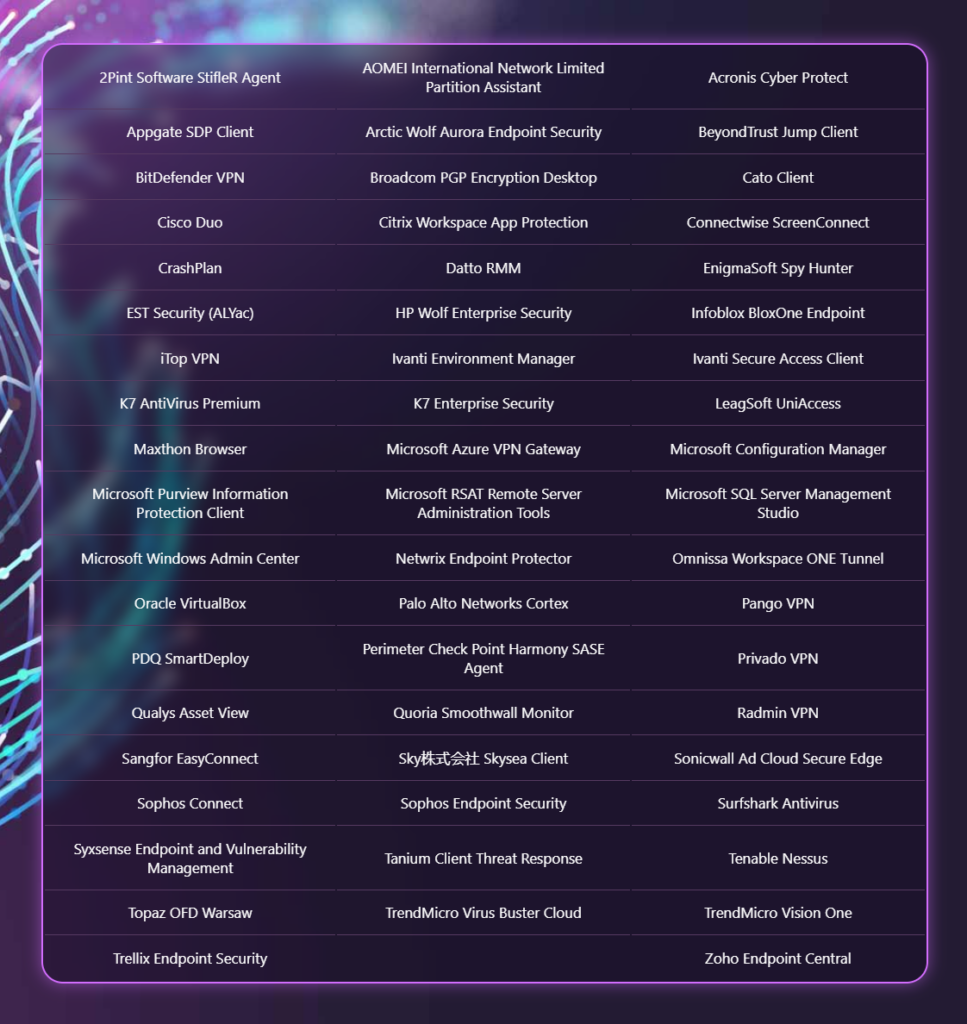
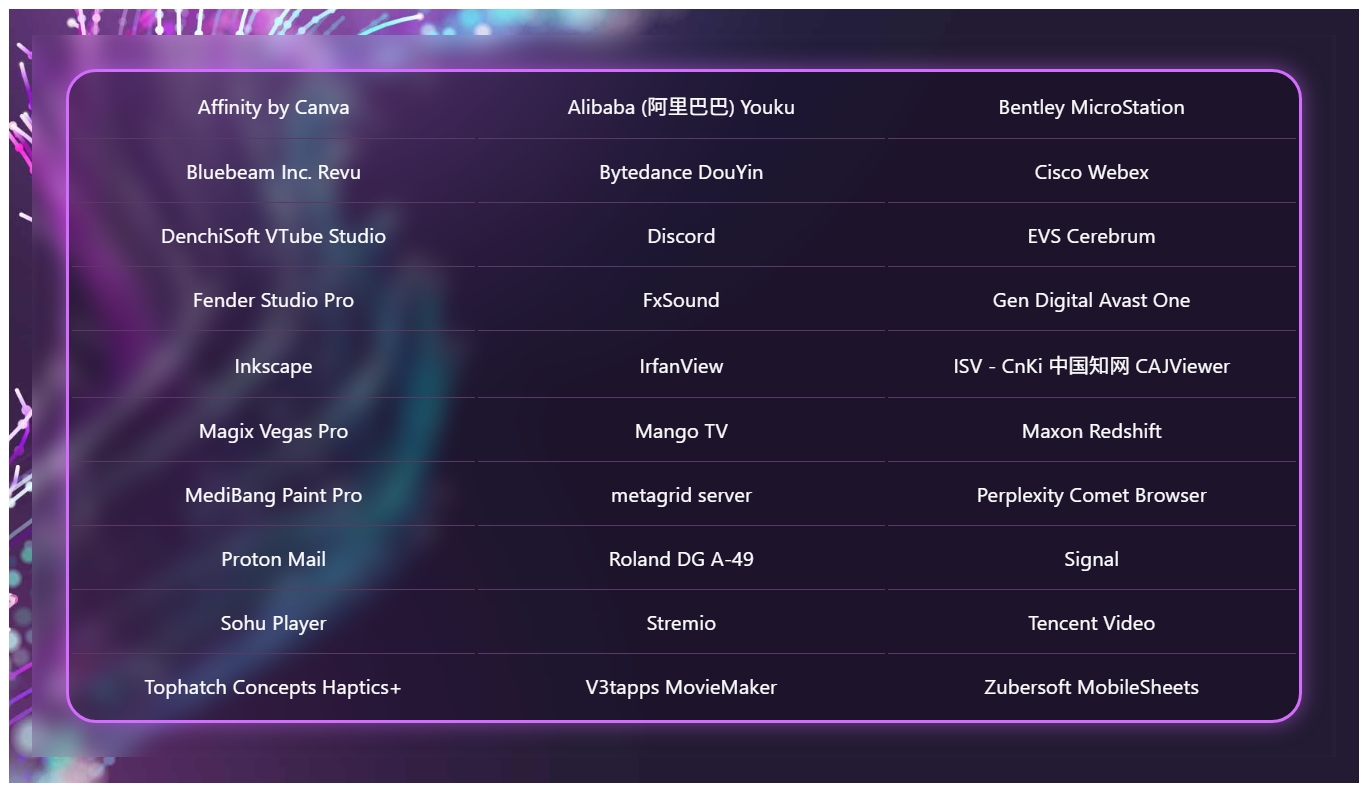
In addition to highlighting silicon and hardware makers bringing Windows on Arm to market, Microsoft is also excited to spotlight Windows apps that are now available on the Arm platform, including STEM and education apps, security apps, productivity apps, creativity apps, entertainment and media apps.

Windows on Arm compatible apps
Microsoft
Windows on Arm compatible apps
Microsoft
Windows on Arm compatible apps
Microsoft
Windows on Arm compatible apps
Microsoft

"Productivity apps remain the cornerstone of how people get work done on Windows. Whether managing projects, collaborating with teammates, organizing information, or communicating across teams, these apps are essential to our customers’ daily work. The growing list of productivity apps now available reflects both customer demand and increasing momentum from developers building with Arm as a first-class Windows platform."

Some of the highlights include apps like Sharex, Proton Mail, Signal, Discord, FxSound, and more. In fact, Microsoft says there are now over 7,000 compatible Windows on Arm apps being tracked on the "Works on WOA" website, which the company recommends as a comprehensive source for app compatibility information.

While most mainstream apps are now natively supported on Arm, there are still Windows apps that don't yet have an Arm native version. With the Windows Prism emulation layer, these apps still run on Windows on Arm, and on the latest Arm PCs they feel native thanks to improvements to performance from both the silicon and software.

"Windows on Arm is no longer defined by potential, but by a rapidly expanding ecosystem of devices with apps available across workloads that customers depend on most," Microsoft states. "As developers continue to invest in Arm-native experiences and compatibility, customers gain more choices, flexibility, and confidence in adopting the next generation of Windows devices."

Click to join us on r/WindowsCentral

Join us on Reddit at r/WindowsCentral to share your insights and discuss our latest news, reviews, and more.
Snapdragon X Elite logo

Snapdragon X Elite logo

  •  

Windows 11 is finally getting better, and the Windows Central Podcast breaks down all the improvements that have been announced and delivered since March

In this week's episode of the Windows Central Podcast, Daniel Rubino and Zac Bowden break down the latest Windows 11 insider features, focusing heavily on major overhauls coming to context menus, File Explorer polish, and options to force apps to open full-screen. They also dive into a surprising new Signal 65 processor study highlighting how Qualcomm's Snapdragon X2 chips stack up against Intel and AMD, wrap up recent Windows 11 improvements from March onward, and touch on various tech ecosystem shifts.

This episode of the Windows Central Podcast is sponsored by Surfshark VPN. Unlimited devices, access your content from anywhere, and auto-block malware on Windows, Edge, and other platforms from $2.50/mo, with 3 months extra FREE. Sign up today!

  • 00:00Introduction & Welcome: Daniel Rubino and Zach Bowden kick off Episode 402 of the Windows Central Podcast.
  • 03:45Qualcomm Snapdragon X2 vs. Intel & AMD: Analyzing the Signal 65 processor study results, showing how Qualcomm beats out Intel and AMD chips in recent laptop testing.
  • 10:15Windows 11 Context Menu Overhaul: Breaking down new customizable, faster context menus in Windows 11 Insider builds, including default cleanups and third-party app management.
  • 24:30File Explorer Improvements: Reviewing massive performance updates, elimination of freezing/hang delays, and better UI polish for File Explorer.
  • 42:10Forcing Apps to Open Full-Screen: Discussing the new Windows settings toggle that allows users to automatically launch apps in full-screen mode.
  • 52:00Recap of Windows 11 K2 Features & General State of the OS: A look back at the overall quality-of-life improvements rolled out to Windows 11 since March.
  • 1:05:15Wrap-Up & Outro: Final thoughts, social media handles, and sign-offs until next week's episode.

Have a question you want us to answer on the podcast? Send it to us at [email protected]

Hosts:

Subscribe to the Windows Central Podcast

If you like the show, please let us know by give us a rating on your podcast platform of choice. It really helps us!

LIVE Video Podcast

You can watch the live, uncut version of the Windows Central Podcast on our YouTube channel!

Click to join us on r/WindowsCentral

Join us on Reddit at r/WindowsCentral to share your insights and discuss our latest news, reviews, and more.
Daniel and Zac on Windows Central Podcast 402

Daniel and Zac on Windows Central Podcast 402

  •  

New Windows 11 feature will make using handheld gaming devices and small tablets easier: Ability to force apps to open in full screen coming soon

It looks like Microsoft is working on a new feature for Windows 11 that will allow users to configure the behavior of apps when they first open. Right now, pretty much all Windows app will open in windowed mode, until manually set to open maximized by the user. But in the latest Windows 11 preview builds, a new option has been discovered that changes this.

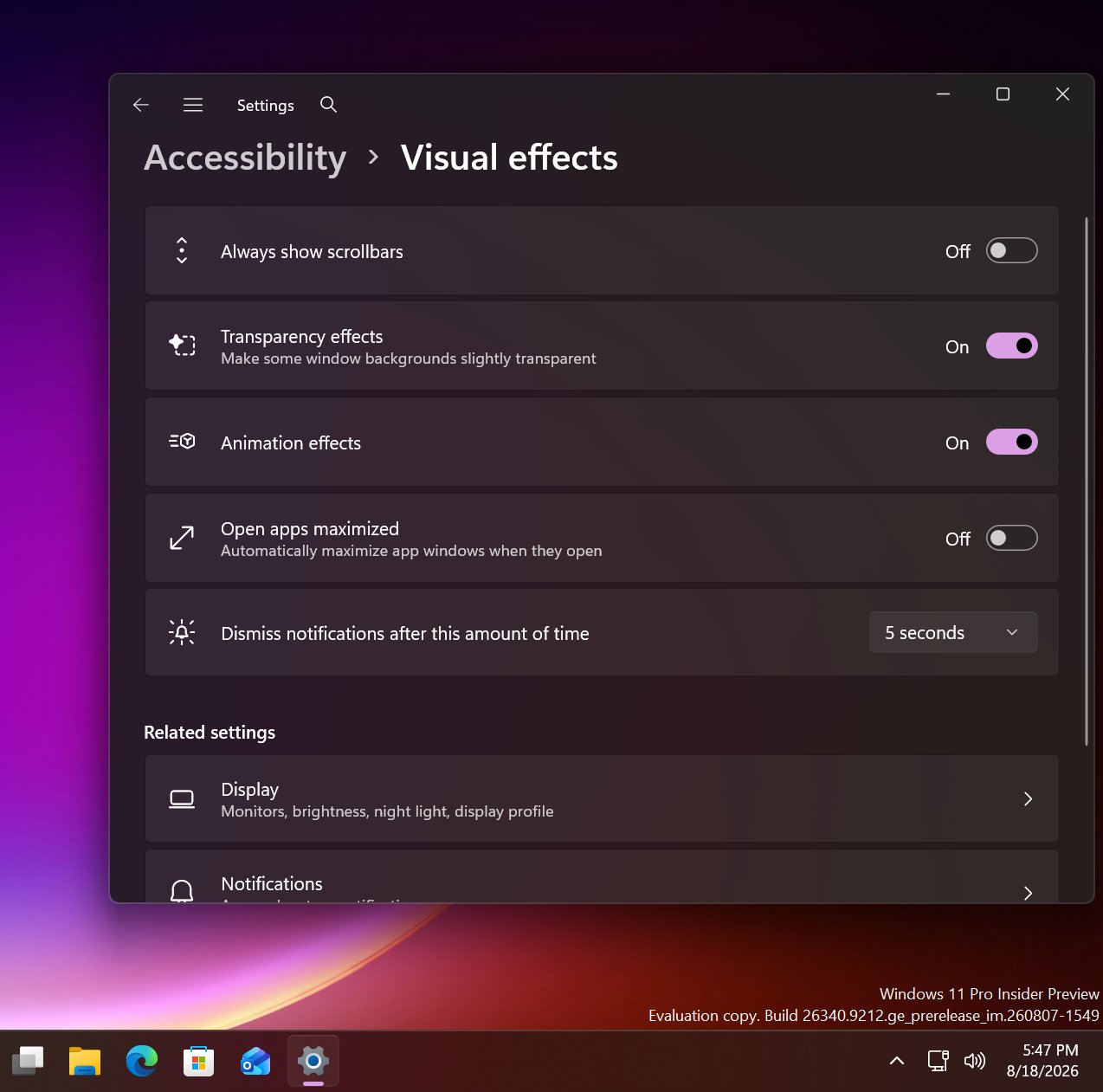
First spotted by phantomofearth, the new option appears in the accessibility area of Windows Settings. The option reads: "Automatically open app windows maximized when they open" with the ability to toggle it on or off. When enabled, all Windows apps will opened in a maximized state by default, meaning the user will no longer be forced to do so for every app they open.

This feature will be great for devices with relatively small screens. PCs with screen sizes of less than 13-inches will benefit greatly from this. On my Surrface Pro 12-inch for example, I almost always find apps are easer to use when maximized as the screen it just too small to enjoy using apps in windowed mode.

New option to open apps maximized in Windows Settings

The new toggle to force apps to open full screen in Settings. (Image credit: Phantomofearth on X)

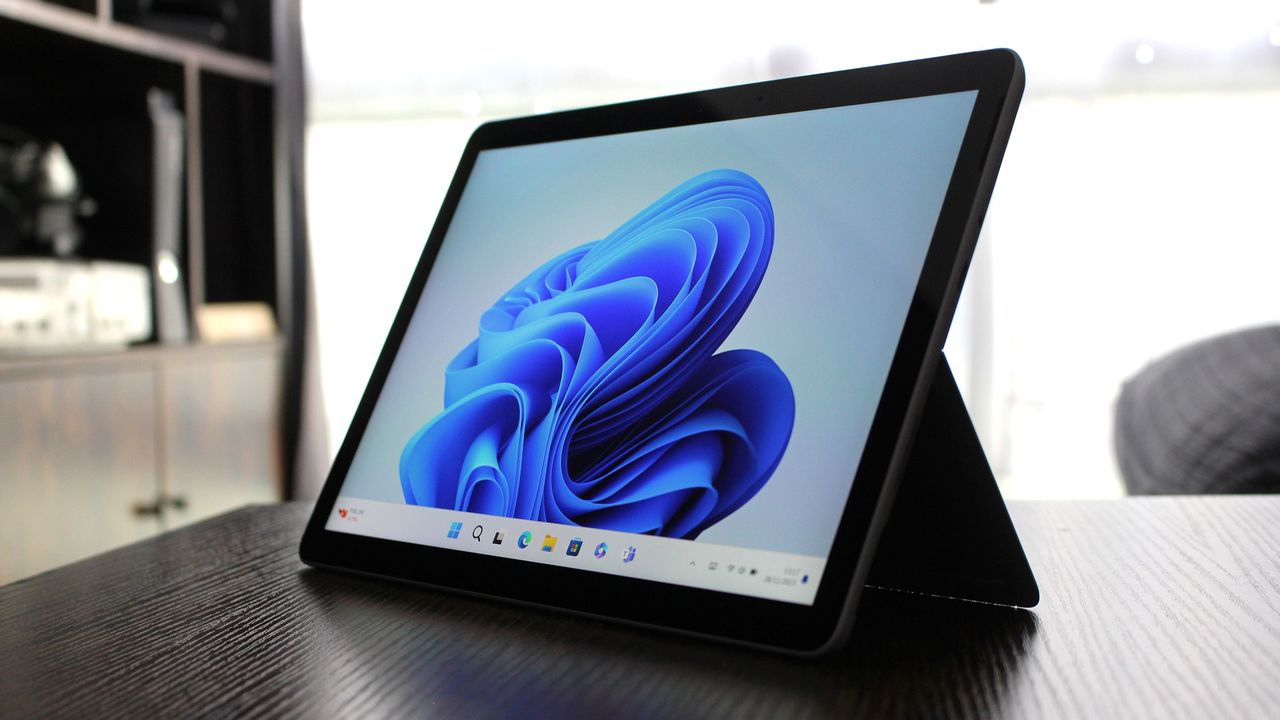
This will be especially beneficial for devices with sub 10-inch screens or less, like the Surface Go line or more commonly, PC handheld gaming devices like the Xbox ROG Ally X, which has a 7-inch screen. Windows is famously not very optimized for these small screen sizes, but letting users open apps full screen will make the experience a little better.

It's also beneficial for PCs where the screen may be far away from the user, such as with a PC under a living room TV that's used primarily for watching movies or playing games. In that instance, you wouldn't want apps opening in windowed mode basically ever, and so this option will come in handy.

For a while, Windows 11 included an automatic behavior change that forced apps to open maximized on PCs with small screens, but at some point that behavior stopped. Now, it seems Microsoft is going to give users the option to enable this on any screen size, which makes more sense.

These quality of life improvements are great to see, and another example of Microsoft making WIndows 11 more customizable. Recently, it announces a whole wave of new customization options for the Start menu and context menus, with more customization to come in the next few months.

Click to join us on r/WindowsCentral

Join us on Reddit at r/WindowsCentral to share your insights and discuss our latest news, reviews, and more.
Windows 11 window app controls

Windows 11 window app controls

  •  

Microsoft disables Windows 11's new "Ask Copilot" Taskbar feature to "incorporate feedback" as it pivots to unified Copilot app

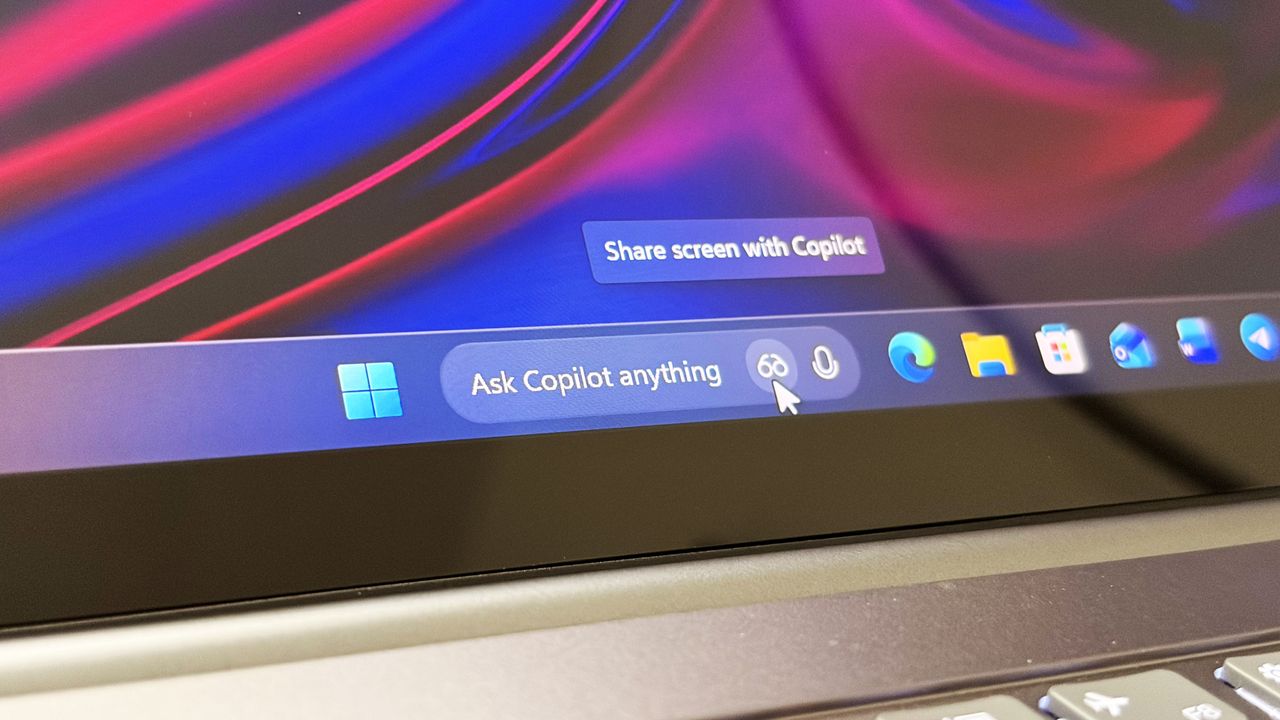
Last year, Microsoft announced a major update coming to the Taskbar on Windows 11 that would allow users to swap out the Windows Search box for one powered by Copilot. Dubbed "Ask Copilot," this new experience would let users interact with Copilot straight from the Taskbar, while maintaining support for searching for apps and files.

Since its announcement, the feature has slowly rolled out in preview to a small subset of users. Most of those users are commercial customers utilizing the Microsoft 365 Copilot app, but a version for consumers was also being developed for the standard Microsoft Copilot app.

At least, that was true until a few months back, when an update to the consumer-facing Copilot app removed support for it. Since then, Ask Copilot has only worked with the Microsoft 365 Copilot app, but with the announcement that the consumer Copilot and Microsoft 365 Copilot are merging under one app experience, Ask Copilot is disappearing once more.

"As we implement these changes, we're temporarily disabling Ask Copilot on the taskbar to update the new experience and incorporate your feedback," a Microsoft changelog has confirmed. The company doesn't explain what user feedback it's taking onboard, or if the Ask Copilot experience will change in any meaningful way. For now, it's no longer in testing.

If you've been using Ask Copilot on the Taskbar, the latest updates to the Copilot app and Microsoft 365 Copilot app will result in the feature disappearing, restoring the standard Windows Search experience automatically.

The UI between Ask Copilot and Windows Search is different. In fact, the two experiences are handled by entirely separate teams at Microsoft. Windows Search is, naturally, developed by the Windows team, whereas Ask Copilot is built by the Copilot and Microsoft 365 AI teams.

Recent upgrades to the Windows Search experience confirm that Ask Copilot is always going to be a separate, optional experience for users who want it. Windows Search is still the primary search experience on Windows, and is being redesigned to remove clutter, ads, and prioritize more accurate and speedy results.

The Ask Copilot search pane is similarly decluttered, but includes a chat box for initiating conversations with Copilot, along with shortcut buttons in the Taskbar for launching into Copilot Vision. If you're someone who has been looking forward to the Ask Copilot experience, it looks like you're going to be waiting a while longer before it begins shipping.

Click to join us on r/WindowsCentral

Join us on Reddit at r/WindowsCentral to share your insights and discuss our latest news, reviews, and more.
Ask Copilot search box on the Taskbar

Ask Copilot search box on the Taskbar

  •  

Microsoft admits Windows 11's context menus are "cluttered and sluggish": Announces major upgrades to the right-click menu that increases performance and customizability

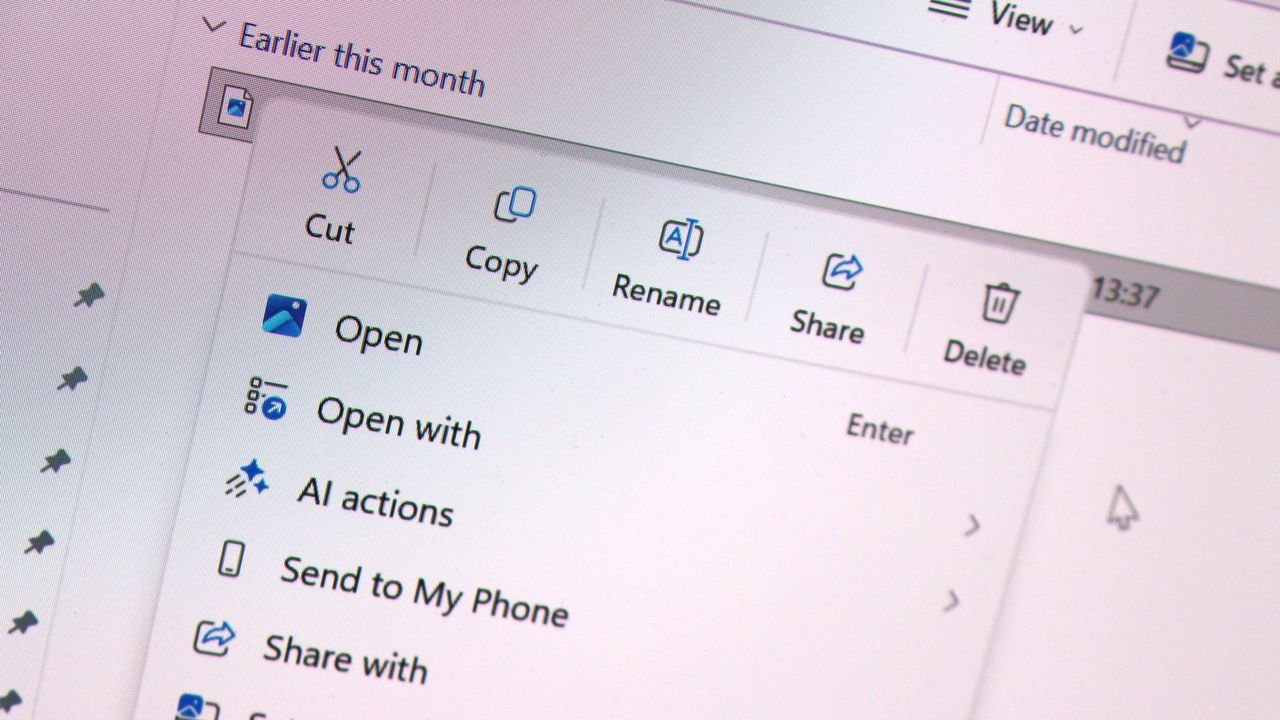
Microsoft has today announced a set of major improvements coming to the context menus that appear in File Explorer and the desktop on Windows 11 that are designed to make the right-click experience faster, less cluttered, and more customizable.

I first revealed Microsoft's plans to overhaul the context-menu system on Windows 11 last month, and now the company has confirmed those plans. In fact, it's already rolling out preview builds with the new context menu system in place, ready for Windows Insiders to begin testing and provide feedback on.

Microsoft says that it knows the context menu system on Windows 11 today is not in a good place. "The menu became cluttered and sluggish, and we recognized the need to dramatically reduce the time between right-clicking and having a menu that’s fully ready to use," says Microsoft engineer Michael Novak in a blog post published today.

"Today, we’re excited to announce an updated context menu that delivers a faster, simpler, and more customizable experience. The new design reduces top-level clutter, keeps commonly used actions easy to access, and introduces a new Settings experience that gives you more control over what appears in the menu."

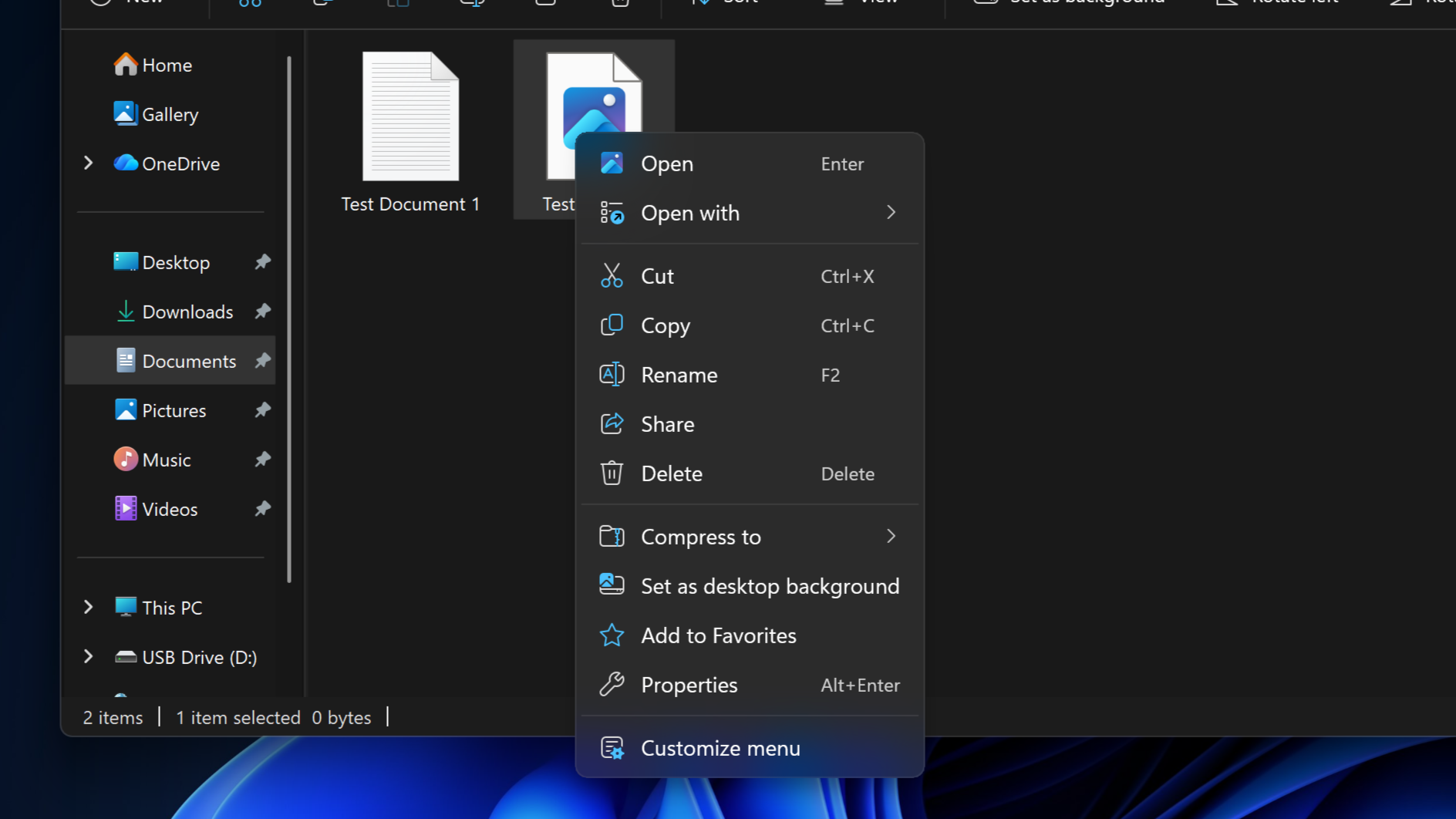
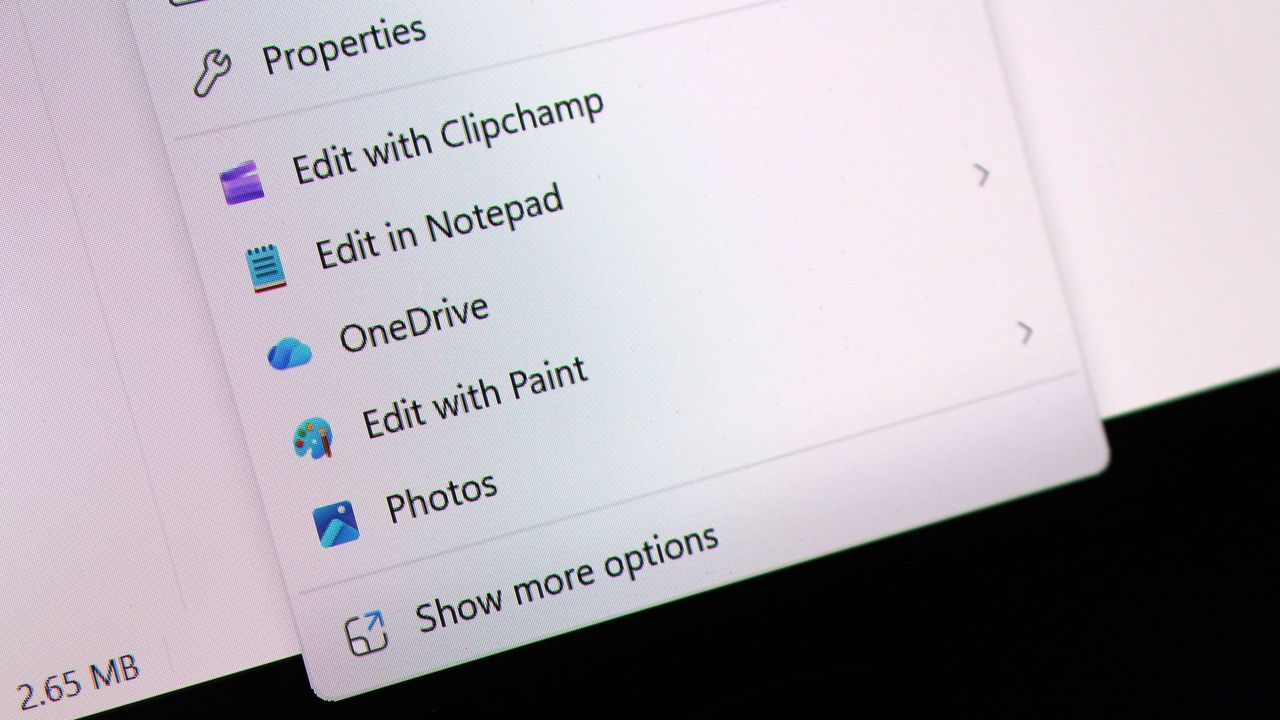
I went hands-on with the new context menu system over the weekend, and I can confirm that the new right-click experience is a major improvement over what is shipping on Windows 11 currently. The new default layout is much less cluttered, with less actions immediately presented to the user in exchange for a much faster response time.

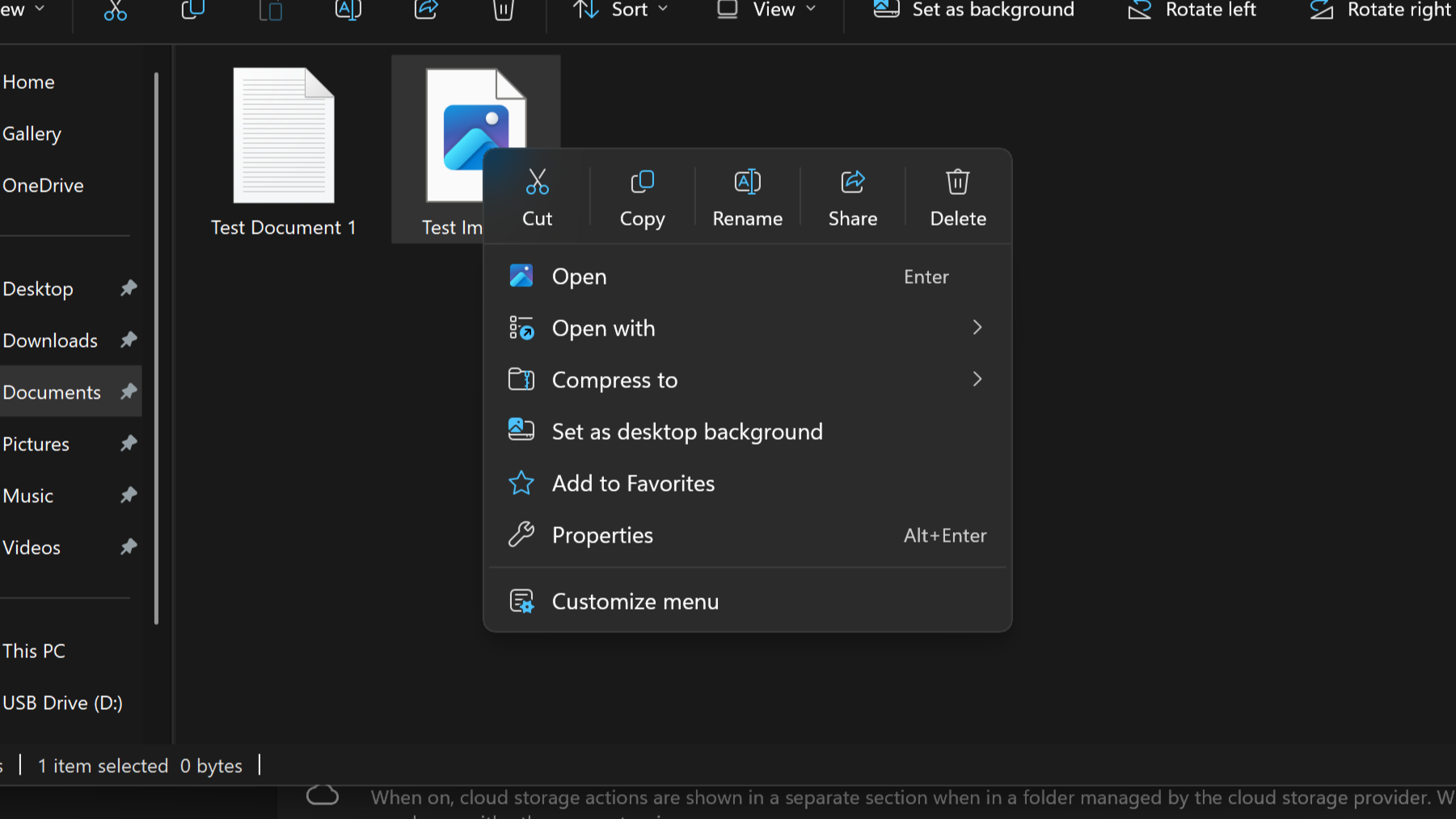
Microsoft is finally letting users customize the context menus too. You can now enable and disable whichever actions you want, as well as show or hide app extensions from third-party apps. This is great for when an app installs itself into your context menus without permission, as you can now hide them from view.

It's even going so far as to allow users to restore the Windows 10 context menu layout within the modern Windows 11 context menu system. Until now, Windows 11's context menu has placed "primary actions" such as cut, copy, and paste into a horizontal view along the top of the menu. Windows 10's context menu placed those actions vertically alongside everything else, and now Windows 11 is letting users restore that layout for users that want it.

"We know many people have years of muscle memory from the Windows 10 menu, so we’ve added options to bring that feel back. You can list the main commands (Cut, Copy, Paste, Rename, Delete, and Share) inline directly in the menu instead of as a row of icons, and you can move Properties down to the very bottom."

These are genuinely good quality of life improvements coming to Windows 11, and Windows Insiders can download the latest Windows 11 preview builds to begin testing them today. Given that they only just entered preview, I expect we won't see them begin shipping to everyone until later in the fall.

Click to join us on r/WindowsCentral

Join us on Reddit at r/WindowsCentral to share your insights and discuss our latest news, reviews, and more.
Windows 11 Context Menus

Windows 11 Context Menus

  •  

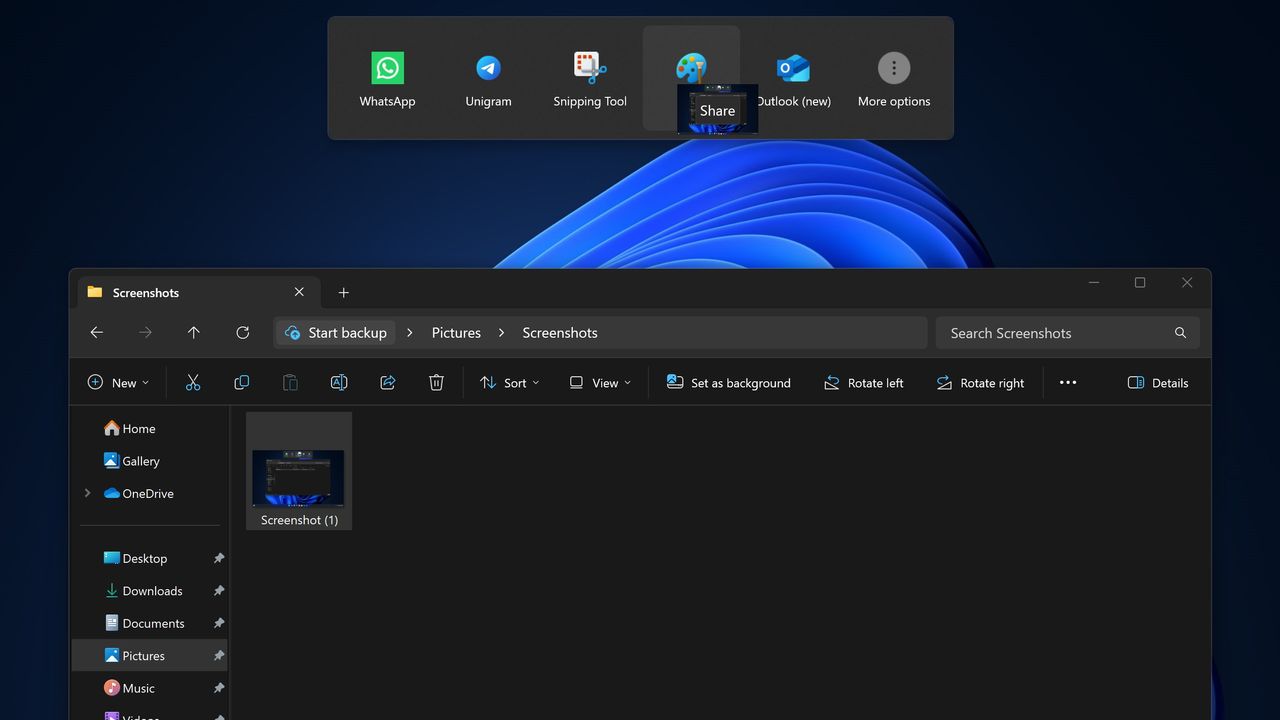
Microsoft pulls "frustrating" Drag Tray file sharing feature from Windows 11 in latest preview builds: Promises to "explore improvements" after feedback from users

Microsoft has announced that it's disabling its unique Drag Tray file sharing experience on Windows 11 after feedback from Insiders. After initially rolling out to a small subset of users a number of months ago, it appears the company is now scrapping the concept in favor of something else.

"Based on feedback, we're removing the experience in this build," Microsoft says. "We're continuing to explore improvements in this area and look forward to sharing more about a future replacement experience in a later update."

The Drag Tray experience was a unique way of sharing files from the File Explorer on Windows 11. It has been in testing for well over a year, and appeared at the top of the screen whenever a user grabbed a file with their cursor. Users would be able to drag the file to the top of the screen and drop the file into an app to instantly share it.

The feature works well on paper, but users online complained about the feature when it first began rolling out, with some calling it frustrating and annoying. While some users found it useful, most users did not like its implementation and sought out guides to disable it.

Windows 11 features multiple ways of sharing files. Most users share files by right-clicking on the file in particular, and clicking share, which opens a dedicated share UI window that makes it easy to send the file to contacts or apps that are installed. The drag tray was supposed to be a faster and easier to use alternative.

Microsoft hasn't yet revealed what will replace the Drag Tray, if anything. While the company says that it's exploring improvements in this area, there's no guarantee that the Drag Tray in this implementation will survive. Given the pushback it received from users originally, it's unlikely to return in its current form.

If you're using Windows 11 with the Insider Program, you'll notice the Drag Tray is gone as of the latest preview builds. If you're running production builds of Windows 11, Drag Tray is still available, but it's likely only a matter of time before Microsoft removes it from shipping builds of the OS too.

Click to join us on r/WindowsCentral

Join us on Reddit at r/WindowsCentral to share your insights and discuss our latest news, reviews, and more.
Windows 11's new file sharing interface.

The Drag Tray sharing feature, which is now being removed.

  •  

I tried Windows 11's new customizable context menus, and they're a major improvement: Microsoft will let you restore Windows 10 style vertical layout for primary actions and more

Last month, I revealed that Microsoft was hard at work on a redesigned context menu system for Windows 11 that's designed to make them faster and more customizable. Now, we've got our first look at the new context menu customization features, discovered hidden in the latest Windows 11 preview builds, and I've been trying them out!

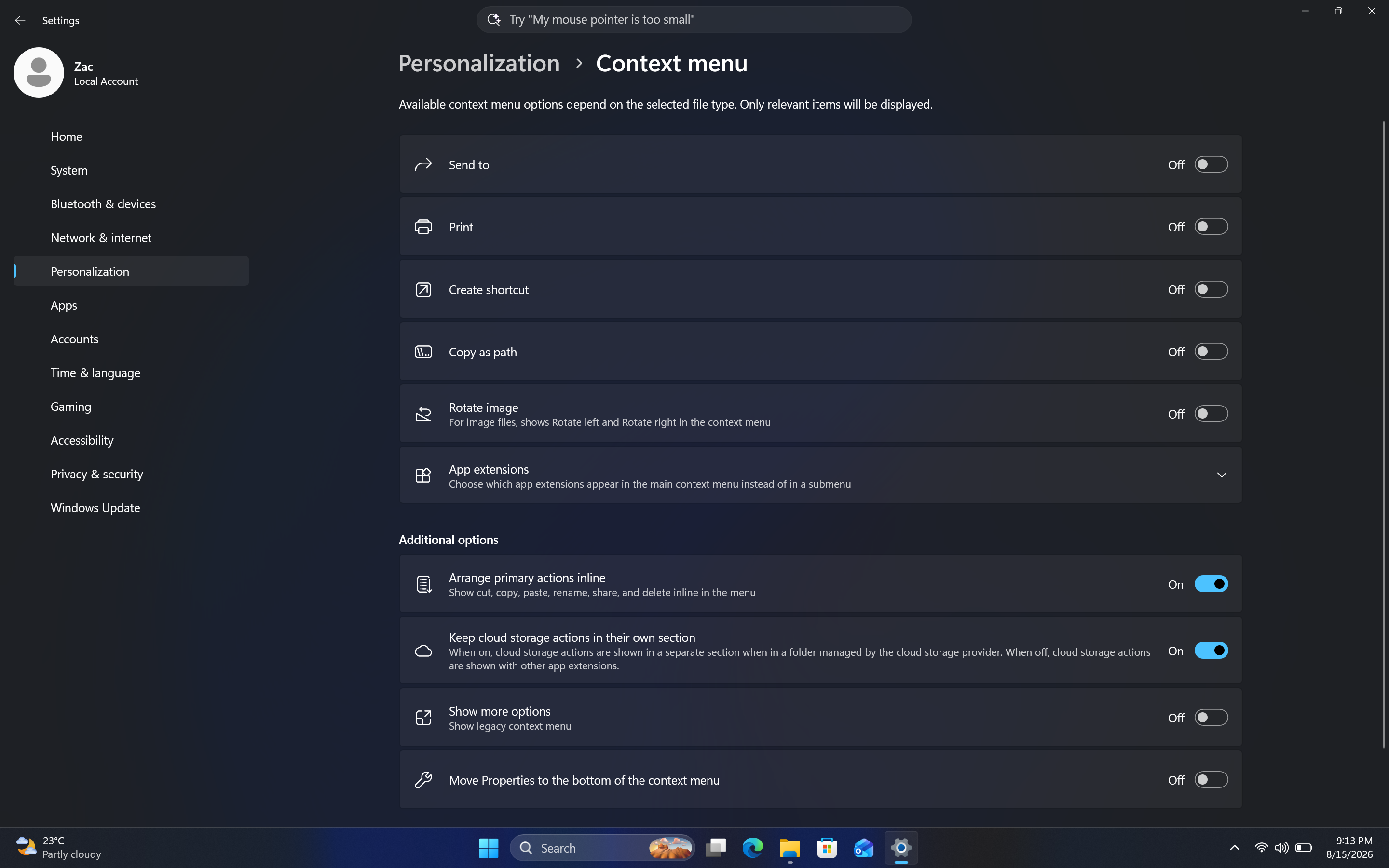
Soon, you'll see a new customize menu option appear at the bottom of the context menu. When selected, you'll be taken into the Windows Settings app where you'll see a wide array of new options that allow you to configure the layout and actions that appear within the context menu.

The toggleable actions presented to the user are:

  • Send to
  • Prin
  • Create shortcut
  • Copy as path
  • Rotate image
  • App extensions
  • Arrange primary actions inline
  • Keep cloud storage actions in their own section

These options allow users to hide certain actions that they might not often use, speeding up the context menu in the process. Additionally, Microsoft is adding an option that lets you change how actions like cut, copy, and paste appear within the menu.

By default, these primary actions appear at the top of the menu in a horizontal layout. This new option will let users restore how they used to appear on Windows 10 and older, where they are listed vertically alongside the other actions within the menu.

It's also worth noting that by default, the context menu has most actions disabled automatically. That means the context menu will be fast for users automatically when these changes roll out, and you'll have to head into the customization options to add back any actions you find useful.

Customizable Context Menu
The new customization options for the context menu are quite in-depth.Windows Central
Customizable Context Menu
This is the new default layout for context menus.Windows Central
Customizable Context Menu
And here's what it looks like when you set primary actions to appear vertically. Just like old times!Windows Central

These new customization options are really great to see, and show that Microsoft is finally listening to feedback when it comes to common UI surface such as the context menu.

The legacy Windows context menu is also still present, and while it no longer appears as an option in the context menu by default, you can still go in and enable that action if that's something you find yourself using. Notably, there's still no option to set the legacy context menu to be the default experience.

In the meantime, we know the new customizable context menu options are imminent, with an announcement from Microsoft expected in the next week or two.

Thanks to phantomofearth for discovering and helping me enable the feature to try out!

Click to join us on r/WindowsCentral

Join us on Reddit at r/WindowsCentral to share your insights and discuss our latest news, reviews, and more.

Windows 11 context menu

Windows 11 context menu

  •  

Microsoft confirms that it will begin shipping major Windows 11 Taskbar and Start menu updates very soon: Big OS update enters final preview phase before public rollout begins

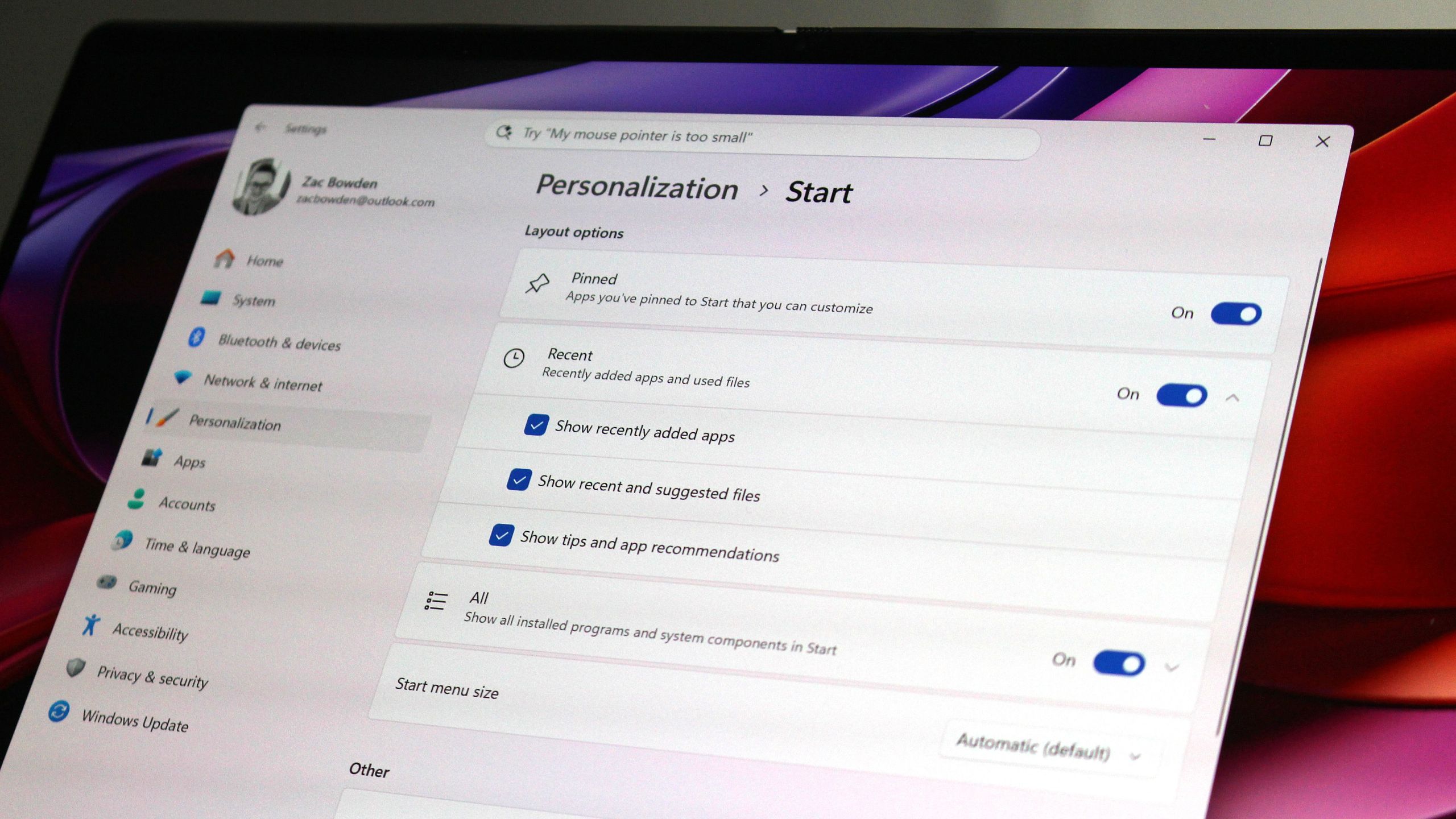
Earlier this year, Microsoft announced big updates for the Start menu and Taskbar on Windows 11 that would address users biggest complaints and bring highly requested features and functionality to the OS. Those changes include the ability to move and resize the Taskbar, as well as customize the size and different sections that appear within the Start menu.

Those features have been in public preview ever since, but those outside of the Windows Insider Program are yet to experience these new features. Now however, Microsoft has confirmed that it's now gearing up to ship the updated Taskbar and Start menu to everyone next month, as the features are now in the final Windows Preview Channel before public rollout.

As of yesterday, the movable and resizable Taskbar, along with the customizable Start menu, and other polish and quality of life improvements, made their way to the Windows 11 Release Preview Channel. This is the last stop before features begin shipping in public, non-Insider updates.

Mockup of Taskbar at top of screen.

You can finally move the Taskbar to the top (and sides) of the screen! (Image credit: Screenshot: Mockup by Windows Central / PC: Edited with Gemini)

Usually, when a feature lands in the Release Preview Channel, it's no more than two or three weeks away from appearing in a public update. Usually, that's with the non-security feature preview update that drops at the end of every month, followed by the security-focused Patch Tuesday which is released on the second Tuesday of every month.

That means if everything goes according to plan, the new Taskbar and Start menu updates will begin rolling out later this month for users with the "Get the latest updates as soon as they're available" toggle in Windows Update switched on, and next month for everyone else.

This is the big user experience update people have been waiting for on Windows 11 this year. The ability to move and resize the Taskbar made headlines when it was announced that it was coming to Windows 11 earlier this year, with a lot of Windows 10 holdouts claiming that the lack of this feature was one reason why they hadn't yet moved to Windows 11.

Microsoft is slowly but surely ensuring that Windows 10 users feel comfortable with the move to Windows 11, and ensuring that functionality that Windows 10 already has is also available on Windows 11 is one way of doing that. Being able to turn off entire sections of Start, as well as resize the menu itself, will be useful for those who enjoyed tweaking the Windows 10 Start menu too.

Windows 11 Start menu options in Settings

The new customizable Start menu options. (Image credit: Zac Bowden / Windows Central)

If you don't want to wait any longer, you can join the Windows Insider Release Preview Channel today to get access to the new features as soon as possible. The quality of code in the Release Preview Channel is usually representative of the final product, meaning the code being previewed in the Release Preview channel now is what will begin shipping in the next handful of weeks.

If you do choose to enroll in the Release Preview channel, be warned that Microsoft is rolling out the new Start menu and Taskbar in waves, so you may not see it right away. This will likely also be the case when the update is released generally, as Microsoft utilized a phased and measured rollout approach to ensure the new features aren't breaking things.

Microsoft has many more quality of life improvements in the works for Windows 11, many of which are expected to begin shipping towards the end of this year and into 2027. Improvements such as better performance and responsiveness in apps and UI surfaces like the Start menu are still to come, as the OS begins adopting WinUI across more areas of the interface.

Click to join us on r/WindowsCentral

Join us on Reddit at r/WindowsCentral to share your insights and discuss our latest news, reviews, and more.
Windows 11

Windows 11

  •  

Did the Surface Phone FINALLY leak? The Windows Central Podcast breaks down what we know about the mysterious Windows Phone prototype, plus a recap of the latest news from Windows and Xbox

Join Zac Bowden and Jez Corden on this week’s Windows Central Podcast as they dive deep into unreleased Microsoft hardware, AI developments, and big Xbox announcements!

  • The Lost "Surface Phone" Prototype: Zach and Jez dissect newly leaked images and video of an unreleased 2013-era Microsoft-built Windows Phone prototype, reminiscing about the Lumia era, Nokia’s acquisition, and what could have been.
  • Microsoft Copilot’s Super App & AI Disillusionment: A look at the rollout of the new unified Copilot experience (merging consumer and Microsoft 365 features), dropped functionalities (Group Chat, Podcast mode, Deep Research), and a frank discussion on AI hype, practical workflows, and "AI psychosis".
  • Xbox Backward Compatibility Coming to Windows PC: The hosts break down the official announcement of original Xbox/Xbox 360 emulation on Windows, potential licensing hurdles, Play Anywhere integration, and upcoming achievement support.
  • Gaming Rumors & Franchise Future: Updates on The Elder Scrolls VI codename rumors (Sentinel), long development cycles across Bethesda/Obsidian, and a candid critique of the state of the Halo franchise following Halo Campaign Evolved and project cancellations.
  • New Xbox Console Features & Live Q&A: A discussion of the upcoming "Platinum Trophy" achievement equivalent, party/mic audio in Game DVR captures, and a live Q&A touching on Windows K2 progress, mobile shells for Windows on ARM, MSN's automation, and modern foldable vs. slab phones.

This episode of the Windows Central Podcast is sponsored by Surfshark VPN. Unlimited devices, access your content from anywhere, and auto-block malware on Windows, Edge, and other platforms from $2.50/mo, with 3 months extra FREE. Sign up today!

Have a question you want us to answer on the podcast? Send it to us at [email protected]

Hosts:

Subscribe to the Windows Central Podcast

If you like the show, please let us know by give us a rating on your podcast platform of choice. It really helps us!

LIVE Video Podcast

You can watch the live, uncut version of the Windows Central Podcast on our YouTube channel!

Click to join us on r/WindowsCentral

Join us on Reddit at r/WindowsCentral to share your insights and discuss our latest news, reviews, and more.
Zac and Jez on the Windows Central Podcast

Zac and Jez on the Windows Central Podcast

  •  

Microsoft begins unified Copilot app rollout: Reveals major plan to merge Copilot and Microsoft 365 Copilot across all platforms, along with updated branding

Back in May, Microsoft confirmed that it was working on a Copilot super app that would merge the different consumer Copilot and productivity Copilot experiences under one app. Until now, Copilot and Microsoft 365 Copilot have been targeted at different users, but starting today those apps are being merged into one.

"We're updating Copilot to create a simpler, more cohesive experience for everyone," a new Microsoft Support document says. "Depending on the account and device you use, you will see changes to the Copilot app including changes to appearance and functionality, such as navigation, feature availability, or sign-in experience."

The unified Copilot experience begins its rollout today, but not everyone will see it right away. Microsoft says the experience will land on mobile first, with the unified Copilot on Windows and macOS being an opt-in experience at first, made available over the coming weeks.

The rollout should make it easier to move between using Copilot as an AI assistant for personal matters and using Copilot for productivity based tasks. For most people, not much will change with the unified app, which will simply appear as "Copilot" now. With that said, Microsoft does say that some features are going away with the unification. Those features include:

  • Group Chat
    • All group chat threads, messages, and images will not carry forward after August 18, 2026.
    • Users must manually copy or download anything they want to keep.
  • Podcasts
    • The Podcasts feature is being fully retired on August 18, 2026.
    • Users will no longer be able to create or access podcasts in Copilot after this date.
    • Individual podcast files can still be downloaded before retirement.
  • Deep Research
    • Deep Research is being retired for consumer users starting August 18, 2026.
    • Existing Deep Research content will remain accessible, but the feature itself will no longer be available.

For those using Copilot with a work or school account, Microsoft says the unified Copilot app is also coming to those accounts too. The personal and commercial accounts will be separated within the app, meaning data from your work or school account won't be shared with your personal account, and vice versa. "Work and personal accounts remain separate. Your organization's security, privacy, compliance, and administrative controls continue to apply when you use Copilot with your work or school account."

For those using the personal consumer Copilot app, you will notice an updated UI that more similarly matches the Microsoft 365 Copilot app. Those who use the Microsoft 365 Copilot app likely won't notice much of a difference, outside of the rebranded app to just "Copilot," along with a slightly updated logo.

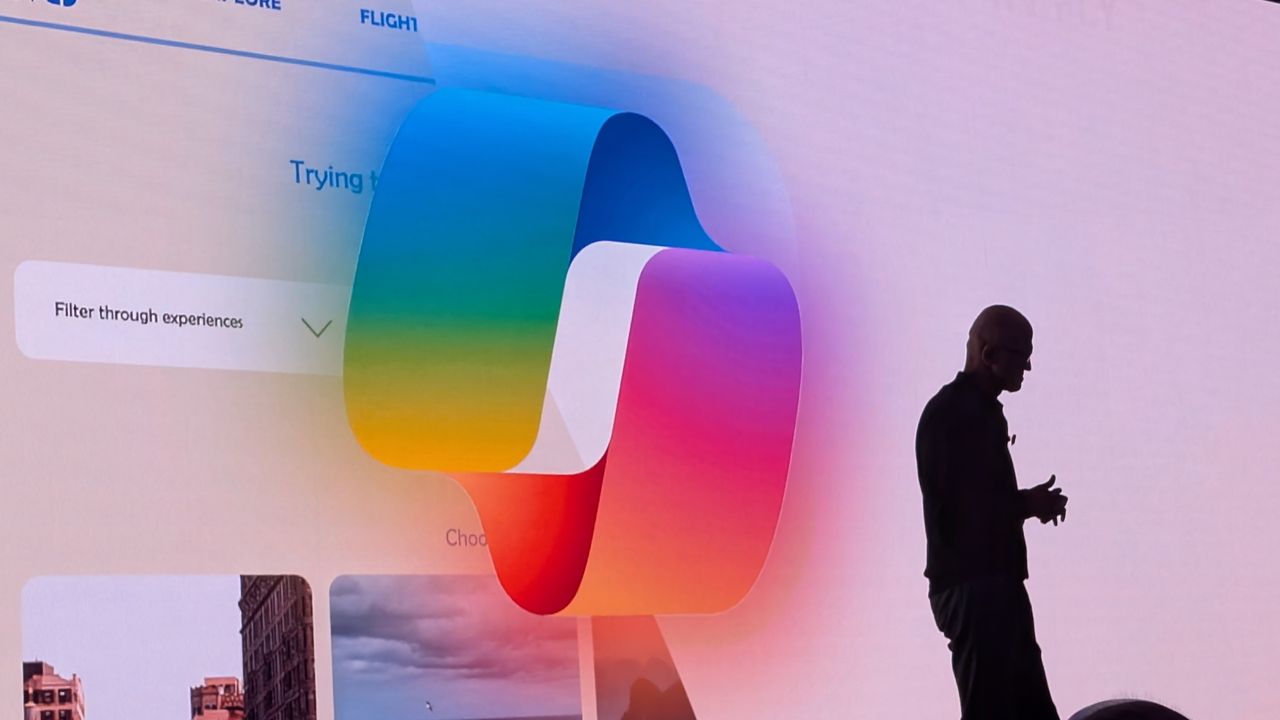
For those curious, this is the new Microsoft Copilot icon and branding. Can you tell the difference? No, us neither.

New Microsoft Copilot Logo for 2026

The new Copilot logo is very similar to the old one. (Image credit: Microsoft)

Lastly, Microsoft has confirmed that all your Copilot data (except for the features that are being taken away) will migrate automatically to the new experience, meaning users won't need to do anything to ensure their chats and data are carried forward. All of that will happen automatically when the unified app lands on your device.

The unified Copilot experience begins its rollout today, though it's happening in waves so most users won't see the changes right away. Worldwide rollout for the mobile starts today, with rollout for Windows and macOS expected to start in mid September. Here's the full rollout schedule:

  • Mid‑August 2026 — Worldwide rollout begins for mobile and web apps; early‑access opt‑in opens for Windows and Mac apps; copilot.cloud.microsoft URL available in Frontier for testing.
  • Late August 2026Standard rollout of the URL redirect begins.
  • Mid‑September 2026 — Worldwide rollout begins for Windows and Mac apps.
  • Late September 2026Deferred rollout of the URL redirect begins for the web app.

Microsoft's unification of Copilot is a long time coming, and one that is setting the company up to deliver a Copilot super app experience that can do everything across Microsoft's platforms and services. It never made sense for Microsoft to split Copilot up between consumer- and productivity-based use cases, especially since users commonly want to do both.

Click to join us on r/WindowsCentral

Join us on Reddit at r/WindowsCentral to share your insights and discuss our latest news, reviews, and more.
Microsoft CEO Satya Nadella in front of the Microsoft Copilot AI logo.

The new Copilot begins rolling out today.

  •  

Microsoft says Windows 11 KB5101684 makes your PC more reliable, especially on devices with low amounts of system memory: PCs with 8GB RAM or less should feel more responsive

Yesterday, Microsoft rolled out the latest Windows 11 updates for all users across version 24H2, 25H2, and 26H1. For users running version 24H2 and 25H2, this latest patch includes a number of nice to see quality of life improvements in the way of performance and reliability upgrades in a number of key areas.

According to the changelog, which includes improvements that began rolling out as part of last month's optional feature update, the KB5101684 update includes reliability upgrades for explorer.exe, which will make opening things like Jump Lists and recent files faster. Additionally, Microsoft says this update will also make sharing files and switching between desktops with Task View faster too.

The reliability improvements don't end there, either. This update also includes reliability upgrades for the Windows lock screen and sign-in screen, which will be most noticeable on PCs with low amounts of RAM available. There are also startup reliability upgrades for the Start menu and Taskbar, which should make those interfaces appear quicker when powering up.

Furthermore, Microsoft says that this update also makes the post-update process less resource intensive, meaning your PC will feel faster to use immediately after an update is installed. Previously, Windows Updates required a clean-up phase after install which could be quite resource intensive on certain PCs.

The good news is all of these performance and reliability upgrades apply regardless of the amount of RAM your system has. You should notice a more responsive system if you have 8GB or 128GB of RAM.

Here's a rundown of the reliability-focused improvements in the latest update:

  • This update improves explorer.exe reliability, including when opening Jump Lists and recent files, when sharing files and folders, and when using Task View and multiple desktops.
  • This update improves the reliability of the Windows sign-in and lock screens, especially when system memory is low. It also improves the reliability of the Start menu and taskbar during startup.
  • This update improves reliability of loading the system tray area of the taskbar when using the taskbar on touch devices in a tablet posture.
  • The update improves the reliability of Start menu view preferences, ensuring your selected view is retained.
  • This update includes changes to update clean-up logic to improve system performance immediately following an update.
  • This update improves app search to better handle typos and partial app names when finding installed apps.

These reliability and performance upgrades are in addition to the many other quality of life improvements shipping as part of the KB5101684 update, including improvements to File Explorer, Windows Hello, Windows Search, system sounds, and more.

Microsoft recently announced a renewed commitment to making Windows 11 better on PCs with 8GB RAM, and it appears we're already seeing the fruits of that labor. While there's plenty of more optimizations to come, it's good to see Microsoft already moving to address this weak point on Windows.

Microsoft has been delivering genuinely nice improvements to Windows 11 over the last few months, all of which have been addressing issues with the OS around performance and reliability. This latest update continues that crusade, meaning your PC will feel better to use as of the latest updates.

Click to join us on r/WindowsCentral

Join us on Reddit at r/WindowsCentral to share your insights and discuss our latest news, reviews, and more.
Windows 11 update in Settings app

Windows 11 update in Settings app

  •  

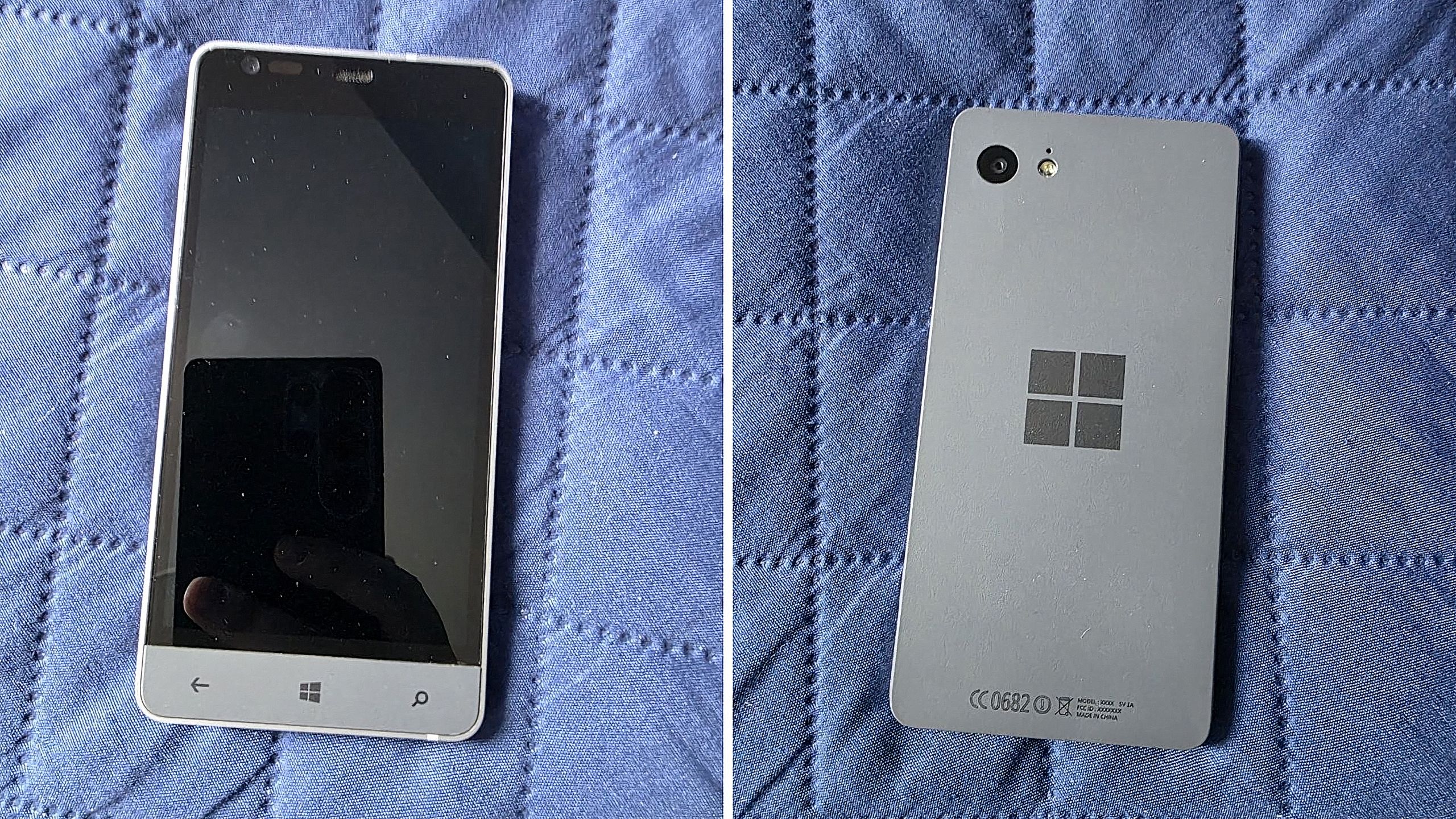
Is this Microsoft’s canceled Surface Phone from 2014? Mysterious Windows Phone prototype appears in new photos

Before Microsoft acquired Nokia, the company was heavily rumoured to be working on its own in-house Windows Phone device that was expected to ship in 2014 under the Surface moniker alongside its Surface Pro device. Unfortunately for Windows Phone fans, such a device never saw the light of day, but newly published images of a mysterious prototype might have just given us our first and only look at what Microsoft was exploring internally.

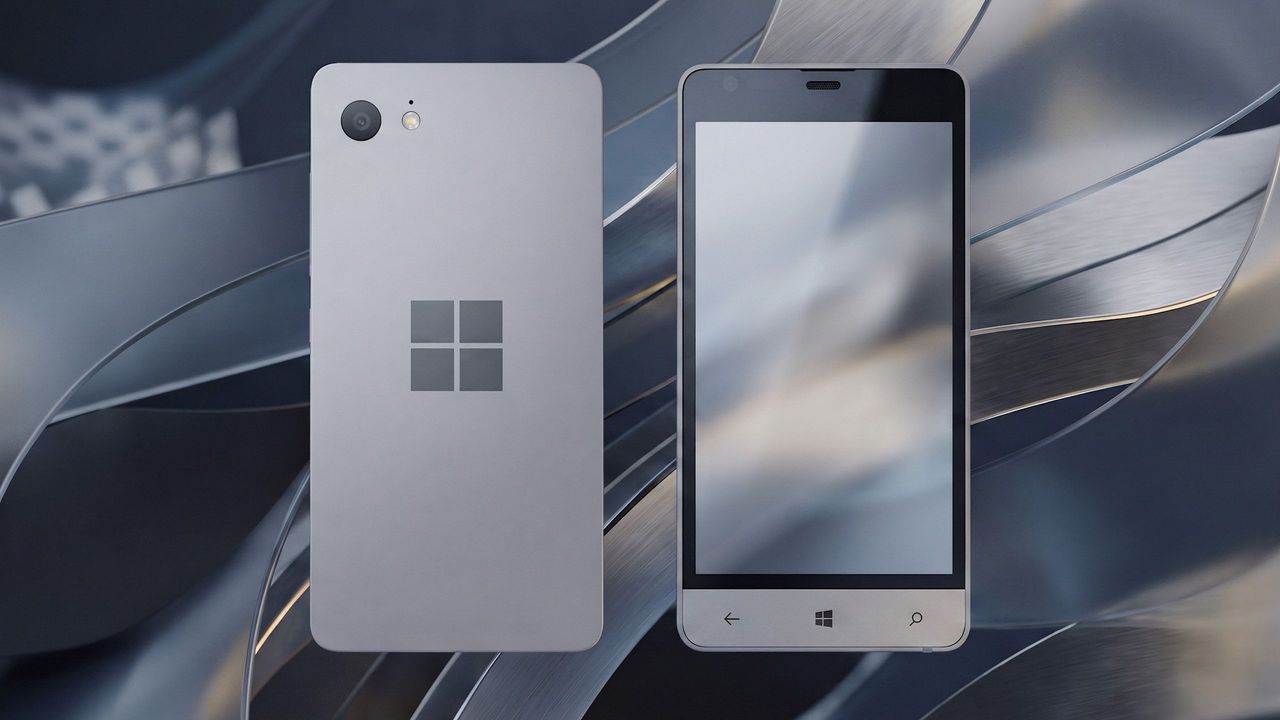
Possibly codenamed Raven, there isn't much information available about this prototype, other than the fact that it’s from the 2013-2014 time frame and is running an early pre-release build of Windows Phone 8.1. It’s powered by an unknown Qualcomm chip, has a 720p screen, features a Microsoft logo on the back, and a silver metal frame that matches the colour of the Surface 2 that released that same year.

We can see in the photos that it has dedicated hardware keys for navigation, which are also coated in the same silver color as the chassis. The build of Windows Phone that it’s running appears to be from September 2013, and is from an internal development branch building towards what eventually became Windows Phone 8.1.

Windows Phone Prototype

Real images of this mysterious Windows Phone prototype. (Image credit: Telegram/Discord)

While not viewable in the images, I understand the device features individual up and down volume buttons and a camera button on the right-hand side of the device, and a power button on the top of the device. It also features a micro-USB port and headphone jack on the bottom side, and a SIM card slot on the left side.

This is likely one of dozens of prototype designs that Microsoft’s hardware teams cooked up during this era, but it’s certainly a fascinating look at what could have been, and it does look so clean. Development on this device was likely paused once Microsoft moved to acquire Nokia in 2014.

Back in 2013, I remember hearing from sources that Microsoft was experimenting with the concept of a "Skype Phone," a Windows Phone device with mobile data that utilized Skype for calls and messaging instead of traditional carrier networks. Perhaps this device was going to be that? Who knows.

The Surface Phone we eventually got arrived as the Surface Duo, which started development in 2016 and launched to the public in 2020. In that time, Microsoft shipped Nokia designs in the form of the Lumia 640, 650, 950, and 550 running Windows Phone, before abandoning the platform in 2017.

Click to join us on r/WindowsCentral

Join us on Reddit at r/WindowsCentral to share your insights and discuss our latest news, reviews, and more.
Surface Phone Render

Render based on real images of the prototype (seen below.)

  •  

Amid RAM price hikes, Microsoft reportedly raises Windows license cost, forcing OEMs to hike prices even further on hardware

According to a new report from Taiwanese publication United Daily News (UDC,) Microsoft is raising the cost of Windows license fees for hardware makers by a much higher amount than normal. According to the report, certain OEMs are seeing licensing price hikes of between 7% and 10%.

Usually, Microsoft raises Windows license fees for OEMs by a low digit percentage, making this 7% to 10% increase much more significant than normal. "A PC brand executive stated that Microsoft increases licensing fees for Windows OEMs (device manufacturers) every year. In the past, licensing fees mostly increased by single digits each year, but starting in July this year, the average increase has reached 7% to 10%, which is a significant increase compared to previous years," UDC says.

Of course, the cost of the Windows license fee is usually (at least partially) passed onto the consumer buying a computer, and UDC claims that their source says laptop pricing is already being impacted by these recent license fee increases. Microsoft charges different OEMs their own fees for Windows, so the exact increase in cost will differ for each hardware maker.

Regardless, with the ongoing memory component shortage, PCs have already seen astronomical price increases over the last year, with experts claiming that we haven't yet seen the worst of it. With Microsoft raising prices higher than usual on Windows licenses, it feels like the Redmond giant is adding extra fuel to the fire.

Windows Central reached out to Microsoft for comment regarding this story, but the company declined to provide one.

To be clear, the Windows license fee price hikes only apply to OEMs building hardware that ships with Windows. The cost of buying a license for Windows 11 as a consumer remains unchanged, being $99 for Windows 11 Home and $199 for Windows 11 Pro.

The ongoing component crisis has made computing unaffordable for many people. PCs that used to target the $600-$800 price bracket now cost close to $1,000. And flagship Windows laptops that used to cost $1,200-1,500 are now closer to $2,000. Even Apple has been hit by the shortage, being forced to raise prices by hundreds of dollars across its Mac lineup. Microsoft's own Surface line was hit especially hard, with the flagship Surface Pro and Surface Laptop being $400-$500 more expensive than the last-gen models.

(Sources: 1, 2)

Click to join us on r/WindowsCentral

Join us on Reddit at r/WindowsCentral to share your insights and discuss our latest news, reviews, and more.
Windows 11 Hero Surfaces on a white table

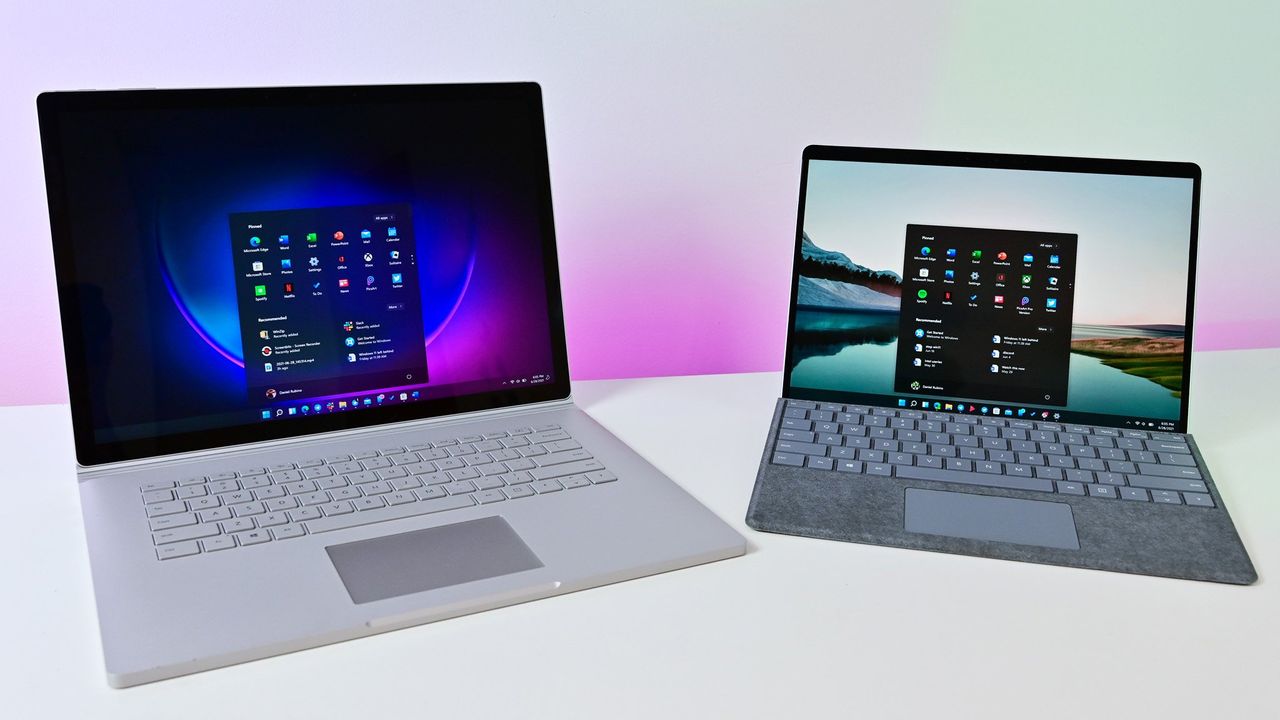
Windows 11 Hero Surfaces on a white table

  •  

“‘We’re fixing that," Microsoft admits error that caused new OneDrive Photos app to appear on millions of Windows 11 PCs

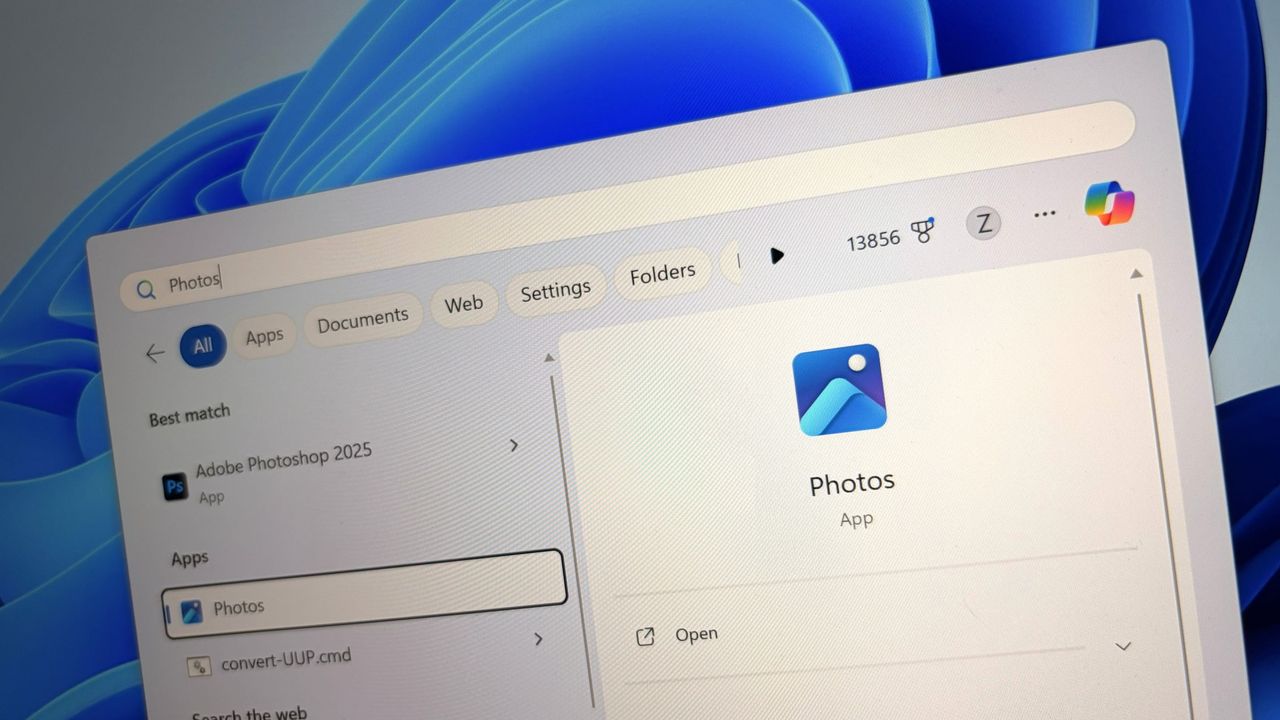
Last week, users began noticing a new app appearing in their Start menu on Windows 11, titled "OneDrive Photos" which was being forcibly installed by the OS. Naturally, this caused outrage among users who aren't interested in using OneDrive for photo storage, resulting in pushback online.

Now, Microsoft's EVP of Apps and Agents, Jeff Teper, has taken to X to explain what happened. He confirms that the OneDrive Photos app is an incubation project, which wasn't supposed to rollout as widely as it did. "We are incubating a new photos experience in OneDrive that went more broadly than it should have in Windows. We’re fixing that. Windows Photos will always give you the option of local and cloud photos and the choice to use OneDrive or not."

It looks like a switch was flipped on Microsoft's end which made the already pre-installed OneDrive app begin showing the OneDrive Photos experience, which is usually hidden from the user currently. Microsoft has been building this new OneDrive Photos experience for a number of months, as it first leaked back in 2025.

It's unclear why Microsoft thinks it needs to build a dedicated OneDrive Photos app, especially when Windows comes preinstalled with an already competent photo viewer that does a good job of handling photos stored in OneDrive. The new OneDrive Photos app is a web app, which is heavy on RAM usage and not very responsive.

Although Microsoft has confirmed that the rollout of OneDrive Photos was an error, the company does say that it's still looking forward to delivering this new experience soon. "We're very excited for you to try out OneDrive's photos features on desktop, web, and mobile and hear your feedback."

It's unclear if Microsoft intends to re-hide the OneDrive Photos app from appear on PCs where it shouldn't. On my PC, I can still see the new Photos (Preview) appearing in Windows Search, which opens the OneDrive Photos experience. This isn't the first time Microsoft has been caught automatically installing new apps on Windows 11. The OS has frequently been accused of automatically installing apps like Microsoft 365 Copilot, much to the dismay of users who don't want it.

The good news is it appears Microsoft is listening to the feedback, and publicly acknowledging that it made an error with the rollout of the OneDrive Photos app is confirmation that it saw the backlash and understands that a lot of users don't want this new experience. Hopefully that means the company won't forcibly install it next time.

Click to join us on r/WindowsCentral

Join us on Reddit at r/WindowsCentral to share your insights and discuss our latest news, reviews, and more.
Windows 11 Photos logo

Windows 11 Photos logo

  •  
❌