Vue lecture

First it was Neo, and now it's iPhone Duo — Apple keeps robbing Microsoft of its Surface device names, and I'm mad about it

I loved my Surface Duo a lot. It was a unique folding phone with two screens instead of a single foldable display, supported pen input, and was the thinnest of its kind when it launched in 2020 (see our original review). It was a mesmerizing bit of kit, but it failed to gain any real mainstream attention.

And although it never shipped, its bigger brother, the Microsoft Surface Neo PC, was also something a lot of us Windows fans were looking forward to at the time. A dual-screen laptop, to complement my dual-screen phone? Sign me up! In 2020, it really did seem like Microsoft was building out its own unique device ecosystem to compete with Apple, Samsung, and Google.

The Neo and Duo were clever names for these devices. Both names had dual meanings to them, too. Neo, meaning "new," referred to the form factor, as well as being a reference to "The One" from The Matrix. And Duo, obviously signifying the device's unique "duo" screen setup, but it was also a reference to the fact that it was a surprise second device in a pair, alongside Neo.

When Duo was announced, it was a true one more thing moment during the event. There had been rumors that Microsoft was working on a folding phone for years prior, but recent reporting at the time had suggested the project was dead. So when Duo was announced alongside Neo, it was a rare true surprise to those in attendance and watching online.
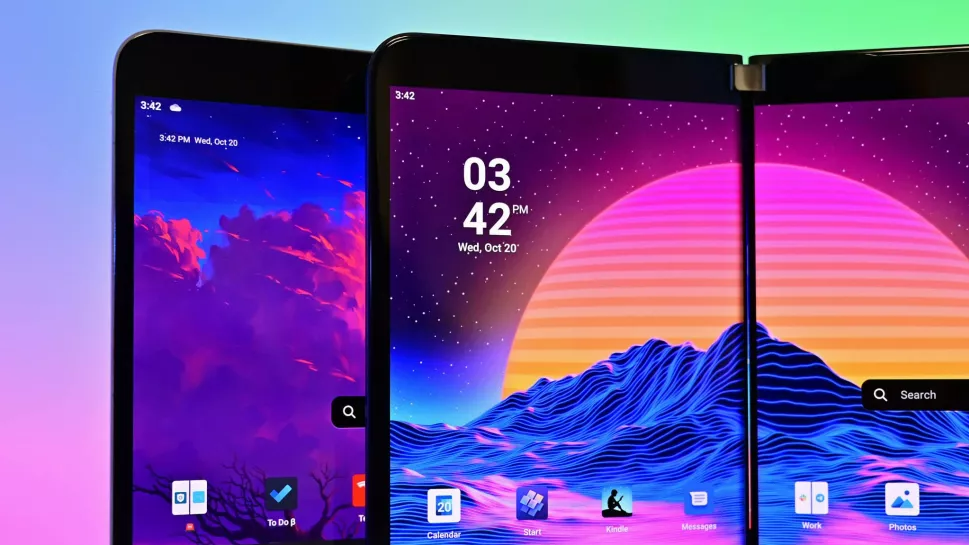
Surface Duo vs Surface Duo 2

(Image credit: Future)

Cut to 2026, and it's all dead. Microsoft gave up on Duo after just one iteration (Surface Duo 2 review), and it never even gave Neo a chance. The company's boneheaded shortsightedness led to the death of unique Surface hardware, and now today we're left with boring laptops and tablets from the Redmond giant.

It was inevitable that the Neo and Duo would forever be relegated to the history books, a hall of fame of unique devices that tried and failed to capture the market. Now, Apple has stormed in and stolen these names for their own products, which will only serve to further bury Microsoft's efforts.

I'm sure there are some Apple fans out there who think Apple never even thought about Microsoft when it named the MacBook Neo and iPhone Duo, but I think that's a lie. Apple is clearly aware that Neo and Duo were strongly tied to the Surface brand, but decided that didn't matter, which is the correct decision.

The MacBook Neo is an almost polar opposite of the Surface Neo. While Surface Neo was supposed to be a super expensive dual-screen flagship laptop, the MacBook Neo is Apple's cheapest laptop, undercutting much of the market. I don't know why, but that feels like an F.U. to Microsoft's vision for its Neo.

And now, there's iPhone Duo. This one hits much harder, as they're both playing in the same game. Surface Duo was a thin folding phone with pen support, and the iPhone Duo is pretty much exactly that. Of course, Apple's iPhone Duo refers to the fact that it's both an iPhone and an iPad, but seeing the Duo moniker on an Apple product just stings.
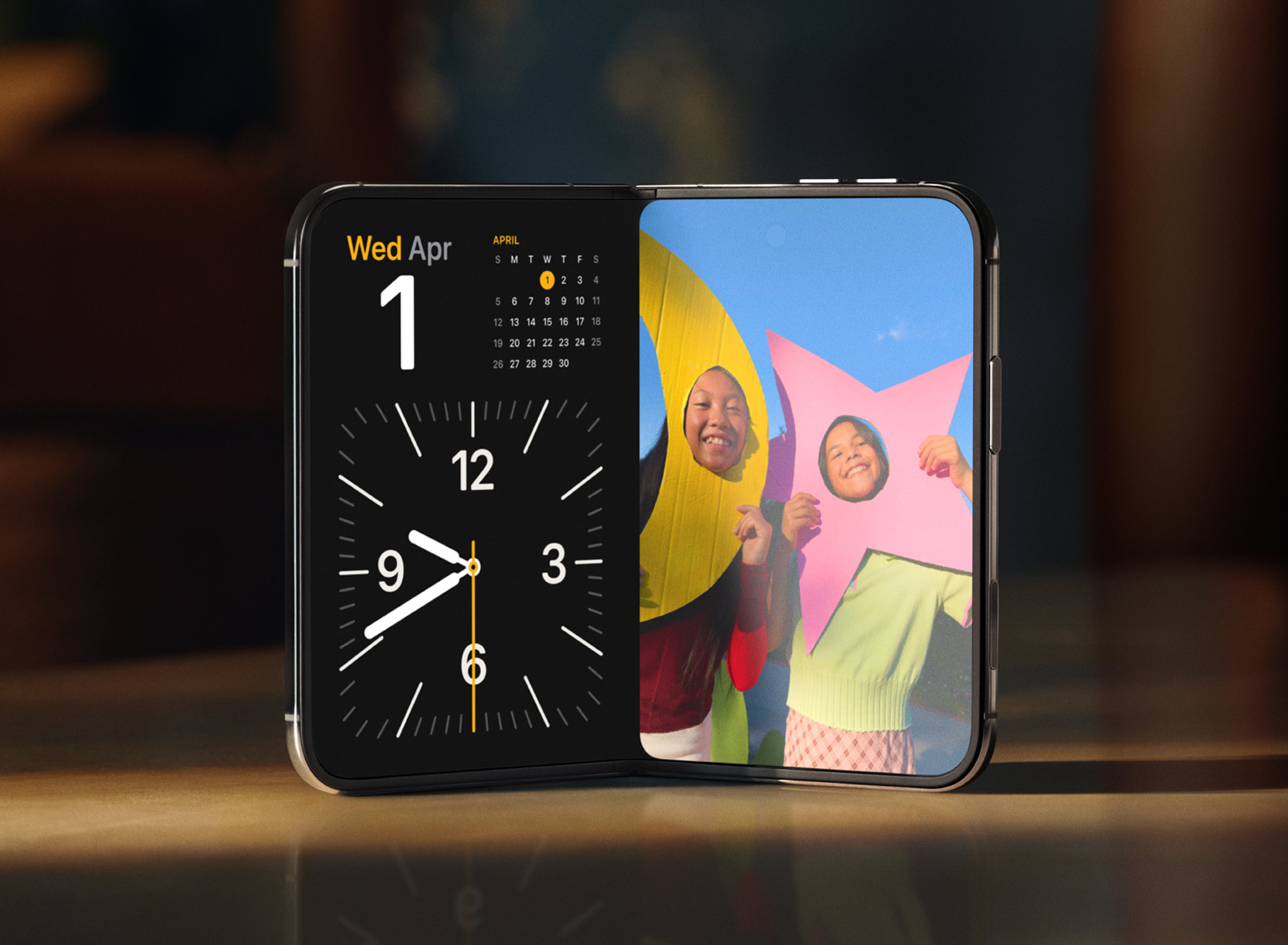
iPhone Duo

The iPhone Duo is a modern day Surface Duo. (Image credit: Apple)

If anything, it's just reminded me of what was possible had Microsoft pushed through and continued to innovate on the Surface Duo. The company had started working on a third-gen Surface Duo in 2022, which was going to pivot to a single-screen folding setup not dissimilar to the iPhone Duo.

But Microsoft just can't see a good thing through. Because Surface Duo 1 sold poorly, and Surface Duo 2 sold even less than that, the company decided that it was not worth continued investment in this category, which is just wrong. Folding phones were and still are the future, but Microsoft decided to pack it all in.

Now, Apple has just stolen the crown for the Duo moniker, with a product that seemingly does everything the Duo set out to achieve, but better in every way because Apple isn't going to give up after just one iteration. I get the impression that Duo is here to stay in Apple's lineup, unlike the Duo in Microsoft's lineup.

I'm mad that Apple has stolen the Neo and Duo moniker, but frankly, they deserve it. Microsoft clearly isn't doing anything with them, and they are cool product names for devices that stand out. MacBook Neo and iPhone Duo certainly do that, even if they're not in complete harmony like the Surface Neo and Surface Duo were supposed to be.

Congratulations on the launch of iPhone Duo, Apple.

Click to join us on r/WindowsCentral

Join us on Reddit at r/WindowsCentral to share your insights and discuss our latest news, reviews, and more.

  •  

Windows 11 set to gain upgraded sound settings, cross-device improvements, and new family safety features

Microsoft has just announced a set of new Windows 11 preview builds that are packing some notable improvements and changes that are now in testing with Insiders. This week's preview builds come packing an upgraded set of settings for sound and audio devices on Windows, enhanced cross device features that sync with your phone, and new family safety options.

First up, Microsoft has introduced a new design for the volume sliders that appear in the Sound Settings area of Windows Settings. The sliders now also show audio activity for when music or video is playing in the background while you configure your settings, making it easier to dial in exactly where you want your volume.

Microsoft is also porting over more Control Panel sound settings to Windows Settings, including the ability to set default devices, and the ability to allow hardware acceleration for devices that support it.

New sound settings

The new live audio activity indicator. (Image credit: Microsoft)

Here's a list of the new sound settings coming to Windows 11:

  • We've updated the design of the volume sliders in Sound Settings so that they display audio activity on the side when audio is playing.
  • If your audio device supports hardware acceleration, an option to allow hardware acceleration is now available in the Advanced section of the device's properties.
  • You can now configure exclusive mode for an audio device in the Advanced section of the device's properties, so you don't have to go to Control Panel.
  • You can now configure adaptive communication sound levels, which reduce the volume of other sounds when communications activity is detected, directly in Settings.
  • The option to set an audio device as the default sound device for communication now always appears in Properties. The option is unavailable if the device is already the default instead of being hidden.
  • We've updated the text for allowing audio devices to make it clearer.
  • We've added a new banner when mono audio is enabled to make it clear that some properties don't take effect while mono audio is active.
  • We've updated the All sound devices page:
    • You can now change default devices from this page.
    • We've adjusted the page design so that you can filter whether you're viewing input or output devices.
    • We've added toggles so that you can choose whether to hide or show disabled, disconnected, and unplugged devices.
  • We've also updated the input and output audio properties pages in Settings to include jack information for devices that need it.

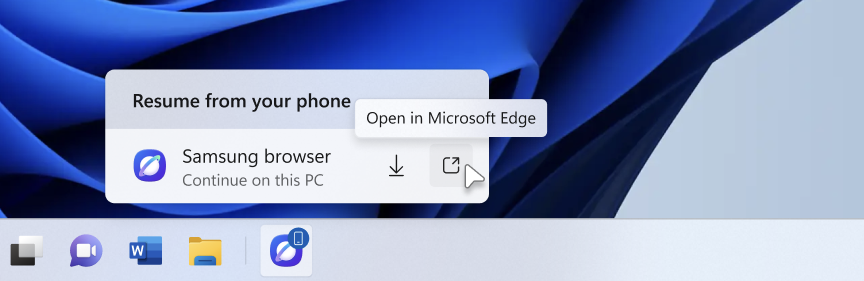
Another new feature in testing is the ability to quickly download the Windows app for a phone app that appears in the Taskbar via Phone Link. If you use the cross-device sync features that comes with Phone Link, hovering over an open app such as your phone's browser on the Taskbar will now let you quickly pick up where you left off without missing a beat.

New cross device features

Quickly resume web browsing activity from your phone from the Taskbar! (Image credit: Microsoft)

In addition to the new sound settings, Microsoft has announced major upgrades to the family safety features in Windows 11. The company says family safety is a top priority for the company, and is addressing key issues and concerns from parents.

Key areas of focus include:

  • Parental approvals for offerings like screen-time extensions, app access, and purchases now happen faster, so kids aren’t left waiting and parents stay in control.
  • We restored clear visibility into web and app activity so parents can trust what they see in their reports.
  • Made spending more transparent, with wallet balances.
  • We also gave adults in a family more control over their own experience, making it far easier to add, manage, or leave a family group 

"Each of these improvements came from a real family experience — from issues parents told us mattered most: speed, accuracy, control, transparency, and peace of mind." Microsoft Distinguished Engineer, Rob Mauceri said. "This is the compounding effect of a team that treats every piece of customer feedback as a commitment to do better."

These improvements are welcome to see, and a sign that Microsoft continues to modernize and improve Windows 11 for the masses. These improvements are part of Microsoft's ongoing Windows K2 effort, which is focused on fixing Windows 11's biggest flaws.

Click to join us on r/WindowsCentral

Join us on Reddit at r/WindowsCentral to share your insights and discuss our latest news, reviews, and more.
  •  
❌