❌

Vue normale

  • ✇Yanko Design
  • This Light-Charging E Ink Frame Gives Your Photos a Home Beyond Your Phone
    Taking photographs has become almost effortless, but getting them off our phones is another matter. There’s always a favorite vacation snapshot that deserves better than being buried between screenshots and receipts. Inkanva is developing a color E Ink canvas that gives those pictures a more permanent place at home, with a paper-like display and indoor-light charging on its two smaller models. The difference starts with what the display doesn’t do. There’s no backlight turning a family portrai
     

This Light-Charging E Ink Frame Gives Your Photos a Home Beyond Your Phone

Par : JC Torres
7 novembre 2026 à 21:45

Taking photographs has become almost effortless, but getting them off our phones is another matter. There’s always a favorite vacation snapshot that deserves better than being buried between screenshots and receipts. Inkanva is developing a color E Ink canvas that gives those pictures a more permanent place at home, with a paper-like display and indoor-light charging on its two smaller models.

The difference starts with what the display doesn’t do. There’s no backlight turning a family portrait into another glowing rectangle in the living room. Instead, E Ink Spectra 6 reflects ambient light and uses six physical pigments to create color. Like a printed photograph, it needs light to be seen, which makes its relationship with the room quite different from a backlit tablet’s.

Designer: Inkanva

Click Here to Buy Now: $159 $239 (34% off). Hurry, only a few left! Raised over $358,000

1

Light also has another job here. The 7.09-inch and 13.3-inch editions include a perovskite photovoltaic component that harvests indoor light to replenish the battery. That’s a rather technical way of addressing a familiar decorating problem: finding somewhere for an electronic object without planning around a nearby power outlet. The component attaches magnetically and can be removed without opening the display housing.

Of course, the room still has a say in how that works. Charging depends on available light and how often you change the picture, so a dim corner isn’t the same as a well-lit shelf. E Ink helps by retaining a static image without continuous display power. The aim is fewer charging interruptions, rather than a promise of unlimited activity.

1

1

Changing the picture follows a routine that should feel familiar to anyone who’s edited a photo on a phone. Choose an image in the Inkanva app, adjust the crop, and send it over Wi-Fi. A trip to the coast could replace last year’s family portrait without another print order, leaving the physical frame where it is while the memory inside changes.

There’s room for less conventional contributions, too. The app offers AI tools that turn spoken ideas or doodles into artwork, giving a quick sketch another direction to explore. A child’s drawing could become the starting point for something new, although there’s no obligation to involve AI at all. Your own photograph can take the same place without being reinterpreted by software.

1

Those who’d rather manage their pictures closer to home have a separate local mode with a browser interface and its own image library. It’s an alternative to app-based management, rather than another remote control running alongside it. Home Assistant support also leaves room for custom routines, such as putting a different artwork on display for the start of the week.

The surrounding frame matters almost as much as the image, especially when it shares a room with furniture you’ve chosen carefully. On the 13.3-inch edition, a separate decorative wood surround can be swapped without replacing the display. Moving it from a study to a living room doesn’t have to mean keeping the same finish, even if the photograph stays exactly as it was.

1

Scale changes that relationship as well. The 7.09-inch canvas suggests a personal photograph beside a desk, while the 13.3-inch version gives an image more presence on a shelf or wall. There’s also a 28.5-inch edition for a larger wall composition, although it doesn’t include the light-harvesting panel.

A photograph doesn’t need to change every morning to deserve a place on the wall. It might stay there for months, gathering the sort of familiarity that makes a room feel like yours. Inkanva leaves that decision with the person living beside it. When another picture finally earns the spot, you can change what’s inside without taking down the frame.

Click Here to Buy Now: $159 $239 (34% off). Hurry, only a few left! Raised over $358,000

The post This Light-Charging E Ink Frame Gives Your Photos a Home Beyond Your Phone first appeared on Yanko Design.
  • ✇Yanko Design
  • Micro Journal Rev.2.1.MINI Writing Laptop Pairs a Wide Screen With Just 48 Keys
    Opening a laptop to write a paragraph can quickly turn into checking messages, rearranging windows, and forgetting the sentence you had in mind. The Micro Journal Rev.2.1.MINI, nicknamed Baby Shark, puts writing at the center of a small, folding computer instead. Its wide screen and compact mechanical keyboard give your words their own space, while Linux supplies the editing tools beneath that colorful clamshell. The chunky enclosure doesn’t try to resemble a slim aluminum laptop. A bright red
     

Micro Journal Rev.2.1.MINI Writing Laptop Pairs a Wide Screen With Just 48 Keys

Par : JC Torres
7 novembre 2026 à 18:30

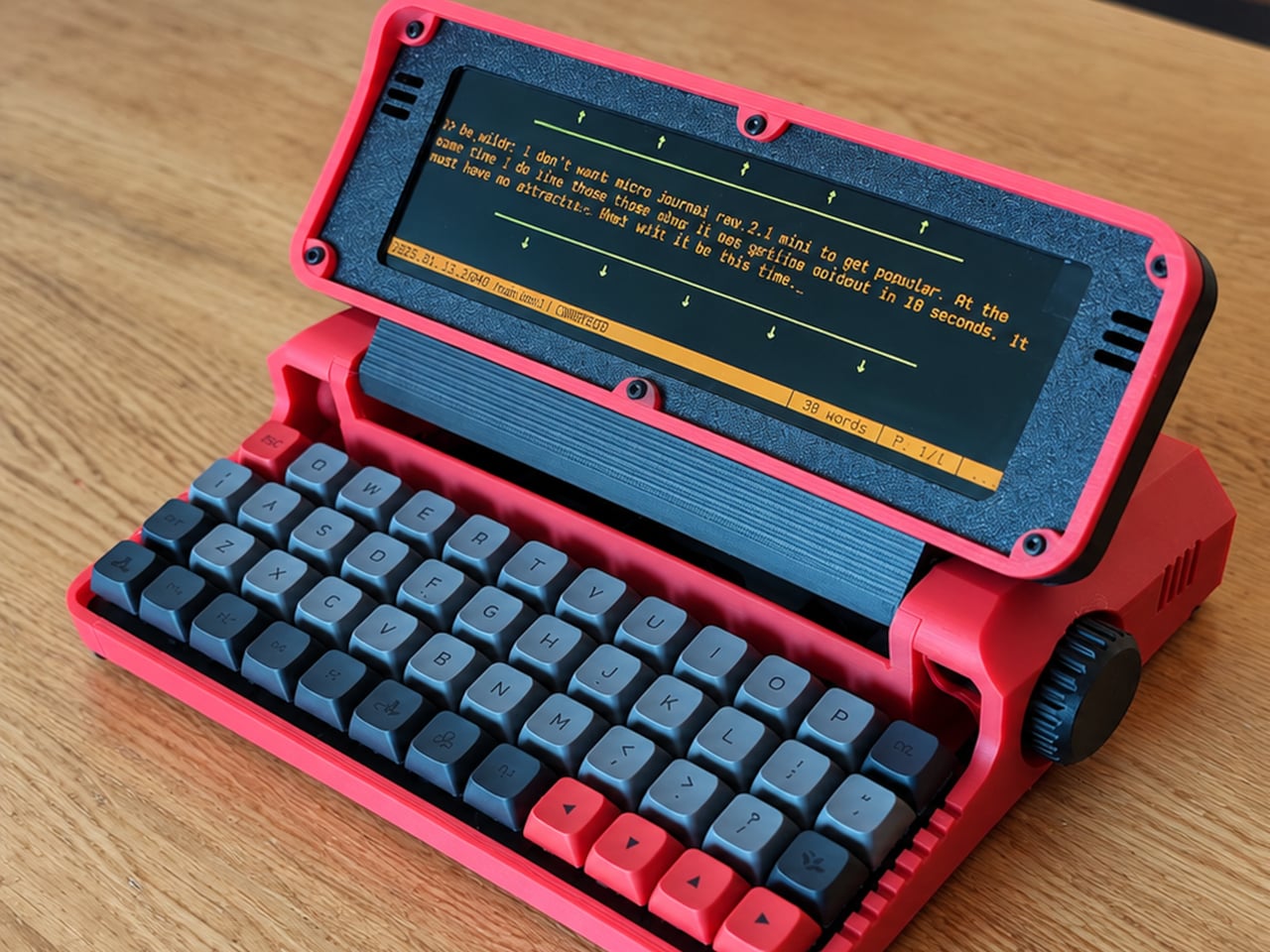
Opening a laptop to write a paragraph can quickly turn into checking messages, rearranging windows, and forgetting the sentence you had in mind. The Micro Journal Rev.2.1.MINI, nicknamed Baby Shark, puts writing at the center of a small, folding computer instead. Its wide screen and compact mechanical keyboard give your words their own space, while Linux supplies the editing tools beneath that colorful clamshell.

The chunky enclosure doesn’t try to resemble a slim aluminum laptop. A bright red shell, dark panels, exposed screws, and ridged side knobs give it the character of a little workshop instrument. Its hinged display folds down over the keyboard when you’re finished. The 3D-printed construction makes color part of the customization, rather than limiting everyone to another black rectangle in their bag.

Designer: Un Kyu Lee

The 8-inch LCD is unusually wide and shallow, with a 1280×400 resolution that stretches a document across the device. It leaves space for your passage without offering the vertical expanse of a conventional laptop screen. That’s a useful distinction for drafting: there’s room to work through a sentence, but reviewing several pages still means scrolling rather than shrinking everything into an overview.

The keyboard makes a similar trade. Its 48 keys form a four-row, 12-column grid, rather than the staggered rows most typists know. Numbers and additional symbols live on layers accessed by holding another key, which keeps the footprint small while asking your fingers to learn new combinations. Vial software lets you remap assignments, and hot-swappable switches let you change the feel without soldering.

A Raspberry Pi Zero 2 W runs Linux inside, with WordGrinder and nano available for drafting and editing. That gives you somewhere to revise yesterday’s work as well as start today’s entry. Files can leave through a USB flash drive or a browser-based interface on your local network, so a writing session doesn’t have to end with retyping everything on your main computer.

Portability also depends on what you put inside. Baby Shark takes up to four replaceable 18650 cells, sold separately, or runs directly from USB power. The connector is USB-C, but the documented setup requires a USB-A charger and a USB-A-to-USB-C cable, not USB Power Delivery. That means the charger already serving your laptop may not be the one this little writing machine needs.

Linux brings a pause before the writing starts: the seller estimates about 30 seconds to boot. This isn’t an instant-on notebook, and closing the screen isn’t a substitute for shutting the system down properly. On the other hand, published enclosure files, circuit-board designs, and firmware give owners ways to repair or modify it, instead of treating the device as a sealed appliance.

Baby Shark is sold as a DIY project even when ordered assembled, with no seller warranty. Later batches are planned without the Raspberry Pi, leaving buyers to supply it themselves. There’s considerable room to make both the hardware and software your own, provided that adjusting the keyboard doesn’t become another way to postpone the paragraph you originally sat down to write. There’s also a Purple Black Mint Green, nicknamed Witch, version inspired by the EVA-01 from the famed anime, Evangelion.

The post Micro Journal Rev.2.1.MINI Writing Laptop Pairs a Wide Screen With Just 48 Keys first appeared on Yanko Design.

  • ✇Yanko Design
  • Aina’s AI Ring Puts an OLED Screen and Joystick on Your Finger
    Reaching for your phone to pause a song can easily turn into reading messages you weren’t planning to open. Aina Ring proposes keeping those small decisions on your hand instead, with a display and thumb-operated control built into a substantial titanium band. The upcoming wearable is designed to handle quick commands and AI suggestions while your iPhone stays tucked away in your pocket. The design doesn’t pretend to be an ordinary piece of jewelry. A rectangular OLED display sits above the ind
     

Aina’s AI Ring Puts an OLED Screen and Joystick on Your Finger

Par : JC Torres
7 novembre 2026 à 16:45

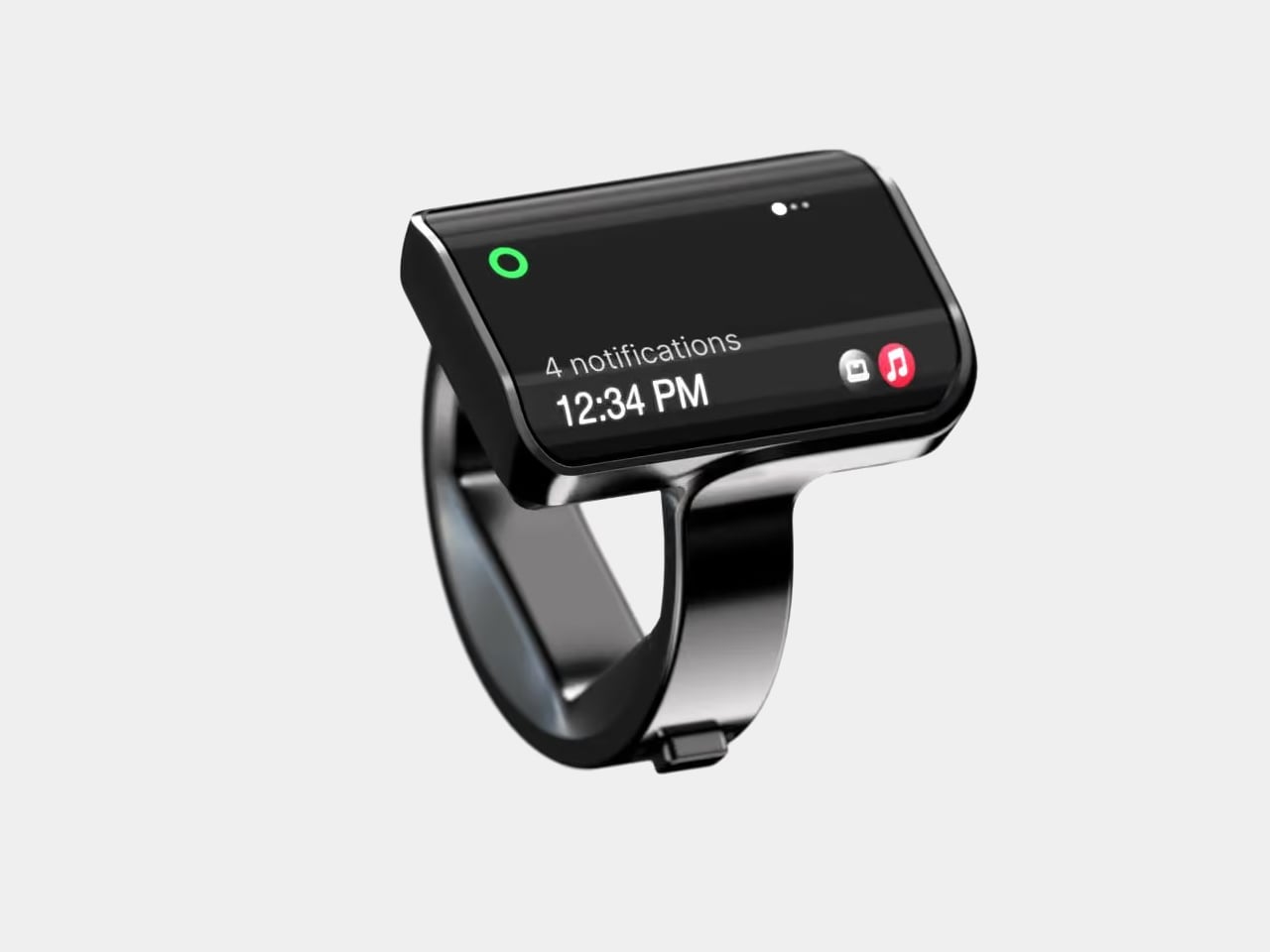
Reaching for your phone to pause a song can easily turn into reading messages you weren’t planning to open. Aina Ring proposes keeping those small decisions on your hand instead, with a display and thumb-operated control built into a substantial titanium band. The upcoming wearable is designed to handle quick commands and AI suggestions while your iPhone stays tucked away in your pocket.

The design doesn’t pretend to be an ordinary piece of jewelry. A rectangular OLED display sits above the index finger, with glass covering its face and rounded edges easing the transition to the band. Four titanium body parts enclose 140 components. Eclipse Black, Amber Gold, Mercury Silver, and Slate Titanium offer different finishes, although none makes that raised screen disappear into a conventional ring.

Designer: Aina

The more interesting detail sits beside your thumb. A joystick-like button on the band accepts seven gesture types, including directional flicks, presses, and holds. Depending on the current task, flicking upward can approve a suggestion, answer a call, or pause music. Displayed hints explain the next action, giving that tiny screen a role beyond repeating notifications from a device you already carry.

Aina calls its suggestions Cues and says its software learns from your routines and calendar. A regular departure time might bring up a ride suggestion; an approaching meeting could offer a shortcut to join. The important design choice is that approval remains yours. Ignore the suggestion and nothing happens, rather than letting a guessed preference quietly become a booking you didn’t request.

Voice provides another route when a flick isn’t enough. Hold the button to dictate a note or set a reminder through the built-in microphone, while a speaker enables calls from the ring. On a Mac, that same control can dictate into applications. It’s a way to catch a thought during a walk, without stopping to compose it on a phone keyboard.

The ring remains an accessory to Apple’s ecosystem, not an independent phone. It requires an iPhone running iOS 18 or later, with macOS 15 or later for Mac features; Android and Windows aren’t supported. Meeting controls depend on the nearby Mac and Aina’s app, so muting from your finger doesn’t mean you can leave the computer behind and keep every function.

Aina claims up to 18 hours per charge, with a cube-shaped dock included for overnight charging. Sizes run from 7 through 13, but only the band changes; the display stays the same. A smaller finger therefore doesn’t get a less conspicuous screen. The IP65 rating allows everyday splashes, although the company says to remove the ring before swimming or showering.

Starting at $399 for early-access preorders, against a $499 list price, Aina is scheduled to ship in early 2027. That leaves the usefulness of its predictions and the comfort of its substantial shape to be established beyond launch demonstrations. A thumb-sized shortcut might save a trip into an app, but wearing it all day needs a better reason than simply having somewhere else to check incoming notifications.

The post Aina’s AI Ring Puts an OLED Screen and Joystick on Your Finger first appeared on Yanko Design.

  • ✇Yanko Design
  • Diden Spider Robot Climbs Steel Walls and Actually Welds Them
    A welding tool is only useful if you can get it to the seam. Inside a ship’s steel structure, that can mean bringing a worker, equipment, and a platform into position before the actual welding begins. It’s the less glamorous side of industrial work, and arguably one of the more compelling reasons to build a climbing robot. South Korea’s Diden Robotics approaches that problem with four widely spread legs and magnetic feet. Its Diden Spider is designed to carry welding equipment onto steel walls
     

Diden Spider Robot Climbs Steel Walls and Actually Welds Them

7 novembre 2026 à 15:15

A welding tool is only useful if you can get it to the seam. Inside a ship’s steel structure, that can mean bringing a worker, equipment, and a platform into position before the actual welding begins. It’s the less glamorous side of industrial work, and arguably one of the more compelling reasons to build a climbing robot.

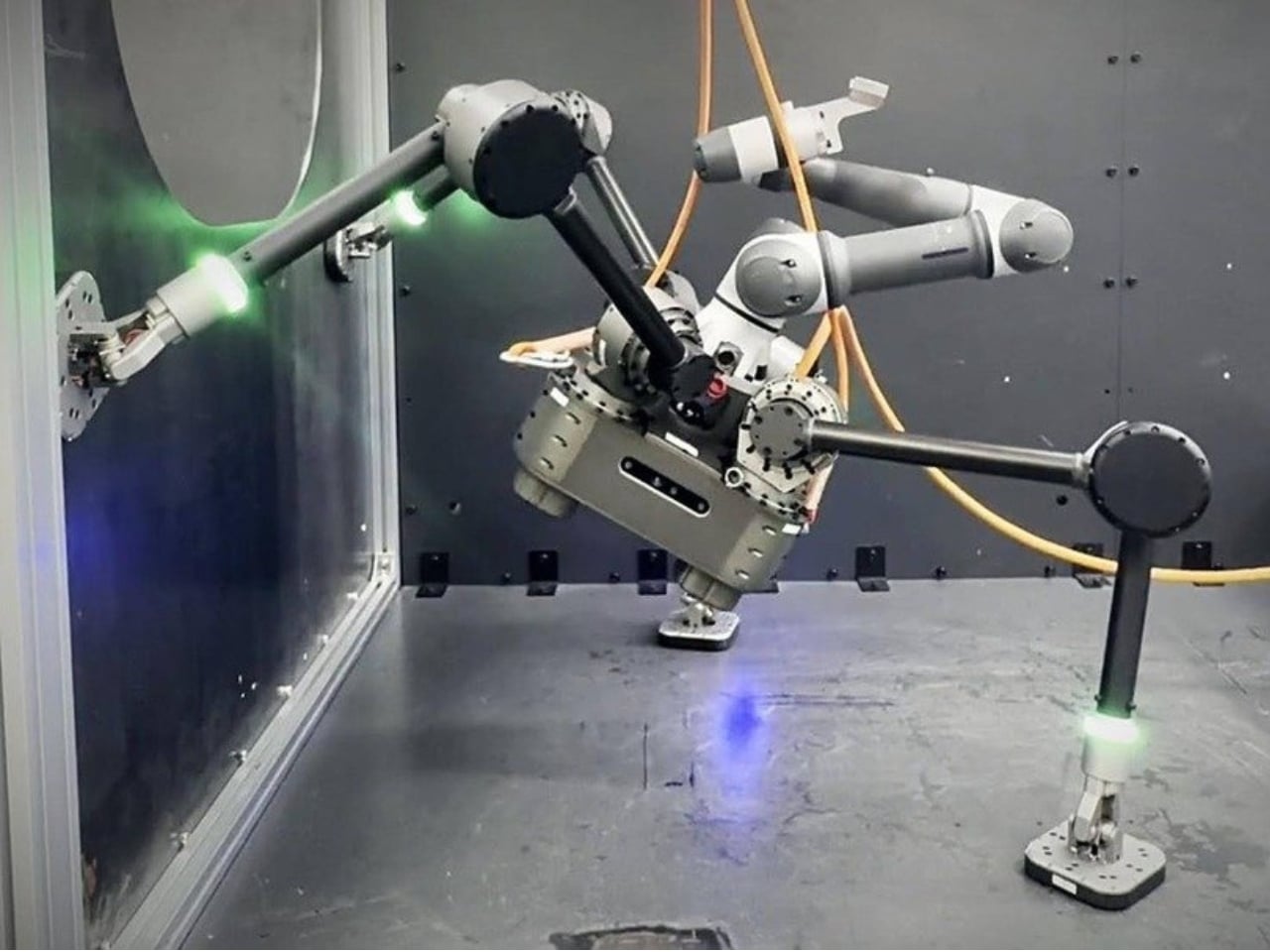
South Korea’s Diden Robotics approaches that problem with four widely spread legs and magnetic feet. Its Diden Spider is designed to carry welding equipment onto steel walls and ceilings, taking the tool to places that are awkward for people to reach. I like how directly its strange-looking body answers the task. The low stance and broad footprint aren’t there to give it personality. They help it stay attached while carrying equipment that has a job to do.

Designer: Diden Robotics

That spider shape also came from a practical failure. In a company interview, co-founder and COO Youngha Shin explains that early, dog-shaped configurations struggled when turning sideways on walls. The arrangement left fewer joint actuators supporting the body, and feet that failed to sit flat could cause the robot to flip. Spreading the legs outward kept the body closer to the wall and improved how the feet met the surface. The silhouette follows the problem.

The feet use electropermanent magnets, which deserve a little attention because they make the whole idea possible. An electrical pulse switches their magnetic state on or off. Once attached, they don’t need a continuous supply of electricity to maintain that magnetic hold, according to Diden. That doesn’t make the entire robot power-free. Its joints, sensors, and computing still have work to do. It means staying attached doesn’t require constantly feeding electricity into the magnets.

Diden rates the Spider 30 configuration for a payload of 30 kilograms, roughly 66 pounds. That capacity is important because climbing alone doesn’t accomplish much welding. The platform needs to carry useful equipment once it gets there. Diden describes interchangeable task modules, including robotic manipulators and inspection equipment. I find the traveling-tool-platform idea more compelling than treating the machine as a single-purpose mechanical welder. Its mobility could serve different jobs along the same steel structure.

One of my favorite details is much smaller than the legs. Shin says feedback from people using the robot led Diden to add LEDs to its feet, allowing them to see whether each foot had attached. That’s a sensible concession to human nerves. A control system may know its magnetic foot is holding, but someone watching expensive equipment hang from steel deserves a readable signal, too.

Finding the work is another challenge. Diden describes a navigation system that compares live, three-dimensional sensor data with a ship’s CAD model to estimate position and orientation. Its mapping system also reconstructs nearby obstacles from depth-camera data. In practical terms, the robot needs to understand where it is and what blocks its next step. A magnetic grip provides attachment; navigating a cluttered structure requires a separate layer of perception and control.

This is a physical machine with reported industrial use, rather than a speculative rendering. Diden says Spider 30 has completed field deployment at major Korean shipyards and that its welding results have been applied to vessels in production. Separately, Maeil Business Newspaper reported in May 2026 that Diden had completed sales to some major Korean shipbuilders. Those are meaningful signs of progress, although neither establishes dependable performance over every production shift.

I’d judge it by the less photogenic parts of the job: repeatable weld quality, maintenance demands, setup time, and how often somebody needs to intervene. Still, the design makes a persuasive starting argument. It gives an awkwardly placed tool a way to reach its work. If that removes even some occasions when a person has to climb into position with welding gear, the unusual body has earned its place.

The post Diden Spider Robot Climbs Steel Walls and Actually Welds Them first appeared on Yanko Design.

  • ✇Yanko Design
  • Baseus Sleep SK1 Brings Bedtime Audio Without Earbuds
    Since I live alone, listening to music or podcasts before I sleep is not really an issue, as there’s no one to complain about the sound. But when I share a hotel room or someone sleeps over, this may become a problem. Sure, there are earbuds, but I have this irrational fear that they may get buried deep in my ears when I fall asleep and move around. One possible solution would be speakers that can sit under the pillow and play close to my ears, with the aim of keeping the sound from bothering o
     

Baseus Sleep SK1 Brings Bedtime Audio Without Earbuds

7 novembre 2026 à 09:20

Since I live alone, listening to music or podcasts before I sleep is not really an issue, as there’s no one to complain about the sound. But when I share a hotel room or someone sleeps over, this may become a problem. Sure, there are earbuds, but I have this irrational fear that they may get buried deep in my ears when I fall asleep and move around. One possible solution would be speakers that can sit under the pillow and play close to my ears, with the aim of keeping the sound from bothering other people in the room.

The Baseus Sleep SK1 is one such speaker. It uses what Baseus calls micro-vibration conduction to carry audio through the pillow to your ears. Basically, your pillow becomes part of the audio system, while two sound-producing units are intended to direct the music, audiobook, or podcast toward the sleeper’s head. The idea is to keep the listening area small rather than fill the bedroom with sound.

Designer: Baseus

The Sleep SK1 looks like a Bluetooth speaker, with two circular pods joined by a narrow, curved bridge. It looks more like connected pucks than a bedside speaker. Its reported dimensions are about 6.5 by 1.8 by 0.55 inches, and it weighs roughly 1.55 ounces. The low profile is designed to minimize intrusion, although that doesn’t mean you won’t feel it through a compressed pillow. Comfort would still need to be tested.

The device has three physical buttons around the edge of one pod for operating the speaker. There’s also a digital display integrated into one circular face, showing the time, operating mode, and remaining battery level. That gives you another way to check the time when you wake up in the middle of the night instead of automatically reaching for your phone. Of course, you’d still have to uncover the display if it’s underneath your pillow.

For people who prefer background sounds to music or conversation, Baseus says its companion app offers more than 100 sound options, including rain, ocean waves, campfire sounds, and ASMR. You can also set up to 10 alarms for different schedules. The alarms use the same pillow-directed approach, which could be useful if you need to get up before the person sleeping beside you.

Baseus claims more than 10 hours of playback from the built-in 300 mAh battery, which would cover an overnight listening session if it holds up in practice. Charging is via USB-C, with a full charge reportedly taking about two hours. For something intended to stay beneath a pillow, the useful part is having enough battery life to use it without leaving a charging cable attached.

Your pillow is an important part of the setup, though. The Gadgeteer reports that Baseus recommends pillows up to about 3.1 inches thick and suggests increasing the volume for thicker pillows or when sleeping on your back. That makes pillow thickness and sleeping position things to consider before buying. Turning the volume up may help you hear, but whether it stays quiet enough for someone nearby is another question.

The SK1 is listed on JD.com in China, with a reported price of 184 yuan. That shouldn’t be mistaken for a confirmed US retail price, and an official US release hasn’t been established in the available sources. It’s worth checking regional availability and app support rather than assuming an imported unit will offer the same experience everywhere.

For me, the appeal is being able to listen without putting anything in my ears. But I’d want to know how clearly a podcast comes through my own pillow and how much of it someone else can hear. Those would be the deciding factors for me. If the SK1 can keep a familiar voice close to my pillow without sharing the whole conversation with the room, that would be a good enough reason to consider it.

The post Baseus Sleep SK1 Brings Bedtime Audio Without Earbuds first appeared on Yanko Design.

❌