Google is rolling out AI-powered Battery usage summaries to Pixel 10 and Pixel 11 phones to help users understand what may be draining battery life.
The post Pixel’s New AI Feature Can Now Explain What’s Draining Your Phone appeared first on TechRepublic.
Acer’s DualPlay Mini combines gaming controls with a physical keyboard, but can the 8-inch handheld replace a travel laptop for everyday work?
The post Acer DualPlay Mini: Can a Gaming Handheld Replace Your Laptop? appeared first on TechRepublic.
Redmi Note 17 Pro and Pro Max pricing varies by country, while the Pro Max adds a larger battery, faster charging, storage, and 4K video.
The post Redmi Note 17 Pro vs Pro Max: Battery, Price and Specs Compared appeared first on TechRepublic.
OnePlus 16 camera leaks point to a 200MP main sensor, larger 50MP 3x telephoto and new ultrawide, but global availability remains unclear.
The post OnePlus 16 Camera Leak Reveals 200MP Main Sensor and New 3x Telephoto appeared first on TechRepublic.
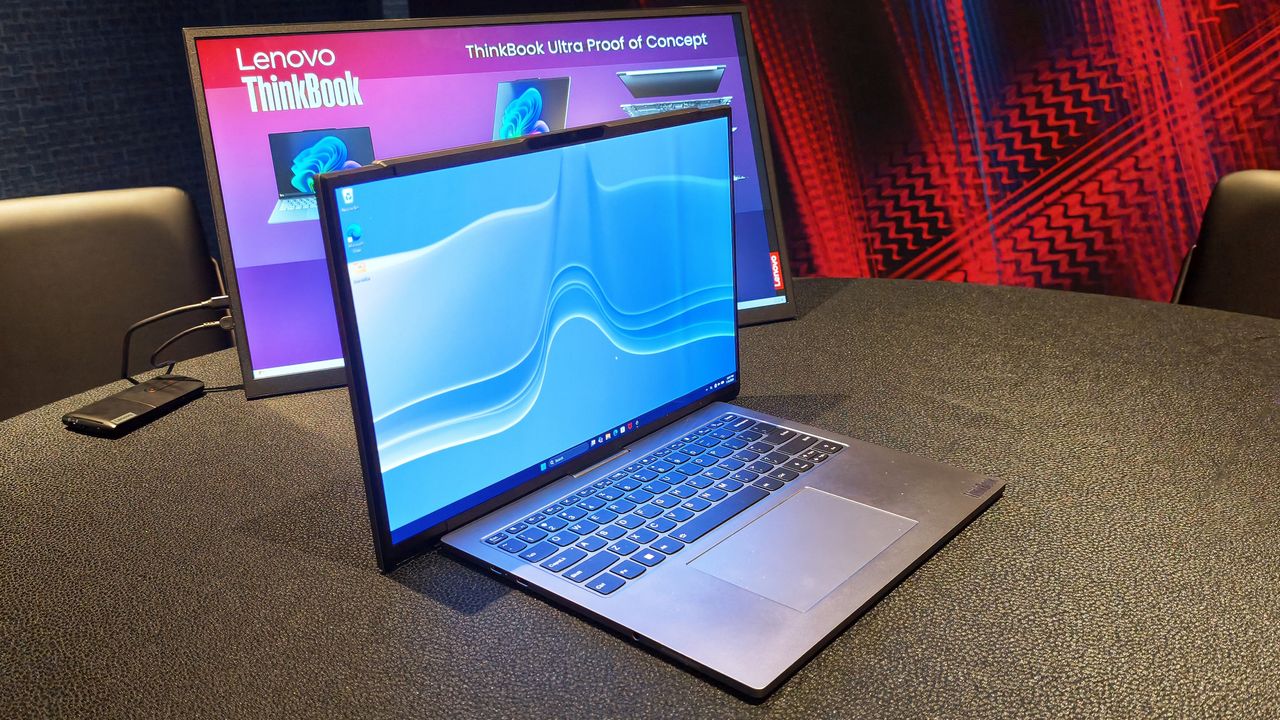
Nobody can accuse Lenovo of lacking imagination.Over the last several years, the company has become the PC industry's unofficial concept lab, routinely showing off hardware that seems pulled from science fiction. We've seen rollable displays that grow taller, gaming laptops that transform into ultrawide displays, foldable PCs, attachable screens, rotating displays, and enough unusual form factors to make even the most adventurous laptop enthusiast pause for a mom
Over the last several years, the company has become the PC industry's unofficial concept lab, routinely showing off hardware that seems pulled from science fiction. We've seen rollable displays that grow taller, gaming laptops that transform into ultrawide displays, foldable PCs, attachable screens, rotating displays, and enough unusual form factors to make even the most adventurous laptop enthusiast pause for a moment.
Some of those ideas have remained concepts. Others have eventually become real products. The ThinkBook Plus Gen 6 Rollable (yes, they actually ship some of these!) is perhaps the best example, evolving from an eye-catching prototype into an actual shipping device. But even as Lenovo's concepts have become increasingly impressive from an engineering perspective, I've often found myself wondering how many of them actually solve a problem that regular laptop buyers have. Making a display expand is certainly cool. Convincing people they need it is the harder challenge.
That's why Project Swan immediately stood out to me.
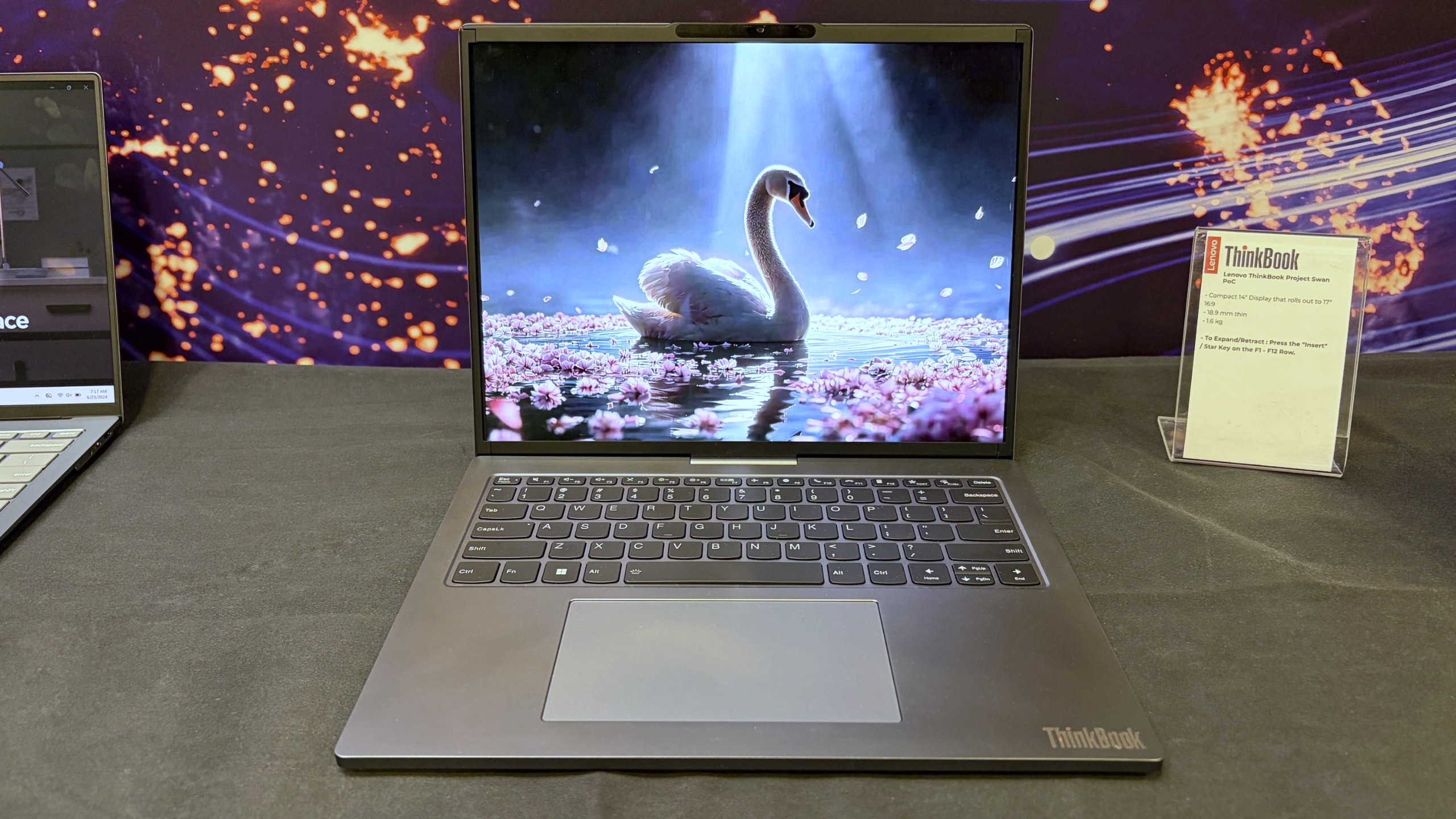
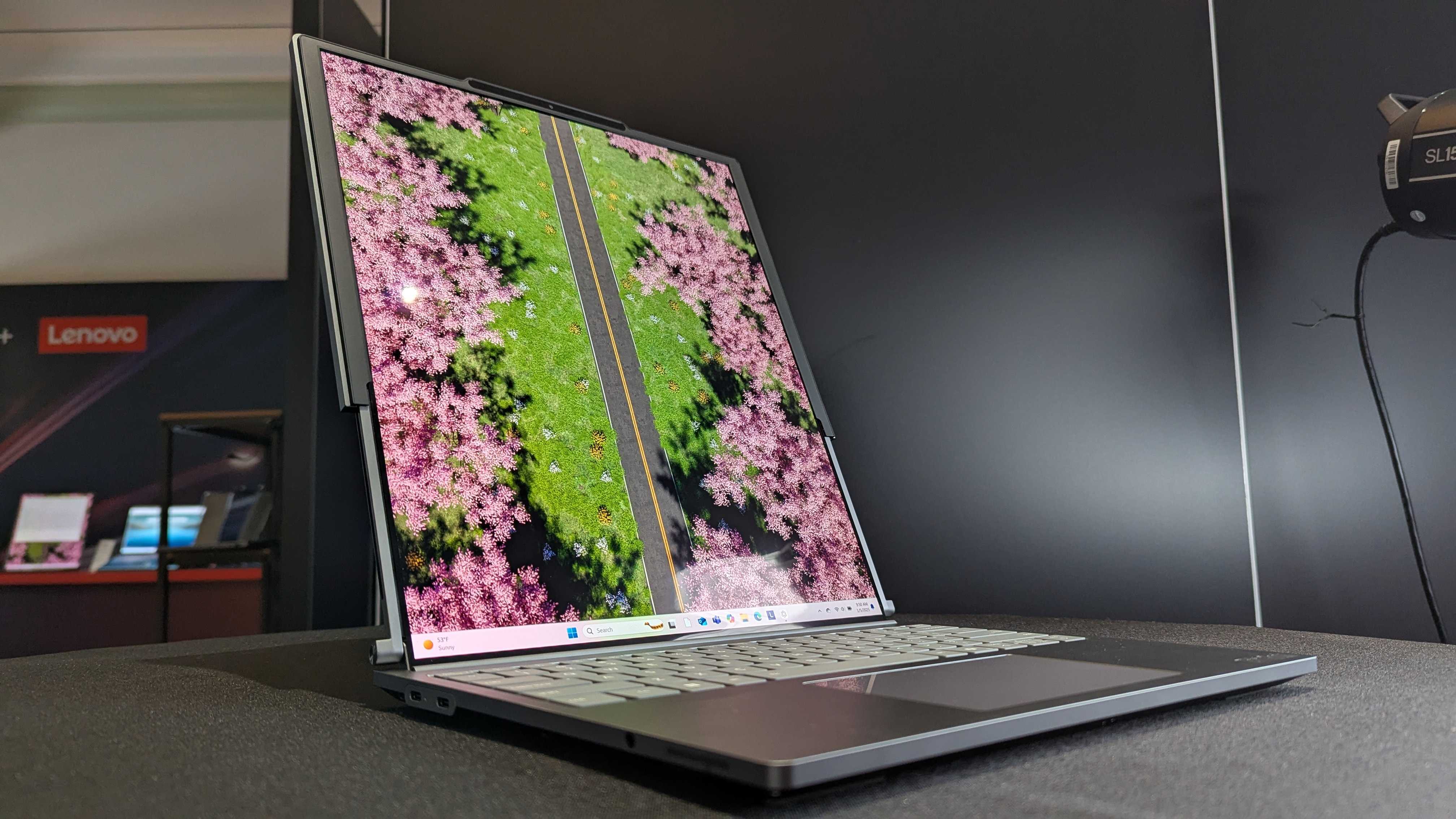
Lenovo's Project Swan laptop in "normal" mode at 14-inches. (Image credit: Future)
Officially, it's another Lenovo proof-of-concept device, but after spending time with it in person, I came away thinking this may be the company's most practical display concept yet. Not because it's the most ambitious, but because it's arguably the least ambitious.
And that's exactly why it works.
Lenovo finally found a sensible use for a rollable display?
The Lenovo ThinkBook Project Swan begins life as a fairly normal-looking 14-inch laptop.
At 17.9mm thick and weighing 1.6kg (3.5lbs), it isn't trying to break weight records or compete with ultra-premium featherweight notebooks (like Lenovo's new AeroBlade concept). Instead, the focus is on creating a laptop that's comfortable to carry throughout the day while offering something extra when users return to their desk, settle into a hotel room, or need more space for serious work.
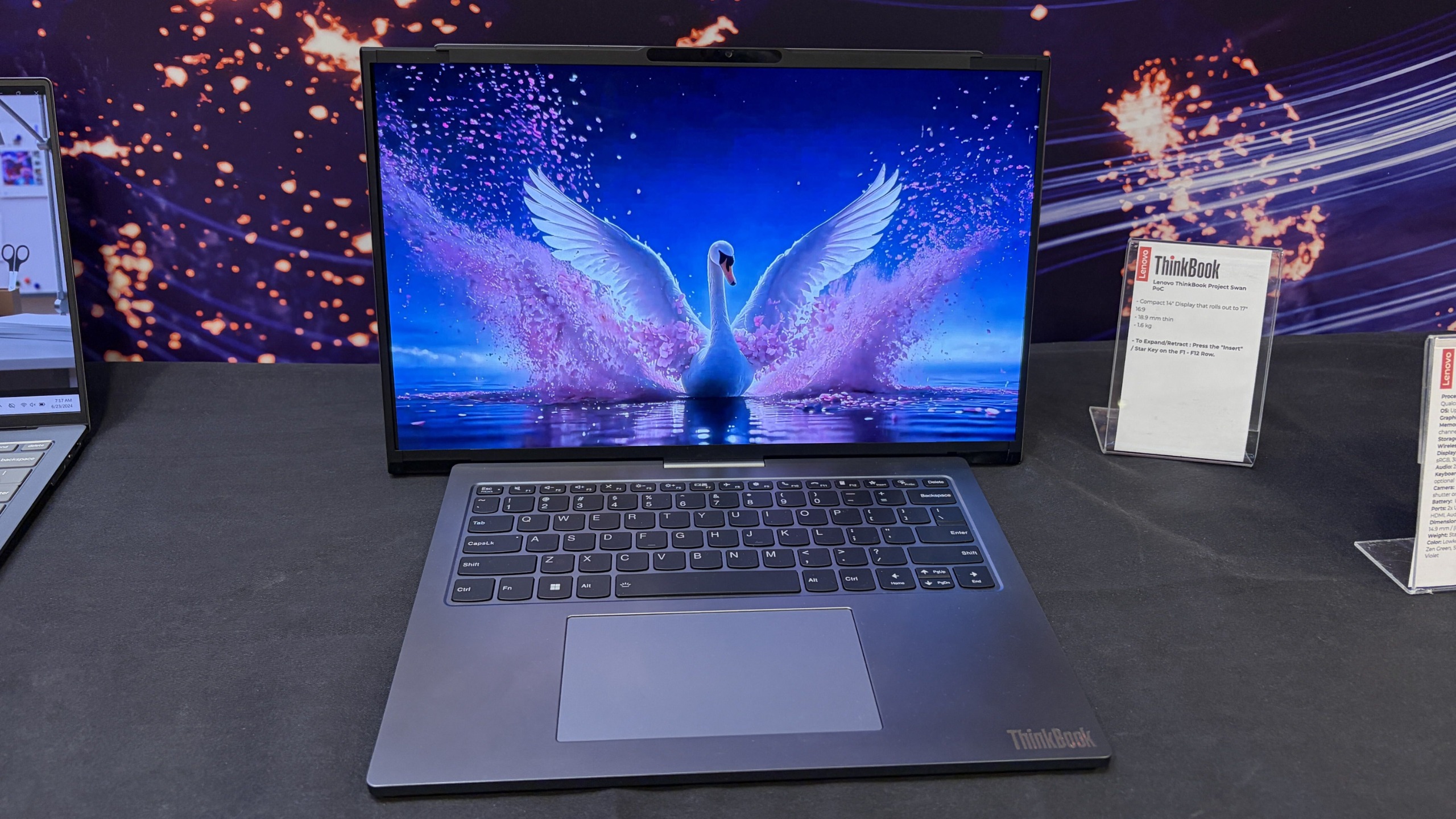
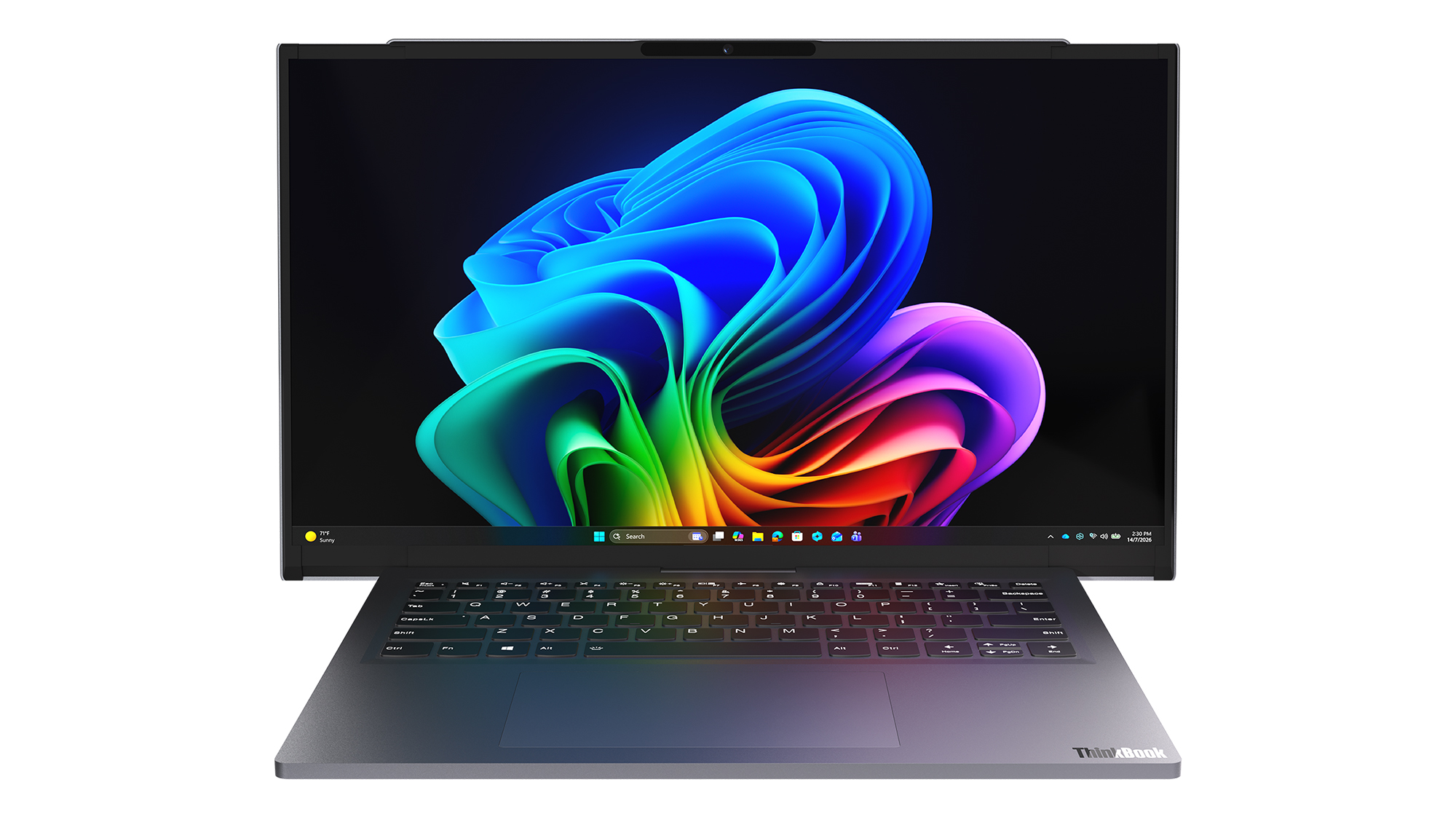
That "something extra" is a rollable display that expands horizontally into a 17-inch 16:9 workspace.
Unlike Lenovo's previous rollable designs, which generally expanded vertically, Project Swan widens itself by extending the display out to the sides. It's all done with a touch of a button (see my video below), and it only takes a few seconds.
The result feels much more like using a traditional external monitor than using an experimental form factor. You suddenly have enough room for side-by-side documents, large spreadsheets, dashboards, presentations, browser windows, Teams chats, and everything else that tends to compete for space on a 14-inch screen.
Lenovo's Project Swan laptop in extended mode, where the display reaches 17 inches. (Image credit: Future)
The transformation is dramatic enough to get attention, but conservative enough to feel practical. During my hands-on session, that was the first thing that struck me about the device.
Many of Lenovo's earlier concepts felt designed to answer the question, "Can we do this?"
Project Swan feels far more interested in answering the question, "Would people actually want this?"
That's a subtle distinction, but it's an important one.
This feels like the next step in Lenovo's display experiments
Lenovo Project Swan concept laptops side-by-side, demonstrating the screen in standard view versus expanded rollable view. (Image credit: Lenovo)
Project Swan didn't emerge in a vacuum. In many ways, it feels like the natural evolution of everything Lenovo has been experimenting with over the last few years.
The ThinkBook Plus Gen 6 Rollable demonstrated that expandable OLED displays could successfully transition from concept to commercial product. Lenovo's Legion rollable gaming laptop concept showed how flexible displays could create an ultrawide experience without requiring users to carry an enormous machine. Other projects explored foldable displays, secondary screens, and entirely new ways of interacting with PCs.
As impressive as many of those concepts were, some occasionally felt like technology showcases first and products second.
Project Swan reverses that equation.
Lenovo ThinkBook Plus (Gen 6) laptop and its vertical rollable display at CES 2025. (Image credit: Windows Central | Zachary Boddy)
Rather than dramatically changing how people interact with a laptop, it simply gives them more screen real estate when they need it and gets out of the way when they don't. That's a much easier benefit for consumers to understand and, perhaps more importantly, a much easier benefit to justify paying for.
After all, most people already know the dilemma.
A 14-inch laptop is ideal for travel. A larger display is ideal for work.
Project Swan attempts to deliver both.
The idea makes sense. The challenges are obvious.
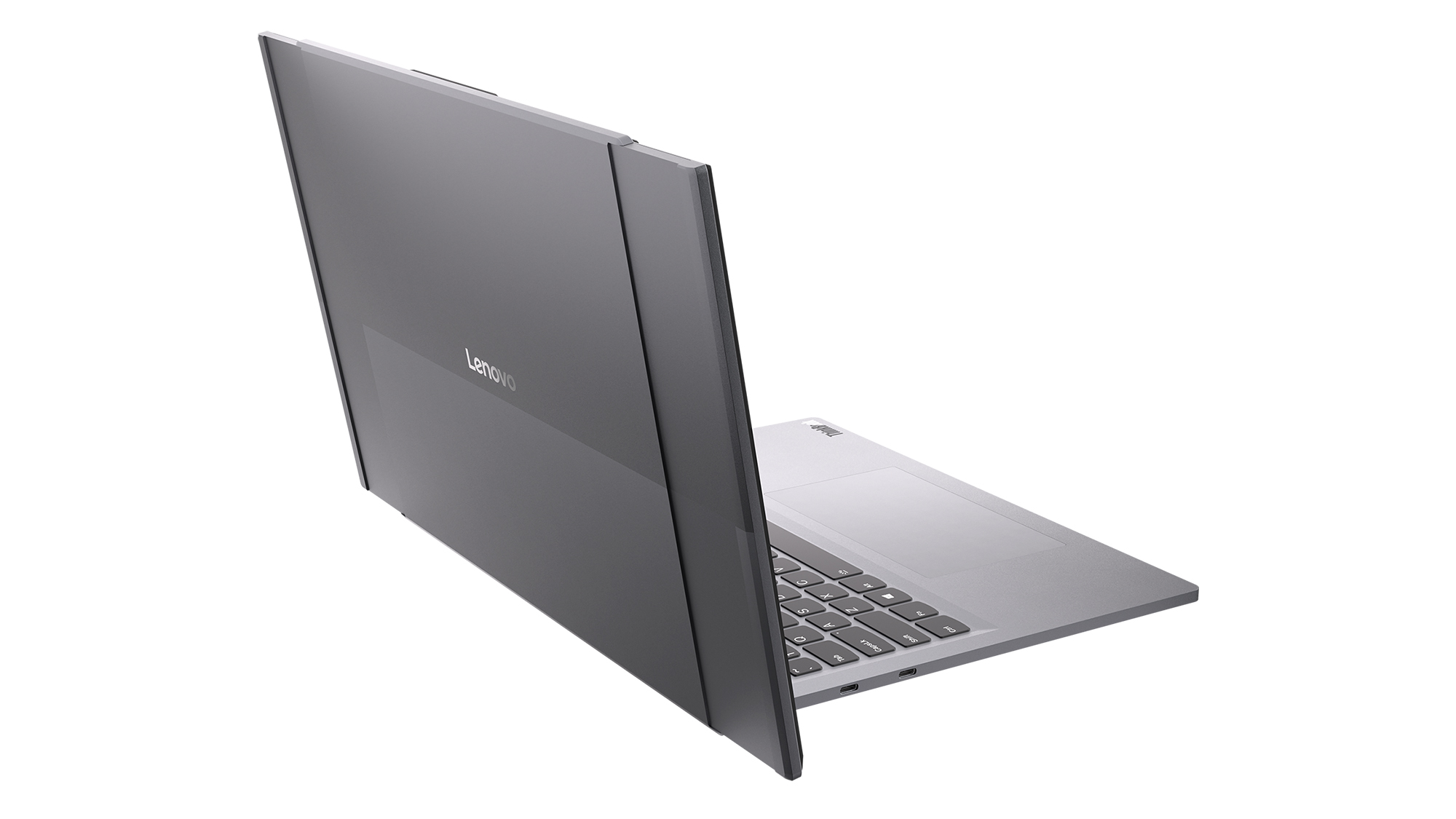
Read image of the Project Swan laptop cover and its motorized rollable display. (Image credit: Lenovo)
That isn't to say there aren't trade-offs.
The first thing I noticed when using the expanded display was that the system becomes somewhat top-heavy. That's hardly surprising given the additional display hardware housed in the lid, but it was noticeable enough that I'd expect Lenovo's engineers to still be looking at ways to refine the balance.
Pricing is another obvious concern.
Rollable OLED displays aren't cheap (it's $3,499 for the ThinkBook Plus Gen 6 Rollable), and if Project Swan ever becomes a commercial product, it's almost certainly going to carry a premium compared to a traditional clamshell laptop. The value proposition may be easier to understand than some other concept devices, but consumers still need to be convinced that expandable screen space is worth the additional cost.
Then there's the question everyone asks whenever a company unveils a rollable or foldable display.
How durable is it?
Flexible OLED technology has improved dramatically over the last few years, but long-term reliability remains an important consideration. How will the mechanism hold up after years of daily use? What happens after thousands of expansion cycles? Will buyers trust a laptop that contains moving display components?
The technology may be ready, but consumer confidence isn't something that can be engineered overnight.
The bigger question is whether people want these new form factors
That's really the challenge facing every laptop manufacturer right now.
The industry has spent years experimenting with alternatives to the traditional clamshell design. Foldable PCs promised tablet-sized displays that fit inside a laptop footprint. Dual-screen systems like the Lenovo Yoga 9i attempted to replace physical keyboards with additional displays. Rollable devices have explored several different directions entirely.
Some enthusiasts love these ideas, but many consumers remain perfectly happy with the laptops they already own.
That's what makes Project Swan so interesting to me. It isn't asking users to learn a new workflow or completely rethink how they use a PC. Instead, it's enhancing something people already understand: bigger screens are often better, but bigger laptops are harder to carry.
Whether that argument ultimately resonates with buyers remains an open question, but it's certainly the clearest pitch Lenovo has made for a rollable display so far.
Lenovo deserves credit for keeping the experimentation alive
Front view of the open grey Lenovo Project Swan concept laptop with its rollable screen expanded horizontally beyond the keyboard base. (Image credit: Lenovo)
Even if Project Swan never reaches store shelves, I appreciate what Lenovo is doing here.
The PC industry can sometimes become obsessed with processor upgrades, AI features, and specification sheets while overlooking more fundamental questions about how people actually use their devices. Lenovo's concepts consistently ask those questions, even when the answers occasionally seem, well, strange.
What's refreshing about Project Swan is that it feels grounded in reality. The company isn't trying to reinvent personal computing or create an entirely new category. Instead, it's exploring a straightforward idea that almost everyone who has worked on a laptop can relate to.
Sometimes you want a compact machine for travel.
Sometimes you wish that same machine had a much larger screen.
Project Swan is the most convincing attempt I've seen yet to bridge that gap.
I still have concerns about durability, balance, pricing, and whether consumers are truly interested in another alternative laptop design. But after trying it for myself, I'm more optimistic about this concept than many of Lenovo's previous experiments.
Ironically, that's because it feels less ambitious. Rather than trying to change how we work, Project Swan simply gives us a little more room to do it.
And that may be exactly what makes it one of Lenovo's most promising concepts yet.
Let me know in the comments what you think about Project Swan. Should Lenovo continue to push this concept of an expanding display, or focus more on other ideas (and if so, which ones)?
Join us on Reddit at r/WindowsCentral to share your insights and discuss our latest news, reviews, and more.
Competition for Apple's MacBook Neo is heating up.Just days after Dell unveiled a new 14-inch laptop designed to take on Apple's latest mainstream notebook, Lenovo is entering the fight with something considerably more interesting: a laptop that lets you express your personality instead of forcing you to settle for silver, gray, or slightly darker gray.I recently got to see Lenovo's new IdeaPad Vibe lineup in person in New York City, and while the company talked
Competition for Apple's MacBook Neo is heating up.
Just days after Dell unveiled a new 14-inch laptop designed to take on Apple's latest mainstream notebook, Lenovo is entering the fight with something considerably more interesting: a laptop that lets you express your personality instead of forcing you to settle for silver, gray, or slightly darker gray.
I recently got to see Lenovo's new IdeaPad Vibe lineup in person in New York City, and while the company talked plenty about AI, processors, and battery life, the thing that immediately stood out to me was how different these laptops look compared to almost everything else on the market.
Most PC makers treat color options as an afterthought. Lenovo is making them the product.
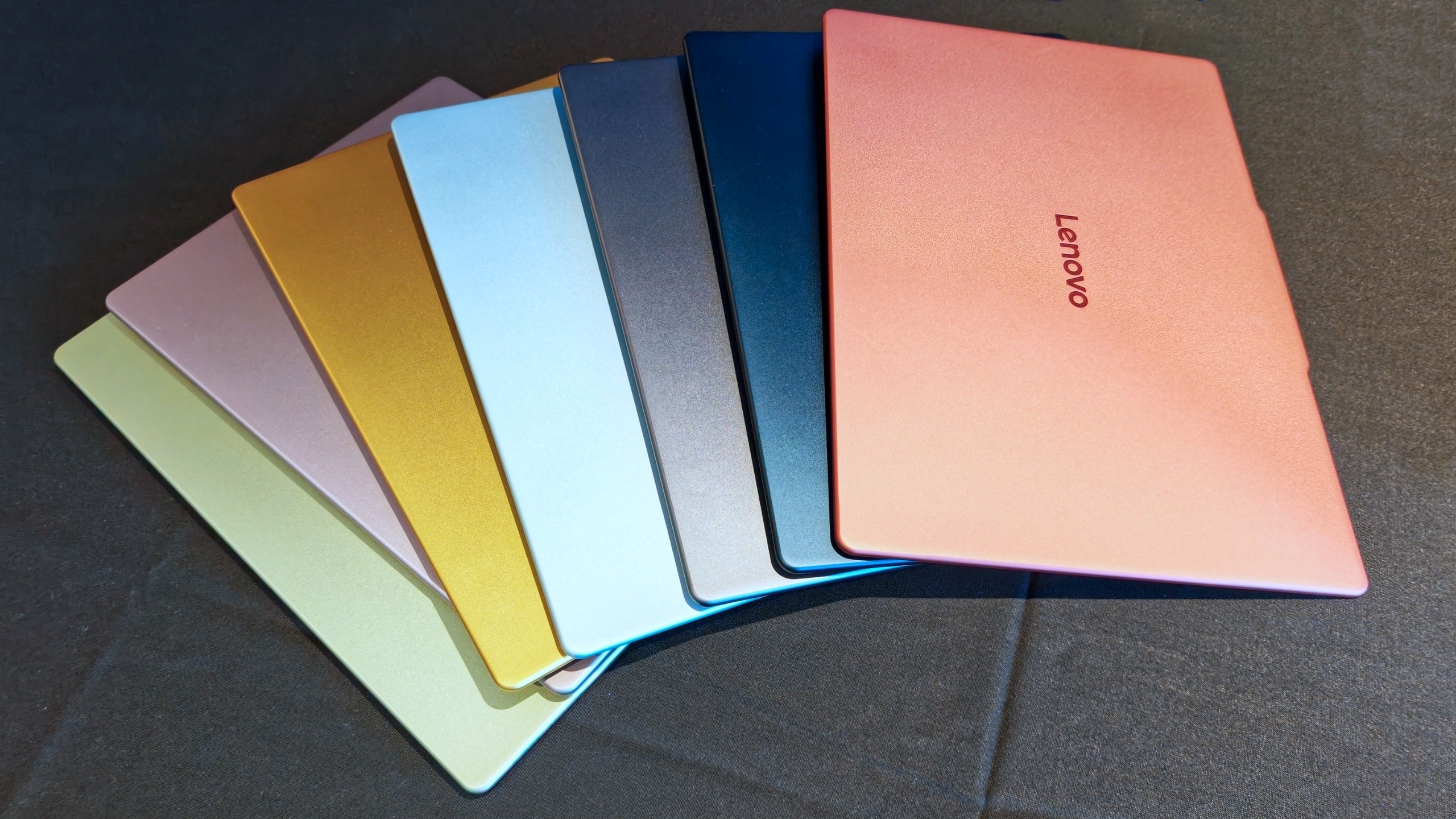
(Image credit: Daniel Rubino)
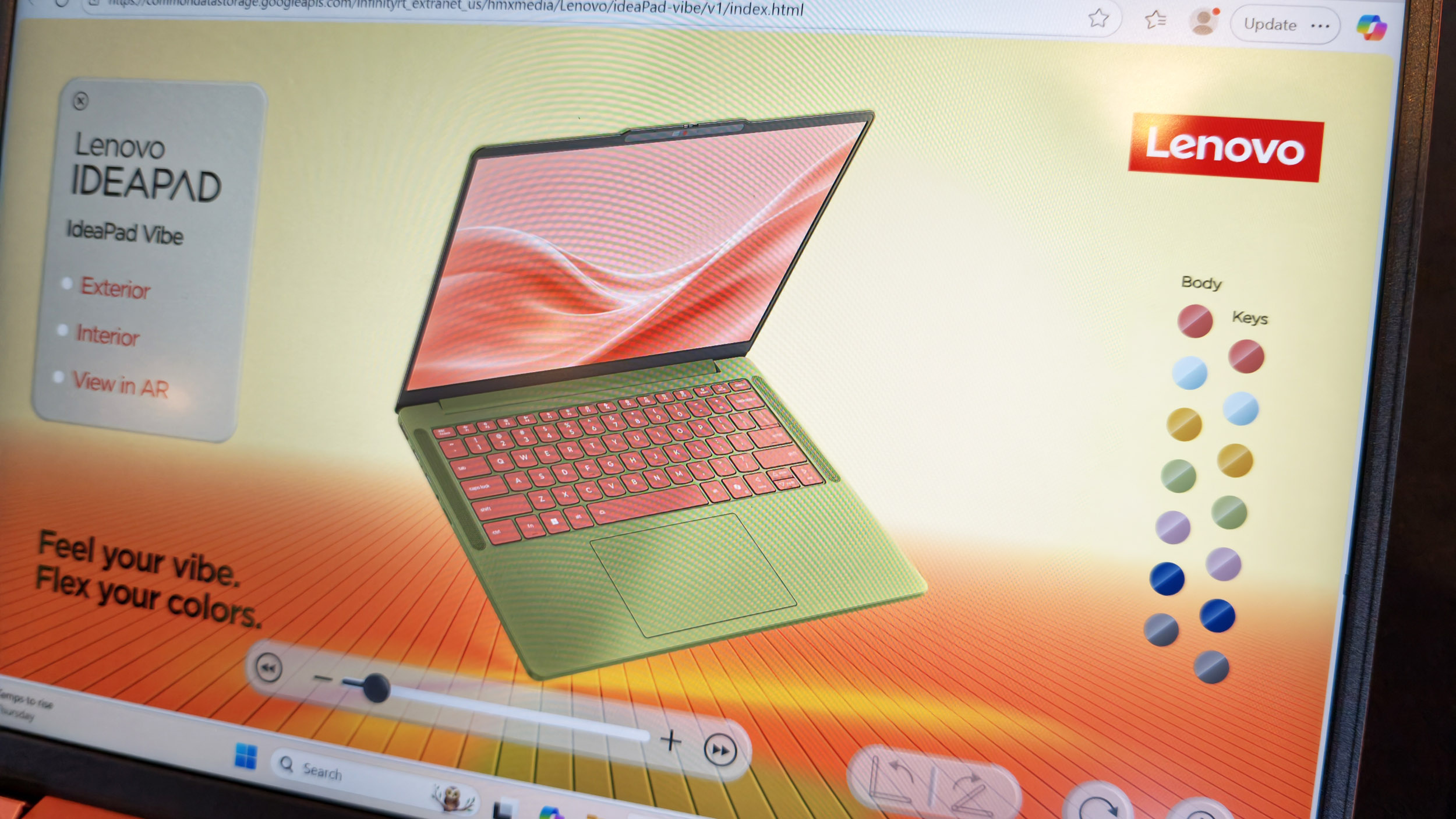
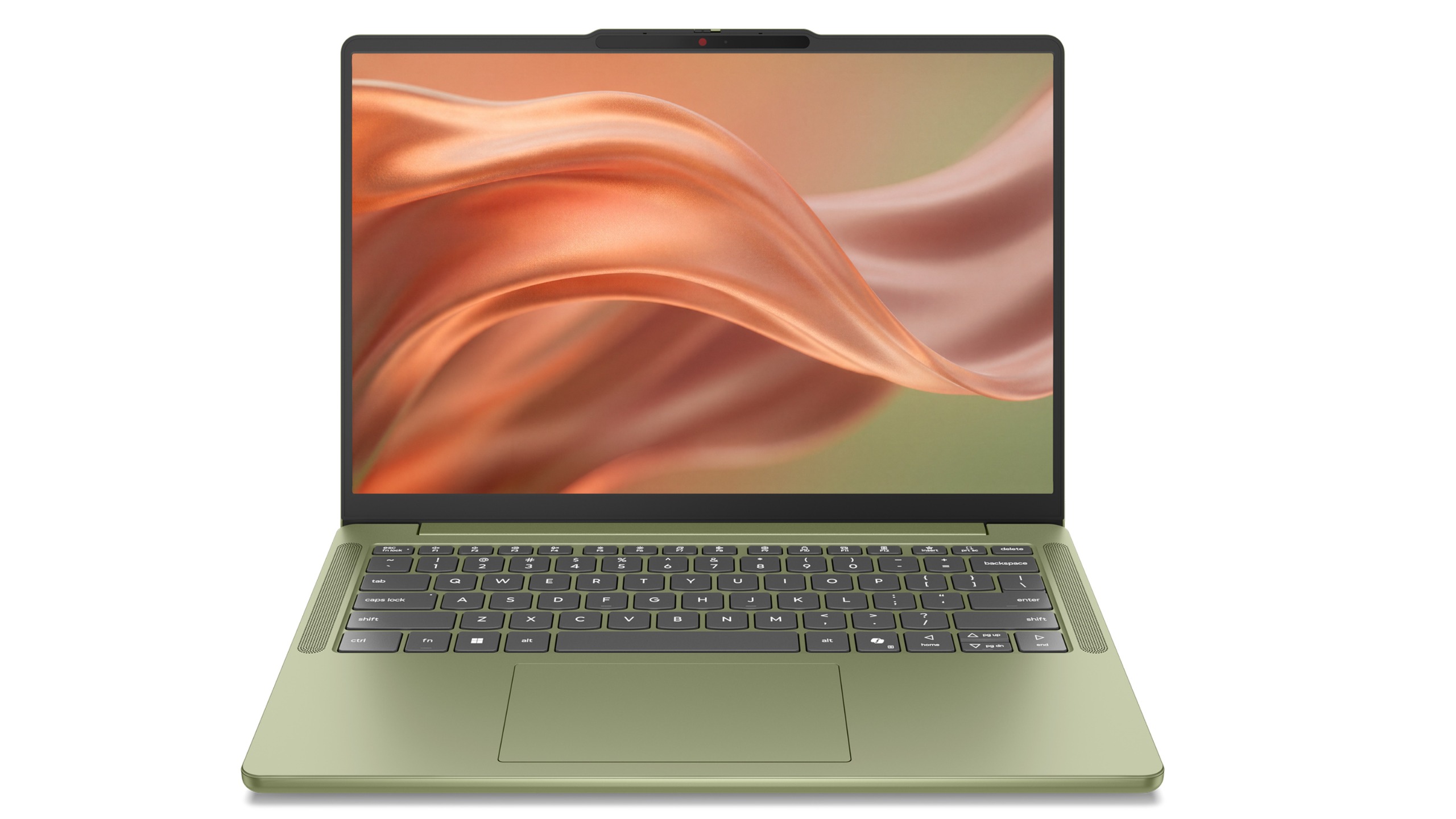
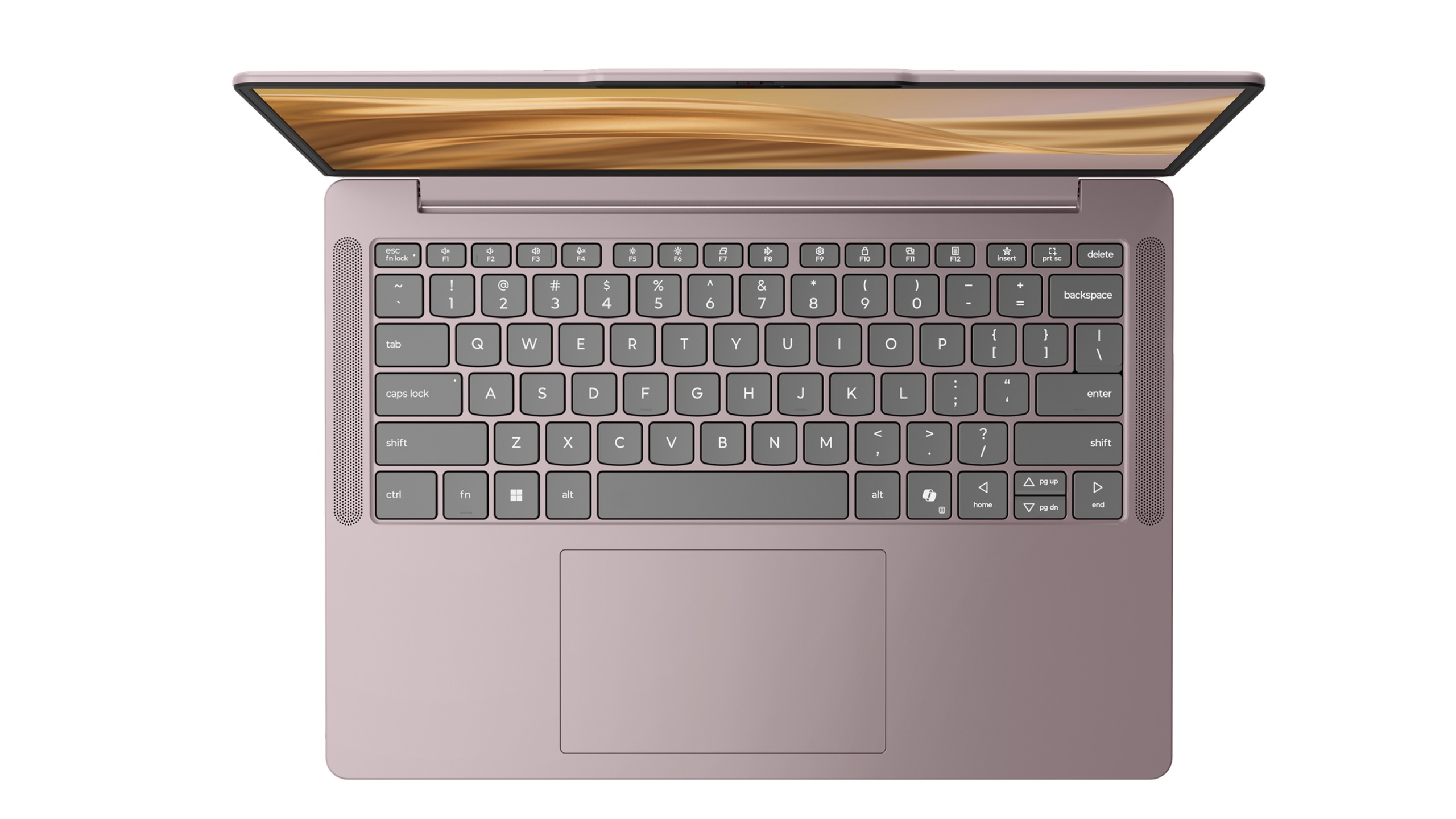
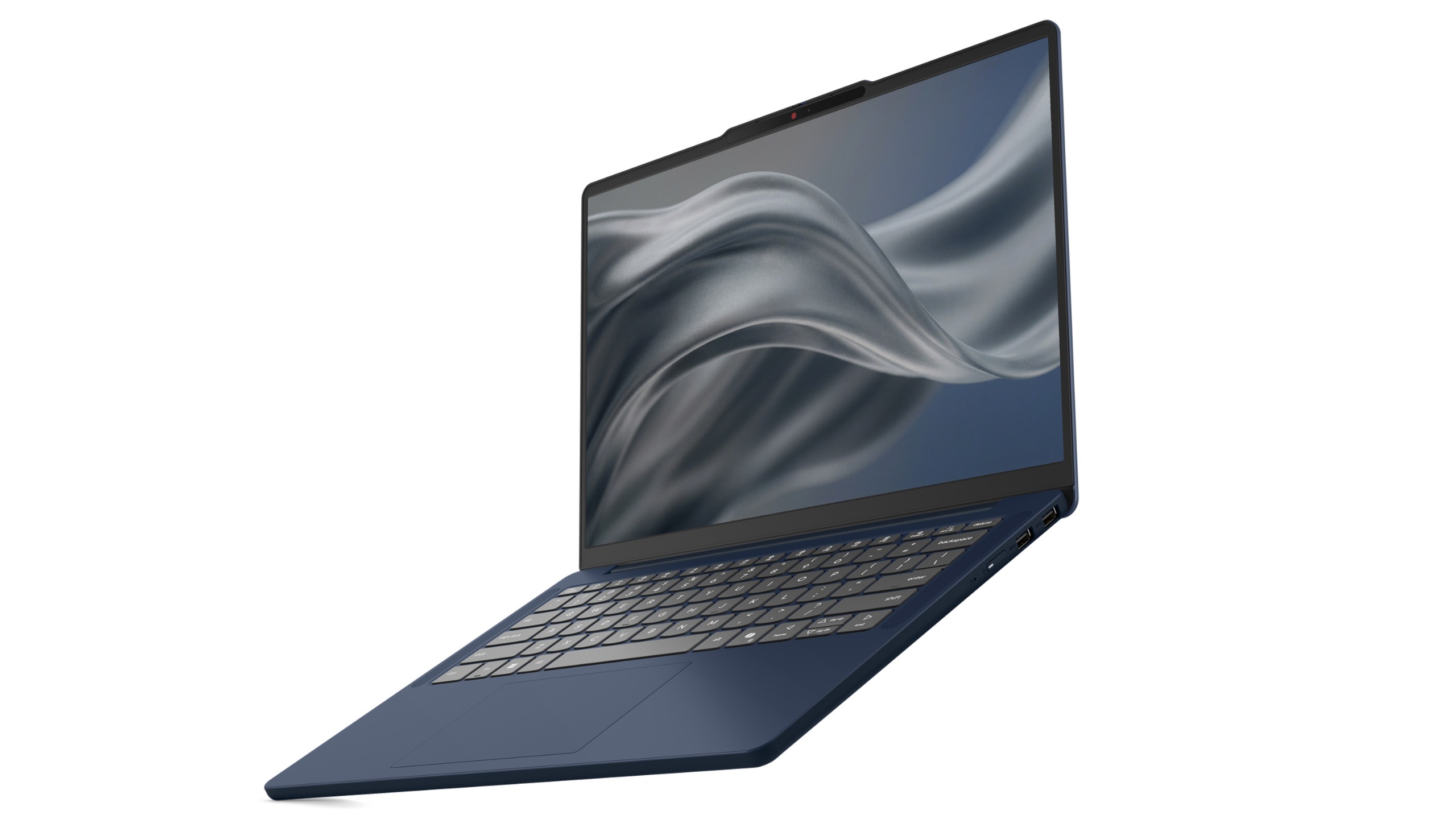
The new IdeaPad Vibe will be available in seven Pantone-developed colors, including Chill Blue, Zen Green, Spicy Gold, Radiant Coral, Dreamy Violet, Lowkey Grey, and Moody Blue. Lenovo says the colors were developed alongside the Pantone Color Institute and are designed to reflect different moods, personalities, and lifestyles.
And that's just the beginning.
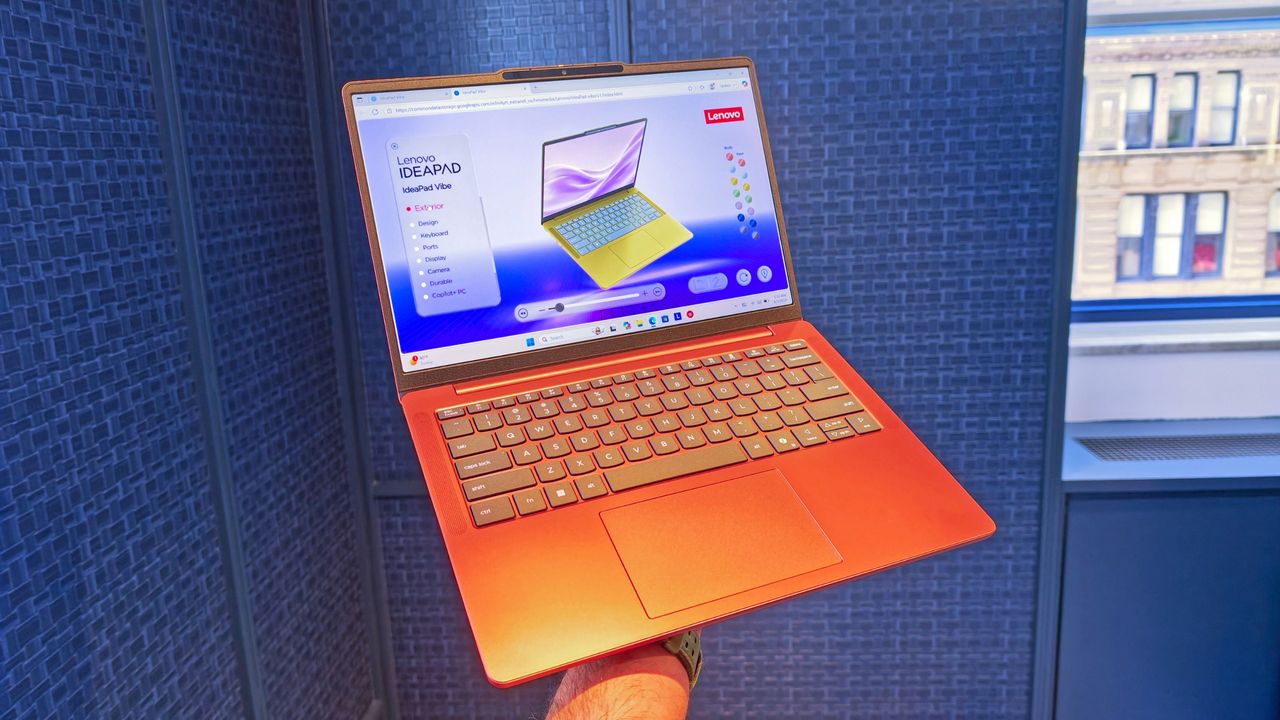
As shown in Lenovo's custom configurator (below), users will be able to mix and match chassis colors and keyboard colors to create something uniquely theirs. The company is also offering swappable custom keycaps, adding another layer of personalization that is virtually unheard of in the mainstream laptop space.
The configurator demo I saw almost felt like building a custom character in a video game rather than buying a laptop, and reminded me of the XBOX Design Lab for custom controllers.
Demo of the web creation tool to let you customize the new IdeaPad Vibe. (Image credit: Daniel Rubino)
In fact, my biggest complaint about the IdeaPad Vibe is that there might be too much choice.
That's obviously a good problem to have, but after looking through the various color combinations, shell finishes, and processor options, I could already imagine spending far too much time trying to decide which configuration to order (I know because I tried).
That's not a sentence I ever expected to write about a Windows laptop.
Lenovo IdeaPad Vibe in Zen Green and black keycaps. (Image credit: Lenovo)
Of course, a laptop can't survive on colors alone, and thankfully Lenovo seems to have put together a genuinely compelling package underneath all that personality.
The IdeaPad Vibe comes in both 14-inch and 15-inch sizes and starts at just 1.3kg (2.87 pounds) for the smaller model. OLED display options are available with up to 100% DCI-P3 color coverage, while IPS models can offer refresh rates up to 120Hz.
Lenovo is also packing in practical features including dual SSD slots, Wi-Fi 7, USB-A and USB-C ports, HDMI, a MicroSD card reader, and a 5MP IR webcam with a privacy shutter.
AMD, Qualcomm or Intel (eventually)
Lenovo IdeaPad Vibe in Dreamy Violet. (Image credit: Lenovo)
Then there's the processor selection.
For launch, buyers can choose between AMD Ryzen AI 400 series configurations and Qualcomm Snapdragon X models (we're not clear on exactly which Snapdragon X chip, or even if it's X2), while Intel-based versions will arrive later. AMD models support up to 32GB of upgradeable memory and up to 1TB of SSD storage, while Snapdragon versions offer up to 24GB of memory and the same dual-slot storage flexibility.
Personally, I'd go Qualcomm.
We've reached a point where Snapdragon X PCs consistently deliver excellent everyday performance while also offering some of the best battery life available in the Windows ecosystem. The combination of a lightweight chassis, Copilot+ PC capabilities on supported configurations, and Qualcomm's efficiency makes the Snapdragon version particularly appealing to me.
That isn't to say AMD isn't tempting. AMD's advantage here is flexibility. The Ryzen AI configurations support memory upgrades up to 32GB and offer optional 50Wh or 65Wh battery configurations, making them attractive for enthusiasts who want more control over their hardware.
What impressed me most during my hands-on time wasn't any single specification. It was how cohesive the overall package felt.
The laptops looked premium, felt solid in the hand, and didn't come across as budget systems despite their surprisingly aggressive pricing. That's important because Lenovo isn't positioning the IdeaPad Vibe as a niche fashion accessory. This is meant to be a mainstream Windows laptop that happens to have far more personality than its competitors.
And right now, that may be enough to help it stand out.
Final thoughts
Lenovo IdeaPad Vibe in Chill Blue. (Image credit: Lenovo)
Apple's MacBook Neo has clearly encouraged PC makers to rethink the mainstream laptop category. Dell has already responded with its own fresh take on the formula with its just-announced Dell 14S, and now Lenovo is bringing something completely different to the table: customization.
Instead of asking buyers which shade of gray they prefer, Lenovo is asking what their "vibe" is.
That's a much more interesting question, even if a bit on the nose and a tad cringey.
The Lenovo IdeaPad Vibe with AMD processorslaunches inOctober 2026 starting at $699.99, while Qualcomm Snapdragon X models will follow in November 2026 with the same $699.99 starting price. Intel is only listed as coming later.
And after seeing them in person, I think Lenovo may have stumbled onto something other PC makers have forgotten: technology can be personal, but it can also be fun.
Join us on Reddit at r/WindowsCentral to share your insights and discuss our latest news, reviews, and more.
I've seen a lot of concept PCs over the years.Most are fascinating engineering exercises that are never destined for store shelves. They're designed to spark conversation, generate headlines, and give us a glimpse into what might be possible someday. Some do come to market, like rollable display PCs.Lenovo's new Project AeroBlade concept feels different.Officially, it's one of the company's latest proof-of-concept devices, unveiled as part of its annual wave of e
Most are fascinating engineering exercises that are never destined for store shelves. They're designed to spark conversation, generate headlines, and give us a glimpse into what might be possible someday. Some do come to market, like rollable display PCs.
Lenovo's new Project AeroBlade concept feels different.
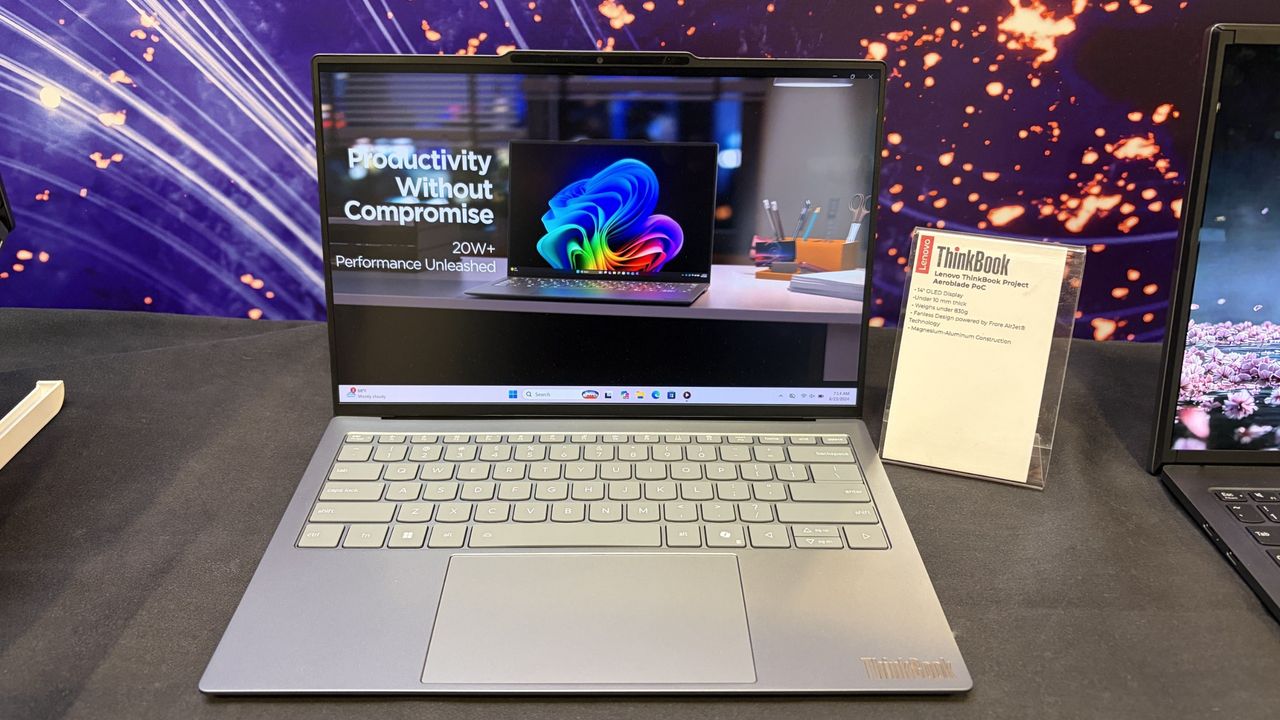
Officially, it's one of the company's latest proof-of-concept devices, unveiled as part of its annual wave of experimental hardware at IFA 2026. Unofficially? I think there's a very good chance we're looking at Lenovo's next big premium laptop platform.
After getting hands-on with AeroBlade, I walked away convinced this isn't some far-future moonshot. If you told me a shipping version appears within the next year, I wouldn't be surprised in the slightest.
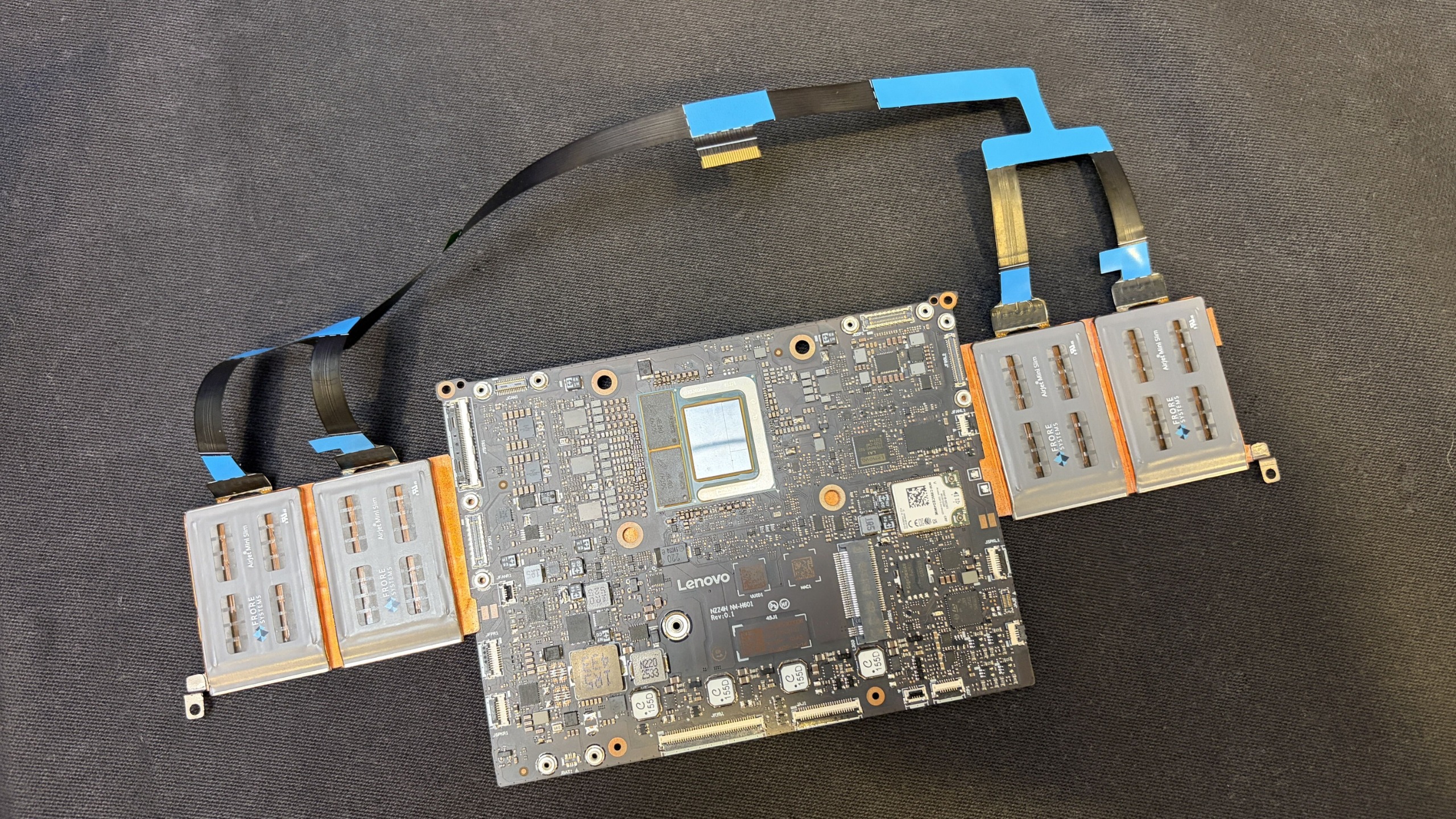
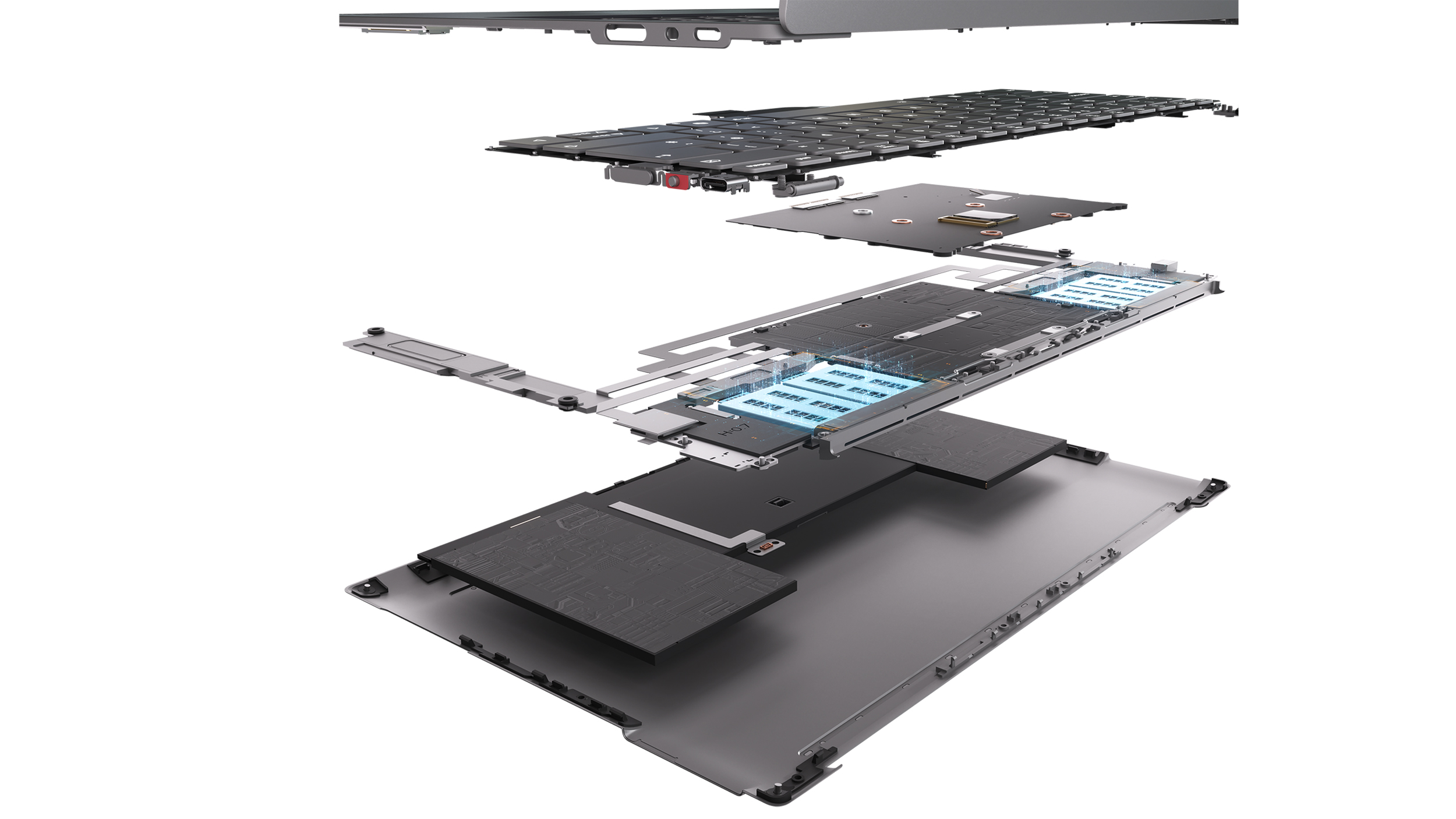
Motherboard and AeroJet cooling system. (Image credit: Future)
And it can't happen soon enough.
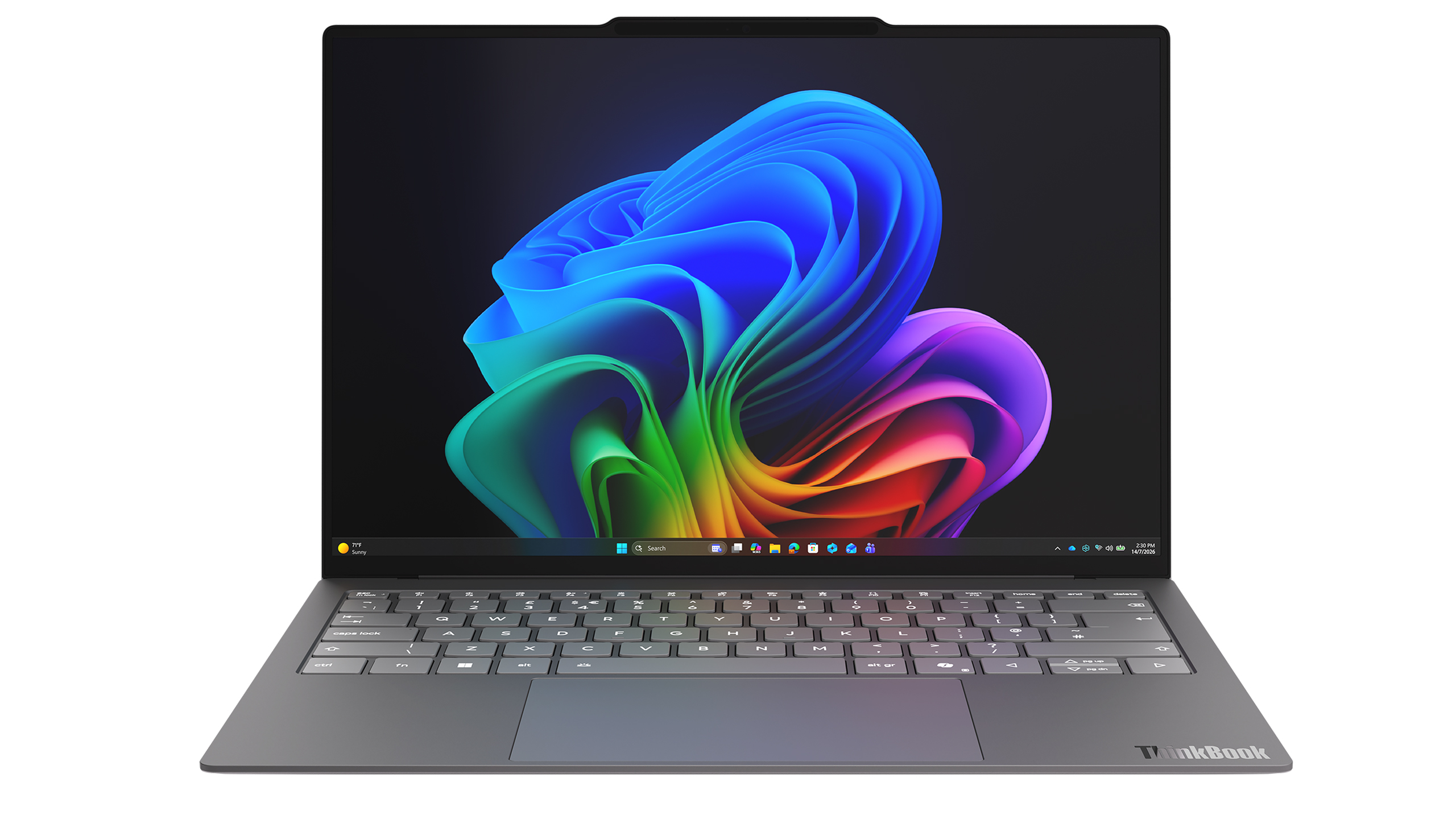
Project AeroBlade is a 14-inch laptop that measures under 10 mm thin and weighs less than 830 grams (1.8lbs). That's lighter than many tablets with keyboard covers attached, yet Lenovo claims performance remains comparable to today's ThinkPad X1 Carbon class of Intel-powered laptops. According to Lenovo, the system achieves this through a completely reimagined thermal design built around its Active Flow cooling architecture developed alongside Frore Systems.
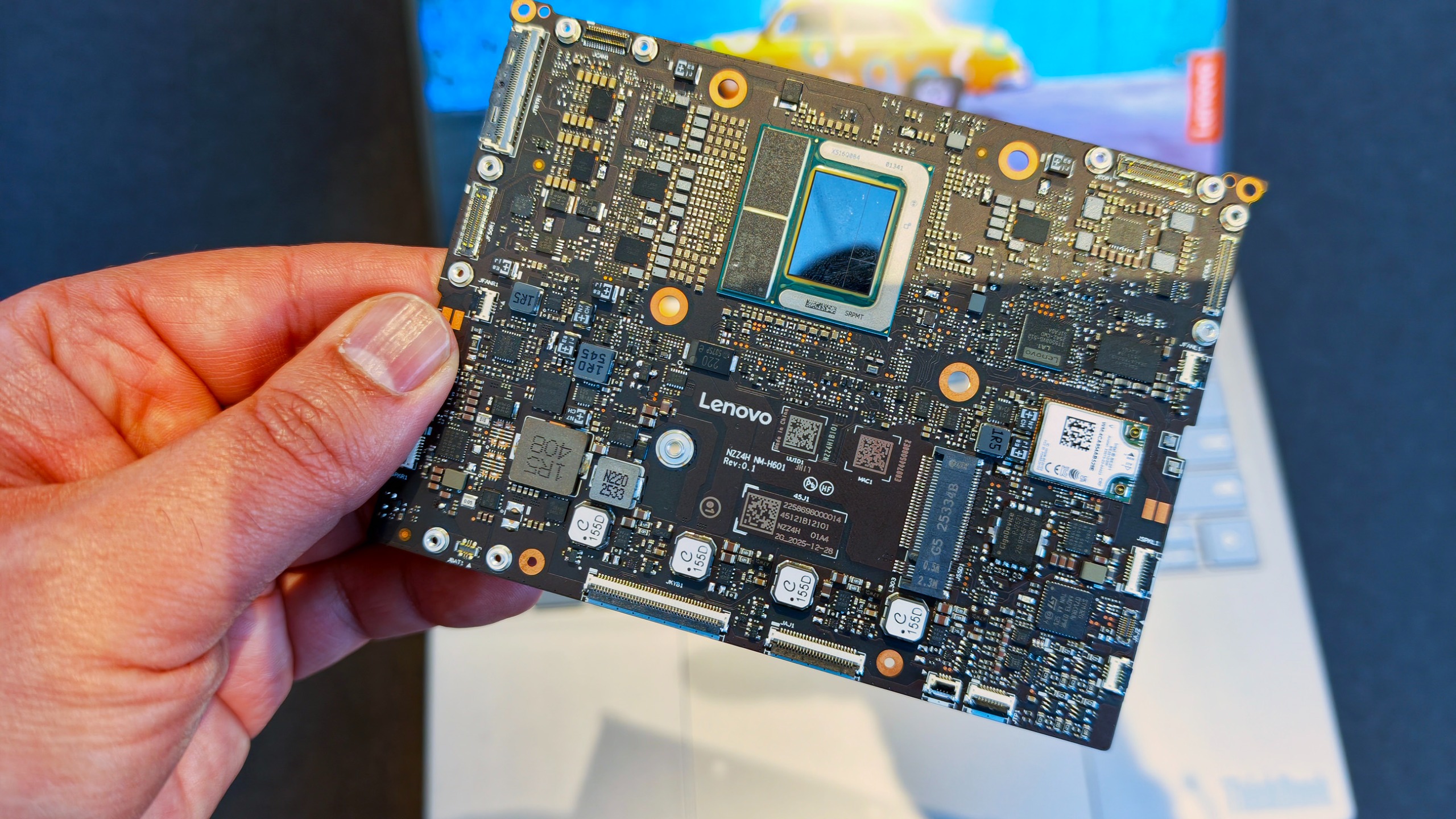
That's the entire motherboad for this laptop👀! (Image credit: Daniel Rubino)
Those numbers don't really hit you until you pick it up.
The first thing that struck me wasn't the thickness. It was the weight. Or rather, the lack of it.
The AeroBlade almost feels unfinished when you lift it because your brain expects more mass. Premium laptops have gotten thinner over the last decade, but reducing weight has become increasingly difficult without introducing compromises. AeroBlade somehow manages to feel substantial and premium while remaining almost shockingly light.
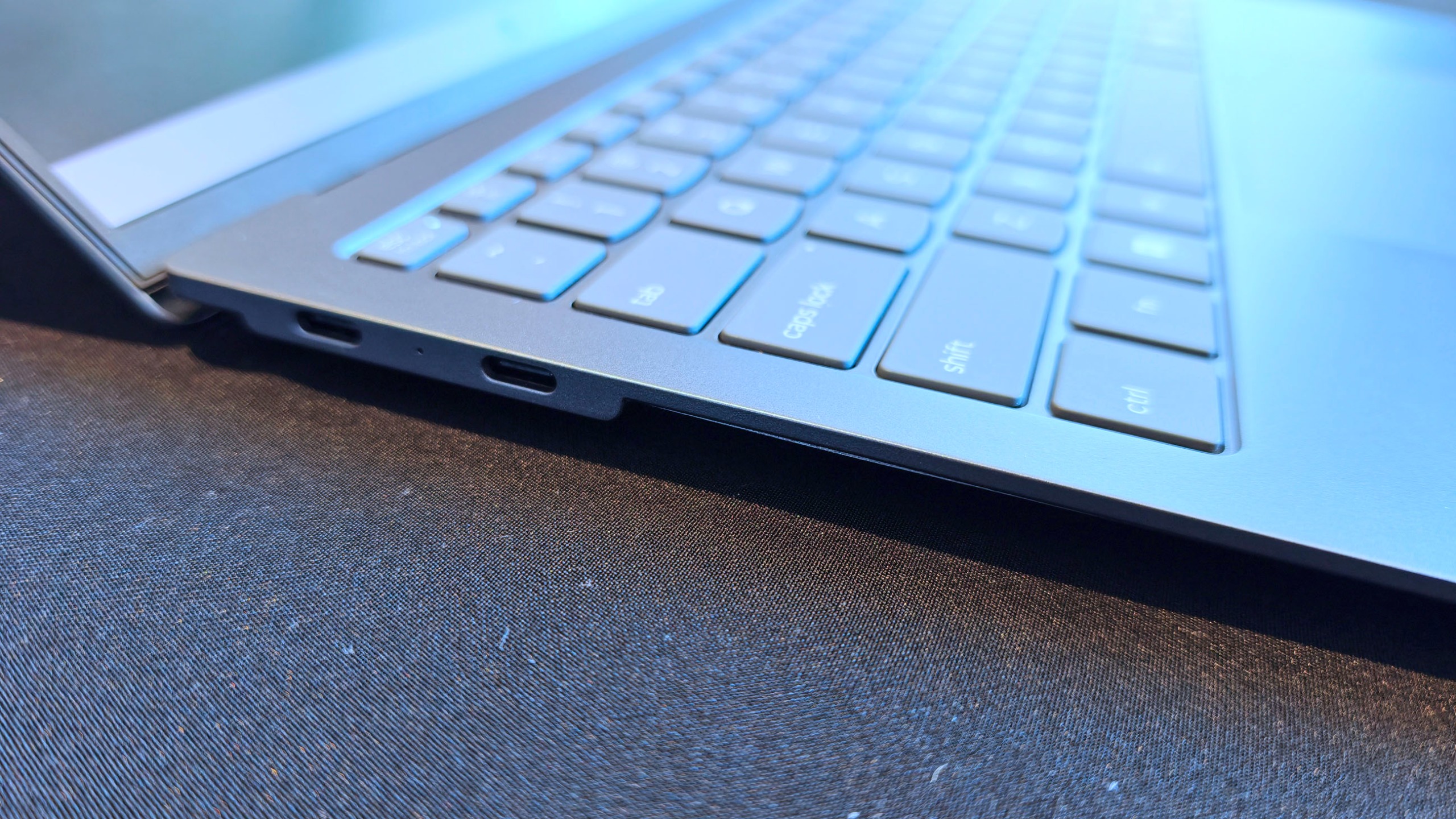
Lenovo says the chassis uses a magnesium-aluminum construction paired with a high screen-to-body OLED display, Thunderbolt 4 connectivity, and Wi-Fi 7. On paper, it sounds like a modern flagship ultrabook. In person, it feels like somebody accidentally removed half the laptop. That's a compliment.
What makes AeroBlade truly interesting, however, isn't how thin it is; it's how Lenovo got there.
The fan is dead. Long live AirJet.
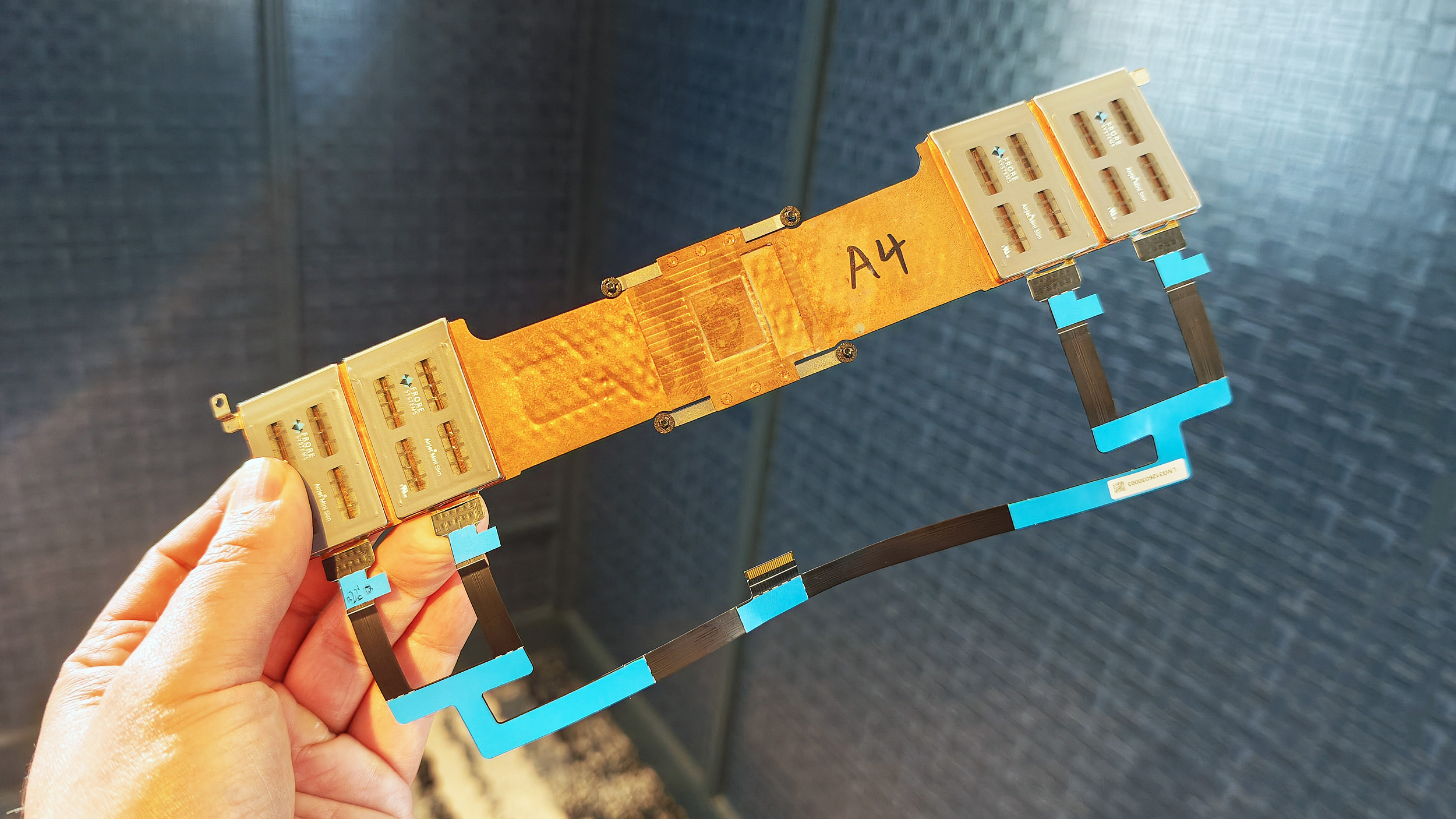
Entire Frore AirJet solid-state cooling strip assembly with copper heat sinks and ribbon cables. (Image credit: Daniel Rubino)
For decades, laptop cooling has largely followed the same formula.
A processor generates heat. Heat pipes move that heat toward a heatsink. One or more fans blow air through the system and out of vents.
The design has evolved, but the fundamentals haven't changed much.
Frore Systems wants to change that.
AirJet is a solid-state active cooling solution that replaces traditional laptop fans with tiny cooling chips that use vibrating membranes to generate airflow. Instead of spinning fan blades, AirJet creates high-velocity pulsating air jets that remove heat while operating at extremely low noise levels. Frore describes it as the world's first solid-state active cooling chip.
One AirJet Mini Slim module is only 2.65mm thick, consumes up to 1 watt of power, removes up to 5.25 watts of heat, and generates significantly higher back pressure than traditional fans. The technology was specifically designed for ultra-thin devices where conventional cooling becomes difficult or impossible.
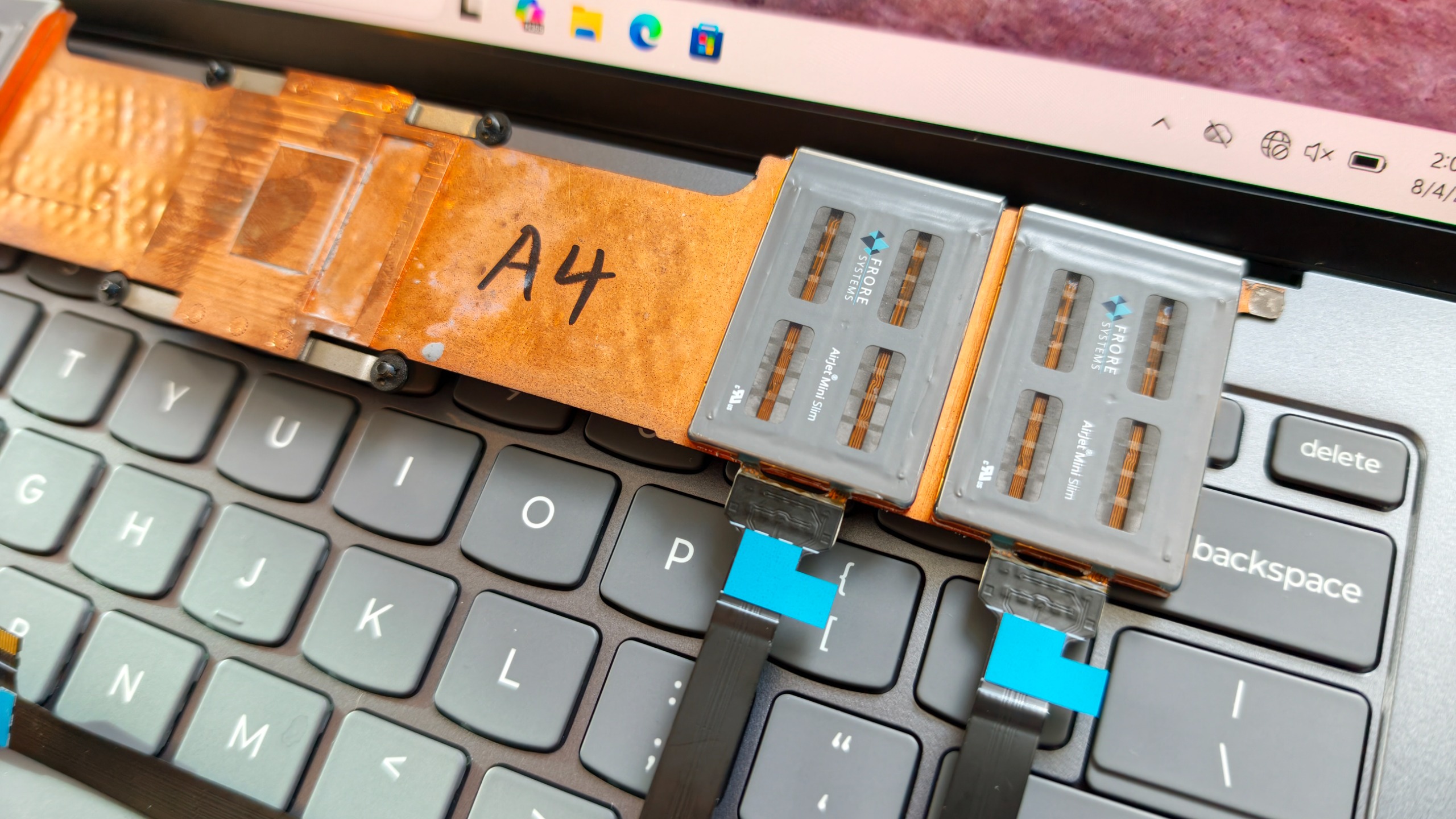
Close-up of two Frore AirJet Mini Slim solid-state cooling chips installed on a copper heat pipe strip above gray laptop keyboard keys showing how they are placed in the laptop. (Image credit: Daniel Rubino)
The clever part is that these modules don't need the large internal spaces required by traditional fans.
Instead of designing a laptop around cooling hardware, manufacturers can distribute AirJet modules throughout the chassis in different locations.
That flexibility is both the technology's greatest strength and its biggest challenge.
During conversations at the event, it became clear why we've seen AirJet demonstrations for a few years but haven't yet seen a flood of mainstream laptops using it.
Exploded diagram revealing the internal layers, motherboard, and Frore AirJet solid-state cooling modules of a Lenovo AeroBlade concept laptop. (Image credit: Lenovo)
This isn't a simple parts swap.
OEMs have spent decades designing motherboards, thermal layouts, and internal structures around conventional fans. AirJet requires engineers to rethink much of that architecture. The cooling solution may be smaller, but integrating it properly involves substantial redesign work throughout the entire system.
That's a lot of engineering investment.
But judging by AeroBlade, the payoff might be worth it.
A laptop with almost no compromises
Rendering of the Lenovo ThinkBook AeroBlade laptop. (Image credit: Lenovo)
The most impressive thing about AeroBlade is that Lenovo doesn't appear to be treating fanless computing as a compromise.
Traditionally, when manufacturers build ultra-thin fanless systems, performance becomes the sacrifice. The device is quiet and portable, but sustained workloads eventually cause thermal throttling.
Lenovo's pitch is essentially the opposite.
Side view of an ultra-thin grey laptop standing open at a 90-degree angle, highlighting its extremely slender display and base. (Image credit: Lenovo)
The company believes Active Flow can deliver sustained AI and productivity performance without the compromises typically associated with fanless PCs. The only noise I noticed during my brief hands-on came under heavier workloads, where there was a faint whooshing sound from moving air. It was subtle enough that I had to actively listen for it.
What I didn't notice were intake vents covering the bottom of the chassis. Hooray!
That's because the cooling system works differently than traditional laptop designs. Air management has largely been pushed toward the rear of the system, creating a cleaner and more minimalist design.
Super thin, but still room for some Type-C ports. (Image credit: Daniel Rubino)
The result is a device that feels almost impossibly refined, and that's why I think AeroBlade is a big deal.
Most laptop innovation over the last few years has focused on AI accelerators, NPUs, display tech, and silicon improvements. Those things are important, but they're largely invisible to users (well, maybe not displays, but still).
In many ways, cooling technology determines what kind of laptop manufacturers can build.
Lenovo could make impossibly thin and light (compared to what we are used to), or use that extra space for a larger battery for absurd laptop longevity. It opens a bunch of engineering doors and options.
The concept that doesn't feel like a concept
Lenovo loves showing proof-of-concept devices, and many never become products.
But the company's track record also shows that some of its most interesting concepts eventually make the jump to production after enough refinement (I'm hoping Lenovo's Legion handheld foldable concept is one of those).
AeroBlade feels like one of those projects. Indeed, this was my first question to Lenovo, as proof-of-concept is often wacky designs, rolling displays, dual displays ... things that look weird but could be useful.
Super thin and light laptop with no vents? Who wouldn't want this? I don't think we really need a focus group to see if it's a good idea!
The hardware already looks polished. The underlying technology exists. The user benefits are immediately obvious. And perhaps most importantly, the industry is constantly searching for ways to make laptops thinner, lighter, quieter, and more efficient.
AirJet checks every one of those boxes.
Will this technology replace fans in gaming laptops with RTX-class graphics anytime soon? Probably not.
But for premium ultraportables, enterprise notebooks, all-in-one desktops, handheld gaming PCs, and productivity-focused systems, I think we're looking at one of the most significant advances in PC design we've seen in years. (We've already openly wondered about Aerojet in a Steam Deck 2).
So, yeah, ironically, the biggest innovation at Lenovo's event wasn't AI.
It was airflow.
Join us on Reddit at r/WindowsCentral to share your insights and discuss our latest news, reviews, and more.
NVIDIA has confirmed new details and availability info about its upcoming RTX Spark SoC for Windows 11 devices. At IFA 2026, the company announced that it expects the first RTX Spark laptops to begin shipping as soon as next month, sometime in October depending on the OEM. Additionally, two new devices are joining the launch lineup; the Lenovo Yoga 9n laptop and Acer SFF desktop PC.Alongside availability news, NVIDIA has also confirmed configuration details for t
NVIDIA has confirmed new details and availability info about its upcoming RTX Spark SoC for Windows 11 devices. At IFA 2026, the company announced that it expects the first RTX Spark laptops to begin shipping as soon as next month, sometime in October depending on the OEM. Additionally, two new devices are joining the launch lineup; the Lenovo Yoga 9n laptop and Acer SFF desktop PC.
Alongside availability news, NVIDIA has also confirmed configuration details for the upcoming RTX Spark chips. There will be two different configurations of the RTX Spark N1X, with configurable RAM and storage based on what OEMs wish to offer. The high-end RTX Spark will be targeted at desktops and laptops, with support for up to 128GB unified memory, 20 CPU cores, and 6144 Blackwell RTX cores.
There will also be a less powerful RTX Spark configuration exclusively for laptops, which can only be configured with 24GB or 32GB unified memory, a 5120-Core Blackwell RTX GPU, and an 18-core CPU. While still a high-end chip, this should allow RTX Spark to ship in laptops that cost closer to $2,000, significantly lower priced than the high-end SoC.
Category
Specification 1
Specification 2
GPU Cores
6144-core Blackwell RTX GPU
5120-core Blackwell RTX GPU
CPU Cores
20-core Grace CPU
18-core Grace CPU
Memory
24-128 GB Unified Memory
24-32 GB Unified Memory
Form Factors
Laptops and Compact Desktops
Laptops
NVIDIA is touting RTX Spark as the best SoC for AI development on Windows. It supports NVIDIAs full AI stack, as well as the Windows Agent Framework and 120B parameter agents. It also supports hardware accelerated 4:2:2 video for video editing professionals.
While the first RTX Spark devices are expected to begin shipping in October, it's not yet clear which OEMs will be first out the gate. All major Windows hardware makers, including Dell, Lenovo, HP, ASUS, and Microsoft have all announced RTX Spark devices that are expected to ship by the end of this year. Devices like the Surface Laptop Ultra have not yet been given a release date, though Microsoft typically does aim to ship new Surface PCs in October.
We'll be sure to keep you updated on all the RTX Spark device availability as more information is revealed by OEMs. In the meantime, are you considering an RTX Spark device as your next Windows PC? Let us know in the comments!
Join us on Reddit at r/WindowsCentral to share your insights and discuss our latest news, reviews, and more.
If you're not a keen follower of the AI space, then the name Hugging Face may not mean anything to you. But the company has just been acquired by NVIDIA, which continues to reinforce its new identity as an AI company. Announced today by NVIDIA CEO Jensen Huang, Hugging Face will be joining the company in an acquisition priced at just under $13 billion. Hugging Face is an open platform that has been likened to GitHub, except for local, open AI models that anyone c
If you're not a keen follower of the AI space, then the name Hugging Face may not mean anything to you. But the company has just been acquired by NVIDIA, which continues to reinforce its new identity as an AI company.
Hugging Face is an open platform that has been likened to GitHub, except for local, open AI models that anyone can use. NVIDIA's plans are to keep Hugging Face the same as it is today but to scale. Because if you're not scaling AI these days, what are you even doing?
"Hugging Face will remain an open platform for the entire AI ecosystem. Developers will choose the models they want, the frameworks they want, the clouds and inference service providers they want and the computing platforms they want. NVIDIA compute will not be required to build on or deploy through Hugging Face.
Hugging Face will continue to support open source and open weight models from across the ecosystem, from every model builder. It will continue to support multi-cloud and multi-accelerator development and deployment, so builders can use the hardware and infrastructure that best fit their work."
Keeping personal opinions about AI aside, I'm certainly more in favor of real people being able to use AI models without having to rely on massive, un-evironmentally friendly data centers from the likes of Microsoft and OpenAI.
AI is very much here to stay, whether we choose to embrace it or not. But I'm definitely on the side of being able to use it however you want to use it and without feeding all your data to companies that don't necessarily deserve it.
NVIDIA is very much AI-first these days, though. Gone are the days we'd all look at its shiny new GPUs, and our only thoughts would be about gaming. It does make you ponder what the future holds for gamers, though.
I've got an RTX 5090, for example, and it's still overkill for gaming. But with 32GB of VRAM and a ton of compute horsepower, it's pretty damn good for local AI use. But is this where future products will be aligned first? Everything's getting more expensive, and AI is definitely to blame for a good chunk of it.
Alas, here we are. If you use Hugging Face currently, it doesn't sound like anything's going to change. But if you're a gaming customer of the company, as I am, I am starting to wonder how important we're going to be in the future.
Join us on Reddit at r/WindowsCentral to share your insights and discuss our latest news, reviews, and more.
Dell just announced a new laptop to take on Apple's MacBook Neo. The Dell 14S is a colorful laptop designed for college students and young adults, which helps the PC compete with the MacBook Neo's colorful range.The Dell 14S should be a budget-friendly PC, though Dell has not released pricing for the laptop yet. The laptop has an aluminum body and a nice selection of ports, including two USB 3.2 Type-C ports, an HDMI port, and a 3.5mm headphone jack.The Dell 14S
Dell just announced a new laptop to take on Apple's MacBook Neo. The Dell 14S is a colorful laptop designed for college students and young adults, which helps the PC compete with the MacBook Neo's colorful range.
The Dell 14S should be a budget-friendly PC, though Dell has not released pricing for the laptop yet. The laptop has an aluminum body and a nice selection of ports, including two USB 3.2 Type-C ports, an HDMI port, and a 3.5mm headphone jack.
The Dell 14S and the Dell XPS 13 released earlier this year both compete with the MacBook Neo, but they do so in different ways. The XPS 13 has a better display, Wi-Fi 7, a backlit keyboard, and is a more premium device.
The Dell 14S promises all-day battery life, is available in several colors, and has a 16:10 display.
People who were intrigued by the low price of the MacBook Neo but want the look of a premium laptop running Windows 11 will likely prefer the newest XPS 13. Those who like the colorful tone of the MacBook Neo but want a lightweight and affordable device running Windows 11 will probably lean toward the Dell 14S.
Dell's confusing naming scheme
Dell is still struggling with naming its products. The company abandoned the XPS lineup and got rid of its entire consumer-focused strategy but has since backtracked and brought back XPS. But the company seems confused on what XPS means to customers.
If you head over to Dell's webpage about the New Dell 14S, you'll see a comparison chart that includes the New Dell 14, New Dell 14S, and Dell 14S. Incredibly, they are quite different from each other.
Listing two laptops side-by-side and having one labeled as "new" is fine. It's somewhat similar to how car companies handle naming, though the automotive industry often just attaches a year within parentheses.
Sticking with that analogy, if you look at a 2025 Honda Civic and a 2026 Honda Civic, they should be somewhat similar vehicles. Barring a complete overhaul, a new version of a model should resemble its predecessor.
If there is an overhaul, it's usually a linear progression, such as when Dell shifted from the old-old XPS to the once-new-but-now-old XPS.
If you did not already know which of the below PCs were XPS laptops, could you easily guess which are in that family of devices?
Zac Bowden / Windows CentralFuture | Daniel RubinoDell
What is an XPS device in 2026? The new XPS 14 is a premium device featuring an Intel Core Ultra 7 processor or more powerful processor. The not-so-new but still great XPS 14 shares a similar design and also has an Intel Core Ultra 7 chip, albeit an older one.
So, XPS laptops are premium machines with high-end processors and a design resembling the XPS laptops from recent years, correct? Nope. The XPS 13 from this year is a budget-focused PC with options powered by an Intel Core Ultra 3 chip.
Other differences stand out, such as the latest XPS 13 having options with 8GB of RAM compared to the 16GB minimum of the new XPS 14.
Please understand, I think the latest XPS 13 and XPS 14 are excellent laptops. I predict the Dell 14S will also be a solid PC. But I don't understand what Dell is doing with its XPS brand. The company seems to have remembered that consumers value the XPS brand and has chosen to etch the XPS logo onto things willy-nilly.
Join us on Reddit at r/WindowsCentral to share your insights and discuss our latest news, reviews, and more.
The memory crisis continues to get worse, driving the price of gaming laptops to ridiculous extremes while scaring people into buying them despite the price hikes out of fear that their prices will worsen before they get better.Thankfully, retailers will always continue to offer brief respites from this crisis with generous discounts for the best gaming laptops. For example, one of our top-rated gaming laptops, the ASUS ROG Strix G16, has had its steep listing pr
The memory crisis continues to get worse, driving the price of gaming laptops to ridiculous extremes while scaring people into buying them despite the price hikes out of fear that their prices will worsen before they get better.
Thankfully, retailers will always continue to offer brief respites from this crisis with generous discounts for the best gaming laptops.
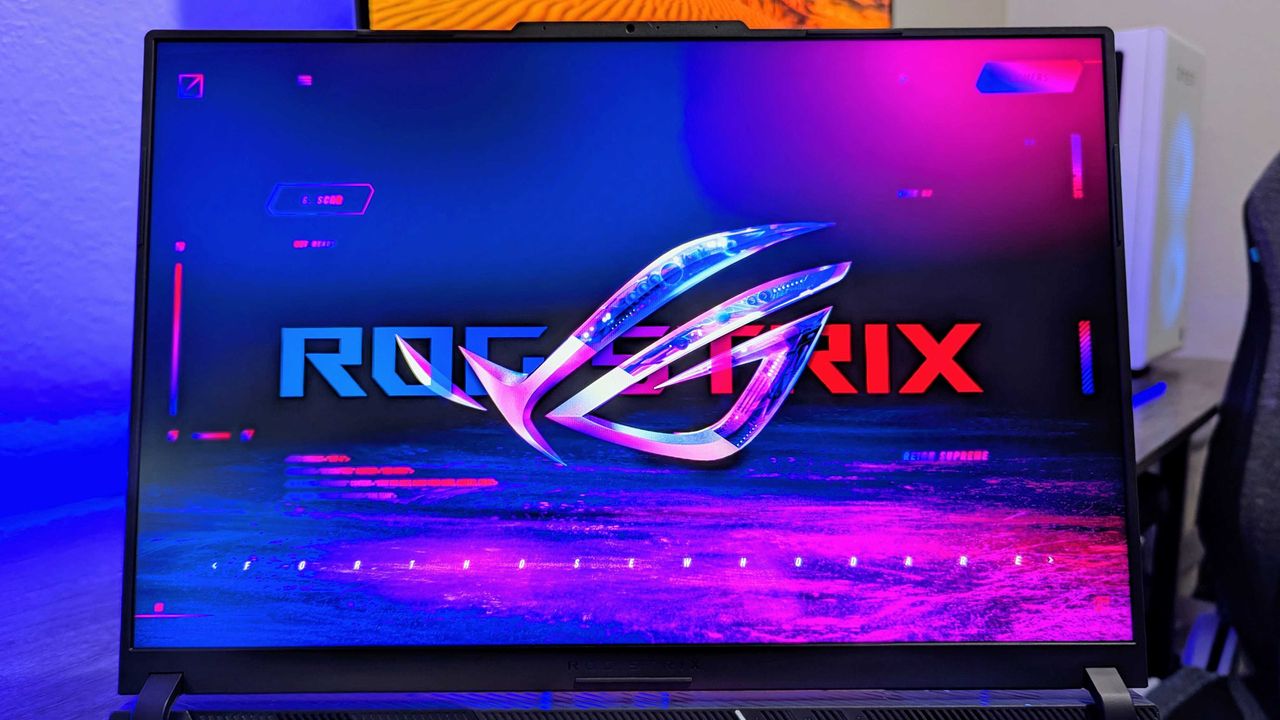
For example, one of our top-rated gaming laptops, the ASUS ROG Strix G16, has had its steep listing price of $2,299.99 brought down to $1,749.99 at Best Buyuntil the end of Best Buy's Labor Day Sale on September 7, 2026.
"The latest ASUS ROG Strix G16 takes full advantage of AMD's most powerful mobile processors to offer excellent performance and a consistent gaming experience, and may end up being an underrated value-play in the premium gaming laptop segment this year." ~ Zachary Boddy, Former Staff Writer
Why buy the ASUS ROG Strix G16 gaming laptop (AMD)?
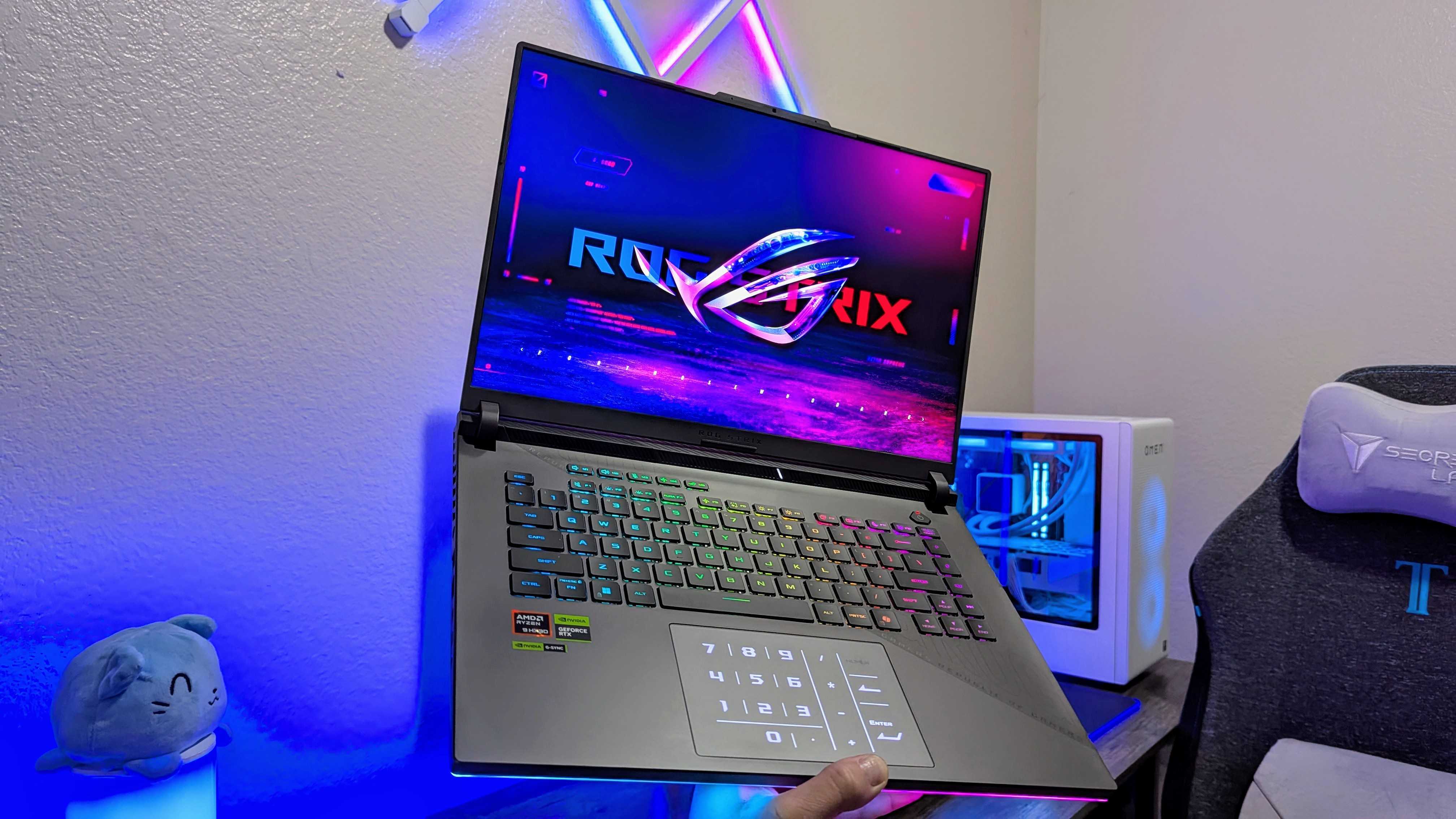
The ASUS ROG Strix G16 in hand. (Image credit: Windows Central (Zachary Boddy) | ASUS)
Of all the best gaming laptops we've personally tested, the ASUS ROG Strix G16 remains one of the finest for those who prefer to outfit their desktops with AMD hardware.
As noted in our 4.5 Star Review of the ASUS ROG Strix G16, it delivers exceptional performance, capable of running graphically demanding games like Cyberpunk 2077 at 69 fps or over 140 fps thanks to its NVIDIA GeForce RTX 5070 TI graphics card, 16GB of RAM, 1TB SSD, and AMD Ryzen 9 8940HX processor.
In addition, this laptop features an LED, FHD, IPS display capable of rendering images and videos at vibrant and colorful 1600p resolutions with refresh rates of 165 Hz and a max brightness of 300 nits.
Close-up of the ASUS ROG Strix G16's keyboard. (Image credit: Windows Central (Zachary Boddy) | ASUS)
Combine these specs with a comfy keyboard with extra buttons, and you've got a powerhouse gaming-on-the-go machine that will let you play your favorite games with sublime graphical details and smooth-as-butter gameplay input responsiveness.
So, if you don't mind a laptop with a mostly plastic design and prefer using AMD processors rather than Intel ones, then the ASUS ROG Strix G16 gaming laptop that's now $1749.99 at Best Buy won't steer you wrong.
I know it certainly pleased my former colleague, Zachary Boddy, when he said, "The ROG Strix G16 isn't trying to compete with the most premium devices from Razer or Lenovo, and instead offers a lot of power in a solidly built chassis, paired with a fantastic keyboard and a comfortable display. It could be the underdog of the premium gaming laptop segment."
FAQ
How long will Best Buy's Labor Day Sale last?
Best Buy's Labor Day Sale will last until September 7, 2026
Is its RAM upgradeable?
The ASUS ROG Strix G16 gaming laptop can have its RAM upgraded to a max limit of 64GB via its two DDR5 SODIMM memory slots.
Can its storage space be upgraded?
The ASUS ROG Strix G16 gaming laptop can have its storage upgraded by inserting NVMe PCIe 4.0 SSDs via its two M.2 2280 slots, each of which can support up to 2TB of space for a grand total of 4TB.
Join us on Reddit at r/WindowsCentral to share your insights and discuss our latest news, reviews, and more.
As PC prices continue to rise, seeing a new release at $799 is a welcome sight, and that's where we're at with the new Samsung Galaxy Book6. It's a decidedly mid-range laptop, but at a mid-range price, and it's not like you're really losing out on much, either. That is, as long as you're not (for some reason) looking to have Copilot+ since the NPU on the included Intel chips doesn't meet the standard. But it's 2026, so there's still plenty of AI focus on tap, wit
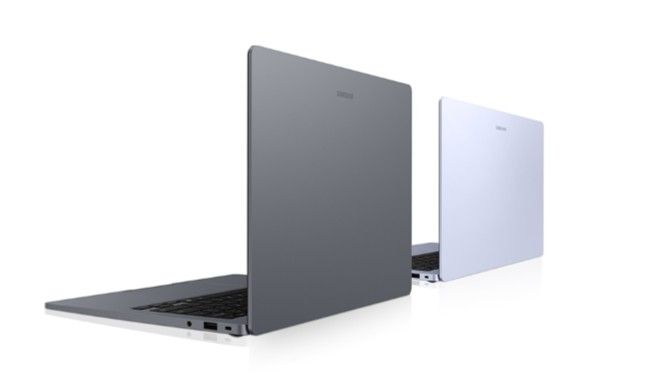
As PC prices continue to rise, seeing a new release at $799 is a welcome sight, and that's where we're at with the new Samsung Galaxy Book6.
It's a decidedly mid-range laptop, but at a mid-range price, and it's not like you're really losing out on much, either.
That is, as long as you're not (for some reason) looking to have Copilot+ since the NPU on the included Intel chips doesn't meet the standard. But it's 2026, so there's still plenty of AI focus on tap, with Samsung's own tools.
Despite the more affordable price, the 14-inch Samsung Galaxy Book6 doesn't skimp on one key spec: Battery life. Samsung claims up to 25 hours, backed by 45W charging that can add 33% charge in half an hour if you do need a top-up.
But in real-world use you're looking at a laptop that will easily get you through a full day off the charger, be that for work or for school. Here's what we're looking at spec-wise:
Dimension
313.0 x 221.0 x 15.7mm
Weight
1.35kg
OS
Windows 11 Pro 25H2 (64-bit) / Windows 11 Home 25H2 (64-bit) Linux (Console only)
Display
14.0″ LCD WUXGA (1920×1200), 350 nits
Processor
Intel® Core™ 5 processor Intel® Core™ 3 processor
NPU
Intel® NPU (up to 15 tops)
Graphic
Intel® Graphics
Network
Wi-Fi 6E, Bluetooth v5.4, 802.11 ax 2×2
Color
Violet Silver, Gray
Memory
8GB/16GB (LPDDR5X)
Storage
256GB/512GB/1TB (PCle)
Camera
2MP (1080p FHD)
Audio
Internal Dual Array Digital Microphones Stereo speaker (2Wx2), Dolby Atmos®
Keyboard
Pro keyboard (Non-Backlit keyboard)
Trackpad
Clickpad
Battery
61.2 Wh (Typical)
Charging
45W USB Type-C Adapter
Port
USB Type-C x 2, USB Type-A, HDMI 1.4 port (Supports 4K@30) Headphone/Microphone
I like that there's anti-glare, and I like that there's a decent array of ports, including a full-sized HDMI output. While the cheapest version will be the Intel Core 3, with the lowest RAM and storage on offer, there is at least an option at an attractive price, and for many, it'll be plenty.
Being a Samsung laptop, if you also use a Galaxy smartphone or tablet, you'll unlock some additional integration, such as second screen support and the ability to use a single keyboard and mouse across multiple devices.
Galaxy AI has a few neat features, too, despite the low-powered NPU on the Galaxy Book6, with some useful tools for images and note summarization.
It's also available in two colors, a dark gray and a "Violet Silver." The Galaxy Book6 isn't going to set performance records, but that's not who it's for. It's for someone who wants a good-quality laptop to do everyday, normal things, and for that, it doesn't look bad at all.
Join us on Reddit at r/WindowsCentral to share your insights and discuss our latest news, reviews, and more.
Back in 2023, HP released the Envy Move, an all-in-one (AIO) PC with a clever quirk: It could run wirelessly on battery power. The average lifespan was around 4 hours, but it was enough to watch a movie, join a video call, or have a playful family interaction with its touchscreen on whatever app or website you wanted.To make it even more portable, HP included a built-in handle attached to a flexible loop on its top side, pop-out feet on its underside, and a rear
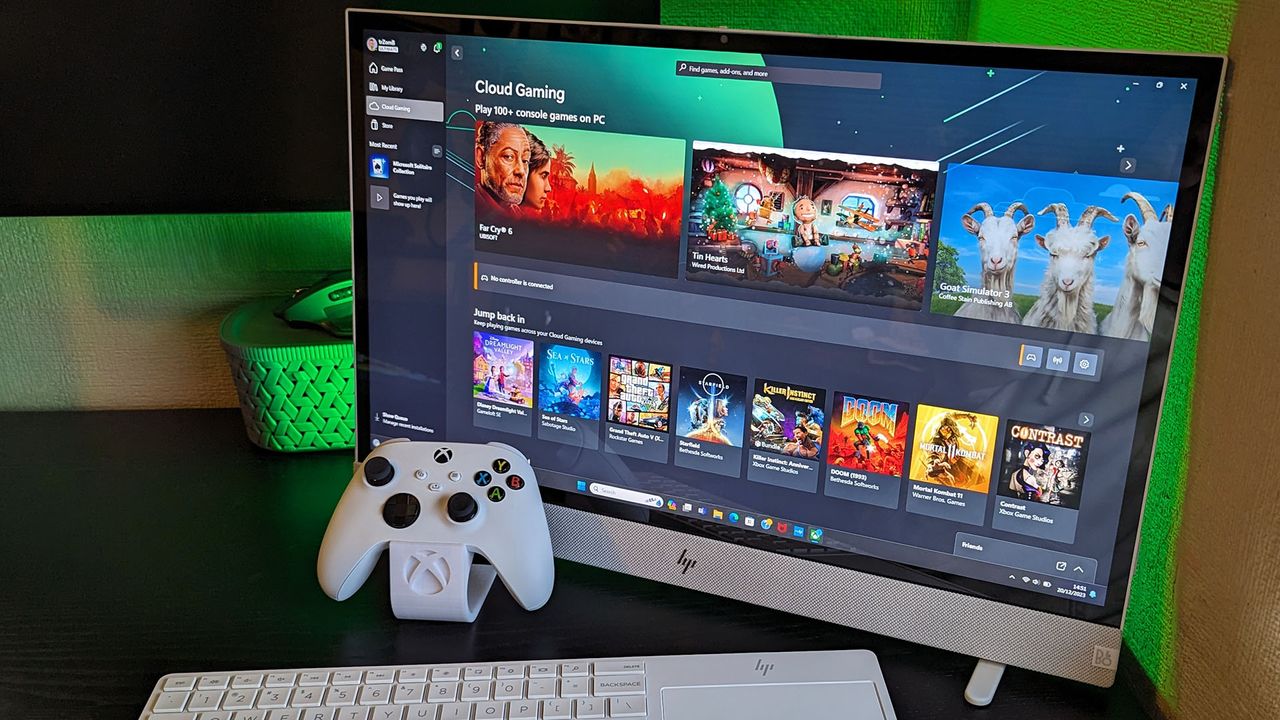
Back in 2023, HP released the Envy Move, an all-in-one (AIO) PC with a clever quirk: It could run wirelessly on battery power. The average lifespan was around 4 hours, but it was enough to watch a movie, join a video call, or have a playful family interaction with its touchscreen on whatever app or website you wanted.
To make it even more portable, HP included a built-in handle attached to a flexible loop on its top side, pop-out feet on its underside, and a rear pouch that held a keyboard with an included touchpad. It was genius; a 24-inch touchscreen PC with great speakers that moved wherever you needed it.
Its design could have used some tweaks, but its downsides didn't feel at all severe, resulting in a perfect score in my Envy Move review. It was the most remarkable sample I'd ever tested, but it quickly became evident that consumers weren't interested enough to choose it over a traditional laptop or desktop.
This portable PC deserved more
Not quite a desktop, but certainly more than a laptop, HP's Envy Move was a unique AIO PC. (Image credit: Ben Wilson | Windows Central)
Following my review in 2023, the Envy Move was later discontinued from HP's official storefront and third-party retailers across the world, while the broader Envy range itself was dropped alongside the Spectre, Pavilion, and Dragonfly names, in favor of a major HP portfolio overhaul that introduced 'Omni' and 'Elite' PCs to replace them.
HP all-in-ones now sit alongside higher-end models like the impressive OmniStudio X, but nothing replaced the Envy Move, leaving any remaining stock with its already modest Core i7-1355U mobile processor from Intel's 13th generation. It was never intended to be a high-performance machine, but I'm sure modern, efficiency-centric Intel chips would have supercharged it perfectly.
Then again, if previous-generation components could maintain the ~$900 price tag on an Envy Move with 16GB of RAM and 512GB of storage, I'd let it slide. Frankly, I doubt many customers in HP's target audience would care to scrutinize its specific choice of processor, especially when the experience is great nonetheless, but future models could have been even better.
Too quirky to live, too clever to die
Its wireless keyboard and touchpad tucked away for transport in a cute pouch. (Image credit: Ben Wilson | Windows Central)
In the following summer, HP's Envy Move made a few appearances at my family gatherings and various parties, watching UEFA Euro 2024 matches in a shaded garden during BBQs in the best weather. At one point, I even connected an old Guitar Hero controller to its built-in Bluetooth receiver and turned it into a type of arcade machine; it was so much fun.
Everyone who would listen was impressed by what I could demonstrate, but nobody was particularly interested in replacing their long-lasting laptops or self-built desktop PCs. Its appeal should have been clear; anyone looking to share a family PC with their children would surely love its touchscreen and a general theme of collaboration, but it still fizzled out.
It's just the way she goes. Sometimes, brands take a risk and let something unusual escape the concept phase, but it never comes with a guarantee that enough people will buy it. I've seen plenty of oddities at conventions like CES, but they usually come with the understanding that it's just brands flexing their manufacturing muscles, showing what they could do if they wanted to.
The Envy Move felt different, but it ultimately doesn't matter how much I admired it, at least not compared to the sales figures that PCs need to pull in to stand a chance. Instead, I just keep my fingers crossed that it could make a comeback someday, or that the people who helped the Envy Move earn a Good Design award would at least know how much I admired what they made.
To be clear, the only reason I suddenly felt all nostalgic and bubbly about an AIO PC is that I started seeing bizarre knockoffs popping up on TikTok and Instagram Reels. Strange, Android-based screens lampooning the same kind of unique selling point as the Envy Move, pulling in frustratingly positive comments about how good the idea is — I know it's a good idea.
Laptops are great, and custom-built desktop PCs are even more rewarding when you can afford it, but all-in-one PCs still have their place. HP tried something unique with the Envy Move, and it's something I'll still praise in the hopes that it tries again when the timing is right (if that ever happens). Let's see what turns up at CES in 2027.
Join us on Reddit at r/WindowsCentral to share your insights and discuss our latest news, reviews, and more.
HP Envy Move
<p>A free Xbox Game Pass Ultimate trial immediately unlocks the opportunity to try out cloud gaming.</p>
I've used Windows PCs for most of my life, and I've tested some of the latest laptops from the most reliable brands for the last half-decade. Even before that, I worked in retail, specifically advising on laptops and helping people spend their money where it makes the most sense. So, despite spending most of my time on desktop PCs, I'm savvy with laptops.For the most part, my criteria for choosing a laptop relate to how well it travels with me. I take regular tri
I've used Windows PCs for most of my life, and I've tested some of the latest laptops from the most reliable brands for the last half-decade. Even before that, I worked in retail, specifically advising on laptops and helping people spend their money where it makes the most sense. So, despite spending most of my time on desktop PCs, I'm savvy with laptops.
For the most part, my criteria for choosing a laptop relate to how well it travels with me. I take regular trips by plane, train, and car to work from hotels and conventions, all with their own limitations and considerations, which has narrowed my list of must-haves to seven non-negotiables. If you're considering a new Windows laptop, this is what matters the most to me.
1. An OLED display for better contrast
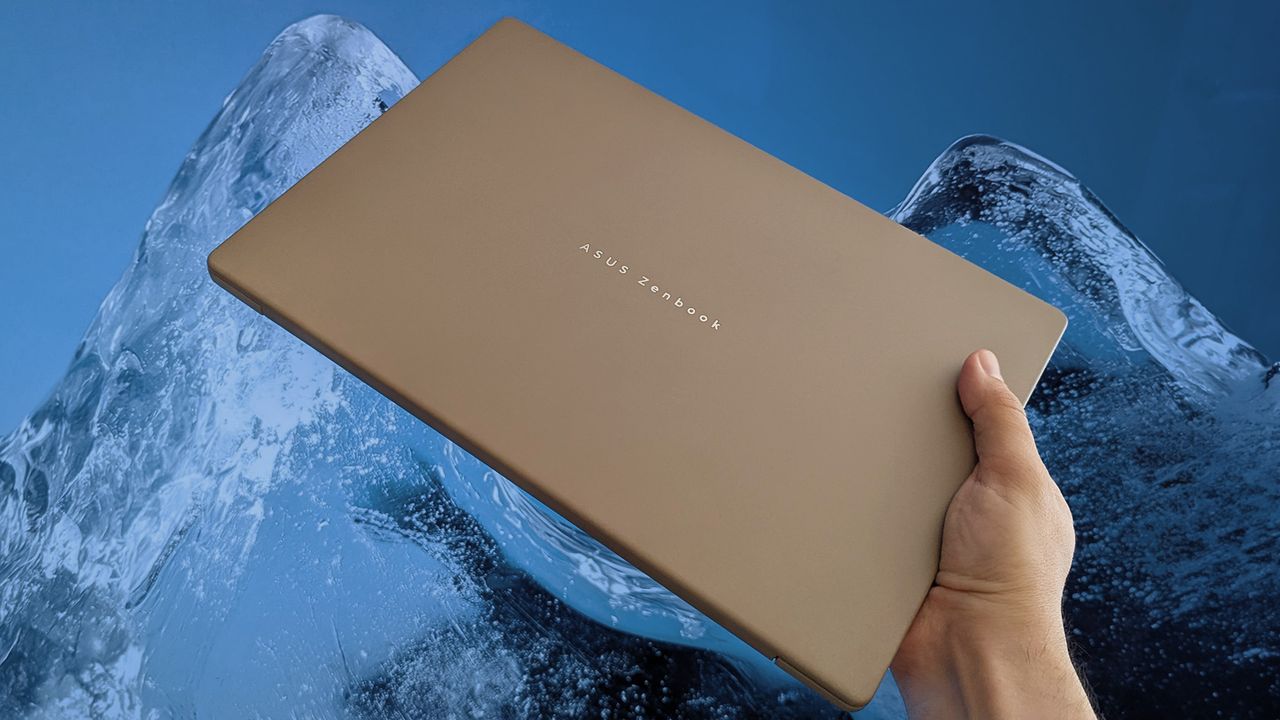
ASUS Zenbook A14 (2026) (Image credit: Ben Wilson | Windows Central)
I was a skeptic for a long time, but OLED laptops have won me over when I'm looking for a new daily driver. Offering better contrast with deeper blacks than traditional IPS screens, many of these color-rich panels also deliver higher-than-average max brightness, though I generally keep mine at around 250 nits. Most of my apps are in dark mode, too, so my average experience looks great.
You can go even more advanced with a mini LED screen, such as the one I tried in Lenovo's Slim Pro 9 a few years ago that reached an incredible 615 nits, but it's far and above anything I've ever needed. OLED is a noticeable improvement over LCD, and many, myself included, will find that anything beyond that yields diminishing returns if you aren't a professional image or video creator.
2. 14-inch chassis (and lightweight)
Lenovo Yoga Slim 7i Ultra (Gen 11) Aura Edition (Image credit: Ben Wilson | Windows Central)
It sounds unusually specific, but after traveling with laptops, I found that 14-inch models with 16:10 ratio displays offered me the best experience. They fit perfectly in cramped travel environments with tray tables and tiny tables, yet still feel spacious enough in a hotel room when I can connect an external mouse. A 13.8-inch Surface Laptop 7 with a 3:2 screen also passes.
Anything around or below 2.65 lbs (1.20 kg) is a bonus, as I'm regularly throwing these compact laptops into rucksacks or whatever carry-on I'm lumped with at the time. However, the lightest laptops are rarely the most affordable, as Lenovo's Yoga Slim 7i Ultra Aura Edition I tested clearly demonstrated with its 2.15-lb (975 g) chassis. The trick is to find something within that ideal window.
3. At least 512GB of storage
M.2 SSD in a Lenovo ThinkPad X1 Carbon (Image credit: Cale Hunt | Windows Central)
Plenty of Windows laptops are listed by major retailers with 256GB of storage, particularly in budget models. That kind of entry-level drive is aimed firmly at casual users who mostly stick to web browsing, but it's never enough for me. Images and video files build up in my workflow, and I'm often hovering around half capacity on a 512GB drive.
To be transparent, my desktop PC has twin 1TB drives, but that's mostly for games and other gigantic software that I'd never need on the road. Plus, if I tried hard enough, I'm sure I could offload some of my largest files onto external drives, but I'd rather not travel with extra gadgets if I don't have to. 512GB has been perfect for years, and I don't see that changing.
4. At least one USB-A port
Acer Swift Go 16 AI (Image credit: Ben Wilson | Windows Central)
My dinosaur bones are showing. This is mostly about me hanging on to hardware for as long as possible, including my most-used flash drives and dongles for an older mouse. USB-C variants are out there and becoming quite common, but I have too many USB-A accessories that show no sign of wearing out, and I'm keeping them.
If you narrow your search to the absolute thinnest possible laptops, you'll find that USB-A ports disappear. Not a big deal if you have modern peripherals compatible with USB-C ports using popular standards like Thunderbolt 4 and USB4, but at least one full-size offering is a traditional mainstay that I'll always look out for. Wired headphone jacks are a bonus, too.
5. Legitimately all-day battery life
ASUS Zenbook S 14 (UX5406S) (Image credit: Ben Wilson | Windows Central)
Essentially, the major x86-64 chip manufacturers escalated a back-and-forth rivalry over battery-life claims around the time Qualcomm launched its first-generation Snapdragon X processors, and consumers have generally been better off for it in recent years. Testing ASUS' Zenbook S 14 proved to me that all-day battery life is now a reasonable expectation that doesn't cost the Earth.
6. Backlit keyboard
Lenovo Yoga Slim 7i Ultra (Gen 11) Aura Edition (Image credit: Ben Wilson | Windows Central)
Typing in the dark has become a pretty regular occurrence at trade shows, whether I'm seated for a glorified PowerPoint presentation in a dim theater or traveling to the event itself on a red-eye flight. To be clear, I've been able to touch type since I was a teenager, but the nuances of switching between US and UK keyboard layouts can still catch me out.
At home, I have desk lamps and plenty of other comfortable light sources, but since my laptops are primarily for travel, I always prefer a backlit keyboard. This generally isn't a difficult criterion to meet, as only entry-level laptops would be likely to sacrifice the backlight to save money, though using the Surface Laptop Go 2 for a few years really made me realize how much it matters.
7. No proprietary chargers!
Lenovo Yoga Slim 7i Ultra (Gen 11) Aura Edition (Image credit: Ben Wilson | Windows Central)
I've seen a huge improvement in this area since USB-C chargers became more mainstream, and I have a growing collection of 65W plugs suited for various countries. Even the 45W AC adapter from my Steam Deck is a reliable backup in a pinch, and I don't mind that it charges my laptops more slowly. It's much better than a proprietary barrel jack.
Gaming laptops often sit in limbo between USB-C, tethered to a gigantic power brick, and the old-school barrel jack, because they draw so much power. It's similar with higher-end laptops for creators, as the more powerful CPUs and GPUs inside thirst for the extra juice. I just want to travel with a single USB-C adapter that charges my laptop, phone, and everything else.
So, my ultimatum isn't actually that unreasonable, as plenty of brands offer all of the above. Then again, some might start disappearing soon, since USB-A ports and headphone jacks will probably be seen as fossils in a few years. At least those two aren't too difficult to adapt to, as I've owned pairs of wireless headphones that can connect to multiple Bluetooth devices simultaneously.
Still, these are all problems that can only be solved by spending money, which is a big ask when the laptops themselves are creeping up in price, snared by the ongoing memory crisis affecting RAM and storage availability. As it stands, my taste traps me into a laptop price bracket of at least ~$1,000. Any less than that, and I start to notice some parts of my list disappearing.
Join us on Reddit at r/WindowsCentral to share your insights and discuss our latest news, reviews, and more.
A hand holds a closed ASUS Zenbook A14 with a beige finish, positioned against a dramatic blue ice formation that contrasts with the laptop’s warm color and sleek design.
ASUS&#39; Zenbook range regularly impresses, but it&#39;s not the only brand to tempt me.
The $100 jump to Garmin’s fēnix 9 Pro buys a titanium case and access to solar and inReach configurations, not a completely different watch platform.
The post Garmin Fenix 9 vs Fenix 9 Pro: Is the $100 Upgrade Worth It? appeared first on TechRepublic.
Sennheiser’s $299.95 Momentum True Wireless 5 adds user-replaceable batteries to both the earbuds and charging case, plus longer battery life and Bluetooth 6.0.
The post Sennheiser Momentum True Wireless 5: Key Features and Price appeared first on TechRepublic.
Sennheiser’s $299.95 Momentum True Wireless 5 adds user-replaceable batteries to both the earbuds and charging case, plus longer battery life and Bluetooth 6.0.
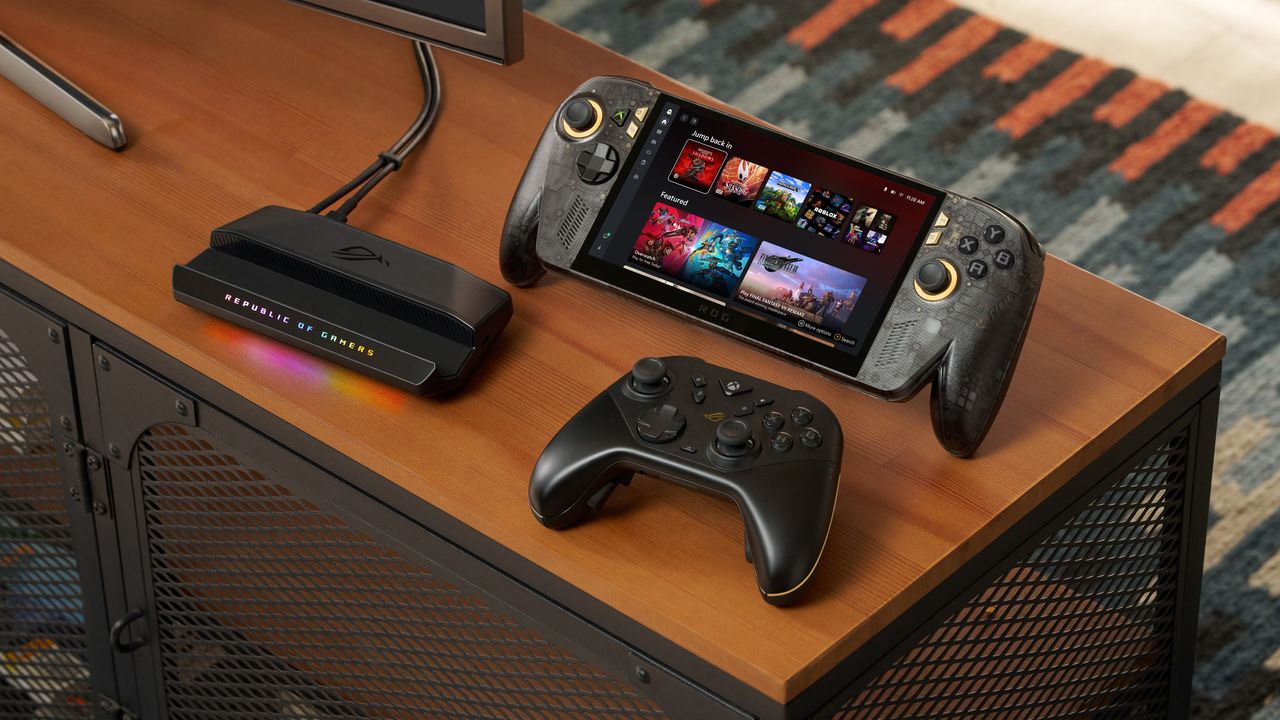
ASUS has officially opened pre-orders for the ROG Xbox Ally X20, confirming that the company's 20th anniversary handheld gaming PC will be available both as a premium standalone device and as part of a bundled package when it launches on October 15.In the United States, customers can now pre-order the ROG Xbox Ally X20 standalone model for $1,299.99 MSRP, while the fully loaded ROG Xbox Ally X20 Bundle is priced at $2,499.99 MSRP. Both versions will be available
ASUS has officially opened pre-orders for the ROG Xbox Ally X20, confirming that the company's 20th anniversary handheld gaming PC will be available both as a premium standalone device and as part of a bundled package when it launches on October 15.
In the United States, customers can now pre-order the ROG Xbox Ally X20 standalone model for $1,299.99 MSRP, while the fully loaded ROG Xbox Ally X20 Bundle is priced at $2,499.99 MSRP.
While ASUS originally introduced the X20 as a special anniversary edition, the more time we've spent learning about the device, the clearer it becomes that this isn't simply a commemorative refresh. The ROG Xbox Ally X20 is effectively a significant mid-generation upgrade to the existing ROG Xbox Ally X, bringing meaningful hardware, display, thermal, and control improvements that go well beyond a new paint job or limited-edition branding.
Pre-order
ASUS
ROG Xbox Ally X20
A refined celebration of ASUS’s gaming legacy, the Ally X20 Anniversary Edition pairs its upgraded Ryzen AI Z2 Extreme chip with a vibrant 7.4‑inch OLED HDR display and a boosted 80 Wh battery. It’s a sleeker, more efficient Windows gaming handheld built to mark the milestone with sharper visuals, quieter thermals, and longer play sessions.
A true upgrade, not just an anniversary model?
At first glance, the X20's translucent-inspired design and special 20th anniversary touches may suggest that this is primarily a collector's edition. Under the chassis, however, ASUS has made extensive engineering changes compared to the existing ROG Xbox Ally X that directly impact the gaming experience.
The most obvious upgrade is the display.
The ROG Xbox Ally X20 moves from the current model's 7-inch screen to a larger 7.4-inch OLED panel, while also delivering substantial improvements in brightness and HDR performance. The display now supports 600 nits SDR brightness, up to 1,400 nits peak HDR brightness, and includes Dolby Vision support alongside ASUS' ROG Nebula HDR technologies.
For handheld gaming, display quality is often one of the most noticeable aspects of the user experience, and the move to OLED alone represents one of the largest upgrades ASUS has made to the platform since launch.
Major internal redesign improves cooling and airflow
Direct front view of the translucent black ROG Xbox Ally X20 handheld gaming device displaying "20 ROG Anniversary" and "Dare to Innovate" on its screen. (Image credit: ASUS)
The display isn't the only part of the handheld receiving attention.
According to ASUS, the X20 features a completely redesigned PCB, allowing engineers to rethink the internal layout of the system. Surface-mounted USB4 ports enabled the motherboard to be repositioned, creating additional airflow opportunities within the chassis.
ASUS has also upgraded the cooling solution with revised fan and heatsink fin designs, while shifting motherboard placement by several millimeters to further improve thermal efficiency.
That may sound like a small change on paper, but thermals have become one of the defining factors of modern handheld gaming PCs. Better airflow and improved cooling can translate into lower temperatures, quieter operation, and more consistent performance during extended gaming sessions.
A better handheld for competitive gaming
A person reclining on a couch wearing ROG XREAL R1 AR glasses while holding the Ally X20 handheld, viewing a large virtual screen projection of a racing game. (Image credit: ASUS)
ASUS is also targeting enthusiasts who play fighting games, shooters, and other genres where input precision matters.
The ROG Xbox Ally X20 introduces hybrid metal dome switches for a more tactile D-pad feel, along with what ASUS calls a Transforming D-pad. The mechanism allows players to rotate the D-pad configuration to better align diagonals, providing an experience specifically designed with fighting games in mind.
The thumbsticks have also been upgraded to TMR magnetic induction sticks, offering Hall-effect-style benefits while reducing power consumption. ASUS says the sticks deliver roughly a 3% dead zone and improved precision compared with traditional alternatives.
From a visual standpoint, ASUS has doubled the RGB lighting count around the sticks, increasing from two LEDs to four LEDs per joystick.
Taken together, these changes may end up being just as important as the display improvements, especially for players who spend hundreds of hours with a handheld in their hands.
What's unchanged?
Back view of the translucent black ROG Xbox Ally X20 featuring textured hand grips, ventilation grilles, a gold diagonal stripe, and a 20th anniversary badge. (Image credit: ASUS)
Interestingly, ASUS has resisted changing several of the core specifications that already made the ROG Xbox Ally X one of the strongest Windows gaming handhelds available.
The ROG Xbox Ally X20 retains:
AMD Ryzen AI Z2 Extreme processor
24GB LPDDR5X-8000 memory
1TB PCIe Gen4 SSD storage
80Wh battery
USB4 connectivity with Thunderbolt compatibility
Wi-Fi 6E support
That's probably the right decision. The current Ally X platform already delivers excellent battery life and class-leading handheld performance, so ASUS appears to have focused on enhancing areas that users interact with directly rather than chasing specs for the sake of a marketing bullet point.
And to be fair, there is no newer AMD handheld chip on the market, so there's that!
Goodbye microSD, hello microSD Express
One notable hardware change involves expandable storage.
The traditional microSD slot has been removed and replaced with a microSD Express card reader, supporting dramatically faster storage speeds. ASUS cites support for microSD Express cards capable of approaching 1 GB/s transfer rates, bringing removable storage much closer to SSD-class performance
As game install sizes continue growing, that could become a more meaningful upgrade than many users initially realize.
Two ways to buy
Everything included in the $2,499 ROG Xbox Ally X20 bundle set. (Image credit: ASUS)
For buyers who only want the handheld itself, the new standalone version offers a straightforward path into the X20 experience.
Meanwhile, ASUS is also offering a premium bundle aimed at enthusiasts and collectors, because of course.
The ROG XREAL R1 AR glasses, which are its top-tier offering, is one of the reasons for the big price jump for the anniversay bundle package. (Image credit: ASUS)
Custom Pelican Protector Case with 20th anniversary badge
68W charger
That's a lot of stuff in that bundle, and it's cool to see dbrand officially teaming up with ASUS here for its famed Killswitch case (see our previous review). As far as that steep price, much of that comes down to the inclusion of the ROG XREAL R1 Edition glasses, which are currently sold separately, while these are, of course, matching in the 20th anniversary gold and black motif.
I've written about the current ROG XREAL R1's before, noting their crazy 240Hz micro‑OLED panels, letting you experience a portable (virtual) 171-inch screen. Along with their included dock, they cost $849.99.
ASUS now has one of the strongest handheld lineups on the market
Angled front view of the translucent black ROG Xbox Ally X20 handheld console with gold joystick rings and screen displaying a 20th anniversary graphic. (Image credit: ASUS)
What's perhaps most impressive about the X20 launch is what it does to ASUS' overall handheld portfolio.
The company's lineup now spans three clear price tiers (assuming we don't see price increases):
That's a remarkably clean progression that gives buyers meaningful upgrade options at every budget level.
The X20 occupies a premium position without completely abandoning value-conscious enthusiasts. Even at $1,299.99, it remains roughly $500 below the eye-watering prices we've seen attached to some ultra-premium handhelds, including MSI's difficult-to-find Intel-powered Claw 8 EX AI+ configurations.
More importantly, the X20 differentiates itself with tangible quality-of-life improvements rather than simply adding more RAM or storage. The OLED display, revamped controls, enhanced cooling design, microSD Express support, and internal engineering changes all combine to create a device that feels genuinely evolved from the existing Ally X.
For a product marketed as an anniversary edition, that's arguably the biggest surprise of all.
The ROG Xbox Ally X20 may celebrate two decades of Republic of Gamers history, but its real significance is that it represents the most refined version of ASUS' handheld gaming platform yet—and now, for the first time, buyers can purchase it without needing to opt for the collector-focused bundle.
Pre-order
ASUS
ROG Xbox Ally X20
A refined celebration of ASUS’s gaming legacy, the Ally X20 Anniversary Edition pairs its upgraded Ryzen AI Z2 Extreme chip with a vibrant 7.4‑inch OLED HDR display and a boosted 80 Wh battery. It’s a sleeker, more efficient Windows gaming handheld built to mark the milestone with sharper visuals, quieter thermals, and longer play sessions.
Pre-order
ASUS
ROG Xbox Ally X20 Bundle
Twenty years of ROG innovation, marked by the limited ROG Edition 20 lineup in an exclusive colorway. The ROG XBOX Ally X20 Bundle carries that celebration forward, pairing the handheld with the ROG XREAL R1 Edition 20 Gaming AR glasses to create a complete gaming setup that travels with you.
Join us on Reddit at r/WindowsCentral to share your insights and discuss our latest news, reviews, and more.
ROG Xbox Ally X20 handheld sitting upright on a desk setup alongside a black wireless controller and an RGB-lit Republic of Gamers dock station.
ROG Xbox Ally X20 handheld sitting upright on a desk setup alongside a black wireless controller and an RGB-lit Republic of Gamers dock station.
Antonline is hosting a limited-time Intel Gaming Days sale, offering massive discounts on Intel-powered PC components to boost graphical fidelity and gaming performance for less, along with more savings on gaming laptops and desktops.One of the biggest highlights of this sale is a range of Intel Core Ultra 200S CPUs, modern desktop processors that offer superb performance, energy efficiency, and thermal stability for gaming and productivity. One of our favorites
Antonline is hosting a limited-time Intel Gaming Days sale, offering massive discounts on Intel-powered PC components to boost graphical fidelity and gaming performance for less, alongwithmore savings on gaming laptops and desktops.
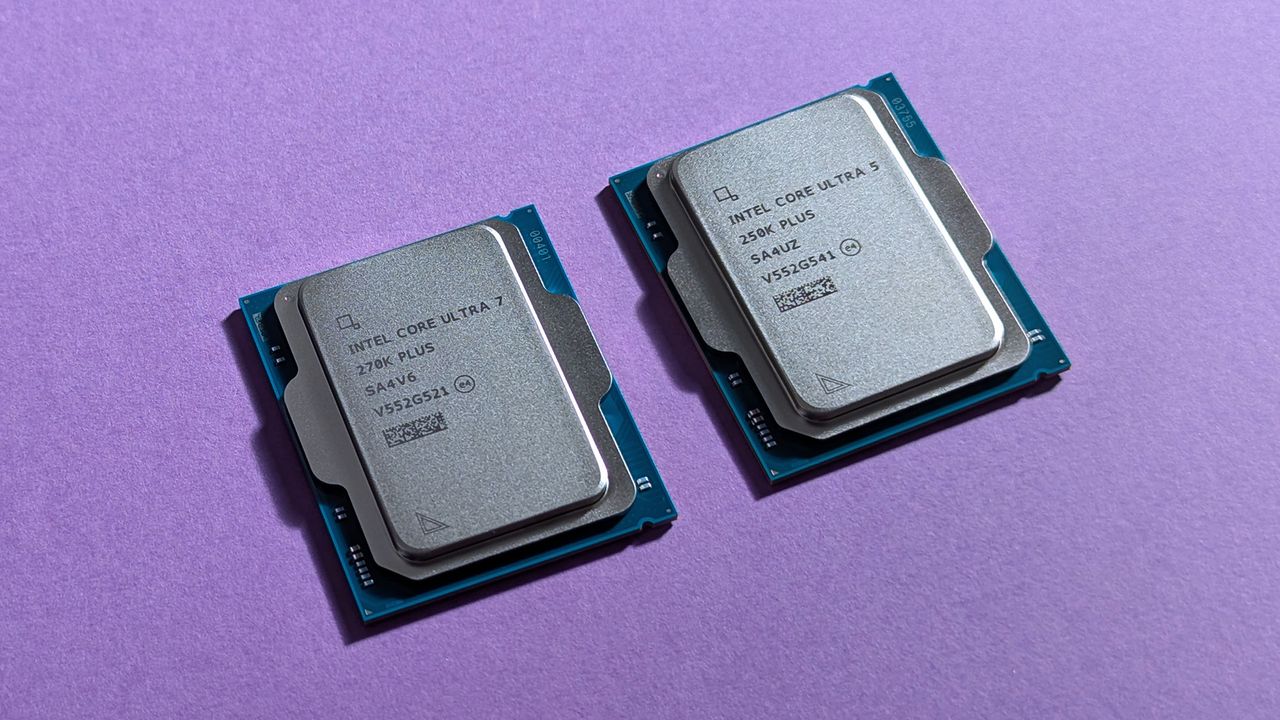
One of the biggest highlights of this sale is a range of Intel Core Ultra 200S CPUs, modern desktop processors that offer superb performance, energy efficiency, and thermal stability for gaming and productivity. One of our favorites from the line-up, the Intel Core Ultra 7 270K Plus, is currently discounted from $469.97 to $329.99 at Antonline.
As a bonus, all these Intel Core Ultra CPU deals at Antonline include free pre-order digital PC codes for STAR WARS: Galactic Racer (which launches on October 10, 2026) and Tomb Raider: Legacy of Atlantis (which launches on February 12, 2027).
"With the Core Ultra 9 285 K, Intel offers the strongest productivity computing performance on the market, perfect for enthusiasts looking to build an at-home creative workstation." ~ Ben Wilson, Senior Editor
"An affordable entryway into the latest connectivity standards on desktops, Intel delivers its ultra-efficient AI processor." ~ Ben Wilson, Senior Editor
The 250KF version features the same 18-core (6P+12E), 18 Threads, max 5.30 GHz Unlocked speeds, and 30 MB Smart Cache as the Core Ultra 5 250K, but without integrated graphics.View Deal
The 245KF version features the same 14 cores, 14 threads, max 5.2 GHz unlocked speeds, and 26MB Cache as the Core Ultra 5 245K, but without integrated graphics.View Deal
If you're wondering what kind of laptops or computers would benefit from being upgraded with these CPUs, here are a couple of discounted examples from Antonline's Intel Gamer Days sale.
Play games on the go with Lenovo LOQ-E 15IRX11 gaming notebook. This laptop can provide your games with smooth, crisp visuals with its 15.6-inch FHD IPS display with a 144Hz refresh rate, and empower their performance to achieve smooth, gameplay-enhancing framerates thanks to its NVIDIA GeForce RTX 5050 graphics card, 16GB RAM, and 13th Gen Intel Core i5-13450HX 10-core processor.View Deal
If you're looking to achieve the absolute best graphical fidelity and performance rates out of your games, no matter the cost, you'd be hard-pressed to find a more powerful laptop than the ASUS ROG Strix Scar 18.
This behemoth of a laptop is equipped with the best hardware on the market for 4K gaming at 120+ FPS, such as an NVIDIA GeForce RTX 5090 graphics card, 32GB of RAM, a 1TB SSD, an Intel Core Ultra 9 290HX CPU, a 4K 240HZ HDR mini-LED display, and more.
Out of all the CPUs on sale here, the Intel Core Ultra 7 270K Plus offers the best overall performance for gaming, on par with the more expensive Intel Core Ultra 9 285K at a lower price. It can make your PC games achieve exceptionally high performance when paired with a suitable graphics card.
Are these CPUs good for productivity?
Yes, the Intel Core Ultra 200S CPUs are fantastic for boosting your PC's performance when tackling productivity tasks. For example, the Intel Core Ultra 9 285K can crush heavy multi-threaded tasks.
How long will Antonline's Intel Gamer Days sale last?
Antonline's Intel Gamer Days sale will last until September 13, 2026.
What are STAR WARS: Galactic Racer and Tomb Raider: Legacy of Atlantis?
STAR WARS: Galactic Racer is an upcoming racing game set in the STAR WARS universe, while Tomb Raider: Legacy of Atlantis is an upcoming third-person action-adventure that reimagines the original Tomb Raider from 1996 for the modern era.
Join us on Reddit at r/WindowsCentral to share your insights and discuss our latest news, reviews, and more.
Intel Core Ultra 5 250K Plus and 270K Plus desktop processors
Overhaul your gaming PC with a discounted Intel Core Ultra 5 250K Plus or 270K Plus CPU.
Taiwan indicted nine people, including Nvidia and Super Micro staff, over an alleged scheme that diverted restricted AI servers to customers in China.
The post Taiwan Indicts Nine Over Alleged Nvidia AI Server Smuggling to China appeared first on TechRepublic.
Samsung’s One UI 9 puts warranty checks, diagnostics, repair estimates, and service booking in Settings on the latest Galaxy foldables.
The post Samsung One UI 9 Puts Warranty Checks and Repair Support Right in Settings appeared first on TechRepublic.

 Connexion