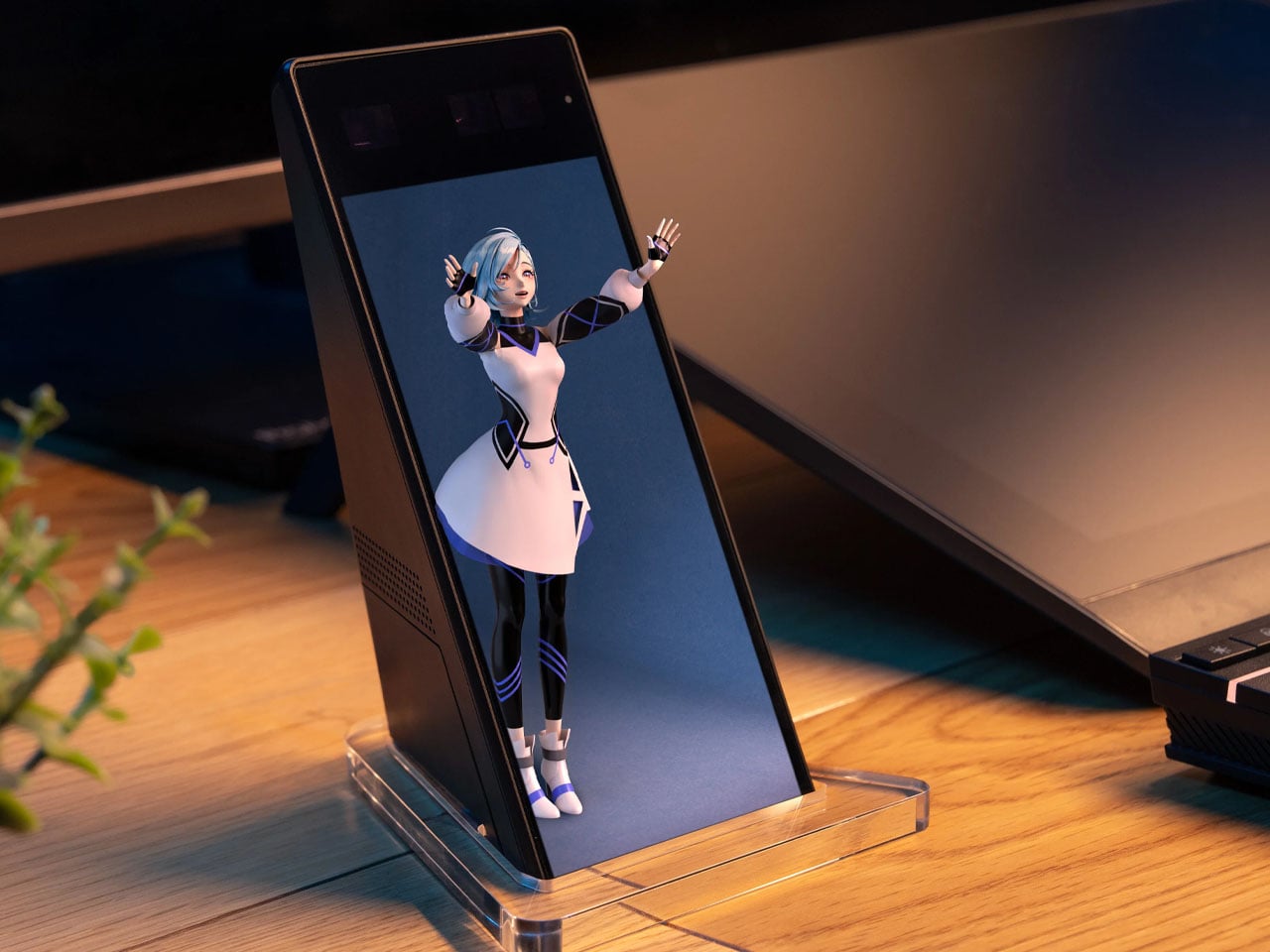
Your desk does not need another gadget simply because there is room for one. The worthwhile additions are the ones that change how the space works or feels: a light that leaves the surface clear, a mouse that packs flat, or a notebook alternative that lets your ideas move around. Sometimes, the right accessory does something less practical but equally personal, giving an otherwise ordinary setup a little more character.
These eight designs approach the workspace from different directions, balancing useful everyday tools with objects that make sitting down feel more inviting. Sony’s miniature 3D display leads the selection, joined by adaptable storage, sculptural stationery, thoughtful lighting, and portable technology. The connecting thread is considered design rather than a matching aesthetic, with each accessory offering a distinct reason to claim some space beside your computer, sketchbook, or morning coffee cup.
1. Sony ELF-MN1 Spatial Reality Display
Sony’s ELF-MN1 takes the familiar desk collectible and replaces the physical figure with a digital character on a six-inch display. Its glasses-free 3D presentation makes compatible content appear to have depth without asking you to wear a headset. The transparent stand keeps the enclosure visually light, which suits an object intended to sit beside a monitor rather than compete with it. This is the personality piece of the group, not another screen pretending to be essential office equipment.
The interesting design decision is making digital collecting feel more like displaying an object than opening another window on your computer. Eye tracking adjusts the stereoscopic image for the viewer, although the effect is intended for one person rather than everyone around the desk. You will need a compatible smartphone or PC and supported content, so this is not a universal digital picture frame.
What we like
- The combination of a compact enclosure and glasses-free depth gives digital collectibles a distinctive desktop presence.
- It adds personality without requiring a headset.
What we dislike
- The stereoscopic effect is intended for a single viewer.
- Compatible hardware and content are required, and the product is not shipping yet.
2. MagBoard Clipboard
A notebook gives your thoughts a home, but it also decides where every page belongs. The MagBoard Clipboard takes a more flexible approach, using a magnet and lever mechanism to secure loose sheets inside a simple cover. Pages can be removed, replaced, or rearranged as a project develops. For a desk covered with sketches, meeting notes, and half-finished ideas, that makes it an appealing middle ground between a conventional bound notebook and an increasingly unruly stack of loose paper.
Designed by Hirock Design Office and made in Japan, the clipboard has a rigid cover that also provides a writing surface away from your desk. The shop specifies a capacity of up to 30 sheets, enough for a focused working collection rather than an entire archive. A5 and A4 sizes let you choose between compact notes and larger drawings. Available configurations start at $45, making this the simplest selection for readers who would rather reorganize their paper than digitize everything.
Click Here to Buy Now: $45.00
What we like
- Loose pages can follow the changing order of a project.
- The rigid cover provides support when a tabletop is unavailable.
What we dislike
- The stated 30-sheet capacity limits how much material it can hold.
- It costs more than a basic clipboard and still requires managing individual sheets.
3. Divoom Astrotoo
The Divoom Astrotoo looks like a tiny computer from a future imagined several decades ago. Its rounded housing, raised keys, and joystick give it a tangible character that a plain speaker grille rarely achieves. Behind that playful appearance sits a 20W speaker and a 3.95-inch display for photographs, clock faces, pixel art, and music visualizations. It offers a way to bring music and personal imagery into the same small object, rather than adding separate accessories to your desk.
Physical controls handle everyday interactions, while the Divoom app manages visual customization. That division gives the buttons a purpose beyond completing the retro look, although the phone remains part of the experience. Divoom lists Bluetooth, WiFi, microSD playback, and battery operation, with up to six hours claimed between charges. At $199.99 and listed in stock, Astrotoo is a substantial purchase for its size. Its appearance is easy to appreciate; sound quality needs listening rather than assumptions based on its specifications.
What we like
- The physical keys and joystick make the retro styling functional.
- Music playback and a customizable display share one compact enclosure.
What we dislike
- Visual customization still involves a phone app.
- The claimed six-hour battery life does not cover a full eight-hour workday.
4. BenQ iScreenBar
A desk lamp can improve a workspace while also becoming another object you have to work around. BenQ’s iScreenBar removes the base from that equation by attaching to a compatible iMac through a magnetic mounting system. The aluminum body follows the computer’s restrained material language, while cable management helps keep the addition visually contained. It is a particularly relevant accessory for an already crowded desk, where the best place to put another useful object may be above the work surface.
The mounting arrangement is designed to leave the camera, microphones, and speakers unobstructed, while asymmetric optics direct illumination toward the desk. BenQ also provides automatic brightness adjustment and software controls, giving the light more flexibility than its minimal appearance suggests. The important qualification is compatibility: the magnetic clip supports iMac models from 2021 onward, not earlier iMacs or Apple’s standalone displays. Listed at $189, it makes sense as a tailored lighting solution, not as a universal recommendation for every computer.
What we like
- The mounted design leaves the desktop free of a lamp base.
- Its attachment and cable routing are designed specifically around the iMac.
What we dislike
- Compatibility excludes earlier iMacs and Apple’s standalone displays.
- The specialized mounting makes it less transferable if you change computer setups.
5. Levitating Pen 3.0
Most pens disappear into a drawer until they are needed. The Levitating Pen 3.0 makes putting one down part of its appeal. Supported magnetically, it balances on a pinpoint at a 60-degree angle, creating a poised silhouette above its pedestal. The effect gives an ordinary writing instrument the presence of a small kinetic sculpture. Beside Sony’s digital display, it offers a different kind of desktop spectacle, using a physical balance mechanism rather than another illuminated screen to attract attention.
The pen remains a writing tool, which matters when the novelty wears off. The available 2-in-1 configuration can switch between fountain and rollerball formats by changing the grip, offering a practical reason to look beyond the stand. That version was listed at $149 when checked, while standalone fountain and rollerball variants were marked sold out. Its strongest appeal is the relationship between object and holder, so consider whether you want to dedicate permanent desk space to the pedestal.
Click Here to Buy Now: $149.00
What we like
- The magnetic balance turns storage into a distinctive part of the design.
- The available 2-in-1 version offers fountain and rollerball configurations.
What we dislike
- The pedestal occupies more space than simply storing a pen in a tray.
- At $149 for the available configuration, its sculptural appeal carries a premium.
6. DailyObjects Node Charging Ecosystem
Charging accessories often arrive one device at a time, eventually leaving a desk with several unrelated stands and cables. Designed by LAYER for DailyObjects, Node treats them as components of a shared system instead. A dock supports interchangeable modules, allowing the arrangement to change with the devices and routines around it. The collection includes a wireless phone stand, charging disk, Apple Watch stand, and portable lamp. Its rounded forms make the charging setup feel like a deliberate group of objects.
The flexibility extends beyond rearranging pieces on a base. LAYER describes modules that can work independently, with a battery-equipped phone stand and portable lamp allowing selected functions to move elsewhere. That could suit someone who works at a desk during the day and wants the same accessories nearby later. The distinction between configurations matters, since a pictured collection should not be mistaken for one included package. Current pricing and regional purchase availability could not be independently confirmed during checking.
What we like
- Interchangeable modules allow the setup to respond to different needs.
- The phone stand and portable lamp bring mobility into a usually stationary category.
What we dislike
- Buyers need to check exactly which modules a configuration includes.
- Current pricing and regional availability remain unconfirmed.
7. Orbitkey Grid Desk Organizer
A fixed compartment organizer works beautifully until the things you need to store change. Orbitkey’s Grid Desk Organizer makes that limitation its starting point, using movable dividers that snap into a perforated tray floor. Instead of finding objects that fit the compartments, you arrange the compartments around your objects.
That is a useful distinction for a desk that alternates between stationery, charging cables, earbuds, and small tools, where yesterday’s tidy arrangement can quickly become today’s awkward collection of empty spaces. Stackable trays add another layer of adaptability, while the lid can serve as a phone stand. The design is promising, but its production status needs to stay visible beside the attractive imagery.
What we like
- Movable dividers let the storage layout follow the objects.
- Stackable layers offer a way to organize vertically.
What we dislike
- Accessing lower trays involves moving or sliding the layers above them.
- Fulfillment remains pending, so it is not an immediate desk upgrade.
8. OrigamiSwift Mouse
The OrigamiSwift Mouse addresses a familiar frustration with portable work tools: the shape that suits your hand rarely suits your bag. Its folding body opens into a raised mouse form, then flattens for storage when the workday moves elsewhere. The triangular geometry gives that transformation a visual logic rather than disguising the folds. Designed by Horace Lam, it belongs on this list because the mechanism changes how the object travels, not simply because its appearance differs from a conventional mouse.
Bluetooth connectivity and USB-C charging keep the practical specifications familiar, while the listed 40-gram weight reinforces the portability story. The shop claims up to three months of use per charge, a figure that should be treated as a product claim rather than a tested result. Black and Gray versions are listed at $85, with Titanium Silver at $95. The folding design is appealing for shared tables and mobile setups, although comfort over long sessions still needs individual assessment.
Click Here to Buy Now: $85.00
What we like
- The folding mechanism reduces thickness for packing and storage.
- Its lightweight construction suits a workspace that moves between locations.
What we dislike
- Folding flatter does not necessarily mean occupying less tabletop area.
- The unusual shape warrants a personal comfort check before replacing an everyday mouse.
A Better Desk Does Not Need Everything
The most convincing desk upgrade is usually the one that answers a specific frustration. MagBoard gives loose notes a more flexible home, BenQ moves lighting off the work surface, and OrigamiSwift changes what a mouse needs to occupy inside your bag. None requires the rest of the collection to make sense. Choosing one useful improvement is a better starting point than assembling an entire setup around a photograph you admire.
There is also room for objects that make the desk feel more personal, whether that means a magnetically balanced pen or a digital character beside your monitor. The distinction is knowing what you are buying and why. Check compatibility, available configurations, and delivery status before committing, particularly with forthcoming designs. A considered workspace should reflect the way you actually spend time there, with enough room left for the work itself.
The post 8 Best Desk Accessories of October 2026 to Upgrade Your Workspace first appeared on Yanko Design.

 Connexion