Microsoft says the August 2026 security update may trigger 0xc0000409 errors on Windows Server 2016 systems where the Compatibility Appraiser diagnostic service is enabled. [...]
Microsoft says the August 2026 security update may trigger 0xc0000409 errors on Windows Server 2016 systems where the Compatibility Appraiser diagnostic service is enabled. [...]
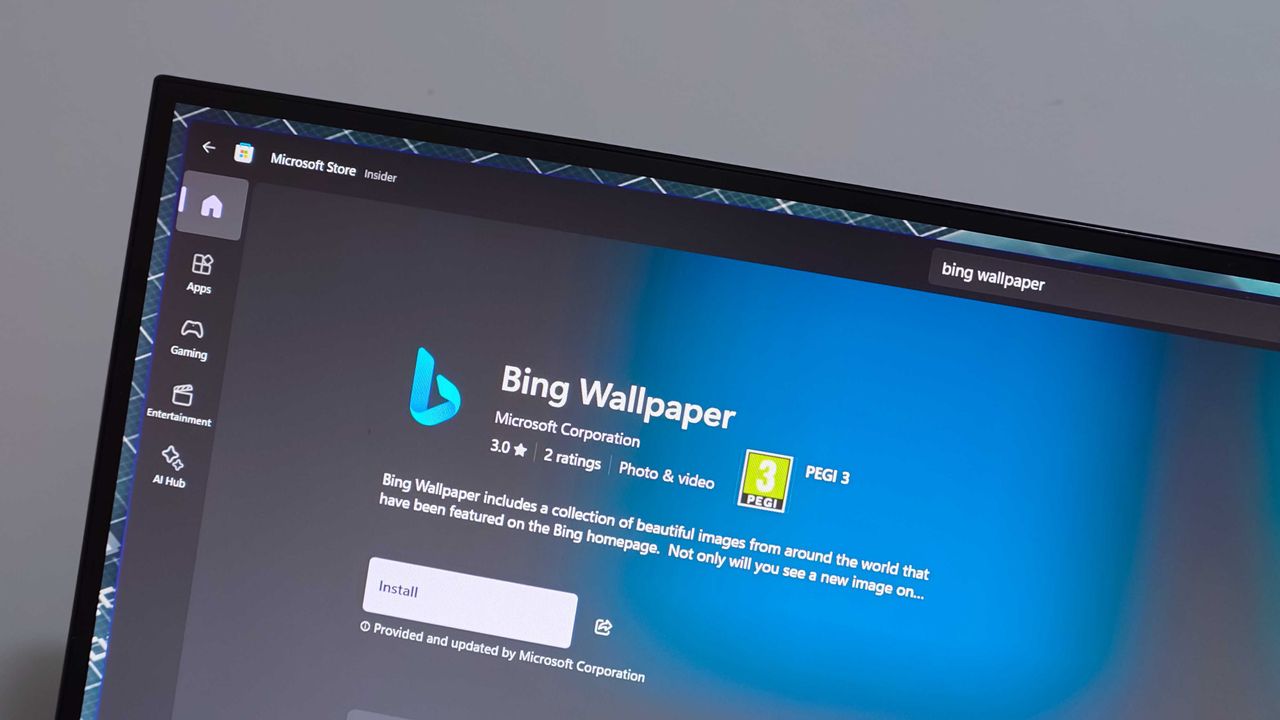
The Bing Wallpaper app is one of the few items under the Bing brand that's praised. The app provides beautiful images that can be set to rotate as your desktop background. But the app is in the headlines for the wrong reasons this week.Some unlucky users have had their desktop background swapped to a fullscreen ad for a collection of Harry Potter and Fantastic Beasts films.People have taken to Reddit to complain about the ad-filled wallpaper. A Microsoft Learn po
The Bing Wallpaper app is one of the few items under the Bing brand that's praised. The app provides beautiful images that can be set to rotate as your desktop background. But the app is in the headlines for the wrong reasons this week.
Some unlucky users have had their desktop background swapped to a fullscreen ad for a collection of Harry Potter and Fantastic Beasts films.
There's often debate about what counts as an ad on Windows 11. For example, prompts to use OneDrive are called ads by some but are viewed simply as optional features by others.
Promotional content isn't entirely new to Bing Wallpaper. The app frequently cycles through images tied to popular movies or Xbox games. Perhaps I'm splitting hairs, but I view the new Harry Potter wallpaper differently than a normal background image.
Bing Wallpaper features a gorgeous clean image of David Corenswet's Superman. It's a well-framed shot with dynamic lighting that captures the hopeful tone of Corenswet's rendition of the character. While the image is from Superman (2025), it is not a promotional poster with text about how to buy the movie.
In contrast, the Harry Potter wallpaper is specifically about the 11-film collection. The lower-right corner of the image says "AVAILABLE NOW" in all caps.
If the image were simply of Hogwarts and the surrounding area, it would be different. People are passionate about Harry Potter and other franchises. It's completely natural to enjoy a wallpaper showing off a favorite character or iconic setting.
I'd be just as bothered if the Superman image featured prominent text telling me the movie is available on Amazon. If Microsoft needs to monetize the Bing Wallpaper app, that needs to happen without crowding the images. Clicking to learn more about an image from a movie and being told about the film is fine. A big promo on my desktop is not.
Bing Wallpaper is an optional app, so it's not as if Microsoft is pushing more ads through Windows 11's settings. But as mentioned earlier, Bing Wallpaper is one of the only parts of the Bing brand that's well received. Tarnishing it with ads is penny wise, pound foolish.
Join us on Reddit at r/WindowsCentral to share your insights and discuss our latest news, reviews, and more.
Microsoft details Windows 11 age-signal APIs that let eligible apps receive age brackets without exposing users’ exact ages or birth dates.
The post Microsoft Confirms Windows 11 Age Signals for Apps — But They Aren’t Live Yet appeared first on TechRepublic.
Microsoft is retiring Word’s Similarity Checker and making Text Predictions opt-in. Learn who is affected and what users should do before October 3.
The post Microsoft Is Removing a Useful Word Tool: What Users Should Know appeared first on TechRepublic.
Microsoft warned customers last week that they may experience application crashes on some Windows Server 2025 due to recent memory management changes. [...]
Microsoft warned customers last week that they may experience application crashes on some Windows Server 2025 due to recent memory management changes. [...]
Last week at IFA 2026, Microsoft announced Project Zenith, the codename of a new class of devices aimed squarely at developers looking to build apps and local AI experiences on top of Windows 11. The announcement came out of the blue, which naturally caused a bit of confusion online.So, what is it? Well, Zenith is an effort to formalize a baseline for "developer-ready" hardware: devices that meet a minimum bar for performance and are ready out of box to begin cod
Last week at IFA 2026, Microsoft announced Project Zenith, the codename of a new class of devices aimed squarely at developers looking to build apps and local AI experiences on top of Windows 11. The announcement came out of the blue, which naturally caused a bit of confusion online.
So, what is it? Well, Zenith is an effort to formalize a baseline for "developer-ready" hardware: devices that meet a minimum bar for performance and are ready out of box to begin coding and compiling. This means the configuration of Windows 11 that ships on these devices is different from normal PCs, with different default settings and pre-installed apps.
To be clear: This isn't a new or different version of Windows 11. Zenith devices will almost definitely still ship with either Windows 11 Home or Pro, depending on the OEM. It's simply how Windows 11 is configured out of box that differentiates these developer-class devices from normal Windows 11 PCs.
There's seemingly also a hardware component at play, too. Microsoft says Zenith devices must ship with at least 64GB of unified memory and be capable of 250GB/s of memory bandwidth if they want to ship with this specially preconfigured version of Windows 11 for developers. All other hardware will ship with the normal configurations of Windows 11.
In recent years, there has been an uptick in developers making the switch from Windows to Mac for a variety of reasons, including OS quality issues or lack of capable hardware in the wake of Apple Silicon. Developers have also complained that it just takes too long to set up a Windows PC for development, sometimes taking hours or even days from the first power-up.
The developer-focused apps and frameworks that come preloaded on Zenith PCs. (Image credit: Microsoft)
Zenith removes this friction. These devices are certified high-end and ship from the factory in a state that is ready to code, with apps like Visual Studio and GitHub Copilot already installed and ready to go as soon as you reach the desktop. They also ship with Windows 11 in a configuration that already dials back the annoyances that developers have complained about.
Out of box, "File Explorer shows file extensions, hidden files, the full path in the title bar, and the details pane, with long-path support enabled. Recently used files and folders and sync provider tips are turned off for a cleaner workspace. In Search and Start, Command Palette is enabled, while Start menu tips and account notifications are turned off to reduce distractions."
These are small but meaningful changes to the default Windows configuration, one that can save minutes of setup time. If you're managing a fleet of developer devices, this will save you hours of configuration time. The good news is these settings aren't unique to Zenith PCs.
If you don't fancy spending the money on a new Zenith device, you can manually configure your existing Windows 11 PC to match the configuration that comes preloaded on Zenith PCs. Of course, it'll take longer to do, but you'll save yourself the cost of a new PC in the process.
Ultimately, the goal of Zenith is to signal to developers that Microsoft is listening and wants to position Windows as the preferred platform for on-device AI and app development. The first Zenith devices to ship will be ones powered by AMD's Ryzen AI Halo chips, with other chipmakers such as the RTX Spark expected to follow.
No word on which OEMs will build Zenith hardware, or when the first Zenith devices will begin shipping just yet. We'll keep you posted when we know more!
Join us on Reddit at r/WindowsCentral to share your insights and discuss our latest news, reviews, and more.
September 2026 TIOBE Index keeps the top 10 unchanged, as Python falls below 18%, C++ widens its lead over Java, and Julia nears the top 20.
The post TIOBE Index for September 2026: Python Drops Below 18% as Julia Nears Top 20 appeared first on TechRepublic.

 Connexion