Vue normale

OpenAI Launches Computer History for ChatGPT and Codex on Mac

17 août 2026 à 13:20

OpenAI’s Computer History turns Mac activity into searchable memories. See how it works, who can use it, and the privacy and security risks.

The post OpenAI Launches Computer History for ChatGPT and Codex on Mac appeared first on TechRepublic.

Anthropic CEO Dario Amodei Says Open-Weight AI Won’t Decentralize Power

17 août 2026 à 12:59

Anthropic CEO Dario Amodei argues that open-weight AI alone cannot decentralize power while advanced chips and compute remain concentrated.

The post Anthropic CEO Dario Amodei Says Open-Weight AI Won’t Decentralize Power appeared first on TechRepublic.

Google Makes Visible Gemini Watermarks Optional for AI Images, Videos and Music

17 août 2026 à 12:53

Google now lets Gemini users disable visible AI watermarks while keeping invisible SynthID markers and C2PA credentials embedded for transparency.

The post Google Makes Visible Gemini Watermarks Optional for AI Images, Videos and Music appeared first on TechRepublic.

How to Take Notes for In-Person Meetings With Google Meet

17 août 2026 à 11:28

Google Meet can use Gemini to capture in-person conversations and turn them into a Google Doc with summaries and action items.

The post How to Take Notes for In-Person Meetings With Google Meet appeared first on TechRepublic.

Can Open-Weight AI Pressure OpenAI and Anthropic Valuations?

17 août 2026 à 10:49

Open-weight AI does not need to beat frontier models to test the growth and margin assumptions behind OpenAI and Anthropic's soaring valuations.

The post Can Open-Weight AI Pressure OpenAI and Anthropic Valuations? appeared first on TechRepublic.

  • ✇Articles on TechRepublic
  • Malaysia Data Center Growth Surges as Johor Capacity Tightens
    Johor’s data center pipeline has reached 8,542 MW, but a 0.7% colocation vacancy rate, grid constraints, and water demand mean regional IT buyers need to separate announced capacity from infrastructure they can actually deploy. The post Malaysia Data Center Growth Surges as Johor Capacity Tightens appeared first on TechRepublic.
     

Malaysia Data Center Growth Surges as Johor Capacity Tightens

17 août 2026 à 08:37

Johor’s data center pipeline has reached 8,542 MW, but a 0.7% colocation vacancy rate, grid constraints, and water demand mean regional IT buyers need to separate announced capacity from infrastructure they can actually deploy.

The post Malaysia Data Center Growth Surges as Johor Capacity Tightens appeared first on TechRepublic.

6 Best Small Business Email Providers for 2026

17 août 2026 à 08:00

Looking for the best business email provider? Compare top options like Google Workspace, Microsoft 365, and Zoho Mail to choose the right one.

The post 6 Best Small Business Email Providers for 2026 appeared first on TechRepublic.

This $19.99 Claude AI Course Is Built for Work, Not Just Prompts

17 août 2026 à 08:00

This eDegree covers Claude prompting, automation, integrations, and coding for practical business use.

The post This $19.99 Claude AI Course Is Built for Work, Not Just Prompts appeared first on TechRepublic.

Microsoft Nearly Left China. AI Gave It a Reason to Stay

14 août 2026 à 18:06

Microsoft has sharply reduced its China footprint, but Azure and AI demand from Chinese companies operating abroad are giving it a reason to stay.

The post Microsoft Nearly Left China. AI Gave It a Reason to Stay appeared first on TechRepublic.

WhatsApp Begins Limited Test of AI Scam Alerts for Unknown Senders

14 août 2026 à 18:00

WhatsApp is testing an on-device Scam Alert feature that flags suspicious messages while keeping analysis local and preserving end-to-end encryption.

The post WhatsApp Begins Limited Test of AI Scam Alerts for Unknown Senders appeared first on TechRepublic.

Microsoft is ditching the COPILOT function in Excel before it even launches

Less than one year after being launched in preview and before leaving testing, the COPILOT function in Excel is going away. The function never shipped to general availability, but it could be used by Frontier and Insider users since August 2025.

The COPILOT function allowed users to use natural language to place prompts into spreadsheets. For example, you could use it to summarize text or categorize feedback. The function could also look up information from the web.

While useful, the function had serious limits. Microsoft stated that people should not use the COPILOT function for numerical calculations, responses that require context from other parts of a workbook, or any tasks with "legal, regulatory or compliance implications."

Considering how many people use Excel for important work and calculations, those limits are quite restrictive.

Microsoft's explanation of why the feature is going away lacks details. Instead, it primarily focuses on the fact that Copilot in Excel is still available in the side pane:

"Beginning September 14, 2026, the =COPILOT function in Microsoft Excel will no longer be available. This function is currently offered as a preview feature through the Insider and Frontier programs.

Customers can continue using Copilot in Excel through the Copilot side pane, which provides many of the same AI-powered capabilities, including summarizing text, classifying data, generating content, and retrieving information from the web. This change helps streamline the Copilot experience within Excel while continuing to provide AI assistance through a supported interface."

Users will not be able to create new formulas using the COPILOT function after September 14, 2026.

Windows Central take

Microsoft Copilot on a red background

(Image credit: Windows Central | Jez Corden)

It appears Microsoft may be reining in Copilot a bit. The AI tool is still part of the company's plans, but in a more controlled manner.

Microsoft has a unified Copilot experience that merges Copilot and Microsoft 365 Copilot. We've also seen some Copilot features go away or be limited over the last few months.

Earlier this summer I argued that the free version of Copilot is starting to feel like a tech demo designed to push paid tiers. I still think that's the case, but if Microsoft is going to push Copilot, it's best to do so with a plan.

Since the launch of Copilot, it's felt like Microsoft threw everything at the wall to see what sticks. The Copilot brand was diluted and there were dozens of different apps with Copilot in the name. Anything even remotely related to AI was attached to Copilot in some way, making the term almost meaningless.

Whether it's because Microsoft decided that strategy was a mistake or it's just had enough time to assess what properly stuck, the next wave of Copilot feels more targeted.

Blank Pixel

Click to join us on r/WindowsCentral

Join us on Reddit at r/WindowsCentral to share your insights and discuss our latest news, reviews, and more.

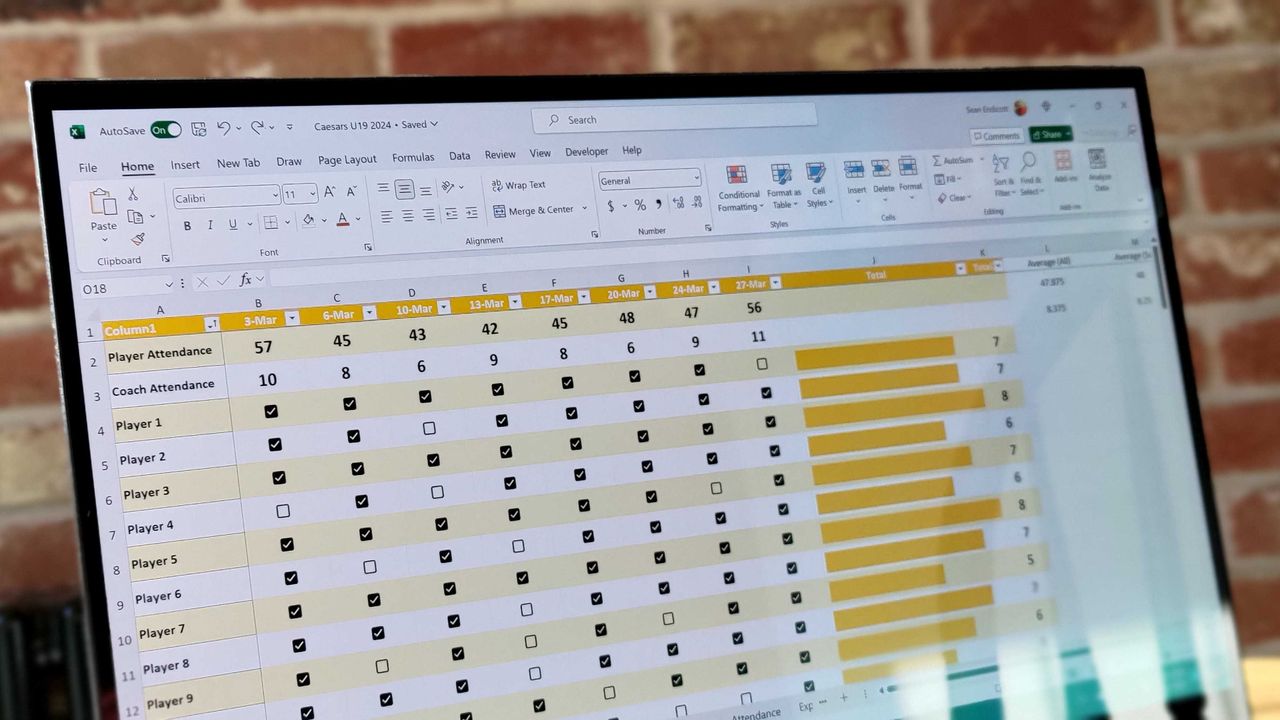
Excel spreadsheet with checkboxes

The upcoming checkboxes feature in Microsoft Excel makes it easy to visualize certain data.

Classic Outlook bug breaks Copilot, but some might call it an upgrade

When does a bug become a feature? Microsoft needs to answer that question now that classic Outlook may hide the Copilot button and stop other Copilot features from working.

A bug that appears with build 20026.20182 of classic Outlook prevents access to Copilot Chat and removes Copilot entry points within the app.

"After classic Outlook for Windows updates to build 20026.20182 and higher, you no longer have Copilot Chat or Copilot entry points in Outlook," reads a Microsoft support document. "This issue happens if you have a Copilot Chat (Basic) license or a paid M365 Copilot (Premium) account."

While it's easy to joke about Copilot going missing being "addition by subtraction," the bug is likely frustrating for those that rely on Copilot within classic Outlook.

If your system is affected by the bug, the Copilot button could be missing from the top-right area above the ribbon. The Copilot icon can also go missing in the left app bar or the More Apps area.

Even if you see the Copilot icon in the Add Apps section, selecting "Open" may not do anything at all. Even if you've added Copilot through ribbon customization, the option may appear grayed out or unavailable.

Only classic Outlook is affected, meaning Copilot still appears and works as usual within the web version of Outlook and other versions. The Microsoft 365 Copilot app and web experience are also working normally, though it's worth noting Microsoft has a new unified Copilot experience rolling out.

If you need to use Copilot immediately, Microsoft suggests switching to Outlook on the web or the new Outlook app. While standard fixes like creating a new Outlook profile, clearing local cache data, re-signing into Office, or restarting Windows have been tried, Microsoft notes they don't consistently restore the missing buttons.

Click to join us on r/WindowsCentral

Join us on Reddit at r/WindowsCentral to share your insights and discuss our latest news, reviews, and more.

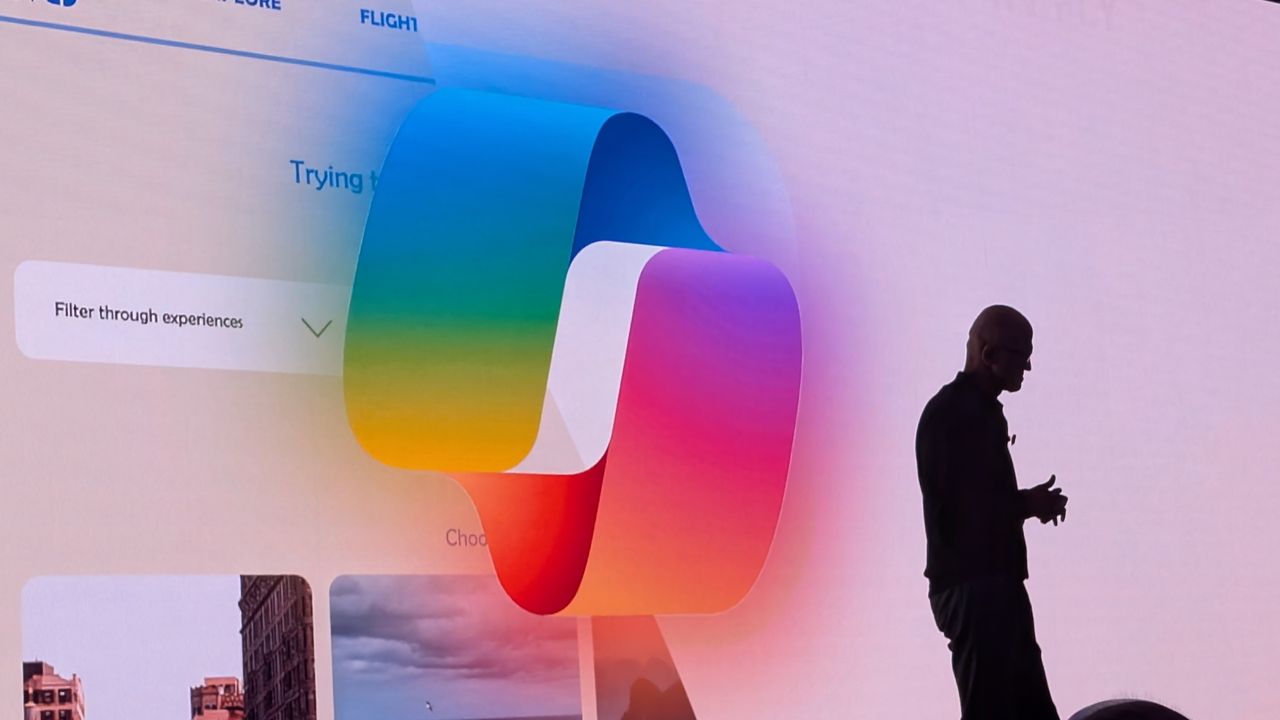
Microsoft CEO Satya Nadella in front of the Microsoft Copilot AI logo.

Microsoft CEO Satya Nadella in front of the Microsoft Copilot AI logo.

ChatGPT adds Windows 11's most hated feature to Mac — Will the backlash be the same this time around, or has OpenAI taken the right approach?

I have several PCs in my office that are capable of running Copilot+ tools in Windows 11, but there's one feature I've stayed away from: Windows Recall.

Why? I don't particularly like the idea of AI snapshotting what I do on my PC and making it searchable, even if it promises to never let the data leave my local system. I'm sure it's handy for some users, but I've yet to come across a scenario where I wish I had it enabled.

If you're of the opposite opinion and happen to use macOS, I have good news. OpenAI today announced "ChatGPT Computer History" for its macOS app.

What is ChatGPT Computer History?

Today we're releasing Computer History in ChatGPT.It lets ChatGPT learn from everything you do on your computer, so it can better understand how you work, finish tasks that you're in the middle of, and suggest skills and automations based on how you use your computer. pic.twitter.com/xnTq7hWH8OAugust 13, 2026

It's tough not to immediately begin comparing Computer History to Windows 11's Copilot+ Recall feature.

Here's a blurb from the ChatGPT press release about how it works:

Computer History turns your activity across apps and websites into memories and a timeline that ChatGPT and Codex can reference. You can ask natural questions about recent work, pick up where you left off, understand patterns in how you work, and turn repeated workflows into skills or automations.

OpenAI

Yeah, that sounds like the same thing. But let me explain ChatGPT's version a bit more.

Computer History, according to ChatGPT's website, is completely optional and turned off by default for Pro, Business, and Enterprise subscribers.

Rather than collecting screenshots every so often to keep track of your doings, Computer History "records interaction events and does not capture your screen or audio." It's basically its own little keylogger, keeping tabs on clicks, typing, app switching, shortcuts, and more.

The data it records is searchable, and you can interact with Computer History the same way you interact with any AI, asking it regular language questions.

The data that Computer History gathers is saved locally on your Mac, but it does get sent to OpenAI's cloud servers in order to turn it into memories. These memories are then sent back to your Mac for local storage.

OpenAI says it does not keep this data on its servers unless required by law, and it does not use the data for training.

Is Computer History different enough from Recall to avoid similar backlash?

Windows Recall

A look at the Recall feature's pause option in the Windows 11 taskbar. (Image credit: Windows Central)

The reaction to ChatGPT's Computer History announcement is surely mixed. It seems like there are just as many people worrying about massive privacy and surveillance issues as there are people wondering if they should go out and buy a Mac.

Windows Recall faced the same adversity when it was announced as a default feature, with no opt-in available. The pushback was so bad that Microsoft delayed its launch by almost a year in order to address security issues. It officially released in April 2025 as an opt-in feature, but I know that many Windows users are still wary of its abilities.

The fact that ChatGPT is making its Computer History opt-in from the start tells me it learned from Microsoft's mistakes. There's also the fact that it doesn't take screenshots, making it feel less like routine spying.

Meme work rules comic showing ChatGPT being treated nicely for the same thing that Microsoft is treated harshly.

The memes coming out of the ChatGPT Computer History announcement are gold. (Image credit: @trashpandaemoji (X.com))

That doesn't mean there aren't inherent risks to using something like Recall on Windows or Computer History on macOS.

It's clearly noted in OpenAI's Computer History documentation that the feature does not encrypt your information, and that it can be accessible to other apps running on macOS.

Like Recall, there are also serious prompt injection risks. Because these AI-powered features can essentially see what you're doing, they can be tricked with text. You might visit a seemingly innocuous website, only to realize later that it contained hidden instructions aimed at AI that made it do something unsavory.

Windows Central's take

Recall symbol highlighted on Taskbar with prompt confirming Recall is activated

Some of us here at Windows Central use Windows Recall on our PCs, but I stay away from it. (Image credit: Zac Bowden / Windows Central)

Some of us here at Windows Central use Windows 11's Recall feature. Others don't. I'm in the latter camp, but one day that might change.

Why? It feels like there's a definite push going on with AI assistants that can remember everything you do, and it's not just ChatGPT and Microsoft. I've spent time with Lenovo's Qira cross-device ambient assistant, and I've written about HP IQ.

Although I shudder at the privacy implications of these tools gone wrong, they definitely seem like one strong fork in the future of computing. It will be interesting to see how this all plays out, and ultimately to see how macOS users react to something that made Windows users go ballistic.

What do you think about ChatGPT's Computer History? Is it Recall with a different name? Is ChatGPT approaching the tool properly with opt-in-only settings and no screenshotting? Is it something you'd use on Windows 11? Let me know in the comments section below!

Click to join us on r/WindowsCentral

Join us on Reddit at r/WindowsCentral to share your insights and discuss our latest news, reviews, and more.

Scooby Doo meme of Fred pulling the mask off of ChatGPT only to reveal Windows Recall beneath.

Scooby Doo meme of Fred pulling the mask off of ChatGPT only to reveal Windows Recall beneath.

Microsoft begins unified Copilot app rollout: Reveals major plan to merge Copilot and Microsoft 365 Copilot across all platforms, along with updated branding

Back in May, Microsoft confirmed that it was working on a Copilot super app that would merge the different consumer Copilot and productivity Copilot experiences under one app. Until now, Copilot and Microsoft 365 Copilot have been targeted at different users, but starting today those apps are being merged into one.

"We're updating Copilot to create a simpler, more cohesive experience for everyone," a new Microsoft Support document says. "Depending on the account and device you use, you will see changes to the Copilot app including changes to appearance and functionality, such as navigation, feature availability, or sign-in experience."

The unified Copilot experience begins its rollout today, but not everyone will see it right away. Microsoft says the experience will land on mobile first, with the unified Copilot on Windows and macOS being an opt-in experience at first, made available over the coming weeks.

The rollout should make it easier to move between using Copilot as an AI assistant for personal matters and using Copilot for productivity based tasks. For most people, not much will change with the unified app, which will simply appear as "Copilot" now. With that said, Microsoft does say that some features are going away with the unification. Those features include:

  • Group Chat
    • All group chat threads, messages, and images will not carry forward after August 18, 2026.
    • Users must manually copy or download anything they want to keep.
  • Podcasts
    • The Podcasts feature is being fully retired on August 18, 2026.
    • Users will no longer be able to create or access podcasts in Copilot after this date.
    • Individual podcast files can still be downloaded before retirement.
  • Deep Research
    • Deep Research is being retired for consumer users starting August 18, 2026.
    • Existing Deep Research content will remain accessible, but the feature itself will no longer be available.

For those using Copilot with a work or school account, Microsoft says the unified Copilot app is also coming to those accounts too. The personal and commercial accounts will be separated within the app, meaning data from your work or school account won't be shared with your personal account, and vice versa. "Work and personal accounts remain separate. Your organization's security, privacy, compliance, and administrative controls continue to apply when you use Copilot with your work or school account."

For those using the personal consumer Copilot app, you will notice an updated UI that more similarly matches the Microsoft 365 Copilot app. Those who use the Microsoft 365 Copilot app likely won't notice much of a difference, outside of the rebranded app to just "Copilot," along with a slightly updated logo.

For those curious, this is the new Microsoft Copilot icon and branding. Can you tell the difference? No, us neither.

New Microsoft Copilot Logo for 2026

The new Copilot logo is very similar to the old one. (Image credit: Microsoft)

Lastly, Microsoft has confirmed that all your Copilot data (except for the features that are being taken away) will migrate automatically to the new experience, meaning users won't need to do anything to ensure their chats and data are carried forward. All of that will happen automatically when the unified app lands on your device.

The unified Copilot experience begins its rollout today, though it's happening in waves so most users won't see the changes right away. Worldwide rollout for the mobile starts today, with rollout for Windows and macOS expected to start in mid September. Here's the full rollout schedule:

  • Mid‑August 2026 — Worldwide rollout begins for mobile and web apps; early‑access opt‑in opens for Windows and Mac apps; copilot.cloud.microsoft URL available in Frontier for testing.
  • Late August 2026Standard rollout of the URL redirect begins.
  • Mid‑September 2026 — Worldwide rollout begins for Windows and Mac apps.
  • Late September 2026Deferred rollout of the URL redirect begins for the web app.

Microsoft's unification of Copilot is a long time coming, and one that is setting the company up to deliver a Copilot super app experience that can do everything across Microsoft's platforms and services. It never made sense for Microsoft to split Copilot up between consumer- and productivity-based use cases, especially since users commonly want to do both.

Click to join us on r/WindowsCentral

Join us on Reddit at r/WindowsCentral to share your insights and discuss our latest news, reviews, and more.

Microsoft CEO Satya Nadella in front of the Microsoft Copilot AI logo.

The new Copilot begins rolling out today.

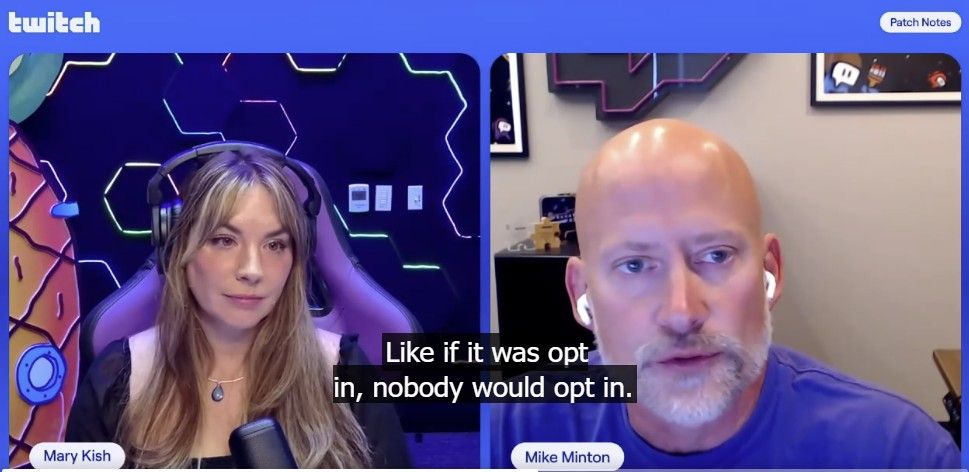
"If it was opt in ... nobody would opt-in." Twitch CPO squirms, admits everyone hates its new AI training 'feature'

Twitch has another backlash on its hands, this time for forcibly opting-in all of its users to wanton content theft.

Twitch is a generally awful platform. The business has been a major drag on Amazon's bottom line since they acquired the brand losing billions of dollars year in, year out. Amazon has simply been unable to figure out how to adequately monetize the platform in a video streaming universe dominated by YouTube and Google ads, but its treatment of its userbase and content creators has hardly helped.

DEAL: Get Surfshark VPN 86% OFF with Windows Central 🦈

Indeed, Twitch is facing another backlash right now for forcibly opting users into "ai training." Now, when you stream on Twitch, by default your likeness, content, voice, and other interactions will be used to train Amazon's AI stuff, in a move nobody could've seen coming.

they know we don't want it. they do not care.

— @witchytq.bsky.social (@witchytq.bsky.social.bsky.social) 2026-08-12T22:25:50.671Z

Responding to the backlash, Twitch Chief Product Officer Mike Minton admitted that they knew everyone hates it, but they don't care.

"Why is not opt-in?" Minton responded, acknowledging Twitch's very angry chat during a live stream this past week. "I get it ... let me opt-in vs. making me opt out. The honest answer, and I think most of you can probably appreciate this ... if it was opt-in, nobody would opt-in. That's honestly the answer. It's gonna' be on by default."

You can opt out of Twitch's AI content theft machine by going to settings, security and privacy, then toggling off "training for generative AI."

Sam Altman gets ratioed for telling parents to make podcasts for their kids instead of talking to them

Shame AI can't teach tech bros to be normal, functional human beings. (Image credit: @_AlexHirsch on X (Twitter))

The entire tech world seems steeped in AI psychosis right now, expecting us plebians to just sit down and take generative slop and its painfully useless and forced "features" flooding into every corner of the web. AI Nutjob-In-Chief Sam Altman recently was fried alive on X (Twitter) for suggesting parents use ChatGPT to generate podcasts for their kids, rather than simply ... yanno, talk to them.

The latest Twitch backlash is just another long list in self-defeating stuff the platform has implemented over the last few years. For what it's worth, competitor YouTube does not give creators any control whatsoever over whether or not their content is used for training. Your content on YouTube is used automatically for Gemini's video training. Google only lets you opt-out of "third-party" training. At least Twitch is giving users an opt out ... which is something, I suppose.

As the tech world struggles to figure out how to make any of this AI stuff make sense, I suspect we'll see more dumb stuff emerge from the gaming universe, not less, in the near term.

Click to join us on r/WindowsCentral

Join us on Reddit at r/WindowsCentral to share your insights and discuss our latest news, reviews, and more.

Twitch CPO Mike Minton admitting that Twitch hates its users

By default, Twitch will now steal your content to train AI. You can turn it off at least, unlike Google's YouTube.

  • ✇Yanko Design
  • Tecno Camon 50 Ultra 5G Review: A $420 AI Phone With Built-in Gemini, ChatGPT, DeepSeek, and Grok
    PROS: EllaClaw is one of the most impressive phone AI experiences available right now Multi-model AI support, including Gemini, ChatGPT, Grok, DeepSeek, Meta AI, and Ella Strong 2-day battery life from the 6500mAh cell Competitive value in the mid-range segment CONS: Single speaker setup sounds tinny and lacks bass Curved waterfall display is prone to accidental palm touches No wireless charging or Qi2 (MagSafe) RATINGS: AESTHETICSERGONOMICSPERFORMANCESUSTAINABILITY /
     

Tecno Camon 50 Ultra 5G Review: A $420 AI Phone With Built-in Gemini, ChatGPT, DeepSeek, and Grok

16 août 2026 à 21:46

PROS:


  • EllaClaw is one of the most impressive phone AI experiences available right now

  • Multi-model AI support, including Gemini, ChatGPT, Grok, DeepSeek, Meta AI, and Ella

  • Strong 2-day battery life from the 6500mAh cell

  • Competitive value in the mid-range segment

CONS:


  • Single speaker setup sounds tinny and lacks bass

  • Curved waterfall display is prone to accidental palm touches

  • No wireless charging or Qi2 (MagSafe)

RATINGS:

AESTHETICS
ERGONOMICS
PERFORMANCE
SUSTAINABILITY / REPAIRABILITY
VALUE FOR MONEY

EDITOR'S QUOTE:

The Camon 50 Ultra 5G feels like Tecno looked at the current AI phone race, skipped the walled garden nonsense, and built the first assistant experience that actually shows you why you’d want to use it in the first place.

Apple has Apple Intelligence. Google Pixel has Gemini. Samsung has Galaxy AI. Tecno has everything else. Packed into its EllaClaw agent is the ability to use Gemini, ChatGPT, Grok, and DeepSeek, because a walled garden never benefited anyone. Tecno’s Camon 50 Ultra 5G is a great phone, but what makes it worth doing a double take for is EllaClaw, an agentic AI built into the phone that offers a phone AI experience I have yet to see on any smartphone so far. EllaClaw is currently an invite-only closed Beta feature limited to just this phone, but seeing it in action gave me everything I needed to understand where other phones are going wrong with their on-board AI, and where they can learn from Tecno.

The wild part is how approachable it all feels. EllaClaw does not sit around waiting for you to guess the perfect command like some moody genie. It actively shows you what it can do, which makes the whole experience feel far less intimidating than Gemini or Apple Intelligence currently do. Within minutes, I was jumping between message summaries, creative tools, settings help, and different AI models without feeling like I needed a tutorial or a prayer.

Aesthetics

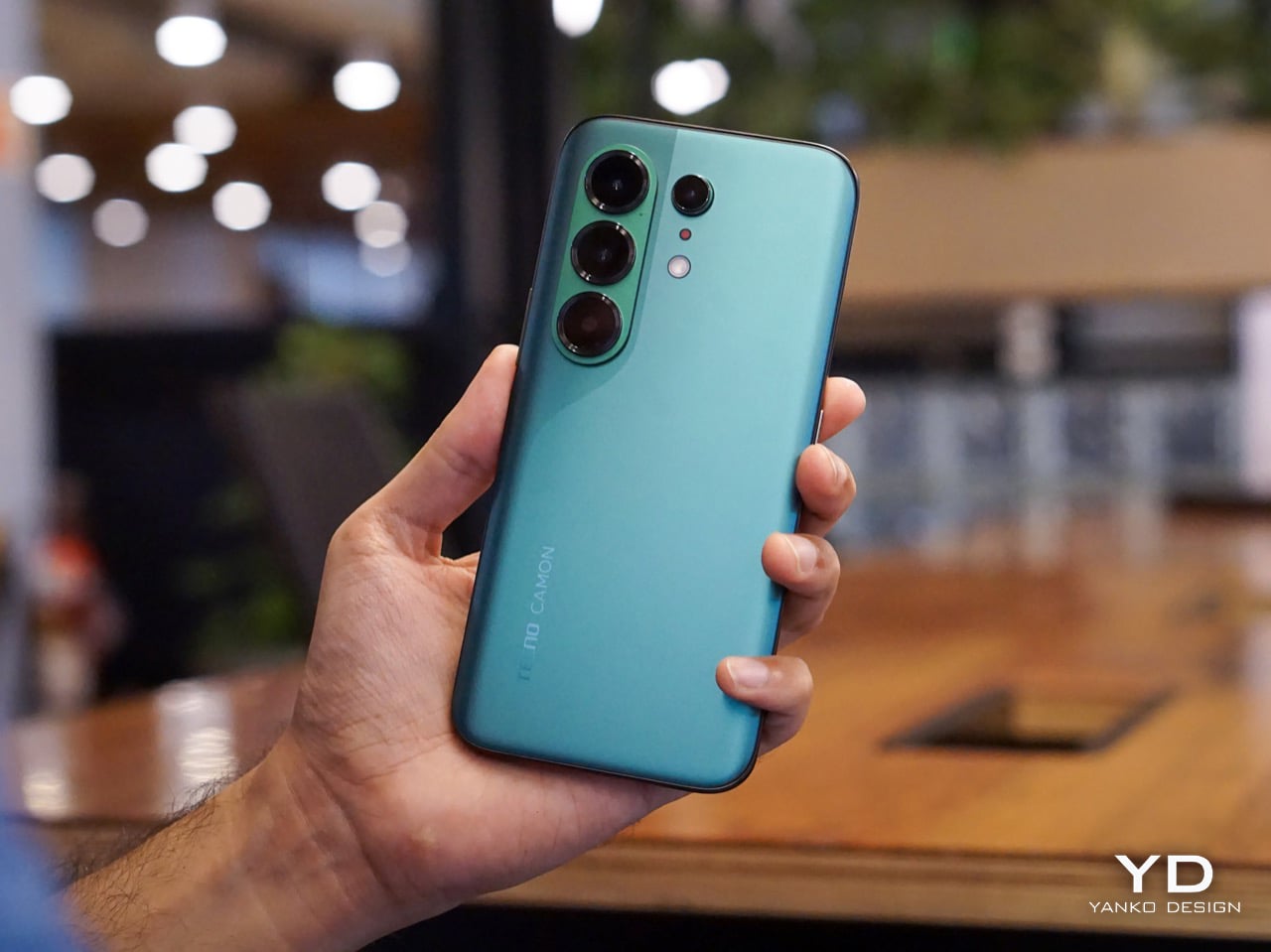
The moment I unboxed the Camon 50 Ultra 5G, I was hit with a serious case of déjà vu. The green variant has a gorgeous satin finish that gives it a silky, metallic glow under the light, and it immediately sent me down a memory lane trip to my old OnePlus 8 Pro which I faithfully used from 2020 to 2024. The color, the texture, even the way the camera module is arranged, it all felt so familiar and, frankly, so premium. Tecno absolutely nailed the flagship-esque feel here. The back is smooth to the touch, resists fingerprints reasonably well, and has a subtle elegance that a lot of phones in this bracket just do not bother with.

The front is where the design language gets a little more complicated, at least for me. Tecno went with a waterfall display, which means the screen curves dramatically around the sides. It looks stunning when the phone is off or when you are watching a video, creating an immersive, almost bezel-free experience. But I have always had a love-hate relationship with these displays. They are beautiful, no doubt, but they can be a magnet for accidental palm touches. While the software does its best to ignore them, I still found myself occasionally tapping something I did not mean to. It is a classic case of striking aesthetics meeting the messy reality of how we hold our phones. I do have to say that Tecno’s Liquid Glass homage does look much better on a waterfall display than on a bezel-ridden iPhone.

Ergonomics

That waterfall display has a big effect on how the phone feels in your hand. The curved edges melt away into the frame, making the Camon 50 Ultra 5G incredibly comfortable to hold. There are no sharp, flat corners digging into your palm, which is great for long sessions of scrolling or gaming. The trade-off, of course, is that the phone can feel a little slippery if you are not paying attention. It has that smooth, polished-stone feel that is lovely to touch but always feels one careless gesture away from a gravity experiment. It is a phone that practically begs to be put in a case, even if it feels like a shame to cover up the design.

The button layout is personally feels a little little bit tricky. On the left, you have a dedicated AI key that summons EllaClaw, a shortcut I ended up using constantly. You can remap it, but having a one-press gateway to the AI is a smart touch. The right side, however, is where my muscle memory started to complain. There is a power button and a fairly short, single-piece volume rocker. Because the rocker is slightly compact, I often found myself fumbling, unsure if my thumb was on volume up, down, or about to lock the screen. It is a small pain, but a tiny indent in the middle of the volume button would have made all the difference. The buttons themselves are slightly sharp and textured, a necessary choice for a phone with curved edges, but it does not quite solve the problem of telling them apart by feel alone.

Performance

EllaClaw is where the Camon 50 Ultra 5G earns its stripes. The dashboard (which you access by swiping towards the left – where you’d see Google Discover on most Android phones) keeps surfacing prompts, shortcuts, and suggestions, making the AI feel alive and accessible rather than buried under three layers of settings. Most phone AI treats users like they should already know what they want. EllaClaw meets you halfway, and that changes everything about how you interact with the phone.

The deeper layer, EllaClaw Pro, is genuinely impressive. It reaches into the phone’s apps and system functions in a way that feels ahead of where the conversation currently is. I asked it to summarize my text messages without opening the messages app, and it did exactly that, handling the whole thing on its own. That kind of agentic behavior is the next logical step for phone assistants, and right now, Tecno seems to be ahead of the pack. Nothing reassured me that the AI wasn’t reading my messages to enhance its database though, so the privacy conscious might have a thing or two to worry about.

Tecno’s decision to build EllaClaw as a multi-model hub is one of the smartest software calls I have seen this year. My unit offered access to DeepSeek, Gemini, ChatGPT, Grok, and Meta AI alongside Ella’s own model, all in one dashboard. Claude is conspicuously missing, but everything else is here and free to use (at least during the Beta period). Daily limits are applied on AI use which reset every 24 hours, and you can buy extra credits in case you overshoot. In all my hours of testing, I never needed to purchase extra credits, which means image generation, video generation, and sketch-to-photo tools were all available at no additional cost.

EllaClaw is still being refined, though. The dashboard lagged occasionally, and the AI sometimes took longer to load than felt comfortable. Restarting the app always sorted it out, but it is a reminder that this experience has not fully grown into its ambition yet. Users in certain regions may also need a VPN to get the full experience running, which is worth knowing upfront.

The camera system is built around a 50MP Sony LYT-700C main sensor with OIS, paired with a 50MP telephoto lens offering 3x optical zoom (70mm equivalent) and an 8MP ultrawide. That telephoto is a proper standout for a phone at this price point, and the software leans into it with confidence. You get 60x hybrid zoom, which is mostly digital exaggeration past the 3x mark, but the results between 3x and 10x are still usable in decent light. The main camera performs well across a range of scenarios, especially in good light, and night mode is aggressive without getting too soupy. The front camera is a 50MP sensor with autofocus, which makes a noticeable difference in selfie sharpness compared to the fixed-focus cameras on cheaper phones.

Tecno stuffs the camera app with modes including dual-cam, underwater mode, document scanning, super night mode, and super macro. FlashSnap is the standout, though. It watches your scene and captures the most dramatic moment automatically, so if someone is mid-jump or mid-throw, the phone clicks at exactly the right time without you having to think about it. It made me look like a considerably better photographer than I actually am. Video recording tops out at 4K at 30fps, which is fine but not particularly exciting.

Battery life is one of the phone’s most quietly satisfying qualities. The 6500mAh cell pushed comfortably through two full days of use without needing a charge, which is more than my current flagship iPhone manages. At some point I just stopped thinking about charging altogether, which is the best thing a battery can do. The phone supports 45W wired charging, which is fast enough to feel civilized without being record-breaking.

The display is a 6.78-inch AMOLED panel with a 1.5K resolution (1208 x 2644 pixels, 429 ppi) and a 144Hz refresh rate with LTPO support for adaptive refresh. It is vibrant, sharp, and performs well in low light. The 144Hz refresh makes scrolling and gaming feel smooth, and the high PWM dimming (2160Hz) helps reduce flicker for those sensitive to it. The curved waterfall edges are a design choice I have already aired my reservations about, and this section will not relitigate that argument. It looks great. It catches accidental touches. Moving on.

Speakers are a weak spot, and a noticeable one. There is a single grille at the bottom right, so stereo is off the table, and the audio leans tinny with very little bass to speak of. For a phone this polished everywhere else, it feels like a department that got the budget cut.

Gaming held up well for everything I tried. Tecno’s dedicated gaming software manages frame rates and battery draw sensibly, and the Dimensity 7400 handled casual to moderate sessions without complaint. The 144Hz display helps make fast-paced games feel responsive, and the phone stayed well within comfortable temperature ranges throughout. Nothing I played caused any real issues, thermal throttling never became a concern, and the large battery meant I could game for extended sessions without nervously watching the percentage drop.

Sustainability

Tecno is promising 3 years of Android OS upgrades and 5 years of security patches for the Camon 50 Ultra 5G, which puts it roughly in line with brands like Motorola and slightly ahead of OnePlus, though still behind Nothing’s 6-year security support.That is a meaningful commitment for a phone at this price, especially if you are someone who plans to use the device well beyond the usual two-year upgrade cycle.

Tecno also claims the battery is built for durability, marketing it as a “5-Year Durability Battery” with TÜV certification and a 72-month lag-free guarantee. Whether that holds true in practice is something only time will tell, but the fact that the company is willing to stake that claim suggests they are at least thinking about longevity beyond the usual marketing fluff. The 6500mAh capacity itself helps, because the less frequently you need to charge, the slower the battery degrades. If you are getting two full days of use out of a charge right now, that headroom means the phone should still feel usable years down the line when the cell inevitably loses some of its capacity.

Value

The Tecno Camon 50 Ultra 5G is priced at $420 for the 8GB + 256GB variant (that’s based on its ₹40,000 Indian price, since the phone hasn’t officially launched in the US). For a phone with a 50MP telephoto, a 144Hz AMOLED display, and a 6500mAh battery, that positioning feels competitive in the under-40K segment, especially when you factor in the AI ambitions.

What feels less competitive is the setup experience. When I powered on the phone and began the initial configuration, India was not listed in the countries menu. Hilariously enough, Palestine was available as an option. The world’s most populated country, nowhere on the list. I eventually had to select a different region just to proceed, which immediately felt awkward for a phone launching in India. Later, I also needed a VPN to access EllaClaw, which could have been a software issue tied to my initial region selection, or it could point to broader availability constraints. Obviously this won’t be the case for everyone since mine was a review unit with the EllaClaw beta program probably tied to a certain region. Either way, it is a frustrating first impression for a feature that is supposed to be the phone’s main selling point.

As for EllaClaw Pro and its credits system, Tecno does offer a credit-based structure for premium AI features like image generation and video creation. In my testing, I never hit a paywall or needed to purchase add-on credits, which suggests the included allocation is generous enough for typical use, at least initially. How sustainable that remains over time, or whether Tecno tightens the limits later, is harder to predict. For now, though, the experience feels surprisingly open, which is a rare thing in the AI phone space.

Verdict

The Tecno Camon 50 Ultra 5G delivers a lot of value for $420. The camera is genuinely impressive, with super night mode shots and 60x zoom that feel bonkers for this price range, and the battery life makes it easy to forget about charging anxiety for days at a time. But I am not recommending this phone for its camera, or its battery, or even its design, as much as I enjoyed all of those things. I am recommending it for EllaClaw, because it is the closest I have come to using a phone AI that feels like it was built for actual humans.

EllaClaw is everything Gemini and Apple Intelligence hope to achieve, and a bit more. I did not think I would see a phone that lets me choose the LLM for its AI assistant, swapping between models depending on what I need. I definitely did not expect an AI assistant dashboard to genuinely give me so much insight and value into how I can use the AI, rather than just sitting through a keynote, nodding along to feature lists, and then forgetting half of them the moment I leave the room. Tecno has cracked something here that bigger brands are still struggling with, which is making AI feel approachable, integrated, and genuinely useful instead of intimidating or buried.

The phone has a few tiny flaws that feel manageable if you’re more driven by the AI chops. The speakers are tinny, the curved display catches palm touches, EllaClaw occasionally lags, and the setup process was a bit of a hassle given I needed a VPN to get EllaClaw to work (but that’s just my China-bound review unit). But if you are looking for a phone that shows you what AI on mobile should feel like when it grows up, the Camon 50 Ultra 5G is worth your attention. It is not perfect, but it is ambitious in all the right ways. Google, Apple, and Samsung could surely take notes.

The post Tecno Camon 50 Ultra 5G Review: A $420 AI Phone With Built-in Gemini, ChatGPT, DeepSeek, and Grok first appeared on Yanko Design.

❌